Top Trade Manager

MT5 için En İyi İşlem Yöneticisi - İşlem Paneli, Pozisyon Büyüklüğü Hesaplayıcı ve Risk Yöneticisi

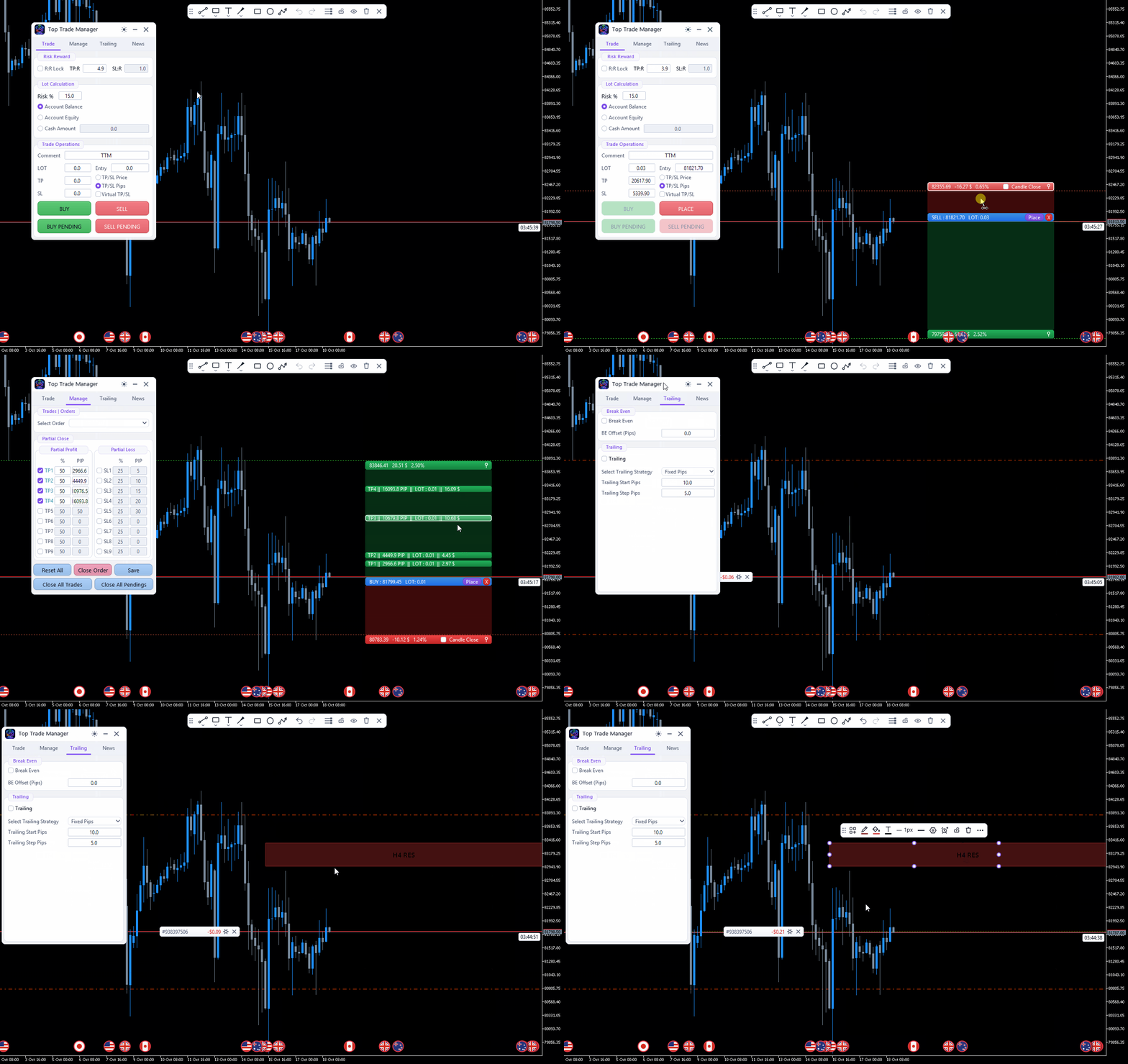
Top Trade Manager , MetaTrader 5 için eksiksiz bir işlem yöneticisidir : işlem paneli, pozisyon büyüklüğü hesaplayıcı ve risk yöneticisi bir arada. Giriş, stop loss ve kar alma noktalarınızı grafikte sürükleyin ve lot büyüklüğü, risk ve getiri anında hesaplansın. Ardından, kısmi kapanış , başabaş noktası , takip eden stop loss ve gizli stop loss ve kar alma ile işlemi yönetin, ekonomik haber takvimini takip edin ve yerleşik çizim araçlarıyla grafiğinizi işaretleyin.

Bu, manuel bir işlem aracıdır: asla kendi başına işlem açmaz. Her işleme siz karar verirsiniz ve Top Trade Manager sizin için hesaplamaları ve yönetimi yapar.

Başlıca Özellikler

  • Görsel işlem planlaması: Giriş noktası, stop loss ve kar alma seviyelerini grafik üzerinde sürükleyin.
  • Hisse senedi bakiyesinin veya öz sermayenin risk yüzdesine veya sabit nakit miktarına göre lot büyüklüğü hesaplayıcısı.
  • Piyasa ve bekleyen emirleri tek tıkla görüntüleyin.
  • Her işlem için en fazla 9 kısmi kar alma ve 9 kısmi zarar durdurma emri.
  • Başabaş noktası, 6 farklı takip eden stop loss yöntemi ve mum kapanışında stop loss.
  • Sanal (gizli) stop loss ve take profit.
  • ForexFactory ekonomik takvimine dayalı, haber uyarıları ve haber öncesi kapanışlar içeren Forex haber filtresi.
  • Fiyat uyarıları, geri alma ve yineleme özelliklerine sahip gelişmiş grafik çizim araçları.
  • Koyu ve açık temalar, grafik üzerinde bildirimler ve anlık bildirimler.

Grafik Üzerinde Görsel Ticaret Planlaması

İşlemlerinizi sayısal veriler yerine görsel olarak planlayın.

  • Giriş, kar alma ve zarar durdurma bölgelerini doğrudan grafik üzerinde sürükleyin.
  • Risk, getiri, risk-getiri oranı ve işlem hacmi, siz onları hareket ettirirken anlık olarak güncellenir.
  • R:R kilidi, sürükleme işlemi sırasında seçtiğiniz TP:R ve SL:R oranlarını korur.
  • Kar alma ve zarar durdurma seviyelerini fiyat bazında veya pip cinsinden belirleyin.
  • Diğerlerini hareket ettirirken yerinde kalması için bir su terazisini sabitleyin.
  • Planlanan siparişi doğrudan bölgeden verin veya iptal edin.

Pozisyon Büyüklüğü Hesaplayıcı ve Risk Yönetimi

Zarar durdurma mesafesi ne olursa olsun, her işlemde aynı miktarda risk alın.

  • Hesap bakiyesinin veya öz sermayenin belirli bir yüzdesini veya sabit bir nakit tutarını riske atın.
  • İşlem hacmi, aracı kurumunuzun işlem hacmi adımına yuvarlanır ve serbest teminatla sınırlandırılır; azaltıldığında ise net bir uyarı verilir.

Tek Tıkla İşlem Yapma: Piyasa ve Bekleyen Emirler

  • Piyasa alım ve satım emirleri, ayrıca bekleyen alım ve satım emirleri: Giriş noktasını belirlediğiniz yerden limit veya stop emri otomatik olarak seçilir.
  • Özel sipariş yorumu ve sihirli numara.
  • Tüm işlemleri kapatın veya bekleyen tüm emirleri tek tıklamayla silin.

Grafik Üzerinde Açık İşlemleri Yönetin

  • Grafikte, açık olan her işlem ve bekleyen emir, kar veya zararını gösteren kendi rozetine sahip olur.
  • Rozet üzerindeki komutlar: işlemi kapat, %50'sini kapat, bekleyen emri sil veya seviyelerini değiştir.
  • Açık bir işlemin stop loss ve take profit seviyelerini grafik üzerinde sürükleyerek değiştirebilirsiniz.
  • Kısmi kapanış planını düzenlemek, kaydetmek, sıfırlamak veya siparişi kapatmak için Yönetim sekmesindeki herhangi bir siparişi seçin.

Kısmi Kapanış, Başabaş Noktası ve Takip Eden Durdurma Emri

İşlem devam ederken karınızı otomatik olarak sabitleyin ve riski azaltın.

  • Her işlem için, pozisyonun kapanış kısmını oluşturan ve grafik üzerinde ayarlanabilen, en fazla 9 kısmi kar alma ve 9 kısmi zarar durdurma emri.
  • Pip cinsinden bir sapma ile başa baş noktasına ulaşın.
  • Sabit pip, hareketli ortalama, ATR, önceki mumun en yüksek/en düşük seviyesi, fraktallar veya Parabolik SAR ile belirlenen takip eden stop loss.
  • Başlangıç, adım ve "X pip'ten sonra başla" ayarları, her yöntem için zaman dilimi ve tam gösterge ayarları (MA periyodu, kaydırma, yöntem ve fiyat; ATR periyodu ve katsayısı; SAR adımı ve maksimumu).

Gizli Zarar Durdurma ve Kar Al (Sanal TP/SL)

  • Sanal TP/SL, stop loss ve take profit emirlerinizi aracı kurumdan gizler; EA, belirli bir seviyeye ulaşıldığında işlemi kapatır.
  • Mum kapanışlı stop loss: İşlem, yalnızca seçtiğiniz zaman dilimindeki bir mumun stop loss seviyesinin ötesinde kapanmasıyla kapanır; bu nedenle fitiller ve sivri uçlar sizi stop loss'tan çıkarmaz.

ForexFactory Takvimine Dayalı Forex Haber Filtresi

Haber verileri, çoğu forex yatırımcısının zaten takip ettiği ForexFactory ekonomik takviminden geliyor. Grafiğinizde her önemli açıklamayı görün ve yüksek etkili haberlerden önce işlemlerinizi koruyun.

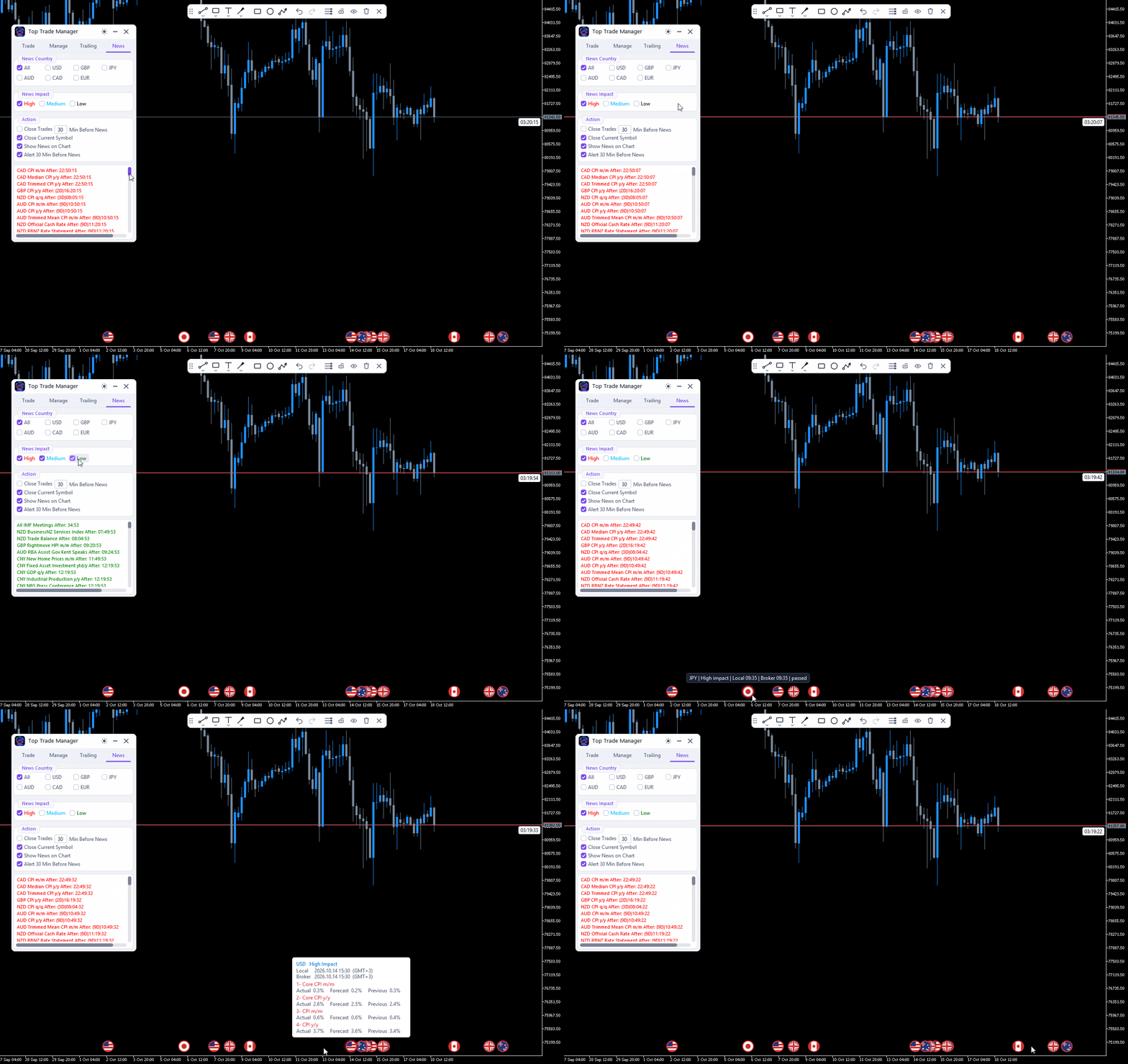
  • ForexFactory'nin bu ay ve gelecek ay için tahmin, önceki ve gerçekleşen değerleri içeren takvimi.
  • ForexFactory'nin kendi etki seviyelerini kullanarak haberleri para birimine (USD, EUR, GBP, JPY, AUD, CAD veya tümü) ve etkiye (yüksek, orta, düşük) göre filtreleyin.
  • Her yayına kadar geri sayım içeren haber listesi.
  • Grafikte önemli haberler işaretçiler olarak gösterilmiştir; yerel ve aracı kurum saatine göre ayrıntıları görmek için bir işaretçiye tıklayın. İşaretçiler kapatılabilir.
  • Yeni bir ürünün piyasaya sürülmesinden 30 dakika önce, grafik üzerinde, sesli ve isteğe bağlı anlık bildirim özelliğiyle haber uyarısı.
  • Haberlerden belirli sayıda dakika önce, tüm semboller için veya yalnızca mevcut sembol için işlemleri kapatın ve bekleyen emirleri silin.
  • Önemli haberlerin gerçek değerleri, ForexFactory tarafından yayınlandıktan hemen sonra güncellenir.

Gelişmiş Grafik Çizme Araçları

İşlem yöneticisinden çıkmadan grafiği analiz edin.

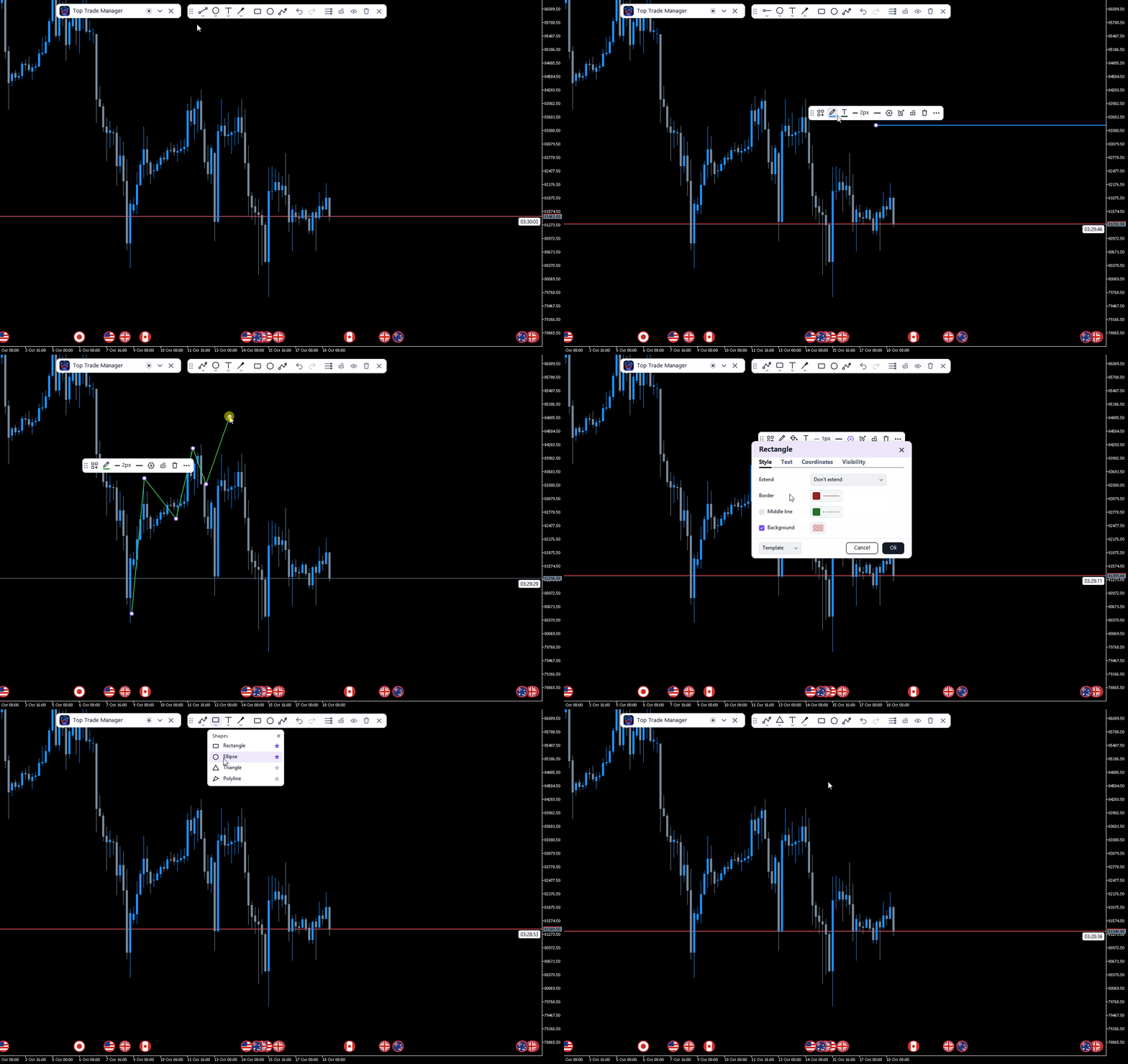
  • Çizgiler, şekiller, açıklamalar ve fırçalar içeren çizim araç çubuğu: eğim çizgisi, ışın, uzatılmış çizgi, yatay çizgi ve ışın, dikey çizgi, çapraz çizgi, ok, dikdörtgen, elips, üçgen, çokgen çizgi, yol, fırça ve metin.
  • Sık kullanılan araçlar, tek tıklamayla erişim için araç çubuğuna sabitlendi.
  • Her çizimin kendine ait bir araç çubuğu vardır: şablonlar, çizgi, dolgu ve metin rengi, kalınlık, çizgi stili, ayarlar, fiyat uyarısı, kilit, ekrana sabitleme ve silme.
  • Stil, Metin, Koordinatlar ve Görünürlük sekmelerini içeren ayarlar penceresi; çizgileri sola veya sağa uzatma; çizgiler ve şekiller üzerinde metin.
  • Klonla, öne getir ve arkaya gönder.
  • Trend çizgileri, yatay ve dikey çizgiler ve dikdörtgenler üzerinde fiyat uyarıları.
  • Geri al ve yinele (Ctrl+Z ve Ctrl+Shift+Z).
  • Tüm çizimleri gizle, tüm nesneleri kilitle, tümünü temizle ve ticaret seviyelerini göster veya gizle.
  • Çizimler her grafik için ayrı ayrı kaydedilir; şablonlar ve favoriler tüm grafikler tarafından paylaşılır.
  • Mum grafiği geri sayım sayacı, mevcut mumun kapanmasına kalan süreyi gösterir.

Uyarılar, Bildirimler ve Temalar

  • Grafik üzerinde yer alan bildirimler ve mesaj kartları, her birinin kendine özgü bir sesi var.
  • İsteğe bağlı olarak telefonunuza anlık bildirimler gönderilebilir.
  • Koyu ve açık temalar.
  • Panel hareket ettirilebilir ve katlanabilir ve tüm ayarları her grafik için kaydedilir.

Kimler İçin?

Forex, altın, endeksler, kripto para birimleri veya aracı kurumlarının sunduğu diğer herhangi bir sembolde hızlı, hassas emir girişi ve disiplinli risk yönetimi isteyen manuel işlemciler, scalper'lar, günlük işlemciler ve swing işlemciler.

Sıkça Sorulan Sorular

Top Trade Manager otomatik olarak işlem açıyor mu?
Hayır. Bu manuel bir işlem yöneticisidir. Her işlemi siz seçersiniz; işlem lot büyüklüğünü hesaplar ve giriş yaptıktan sonra işlemi yönetir.

Zarar durdurma ve kar alma emirlerimi aracı kurumdan gizleyebilir miyim?
Evet. Sanal TP/SL açıkken, seviyeler yalnızca grafiğinizde kalır ve EA bu seviyelere ulaşıldığında işlemi kapatır. Terminalin, grafikteki EA ile birlikte çalışmaya devam etmesi gerekir; 7/24 yönetim için bir VPS kullanın.

Haber verileri nereden geliyor?
ForexFactory ekonomik takviminden. EA bu ay ve gelecek ayları yükler, grafikte ve Haberler sekmesinde yayınları gösterir, bunlardan önce sizi uyarır ve yüksek etkili haberlerden önce işlemleri kapatabilir. Terminalde, Haberler sekmesi adımları gösterir.

MetaTrader 4 sürümü var mı?
Evet, Top Trade Manager MetaTrader 4 ( MT4 sürümü) için de mevcuttur.

Önerilen ürünler
Manual Trade Panel EA MT5
Juvenille Emperor Limited
5 (2)
Manuel Ticaret Paneli EA MT5 , MT5 için bulabileceğiniz en basit ve kullanımı kolay ticaret panelidir. Ek pencere veya panel açmaya gerek kalmadan tüm seçenekleri ve işlevleri tek bir yüzeyde toplar. Bu bir sipariş yönetimi, risk hesaplayıcı, kısmi kapatma ve hesap koruyucu aracıdır, hepsi bir arada kullanımı son derece kullanışlı bir arayüzdür! Manuel Ticaret Paneli EA MT5 'ü kullanarak, geleneksel manuel ticaret yöntemlerinden çok daha hızlı ve daha doğru ticaret yapabilirsiniz ve bu size ti
Partial
Pablo Filipe Soares De Almeida
Partial Close Manager – İşlem Hacmi Ayarlama Aracı Bu araç, MetaTrader 5’te açık işlemlerde kısmi kapatma yapmanızı sağlar. Özellikler Kısmi Kapatma: Açık işlemlerin bir kısmını tek işlemle kapatın. Hacim Hesaplama: Kapatılacak hacmi otomatik hesaplar, manuel giriş gerekmez. Çoklu Emir Desteği: Aynı semboldeki tüm açık emirlerde kısmi kapatma uygular. Taşınabilir Tablo: Başlığı tıklayıp basılı tutarak tabloyu grafikte istediğiniz yere taşıyın.
**Forex Trade Manager Pro MT5** **Trade Manager MT5** , MetaTrader 5 için kapsamlı bir işlem yönetim yardımcı programıdır ve bir işlemi planladığınız andan kapattığınız ana kadar pozisyonunuzun her yönü üzerinde size tam kontrol sağlar. Riski ciddiye alan yatırımcılar için tasarlanmıştır; disiplin oluşturan acemiden, birden çok pozisyonda anında işlem yapması gereken profesyonel skalpera kadar herkes için uygundur. Araç herhangi bir grafiğe eklenir ve temiz, kompakt bir panel sunar. Grafik üz
A powerful and intuitive trade management tool designed for scalpers and intraday traders. Created to complement the Nampim Samba Scalper strategy , it allows traders to open, manage, and close positions quickly without leaving the chart.  Key Features: Customizable trading panel – choose position (left, right, center, top, bottom). One-click trading buttons – instantly open Buy/Sell trades with pre-set lot sizes. Close management – close last 1/2/3 trades or all Buy/Sell positions with one clic
This tool will perform Trailing stop loss and Break even management for orders. Helps you limit or reduce the time spend watching orders on the screen, especially when you need to go to sleep. Just add this EA to 1 chart, you can manage all pairs. You can filter orders by comment, magic number, symbol and order ticket number. When Breakeven it can add shift/offset pips (to cover the commission...). You can try in strategy tester before purchase. The EA will add Buy and Sell alternately, so you
DDKiller Pro
Njaratahiry Michael Randrianiaina
Stop Blowing Your Account. Once and For All. DDKiller Pro is the MT5 risk guardian that runs silently on your chart and shuts down trading the moment you hit a limit — whether you're grinding a prop firm challenge or managing your own CFD account. The problem every trader knows: You set your rules. You break them anyway. One revenge trade. One overleveraged position. One session that erases a month of gains. DDKiller Pro removes that decision from your hands entirely. What it does: The second yo
Flexible receiver with lot scaling, symbol mapping and filters. Ideal receiver for MT4 → MT5 trade copying. Receive trades automatically from MT4 or MT5 master accounts. Designed for fast, flexible and reliable multi-account copying. Main Features • MT4 Master → MT5 Slave • MT5 Master → MT5 Slave • Lot size management: Same Lot Fixed Lot Multiply Lot Balance Based Lot • Symbol Mapping Example: XAUUSD = GOLD EURUSD = EURUSD.a • Include Symbols filter • Include Magics filter • Reverse Trades mode
AZ Trade Recovery Assistant MT5 combines manual trading flexibility with intelligent automated management.This advanced on-chart panel isn’t just for trade execution — it’s a complete trade management assistant. You can open or close positions instantly, adjust lot size, manage trailing stops, and modify Take Profit or Stop Loss — all directly from the panel. It’s built for traders who want full control of their trades with smart automation running in the background. What truly makes this assist
Bneu News Filter Pro
Marvinson Salavia Caballero
Bneu News Filter is a trading utility for MetaTrader 5 that monitors economic calendar events and manages trading activity during high-impact news releases. The utility provides automatic position protection, real-time spread monitoring, and optional news trading functionality through a visual panel interface. Main Functionality Economic Calendar Integration Automatic retrieval of economic calendar events from the MetaTrader 5 built-in calendar. Monitors 8 major currencies: USD, EUR, GBP, JP
Quick Trade Panel Pro
Nicolas Olivier Menetrey
5 (1)
Otomatik lot ve risk yönetimli tek tıkla işlem paneli Quick Trade Panel Pro , emirleri hızlı bir şekilde gerçekleştirmek isteyen ve aynı zamanda riskleri üzerinde tam kontrol sahibi olmak isteyen yatırımcılar için tasarlanmış sezgisel bir işlem panelidir. Ana Özellikler Kullanılabilir marjın yüzdesine göre otomatik lot büyüklüğü hesaplama Puan cinsinden ayarlanabilir Stop Loss, her işleme otomatik uygulanır Tutarlı pozisyon büyüklüğü sağlamak için işlem serisi boyunca lot büyüklüğü kilitlenir
FREE
XBOOT BOLETA PRO Professional Manual Trading Panel for MetaTrader 5 XBOOT Boleta Pro is a complete trading panel designed for traders who execute manual trades and want greater speed, organization, and control during every trading session. More than a standard Buy and Sell panel, XBOOT Boleta Pro combines powerful trading tools into a single interface, helping traders analyze the market, manage risk, execute orders, and monitor trading performance without leaving the chart. Its purpose is to sim
One Click Trade Panel with Risk Manager is an order-entry and trade-management panel for MetaTrader 5. It does not contain a trading strategy and does not open trades by itself on a live or demo account. Trades are opened only when you click BUY or SELL. Position sizing You enter the stop-loss distance and the risk, either as a percentage of balance, equity or free margin, or as a fixed amount in the account currency. The panel calculates the lot from the broker's contract specification (tick
Trade Manager JM
Jonathan Ferreira De Magalhaes
Efficient Manual Trading Panel for Professional Traders === TRADING SESSIONS DISPLAY & BAR TIMER INCLUDED === Trade Manager JM is a comprehensive, intuitive utility designed to revolutionize manual order execution and management on MetaTrader 5. Built for speed and precision, this panel consolidates everything a serious manual trader needs into a single, sleek interface. Stop wasting precious seconds calculating lot sizes or manually setting SL/TP levels. Trade Manager JM allows you to focus pur
SLTPSetter
Raphael Djangmah Osro Agbo
SLTPSetter - StopLoss Take Profit Setter HOW DOES IT WORK? Risk and account management is a very critical aspect of trading. Before entering a position, you must be fully aware how much you will be willing to loss both in percentage and value. This is where SLTPSetter gets you covered.  All you need to do is attach the indicator on the chart and PRESS BUY OR SELL automatically, all parameters needed for placing the trades will be provided at the top left corner of the screen. Feel free to adjust
Nebula Trading Manager
Sina Mohammadamin Shahriari Moghadam
This expert advisor named   TradeManager   provides a manual trading management panel in MetaTrader 5 that allows precise control over open positions. It is designed for traders who want dynamic management of Stop Loss (SL), Take Profit (TP), Break Even (BE), and Partial Close functionality. Key Features: Dynamic Trade Management : Manually set or drag-and-drop SL, TP, and BE levels. Supports partial closing at different profit levels (1:1, 1:1.5, 1:2). Automated Drawing : Automatically draw
ZenTrade Manager MT5 Stop Computing. Start Trading. Are you tired of missing perfect entries because you were busy calculating pip distances, lot sizes, or monetary risk? Do you overthink your Stop Loss and Take Profit levels, only to watch the market reverse while you're adjusting lines? ZenTrade Manager MT5 removes the mental load of order management, allowing you to focus 100% on what matters: Reading the Market. You handle the high-level analysis and decide when to enter; ZenTrade handles t
NVR Trade Manager is a professional manual trade management panel for MetaTrader 5. It combines risk calculation, order preparation, visual Entry / Stop Loss / Take Profit management and open-position management in one compact interface. The product is designed for traders who make their own trading decisions and want to execute them faster and more precisely in MetaTrader 5. Main Features • Market orders: Buy Market and Sell Market • Pending orders: Buy Limit, Sell Limit, Buy Stop and Sell Sto
Pass the challenge by following the rules every day, even on the bad ones. EdgeProof Account Guardian watches your whole account in real time and enforces prop firm rules for you: daily loss, maximum drawdown, profit target, and your own trading rules. ACCOUNT LIMITS - Daily loss limit as a percent of the day-start value (balance, or the higher of balance and equity at reset). - Maximum drawdown: static from the initial balance, or trailing from the highest equity, with an option to stop traili
Ultimate Pro Trading Panel — All-In-One Manual & Grid Trading Dashboard Pro Trading Panel   is an all-in-one on-chart control panel that gives discretionary and semi-automated traders a complete toolkit for entries, exits, risk management, and grid trading — without leaving the chart. Every function is visual, draggable, and updates in real time. If you want to test this utility feel free to download the basic preview version of this tool here:  https://www.mql5.com/en/market/product/181435 Who
This is a common, simple and easy to use but effective tool to manage trading risks for all traders. It also help trader places stop loss and take profit levels at the same time the order is filled. How to set the expert advisor's parameters to support your trading style? Lots size. Fixed lots size - For traders who prefered to trade with fixed lots size, they can input the lots size in 'User lots' menu in the expert advisor's properties. The input value should be from the 'Minimum Volume' to th
Trade Panel Osw MT5
William Oswaldo Mayorga Urduy
Trade Panel Osw MT5: Profesyonel Risk Yönetimi ve İşlem Paneli Trade Panel Osw MT5, MetaTrader 5 için hızlı işlem yürütme ve gelişmiş emir yönetimi konsoludur. Scalping ve gün içi işlemleri optimize etmek için tasarlanmış olup, yatırımcının riskini kontrol etmesine ve sermaye korumasını doğrudan grafik üzerinde otomatikleştirmesine olanak tanır. Panel Parametreleri ve Fonksiyonları İşlem Sekmesi (Trade) N Orders: Yürüt'e basıldığında eş zamanlı olarak açılacak pozisyon miktarı. Lot / Type of
Transform Your Trading with Advanced Automation Management EA TRADE NEXUS PRO is a sophisticated MetaTrader 5 Expert Advisor designed specifically for every trading pair. This EA combines intelligent position management with precise risk control. Key Features That Set Us Apart Position Orchestrator System Risk Calculation Based on Stop Loss in Pips/Points. Orders : You can set pending orders such as limit orders, market orders and stop orders Dynamic Risk Control : Customizable risk p
JMM Trade Panel MT5 JMM Trade Panel MT5, MetaTrader 5 için grafik tabanlı bir işlem açma ve yönetim aracıdır. Grafik üzerinden doğrudan Buy ve Sell işlemleri açabilir, lot miktarını hızlıca ayarlayabilir, sepet performansını takip edebilir ve işlemleri Magic Number ile sembol yönetimi ayarlarına göre kontrol edebilirsiniz. Tam kullanıcı kılavuzu:  İndir Temel özellikler Grafik üzerinde Buy, Sell ve Close All butonları. EA tarafından yönetilen tüm işlemleri tek tıklamayla kapatma. Magic Number’
Trader SWORD
Tiofelo Da Olga Gilbert Teles
Trader [SWORD] is a panel EA designed to help the trader [scalper]. From the dashboard, the trader can: set the order volume, stop loss and take profit values [in points]; open a market order with its respective stop loss and take profit values. close all [win only, loss only or win and loss] positions opened through the EA.  On the panel we have:   the buttons to open new market orders [buy and sell];   the buttons to set the order volume [increasing and decreasing de volume order]; the buttons
You can change the time period of the chart at the touch of a button. You can also change multiple charts at the touch of a button. You can also change multiple charts at the touch of a button,   saving you the trouble of changing time periods. We are live-streaming the actual operation of the system. Please check for yourself if it is usable. Please check it out for yourself. https://www.youtube.com/@ganesha_forex We do not guarantee your investment results. Investments should be made at you
More stable MetaTrader 4 version is available here:  Lot Calculator Tool . This tool helps you to automatically calculate and manage risk, conveniently place orders visually, schedule orders, trail stops, move them to break-even and more. Features Place market or pending orders using draggable lines Schedule orders Calculate and limit risk using various methods See current spread See time till next candle Set custom order comments Trail stops Move stops to break-even See order profit/loss in p
Riskinizi otomatik olarak hesaplarken işlemlere hızlı bir şekilde girip çıkmanıza yardımcı olacak Ticaret Yöneticisi. Aşırı Ticaret, İntikam Ticareti ve Duygusal Ticaretten korunmanıza yardımcı olacak özellikler içerir. İşlemler otomatik olarak yönetilebilir ve hesap performans ölçümleri bir grafikte görselleştirilebilir. Bu özellikler, bu paneli tüm manuel yatırımcılar için ideal kılar ve MetaTrader 5 platformunun geliştirilmesine yardımcı olur. Çoklu Dil desteği. MT4 Sürümü  |  Kullanım Kılavu
Veron Link Slave – Synchronized Grid, Martingale & Breakout Management Short Description Advanced synchronization tool designed to manage Grid, Martingale, and Breakout EAs. Automatically sends close-basket signals to the Master account upon profit target completion, minimizing slippage across different brokers. Full Description Veron Link Slave is a specialized utility developed to enhance the execution efficiency and risk management of multi-account or multi-broker trading setups. It is desig
Click Trading
Jawad Tauheed
5 (2)
One Click Trading – Auto TP SL Developer TraderLinkz Version 1.00 Category Utility What it does Adds missing TP and SL to your manual trades and pending orders Sets them once per ticket Lets you move TP and SL afterward Works on hedging and netting accounts Scans on every tick and reacts on trade events Why you want it You place faster entries You get consistent risk and exit targets You reduce fat finger errors You keep full manual control Quick start Attach the EA to any chart Keep TP and SL e
FREE
Symbol Manager or Grid Manager, designed to group orders into one position (by Symbol or by Magic Number). This utility will be useful to multi-currency traders (many EAs), who can have multiple orders on several pairs. You will be able to see the total number of lots, the total profit, and set virtual stop loss and virtual take profit. To set a real TP (or SL), you must first set the virtual value, and then enter the command in this cell: "set". If you want to set real TP/SL for all orders at
Bu ürünün alıcıları ayrıca şunları da satın alıyor
Trade Assistant MT5
Evgeniy Kravchenko
4.43 (216)
It helps to calculate the risk per trade, the easy installation of a new order, order management with partial closing functions, trailing stop of 7 types and other useful functions. Additional materials and instructions Installation instructions - Application instructions Line function -   shows on the chart the Opening line, Stop Loss, Take Profit. With this function it is easy to set a new order and see its additional characteristics before opening.   Risk management  - The risk calculation
Trade Manager EA’ye hoş geldiniz! Ticaretin daha sezgisel, hassas ve verimli hale gelmesi için tasarlanmış nihai risk yönetim aracı ile tanışın. Bu sadece bir emir verme aracı değil; ticaret planlaması, pozisyon yönetimi ve risk kontrolü için kapsamlı bir çözüm. İster yeni başlayan bir yatırımcı olun, ister deneyimli bir trader ya da hızlı emir gerektiren bir scalper, Trade Manager EA ihtiyaçlarınıza uyum sağlar ve forex, endeksler, emtialar ve kripto paralar dahil tüm piyasalarda esneklik sunar
Telegram to MT5 Multi-Channel Copier   , Telegram ve Discord kanallarınızdaki alım-satım sinyallerini doğrudan MetaTrader 5'e otomatik kopyalar. Bot yok, tarayıcı uzantısı yok, elle kopyalama yok. Sinyal Telegram'a veya Discord'a düşer ve EA birkaç saniye içinde terminalinizde işlemi açar. Ve bir kanalı kopyalamadan önce, yerleşik backtester o kanalın hesabınızda ne yapmış olacağını gösterir. Ürün iki bileşenden oluşur: Telegram kanallarınızı dinleyen bir Windows uygulaması ve sinyalleri MT5 ter
================================================================================ POC BREAKOUT - V20.72. Full Professional Grade Toolkit ================================================================================ POC Breakout is a full MetaTrader 5 trading dashboard for discretionary traders who want breakout signals, Point of Control (POC) context, volume profiles, order flow, market structure, news, alerts, and advanced trade planning in one professional workspace. Attached directly to you
Farmed Hedge Yield Farming | All Markets (Manual - Hybrid - Semi/Automated EA) VERIFIED TRADING RESULTS - Farmed Hedge Yield Axi Copy:  https://www.mql5.com/en/signals/2356376 - Farmed Hedge Yield Exn Copy:   https://www.mql5.com/en/signals/2356404 - Farmed Hedge Yield V Copy:  https://www.mql5.com/en/signals/2357156 IMPORTANT NOTICE: FarmedHedge is a MANUAL-FOCUSED TRADING UTILITY ,not a fully automated EA. Results shown on this Signal include manual trades and overall strategic management.
Telegram sinyallerini kendi işlem kurallarınızla kopyalayın Telegram to MT5 Signal Trader , herkese açık ve özel Telegram kanallarındaki ve gruplarındaki metin tabanlı işlem sinyallerini otomatik olarak MetaTrader 5'e kopyalar. Tek bir masaüstü uygulamasından birden fazla sinyal sağlayıcısını ve MT5 hesabını yönetin; her sağlayıcı için ayrı risk ve işlem ayarları belirleyin. Sinyal kopyalamak için Telegram botu veya API kurulumu gerekmez. Kendi Telegram hesabınızla telefon numarası veya QR kod k
TradePanel MT5
Alfiya Fazylova
4.88 (170)
Trade Panel, çok işlevli bir ticaret asistanıdır. Uygulama, manuel ticaret için 50'den fazla ticaret fonksiyonu içerir ve çoğu ticaret görevini otomatikleştirmeyi mümkün kılar. Uygulama talimatları: https://www.mql5.com/en/blogs/post/756482 Demo hesabı için uygulamanın deneme sürümü: https://www.mql5.com/en/blogs/post/750865 Uygulamayı nasıl kurulur: https://www.mql5.com/en/blogs/post/756239 Uygulamayı görsel modda nasıl test edilir: https://www.mql5.com/en/blogs/post/770277 Uygulamayı VPS MetaT
Master Your Trading Discipline   Stop losing your hard-earned gains to overtrading and emotional decisions. The Discipline Tool is your ultimate trading assistant, ensuring strict risk management in real-time. Key Protection Features: Advanced Drawdown Defense : Automatically halts trading if your daily drawdown exceeds a preset threshold (percentage or dollar amount). Real-Time Equity Lock : Safeguard profits by referencing peak equity, ensuring drawdown stays within control. Hard Profit Target
Power Candles Strateji Tarayıcısı - Kendi Kendini Optimize Eden Çoklu Sembol Kurulum Bulucu Power Candles Strateji Tarayıcısı , Power Candles göstergesini çalıştıran aynı kendinden optimize edici motoru, Piyasa İzleyicinizdeki her sembol üzerinde yan yana çalıştırır. Tek bir panel, şu anda istatistiksel olarak hangi sembollerin işlem yapılabilir olduğunu, her birinde hangi stratejinin kazandığını, en uygun Stop Loss / Take Profit çiftini gösterir ve yeni bir sinyal geldiği anda size bildirim gön
Exp COPYLOT CLIENT for MT5
Vladislav Andruschenko
3.97 (35)
MetaTrader 5 için profesyonel işlem kopyalayıcı MetaTrader için hızlı, profesyonel ve güvenilir bir işlem kopyalayıcı . COPYLOT , MT4 ve MT5 terminalleri arasında Forex işlemlerini kopyalamanıza olanak tanır ve Hedge ile Netting hesaplarını destekler. COPYLOT MT5 sürümü şunları destekler: - MT5 Hedge → MT5 Hedge - MT5 Hedge → MT5 Netting - MT5 Netting → MT5 Hedge - MT5 Netting → MT5 Netting - MT4 → MT5 Hedge - MT4 → MT5 Netting MT4 sürümü Tam açıklama + DEMO + PDF Nasıl satın alınır Nasıl kurul
Entry In The Zone with SMC Multi Timeframe is a real-time market analysis tool based on Smart Money Concepts (SMC), designed to analyze market structure, price direction, and key trading zones. It supports both Single-Timeframe and Multi-Timeframe Analysis, providing a clearer view of overall market structure across multiple timeframes, with real-time BUY / SELL signals designed with a strict focus on No-Repaint principles.   The signals are designed to help filter unclear setups and evaluate tr
EASY Insight AIO – Akıllı ve zahmetsiz yatırım için hepsi bir arada çözüm Genel Bakış Tüm piyasayı — Forex, Altın, Kripto, Endeksler ve hatta Hisseler — saniyeler içinde, manuel grafik incelemesi, gösterge kurulumu ya da karmaşık ayarlar olmadan analiz edebildiğinizi hayal edin. EASY Insight AIO , yapay zekâ destekli yatırım için nihai, kullanıma hazır dışa aktarma aracınızdır. Tüm piyasanın kapsamlı bir anlık görüntüsünü tek bir temiz CSV dosyasında sunar; bu dosya ChatGPT, Claude, Gemini, Pe
The product will copy all telegram signal to MT5 ( which you are member) , also it can work as remote copier.  Easy to set up, copy order instant, can work with almost signal formats, image signal,  s upport to translate other language to English Work with all type of channel or group, even channel have "Restrict Saving Content", work with  multi channel, multi MT5 Work as remote copier: with signal have ticket number, it will copy exactly via ticket number. Support to backtest signal. How to s
Trade Indicator Assistant   is a powerful MT5 utility designed to turn indicators into automated trading systems. Its main feature is the ability to automatically detect an indicator’s   BUY and SELL signal buffers , without requiring you to know the buffer numbers, search through indicator settings, or modify the indicator source code. Bonus Indicator:   After purchasing Trade Indicator Assistant, contact me to receive   Trade Signal Pro   completely free as a bonus indicator. [Download Demo V
Signal TradingView to MT5 Pro Automator TradingView ve MetaTrader 5 arasında anında profesyonel uygulama TradingView alarmları ile MT5'teki gerçek uygulama arasındaki en güçlü iletişim köprüsüyle ticaret stratejinizi otomatikleştirin. Hız, esneklik ve kusursuz risk yönetimi talep eden yatırımcılar için tasarlanan bu Uzman Danışman (Expert Advisor), herhangi bir alarm mesajını hassas bir piyasa (market) veya limit emrine dönüştürür. GÜÇLÜ YÖNLER VE AVANTAJLAR Evrensel Ayrıştırma Motoru (Tescilli)
Grid Manual MT5
Alfiya Fazylova
4.73 (22)
Grid Manual, sipariş ızgarasıyla çalışmak için kullanılan bir ticaret yardımcı programıdır. Yardımcı program evrenseldir, esnek ayarlara ve sezgisel bir arayüze sahiptir. Sadece kayıpların ortalaması yönünde değil, aynı zamanda kazanç artışı yönünde de bir emir ızgarası ile çalışır. Tüccarın bir emir ızgarası oluşturmasına ve eşlik etmesine gerek yoktur, bu yardımcı programı yapacaktır. Emri açmanız yeterlidir ve Grid manual otomatik olarak ona bir emir ızgarası oluşturacak ve kapanana kadar ona
The Patch It never opens a trade. It walks behind the ones that did. Every open position, every pending order — checked twice a second for the one thing that's easy to forget: a stop, a target. Found bare, it doesn't ask. It writes the missing number in, measured in points from wherever the position began, and moves on to the next. No strategy, no opinion on direction. Just the quiet assumption that nothing should ever sit on the market unprotected — not because someone decided it shouldn't,
EA Overfitter
Stephen J Martret
5 (1)
That backtest looks great. But will it still be making money tomorrow, next week, next month? EA Overfitter re-runs your EA on 100 price histories it has never seen. One score tells you if the edge is real. A backtest tells you what an EA did on one price history — the one that happened to occur. What you cannot tell from it is how much of that result was the strategy and how much was the particular path. EA Overfitter answers that. It builds up to 100 synthetic price histories your EA has n
MetaTrader 5 için Trading Panel — grafik ve klavyeden profesyonel tek tıkla işlem kontrolü Aktif traderlar için geliştirilmiş güçlü bir Trading Panel; işlemleri standart MetaTrader arayüzüne göre çok daha hızlı açmanıza, yönetmenize ve kapatmanıza yardımcı olur. Bu çözüm; pozisyonları, bekleyen emirleri, toplam kârı ve işlem yürütmesini tek bir profesyonel çalışma alanında kontrol etmek isteyen kullanıcılar için tasarlanmıştır. Bu sadece sıradan bir yardımcı araç değildir. MetaTrader 5 için ger
Your EAs cannot see each other, but Anchor can. Anchor gives you one place to coordinate your EAs, manage risk, and decide when trading is allowed. It works alongside the trading bots you already use without any changes to them. The Problem One EA opens a trade. Then another starts trading. The next thing you know, you wake up to multiple grids built across your account. Each EA may be doing exactly what it was designed to do, but together they can place far more risk on your account than you in
Floor Watch
Syed Tauqeer Hussain Shah
Floor Watch One number, watched every thirty seconds: how far equity has fallen since the day began — or since its highest point, if it's told to trail the peak instead of the open. Cross the line and it doesn't argue. Every open position closes, every pending order vanishes, and anything that slips through afterward gets shut the moment it appears. Not asked. Removed. The floor holds until the clock turns 5 AM Pakistan time — then, and only then, does the day start over. One rule. No except
MT5 to Telegram Signal Provider , hesabınızı bir sinyal sağlayıcı haline getirerek belirtilen sinyalleri Telegram'ın sohbetine, kanalına veya grubuna göndermeyi sağlayan kullanımı kolay, tamamen özelleştirilebilir bir araçtır. Rakip ürünlerin çoğunun aksine, DLL içe aktarması yapmaz. [ Demo ] [ Kılavuz ] [ MT4 Versiyonu ] [ Discord Versiyonu ] [ Telegram Kanalı ]  New: [ Telegram To MT5 ] Kurulum Adım adım bir kullanıcı kılavuzu mevcuttur. Telegram API'si hakkında bilgi gerekmemektedir; ihtiyac
RETAILBERG FOOTPRINT CHART PRO — Order-Flow Workspace for MetaTrader 5 Version 7.00  |  Professional System  |  31 tools  |  One chart A full 150-page illustrated User Manual is included. Please read the full manual to understand this feature packed footprint chart elements and ui. https://www.mql5.com/en/blogs/post/777982 DEMO / STRATEGY TESTER — PLEASE READ FIRST
MT4 to Discord Signal Provider , ticaret sinyallerini doğrudan Discord'a göndermek için tasarlanmış kullanıcı dostu ve tamamen özelleştirilebilir bir araçtır. Bu araç, ticaret hesabınızı etkili bir sinyal sağlayıcısına dönüştürür. Mesaj formatlarını tarzınıza uyacak şekilde özelleştirin! Kolay kullanım için önceden tasarlanmış şablonlardan seçim yapın ve hangi mesaj öğelerini dahil etmek veya çıkarmak istediğinize karar verin. [ Demo ] [ Kullanım Kılavuzu ] [ MT4 Versiyonu ] [ Telegram Versiyonu


Bir kez satın alın. Şu anda sunulan ve gelecekte yayımlayacağım tüm MT4 ve MT5 göstergelerimi ek ücret ödemeden edinin. Satın aldıktan sonra edinme talimatları için benimle iletişime geçin. Her 10 satın alımdan sonra fiyatın 50$ artırılarak en fazla 999$ olması planlanmaktadır. Ödeme sırasında Market’te görünen fiyat geçerlidir. Güvendiğiniz göstergeyi kullanmaya devam edin. Çevresindeki işleri otomatikleştirin. Sizin sinyaliniz. Sizin kurallarınız. Sizin işlem yürütmeniz. Güvendiğiniz bir MT5
AI Trading Assistant | Discord/Telegram → MetaTrader 5 Automation An advanced automation framework that enables natural language trade instructions sent from Discord or Telegram to be executed automatically on MetaTrader 5 using n8n workflows and a custom Expert Advisor. This solution integrates modern workflow automation with MetaTrader 5, allowing users to send trade instructions such as: “buy EURUSD 1% risk 30 pip SL 3R TP” “sell GBPUSD now 2% 20 SL 60 TP” “buy limit EURUSD at 1.0850 with 1%
25% discount on the release of the tool: only for the next 3 buyers Send a message to receive a demo version. AstroTrade Trading Assistant AstroTrade is a comprehensive multi-functional trading utility developed for the MetaTrader 5 platform. It integrates essential tools for trade execution, risk management, and technical monitoring into a single unified interface. The application is designed to assist traders in managing their daily operations through a visual and structured environment. Vi
Trader Evolution
Siarhei Vashchylka
5 (7)
" Trader Evolution " - A utility designed for traders who use wave and technical analysis in their work. One tab of the utility is capable of money management and opening orders, and the other can help in making Elliott wave and technical analysis. Manual (Be sure to read before purchasing) | Version for MT4 Advantages 1. Trading in a few clicks. Immediate and pending orders are available in the panel 2. Money management. The program automatically selects the appropriate lot size 3. Simplifies
YuClusters
Yury Kulikov
4.93 (43)
Attention: You can view the program operation in the free version  YuClusters DEMO .  YuClusters is a professional market analysis system. The trader has unique opportunities to analyze the flow of orders, trade volumes, price movements using various charts, profiles, indicators, and graphical objects. YuClusters operates on data based on Time&Sales or ticks information, depending on what is available in the quotes of a financial instrument. YuClusters allows you to build graphs by combining da
Premium Trade Manager - İçine Koç Yerleştirilmiş İşlem Paneli Premium Trade Manager , grafiğinizin içine bir trading koçu yerleştirir; altında tam bir yürütme motoru çalışır. İşlemi her zamanki gibi kurun, ardından yapay zeka trading koçunuz Max, o kurulumu tam olarak okusun ve canlı hesabınıza göre taahhüt etmeden önce size net bir değerlendirme sunsun: stop disiplinli bir yaklaşıma uyuyor mu, risk büyüklüğü makul mü, yüksek etkili bir haber dakikalar sonra mı geliyor, prop firm limitinize yakl
Yazarın diğer ürünleri
MT4 için En İyi İşlem Yöneticisi - İşlem Paneli, Pozisyon Büyüklüğü Hesaplayıcı ve Risk Yöneticisi Top Trade Manager , MetaTrader 4 için eksiksiz bir işlem yöneticisidir : işlem paneli, pozisyon büyüklüğü hesaplayıcı ve risk yöneticisi bir arada. Giriş, stop loss ve kar alma noktalarınızı grafikte sürükleyin ve lot büyüklüğü, risk ve getiri anında hesaplansın. Ardından, kısmi kapanış , başabaş noktası , takip eden stop loss ve gizli stop loss ve kar alma ile işlemi yönetin, ekonomik haber takvim
Filtrele:
Değerlendirme yok
Değerlendirmeye yanıt