Smart UT BOT
- Yardımcı programlar
-
Lam Tran
 Thanks for your interest in "Push Signal”
 - Sürüm: 1.0
- Etkinleştirmeler: 5
1. System Overview
Smart UT Bot is a fully automated MetaTrader 4 (MT4) Expert Advisor engineered specifically for high-volatility financial instruments, with primary optimization for Gold (XAUUSD), Forex pairs, and Indices.
The system combines the core UT Bot (ATR Trailing Stop) algorithm made famous by QuantNomad on TradingView with a multi-layered filtering matrix. This matrix integrates classic technical indicators (RSI, MACD, Volume, Momentum), Smart Money Concepts (SMC) structural events (CHoCH/BOS), and Multi-Timeframe (MTF) Trend Alignment.
Key Architectural Highlights
-
Adaptive Auto-Preset Engine: Automatically detects chart timeframe changes ( M1 , M5 , M15 ) and applies optimized parameter sets instantly without requiring manual re-configuration.
-
Smart Scoring Matrix: Solves trade stagnation caused by rigid multi-indicator logical AND ( && ) conditions. The UT Bot triggers the initial signal, while six secondary filters generate a composite confidence score ( MinSignalScore ).
-
Heikin-Ashi Smoothed Core: Filters out market noise and false breakout spikes using smoothed Heikin-Ashi pricing sources.
-
Dynamic Real-Time ATR Trailing Stop: Continuously adjusts server-side Stop Loss orders based on volatility changes to secure floating profits.
-
Interactive Visual Dashboard: Displays live market statistics directly on the chart, including multi-timeframe trend strength (5M to 1D), Cumulative Volume Delta (CVD), indicator readings, and execution metrics.
2. Installation & Setup Guide
-
Open Data Folder: In MT4, click File > Open Data Folder.
-
Copy EA File: Navigate to MQL4 > Experts and paste Smart_UT_Bot. ex4 ).
-
Refresh Navigator: Return to MT4, open the Navigator window ( Ctrl + N ), right-click Expert Advisors, and click Refresh.
-
Attach to Chart: Drag and drop the EA onto your target chart (Recommended: XAUUSD).
-
Enable Trading: In the EA properties window under the Common tab:
-
Check Allow Live Trading.
-
Check Allow DLL imports.
-
-
Confirm Activation: Click OK. Ensure the AutoTrading button on the main MT4 toolbar is active (Green).
3. Comprehensive Input Parameters Dictionary
Configuration Mode
-
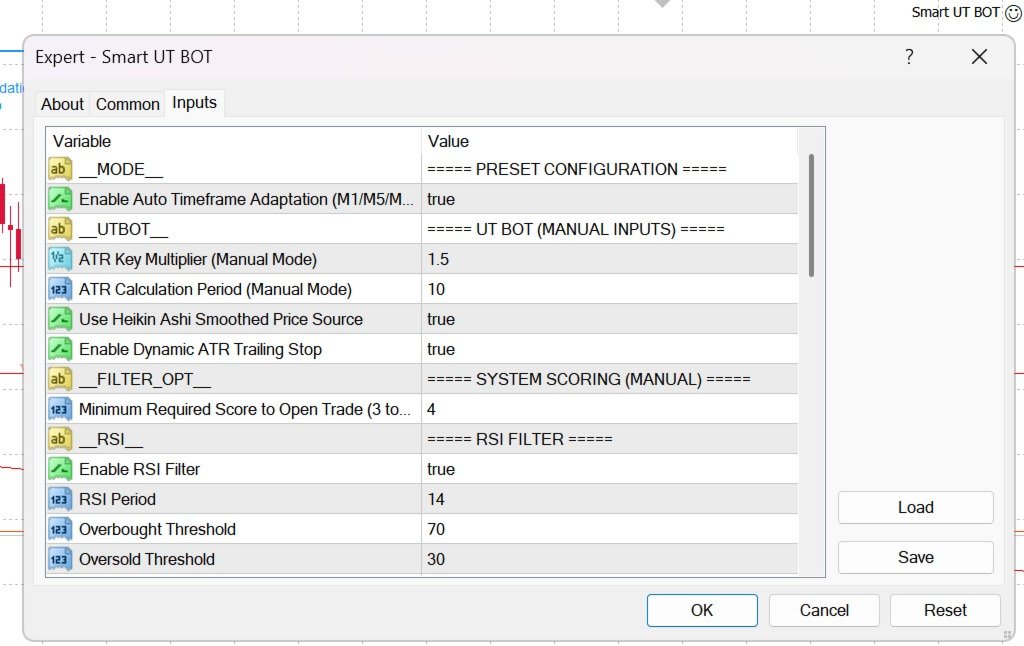
AutoPreset ( true / false ):
-
true : Enables automatic timeframe optimization for M1, M5, and M15.
-
false : Forces the EA to use manually defined input settings.
-
UT Bot Core (Manual Mode)
-
KeyValue (Default: 1.5 ): ATR multiplier for the trailing stop line. Higher values widen the stop distance to avoid market noise; lower values increase signal sensitivity.
-
ATRPeriod (Default: 10 ): Number of candles calculated for Average True Range volatility measurement.
-
UseHeikinAshi ( true / false ): Uses Heikin-Ashi smoothed close price for calculations instead of raw Close price.
-
UseATRTrailing ( true / false ): Enables real-time server-side trailing stop modification based on the UT Bot ATR line.
System Scoring Matrix
-
MinSignalScore (Default: 4 ): Minimum score required across the 6 secondary filters (RSI, MACD, Volume, Momentum, SMC, H1 Trend) to confirm entry (Range: 3 to 6 ).
Technical & SMC Filters
-
UseRSI / RSIPeriod / RSI_OB / RSI_OS : Prevents opening Buy orders in overbought zones (>70) or Sell orders in oversold zones (<30).
-
UseMACD / MACD_Fast / MACD_Slow / MACD_Signal : Validates directional momentum via MACD main and signal line cross.
-
PivotLength / UseCHoCH / UseBOS : Detects Smart Money Concepts structural breaks—Change of Character (CHoCH) and Break of Structure (BOS).
-
UseMTFTrend / MTF_EMA_Period : Evaluates EMA trend bias across 6 timeframes (5M, 15M, 30M, 1H, 4H, 1D).
-
UseVolume / VolLongPeriod / VolShortPeriod : Confirms volume expansion relative to historical moving averages.
-
UseMomentum / MomThreshold : Measures rate-of-change velocity normalized against market volatility.
Risk & Order Management
-
LotSize (Default: 0.01 ): Fixed order volume in lots.
-
UseATR_SL ( true / false ):
-
true : Sets Stop Loss and Take Profit based on ATR multiples ( ATR_SL_Mult , ATR_TP_Mult ).
-
false : Uses fixed monetary USD amounts ( FixedSL_USD , FixedTP_USD ).
-
-
ATR_SL_Mult (Default: 1.5 ): Stop Loss distance multiplier
-
ATR_TP_Mult (Default: 3.0 ): Take Profit distance multiplier
-
MagicNumber (Default: 88888888 ): Unique identifier for EA trade tracking.
-
Slippage (Default: 3 ): Maximum allowed order execution slippage in points.
-
MinBarsBetween (Default: 5 ): Minimum candle count required between consecutive trade executions
3. Comprehensive Input Parameters Dictionary
-
Broker & Spread Conditions: Use raw ECN accounts with Gold spreads below 15–20 points (1.5–2.0 pips). Wide spreads degrade the performance of ATR trailing stops.
-
Capital Management:
-
$1,000 Account Balance: Trade 0.01 – 0.02 lots.
-
$5,000 Account Balance: Trade 0.05 – 0.10 lots.
-
Ensure overall exposure per trade does not exceed 1% to 2% of account equity.
-
-
High-Impact News Protocol: Disable automated trading 30 minutes before and after high-impact USD macroeconomic releases: Non-Farm Payrolls (NFP), Consumer Price Index (CPI), and FOMC Rate Decisions. Extreme volatility spikes during these events can cause spread widening and slippage.
-
Optimal Active Hours:
-
London Session: 07:00 – 10:30 UTC.
-
New York Session: 12:00 – 16:00 UTC.
-
Avoid trading during low-liquidity Asian consolidation periods or late Friday sessions.
-