TDI Optimized
- Göstergeler
-
Lam Tran
 Thanks for your interest in "Marsu Signal”
 - Sürüm: 3.0
- Etkinleştirmeler: 5
📘 USER MANUAL: TDI OPTIMIZED BY MARSU (MT5)
1. Introduction:
TDI Optimized by Marsu is a super indicator developed specifically for the MetaTrader 5 (MT5) platform. Upgraded from the classic Traders Dynamic Index (TDI) system, this version brings a fresh perspective with its excellent noise signal removal capabilities, direct optimization on Japanese candlesticks (lighter and smoother), and especially its Auto Timeframe system that automatically adapts to all trading styles.
The indicator provides extremely clear entry points through intuitive arrows on the chart, combined with a sub-window displaying momentum and market trends.
2. Main Components on the Chart
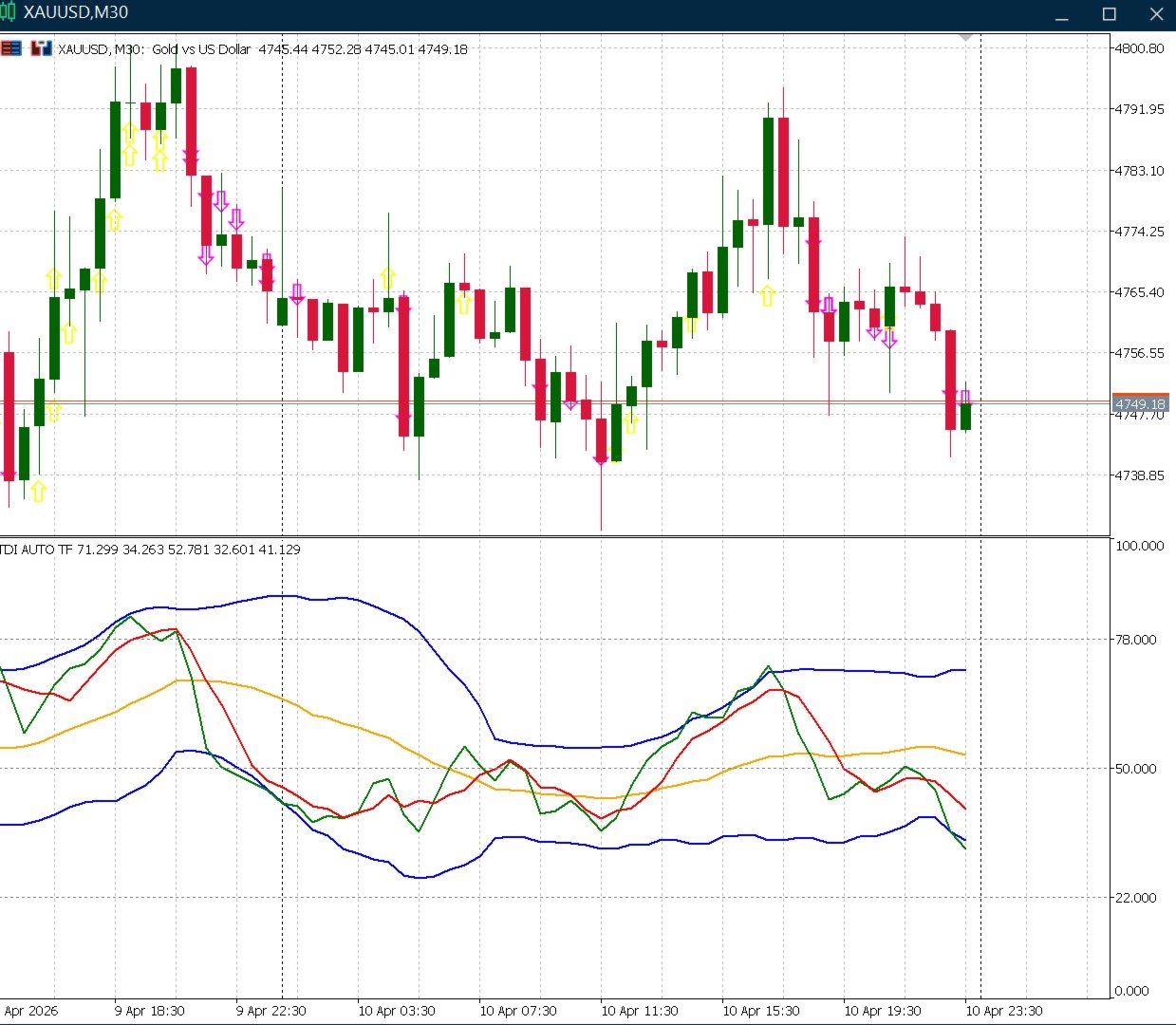
The indicator is divided into two display parts:
2.1 Sub-Window (TDI Core):
Green line (RSI PL - RSI Price Line): Shows the current price speed and direction (Fast).
Red line (TSL - Trade Signal Line): A slower signal line, used to confirm crossovers with RSI PL.
Orange line (MBL - Market Base Line): The center line of the market, separating buyers and sellers.
Two blue lines (VB High / VB Low): Volatility Bands. When the bands contract, it signals market consolidation; when they expand, it signals a breakout trend.
2.2 Main Candlestick Chart:
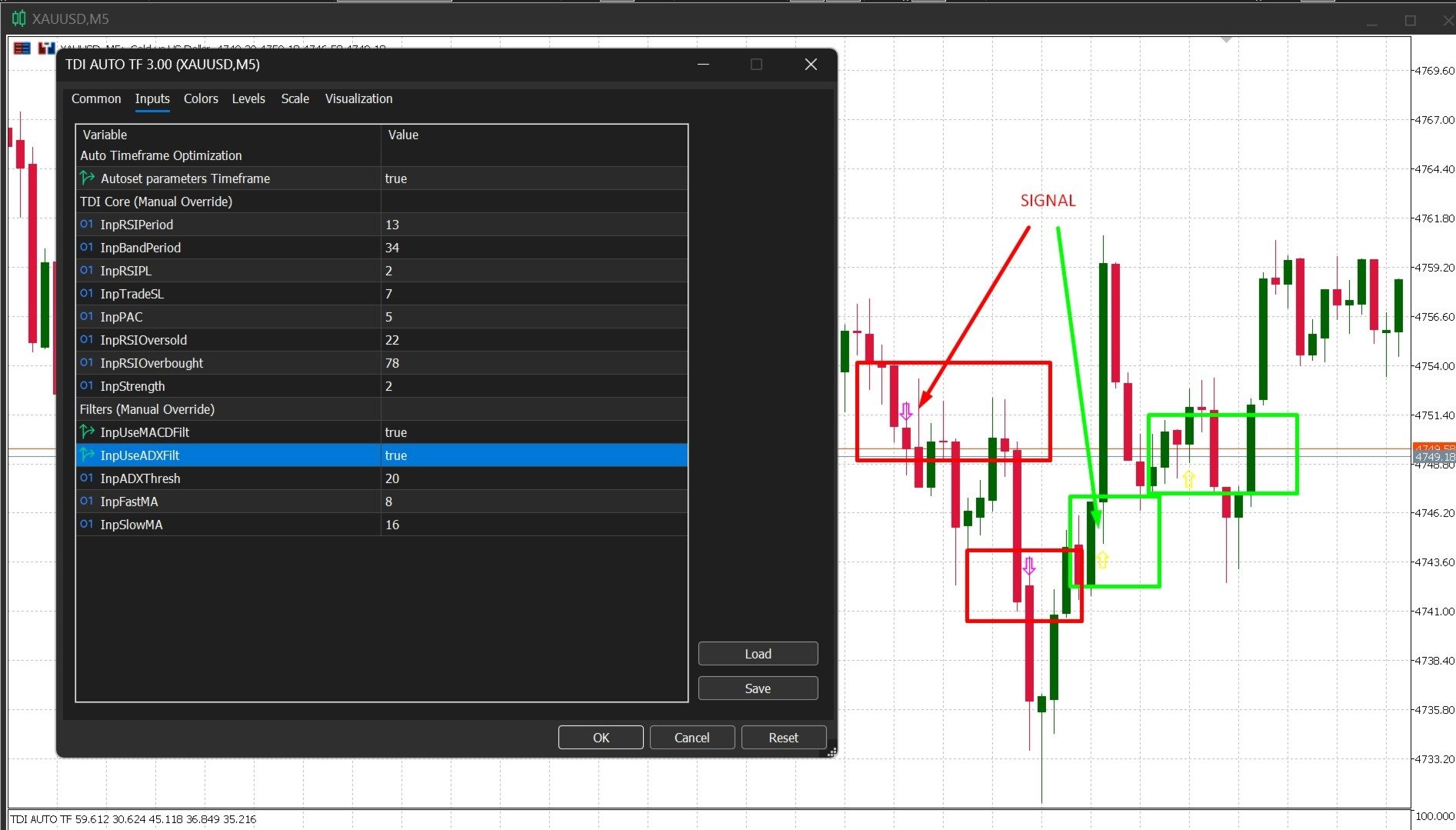
🟨 Yellow arrow (Upward): Signal to open a BUY (LONG) order.
🟪 Pink/Purple Arrow (Downward): SHORT order signal.
3. Outstanding Features (Exclusive)
🚀 Performance Optimization with Pure Japanese Candlesticks
Unlike older TDI versions that used simulated Heikin Ashi calculations, causing system lag and order delay (Repaint), this version has a completely rewritten algorithm to run directly on the original Japanese candlestick array (Open/High/Low/Close). This allows the bot to load hundreds of thousands of candlesticks in an instant, preventing Repainting 100%. (No Repaint)
🚀 Auto Timeframe Optimization
You no longer need to worry about finding the correct settings for each timeframe. When AutoTFSettings is enabled (true), the Indicator will automatically recognize and reconfigure the entire core:
Scalping (M1 - M15): Sensitive filter pulling, allowing for the fastest short-wave detection.
Swing Trading (H1 - H4): Minimizes noise, accelerates the cycle to anticipate medium-term waves.
Position Trading (D1 and above): System settings standardized according to long-term trends, extremely safe.
🛡️ Integrated 3-Layer Dual Filter (Avoids False Signals)
The arrow only appears when the following stringent conditions are met SIMULTANEOUSLY:
PAC (Price Action Channel) Filter: The candle must actually break through the average range of the High/Low and be a trending candle (Closing > Opening for Buy orders).
MACD Filter: Confirms increasing buy/sell momentum in the most recent candles.
ADX Filter: Prevents entry when the market is sideways. Only trade when the trend strength (ADX) exceeds a certain threshold.
4. Conditions for Signal Appearance
BUY Signal (Yellow Arrow):
The green RSI line crosses UP above the red signal line.
MACD is in an upward trend.
ADX shows a clear market trend.
RSI has not yet reached the Overbought level (78).
The current candle closed as a BULL and the price has broken above the PAC band.
SELL Signal (Pink Arrow):
The green RSI line crosses DOWN below the red signal line.
MACD is in a downward trend.
ADX confirms a trend.
RSI has not yet reached the Oversold level (22).
The current candle closed as a BEAR and the price has broken below the PAC band.
(Note: The arrow is fixed and will never disappear or move after the candle has closed).
5. Input Parameter Settings Guide
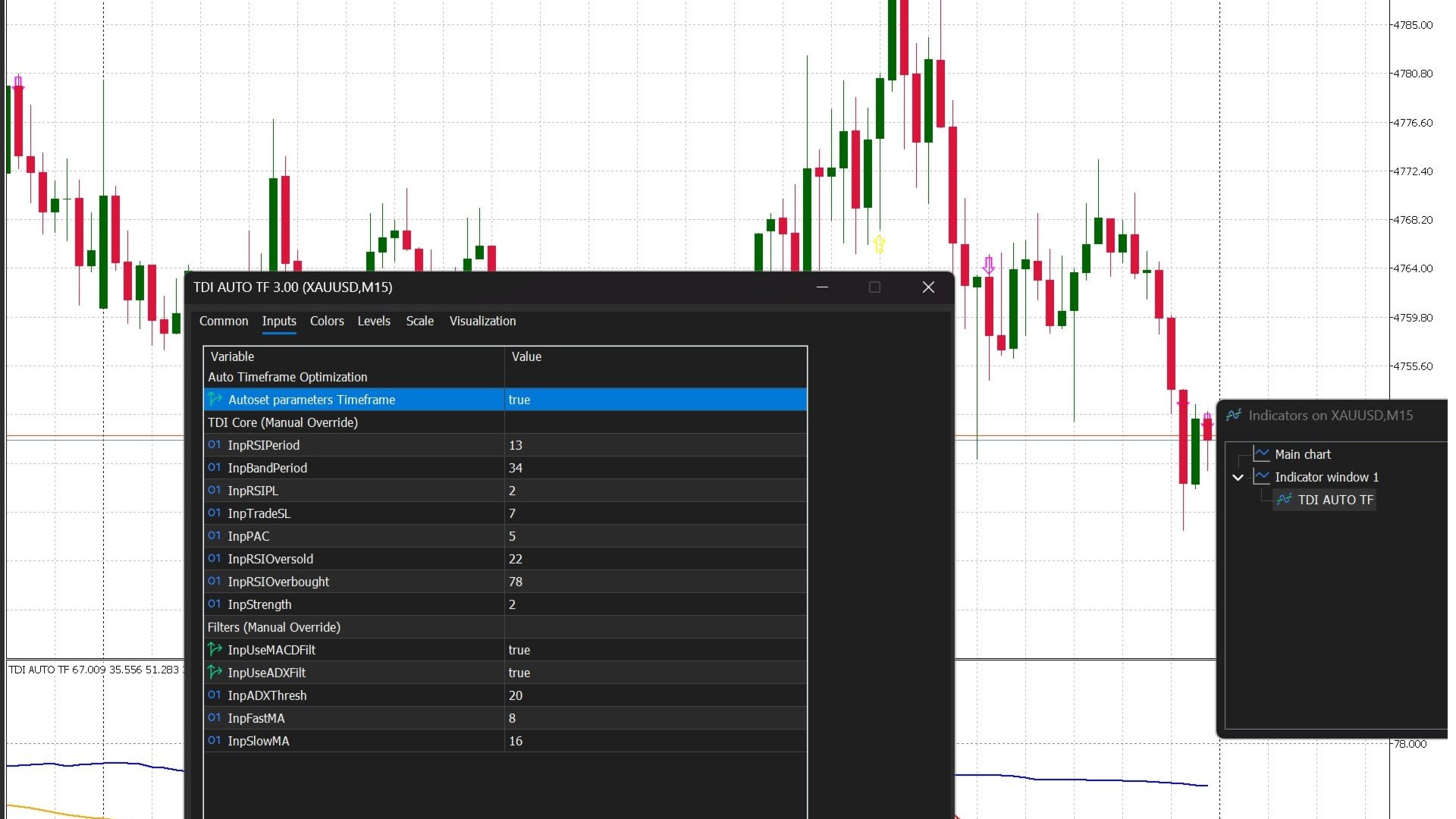
You can fine-tune the parameters in the settings panel (Double-click on the Indicator on the chart):
Settings Parameter Name Meaning & Usage
Auto Timeframe InpAutoTFSettings Turn on True for the AI to automatically recognize and adjust the numbers according to the time frame. If you want to manually adjust everything, select False.
TDI Core InpRSIPeriod RSI Period (Default: 13).
InpBandPeriod Volatility Band Period (Default: 34).
InpRSIPL / InpTradeSL Green (Fast) and Red (Slow) Line Period.
InpPAC Number of candles used to create Price Action support/resistance channels (Default: 5).
InpRSIOversold / Overbought | Oversold (22) and Overbought (78) levels.
Filters InpUseMACDFilt Turn MACD filter on/off.
InpUseADXFilt: Turns the Sideway zone filter using ADX on/off.
InpADXThresh: Minimum ADX threshold to allow trading (20 is the benchmark).
InpFastMA / InpSlowMA: Period for the hidden MACD filter.
6. Pro Trading Tips
Combining Resistance/Support: Although the indicator's filter is very powerful, for the highest win rate, prioritize arrows that appear near important Support (for BUY orders) or Resistance (for SELL orders) zones on larger timeframes.
Volatility Bands (VB Bands): When the two blue lines squeeze, be patient. Don't rush into a trade even if there is an arrow. Wait until the arrow appears simultaneously with the band starting to expand sharply upwards/downwards.
Risk Management: Always place your Stop Loss below the bottom of the signal candle (or the nearest resistance zone) and your Take Profit with a minimum Risk:Reward ratio of 1:1.5 or 1:2.
Wishing you successful trades and consistent profits with TDI Optimized by Marsu!