Smart UT BOT

Smart UT Bot Pro EA - User Manual & Operations Guide

1. System Overview

Smart UT Bot is a fully automated MetaTrader 4 (MT4) Expert Advisor engineered specifically for high-volatility financial instruments, with primary optimization for Gold (XAUUSD), Forex pairs, and Indices.

The system combines the core UT Bot (ATR Trailing Stop) algorithm made famous by QuantNomad on TradingView with a multi-layered filtering matrix. This matrix integrates classic technical indicators (RSI, MACD, Volume, Momentum), Smart Money Concepts (SMC) structural events (CHoCH/BOS), and Multi-Timeframe (MTF) Trend Alignment.

Key Architectural Highlights

  • Adaptive Auto-Preset Engine: Automatically detects chart timeframe changes ( M1 , M5 , M15 ) and applies optimized parameter sets instantly without requiring manual re-configuration.

  • Smart Scoring Matrix: Solves trade stagnation caused by rigid multi-indicator logical AND ( && ) conditions. The UT Bot triggers the initial signal, while six secondary filters generate a composite confidence score ( MinSignalScore ).

  • Heikin-Ashi Smoothed Core: Filters out market noise and false breakout spikes using smoothed Heikin-Ashi pricing sources.

  • Dynamic Real-Time ATR Trailing Stop: Continuously adjusts server-side Stop Loss orders based on volatility changes to secure floating profits.

  • Interactive Visual Dashboard: Displays live market statistics directly on the chart, including multi-timeframe trend strength (5M to 1D), Cumulative Volume Delta (CVD), indicator readings, and execution metrics.

2. Installation & Setup Guide

  1. Open Data Folder: In MT4, click File > Open Data Folder.

  2. Copy EA File: Navigate to MQL4  >  Experts and paste Smart_UT_Bot. ex4 ).

  3. Refresh Navigator: Return to MT4, open the Navigator window ( Ctrl + N ), right-click Expert Advisors, and click Refresh.

  4. Attach to Chart: Drag and drop the EA onto your target chart (Recommended: XAUUSD).

  5. Enable Trading: In the EA properties window under the Common tab:

    • Check Allow Live Trading.

    • Check Allow DLL imports.

  6. Confirm Activation: Click OK. Ensure the AutoTrading button on the main MT4 toolbar is active (Green).

3. Comprehensive Input Parameters Dictionary

Configuration Mode

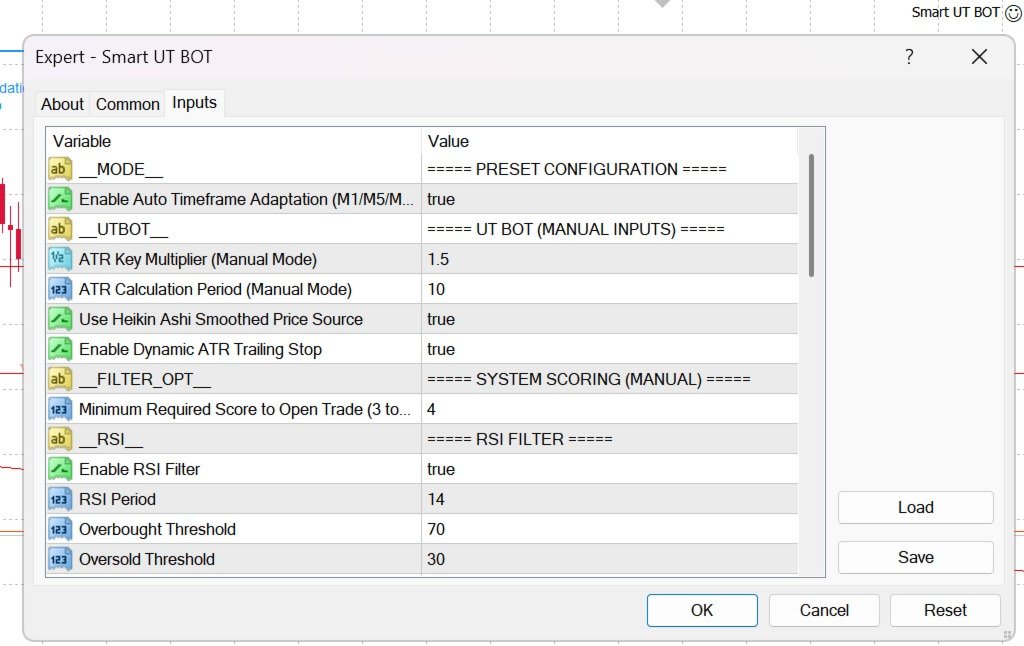
  • AutoPreset ( true / false ):

    • true : Enables automatic timeframe optimization for M1, M5, and M15.

    • false : Forces the EA to use manually defined input settings.

UT Bot Core (Manual Mode)

  • KeyValue (Default: 1.5 ): ATR multiplier for the trailing stop line. Higher values widen the stop distance to avoid market noise; lower values increase signal sensitivity.

  • ATRPeriod (Default: 10 ): Number of candles calculated for Average True Range volatility measurement.

  • UseHeikinAshi ( true / false ): Uses Heikin-Ashi smoothed close price for calculations instead of raw Close price.

  • UseATRTrailing ( true / false ): Enables real-time server-side trailing stop modification based on the UT Bot ATR line.

System Scoring Matrix

  • MinSignalScore (Default: 4 ): Minimum score required across the 6 secondary filters (RSI, MACD, Volume, Momentum, SMC, H1 Trend) to confirm entry (Range: 3 to 6 ).

Technical & SMC Filters

  • UseRSI / RSIPeriod / RSI_OB / RSI_OS : Prevents opening Buy orders in overbought zones (>70) or Sell orders in oversold zones (<30).

  • UseMACD / MACD_Fast / MACD_Slow / MACD_Signal : Validates directional momentum via MACD main and signal line cross.

  • PivotLength / UseCHoCH / UseBOS : Detects Smart Money Concepts structural breaks—Change of Character (CHoCH) and Break of Structure (BOS).

  • UseMTFTrend / MTF_EMA_Period : Evaluates EMA trend bias across 6 timeframes (5M, 15M, 30M, 1H, 4H, 1D).

  • UseVolume / VolLongPeriod / VolShortPeriod : Confirms volume expansion relative to historical moving averages.

  • UseMomentum / MomThreshold : Measures rate-of-change velocity normalized against market volatility.

Risk & Order Management

  • LotSize (Default: 0.01 ): Fixed order volume in lots.

  • UseATR_SL ( true / false ):

    • true : Sets Stop Loss and Take Profit based on ATR multiples ( ATR_SL_Mult , ATR_TP_Mult ).

    • false : Uses fixed monetary USD amounts ( FixedSL_USD , FixedTP_USD ).

  • ATR_SL_Mult (Default: 1.5 ): Stop Loss distance multiplier

  • ATR_TP_Mult (Default: 3.0 ): Take Profit distance multiplier

  • MagicNumber (Default: 88888888 ): Unique identifier for EA trade tracking.

  • Slippage (Default: 3 ): Maximum allowed order execution slippage in points.

  • MinBarsBetween (Default: 5 ): Minimum candle count required between consecutive trade executions

3. Comprehensive Input Parameters Dictionary

  1. Broker & Spread Conditions: Use raw ECN accounts with Gold spreads below 15–20 points (1.5–2.0 pips). Wide spreads degrade the performance of ATR trailing stops.

  2. Capital Management:

    • $1,000 Account Balance: Trade 0.01 – 0.02 lots.

    • $5,000 Account Balance: Trade 0.05 – 0.10 lots.

    • Ensure overall exposure per trade does not exceed 1% to 2% of account equity.

  3. High-Impact News Protocol: Disable automated trading 30 minutes before and after high-impact USD macroeconomic releases: Non-Farm Payrolls (NFP), Consumer Price Index (CPI), and FOMC Rate Decisions. Extreme volatility spikes during these events can cause spread widening and slippage.

  4. Optimal Active Hours:

    • London Session: 07:00 – 10:30 UTC.

    • New York Session: 12:00 – 16:00 UTC.

    • Avoid trading during low-liquidity Asian consolidation periods or late Friday sessions.


おすすめのプロダクト
Exp Swing
Vladislav Andruschenko
4.44 (64)
これは、Swinger(Pendulum、Cheburashka)と呼ばれる有名な戦略のモデルを使用しています。 戦略は、2つの反対の保留中の注文を出すことにあります。価格が特定の方向に移動すると、一方の保留中の注文がトリガーされ、もう一方の注文のロットサイズが増加します。 EAは3種類のオープン保留中の注文を提供します(TypeofTrade) 配置後の自動オープン(インスタントオープンAutoTrade) 手動開封後の開封と管理(手動開封ManualTrade) 高/低レベルで開く(過去のバーTFTradeの高低) OCO(One-Cancels-the-Other)注文は、2つの注文で構成される条件付き注文の一種です。2つ目の注文が約定すると、1つ目の注文は自動的にキャンセルされます。 スイング-完全な説明 MT5 version 購入する方法 インストールする方法     ログファイルの取得方法     テストと最適化の方法     Expforex のすべての製品 使い方? 開始時に、エキスパートアドバイザーは2つの注文を出します-現在の価格から StopOrderDe
FREE
インディケータは現在のクオートを作成し、これを過去のものと比較して、これに基づいて価格変動予測を行います。インジケータには、目的の日付にすばやく移動するためのテキスト フィールドがあります。 オプション: シンボル - インジケーターが表示するシンボルの選択; SymbolPeriod - 指標がデータを取る期間の選択; IndicatorColor - インジケータの色; HorisontalShift - 指定されたバー数だけインディケータによって描画されたクオートのシフト; Inverse - true は引用符を逆にします。false - 元のビュー。 ChartVerticalShiftStep - チャートを垂直方向にシフトします (キーボードの上下矢印)。 次は日付を入力できるテキストフィールドの設定で、「Enter」を押すとすぐにジャンプできます。

Kiwi AUDCAD Bot MT4 Kiwi AUDCAD Bot MT4 is an automated Expert Advisor developed specifically for the AUDCAD currency pair. The EA combines a market-scanning entry system with adaptive grid recovery and basket-level trade management. It applies consistent rules for entries, recovery positions and coordinated basket exits while displaying its current status on the chart. Recommended setup Platform: MetaTrader 4 Symbol: AUDCAD Recommended chart: M5 Default signal timeframe: M5 Default entry profi
FREE
Trading Helper - Program for trading and money management. It works with pending and immediate orders, and is equipped with trailing stop, breakeven and take profit functions. Manual (Be sure to read before purchasing) Advantages 1. Comfortable trading in a few clicks. Immediate and pending orders are available in the panel 2. Fixed percent method. The panel can select the lot size based on a predetermined risk 3. Trading with a fixed lot. In a few clicks, select a lot and open a Trade 4. Posi
Jet Punch
Didit Haryadi Saputra
Jet Punch is another best expert advisor for MT4,  can help you make money while you sleep by automatically entering and exiting trades. It trades by opening trades every day and closing them at the right time to ensure you always earn a profit. The software is very simple and can be used by both beginner and experienced traders.  Jet Punch was tested and has successfully passed the stress test with slippage and commission approximate to the real market condition. Recommendations: Currency pair:
Expert Advisor for MT4 Useful utility MUST have for all traders.  With 1 click button, you're able to close all your open positions. Its come with a warning pop up notification when you click to close all your trades, to avoid an accident press the button. Just press 'Yes' to confirm or 'No' to cancel it. The expert will close all your open positions no matter what pairs you currently open or directions. Just attach the expert on 1 of your chart, and you're good to go.
M5 タイムフレームのロボット スカルパー。 GBPUSD 通貨ペアでの取引。このロボットは、英ポンドの取引のためにプロのトレーダーの会社によって特別に開発されました。ロボットは、毎日約 5 ~ 15 の取引を開始します。 GBPUSD のスプレッドが最大 10 ピップスまでの低いブローカーと取引するのが最善です。開始するための推奨最低入金額は $500 以上です。 利点: マーチンゲールは使いません。 ネットではありません。 すべての取引にはストップロスがあります。 GBPUSDペア専用のプロボット。 ロボットスキャルパー、M5 期間の日中取引。 このロボットはどのように取引しますか? 市場を分析するために、ロボットは 2 つの指標の価格モデルと戦略的な市場パターンを使用します: パラボリック ストップとリバース システムとボリンジャー バンド。ロボットは最初に、価格エントラポレーション統計を使用して価格の動きについて市場を分析します。次に、ロボットはこれらの指標を読み取り、現在と過去の動きの傾向を比較します。市場の反転またはロールバックを示すパターンが一致した場合、ロボットは取
| Fully-automated Smart Money Concept (ICT) inspired trading solution with multi-strategy capabilities | Built by a grid trader >> for grid traders.  This is MT4 version, click  here  for  Blue CARA MT5  (settings and logics are same in both versions)     Real monitoring signal  -->  Cara Gold Intro Blue CARA EA   ('CARA') - short for  C omprehensive  A lgorithmic R esponsive A dvisor is a next-gen  multi-currency    multi-timeframe  EA base on the widely known (and perhapse most popular) Inn
Set TP & SL by Price – Auto Order Modifier for MT4 任意の注文に正確なTPおよびSL価格を自動設定 ️ すべての通貨ペアとEAに対応、シンボルまたはマジックナンバーでフィルタリング可能 このエキスパートアドバイザーは、Take Profit(TP)およびStop Loss(SL)を正確な価格で設定できます(例:EURUSDの 1.12345 )。ポイントやpipsではなく、価格による明確なコントロール。すべての注文、またはチャート/マジックナンバーによってフィルタリングされた注文に適用可能です。 主な機能: 正確な価格でTPとSLを即時変更 全注文、現在のシンボル、または特定のマジックナンバーに適用 ️ 0を使用してTPやSLを削除 グラフに追加するだけで自動的に作動 すべての取引商品と互換性あり こんな人におすすめ: TP/SLを迅速に制御したい裁量トレーダー 出口戦略を変更したいEAユーザー 多くの注文を管理している人 質問や提案はありますか? コメント欄でお気軽
Mapleroo
Thamini De Oliveira Feitosa Puntel
5 (1)
10 COPIES AT $ 99 ! After that, the price will be raised to $ 150 . MAPLEROO is a smart EA that uses technical and statistical analysis based on a deep and long study of this beautiful pair loved by many traders. LIVE HERE --> MAPLEROO Pair: AUDCAD TimeFrame: M1. Recommended Deposit for Safe Risk: 2000$. For Moderate Risk: 1000$. For High Risk (be careful!): Less than 1000$ FEATURES: Solid backtest and proven live performance No need to adjust GMT Very easy to use: just read 3 lines of
アクティブ注文と保留中の注文の管理:自動ブレイクイーブン、TP/SL変更、部分/完全決済、チャート上のレベルの視覚的表示 私の #1  Utility :66以上の機能、PROトレード管理を含む   |    ご質問はこちら  まで 1) メインウィンドウ:注文を管理するには、特定のシンボル [Symbol] を設定するか、すべてのシンボル [ALL] を選択できます すべてのアクティブポジションを閉じる [ALL] すべての利益のあるトレードを閉じる [profits] すべての損失のあるトレードを閉じる [losses] すべての買いトレードを閉じる [longs] すべての売りトレードを閉じる [shorts] すべての指値注文を削除 [Delete limit orders] すべての逆指値注文を削除 [Delete stop order] 右側には、各注文カテゴリの現在のフローティング損益(口座通貨および現在の残高のパーセンテージ)が表示され、各カテゴリの注文数が計算されます。 2) 手動でトレードをブレイクイーブンに変更 [- Move SL to BE now -]:SL
Trading panel for manual trading. Has a fairly wide functionality. Allows you to automatically calculate the order size, open both market and pending orders. It has a wide range of options for closing orders, it is possible to partially close orders, close orders after reaching a certain profit or loss, separately close profitable and unprofitable, buy and sell, as well as pending orders. The panel also contains a simple implementation of a grid of pending orders, reverse and lock functions, tr
Initial Stop Loss Setup : Automatically applies an initial stop loss (in points) immediately when a trade is opened. Provides peace of mind by ensuring every trade is protected against unfavorable price movements. Dynamic Trailing Stop : Adjusts the stop loss at the close of each candle based on a fixed point distance. Moves the stop loss incrementally closer to the current price, locking in profits as the market moves in your favor. Works Across All Timeframes : The EA adapts to any chart time
Angry bull Option Binary
Fabio Oliveira Magalhaes
1 (1)
Angry Bull Option Binary   This is a Binary Options robot, which contains 7 strategies, you can backtest it to check what the best strategies are Settings Initial Batch Value Dynamic Investment = If activated it will use an automatic lot according to its capital Balance ($) w/ backtest = Starting balance to backtest PorcRiscoInvestment = It will be the value of % for the automatic lot if it is activated Expiration (in minutes) = It will be the expiration time of orders in Binary Options Magic
Vizzion is a fully automated scalping Expert Advisor that can be run successfully using GBPJPY currency pair at H1 timeframe. Very Important This Expert Advisor can not run with any EAs in the same account. As part of the money management plan, it calculates and monitors the Margin Level % and assumes that all open trades are created by it. If you want an Expert Advisor that trades in a daily basis, this EA is not for you because using this requires a patience to wait for a few days or weeks on
AZ Semi Auto Trade Manager MT4 is a professional one-click trade management tool designed for traders who prefer manual entries while automating risk management and trade protection. This Expert Advisor allows traders to open BUY or SELL positions directly from the chart using dedicated trading buttons and automatically manage open trades with Stop Loss, Take Profit, Break Even, and Trailing Stop functions. The EA does not generate trading signals. Instead, it focuses on efficient trade executio
「Auto FIBO Pro」Crypto_Forex インジケーターは、取引の補助ツールとして最適です。 - インジケーターは、フィボナッチ レベルとローカル トレンド ライン (赤色) を自動的に計算してチャート上に配置します。 - フィボナッチ レベルは、価格が反転する可能性のある重要な領域を示します。 - 最も重要なレベルは、23.6%、38.2%、50%、61.8% です。 - リバーサル スキャルピングやゾーン グリッド取引に使用できます。 - Auto FIBO Pro インジケーターを使用して、現在のシステムを改善する機会も多数あります。 - Info Spread Swap Display があり、接続されている外国為替ペアの現在のスプレッドとスワップを表示します。 - ディスプレイには、アカウントの残高、エクイティ、マージンも表示されます。 - Info Spread Swap Display は、チャートのどのコーナーにも配置できます。 高品質のトレーディングロボットとインジケーターをご覧になるにはここをクリックしてください! これは、この MQL5 ウェブサイ
Fast copier for sending trades to multiple MT4 / MT5 accounts. Perfect for copying trades from MT4 to MT5 accounts. MT4 Trade Copier Master EA sends trades instantly from your master account to one or multiple slave accounts. Supports copying to: • MT5 accounts • MT4 accounts Perfect for: • Multi-account traders • Signal providers • Account managers • Personal account mirroring Main Features • Fast local trade copying • Low latency execution • Multiple slave accounts support • Copy open position
VN Trade Panel II
Vyacheslav Nekipelov
4 (1)
The new version of the trading panel, which now has the ability to separately close Buy and Sell orders, display targets for all orders on the chart, as well as the ability to use the panel to trade with brokers working on the FIFO rule. Also, the new version adds option buttons for separate management of open orders. It has a convenient visualized interface and intuitive control without a lot of additional tabs to which traders have to be distracted and switch their attention. Thanks to this,
VR Grid
Vladimir Pastushak
5 (3)
VR グリッド インジケーターは、ユーザー定義の設定を使用してグラフィカル グリッドを作成するように 設計 されています。 標準グリッド とは異なり、VR グリッドは 円形レベル を構築するために使用されます。ユーザーの選択に応じて、ラウンド レベル間のステップは任意に設定できます。さらに、他のインジケーターやユーティリティとは異なり、VR Grid は期間が変更されたり、端末が再起動されたりした場合でも、 グリッドの位置を維持 します。 設定、設定ファイル、デモ版、説明書、問題解決方法は、以下から入手できます。 [ブログ] レビューを読んだり書いたりすることができます。 [リンク] のバージョン [MetaTrader 5] 垂直レベル は実際の時間間隔に基づいており、 欠落している または存在しない期間は無視します。したがって、レベル間のステップは、ユーザーが選択した値に厳密に対応します。 VR グリッド インジケーターを使用すると、トレーダーは任意のレベルで 垂直線と水平線のスタイル 、色、太さを変更できます。これにより、金融商品の ラウンドレベル を制御できます。 ラウンド
FREE
Program Overview: This program is a trading tool designed to monitor and analyze the 7 major currency pairs. It is a variant of a similar program used for tracking stock indices, but this version focuses on the seven major currency pairs. The program helps in identifying and calculating significant price movements (gaps) between the high and low prices of these currency pairs over a specified time frame. It then provides insights through comments and alerts based on the calculated gaps. Major Cu
Lot Size Calculator, Risk Manager and Trade Panel for MetaTrader 4 Lot Size Calculator Risk Manager Panel MT4 (This is the free edition of   Lot Architect PRO ) is a trading utility for MetaTrader 4 that combines a lot size calculator, position size calculator, risk manager and trade panel in one chart-based interface. The utility calculates position size from a selected risk value and displays the planned trade information before order execution. Entry, Stop Loss and Take Profit levels can be
FREE
VR Cub
Vladimir Pastushak
VR Cub は、質の高いエントリーポイントを獲得するためのインジケーターです。このインジケーターは、数学的計算を容易にし、ポジションへのエントリーポイントの検索を簡素化するために開発されました。このインジケーターが作成されたトレーディング戦略は、長年にわたってその有効性が証明されてきました。取引戦略のシンプルさはその大きな利点であり、初心者のトレーダーでもうまく取引することができます。 VR Cub はポジション開始ポイントとテイクプロフィットとストップロスのターゲットレベルを計算し、効率と使いやすさを大幅に向上させます。取引の簡単なルールを理解するには、以下の戦略を使用した取引のスクリーンショットを見てください。 設定、設定ファイル、デモ版、説明書、問題解決方法は、以下から入手できます。 [ブログ] レビューを読んだり書いたりすることができます。 [リンク] のバージョン [MetaTrader 5] エントリーポイントの計算ルール ポジションをオープンする エントリーポイントを計算するには、VR Cub ツールを最後の高値から最後の安値までストレッチする必要があります。 最初
The algorithm of the adviser's work: When the Expert Advisor is launched at a specified distance from the price (first_step), BuyStop and SellStop orders are placed. Further, depending on which way the price went, one of them becomes market, and the other begins to crawl after the price. When the price rolls back, it also becomes market. If we have reached a set profit in some direction, the order is closed and a creeping pending order of the same direction is placed again. If the profit is no
Exotic Bot   is a multi -cream multifunctional adviser working on any time frame and in any market conditions. The robot’s work is taken as a system of averaging with the non -geometric progression of the construction of a trading grid. Built -in protection systems: special filters, spreading, internal restriction of trading time. Building a trading grid, taking into account important internal levels. The ability to configure trading aggressiveness. Work postponed orders with trailing orders. T
Harvest GOLD USES THE TREND WAVE INDICATOR AND IT CAN IDENTIFY THE BEGINNING AND THE END OF A NEW WAVE TREND MOVEMENT. AS AN OSCILLATOR, THE INDICATOR IDENTIFIES THE OVERBOUGHT AND OVERSOLD ZONES. IT WORKS GREAT TO CATCH THE SHORT TERM PRICE REVERSALS AND USES A MARTINGALE STRATEGY TO CLOSE ALL TRADES IN PROFIT. USE DEFAULT SETTINGS ON H1 OR HIGHER TIME FRAME ON ANY PAIR FOR MORE ACCURATE TRADES WHY THIS EA : Smart entries calculated by 3 great strategies The EA can be run on even a $30000
The Return Forex EA The Robot was designed by myself and works already on live accounts. Can be used with TP and SL settings with trailing stop as MArtingale The robot works on all Currency PAirs and all Time Frames. The higher the Frame so higher the possibility of the trade accuracy. Please trade carefully and responsibly.Happy Trading Happy Trading Thank you
これは、買い注文と売り注文のネットワークを配置する通常のパネルです。 このExpert Advisorは、設定で定義された利益注文を閉じます。 次に、ラダーと呼ばれるパラメータがあり、ラダーパラメータで示されたポイントだけ注文間の距離が増加し始めることを含みます(ここでは、メイン設定では10ポイントです)。これは、2次が10ポイント、3次が20ポイント、4次が40ポイントなどを意味します。 次に、これは設定にないため、このアドバイザーに何があるかを知る必要がありますが、このアドバイザーが提案した戦略のロジックに影響します。. アドバイザーが5つの注文を開くのは、ここの設定であるとしましょう。.. または購入のために。.. または販売のため。.. よかった.. ただし、注文を開くと、次のオープン注文のロットが以前にオープンした注文の半分だけ増加します。 つまり、設定で0.1ロットを設定すると、スキームに従って5つの注文が開き、現在の価格に近い最初の注文は0.1ロットの価格で開かれます。 第二に、与えられたステップのために、ここで50ポイントのステップは0.15ロットの価格で開きます。
Spectre
Konstantin Kotlov
Multifunctional universal Expert Advisor that is designed for automatic or semi-automatic trading on various strategies using different indicators. To do this, you need to fill out a template file in which you can select up to 30 variables and up to 15 conditions for sale or purchase. The Expert Advisor has a mini panel for manual trading, as well as the ability to trade along trend lines for both breakdown and rebound. Thanks to the buttons in the strategy tester, you can practice trading on hi
これは、キャンドルの終値を予測する指標です。 このインジケータは、主にD1チャートでの使用を目的としていますが. この指標は、従来の外国為替取引とバイナリオプション取引の両方に適しています。 インジケーターは、スタンドアロンのトレーディングシステムとして使用することも、既存のトレーディングシステムへの追加として機能させることもできます。 このインジケーターは、現在のキャンドルを分析し、キャンドル自体の内部の特定の強度係数と、前のキャンドルのパラメーターを計算します。 したがって、この指標は、市場の動きのさらなる方向性と現在のキャンドルの終値を予測します。 この方法のおかげで、この指標は、短期の日中取引だけでなく、中期および長期の取引にも適しています。 インジケーターを使用すると、市場の状況の分析中にインジケーターが生成する潜在的な信号の数を設定できます。 インジケーターの設定には、このための特別なパラメーターがあります。 また、インジケーターは、チャート上のメッセージの形式で、電子メールで、およびPUSH通知の形式で、新しい信号について通知することができます。 購入後は必ず私に書いて
このプロダクトを購入した人は以下も購入しています
Trade Indicator Assistant is a powerful MT4 utility designed to turn indicators into automated trading systems. Its main feature is the ability to automatically detect an indicator’s   BUY and SELL signal buffers , without requiring you to know the buffer numbers, search through indicator settings, or modify the indicator source code. Bonus Indicator: After purchasing Trade Indicator Assistant, contact me to receive Trade Signal Pro completely free as a bonus indicator. [Download Demo Version]
Trade Manager EAへようこそ。これは、取引をより直感的、正確、そして効率的にするために設計された究極の リスク管理ツール です。これは単なるオーダー実行ツールではなく、包括的な取引計画、ポジション管理、リスク管理のためのソリューションです。初心者から上級者、迅速な実行を必要とするスキャルパーまで、Trade Manager EAはあらゆるニーズに対応し、為替、指数、商品、暗号通貨などさまざまな市場で柔軟に対応します。 Trade Manager EAを使用すると、複雑な計算が過去のものになります。市場を分析し、エントリーポイント、ストップロス、テイクプロフィットのレベルをチャート上のラインでマークし、リスクを設定するだけで、Trade Managerが最適なポジションサイズを即座に計算し、SLとTPをピップ、ポイント、口座通貨でリアルタイムに表示します。すべての取引が簡単かつ効果的に管理されます。 主な機能: ポジションサイズ計算機 :定義されたリスクに基づいて取引サイズを瞬時に決定します。 簡単な取引計画 :エントリー、ストップロス、テイクプロフィットを設定するためのド
Exp COPYLOT CLIENT for MT4
Vladislav Andruschenko
4.69 (65)
MetaTrader 4向け 高機能トレードコピーソフト MetaTrader 4 用の、高速・安定・高機能なトレードコピーソフトです。 COPYLOT は、 MetaTrader 4 と MetaTrader 5 間でFX取引をコピーでき、さまざまな口座タイプや運用スタイルに合わせて柔軟に同期できます。 COPYLOT MT4版の対応コピー方式: MetaTrader 4 → MetaTrader 4 MetaTrader 5 Hedge → MetaTrader 4 MetaTrader 5 Netting → MetaTrader 4   MT5版 詳細説明 + DEMO + PDF 購入方法 インストール方法 ログファイルの取得方法 テストと最適化の方法 Expforexの全製品 MetaTrader 5版 を使えば、 MetaTrader 5 → MetaTrader 5 および MetaTrader 4 → MetaTrader 5 のコピーにも対応します: COPYLOT CLIENT for MT5 COPYLOT は、2台、3台、さらには10台規模のターミナル環境でも
TradePanel MT4
Alfiya Fazylova
4.84 (95)
Trade Panelは多機能なトレーディングアシスタントです。アプリには手動取引用の50以上のトレーディング機能が搭載されており、ほとんどの取引作業を自動化することができます。 アプリの説明書+ビデオガイド: https://www.mql5.com/en/blogs/post/772452 デモ口座用アプリの試用版: https://www.mql5.com/en/blogs/post/750865 アプリのインストール方法: https://www.mql5.com/en/blogs/post/756239 アプリをビジュアルモードでテストする方法: https://www.mql5.com/en/blogs/post/770277 VPSのMetaTraderにアプリをインストールする方法: https://www.mql5.com/en/blogs/post/770190 取引。 ワンクリックで取引操作を行うことができます: リスクを自動計算して指値注文やポジションを開く。 複数の注文やポジションをワンクリックで開く。 注文のグリッドを開く。 保留中の注文やポジションをグルー
The product will copy all telegram signal to MT4   ( which you are member  ) , also it can work as remote copier.  Easy to set up, copy order instant, can work with almost signal formats, image signal, s upport to translate other language to English Work with all type of channel or group, even channel have "Restrict Saving Content", work with  multi channel, multi MT5 Work as remote copier: with signal have ticket number, it will copy exactly via ticket number. Support to backtest signal. How to
Trade Manager は、リスクを自動的に計算しながら、取引を迅速に開始および終了するのに役立ちます。 過剰取引、復讐取引、感情的な取引を防止する機能が含まれています。 取引は自動的に管理され、アカウントのパフォーマンス指標はグラフで視覚化できます。 これらの機能により、このパネルはすべてのマニュアル トレーダーにとって理想的なものとなり、MetaTrader 4 プラットフォームの強化に役立ちます。多言語サポート。 MT5バージョン  |  ユーザーガイド + デモ Trade Manager はストラテジー テスターでは機能しません。 デモについてはユーザーガイドをご覧ください。 危機管理 % または $ に基づくリスクの自動調整 固定ロットサイズを使用するか、ボリュームとピップに基づいた自動ロットサイズ計算を使用するオプション RR、Pips、または価格を使用した損益分岐点ストップロス設定 トレーリングストップロス設定 目標に達したときにすべての取引を自動的に終了するための 1 日あたりの最大損失 (%)。 過度のドローダウンからアカウントを保護し、オーバートレードを防ぎま
コピー機->便利で高速なインターフェースインタラクション、ユーザーはすぐに使用できます     ->>>> WindowsコンピュータまたはVPS Windowsでの使用を推奨 特徴: 多様でパーソナライズされたコピー取引設定:1. 異なるシグナルソースに異なるロットモードを設定できます。2. フォワードコピー取引とリバースコピー取引に異なるシグナルソースを設定できます。3. シグナルはコメントで設定できます。4. 契約ロットに応じてロットを調整するかどうか 多様でパーソナライズされたコピー注文設定2:1.品種ごとに異なるロットモードを設定できます2.順方向コピー注文と逆方向コピー注文に異なる品種を設定できます3.コメントでシグナルを設定できます4.契約ロットに応じてロットを調整するかどうか コメントフィルタリング、MAGICフィルタリング、シグナルロットフィルタリング、ローカル製品フィルタリング 勤務時間設定 逆同期SLAVE終了 注文バインド機能: 任意の注文を設定されたシグナルソース注文にバインドできます (テーブルをダブルクリックして編集します) アカウントリスク管理 基本
News Filter EA: Advanced Algo Trading Assistant News Filter EA is an advanced algo trading assistant designed to enhance your trading experience. By using the   News Filter EA , you can integrate a Forex economic news filter into your existing expert advisor, even if you do not have access to its source code. In addition to the news filter, you can also specify   trading days   and   hours   for your expert. The News Filter EA also includes   risk management   and   equity protection   features
Prop Guardian Risk Manager MT4 – Drawdown, Risk & Hedge Protection for Prop Firm and Managed Accounts Prop Guardian Risk Manager is a professional risk-control utility for MetaTrader 4, designed for prop firm traders, money managers and anyone who wants strict account-level risk protection. It does not generate trading signals, strategy entries or trading decisions. Instead, it runs in the background, monitors your account risk and can automatically block new exposure, close managed trades or ac
Risk manager Risk manager - it will simplify the tracking of drawdown and will notify you (alert) when the specified risk is reached, and close/lock orders when the critical DD risk level is reached. If the specified drawdown is exceeded, you can choose two options for actions: All orders will be closed that mean loss will be fixed on depo. The terminal also closes. Instead of fixing the loss on depo, the opposite order will be opened - orders locking will occure. Not a single order will be c
MT4 to Telegram Signal Provider は使いやすく、完全にカスタマイズ可能なツールで、Telegramに信号を送信し、あなたのアカウントを信号提供者に変えることができます。 メッセージのフォーマットは 完全にカスタマイズ可能です! しかし、簡単な使用のために、あらかじめ定義されたテンプレートを選択し、メッセージの特定の部分を有効または無効にすることもできます。 [ デモ ]   [ マニュアル ] [ MT5バージョン ] [ Discordバージョン ] [ Telegramチャンネル ]  New: [ Telegram To MT5 ] セットアップ ステップバイステップの ユーザーガイド が利用可能です。 Telegram APIの知識は必要ありません。開発者が必要なものをすべて提供します。 主要機能 購読者に送信される注文の詳細をカスタマイズする機能 例えばブロンズ、シルバー、ゴールドなど、階層型のサブスクリプションモデルを作成できます。ゴールドサブスクリプションでは、すべての信号が得られますなど。 ID、シンボル、またはコメントによる注文のフ
Lot Architect — Trade Panel and Position Size Calculator for MT4 Lot Architect is a trade panel and risk-based position size calculator for MetaTrader 4. It helps calculate lot size from the selected risk, displays trade parameters before entry, and supports Market, Limit and Stop orders from the chart. The utility is designed for traders who want a structured workflow for position sizing, stop-loss placement, take-profit planning and order execution. Purpose Before opening a trade, a trader nee
これは視覚的な取引パネルであり、取引を簡単に配置および管理し、人為的エラーを回避し、取引活動を強化するのに役立ちます。使いやすい視覚的なインターフェースと、健全なリスクおよび位置管理アプローチを組み合わせています。 [ インストールガイド | 更新ガイド | トラブルシューティング | よくある質問 | すべての製品 ] 驚くほど使いやすい チャートから簡単に取引 正確なリスク管理との取引、手間のかからない 資本の保存が最優先事項です 気をつけずに利益を上げましょう できるだけ早くリスクのない取引をお楽しみください 開かれているすべての取引の自動トレーリングストップ 最初のストップロスは、取引が行われるとすぐに配置されます EAは、取引を行った後に次のタスクを実行します。 最初のストップロス/テイクプロフィットは自動的に配置されます できるだけ早くフリーライドにロックします(オプション) ストップロスを初めて損益分岐点に移動します(オプション) 停止するまで、希望の方法を使用してストップロスを追跡します その他のクールな機能は次のとおりです。 優れたターミナルアクティビティレポート
Unlimited Trade Copier Pro is a tool to copy trade remotely to multiple MT4, MT5 and cTrader accounts at different computers/locations over internet. This is an ideal solution for you if you are a signal provider and want to copy your trades to other receivers globally on your own rules. One provider can copy trades to multiple receivers and one receiver can get trade from multiple providers as well. The provider can even set the subscription expiry for each receiver, so that receiver will not b
Telegram to MT4 Multi-Channel Copier   は、Telegram チャンネルのトレードシグナルを MetaTrader 4 へ自動コピーします。ボット不要、ブラウザ拡張不要、手動コピー不要。Telegram にシグナルが届くと、EA が数秒であなたのターミナルに注文を出します。 さらに、チャンネルをコピーする前に、内蔵バックテスターでそのチャンネルがあなたの口座でどう動いたかを確認できます。 製品は 2 つのコンポーネントで構成されます:Telegram チャンネルを監視する Windows アプリと、MT4 ターミナルでシグナルを執行する本 EA です。MT5 版もあります   こちら . セットアップガイドとアプリのダウンロード:   https://www.mql5.com/en/blogs/post/768988 現在の価格は今後値上げされます。 仕組み Windows アプリは、ボットではなくあなた自身の API 認証情報で Telegram に接続します。そのため、プライベートや VIP を含む、購読中のあらゆるチャンネル・グループ・トピッ
Strategy Builder offers an incredible amount of functionality. It combines a trade panel with configurable automation (covert indicators into an EA), real-time statistics (profit & draw down) plus automatic optimization of SL, TP/exit, trading hours, indicator inputs. Multiple indicators can be combined into an single alert/trade signal and can include custom indicators, even if just have ex4 file or purchased from Market. The system is easily configured via a CONFIG button and associated pop-up
VirtualTradePad PRO SE MT4 — MetaTrader 4向け高度な取引パネルとチャートワークスペース VirtualTradePad PRO SE は、 MetaTrader 4 向けのプロフェッショナルな取引パネルであり、トレード管理ワークスペースです。1つのチャートベースのインターフェースから、取引の開始、管理、保護、決済、分析をより速く行えるようにします。 この製品は、単なるボタンセット以上の機能を必要とするアクティブな手動トレーダー向けに作られています。PRO SE は、ワンクリック執行、予約注文、ポジション管理、部分決済、バスケット損益ロジック、平均化レベル、ATMルール、シグナル監視、市場情報、ストラテジーテスターのワークフロー、VPS向け準備を、1つの構造化されたワークスペースに統合します。 MT5版 | 完全な説明とスクリーンショット | 購入方法 | インストール方法 | ログファイルの取得方法 | テストと最適化の方法 | Expforex のすべての製品 通常の手動取引に対する利点 多くのウィンドウではなく1つのワークスペース — 取引執
VirtualTradePad mt4 Extra
Vladislav Andruschenko
4.85 (61)
ワンクリックで取引できるトレーディングパネル。ポジションと注文の操作!チャートまたはキーボードから取引。 手動取引用の取引パネル。チャート(チャートウィンドウ)またはキーボードから取引できます。開閉、リバース、ロックポジションと注文を処理する МetaТrader4のメインオーダーのトレーディングコントロールパネル:売買、売却、売却、売却、売却、閉じる、削除、修正、トレーリングストップ、ストップロス、takeproft 新しいプレミアム版が利用可能です: VirtualTradePad PRO SE   で取引ワークフローを強化できます。 MetaTrader 5   と   MetaTrader 4   に対応した次世代のプロ向け取引パネルです。 MT5のバージョン 完全な説明 +DEMO +PDF 購入する方法 インストールする方法    ログファイルの取得方法    テストと最適化の方法    Expforex のすべての製品 シンボルウィンドウからの取引とキーボードからの取引! あなたはMetaTrader 4ターミナル - バーチャルコントロールパネルVirtualTr
Trade Dashboard simplifies how you open, manage, and control your trades, with built-in lot size calculation. It allows you to execute trades, manage risk, and control positions directly on the chart, with tools such as partial close, breakeven, and trailing stop. Designed to reduce manual work and help you stay focused on your trading decisions. A demo version is available for testing. Detailed explanations of features are provided within the MQL5 platform. Installation instructions are include
手動トレードのための、本格的なトレードパネル。正確なエントリーから口座の保護まで、トレードの全工程をチャート上のひとつのウィンドウで完結させます。設定したリスクに正確に合わせてロット数を計算し、RR Tool でチャートに線を引きながらトレードを組み立て、成行注文・待機注文・Grid・OCO を発注できます。ポジションの管理はパネルが引き受けます。最大5段階の分割決済、6種類のトレーリングストップ、建値、Virtual SL/TP を搭載。日次・週次・月次の上限が資金を守り、上限を超えると自動で作動します。 ガイドと無料の Live デモ 無料の Live デモ版はこちらでご利用いただけます ( Free Live Demo )。 製品の操作ガイドはこちらです ( User Manual )。 NT Trade Manager は、トレーダーの作業の流れ全体を、チャート上のコンパクトなパネルひとつにまとめます。ターミナルのウィンドウを行き来する必要も、エントリーのたびに手計算する必要もありません。自分の意思で手動トレードする人のためのツールです。裁量トレーダーからスキャルパー、スイ
Grid Manual MT4
Alfiya Fazylova
4.71 (17)
「Grid Manual」は、注文のグリッドを操作するための取引パネルです。 ユーティリティはユニバーサルで、柔軟な設定と直感的なインターフェイスを備えています。 それは、損失を平均化する方向だけでなく、利益を増やす方向でも注文のグリッドで機能します。 トレーダーは注文のグリッドを作成して維持する必要はありません。 すべてが「Grid Manual」によって行われます。 注文を開くだけで十分であり、「Grid Manual」は注文のグリッドを自動的に作成し、非常に閉じるまでそれに付随します。 完全な説明とデモバージョン ここ。 ユーティリティの主な機能と機能 ユーティリティは、モバイル端末から開かれた注文を含め、あらゆる方法で開かれた注文を処理します。 「制限」と「停止」の2種類のグリッドで機能します。 グリッド間隔の計算には、固定と動的(ATRインジケーターに基づく)の2つの方法で機能します。 オープンオーダーグリッドの設定を変更できます。 チャート上の各注文グリッドの損益分岐点を表示します。 各注文グリッドの利益率を表示します。 ワンクリックでグリッドから収益性の高い注文を閉じるこ
取引したい主要エリアを特定したら、サポートとレジスタンス、または供給と需要のゾーンを自動的に取引します。この EA を使用すると、1 回のクリックで買いゾーンと売りゾーンを描画し、価格が反転すると予想される場所に正確に配置できます。EA はそれらのゾーンを監視し、ゾーンに指定した価格アクションに基づいて自動的に取引を行います。最初の取引が行われると、EA は、ターゲット エリアとなる、配置した反対のゾーンで利益を出して終了します。その後、2 つの選択肢があります。取引を終了して新しいゾーンを描画してエントリーするか、利益を出して終了し、すぐに反対方向に取引を反転して、「常に市場に参加する」スタイルの戦略を作成します。 入力と戦略を含む完全なマニュアルはこちら: https://www.mql5.com/en/blogs/post/760256 この EA は、市場で固定またはハード ストップ ロスを使用しないポジション トレーダーまたはドル コスト平均法の取引戦略向けに設計されています。代わりに、次の利用可能なサポートまたはレジスタンス ゾーンで同じ方向に新しい取引を行うことで、
TradeMirror は、MT4/MT5プラットフォーム向けに開発されたローカル注文同期ツールで、リアルタイム取引をサポートします。 チュートリアル Trademirror チュートリアル のリンクをクリックして、さらにチュートリアルをご覧ください。 製品の特長 金融ソフトウェアにおけるセキュリティ・安定性・プライバシー保護の高基準に準拠し、以下の3つの核心領域を最適化しました: 直感的なグラフィカルインターフェースで操作が容易 金融シナリオにおける機密データ分離のための強化されたプライバシー保護 ミリ秒単位の注文同期で信号遅延ゼロを実現 MT4/MT5完全互換、多様な取引環境にシームレス対応 システム監視機能とメール通知による取引安定性管理 主要機能 本製品には以下のプロフェッショナルコピー機能を搭載: 複数アカウント並列接続 リアルタイムメール通知 ロットサイズカスタマイズ 信号フィルタリング機構 逆方向コピーモード テイクプロフィット/ストップロス再設定 無料デモ手順 購入前に以下の手順で全機能を体験可能: ページ内の「無料デモ」ボタンをクリック 「MetaTrader 4/5
DrawDown Limiter MT4
Haidar Lionel Haj Ali
5 (8)
Drawdown Limiter EA You are in the right place if you were searching for Drawdown control, Drawdown limiter, Balance protection, Equity Protection or Daily Drawdown Limit related to Prop Firm, FTMO, or Funded account trading, or if you want to protect your trading account. Have you suffered from controlling your drawdown when trading funded accounts? This EA is meant for you. Prop firms usually set a rule called “Trader Daily Drawdown”, and if it is not respected, you are disqualified.  I am an
Hello friends. I wrote this utility specifically for use in my profile with a large number of Expert Advisors and sets ("Joint_profiles_from_grid_sets" https://www.mql5.com/en/blogs/post/747929 ). Now, in order to limit losses on the account, there is no need to change the "Close_positions_at_percentage_of_loss" parameter on each chart. Just open one additional chart, attach this utility and set the desired percentage for closing all trades on the account. The utility has the following function
Trade Signal Pro (MT4) — Telegram Signal Provider (Utility) A lightweight utility that sends trade notifications from your MT4 account to Telegram. It does NOT open/close trades. It only reads positions/deals and sends messages. What it sends Entry signal (BUY/SELL) with Entry, SL, TP, pips + Risk:Reward   Updates when SL/TP is modified (reply/tag to the original signal)   Close notifications: TP hit / SL hit / Breakeven / Manual close   Optional Daily & Weekly performance summary (win
Riskless Pyramid
Snapdragon Systems Ltd
5 (1)
Introduction This powerful MT4 trade mangement EA offers a way potentially to aggressively multiply trade profits in a riskfree manner. Once a trade has been entered with a defined stoploss and take profit target then the EA will add three pyramid add-on trades in order to increase the overall level of profit. The user sets the total combined profit target to be gained if everything works out. This can be specified either as a multiple of the original trade profit or as a total dollar amount. Fo
Candlestick Pattern Scanner is a multi-timeframe and multi-symbol dashboard and alert system that checks all timeframes and currency pairs for different candlestick patterns that are formed in them. Scanner is integrated with support and resistance zones so you can check the candlestick patterns in the most important areas of the chart to find breakout and reversal patterns in the price chart. Download demo version   (works on M30,D1,W1 timeframes and 20 symbols of Market Watch window) Read the
この製品は、ニュースタイム中にすべてのエキスパートアドバイザーと手動チャートをフィルタリングするため、急激な価格変動によるマニュアルトレードのセットアップの破壊や他のエキスパートアドバイザーによって入力された取引について心配する必要はありません。この製品には、ニュースのリリース前にオープンポジションとペンディングオーダーを処理できる完全な注文管理システムも付属しています。 The News Filter  を購入すると、将来のエキスパートアドバイザーのためにビルトインのニュースフィルターに頼る必要はなく、今後はすべてのエキスパートアドバイザーをここからフィルタリングできます。 ニュース選択 ニュースソースは、Forex Factoryの経済カレンダーから取得されます。 USD、EUR、GBP、JPY、AUD、CAD、CHF、NZD、CNYなど、任意の通貨数に基づいて選択できます。 Non-Farm(NFP)、FOMC、CPIなどのキーワード識別に基づいて選択することもできます。 影響レベルによってフィルタリングするニュースを選択することができ、低、中、高の影響範囲から選択できます。
日ごとおよび週ごとのクローズ取引履歴、現在のオープン取引、および外国為替エクスポージャーを 1 つのチャートで即座に確認できます。ヒートマップを使用して、収益性の高い取引と、取引ポートフォリオ内の現在のドローダウンの位置を特定します。 クイック クローズ ボタン クイック クローズ ボタンを使用すると、1 つのシンボルのすべての取引をクローズしたり、個々の取引を完全にクローズしたり、ボタンをクリックするだけで部分的な利益または損失を取得したりできます。リストで取引を探したり、取引の一部をクローズする方法を考えたりする必要はもうありません。ダッシュボードには、外国為替ペアの取引中に各通貨シンボルの現在のエクスポージャーも表示されるため、主要なニュース イベントの前にエクスポージャーが過剰になっている可能性のある領域を特定するのに役立ちます。ボタンを使用して、ニュースの前にエクスポージャーを即座にすばやく減らすことができます。または、ニュースがすでに発生して利益が出ている場合は、1 回のクリックでその利益をすばやく銀行に預けることができます。 オープン取引ヒートマップ 取引ヒートマッ
作者のその他のプロダクト
EA Risk Manager is a professional risk‑management Expert Advisor designed to protect your trading account and enforce disciplined money management. The EA does not open trades by itself – it only monitors and manages all existing positions (manual and automated) on the account. It is especially useful for traders who want to: Hard‑limit daily / weekly / monthly losses and profits. Restrict lot size and the number of open trades. Trade a basket of G7‑related Forex pairs using one centralized
The Candle Time Spread indicator is designed to smoothly display the remaining time of the current candle and the spread fluctuations. It offers full customization options, allowing you to control the appearance of the countdown timer, including size, color, and position relative to the candle, across all timeframes. Please leave a positive review. Candle Time Indicator, Spread Clock, Spread Counter, Spread Alert, Candle Timer, Candle Clock, Candle Timer for MT5, Time Candle, Timer Candle. Can
FREE
Overview The SMC indicator is a versatile tool that helps traders automate chart analysis using price action. Its main goal is to identify where large institutions place orders (liquidity) to find optimal entry/exit points. Core Features Market Structure: Automatically labels BOS (Breakout Structure) and CHoCH (Change of Character) in real time for both internal and main swing waves. Supply & Demand Zones: Identifies bullish and bearish Order Blocks. Liquidity & Price Gaps: Identifies equal
FREE
Linear Regression Oscillator (LRO+) Alert Update: LRO+ v2.0 — Linear Regression Oscillator for MT5 Momentum indicator based on linear regression + normalized Z-score. No lag like MACD, no noise like RSI. Automatically adjusts parameters according to timeframe — M1 to Monthly, no manual adjustment required 3 types of signals: Zero-Cross (trend), Reversion, and Divergence ATR Filter — automatically turns off signals when the market is sideways or flat Invalidation Level — automatically dra
The SMC Smart  indicator automates market structure analysis based on the Smart Money Concepts (SMC) methodology. It removes subjective chart analysis by automatically plotting Order Blocks, Fair Value Gaps (FVG), Break of Structure (BOS), Change of Character (CHoCH), and liquidity pools. 1. Core Chart Features Market Structure The indicator categorizes market structure into two distinct levels: Swing Structure: Uses a larger lookback length ( InpSwingsLength = 50 ) to define the medium-to-long-
FREE
Trade Panel Manager — Master all trades in one dashboard Stop calculating volume manually, stop worrying about forgetting to set SL/TP. TTrade Panel Manager transforms MetaTrader 5 into a professional trading command center — drag and drop a few lines on the chart, the EA automatically calculates lot sizes according to your desired risk level, displaying SL/TP in pips and currency in real time, right before you press the button. Why download now? Accurate lot size calculation based on risk pe
FREE
A fast, chart-based MT4 trade manager with one-click BUY/SELL execution, editable Lot/SL/TP controls, and selective position-closing tools. One Click Trading MT4 is a lightweight trade-management Expert Advisor for MetaTrader 4. It is designed for traders who want to manage manual trades or trades opened by an EA directly from the chart, without repeatedly opening the Terminal window.
FREE
A fast, chart-based MT5 trade manager with one-click BUY/SELL execution, editable Lot/SL/TP controls, and selective position-closing tools. One Click Trading MT5 is a lightweight trade-management Expert Advisor for MetaTrader 5. It is designed for traders who want to manage manual trades or trades opened by an EA directly from the chart, without repeatedly opening the Terminal window.
FREE
The Candle Time Spread indicator is designed to smoothly display the remaining time of the current candle and the spread fluctuations. It offers full customization options, allowing you to control the appearance of the countdown timer, including size, color, and position relative to the candle, across all timeframes. Please leave a positive review. Candle Time Indicator, Spread Clock, Spread Counter, Spread Alert, Candle Timer, Candle Clock, Candle Timer for MT4, Time Candle, Timer Candle. Can
FREE
EA Risk Manager is a professional risk‑management Expert Advisor designed to protect your trading account and enforce disciplined money management. The EA does not open trades by itself – it only monitors and manages all existing positions (manual and automated) on the account. It is especially useful for traders who want to: Hard‑limit daily / weekly / monthly losses and profits. Restrict lot size and the number of open trades. Trade a basket of G7‑related Forex pairs using one centralized
USER MANUAL: TDI OPTIMIZED BY MARSU (MT5) 1. Introduction: TDI Optimized by Marsu is a super indicator developed specifically for the MetaTrader 5 (MT5) platform. Upgraded from the classic Traders Dynamic Index (TDI) system, this version brings a fresh perspective with its excellent noise signal removal capabilities, direct optimization on Japanese candlesticks (lighter and smoother), and especially its Auto Timeframe system that automatically adapts to all trading styles.  The indicator pr
Linear Regression Oscillator (LRO+) Alert Update: LRO+ v2.0 — Linear Regression Oscillator for MT4 Momentum indicator based on linear regression + normalized Z-score. No lag like MACD, no noise like RSI. Automatically adjusts parameters according to timeframe — M1 to Monthly, no manual adjustment required 3 types of signals: Zero-Cross (trend), Reversion, and Divergence ATR Filter — automatically turns off signals when the market is sideways or flat Invalidation Level — automatically dra
ユーザーマニュアル:TDI Optimized by Marsu (MT5) 1. はじめに: TDI Optimized by Marsuは、MetaTrader 5 (MT5)プラットフォーム専用に開発された優れたインジケーターです。従来のTraders Dynamic Index (TDI)システムをアップグレードしたこのバージョンは、優れたノイズ除去機能、ローソク足チャートへの直接最適化(より軽快で滑らかな表示)、そしてあらゆるトレードス​​タイルに自動的に適応するオートタイムフレームシステムなど、新たな視点を提供します。 このインジケーターは、チャート上の直感的な矢印と、モメンタムと市場トレンドを表示するサブウィンドウを組み合わせることで、非常に明確なエントリーポイントを提供します。 2. チャート上の主要コンポーネント インジケーターは2つの表示部分に分かれています。 2.1 サブウィンドウ(TDIコア): 緑線(RSI PL - RSI価格線):現在の価格の速度と方向(高速)を示します。 赤線(TSL - トレードシグナルライン):RSI PLと
Gold Early EA - Early Trend Catcher Robot (No Grid/Martingale) Overview Gold Early EA is an Expert Advisor specifically programmed for MetaTrader 5, inspired by successful Multi-Indicator trading strategies. Instead of waiting until a trend is already overextended (Full Signal), this EA is designed to identify Early Signals right when the money flow begins to shift. Operating on a strict "Set & Forget" trading philosophy combined with a Risk:Reward (RR) ratio always greater than 1, the EA
SMS Panel - Real-Time Smart Money Concepts Suite for MT5 "Don't just label. Validate." SMC Panel is the only comprehensive Smart Money Concepts/ICT toolset on the MQL5 Market that detects market structure (BOS/CHoCH) in real time – no more waiting for opposite swings to confirm breakout signals. From Order Block, Fair Value Gap, Breaker Block, Inducement (IDM) to OTE Zone and multi-factor Signal Engine – all are validated through liquidity sweep, displacement, killzone, and premium/discount befo
This is a multi-strategy Expert Advisor (EA) for MetaTrader 5 , integrating a visual control panel with buttons for manual trading, automatic position management based on ATR/Swing logic, session filtering by New York/London hours, and a daily profit/loss protection mechanism. Main Functional Blocks Mode Core logic Main filter Minimal EMA9/EMA21 crossover No additional filter BreakoutPullback Breakout of N-candle high/low or pullback to EMA20/50 SetupMode (Clean Breakout / Pullback) XAUSweepRete
Smart UT Bot MT5 (PRO EA for MT5) - User Manual & Operations Guide 1. System Overview & Architecture Smart UT Bot Pro EA (MT5 Edition) is an institutional-grade, fully automated trading system engineered specifically for MetaTrader 5. Optimized for Gold (XAUUSD) , Forex pairs, and Indices, the EA combines high-frequency ATR volatility tracking with a multi-layered indicator matrix and Smart Money Concepts (SMC) structure analysis. The system is built on a native MQL5 execution architecture, util
フィルタ:
レビューなし
レビューに返信