Multiple Moving Average Signal Panel
- Göstergeler
- Sürüm: 1.1
- Güncellendi: 15 Eylül 2026

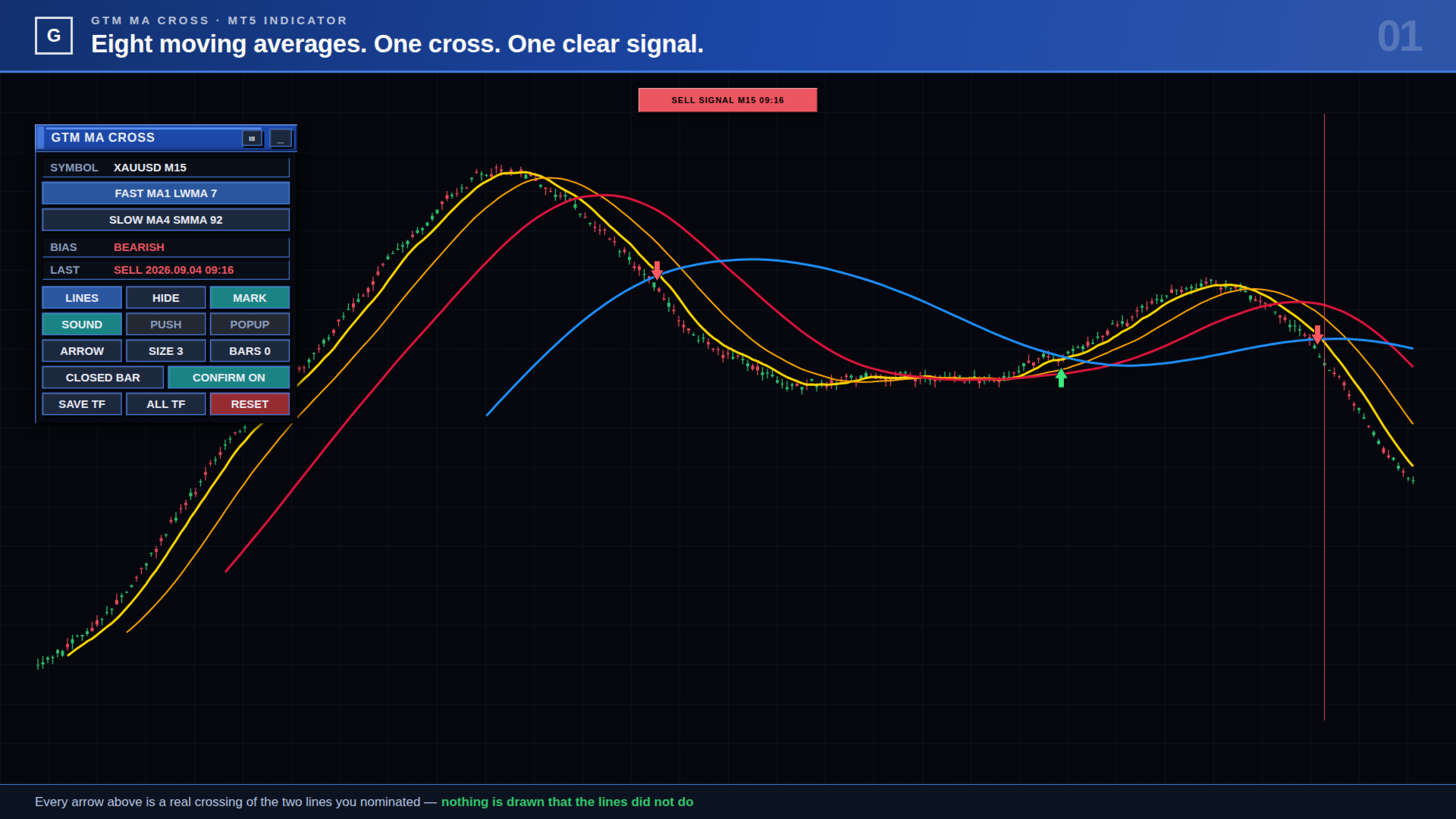
Tek grafikte sekiz hareketli ortalama, seçtiğiniz ikisi her kesiştiğinde bir BUY veya SELL oku ve girdi penceresini açmadan bunların hepsini değiştiren bir kontrol paneli.
Çoğu hareketli ortalama aracı size iki çizgi ve sabit bir kural verir. Bu araç sekiz çizgi verir, sinyali hangi ikisinin oluşturacağına sizin karar vermenizi sağlar ve fikrinizi grafikten değiştirmenize izin verir — periyot, yöntem, renk, kalınlık, kesik çizgi deseni, ok şekli, ok boyutu ve bir kesişimin sayılmadan önce ne kadar tutunması gerektiği.
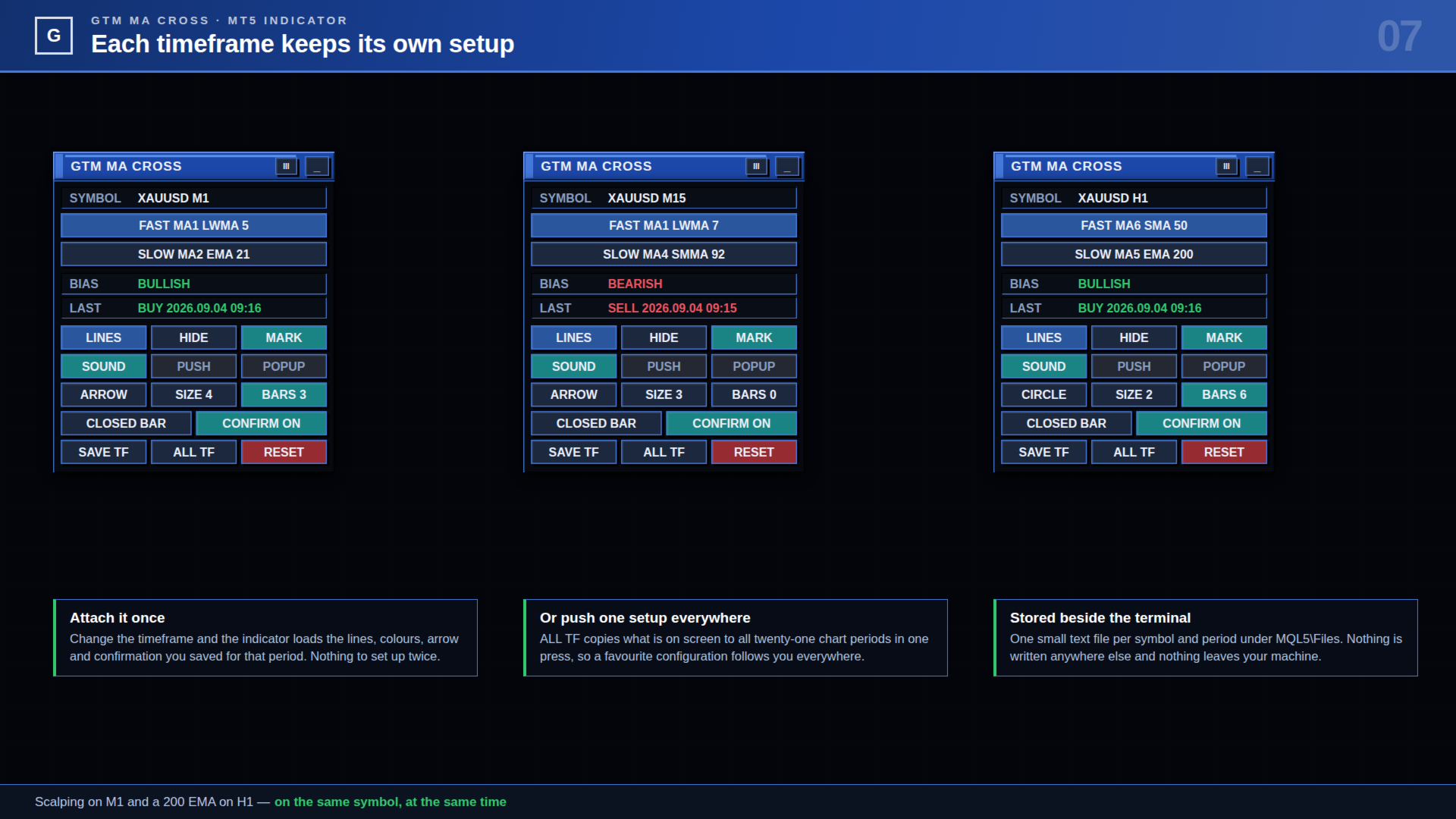
Her şey kaydedilir: sembol başına ve zaman dilimi başına. M1 grafiği büyük oklarla bir 5/21 çifti kullanabilir; aynı sembolün H1 grafiği sade noktalarla 50/200 kullanabilir. Periyodu değiştirin, doğru ayar da onunla gelir.
| ● Hiçbir şekilde hesap erişimi yok. Bu bir indikatördür. Grafiğe çizer ve uyarı verir. Emir açamaz, kapatamaz veya değiştiremez ve içinde ağ kodu yoktur — hiçbir yere hiçbir şey gönderilmez. |
Onunla gerçekte ne yaparsınız
Sinyali üreten çifti seçin
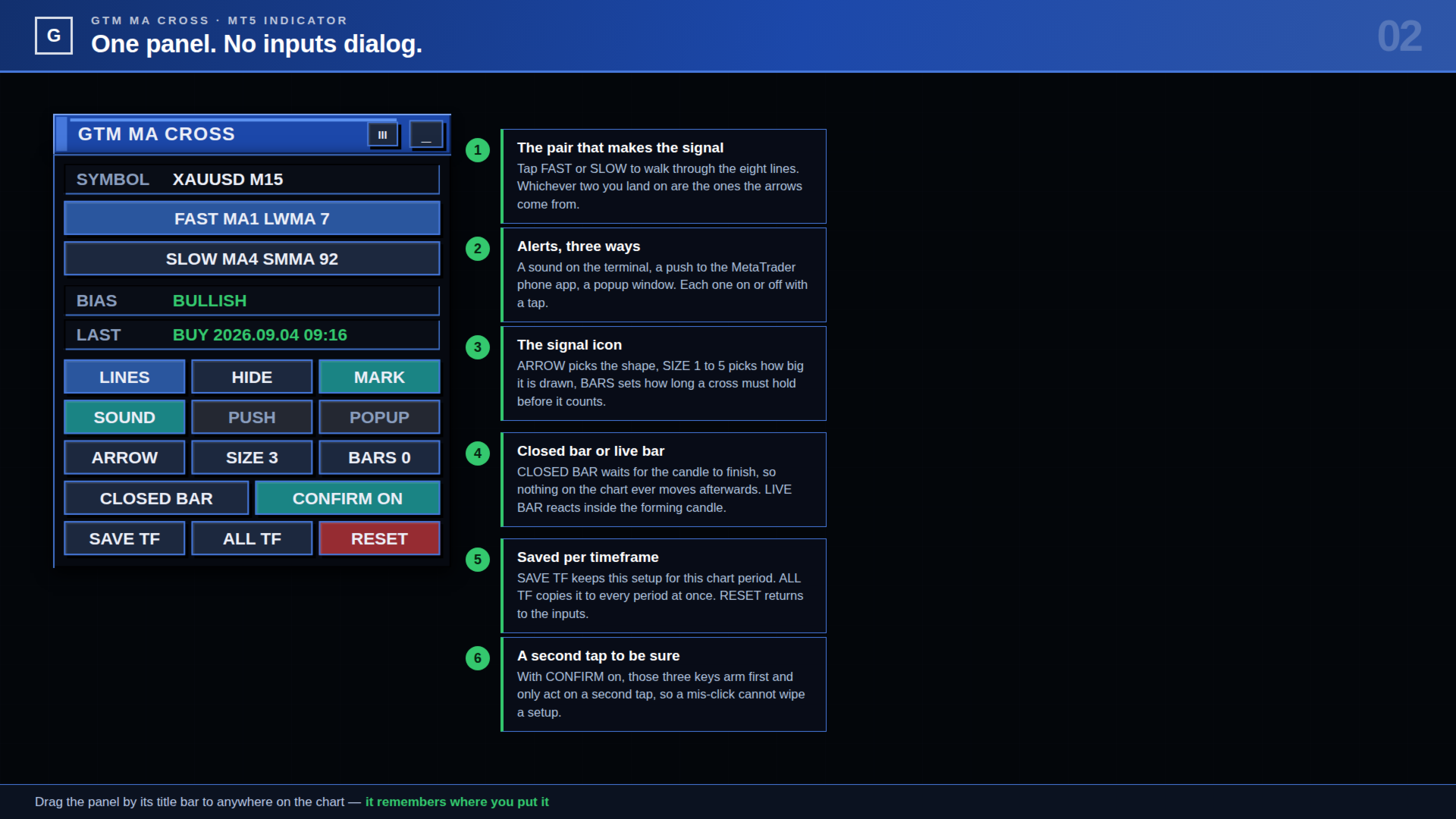
Sekiz çizgi arasında gezinmek için paneldeki FAST veya SLOW düğmesine dokunun. Hangi ikisinde durursanız oklar onlardan gelir. Diğer tüm çizgiler bağlam olarak grafikte kalır ve sinyale katılmaz. Bir çizgiyi çizgi editörünün içinden de SET FAST / SET SLOWile atayabilirsiniz.
Önce kesişimin kendini kanıtlamasını sağlayın
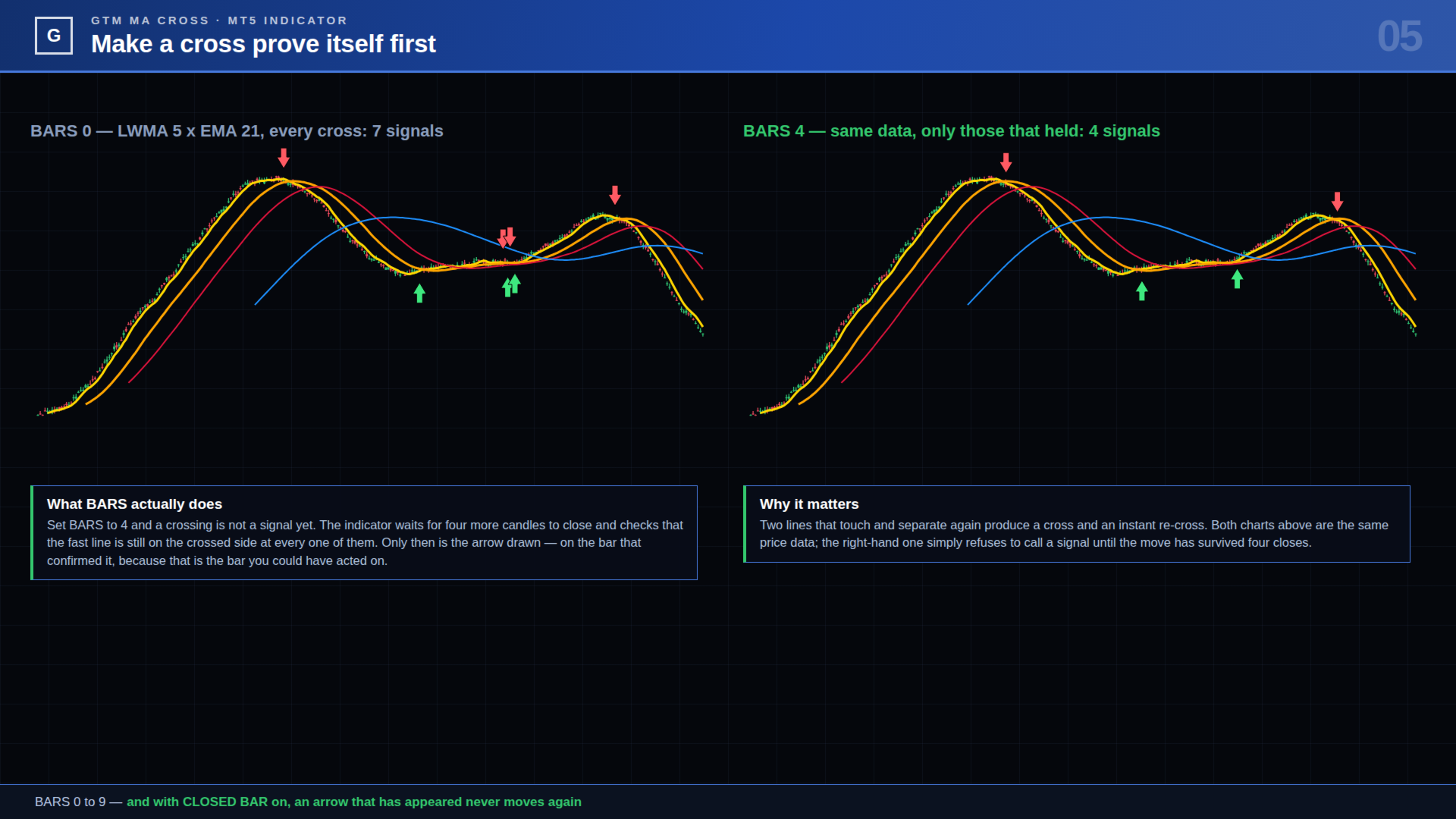
Birbirine dokunup yeniden ayrılan iki ortalama size bir kesişim ve anında bir geri kesişim verir. BARS tuşu 0'dan 9'a kadar bir onay sayısı belirler. BARS 4ile bir kesişim henüz sinyal değildir: indikatör dört mumun daha kapanmasını bekler ve hızlı çizginin her birinde kesişilen tarafta kalıp kalmadığını kontrol eder. Ancak o zaman ok çizilir — onu onaylayan barın üzerine, çünkü harekete geçebileceğiniz bar odur.
Sinyali aramadan görün
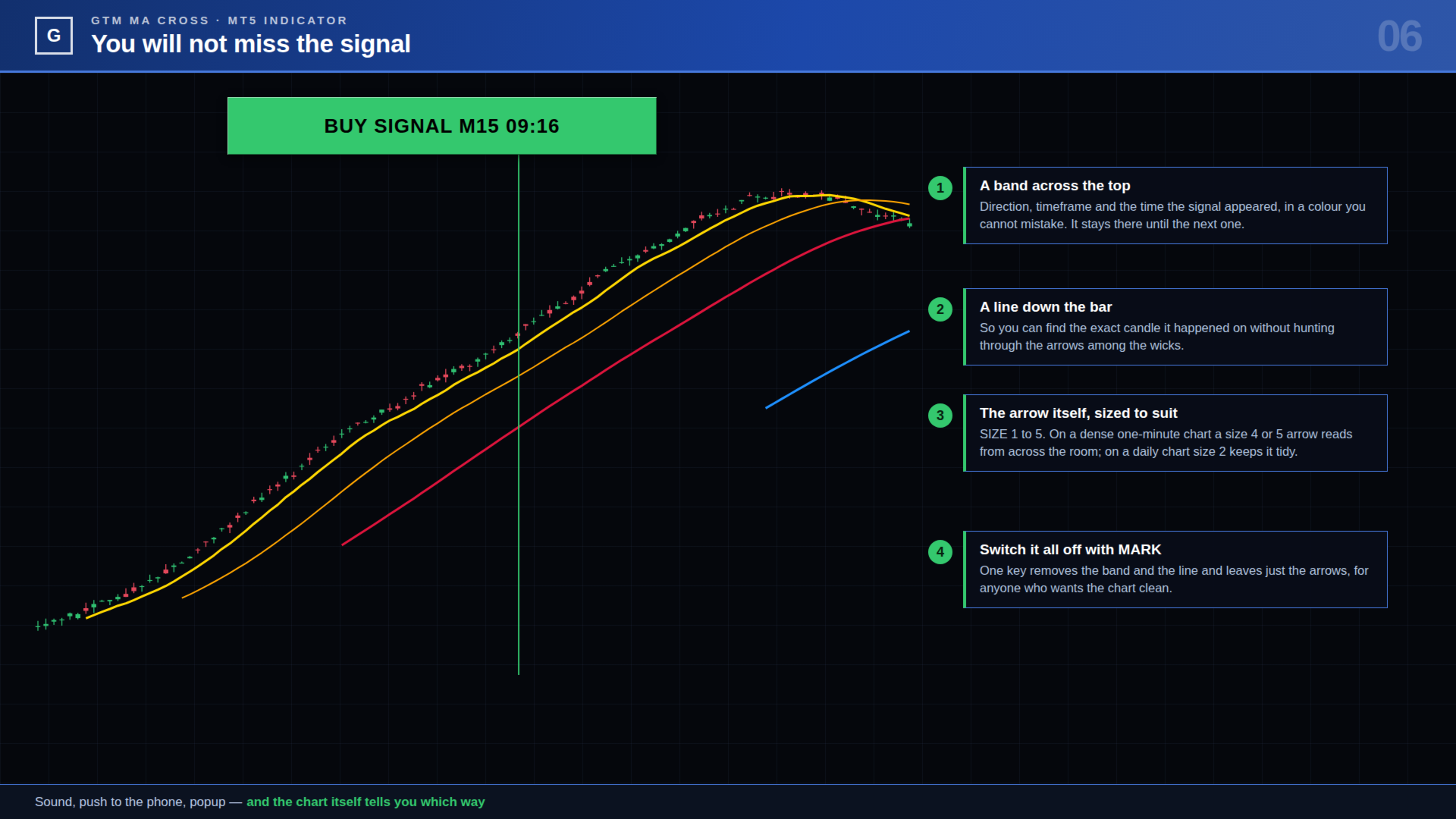
Oklar mumların arasında durur ve yoğun bir grafikte kolayca gözden kaçar. MARK açıkken bir sinyal ayrıca grafiğin üstüne renkli bir şerit koyar — yön, zaman dilimi ve oluştuğu saat — ve gerçekleştiği barın üzerine noktalı bir çizgi indirir. Tek bir tuş, grafiği temiz isteyenler için ikisini de kapatır.
Grafikten ayrılmadan bir çizgiyi değiştirin
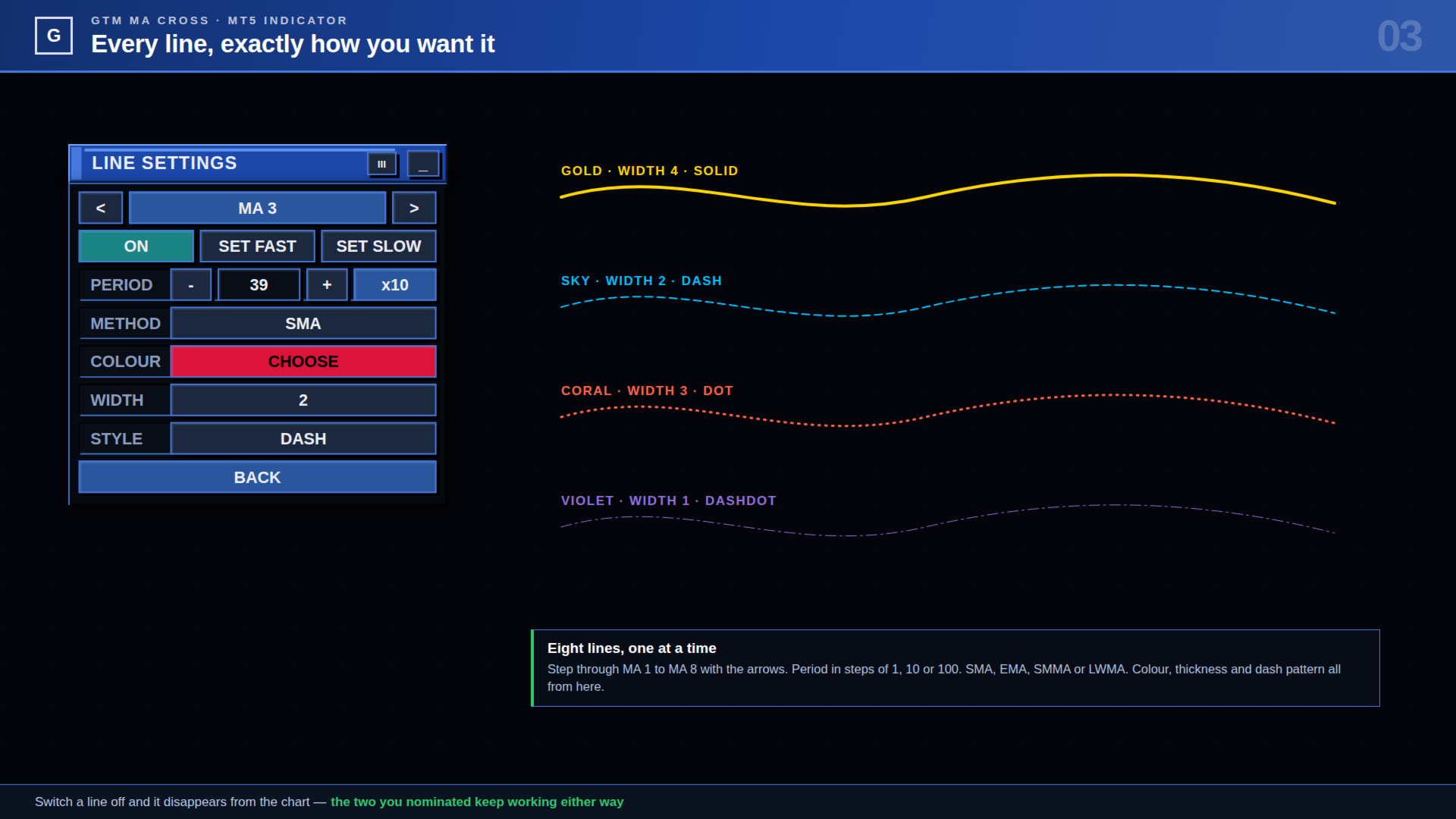
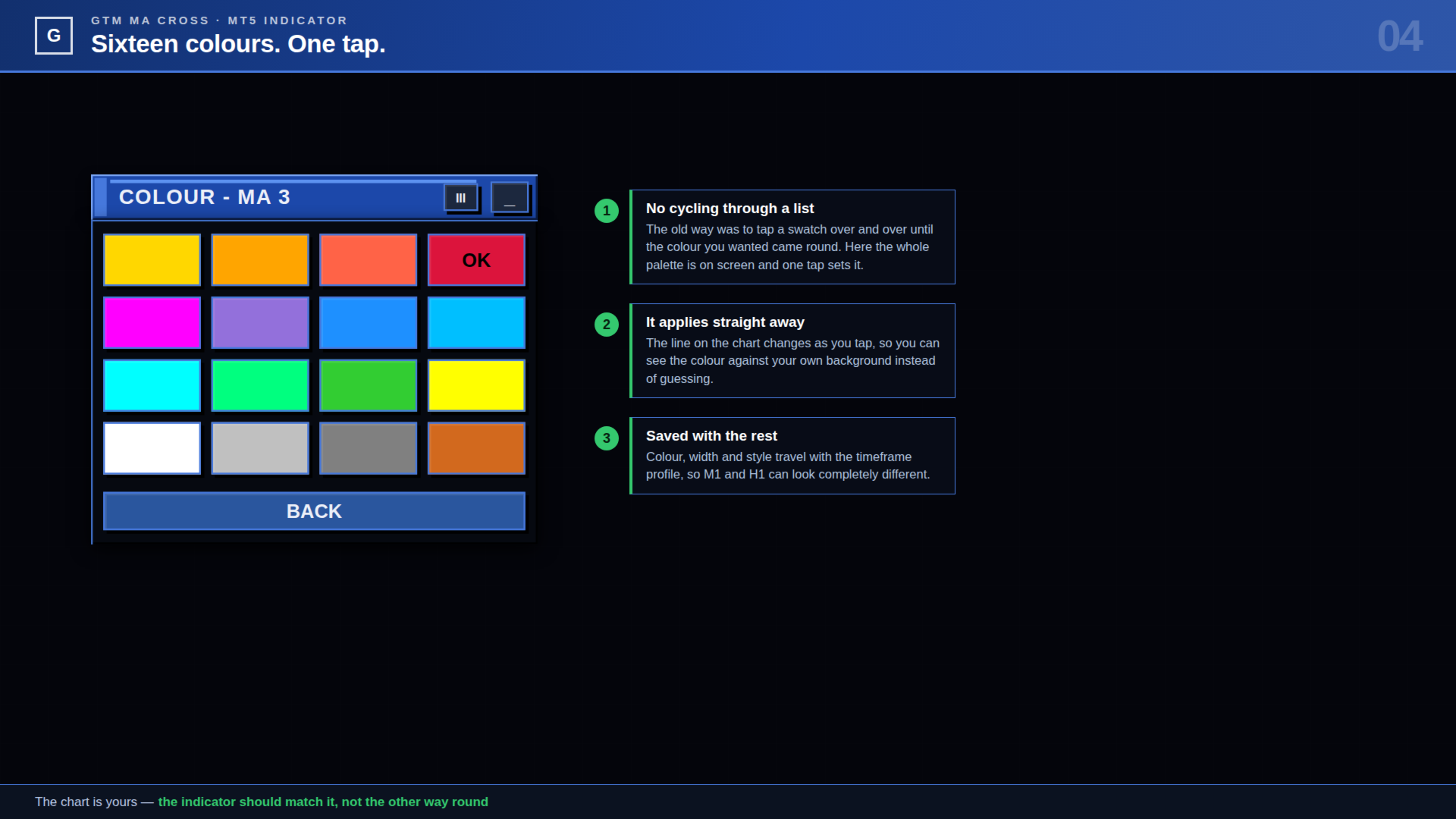
LINES editörü açar. MA 1'den MA 8'e gezinin, periyodu 1, 10 veya 100'lük adımlarla ayarlayın, SMA, EMA, SMMA ve LWMA arasında geçiş yapın, kalınlığı 1'den 5'e ve stili düz çizgiden kesik-nokta-noktaya kadar ayarlayın. Renk, on altı renk örneğinden oluşan bir ızgara açar — tek dokunuş, bitti, istediğinizi bulmak için listede dolaşmak yok. Grafik siz dokundukça güncellenir.
Her zaman diliminde farklı bir ayar tutun
SAVE TF bu sembol ve bu grafik periyodu için mevcut ayarı kaydeder. Periyodu değiştirin, o periyodun kendi ayarı yüklenir. ALL TF ekrandakini bir kerede yirmi bir grafik periyodunun tamamına kopyalar; tek bir yapılandırmanın sizi her yerde takip etmesini istediğinizde. RESET girdi penceresindeki değerlere döner. Üçü de harekete geçmeden önce ikinci bir dokunuş ister, CONFIRM kapalı değilse.
Paneli istediğiniz yere koyun
Başlık çubuğunu tutun ve sürükleyin. Konum ayarın geri kalanıyla birlikte kaydedilir. _ tuşu paneli başlık çubuğuna kadar katlar; başlık çubuğu bu durumda mevcut eğilimi tek başına gösterir.
Uyarılar
Panelde üç bağımsız anahtar:
- SOUND — terminalin Sounds klasöründen bir wav çalar. Girdilerde herhangi bir dosya adı ayarlanabilir.
- PUSH — MetaTrader mobil uygulamasına bildirim gönderir. MetaQuotes ID'nizin şurada girilmiş olması gerekir: Araçlar → Seçenekler → Bildirimler (Tools → Options → Notifications).
- POPUP — terminalin normal uyarı penceresi.
Her uyarı sembolü, zaman dilimini, saati, kesişen iki ortalamayı ve fiyatı belirtir. Sinyal başına bir kez tetiklenir ve indikatör yüklenirken geçmişte zaten bulunan sinyaller asla duyurulmaz.
Yeniden çizim (repaint)
| CLOSED BAR seçiliyken — varsayılan — bir kesişim yalnızca tamamlanmış mumlarda değerlendirilir. Beliren bir ok o barda kalır ve asla yer değiştirmez, uyarısı bir kez gönderilir. LIVE BAR tasarım gereği tersidir: oluşmakta olan mumun içinde tepki verir, bu yüzden fiyat hareket ettikçe bir ok belirip yeniden kaybolabilir. Mümkün olan en erken uyarıyı istiyorsanız ve bunun bedelini anlıyorsanız kullanın. |
Ne yapmaz
İndirmeden önce okumaya değer; size uygun olup olmadığını bilirsiniz.
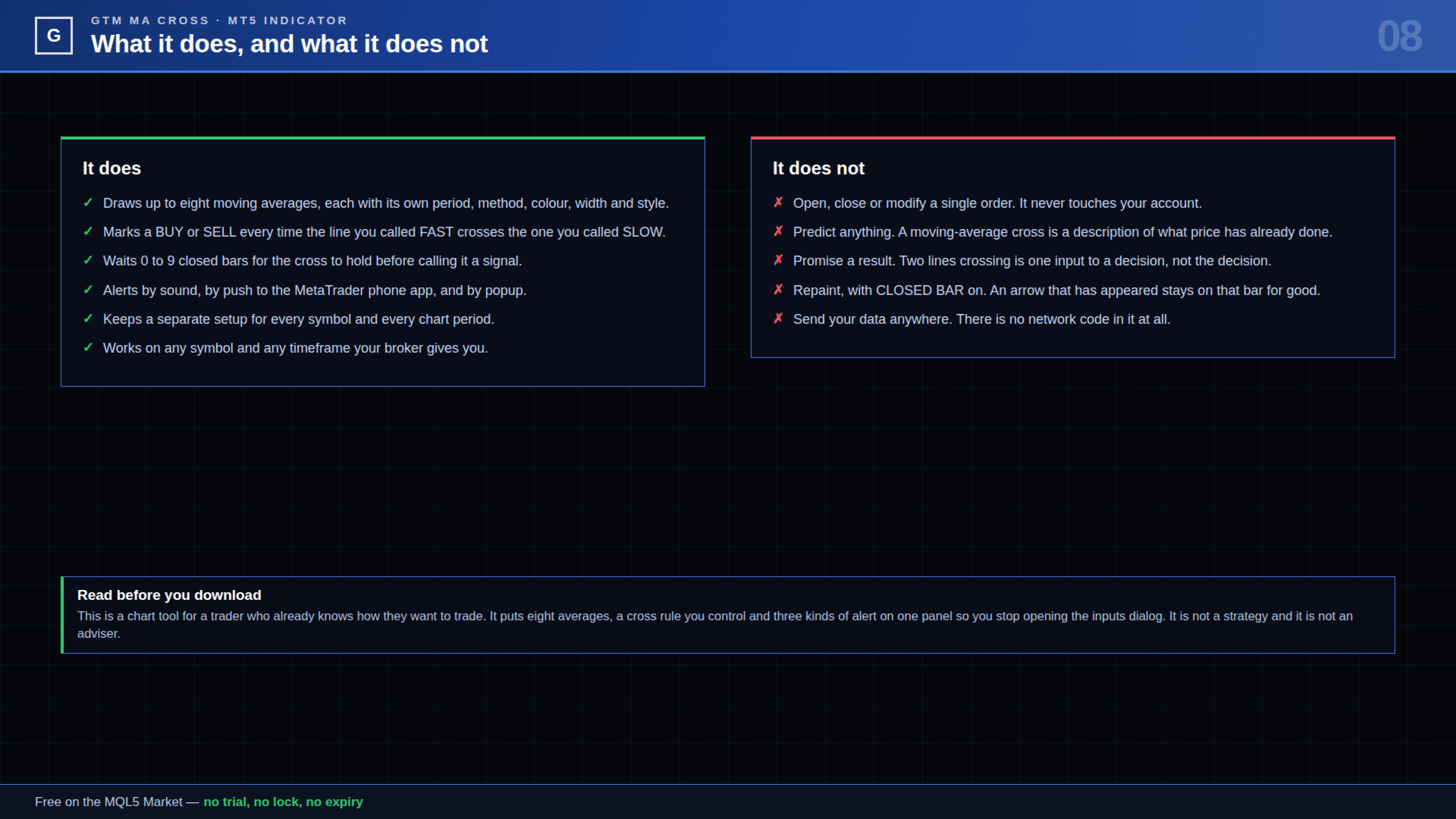
- İşlem yapmaz. Emir yok, değişiklik yok, hesap erişimi yok.
- Tahmin yapmaz. Bir hareketli ortalama kesişimi fiyatın zaten yaptığını tanımlar.
- Bir strateji değildir ve sonuçlar hakkında hiçbir iddiada bulunmaz. İki çizginin kesişmesi bir kararın girdilerinden biridir, kararın kendisi değil.
- Diğer sembolleri taramaz. Eklendiği grafikte çalışır.
- Hiçbir yere veri göndermez. İçinde ağ kodu yoktur.
Başlarken
- Herhangi bir grafiğe ekleyin. Varsayılan olarak dört ortalama açıktır — LWMA 7, SMA 19, SMA 39 ve SMMA 92 — MA 1 FAST, MA 4 SLOW olarak.
- İşlem yaptığınız çift görünene kadar FAST ve SLOW düğmelerine dokunun.
- LINES'ı açın ve istediğiniz periyotları, renkleri ve stilleri ayarlayın.
- Bir kesişimin sayılmadan önce tutunmasını istiyorsanız BARS 'ı, okların grafiğinizde okunaklı olması için SIZE'ı ayarlayın.
- İstediğiniz uyarıları açın, ardından SAVE TF'a basın — veya her periyotta aynı ayarı kullanmak için ALL TF 'a.
Girdi parametreleri
Genel
- Applied price (all lines) [Varsayılan: PRICE_CLOSE] — Her ortalamanın hesaplandığı fiyat.
- Bars to calculate [Varsayılan: 3000] — Çizgilerin ve okların ne kadar geriye çizildiği. 0 tüm mevcut geçmişi kullanır ve daha fazla CPU harcar.
- Remember settings per timeframe [Varsayılan: true] — Sembol ve periyot başına küçük bir dosyayı MQL5\Files altında kaydeder ve yükler. Kapalıysa her seferinde girdiler kullanılır.
Sinyal
- FAST line number (1-8) [Varsayılan: 1] — Sekiz ortalamadan hangisinin hızlı olduğu.
- SLOW line number (1-8) [Varsayılan: 4] — Hangisini kesmesi gerektiği.
- Signal only on a closed bar [Varsayılan: true] — Açık: mum kapanana kadar hiçbir şeye karar verilmez ve ok asla yer değiştirmez. Kapalı: oluşmakta olan mum da değerlendirilir.
- Confirmation bars after the cross [Varsayılan: 0] — 0 ile 9 arası. Ok çizilmeden önce hızlı çizginin kesişilen tarafta kaç kapanış daha kalması gerektiği.
- Banner + line on the chart at a signal [Varsayılan: true] — Üstteki renkli şerit ve sinyal barındaki noktalı çizgi.
- Arrow style (0-6) [Varsayılan: 0] — 0 ok, 1 ince ok, 2 içi boş ok, 3 nokta, 4 daire, 5 kare, 6 özel Wingdings kodları.
- Arrow size (1-5) [Varsayılan: 3] — Simgenin ne kadar büyük çizildiği.
- Arrow gap from the candle [Varsayılan: 15 puan] — Fitil ile simge arasındaki mesafe.
- BUY arrow colour [Varsayılan: SpringGreen]
- SELL arrow colour [Varsayılan: Tomato]
- CUSTOM style: up / down Wingdings code [Varsayılan: 233 / 234] — Yalnızca ok stili 6 olduğunda kullanılır.
Uyarılar
- Sound alert [Varsayılan: true]
- Sound file [Varsayılan: alert.wav] — Terminalin Sounds klasöründeki herhangi bir wav.
- Mobile push notification [Varsayılan: false] — Terminal seçeneklerinde ayarlanmış MetaQuotes ID'nizi gerektirir.
- Terminal popup alert [Varsayılan: false]
Panel
- Show the control panel [Varsayılan: true] — Kapalıyken çizgiler, oklar ve uyarılar grafikte paneli olmadan kalır.
- Ask before SAVE / ALL TF / RESET [Varsayılan: true] — Bu üç tuş ilk dokunuşta hazırlanır, ikincisinde çalışır.
- Panel X / Panel Y [Varsayılan: 12 / 22] — Başlangıç konumu. Paneli sürüklemek bunu geçersiz kılar ve yeni konum kaydedilir.
MA 1 ile MA 8 arası
Sekiz ortalamanın her birinin aynı altı girdisi vardır: açık, periyot, yöntem (SMA, EMA, SMMA, LWMA), renk, kalınlık 1-5 ve stil. Varsayılanlar: MA 1 LWMA 7 altın, MA 2 SMA 19 turuncu noktalı, MA 3 SMA 39 kızıl kesikli, MA 4 SMMA 92 mavi ve MA 5 ile MA 8 arası 144, 200, 50 ve 10'da kapalı.
FAST ve SLOW olarak atadığınız iki çizgi kapalı olsalar bile her zaman hesaplanır; böylece sinyali çizilmesini istemediğiniz bir çizgiden alabilirsiniz.
Notlar
- Aracı kurumunuzun sunduğu her sembolde ve her zaman diliminde çalışır.
- Ayar dosyaları şurada bulunur: MQL5\Files\GTM_MACross\, sembol ve periyot başına bir tane. Silmek her şeyi girdilere döndürür.
- Girdi penceresinde bir değeri değiştirirseniz, yeni değerin geçerli olması için o grafiğin kayıtlı profili silinir.
- Sorular ve istekler memnuniyetle karşılanır — profilim üzerinden mesaj gönderin, yanıtlarım.
| İşlemlerinizi elle yönetiyorsanız ve girişler, stoplar, hedefler ve kapanış için de aynı doğrudanlığı istiyorsanız, profilimdeki GTM Panel Pro'ya göz atın — dört bağımsız işlem grubu, dört bekleyen emir yuvası, tek tıkla başabaş ve trailing ve Telegram uzaktan kontrolü olan manuel bir işlem yöneticisi. |