Risk Assist MT5
- Yardımcı programlar
- Sürüm: 1.11
- Güncellendi: 30 Temmuz 2026
- Etkinleştirmeler: 20

Visual MT5 trade planner with draggable entry, SL and TP, risk sizing and order management.
## Full description
Risk Assistant MT5 is a manual trading utility for planning, sizing and managing orders directly on a MetaTrader 5 chart.
The utility does not generate trading signals and does not decide when to enter the market. The trader selects the direction, entry, stop loss, take profit and acceptable risk. Risk Assistant displays the planned trade, calculates the volume and sends the order only after the trader confirms it.
### Visual trade planning
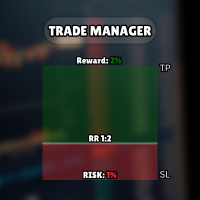
Entry, Stop Loss and Take Profit are displayed as draggable chart levels. The visual risk area shows the planned direction and the distance between the levels.
The level plates can be moved vertically to change their prices. The complete risk area can also be moved horizontally and resized to fit the chart layout.
Displayed values include:
- Entry, Stop Loss and Take Profit prices
- Calculated lot size
- Estimated money at risk
- Estimated target value
- Reward-to-risk relationship
- Current spread
### Risk-based position sizing
The lot size can be calculated from:
- Fixed money risk
- Percentage of account balance
- Percentage of account equity
- Percentage of free margin
- Fixed lot size
The calculation uses the symbol tick size, tick value, contract rules, minimum volume, maximum volume and volume step reported by the broker. An optional round-turn commission value can be included in the estimate.
If the calculated volume is below the broker minimum, the utility does not silently increase the risk by rounding the volume up.
### Reward-to-risk control
The RR control has two operating modes.
When RR lock is enabled, moving a linked level recalculates the opposite distance according to the selected reward-to-risk values.
When RR lock is disabled, the ratio can be applied once and Take Profit or Stop Loss can then be adjusted independently.
### Market and pending orders
Risk Assistant classifies the planned entry from its position relative to the current Bid and Ask prices.
Supported order types:
- Buy Market
- Sell Market
- Buy Limit
- Sell Limit
- Buy Stop
- Sell Stop
When the entry level is left in market-follow mode, it stays attached to the live market price. Moving the entry away from the market changes the preview to the corresponding pending-order type.
The utility checks the broker stop-distance rules, tick size, supported trade mode, available trading permissions and order parameters before sending a request. `OrderCheck` is performed before `OrderSend`.
### Position and order management
Optional management functions include:
- Breakeven with a numeric trigger and profit offset
- Numeric trailing stop with start, distance and step
- Three configurable partial-exit levels measured in initial R
- OCO handling for related pending orders
- Pending-order trailing that moves Entry, SL and TP together
- Optional virtual Stop Loss and virtual Take Profit
- Closing Buy, Sell, profitable, losing or all managed positions
- Deleting Stop, Limit or all managed pending orders
All automation functions are disabled by default. They are enabled only after the trader configures and confirms them.
Virtual protection and active management require MetaTrader 5, the Expert Advisor and the trading connection to remain online.
### Account overview
The Info page displays:
- Balance
- Equity
- Floating profit or loss
- Closed profit or loss for the broker server day
- Net result for the current day
- Current and daily drawdown
- Total closed trading result available in account history
Deposits and withdrawals are excluded from the trading result calculations.
### Operation alongside other Expert Advisors
Risk Assistant uses its own Magic Number and limits management to its own symbol and Magic Number by default.
Optional inputs allow a trader to widen the management scope. These options should be enabled only when intentionally managing other positions or orders.
On netting accounts, the utility refuses to add exposure when a position from another Magic Number already exists on the same symbol, unless management of all Magic Numbers is explicitly enabled.
An instance lock helps prevent two copies with the same account, symbol and Magic Number scope from managing the same trades at the same time.
### State recovery
Panel position, visual levels, enabled management settings and position-management data are stored in terminal Global Variables. The utility restores this state after a chart refresh or MetaTrader 5 restart.
### Quick start
1. Attach Risk Assistant MT5 to a chart.
2. Enable Algo Trading.
3. Select risk-based sizing or a fixed lot.
4. Set the acceptable risk value.
5. Move Entry, Stop Loss and Take Profit on the chart.
6. Review the order type, lot size, estimated risk and prices.
7. Press Buy or Sell to send the confirmed order.
After a position is opened, the planning area is hidden so the active position remains clear. Press Lines on when a new plan is required on the same chart.
### Important notes
Risk Assistant is an execution and risk-management utility, not a trading strategy or signal service.
Calculated values depend on the symbol specifications and prices supplied by the connected broker. Slippage, gaps, execution mode, commissions, swaps and connection conditions can affect the final result.
No software can guarantee trading performance or prevent every loss. Test the utility on a demo account and verify the settings for each broker and symbol before using it on a live account.