ModelSR Gold Pro
- Göstergeler
- Sürüm: 2.0
- Etkinleştirmeler: 12

Model S/R + Rotation + Sessions
One overlay. Three engines. No repaint Indicator
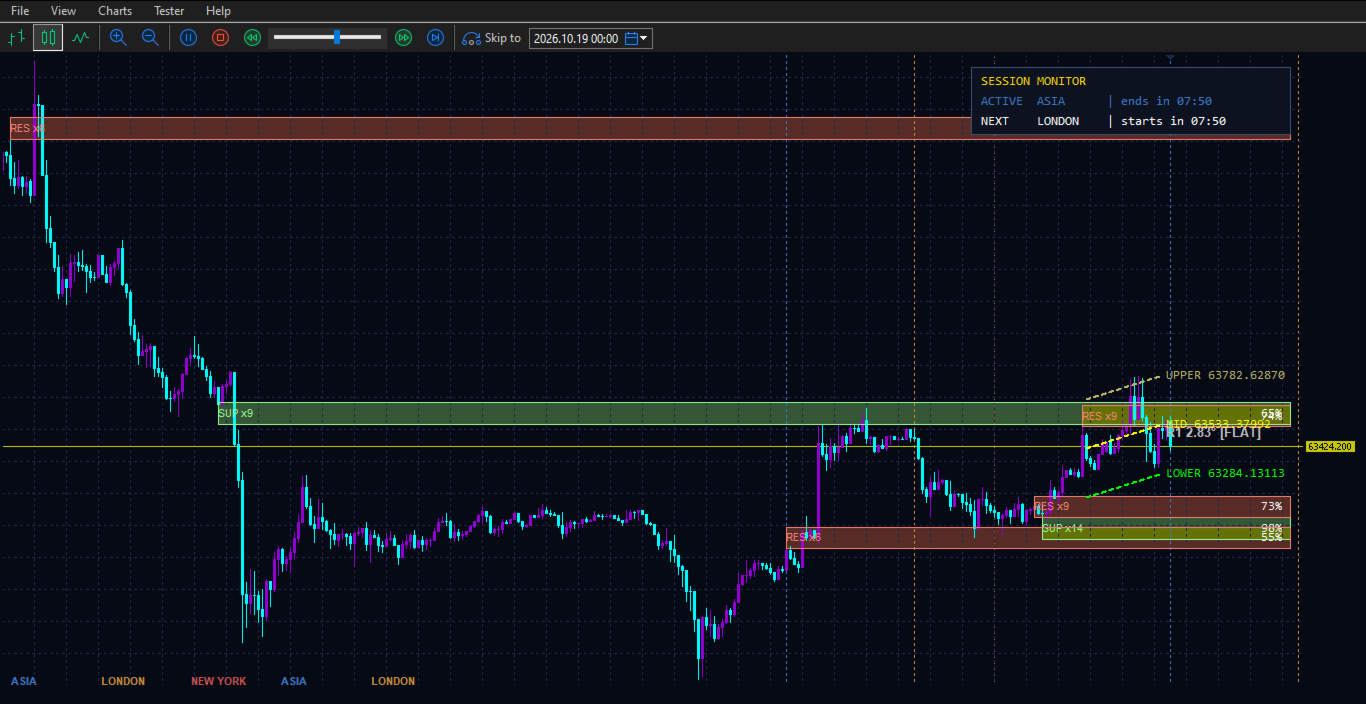
A professional analytical indicator that combines historical Support/Resistance with strength scoring, a rotation trend channel with live angle readout, and a session engine with countdown monitor — all rendered natively on the MT5 chart with zero external dependencies.
What It Does
| Engine | Output |
|---|---|
| S/R Engine | Auto-detected historical bands, colour-coded (RES/SUP), tagged xN touches and strength % (0–100). Strongest bands sorted first. |
| Rotation Channel (R1) | Three parallel lines (upper/middle/lower) fitted to recent swing pivots, plus a live degree readout: FLAT , UP , UP-STEEP , DOWN , DOWN-STEEP . |
| Session Engine | Vertical boundary lines for Asia / London / New York (full names, not abbreviated), pinned to fixed screen position. Top-right Session Monitor panel with active session + countdown + next session. |
Non-repainting. Recalculated on new-bar close. Reads OHLC only.
Who It's For
-
Scalpers (M1–M5) — band-to-band reactions inside the active session
-
Intraday traders (M15–H1) — sweet spot; confluence of S/R + rotation
-
Swing traders (H4–D1) — multi-session levels + directional bias
-
Session traders — London/NY open, Asia range breaks, with live countdown
-
Prop-firm traders — discipline around news windows and session cut-offs
-
Beginners — colour-coded trend tag and strength % turn the chart readable instantly
Not a signal service. A decision-support overlay.
Suitability
| Dimension | Recommendation |
|---|---|
| Primary instrument | XAUUSD (Gold) — primary design target; also XAGUSD, XPTUSD |
| Secondary | Major FX (EURUSD, GBPUSD, USDJPY, AUDUSD), indices (US30, NAS100, GER40), BTC/ETH CFDs |
| Timeframes | All — M1 to MN1. Optimal: M15–H1 |
| Brokers | All MT5 brokers — ECN, STP, market maker, raw-spread, cent. Zero broker-specific config |
| Platform | MetaTrader 5 only |
| Dependencies | None. No DLLs, no libraries, no external feeds |
Broker note: All session hour inputs are in broker server time. Set InpAsiaStartHour , InpLondonStartHour , InpNewYorkStartHour to match your broker's offset (defaults assume GMT+2/+3).
How to Use - Three Core Setups
A — Rotation + S/R Confluence (trend continuation)
R1 shows UP / UP-STEEP → price pulls back to a support band with strength ≥ 70 % → entry on bullish reversal, stop below band, target upper channel line or next resistance band.
B — FLAT Rotation, Band-to-Band Scalping
R1 shows FLAT → buy at support band, sell at resistance band → stop just outside, target the opposite band.
C — Session Breakout
Mark Asia high/low with session lines → wait for London open → trade the break in the direction of the R1 tag (UP = long break, DOWN = short break) → stop on opposite side of Asia range.
Session Monitor — Read At A Glance
┌──────────────────────────────────────┐ │ SESSION MONITOR │ │ ACTIVE LONDON | ends in 02:47 │ │ NEXT NEW YORK | starts in 00:13 │ └──────────────────────────────────────┘
-
Updates once per minute — visually stable, no flashing
-
Auto-resets at broker midnight
-
Active session colour-coded to match its boundary line
Configuration Highlights
| Input | Default | Tuning |
|---|---|---|
| InpSR_Lookback | 600 | M1 ≈ 10 hrs · H1 ≈ 10 days · Increase to 800–1200 on H4–D1 |
| InpSR_BandATR | 0.35 | Raise to 0.45 on noisier feeds |
| InpCandleCount | 20 | Ideal on M5–H1; increase to 30–40 on H4+ |
| InpSR_MinTouches | 3 | Raise to 4–5 for stricter, fewer bands |
| Session hours | GMT+2/+3 | Must match broker server time |
What It Does Not Do
-
Does not place, manage, or close trades
-
Does not repaint — all levels and geometry locked on bar close
-
Does not predict news — pair with a news filter if scalping high-impact events
-
Does not guarantee profits — analytical overlay; risk management remains yours
Quick-Start
-
Attach to XAUUSD M15
-
Verify session hours match broker server time
-
Wait ~30 s for S/R scan (last 600 bars)
-
Identify the 2–3 strongest bands (highest %)
-
Read the R1 tag for directional bias
-
Check Session Monitor for active session + time left
-
Apply your entry trigger at a band, in the direction of the R1 tag, within the active session
-
Manage risk normally