Telegram To MT5 Easy

elegram to MT5 Professional Copier

Telegram to MT5 Professional Copier is a complete Expert Advisor designed to receive trading signals and management commands from a private Telegram channel and execute them directly on MetaTrader 5.

The EA connects directly to the Telegram Bot API. No Python bridge, DLL, third-party copier, or additional application is required.

Main Features

  • Direct Telegram-to-MT5 connection
  • Supports private Telegram channels
  • Exact channel-ID verification
  • Automatic BUY and SELL execution
  • Fixed-lot or risk-percentage money management
  • Selectable TP1, TP1–TP2, or TP1–TP2–TP3 execution
  • Separate position for each selected take-profit
  • Automatic market and pending-order handling
  • Broker-symbol suffix support
  • Configurable slippage
  • Time and weekday filters
  • Automatic break-even management
  • Optional trailing stop
  • Telegram execution confirmations
  • Detailed failure and broker-rejection messages
  • Remote position management through Telegram
  • Professional dashboard and clean chart appearance
  • Duplicate Telegram message protection
  • Customizable Telegram command phrases

Supported Signal Format

The EA supports signals formatted as follows:

XAUUSD BUY Entry: 4296.889 SL: 4286.090 TP1: 4304.448 TP2: 4312.007 TP3: 4319.566

SELL signals use the same structure.

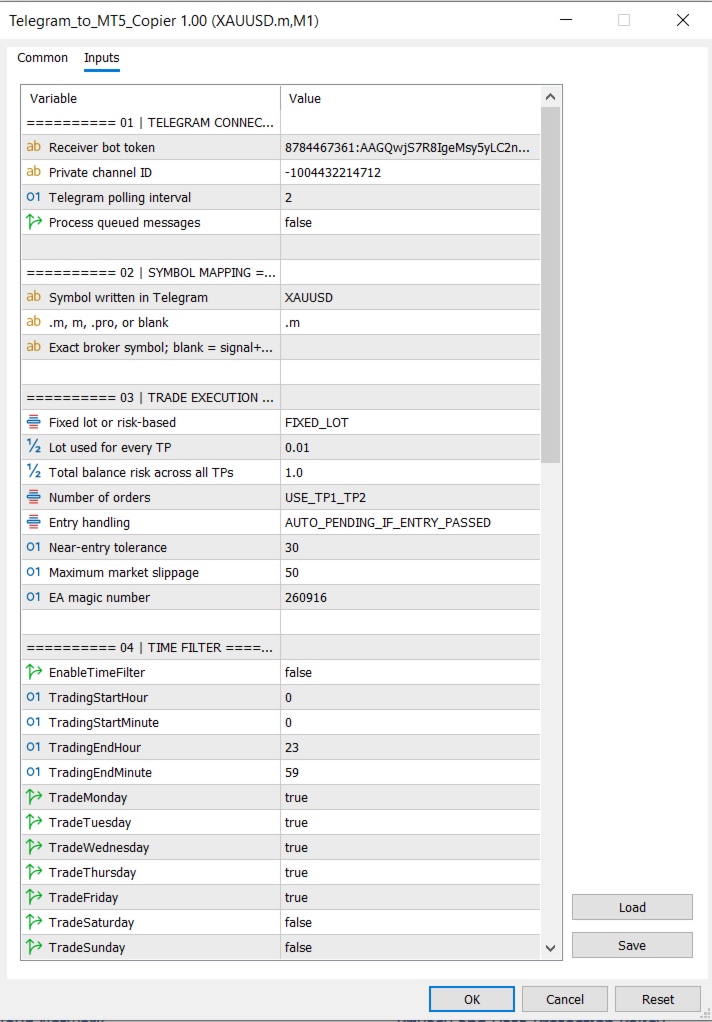
The number of take-profit orders is selected from the EA inputs. Every selected TP uses the configured lot-sizing method.

Intelligent Entry Handling

The EA provides three entry modes:

  • Open immediately at market
  • Automatically place a pending order if the signal entry has already been passed
  • Always place the order at the exact signal entry

When automatic entry handling is selected, the EA determines whether a Limit or Stop order is required based on the current market price.

This prevents the EA from chasing a signal after price has moved too far from its original entry.

Symbol Mapping

Telegram and broker symbols can be mapped automatically.

Example:

Telegram symbol: XAUUSD
Broker suffix: .m
Broker symbol: XAUUSD.m

The suffix can be changed or removed. An exact broker-symbol override is also available.

Lot-Sizing Modes

Two lot-sizing methods are available:

Fixed Lot

Every selected TP position uses the configured fixed lot.

Risk Percentage

The EA calculates the lot size using:

  • Account balance
  • Entry price
  • Stop-loss distance
  • Broker contract specifications
  • Minimum and maximum volume
  • Volume step

The selected risk percentage represents the total risk across all TP positions.

Automatic Stop-Loss Management

The break-even dropdown provides four modes:

  • Disabled
  • Move SL to Entry when TP1 is reached
  • Move SL to TP1 when TP2 is reached
  • Apply both rules progressively

Each Telegram signal stores its own TP levels, allowing the EA to manage multiple signals independently.

Optional Trailing Stop

The trailing stop is disabled by default and provides configurable:

  • Activation distance
  • Trailing distance
  • Trailing step

Time Filter

The optional time filter uses MetaTrader broker/server time and includes:

  • Start hour and minute
  • End hour and minute
  • Individual weekday controls
  • Overnight-session support

The time filter affects new signals only. Existing trade management and Telegram commands remain active.

Telegram Remote Commands

The EA can manage trades directly from the configured private Telegram channel.

Default commands include:

bot help bot status bot stop bot resume bot move sl bot sl to 4220 bot tp1 to 4300 bot tp2 to 4310 bot close half bot close all bot close buy bot close sell bot cancel pending

The prices shown above are examples. Any valid price can be entered.

All command phrases are customizable from the EA inputs.

Remote Order Execution

Market orders can be opened using:

bot buy
bot sell

An order can be placed at a specific price:

bot buy 4296.889 bot sell 4310.000

The EA automatically determines whether a Limit or Stop order is required.

Explicit Limit orders are also supported:

bot buy limit 4296.889
bot sell limit 4310.000

Optional SL and TP values can be included:

bot buy limit 4296.889 sl 4286.090 tp 4304.448 bot sell limit 4310.000 sl 4320.000 tp 4300.000

If risk-percentage lot sizing is selected, an SL must be included so the EA can calculate the correct volume.

Telegram Notifications

The EA sends confirmation messages containing:

  • Market or pending execution
  • BUY or SELL direction
  • Broker symbol
  • MT5 order ticket
  • Lot size
  • Entry price
  • Stop-loss
  • Take-profit
  • Number of accepted orders

If execution fails, the EA sends the actual MT5 rejection reason, including:

  • Market closed
  • Invalid price
  • Invalid stops
  • Insufficient margin
  • Missing signal value
  • Symbol mismatch
  • Disabled direction
  • Time-filter restriction
  • EA stopped
  • Lot-calculation failure

Professional Dashboard

The on-chart dashboard displays:

  • EA status
  • Telegram channel ID
  • Signal-to-broker symbol mapping
  • Lot-sizing method
  • Number of TP orders
  • Entry mode
  • Time-filter status
  • Break-even mode
  • Trailing-stop status
  • Slippage
  • Open and pending order counts
  • Floating profit or loss
  • Last received signal
  • Last EA action

The EA also applies a clean chart layout with:

  • White background
  • Blue bullish candles
  • Red bearish candles
  • Hidden chart grid

Installation

  1. Create a Telegram bot using BotFather.
  2. Add the bot as an administrator in the private signal channel.
  3. Copy the bot token and private channel ID.
  4. In MetaTrader 5, open:
Tools → Options → Expert Advisors
  1. Enable WebRequest and add:

https://api.telegram.org

  1. Attach the EA to the broker-symbol chart.
  2. Enter the Telegram bot token and private channel ID.
  3. Enable Algo Trading.

Important Information

  • A separate receiver bot is recommended.
  • The Telegram bot must be an administrator in the private channel.
  • A hedging account is required to maintain separate TP1, TP2, and TP3 positions.
  • On a netting account, multiple positions for the same symbol may be combined.
  • MetaTrader 5 must remain connected and running.
  • Telegram signals and a Telegram channel are not included with the product.
  • The EA executes instructions received through Telegram; it does not generate trading signals.
  • Correct signal formatting and valid broker prices remain the user’s responsibility.
  • Trading involves financial risk. This product does not guarantee profits or prevent losses

Önerilen ürünler
MT5 işlemlerinin açılması, kapanması, kısmi kapanması ve değiştirilmesi hakkında gerçek zamanlı bildirimleri Discord’a otomatik olarak gönderir. Araç 16 dili destekler : İngilizce, Fransızca, Almanca, Hintçe (Hindi), Endonezce, İtalyanca, Kazakça, Korece, Felemenkçe, Lehçe, Portekizce, Rusça, İspanyolca, Türkçe, Ukraynaca ve Vietnamca. Bildirim metnini özelleştirerek başka herhangi bir dili de kullanabilirsiniz. Ürün, terminali sürekli izlemek zorunda kalmadan Discord bildirimleri almak isteyen
FREE
MT5 işlemlerinin açılması, kapanması, kısmi kapanması ve değiştirilmesi hakkında gerçek zamanlı bildirimleri Slack’a otomatik olarak gönderir. Araç 16 dili destekler : İngilizce, Fransızca, Almanca, Hintçe (Hindi), Endonezce, İtalyanca, Kazakça, Korece, Felemenkçe, Lehçe, Portekizce, Rusça, İspanyolca, Türkçe, Ukraynaca ve Vietnamca. Bildirim metnini özelleştirerek başka herhangi bir dili de kullanabilirsiniz. Ürün, terminali sürekli izlemek zorunda kalmadan Slack bildirimleri almak isteyen yat
FREE
ZF Equity Protector Premium v2.0 The Ultimate Daily Loss Breaker for Smart Traders & Prop Firm Hunters Have you ever blown a Prop Firm account just because of "one bad day"? Or has emotional revenge trading destroyed weeks of hard-earned profits in a matter of hours? Put an end to account destruction right now. ZF Equity Protector Premium v2.0 is an advanced automated safety system (EA) specifically engineered to be your capital's ultimate line of defense. This EA acts as a cold, calculated circ
BossFXTradePanelEA (MT5)  [First 10 copies sold at 50 USD price will increase to 99USD] BossFXTradePanelEA is a fully interactive trade management panel designed for MetaTrader 5, providing traders with an easy-to-use, one-click interface to execute and manage trades. This EA simplifies trade execution , risk management, and position control by combining market orders, stop loss, take profit, trailing stops, and breakeven functionalities into a single, intuitive panel.  Key features include: On
Product Name: Anchor auto TP and SL Trade Manager Pro MT5 The ultimate manual assistant. Turns trades into auto-grids with Hedging, Zero-Loss Breakeven & Spread Detection. Your manual trade will be managed automatically. Anchor Auto TP and SL Trade Manager MT5 Pro is the advanced edition of our popular trade assistant. It transforms simple manual trades into sophisticated, professional-grade recovery grids. Unlike the free version, this PRO edition fully supports Hedging (simultaneous Buy & Sell
Grid Trading EA is a semi-automated one-click trading EA for both Normal Trading and Grid/Martingale Trading . Normal Trading Simply click Buy or Sell directly from the chart. The EA will automatically manage trades by: Setting Stop Loss and Take Profit Managing Trailing Stop Grid / Martingale Trading (For Hedging Account Type Only) When Grid Trading mode is enabled, the EA will automatically open additional grid orders at specified distances while increasing the lot size based on your settings.
Auto SL & TP for Manual Trades – MT5 Application Overview Auto SL & TP for Manual Trades is a simple and practical Expert Advisor for the MetaTrader 5 platform that automatically applies Stop Loss and Take Profit levels to manually opened trades as well as pending orders. The EA is designed primarily for traders who execute trades manually but want the assurance that every position is immediately protected with predefined Stop Loss and Take Profit levels. The Expert Advisor works in points and
Prop Firm Shield Full
Pablo Adolfo Cantos
Prop Firm Shield is a risk management panel for MetaTrader 5, built for prop firm traders who need control over their daily limits. You configure each limit and the tool watches the account around the clock, acting automatically when a limit is reached: closing positions, deleting pending orders and blocking new trading until the next day. Features: - Daily Take Profit - three modes: fixed USD, percent of the day-start balance, or target balance - Daily Stop Loss - three modes: fixed USD, percen
Advanced Multi Strategy EA Precision. Intelligence. Control. Advanced Multi Strategy EA is a fully automated trading system designed to provide flexibility, structured decision-making, and precise control over strategy execution. It integrates Smart Money Concepts (ICT), traditional technical indicators, and adaptive market logic into a single configurable environment. Core Concept This EA uses a multi-layer analysis process before executing trades. Instead of relying on a single signal, it eva
justEnter is a semi-automatic trade management utility for MetaTrader 5. You choose the entry; the utility calculates position size, places the stop loss, and manages the position through breakeven, partial closes and trailing until exit. For traders following signals If you take your entries from a signal service, a mentor, or your own alerts, the entry decision is already made by the time you open the terminal. What remains is execution: sizing the position correctly, placing the stop, moving
Take Control of Your Risk with ZenEntry ZenEntry is a premium, interactive graphical panel designed for MetaTrader 5 that eliminates manual lot-size calculations. By syncing live chart lines directly with a beautiful HUD, ZenEntry allows you to execute mathematically perfect, risk-managed trades in milliseconds. Whether you risk a fixed dollar amount or a percentage of your account equity, ZenEntry automatically shifts your lot sizing dynamically as you drag your Stop Loss and Take Profit lin
UTrailingMinMT5
Viktor Shpakovskiy
The EA for manual trading to manage open positions.The built-in trailing stop has five modes and seven instruments. There is a virtual stop loss and a virtual take profit, which can be freely moved around the chart. With the help of the built-in trading simulator, you can check how the EA works in the strategy tester. Guide to UTrailingMinMT5 can be found in the "Comments" section. In the MT5 strategy tester, manual movement of virtual SL and TP lines according to the schedule does not work! Ben
Account Risk Hedge Bot                                                                                  ...hedge your trades with confidence. Safeguard Your Investments with Account Risk Hedge Bot, stay ahead of market volatility with our cutting-edge risk management solution. Account Risk Hedge Bot is designed to safeguard your investments with automated precision, helping you navigate market uncertainty, ensuring you minimize losses and maximize returns. Note: Account Risk Hedge Bot does
Free automatic Fibonacci is an indicator that automatically plots a Fibonacci retracement based on the number of bars you select on the BarsToScan setting in the indicator. The Fibonacci is automatically updated in real time as new highest and lowest values appears amongst the selected bars. You can select which level values to be displayed in the indicator settings. You can also select the color of the levels thus enabling the trader to be able to attach the indicator several times with differe
FREE
Fvg Edge
Ahmad Meftah Abdulsalam Alawwami
5 (3)
FVG Smart Zones – Ücretsiz Sürüm MetaTrader 5 (MT5) için Adil Değer Boşlukları (FVG) Algılama Göstergesi Sadece başka bir rastgele gösterge değil, gerçek bir ticaret aracı mı arıyorsunuz? FVG Smart Zones – Ücretsiz Sürüm , Adil Değer Boşluklarını (FVG) otomatik olarak algılar ve grafiğinizde yüksek olasılıklı ticaret bölgelerini vurgulayarak profesyonel piyasa içgörüsü sağlar. Bu gösterge şu traderlar için tasarlanmıştır: Akıllı Para Konseptleri (SMC) ICT Ticaret Konseptleri Fiyat H
FREE
FX Auto Risk Management TP SL and Out Stop v3.10 Strengths of the Script 1. Comprehensive Risk Management Automated Take Profit and Stop Loss   with customizable percentage-based settings Trailing Stop   with two adjustable modes (Normal and Aggressive) Stop Out   based on floating loss/profit percentage 2. Advanced Features Multi-mode trailing stop   with different parameters for each mode Slippage control   for more realistic order execution API request limit   to prevent server overload 3.
CycleMind Pro MT5
Muhammad Abdulrahman Omar Naima Allah Al-rais
Tek sembollü döngüsel işlem için profesyonel Expert Advisor Money Management düğmesi ve katı güvenlik kuralları ile Genel Bakış Bu Expert Advisor iki ayrı sürüm olarak sunulmaktadır: MetaTrader 4 (MT4) sürümü MetaTrader 5 (MT5) sürümü Her sürüm, ilgili platformun kendi bölümünde ayrı ayrı yayınlanmıştır. Aynı işlem konsepti ve mantığı her iki sürümde de kullanılmaktadır ve bu açıklama hem MT4 hem de MT5 sürümleri için geçerlidir . EA, yalnızca tek bir grafik ve tek bir sembol üzerinde çalışaca
**Bneu Trade Copier Pro** is a trade copying utility for MetaTrader 5 that enables copying trades from a master account to multiple slave accounts. The utility supports various lot sizing methods, symbol mapping, trade filtering, and provides a monitoring dashboard. **Main Features** **Master/Slave Architecture** - Configure as Master account to broadcast trade signals - Configure as Slave account to receive and execute trades - Support for up to 50 slave accounts per master - File-based sign
Online Accounts Manager MT5
Kyra Nickaline Watson-gordon
5 (1)
OneClick Online Account Manager is a powerful utility that helps you to manage all your accounts from a centralized panel. It is suitable for all single account traders and specially for multiple accounts traders. The utility help you to : Monitor status of all accounts on a private web page. Some information such as account connection status, account profit, DD, Balance, Equity, Margin Level, Number of positions and orders, Daily and Weekly profit/loss and also overall summation of all these p
EA Name: Advanced Manual Trading Panel with Martingale & Risk Management Platform: MetaTrader 5 Description The Advanced Manual Trading Panel is a powerful and intuitive Expert Advisor designed for traders who want full control over their trading operations combined with automated risk management features. Whether you are a scalper, day trader, or swing trader, this panel provides an all-in-one solution to manage your positions efficiently directly from the chart. With a clean and compact graph
DCA Buddy: Advanced Price Visualiser Take control of your multi-position trading with DCA Buddy , an advanced indicator for MetaTrader 5. It provides a clear and accurate visualisation of the average break-even price for all your open trades on the current chart symbol. This powerful tool goes beyond simple averages, correctly handling both one-sided and complex hedged scenarios, and features a sophisticated alert system to notify you precisely when your net position achieves its goals. Core Fun
IMD Gold EA
Aleksei Chedaev
Altın, algoritmik ticaret için en zorlu araçlardan biridir: Sakin trend hareketleri düzenli olarak keskin yatay piyasalara (range) bırakır, ardından haberler sırasında kaotik volatilite sıçramaları gelir. Trendde mükemmel çalışan bir strateji genellikle yatay piyasada etkisini yitirir ve tam tersi de geçerlidir. IMD Gold EA tam olarak bu sorunu çözer. MetaTrader 5 için bu Uzman Danışman (EA), özellikle M15 zaman diliminde altın (XAUUSD) ticareti için tasarlanmıştır. Tek bir sabit strateji yerin
如果产品有任何问题或者您需要在此产品上添加功能,请联系我 Contact/message me if you encounter any issue using the product or need extra feature to add on the base version. There is Demo version of this panel Dashboard Super Three MA MT5 Demo in my product list, please try it out to get familiar with all functionalities for free Free version: LINK MT4 version: LINK This system basically utilizes PA and three adjustable Moving Average as the main indicator set to generate trading signal. With the feature that all MA_timefram
Adaptive Multi Hybrid
Dmitriq Evgenoeviz Ko
Adaptive Multi-Hybrid (AMH) v3.0: A Next-Generation Intelligent Trading System for MetaTrader 5 Basic concept Unlike classic robots, AMH doesn't use grids, Martingale, or dangerous pending orders. Entries are made only at the market , when the global trend and local momentum are in sync. The system "breathes" with the market, widening or narrowing stop-losses depending on current volatility (ATR-Adaptation). Key Features (The Edge) Market Precision Execution: Entry at market price elim
如果产品有任何问题或者您需要在此产品上添加功能,请联系我 Contact/message me if you encounter any issue using the product or need extra feature to add on the base version. There is Demo version of this panel Dashboard Super MA RSI CCI Demo in my product list, please try it out to get familiar with all functionalities for free, LINK . Dashboard Super MA RSI CCI is an intuitive and handy graphic tool to help you to: Have 28 pairs under control with one dashboard Monitor price movement, identify possible trend based on MA, RS
Chart Pro Classic Dark v1.00 Chart Pro Classic Dark is a professional MT5 chart styling and customization tool designed to give your charts a clean, modern, and professional dark appearance. Key Features Dark Black Background — Applies a clean black background to the chart. ️ Candlestick Chart — Automatically configures the chart to use candlesticks. Bullish Candles — Green/Lime bullish candles. Bearish Candles — White bearish candles. Grid Removal — Hides the chart grid for a clean
FREE
RRtoolbox - Professional Tools: Risk:Reward Trading Tool (SL/TP Horizontals + Pending orders + Diagonals), Alerts set on trend lines (for alerts on diagonal levels), SelfManagement (BE, partials...), close/cancelling by time, Statistics, Info and trading on chart. One-Click Trading with Visual Risk:Reward Management RRtoolbox is a comprehensive trading panel that combines one-click order execution,  statistics and  powerful visual Risk:Reward tools, alerts set with trendlines, on chart butt
Talents ATR Scalper Utility (MT5) The Talents ATR Scalper Utility is a professional-grade trade execution and management tool built for MetaTrader 5. Inspired by the Biblical Parable of the Talents , this utility is designed to help traders multiply their potential with precision risk control, one-click simplicity, and advanced automation. Whether you’re scalping forex, gold, or indices, this tool delivers speed, consistency, and confidence. Key Features One-Click Trade Preview Click below price
Smart Stop Indicator – Stop-loss düzeylerini doğrudan grafikte akıllı ve hassas şekilde belirleyin Genel Bakış Smart Stop Indicator, stop-loss seviyesini tahmin ederek veya sezgilere güvenerek değil, net ve sistematik bir şekilde belirlemek isteyen traderlar için özel olarak geliştirilmiştir. Bu araç, klasik price-action mantığını (yükselen tepeler, düşen dipler) modern breakout algılama ile birleştirerek bir sonraki mantıklı stop seviyesini belirler. Trendlerde, yatay piyasalarda veya hızlı k
Protect your capital and turn winning trades into risk-free positions instantly. Auto Break-Even is an automated trade management utility that shifts your Stop Loss to your entry price (plus a customizable offset) the moment your trade reaches a defined profit target. Take the emotion out of trade management. By automating your break-even process, you prevent winning trades from turning into losers, allowing you to confidently hold positions for larger targets. [   Get the MT4 Version Here  ]
FREE
Bu ürünün alıcıları ayrıca şunları da satın alıyor
================================================================================ POC BREAKOUT - V20.72. Full Professional Grade Toolkit ================================================================================ POC Breakout is a full MetaTrader 5 trading dashboard for discretionary traders who want breakout signals, Point of Control (POC) context, volume profiles, order flow, market structure, news, alerts, and advanced trade planning in one professional workspace. Attached directly to you
Farmed Hedge Yield Farming | All Markets (Manual - Hybrid - Semi/Automated EA) VERIFIED TRADING RESULTS - Farmed Hedge Yield Axi Copy:  https://www.mql5.com/en/signals/2356376 - Farmed Hedge Yield Exn Copy:   https://www.mql5.com/en/signals/2356404 - Farmed Hedge Yield V Copy:  https://www.mql5.com/en/signals/2357156 IMPORTANT NOTICE: FarmedHedge is a MANUAL-FOCUSED TRADING UTILITY ,not a fully automated EA. Results shown on this Signal include manual trades and overall strategic management.
Premium Trade Manager - İçine Koç Yerleştirilmiş İşlem Paneli Premium Trade Manager , grafiğinizin içine bir trading koçu yerleştirir; altında tam bir yürütme motoru çalışır. İşlemi her zamanki gibi kurun, ardından yapay zeka trading koçunuz Max, o kurulumu tam olarak okusun ve canlı hesabınıza göre taahhüt etmeden önce size net bir değerlendirme sunsun: stop disiplinli bir yaklaşıma uyuyor mu, risk büyüklüğü makul mü, yüksek etkili bir haber dakikalar sonra mı geliyor, prop firm limitinize yakl
EA Overfitter
Stephen J Martret
5 (1)
That backtest looks great. But will it still be making money tomorrow, next week, next month? EA Overfitter re-runs your EA on 100 price histories it has never seen. One score tells you if the edge is real. A backtest tells you what an EA did on one price history — the one that happened to occur. What you cannot tell from it is how much of that result was the strategy and how much was the particular path. EA Overfitter answers that. It builds up to 100 synthetic price histories your EA has n
FUTURES ORDERFLOW FOOTPRINT CHART Professional OrderFlow EA for MetaTrader 5 Version 1.01| Professional tool for real traders | Institutional-Grade Visualization STRATEGY TESTER USERS - PLEASE SELECT EVERY REAL TICK WHEN TESTING AND YOU HAVE DOWNLOADED HISTORICAL DATA. IF YOU SEE A WAITING SCREEN AND IT IS NOT DOWNLOADING, IT MEANS YOU HAVE LOW HISTORICAL DATA. TRY 1 MIN AND 5 MIN FIRST ON 1 DAY DATA. ONE DAY DATA SHOULD BE THE NEWEST AND MOST CURRENT DATE. PLEASE WAIT UNTIL THE MARKET HAS ROL
The product will copy all telegram signal to MT5 ( which you are member) , also it can work as remote copier.  Easy to set up, copy order instant, can work with almost signal formats, image signal,  s upport to translate other language to English Work with all type of channel or group, even channel have "Restrict Saving Content", work with  multi channel, multi MT5 Work as remote copier: with signal have ticket number, it will copy exactly via ticket number. Support to backtest signal. How to s
Timeless Charts
Samuel Manoel De Souza
5 (8)
Timeless Charts, profesyonel yatırımcılar için hepsi bir arada bir trading aracıdır. Saniye Grafikleri ve Renko gibi özel grafik türlerini, Footprints , Clusters , Hacim Profilleri , VWAP çalışmaları ve gelişmiş piyasa analizi sağlayan sabitlenmiş analiz araçlarıyla gelişmiş emir akışı analiziyle birleştirir. İşlem ve pozisyon yönetimi, entegre işlem yönetim paneli aracılığıyla doğrudan grafik üzerinden gerçekleştirilirken, Market Replay ve Sanal Hesaplar trading becerileri ve stratejileri üzeri
Footprint Chart Pro — Professional OrderFlow EA for MetaTrader 5 Version 6.34 | Professional tool for real traders | Institutional-Grade Visualization DEMO USERS - PLEASE SELECT EVERY TICK / REAL TICK WHEN TESTING AND YOU HAVE DOWNLOADED HISTORICAL DATA. IF YOU SEE A WAITING SCREEN AND IT IS NOT DOWNLOADING, IT MEANS YOU HAVE LOW HISTORICAL DATA. TRY 1 MIN AND 5 MIN FIRST ON 1 DAY DATA. ONE DAY DATA SHOULD BE THE NEWEST AND MOST CURRENT DATE. PLEASE WAIT UNTIL THE MARKET HAS ROLLED OVER PERIOD.
Welcome to ENTRY IN THE ZONE WITH SMC MULTI TIMEFRAME Entry In The Zone and SMC Multi Timeframe is a real-time market analysis tool based on Smart Money Concepts (SMC), designed to analyze market structure, price direction, and key trading zones. It supports both Single-Timeframe Analysis and Multi-Timeframe Analysis, providing a clearer view of the overall market structure across multiple timeframes, with real-time BUY / SELL signals that do not repaint. It is designed to help filter trading op
Power Candles Strateji Tarayıcısı - Kendi Kendini Optimize Eden Çoklu Sembol Kurulum Bulucu Power Candles Strateji Tarayıcısı , Power Candles göstergesini çalıştıran aynı kendinden optimize edici motoru, Piyasa İzleyicinizdeki her sembol üzerinde yan yana çalıştırır. Tek bir panel, şu anda istatistiksel olarak hangi sembollerin işlem yapılabilir olduğunu, her birinde hangi stratejinin kazandığını, en uygun Stop Loss / Take Profit çiftini gösterir ve yeni bir sinyal geldiği anda size bildirim gön
This Expert Advisor waits a position to be opened, no matter if you open manually or with the EA buttons or eventually via mobile: it creates a Grid in Anti Martingale with pending stop orders in the same direction of the first position. You can specify the number of orders, the size and the distance between the orders. You can also adjust the Monetary Target of the Grid, the monetary Stop Loss, the Intermediate Target (when reached the EA insert an order with opposite direction of the total pos
YuClusters
Yury Kulikov
4.93 (43)
Attention: You can view the program operation in the free version  YuClusters DEMO .  YuClusters is a professional market analysis system. The trader has unique opportunities to analyze the flow of orders, trade volumes, price movements using various charts, profiles, indicators, and graphical objects. YuClusters operates on data based on Time&Sales or ticks information, depending on what is available in the quotes of a financial instrument. YuClusters allows you to build graphs by combining da
Copy your MT5 trades to Interactive Brokers You keep using MT5. Every order you open or close is sent to your IB account. In real time. No coding. No changes to your strategy or EA. Try it first Rent 1 month: $30. Test on a live or paper account. What it does Real-time copying: same direction, reverse, or one side only. Map any MT5 symbol to any IB symbol. Set a lot ratio for each. Forex, Futures, Stocks, CFDs, Metals and Crypto. Position sync: both accounts checked, any difference fixed. Optio
Ultimate Extractor - Professional Trading Analytics for MT5 *****this is the local HTML version of Ultimate Extractor. !!!!!it is not compatible with Cloud!!!! For the online version please reach out to me directly****** Ultimate EA manager also now available when you use cloud pro and above for free!! Ultimate Extractor transforms your MetaTrader 5 trading history into actionable insights with comprehensive analytics, interactive charts, and real-time performance tracking. What It Does Automa
AI Agent Supervisor is NOT an Expert Advisor. AI Agent Supervisor   is a   multi-agent AI risk & portfolio supervisor   that watches every EA on your account and intervenes in real time.  WANT AN AI PORTFOLIO MANAGER WATCHING YOUR FLEET 24/7?   Run your fleet on the same brokers I do:   IC MARKETS , IC TRADING   .  Unlike the centralized stock market, Forex has no single, unified price feed.  Every broker sources liquidity from different providers, creating unique data streams. The Supervisor r
Quant AI Agents are independent trading Expert Advisors. Instead of trading using a fixed strategy like other conventional EAs, Quant AI Agents   is a   multi-agent AI trading framework   that turns natural-language strategy prompts into live.  WANT THE SAME RESULTS AS MY LIVE SIGNAL?   Use the exact same brokers I do:   IC MARKETS , IC TRADING   .  Unlike the centralized stock market, Forex has no single, unified price feed.  Every broker sources liquidity from different providers, creating un
EA Auditor
Stephen J Martret
5 (5)
EA Auditor is an independent analysis tool for traders evaluating Expert Advisors and trading signals on MetaTrader 5. It audits backtest reports, reviews posted developer signals, and cross-verifies the two against each other to help traders assess strategies before committing capital. The MQL5 market offers a wide range of Expert Advisors from many developers, with varying approaches, quality, and transparency. EA Auditor provides a consistent, data-driven framework for reviewing them, answer
Global Investing FX Terminal
Santiago Nicolas Pla Casuriaga
5 (1)
Global Investing FX Terminal , MetaTrader 5 için hepsi bir arada bir FX dashboard'udur — merkez bankası politika faizleri, CFTC COT pozisyonlanması, carry sıralamaları, ekonomik sürprizler, opsiyon skew'u, perakende duyarlılığı ve korelasyonlar, toplamda on üç panel — titremesiz tek bir canvas katmanında görüntülenir ve tek bir ekli EA'dan her 10 saniyede bir güncellenir. Harici yazılım gerekmez. Profesyonel FX analizi, normalde ayrı platformlarda bulunan verilere eş zamanlı erişim gerektirir: f
Üye olduğunuz herhangi bir kanaldan (özel ve kısıtlı olanlar dahil) sinyalleri doğrudan MT5'inize kopyalayın.  Bu araç, kullanıcıyı göz önünde bulundurarak tasarlanmış olup işlemleri yönetmek ve izlemek için ihtiyacınız olan birçok özelliği sunar. Bu ürün, kullanıcı dostu ve görsel olarak çekici bir arayüzde sunulmaktadır. Ayarlarınızı özelleştirin ve ürünü dakikalar içinde kullanmaya başlayın! Kullanıcı Kılavuzu + Demo  | MT4 Sürümü | Discord Sürümü Demo denemek isterseniz lütfen kullanıcı kı
Prop Firm Os
Gayathiri Gopalakrishnan
5 (1)
PROP FIRM OS Structured Trading Assistant for MetaTrader 5 PROP FIRM OS is a structured trading assistant designed for MetaTrader 5 users who prefer rule-based market analysis and organized trading workflows. The Expert Advisor combines market analysis tools, scanner functions, dashboard monitoring, alerts, risk-control settings, and trade management features inside one system. PROP FIRM OS is designed to help traders follow selected rules, filters, and monitoring conditions during trading activ
Trading Chaos Expert
Gennadiy Stanilevych
5 (11)
This software has no equals in the world and represents a universal trade "console" covering trading signals, automated market entry, setting of Stop Loss and Take Profit, as well as Trailing Profit for multiple trades at the same time in a single open window. Intuitive control of the Expert Advisor in "three clicks" ensures a comprehensive use of all its functions on different computers, including tablets PCs. Interacting with additional signal indicators that mark the chart to give a real mark
One button. One trade. MT5 Trading Deck is a hotkey trading panel for MetaTrader 5 that turns the platform into a keyboard-driven execution cockpit. Stop loss, take profit and lot size are pre-calculated for every key; the moment you press, a market order is live on the broker. A complete technical user manual is attached in the product Comments section. It documents every input parameter, the full hotkey map, the recommended Stream Deck XL layout, and the advanced workflows for Pre-Limit orders
EASY Insight AIO – Akıllı ve zahmetsiz yatırım için hepsi bir arada çözüm Genel Bakış Tüm piyasayı — Forex, Altın, Kripto, Endeksler ve hatta Hisseler — saniyeler içinde, manuel grafik incelemesi, gösterge kurulumu ya da karmaşık ayarlar olmadan analiz edebildiğinizi hayal edin. EASY Insight AIO , yapay zekâ destekli yatırım için nihai, kullanıma hazır dışa aktarma aracınızdır. Tüm piyasanın kapsamlı bir anlık görüntüsünü tek bir temiz CSV dosyasında sunar; bu dosya ChatGPT, Claude, Gemini, Pe
VirtualTradePad PRO SE MT5 — MetaTrader 5 için profesyonel işlem kontrol merkezi VirtualTradePad PRO SE , MetaTrader 5 için grafik tabanlı premium bir işlem paneli ve trade yönetim çalışma alanıdır. Daha hızlı emir yürütme, daha net pozisyon kontrolü, yapılandırılmış trade yönetimi, görsel seviye planlama ve doğrudan grafik üzerinden profesyonel bir çalışma akışı isteyen traderlar için tasarlanmıştır. Bu yalnızca basit bir BUY / SELL paneli değildir. PRO SE; manuel işlem, bekleyen emirler, pozis
This is exactly what the name says. Visual strategy builder . One of a kind. Turn your trading strategies and ideas into Expert Advisors without writing single line of code. Generate mql source code files with a few clicks and get your fully functional Expert Advisors, which are ready for live execution, strategy tester and cloud optimization. There are very few options for those who have no programming skills and can not create their trading solutions in the MQL language. Now, with Bots Builde
The real‑time view of what is happening inside the market. Footprint Secrets brings detailed analysis directly into MetaTrader 5. It shows where volume is trading, how buyers and sellers are interacting, and how liquidity shifts as the market evolves. Designed for traders who want a precise, real‑time understanding of market behavior. Check out the free preview version here:  https://www.mql5.com/en/market/product/172398 Benefits for the Trader See the real activity behind price . Footprint ch
The core idea: using the user interface, you configure the parameters the chart must meet before entering a position (or positions), choose which entry models to use, and set the rules for when trading and planning should end. Lazy Trader  handles the rest: it  takes over all the routine chart watching and execution! full description  :: 3 key videos [1] ->  [2]   ->  [3] What can it do? - Understands Larry Williams market structure - Understands swing market structure by Michael Huddleston
Custom Alerts AIO: Tüm Piyasaları Takip Et — Hiçbir Kurulum Gerekmez Genel Bakış Custom Alerts AIO , hiçbir ek yapılandırma gerektirmeyen, kullanıma hazır bir piyasa izleme çözümüdür. Gerekli tüm göstergeler — FX Power, FX Volume, FX Dynamic, FX Levels, IX Power — iç yapısına gömülüdür. Grafik görüntülemesi olmadan çalışır, bu da onu sessiz ve verimli bir şekilde gerçek zamanlı alarm üretimi için mükemmel hale getirir. Brokerınızın sunduğu tüm varlık sınıflarını destekler: Forex, Metaller, End
Features   With MT5 to Interactive Brokers(IB) Trader, you can: 1. Load chart data from IB to MT5, and Analyze with all standard or customer Indicators. 2. Place Orders to IB Account Directly in MT5. 3. Make your Own EAs upon IB Securities by only making minus changes of the trading function. Usage 1) Installation Copy the "Mt5ToIBTraderEn.ex4" and sample files to [MT5 Data Folder]->MQL5->Experts.  2)  MT5 Settings Add the IP Address to the MT5 Allowed URLs in 'Tools->Options->Expert Adviso
Telegram to MT5 Pro — Advanced Telegram Signal Copier with Auto-Fix, Multi-TP, Risk Control and Full Trade Management Telegram to MT5 Pro — Profesyonel Telegram Sinyal Kopyalayıcı Telegram to MT5 Pro, Telegram’dan gelen sinyalleri MetaTrader 5 hesabına otomatik olarak doğrudan uygulayan yüksek performanslı bir trade kopyalayıcıdır ve risk, işlem yürütme ve trade yönetimi üzerinde tam kontrol sağlar. Sistem iki bileşenden oluşur: • MetaTrader 5 içinde çalışan Expert Advisor (EA) • Telegram’a bağ
Yazarın diğer ürünleri
Winning Strategy Pro
Jasim Mohammed Mousa Bahiya
Winning Strategy Pro is a professional Expert Advisor for XAUUSD M5. It uses a unique algorithm combining multiple technical confirmations for high-probability entries with strict risk management. KEY FEATURES: - Smart price level detection - Multiple entry confirmation filters - Flexible Money Management (Fixed or % Risk) - Daily protection (loss/profit limits, max trades) - Trading time filter - Email & Push notifications - Visual trading zones on chart - Real-time info panel PROTECTION: -

Filtrele:
Değerlendirme yok
Değerlendirmeye yanıt