Session Timer

4.4

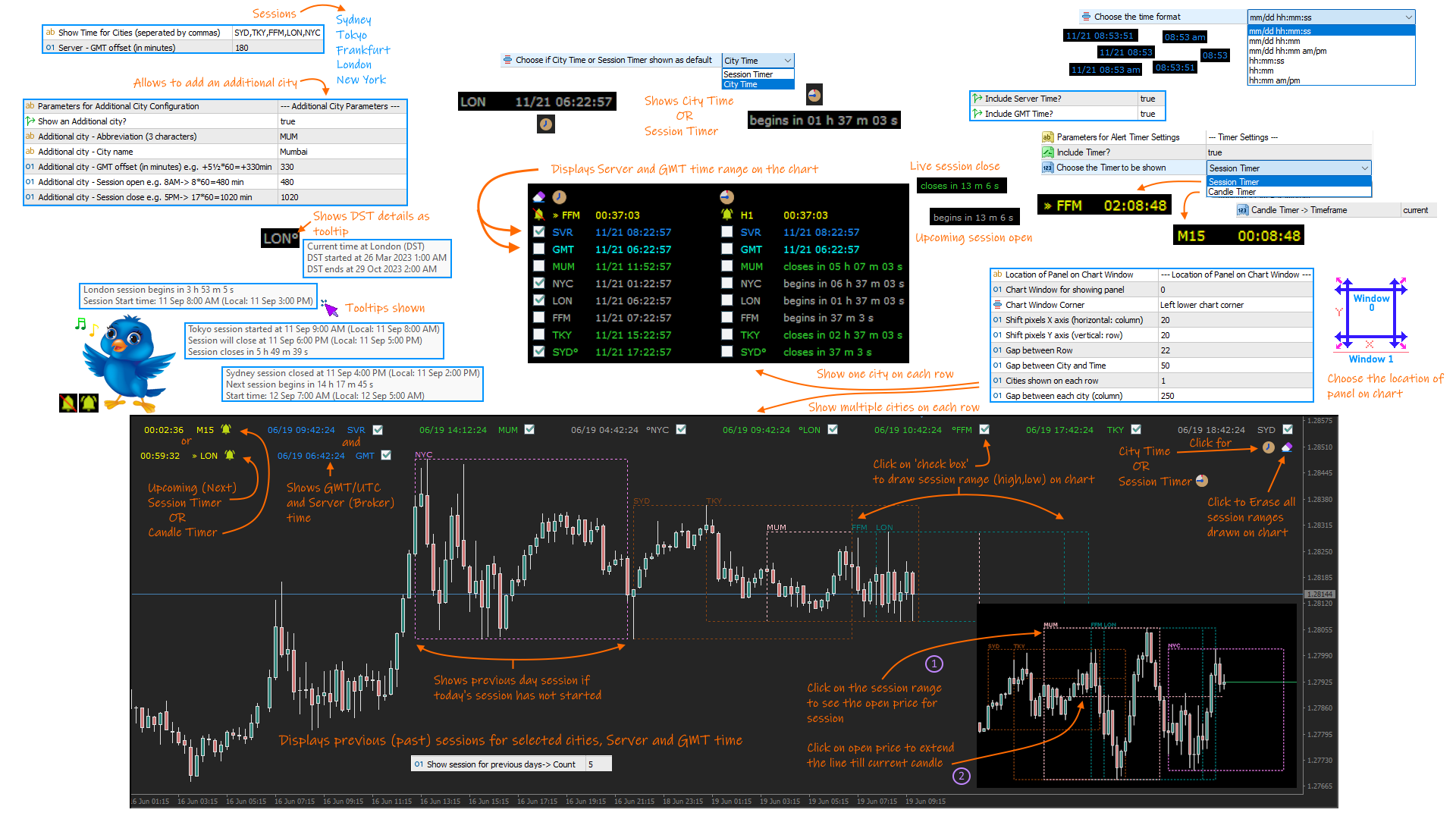
A complete Session Timer that shows the current time, session information with remaining time, chart display of range (high-low) and open price, of current and previous sessions for major markets, and option to add an additional city. A friendly user interface with clickable icons, customizable panel location and format, selection of colors and text. It automatically handles the DST (daylight saving) settings. It also shows the GMT/UTC and server (broker) time. And includes a Candle timer option.

The selectable cities are Sydney, Tokyo, Frankfurt, London and New York. Although the indicator comes with a preset session (open and close) timing, it can be changed as required (please refer to the User Guide for more information).

Session Timer functionality includes:

  • Displays current time for the main markets (Sydney, Tokyo, Frankfurt, London and New York).
  • Handles Daylight savings (DST) update for above cities.
  • Allows display of an additional city with user defined settings.
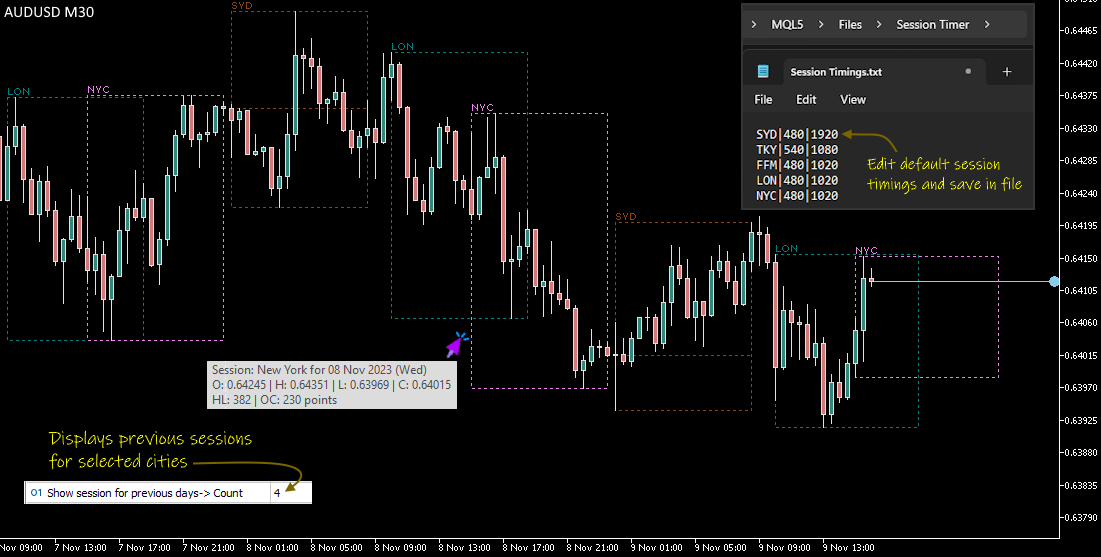
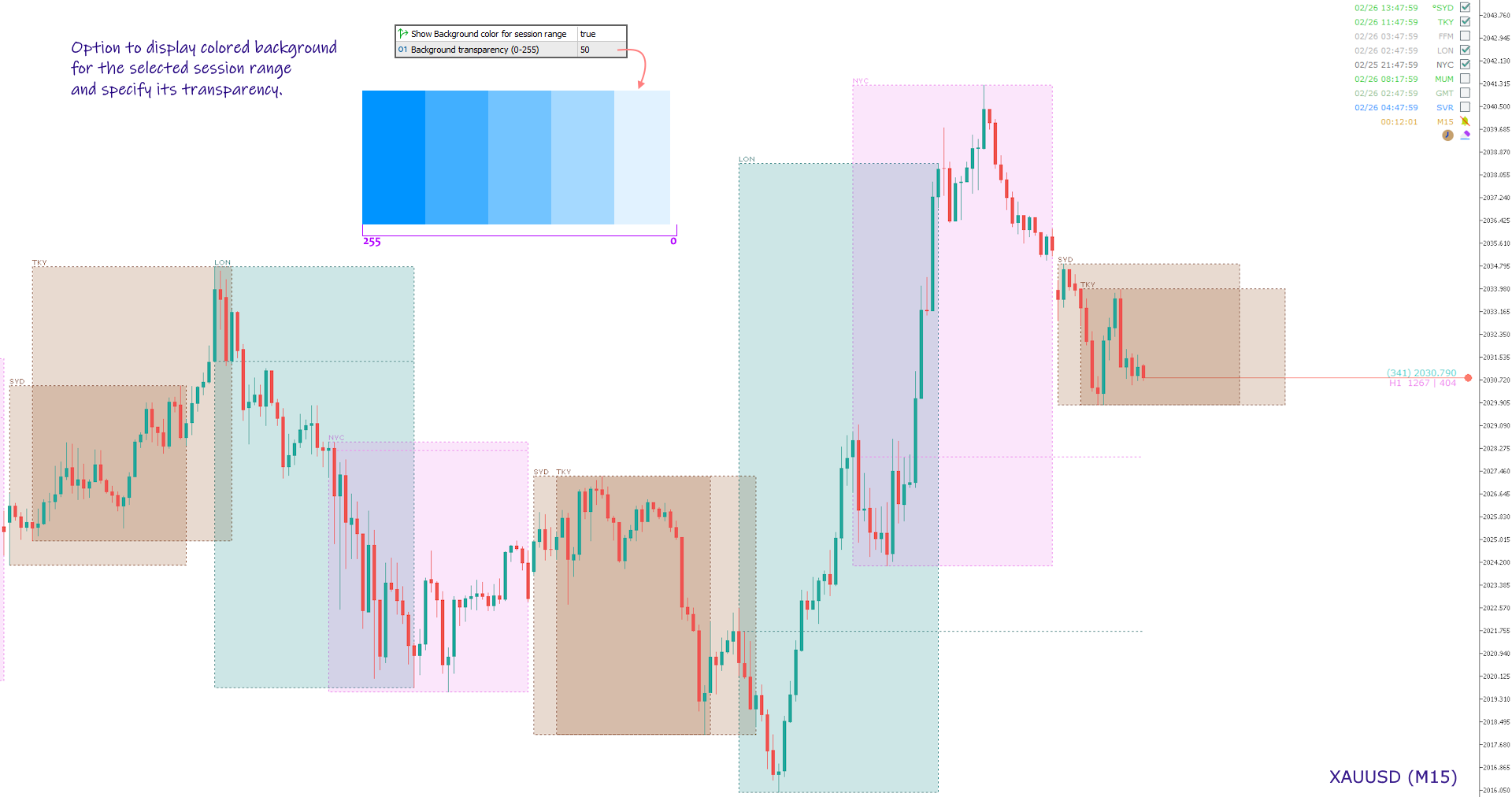
  • Shows session range (high-low price) on chart for the previous or current session with user assigned color. Also allows to view the open price for each session.
  • Displays specified number of previous session range on chart for the selected cities.
  • Option to show Server and GMT time. Also shows range for Server and GMT time for current and previous days.
  • Selection to show time or the current session status (upcoming, live or closed).
  • Option to show Candle Timer or Upcoming Session Timer with alert sound notifications.
  • Easy user interface with clickable button icons for navigating options.
  • Highlights the opening and closing of markets by user defined color.
  • Customizable font and size.
  • Position the text on any specified window or location on the chart.

NOTE:

  1. The display of session range on chart is possible only for period below or equal to H1.
  2. The indicator depends on the GMT offset for Server and its DST adjustments to draw range on chart. This will also require a change of open and close hours for session, by editing the Session Timings file (read User Guide for more information).

Product Links:
User Guide
MT4 version


Отзывы 25
EdgardBirt
48
EdgardBirt 2026.01.16 16:43 

This indicator is very useful for both professionals and beginners. Thank you to the creator.

Sirous Ghaffari
30
Sirous Ghaffari 2025.06.25 15:06 

Hello. Thank you for this good indicator. It was working very well until now, but now that I changed my broker and it is based on GMT+0, I can't set the GMT rectangle/zone based on the New York market closing.

I didn't have this problem before, and by default the server zone and GMT were correct, and it was based on the Sydney market opening and New York closing.

But now, because it is based on GMT+0, my broker's clock is different and it is based on the Tokyo market opening and I have to set the GMT time myself, which is not possible.

I wish it was possible to give a negative offset to the GMT time because it is not working now and the rectangle (gmt time) would also be offset negatively.

GHANO03
186
GHANO03 2024.12.26 06:20 

Great tool Thank you .

Рекомендуем также
Native Account Stats
Ubaldo Barranco Jimenez
Native Account Stats разбивает историю ваших закрытых сделок по символам, часам суток и дням недели, показывая профит-фактор, процент прибыльных сделок, математическое ожидание и просадку кривой эквити закрытых сделок. Сделки реконструируются из сделок (deals) MT5, поэтому депозиты, кредиты и корректировки никогда не учитываются как прибыльные сделки. ЧТО ОН ПОКАЗЫВАЕТ Панель на графике отображает: Сделки, чистый результат, профит-фактор, процент прибыльных сделок, математическое ожидание и м
FREE
Утилита отображает экономические новости прямо на графике. Она показывает ближайшие события, время до их выхода, важность и отправляет уведомления. Для кого: Для трейдеров, которые следят за экономическими новостями Для тех, кто торгует на новостях Для трейдеров, которые хотят получать своевременные оповещения Для пользователей, которым нужен простой и понятный календарь прямо на графике Основные функции Панель с новостями   - Показывает ближайшее экономическое событие на графике Фильтр по валют
FREE
ATC Economic Calendar and News Panel показывает встроенный экономический календарь MetaTrader 5 прямо на графике, чтобы вы могли видеть предстоящие публикации, не открывая другое окно. Этот инструмент также является частью All In One Trade Management Panel MT5 , вместе с инструментом позиции, управлением сделками и аналитикой производительности.  Бесплатная пробная версия для демо-счетов — попробуйте её на живом графике, без ограничения по времени. Основные функции: • Карточка «Следующее важ
FREE
Утилита рисует pivot уровни на основании выбора из day week month Берется предыдущая свеча выбранного таймфрейма и расчитываются значения для уровней по следующим формулам: Pivot = (high + close + low)/ 3 R1 = ( 2 * Pivot) - low S1 = ( 2 * Pivot) - high R2 = Pivot + (R1 -S1) R3 = high + ( 2 * (Pivot - low)) S2 = Pivot - (R1 - S1) S3 = low - ( 2 *(high - Pivot)); Настраиваются стиль и толщина для всех линий. Цвета для линий R, Pivot и S настраиваются по отдельности. При удалении утилиты с графика
FREE
VolPulse Telegram Bridge пересылает оповещения бесплатного индикатора VolPulse Volume Profile в Telegram: смену состояния рынка, касание ключевых уровней (POC, VAH, VAL, «голый» POC) и новые сигналы входа со стопом и целью. Утилита не торгует. Она не читает ваши позиции, баланс или номер счёта. Настройка (около 2 минут) Установите бесплатный индикатор «VolPulse Volume Profile» и прикрепите его к графикам: https://www.mql5.com/ru/market/product/200141 Сервис → Настройки → Советники → включите «Ра
FREE
Important Lines
Terence Gronowski
4.88 (24)
Индикатор отображает линии пивот, уровни максимума, минимума и закрытия предыдущего дня, а также минимум и максимум предыдущего часа. Нужно просто установить этот индикатор на график, чтобы отобразить все эти важные линии, нет необходимости настраивать множество отдельных индикаторов. Почему важны определенные линии Максимум и минимум предыдущего дня : эти уровни используются для торговли на дневном графике. Очень часто, если цена становится выше или ниже минимума/максимума предыдущего дня, про
FREE
Seconds Chart Tester es la versión de prueba gratuita de Seconds Chart, la utilidad que muestra velas de segundos (S1, S3, S5, S10, S15, S30) en una ventana flotante sobre tu gráfico de MetaTrader 5. A diferencia del demo del Probador de Estrategias, esta versión funciona en un gráfico real, para que puedas probar la herramienta en vivo antes de comprar. Qué podés probar en el demo: - Velas de segundos de S1 a S30, seleccionables con un click. - Ventana flotante: mover, redimensionar, minimiz
FREE
Manual Trade Helper - Telegram Controlled Trading Assistant Trade From Anywhere Using Telegram Manual Trade Helper   is a powerful trading assistant that lets you control your trades directly from your Telegram app. No need to be at your computer - open, close, and manage trades from your phone, tablet, or any device with Telegram. Open, close, and manage positions from your phone. Features partial close, auto trailing, flip mode, and daily summaries. Simple commands: B=Buy, S=Sell, C=Close.
FREE
LT Watermark MT5
Thiago Duarte
4.79 (24)
This indicator draw a watermark on the chart, with the timeframe and symbol name. You can change everything, including add a aditional watermark. Functions: Symbol watermark: Size -  text size. Font -  text font. Color -  text color. Background text -  watermark at foreground or background mode. Horizontal correction -  x correction in pixels. Vertical correction -  y correction in pixels. Separator period X symbol -  what will separate the period from symbol. Aditional watermark: Enable custom
FREE
Утилита открывает копии открытых сделок.  Очень удобно, если вы пользуетесь сервисом " Сигналы " и хотите увеличить объем сделок. Настройки: Символы: все символы только текущий символ Сделки: Buy Sell Magic Любой Magic Определенный Magic Лот Original - объем лота из "Оригинала"; Fix Lot - фиксированный объем лота; Lot X Mult - объем лота из "Источника" умноженный на коэффициент; Stop Loss From sender - Stop Loss из Источника; Without - без Stop Loss; Plus Fix - Stop Loss из Источника плюс фикси
FREE
Phone Trade Manager
Krutik Piyushkumar Parekh
Smart Lot-Size Calculator And Trade Assistant for Mobile Trading Overview: This is the tool every trader in the market must have no matter if you are scalper, swing traders, day trader, or long term trader. This On-The-Go trading tool will help you stay disciplined and also stay free from daily trade management chores, Most traders face common problems like   1. Calculation of proper lot-size of a position to take controlled risk  2. Managing every trade and trailing stop-loss if trades goes in
FREE
Candle Countdown Timer - Optimized Edition Overview Candle Countdown Timer is a lightweight, high-performance indicator that displays the exact time remaining until the current candle closes. Designed with efficiency as a top priority, this indicator provides traders with essential timing information without consuming unnecessary system resources. Whether you're a scalper watching every second on M1 charts, a day trader timing entries on H1, or a swing trader monitoring daily candles, this i
FREE
Time to Close Candle
German David Nino Cifuentes
TimeToClose The "TimeToClose" indicator is an essential tool for traders who need to monitor the remaining time before a candle closes. This indicator displays the remaining time directly on the BID line, providing a clear and precise reference during real-time trading. Key Features: Displays the remaining time for the current candle to close. Direct integration on the BID line for better visualization. Simple and user-friendly configuration. Ideal for all types of traders, from beginners to pro
FREE
Symbol Watermark
Flavio Javier Jarabeck
4.63 (16)
Another request from my brotherhood was putting the name of the Symbol being seen - a little bigger - on the Chart, just to get sure that they are seeing the correct one... Mistakes pay a high price on the market... It is a very effective, and almost resource-null-consuming indicator that displays the current Symbol Name and Timeframe in almost any position of your Chart, with any color, and any Font Size... And also you can change the divisor character that is presented between the Symbol Name
FREE
RoundNum Readme (Traders Club) 特徴: このツールはDOWやNIKKEIなど500や1000ポイントがラウンドナンバーの 指数を取引する際に表示するように開発しました。 もちろんメジャー通貨でも表示はされます。 更新頻度を制限しているのでチャート表示が遅くなるということは ありません。 XMでDOWを取引される場合、Main Levelsを10000 Sub Levelsを5000にしてください。 各パラメータの説明: Number to display lines:表示するライン数を設定します。 Main Levels:メインレベルをポイントで指定します。 Main Line Color:メインラインの色を設定します。 Main Line Style:メインラインで使用されるラインを設定します。 Show Sub Lines:サブラインを表示するか設定します。 Sub Levels:サブレベルをポイントで指定します。 Sub Line Color:サブラインの色を設定します。 Sub Line Style:サブラインで使用され
FREE
Stop Logging In and Out. See All Your Accounts at Once. If you run multiple trading accounts across MT4 and MT5, you know the frustration — opening your broker app, logging in, checking the account, logging out, switching to the next. Repeat. Every time you want a quick status check, it costs you minutes and mental energy. Equity Watch Pro was built to solve exactly that problem. One dashboard. All your accounts. Live equity, balance, floating P&L, drawdown, and daily performance — visible at a
FREE
CandlePulse Candle Timer MT5 shows the time remaining in the current candle, with a dashboard for up to four timeframes and optional candle-close alerts. Choose a full panel, a compact corner timer, or a countdown beside the latest candle. All features are included at no charge. There is no subscription, external account, or DLL requirement. Main features Multi-timeframe dashboard: monitor the chart timeframe plus up to three additional periods. Duplicate periods are combined into one row. Three
FREE
Displays the countdown to the current candle’s close and shows the live server time clearly on your chart, including the GMT. It is a fuss-free indicator, plug and play. Accurate Candle Timer is a simple and practical tool for traders who want to monitor candle timing without unnecessary clutter. It shows how much time is left before the current candle closes, helping you stay aware of when the next candle will begin. This is useful for traders who prefer to wait for candle close confirmation be
FREE
DataForge exports MetaTrader 5 bars to a CSV file, and writes into that file what the data actually contains. It does not trade. It places no orders, reads no positions, and requires no account permissions. It reads history and writes a text file. WHAT THE EXPORT WRITES 1. An instrument passport, placed in the CSV header    Digits, point, contract size, tick value, tick size, and the minimum, step and maximum lot are written as comment lines at the top of the file. Export the same symbol fro
FREE
This indicator displays two important pieces of information on the MT5 chart: Current Spread - Trading cost measured in points, helping traders assess optimal entry timing when spread is low. Time Countdown - Remaining time (minutes:seconds) until the current candle closes and a new candle forms, supporting candle-based trading strategies. Information is displayed as compact text in a chart corner (default top-right), with customizable position, color, and font size. The indicator updates in rea
FREE
Общее описание Этот индикатор — усовершенствованная версия классического канала Дончия с добавлением практических функций для реальной торговли. Помимо стандартных трёх линий (верхняя, нижняя и средняя), система определяет пробои и отображает их на графике стрелками, показывая только линию, противоположную текущему направлению тренда для более чистого восприятия. Индикатор включает: Визуальные сигналы : цветные стрелки при пробое Автоматические уведомления : всплывающие окна, push и email Фильтр
FREE
Session Sync MT5
Mohammadreza Faghanimakrani
Session Sync MT5 displays the Tokyo, London, New York and Sydney trading sessions directly on your chart. Each session uses its own regional daylight-saving rules and is converted to your broker's server time. The active broker time model is shown on the chart, so you can see exactly what the indicator is using. What you get • Tokyo, London, New York and Sydney session boxes • Session High/Low calculated from M1 data, independent of chart timeframe • Historical sessions loaded automatically
FREE
Market Hours Pro shows Tokyo, London, and New York trading sessions directly on your MT5 chart, including scheduled overlap periods. It’s designed to give you a clear view of global market timing so you can plan trades, spot high-activity periods, and align strategies with standard Forex hours. How It Works Displays scheduled session times visually on your chart. Highlights session overlaps for London/New York and Tokyo/London. Automatically adjusts times for your timezone or broker time. Shows
FREE
Prior Day Breakout is an Expert Advisor for MetaTrader 5 that trades the previous-day high and low breakout on XAUEUR. It uses a fixed 0.01 lot and decides on closed bars. Two presets are included, for H1 and M15. This EA promises no profit. Every result below is a backtest on broker history, not live trading. The tests passed on gold only. Thirty-seven symbols were tested. Quick start Open an XAUEUR chart on H1 or M15 (a prefixed or suffixed name is fine). Attach the EA from the Navigator and k
FREE
Хотите перенести данные MetaTrader 5 в Excel, Python, внешний бэктестинг или machine learning, не тратя время на неудобные экспорты? Candle History Exporter создан для того, чтобы превращать историю свечей текущего символа в понятные, настраиваемые CSV-файлы, готовые для research, автоматизации и количественного анализа. Скрипт позволяет экспортировать один или несколько таймфреймов в выбранном диапазоне дат, с возможностью автоматически использовать текущее серверное время как дату окончания п
FREE
Positions Risk Analyzer
Jacobus Nicolaas Van Staden
Positions Risk Analyzer Utility The Trade Analyzer is a powerful tool designed for real-time monitoring of your trading performance directly on the chart. It provides insights into: Total Open Positions : Number of active trades. Potential Profit (TP) : Estimated profit if all Take Profits are hit. Potential Loss (SL) : Maximum potential loss if all Stop Losses are triggered. Floating Profit/Loss : Real-time net profit or loss of all open trades. This utility dynamically updates its calculation
FREE
Session Matrix Pro
Abhilash Keshav Dhumatkar
X-STOX Session Matrix Pro puts the market's clock on your chart. Instantly see which trading session is active, when the high-liquidity overlaps hit, and exactly how long until the next session opens or closes — all adjusted automatically to your broker's server time. Built as a single lightweight indicator. No DLLs, no external data, no configuration headaches. — What it does — Session zones on-chart — the Sydney, Tokyo, London and New York sessions are drawn as clean shaded zones so you always
FREE
Reverse
Konstantin Chernov
1 (1)
Скрипт для быстрого переворота позиций и/или ордеров. Если вам необходимо перевернуть позицию с равным лотом, выставить встречную позицию объемом отличным от текущей, то этот скрипт избавит вас от рутинных действий! Разрешите авто-торговлю перед запуском скрипта. Использование: Запустите скрипт на графике. Данный скрипт является усеченной версией платного продукта https://www.mql5.com/ru/market/product/638 и позволяет переворачивать только позиции. Входные параметры скрипт не запрашивает. Такие
FREE
Основное назначение:   "Pin Bars"   предназначен для автоматического обнаружения пин-баров на графиках финансовых рынках. Пин-бар – это свеча с характерным телом и длинным хвостом, которая может сигнализировать о развороте тренда или коррекции. Принцип работы:   Индикатор анализирует каждую свечу на графике, определяя размер тела, хвоста и носа свечи. При обнаружении пин-бара, соответствующего заранее определенным параметрам, индикатор отмечает его на графике стрелкой вверх или вниз, в зависимос
FREE
Monte Carlo Risk Simulator shows how much worse a backtest could have gone with the same trades in a different order, and what more or less risk per trade does to its growth and drawdown. It reads saved Strategy Tester reports or the history of your account, runs thousands of simulations and writes one HTML page. How To Use Backtests: in the Strategy Tester, right click on the Backtest tab > Report > save it as HTML into MQL5\Files\RiskSimulator (File > Open Data Folder). Account: set "Trades to
FREE
С этим продуктом покупают
Trade Assistant MT5
Evgeniy Kravchenko
4.43 (216)
Помогает рассчитать риск на сделку, простая установка нового ордера с помощью линий, управление ордерами с функциями частичного закрытия, 7 типов трейлинг-стопа и другие полезные функции. Дополнительные материалы и инструкции Инструкция по установке - Инструкция к приложению Функция Линии   - отображает на графике линию открытия, стоп-лосс, тейк-профит. С помощью этой функции легко установить новый ордер и увидеть его дополнительные характеристики перед открытием. Управление риском   -   функ
Добро пожаловать в Trade Manager EA — лучший инструмент для управления рисками, предназначенный для упрощения, точности и эффективности торговли. Это не просто инструмент для размещения ордеров; это комплексное решение для удобного планирования торгов, управления позициями и усиленного контроля над рисками. Независимо от того, начинающий вы трейдер, опытный специалист или скальпер, нуждающийся в быстром исполнении, Trade Manager EA адаптируется к вашим потребностям и работает с любыми активами:
Local Trade Copier EA MT5
Juvenille Emperor Limited
4.94 (149)
Local Trade Copier EA MT5 — это быстрый и гибкий копировщик сделок для копирования и управления сделками между несколькими счетами MetaTrader 5 на одном компьютере с Windows или Windows VPS. Он сочетает локальную синхронизацию сделок с настройками на стороне Receiver для управления размером лота, рисками, фильтрацией сделок, сопоставлением символов, управлением сделками и защитой счета. Настройте терминалы Transmitter и Receiver примерно за 1 минуту и копируйте ручные сделки или сделки, открыты
Telegram to MT5 Multi-Channel Copier   автоматически копирует торговые сигналы из ваших Telegram- и Discord -каналов прямо в MetaTrader 5. Без ботов, без браузерных расширений, без ручного копирования. Сигнал приходит в Telegram или Discord — и советник открывает сделку в вашем терминале за считанные секунды. А перед тем как копировать канал, встроенный бэктестер покажет, что этот канал сделал бы на вашем счёте. Продукт состоит из двух компонентов: приложения для Windows, которое слушает ваши Te
Farmed Hedge Yield Farming | All Markets (Manual - Hybrid - Semi/Automated EA) VERIFIED TRADING RESULTS - Farmed Hedge Yield Axi Copy:  https://www.mql5.com/en/signals/2356376 - Farmed Hedge Yield Exn Copy:   https://www.mql5.com/en/signals/2356404 - Farmed Hedge Yield V Copy:  https://www.mql5.com/en/signals/2357156 IMPORTANT NOTICE: FarmedHedge is a MANUAL-FOCUSED TRADING UTILITY ,not a fully automated EA. Results shown on this Signal include manual trades and overall strategic management.
Копируйте сигналы из Telegram по своим торговым правилам Telegram to MT5 Signal Trader автоматически копирует текстовые торговые сигналы из открытых и закрытых каналов и групп Telegram в MetaTrader 5. Управляйте несколькими поставщиками сигналов и счетами MT5 из одного приложения для компьютера, задавая индивидуальные параметры риска и торговли для каждого поставщика . Для копирования не нужны бот Telegram и настройка API. Просто войдите в свой аккаунт Telegram по номеру телефона или QR-коду и в
TradePanel MT5
Alfiya Fazylova
4.88 (170)
Trade Panel — это многофункциональный торговый помощник. Приложение содержит более 50 торговых функций для ручной торговли и позволяет автоматизировать большинство торговых операций. Инструкция к приложению: https://www.mql5.com/ru/blogs/post/756476 Пробная версия приложения для демо-счета: https://www.mql5.com/ru/blogs/post/750864 Как установить приложение: https://www.mql5.com/ru/blogs/post/750096 Как тестировать приложение в визуальном режиме: https://www.mql5.com/ru/blogs/post/770274 Как уст
Strategy Ledger Pro
Abdullah Uygar Tuna
5 (12)
Теперь доступно на русском языке. Strategy Ledger Pro — панель анализа счёта для MetaTrader 5, работающая только на чтение. Она разделяет результаты счёта по советникам, стратегиям, символам и magic-номерам, чтобы было видно, что на самом деле вносит каждый из них. Панель доступна на 11 языках: English, Français, Deutsch, Español, Italiano, Português, Русский, Türkçe, 中文, 日本語 и 한국어. Перед загрузкой демоверсии. Маркет запускает демоверсию любого платного продукта только в тестере стратегий. Эта
================================================================================ POC BREAKOUT - V20.72. Full Professional Grade Toolkit ================================================================================ POC Breakout is a full MetaTrader 5 trading dashboard for discretionary traders who want breakout signals, Point of Control (POC) context, volume profiles, order flow, market structure, news, alerts, and advanced trade planning in one professional workspace. Attached directly to you
News Trade EA MT5
Konstantin Kulikov
4.55 (11)
Представляю полезного робота, которым пользуюсь сам уже несколько лет. Может использоваться как в полуавтоматическом, так и в полностью автоматическом режиме. >>> Chat <<< Программа содержит гибкие настройки торговли на новостях экономического календаря. В тестере стратегий проверить нельзя. Только реальная работа. В настройках терминала необходимо добавить новостной сайт в список разрешенных URL. Кликните Сервис > Настройки > Советники. Поставьте галочку в "Разрешить WebRequest для следующих U
Master Your Trading Discipline   Stop losing your hard-earned gains to overtrading and emotional decisions. The Discipline Tool is your ultimate trading assistant, ensuring strict risk management in real-time. Key Protection Features: Advanced Drawdown Defense : Automatically halts trading if your daily drawdown exceeds a preset threshold (percentage or dollar amount). Real-Time Equity Lock : Safeguard profits by referencing peak equity, ensuring drawdown stays within control. Hard Profit Target
Dealer's Panel No signal decides anything here — a hand does. One click, and the panel calculates what's underneath: lot size from risk, target from a 30-step balance ladder that remembers exactly how far an account has climbed. Toggle between market and pending without touching an input field. Set a stop, and the take-profit can write itself — a fixed share of the balance, translated into price with no arithmetic left for the trader to get wrong. One trade live at a time; it won't let a seco
Exp COPYLOT CLIENT for MT5
Vladislav Andruschenko
3.97 (35)
Профессиональный копировщик сделок для MetaTrader 5 Быстрый, профессиональный и надежный копировщик сделок для MetaTrader . COPYLOT позволяет копировать сделки Forex между терминалами MT4 и MT5 с поддержкой счетов Hedge и Netting . Версия COPYLOT для MT5 поддерживает: - MT5 Hedge → MT5 Hedge - MT5 Hedge → MT5 Netting - MT5 Netting → MT5 Hedge - MT5 Netting → MT5 Netting - MT4 → MT5 Hedge - MT4 → MT5 Netting Версия MT4 Полное описание + DEMO + PDF Как купить Как установить Как получить файлы жур
HINN MAGIC ENTRY - лучший инструмент для входа и менеджмента позиций! ПРОСТО. БЫСТРО. ИНТУИТИВНО. МАКСИМАЛЬНО АВТОМАТИЗИРОВАНО. Выставляет ордера через выбор уровня на графике! полное описание    ::    demo-версия    ::   60-sec-video-description Основные функции: - Рыночные, лимитные и отложенные ордера -  Автоматический подсчет лоттажа  -  Автоматический учет спреда и комиссий -  Неограниченное количество промежуточных тейков для позиций - Перевод в безубыток и трейл стоп-лосса и тейк-проф
Get Ready for 2 Major New Features in Our Next Update — Coming Soon!    [ NEW  ] We’re taking market analysis to the next level with 2 new features designed to meet your trading needs. Introducing: TRADE OVERVIEW DASHBOARD CONFLUENCE AT ZONE 1. TRADE OVERVIEW DASHBOARD A dashboard that helps you see the overall market picture more easily, with key information from multiple timeframes and trading guidance to support your trading decisions, helping you analyze the market and plan your trades sys
The product will copy all telegram signal to MT5 ( which you are member) , also it can work as remote copier.  Easy to set up, copy order instant, can work with almost signal formats, image signal,  s upport to translate other language to English Work with all type of channel or group, even channel have "Restrict Saving Content", work with  multi channel, multi MT5 Work as remote copier: with signal have ticket number, it will copy exactly via ticket number. Support to backtest signal. How to s
EasyInsight AIO MT5
Alain Verleyen
4.92 (12)
EASY Insight AIO – Всё-в-одном для умного и простого трейдинга Обзор Представьте, что вы можете просканировать весь рынок — Форекс, золото, криптовалюты, индексы и даже акции — всего за несколько секунд, без ручного просмотра графиков, сложной установки или настройки индикаторов. EASY Insight AIO — это ваш идеальный инструмент экспорта для трейдинга с поддержкой искусственного интеллекта. Он предоставляет полный снимок рынка в одном аккуратном CSV-файле — готовом к мгновенному анализу в ChatGP
Telegram To MT5 Ultra
Mirel Daniel Gheonu
5 (5)
Telegram To MT5 — копировщик сигналов Превратите торговые сигналы из ваших Telegram-каналов в реальные ордера MT5 — автоматически, на любом количестве счетов, с полным контролем над риском и правилами. Telegram To MT5 связывает VIP / сигнальные каналы, на которые вы уже подписаны в Telegram, с вашим терминалом MetaTrader 5. Бесплатное приложение-компаньон для ПК читает сообщения (даже из каналов, которые не допускают ботов), а этот советник исполняет их на вашем счёте — применяя ваши настройки р
MT5 to Telegram Signal Provider — это простой в использовании полностью настраиваемый инструмент, который позволяет отправлять определённые сигналы в чат, канал или группу Telegram, превращая вашу учётную запись в провайдера сигналов . В отличие от большинства конкурирующих продуктов, он не использует импорт DLL. [ Демо ]   [ Руководство ] [ Версия MT4 ] [ Версия для Discord ] [ Канал в Telegram ]  New: [ Telegram To MT5 ] Настройка Доступно пошаговое руководство пользователя . Никаких знаний A
Power Candles Strategy Scanner — самооптимизирующийся инструмент для поиска настроек по нескольким инструментам Power Candles Strategy Scanner использует тот же самооптимизирующийся движок, что и индикатор Power Candles — для всех символов в вашем Market Watch, одновременно. На одной панели отображается информация о том, какие символы в данный момент являются статистически торгуемыми, какая стратегия выигрывает на каждом из них, оптимальная пара Stop Loss / Take Profit, а также отправляется увед
The Patch
Mian Rameez Ali
The Patch It never opens a trade. It walks behind the ones that did. Every open position, every pending order — checked twice a second for the one thing that's easy to forget: a stop, a target. Found bare, it doesn't ask. It writes the missing number in, measured in points from wherever the position began, and moves on to the next. No strategy, no opinion on direction. Just the quiet assumption that nothing should ever sit on the market unprotected — not because someone decided it shouldn't,
Grid Manual MT5
Alfiya Fazylova
4.73 (22)
Grid Manual — это торговая панель для работы с сеточными стратегиями. Утилита универсальная, имеет гибкие настройки и понятный интерфейс. Работает с сеткой ордеров не только в сторону усреднения убытков, но и в сторону наращивания прибыли. Трейдеру не нужно создавать и сопровождать сетку ордеров, это сделает утилита. Достаточно открыть ордер и Grid manual автоматически создаст ему сетку ордеров и будет сопровождать его до самого закрытия. Полная инструкция и демо-версия здесь . Основные особенно
Signal TradingView to MT5 Pro Automator Мгновенное профессиональное исполнение между TradingView и MetaTrader 5 Автоматизируйте свою торговую стратегию с помощью самого надежного моста связи между алертами TradingView и реальным исполнением в MT5. Разработанный для трейдеров, которым требуются скорость, гибкость и безупречное управление рисками, этот советник (Expert Advisor) превращает любое сообщение с алертом в точный рыночный или лимитный ордер. ПРЕИМУЩЕСТВА И СИЛЬНЫЕ СТОРОНЫ Универсальный д
Нужна поддержка? Как настроить? Есть вопросы? Спрашивайте здесь на своём языке, быстрый ответ: https://www.mql5.com/en/market/product/139088/comments Скачать рабочую демо-версию Copy Cat More (Копи Кэт Мор) — копировщик сделок (Trade Copier) MT5 — это локальный копировщик сделок и полноценная система управления рисками и исполнения, созданная для современных торговых задач. От челленджей проп-фирм (prop firm) до управления личным портфелем — он адаптируется к любой ситуации благодаря сочетанию
Anchor Trade Manager
Kalinskie Gilliam
5 (9)
Your EAs cannot see each other, but Anchor can. Anchor gives you one place to coordinate your EAs, manage risk, and decide when trading is allowed. It works alongside the trading bots you already use without any changes to them. The Problem One EA opens a trade. Then another starts trading. The next thing you know, you wake up to multiple grids built across your account. Each EA may be doing exactly what it was designed to do, but together they can place far more risk on your account than you in
Trade copier MT5
Alfiya Fazylova
4.61 (57)
Trade Copier — это профессиональная утилита, предназначенная для копирования и синхронизации сделок между торговыми счетами. Копирование происходит от счета/терминала поставщика к счету/терминалу получателя, которые установлены на одном компьютере или vps. Перед покупкой вы можете протестировать демо-версию на демо-счете. Демо-версия здесь . Полная инструкция здесь . Основной функционал и преимущества: Русифицированный интерфейс, поддержка на русском языке. Поддерживает копирование МТ5 > МТ5, МТ
Telegram to MT5 Coppy
Sergey Batudayev
5 (10)
Telegram to MT5: Идеальное решение для копирования сигналов Упростите свою торговлю с Telegram to MT5 — современным инструментом, который копирует торговые сигналы прямо из каналов и чатов Telegram на вашу платформу MetaTrader 5, без необходимости использования DLL. Это мощное решение обеспечивает точное исполнение сигналов, широкие возможности настройки, экономит время и повышает вашу эффективность. [ Instructions and DEMO ] [ FAQ ] [ How atach logs properly ] [ Settings descrition ] Ключевые
The News Filter MT5
Leolouiski Gan
4.79 (24)
Этот продукт фильтрует всех экспертных советников и ручные графики во время новостей, так что вам не нужно беспокоиться о внезапных скачках цены, которые могут разрушить ваши ручные торговые настройки или сделки, введенные другими экспертными советниками. Этот продукт также поставляется с полной системой управления ордерами, которая может обрабатывать ваши открытые позиции и ордера на ожидание перед выпуском новостей. После покупки   The News Filter   вам больше не придется полагаться на встроен
Торговая панель для MetaTrader 5 — профессиональная торговля в один клик с графика и клавиатуры Мощная торговая панель для активного ручного трейдинга, которая позволяет открывать, сопровождать и закрывать сделки значительно быстрее и удобнее, чем стандартными средствами MetaTrader. Панель создана для тех, кто хочет получить полный контроль над позициями, ордерами, прибылью и торговыми сценариями в одном рабочем пространстве. Это не просто вспомогательная утилита. Это полноценный торговый интер
Floor Watch
Syed Tauqeer Hussain Shah
Floor Watch One number, watched every thirty seconds: how far equity has fallen since the day began — or since its highest point, if it's told to trail the peak instead of the open. Cross the line and it doesn't argue. Every open position closes, every pending order vanishes, and anything that slips through afterward gets shut the moment it appears. Not asked. Removed. The floor holds until the clock turns 5 AM Pakistan time — then, and only then, does the day start over. One rule. No except
Другие продукты этого автора
PnL Calendar
Keni Chetankumar Gajanan -
PnL Calendar - analyse to profit PnL Calendar turns your trading history into a clear calendar view, so you can see profitable days, monitor risk in real time, and combine multiple broker accounts into a single portfolio picture using the Multi-Broker data export feature. The Calendar Panel breaks profit down by day, week, month, and year, while the Account Panel tracks balance, equity, margin alerts, multi-timeframe summaries, and overnight gap adjustments. The Risk Dashboard adds leverage, dra
Session Timer MT4
Keni Chetankumar Gajanan -
5 (5)
A complete Session Timer that shows the current time, session information with remaining time, chart display of range (high-low) and open price, of current and previous sessions for major markets, and option to add an additional city. A friendly user interface with clickable icons, customizable panel location and format, selection of colors and text. It automatically handles the DST (daylight saving) settings. It also shows the GMT/UTC and server (broker) time. And includes a Candle timer option
FREE
Fibonacci Dimension MT4
Keni Chetankumar Gajanan -
5 (4)
'Fibonacci Dimension' indicator allows display of preset or user-defined multi-timeframe Fibonacci levels. It automatically takes the previous high and low for two user-defined timeframes and calculates their Fibonacci retracement levels. It also considers the retraced level to draw the expansions on every change of price. A complete visual dimension in multiple timeframes allows deriving profitable strategies for execution. Enhanced functionality to view and customize the default Fibonacci Rang
FREE
Price Ray
Keni Chetankumar Gajanan -
5 (7)
Price Ray indicator is a utility that will improve the way you trade. Primarily, it shows the Bid, Ask or Last price as a line ray which beams till the current candle, last visible chart candle or extended to all candle bars. The enhanced features in this indicator provide information in an area where you focus most, right next to the current candle. You can select text to be shown above or below the Price ray. The indicator is fully customizable, allowing it to fit any strategy requirements. Th
FREE
Fibonacci Dimension
Keni Chetankumar Gajanan -
4.6 (5)
'Fibonacci Dimension' indicator allows display of preset or user-defined multi-timeframe Fibonacci levels. It automatically takes the previous high and low for two user-defined timeframes and calculates their Fibonacci retracement levels. It also considers the retraced level to draw the expansions on every change of price. A complete visual dimension in multiple timeframes allows deriving profitable strategies for execution. Enhanced functionality to view and customize the default Fibonacci Rang
FREE
Current Price
Keni Chetankumar Gajanan -
5 (2)
A simple and useful Current Price Panel, which displays magnified current Bid, Ask prices and spread, movable anywhere on chart window using the mouse. Also provides an option to have as text at a static location showing bid or ask price along with spread, shown at any location on the chart. Allows display as pips or points along with spread highlighted in distinct color if it crosses the threshold point for the previous 100 ticks. Includes an option to show or hide the last digit (pipette) of t
FREE
Price Ray MT4
Keni Chetankumar Gajanan -
4 (2)
Price Ray indicator is a utility that will improve the way you trade. Primarily, it shows the Bid, Ask or Last price as a line ray which beams till the current candle, last visible chart candle or extended to all candle bars. The enhanced features in this indicator provide information in an area where you focus most, right next to the current candle. You can select text to be shown above or below the Price ray. The indicator is fully customizable, allowing it to fit any strategy requirements. Th
FREE
Portfolio Aggregator
Keni Chetankumar Gajanan -
Portfolio Aggregator - one dashboard, total clarity across all your trading accounts Portfolio Aggregator unifies account data from multiple brokers and currencies into a single, transparent dashboard, giving real-time visibility into equity, margin, P&L, and risk metrics so traders can maintain control and confidence across diversified strategies. It converts all values into a chosen base currency using live FX rates, and displays equity, balance, unrealized P&L, margin usage, and open position
FREE
Current Price MT4
Keni Chetankumar Gajanan -
5 (1)
A simple and useful Current Price Panel, which displays magnified current Bid, Ask prices and spread, movable anywhere on chart window using the mouse. Also provides an option to have as text at a static location showing bid or ask price along with spread, shown at any location on the chart. Allows display as pips or points along with spread highlighted in distinct color if it crosses the threshold point for the previous 100 ticks. Includes an option to show or hide the last digit (pipette) of t
FREE
Portfolio Aggregator MT4
Keni Chetankumar Gajanan -
Portfolio Aggregator - one dashboard, total clarity across all your trading accounts Portfolio Aggregator unifies account data from multiple brokers and currencies into a single, transparent dashboard, giving real-time visibility into equity, margin, P&L, and risk metrics so traders can maintain control and confidence across diversified strategies. It converts all values into a chosen base currency using live FX rates, and displays equity, balance, unrealized P&L, margin usage, and open position
FREE
PnL Calendar MT4
Keni Chetankumar Gajanan -
PnL Calendar - analyse to profit PnL Calendar turns your trading history into a clear calendar view, so you can see profitable days, monitor risk in real time, and combine multiple broker accounts into a single portfolio picture using the Multi-Broker data export feature. The Calendar Panel breaks profit down by day, week, month, and year, while the Account Panel tracks balance, equity, margin alerts, multi-timeframe summaries, and overnight gap adjustments. The Risk Dashboard adds leverage, dra
Фильтр:
Serhii Yukhymchuk
391
Serhii Yukhymchuk 2026.08.16 17:55 

Плохой! Глючит мт 5 с ним, слишко перемудренный

Keni Chetankumar Gajanan -
19651
Ответ разработчика Keni Chetankumar Gajanan - 2026.08.17 08:08
Здравствуйте! Спасибо за отзыв. Не могли бы вы подробнее описать проблему, с которой столкнулись в MT5? Какие именно глюки вы наблюдаете? Это поможет нам быстро разобраться и исправить ситуацию.
EdgardBirt
48
EdgardBirt 2026.01.16 16:43 

This indicator is very useful for both professionals and beginners. Thank you to the creator.

Keni Chetankumar Gajanan -
19651
Ответ разработчика Keni Chetankumar Gajanan - 2026.01.17 16:07
Thanks @EdgardBirt for the review. Its greatly appreciated.
Tendai Gomwe
18
Tendai Gomwe 2025.11.11 06:57 

Пользователь не оставил комментарий к оценке

Keni Chetankumar Gajanan -
19651
Ответ разработчика Keni Chetankumar Gajanan - 2025.11.12 08:50
Thanks Tendai
Adrian Lara Carrasco
11765
Adrian Lara Carrasco 2025.11.10 21:44 

Пользователь не оставил комментарий к оценке

Keni Chetankumar Gajanan -
19651
Ответ разработчика Keni Chetankumar Gajanan - 2025.11.12 08:49
Thanks Adrian
khosro84
14
khosro84 2025.07.03 12:09 

Great!!

Keni Chetankumar Gajanan -
19651
Ответ разработчика Keni Chetankumar Gajanan - 2025.07.07 09:18
Thank you
Hamed Rahimi
28
Hamed Rahimi 2025.06.29 06:03 

GREAT INDICATOR THANK YOU

Keni Chetankumar Gajanan -
19651
Ответ разработчика Keni Chetankumar Gajanan - 2025.07.07 09:16
Thanks for review Hamed. Greatly appreciate it.
Sirous Ghaffari
30
Sirous Ghaffari 2025.06.25 15:06 

Hello. Thank you for this good indicator. It was working very well until now, but now that I changed my broker and it is based on GMT+0, I can't set the GMT rectangle/zone based on the New York market closing.

I didn't have this problem before, and by default the server zone and GMT were correct, and it was based on the Sydney market opening and New York closing.

But now, because it is based on GMT+0, my broker's clock is different and it is based on the Tokyo market opening and I have to set the GMT time myself, which is not possible.

I wish it was possible to give a negative offset to the GMT time because it is not working now and the rectangle (gmt time) would also be offset negatively.

Keni Chetankumar Gajanan -
19651
Ответ разработчика Keni Chetankumar Gajanan - 2025.07.07 10:02
Hi Sirous, Thanks for the review. I have replied to you in the comments section. Please review and send me a message to discuss further. Regards,
GHANO03
186
GHANO03 2024.12.26 06:20 

Great tool Thank you .

Keni Chetankumar Gajanan -
19651
Ответ разработчика Keni Chetankumar Gajanan - 2024.12.30 05:26
Thanks for the review. Greatly appreciated.
Roman Utkin
547
Roman Utkin 2024.11.30 01:22 

Пользователь не оставил комментарий к оценке

Keni Chetankumar Gajanan -
19651
Ответ разработчика Keni Chetankumar Gajanan - 2024.11.30 03:04
Thanks Roman for the kind review.
shadowfund
167
shadowfund 2024.10.10 03:55 

Пользователь не оставил комментарий к оценке

Keni Chetankumar Gajanan -
19651
Ответ разработчика Keni Chetankumar Gajanan - 2024.10.10 09:54
Thanks @shadowfund for the kind review. Greatly appreciate it.
Koirala
49
Koirala 2024.05.14 16:27 

Пользователь не оставил комментарий к оценке

Keni Chetankumar Gajanan -
19651
Ответ разработчика Keni Chetankumar Gajanan - 2024.06.03 13:06
Thanks @Koirala 🙏
vemos07
74
vemos07 2024.05.11 22:22 

muy útil, pero cuesta configurarlo.

Keni Chetankumar Gajanan -
19651
Ответ разработчика Keni Chetankumar Gajanan - 2024.05.12 07:52
Hola @vemos07,
Gracias por la reseña.
Dado que la Guía del usuario está en inglés, es posible que necesite más claridad si no está familiarizado con el idioma. Avíseme si necesita más información sobre la configuración del "Session Timer". Puedes enviar tus consultas como mensaje o escribir en la sección de comentarios.
Saludos,
Keni
windy99
99
windy99 2024.02.15 02:28 

Пользователь не оставил комментарий к оценке

Keni Chetankumar Gajanan -
19651
Ответ разработчика Keni Chetankumar Gajanan - 2024.02.15 03:34
Thank you 🙏
Igor Mishchenko
240
Igor Mishchenko 2023.12.01 21:35 

Пользователь не оставил комментарий к оценке

Keni Chetankumar Gajanan -
19651
Ответ разработчика Keni Chetankumar Gajanan - 2023.12.02 03:06
Thanks Igor,
I am glad you like the product and find it helpful 🙏
Vino M
16
Vino M 2023.10.09 06:19 

Helpful EA, thank you very much.

Keni Chetankumar Gajanan -
19651
Ответ разработчика Keni Chetankumar Gajanan - 2023.10.09 07:13
Thanks Vino
RUTTO2
436
RUTTO2 2023.09.28 09:03 

This is the best session timer in the market. It has excellent features and it's free. Keni is a very kind and listening developer and always very prompt to help and assist wherever there is a challenge in any of his products. This timer and his other products have helped me alot.

Keni Chetankumar Gajanan -
19651
Ответ разработчика Keni Chetankumar Gajanan - 2023.09.28 10:34
Thanks #RUTTO2 for the review.
I am grateful for the reviews and suggestions as it encourages me to improve the product and also for other users to benefit. You have always been kind with your words🙂. Thanks again.
Yue Li
365
Yue Li 2023.09.24 09:28 

我遇到了一样的问题,加载指标之后切换周期会变得卡顿,希望能够得到修复(我找到了原因,是和另一个指标发生了冲突,不知道为什么两个指标不能同时工作)

Keni Chetankumar Gajanan -
19651
Ответ разработчика Keni Chetankumar Gajanan - 2023.09.25 12:03
您好 Yue Li,感谢您的评论。 在产品版本 2.6 中,我添加了在更改时间段时保存会话选择的功能。请检查指示器第一个选项卡中的产品版本,以确认您使用的是最新更新。 更改时间段时,选择将自动作为文本文件保存在“MQL5/Files/Session Timer/Data” 文件夹中。请检查文件夹中是否存在该文件。 任何更改将在时间段更改时再次保存。如果您仍然遇到问题,您可以给我发消息。(我很高兴这个问题已经解决。图表上还有哪些其他产品?我的其他产品?如果您指的是 “Session Timer” 的两个实例,该功能在 2.6 中不可用,我已将其添加到今天发布的新更新版本 2.7 中)。
T Bao
19
T Bao 2023.09.18 16:32 

Hi there, this is such a great EA, thanks a million. I'm not sure whether I'm doing something wrong, whenever I change a Time frame the city/Session get deselected. is there any fix for this? Many thanks.

Keni Chetankumar Gajanan -
19651
Ответ разработчика Keni Chetankumar Gajanan - 2023.09.19 09:23
Thanks Bao for the review and suggestion. The indicator did not have the functionality to save session selection on change of timeframe. I have added this with the new update released today (ver 2.6). Also added is an option to display open price for each session. Click on session range to view the open price. Then click on open price line to extend it to the current candle. I hope you will find this addition useful. I have updated the product screenshot and user guide https://www.mql5.com/en/blogs/post/748634 to explain.
Duovo
14
Duovo 2023.08.10 04:53 

Пользователь не оставил комментарий к оценке

Keni Chetankumar Gajanan -
19651
Ответ разработчика Keni Chetankumar Gajanan - 2023.08.18 08:10
Thanks Duovo for the review. As discussed last week, I have removed a check for server disconnection or market closure while showing the candle timer. Also included an option to show upcoming session timer instead of Candle timer. I hope you find this addition useful. I have made the changes in the update released today (ver 2.3)
apcruz01
180
apcruz01 2023.08.04 06:16 

gracias... justo lo que buscaba.

Keni Chetankumar Gajanan -
19651
Ответ разработчика Keni Chetankumar Gajanan - 2023.08.04 06:27
De nada, me alegro de haber podido ayudar 🙂
12
Ответ на отзыв