Account Performance Report

  • Утилиты
  • Mohamed-amine Baddir
    Mohamed-amine Baddir
    Я создаю Expert Advisors для MetaTrader 5 и тщательно тестирую их перед тем, как вы начнёте ими торговать.
    Что я делаю:
    - Превращаю вашу торговую стратегию, скрипт TradingView или письменные правила в чистый Expert Advisor для MT5
  • Версия: 1.0

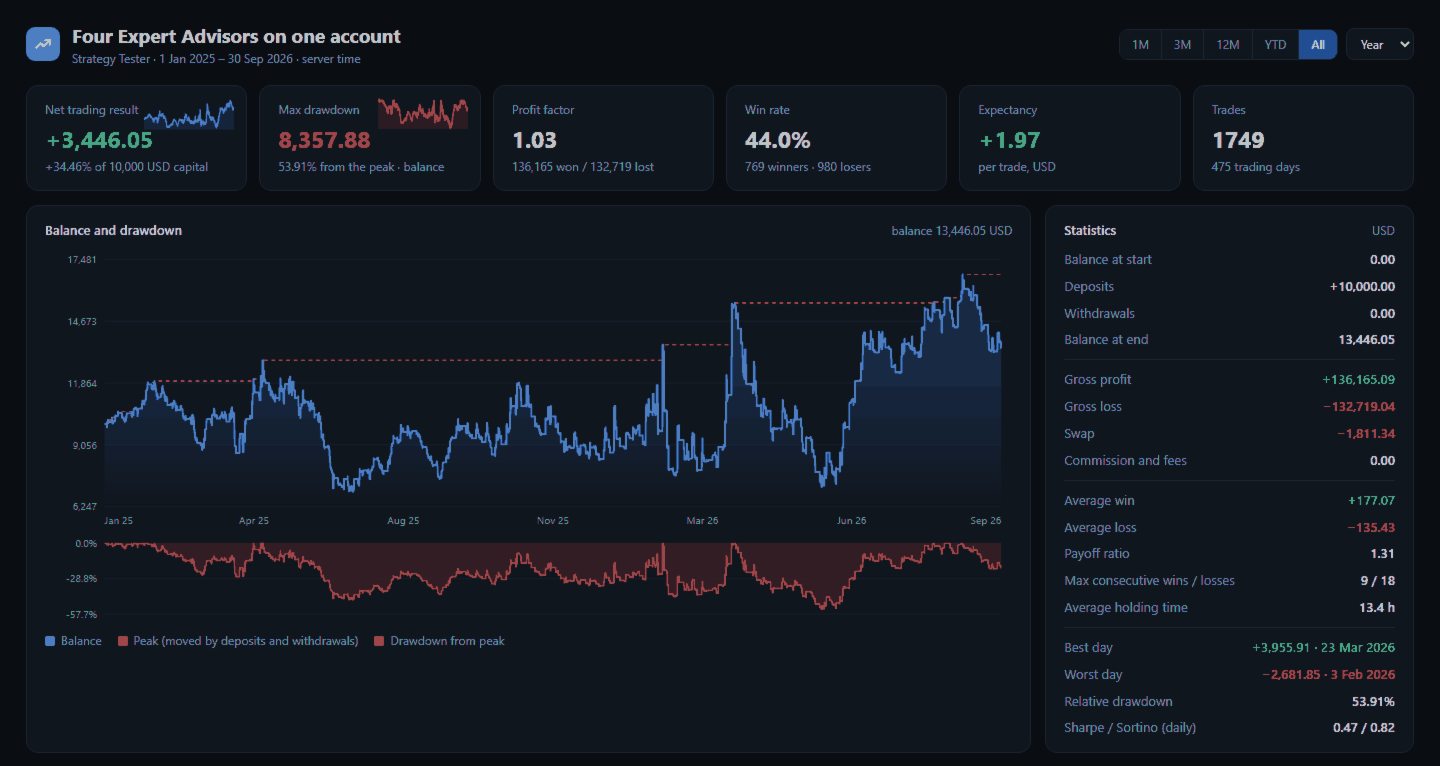
Account Performance Report turns the history of your account into one HTML report that you open in any browser: balance and drawdown, the result of each Expert Advisor and each symbol, a daily P&L calendar, monthly returns and the usual statistics. The main figures are also shown on the chart, and the report is kept up to date while the terminal runs.

How To Use

  • Attach Account Performance Report to any chart of the account. It does not trade, so any symbol and timeframe will do.
  • The report is written to MQL5\Files\AccountReport\AccountReport.html (File > Open Data Folder). Open it in any browser.
  • The report is updated when a position closes and at the interval set in the inputs.

What The Report Shows

  • Net trading result, maximum balance drawdown, profit factor, win rate, expectancy, number of trades and trading days.
  • Balance curve with its peak and the drawdown from the peak. Deposits and withdrawals move the peak, so they never show as a profit or a drawdown.
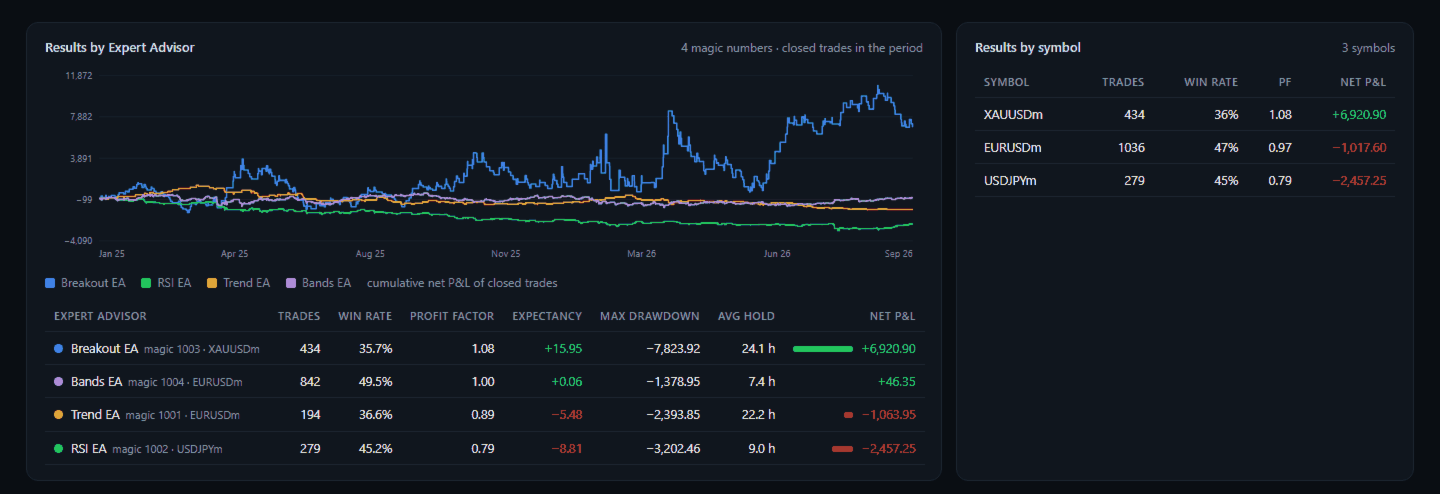
  • Results by Expert Advisor (magic number): trades, win rate, profit factor, expectancy, maximum drawdown of its closed trades, average holding time and net result, with the cumulative result of each EA on one chart.
  • Results by symbol.
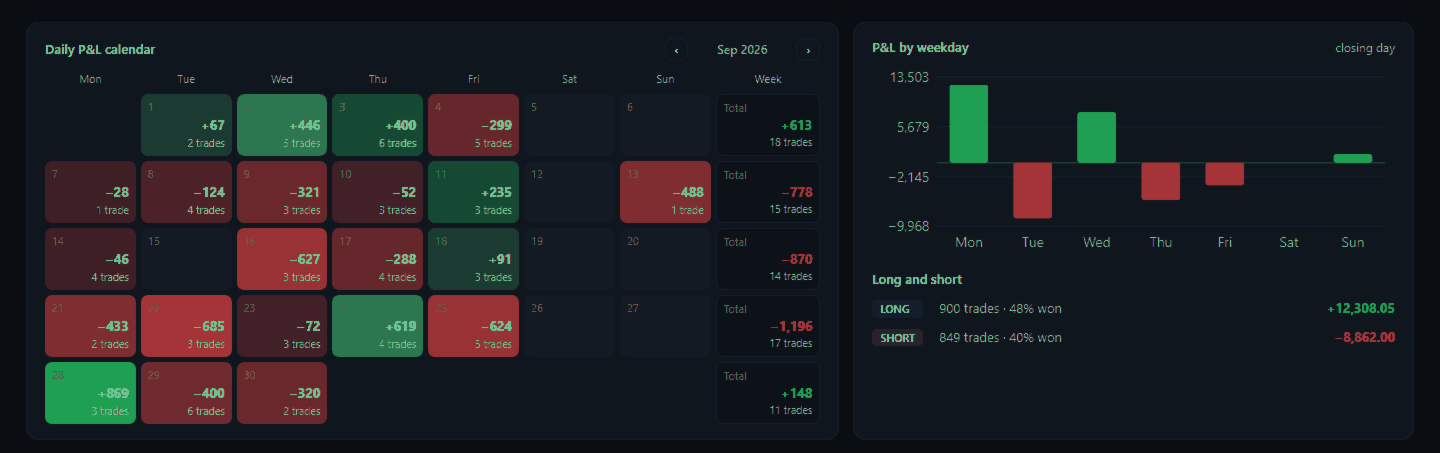
  • Daily P&L calendar with weekly totals, P&L by weekday, long and short trades.
  • Monthly returns for every year, in percent of the balance at the start of the month.
  • Statistics: gross profit and loss, swap, commission and fees, average win and loss, payoff ratio, consecutive wins and losses, holding time, best and worst day, Sharpe and Sortino ratios of daily returns.
  • Latest closed trades, deposits, withdrawals and credit.
  • Period buttons: 1 month, 3 months, 12 months, year to date, whole history, or any year.

Names Of The Expert Advisors

Many Expert Advisors write their name in the comment of their orders; the report uses it. You can also name them in the inputs, for example 1001=Trend EA;2002=Grid EA. Trades without a magic number are shown as Manual trades.

Checks

  • Every deal of the history is included: trades closed in parts, netting reversals, swaps, commissions, fees, deposits, withdrawals, bonus and credit.
  • The end balance computed by the report is compared with the account balance and the result is printed at the bottom of the report.
  • The screenshots come from a Strategy Tester backtest of four example strategies on one account (EURUSD, USDJPY, XAUUSD, 21 months). They show the report, not trading results to expect.

Inputs

  • Report title
  • Names of the Expert Advisors: magic=name pairs separated by ; (empty = taken from the order comments)
  • From: first day of the report (0 = whole history)
  • Magic number: one EA only (-1 = all trades)
  • Symbol: one symbol only (empty = all symbols)
  • Update every N minutes (0 = only when a position closes)
  • Update when a position closes

Good To Know

  • The report is one file with no internet access needed; it can be sent or archived as it is.
  • Only the last 4 digits of the account number appear in the report, so it can be shared.
  • Times are server times.
  • The drawdown is measured on the balance of closed trades, as in the account history.
  • In the Strategy Tester the report of the test is written to the common Files folder when the test ends.
  • The utility reads the history and writes one file. It does not trade and does not change any setting.
  • To see why an Expert Advisor earns a different amount live than in its backtest, trade by trade, see Backtest vs Live by the same author.
Рекомендуем также
Noetrix Sentinel
Julien Jeremy Rodrigue Gazagnaire
Noetrix Sentinel 1.10 Noetrix Sentinel is a native, read-only MetaTrader 5 operational supervision utility. It monitors terminal connectivity, latency, trading permissions, chart and EA presence, watched market feeds, optional Magic mappings, alerts and diagnostic evidence from a single chart. ## Safety and distribution - MetaEditor result: `0 errors, 0 warnings`. - Entry point: `MQL5/Experts/NoetrixSentinel/NoetrixSentinel.mq5`. - No trading library, order submission, position close, order
FREE
Session panel
Timo Mario Hoffmann
Session Panel for MT5 Session Panel is a free MT5 indicator that gives you a fast and convenient live overview of the major trading sessions directly from the chart. Monitor Tokyo, London, and New York session times, see which session is currently active, track countdowns to the next session, and view session overlap information in one compact dashboard. Built for traders who want better market timing, clearer session awareness, and a cleaner chart workflow in live market conditions. Session Pan
FREE
DataForge exports MetaTrader 5 bars to a CSV file, and writes into that file what the data actually contains. It does not trade. It places no orders, reads no positions, and requires no account permissions. It reads history and writes a text file. WHAT THE EXPORT WRITES 1. An instrument passport, placed in the CSV header    Digits, point, contract size, tick value, tick size, and the minimum, step and maximum lot are written as comment lines at the top of the file. Export the same symbol fro
FREE
Adaptive ATR Trailing Stop
Seref Oliver Joisten
4.5 (2)
Adaptive ATR Trailing Stop (MT5) Overview Adaptive ATR Trailing Stop is a utility Expert Advisor for MetaTrader 5 that manages stop loss levels for existing open positions. It uses the Average True Range (ATR) to calculate a volatility-based trailing distance. This EA does not open trades. It only modifies the Stop Loss (SL) of existing positions and keeps the current Take Profit (TP) unchanged. How it works - The EA runs on every tick of the chart where it is attached. - For each open posit
FREE
Telecontrol MT5
MIKHAIL VINOGRADOV
3 (1)
Telegram Controls (Telecontrol)  — выполняет связь бота   Телеграм   и терминала  MetaTrader 5 . Помогает агрегировать данные с нескольких терминалов и управлять ими с помощью бота в   Телеграм . Сервис удобен для работы на нескольких терминалах MT5, позволяя индивидуально настраивать каждый терминал для оптимального отображения и восприятия информации. Все данные с терминалов собираются в одном Telegram-канале, а панель настроек позволяет быстро вносить и сохранять изменения в работе и интерфей
FREE
MT5toTLGRM
Fernando Morales
4.2 (5)
MT5toTLGGRM EA отправляет текстовые сообщения только на группу телеграмм или канал по Вашему выбору. Сообщения настраиваются для отображения информации о любой торговой деятельности на счете. Также отображается ежедневный отчет PnL. В одном и том же терминале МТ5 можно использовать несколько экземпляров данного советника для отправки сообщений на разные группы/канал телеграмм, но при этом следить за тем, чтобы каждый из них имел свой номер в настройках [B13]. Ниже перечислены особенности отправ
FREE
Pro Trade Manager Panel объединяет весь ручной трейдинг на одной панели на графике MetaTrader 5: планируйте сделку визуально, панель сама рассчитает объём по вашему риску, отправит ордера, а затем поможет управлять ими и защитить счёт. Работает на Forex, металлах, индексах и других символах. ВИЗУАЛЬНОЕ ПЛАНИРОВАНИЕ СДЕЛКИ Прямоугольники входа, Stop Loss и Take Profit на графике: перетаскивайте, чтобы изменить. 1, 2 или 3 уровня Take Profit (разделение лота). Опция Step SL: SL переносится на вход
AK2 Risk Monitor Dashboard + Telegram Notification is a lightweight, 100% read-only account and risk monitoring utility for MetaTrader 5 — with your account's balance, equity, drawdown, and full weekly/monthly history delivered straight to your chart and straight to your phone. Get an instant Telegram alert the moment your risk status changes, receive an automatic daily recap, or just ask the bot /status , /today , /week , /month , or /day  whenever you want an update — no need to even open Meta
Forget about enabling templates when you launch the window. Auto Template Master Service  is a professional utility tool that runs as a system service in MetaTrader 5, and it will do it for you. Unlike traditional indicators or expert advisors (EAs), the program runs in the background of the entire terminal and doesn't require you to add it to each window individually. As soon as you open a new chart of any instrument (Forex, Stocks, Crypto), the service immediately detects the new window and a
Symbol Spec Auditor выводит на одну панель на графике ту часть спецификации контракта символа, от которой зависят размер позиции и торговые издержки: стоимость пункта, стоимость спреда, маржу, своп, правила исполнения и торговые сессии. Сырые значения спецификации пересчитываются в деньги на 1,00 лот в валюте счёта, а настройки брокера, которые незаметно ломают код расчёта лота, перечисляются как предупреждения. Одна кнопка экспортирует такой же аудит для каждого символа из Обзора рынка в CSV-фа
FREE
MultiTradeNews
Leeank Andres Fernandez Molano
Этот скрипт предназначен для трейдеров, которым необходимо быстро открывать сделки по нескольким валютным парам во время важных экономических новостей, когда каждая секунда имеет значение. С помощью этого инструмента вы можете заранее выбрать валютные пары и задать индивидуальный объем для каждой из них. Когда выходит важная новость, такая как данные по занятости вне сельского хозяйства (NFP) или индексы деловой активности (PMI), скрипт позволяет мгновенно выполнить все сделки, не тратя время на
FREE
Этот экспертный советник отслеживает все открытые позиции по всем символам в MetaTrader 5. Как только вручную устанавливается или изменяется уровень Stop Loss (SL) или Take Profit (TP) на любой позиции, советник автоматически применяет это значение ко всем другим открытым позициям , независимо от символа или типа ордера (Buy/Sell). Это обеспечивает синхронизацию уровней SL и TP по всему счёту. Идеально подходит для мобильного трейдинга с планшета или смартфона!
FREE
ApexForge Quote Paused Notification is a lightweight monitoring utility designed for MetaTrader 5 that detects when market quotes stop updating and immediately alerts you when abnormal quote interruptions occur. Whether caused by server issues, network disconnections, market closures, or temporary liquidity interruptions, the tool helps traders recognize quote freezes before they lead to missed opportunities or unexpected trading behavior. A notification is also generated once normal price upda

FREE
Position Prime
Mariana Cordeiro Neves Fernandes
Скачайте бесплатную демо-версию прямо сейчас и протестируйте все функции управления рисками в вашем Strategy Tester, прежде чем совершить покупку! Position Prime — это визуальный помощник по исполнению ордеров и риск-менеджер институционального уровня для MetaTrader 5. Разработанный для трейдеров, которым важны скорость и точность, он избавляет от необходимости ручного расчета лота и превращает ваш график в настоящий торговый терминал. Планируйте, исполняйте и защищайте свои сделки за доли сек
Reverse
Konstantin Chernov
1 (1)
Скрипт для быстрого переворота позиций и/или ордеров. Если вам необходимо перевернуть позицию с равным лотом, выставить встречную позицию объемом отличным от текущей, то этот скрипт избавит вас от рутинных действий! Разрешите авто-торговлю перед запуском скрипта. Использование: Запустите скрипт на графике. Данный скрипт является усеченной версией платного продукта https://www.mql5.com/ru/market/product/638 и позволяет переворачивать только позиции. Входные параметры скрипт не запрашивает. Такие
FREE
Название:   DCFX Ultimate Risk Manager v5.65 – Полуавтоматический риск-менеджер для MT5 Краткое описание: Профессиональный помощник для управления рисками и позициями в MT5. Рассчитывает лот по проценту риска, работает с визуальными ордерами (линии), автоматически фиксирует прибыль по режимам SAFE (1:1), EXIT (1:2), SING (закрытие одной сделки 1:2), 50% @ 1:2 + безубыток. Есть целевая прибыль (Target Profit) и отложенные ордера. Подробное описание: DCFX Ultimate Risk Manager v5.65 – это полуавт
Broker Environment Inspector is a professional MetaTrader 5 compatibility and diagnostics utility for examining the current terminal, account and symbol environment. It presents trading permissions, quote conditions, contract settings and supported execution capabilities in a clear technical dashboard. MAIN FEATURES • Terminal connection and trading-permission flags • Quote freshness and current spread inspection • Trading-session availability • Contract size, tick size and tick value details •
Ping-Monitor — Never Miss a Tick Again! Do you run EAs and worry about silent chart freezes or data feed stalls ?  This utility is your ultimate watchdog, alerting you the moment your charts stop receiving updates. Ping-Monitor is designed to detect when a chart freezes or the data feed stalls, even if MT5 still shows that the connection is active. It works by tracking the time of the last incoming tick. Every time the chart receives a new price update, the EA records the timestamp. Then, on a
Neuron News Risk Manager MT5 Neuron News Risk Manager MT5 — это система защиты от экономических новостей, управления рисками и удаленного контроля через Telegram для MetaTrader 5. Система отслеживает экономический календарь MT5 и отображает следующую новость, валюту, время, важность, влияние и оставшееся время. Можно фильтровать события уровня Low, Medium и High и отображать линии новостей непосредственно на графике. Функция Global Algo Trading Guard может автоматически отключать Algo Trading пе
Chart Date Jump Chart Date Jump is a lightweight MetaTrader 5 utility that helps you open historical chart context in seconds. Enter a target Day / Month / Year / Hour / Minute , press Go to datetime , and the chart scrolls to the matching bar and centers it in the window. A vertical marker is drawn on the located candle so you can instantly see the exact time you jumped to. Key features Jump to an exact date and time on the current symbol/period Center the found bar in the visible chart area Ma
MT5 to Telegram bot
Maksim Plotnikov
5 (1)
MT5 к сигналам Telegram Эта утилита проста в использовании и поддерживает широкий спектр настроек: Выберите желаемую группу Telegram и введите токен бота и идентификатор чата. Получайте уведомления, когда заказы размещаются, изменяются, выполняются, закрываются... или любые комбинации состояний. Соедините свой брокерский аккаунт с Telegram и перестаньте пропускать важные уведомления. Хотите получать уведомления в Telegram? Ищете простой способ делиться торговыми сигналами с вашими подписчиками?
FREE
If you want something as below: Sell FOREX trading signal. Manage multiple accounts. Follow the trading from somebody. "TradeCopier_follow" and   "TradeCopier_source"   can help you! Features: Copying from one source (master) account to multiple follower (slave) accounts. Allow investor (read only) password for the source (master) account. There are no complicated settings and input parameters, everything is easy. Works with different Brokers. Works with different symbols (EURUSD_FX, eurusd_m, e
FREE
Algo Trading Indicaor MT5 The ATC ALGO indicator has been developed to work on the MetaTrader 5 platform. It has the same specifications and zones as the MetaTrader 4 version. There may be slight lag, which we believe is due to differences in MetaTrader 5 programming. We will work on improving it, God willing. MT5 Version                    https://www.mql5.com/en/market/product/170028 MT4 Version                    https://www.mql5.com/en/market/product/88034 With this indicator , you’ll have
AI QUANT SYSTEM EA — Institutional Neural Engine (v52.0) Fully Automatic Trading EA Please Note:- First that this is an EXPERT ADVISOR, not a Utility. However, due to certain restrictions, I have to publish this  EXPERT ADVISOR  under the Utilities category.  We are  Provided  including a FREE OpenAI API key with this product, so you do not need to purchase AI API KEYS one separately, With Lifetime FREE Upgardes in Future. The AI Quant System EA is a next-generation, high-frequency quantitative
AP Pips
Felix Dumouchel
Trading is not easy, but you can make it easier with the pips-focused AP Pips. Money is the root of many emotional behaviors that plague traders, AP Pips take that away by offering you real-time analysis of your performance in pips so you can forget the $ behind it. Included in this free version : Live Pips Counter for your open trades Real-time data on your performance (Net Pips & Win Rate) for the current session, day & week. Adjusted every time a position is closed.
FREE
KS Hotkey Trading Panel Pro — это торговый советник (Expert Advisor) для MetaTrader 5, обеспечивающий возможность быстрой торговли с помощью горячих клавиш, а также оснащенный интерактивной панелью управления, размещаемой прямо на графике. Основные возможности Торговля с помощью горячих клавиш — выполнение действий одним нажатием: Рыночная покупка / продажа (Market Buy / Sell) Buy Limit / Sell Limit Buy Stop / Sell Stop Закрытие всех позиций Закрытие только позиций на покупку / только на
PipTick Close - это простой скрипт, позволяющий закрывать сделки тремя методами. Просто запустите скрипт и выберите метод закрытия. Методы закрытия Symbol - Позволяет закрыть все открытые сделки по определенному символу All_Trades - Позволяет закрыть все открытые сделки Magic_Number - Позволяет закрыть все открытые сделки по указанному магическому номеру Рекомендация Функция Авто-торговли должна быть активирована . Если функция Авто-торговли отключена, скрипт не будет работать. Советники должны
FREE
Telegram Sender Osw MT5
William Oswaldo Mayorga Urduy
Руководство пользователя: Telegram Sender Osw Telegram Sender Osw — это экспертный помощник (EA), предназначенный для автоматизации отправки торговых сигналов из MetaTrader в Telegram. Идеально подходит для поставщиков сигналов и управления счетами, мгновенно и профессионально отправляет важные данные (цена, стоп-лосс, тейк-профит, объем). 1. Настройка параметров Общие и подключение Включить EA: Активирует (true) или приостанавливает (false) работу системы. Токен бота: Буквенно-цифровой код,
AutoCloseTimer позволяет закрывать позиции и удалять отложенные ордера в определенное время. Применение Загрузите и перетащите AutoCloseTimer на график. Включите опцию "Разрешить авто-торговлю" на вкладке "Общие". Установите параметры на вкладке "Входные параметры". Примечание: Время закрытия должно быть позже текущего рыночного времени. Входные параметры CloseSymbol - предусмотрены 2 опции SymBol Of Chart - закрыть символ текущего графика All Symbols - закрыть все символы CloseTimerDay - уста
Telegram Notification Worker (v5.31) Telegram Notification Worker is a high-performance, professional utility designed to bridge the gap between your MetaTrader 5 terminal and Telegram. It acts as a dedicated background worker that forwards custom alerts, trade events, and system status messages from any of your Expert Advisors (EAs) directly to your Telegram chat or channel. Key Technical Features: Asynchronous Messaging Engine: Unlike standard notification scripts, this worker uses an asynchr
FREE
С этим продуктом покупают
Trade Assistant MT5
Evgeniy Kravchenko
4.43 (216)
Помогает рассчитать риск на сделку, простая установка нового ордера с помощью линий, управление ордерами с функциями частичного закрытия, 7 типов трейлинг-стопа и другие полезные функции. Дополнительные материалы и инструкции Инструкция по установке - Инструкция к приложению Функция Линии   - отображает на графике линию открытия, стоп-лосс, тейк-профит. С помощью этой функции легко установить новый ордер и увидеть его дополнительные характеристики перед открытием. Управление риском   -   функ
Добро пожаловать в Trade Manager EA — лучший инструмент для управления рисками, предназначенный для упрощения, точности и эффективности торговли. Это не просто инструмент для размещения ордеров; это комплексное решение для удобного планирования торгов, управления позициями и усиленного контроля над рисками. Независимо от того, начинающий вы трейдер, опытный специалист или скальпер, нуждающийся в быстром исполнении, Trade Manager EA адаптируется к вашим потребностям и работает с любыми активами:
Local Trade Copier EA MT5
Juvenille Emperor Limited
4.94 (149)
Local Trade Copier EA MT5 — это быстрый и гибкий копировщик сделок для копирования и управления сделками между несколькими счетами MetaTrader 5 на одном компьютере с Windows или Windows VPS. Он сочетает локальную синхронизацию сделок с настройками на стороне Receiver для управления размером лота, рисками, фильтрацией сделок, сопоставлением символов, управлением сделками и защитой счета. Настройте терминалы Transmitter и Receiver примерно за 1 минуту и копируйте ручные сделки или сделки, открыты
Telegram to MT5 Multi-Channel Copier   автоматически копирует торговые сигналы из ваших Telegram- и Discord -каналов прямо в MetaTrader 5. Без ботов, без браузерных расширений, без ручного копирования. Сигнал приходит в Telegram или Discord — и советник открывает сделку в вашем терминале за считанные секунды. А перед тем как копировать канал, встроенный бэктестер покажет, что этот канал сделал бы на вашем счёте. Продукт состоит из двух компонентов: приложения для Windows, которое слушает ваши Te
================================================================================ POC BREAKOUT - V20.72. Full Professional Grade Toolkit ================================================================================ POC Breakout is a full MetaTrader 5 trading dashboard for discretionary traders who want breakout signals, Point of Control (POC) context, volume profiles, order flow, market structure, news, alerts, and advanced trade planning in one professional workspace. Attached directly to you
Farmed Hedge Yield Farming | All Markets (Manual - Hybrid - Semi/Automated EA) VERIFIED TRADING RESULTS - Farmed Hedge Yield Axi Copy:  https://www.mql5.com/en/signals/2356376 - Farmed Hedge Yield Exn Copy:   https://www.mql5.com/en/signals/2356404 - Farmed Hedge Yield V Copy:  https://www.mql5.com/en/signals/2357156 IMPORTANT NOTICE: FarmedHedge is a MANUAL-FOCUSED TRADING UTILITY ,not a fully automated EA. Results shown on this Signal include manual trades and overall strategic management.
Копируйте сигналы из Telegram по своим торговым правилам Telegram to MT5 Signal Trader автоматически копирует текстовые торговые сигналы из открытых и закрытых каналов и групп Telegram в MetaTrader 5. Управляйте несколькими поставщиками сигналов и счетами MT5 из одного приложения для компьютера, задавая индивидуальные параметры риска и торговли для каждого поставщика . Для копирования не нужны бот Telegram и настройка API. Просто войдите в свой аккаунт Telegram по номеру телефона или QR-коду и в
Strategy Ledger Pro
Abdullah Uygar Tuna
5 (11)
Теперь доступно на русском языке. Strategy Ledger Pro — панель анализа счёта для MetaTrader 5, работающая только на чтение. Она разделяет результаты счёта по советникам, стратегиям, символам и magic-номерам, чтобы было видно, что на самом деле вносит каждый из них. Панель доступна на 11 языках: English, Français, Deutsch, Español, Italiano, Português, Русский, Türkçe, 中文, 日本語 и 한국어. Перед загрузкой демоверсии. Маркет запускает демоверсию любого платного продукта только в тестере стратегий. Эта
TradePanel MT5
Alfiya Fazylova
4.88 (170)
Trade Panel — это многофункциональный торговый помощник. Приложение содержит более 50 торговых функций для ручной торговли и позволяет автоматизировать большинство торговых операций. Инструкция к приложению: https://www.mql5.com/ru/blogs/post/756476 Пробная версия приложения для демо-счета: https://www.mql5.com/ru/blogs/post/750864 Как установить приложение: https://www.mql5.com/ru/blogs/post/750096 Как тестировать приложение в визуальном режиме: https://www.mql5.com/ru/blogs/post/770274 Как уст
Master Your Trading Discipline   Stop losing your hard-earned gains to overtrading and emotional decisions. The Discipline Tool is your ultimate trading assistant, ensuring strict risk management in real-time. Key Protection Features: Advanced Drawdown Defense : Automatically halts trading if your daily drawdown exceeds a preset threshold (percentage or dollar amount). Real-Time Equity Lock : Safeguard profits by referencing peak equity, ensuring drawdown stays within control. Hard Profit Target
Power Candles Strategy Scanner — самооптимизирующийся инструмент для поиска настроек по нескольким инструментам Power Candles Strategy Scanner использует тот же самооптимизирующийся движок, что и индикатор Power Candles — для всех символов в вашем Market Watch, одновременно. На одной панели отображается информация о том, какие символы в данный момент являются статистически торгуемыми, какая стратегия выигрывает на каждом из них, оптимальная пара Stop Loss / Take Profit, а также отправляется увед
Exp COPYLOT CLIENT for MT5
Vladislav Andruschenko
3.97 (35)
Профессиональный копировщик сделок для MetaTrader 5 Быстрый, профессиональный и надежный копировщик сделок для MetaTrader . COPYLOT позволяет копировать сделки Forex между терминалами MT4 и MT5 с поддержкой счетов Hedge и Netting . Версия COPYLOT для MT5 поддерживает: - MT5 Hedge → MT5 Hedge - MT5 Hedge → MT5 Netting - MT5 Netting → MT5 Hedge - MT5 Netting → MT5 Netting - MT4 → MT5 Hedge - MT4 → MT5 Netting Версия MT4 Полное описание + DEMO + PDF Как купить Как установить Как получить файлы жур
Entry In The Zone with SMC Multi Timeframe is a real-time market analysis tool based on Smart Money Concepts (SMC), designed to analyze market structure, price direction, and key trading zones. It supports both Single-Timeframe and Multi-Timeframe Analysis, providing a clearer view of overall market structure across multiple timeframes, with real-time BUY / SELL signals designed with a strict focus on No-Repaint principles.   The signals are designed to help filter unclear setups and evaluate tr
Telegram To MT5 Ultra
Mirel Daniel Gheonu
5 (5)
Telegram To MT5 — копировщик сигналов Превратите торговые сигналы из ваших Telegram-каналов в реальные ордера MT5 — автоматически, на любом количестве счетов, с полным контролем над риском и правилами. Telegram To MT5 связывает VIP / сигнальные каналы, на которые вы уже подписаны в Telegram, с вашим терминалом MetaTrader 5. Бесплатное приложение-компаньон для ПК читает сообщения (даже из каналов, которые не допускают ботов), а этот советник исполняет их на вашем счёте — применяя ваши настройки р
EasyInsight AIO MT5
Alain Verleyen
4.92 (12)
EASY Insight AIO – Всё-в-одном для умного и простого трейдинга Обзор Представьте, что вы можете просканировать весь рынок — Форекс, золото, криптовалюты, индексы и даже акции — всего за несколько секунд, без ручного просмотра графиков, сложной установки или настройки индикаторов. EASY Insight AIO — это ваш идеальный инструмент экспорта для трейдинга с поддержкой искусственного интеллекта. Он предоставляет полный снимок рынка в одном аккуратном CSV-файле — готовом к мгновенному анализу в ChatGP
The product will copy all telegram signal to MT5 ( which you are member) , also it can work as remote copier.  Easy to set up, copy order instant, can work with almost signal formats, image signal,  s upport to translate other language to English Work with all type of channel or group, even channel have "Restrict Saving Content", work with  multi channel, multi MT5 Work as remote copier: with signal have ticket number, it will copy exactly via ticket number. Support to backtest signal. How to s
Нужна поддержка? Как настроить? Есть вопросы? Спрашивайте здесь на своём языке, быстрый ответ: https://www.mql5.com/en/market/product/139088/comments Скачать рабочую демо-версию Copy Cat More (Копи Кэт Мор) — копировщик сделок (Trade Copier) MT5 — это локальный копировщик сделок и полноценная система управления рисками и исполнения, созданная для современных торговых задач. От челленджей проп-фирм (prop firm) до управления личным портфелем — он адаптируется к любой ситуации благодаря сочетанию
Trade Indicator Assistant   is a powerful MT5 utility designed to turn indicators into automated trading systems. Its main feature is the ability to automatically detect an indicator’s   BUY and SELL signal buffers , without requiring you to know the buffer numbers, search through indicator settings, or modify the indicator source code. Bonus Indicator:   After purchasing Trade Indicator Assistant, contact me to receive   Trade Signal Pro   completely free as a bonus indicator. [Download Demo V
HINN MAGIC ENTRY - лучший инструмент для входа и менеджмента позиций! ПРОСТО. БЫСТРО. ИНТУИТИВНО. МАКСИМАЛЬНО АВТОМАТИЗИРОВАНО. Выставляет ордера через выбор уровня на графике! полное описание    ::    demo-версия    ::   60-sec-video-description Основные функции: - Рыночные, лимитные и отложенные ордера -  Автоматический подсчет лоттажа  -  Автоматический учет спреда и комиссий -  Неограниченное количество промежуточных тейков для позиций - Перевод в безубыток и трейл стоп-лосса и тейк-проф
Signal TradingView to MT5 Pro Automator Мгновенное профессиональное исполнение между TradingView и MetaTrader 5 Автоматизируйте свою торговую стратегию с помощью самого надежного моста связи между алертами TradingView и реальным исполнением в MT5. Разработанный для трейдеров, которым требуются скорость, гибкость и безупречное управление рисками, этот советник (Expert Advisor) превращает любое сообщение с алертом в точный рыночный или лимитный ордер. ПРЕИМУЩЕСТВА И СИЛЬНЫЕ СТОРОНЫ Универсальный д
Trade copier MT5
Alfiya Fazylova
4.61 (57)
Trade Copier — это профессиональная утилита, предназначенная для копирования и синхронизации сделок между торговыми счетами. Копирование происходит от счета/терминала поставщика к счету/терминалу получателя, которые установлены на одном компьютере или vps. Перед покупкой вы можете протестировать демо-версию на демо-счете. Демо-версия здесь . Полная инструкция здесь . Основной функционал и преимущества: Русифицированный интерфейс, поддержка на русском языке. Поддерживает копирование МТ5 > МТ5, МТ
Grid Manual MT5
Alfiya Fazylova
4.73 (22)
Grid Manual — это торговая панель для работы с сеточными стратегиями. Утилита универсальная, имеет гибкие настройки и понятный интерфейс. Работает с сеткой ордеров не только в сторону усреднения убытков, но и в сторону наращивания прибыли. Трейдеру не нужно создавать и сопровождать сетку ордеров, это сделает утилита. Достаточно открыть ордер и Grid manual автоматически создаст ему сетку ордеров и будет сопровождать его до самого закрытия. Полная инструкция и демо-версия здесь . Основные особенно
The Patch
Mian Rameez Ali
The Patch It never opens a trade. It walks behind the ones that did. Every open position, every pending order — checked twice a second for the one thing that's easy to forget: a stop, a target. Found bare, it doesn't ask. It writes the missing number in, measured in points from wherever the position began, and moves on to the next. No strategy, no opinion on direction. Just the quiet assumption that nothing should ever sit on the market unprotected — not because someone decided it shouldn't,
Seconds Chart MT5
Boris Sedov
4.61 (18)
Seconds Chart - уникальный инструмент для создания секундных графиков в MetaTrader 5 . С помощью Seconds Chart вы можете построить график с таймфреймом, заданным в секундах, получая идеальную гибкость и точность анализа, недоступную на стандартных минутных или часовых графиках. Например, таймфрейм S15 обозначает график со свечами продолжительностью 15 секунд. Вы можете использовать любые индикаторы и советники с поддержкой пользовательских символов. Работать с ними так же удобно, как и на станда
Telegram to MT5 Coppy
Sergey Batudayev
5 (10)
Telegram to MT5: Идеальное решение для копирования сигналов Упростите свою торговлю с Telegram to MT5 — современным инструментом, который копирует торговые сигналы прямо из каналов и чатов Telegram на вашу платформу MetaTrader 5, без необходимости использования DLL. Это мощное решение обеспечивает точное исполнение сигналов, широкие возможности настройки, экономит время и повышает вашу эффективность. [ Instructions and DEMO ] [ FAQ ] [ How atach logs properly ] [ Settings descrition ] Ключевые
EA Overfitter
Stephen J Martret
5 (1)
Бэктест выглядит отлично. Но будет ли советник зарабатывать завтра, через неделю, через месяц? EA Overfitter прогоняет вашего советника по 100 историям цены, которых он никогда не видел. Одна оценка показывает, реально ли преимущество. Бэктест показывает, что советник сделал на одной истории цены — на той, которая случайно произошла. Из него невозможно понять, какая часть результата была заслугой стратегии, а какая — конкретного пути цены. EA Overfitter отвечает на этот вопрос. Он строит до 10
Торговая панель для MetaTrader 5 — профессиональная торговля в один клик с графика и клавиатуры Мощная торговая панель для активного ручного трейдинга, которая позволяет открывать, сопровождать и закрывать сделки значительно быстрее и удобнее, чем стандартными средствами MetaTrader. Панель создана для тех, кто хочет получить полный контроль над позициями, ордерами, прибылью и торговыми сценариями в одном рабочем пространстве. Это не просто вспомогательная утилита. Это полноценный торговый интер
Anchor Trade Manager
Kalinskie Gilliam
5 (9)
Your EAs cannot see each other, but Anchor can. Anchor gives you one place to coordinate your EAs, manage risk, and decide when trading is allowed. It works alongside the trading bots you already use without any changes to them. The Problem One EA opens a trade. Then another starts trading. The next thing you know, you wake up to multiple grids built across your account. Each EA may be doing exactly what it was designed to do, but together they can place far more risk on your account than you in
Trade Dashboard MT5
Fatemeh Ameri
4.94 (135)
Trade Dashboard simplifies how you open, manage, and control your trades, with built-in lot size calculation. It allows you to execute trades, manage risk, and control positions directly on the chart, with tools such as partial close, breakeven, and trailing stop. Designed to reduce manual work and help you stay focused on your trading decisions. A demo version is available for testing. Detailed explanations of features are provided within the MQL5 platform. Installation instructions are include
Floor Watch
Syed Tauqeer Hussain Shah
Floor Watch One number, watched every thirty seconds: how far equity has fallen since the day began — or since its highest point, if it's told to trail the peak instead of the open. Cross the line and it doesn't argue. Every open position closes, every pending order vanishes, and anything that slips through afterward gets shut the moment it appears. Not asked. Removed. The floor holds until the clock turns 5 AM Pakistan time — then, and only then, does the day start over. One rule. No except
Другие продукты этого автора
Optimization Robustness Map reads the results of a Strategy Tester optimization and shows whether the best pass sits on a plateau, where nearby inputs give similar results, or on a lone spike that a small change destroys. It draws a heat map of any two inputs, compares every pass with its neighbours, shows how each input moves the result and, when a forward period was tested, how well the back test predicted it. Everything is written to one HTML page. How To Use In the Strategy Tester, after an
FREE
Monte Carlo Risk Simulator shows how much worse a backtest could have gone with the same trades in a different order, and what more or less risk per trade does to its growth and drawdown. It reads saved Strategy Tester reports or the history of your account, runs thousands of simulations and writes one HTML page. How To Use Backtests: in the Strategy Tester, right click on the Backtest tab > Report > save it as HTML into MQL5\Files\RiskSimulator (File > Open Data Folder). Account: set "Trades to
FREE
Trade History to Excel turns saved Strategy Tester reports, or the trading history of your account, into a real Excel workbook (.xlsx). Every report goes into the same file: one summary row per report, every closed trade with its entry and exit price, every deal, and the results of each day and month with the balance. Dates are Excel dates, numbers are numbers, the header row is frozen and every sheet has filters, so you can sort, filter, build pivot tables and charts right away. How To Use Back
FREE
Prop Risk Guard
Mohamed-amine Baddir
Prop Risk Guard автоматически обеспечивает соблюдение правил управления рисками вашего счёта. Достаточно прикрепить его к одному графику — он будет отслеживать все позиции на счёте. При достижении лимита он закрывает позиции, удаляет отложенные ордера и блокирует торговлю, чтобы одна неудачная сделка или неконтролируемо работающий советник (EA) не нарушили правила вашей оценки или финансируемого счёта. Дневной лимит убытков Задаётся в процентах, фиксированной суммой или обоими способами одноврем
The Strategy Tester runs one Expert Advisor at a time. If you run several EAs on one account, their separate reports do not tell you the combined drawdown, the margin they need together, or whether the account can carry them at all. Portfolio Backtest Combiner answers that from the reports you already have. How It Works Backtest each Expert Advisor as usual and save the report as HTML (Strategy Tester > Backtest tab > right click > Report > save as HTML) into the MQL5\Files folder of the termina
Backtest Report Compare puts several Strategy Tester reports side by side on one HTML page: growth and drawdown curves on one chart, the main statistics in one table, the correlation of their daily results, monthly returns and results by weekday and hour. Use it to choose between Expert Advisors, between settings of one Expert Advisor, or to see which strategies lose on the same days. How To Use In the Strategy Tester, after each test: right click on the Backtest tab > Report > save it as HTML i
FREE
Trade Excursion Analyzer measures how far every closed trade went against you (maximum adverse excursion, MAE) and in your favour (maximum favorable excursion, MFE) before it closed. It reads saved Strategy Tester reports or the history of your account, measures each trade on the price history of your terminal and writes one HTML page: where your stop-loss could be, how much open profit your exits give back, and what a fixed stop-loss or take-profit would have changed. How To Use Backtests: in t
Backtest vs Live
Mohamed-amine Baddir
Backtest vs Live explains why an Expert Advisor earns a different amount live than in the Strategy Tester. It matches every live trade with its twin in the backtest, then splits the whole difference of the results, to the cent, into entry prices, exit prices, swap and commission, lots and currency conversion, trades the backtest made that live trading missed, and live trades the backtest never made. It can also compare two backtests, for example the same Expert Advisor with and without execution
Фильтр:
Нет отзывов
Ответ на отзыв