Account Performance Report
- 유틸리티
-
Mohamed-amine Baddir
 MetaTrader 5용 Expert Advisor(EA)를 개발하고, 실제 거래에 사용하기 전에 충분히 테스트합니다.
제가 제공하는 작업:
고객의 전략, TradingView 스크립트 또는 문서화된 규칙을 깔끔한 MT5 Expert Advisor로 구현
기존 EA 수정 및 문제 해결: % 기준 리스크 포지션 사이징, 트레일링 스톱, 세션 및 시간 필터, 스프레드 필터, 멀티 심볼 포트폴리오, 드로다운 보호 기능 - 버전: 1.0
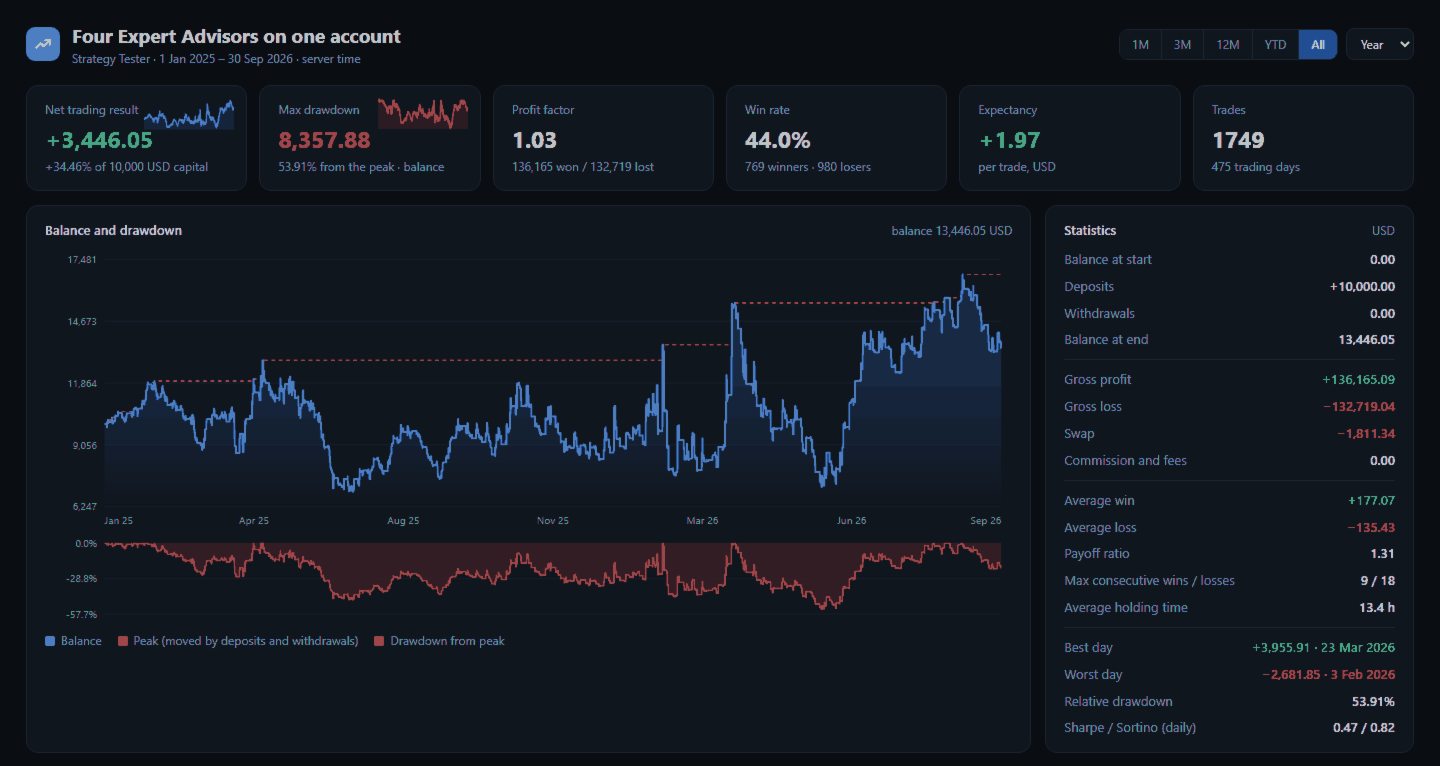
Account Performance Report turns the history of your account into one HTML report that you open in any browser: balance and drawdown, the result of each Expert Advisor and each symbol, a daily P&L calendar, monthly returns and the usual statistics. The main figures are also shown on the chart, and the report is kept up to date while the terminal runs.
How To Use
- Attach Account Performance Report to any chart of the account. It does not trade, so any symbol and timeframe will do.
- The report is written to MQL5\Files\AccountReport\AccountReport.html (File > Open Data Folder). Open it in any browser.
- The report is updated when a position closes and at the interval set in the inputs.
What The Report Shows
- Net trading result, maximum balance drawdown, profit factor, win rate, expectancy, number of trades and trading days.
- Balance curve with its peak and the drawdown from the peak. Deposits and withdrawals move the peak, so they never show as a profit or a drawdown.
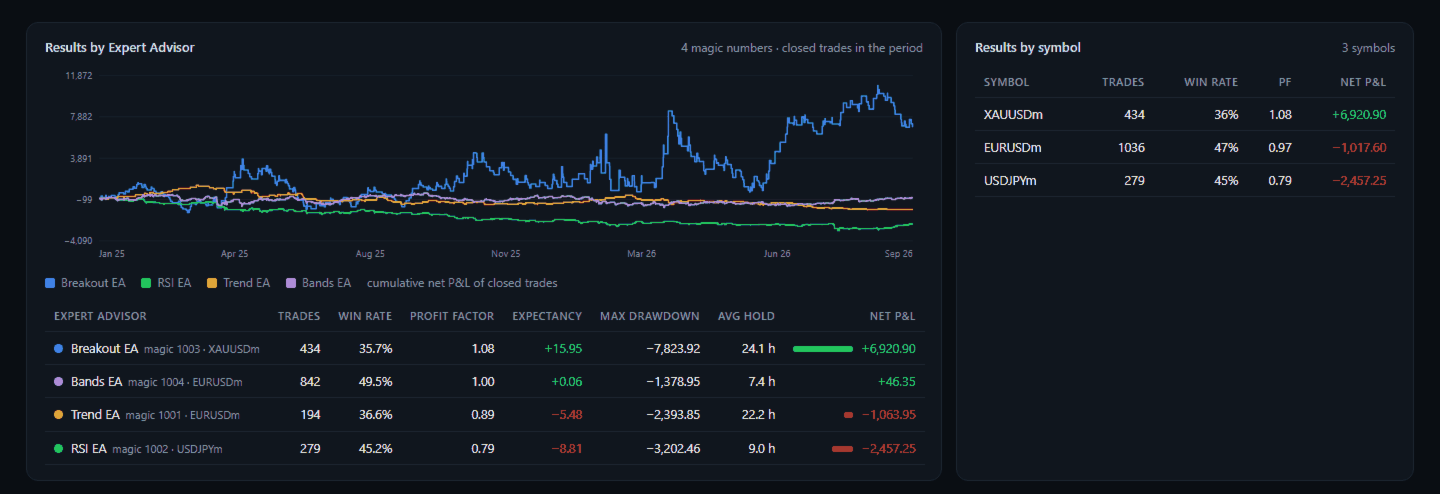
- Results by Expert Advisor (magic number): trades, win rate, profit factor, expectancy, maximum drawdown of its closed trades, average holding time and net result, with the cumulative result of each EA on one chart.
- Results by symbol.
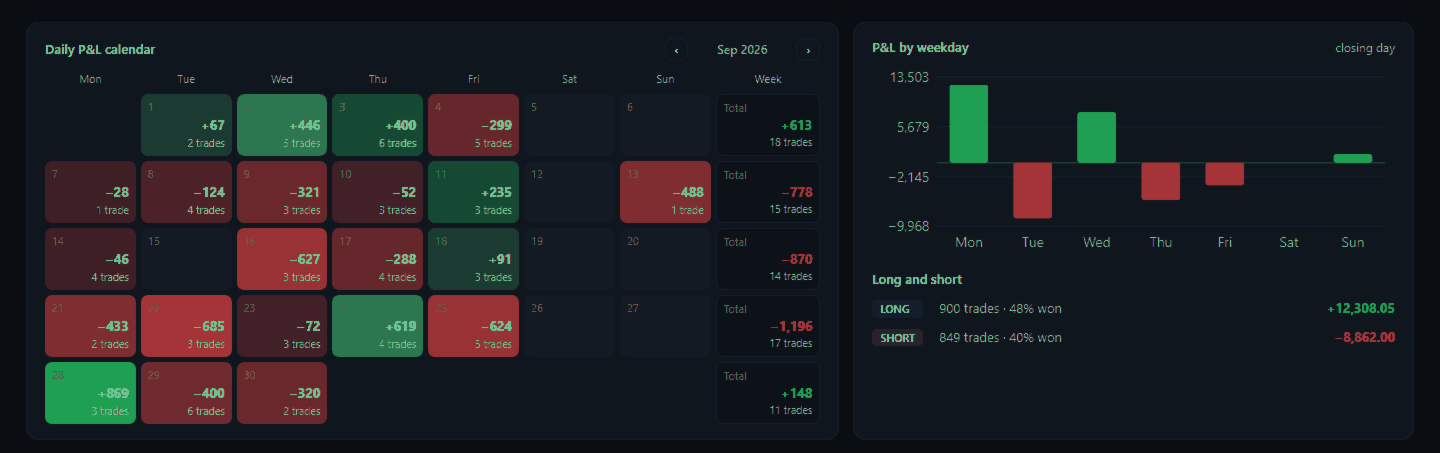
- Daily P&L calendar with weekly totals, P&L by weekday, long and short trades.
- Monthly returns for every year, in percent of the balance at the start of the month.
- Statistics: gross profit and loss, swap, commission and fees, average win and loss, payoff ratio, consecutive wins and losses, holding time, best and worst day, Sharpe and Sortino ratios of daily returns.
- Latest closed trades, deposits, withdrawals and credit.
- Period buttons: 1 month, 3 months, 12 months, year to date, whole history, or any year.
Names Of The Expert Advisors
Many Expert Advisors write their name in the comment of their orders; the report uses it. You can also name them in the inputs, for example 1001=Trend EA;2002=Grid EA. Trades without a magic number are shown as Manual trades.
Checks
- Every deal of the history is included: trades closed in parts, netting reversals, swaps, commissions, fees, deposits, withdrawals, bonus and credit.
- The end balance computed by the report is compared with the account balance and the result is printed at the bottom of the report.
- The screenshots come from a Strategy Tester backtest of four example strategies on one account (EURUSD, USDJPY, XAUUSD, 21 months). They show the report, not trading results to expect.
Inputs
- Report title
- Names of the Expert Advisors: magic=name pairs separated by ; (empty = taken from the order comments)
- From: first day of the report (0 = whole history)
- Magic number: one EA only (-1 = all trades)
- Symbol: one symbol only (empty = all symbols)
- Update every N minutes (0 = only when a position closes)
- Update when a position closes
Good To Know
- The report is one file with no internet access needed; it can be sent or archived as it is.
- Only the last 4 digits of the account number appear in the report, so it can be shared.
- Times are server times.
- The drawdown is measured on the balance of closed trades, as in the account history.
- In the Strategy Tester the report of the test is written to the common Files folder when the test ends.
- The utility reads the history and writes one file. It does not trade and does not change any setting.