Keyboard Master
- Эксперты
- Версия: 1.30
- Активации: 15

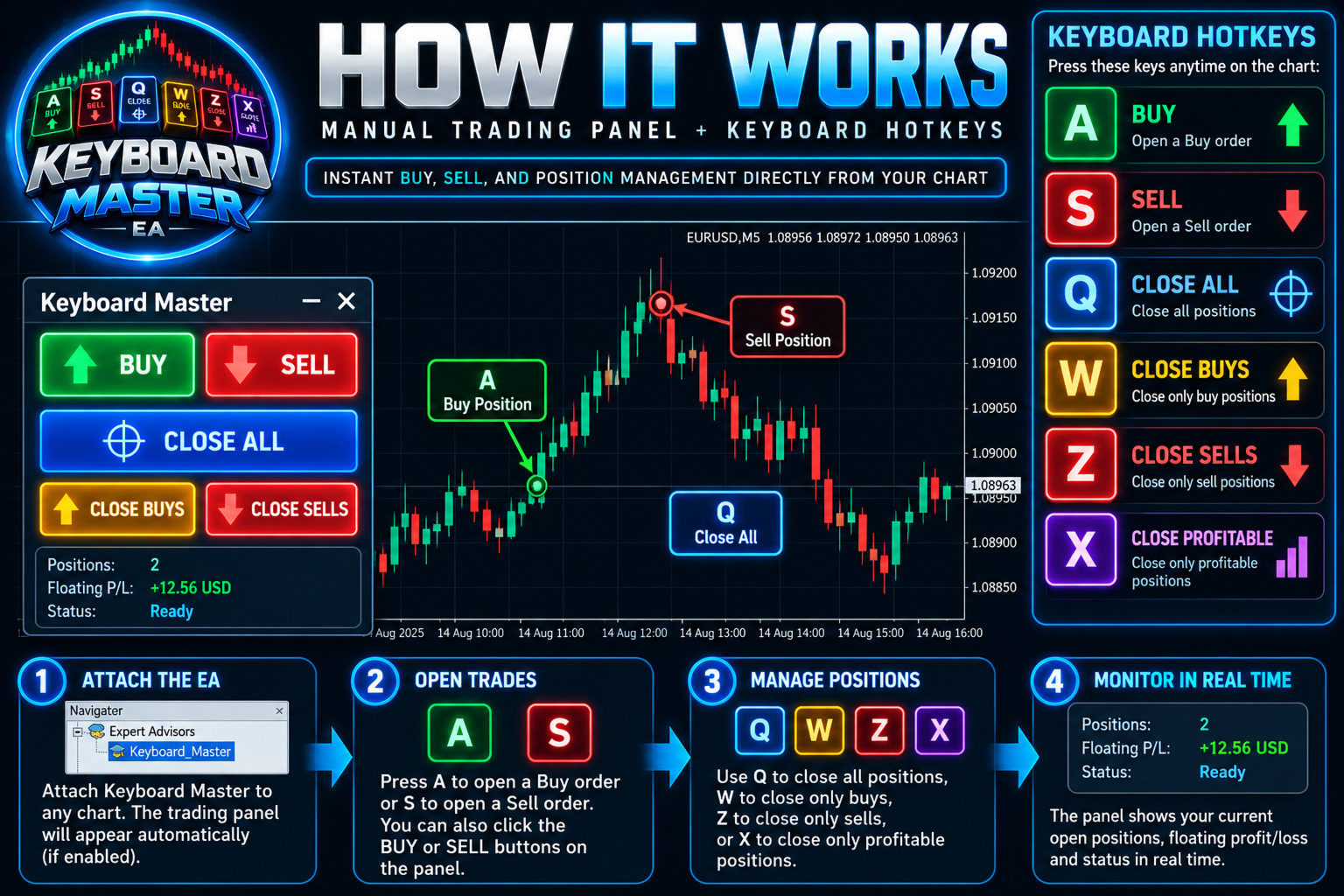
Keyboard Master is a manual trading tool for MetaTrader 5. It lets you open and close positions with a single key press or one click on a clean on-chart panel, with no order windows and no confirmation dialogs.
It's built for scalpers, news traders and anyone who needs to react quickly.
Important: Keyboard Master is NOT an automated trading robot. It does not open trades on its own and has no trading strategy. Every trade on your chart is placed by you.
HOTKEYS
- A – Buy
- S – Sell
- Q – Close ALL positions
- W – Close all BUY positions
- Z – Close all SELL positions
- X – Close all PROFITABLE positions
HOW TO USE
- Attach Keyboard Master to any chart.
- Make sure Algo Trading is enabled.
- Click the chart once, then use the hotkeys or the panel buttons.
NOTE ABOUT THE STRATEGY TESTER
Keys and buttons can't be pressed in the Strategy Tester. So when run there, the EA places small automatic test trades to show that the order and close functions work. This happens only in the Strategy Tester, never on a live or demo account. The test results do not represent any trading strategy or expected performance.