Nomad Trade Panel Pro

Nomad Trade Panel Pro is a manual trade panel for MetaTrader 5 that checks each order you send from it against limits you set, and refuses the ones that break them. It is built for an account with a daily loss limit.

A daily limit is rarely broken by one trade. It is broken by the next one, sized as if the losses still open did not count. This panel counts them before it lets another order through. It does not close positions or delete pending orders, so a running loss, a gap or slippage can still carry the account past the limit.

It never opens a trade by itself. Trailing, break-even and partial closes act without a click once you switch them on. Orders from the order window, mobile apps or other programs are not checked.

THE RISK GATE
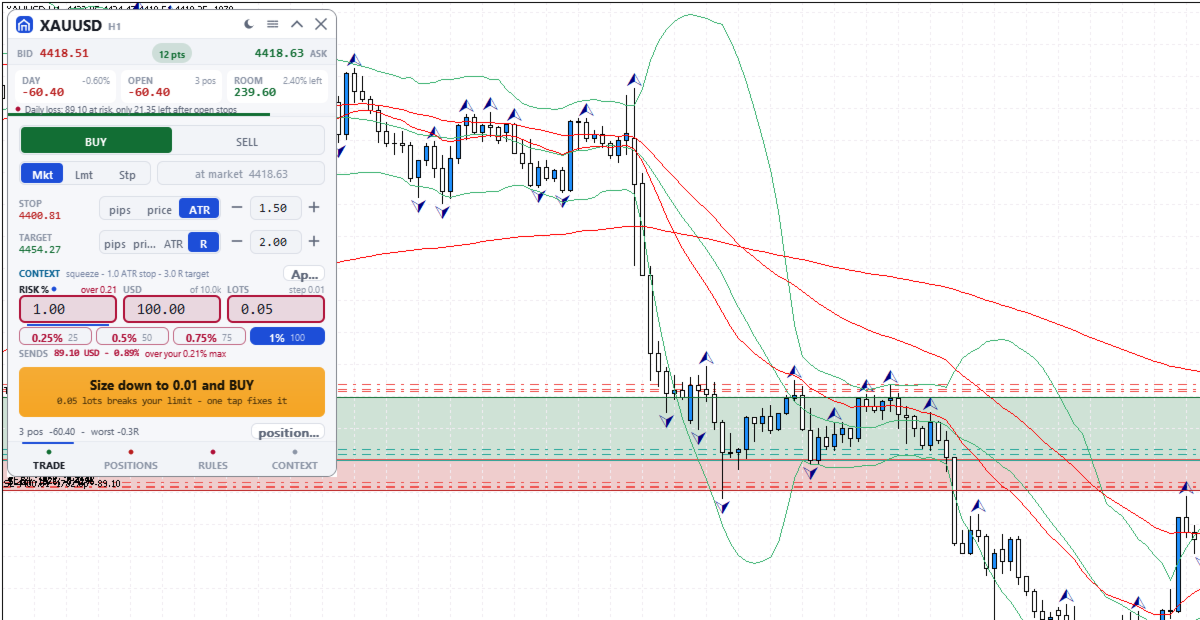
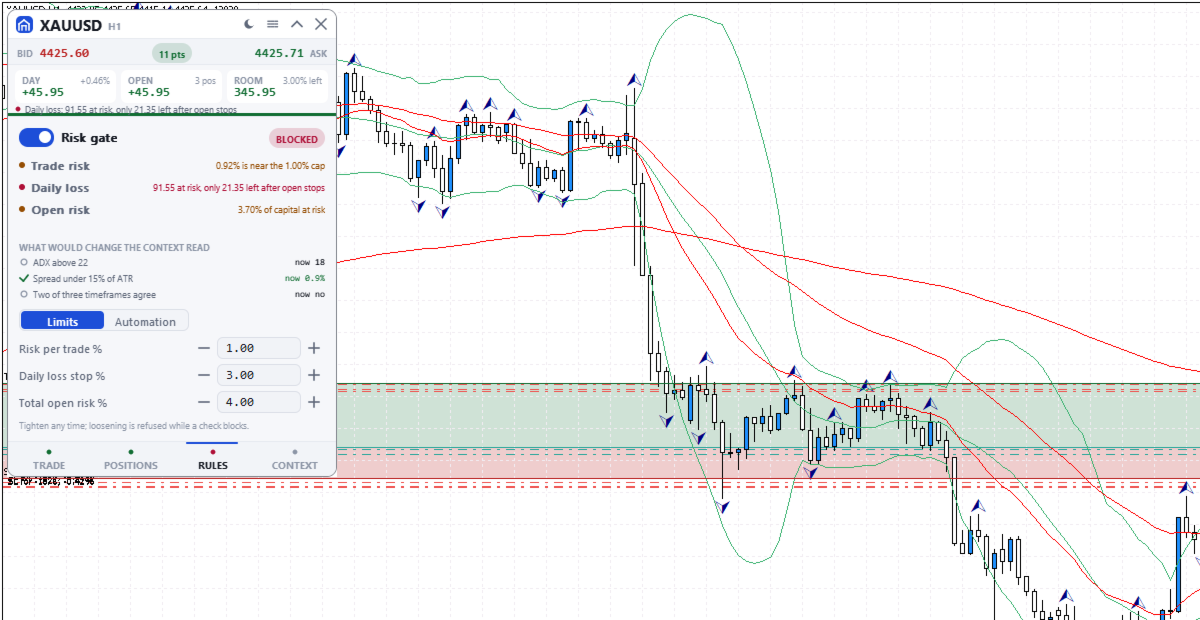
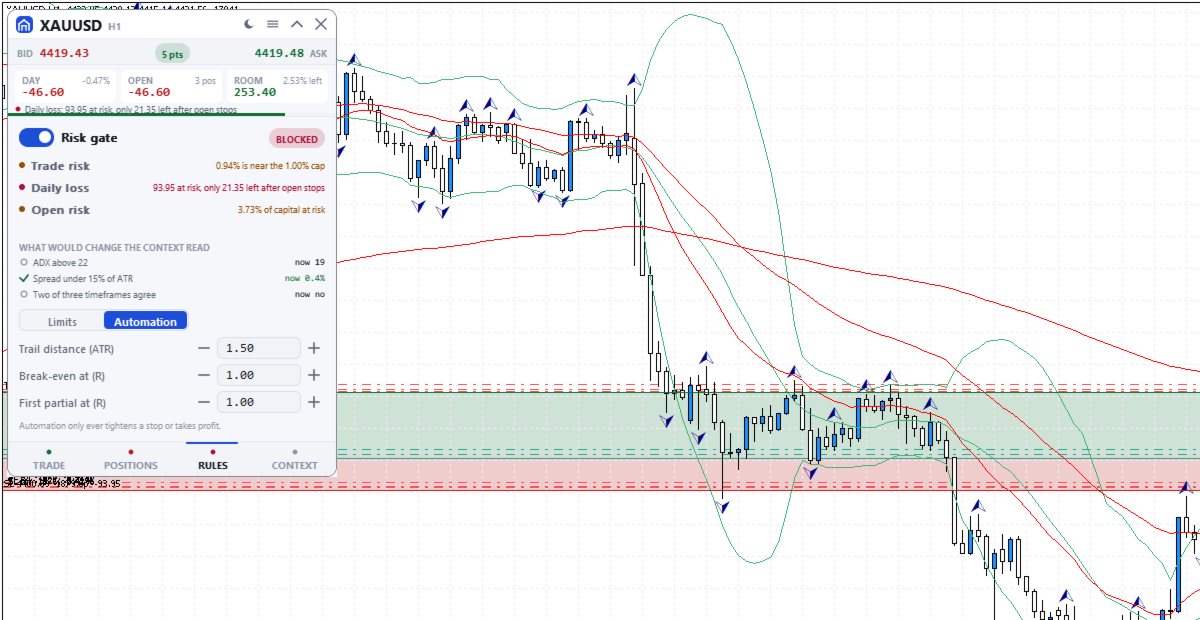
A blocking check shows Blocked and the reason on the button.
- Risk per trade: default 1% of balance, measured to the stop. An order without a stop (fixed lot size only) skips this cap and the open-risk cap; the daily loss check refuses it only once less than one per-trade cap is left.
- Daily loss stop: default 3% of the day's opening balance. It counts today's closed results, costs included, and the whole account's floating result. The day starts at server midnight, which may not match your provider's reset. A new order is also blocked if the day would pass the limit once its stop and every open and pending stop are hit.
- Total open risk: default 4%, this order included, from entry to stop of every open position on all symbols. A stop moved past entry still counts. Positions without a stop are left out, with a warning.
- Open positions (default 6), trades per server day (default 12) and spread against ATR (Average True Range).
- Blackout windows you type in server time, with no news calendar. 21:00 to midnight server time warns, or blocks if you choose.
- Margin level warns under 200% and blocks under 130%. A losing streak warns.

The gate switch, per-trade, daily loss and open-risk limits are set on the RULES tab; the rest come from the inputs. Lowering always works. Raising a limit or switching the gate off is refused while a check blocks, and for the rest of the server day once the daily stop is hit. A stop cannot be dragged wider then either.

SIZE DOWN
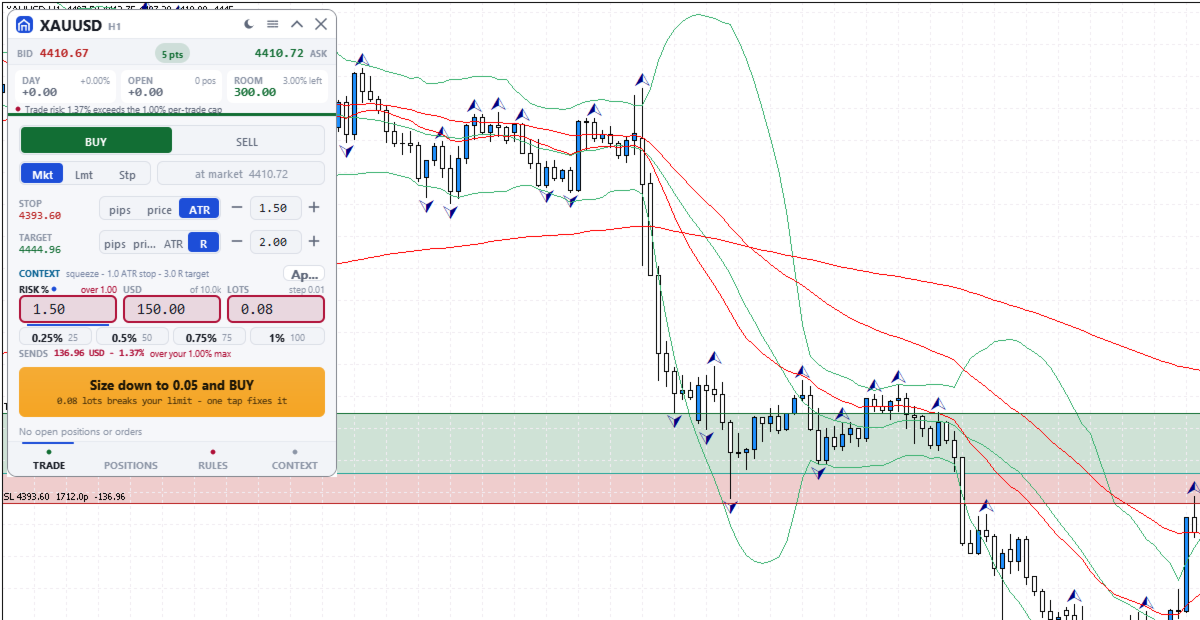
If only size is wrong, the button offers, for example, "Size down to 0.08 and BUY": one click writes the largest lot size that passes every check into the order, without sending.

ORDERS AND CHART LEVELS
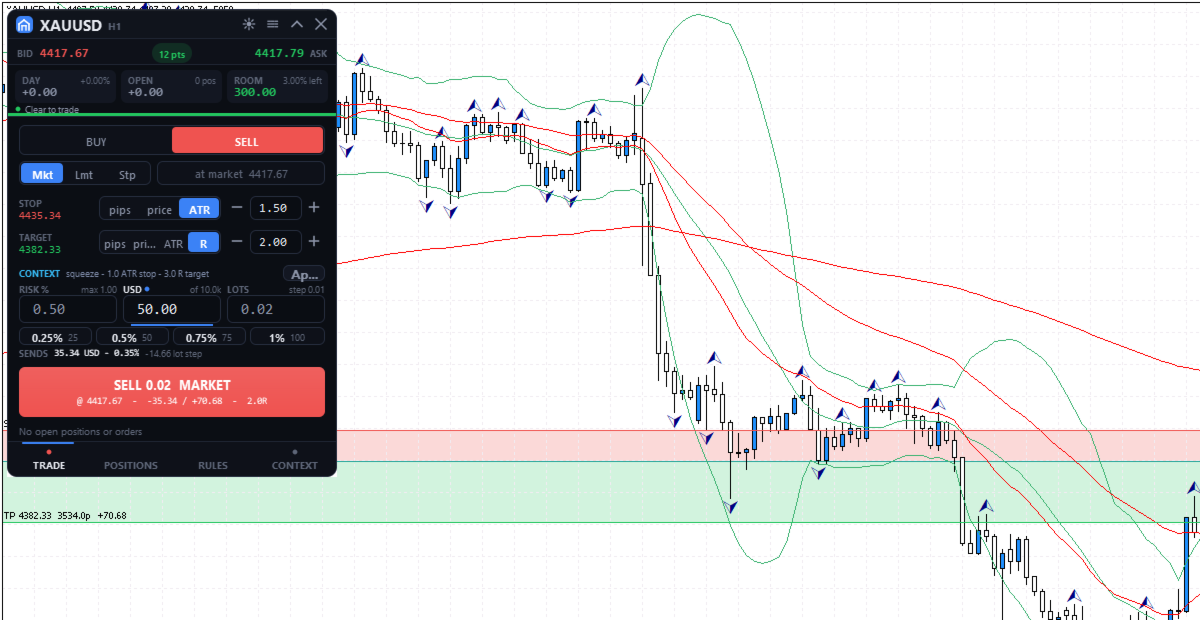
The TRADE tab sizes each order from its stop, with risk in percent, money or lots, and shows the most your limits allow now. Quick-risk buttons (quarters of the cap by default) and the mouse wheel stop there. SENDS shows the rounded size's risk to the stop, without commission. Two clicks send. After a market fill that opens a new position, Undo can close it at market for 8 seconds. On the chart's symbol, levels of the planned order, pending orders and positions can be dragged, replacing MetaTrader's own level dragging. Releasing a live level sends one request, undoable for 10 seconds.

POSITIONS
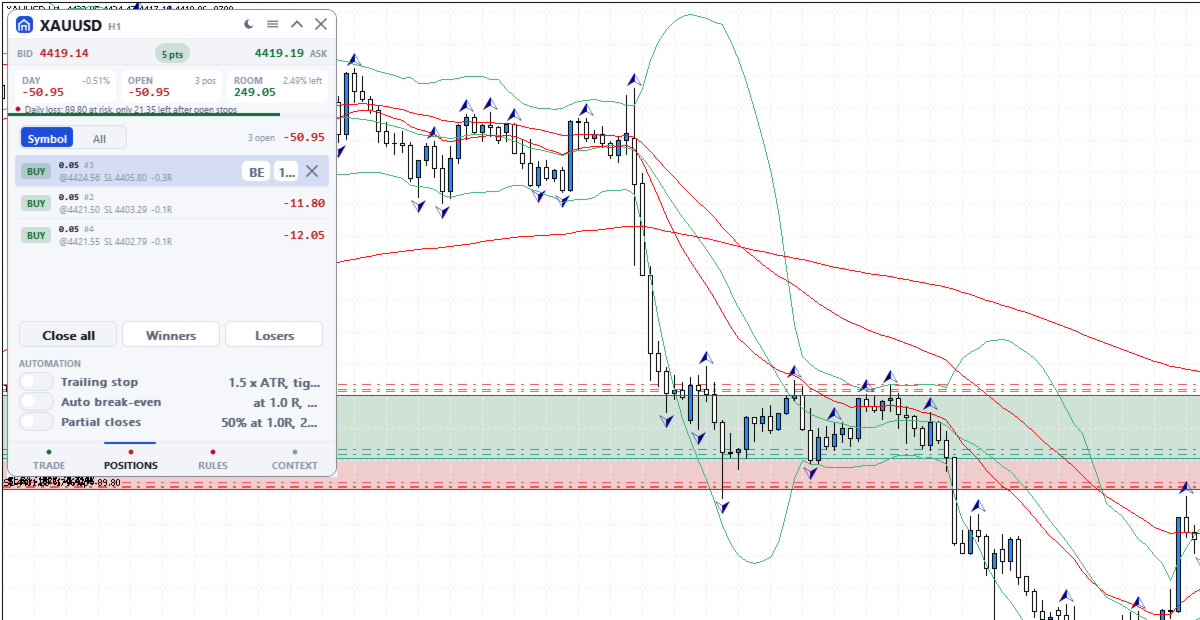
Positions and pending orders, this symbol or all: break-even, close half, close or delete. Close all needs a second press; Winners and Losers act at once.

AUTOMATIC MANAGEMENT
Off by default; switched on in POSITIONS, set on RULES. It acts on every position of the chart's symbol, including manual and other programs' trades, unless Manage only this panel's trades is on. Stops you drag by hand are left alone.
- Trailing stop 1.5 x ATR behind the price, in steps of at least 50 points, never moved back. It starts at once, in profit or not: a wider stop is pulled in, and a missing stop is added.
- Break-even at a chosen R (a multiple of the first stop), to entry plus 20 points.
- Partial closes: 50% at a chosen R, then 25% of the rest at twice that R. A position too small to split is skipped.

MARKET CONTEXT
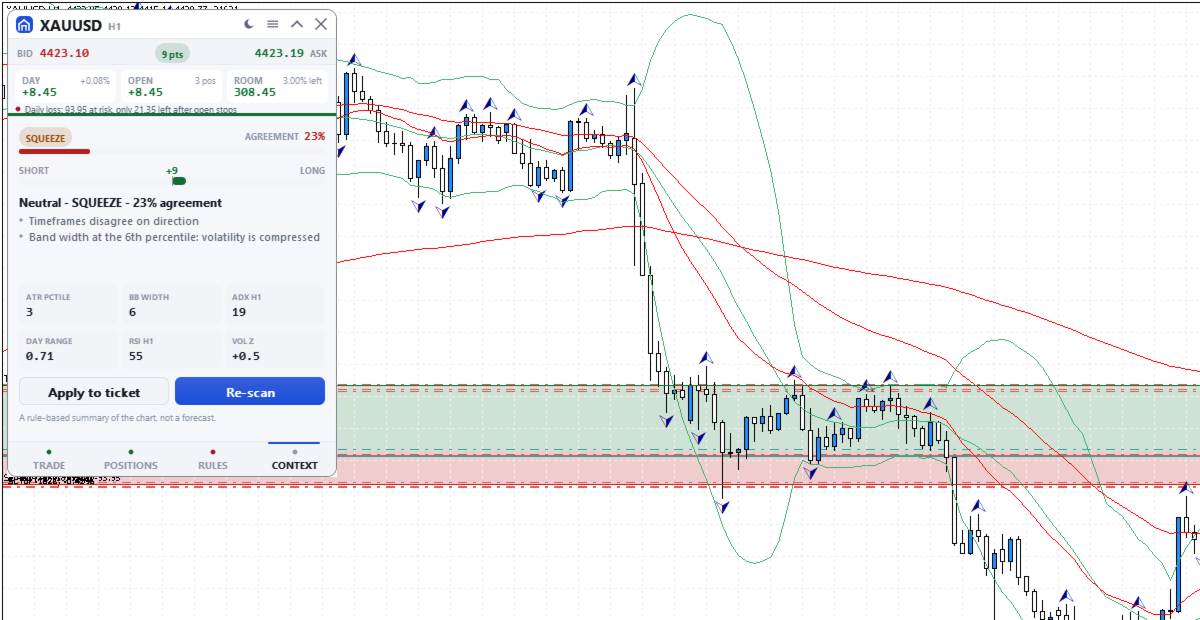
A rule-based summary of standard trend, momentum and volatility indicators. It names the market state, with an agreement score from 0 to 95 and its reasons. The score is not a probability of profit and the summary is not a forecast. Apply copies its suggested plan into the order without sending it.

THE PANEL
330 x 468 pixels at UI scale 1.0, four tabs: TRADE, POSITIONS, RULES and CONTEXT. The header shows today's and floating results, the room before the daily stop and the most serious warning or block, even folded. Dark, graphite, light or Auto theme. It needs Algo Trading, works on hedging and netting accounts and uses no DLLs.

INPUT PARAMETERS
General
- InpTheme, shown as "Colour theme (the sun/moon button overrides it; OK here resets)": default Auto. Sets Dark, Graphite or Light, or follows the chart background. The title bar button can switch it; OK in this dialog brings this setting back.
- InpUiScale, shown as "UI scale (1.0 / 1.25 / 1.5 for hi-dpi)": default 1.0, accepted from 0.75 to 2.0. At 1.5 the panel measures 495 x 702 pixels.
- InpMagic, shown as "Magic number": default 20250909. Marks the panel's own orders, which the last input in this group can filter on.
- InpSlippage, shown as "Max slippage (points)": default 20, which is 2 pips on a 5-digit forex quote. Applies to market orders and to closes.
- InpManageOwnOnly, shown as "Manage only this panel's trades": default false. When true, the positions list, bulk closes, chart dragging, automation, open risk, the trades-per-day count and the losing streak use only trades with this magic number. The daily loss stop and the positions limit always count the whole account.

Risk limits
The first seven inputs are read only the first time the panel runs on an account and symbol. After that the panel uses its saved values, and changing these seven inputs has no effect. Change the gate, risk per trade, daily loss stop and open risk on the RULES tab; max positions, trades per day and max spread keep their first values. Saved values and the daily-stop lock belong to that account and symbol, so a panel on another symbol starts from these inputs. The last three inputs apply every time the panel starts and are not covered by the lock.
- InpGuardOn, shown as "Enable the pre-trade risk gate": default true. Starting state of the gate switch.
- InpMaxRiskTrade, shown as "Max risk per trade (% of balance)": default 1.0.
- InpMaxDailyLoss, shown as "Daily loss stop (% of day-open balance)": default 3.0. The day-open balance is the current balance less today's closed results, so a deposit or withdrawal made today moves it.
- InpMaxOpenRisk, shown as "Max total open risk (% of balance)": default 4.0. Entry-to-stop money of all open positions, on every symbol, plus the new order.
- InpMaxPositions, shown as "Max concurrent positions": default 6. Orders are blocked while this many positions are open on the account.
- InpMaxTradesDay, shown as "Max trades per day": default 12. Orders are blocked once this many entry deals were made since server midnight, including pending order fills and other programs' trades unless Manage only this panel's trades is on.
- InpMaxSpreadAtr, shown as "Max spread as a fraction of ATR": default 0.15, meaning orders are blocked while the spread is wider than 15% of ATR (14 bars, chart timeframe). On low timeframes the ATR is small, so this blocks more often.
- InpMaxConsecLoss, shown as "Warn after N losses in a row": default 3. A warning, not a block.
- InpBlockOffSession, shown as "Block trading outside the main sessions": default false. True blocks orders from 21:00 to midnight server time; false only warns.
- InpNewsWindows, shown as "Blackout windows, e.g. 13:30-14:00,15:00-15:30": default empty. Server times as HH:MM-HH:MM, separated by commas. Orders are blocked inside them every day until you remove them; the panel does not read an economic calendar.

Рекомендуем также
EA交易快捷助手 —— 专为 MetaTrader 5 打造的硬件交易利器 本工具专为配合实体快捷键盘设计,将 MT5 的核心交易指令集中映射至硬件实体按键。无需频繁移动鼠标找寻按钮,助你在行情剧烈波动时实现毫秒级订单执行与快速风险规避。 核心功能与优势 毫秒级极速响应 :实体按键物理触发,极大缩短交易决策与订单送达服务器之间的时间差。 一键快捷交易 :支持一键市价买入、卖出、一键平仓、持仓锁仓及手数快速微调。 防误触安全锁 :内置安全锁定机制,有效规避手滑或误触造成的非预期建仓。 完全合规无 DLL :采用纯正 MQL5 原生逻辑编写, 不依赖任何第三方 DLL 文件 ,确保账户资金与平台安全。 快捷键默认映射 (Key Mapping) Key A / F1 :按预设手数一键买入 (Buy) Key B / F2 :按预设手数一键卖出 (Sell) Key C / F3 :一键平仓当前图表品种的所有持仓 (Close Current) Key D / F4 :一键平仓账户内所有品种持仓 (Close All) Key Up / Down :快速增减下一次下单的手数步长 输入参数
FREE
Quick Order Closer
Danny Giovanni Romero Lozano
Demo Version Here : https://www.mql5.com/en/market/product/170598 The fastest on the entire platform, try it with 50 open trades or more This Expert Advisor provides a fast and intuitive way to manage and close open trading positions directly from the chart using a clean button-based interface. With a single click, traders can instantly close positions based on different conditions, improving execution speed and overall trade management efficiency. Key Features Close all open positions instant
AW Metatrader to Telegram MT5
AW Trading Software Limited
5 (1)
Автоматизированная система для отправки уведомлений, чтобы ни один из ваших подписчиков не пропустил события о вашей торговле из вашего торгового терминала. Утилита, которая отправляет уведомления в мессенджер Telegram о любых торговых операциях на вашем счете.   Пошаговая инструкция по подключению утилиты к каналу в Телеграм ->   ЗДЕСЬ  / MT4 -> ЗДЕСЬ Преимущества: Легкая настройка и подробная инструкция,  Возможность отправки регулируемых скриншотов, Настраиваемый текст уведомлений с использов
SAB Advance Assistant - это панель ручного управления сделками для MetaTrader 5. Стройте каждую сделку визуально на графике, точно контролируйте риск и позвольте встроенному движку управлять частичными тейк-профитами, безубытком и трейлингом - всё из одной аккуратной панели с изменяемым размером. Создано для дискреционных и ICT/SMC трейдеров, которым нужна точность без таблиц. КЛЮЧЕВЫЕ ВОЗМОЖНОСТИ - Перетаскиваемые линии Entry, Stop Loss, TP1-TP5 и Final TP с живыми подписями   (пункты, деньг
This EA trails your stops based on percentage of current TP, for both manually and auto-opened trades.   You can edit the percentage value in the inputs. Trailing stop   is a more flexible variation of a normal exit order. T railing stop  is the practice of moving the stop-loss level closer to the current price when the price moves in your favor. Trailing the stop-loss allows traders to limit their losses and safeguard their positive trades. It is a very popular practice. This EA will manage you

Trade Panel HotKey – MT5 Scalping Utility Fast Trade Panel HotKey is a lightweight MT5 trading utility designed for traders who need to open, manage, and close positions as quickly as possible . The main purpose of this tool is to reduce the time between a trading decision and execution. Instead of moving the mouse, opening order windows, or manually modifying multiple positions, most important actions can be performed instantly through customizable keyboard hotkeys or directly from the compact
Trade Control Panel
Jerry Jilun Anak Liban
Trade Control Panel Function Normal One Click Function Close All Close All Profit Close All Loss Close All Pending Order Close All Sell Close All Buy Advance One Click Function 1.  Close Partial Lot Sell by Percent It will help you partial close for all open position by desire percent you wanted. No longer partial close one by one for every open position Manual input for desire percent 2. Close Partial Lot Buy by Percent It will help you partial close for all open position by desire percent
Sessions and News Panel An on-chart dashboard that shows the world's trading sessions and the economic calendar in real time, plus an optional News Guard that can protect your account around high-impact news. This is a utility / information panel. It does NOT open trades on its own and it is NOT a signal system. Its only trading action is the optional News Guard, which can cancel pending orders and/or close open positions around scheduled news - and only when you explicitly enable it. -------
FREE
The “Summary Risk Target” indicator is designed to show the total number of transactions made on a single pair. The transactions counted include active positions as well as pending orders . By setting a stop loss for each trade, this indicator displays the total potential risk (loss) that may be incurred. This helps traders easily understand their overall risk exposure without the need for manual calculations. Likewise, for take profit , if the TP level is defined—either in terms of pips or at a
FREE
Symbol Changer Pro
Chun Kit Kevin Cheung
SymbolChangerPro v1.00 - Quick Reference Guide What It Does SymbolChangerPro creates smart buttons on your charts to quickly switch symbols. It can change symbols on individual charts or groups of charts, shows buttons for your active trades, and lets you pin favorite symbols for easy access. Main Settings Where to Get Symbols Symbol Source - Choose Market Watch, All Symbols, Forex Only, Crypto, etc. (All Symbols are auto-loaded into the indicator.) Custom Symbol List - Type your own symbols (li
StopLoss and TakeProfit Utility MT5 for automatic setting of stop loss and take profit levels. Created by a professional trader for traders.   The utility   works with any market orders opened by a trader manually or using advisors. Can filter trades by magic number. The utility can work with any number of orders simultaneously. WHAT THE UTILITY CAN DO: Set virtual stop loss and take profit from 1 pip Real   stop loss and take profit W ork with each order separately (   stop loss and take prof
Real-Time Spread Display Tool A   real-time spread display tool   is a specialized software or application designed to provide traders and investors with instant, live data on the   spread —the difference between the bid price (the price at which buyers are willing to purchase an asset) and the ask price (the price at which sellers are willing to sell it)—for various financial instruments. This tool is critical in markets such as forex (FX), stocks, futures, and cryptocurrencies, where price f
FOX CUSTOMER BENEFITS Verified customers with qualifying MQL5 Market purchases may be eligible for complimentary FOX commercial Expert Advisors. Learn more about the FOX Customer Benefits Program: https://www.mql5.com/en/blogs/post/774575 ACCOUNT NUCLEAR One account. One control panel. Full manual authority when you need it. Account Nuclear is a free MetaTrader 5 utility built for traders who manage multiple positions, pending orders, manual trades or several Expert Advisors on the same account
FREE
The utility is designed to save funds on your trading account. There is support for three levels of minimum equity and free margin. For each level, you can set partial (by a certain percentage) or complete closing of all market orders. The partial close percentage is applied for each order separately based on its current size (i.e. the size at the time the equity or free margin reaches the appropriate level). Upon reaching the last third level, the utility can close all charts, which will make i
Данный скрипт анализирует все символы в Market Watch для установленного таймфрейма. Результат выводится на вкладке Experts и в указанный файл. Для более удобного просмотра и редактирования результат выводится в csv-файл. Для расчета используется формула Пирсона. Значение коэффициента корреляции пар, близкое к 1, означает что пары двигаются практически идентично. Значение близкое к -1 означает, что пары двигаются зеркально одинаково.  Данный инструмент будет полезен тем, кто пользуется хеджирован
Apart from psychology, another thing that makes traders successful is risk management. This utility helps the trader in risk management, order management, and monitoring the profits that are made within a certain period. The utility works on the forex market. inputs: The following are inputs that are required before an order is executed ·        Sl- this is the stop loss in pips. ·        Tip: this is the take profit in pips. ·        Risk%: the percentage of the equity that the user wants to ri
Grid Manager — Manual Multi-Basket Grid Assistant for MT5 Grid Manager is a hands-on control panel for building and managing grid "baskets" directly on your chart. You decide the direction and the moment; the tool opens the grid, manages every leg, and protects the position with money-based risk controls, on-chart breakeven/SL/TP lines, and one-click actions. It is an execution and management assistant — fast, visual, and fully under your control. What it is — and what it is not Grid Manager is
This is a utility that helps you close market orders and pending orders (optional), using keyboard shortcuts. For me,  it's more convenient and  faster  than clicking a button on the chart. You can set:  Keyboard Shortcut Hotkey: You can change and use most of the keys on the keyboard.   Key combination (Ctrl, Shift) also available in case you want to use  (Note that not all combinations work).  Magic Number  Symbol: All Symbol, or Current Chart Symbol, or Select Symbol List  Close Pending orde
Guardian Magic GT
Carlos Eduardo Rivas Istacuy
Guardian Magic GT - Risk Management Expert Advisor for MetaTrader 5 PROTECT YOUR TRADING CAPITAL WITH INTELLIGENT RISK MANAGEMENT Guardian Magic GT is a professional-grade Expert Advisor designed to safeguard your trading operations by implementing sophisticated risk control mechanisms. Whether you run a single bot or manage multiple automated trading systems simultaneously, Guardian Magic GT provides real-time monitoring and automatic position management to ensure your account stays within your
Telegram Services
Ramesh Maharjan
5 (1)
Telegram Services — это торговое приложение, обеспечивающее связь между этим советником и вашим Telegram-каналом. Приложение генерирует отчеты, оповещает об открытии, закрытии и изменении сделок, открывает новые сделки, закрывает открытые сделки, изменяет существующие сделки, отображает историю сделок, делает скриншоты графиков, определяет значения стоп-лосса и тейк-профита. Оно также отображает текущие рыночные условия, получает новости рынка, анализирует лог-файлы и, что наиболее важно, позвол
One Click Trader  is a tool designed for MetaTrader 4 platform, which enables you to take your trading to the next level. It enables you to open, manage and close your trades in simple an efficient way by just one click of your mouse button. "-"   ,  "+"  change OCT window size  Up arrow minimizes the OCT panel Down arrow maximizes the OCT panel Right arrow displays the next panel with additional features Left arrow hides the panel with additional features Red  SELL  button enables you to open s
Prop Max Daily Loss Manager — помощник в управлении дневным риском для трейдеров Prop-фирм Prop Max Daily Loss Manager — это утилита для MetaTrader 5, предназначенная для трейдеров, проходящих Challenge или работающих на Funded-счетах в проп-компаниях (например, FTMO). Инструмент автоматически контролирует дневной риск и помогает избежать нарушения установленного максимального дневного убытка. Основные функции Автоматическое закрытие всех сделок при достижении заданного уровня дневного убытка;
Forget about enabling templates when you launch the window. Auto Template Master Service  is a professional utility tool that runs as a system service in MetaTrader 5, and it will do it for you. Unlike traditional indicators or expert advisors (EAs), the program runs in the background of the entire terminal and doesn't require you to add it to each window individually. As soon as you open a new chart of any instrument (Forex, Stocks, Crypto), the service immediately detects the new window and a
Обзор продукта: Apex Zone Reversal Добро пожаловать в Apex Zone Reversal — передовой инструмент технического анализа, созданный специально для MetaTrader 5 (MT5). Разработанный для устранения сложностей при анализе графиков, этот инструмент помогает трейдерам систематически находить развороты рынка с высокой вероятностью успеха за счет упрощения поиска качественных зон на основе проверенной торговой стратегии ZORRO и разворотов структуры рынка. Независимо от того, размечаете ли вы графики вручну
Этот инструмент поможет вам закрыть все открытые ордера одним щелчком мыши, просто нажмите «Закрыть все». Если вы хотите закрыть только прибыльные ордера, нажмите кнопку «Закрыть прибыльные», после нажатия все плавающие ордера будут закрыты; Если вы хотите закрыть только ордера с плавающими убытками, нажмите кнопку «Закрыть убыточные», после нажатия все ордера с плавающими убытками будут закрыты.
ProBridger
Marius Ovidiu Sunzuiana
How Traders and Analysts Can Use the Data Export Bridge to Improve Their Analytics The MQL Data Export Bridge unlocks a new level of analytical power by transforming MetaTrader into a real‑time data provider for any external research environment. Here are the most impactful ways different users can apply the bridge to enhance their trading performance. Build Predictive Models with Machine Learning Who benefits: Quantitative traders, data scientists, algorithm developers How it helps: Export t
Position Prime
Mariana Cordeiro Neves Fernandes
Скачайте бесплатную демо-версию прямо сейчас и протестируйте все функции управления рисками в вашем Strategy Tester, прежде чем совершить покупку! Position Prime — это визуальный помощник по исполнению ордеров и риск-менеджер институционального уровня для MetaTrader 5. Разработанный для трейдеров, которым важны скорость и точность, он избавляет от необходимости ручного расчета лота и превращает ваш график в настоящий торговый терминал. Планируйте, исполняйте и защищайте свои сделки за доли сек
Индикатор Crypto_Forex "WPR с 2 скользящими средними" для MT5, без перерисовки. - Сам по себе WPR является одним из лучших осцилляторов для скальпинга. - Индикатор "WPR и 2 скользящие средние" позволяет видеть быстрые и медленные скользящие средние осциллятора WPR. - Индикатор дает возможность увидеть коррекцию цены на очень ранней стадии. - Этот индикатор очень легко настроить через параметры, его можно использовать на любом таймфрейме. - Условия входа на покупку и продажу показаны на изображ
Global Stop Loss and Take Profit Manager Drag Lines Auto Apply Already using my free Global Stop Loss and Take Profit Setter? This is the always on version. Instead of setting levels once, you drag two lines on the chart and every manual position on that symbol — plus every new one you open — instantly inherits the Stop Loss and Take Profit. No clicking into each order. No forgetting a stop. Global Stop Loss and Target Manager is a drag-and-drop risk tool for manual traders on MetaTrader 5. Pu
Ultimate MT5 to Telegram (UMT) sends controlled trades (via symbol, magic, comment) to your telegram channel. It sends open and closed trades, including pending orders and TP/SL modifications, along with chart screenshots, to any telegram channel. Additionally, you can send trade reports of open trades and summary profit/pip reports for day, week, or month. You can customize the design of the trade actions or reports with variables and emoticons.  A beautiful panel allows you to visualize all t
С этим продуктом покупают
Trade Assistant MT5
Evgeniy Kravchenko
4.43 (216)
Помогает рассчитать риск на сделку, простая установка нового ордера с помощью линий, управление ордерами с функциями частичного закрытия, 7 типов трейлинг-стопа и другие полезные функции. Дополнительные материалы и инструкции Инструкция по установке - Инструкция к приложению - Пробная версия приложения для демо счета Функция Линии   - отображает на графике линию открытия, стоп-лосс, тейк-профит. С помощью этой функции легко установить новый ордер и увидеть его дополнительные характеристики пе
Добро пожаловать в Trade Manager EA — лучший инструмент для управления рисками, предназначенный для упрощения, точности и эффективности торговли. Это не просто инструмент для размещения ордеров; это комплексное решение для удобного планирования торгов, управления позициями и усиленного контроля над рисками. Независимо от того, начинающий вы трейдер, опытный специалист или скальпер, нуждающийся в быстром исполнении, Trade Manager EA адаптируется к вашим потребностям и работает с любыми активами:
================================================================================ POC BREAKOUT - V20.72. Full Professional Grade Toolkit ================================================================================ POC Breakout is a full MetaTrader 5 trading dashboard for discretionary traders who want breakout signals, Point of Control (POC) context, volume profiles, order flow, market structure, news, alerts, and advanced trade planning in one professional workspace. Attached directly to you
Local Trade Copier EA MT5
Juvenille Emperor Limited
4.94 (149)
Local Trade Copier EA MT5 — это быстрый и гибкий копировщик сделок для копирования и управления сделками между несколькими счетами MetaTrader 5 на одном компьютере с Windows или Windows VPS. Он сочетает локальную синхронизацию сделок с настройками на стороне Receiver для управления размером лота, рисками, фильтрацией сделок, сопоставлением символов, управлением сделками и защитой счета. Настройте терминалы Transmitter и Receiver примерно за 1 минуту и копируйте ручные сделки или сделки, открыты
TradePanel MT5
Alfiya Fazylova
4.88 (168)
Trade Panel — это многофункциональный торговый помощник. Приложение содержит более 50 торговых функций для ручной торговли и позволяет автоматизировать большинство торговых операций. Инструкция к приложению + видео-инструкции: https://www.mql5.com/ru/blogs/post/771695 Пробная версия приложения для демо-счета: https://www.mql5.com/ru/blogs/post/750864 Как установить приложение: https://www.mql5.com/ru/blogs/post/750096 Как тестировать приложение в визуальном режиме: https://www.mql5.com/ru/blogs/
Копируйте сигналы из Telegram по своим торговым правилам Telegram to MT5 Signal Trader автоматически копирует текстовые торговые сигналы из открытых и закрытых каналов и групп Telegram в MetaTrader 5. Управляйте несколькими поставщиками сигналов и счетами MT5 из одного приложения для компьютера, задавая индивидуальные параметры риска и торговли для каждого поставщика . Для копирования не нужны бот Telegram и настройка API. Просто войдите в свой аккаунт Telegram по номеру телефона или QR-коду и в
Strategy Ledger Pro
Abdullah Uygar Tuna
5 (2)
Strategy Ledger Pro — панель анализа счёта для MetaTrader 5, работающая только на чтение. Она разделяет результаты счёта по советникам, стратегиям, символам и магическим номерам. Подробное руководство  с описанием каждой функции. MetaTrader показывает один баланс на весь счёт. Когда несколько советников торгуют вместе, этот баланс не показывает вклад каждого. Strategy Ledger Pro читает историю счёта, восстанавливает закрытые позиции, относит их к стратегиям и выводит результаты в одной панели.
Telegram to MT5 Multi-Channel Copier   автоматически копирует торговые сигналы из ваших Telegram-каналов прямо в MetaTrader 5. Без ботов, без браузерных расширений, без ручного копирования. Сигнал приходит в Telegram — и советник открывает сделку в вашем терминале за считанные секунды. А перед тем как копировать канал, встроенный бэктестер покажет, что этот канал сделал бы на вашем счёте. Продукт состоит из двух компонентов: приложения для Windows, которое слушает ваши Telegram-каналы, и этого с
Farmed Hedge Yield Farming | All Markets (Manual - Hybrid - Semi/Automated EA) VERIFIED TRADING RESULTS - Farmed Hedge Yield Axi Copy:  https://www.mql5.com/en/signals/2356376 - Farmed Hedge Yield Exn Copy:   https://www.mql5.com/en/signals/2356404 - Farmed Hedge Yield V Copy:  https://www.mql5.com/en/signals/2357156 IMPORTANT NOTICE: FarmedHedge is a MANUAL-FOCUSED TRADING UTILITY ,not a fully automated EA. Results shown on this Signal include manual trades and overall strategic management.
Premium Trade Manager - Торговая панель со встроенным коучем Premium Trade Manager помещает торгового коуча прямо в ваш график, а под ним работает полноценный движок исполнения. Настройте сделку так, как вы всегда это делаете, затем позвольте Max, вашему ИИ-наставнику по трейдингу, прочитать именно эту настройку с учётом вашего живого счёта и дать чёткое заключение до того, как вы входите: соответствует ли стоп дисциплинированному подходу, разумен ли риск, не выходит ли высоковолатильный релиз ч
Exp COPYLOT CLIENT for MT5
Vladislav Andruschenko
3.97 (35)
Профессиональный копировщик сделок для MetaTrader 5 Быстрый, профессиональный и надежный копировщик сделок для MetaTrader . COPYLOT позволяет копировать сделки Forex между терминалами MT4 и MT5 с поддержкой счетов Hedge и Netting . Версия COPYLOT для MT5 поддерживает: - MT5 Hedge → MT5 Hedge - MT5 Hedge → MT5 Netting - MT5 Netting → MT5 Hedge - MT5 Netting → MT5 Netting - MT4 → MT5 Hedge - MT4 → MT5 Netting Версия MT4 Полное описание + DEMO + PDF Как купить Как установить Как получить файлы жур
Telegram To MT5 Ultra
Mirel Daniel Gheonu
5 (5)
Telegram To MT5 — копировщик сигналов Превратите торговые сигналы из ваших Telegram-каналов в реальные ордера MT5 — автоматически, на любом количестве счетов, с полным контролем над риском и правилами. Telegram To MT5 связывает VIP / сигнальные каналы, на которые вы уже подписаны в Telegram, с вашим терминалом MetaTrader 5. Бесплатное приложение-компаньон для ПК читает сообщения (даже из каналов, которые не допускают ботов), а этот советник исполняет их на вашем счёте — применяя ваши настройки р
The product will copy all telegram signal to MT5 ( which you are member) , also it can work as remote copier.  Easy to set up, copy order instant, can work with almost signal formats, image signal,  s upport to translate other language to English Work with all type of channel or group, even channel have "Restrict Saving Content", work with  multi channel, multi MT5 Work as remote copier: with signal have ticket number, it will copy exactly via ticket number. Support to backtest signal. How to s
Trade Manager DashPlus
Henry Lyubomir Wallace
4.85 (13)
DashPlus – это продвинутое средство для управления торговлей, разработанное для повышения эффективности и результативности торговли на платформе MetaTrader 5. Оно предлагает широкий набор функций, включая расчет рисков, управление ордерами, продвинутые системы сеток, инструменты на основе графиков и аналитику производительности. Основные функции Восстановительная Сетка Внедряет систему усреднения и гибкую сетку для управления сделками в неблагоприятных рыночных условиях. Позволяет стратегически
Astro Trade MT5
Indra Maulana
5 (7)
25% discount on the release of the tool: only for the next 3 buyers Send a message to receive a demo version. AstroTrade Trading Assistant AstroTrade is a comprehensive multi-functional trading utility developed for the MetaTrader 5 platform. It integrates essential tools for trade execution, risk management, and technical monitoring into a single unified interface. The application is designed to assist traders in managing their daily operations through a visual and structured environment. Vi
FUTURES ORDERFLOW FOOTPRINT CHART Professional OrderFlow EA for MetaTrader 5 Version 1.01| Professional tool for real traders | Institutional-Grade Visualization STRATEGY TESTER USERS - PLEASE SELECT EVERY REAL TICK WHEN TESTING AND YOU HAVE DOWNLOADED HISTORICAL DATA. IF YOU SEE A WAITING SCREEN AND IT IS NOT DOWNLOADING, IT MEANS YOU HAVE LOW HISTORICAL DATA. TRY 1 MIN AND 5 MIN FIRST ON 1 DAY DATA. ONE DAY DATA SHOULD BE THE NEWEST AND MOST CURRENT DATE. PLEASE WAIT UNTIL THE MARKET HAS ROL
Timeless Charts
Samuel Manoel De Souza
5 (8)
Timeless Charts is an all-in-one trading utility for professional traders. It combines custom chart types such as Seconds Charts and Renko with advanced order flow analysis using Footprints , Clusters , Volume Profiles , VWAP studies, and anchored analysis tools for deeper market insight. Trading and position management are handled directly from the chart through an integrated trade management panel , while Market Replay and Virtual Accounts provide environments for practicing trading skills and
Trade Copier Ultimate
Janitha Sandaruwan Amaradasa Wickramasingha Arachchilage
5 (5)
Trade Copier Ultimate - Telegram to MT5 Signal Copier Trade Copier Ultimate automatically copies Telegram trading signals into MetaTrader 5. The EA can read signal messages, detect the symbol, order type, entry price, Stop Loss, Take Profit levels and selected update commands, then execute or manage the trade in MT5 using your lot and risk settings. It is more than a basic Telegram to MT5 copier. TCU also supports Bot API and user-account Bridge workflows, Discord signal routing, local MT5 to MT
Trade Dashboard MT5
Fatemeh Ameri
4.94 (133)
Trade Dashboard simplifies how you open, manage, and control your trades, with built-in lot size calculation. It allows you to execute trades, manage risk, and control positions directly on the chart, with tools such as partial close, breakeven, and trailing stop. Designed to reduce manual work and help you stay focused on your trading decisions. A demo version is available for testing. Detailed explanations of features are provided within the MQL5 platform. Installation instructions are include
EA Overfitter
Stephen J Martret
5 (1)
Бэктест выглядит отлично. Но будет ли советник зарабатывать завтра, через неделю, через месяц? EA Overfitter прогоняет вашего советника по 100 историям цены, которых он никогда не видел. Одна оценка показывает, реально ли преимущество. Бэктест показывает, что советник сделал на одной истории цены — на той, которая случайно произошла. Из него невозможно понять, какая часть результата была заслугой стратегии, а какая — конкретного пути цены. EA Overfitter отвечает на этот вопрос. Он строит до 10
Trade Indicator Assistant   is a powerful MT5 utility designed to turn indicators into automated trading systems. Its main feature is the ability to automatically detect an indicator’s   BUY and SELL signal buffers , without requiring you to know the buffer numbers, search through indicator settings, or modify the indicator source code. Bonus Indicator:   After purchasing Trade Indicator Assistant, contact me to receive   Trade Signal Pro   completely free as a bonus indicator. [Download Demo V
Напишите мне после покупки, чтобы получить полный комплект руководств + 3-дневный пробный доступ к API OpenAI для тестирования функций ИИ + ещё один бонусный подарок Текущая цена — ограниченная скидка в рамках августовского обновления и повторного запуска — успейте приобрести свою версию до повышения цены. Следующая цена: $340 Это совершенно не похоже ни на одну торговую панель, которую вы пробовали или видели на рынке. Это одна из самых инновационных торговых панелей с поддержкой ИИ, доступных
HINN MAGIC ENTRY - лучший инструмент для входа и менеджмента позиций! ПРОСТО. БЫСТРО. ИНТУИТИВНО. МАКСИМАЛЬНО АВТОМАТИЗИРОВАНО. Выставляет ордера через выбор уровня на графике! полное описание    ::    demo-версия    ::   60-sec-video-description Основные функции: - Рыночные, лимитные и отложенные ордера -  Автоматический подсчет лоттажа  -  Автоматический учет спреда и комиссий -  Неограниченное количество промежуточных тейков для позиций - Перевод в безубыток и трейл стоп-лосса и тейк-проф
Trade Assistant 38 in 1
Makarii Gubaydullin
4.91 (23)
Многофункциональная утилита: калькулятор лота, сеточные ордера, индикатор Price Action, менеджер ордеров, рассчёт R/R, и многое другое Демо-веpсия  |   Инструкция  |   Версия для MT4 Утилита не работает в тестере стратегий: вы можете скачать демо-версию ЗДЕСЬ , чтобы протестировать продукт перед покупкой. Напишите мне  если есть вопросы / идеи по улучшению / в случае найденного бага Упроситите и сделайте вашу торговлю быстрее, при этом расширяя стандартные возможности терминала. 1. Открытие но
Footprint Chart Pro — Professional OrderFlow EA for MetaTrader 5 Version 6.34 | Professional tool for real traders | Institutional-Grade Visualization DEMO USERS - PLEASE SELECT EVERY TICK / REAL TICK WHEN TESTING AND YOU HAVE DOWNLOADED HISTORICAL DATA. IF YOU SEE A WAITING SCREEN AND IT IS NOT DOWNLOADING, IT MEANS YOU HAVE LOW HISTORICAL DATA. TRY 1 MIN AND 5 MIN FIRST ON 1 DAY DATA. ONE DAY DATA SHOULD BE THE NEWEST AND MOST CURRENT DATE. PLEASE WAIT UNTIL THE MARKET HAS ROLLED OVER PERIOD.
Grid Manual MT5
Alfiya Fazylova
4.73 (22)
Grid Manual — это торговая панель для работы с сеточными стратегиями. Утилита универсальная, имеет гибкие настройки и понятный интерфейс. Работает с сеткой ордеров не только в сторону усреднения убытков, но и в сторону наращивания прибыли. Трейдеру не нужно создавать и сопровождать сетку ордеров, это сделает утилита. Достаточно открыть ордер и Grid manual автоматически создаст ему сетку ордеров и будет сопровождать его до самого закрытия. Полная инструкция и демо-версия здесь . Основные особенно
Trade copier MT5
Alfiya Fazylova
4.6 (55)
Trade Copier — это профессиональная утилита, предназначенная для копирования и синхронизации сделок между торговыми счетами. Копирование происходит от счета/терминала поставщика к счету/терминалу получателя, которые установлены на одном компьютере или vps. АКЦИЯ - Если вы уже приобрели "Trade copier MT5", вы можете получить "Trade copier MT4" бесплатно (для копирования MT4 > MT5 и MT4 < MT5). Для получения более подробной информации об условиях, пожалуйста, свяжитесь с нами через личные сообщени
Anchor Trade Manager
Kalinskie Gilliam
5 (9)
Your EAs cannot see each other, but Anchor can. Anchor gives you one place to coordinate your EAs, manage risk, and decide when trading is allowed. It works alongside the trading bots you already use without any changes to them. The Problem One EA opens a trade. Then another starts trading. The next thing you know, you wake up to multiple grids built across your account. Each EA may be doing exactly what it was designed to do, but together they can place far more risk on your account than you in
Seconds Chart MT5
Boris Sedov
4.61 (18)
Seconds Chart - уникальный инструмент для создания секундных графиков в MetaTrader 5 . С помощью Seconds Chart вы можете построить график с таймфреймом, заданным в секундах, получая идеальную гибкость и точность анализа, недоступную на стандартных минутных или часовых графиках. Например, таймфрейм S15 обозначает график со свечами продолжительностью 15 секунд. Вы можете использовать любые индикаторы и советники с поддержкой пользовательских символов. Работать с ними так же удобно, как и на станда
Power Candles Strategy Scanner — самооптимизирующийся инструмент для поиска настроек по нескольким инструментам Power Candles Strategy Scanner использует тот же самооптимизирующийся движок, что и индикатор Power Candles — для всех символов в вашем Market Watch, одновременно. На одной панели отображается информация о том, какие символы в данный момент являются статистически торгуемыми, какая стратегия выигрывает на каждом из них, оптимальная пара Stop Loss / Take Profit, а также отправляется увед
Другие продукты этого автора
SuperTrendNew
Tsog Erdene Borjigon Enkhkhudulmur
4.83 (6)
SuperTrendNew 2.0 is a clean, non-repainting SuperTrend indicator for MetaTrader 5. It draws one trend line you can actually trade from, marks every reversal with an arrow, tells you about it by popup, sound and mobile push, and keeps a live dashboard on the chart with the trend state, the line price, the distance to the line in points and in ATR, and the age of the current trend. Free, no time limit, no ad banner on your chart. What is new in 2.0 Version 1.1 has been on the Market since January
FREE
Nomad Trade Panel
Tsog Erdene Borjigon Enkhkhudulmur
Nomad Trade Panel is a trade panel for MetaTrader 5 that works out the lot size from your stop loss and the risk you choose, then sends the order from the chart. It is for manual traders who decide the risk first and want to see what will be sent before they click. It is a manual tool. It never opens, changes or closes anything by itself: every action starts with your click, a level you drag, or the close-all key (Ctrl+Shift+F, pressed twice). To start: attach it to a chart, check the stop lo
FREE
Supply and Demand Monster MT4
Tsog Erdene Borjigon Enkhkhudulmur
Supply and demand zones are at the heart of   supply and demand trading . These zones are areas that show  liquidity at a specific price.  The supply zone is also called the distribution zone, while the demand zone is called the accumulation zone.   Our indicator automatically draw supply and demand zones in Metatrader 5. It give opportunity to understand trading zone and avoiding risk.
Stoploss hunter
Tsog Erdene Borjigon Enkhkhudulmur
Stoploss hunter 2.00 is a correction release. The strategy is unchanged: a rejection-candle reversal, filtered by a 200-period DEMA trend, an RSI gate and a Bollinger extreme. What changed is everything around it. The short side works again. In the previous build, three lines created indicator handles and compared them to prices. The effect was that one condition was always true, and the expert returned before every sell order. Measured in the Strategy Tester on EURUSD H1 over three and a half
Supply and Demand Monster
Tsog Erdene Borjigon Enkhkhudulmur
Supply and demand zones are at the heart of   supply and demand trading . These zones are areas that show  liquidity at a specific price.  The supply zone is also called the distribution zone, while the demand zone is called the accumulation zone.   Our indicator automatically draw supply and demand zones in Metatrader 5. It give opportunity to understand trading zone and avoiding risk.
NomadAI
Tsog Erdene Borjigon Enkhkhudulmur
Nomad AI trades the three commodity crosses — AUDCAD, AUDNZD, NZDCAD — from a single M15 chart. It is a mean-reversion grid: an RSI extreme inside a measured volatility regime opens a position, further levels are spaced by ATR, and each symbol's basket is closed together at a take-profit measured net of swap and commission. Version 2.01 is a rewritten engine that has then been independently reviewed twice. The strategy is unchanged; every mechanism around it was audited and fixed — grid spacing
Nomad Grid
Tsog Erdene Borjigon Enkhkhudulmur
Nomad Grid — Volatility Adaptive Mean-Reversion Grid Version 9.62 · MetaTrader 5 · AUDCAD · NZDCAD · AUDNZD · M15 A bar closes outside the Bollinger envelope and Nomad Grid takes the other side. If price keeps going, it does not cut — it extends a ladder, spaced by the market's own 30-day daily range, and the whole basket shares one exit. One reversal closes the lot. That is a grid, and this page is not going to pretend otherwise. What 9.62 changed is everything around it. What is new in 9.62 Th
Gold Level Breakout
Tsog Erdene Borjigon Enkhkhudulmur
Gold Level Breakout is a patient XAUUSD expert advisor built on a single principle: most breakouts are noise, and the few that matter are worth waiting for. It does not chase price. It follows the structure gold is trading inside, stays flat while that structure holds, and only takes interest once price has genuinely left it. Even then it waits for the market to come back before committing. Most candidates never qualify, and that patience is the product. WHAT YOU GET A finished system. The defau
Gold Block Breaker
Tsog Erdene Borjigon Enkhkhudulmur
Built for an account with a loss limit An evaluation account is rarely lost on one bad idea. It is lost when a floating loss crosses the daily limit while nobody is watching. Gold Block Breaker is an Expert Advisor for MetaTrader 5, developed on XAUUSD, and it watches that number itself. Pick a rule set: five percent daily with ten percent overall, a stricter four and eight, or your own two percentages. Both lines read equity, so an open losing position counts the moment it moves against you, wh
TWAP Institutional
Tsog Erdene Borjigon Enkhkhudulmur
TWAP Institutional A gold trend-pullback Expert Advisor. Every position it opens carries a hard, broker-side stop-loss and a dollar risk that is fixed BEFORE the order is sent. Developed and measured on XAUUSD H1. It is a gold strategy, not a generic one: on the same broker and window it returns a profit factor of 1.43 on XAUEUR and LOSES money on XAGUSD (PF 0.94, 35% drawdown). Re-test before running it on anything else. WHAT THE CURRENT BUILD MEASURES IC Markets XAUUSD H1, 2023.03.20 - 2026
Nomad SuperTrend Pro
Tsog Erdene Borjigon Enkhkhudulmur
Nomad SuperTrend Pro is a multi-timeframe SuperTrend indicator for MetaTrader 5. It draws any higher timeframe's trend on the chart you actually trade, shows six timeframes at once in a live on-chart dashboard, alerts you on reversals and on pullbacks to the line by popup, sound, mobile push and e-mail, and can restyle the whole chart with one input. It shares its calculation core with SuperTrendNew , the free version on the Market since January 2022: same maths, same input names, same buffer la
Фильтр:
Нет отзывов
Ответ на отзыв