Nomad Trade Panel Pro

Nomad Trade Panel Pro is a manual trade panel for MetaTrader 5 that checks each order you send from it against limits you set, and refuses the ones that break them. It is built for an account with a daily loss limit.

A daily limit is rarely broken by one trade. It is broken by the next one, sized as if the losses still open did not count. This panel counts them before it lets another order through. It does not close positions or delete pending orders, so a running loss, a gap or slippage can still carry the account past the limit.

It never opens a trade by itself. Trailing, break-even and partial closes act without a click once you switch them on. Orders from the order window, mobile apps or other programs are not checked.

THE RISK GATE
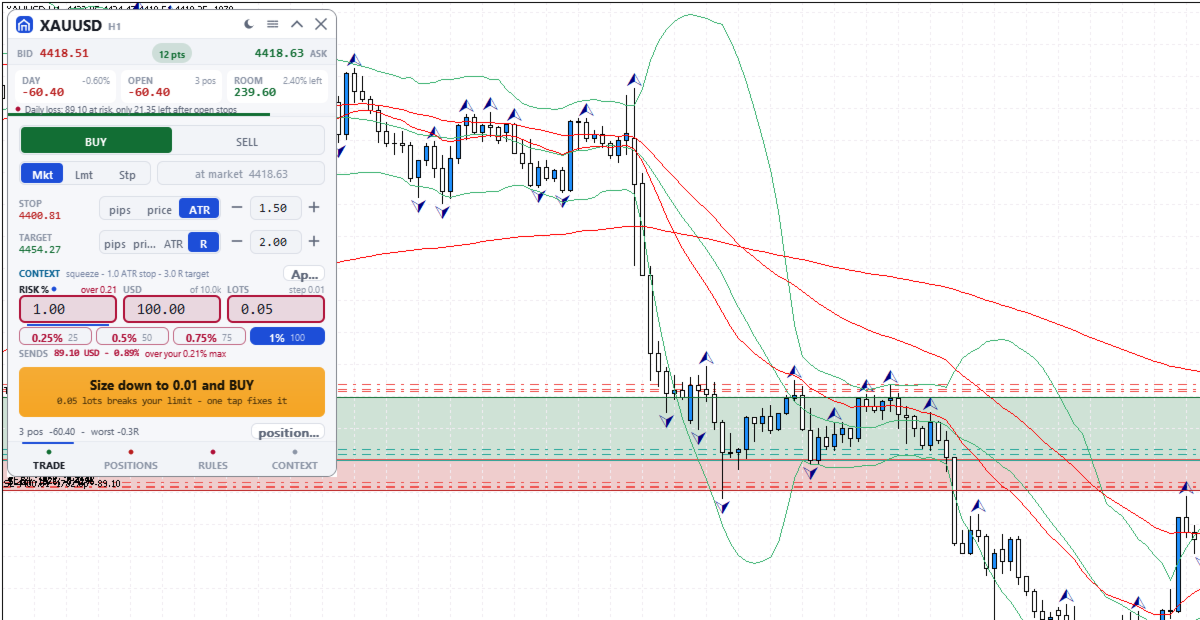
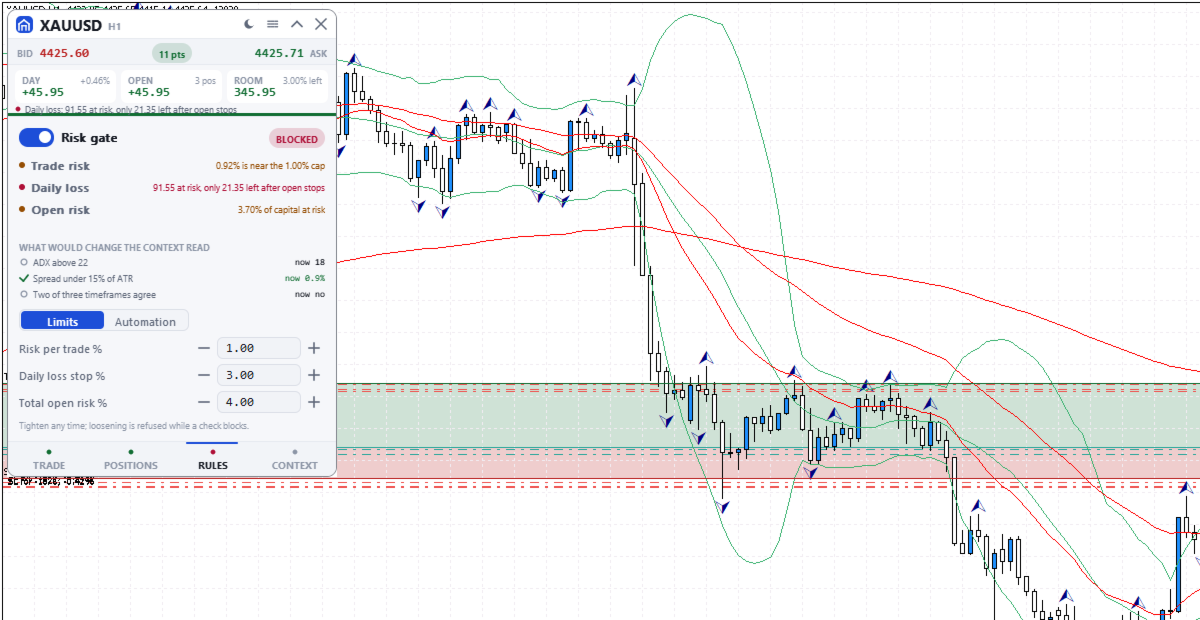
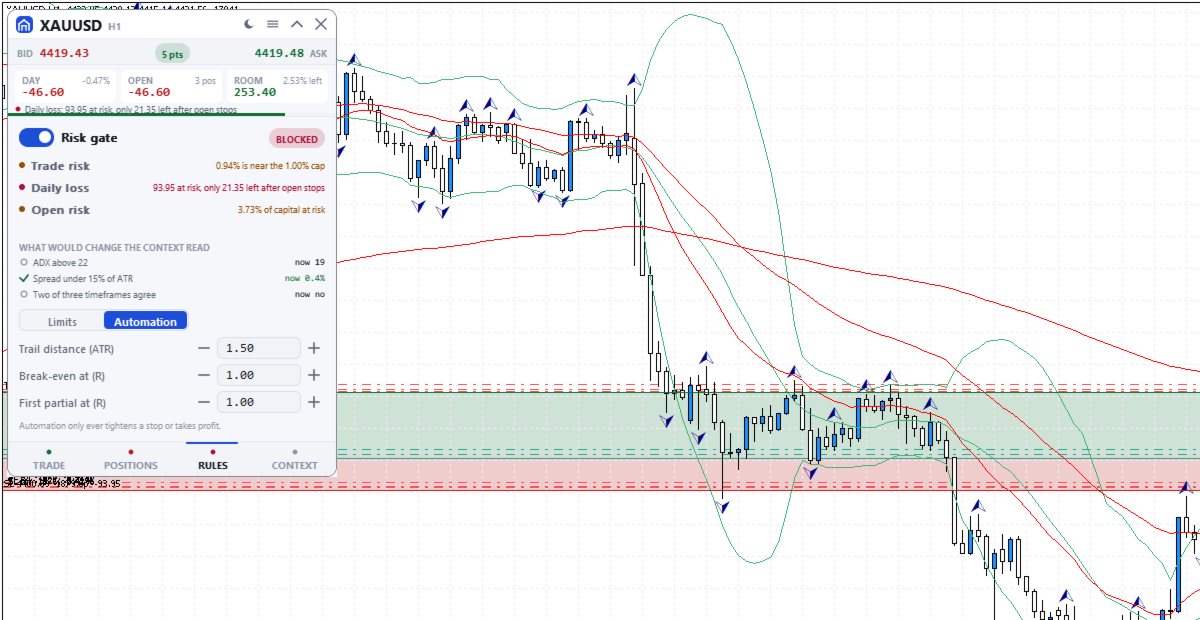
A blocking check shows Blocked and the reason on the button.
- Risk per trade: default 1% of balance, measured to the stop. An order without a stop (fixed lot size only) skips this cap and the open-risk cap; the daily loss check refuses it only once less than one per-trade cap is left.
- Daily loss stop: default 3% of the day's opening balance. It counts today's closed results, costs included, and the whole account's floating result. The day starts at server midnight, which may not match your provider's reset. A new order is also blocked if the day would pass the limit once its stop and every open and pending stop are hit.
- Total open risk: default 4%, this order included, from entry to stop of every open position on all symbols. A stop moved past entry still counts. Positions without a stop are left out, with a warning.
- Open positions (default 6), trades per server day (default 12) and spread against ATR (Average True Range).
- Blackout windows you type in server time, with no news calendar. 21:00 to midnight server time warns, or blocks if you choose.
- Margin level warns under 200% and blocks under 130%. A losing streak warns.

The gate switch, per-trade, daily loss and open-risk limits are set on the RULES tab; the rest come from the inputs. Lowering always works. Raising a limit or switching the gate off is refused while a check blocks, and for the rest of the server day once the daily stop is hit. A stop cannot be dragged wider then either.

SIZE DOWN
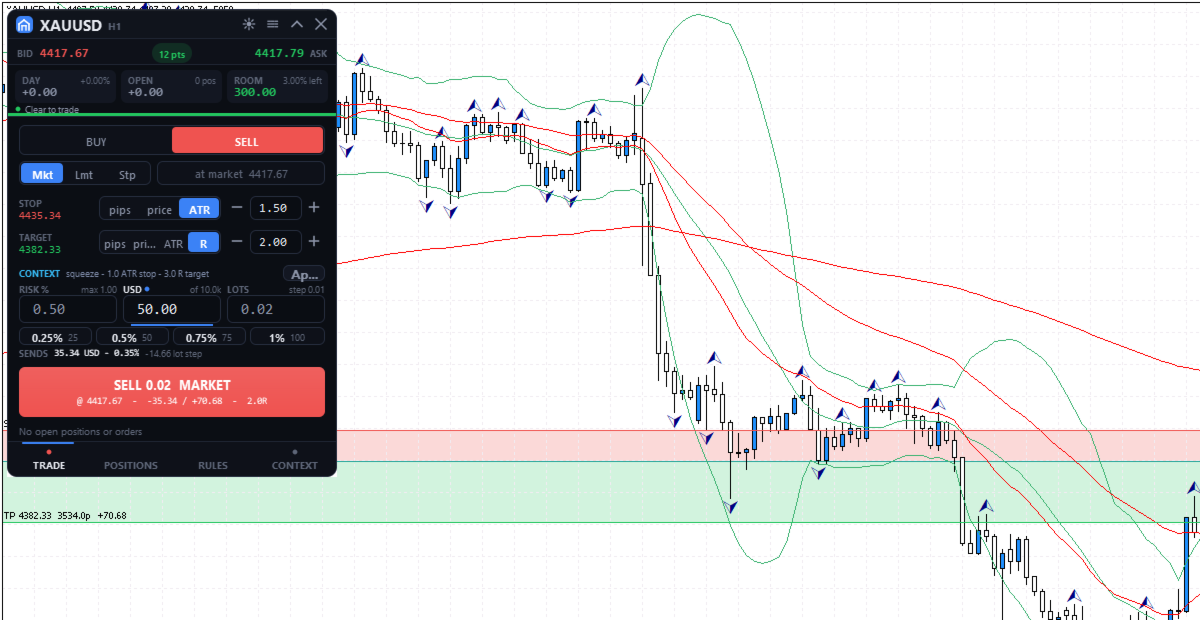
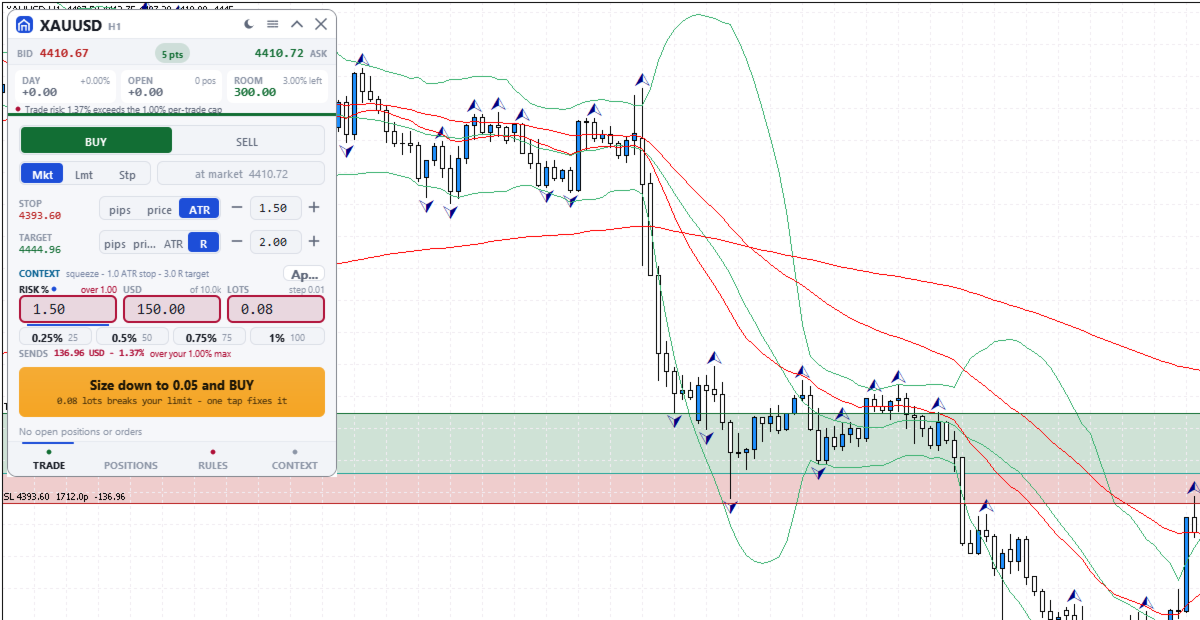
If only size is wrong, the button offers, for example, "Size down to 0.08 and BUY": one click writes the largest lot size that passes every check into the order, without sending.

ORDERS AND CHART LEVELS
The TRADE tab sizes each order from its stop, with risk in percent, money or lots, and shows the most your limits allow now. Quick-risk buttons (quarters of the cap by default) and the mouse wheel stop there. SENDS shows the rounded size's risk to the stop, without commission. Two clicks send. After a market fill that opens a new position, Undo can close it at market for 8 seconds. On the chart's symbol, levels of the planned order, pending orders and positions can be dragged, replacing MetaTrader's own level dragging. Releasing a live level sends one request, undoable for 10 seconds.

POSITIONS
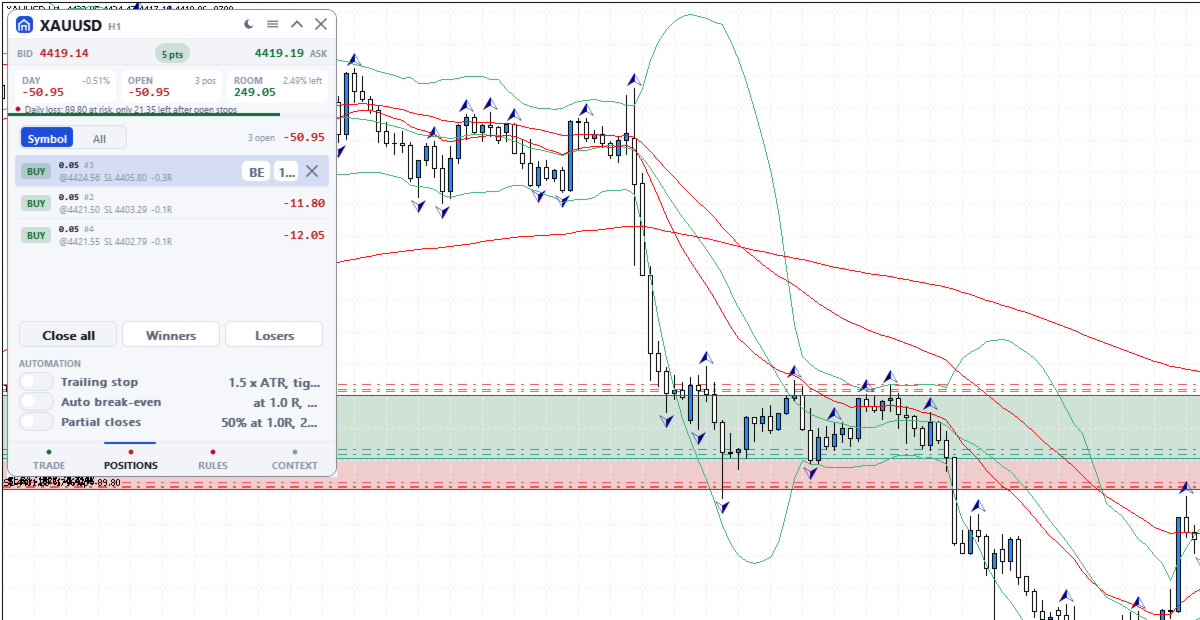
Positions and pending orders, this symbol or all: break-even, close half, close or delete. Close all needs a second press; Winners and Losers act at once.

AUTOMATIC MANAGEMENT
Off by default; switched on in POSITIONS, set on RULES. It acts on every position of the chart's symbol, including manual and other programs' trades, unless Manage only this panel's trades is on. Stops you drag by hand are left alone.
- Trailing stop 1.5 x ATR behind the price, in steps of at least 50 points, never moved back. It starts at once, in profit or not: a wider stop is pulled in, and a missing stop is added.
- Break-even at a chosen R (a multiple of the first stop), to entry plus 20 points.
- Partial closes: 50% at a chosen R, then 25% of the rest at twice that R. A position too small to split is skipped.

MARKET CONTEXT
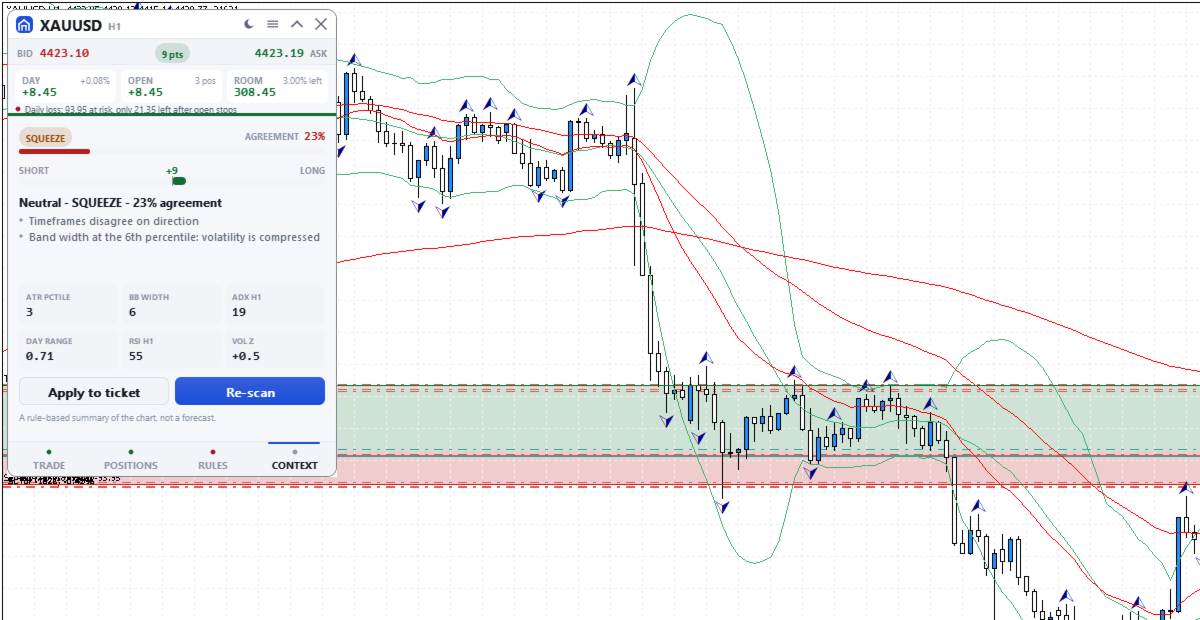
A rule-based summary of standard trend, momentum and volatility indicators. It names the market state, with an agreement score from 0 to 95 and its reasons. The score is not a probability of profit and the summary is not a forecast. Apply copies its suggested plan into the order without sending it.

THE PANEL
330 x 468 pixels at UI scale 1.0, four tabs: TRADE, POSITIONS, RULES and CONTEXT. The header shows today's and floating results, the room before the daily stop and the most serious warning or block, even folded. Dark, graphite, light or Auto theme. It needs Algo Trading, works on hedging and netting accounts and uses no DLLs.

INPUT PARAMETERS
General
- InpTheme, shown as "Colour theme (the sun/moon button overrides it; OK here resets)": default Auto. Sets Dark, Graphite or Light, or follows the chart background. The title bar button can switch it; OK in this dialog brings this setting back.
- InpUiScale, shown as "UI scale (1.0 / 1.25 / 1.5 for hi-dpi)": default 1.0, accepted from 0.75 to 2.0. At 1.5 the panel measures 495 x 702 pixels.
- InpMagic, shown as "Magic number": default 20250909. Marks the panel's own orders, which the last input in this group can filter on.
- InpSlippage, shown as "Max slippage (points)": default 20, which is 2 pips on a 5-digit forex quote. Applies to market orders and to closes.
- InpManageOwnOnly, shown as "Manage only this panel's trades": default false. When true, the positions list, bulk closes, chart dragging, automation, open risk, the trades-per-day count and the losing streak use only trades with this magic number. The daily loss stop and the positions limit always count the whole account.

Risk limits
The first seven inputs are read only the first time the panel runs on an account and symbol. After that the panel uses its saved values, and changing these seven inputs has no effect. Change the gate, risk per trade, daily loss stop and open risk on the RULES tab; max positions, trades per day and max spread keep their first values. Saved values and the daily-stop lock belong to that account and symbol, so a panel on another symbol starts from these inputs. The last three inputs apply every time the panel starts and are not covered by the lock.
- InpGuardOn, shown as "Enable the pre-trade risk gate": default true. Starting state of the gate switch.
- InpMaxRiskTrade, shown as "Max risk per trade (% of balance)": default 1.0.
- InpMaxDailyLoss, shown as "Daily loss stop (% of day-open balance)": default 3.0. The day-open balance is the current balance less today's closed results, so a deposit or withdrawal made today moves it.
- InpMaxOpenRisk, shown as "Max total open risk (% of balance)": default 4.0. Entry-to-stop money of all open positions, on every symbol, plus the new order.
- InpMaxPositions, shown as "Max concurrent positions": default 6. Orders are blocked while this many positions are open on the account.
- InpMaxTradesDay, shown as "Max trades per day": default 12. Orders are blocked once this many entry deals were made since server midnight, including pending order fills and other programs' trades unless Manage only this panel's trades is on.
- InpMaxSpreadAtr, shown as "Max spread as a fraction of ATR": default 0.15, meaning orders are blocked while the spread is wider than 15% of ATR (14 bars, chart timeframe). On low timeframes the ATR is small, so this blocks more often.
- InpMaxConsecLoss, shown as "Warn after N losses in a row": default 3. A warning, not a block.
- InpBlockOffSession, shown as "Block trading outside the main sessions": default false. True blocks orders from 21:00 to midnight server time; false only warns.
- InpNewsWindows, shown as "Blackout windows, e.g. 13:30-14:00,15:00-15:30": default empty. Server times as HH:MM-HH:MM, separated by commas. Orders are blocked inside them every day until you remove them; the panel does not read an economic calendar.

Produits recommandés
Trader Toolkit Pro
Temuujin Khongorzul
[ INSTITUTIONAL RISK ENGINE • METATRADER 5 ] — [ A MUST-HAVE FOR EVERY TRADER ] Trader Toolkit Pro MT5 An essential trading console, precision risk engine, and prop drawdown guardian for MetaTrader 5. Engineered for professional discretionary traders, evaluation challenges, and rapid intraday execution. KEY CAPABILITIES: Risk & Position Hub • 6-in-1 HUD • Margin Call Projections • Daily Loss Breaker • Dark & White Skins • 12 Themes • Streamer Privacy • Stealth Virtual Orders • Dynamic R:R Lock
EA交易快捷助手 —— 专为 MetaTrader 5 打造的硬件交易利器 本工具专为配合实体快捷键盘设计,将 MT5 的核心交易指令集中映射至硬件实体按键。无需频繁移动鼠标找寻按钮,助你在行情剧烈波动时实现毫秒级订单执行与快速风险规避。 核心功能与优势 毫秒级极速响应 :实体按键物理触发,极大缩短交易决策与订单送达服务器之间的时间差。 一键快捷交易 :支持一键市价买入、卖出、一键平仓、持仓锁仓及手数快速微调。 防误触安全锁 :内置安全锁定机制,有效规避手滑或误触造成的非预期建仓。 完全合规无 DLL :采用纯正 MQL5 原生逻辑编写, 不依赖任何第三方 DLL 文件 ,确保账户资金与平台安全。 快捷键默认映射 (Key Mapping) Key A / F1 :按预设手数一键买入 (Buy) Key B / F2 :按预设手数一键卖出 (Sell) Key C / F3 :一键平仓当前图表品种的所有持仓 (Close Current) Key D / F4 :一键平仓账户内所有品种持仓 (Close All) Key Up / Down :快速增减下一次下单的手数步长 输入参数
FREE
Quick Order Closer
Danny Giovanni Romero Lozano
Demo Version Here : https://www.mql5.com/en/market/product/170598 The fastest on the entire platform, try it with 50 open trades or more This Expert Advisor provides a fast and intuitive way to manage and close open trading positions directly from the chart using a clean button-based interface. With a single click, traders can instantly close positions based on different conditions, improving execution speed and overall trade management efficiency. Key Features Close all open positions instant
Détecteur de Marge Élevée Requise (HMR) pour MT5 Détectez les événements de Marge Élevée Requise (HMR) d'Exness et choisissez quoi faire de vos trades ouverts. Le Détecteur HMR est un utilitaire MetaTrader 5 conçu pour surveiller les conditions HMR liées à Exness sur votre compte et répondre automatiquement selon vos paramètres. Qu'est-ce que le HMR ? Le HMR est une condition liée à la marge qui s'applique à certains instruments et périodes nécessitant des exigences de marge plus élevées. Si vou
SAB Advance Assistant est un panneau de gestion de trades manuel pour MetaTrader 5. Construisez chaque trade visuellement sur le graphique, maîtrisez votre risque au centime près, et laissez le moteur intégré gérer les prises de profit partielles, le break-even et le trailing — le tout depuis un panneau clair et redimensionnable. Conçu pour les traders discrétionnaires et ICT/SMC qui veulent de la précision sans tableur. FONCTIONNALITÉS CLÉS - Lignes Entrée, Stop Loss, TP1-TP5 et TP Final dép
This EA trails your stops based on percentage of current TP, for both manually and auto-opened trades.   You can edit the percentage value in the inputs. Trailing stop   is a more flexible variation of a normal exit order. T railing stop  is the practice of moving the stop-loss level closer to the current price when the price moves in your favor. Trailing the stop-loss allows traders to limit their losses and safeguard their positive trades. It is a very popular practice. This EA will manage you

Trade Panel HotKey – MT5 Scalping Utility Fast Trade Panel HotKey is a lightweight MT5 trading utility designed for traders who need to open, manage, and close positions as quickly as possible . The main purpose of this tool is to reduce the time between a trading decision and execution. Instead of moving the mouse, opening order windows, or manually modifying multiple positions, most important actions can be performed instantly through customizable keyboard hotkeys or directly from the compact
Trade Control Panel
Jerry Jilun Anak Liban
Trade Control Panel Function Normal One Click Function Close All Close All Profit Close All Loss Close All Pending Order Close All Sell Close All Buy Advance One Click Function 1.  Close Partial Lot Sell by Percent It will help you partial close for all open position by desire percent you wanted. No longer partial close one by one for every open position Manual input for desire percent 2. Close Partial Lot Buy by Percent It will help you partial close for all open position by desire percent
Funded Account Guard
Edgar Alexis Benitez
Funded Account Guard monitors the whole trading account and enforces the risk limits you set. When a limit is reached, it closes all positions, deletes pending orders and blocks new entries until the limit period ends. It is intended for funded and evaluation accounts with a daily loss limit and a maximum drawdown limit, and for any trader who wants a fixed daily stop. The utility does not open trades, does not give signals and does not move stop loss or take profit levels. Rules - Daily loss
FREE
Sessions and News Panel
Claudiu-georgian Zavera
Sessions and News Panel An on-chart dashboard that shows the world's trading sessions and the economic calendar in real time, plus an optional News Guard that can protect your account around high-impact news. This is a utility / information panel. It does NOT open trades on its own and it is NOT a signal system. Its only trading action is the optional News Guard, which can cancel pending orders and/or close open positions around scheduled news - and only when you explicitly enable it. -------
FREE
The “Summary Risk Target” indicator is designed to show the total number of transactions made on a single pair. The transactions counted include active positions as well as pending orders . By setting a stop loss for each trade, this indicator displays the total potential risk (loss) that may be incurred. This helps traders easily understand their overall risk exposure without the need for manual calculations. Likewise, for take profit , if the TP level is defined—either in terms of pips or at a
FREE
ApexForge Economic Calendar Safety Dashboard Calendrier économique MT5 | Calendrier économique Forex | News Filter | Alertes des annonces économiques majeures | Compte à rebours des événements économiques | Clôture d'urgence | Close All | Alertes jours fériés | Alertes de clôture anticipée | KTimer | Compte à rebours des bougies | Notifications Push mobiles | 12 langues + Auto ApexForge Economic Calendar Safety Dashboard est un tableau de bord complet pour MetaTrader 5 intégrant le calendrier éc
Task Panel Nxfx Trade Manager Task Panel Nxfx Trade Manager is a trading utility designed to simplify manual trading, position management, and risk control in MetaTrader 4 and MetaTrader 5. The panel provides quick access to trading functions directly from the chart. Traders can place orders, configure Stop Loss and Take Profit levels, manage position sizes, and monitor open trades through a clear and convenient interface. The tool is suitable for scalping, day trading, swing trading, and other
FREE
StopLoss and TakeProfit Utility MT5 for automatic setting of stop loss and take profit levels. Created by a professional trader for traders.   The utility   works with any market orders opened by a trader manually or using advisors. Can filter trades by magic number. The utility can work with any number of orders simultaneously. WHAT THE UTILITY CAN DO: Set virtual stop loss and take profit from 1 pip Real   stop loss and take profit W ork with each order separately (   stop loss and take prof
Real-Time Spread Display Tool A   real-time spread display tool   is a specialized software or application designed to provide traders and investors with instant, live data on the   spread —the difference between the bid price (the price at which buyers are willing to purchase an asset) and the ask price (the price at which sellers are willing to sell it)—for various financial instruments. This tool is critical in markets such as forex (FX), stocks, futures, and cryptocurrencies, where price f
Account Nuclear
Putu Hery Siswanto
FOX CUSTOMER BENEFITS Verified customers with qualifying MQL5 Market purchases may be eligible for complimentary FOX commercial Expert Advisors. Learn more about the FOX Customer Benefits Program: https://www.mql5.com/en/blogs/post/774575 ACCOUNT NUCLEAR One account. One control panel. Full manual authority when you need it. Account Nuclear is a free MetaTrader 5 utility built for traders who manage multiple positions, pending orders, manual trades or several Expert Advisors on the same account
FREE
The utility is designed to save funds on your trading account. There is support for three levels of minimum equity and free margin. For each level, you can set partial (by a certain percentage) or complete closing of all market orders. The partial close percentage is applied for each order separately based on its current size (i.e. the size at the time the equity or free margin reaches the appropriate level). Upon reaching the last third level, the utility can close all charts, which will make i
Synchronizer
PATRICK PAARSCH
This Expert Advisor monitors all open positions across all symbols in MetaTrader 5. Whenever a Stop Loss (SL) or Take Profit (TP) is manually set or adjusted on any position, the EA automatically applies that value to all other open positions , regardless of symbol or order type (Buy/Sell). This ensures consistent and synchronized SL and TP levels across your account. Perfect for mobile trading via tablet or smartphone!
FREE
This script analyzes all symbols in Market Watch for a set timeframe. The result is displayed on the Experts tab and in the specified file. For more convenient viewing and editing, the result is displayed in a csv file. For the calculation, the Pearson formula is used. The value of the correlation coefficient of pairs close to 1 means that the pairs move almost identically. A value close to -1 means that the pairs move in the same way. This tool will be useful to those who use hedging due to the
Apart from psychology, another thing that makes traders successful is risk management. This utility helps the trader in risk management, order management, and monitoring the profits that are made within a certain period. The utility works on the forex market. inputs: The following are inputs that are required before an order is executed ·        Sl- this is the stop loss in pips. ·        Tip: this is the take profit in pips. ·        Risk%: the percentage of the equity that the user wants to ri
Grid Manager — Manual Multi-Basket Grid Assistant for MT5 Grid Manager is a hands-on control panel for building and managing grid "baskets" directly on your chart. You decide the direction and the moment; the tool opens the grid, manages every leg, and protects the position with money-based risk controls, on-chart breakeven/SL/TP lines, and one-click actions. It is an execution and management assistant — fast, visual, and fully under your control. What it is — and what it is not Grid Manager is
This is a utility that helps you close market orders and pending orders (optional), using keyboard shortcuts. For me,  it's more convenient and  faster  than clicking a button on the chart. You can set:  Keyboard Shortcut Hotkey: You can change and use most of the keys on the keyboard.   Key combination (Ctrl, Shift) also available in case you want to use  (Note that not all combinations work).  Magic Number  Symbol: All Symbol, or Current Chart Symbol, or Select Symbol List  Close Pending orde
Guardian Magic GT
Carlos Eduardo Rivas Istacuy
Guardian Magic GT - Risk Management Expert Advisor for MetaTrader 5 PROTECT YOUR TRADING CAPITAL WITH INTELLIGENT RISK MANAGEMENT Guardian Magic GT is a professional-grade Expert Advisor designed to safeguard your trading operations by implementing sophisticated risk control mechanisms. Whether you run a single bot or manage multiple automated trading systems simultaneously, Guardian Magic GT provides real-time monitoring and automatic position management to ensure your account stays within your
Telegram Services
Ramesh Maharjan
5 (1)
Le service Telegram est une application de trading qui assure la communication entre ce conseiller expert (EA) et votre chaîne Telegram. Cette application génère des rapports, vous alerte lors de l'ouverture, la fermeture et la modification de positions, ouvre de nouvelles positions, ferme les positions ouvertes, modifie les positions existantes, affiche l'historique des transactions, récupère des captures d'écran des graphiques, et récupère les valeurs de stop loss et de take profit. Elle affi
One Click Trader  is a tool designed for MetaTrader 4 platform, which enables you to take your trading to the next level. It enables you to open, manage and close your trades in simple an efficient way by just one click of your mouse button. "-"   ,  "+"  change OCT window size  Up arrow minimizes the OCT panel Down arrow maximizes the OCT panel Right arrow displays the next panel with additional features Left arrow hides the panel with additional features Red  SELL  button enables you to open s
Prop Max Daily Loss Manager — Assistant de Gestion de Risque Quotidien pour les Entreprises de Trading Propriétaire Prop Max Daily Loss Manager est un utilitaire MetaTrader 5 conçu pour les traders participant à des Challenges ou tradant sur des comptes financés avec des entreprises prop (comme FTMO). L'outil surveille automatiquement le risque quotidien et aide à éviter de violer la limite maximale de perte quotidienne établie. Fonctionnalités Principales Fermeture automatique de tous les trade
Forget about enabling templates when you launch the window. Auto Template Master Service  is a professional utility tool that runs as a system service in MetaTrader 5, and it will do it for you. Unlike traditional indicators or expert advisors (EAs), the program runs in the background of the entire terminal and doesn't require you to add it to each window individually. As soon as you open a new chart of any instrument (Forex, Stocks, Crypto), the service immediately detects the new window and a
Prop Risk Guard
Mohamed-amine Baddir
Prop Risk Guard applique automatiquement les règles de gestion du risque de votre compte. Il suffit de l’ajouter à un graphique pour qu’il surveille toutes les positions du compte. Lorsqu’une limite est atteinte, il clôture les positions, supprime les ordres en attente et bloque le trading afin qu’une mauvaise opération ou un EA incontrôlable ne compromette pas les règles de votre compte d’évaluation ou de votre compte financé. Limite de perte journalière Paramétrable en pourcentage, en montant
Cet outil peut vous aider à clôturer toutes les commandes ouvertes en un seul clic, cliquez simplement sur « Tout fermer ». Si vous souhaitez uniquement clôturer les ordres rentables, cliquez sur le bouton « Fermer les ordres rentables ». Après avoir cliqué, tous les ordres flottants seront fermés ; Si vous souhaitez uniquement clôturer les ordres avec des pertes flottantes, cliquez sur le bouton « Fermer les ordres perdants ». Après avoir cliqué, tous les ordres avec des pertes flottantes seron
ProBridger
Marius Ovidiu Sunzuiana
How Traders and Analysts Can Use the Data Export Bridge to Improve Their Analytics The MQL Data Export Bridge unlocks a new level of analytical power by transforming MetaTrader into a real‑time data provider for any external research environment. Here are the most impactful ways different users can apply the bridge to enhance their trading performance. Build Predictive Models with Machine Learning Who benefits: Quantitative traders, data scientists, algorithm developers How it helps: Export t
Les acheteurs de ce produit ont également acheté
Trade Assistant MT5
Evgeniy Kravchenko
4.43 (216)
It helps to calculate the risk per trade, the easy installation of a new order, order management with partial closing functions, trailing stop of 7 types and other useful functions. Additional materials and instructions Installation instructions - Application instructions Line function -   shows on the chart the Opening line, Stop Loss, Take Profit. With this function it is easy to set a new order and see its additional characteristics before opening.   Risk management  - The risk calculation
Bienvenue sur Trade Manager EA, l’outil ultime de gestion des risques conçu pour rendre le trading plus intuitif, précis et efficace. Ce n’est pas seulement un outil d’exécution d’ordres ; c’est une solution complète pour la planification des trades, la gestion des positions et le contrôle des risques. Que vous soyez débutant, trader expérimenté ou scalpeur ayant besoin d’une exécution rapide, Trade Manager EA s’adapte à vos besoins, offrant une flexibilité sur tous les marchés, des devises et i
Telegram to MT5 Multi-Channel Copier   copie automatiquement les signaux de trading de vos canaux Telegram et Discord directement vers MetaTrader 5. Pas de bots, pas d'extensions de navigateur, pas de copie manuelle. Un signal arrive sur Telegram ou Discord et l'EA ouvre le trade dans votre terminal en quelques secondes. Et avant de copier un canal, le backtester intégré vous montre ce que ce canal aurait fait sur votre compte. Le produit comprend deux composants : une application Windows qui éc
Local Trade Copier EA MT5
Juvenille Emperor Limited
4.94 (149)
Local Trade Copier EA MT5 est un copieur de trades rapide et flexible permettant de copier et de gérer des trades entre plusieurs comptes MetaTrader 5 sur le même ordinateur Windows ou Windows VPS. Il combine la synchronisation locale des trades avec des contrôles côté Receiver pour la taille des lots, la gestion du risque, le filtrage des trades, le mappage des symboles, la gestion des trades et la protection du compte. Configurez vos terminaux Transmitter et Receiver en environ 1 minute et co
Farmed Hedge Yield Farming | All Markets (Manual - Hybrid - Semi/Automated EA) VERIFIED TRADING RESULTS - Farmed Hedge Yield Axi Copy:  https://www.mql5.com/en/signals/2356376 - Farmed Hedge Yield Exn Copy:   https://www.mql5.com/en/signals/2356404 - Farmed Hedge Yield V Copy:  https://www.mql5.com/en/signals/2357156 IMPORTANT NOTICE: FarmedHedge is a MANUAL-FOCUSED TRADING UTILITY ,not a fully automated EA. Results shown on this Signal include manual trades and overall strategic management.
Copiez les signaux Telegram avec vos propres règles de trading Telegram to MT5 Signal Trader copie automatiquement les signaux de trading au format texte provenant de canaux et de groupes Telegram publics et privés vers MetaTrader 5. Gérez plusieurs fournisseurs et comptes MT5 depuis une seule application de bureau, avec des paramètres de risque et de trading propres à chaque fournisseur . Aucun bot Telegram ni configuration d'API n'est nécessaire pour copier les signaux. Connectez-vous simpleme
Strategy Ledger Pro
Abdullah Uygar Tuna
5 (14)
Désormais disponible en français. Strategy Ledger Pro est un panneau d'analyse de compte en lecture seule pour MetaTrader 5. Il sépare les résultats du compte par Expert Advisor, stratégie, symbole et numéro magic, pour que vous voyiez ce que chacun apporte réellement. Le panneau est disponible en 11 langues : English, Français, Deutsch, Español, Italiano, Português, Русский, Türkçe, 中文, 日本語 et 한국어. Avant de télécharger la démo. Le Market exécute la démo de tout produit payant uniquement dans l
TradePanel MT5
Alfiya Fazylova
4.88 (170)
Trade Panel est un assistant commercial multifonction. L'application contient plus de 50 fonctions de trading pour le trading manuel et permet d'automatiser la plupart des tâches commerciales. Instructions d'utilisation : https://www.mql5.com/fr/blogs/post/762589 Version d'essai de l'application pour un compte démo : https://www.mql5.com/fr/blogs/post/762644 Comment installer l'application : https://www.mql5.com/fr/blogs/post/762645 Comment tester l'application en mode visuel : https://www.mql5.
================================================================================ POC BREAKOUT - V20.72. Full Professional Grade Toolkit ================================================================================ POC Breakout is a full MetaTrader 5 trading dashboard for discretionary traders who want breakout signals, Point of Control (POC) context, volume profiles, order flow, market structure, news, alerts, and advanced trade planning in one professional workspace. Attached directly to you
MT5 to Telegram Signal Provider est un utilitaire facile à utiliser et entièrement personnalisable qui permet l'envoi de signaux spécifiés vers un chat, un canal ou un groupe Telegram, transformant ainsi votre compte en fournisseur de signaux. Contrairement à la plupart des produits concurrents, il n'utilise pas d'importations DLL. [ Démonstration ] [ Manuel ] [ Version MT4 ] [ Version Discord ] [ Canal Telegram ]  New: [ Telegram To MT5 ] Configuration Un guide utilisateur étape par étape est
VirtualTradePad PRO SE MT5 — centre de contrôle de trading professionnel pour MetaTrader 5 VirtualTradePad PRO SE est un panneau de trading premium basé sur le graphique et un espace de gestion des trades pour MetaTrader 5 . Il est conçu pour les traders qui souhaitent une exécution plus rapide, un contrôle plus clair des positions, une gestion structurée des trades, une planification visuelle des niveaux et un flux de travail professionnel directement depuis le graphique. Ce n’est pas seulement
Trade copier MT5
Alfiya Fazylova
4.61 (57)
Trade Copier est un utilitaire professionnel conçu pour copier et synchroniser les commandesentre les comptes de trading. Les commandes sont copiées du compte/terminal du fournisseur vers le compte/terminal du destinataire, qui sont installés sur le même ordinateur ou vps. Avant d'acheter, vous pouvez tester la version démo sur un compte démo. Version démo ici . Instructions complètes ici . Principales fonctionnalités et avantages: Prend en charge la copie des commandes MT5> MT5, MT4> MT5, MT5>
Exp COPYLOT CLIENT for MT5
Vladislav Andruschenko
3.97 (35)
Copieur professionnel de trades pour MetaTrader 5 Un copieur de trades rapide, professionnel et fiable pour MetaTrader . COPYLOT permet de copier des trades Forex entre les terminaux MT4 et MT5 avec prise en charge des comptes Hedge et Netting . La version MT5 de COPYLOT prend en charge : - MT5 Hedge → MT5 Hedge - MT5 Hedge → MT5 Netting - MT5 Netting → MT5 Hedge - MT5 Netting → MT5 Netting - MT4 → MT5 Hedge - MT4 → MT5 Netting Version MT4 Description complète + DEMO + PDF Comment acheter Comme
News Trade EA MT5
Konstantin Kulikov
4.55 (11)
Je voudrais vous présenter un robot efficace que j'utilise depuis plusieurs années. Il peut être utilisé en mode semi-automatique, comme en mode totalement automatique. >>> Chat <<< Le programme comporte des paramètres souples pour le commerce sur les nouvelles du calendrier économique. Il est impossible de le vérifier dans le testeur des stratégies. Ce qu’il faut, c’est le travail réel. Il faut ajouter à la liste des URL autorisées, dans les paramètres du terminal, un site d'actualités. Cliqu
The Patch
Mian Rameez Ali
The Patch It never opens a trade. It walks behind the ones that did. Every open position, every pending order — checked twice a second for the one thing that's easy to forget: a stop, a target. Found bare, it doesn't ask. It writes the missing number in, measured in points from wherever the position began, and moves on to the next. No strategy, no opinion on direction. Just the quiet assumption that nothing should ever sit on the market unprotected — not because someone decided it shouldn't,
Telegram To MT5 Ultra
Mirel Daniel Gheonu
5 (5)
Telegram To MT5 — Copieur de signaux Transformez les appels de trading de vos canaux Telegram en véritables ordres MT5 — automatiquement, sur autant de comptes que vous le souhaitez, avec le risque et les règles entièrement sous votre contrôle. Telegram To MT5 relie les canaux VIP / de signaux que vous suivez déjà sur Telegram à votre terminal MetaTrader 5. Une application de bureau compagnon gratuite lit les messages (même des canaux qui bloquent les bots), et cet Expert Advisor les exécute sur
Prochaine mise à jour — Version 2.52 bientôt disponible ! [NOUVEAU] Préparez-vous à découvrir 4 nouvelles fonctionnalités majeures conçues pour améliorer votre analyse du marché et votre flux de travail de trading Nous faisons passer l’analyse du marché au niveau supérieur avec 4 nouvelles fonctionnalités conçues pour répondre à vos besoins en trading. Découvrez : 1. TRADE OVERVIEW DASHBOARD 2. CONFLUENCE AT ZONE 3. STRONG & WEAK HIGH/LOW 4. OTE 1. TRADE OVERVIEW DASHBOARD Un tableau de bord qu
Anchor Trade Manager
Kalinskie Gilliam
5 (8)
Your EAs cannot see each other, but Anchor can. Anchor gives you one place to coordinate your EAs, manage risk, and decide when trading is allowed. It works alongside the trading bots you already use without any changes to them. The Problem One EA opens a trade. Then another starts trading. The next thing you know, you wake up to multiple grids built across your account. Each EA may be doing exactly what it was designed to do, but together they can place far more risk on your account than you in
Trader Evolution
Siarhei Vashchylka
5 (7)
" Trader Evolution " - A utility designed for traders who use wave and technical analysis in their work. One tab of the utility is capable of money management and opening orders, and the other can help in making Elliott wave and technical analysis. Manual (Be sure to read before purchasing) | Version for MT4 Advantages 1. Trading in a few clicks. Immediate and pending orders are available in the panel 2. Money management. The program automatically selects the appropriate lot size 3. Simplifies
Grid Manual MT5
Alfiya Fazylova
4.73 (22)
Grid Manual est un panneau de trading permettant de travailler avec une grille d'ordres. L'utilitaire est universel, possède des paramètres flexibles et une interface intuitive. Il fonctionne avec une grille d'ordres non seulement dans le sens des pertes, mais aussi dans le sens de l'augmentation des profits. Le commerçant n'a pas besoin de créer et de maintenir une grille d'ordres, l'utilitaire le fera. Il suffit d'ouvrir une ordre et "Grid Manual" créera automatiquement une grille de ordres po
The product will copy all telegram signal to MT5 ( which you are member) , also it can work as remote copier.  Easy to set up, copy order instant, can work with almost signal formats, image signal,  s upport to translate other language to English Work with all type of channel or group, even channel have "Restrict Saving Content", work with  multi channel, multi MT5 Work as remote copier: with signal have ticket number, it will copy exactly via ticket number. Support to backtest signal. How to s
RETAILBERG FOOTPRINT CHART PRO — Order-Flow Workspace for MetaTrader 5 Version 7.00  |  Professional System  |  31 tools  |  One chart A full 150-page illustrated User Manual is included. Please read the full manual to understand this feature packed footprint chart elements and ui. https://www.mql5.com/en/blogs/post/777982 DEMO / STRATEGY TESTER — PLEASE READ FIRST
Timeless Charts
Samuel Manoel De Souza
5 (9)
Timeless Charts est un utilitaire de trading tout-en-un destiné aux traders professionnels. Il combine des types de graphiques personnalisés tels que les graphiques en secondes et Renko avec une analyse avancée du flux d’ordre s utilisant Footprints , Clusters , Profils de Volume , études VWAP et outils d’analyse ancrés pour une compréhension plus approfondie du marché. Le trading et la gestion des positions sont effectués directement depuis le graphique via un panneau intégré de gestion des ord
Floor Watch
Syed Tauqeer Hussain Shah
Floor Watch One number, watched every thirty seconds: how far equity has fallen since the day began — or since its highest point, if it's told to trail the peak instead of the open. Cross the line and it doesn't argue. Every open position closes, every pending order vanishes, and anything that slips through afterward gets shut the moment it appears. Not asked. Removed. The floor holds until the clock turns 5 AM Pakistan time — then, and only then, does the day start over. One rule. No except
RS Trade Copier - le copieur de trades local ultra-rapide avec une véritable interface graphique. Arrêtez de saisir les numéros de compte manuellement. Fini les listes interminables de 200+ paramètres dans l'onglet Inputs. Un outil fiable et flexible pour copier les opérations de trading entre plusieurs terminaux MT5 et MT4. Il convient aux traders expérimentés, aux services de signaux ainsi qu'aux investisseurs privés. Il permet la synchronisation du trading d'un ou plusieurs Providers vers un
Seconds Chart MT5
Boris Sedov
4.61 (18)
Seconds Chart - un outil unique pour créer des graphiques en secondes dans MetaTrader 5 . Grâce à Seconds Chart , vous pouvez créer un graphique avec une période définie en secondes, offrant une flexibilité et une précision idéales pour l'analyse, indisponibles sur les graphiques standards en minutes ou en heures. Par exemple, la période S15 indique un graphique avec des bougies d'une durée de 15 secondes. Vous pouvez utiliser n'importe quels indicateurs et experts advisors compatibles avec les
Power Candles Strategy Scanner - Outil de recherche de configurations multi-symboles à optimisation automatique Le Power Candles Strategy Scanner utilise le même moteur d'auto-optimisation que celui qui alimente l'indicateur Power Candles, pour chaque symbole de votre Market Watch, en parallèle. Un panneau vous indique quels symboles sont statistiquement négociables à l'instant, quelle stratégie est la plus performante pour chacun, la paire Stop Loss / Take Profit optimale, et vous alerte dès qu
EA Auditor
Stephen J Martret
5 (6)
EA Auditor is an independent analysis tool for traders evaluating Expert Advisors and trading signals on MetaTrader 5. It audits backtest reports, reviews posted developer signals, and cross-verifies the two against each other to help traders assess strategies before committing capital. The MQL5 market offers a wide range of Expert Advisors from many developers, with varying approaches, quality, and transparency. EA Auditor provides a consistent, data-driven framework for reviewing them, answer
Astro Trade MT5
Indra Maulana
5 (8)
25% discount on the release of the tool: only for the next 3 buyers Send a message to receive a demo version. AstroTrade Trading Assistant AstroTrade is a comprehensive multi-functional trading utility developed for the MetaTrader 5 platform. It integrates essential tools for trade execution, risk management, and technical monitoring into a single unified interface. The application is designed to assist traders in managing their daily operations through a visual and structured environment. Vi
MT5 Professional Copy Trading System (Édition MT5) Le MT5 Professional Copy Trading System est un système de copie de trades LOCAL de niveau industriel, conçu pour les traders professionnels, les fournisseurs de signaux et la gestion multi-comptes de style institutionnel. Contrairement aux outils de copie retail ou basés sur le cloud, cette solution repose sur une architecture LOCAL optimisée pour l’exécution de plusieurs terminaux dans le même environnement Windows. Architecture LOCAL industri
Plus de l'auteur
SuperTrendNew
Tsog Erdene Borjigon Enkhkhudulmur
4.83 (6)
SuperTrendNew 2.0 is a clean, non-repainting SuperTrend indicator for MetaTrader 5. It draws one trend line you can actually trade from, marks every reversal with an arrow, tells you about it by popup, sound and mobile push, and keeps a live dashboard on the chart with the trend state, the line price, the distance to the line in points and in ATR, and the age of the current trend. Free, no time limit, no ad banner on your chart. What is new in 2.0 Version 1.1 has been on the Market since January
FREE
Nomad Trade Panel
Tsog Erdene Borjigon Enkhkhudulmur
Nomad Trade Panel is a trade panel for MetaTrader 5 that works out the lot size from your stop loss and the risk you choose, then sends the order from the chart. It is for manual traders who decide the risk first and want to see what will be sent before they click. It is a manual tool. It never opens, changes or closes anything by itself: every action starts with your click, a level you drag, or the close-all key (Ctrl+Shift+F, pressed twice). To start: attach it to a chart, check the stop lo
FREE
Supply and Demand Monster MT4
Tsog Erdene Borjigon Enkhkhudulmur
Supply and demand zones are at the heart of   supply and demand trading . These zones are areas that show  liquidity at a specific price.  The supply zone is also called the distribution zone, while the demand zone is called the accumulation zone.   Our indicator automatically draw supply and demand zones in Metatrader 5. It give opportunity to understand trading zone and avoiding risk.
Stoploss hunter
Tsog Erdene Borjigon Enkhkhudulmur
Stoploss hunter 2.00 is a correction release. The strategy is unchanged: a rejection-candle reversal, filtered by a 200-period DEMA trend, an RSI gate and a Bollinger extreme. What changed is everything around it. The short side works again. In the previous build, three lines created indicator handles and compared them to prices. The effect was that one condition was always true, and the expert returned before every sell order. Measured in the Strategy Tester on EURUSD H1 over three and a half
Supply and Demand Monster
Tsog Erdene Borjigon Enkhkhudulmur
Supply and demand zones are at the heart of   supply and demand trading . These zones are areas that show  liquidity at a specific price.  The supply zone is also called the distribution zone, while the demand zone is called the accumulation zone.   Our indicator automatically draw supply and demand zones in Metatrader 5. It give opportunity to understand trading zone and avoiding risk.
NomadAI
Tsog Erdene Borjigon Enkhkhudulmur
Nomad AI trades the three commodity crosses — AUDCAD, AUDNZD, NZDCAD — from a single M15 chart. It is a mean-reversion grid: an RSI extreme inside a measured volatility regime opens a position, further levels are spaced by ATR, and each symbol's basket is closed together at a take-profit measured net of swap and commission. Version 2.01 is a rewritten engine that has then been independently reviewed twice. The strategy is unchanged; every mechanism around it was audited and fixed — grid spacing
Nomad Grid
Tsog Erdene Borjigon Enkhkhudulmur
Nomad Grid — Volatility Adaptive Mean-Reversion Grid Version 9.62 · MetaTrader 5 · AUDCAD · NZDCAD · AUDNZD · M15 A bar closes outside the Bollinger envelope and Nomad Grid takes the other side. If price keeps going, it does not cut — it extends a ladder, spaced by the market's own 30-day daily range, and the whole basket shares one exit. One reversal closes the lot. That is a grid, and this page is not going to pretend otherwise. What 9.62 changed is everything around it. What is new in 9.62 Th
Gold Level Breakout
Tsog Erdene Borjigon Enkhkhudulmur
Gold Level Breakout is a patient XAUUSD expert advisor built on a single principle: most breakouts are noise, and the few that matter are worth waiting for. It does not chase price. It follows the structure gold is trading inside, stays flat while that structure holds, and only takes interest once price has genuinely left it. Even then it waits for the market to come back before committing. Many candidates never qualify. WHAT YOU GET A finished system that runs on its defaults. Version 6.48 take
Gold Block Breaker
Tsog Erdene Borjigon Enkhkhudulmur
Built for an account with a loss limit An evaluation account is rarely lost on one bad idea. It is lost when a floating loss crosses the daily limit while nobody is watching. Gold Block Breaker is an Expert Advisor for MetaTrader 5, developed on XAUUSD, and it watches that number itself. Pick a rule set: five percent daily with ten percent overall, a stricter four and eight, or your own two percentages. Both lines read equity, so an open losing position counts the moment it moves against you, wh
TWAP Institutional
Tsog Erdene Borjigon Enkhkhudulmur
TWAP Institutional A gold trend-pullback Expert Advisor. Every position it opens carries a hard, broker-side stop-loss and a dollar risk that is fixed BEFORE the order is sent. Developed and measured on XAUUSD H1. It is a gold strategy, not a generic one: on the same broker and window it returns a profit factor of 1.43 on XAUEUR and LOSES money on XAGUSD (PF 0.94, 35% drawdown). Re-test before running it on anything else. WHAT THE CURRENT BUILD MEASURES IC Markets XAUUSD H1, 2023.03.20 - 2026
Nomad SuperTrend Pro
Tsog Erdene Borjigon Enkhkhudulmur
Nomad SuperTrend Pro is a multi-timeframe SuperTrend indicator for MetaTrader 5. It draws any higher timeframe's trend on the chart you actually trade, shows six timeframes at once in a live on-chart dashboard, alerts you on reversals and on pullbacks to the line by popup, sound, mobile push and e-mail, and can restyle the whole chart with one input. It shares its calculation core with SuperTrendNew , the free version on the Market since January 2022: same maths, same input names, same buffer la
Nomad Zone
Tsog Erdene Borjigon Enkhkhudulmur
Every figure below comes from one backtest: XAUUSD, 121,924,747 real ticks, 2024.02.15 - 2026.09.26, history quality 100%. What it trades Yesterday's daily high and low are the two levels. Around each one sits a zone whose width is a percentage of price, so it adapts as the instrument moves - on gold that same setting meant $5.6 in 2024 and $11.2 in 2026 without being touched. Three independent patterns run on their own magic numbers and can be switched off separately: S1 - breaks the level,
Nomad Reaper
Tsog Erdene Borjigon Enkhkhudulmur
Nomad Reaper is a MetaTrader 5 expert advisor for gold (XAUUSD). It contains a portfolio of nine independent breakout strategies in three risk classes: three low, four medium and two high. Each strategy places pending stop orders and manages its own trades independently. In the default Auto mode, the number of strategies that trade follows your balance (see REQUIREMENTS). The name comes from the Mongolian steppe, where the nomad stays mobile and patient. Nomad Reaper works the same way: its pend
Filtrer:
Aucun avis
Répondre à l'avis