Nomad Trade Panel Pro
- Yardımcı programlar
- Sürüm: 1.0
- Etkinleştirmeler: 10

Nomad Trade Panel Pro is a manual trade panel for MetaTrader 5 that checks each order you send from it against limits you set, and refuses the ones that break them. It is built for an account with a daily loss limit.
A daily limit is rarely broken by one trade. It is broken by the next one, sized as if the losses still open did not count. This panel counts them before it lets another order through. It does not close positions or delete pending orders, so a running loss, a gap or slippage can still carry the account past the limit.
It never opens a trade by itself. Trailing, break-even and partial closes act without a click once you switch them on. Orders from the order window, mobile apps or other programs are not checked.
THE RISK GATE
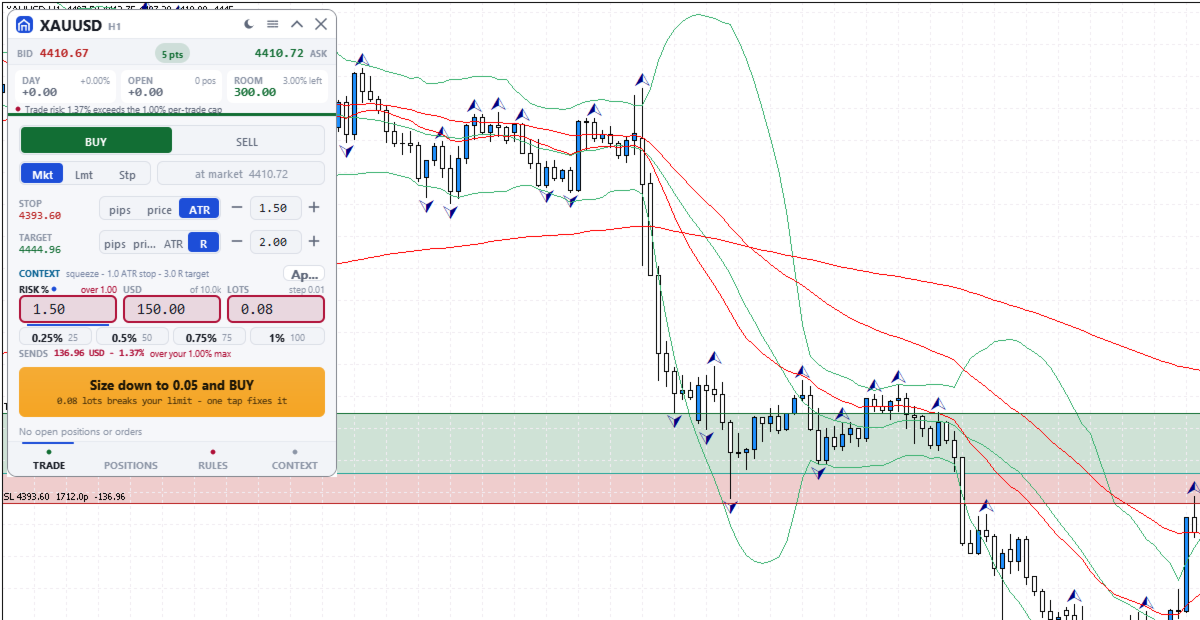
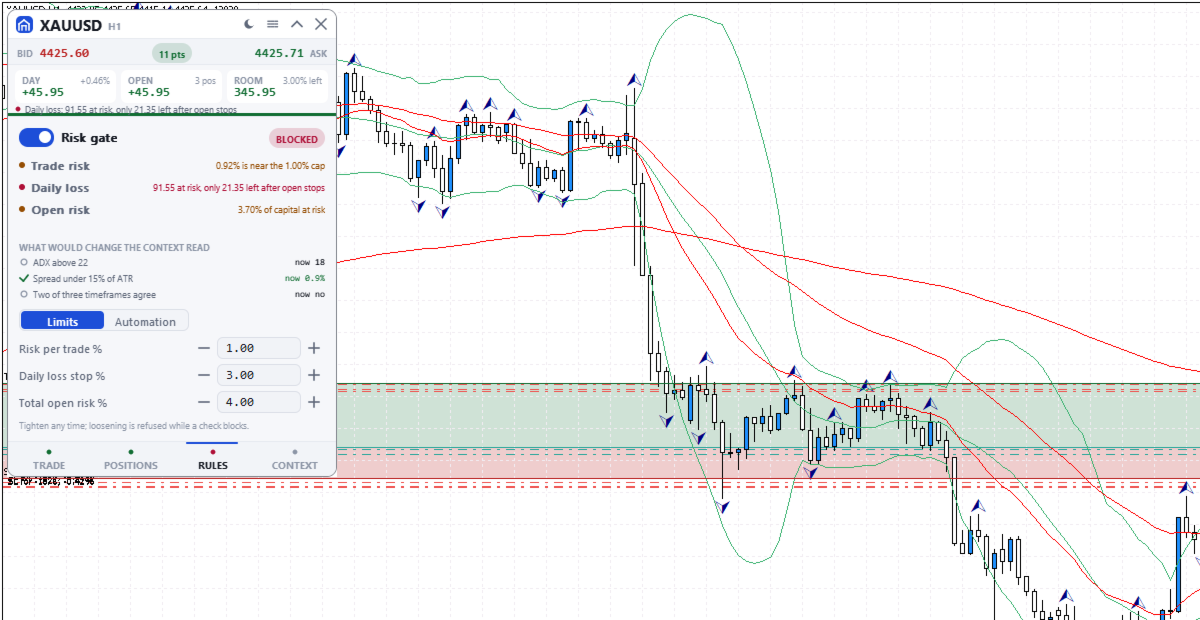
A blocking check shows Blocked and the reason on the button.
- Risk per trade: default 1% of balance, measured to the stop. An order without a stop (fixed lot size only) skips this cap and the open-risk cap; the daily loss check refuses it only once less than one per-trade cap is left.
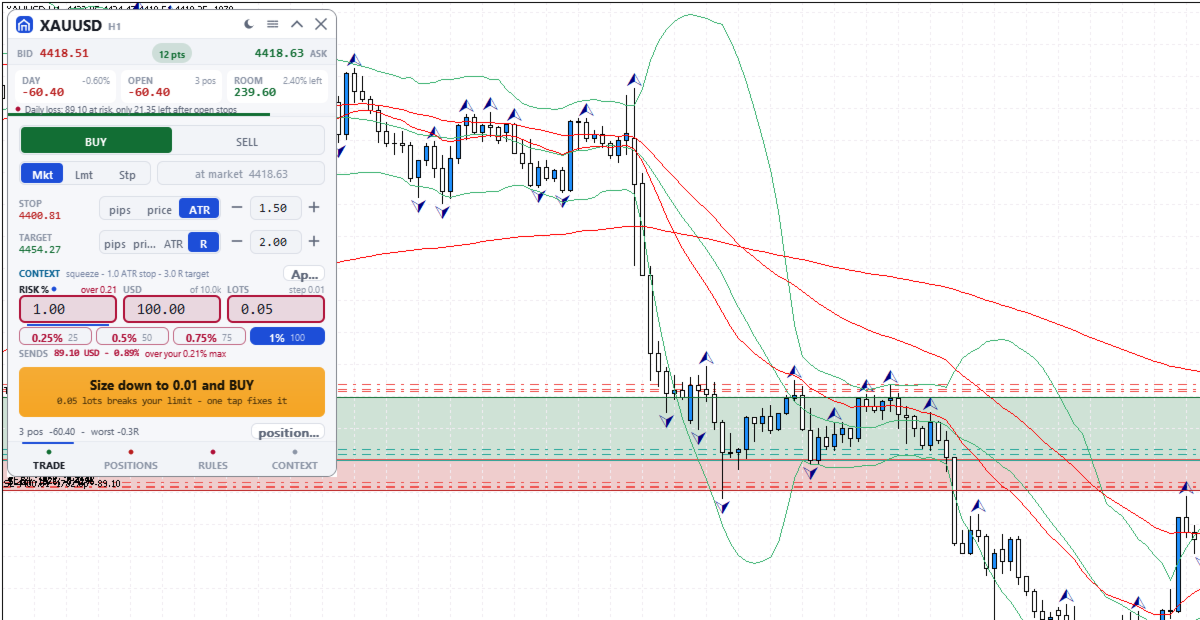
- Daily loss stop: default 3% of the day's opening balance. It counts today's closed results, costs included, and the whole account's floating result. The day starts at server midnight, which may not match your provider's reset. A new order is also blocked if the day would pass the limit once its stop and every open and pending stop are hit.
- Total open risk: default 4%, this order included, from entry to stop of every open position on all symbols. A stop moved past entry still counts. Positions without a stop are left out, with a warning.
- Open positions (default 6), trades per server day (default 12) and spread against ATR (Average True Range).
- Blackout windows you type in server time, with no news calendar. 21:00 to midnight server time warns, or blocks if you choose.
- Margin level warns under 200% and blocks under 130%. A losing streak warns.
The gate switch, per-trade, daily loss and open-risk limits are set on the RULES tab; the rest come from the inputs. Lowering always works. Raising a limit or switching the gate off is refused while a check blocks, and for the rest of the server day once the daily stop is hit. A stop cannot be dragged wider then either.
SIZE DOWN
If only size is wrong, the button offers, for example, "Size down to 0.08 and BUY": one click writes the largest lot size that passes every check into the order, without sending.
ORDERS AND CHART LEVELS
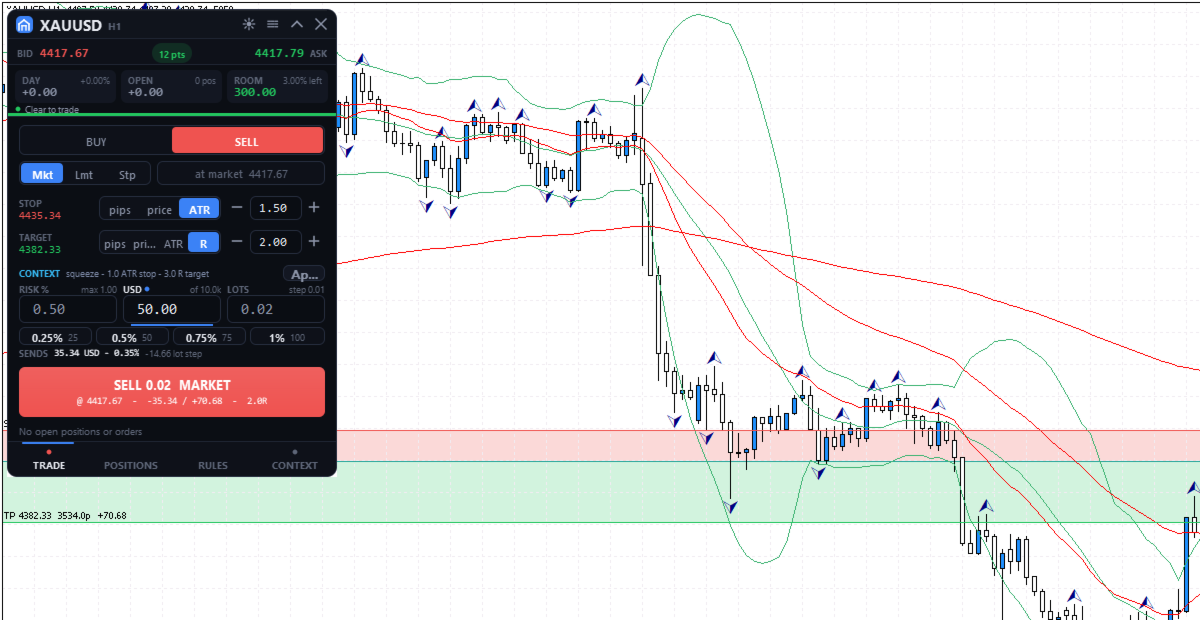
The TRADE tab sizes each order from its stop, with risk in percent, money or lots, and shows the most your limits allow now. Quick-risk buttons (quarters of the cap by default) and the mouse wheel stop there. SENDS shows the rounded size's risk to the stop, without commission. Two clicks send. After a market fill that opens a new position, Undo can close it at market for 8 seconds. On the chart's symbol, levels of the planned order, pending orders and positions can be dragged, replacing MetaTrader's own level dragging. Releasing a live level sends one request, undoable for 10 seconds.
POSITIONS
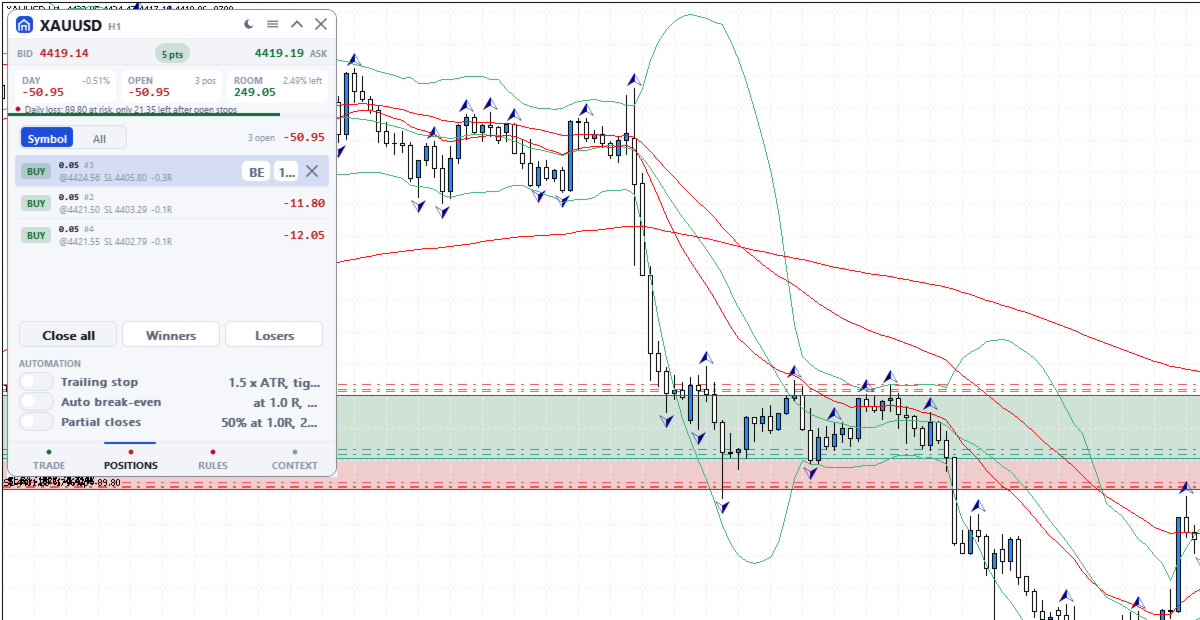
Positions and pending orders, this symbol or all: break-even, close half, close or delete. Close all needs a second press; Winners and Losers act at once.
AUTOMATIC MANAGEMENT
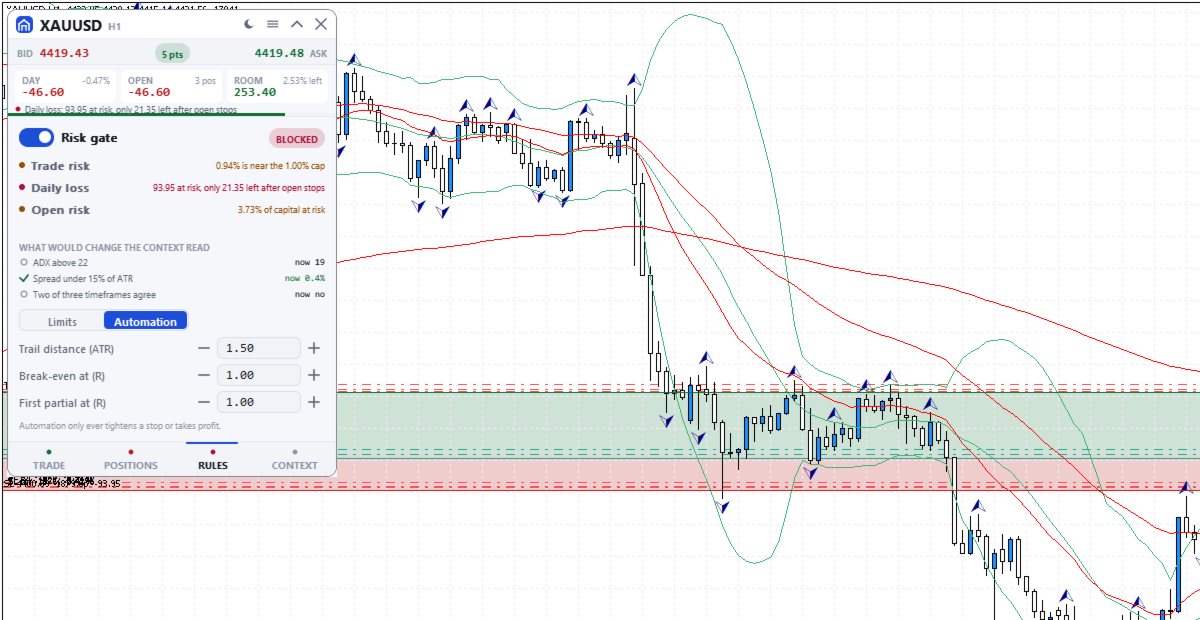
Off by default; switched on in POSITIONS, set on RULES. It acts on every position of the chart's symbol, including manual and other programs' trades, unless Manage only this panel's trades is on. Stops you drag by hand are left alone.
- Trailing stop 1.5 x ATR behind the price, in steps of at least 50 points, never moved back. It starts at once, in profit or not: a wider stop is pulled in, and a missing stop is added.
- Break-even at a chosen R (a multiple of the first stop), to entry plus 20 points.
- Partial closes: 50% at a chosen R, then 25% of the rest at twice that R. A position too small to split is skipped.
MARKET CONTEXT
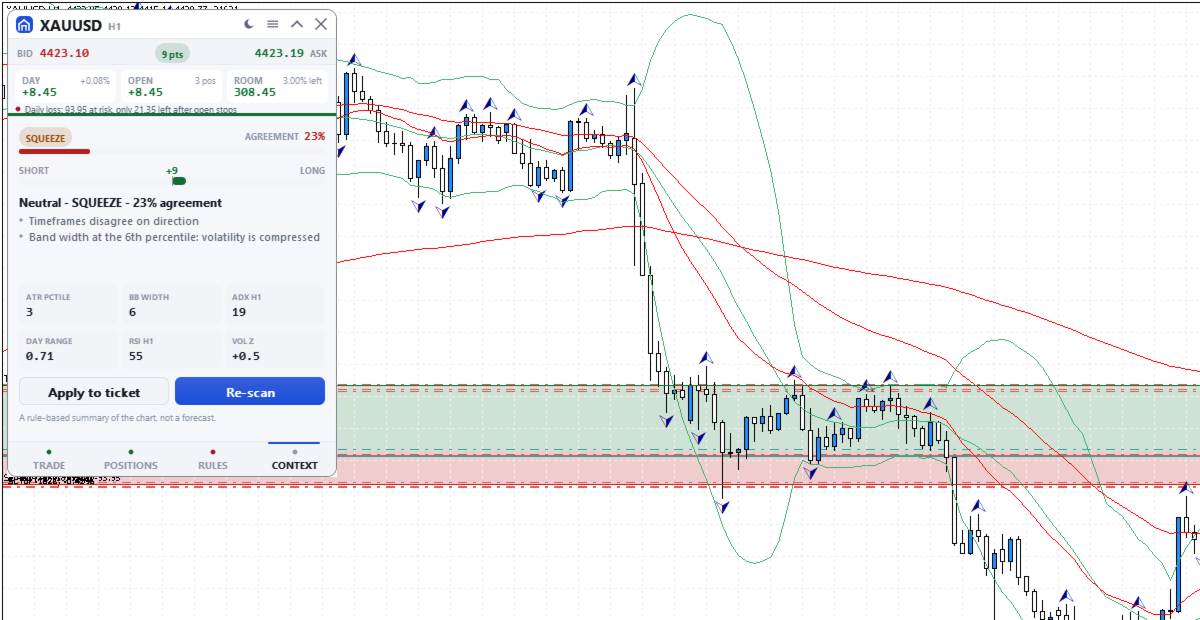
A rule-based summary of standard trend, momentum and volatility indicators. It names the market state, with an agreement score from 0 to 95 and its reasons. The score is not a probability of profit and the summary is not a forecast. Apply copies its suggested plan into the order without sending it.
THE PANEL
330 x 468 pixels at UI scale 1.0, four tabs: TRADE, POSITIONS, RULES and CONTEXT. The header shows today's and floating results, the room before the daily stop and the most serious warning or block, even folded. Dark, graphite, light or Auto theme. It needs Algo Trading, works on hedging and netting accounts and uses no DLLs.
INPUT PARAMETERS
General
- InpTheme, shown as "Colour theme (the sun/moon button overrides it; OK here resets)": default Auto. Sets Dark, Graphite or Light, or follows the chart background. The title bar button can switch it; OK in this dialog brings this setting back.
- InpUiScale, shown as "UI scale (1.0 / 1.25 / 1.5 for hi-dpi)": default 1.0, accepted from 0.75 to 2.0. At 1.5 the panel measures 495 x 702 pixels.
- InpMagic, shown as "Magic number": default 20250909. Marks the panel's own orders, which the last input in this group can filter on.
- InpSlippage, shown as "Max slippage (points)": default 20, which is 2 pips on a 5-digit forex quote. Applies to market orders and to closes.
- InpManageOwnOnly, shown as "Manage only this panel's trades": default false. When true, the positions list, bulk closes, chart dragging, automation, open risk, the trades-per-day count and the losing streak use only trades with this magic number. The daily loss stop and the positions limit always count the whole account.
Risk limits
The first seven inputs are read only the first time the panel runs on an account and symbol. After that the panel uses its saved values, and changing these seven inputs has no effect. Change the gate, risk per trade, daily loss stop and open risk on the RULES tab; max positions, trades per day and max spread keep their first values. Saved values and the daily-stop lock belong to that account and symbol, so a panel on another symbol starts from these inputs. The last three inputs apply every time the panel starts and are not covered by the lock.
- InpGuardOn, shown as "Enable the pre-trade risk gate": default true. Starting state of the gate switch.
- InpMaxRiskTrade, shown as "Max risk per trade (% of balance)": default 1.0.
- InpMaxDailyLoss, shown as "Daily loss stop (% of day-open balance)": default 3.0. The day-open balance is the current balance less today's closed results, so a deposit or withdrawal made today moves it.
- InpMaxOpenRisk, shown as "Max total open risk (% of balance)": default 4.0. Entry-to-stop money of all open positions, on every symbol, plus the new order.
- InpMaxPositions, shown as "Max concurrent positions": default 6. Orders are blocked while this many positions are open on the account.
- InpMaxTradesDay, shown as "Max trades per day": default 12. Orders are blocked once this many entry deals were made since server midnight, including pending order fills and other programs' trades unless Manage only this panel's trades is on.
- InpMaxSpreadAtr, shown as "Max spread as a fraction of ATR": default 0.15, meaning orders are blocked while the spread is wider than 15% of ATR (14 bars, chart timeframe). On low timeframes the ATR is small, so this blocks more often.
- InpMaxConsecLoss, shown as "Warn after N losses in a row": default 3. A warning, not a block.
- InpBlockOffSession, shown as "Block trading outside the main sessions": default false. True blocks orders from 21:00 to midnight server time; false only warns.
- InpNewsWindows, shown as "Blackout windows, e.g. 13:30-14:00,15:00-15:30": default empty. Server times as HH:MM-HH:MM, separated by commas. Orders are blocked inside them every day until you remove them; the panel does not read an economic calendar.