Nomad Trade Panel Pro

Nomad Trade Panel Pro is a manual trade panel for MetaTrader 5 that checks each order you send from it against limits you set, and refuses the ones that break them. It is built for an account with a daily loss limit.

A daily limit is rarely broken by one trade. It is broken by the next one, sized as if the losses still open did not count. This panel counts them before it lets another order through. It does not close positions or delete pending orders, so a running loss, a gap or slippage can still carry the account past the limit.

It never opens a trade by itself. Trailing, break-even and partial closes act without a click once you switch them on. Orders from the order window, mobile apps or other programs are not checked.

THE RISK GATE
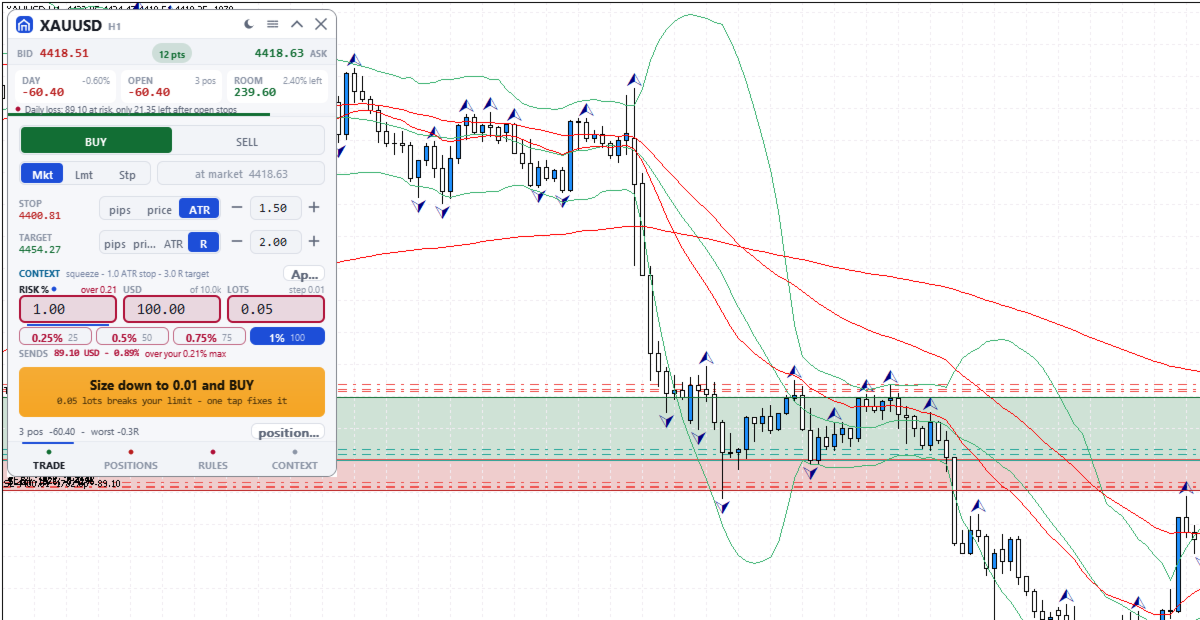
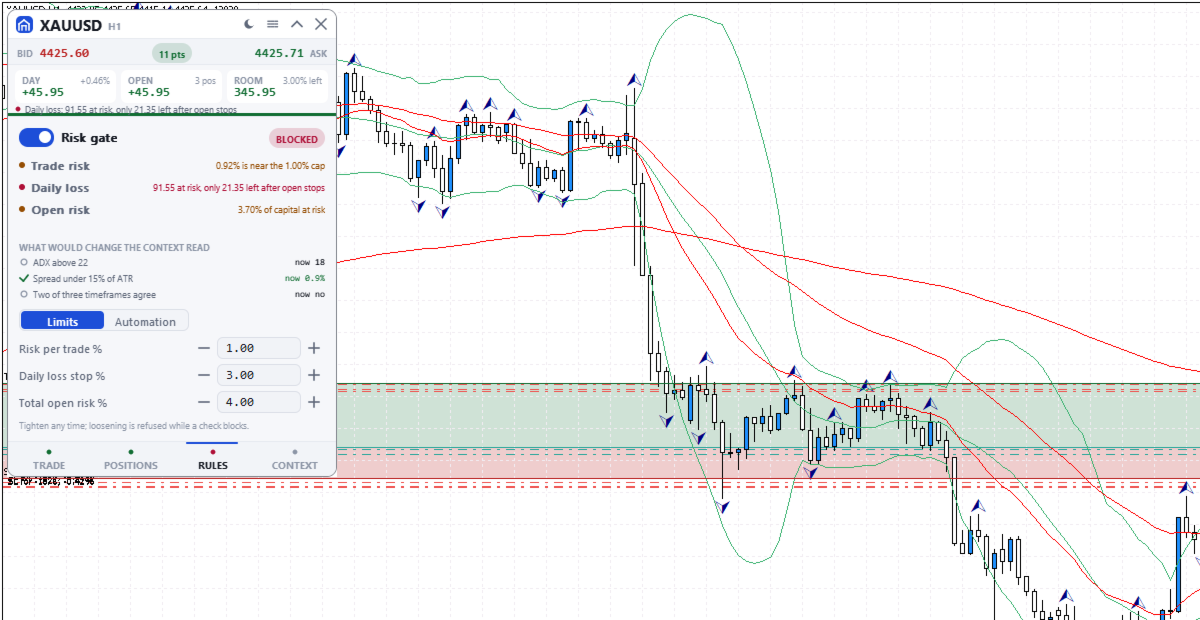
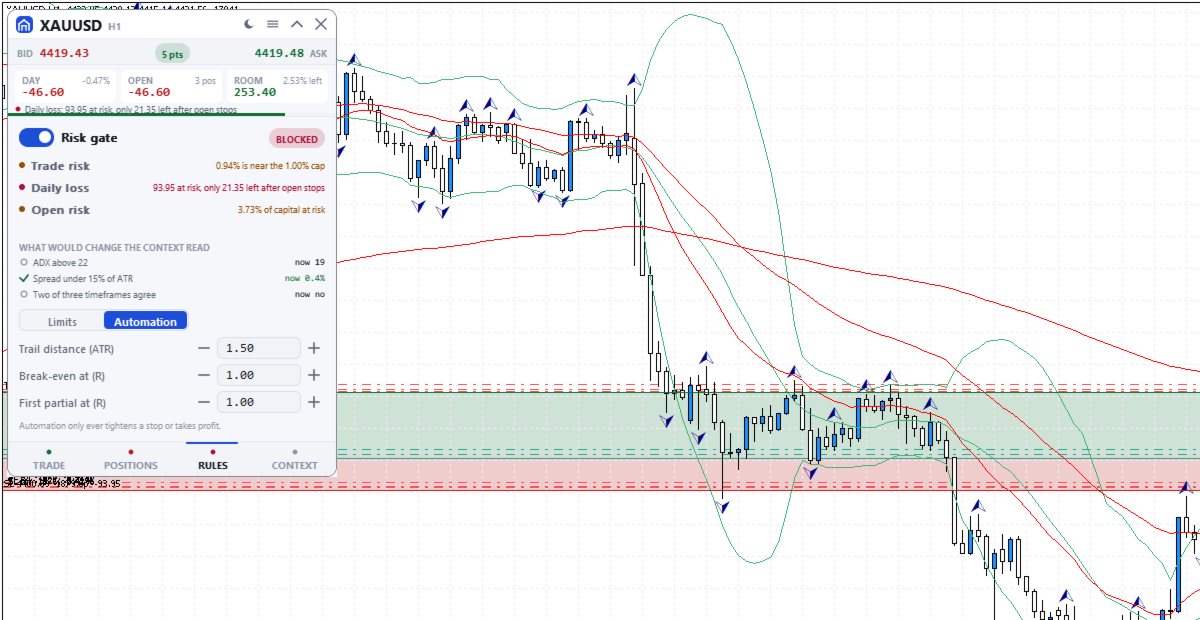
A blocking check shows Blocked and the reason on the button.
- Risk per trade: default 1% of balance, measured to the stop. An order without a stop (fixed lot size only) skips this cap and the open-risk cap; the daily loss check refuses it only once less than one per-trade cap is left.
- Daily loss stop: default 3% of the day's opening balance. It counts today's closed results, costs included, and the whole account's floating result. The day starts at server midnight, which may not match your provider's reset. A new order is also blocked if the day would pass the limit once its stop and every open and pending stop are hit.
- Total open risk: default 4%, this order included, from entry to stop of every open position on all symbols. A stop moved past entry still counts. Positions without a stop are left out, with a warning.
- Open positions (default 6), trades per server day (default 12) and spread against ATR (Average True Range).
- Blackout windows you type in server time, with no news calendar. 21:00 to midnight server time warns, or blocks if you choose.
- Margin level warns under 200% and blocks under 130%. A losing streak warns.

The gate switch, per-trade, daily loss and open-risk limits are set on the RULES tab; the rest come from the inputs. Lowering always works. Raising a limit or switching the gate off is refused while a check blocks, and for the rest of the server day once the daily stop is hit. A stop cannot be dragged wider then either.

SIZE DOWN
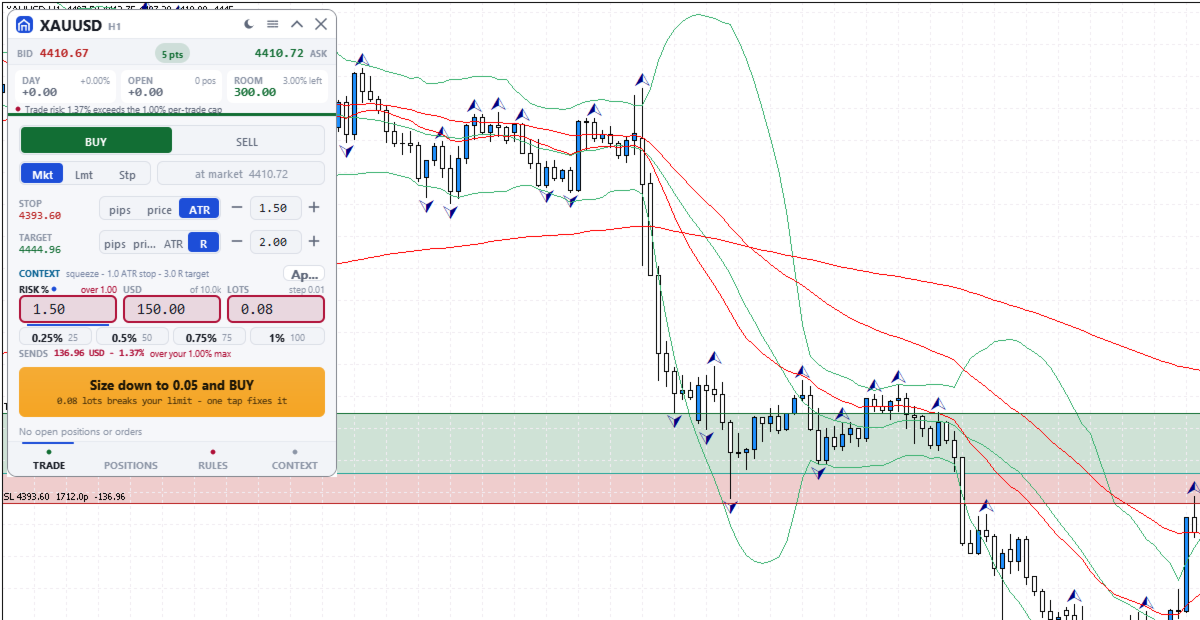
If only size is wrong, the button offers, for example, "Size down to 0.08 and BUY": one click writes the largest lot size that passes every check into the order, without sending.

ORDERS AND CHART LEVELS
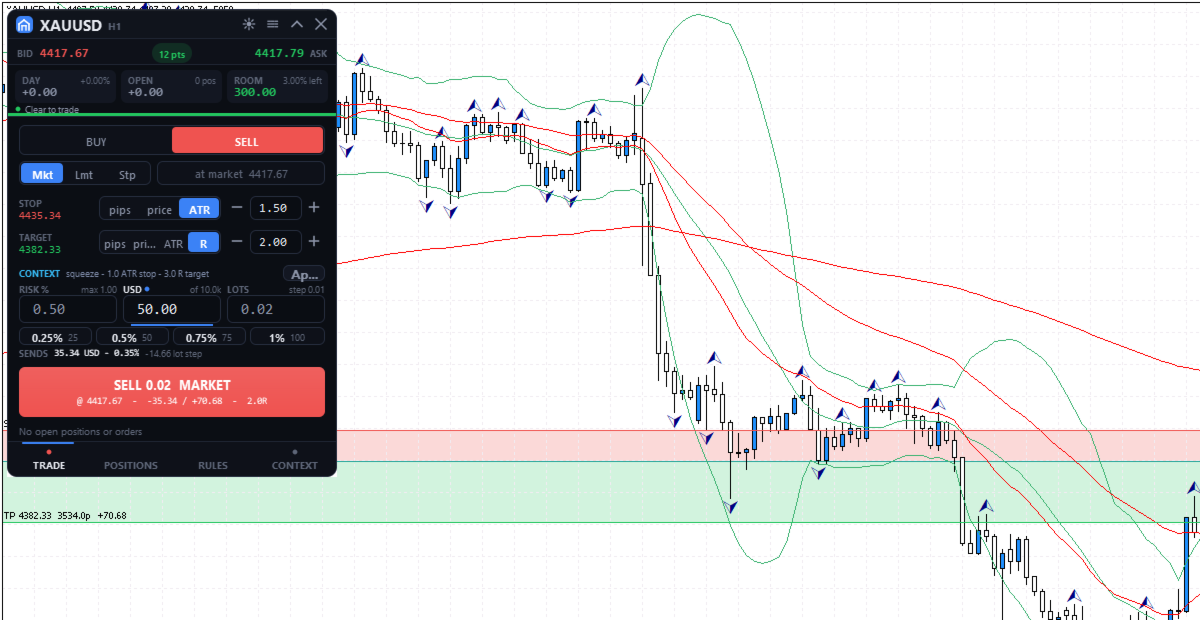
The TRADE tab sizes each order from its stop, with risk in percent, money or lots, and shows the most your limits allow now. Quick-risk buttons (quarters of the cap by default) and the mouse wheel stop there. SENDS shows the rounded size's risk to the stop, without commission. Two clicks send. After a market fill that opens a new position, Undo can close it at market for 8 seconds. On the chart's symbol, levels of the planned order, pending orders and positions can be dragged, replacing MetaTrader's own level dragging. Releasing a live level sends one request, undoable for 10 seconds.

POSITIONS
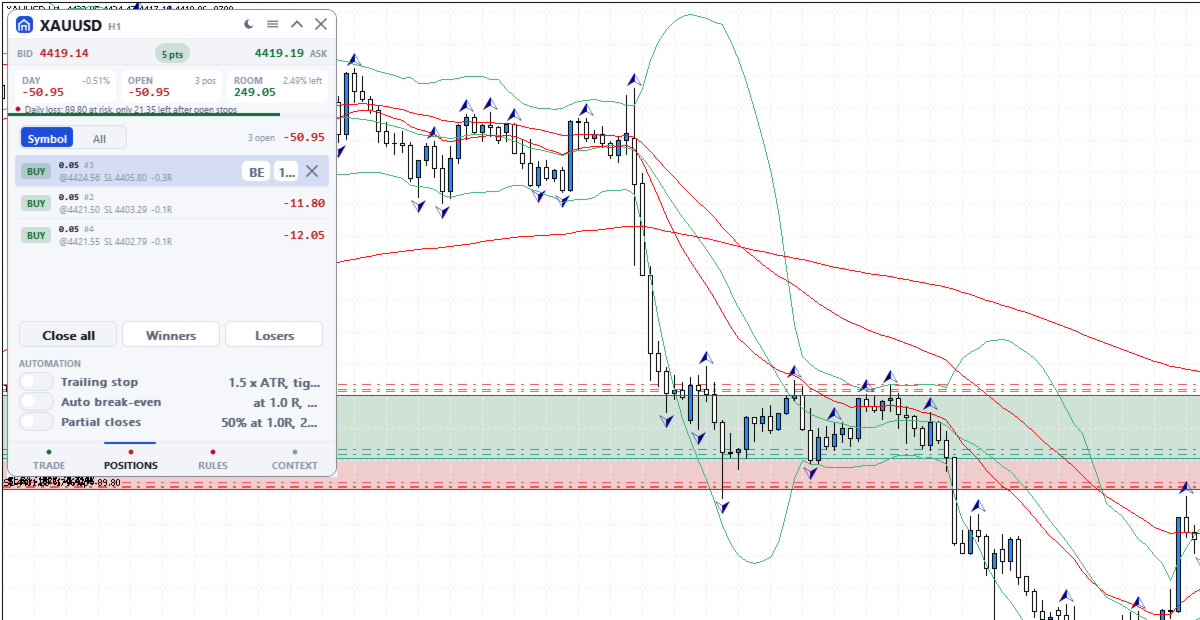
Positions and pending orders, this symbol or all: break-even, close half, close or delete. Close all needs a second press; Winners and Losers act at once.

AUTOMATIC MANAGEMENT
Off by default; switched on in POSITIONS, set on RULES. It acts on every position of the chart's symbol, including manual and other programs' trades, unless Manage only this panel's trades is on. Stops you drag by hand are left alone.
- Trailing stop 1.5 x ATR behind the price, in steps of at least 50 points, never moved back. It starts at once, in profit or not: a wider stop is pulled in, and a missing stop is added.
- Break-even at a chosen R (a multiple of the first stop), to entry plus 20 points.
- Partial closes: 50% at a chosen R, then 25% of the rest at twice that R. A position too small to split is skipped.

MARKET CONTEXT
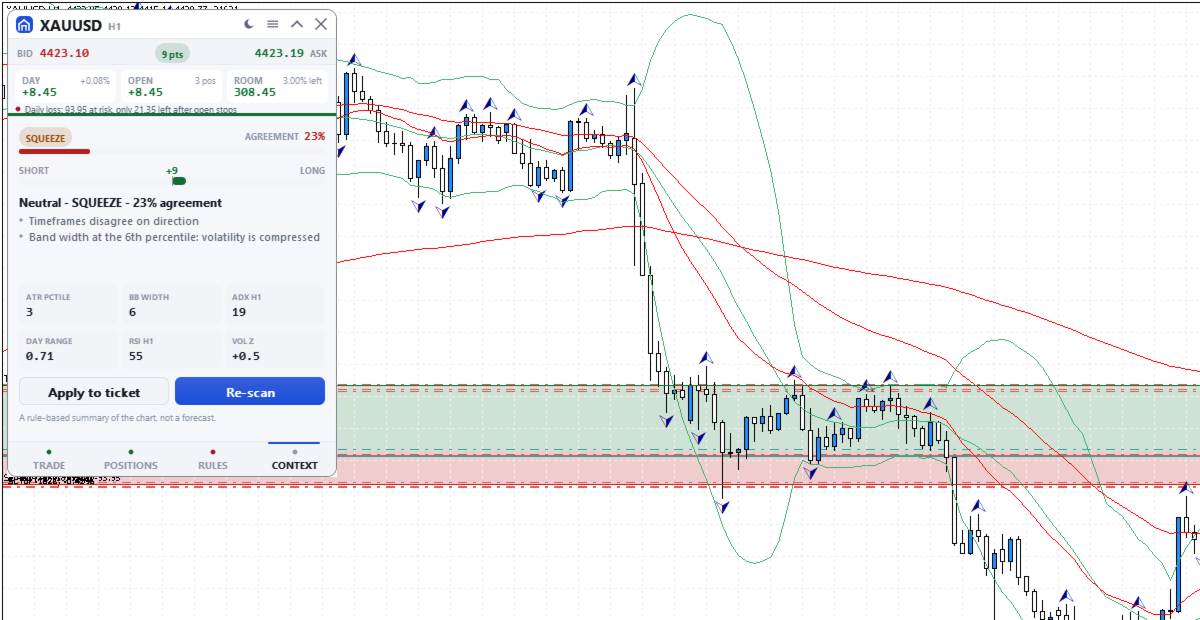
A rule-based summary of standard trend, momentum and volatility indicators. It names the market state, with an agreement score from 0 to 95 and its reasons. The score is not a probability of profit and the summary is not a forecast. Apply copies its suggested plan into the order without sending it.

THE PANEL
330 x 468 pixels at UI scale 1.0, four tabs: TRADE, POSITIONS, RULES and CONTEXT. The header shows today's and floating results, the room before the daily stop and the most serious warning or block, even folded. Dark, graphite, light or Auto theme. It needs Algo Trading, works on hedging and netting accounts and uses no DLLs.

INPUT PARAMETERS
General
- InpTheme, shown as "Colour theme (the sun/moon button overrides it; OK here resets)": default Auto. Sets Dark, Graphite or Light, or follows the chart background. The title bar button can switch it; OK in this dialog brings this setting back.
- InpUiScale, shown as "UI scale (1.0 / 1.25 / 1.5 for hi-dpi)": default 1.0, accepted from 0.75 to 2.0. At 1.5 the panel measures 495 x 702 pixels.
- InpMagic, shown as "Magic number": default 20250909. Marks the panel's own orders, which the last input in this group can filter on.
- InpSlippage, shown as "Max slippage (points)": default 20, which is 2 pips on a 5-digit forex quote. Applies to market orders and to closes.
- InpManageOwnOnly, shown as "Manage only this panel's trades": default false. When true, the positions list, bulk closes, chart dragging, automation, open risk, the trades-per-day count and the losing streak use only trades with this magic number. The daily loss stop and the positions limit always count the whole account.

Risk limits
The first seven inputs are read only the first time the panel runs on an account and symbol. After that the panel uses its saved values, and changing these seven inputs has no effect. Change the gate, risk per trade, daily loss stop and open risk on the RULES tab; max positions, trades per day and max spread keep their first values. Saved values and the daily-stop lock belong to that account and symbol, so a panel on another symbol starts from these inputs. The last three inputs apply every time the panel starts and are not covered by the lock.
- InpGuardOn, shown as "Enable the pre-trade risk gate": default true. Starting state of the gate switch.
- InpMaxRiskTrade, shown as "Max risk per trade (% of balance)": default 1.0.
- InpMaxDailyLoss, shown as "Daily loss stop (% of day-open balance)": default 3.0. The day-open balance is the current balance less today's closed results, so a deposit or withdrawal made today moves it.
- InpMaxOpenRisk, shown as "Max total open risk (% of balance)": default 4.0. Entry-to-stop money of all open positions, on every symbol, plus the new order.
- InpMaxPositions, shown as "Max concurrent positions": default 6. Orders are blocked while this many positions are open on the account.
- InpMaxTradesDay, shown as "Max trades per day": default 12. Orders are blocked once this many entry deals were made since server midnight, including pending order fills and other programs' trades unless Manage only this panel's trades is on.
- InpMaxSpreadAtr, shown as "Max spread as a fraction of ATR": default 0.15, meaning orders are blocked while the spread is wider than 15% of ATR (14 bars, chart timeframe). On low timeframes the ATR is small, so this blocks more often.
- InpMaxConsecLoss, shown as "Warn after N losses in a row": default 3. A warning, not a block.
- InpBlockOffSession, shown as "Block trading outside the main sessions": default false. True blocks orders from 21:00 to midnight server time; false only warns.
- InpNewsWindows, shown as "Blackout windows, e.g. 13:30-14:00,15:00-15:30": default empty. Server times as HH:MM-HH:MM, separated by commas. Orders are blocked inside them every day until you remove them; the panel does not read an economic calendar.

Produtos recomendados
[ INSTITUTIONAL RISK ENGINE • METATRADER 5 ] — [ A MUST-HAVE FOR EVERY TRADER ] Trader Toolkit Pro MT5 An essential trading console, precision risk engine, and prop drawdown guardian for MetaTrader 5. Engineered for professional discretionary traders, evaluation challenges, and rapid intraday execution. KEY CAPABILITIES: Risk & Position Hub • 6-in-1 HUD • Margin Call Projections • Daily Loss Breaker • Dark & White Skins • 12 Themes • Streamer Privacy • Stealth Virtual Orders • Dynamic R:R Lock
EA交易快捷助手 —— 专为 MetaTrader 5 打造的硬件交易利器 本工具专为配合实体快捷键盘设计,将 MT5 的核心交易指令集中映射至硬件实体按键。无需频繁移动鼠标找寻按钮,助你在行情剧烈波动时实现毫秒级订单执行与快速风险规避。 核心功能与优势 毫秒级极速响应 :实体按键物理触发,极大缩短交易决策与订单送达服务器之间的时间差。 一键快捷交易 :支持一键市价买入、卖出、一键平仓、持仓锁仓及手数快速微调。 防误触安全锁 :内置安全锁定机制,有效规避手滑或误触造成的非预期建仓。 完全合规无 DLL :采用纯正 MQL5 原生逻辑编写, 不依赖任何第三方 DLL 文件 ,确保账户资金与平台安全。 快捷键默认映射 (Key Mapping) Key A / F1 :按预设手数一键买入 (Buy) Key B / F2 :按预设手数一键卖出 (Sell) Key C / F3 :一键平仓当前图表品种的所有持仓 (Close Current) Key D / F4 :一键平仓账户内所有品种持仓 (Close All) Key Up / Down :快速增减下一次下单的手数步长 输入参数
FREE
Quick Order Closer
Danny Giovanni Romero Lozano
Demo Version Here : https://www.mql5.com/en/market/product/170598 The fastest on the entire platform, try it with 50 open trades or more This Expert Advisor provides a fast and intuitive way to manage and close open trading positions directly from the chart using a clean button-based interface. With a single click, traders can instantly close positions based on different conditions, improving execution speed and overall trade management efficiency. Key Features Close all open positions instant
Detector de Alta Margem Exigida (HMR) para MT5 Detecte eventos de Alta Margem Exigida (HMR) da Exness e escolha o que acontece com suas negociações abertas. O Detector HMR é um utilitário do MetaTrader 5 projetado para monitorar sua conta de negociação em busca de condições HMR e responder automaticamente de acordo com as configurações que você escolher. O que é HMR? Alta Margem Exigida (HMR) é uma condição que pode ocorrer em determinados instrumentos e períodos quando requisitos de margem mais
O SAB Advance Assistant e um painel de gestao manual de operacoes para o MetaTrader 5. Construa cada operacao visualmente no grafico, controle o seu risco exato e deixe o motor integrado cuidar dos take-profits parciais, do break-even e do trailing, tudo a partir de um unico painel limpo e redimensionavel. Feito para traders discricionarios e ICT/SMC que querem precisao sem planilhas. PRINCIPAIS RECURSOS - Linhas arrastaveis de Entry, Stop Loss, TP1-TP5 e Final TP com rotulos ao vivo   (pips,
This EA trails your stops based on percentage of current TP, for both manually and auto-opened trades.   You can edit the percentage value in the inputs. Trailing stop   is a more flexible variation of a normal exit order. T railing stop  is the practice of moving the stop-loss level closer to the current price when the price moves in your favor. Trailing the stop-loss allows traders to limit their losses and safeguard their positive trades. It is a very popular practice. This EA will manage you
Trade Panel HotKey – MT5 Scalping Utility Fast Trade Panel HotKey is a lightweight MT5 trading utility designed for traders who need to open, manage, and close positions as quickly as possible . The main purpose of this tool is to reduce the time between a trading decision and execution. Instead of moving the mouse, opening order windows, or manually modifying multiple positions, most important actions can be performed instantly through customizable keyboard hotkeys or directly from the compact
Trade Control Panel
Jerry Jilun Anak Liban
Trade Control Panel Function Normal One Click Function Close All Close All Profit Close All Loss Close All Pending Order Close All Sell Close All Buy Advance One Click Function 1.  Close Partial Lot Sell by Percent It will help you partial close for all open position by desire percent you wanted. No longer partial close one by one for every open position Manual input for desire percent 2. Close Partial Lot Buy by Percent It will help you partial close for all open position by desire percent
Funded Account Guard monitors the whole trading account and enforces the risk limits you set. When a limit is reached, it closes all positions, deletes pending orders and blocks new entries until the limit period ends. It is intended for funded and evaluation accounts with a daily loss limit and a maximum drawdown limit, and for any trader who wants a fixed daily stop. The utility does not open trades, does not give signals and does not move stop loss or take profit levels. Rules - Daily loss
FREE
Sessions and News Panel
Claudiu-georgian Zavera
Sessions and News Panel An on-chart dashboard that shows the world's trading sessions and the economic calendar in real time, plus an optional News Guard that can protect your account around high-impact news. This is a utility / information panel. It does NOT open trades on its own and it is NOT a signal system. Its only trading action is the optional News Guard, which can cancel pending orders and/or close open positions around scheduled news - and only when you explicitly enable it. -------
FREE
The “Summary Risk Target” indicator is designed to show the total number of transactions made on a single pair. The transactions counted include active positions as well as pending orders . By setting a stop loss for each trade, this indicator displays the total potential risk (loss) that may be incurred. This helps traders easily understand their overall risk exposure without the need for manual calculations. Likewise, for take profit , if the TP level is defined—either in terms of pips or at a
FREE
ApexForge Economic Calendar Safety Dashboard Calendário Econômico MT5 | Calendário Forex | News Filter | Alertas de Notícias de Alto Impacto | Contagem Regressiva de Eventos Econômicos | Fechamento de Emergência | Close All | Alertas de Feriados do Mercado | Aviso de Fechamento Antecipado | KTimer | Contagem Regressiva de Velas | Notificações Push | 12 Idiomas + Auto ApexForge Economic Calendar Safety Dashboard é um painel completo de informações e gerenciamento para MetaTrader 5 que integra Cal
Task Panel Nxfx Trade Manager Task Panel Nxfx Trade Manager is a trading utility designed to simplify manual trading, position management, and risk control in MetaTrader 4 and MetaTrader 5. The panel provides quick access to trading functions directly from the chart. Traders can place orders, configure Stop Loss and Take Profit levels, manage position sizes, and monitor open trades through a clear and convenient interface. The tool is suitable for scalping, day trading, swing trading, and other
FREE
StopLoss and TakeProfit Utility MT5 for automatic setting of stop loss and take profit levels. Created by a professional trader for traders.   The utility   works with any market orders opened by a trader manually or using advisors. Can filter trades by magic number. The utility can work with any number of orders simultaneously. WHAT THE UTILITY CAN DO: Set virtual stop loss and take profit from 1 pip Real   stop loss and take profit W ork with each order separately (   stop loss and take prof
Real-Time Spread Display Tool A   real-time spread display tool   is a specialized software or application designed to provide traders and investors with instant, live data on the   spread —the difference between the bid price (the price at which buyers are willing to purchase an asset) and the ask price (the price at which sellers are willing to sell it)—for various financial instruments. This tool is critical in markets such as forex (FX), stocks, futures, and cryptocurrencies, where price f
Account Nuclear
Putu Hery Siswanto
FOX CUSTOMER BENEFITS Verified customers with qualifying MQL5 Market purchases may be eligible for complimentary FOX commercial Expert Advisors. Learn more about the FOX Customer Benefits Program: https://www.mql5.com/en/blogs/post/774575 ACCOUNT NUCLEAR One account. One control panel. Full manual authority when you need it. Account Nuclear is a free MetaTrader 5 utility built for traders who manage multiple positions, pending orders, manual trades or several Expert Advisors on the same account
FREE
The utility is designed to save funds on your trading account. There is support for three levels of minimum equity and free margin. For each level, you can set partial (by a certain percentage) or complete closing of all market orders. The partial close percentage is applied for each order separately based on its current size (i.e. the size at the time the equity or free margin reaches the appropriate level). Upon reaching the last third level, the utility can close all charts, which will make i
This Expert Advisor monitors all open positions across all symbols in MetaTrader 5. Whenever a Stop Loss (SL) or Take Profit (TP) is manually set or adjusted on any position, the EA automatically applies that value to all other open positions , regardless of symbol or order type (Buy/Sell). This ensures consistent and synchronized SL and TP levels across your account. Perfect for mobile trading via tablet or smartphone!
FREE
This script analyzes all symbols in Market Watch for a set timeframe. The result is displayed on the Experts tab and in the specified file. For more convenient viewing and editing, the result is displayed in a csv file. For the calculation, the Pearson formula is used. The value of the correlation coefficient of pairs close to 1 means that the pairs move almost identically. A value close to -1 means that the pairs move in the same way. This tool will be useful to those who use hedging due to the
Apart from psychology, another thing that makes traders successful is risk management. This utility helps the trader in risk management, order management, and monitoring the profits that are made within a certain period. The utility works on the forex market. inputs: The following are inputs that are required before an order is executed ·        Sl- this is the stop loss in pips. ·        Tip: this is the take profit in pips. ·        Risk%: the percentage of the equity that the user wants to ri
Grid Manager — Assistente Manual de Grid Multi-Cesta para MT5 O Grid Manager é um painel de controle para montar e gerenciar "cestas" de grid direto no gráfico. Você decide a direção e o momento; a ferramenta abre o grid, gerencia cada perna e protege a posição com controles de risco em dólar, linhas de breakeven/SL/TP no gráfico e ações de um clique. É um assistente de execução e gestão — rápido, visual e totalmente sob o seu comando. O que é — e o que não é O Grid Manager é um assistente manua
This is a utility that helps you close market orders and pending orders (optional), using keyboard shortcuts. For me,  it's more convenient and  faster  than clicking a button on the chart. You can set:  Keyboard Shortcut Hotkey: You can change and use most of the keys on the keyboard.   Key combination (Ctrl, Shift) also available in case you want to use  (Note that not all combinations work).  Magic Number  Symbol: All Symbol, or Current Chart Symbol, or Select Symbol List  Close Pending orde
Guardian Magic GT
Carlos Eduardo Rivas Istacuy
Guardian Magic GT - Risk Management Expert Advisor for MetaTrader 5 PROTECT YOUR TRADING CAPITAL WITH INTELLIGENT RISK MANAGEMENT Guardian Magic GT is a professional-grade Expert Advisor designed to safeguard your trading operations by implementing sophisticated risk control mechanisms. Whether you run a single bot or manage multiple automated trading systems simultaneously, Guardian Magic GT provides real-time monitoring and automatic position management to ensure your account stays within your
Telegram Services
Ramesh Maharjan
5 (1)
O Telegram Services é uma aplicação de negociação que permite a comunicação entre este EA e o seu canal Telegram. Esta aplicação gera relatórios, alerta-o quando as negociações são abertas, fechadas e modificadas, abre novas negociações, fecha as negociações em aberto, modifica as negociações existentes, lista o histórico de negociações, obtém capturas de ecrã de gráficos, obtém valores de stop loss e take profit para serem utilizados, exibe as condições atuais do mercado, obtém notícias do mer
One Click Trader  is a tool designed for MetaTrader 4 platform, which enables you to take your trading to the next level. It enables you to open, manage and close your trades in simple an efficient way by just one click of your mouse button. "-"   ,  "+"  change OCT window size  Up arrow minimizes the OCT panel Down arrow maximizes the OCT panel Right arrow displays the next panel with additional features Left arrow hides the panel with additional features Red  SELL  button enables you to open s
Prop Max Daily Loss Manager — Assistente de Gestão de Risco Diário para Empresas de Trading Proprietário Prop Max Daily Loss Manager é um utilitário para MetaTrader 5 projetado para traders realizando Challenges ou operando em contas financiadas com empresas prop (como FTMO). A ferramenta monitora automaticamente o risco diário e ajuda a evitar violar o limite máximo de perda diária estabelecido. Principais Funcionalidades Fechamento automático de todas as operações quando o nível de perda diári
Forget about enabling templates when you launch the window. Auto Template Master Service  is a professional utility tool that runs as a system service in MetaTrader 5, and it will do it for you. Unlike traditional indicators or expert advisors (EAs), the program runs in the background of the entire terminal and doesn't require you to add it to each window individually. As soon as you open a new chart of any instrument (Forex, Stocks, Crypto), the service immediately detects the new window and a
Prop Risk Guard
Mohamed-amine Baddir
O Prop Risk Guard aplica automaticamente as regras de risco da sua conta. Anexe-o a um único gráfico e ele monitora todas as posições da conta. Quando um limite é atingido, ele fecha as posições, exclui as ordens pendentes e bloqueia as operações, para que um trade ruim ou um EA descontrolado não quebre as regras da sua conta de avaliação ou financiada (mesa proprietária). Limite de perda diária Em percentual, valor fixo ou ambos (vale o mais rígido) Medido a partir do saldo do início do dia, do
This tool can help you close all open orders with one click, just click "Close all". If you only want to close profitable orders, click the "Close profitable" button. After clicking, all floating orders will be closed; If you only want to close the orders with floating losses, click the "Close losable" button. After clicking, all orders with floating losses will be closed. This tool has been tested for a year. The one-click position closing function is very complete, the position closing is time

ProBridger
Marius Ovidiu Sunzuiana
How Traders and Analysts Can Use the Data Export Bridge to Improve Their Analytics The MQL Data Export Bridge unlocks a new level of analytical power by transforming MetaTrader into a real‑time data provider for any external research environment. Here are the most impactful ways different users can apply the bridge to enhance their trading performance. Build Predictive Models with Machine Learning Who benefits: Quantitative traders, data scientists, algorithm developers How it helps: Export t
Os compradores deste produto também adquirem
Trade Assistant MT5
Evgeniy Kravchenko
4.43 (216)
Ajuda a calcular o risco por comércio, a fácil instalação de uma nova encomenda, gestão de encomendas com funções de fecho parcial, trailing stop de 7 tipos e outras funções úteis. Materiais e instruções adicionais Instruções de instalação   -   Instruções para a aplicação   Função de linha Mostra no gráfico a linha de Abertura, Stop Loss, Take Profit. Com esta função é fácil definir uma nova ordem e ver as suas características adicionais antes da abertura.   Gestão de risco A função de cálcul
Bem-vindo ao Trade Manager EA—uma ferramenta de gestão de risco criada para tornar o trading mais intuitivo, preciso e eficiente. Não é apenas uma ferramenta para executar ordens, mas uma solução abrangente para planejamento de operações, gerenciamento de posições e controle de risco. Seja você um iniciante, trader avançado ou scalper que precisa de execução rápida, o Trade Manager EA adapta-se às suas necessidades, oferecendo flexibilidade em todos os mercados, desde forex e índices até commodi
O Telegram to MT5 Multi-Channel Copier copia automaticamente os sinais de trading dos seus canais de Telegram e Discord diretamente para o MetaTrader 5. Sem bots, sem extensões de navegador, sem copiar à mão. O sinal chega ao Telegram ou ao Discord e o EA abre a operação no seu terminal em poucos segundos. E antes de copiar um canal, o backtester integrado mostra o que esse canal teria feito na sua conta. O produto inclui dois componentes: um aplicativo de Windows que escuta os seus canais de Te
Local Trade Copier EA MT5
Juvenille Emperor Limited
4.94 (149)
Local Trade Copier EA MT5 é um copiador de operações rápido e flexível para copiar e gerenciar operações entre várias contas MetaTrader 5 no mesmo computador Windows ou Windows VPS. Ele combina a sincronização local de operações com controles no lado do Receiver para tamanho de lote, gerenciamento de risco, filtragem de operações, mapeamento de símbolos, gerenciamento de operações e proteção da conta. Configure seus terminais Transmitter e Receiver em aproximadamente 1 minuto e copie operações
Farmed Hedge Yield Farming | All Markets (Manual - Hybrid - Semi/Automated EA) VERIFIED TRADING RESULTS - Farmed Hedge Yield Axi Copy:  https://www.mql5.com/en/signals/2356376 - Farmed Hedge Yield Exn Copy:   https://www.mql5.com/en/signals/2356404 - Farmed Hedge Yield V Copy:  https://www.mql5.com/en/signals/2357156 IMPORTANT NOTICE: FarmedHedge is a MANUAL-FOCUSED TRADING UTILITY ,not a fully automated EA. Results shown on this Signal include manual trades and overall strategic management.
Copie sinais do Telegram com suas próprias regras de negociação Telegram to MT5 Signal Trader copia automaticamente sinais de negociação em texto de canais e grupos públicos e privados do Telegram para o MetaTrader 5. Gerencie vários provedores e contas MT5 em um único aplicativo para desktop, com configurações individuais de risco e de negociação para cada provedor . Você não precisa de um bot do Telegram nem configurar uma API para copiar sinais. Basta entrar com sua própria conta do Telegram
Strategy Ledger Pro
Abdullah Uygar Tuna
5 (14)
Agora disponível em português. Strategy Ledger Pro é um painel de análise de conta somente leitura para o MetaTrader 5. Ele separa os resultados da conta por Expert Advisor, estratégia, símbolo e número mágico, para que você veja o que cada um realmente contribui. O painel está disponível em 11 idiomas: English, Français, Deutsch, Español, Italiano, Português, Русский, Türkçe, 中文, 日本語 e 한국어. Antes de baixar a demo. O Market executa a demo de qualquer produto pago somente no Testador de Estratég
TradePanel MT5
Alfiya Fazylova
4.88 (170)
Trade Panel é um assistente de negociação multifuncional. O aplicativo contém mais de 50 funções de negociação para trading manual e permite automatizar a maioria das tarefas de negociação. Instruções para o aplicativo: https://www.mql5.com/pt/blogs/post/762435 Versão de teste do aplicativo para conta demo: https://www.mql5.com/pt/blogs/post/762547 Como instalar o aplicativo: https://www.mql5.com/pt/blogs/post/762548 Como testar o aplicativo no modo visual: https://www.mql5.com/pt/blogs/post/770
================================================================================ POC BREAKOUT - V20.72. Full Professional Grade Toolkit ================================================================================ POC Breakout is a full MetaTrader 5 trading dashboard for discretionary traders who want breakout signals, Point of Control (POC) context, volume profiles, order flow, market structure, news, alerts, and advanced trade planning in one professional workspace. Attached directly to you
MT5 to Telegram Signal Provider é uma utilidade fácil de usar e totalmente personalizável que permite o envio de sinais especificados para o chat, canal ou grupo do Telegram, tornando sua conta um fornecedor de sinais . Ao contrário da maioria dos produtos concorrentes, ele não usa importações de DLL. [ Demonstração ] [ Manual ] [ Versão MT4 ] [ Versão Discord ] [ Canal do Telegram ]  New: [ Telegram To MT5 ] Configuração Um guia do usuário passo a passo está disponível. Não é necessário conhec
VirtualTradePad PRO SE MT5 — centro profissional de controle de trading para MetaTrader 5 VirtualTradePad PRO SE é um painel de trading premium baseado no gráfico e um ambiente de gerenciamento de operações para MetaTrader 5 . Ele foi desenvolvido para traders que desejam execução mais rápida, controle de posições mais claro, gerenciamento de trades estruturado, planejamento visual de níveis e um fluxo de trabalho profissional diretamente no gráfico. Não é apenas um painel de COMPRA / VENDA. O P
Trade copier MT5
Alfiya Fazylova
4.61 (57)
Trade Copier é um utilitário profissional projetado para copiar e sincronizar negociações entre contas de negociação. A cópia ocorre da conta / terminal do fornecedor para a conta / terminal do destinatário, instalada no mesmo computador ou vps. Antes de comprar, você pode testar a versão demo em uma conta demo. Versão de demonstração aqui . Instruções completas aqui . Principais funcionalidades e benefícios: Suporta a cópia de MT5> MT5, MT4> MT5, MT5> MT4, incluindo contas "MT5 netting". Os mod
Exp COPYLOT CLIENT for MT5
Vladislav Andruschenko
3.97 (35)
Copiador profissional de operações para MetaTrader 5 Um copiador de operações rápido, profissional e confiável para MetaTrader . COPYLOT permite copiar operações de Forex entre terminais MT4 e MT5 com suporte para contas Hedge e Netting . A versão MT5 do COPYLOT oferece suporte a: - MT5 Hedge → MT5 Hedge - MT5 Hedge → MT5 Netting - MT5 Netting → MT5 Hedge - MT5 Netting → MT5 Netting - MT4 → MT5 Hedge - MT4 → MT5 Netting Versão MT4 Descrição completa + DEMO + PDF Como comprar Como instalar Como
News Trade EA MT5
Konstantin Kulikov
4.55 (11)
Apresento um robô útil que eu mesmo uso há vários anos. Pode ser usado nos modos semiautomático e totalmente automático. >>> Chat <<< O programa contém configurações flexíveis para negociação nas notícias do calendário econômico. Não pode ser verificado no testador de estratégia. Somente trabalho real. Nas configurações do terminal, você precisa adicionar o site de notícias à lista de URLs permitidos. Clique em Serviço > Opções > Conselheiros. Marque com V a caixa "Permitir WebRequest para os
The Patch
Mian Rameez Ali
The Patch It never opens a trade. It walks behind the ones that did. Every open position, every pending order — checked twice a second for the one thing that's easy to forget: a stop, a target. Found bare, it doesn't ask. It writes the missing number in, measured in points from wherever the position began, and moves on to the next. No strategy, no opinion on direction. Just the quiet assumption that nothing should ever sit on the market unprotected — not because someone decided it shouldn't,
Telegram To MT5 Ultra
Mirel Daniel Gheonu
5 (5)
Telegram To MT5 — Copiador de sinais Transforme as chamadas de trading dos seus canais do Telegram em ordens reais no MT5 — automaticamente, em quantas contas quiser, com o risco e as regras totalmente sob o seu controlo. O Telegram To MT5 liga os canais VIP / de sinais que já segue no Telegram ao seu terminal MetaTrader 5. Um aplicativo de desktop complementar gratuito lê as mensagens (mesmo de canais que bloqueiam bots), e este Expert Advisor executa-as na sua conta — aplicando as suas própria
Próxima Atualização — Versão 2.52 em Breve! [NOVO] Prepare-se para 4 Grandes Novos Recursos Projetados para Aprimorar sua Análise de Mercado e seu Fluxo de Trabalho de Trading Estamos levando a análise de mercado a um novo nível com 4 novos recursos desenvolvidos para atender às suas necessidades de trading. Apresentamos: 1. TRADE OVERVIEW DASHBOARD 2. CONFLUENCE AT ZONE 3. STRONG & WEAK HIGH/LOW 4. OTE 1. TRADE OVERVIEW DASHBOARD Um painel que ajuda você a compreender mais facilmente o panoram
Anchor Trade Manager
Kalinskie Gilliam
5 (8)
Your EAs cannot see each other, but Anchor can. Anchor gives you one place to coordinate your EAs, manage risk, and decide when trading is allowed. It works alongside the trading bots you already use without any changes to them. The Problem One EA opens a trade. Then another starts trading. The next thing you know, you wake up to multiple grids built across your account. Each EA may be doing exactly what it was designed to do, but together they can place far more risk on your account than you in
Trader Evolution
Siarhei Vashchylka
5 (7)
" Trader Evolution " - A utility designed for traders who use wave and technical analysis in their work. One tab of the utility is capable of money management and opening orders, and the other can help in making Elliott wave and technical analysis. Manual (Be sure to read before purchasing) | Version for MT4 Advantages 1. Trading in a few clicks. Immediate and pending orders are available in the panel 2. Money management. The program automatically selects the appropriate lot size 3. Simplifies
Grid Manual MT5
Alfiya Fazylova
4.73 (22)
"Grid Manual" é um painel comercial para trabalhar com uma grade de ordens. O utilitário é universal, possui configurações flexíveis e uma interface intuitiva. Ele trabalha com uma grade de ordens não apenas na direção da média das perdas, mas também na direção do aumento dos lucros. O trader não precisa criar e manter uma grade de ordens, tudo será feito pelo ""Grid Manual". Basta abrir um orden e o "Grid manual" criará automaticamente uma grade de ordens para ele e trabalhará com ele até que s
The product will copy all telegram signal to MT5 ( which you are member) , also it can work as remote copier.  Easy to set up, copy order instant, can work with almost signal formats, image signal,  s upport to translate other language to English Work with all type of channel or group, even channel have "Restrict Saving Content", work with  multi channel, multi MT5 Work as remote copier: with signal have ticket number, it will copy exactly via ticket number. Support to backtest signal. How to s

RETAILBERG FOOTPRINT CHART PRO — Order-Flow Workspace for MetaTrader 5 Version 7.00  |  Professional System  |  31 tools  |  One chart A full 150-page illustrated User Manual is included. Please read the full manual to understand this feature packed footprint chart elements and ui. https://www.mql5.com/en/blogs/post/777982 DEMO / STRATEGY TESTER — PLEASE READ FIRST
Timeless Charts
Samuel Manoel De Souza
5 (9)
Timeless Charts é um utilitário de trading tudo-em-um para traders profissionais. Ele combina tipos de gráficos personalizados, como Gráficos por Segundos e Renko , com análise avançada de fluxo de ordens utilizando Footprints , Clusters , Perfis de Volume , estudos VWAP e ferramentas de análise ancorada para uma visão mais profunda do mercado. O gerenciamento de ordens e posições é realizado diretamente no gráfico por meio de um painel integrado de gerenciamento de operações , enquanto o Market
Floor Watch
Syed Tauqeer Hussain Shah
Floor Watch One number, watched every thirty seconds: how far equity has fallen since the day began — or since its highest point, if it's told to trail the peak instead of the open. Cross the line and it doesn't argue. Every open position closes, every pending order vanishes, and anything that slips through afterward gets shut the moment it appears. Not asked. Removed. The floor holds until the clock turns 5 AM Pakistan time — then, and only then, does the day start over. One rule. No except
RS Trade Copier - o local trade copier ultrarrápido com uma interface gráfica verdadeira . Pare de digitar números de conta manualmente. Chega daquela lista enorme de 200+ parâmetros de entrada incompreensíveis. Uma ferramenta confiável e flexível para cópia de operações comerciais entre múltiplos terminais MT5 e MT4. Atende tanto traders experientes e serviços de sinais quanto investidores individuais. Permite sincronizar negociações de um ou múltiplos Provedores para um ou múltiplos Clientes c
Seconds Chart MT5
Boris Sedov
4.61 (18)
Seconds Chart - uma ferramenta exclusiva para criar gráficos de segundos no MetaTrader 5 . Com o Seconds Chart , você pode criar gráficos com períodos definidos em segundos, proporcionando flexibilidade e precisão ideais para análise, indisponíveis em gráficos padrão de minutos ou horas. Por exemplo, o período S15 indica um gráfico com velas de 15 segundos. Você pode usar qualquer indicador ou Expert Advisor com suporte a símbolos personalizados. Trabalhar com eles é tão conveniente quanto negoc
Power Candles Strategy Scanner - Localizador de configurações multissímbolo com auto-otimização O Power Candles Strategy Scanner utiliza o mesmo motor de auto-otimização que alimenta o indicador Power Candles — em todos os símbolos da sua lista de observação, lado a lado. Um painel indica-lhe quais os símbolos que são estatisticamente negociáveis neste momento, qual a estratégia vencedora para cada um, o par ideal de Stop Loss / Take Profit, e avisa-o assim que um novo sinal é emitido. Esta ferr
EA Auditor
Stephen J Martret
5 (6)
EA Auditor is an independent analysis tool for traders evaluating Expert Advisors and trading signals on MetaTrader 5. It audits backtest reports, reviews posted developer signals, and cross-verifies the two against each other to help traders assess strategies before committing capital. The MQL5 market offers a wide range of Expert Advisors from many developers, with varying approaches, quality, and transparency. EA Auditor provides a consistent, data-driven framework for reviewing them, answer
Astro Trade MT5
Indra Maulana
5 (8)
25% discount on the release of the tool: only for the next 3 buyers Send a message to receive a demo version. AstroTrade Trading Assistant AstroTrade is a comprehensive multi-functional trading utility developed for the MetaTrader 5 platform. It integrates essential tools for trade execution, risk management, and technical monitoring into a single unified interface. The application is designed to assist traders in managing their daily operations through a visual and structured environment. Vi
MT5 Professional Copy Trading System (Edição MT5) O MT5 Professional Copy Trading System é um copiador de operações LOCAL de nível industrial e ultra rápido, projetado para traders profissionais, provedores de sinais e gestão multi-conta de estilo institucional. Diferentemente das soluções de cópia retail ou baseadas em nuvem, este sistema é construído sobre uma arquitetura LOCAL otimizada para ambientes onde múltiplos terminais operam no mesmo sistema Windows. Arquitetura LOCAL industrial O d
Mais do autor
SuperTrendNew
Tsog Erdene Borjigon Enkhkhudulmur
4.83 (6)
SuperTrendNew 2.0 is a clean, non-repainting SuperTrend indicator for MetaTrader 5. It draws one trend line you can actually trade from, marks every reversal with an arrow, tells you about it by popup, sound and mobile push, and keeps a live dashboard on the chart with the trend state, the line price, the distance to the line in points and in ATR, and the age of the current trend. Free, no time limit, no ad banner on your chart. What is new in 2.0 Version 1.1 has been on the Market since January
FREE
Nomad Trade Panel
Tsog Erdene Borjigon Enkhkhudulmur
Nomad Trade Panel is a trade panel for MetaTrader 5 that works out the lot size from your stop loss and the risk you choose, then sends the order from the chart. It is for manual traders who decide the risk first and want to see what will be sent before they click. It is a manual tool. It never opens, changes or closes anything by itself: every action starts with your click, a level you drag, or the close-all key (Ctrl+Shift+F, pressed twice). To start: attach it to a chart, check the stop lo
FREE
Supply and Demand Monster MT4
Tsog Erdene Borjigon Enkhkhudulmur
Supply and demand zones are at the heart of   supply and demand trading . These zones are areas that show  liquidity at a specific price.  The supply zone is also called the distribution zone, while the demand zone is called the accumulation zone.   Our indicator automatically draw supply and demand zones in Metatrader 5. It give opportunity to understand trading zone and avoiding risk.
Stoploss hunter
Tsog Erdene Borjigon Enkhkhudulmur
Stoploss hunter 2.00 is a correction release. The strategy is unchanged: a rejection-candle reversal, filtered by a 200-period DEMA trend, an RSI gate and a Bollinger extreme. What changed is everything around it. The short side works again. In the previous build, three lines created indicator handles and compared them to prices. The effect was that one condition was always true, and the expert returned before every sell order. Measured in the Strategy Tester on EURUSD H1 over three and a half
Supply and Demand Monster
Tsog Erdene Borjigon Enkhkhudulmur
Supply and demand zones are at the heart of   supply and demand trading . These zones are areas that show  liquidity at a specific price.  The supply zone is also called the distribution zone, while the demand zone is called the accumulation zone.   Our indicator automatically draw supply and demand zones in Metatrader 5. It give opportunity to understand trading zone and avoiding risk.
NomadAI
Tsog Erdene Borjigon Enkhkhudulmur
Nomad AI trades the three commodity crosses — AUDCAD, AUDNZD, NZDCAD — from a single M15 chart. It is a mean-reversion grid: an RSI extreme inside a measured volatility regime opens a position, further levels are spaced by ATR, and each symbol's basket is closed together at a take-profit measured net of swap and commission. Version 2.01 is a rewritten engine that has then been independently reviewed twice. The strategy is unchanged; every mechanism around it was audited and fixed — grid spacing
Nomad Grid
Tsog Erdene Borjigon Enkhkhudulmur
Nomad Grid — Volatility Adaptive Mean-Reversion Grid Version 9.62 · MetaTrader 5 · AUDCAD · NZDCAD · AUDNZD · M15 A bar closes outside the Bollinger envelope and Nomad Grid takes the other side. If price keeps going, it does not cut — it extends a ladder, spaced by the market's own 30-day daily range, and the whole basket shares one exit. One reversal closes the lot. That is a grid, and this page is not going to pretend otherwise. What 9.62 changed is everything around it. What is new in 9.62 Th
Gold Level Breakout
Tsog Erdene Borjigon Enkhkhudulmur
Gold Level Breakout is a patient XAUUSD expert advisor built on a single principle: most breakouts are noise, and the few that matter are worth waiting for. It does not chase price. It follows the structure gold is trading inside, stays flat while that structure holds, and only takes interest once price has genuinely left it. Even then it waits for the market to come back before committing. Many candidates never qualify. WHAT YOU GET A finished system that runs on its defaults. Version 6.48 take
Gold Block Breaker
Tsog Erdene Borjigon Enkhkhudulmur
Built for an account with a loss limit An evaluation account is rarely lost on one bad idea. It is lost when a floating loss crosses the daily limit while nobody is watching. Gold Block Breaker is an Expert Advisor for MetaTrader 5, developed on XAUUSD, and it watches that number itself. Pick a rule set: five percent daily with ten percent overall, a stricter four and eight, or your own two percentages. Both lines read equity, so an open losing position counts the moment it moves against you, wh
TWAP Institutional
Tsog Erdene Borjigon Enkhkhudulmur
TWAP Institutional A gold trend-pullback Expert Advisor. Every position it opens carries a hard, broker-side stop-loss and a dollar risk that is fixed BEFORE the order is sent. Developed and measured on XAUUSD H1. It is a gold strategy, not a generic one: on the same broker and window it returns a profit factor of 1.43 on XAUEUR and LOSES money on XAGUSD (PF 0.94, 35% drawdown). Re-test before running it on anything else. WHAT THE CURRENT BUILD MEASURES IC Markets XAUUSD H1, 2023.03.20 - 2026
Nomad SuperTrend Pro
Tsog Erdene Borjigon Enkhkhudulmur
Nomad SuperTrend Pro is a multi-timeframe SuperTrend indicator for MetaTrader 5. It draws any higher timeframe's trend on the chart you actually trade, shows six timeframes at once in a live on-chart dashboard, alerts you on reversals and on pullbacks to the line by popup, sound, mobile push and e-mail, and can restyle the whole chart with one input. It shares its calculation core with SuperTrendNew , the free version on the Market since January 2022: same maths, same input names, same buffer la
Nomad Zone
Tsog Erdene Borjigon Enkhkhudulmur
Every figure below comes from one backtest: XAUUSD, 121,924,747 real ticks, 2024.02.15 - 2026.09.26, history quality 100%. What it trades Yesterday's daily high and low are the two levels. Around each one sits a zone whose width is a percentage of price, so it adapts as the instrument moves - on gold that same setting meant $5.6 in 2024 and $11.2 in 2026 without being touched. Three independent patterns run on their own magic numbers and can be switched off separately: S1 - breaks the level,
Nomad Reaper
Tsog Erdene Borjigon Enkhkhudulmur
Nomad Reaper is a MetaTrader 5 expert advisor for gold (XAUUSD). It contains a portfolio of nine independent breakout strategies in three risk classes: three low, four medium and two high. Each strategy places pending stop orders and manages its own trades independently. In the default Auto mode, the number of strategies that trade follows your balance (see REQUIREMENTS). The name comes from the Mongolian steppe, where the nomad stays mobile and patient. Nomad Reaper works the same way: its pend
Filtro:
Sem comentários
Responder ao comentário