PropGuard Solo MT5

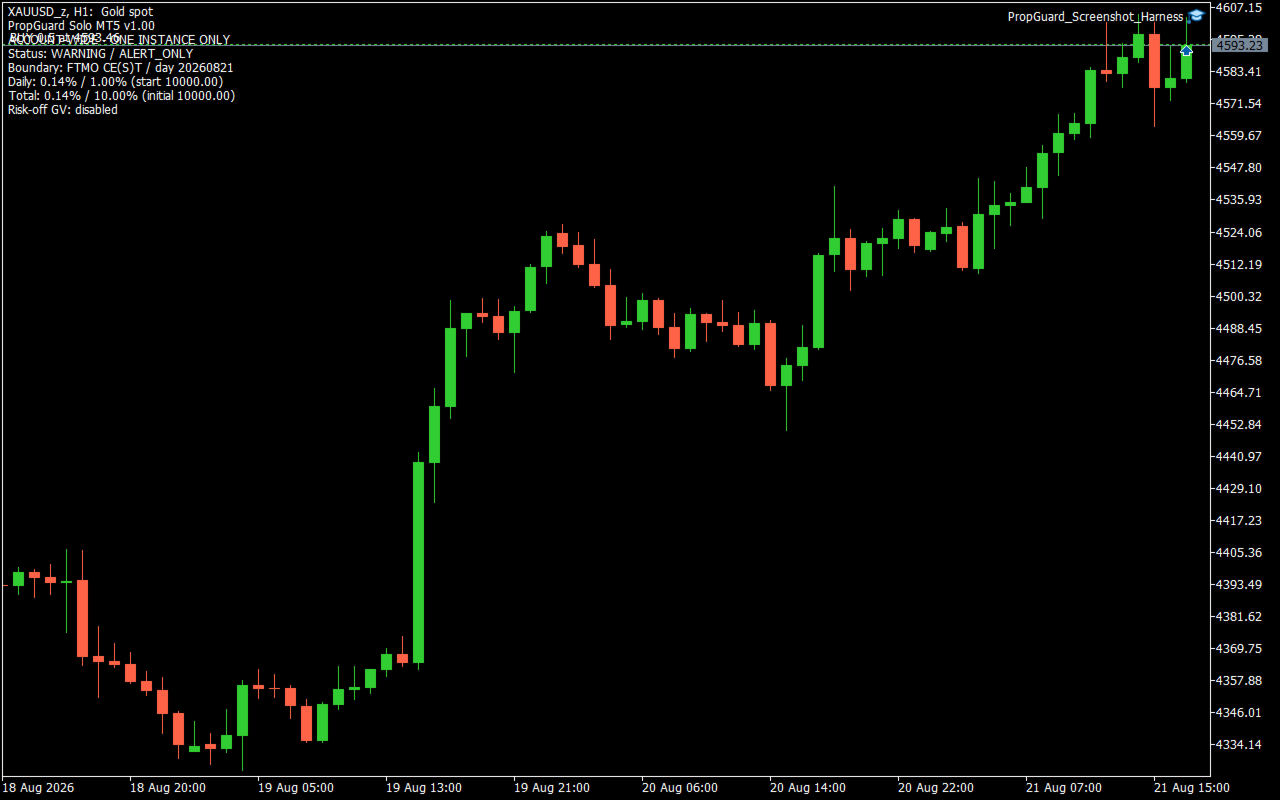
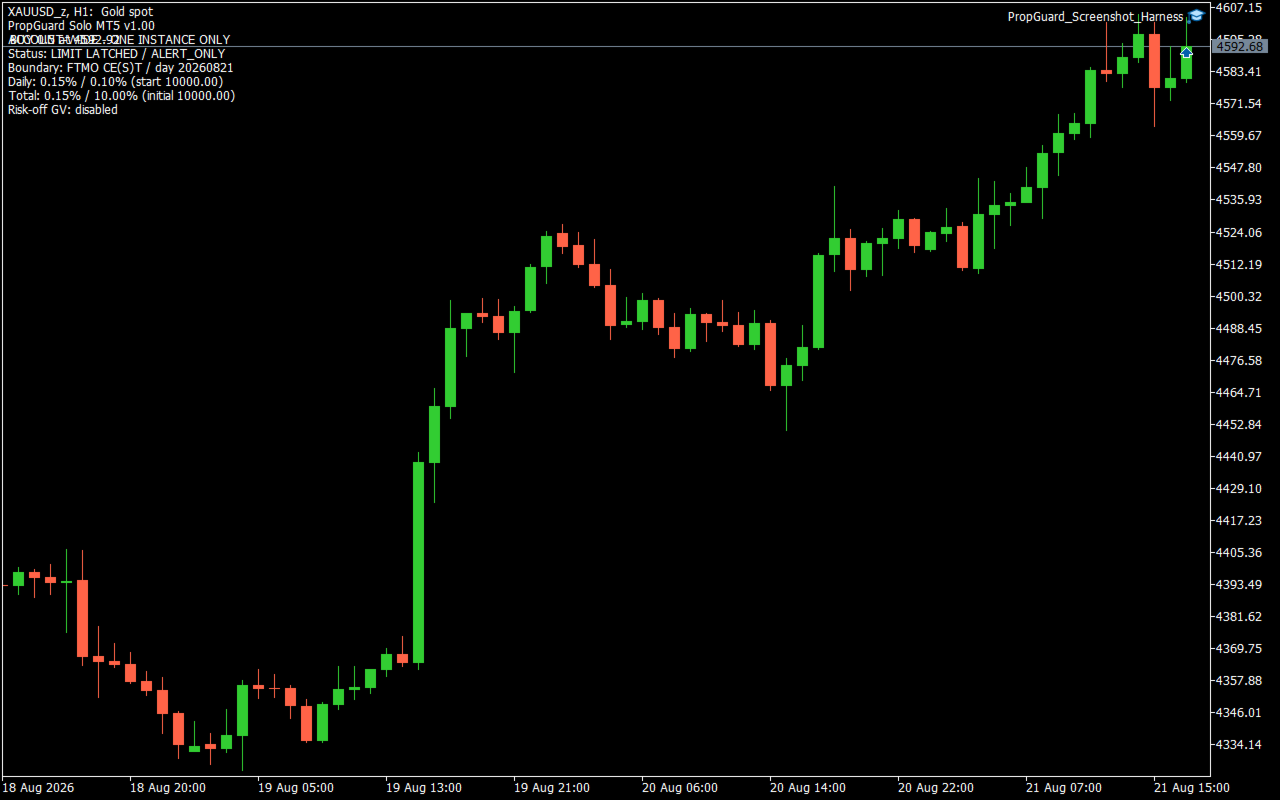
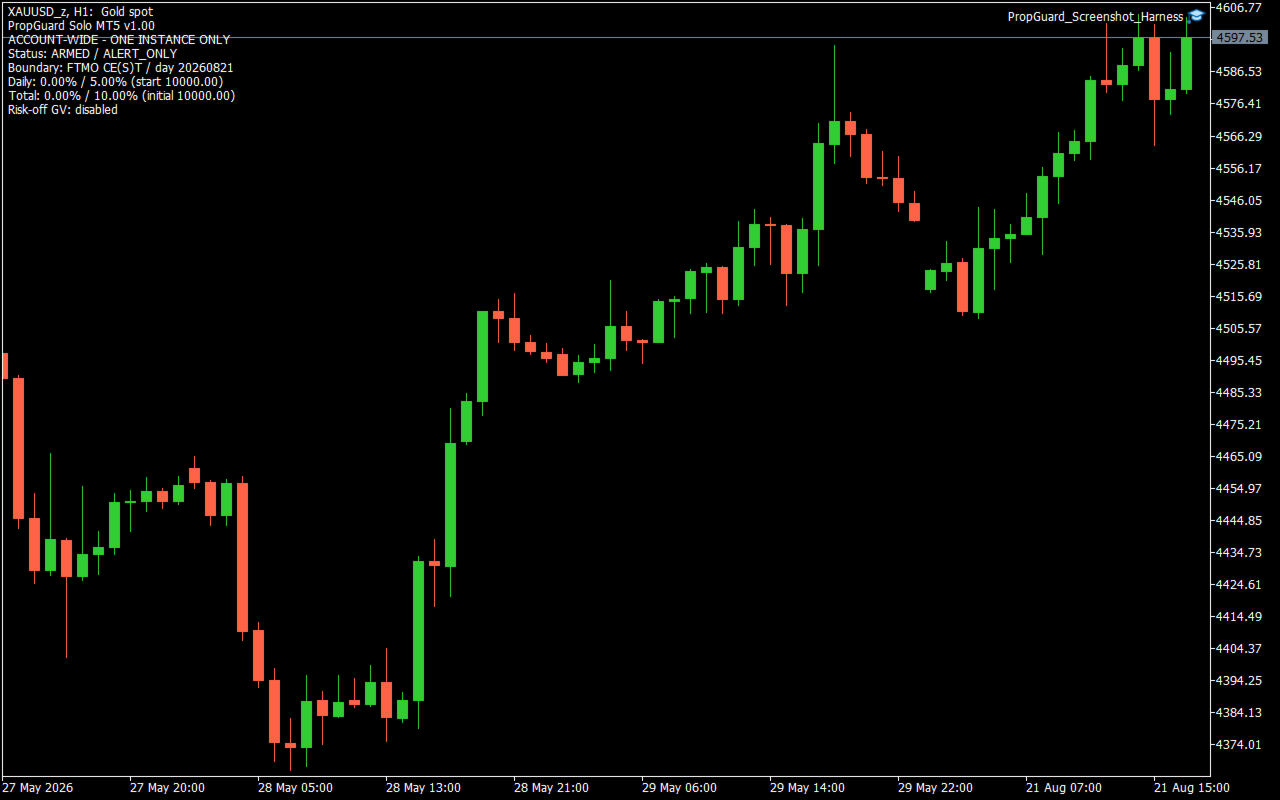
PropGuard Solo MT5 is an account-wide loss-monitoring utility for MetaTrader 5. It monitors configurable daily and total loss limits across all symbols, magic numbers, Expert Advisors and manual positions on one account. This product does not open trades. It is not a trading strategy and does not claim or guarantee profit, challenge completion, or prevention of a rule violation. What it monitors - Daily loss as a percentage of the reconstructed start-of-day balance. - Total loss as a percentage of the configured initial campaign balance. - Floating profit or loss together with realized trading results, including profit, swap, commission and fee amounts. - Daily and total warning states independently. - The active day boundary and the persisted campaign state. Daily loss is calculated from trading results recorded after the selected day boundary plus the account's current floating profit or loss. Balance, credit, correction and bonus operations are treated as external capital movements rather than trading results. Total loss compares the initial campaign balance with current equity adjusted for external capital movements recorded after this utility was initialized. Boundary modes - FTMO_CEST_Midnight: uses midnight in Central European time and applies the European CET/CEST last-Sunday daylight-saving rule. - Custom_Server_Time: uses a broker-server hour and minute chosen by the user. The rules and time boundaries used by third-party prop firms can change and can differ by account program. Confirm the current rule definition before use. In Strategy Tester, the modeled server UTC offset must be supplied manually for the CE(S)T mode; one fixed offset does not accurately model a test spanning a daylight-saving transition. Warning and limit actions The default warning threshold is 80% of each configured limit. With the default 5% daily limit and 10% total limit, warnings are triggered at 4% daily loss and 8% total loss. Two action modes are available: - AlertOnly: records the state and reports warnings or reached limits without closing trades. - AlertAndCloseAll: after a daily or total limit is reached, attempts to delete all pending orders and close all positions across the account. Failed or remaining tickets are retried while the reached-limit state remains latched. The optional RISK_OFF terminal Global Variable is a cooperative signal only. It affects another EA only when that EA has been programmed to read the same variable. This utility does not switch off terminal AutoTrading, remove charts, or stop other EAs from submitting new orders. Persistent state and visibility The on-chart display shows the operating status, action mode, boundary mode, day key, current daily loss, daily start balance, current total loss, initial balance and optional risk-off variable name. Campaign and daily state are stored in terminal Global Variables scoped by account login, account-server hash and StateGeneration. Daily warning and daily reached-limit states reset at a new day boundary. Total warning and total reached-limit states remain latched for the campaign. Incomplete state, an initial-balance mismatch, unavailable history or an account identity problem causes measurement to stop instead of silently replacing the baseline. During a measurement error, no new limit decision is made. A previously persisted reached-limit state can continue close attempts in AlertAndCloseAll mode. Initial setup 1. Check the current loss definitions and day boundary for your account program. 2. Install only one instance on the account. The chart symbol and timeframe do not define the monitoring scope. 3. If the utility is added after a campaign has started, enter the campaign's true initial balance. The default value of zero can auto-seed only on a clean, flat account with no pending orders, zero credit and equity equal to balance. 4. Select the correct boundary mode. For a custom boundary, enter the broker-server reset hour and minute. 5. Begin with AlertOnly and compare the displayed baseline, loss values and reset time with the account provider's records. 6. Test close behavior on a demo account before enabling AlertAndCloseAll. Important limitations - Keep a safety margin below any external loss limit. Closing begins only after a configured threshold is measured as reached. - Gaps, slippage, market closure, disconnection, terminal shutdown, trade restrictions, stop-out and rejected orders can delay or prevent closing. - Other EAs and manual users can submit new orders after a limit is reached. The utility retries closing but cannot guarantee that the account remains flat. - Incorrect boundary, initial balance or persistent-state settings can produce incorrect daily or total measurements. - When the terminal is not running or connected, the utility cannot monitor or act. - Use on a demo account first. Runtime testing across broker time zones, daylight-saving transitions, hedging and netting accounts, rejected close requests and restart scenarios is required before relying on the close mode. Technical profile - Platform: MetaTrader 5 - Scope: one account, all symbols and magic numbers - Default action: alerts only - New trade entry: none - DLL calls: none - Web requests: none - External file dependency: none - Included dependency: the standard MQL5 Trade/Trade.mqh library FAQ Does it open trades or provide entry signals? No. It only monitors the account and, if explicitly configured, attempts to close existing positions and delete pending orders after a configured limit is reached. Does close mode stop other EAs? No. It does not disable AutoTrading. The optional Global Variable is effective only for EAs that have been programmed to cooperate with it. Which chart should I use? Any chart can host the utility because its scope is the entire account. Install only one instance per account. Can I leave InitialBalance at zero? Only on a clean, flat account with no pending orders, zero credit and equity equal to balance. For a campaign already in progress, enter the true campaign initial balance. PropGuard Solo MT5 is a monitoring and response utility. The user remains responsible for choosing settings that match the current account rules and for supervising account, terminal and execution conditions.
Рекомендуем также
One Click Trader  is a tool designed for MetaTrader 4 platform, which enables you to take your trading to the next level. It enables you to open, manage and close your trades in simple an efficient way by just one click of your mouse button. "-"   ,  "+"  change OCT window size  Up arrow minimizes the OCT panel Down arrow maximizes the OCT panel Right arrow displays the next panel with additional features Left arrow hides the panel with additional features Red  SELL  button enables you to open s
A simple script that closes all current orders. Terminate once close all positions, so no worries about constantly closing your order. How to use : Drag the script from the navigator to the chart, and it will be activated. Do remember to enable algo trading to use this script. There are different version of the script that can choose whether to close all buy/sell posiitons, if you need this, do contact me in MQL5.
Trade Control Panel
Jerry Jilun Anak Liban
Trade Control Panel Function Normal One Click Function Close All Close All Profit Close All Loss Close All Pending Order Close All Sell Close All Buy Advance One Click Function 1.  Close Partial Lot Sell by Percent It will help you partial close for all open position by desire percent you wanted. No longer partial close one by one for every open position Manual input for desire percent 2. Close Partial Lot Buy by Percent It will help you partial close for all open position by desire percent
Risk calculator for MetaTrader 5. Precision Position Calculator is a MetaTrader 5 utility that helps calculate trade volume based on the risk configured by the user. The panel allows the user to work with Entry, Stop Loss and up to three Take Profit levels directly on the chart. Main description Precision Position Calculator is a utility for MetaTrader 5 designed to help calculate the volume of a trade before opening it. The panel allows the user to configure risk, select the order type, set th
RiskPilot Pro
Mohamed Zein Mohamed Zein Soliman
RiskPilot Pro Plan risk clearly. Execute efficiently. Manage positions from one professional MT5 dashboard. RiskPilot Pro is a visual trade-planning and position-management utility for MetaTrader 5. It helps manual traders define risk before entry, calculate position size, place market or pending orders, and manage open positions from one chart panel. Important: RiskPilot Pro does not generate trading signals and does not choose trade direction. The trader defines the setup and remains responsib
Smart Remote Trade Assistant MT5: Панель удаленной торговли через Telegram для MetaTrader 5 Smart Remote Trade Assistant MT5 — это продвинутая панель для MetaTrader 5, разработанная для трейдеров, которым необходимо быстро, безопасно и удаленно управлять своими операциями непосредственно из Telegram. Получите файл приложения Windows Bridge и инструкцию Файл Bridge необходим для подключения торговой панели Telegram к советнику MT5. Совместимо с Windows 10 и Windows 11 — 64-бит — и Windows Serv
T Manager, the ultimate trade management solution designed by traders for traders. If you are searching for a simple and efficient trade panel, trade manager, or trade assistant, you are at the right place.   The market contains a diverse number of those tools , but this one is designed by traders for traders . I designed this tool, and I am using it daily. Take my advice and stop buying tools blended with un-useful features that you will never use,   T Manager provides you with the essential y
Этот инструмент поможет вам закрыть все открытые ордера одним щелчком мыши, просто нажмите «Закрыть все». Если вы хотите закрыть только прибыльные ордера, нажмите кнопку «Закрыть прибыльные», после нажатия все плавающие ордера будут закрыты; Если вы хотите закрыть только ордера с плавающими убытками, нажмите кнопку «Закрыть убыточные», после нажатия все ордера с плавающими убытками будут закрыты.
Этот экспертный советник отслеживает все открытые позиции по всем символам в MetaTrader 5. Как только вручную устанавливается или изменяется уровень Stop Loss (SL) или Take Profit (TP) на любой позиции, советник автоматически применяет это значение ко всем другим открытым позициям , независимо от символа или типа ордера (Buy/Sell). Это обеспечивает синхронизацию уровней SL и TP по всему счёту. Идеально подходит для мобильного трейдинга с планшета или смартфона!
Forget about enabling templates when you launch the window. Auto Template Master Service  is a professional utility tool that runs as a system service in MetaTrader 5, and it will do it for you. Unlike traditional indicators or expert advisors (EAs), the program runs in the background of the entire terminal and doesn't require you to add it to each window individually. As soon as you open a new chart of any instrument (Forex, Stocks, Crypto), the service immediately detects the new window and a
This utility sends notification to trader’s MT5 (for MT4 version, checkout this link ) mobile app, to remind traders about their open positions. Super useful for part time traders to keep track and not forget any positions. To turn on notification, please visit   this link   (https://www.metatrader4.com/en/trading-platform/help/setup/settings_notifications) Features Keep track on open orders (pending orders, running orders) Customize time to send notification Customize notification interval (se


Telegram to mt5 pro
Janet Abu Khalil
4 (4)
Telegram to MT5 Pro — Расширенный копировщик сигналов Telegram с Auto-Fix, Multi-TP, управлением риском и полным управлением сделками Telegram to MT5 Pro — профессиональный копировщик сигналов Telegram Telegram to MT5 Pro автоматически копирует торговые сигналы из Telegram прямо в ваш аккаунт MetaTrader 5 в реальном времени с полным контролем риска, исполнения и управления сделками. Система состоит из двух компонентов: • Expert Advisor (EA), работающий внутри MetaTrader 5 • Desktop bridge прило
Orders Executor
Claudio Aguiar De Aragao
Представляем Order Executor, вашего мощного и эффективного торгового помощника, предназначенного для беспрепятственного выполнения ордеров непосредственно из указанного пользователем текстового файла. Этот инновационный торговый инструмент оптимизирует ваш торговый процесс, предоставляя удобное и автоматизированное решение для точного и быстрого совершения сделок. Ключевая особенность: **Интеграция текстовых файлов:**    Orders Executor предназначен для легкого чтения и интерпретации приказов
Trade Panel HotKey – MT5 Scalping Utility Fast Trade Panel HotKey is a lightweight MT5 trading utility designed for traders who need to open, manage, and close positions as quickly as possible . The main purpose of this tool is to reduce the time between a trading decision and execution. Instead of moving the mouse, opening order windows, or manually modifying multiple positions, most important actions can be performed instantly through customizable keyboard hotkeys or directly from the compact
Добрый день, уважаемые трейдеры! Я ваш помощник в торговле. Кратко скажу, а затем расскажу о моих сильных сторонах: Я специализируюсь на управлении вашим портфелем, и независимо от того, с какой стороны вы открываете ордер, я могу немедленно добавить для вас разумные стоп-лоссы и скользящие стопы. 2. Я могу помочь вам избежать спекуляции и поспешных действий, устраняя с корня слабость человеческой природы, которая не позволяет придерживаться принципов. 3. Я отправлю вам уведомление на MT5 - кли
Guardian Magic GT
Carlos Eduardo Rivas Istacuy
Guardian Magic GT - Risk Management Expert Advisor for MetaTrader 5 PROTECT YOUR TRADING CAPITAL WITH INTELLIGENT RISK MANAGEMENT Guardian Magic GT is a professional-grade Expert Advisor designed to safeguard your trading operations by implementing sophisticated risk control mechanisms. Whether you run a single bot or manage multiple automated trading systems simultaneously, Guardian Magic GT provides real-time monitoring and automatic position management to ensure your account stays within your
Trade Manager G2 MT5
Ida Bagus Putu Mahardika
TRADE MANAGER G2 – PRODUCT DESCRIPTION By Ida Bagus Putu Mahardika Trade Manager G2 – All-in-One Trading Panel for Professional Execution & Risk Management Trade Manager G2 is a next-generation trading panel designed to give you full control over order execution, position management, and profit optimization in real time on MetaTrader 5. With a modern card-based user interface and individual TP actions per level, this panel elevates your trading experience to the next level. KEY ADVANTAGES OF
Smart Trade Manager Pro is the ultimate all-in-one trading panel designed to give you complete control over your manual trading. Built for both professional traders and prop-firm challenges (like FTMO), it brings TradingView-style visual planning directly into your MetaTrader 5 charts. KEY FEATURES: 1. Visual Chart Planning (TradingView Style) Plan your trades visually before execution! The EA draws interactive Profit/Loss boxes directly on the chart. Drag the edges of the boxes to seamlessly
Horizontal Line Trade Assistant EA  Semi-Automated Trading Assistant      IMPORTANT :     On the main/purchased program a user can click on the Horizontal line and change it to Buy or Sell, and drag by double clicking on it. Please keep in mind that this option is not available on demo version, due to some restrictions/limitations of Strategy Tester, some Object related operations are not available in the  Strategy Tester. But, it will not prevent you from Testing, please drop an Object to chart
AW Metatrader to Telegram MT5
AW Trading Software Limited
5 (1)
Автоматизированная система для отправки уведомлений, чтобы ни один из ваших подписчиков не пропустил события о вашей торговле из вашего торгового терминала. Утилита, которая отправляет уведомления в мессенджер Telegram о любых торговых операциях на вашем счете.   Пошаговая инструкция по подключению утилиты к каналу в Телеграм ->   ЗДЕСЬ  / MT4 -> ЗДЕСЬ Преимущества: Легкая настройка и подробная инструкция,  Возможность отправки регулируемых скриншотов, Настраиваемый текст уведомлений с использов
Position Prime
Mariana Cordeiro Neves Fernandes
Скачайте бесплатную демо-версию прямо сейчас и протестируйте все функции управления рисками в вашем Strategy Tester, прежде чем совершить покупку! Position Prime — это визуальный помощник по исполнению ордеров и риск-менеджер институционального уровня для MetaTrader 5. Разработанный для трейдеров, которым важны скорость и точность, он избавляет от необходимости ручного расчета лота и превращает ваш график в настоящий торговый терминал. Планируйте, исполняйте и защищайте свои сделки за доли сек
Expert was built on the basis of Trap . EA can trade in automatic and semi-automatic mode. In automatic mode, it will place pending orders. However, in semi-automatic mode, it will wait for the first manually opened order. It will then go into automatic mode. Before starting work, the expert will download 28 currency pairs:         "AUDCAD","AUDCHF","AUDJPY","AUDNZD","AUDUSD","CADCHF","CADJPY",         "CHFJPY","EURAUD","EURCAD","EURCHF","EURGBP","EURJPY","EURNZD",         "EURUSD","GBPAUD","GBP
One click. Everything under control. SmartTradePanel is a lightweight, fast trade panel for MT5. You trade and manage risk in USD (not pips), place pending orders with visual confirmation, start trailing only when your trigger is activated – and keep your chart clean. The panel always stays in the foreground, is DPI-friendly, and remembers your settings for each symbol. Main functions • One-click trading & closing BUY / SELL Close all BUY / SELL Close only winners / only losers Close HAL
Crash5 EA ,I s a automatic robot that has the level of professional decision when to take a trade without any emotion. The bot will help in your scalping decision making with its own TP (take profit) and SL (stop loss) with the trail stop when in profit. This is a trend based spike catching ,looking on whats happening in real time charts no repainting of any signals. The robot helps in making decisions on the candle stick pattern opened and closed lat price with the help of RSI ,MACD and the EMA
Easy Trade Executor — инструмент для быстрого расчета лота, открытия и сопровождения сделок в MT5. Размещайте уровни Open Price, Stop Loss и Take Profit прямо на графике, получайте автоматический расчет объема позиции и открывайте сделки с контролируемым риском всего за несколько кликов. Почему Easy Trade Executor? Easy Trade Executor создан для трейдеров, которые хотят не только рассчитывать риск, но и быстро управлять сделками на графике. Инструмент объединяет расчет позиции, открытие ордеро
Risk Control Utility MT5 designed for manual trading. It helps to calculate and control your risks, transfer transactions to breakeven and accompany positions with trailing stop. Easy to set up and use. It can be used for calculating a trading lot, calculating stop loss and take profit levels. Works with currency pairs, CFDs, stocks, indices, futures, cryptocurrencies Displays   volume,   potential loss and profit before   placing an order Ability to set the expiration time of a pending order Tr
Trade manager gtm
Gayan Indika Honnanthara Acharige
GTM Panel   is a   manual   trade panel for MetaTrader 5. It does not generate signals and it does not open a single trade on its own. You decide what to trade and when — the panel places it, protects it, follows it, and closes it in one press instead of ten. It is built around one thing most panels treat as an afterthought:   pending orders . Four independent limit slots sit beside the market scope, each with its own colour, its own price, its own lots, its own SL and TP, and its own line on th
Atlas Trade Desk MT5 Atlas Trade Desk MT5 is a visual trade panel, risk manager and lot calculator for manual MetaTrader 5 traders. Plan market and pending orders directly on the chart, calculate position size from your selected risk, adjust Entry, Stop Loss and Take Profit visually, and manage open positions from one clean dashboard. The tool is built for discretionary traders who want faster order preparation, clearer risk control and safer position management without switching between multipl
Photocopy MT5 is an Copier of transactions through Telegram channel. Will help you instantly publish your trade in Telegram channel or copy trades from Telegram channel. The utility can work in two directions by receiving signals in MT5 and transmitting signals to Telegram   . No more missed deals No more panic Capital Management Ease of use You can use it for: Copying your own deals through Telegram channel (via the Internet); Copying trades from MT5 to MT4 and vice versa. Propagation of signa
Перенесите удобство TradingView в свой MetaTrader 5! Magic Entry Pro — это профессиональный визуальный торговый помощник, созданный для ручных трейдеров, скальперов и трейдеров Prop-компаний. Панель позволяет открывать сделки с молниеносной скоростью, автоматически рассчитывать риск и визуально проецировать зоны Stop Loss и Take Profit прямо на графике до открытия позиции. Устали вручную рассчитывать лотность или прикидывать соотношение риска к прибыли (RR)? Magic Entry сделает всё за секунды!
С этим продуктом покупают
Trade Assistant MT5
Evgeniy Kravchenko
4.41 (216)
Помогает рассчитать риск на сделку, простая установка нового ордера с помощью линий, управление ордерами с функциями частичного закрытия, 7 типов трейлинг-стопа и другие полезные функции. Дополнительные материалы и инструкции Инструкция по установке - Инструкция к приложению - Пробная версия приложения для демо счета Функция Линии   - отображает на графике линию открытия, стоп-лосс, тейк-профит. С помощью этой функции легко установить новый ордер и увидеть его дополнительные характеристики пе
Добро пожаловать в Trade Manager EA — лучший инструмент для управления рисками, предназначенный для упрощения, точности и эффективности торговли. Это не просто инструмент для размещения ордеров; это комплексное решение для удобного планирования торгов, управления позициями и усиленного контроля над рисками. Независимо от того, начинающий вы трейдер, опытный специалист или скальпер, нуждающийся в быстром исполнении, Trade Manager EA адаптируется к вашим потребностям и работает с любыми активами:
TradePanel MT5
Alfiya Fazylova
4.88 (167)
Trade Panel — это многофункциональный торговый помощник. Приложение содержит более 50 торговых функций для ручной торговли и позволяет автоматизировать большинство торговых операций. Перед покупкой вы можете протестировать демоверсию на демо-счете. Скачать пробную версию приложения для демонстрационного аккаунта: https://www.mql5.com/ru/blogs/post/750864 . Полная инструкция здесь . Торговля. Позволяет совершать торговые операции в один клик: Открыть отложенные ордера и позиции с автоматическим р
Local Trade Copier EA MT5
Juvenille Emperor Limited
4.97 (146)
Опыт экстремально быстрого копирования сделок с помощью Local Trade Copier EA MT5 . Благодаря простой установке в течение 1 минуты этот копировщик сделок позволяет вам копировать сделки между несколькими терминалами MetaTrader на одном компьютере с Windows или на Windows VPS с крайне быстрыми скоростями копирования менее 0.5 секунды. Независимо от того, новичок вы или профессиональный трейдер, Local Trade Copier EA MT5 предлагает широкий спектр опций, чтобы настроить его под ваши конкретные по
Astro Trade MT5
Indra Maulana
5 (2)
AstroTrade Trading Assistant AstroTrade is a comprehensive multi-functional trading utility developed for the MetaTrader 5 platform. It integrates essential tools for trade execution, risk management, and technical monitoring into a single unified interface. The application is designed to assist traders in managing their daily operations through a visual and structured environment. Visual Trade Execution and Risk Management The application includes a specialized trading panel that assists in c
================================================================================ POC BREAKOUT - V20.72. Full Professional Grade Toolkit ================================================================================ POC Breakout is a full MetaTrader 5 trading dashboard for discretionary traders who want breakout signals, Point of Control (POC) context, volume profiles, order flow, market structure, news, alerts, and advanced trade planning in one professional workspace. Attached directly to you
Бета-версия Telegram to MT5 Signal Trader почти готов к официальному альфа-релизу. Некоторые функции все еще находятся в разработке, и вы можете столкнуться с небольшими ошибками. Если вы заметите проблемы, пожалуйста, сообщите о них, ваша обратная связь помогает улучшать программное обеспечение для всех. Telegram to MT5 Signal Trader — мощный инструмент, который автоматически копирует торговые сигналы из каналов и групп Telegram прямо в ваш счёт MetaTrader 5 . Поддерживаются как публичные, так
Telegram to MT5 Multi-Channel Copier автоматически копирует торговые сигналы из ваших Telegram-каналов напрямую в MetaTrader 5. Никаких ботов, никаких браузерных расширений, никакого ручного копирования. Вы получаете сигнал в Telegram, и советник открывает сделку на вашем терминале за несколько секунд. Продукт включает два компонента: приложение для Windows, которое слушает ваши Telegram-каналы, и этот советник, который исполняет сигналы на терминале MT5. Также доступна версия для MT4. Руководст
Grid Manual MT5
Alfiya Fazylova
4.73 (22)
Grid Manual — это торговая панель для работы с сеточными стратегиями. Утилита универсальная, имеет гибкие настройки и понятный интерфейс. Работает с сеткой ордеров не только в сторону усреднения убытков, но и в сторону наращивания прибыли. Трейдеру не нужно создавать и сопровождать сетку ордеров, это сделает утилита. Достаточно открыть ордер и Grid manual автоматически создаст ему сетку ордеров и будет сопровождать его до самого закрытия. Полная инструкция и демо-версия здесь . Основные особенно
Trade copier MT5
Alfiya Fazylova
4.58 (52)
Trade Copier — это профессиональная утилита, предназначенная для копирования и синхронизации сделок между торговыми счетами. Копирование происходит от счета/терминала поставщика к счету/терминалу получателя, которые установлены на одном компьютере или vps. АКЦИЯ - Если вы уже приобрели "Trade copier MT5", вы можете получить "Trade copier MT4" бесплатно (для копирования MT4 > MT5 и MT4 < MT5). Для получения более подробной информации об условиях, пожалуйста, свяжитесь с нами через личные сообщени
Exp COPYLOT CLIENT for MT5
Vladislav Andruschenko
3.97 (35)
Профессиональный копировщик сделок для MetaTrader 5 Быстрый, профессиональный и надежный копировщик сделок для MetaTrader . COPYLOT позволяет копировать сделки Forex между терминалами MT4 и MT5 с поддержкой счетов Hedge и Netting . Версия COPYLOT для MT5 поддерживает: - MT5 Hedge → MT5 Hedge - MT5 Hedge → MT5 Netting - MT5 Netting → MT5 Hedge - MT5 Netting → MT5 Netting - MT4 → MT5 Hedge - MT4 → MT5 Netting Версия MT4 Полное описание + DEMO + PDF Как купить Как установить Как получить файлы жур
Premium Trade Manager - Торговая панель со встроенным коучем Premium Trade Manager помещает торгового коуча прямо в ваш график, а под ним работает полноценный движок исполнения. Настройте сделку так, как вы всегда это делаете, затем позвольте Max, вашему ИИ-наставнику по трейдингу, прочитать именно эту настройку с учётом вашего живого счёта и дать чёткое заключение до того, как вы входите: соответствует ли стоп дисциплинированному подходу, разумен ли риск, не выходит ли высоковолатильный релиз ч
Timeless Charts
Samuel Manoel De Souza
5 (8)
Timeless Charts is an all-in-one trading utility for professional traders. It combines custom chart types such as Seconds Charts and Renko with advanced order flow analysis using Footprints , Clusters , Volume Profiles , VWAP studies, and anchored analysis tools for deeper market insight. Trading and position management are handled directly from the chart through an integrated trade management panel , while Market Replay and Virtual Accounts provide environments for practicing trading skills and
Footprint Chart Pro — Professional OrderFlow EA for MetaTrader 5 Version 6.34 | Professional tool for real traders | Institutional-Grade Visualization DEMO USERS - PLEASE SELECT EVERY TICK / REAL TICK WHEN TESTING AND YOU HAVE DOWNLOADED HISTORICAL DATA. IF YOU SEE A WAITING SCREEN AND IT IS NOT DOWNLOADING, IT MEANS YOU HAVE LOW HISTORICAL DATA. TRY 1 MIN AND 5 MIN FIRST ON 1 DAY DATA. ONE DAY DATA SHOULD BE THE NEWEST AND MOST CURRENT DATE. PLEASE WAIT UNTIL THE MARKET HAS ROLLED OVER PERIOD.
Trade Copier Ultimate
Janitha Sandaruwan Amaradasa Wickramasingha Arachchilage
5 (4)
Trade Copier Ultimate - Telegram to MT5 Signal Copier Trade Copier Ultimate automatically copies Telegram trading signals into MetaTrader 5. The EA can read signal messages, detect the symbol, order type, entry price, Stop Loss, Take Profit levels and selected update commands, then execute or manage the trade in MT5 using your lot and risk settings. It is more than a basic Telegram to MT5 copier. TCU also supports Bot API and user-account Bridge workflows, Discord signal routing, local MT5 to MT
Farmed Hedge Yield Farming | All Markets (Manual - Hybrid - Semi/Automated EA) VERIFIED TRADING RESULTS - Farmed Hedge Yield Axi Copy:  https://www.mql5.com/en/signals/2356376 - Farmed Hedge Yield Exn Copy:   https://www.mql5.com/en/signals/2356404 - Farmed Hedge Yield V Copy:  https://www.mql5.com/en/signals/2357156 * Before purchasing, please feel free to send me a message if you have any questions about the product or setup. ** After purchase,  Contact me via private message to receive t
Global Investing FX Terminal
Santiago Nicolas Pla Casuriaga
Global Investing FX Terminal — это комплексный FX-дашборд для MetaTrader 5 — процентные ставки центральных банков, позиции COT CFTC, рэнкинг carry, индексы экономических сюрпризов, перекос опционов, настроения ритейла и корреляции, тринадцать панелей в общей сложности — отображается на едином канвасе без мерцания и обновляется каждые 10 секунд через один прикреплённый EA. Никаких внешних программ не требуется. Профессиональный анализ валютного рынка требует одновременного доступа к данным, котор
Signal TradingView to MT5 Pro Automator Мгновенное профессиональное исполнение между TradingView и MetaTrader 5 Автоматизируйте свою торговую стратегию с помощью самого надежного моста связи между алертами TradingView и реальным исполнением в MT5. Разработанный для трейдеров, которым требуются скорость, гибкость и безупречное управление рисками, этот советник (Expert Advisor) превращает любое сообщение с алертом в точный рыночный или лимитный ордер. ПРЕИМУЩЕСТВА И СИЛЬНЫЕ СТОРОНЫ Универсальный д
Trading Chaos Expert
Gennadiy Stanilevych
5 (11)
Этот программный продукт не имеет аналогов в мире, поскольку он является универсальным "пультом управления" торговых операций, начиная от получения торговых сигналов, автоматизации входа в позиции, установки стоп-лоссов и тейк-профитов, а также трейлинга прибыли одновременно по множеству сделок в одном открытом окне. Интуитивно понятное управление экспертом в "три клика" на экране монитора позволяет полноценно использовать все его функции на разного рода компьютерах, включая планшетные. Взаимоде
Power Candles Strategy Scanner — самооптимизирующийся инструмент для поиска настроек по нескольким инструментам Power Candles Strategy Scanner использует тот же самооптимизирующийся движок, что и индикатор Power Candles — для всех символов в вашем Market Watch, одновременно. На одной панели отображается информация о том, какие символы в данный момент являются статистически торгуемыми, какая стратегия выигрывает на каждом из них, оптимальная пара Stop Loss / Take Profit, а также отправляется увед
MT5 to Telegram Signal Provider — это простой в использовании полностью настраиваемый инструмент, который позволяет отправлять определённые сигналы в чат, канал или группу Telegram, превращая вашу учётную запись в провайдера сигналов . В отличие от большинства конкурирующих продуктов, он не использует импорт DLL. [ Демо ]   [ Руководство ] [ Версия MT4 ] [ Версия для Discord ] [ Канал в Telegram ]  New: [ Telegram To MT5 ] Настройка Доступно пошаговое руководство пользователя . Никаких знаний A
Custom Alerts AIO: Универсальный сканер рынка — Без настройки Обзор Custom Alerts AIO — это самый быстрый и простой способ отслеживать рыночные сигналы в реальном времени на множестве инструментов без дополнительной настройки и без необходимости покупать другие продукты. В состав входят все необходимые индикаторы от Stein Investments, что делает этот инструмент идеальным решением «всё в одном» для трейдеров, ценящих простоту и эффективность. Просто установите на график и сразу получайте сигнал
Welcome to ENTRY IN THE ZONE WITH SMC MULTI TIMEFRAME Entry In The Zone and SMC Multi Timeframe is a real-time market analysis tool based on Smart Money Concepts (SMC), designed to analyze market structure, price direction, and key trading zones. It supports both Single-Timeframe Analysis and Multi-Timeframe Analysis, providing a clearer view of the overall market structure across multiple timeframes, with real-time BUY / SELL signals that do not repaint. It is designed to help filter trading op
Trade Dashboard MT5
Fatemeh Ameri
4.95 (132)
Trade Dashboard simplifies how you open, manage, and control your trades, with built-in lot size calculation. It allows you to execute trades, manage risk, and control positions directly on the chart, with tools such as partial close, breakeven, and trailing stop. Designed to reduce manual work and help you stay focused on your trading decisions. A demo version is available for testing. Detailed explanations of features are provided within the MQL5 platform. Installation instructions are include
Trade Manager DaneTrades
Levi Dane Benjamin
4.23 (30)
Trade Manager, который поможет вам быстро входить и выходить из сделок, автоматически рассчитывая риск. Включает функции, которые помогут предотвратить чрезмерную торговлю, торговлю из мести и эмоциональную торговлю. Сделками можно управлять автоматически, а показатели эффективности счета можно визуализировать в виде графика. Эти функции делают эту панель идеальной для всех трейдеров, занимающихся ручной торговлей, и помогают улучшить платформу MetaTrader 5. Многоязычная поддержка. Версия для МТ
Anchor Trade Manager
Kalinskie Gilliam
5 (7)
Anchor: The EA Manager Your EAs manage their own trades. Anchor manages the account around them. Anchor gives you one place to control your EAs, manage risk and decide when trading is allowed. Any EA, any vendor, any broker or symbol. No source-code changes required. The Problem Most EAs only know what they are doing. They cannot see when another EA is already trading, when several EAs open and are stacking risk or when the account has reached your loss limit. Even using just one EA, it may not
Скачать рабочую демо-версию Copy Cat More (Копи Кэт Мор) — копировщик сделок (Trade Copier) MT5 — это локальный копировщик сделок и полноценная система управления рисками и исполнения, созданная для современных торговых задач. От челленджей проп-фирм (prop firm) до управления личным портфелем — он адаптируется к любой ситуации благодаря сочетанию надёжного исполнения, защиты капитала, гибкой настройки и продвинутой обработки сделок. Копировщик работает в обоих режимах — Мастер (Master, отправи
VirtualTradePad PRO SE MT5 — профессиональный торговый центр управления для MetaTrader 5 VirtualTradePad PRO SE — это премиальная торговая панель и рабочая среда управления сделками на графике для MetaTrader 5 . Она создана для трейдеров, которым нужны более быстрое исполнение, более понятный контроль позиций, структурированное управление сделками, визуальное планирование уровней и профессиональный рабочий процесс прямо с графика. Это не просто панель BUY / SELL. PRO SE объединяет ручную торговл
YuClusters
Yury Kulikov
4.93 (43)
Внимание: Ознакомиться с работой программы можно с помощью бесплатной версии  YuClusters DEMO . YuClusters это профессиональная система анализа рынка. Для трейдера открываются уникальные возможности анализа потока ордеров, объемов торговли, движения цены используя различные графики, профили, индикаторы, графические объекты. YuClusters оперирует данными на основе ленты сделок или тиковой информации, в зависимости от того, что доступно в котировках финансового инструмента.  YuClusters позволяет с
Quant AI Agents
Ho Tuan Thang
5 (1)
Quant AI Agents are independent trading Expert Advisors. Instead of trading using a fixed strategy like other conventional EAs, Quant AI Agents   is a   multi-agent AI trading framework   that turns natural-language strategy prompts into live.  WANT THE SAME RESULTS AS MY LIVE SIGNAL?   Use the exact same brokers I do:   IC MARKETS , IC TRADING   .  Unlike the centralized stock market, Forex has no single, unified price feed.  Every broker sources liquidity from different providers, creating un
Другие продукты этого автора
Midnight Queen MT4 Midnight Queen MT4 is a night-session Expert Advisor for MetaTrader 4. It looks for mean-reversion entries during the Asian session and closes positions with fixed exit rules. How it trades Pair: EURGBP. Timeframe: M5. Trading window: 21:00-07:00 broker time. Entry logic: Bollinger Bands combined with RSI, mean-reversion direction. Every position is opened with a stop loss. No martingale, no grid, no lot averaging. Filters: news filter, spread filter, slippage limit. Two input
Фильтр:
Нет отзывов
Ответ на отзыв