SmartRisk Trade Tool

SmartRisk Trade Tool — One-Click Risk-Based Trade Panel

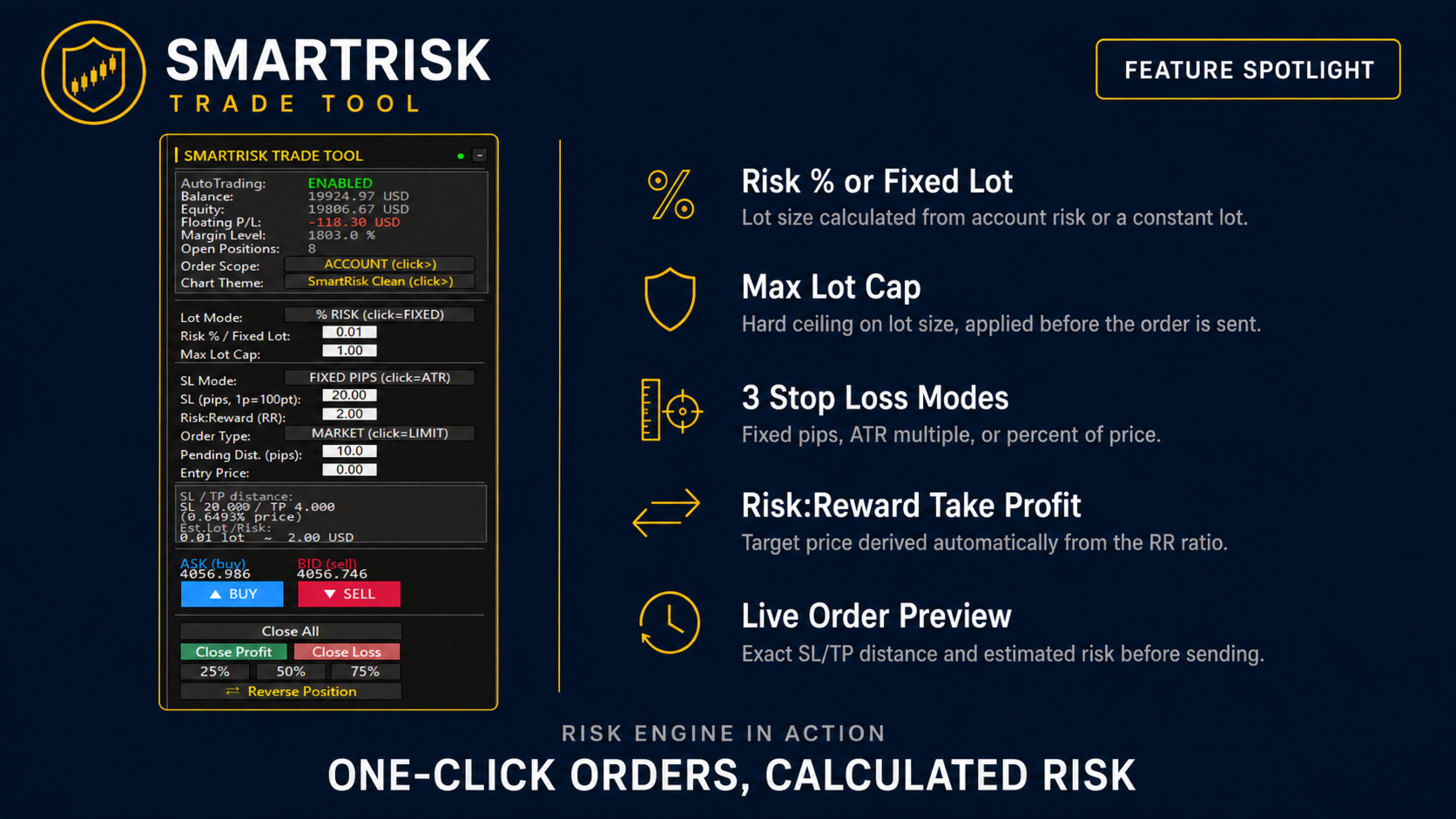
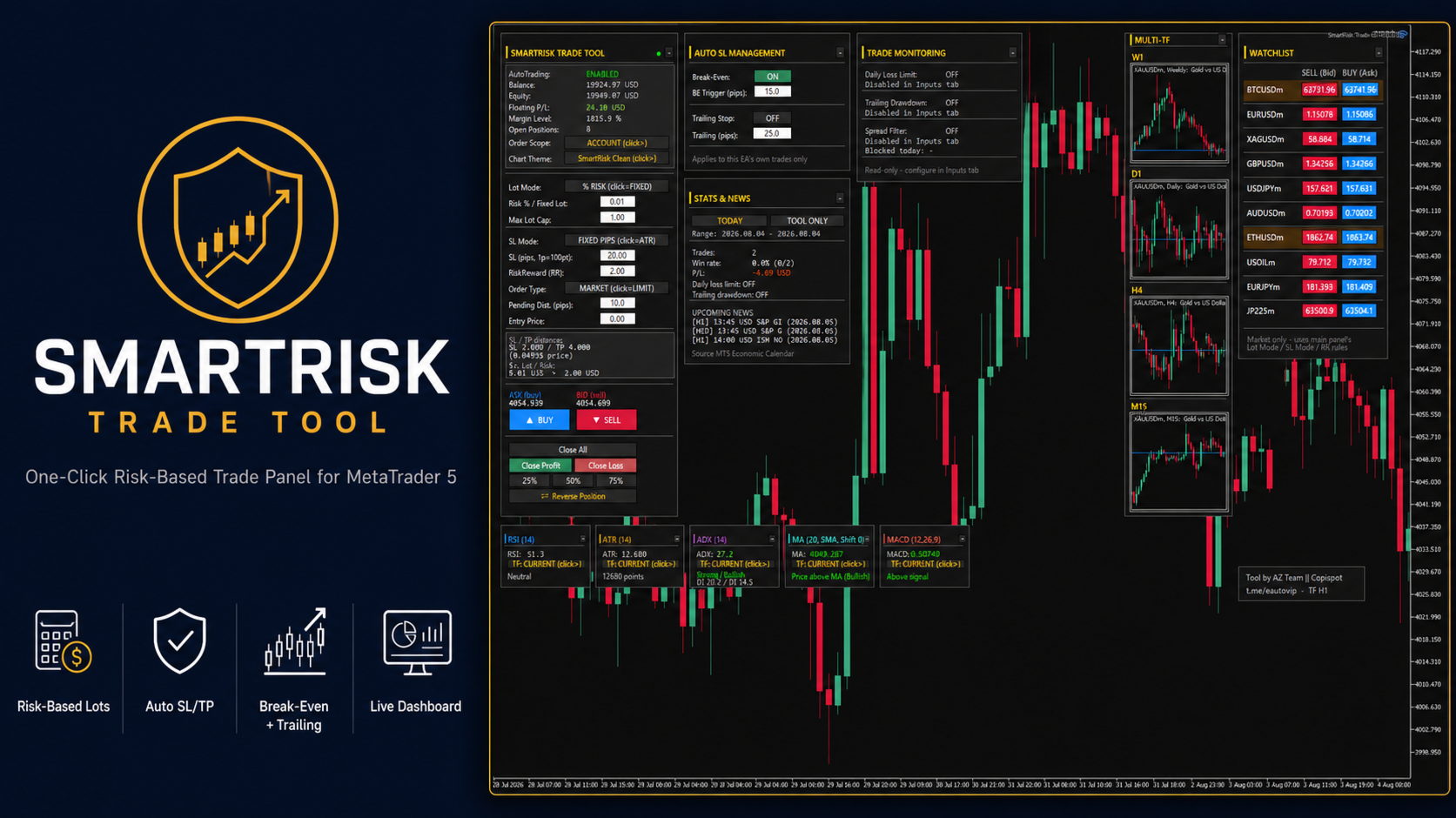
SmartRisk Trade Tool is a manual trading panel for MetaTrader 5 built around position sizing and risk control rather than signal generation. It does not analyze the market or suggest trade direction — it exists so that every order sent from the chart already has a calculated lot size, stop loss, and take profit consistent with a risk value the trader chooses, removing the manual arithmetic that normally happens between deciding to trade and pressing the order button.

Order Panel and Lot Sizing

Orders can be sent as Market, Limit, or Stop, with the panel switching its input fields automatically depending on the order type selected. Lot size is calculated using one of two modes: Risk %, where the lot is derived from a chosen percentage of account balance or equity combined with the current stop loss distance, or Fixed Lot, where a constant lot size is used regardless of stop distance. An independent Max Lot Cap input places a hard ceiling on the final lot size sent to the broker; unlike a simple warning message, this cap is applied inside the lot-normalization step itself, so a tight stop loss on a fast-moving symbol cannot produce an oversized position even if a risk warning is dismissed.

Before an order is sent, a live preview box shows the exact stop loss distance, take profit distance, calculated lot size, and estimated risk in account currency, so the trade can be reviewed before execution rather than after. Pip and point size are calculated per symbol rather than assumed to follow standard Forex conventions, including a dedicated calculation path for metals such as Gold and Silver where the relationship between points and price is different from currency pairs; a manual override input is also available for symbols or brokers where the automatic calculation does not match the intended pip size.

Stop Loss and Take Profit

Stop loss can be set in three modes: a fixed number of pips, a multiple of the Average True Range, or a percentage of the current price. Take profit is not set directly — it is derived from the chosen stop loss distance and a Risk:Reward ratio entered by the trader, so changing the ratio automatically recalculates the target. Stop and target prices are snapped to the symbol's real tick size rather than a fixed number of decimal digits, and the broker's minimum stop distance is applied automatically where required, with the preview box flagging when a requested stop was tightened to meet that minimum so the displayed numbers always match what is actually sent to the server. For pending orders, an entry price field can be typed directly or left to follow an auto-suggested price based on the configured pips distance from the current market price, with a validation check confirming the entry price is on the correct side of the market for the order type chosen.

Position Management

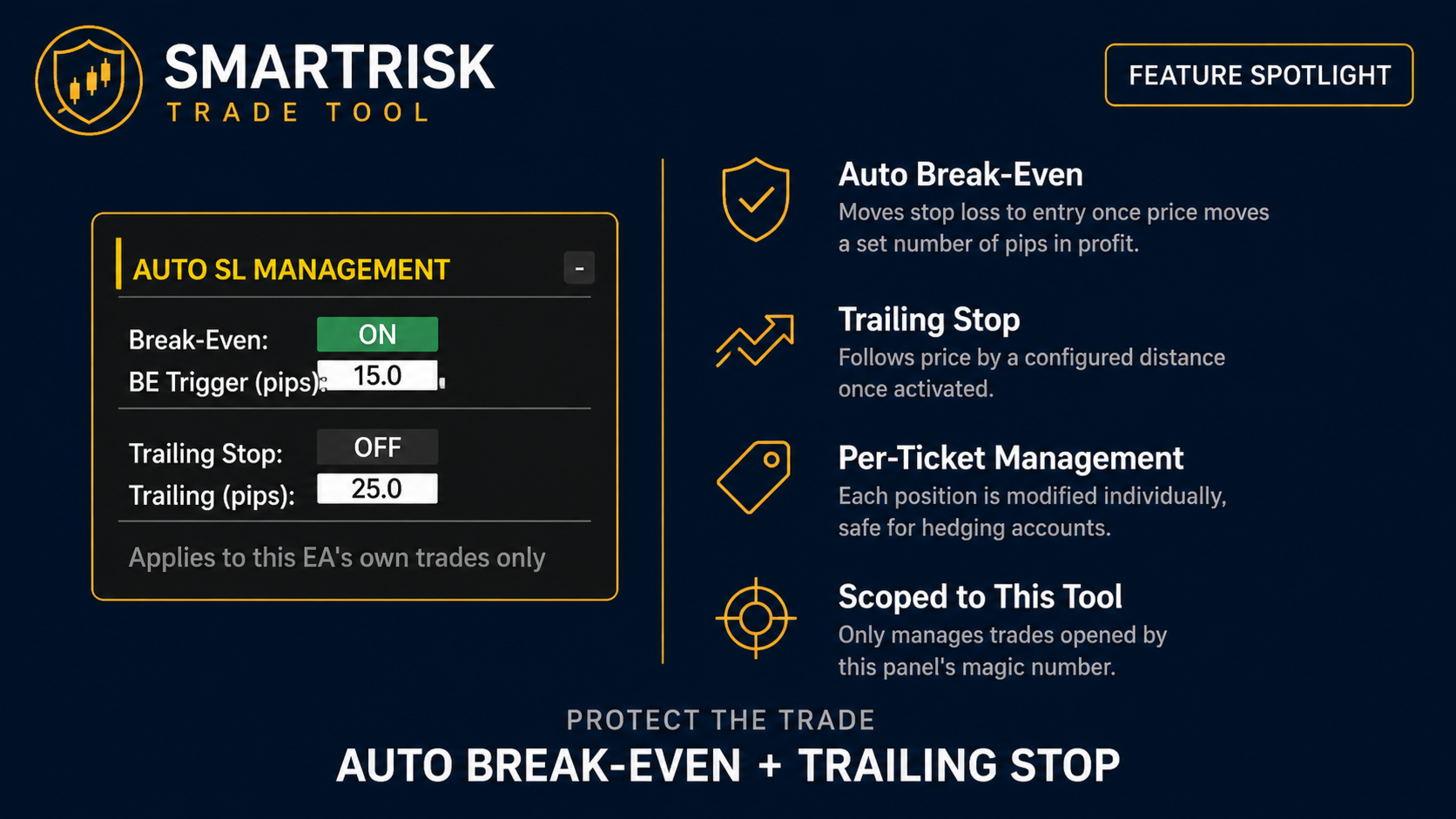
Existing positions opened by the tool can be closed with Close All, Close Profit, or Close Loss buttons, or partially closed at 25%, 50%, or 75% of their current volume. A Reverse Position button closes the current position and opens a new one in the opposite direction using the same lot-sizing rules. Break-Even and Trailing Stop can each be enabled independently: Break-Even moves the stop loss to entry once price has moved a configured number of pips in favor of the trade, and Trailing Stop then follows price by a configured distance once active. Both are scoped to the tool's own trades by magic number, and modify positions by ticket rather than by symbol, so on hedging accounts with multiple open positions on the same symbol, each position is managed individually instead of only the first one found.

Risk Guardrails

Three optional protections can be enabled from the Inputs tab, each acting independently of the others. A Daily Loss Limit blocks new orders from the panel once the day's realized and floating loss reaches a configured percentage of the balance recorded at the start of the day, with an option to also trigger Close All automatically when the limit is hit. A Trailing Drawdown limiter tracks the day's peak equity as it changes and blocks new orders once equity falls a configured percentage below that peak, catching cases where an account was up for the day and gave back gains quickly, not only a net loss against the day's opening balance. A Spread Filter blocks new market orders (pending orders are unaffected) when the current spread exceeds a configured multiple of its own recent rolling average, guarding against sending a market order into a temporary spread spike. All three are shown as read-only status fields on the panel, with the underlying limits configured once in the Inputs tab.

Monitoring Dashboard

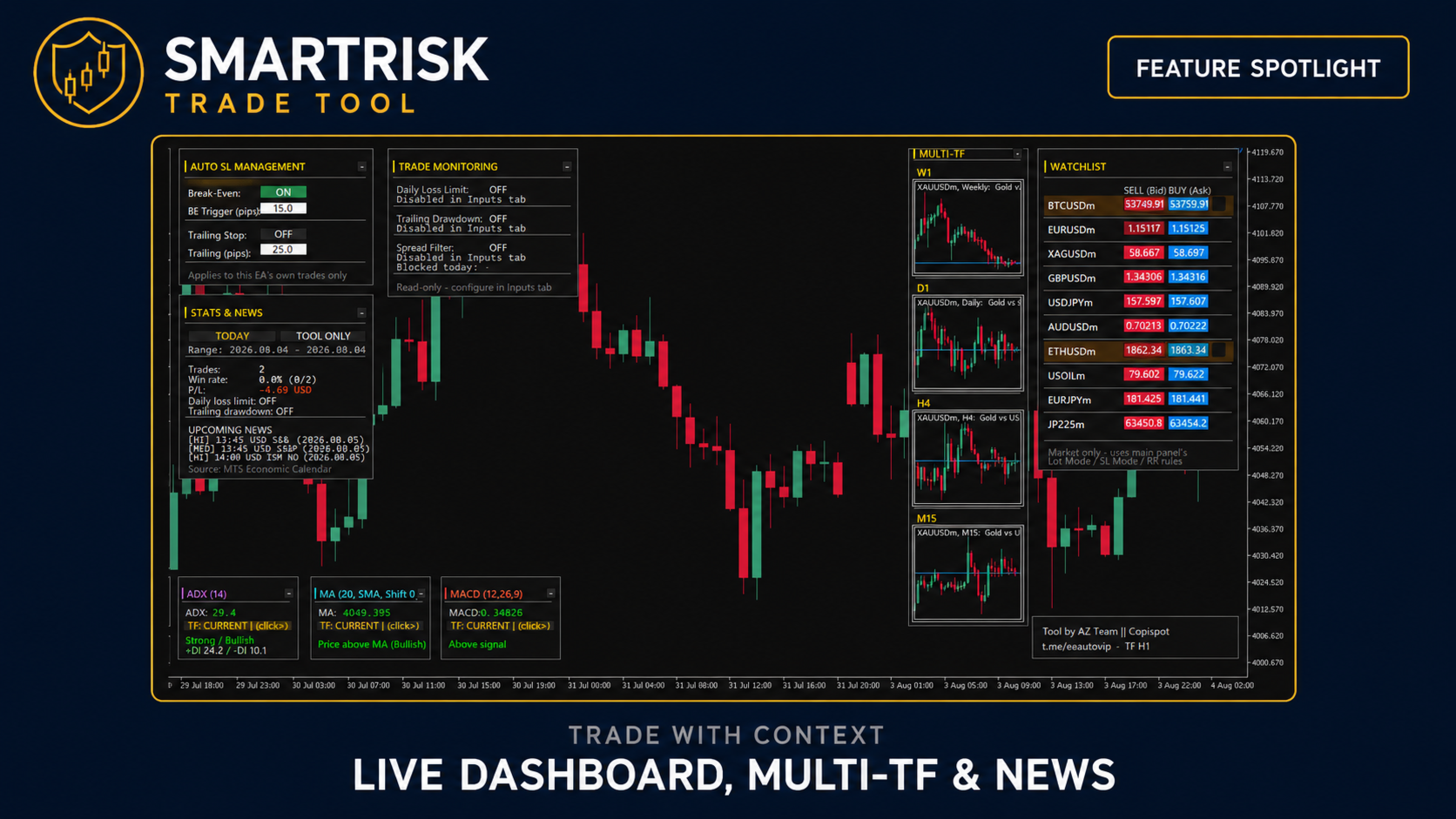
The main dashboard section shows account balance, equity, floating profit/loss, margin level, and the number of currently open positions, refreshed continuously. Alongside it, a Multi-Timeframe panel displays small reference charts for four configurable timeframes of the active symbol (Weekly, Daily, H4, and M15 by default), and a Watchlist panel shows live bid/ask prices for a configurable list of up to twelve symbols, with a broker symbol suffix (such as "m" or ".a") detected automatically so the base symbol name is enough. A Stats & News section reports the number of trades taken and win rate for a selectable period (Today, Last Week, Last Month, or a custom date range), together with an upcoming and recent economic-events list read directly from the MetaTrader 5 terminal's built-in Economic Calendar, filterable by currency, title keyword, and impact level, using the trade server's own time so no timezone adjustment is required.

Auxiliary Indicator Readout

A row of compact panels below the main dashboard shows current values for RSI, ATR, ADX, a configurable Moving Average, and MACD on the active chart, each independently minimizable and each able to cycle its own timeframe, so common context indicators can be checked without opening separate indicator windows.

Alerts

Optional popup-and-sound alerts can be enabled separately for a position closing by Stop Loss or Take Profit, for the first time Break-Even or Trailing activates on a position, and for the account's Margin Level dropping below a configured threshold. An optional alert can also fire a configured number of minutes before an upcoming high-impact news event, with a separate option to temporarily lock the Buy/Sell buttons for a configured window around the event time.

Interface

Each of the four main panel sections (order panel, auto SL management, stats & news, trade monitoring) can be shown or hidden independently. The panel can be collapsed to its header bar with a single click to save chart space, and automatically rescales its layout to the width and height of the chart window, within a configurable minimum and maximum scale range. Panel background, text, and accent colors can be customized from the Inputs tab, independent of the chart's own color scheme.

Input Parameters

Inputs are organized into the following groups:

  • General — magic number used to identify the tool's own trades, an option to scope Partial Close/Reverse/alerts to the current chart symbol only, and maximum allowed order slippage.
  • Panel Visibility / Panel Colors / Panel Auto-Resize — show/hide each panel section, background/text/accent colors, and the minimum/maximum scale the panel is allowed to resize to.
  • Default Values — starting risk %, fixed lot, stop loss value for each SL mode, default Risk:Reward ratio, and the manual pip-size override for non-standard symbols.
  • Risk Safety Guards — the spread multiple below which a stop loss is flagged as too tight, the free-margin usage percentage that triggers a warning, and the hard maximum lot size per trade.
  • Break-Even / Trailing — enable/disable each feature and its trigger/trailing distance in pips (also adjustable live from the panel itself).
  • Pending Orders — default distance in pips used to suggest an entry price for Limit/Stop orders.
  • Trade Monitoring — enable/disable the Daily Loss Limit and Trailing Drawdown limiter, their percentage thresholds, and whether hitting either limit also triggers Close All.
  • Spread Filter — enable/disable, the spread multiple that blocks new market orders, and the rolling time window used to compute the average spread.
  • Multi-Symbol Watchlist — enable/disable, the list of symbols to display, and the spread threshold (in points) that highlights a row as elevated.
  • Indicator View — show/hide and starting state for each of the RSI, ATR, ADX, MA, and MACD boxes, along with their individual periods and default timeframe.
  • Multi-Timeframe Preview — show/hide, column width, and the four timeframes displayed.
  • Alerts — enable/disable each alert type, the margin level threshold for the low-margin alert, and the sound file used.
  • Dashboard: Upcoming News — enable/disable the news section, currency/keyword/impact filters, how many upcoming and past events are shown, how far ahead/behind the calendar is read, how often it refreshes, and the optional pre-news alert and trading-lock window.

Notes

  • The tool does not open, close, or modify any trade automatically based on market conditions; every entry is triggered manually by the user through the panel. Break-Even, Trailing Stop, and the risk guardrails only manage or restrict trades already opened through user action.
  • Order filling mode is detected automatically per symbol and broker.
  • Works on any symbol and timeframe; the panel's default values are set for manual discretionary trading rather than any specific strategy.
Produtos recomendados
Trade assistant pro v8
Ahmed Mohammed Bakr Bakr
2 (1)
FREE FREE FREE Trade Assistant MT5 – Professional Trading & Risk Management Panel Trade Assistant MT5 is an advanced trading panel designed to help traders execute orders faster, safer, and more professionally . It simplifies manual trading by combining smart order management , precise risk control , and one-click execution , making it ideal for both beginners and advanced traders. This tool does not trade automatically . Instead, it empowers you with full control while applying professional-gra
FREE
================================================================ MATRIX CONDITION MONITOR Live Trade Condition Panel for MetaTrader 5 Fully Automatic -- Works with ALL Matrix EAs ================================================================ NEVER MISS A TRADE SETUP AGAIN Matrix Condition Monitor is a free utility that attaches to any chart and automatically checks all 10 trade conditions in real time -- showing you exactly why a trade will or will not open, and alerting you the moment ever
FREE
Click Trading
Jawad Tauheed
5 (2)
One Click Trading – Auto TP SL Developer TraderLinkz Version 1.00 Category Utility What it does Adds missing TP and SL to your manual trades and pending orders Sets them once per ticket Lets you move TP and SL afterward Works on hedging and netting accounts Scans on every tick and reacts on trade events Why you want it You place faster entries You get consistent risk and exit targets You reduce fat finger errors You keep full manual control Quick start Attach the EA to any chart Keep TP and SL e
FREE
Core function Intelligent transaction management one-click opening and closing operation, which supports user-defined lots to set multiple closing modes: all closing, closing by direction and closing by profit and loss status. Professional risk control, real-time risk monitoring and spread control to avoid high-cost trading environment. Visual control panel has an intuitive graphical interface, and all functions can be operated with one button to display position information, profit and loss sta
FREE
FiT Panel Pro
Thonglak Janyakorn
Overview FiT Panel Pro is a professional-grade trade management panel designed for MetaTrader 5 traders who demand speed, precision, and full control over their trades. Built with a modern dark-theme UI, it combines one-click execution with advanced risk management, visual SL/TP drag lines, automatic Fibonacci-based levels, and comprehensive order management — all in a single, compact panel. Whether you are a scalper, day trader, or swing trader, FiT Panel Pro gives you the edge you need to exec
FREE
ADAPTIVE CLOSER Manage many open positions as one book, from the chart Type: Utility (position manager) Symbols: Any Account: Hedging and Netting Opens trades: Only when you press a button 1. The problem this addresses One position is easy to manage. Six are not. Once several tickets are open — entered by hand, by different Expert Advisors, from a phone — the thing you actually care about is the combined result, and MetaTrader gives you no way to act on it. You end up closing tickets one at a t
FREE
Objetivo: Abre automaticamente os gráficos de todos os símbolos do Market Watch usando o template default.tpl no timeframe atual (TF) , fechando todos os outros gráficos (exceto o ativo). Perfeito para análise rápida de múltiplos ativos sem trabalho manual! Funcionalidades: Automação: Abre dezenas de gráficos com um clique. Segurança: Fecha gráficos desnecessários, mantendo o atual ativo. Flexibilidade: Usa seu template default.tpl (configure-o previamente!). Timeframe atual: Gráf
FREE
Spread Candle Clock Pro
Federico Ruben Vissio
5 (1)
Spread Candle Clock is a clock that displays the remaining time of the current candle along with the spread in real time directly on the chart. Features: Real-time candle countdown. Live spread (SP) display. Adjustable size. Customizable colors. Configurable position in all four corners. Compatible with all symbols and timeframes. Includes a button to minimize to a small panel.

FREE
GDS RiskLab TradeDesk Free Manual Trading Desk and Risk-Control Utility for MetaTrader 5 GDS RiskLab TradeDesk is a free chart-based utility for traders who want a cleaner manual trading workspace in MetaTrader 5. It is designed as a simple execution-support and risk-control panel. The goal is to keep the trading process more organized: review the chart, plan the trade, keep risk visible and execute manually with more structure. This tool does not generate buy or sell signals. It does not predic
FREE
EmaRsi robot
Deepak Saini
https://youtu.be/KHhg88fXWTk?si=ZoVtpc-wpfTVImSL 5-Minute Trading Strategy | Quick & Effective for Beginners Welcome to our trading channel- the deepak trading In this video, we'll be exploring a simple 5-minute trading strategy that can help you capture quick market movements and make profitable trades. Whether you're a beginner or an experienced trader, this strategy is designed to give you clear entry and exit points using technical indicators like EMA, RSI, and Stochastic Oscillator.
FREE
Calculating the volume of orders every time you create an order is an extremely important thing in risk management Let this tool simplify your work! ----------------------------------------------------- How to use? Attach the indicator to the chart and set its parameters:  Risk size in %  or money and Risk Reward Ratio. Click on the ON button and locate the horizontal line to your would-be StopLoss level. Options: Click on the Pending/Instant button to locate the horizontal line  to your would-b
FREE
Position Size Tool – Smart Risk Management & Trade Execution Panel The Position Size Tool is a powerful and intuitive MT5 panel that simplifies your trading by combining position sizing , risk calculation , risk/reward visualization , and order placement —all in one place. ️ Clean & Functional Interface The tool features a compact, real-time panel with the following: Balance & Equity display Live Price tracking Customizable Risk % input Auto-calculated Lot Size based on SL and Risk Input for S
FREE
Risk Manager Lot Calculator tells you the exact lot size to trade so that a losing trade costs only the amount you decide, no more. You set your risk as a percentage of the account or as a fixed money amount, and you set your stop loss by pips, by price, or by dragging a line on the chart. The panel then shows the correct position size, the money at risk, the pip value and, when you add a take profit, the reward to risk ratio and the potential profit. Position sizing is the part of trading that
FREE
Apresentamos o NAS100 Auto SL e TP Maker para MT5: Nunca mais perca a definição de StopLoss e TakeProfit com o nosso NAS100 Auto SL e TP Maker, um assistente indispensável para os traders que navegam no mercado Nasdaq 100 no MetaTrader 5. Esta ferramenta foi concebida para aqueles que procuram uma solução perfeita para automatizar a gestão dos níveis de StopLoss e TakeProfit. Caraterísticas principais: Automação sem esforço: Monitoriza automaticamente as transacções Nasdaq 100 sem StopLoss e/o
FREE
Equity monitor This is a simple means change informer. I wrote it for myself, maybe someone will need it... 1. Displays the change in funds for the day. Every day, when the terminal is first launched, it remembers the current funds and monitors changes throughout the day. 2. The first day of the month, well remembers the money and, within months, to monitor changes. 3. Well, it displays the profit of the open position. To work, you need to create 4 global variables: gvarEqityDay , gvarEq
FREE
no Trade operation, Robot Set auto SL to every manually Trade from a Phone Automatic Phone TradeManager Need just Set on 1 Symbol Auto BE Trigger is added that immediately sets a stop-loss for every () But does NOT calculate position size based on risk, allows the fixed  SL to   adjusted dynamically drag on Chart or Menu. It protects capital around the clock, reduces emotional mistakes, and ensures consistent risk management.
FREE
Dynamic Candle Timer
Channaphat Yamuangmorn
Overview The Dynamic Candle Timer is a lightweight and efficient utility designed for MetaTrader 5. Unlike traditional candle timers that remain static in the corner of the chart, this indicator dynamically attaches to the current Bid price line. This allows traders to monitor the remaining candle time directly at the point of action, enhancing focus during fast-paced market movements. It is highly suitable for day traders and scalpers operating on XAUUSD, Forex, Crypto, or Indices. Key Feature
FREE
Risk Manager – Account Protection Tool Risk Manager is an Expert Advisor for MetaTrader 5 designed to protect your trading account by applying automatic risk management rules. This tool does not open trades . It continuously monitors your account and enforces predefined limits to help prevent excessive losses and maintain disciplined trading. Risk Manager works in the background and can manage positions opened by manual trading or other Expert Advisors. It is particularly useful for: • Manual tr
FREE
Auto Trailing Stop and Breakeven - Free - Free Trailing Stop and Break Even Manager - Trailing Stop EA Free - Auto Breakeven Free automatic trailing stop and breakeven manager for MT5. Moves your stop loss to break even and trails it for you - on every trade, hands-free. The free edition of Trail Architect. Stop letting winning trades turn into losers. This free automatic Trailing Stop and Breakeven manager watches your open positions and moves the stop loss for you - first to break even, then
FREE
Lot by Risk MT5
Sergey Vasilev
4.88 (16)
O painel de negociação Lot by Risk é projetado para negociação manual. Este é um meio alternativo para enviar ordens. A primeira característica do painel é a colocação conveniente de ordens usando linhas de controle. A segunda característica é o cálculo do volume da transação de acordo com um determinado risco, se houver uma linha stop loss. As linhas de controle são definidas usando as teclas de atalho: take profit-tecla T padrão; price-tecla padrão P; stop loss - tecla padrão S; Você mesmo
FREE
Ao executara ordem, seja ela pela boleta do metatrader no computador ou pelo metatrader no celular, seja ordem manual ou pendente, o Easy Trade irá posicionar os níveis de take profit e stop loss, bem como uma ordem limit e seus respectivos take profit e stop loss de forma automática. Seguindo a estratégia de negociação para abertura de Bolsa (us30, us100,us500) porém, pode ser ultilizada em quaisquer ativo do mercado.
FREE
Manual Assistant MT5
Igor Kotlyarov
4.75 (4)
Bonus when buying an indicator or an advisor from my list. Write to me in private messages to receive a bonus. Manual Assistant MT5 is a professional manual trading tool that will make your trading fast and comfortable. It is equipped with all the necessary functions that will allow you to open, maintain and close orders and positions with one click. It has a simple and intuitive interface and is suitable for both professionals and beginners. The panel allows you to place buy and sell orders w
FREE
IMPORTANT NOTE: This is a professional Trade Management Utility and on-chart assistant. It is NOT an automated trading robot. It does not open trades on its own. The UltraFast Trade Manager MT5 is the ultimate execution and risk-management suite designed to give you absolute control over your manual and algorithmic trades. When managing multiple positions, calculating complex net break-even points, or constantly monitoring the economic calendar, hesitation can lead to costly mistakes. This utili
FREE
GOM Trade Manager
Wannapach Chinnaprapa
GOM Trade Manager helps you execute trades the way you want it. Works on all instruments Forex, Commodities, & Crypto. It helps you with lot calculations, spread addition and balance calculations so you can just focus on actual trading. For full automatic planned management, stackable triggers and spread widening protection >> check out GOM Trade Manager Pro . ------------------------------------------NOTABLE FEATURES------------------------------------------ You set everything based on bid
FREE
Trade With Price is a powerful and user-friendly MetaTrader 5 Expert Advisor designed to simplify and accelerate your trading execution. This EA provides a smart one-click trading panel that allows traders to instantly place BUY, SELL, and pending orders directly at the current market price—eliminating the need to calculate distances in pips. Key Features One-click BUY & SELL execution Place pending orders based on market price instead of pips Clean and intuitive trading panel interface
FREE
This utility keeps a watchful eye on your trading terminals and ensures that you are notified if any of them are disconnected. Simply attach the utility to a chart and connect to a monitoring service who can notify you. We use UptimeRobot for both VPS and terminal monitoring; however, any service supporting heartbeat monitoring can be employed. Many such services offer free plans and various notification methods, such as Cronitor.io
FREE
Collective TP SL Manager is a MetaTrader 5 utility that manages a combined take-profit and stop-loss across many open positions on one symbol. Instead of setting TP/SL per order, it watches the net profit or loss of all (or filtered) positions and closes the basket when your target is reached. Features Basket-level targets: one collective take-profit and one collective stop-loss for the whole group of positions. Net P/L monitoring: continuously sums the profit/loss of all selected positions in
FREE
Title:   Smart Position Manager PRO - Advanced Risk & Position Manager Description: Smart Position Manager PRO is an all-in-one visual trade management and risk calculation tool designed for serious traders who prioritize iron discipline and strict risk management. Whether you are executing precise SMC or ICT setups on personal capital or managing large funded accounts on strict prop firms, this tool ensures you focus on counting percentages rather than emotional money swings. With a highly int
FREE
Account Info EA It is a tool that presents on the graph all the positions of the account, and specific information concerning the positions, but also the account. It enables the user to have an image of his account at a glance. Use like any expert advisor. You can't attach it in the same chart with other expert advisor. It does not have the ability to open or manage positions. You can attach it on any chart and any timeframe.
FREE
VR Color Levels é uma ferramenta útil para quem aplica análises técnicas usando elementos como linha de tendência, retângulo e texto. É possível adicionar texto diretamente ao gráfico e fazer capturas de tela. Configurações, arquivos de configuração, versões demo, instruções, solução de problemas podem ser obtidos em [blog] Você pode ler ou escrever comentários em [ссылке] Versão para [MetaTrader 4] O trabalho com o indicador é realizado com um clique . Para fazer isso, clique no botão com a l
FREE
Os compradores deste produto também adquirem
Trade Assistant MT5
Evgeniy Kravchenko
4.43 (216)
Ajuda a calcular o risco por comércio, a fácil instalação de uma nova encomenda, gestão de encomendas com funções de fecho parcial, trailing stop de 7 tipos e outras funções úteis. Materiais e instruções adicionais Instruções de instalação   -   Instruções para a aplicação   -   Versão de teste da aplicação para uma conta de demonstração Função de linha Mostra no gráfico a linha de Abertura, Stop Loss, Take Profit. Com esta função é fácil definir uma nova ordem e ver as suas características ad
Bem-vindo ao Trade Manager EA—uma ferramenta de gestão de risco criada para tornar o trading mais intuitivo, preciso e eficiente. Não é apenas uma ferramenta para executar ordens, mas uma solução abrangente para planejamento de operações, gerenciamento de posições e controle de risco. Seja você um iniciante, trader avançado ou scalper que precisa de execução rápida, o Trade Manager EA adapta-se às suas necessidades, oferecendo flexibilidade em todos os mercados, desde forex e índices até commodi
================================================================================ POC BREAKOUT - V20.72. Full Professional Grade Toolkit ================================================================================ POC Breakout is a full MetaTrader 5 trading dashboard for discretionary traders who want breakout signals, Point of Control (POC) context, volume profiles, order flow, market structure, news, alerts, and advanced trade planning in one professional workspace. Attached directly to you
Local Trade Copier EA MT5
Juvenille Emperor Limited
4.94 (149)
Local Trade Copier EA MT5 é um copiador de operações rápido e flexível para copiar e gerenciar operações entre várias contas MetaTrader 5 no mesmo computador Windows ou Windows VPS. Ele combina a sincronização local de operações com controles no lado do Receiver para tamanho de lote, gerenciamento de risco, filtragem de operações, mapeamento de símbolos, gerenciamento de operações e proteção da conta. Configure seus terminais Transmitter e Receiver em aproximadamente 1 minuto e copie operações
TradePanel MT5
Alfiya Fazylova
4.88 (168)
Trade Panel é um assistente de negociação multifuncional. O aplicativo contém mais de 50 funções de negociação para trading manual e permite automatizar a maioria das tarefas de negociação. Instruções para o aplicativo + vídeo-instruções: https://www.mql5.com/pt/blogs/post/772421 Versão de teste do aplicativo para conta demo: https://www.mql5.com/pt/blogs/post/762547 Como instalar o aplicativo: https://www.mql5.com/pt/blogs/post/762548 Como testar o aplicativo no modo visual: https://www.mql5.co
Copie sinais do Telegram com suas próprias regras de negociação Telegram to MT5 Signal Trader copia automaticamente sinais de negociação em texto de canais e grupos públicos e privados do Telegram para o MetaTrader 5. Gerencie vários provedores e contas MT5 em um único aplicativo para desktop, com configurações individuais de risco e de negociação para cada provedor . Você não precisa de um bot do Telegram nem configurar uma API para copiar sinais. Basta entrar com sua própria conta do Telegram
Strategy Ledger Pro
Abdullah Uygar Tuna
5 (2)
Strategy Ledger Pro é um painel de análise de conta apenas de leitura para o MetaTrader 5. Separa os resultados da conta por Expert Advisor, estratégia, símbolo e número mágico. Manual  detalhado com cada função explicada. O MetaTrader mostra um único saldo para toda a conta. Quando vários Expert Advisors operam em conjunto, esse saldo não mostra o que cada um contribuiu. O Strategy Ledger Pro lê o histórico da conta, reconstrói as posições fechadas, atribui-as a estratégias e apresenta os res
O Telegram to MT5 Multi-Channel Copier copia automaticamente os sinais de trading dos seus canais de Telegram diretamente para o MetaTrader 5. Sem bots, sem extensões de navegador, sem copiar à mão. O sinal chega ao Telegram e o EA abre a operação no seu terminal em poucos segundos. E antes de copiar um canal, o backtester integrado mostra o que esse canal teria feito na sua conta. O produto inclui dois componentes: um aplicativo de Windows que escuta os seus canais de Telegram, e este Expert Ad
Farmed Hedge Yield Farming | All Markets (Manual - Hybrid - Semi/Automated EA) VERIFIED TRADING RESULTS - Farmed Hedge Yield Axi Copy:  https://www.mql5.com/en/signals/2356376 - Farmed Hedge Yield Exn Copy:   https://www.mql5.com/en/signals/2356404 - Farmed Hedge Yield V Copy:  https://www.mql5.com/en/signals/2357156 IMPORTANT NOTICE: FarmedHedge is a MANUAL-FOCUSED TRADING UTILITY ,not a fully automated EA. Results shown on this Signal include manual trades and overall strategic management.
Premium Trade Manager - O Painel de Operações com um Coach Integrado Premium Trade Manager coloca um coach de trading dentro do seu gráfico, com um motor de execução completo por baixo. Configure a operação da forma que sempre faz e deixe o Max, seu coach de trading com IA, ler exatamente esse setup em relação à sua conta ao vivo e dar um veredicto direto antes de confirmar: se o stop é disciplinado, se o risco faz sentido, se há um evento de alto impacto a minutos de distância, se você está pró
Exp COPYLOT CLIENT for MT5
Vladislav Andruschenko
3.97 (35)
Copiador profissional de operações para MetaTrader 5 Um copiador de operações rápido, profissional e confiável para MetaTrader . COPYLOT permite copiar operações de Forex entre terminais MT4 e MT5 com suporte para contas Hedge e Netting . A versão MT5 do COPYLOT oferece suporte a: - MT5 Hedge → MT5 Hedge - MT5 Hedge → MT5 Netting - MT5 Netting → MT5 Hedge - MT5 Netting → MT5 Netting - MT4 → MT5 Hedge - MT4 → MT5 Netting Versão MT4 Descrição completa + DEMO + PDF Como comprar Como instalar Como
Telegram To MT5 Ultra
Mirel Daniel Gheonu
5 (5)
Telegram To MT5 — Copiador de sinais Transforme as chamadas de trading dos seus canais do Telegram em ordens reais no MT5 — automaticamente, em quantas contas quiser, com o risco e as regras totalmente sob o seu controlo. O Telegram To MT5 liga os canais VIP / de sinais que já segue no Telegram ao seu terminal MetaTrader 5. Um aplicativo de desktop complementar gratuito lê as mensagens (mesmo de canais que bloqueiam bots), e este Expert Advisor executa-as na sua conta — aplicando as suas própria
The product will copy all telegram signal to MT5 ( which you are member) , also it can work as remote copier.  Easy to set up, copy order instant, can work with almost signal formats, image signal,  s upport to translate other language to English Work with all type of channel or group, even channel have "Restrict Saving Content", work with  multi channel, multi MT5 Work as remote copier: with signal have ticket number, it will copy exactly via ticket number. Support to backtest signal. How to s
Trade Manager DashPlus
Henry Lyubomir Wallace
4.85 (13)
DashPlus é uma ferramenta avançada de gerenciamento de operações projetada para melhorar a eficiência e a eficácia das suas transações na plataforma MetaTrader 5. Ela oferece um conjunto completo de funcionalidades, incluindo cálculo de risco, gestão de ordens, sistemas de grade avançados, ferramentas baseadas em gráficos e análise de desempenho. Principais Funcionalidades 1. Grade de Recuperação Implementa um sistema de grade flexível e de média para gerenciar operações em condições adversas de
Astro Trade MT5
Indra Maulana
5 (7)
25% discount on the release of the tool: only for the next 3 buyers Send a message to receive a demo version. AstroTrade Trading Assistant AstroTrade is a comprehensive multi-functional trading utility developed for the MetaTrader 5 platform. It integrates essential tools for trade execution, risk management, and technical monitoring into a single unified interface. The application is designed to assist traders in managing their daily operations through a visual and structured environment. Vi
FUTURES ORDERFLOW FOOTPRINT CHART Professional OrderFlow EA for MetaTrader 5 Version 1.01| Professional tool for real traders | Institutional-Grade Visualization STRATEGY TESTER USERS - PLEASE SELECT EVERY REAL TICK WHEN TESTING AND YOU HAVE DOWNLOADED HISTORICAL DATA. IF YOU SEE A WAITING SCREEN AND IT IS NOT DOWNLOADING, IT MEANS YOU HAVE LOW HISTORICAL DATA. TRY 1 MIN AND 5 MIN FIRST ON 1 DAY DATA. ONE DAY DATA SHOULD BE THE NEWEST AND MOST CURRENT DATE. PLEASE WAIT UNTIL THE MARKET HAS ROL
Timeless Charts
Samuel Manoel De Souza
5 (8)
Timeless Charts é um utilitário de trading tudo-em-um para traders profissionais. Ele combina tipos de gráficos personalizados, como Gráficos por Segundos e Renko , com análise avançada de fluxo de ordens utilizando Footprints , Clusters , Perfis de Volume , estudos VWAP e ferramentas de análise ancorada para uma visão mais profunda do mercado. O gerenciamento de ordens e posições é realizado diretamente no gráfico por meio de um painel integrado de gerenciamento de operações , enquanto o Market
Trade Copier Ultimate
Janitha Sandaruwan Amaradasa Wickramasingha Arachchilage
5 (5)
Trade Copier Ultimate - Telegram to MT5 Signal Copier Trade Copier Ultimate automatically copies Telegram trading signals into MetaTrader 5. The EA can read signal messages, detect the symbol, order type, entry price, Stop Loss, Take Profit levels and selected update commands, then execute or manage the trade in MT5 using your lot and risk settings. It is more than a basic Telegram to MT5 copier. TCU also supports Bot API and user-account Bridge workflows, Discord signal routing, local MT5 to MT
Trade Dashboard MT5
Fatemeh Ameri
4.94 (133)
Trade Dashboard simplifies how you open, manage, and control your trades, with built-in lot size calculation. It allows you to execute trades, manage risk, and control positions directly on the chart, with tools such as partial close, breakeven, and trailing stop. Designed to reduce manual work and help you stay focused on your trading decisions. A demo version is available for testing. Detailed explanations of features are provided within the MQL5 platform. Installation instructions are include
EA Overfitter
Stephen J Martret
5 (1)
That backtest looks great. But will it still be making money tomorrow, next week, next month? EA Overfitter re-runs your EA on 100 price histories it has never seen. One score tells you if the edge is real. A backtest tells you what an EA did on one price history — the one that happened to occur. What you cannot tell from it is how much of that result was the strategy and how much was the particular path. EA Overfitter answers that. It builds up to 100 synthetic price histories your EA has n
Trade Indicator Assistant   is a powerful MT5 utility designed to turn indicators into automated trading systems. Its main feature is the ability to automatically detect an indicator’s   BUY and SELL signal buffers , without requiring you to know the buffer numbers, search through indicator settings, or modify the indicator source code. Bonus Indicator:   After purchasing Trade Indicator Assistant, contact me to receive   Trade Signal Pro   completely free as a bonus indicator. [Download Demo V
Envie-me uma mensagem após a compra para receber o kit completo do manual + teste de 3 dias da API da OpenAI para testar os recursos de IA + Outro presente bônus O preço atual é um desconto limitado para a atualização de relançamento de agosto — garanta sua edição agora antes que o preço aumente. Próximo preço: $340 Isso é completamente diferente de qualquer painel de trading que você já experimentou ou viu no mercado. É um dos painéis de trading com tecnologia de IA mais inovadores disponíveis
HINN MagicEntry Extra
ALGOFLOW OÜ
4.74 (19)
HINN MAGIC ENTRY – the ultimate tool for entry and position management! SIMPLE. FASTEST. INTUITIVE. MAX AUTOMATED. Place orders by selecting a level directly on the chart! full description   ::  demo-version  :: 60-sec-video-description Key features: - Market, limit, and pending orders - Automatic lot size calculation - Automatic spread and commission accounting - Unlimited partitial take-profits  - Breakeven and trailing stop-loss and take-profit  functions - Invalidation leves - Intuitive, a
Trade Assistant 38 in 1
Makarii Gubaydullin
4.91 (23)
Ferramenta Multifuncional: Calculadora de Lote, Ordens Grid, Proporção R/R, Gerenciador de Negociações, Zonas de Oferta e Demanda, Price Action e muito mais Versão Demo   |   Manual do Usuário O Assistente de Trading   não funciona no testador de estratégias : você pode baixar a   Versão Demo AQUI  para testar a utilidade . Entre em contato   para qualquer dúvida  / ideias de melhoria / caso encontre um erro Se precisar de uma versão MT4, ela está disponível aqui Simplifique, acelere e automati
Footprint Chart Pro — Professional OrderFlow EA for MetaTrader 5 Version 6.34 | Professional tool for real traders | Institutional-Grade Visualization DEMO USERS - PLEASE SELECT EVERY TICK / REAL TICK WHEN TESTING AND YOU HAVE DOWNLOADED HISTORICAL DATA. IF YOU SEE A WAITING SCREEN AND IT IS NOT DOWNLOADING, IT MEANS YOU HAVE LOW HISTORICAL DATA. TRY 1 MIN AND 5 MIN FIRST ON 1 DAY DATA. ONE DAY DATA SHOULD BE THE NEWEST AND MOST CURRENT DATE. PLEASE WAIT UNTIL THE MARKET HAS ROLLED OVER PERIOD.
Grid Manual MT5
Alfiya Fazylova
4.73 (22)
"Grid Manual" é um painel comercial para trabalhar com uma grade de ordens. O utilitário é universal, possui configurações flexíveis e uma interface intuitiva. Ele trabalha com uma grade de ordens não apenas na direção da média das perdas, mas também na direção do aumento dos lucros. O trader não precisa criar e manter uma grade de ordens, tudo será feito pelo ""Grid Manual". Basta abrir um orden e o "Grid manual" criará automaticamente uma grade de ordens para ele e trabalhará com ele até que s
Trade copier MT5
Alfiya Fazylova
4.6 (55)
Trade Copier é um utilitário profissional projetado para copiar e sincronizar negociações entre contas de negociação. A cópia ocorre da conta / terminal do fornecedor para a conta / terminal do destinatário, instalada no mesmo computador ou vps. PROMOÇÃO - Se você já adquiriu o "Trade copier MT5", pode receber o "Trade copier MT4" gratuitamente (para cópia MT4 > MT5 e MT4 < MT5). Para obter informações mais detalhadas sobre os termos, por favor, entre em contato conosco através de mensagens priv
Anchor Trade Manager
Kalinskie Gilliam
5 (9)
Your EAs cannot see each other, but Anchor can. Anchor gives you one place to coordinate your EAs, manage risk, and decide when trading is allowed. It works alongside the trading bots you already use without any changes to them. The Problem One EA opens a trade. Then another starts trading. The next thing you know, you wake up to multiple grids built across your account. Each EA may be doing exactly what it was designed to do, but together they can place far more risk on your account than you in
Advanced Dashboard Ultra
Mirel Daniel Gheonu
5 (6)
Stats Dashboard & Journal ULTRA para MT5 O Centro de Comando de Trading Completo: Analytics, Automação e Inteligência de Notícias. O Stats Dashboard ULTRA é a evolução definitiva da ferramenta de análise Pro. Ele transforma o MetaTrader 5 em uma estação de trading profissional, combinando análise de desempenho de nível institucional com proteção automatizada contra notícias e métricas psicológicas avançadas. Projetado para traders manuais e gestores de portfólio de EAs (robôs) que exigem control
Seconds Chart MT5
Boris Sedov
4.61 (18)
Seconds Chart - uma ferramenta exclusiva para criar gráficos de segundos no MetaTrader 5 . Com o Seconds Chart , você pode criar gráficos com períodos definidos em segundos, proporcionando flexibilidade e precisão ideais para análise, indisponíveis em gráficos padrão de minutos ou horas. Por exemplo, o período S15 indica um gráfico com velas de 15 segundos. Você pode usar qualquer indicador ou Expert Advisor com suporte a símbolos personalizados. Trabalhar com eles é tão conveniente quanto negoc
Mais do autor
Confluex — Smart Money Concepts (SMC) All-in-One Indicator Confluex is an all-in-one Smart Money Concepts indicator for MetaTrader 5. It detects swing and internal market structure breaks, order blocks, fair value gaps, equal highs/lows, and premium/discount zones directly on the chart, then combines that structure into a rule-based, weighted-confluence Signal Engine that plots Buy/Sell arrows with SL/TP directly on the chart. It does not place trades — every signal is for visual/manual referenc
FREE
Vertex Aurum Gold — Smart Money Concepts (SMC) Auto-Trading System for XAUUSD Vertex Aurum Gold is an Expert Advisor for MetaTrader 5 built around Smart Money Concepts market structure. It detects swing and internal structure breaks, order blocks, fair value gaps, and liquidity zones directly on the chart, then uses that structure as the basis for a rule-based signal, execution, and risk engine. Structure detection can also be run on its own, with auto-trading switched off, for chart analysis on
FREE
AMIX ALGO TRADING — Multi-Layer Adaptive DCA-Hedge System AMIX ALGO TRADING is a multi-layer Expert Advisor for MetaTrader 5 that combines trend detection, tiered capital management, an automatic hedge mechanism, and adaptive profit-taking into one trading framework. Each entry, averaging step, and exit is handled by a dedicated module rather than a single fixed rule set, so the system can adjust its behavior to current market conditions. Trading Logic Trade direction is determined by two indepe
FREE
Filtro:
Sem comentários
Responder ao comentário