IronSignal EA
- Эксперты
- Ahmed Sabba
- Версия: 2.14
- Активации: 20
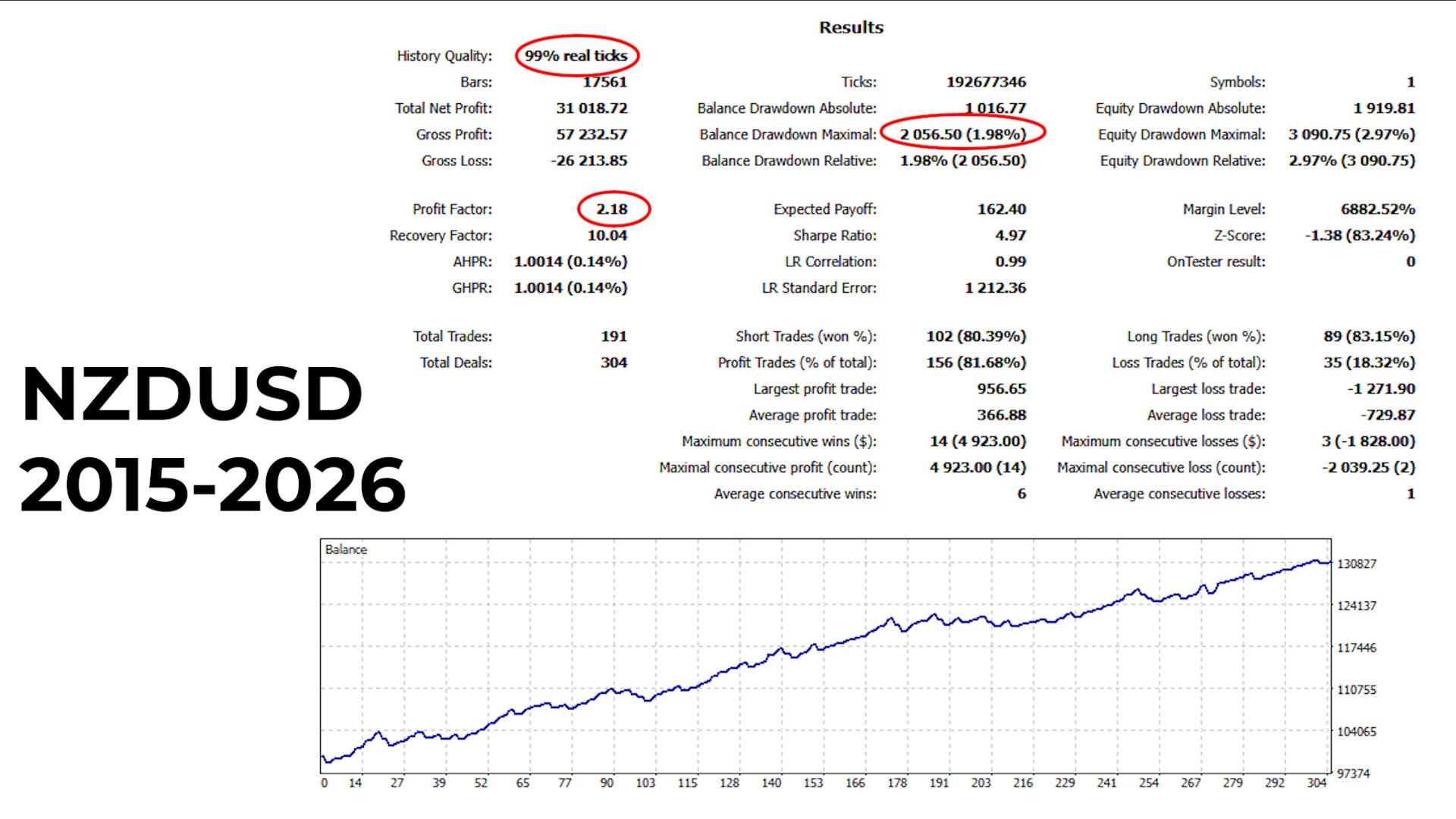
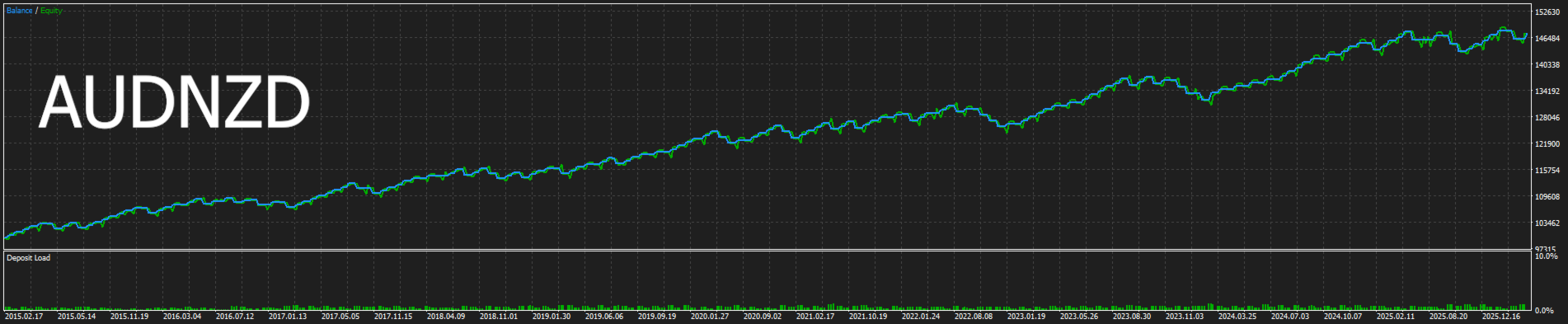
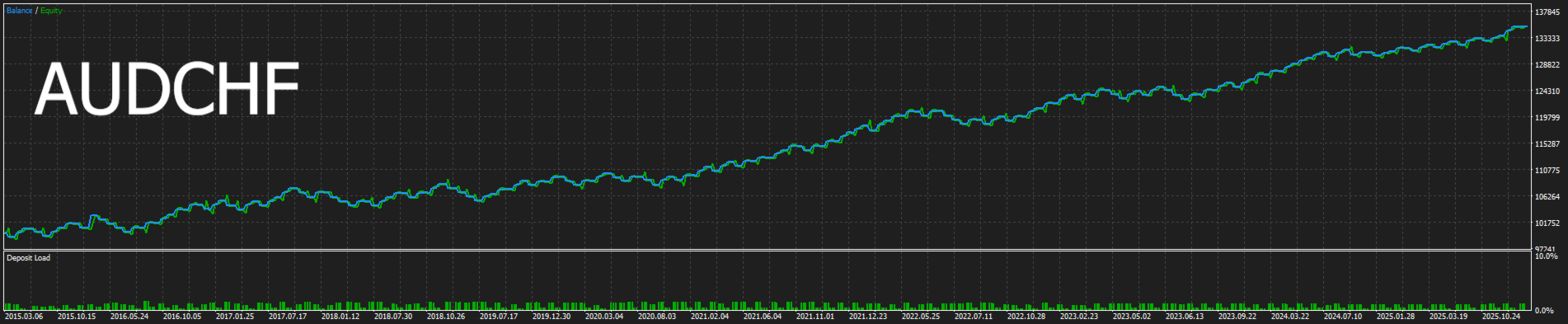
Live Performance : CLICK HERE
DM me for set files — highly recommended before running the EA.
This is a Swing Trading EA designed to run on the H4 (4-Hour) timeframe. Trades may stay open for several days while the market moves toward the Take Profit or Stop Loss — that is completely normal for a swing system.
fully automated Expert Advisor for MetaTrader 5 that identifies high-probability entry zones by combining two independent layers of market structure confirmation before placing any trade. Every single trade is protected with a hard Stop Loss calculated dynamically from market volatility. There is no martingale, no grid, no averaging, and no hedging of any kind.
The EA trades one position at a time per symbol. It does not open new trades while a position is already active. Risk is precisely controlled per trade, making the EA suitable for accounts of any size.
How It Works — General Overview
The EA analyzes the current chart to detect two types of structural zones:
1. Support and Resistance Levels — Historical price areas where the market has shown repeated reaction. These are automatically detected and clustered from recent price action. Only levels with enough historical confirmation are considered valid.
2. Trendlines — Diagonal structural lines connecting swing highs or swing lows. The EA detects these automatically from recent pivots and uses them as a second layer of confirmation for any potential entry.
A trade signal is only generated when both layers confirm simultaneously — a breakout of a Support/Resistance level that also aligns with a trendline break. This double confirmation requirement significantly reduces low-quality signals.
An optional EMA trend filter adds a third layer by ensuring trades are taken only in the direction of the dominant trend on the current timeframe.
Once a trade is open, an optional Breakeven system automatically moves the Stop Loss to protect profits once the trade reaches a defined profit threshold. Partial close at breakeven is also available.
Trading Rules Summary
- ✅ One trade at a time per chart/symbol
- ✅ Every trade has a hard Stop Loss — always
- ✅ Take Profit set automatically based on a configurable Risk:Reward ratio
- ✅ ATR-based dynamic Stop Loss — adapts to current market volatility
- ✅ Optional Breakeven with configurable trigger
- ✅ Daily trade limit to control overtrading
- ✅ Spread filter to avoid entering during high-spread conditions
- ❌ No Martingale
- ❌ No Grid
- ❌ No Averaging
- ❌ No Hedging
- ❌ No hidden Stop Loss — broker-visible SL on every trade
Input Parameters — Full Reference
📌 Support & Resistance
SR Lookback (300) — How many bars back the EA searches for key S/R levels.
SR Pivot Strength (8) — How significant a pivot must be to qualify as a level. Higher = fewer but stronger levels.
SR Cluster Pips (15) — Nearby levels within this distance are merged into one zone.
SR Min Touches (2) — Minimum number of times price must react to a level before it is used.
SR Max Levels (4) — Maximum number of active S/R levels on the chart at any time.
📌 Trendline Detection
TL Lookback (150) — How many bars back the EA scans to detect trendlines.
TL Pivot Strength (5) — Strength required for a swing point to anchor a trendline.
TL Min Bars Apart (10) — Minimum distance between two pivot points to form a valid trendline.
TL Must Be Unbroken (true) — Only uses trendlines that price has never violated. Disable for more signals.
📌 EMA Trend Filter
EMA Period (200) — Period of the trend filter EMA. Trades are only taken in its direction.
EMA Filter On (true) — Enable or disable the trend filter entirely.
📌 Stop Loss & Take Profit
ATR Period (14) — Period used to measure current market volatility for SL sizing.
ATR Multiplier (1.5) — Stop Loss is placed at this multiple of ATR from entry.
RR Ratio (2.0) — Take Profit is set at this multiple of the Stop Loss distance.
📌 Entry Quality
Breakout Min Distance (0.10) — Close must exceed the S/R level by at least this fraction of ATR to count as a valid breakout. Set to 0 to disable.
Max Wick Ratio (0.40) — Rejects signal bars where the wick exceeds 40% of the bar range.
Range Filter On (true) — Rejects oversized spike candles that look like breakouts but reverse quickly.
Range Filter Max ATR (3.0) — Maximum candle size allowed, as a multiple of ATR.
📌 Risk & Daily Limits
Lot Mode (Auto) — Choose between automatic % risk sizing or a fixed lot size.
Fixed Lots (0.01) — Lot size used when mode is set to Fixed. Ignored in Auto mode.
Risk Percent (1.0) — Percentage of account balance risked per trade in Auto mode.
Max Lots (2.0) — Hard cap on lot size regardless of account size. Set to 0 to disable.
Max Spread (30) — EA skips signals if spread exceeds this value in points.
Max Trades Per Day (3) — Maximum number of trades allowed per calendar day.
📌 Breakeven
Breakeven Enable (true) — Automatically moves SL to entry once the trade reaches profit target.
Breakeven Trigger (1.0) — Profit level in R at which breakeven is triggered.
Breakeven Buffer (50) — Small buffer in points added to entry when setting breakeven SL.
Partial Close (false) — Close part of the position when breakeven is triggered.
Partial Close % (50) — Percentage of position to close at breakeven. Active only when Partial Close is enabled.
📌 Entry Direction
Allow Buy (true) — Enable or disable long trades.
Allow Sell (true) — Enable or disable short trades.
📌 Display
Draw S/R (true) — Shows S/R levels on the chart. Blue = Support, Red = Resistance.
Draw Trendlines (true) — Shows detected trendlines on the chart. Cyan = ascending, Orange = descending.
📌 EA Identity
Magic Number (20260425) — Unique ID for this EA's trades. Change if running multiple instances.
Comment (x) — Label attached to each trade in the terminal history.
Slippage (10) — Maximum allowed slippage in points when placing orders.
Recommended Usage
- Works on any Forex pair, Gold (XAUUSD), and major CFD indices
- Required timeframe: H4 only — attach the EA to the H4 chart exclusively
- Works in both Netting and Hedging account modes
- Minimum recommended balance: $500 with default 1% risk and 0.01 min lot
- Adjust inp_Max_Lots to match your broker's maximum allowed lot per trade
- Use inp_Risk_MaxPerDay to limit activity during volatile news periods
- Backtest each symbol individually before live deployment to confirm parameter suitability
Important Notes
- All Stop Loss orders are placed directly with the broker and are always visible. There are no hidden or virtual Stop Loss levels.
- The EA handles terminal restarts gracefully — open trade state is recovered automatically from the trade comment and broker records.
- The Breakeven system retries automatically if a broker rejects the SL modification, without blocking the main loop.
- The EA is compiled for X64 Regular CPU architecture for maximum compatibility across all brokers and VPS environments.
Desclaimer⚠️
Past performance is not indicative of future results. Trading involves risk and you may lose some or all of your invested capital. Trade responsibly.