
Mtf Price Action Tracker
- Индикаторы
- Версия: 2.20
- Обновлено: 28 апреля 2026

Here's the full product description text:
MTF PA TrackerMonitor up to 10 symbol/timeframe combinations — all from a single chart window.
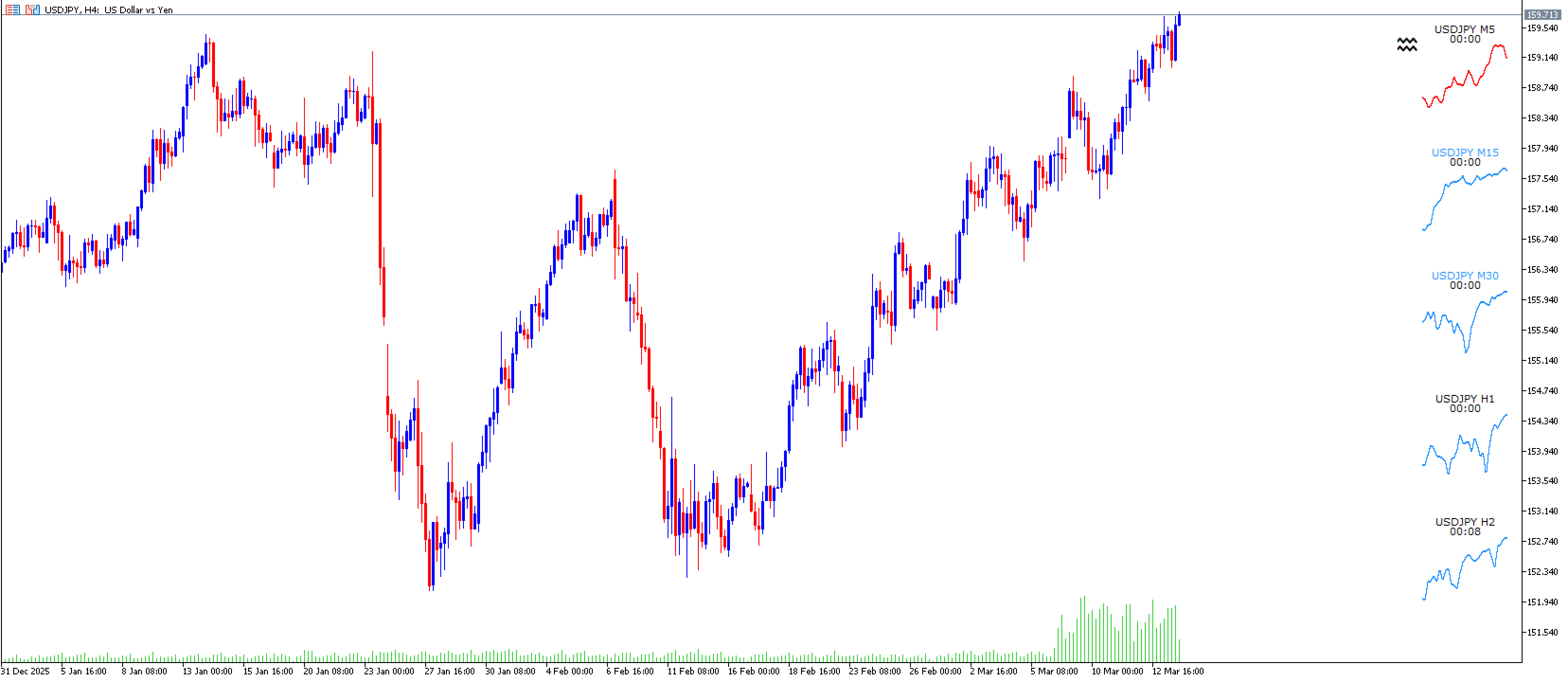
MTF PA Tracker renders live, miniature price-action charts directly on your MT5 chart as an overlay panel. No extra windows, no tab switching. Everything you need to read the market across multiple timeframes is in one place, always visible.
What It Does
The indicator displays up to 10 fully independent mini-charts, each with its own symbol and timeframe. You configure each panel with any symbol available in your Market Watch and any MT5 timeframe from M1 through MN1. Panels update automatically on every new bar and can be arranged in a clean two-column layout anywhere on your chart.
Three Chart Modes
Switch between modes instantly with a single click — no settings dialog required.
- Candlestick — full OHLC candles with configurable body width, wick colour, and bull/bear colours
- OHLC Bar — classic bar chart with open and close ticks
- Line Chart — close-price line with automatic breakout colouring (green above swing high, red below swing low)
Engulfing Pattern Detection
The indicator continuously scans every active panel for engulfing patterns on candle close. It detects:
- Type 1 — Standard single-candle engulfing
- Type 2 — Two-candle engulfing (engulfing candle absorbs two prior candles)
- Type 3 — Three-candle engulfing (engulfing candle absorbs three prior candles)
Detection rules are strict: the engulfing candle's close must breach the anchor candle's full wick — not just the body. The anchor must be the opposite colour, and any intermediate candles must match the engulfing candle's colour. When a pattern fires, the panel heading lights up in your chosen bull or bear colour as an instant visual cue.
Alerts are deduplication-protected — the same pattern never fires twice for the same anchor candle, even across multiple bars.
Alert Options
| Alert type | Engulfing close | Candle close (per panel) |
|---|---|---|
| MT5 popup | Always | When bell is armed |
| Push notification | Optional | Optional |
| Optional | Optional |
Push and email require MetaTrader 5 to be configured with a MetaQuotes ID (Notifications) and SMTP settings (Email) respectively.
Per-Panel Candle-Close Bell
Every panel has a small bell button next to its heading label. Click it to arm that panel. When that timeframe's candle closes, an alert fires and the bell resets automatically. Arm as many panels as you need simultaneously. Arming state persists across timeframe switches.
Breakout Detection (Line Chart Mode)
The line chart colours itself based on whether the latest close has broken a recent swing pivot:
- Green — close is above the most recent swing high
- Red — close is below the most recent swing low
- Default — no breakout detected
Lookback depth and swing strength are configurable independently for each panel.
Live Countdown Timers
Each panel displays a live countdown to the next candle close, updated every second — so you always know exactly how much time is left on any timeframe.
Panel Controls
- Mode button — switches between candle/bar and line chart modes, persists across TF switches
- Minimize button — collapses all panels instantly to reclaim screen space; click again to restore
- Bell buttons — one per panel for per-timeframe candle-close alerts
Notes
- Zero indicator buffers — renders entirely through MT5 chart objects, no buffer interference with other indicators
- Only redraws on new bar per panel — minimal CPU impact between bars
- All state (mode, minimize, bell arms) persists across timeframe switches via GlobalVariables and cleans up automatically on removal
- Compatible with any symbol and any MT5 timeframe string (M1–MN1)








































Fantastic Utility to see the higher time frame structure .Great updates too ! Thanks a lot !