Telegram Trade Watcher

Telegram Notification System for MetaTrader - User Guide

This guide describes the functionalities of our Expert Advisor (EA) for MetaTrader that sends real‑time notifications via Telegram. The system is ideal for traders who want to stay updated on their trades—whether opened manually or by other EAs—and includes chart screenshots for visual context. In addition to standard trade open and close notifications, the system now also alerts you if an order is modified (for example, when the Stop Loss is updated or moved to Break Even).

Main Features

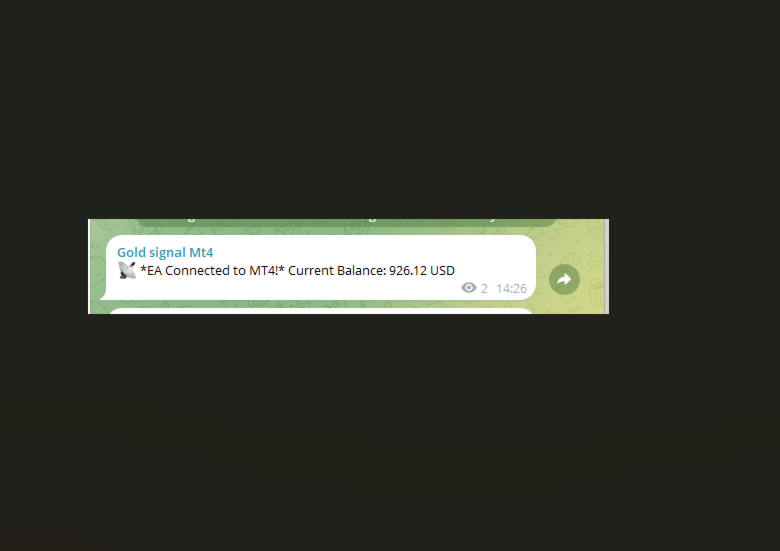
Startup Notification

  • What It Does:
    When the EA is attached to a chart, it sends an initial Telegram message confirming the connection and displays the current account balance.

Trade Open Notification

  • What It Does:
    When a new trade is opened (either manually or via EA), the system immediately sends a message including:
    • Order ticket
    • Trade type (BUY/SELL)
    • Opening price
    • Lot size
    • Stop Loss (if set)
    • Risk/Reward Ratio (if both SL and TP are set; otherwise, “N/A”)
    • Timestamp of the trade opening
    • A screenshot of the chart for visual context

Trade Modification Notification

  • What It Does:
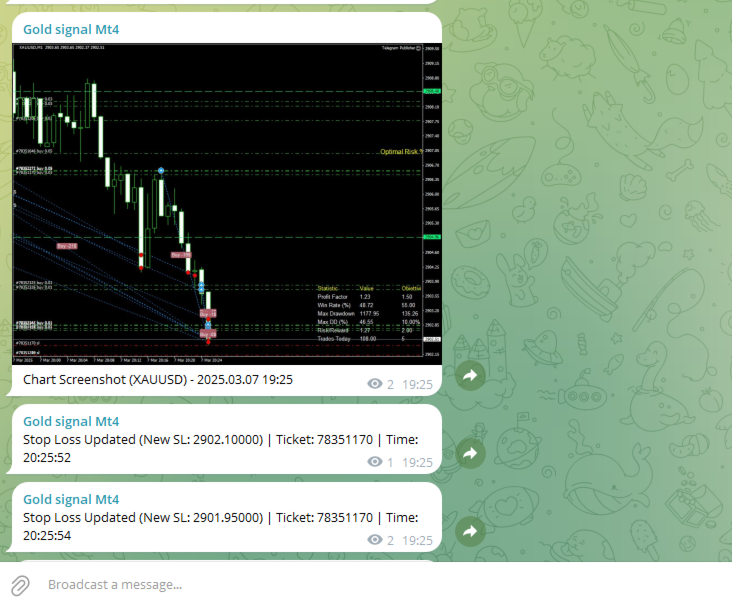
    The system continuously monitors open orders. If a modification is detected (for example, if the Stop Loss is updated), it sends a notification:
    • If the new Stop Loss is very close to the opening price (within a pre-defined threshold), the message indicates that the order has been moved to Break Even.
    • Otherwise, it sends a standard notification with the new Stop Loss value.

Trade Close Notification

  • What It Does:
    When a trade is closed, the system sends a detailed message including:
    • Order ticket
    • Opening and closing prices
    • Profit or loss
    • Reason for closure (e.g., Stop Loss hit, Take Profit hit, or manual closure)
    • Timestamp of the trade closure

Daily Summary

  • What It Does:
    At 23:00 each day (or at a configured time), if a daily summary hasn’t been sent within the last hour, the EA compiles and sends a summary that includes:
    • The date
    • Total number of trades
    • Number of winning and losing trades
    • Total profit or loss for the day

Requirements and Setup

1. Creating Your Telegram Bot

  • Step 1: Open Telegram and search for @BotFather.
  • Step 2: Send the command /newbot and follow the instructions to create your bot.
  • Step 3: You will receive an API Token (e.g., xxxx:yyyyyyy ). Save this token for later use.

2. Obtaining the Chat ID

  • Step 1: Add your bot to a Telegram group or channel, or use a service like @userinfobot to get your Chat ID.
  • Step 2: Copy the Chat ID; you will need to enter it into the EA configuration.

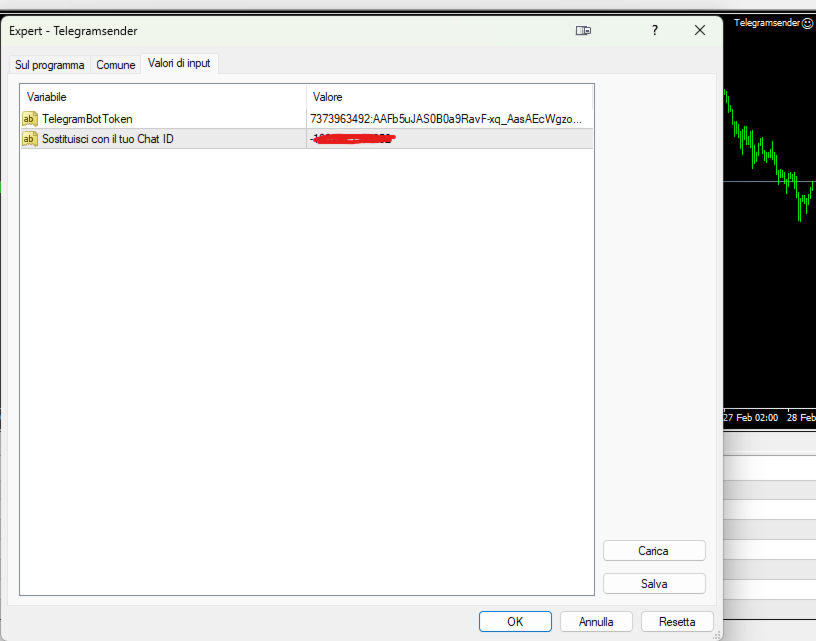
3. Configuring the EA in MetaTrader

  • Step 1: Open the MetaEditor and paste the EA source code.
  • Step 2: Replace the constants TelegramBotToken and ChatId with your own values.
  • Step 3: Ensure the URL https://api.telegram.org is added to the list of allowed URLs in MetaTrader (Tools → Options → Expert Advisors → Allow WebRequest for listed URL).
  • Step 4: Compile the EA and attach it to the desired chart.

How the System Works

At EA Startup:

  • Notification:
    The EA sends an initial Telegram message confirming the connection and displaying the current account balance.

Order Monitoring:

  • On Trade Open:
    The EA continuously monitors open orders. When a new order is detected, it registers the order’s details (ticket, open price, lot size, Stop Loss, etc.), calculates the risk/reward ratio (if applicable), and sends a notification. A screenshot of the chart is captured at the moment of opening and sent to provide visual context.

  • On Trade Modification:
    For each active order, the EA checks if the Stop Loss has been changed.

    • If the new Stop Loss is very near the opening price (determined by a set threshold), it sends a notification indicating that the order has been moved to Break Even.
    • Otherwise, it sends a notification with the updated Stop Loss value.
  • On Trade Close:
    When a trade is closed, the EA sends a detailed message with the order’s ticket, opening/closing prices, profit or loss, the reason for closure, and the timestamp.

Chart Screenshot:

  • How It Works:
    The EA uses the ChartScreenShot() function to capture an image of the current chart when a trade is opened. This screenshot is then sent to Telegram using a multipart/form-data WebRequest, ensuring you have a visual snapshot of market conditions at the time of the trade.

Daily Summary:

  • How It Works:
    At 23:00 (or a configured time), if a daily summary has not already been sent within the last hour, the EA compiles statistics for the day (total trades, winning/losing trades, overall profit or loss) and sends them as a summary message to Telegram.

Benefits of the System

  • Real-Time Updates:
    Stay informed with immediate notifications on Telegram, eliminating the need to constantly monitor MetaTrader.

  • Visual Context:
    With chart screenshots, you get a clear visual representation of market conditions at the time of each trade.

  • Comprehensive Monitoring:
    The system tracks trades opened manually as well as those managed by other EAs, and now also alerts you to modifications like Stop Loss updates.

  • Enhanced Trade Information:
    Receive detailed trade data including lot size and risk/reward ratio, helping you make more informed decisions.

  • Daily Performance Summary:
    A concise end-of-day summary helps you review your trading performance effectively.

Support and Maintenance

If you have any questions, require further customizations, or need technical support, please do not hesitate to contact us. Our team is available to help you integrate and tailor the system to your trading needs.

Рекомендуем также
Trade History Exporter automatically exports trade history to a CSV (comma separated values) file. Trade History Exporter: - automatically exports trade history every time a trade is closed - allows you to manually force an export by using the "W" key on your keyboard - can use Order Comments as Magic Numbers - useful for instance when using a Trade Copier - calculates the Net Profit per trade
С легкостью возьмите под контроль свою торговую рутину с революционным менеджером времени сделок. Этот мощный инструмент автоматизирует выполнение ордеров в назначенное время, изменяя ваш подход к торговле. Создавайте персонализированные списки задач для различных торговых действий, от покупки до выставления ордеров, без ручного вмешательства. Руководство по установке и вводу данных Trades Time Manager Если вы хотите получать уведомления о работе советника, добавьте наш URL в терминал MT4/MT5 (с
Утилита отслеживает ваши текущие советники и управляет стоп-уровнями. Вы можете настроить, какие именно советники и валюты отслеживать. Утилита предназначена в основном для советников, которые, на ваш взгляд, плохо справляются с управлением стоп-уровнями. Установите нулевое магическое число, если вы хотите, чтобы советник отслеживал также и сделки, совершенные вручную. Поддержка скрытых уровней стоп-лосс и тейк-профит Поддержка динамического стоп-лосс на основе ATR Поддержка уровня безубытка для
Market Monitor
Rodrigo Rethka Goncalves
Market Monitor – Smart Asset Performance Dashboard for MT4 Turn your MetaTrader 4 into a professional trading intelligence center! Market Monitor is a powerful monitoring tool that displays, in real time, the most relevant performance metrics of each symbol being traded — helping you make faster, smarter, and more strategic decisions. What Does This Indicator Do? Market Monitor scans all open and historical orders, consolidates the data by symbol, and displays everything in visual pa
Hello Traders! Version 3.0 of the script has been released!  What's new?  Thanks to your suggestions I have inserted these changes to the tool: 1 - Data input are now date picker, it will be easier and faster to set the data export period; 2 - A message box will check that there is not a file with the same name in your folder; 3 - Error message to check that data insert are correct. If you like this product, take a look to the FULL INTERFACE!   MT4 To Excel Interface This script is a very usefu
HEDGE   120   is an EA that opens an order if the market moves an adverse will make a safe zone . Hedging with Forex is a strategy used to protect one's position in a currency pair from an adverse move. It is typically a form of short-term protection when a trader is concerned about news or an event triggering volatility in currency markets. The main reason that you want to use hedging on your trades is to limit risk. Hedging can be a bigger part of your trading plan if done carefully. I
Market View MT4
Kyra Nickaline Watson-gordon
5 (1)
Definition : Market View is a dashboard (scanner) to view price graphs of all symbols and all timeframes at a glance. The utility is designed user friendly and added a wide range of customization options. Main features of Market View : Visual settings window on the chart Customizable list of symbols and timeframes Different shapes : Real Candles, Schematic Candles, Arrows Customizable number of candles Changeable size of dashboard (scanner) Highlight timeframes with gaps on candles Open approp
Telegram Sender Osw MT4
William Oswaldo Mayorga Urduy
Руководство пользователя: Telegram Sender Osw Telegram Sender Osw — это экспертный помощник (EA), предназначенный для автоматизации отправки торговых сигналов из MetaTrader в Telegram. Идеально подходит для поставщиков сигналов и управления счетами, мгновенно и профессионально отправляет важные данные (цена, стоп-лосс, тейк-профит, объем). 1. Настройка параметров Общие и подключение Включить EA: Активирует (true) или приостанавливает (false) работу системы. Токен бота: Буквенно-цифровой код,
Every trader is watching over his account over and over.... trying to anlayse every system he or she has. With this tool you are able to  export your complete history of every account export withdrawls / deposits / rebates to a separate file export account status with balance / equity / current drawdown recalculate micro to standard lots / profits ...  export decimal by "." or ","  combine a series of Magic Numbers to one unique Magic Number   filter to ignore OrderComments.
Trade History Exporter automatically exports trade history to a CSV (comma separated values) file. Trade History Exporter: - automatically exports trade history every time a trade is closed - allows you to manually force an export by using the "W" key on your keyboard - can use Order Comments as Magic Numbers - useful for instance when using a Trade Copier - calculates the Net Profit per trade
Dhokiyas Market Screener MT4
Dhokiyas Money Map Investment Consultants - FZCO
Dhokiya's Market Screener Руководство пользователя Панель мультисимвольного анализа для MetaTrader 5 с торговлей в один клик и полным техническим обзором Официальный канал обновлений Присоединиться : Dhokiyas Поддержка Написать напрямую : Contact 1. Назначение продукта Dhokiya's Market Screener   это инструмент мультисимвольного технического анализа для MetaTrader 5. Он сканирует список символов и показывает возможное направление сделки с оценкой силы сигнала на основе нескольких подтвержд
FCK CurrencyStrength Pro
Patel Hitendrakumar Mahendrabhai
Hi Friends, " FCK Currency Strength Pro " is a auto & semi auto trading expert with direction of pair. Buy-Sell separate or multi currency in one click. The strategy of  FCK Currency Strength Pro  is a combination of custom indicator, Trendlines, Support & Resistance levels ( Price Action ) and most important secretive trading algorithm mentioned above. Download News Ex4 and csv file You need the following SDSnews.ex4 in MQL4/Libraries and the daylightsavings.csv in MQL4/Files. Only 4 of 5 copi
KFX Dashboard EA
Peter Kariuki Thande
** Automatically Adds to your existing trades that you open ** KFX Dashboard EA monitors Price Action using Candle Direction + Moving Average on Multiple currency pairs (selected by you) and on Multiple Timeframes (selected by you). The dashboard also reveals Currency Strength of pairs based on your Moving Average selection. KFX Dashboard EA option to set Stop Loss(SL) and Take Profit(TP) based on your selected Timeframe and ATR / Points settings. Trailing stop by ATR / Points also available (s
News Panel
Radek Reznicek
5 (2)
News Panel  is a fully adjustable utility for Forex News. It can show upcoming news in InfoPanel as well as lable for upcoming and past news labels on the chart.  This utility also enables Upcoming news Alerts and Push notification. User can change number of upcoming news displayed, colors and many others. Instructions Alow WebRequest for Listed URLS in Metatrader Tools -> Options -> Expert Advisors tab (see screen or watch the video) Add " https://ec.forexprostools.com/ " to the list of allo
Spread Costs указывает размер убытка от спреда, а Swap Benefits - объем прибыли по ночным позициям. Spread Costs особенно важен для краткосрочных трейдеров, особенно скальперов, а Swap Benefits - важный индикатор для долгосрочных трейдеров. Так как спреды и свопы в платформе MetaTrader 4 указываются в пунктах, необходимо конвертировать их в валюту счета. Утилита отображает Spread Costs и Swap Benefits всех форекс-пар (включая золото XAU и серебро XAG) на разных типах счетов (USD, EUR и т.д.). Вс
Install as an EXPERT ADVISOR for it to work. This product will not work in strategy tester because it requires trades to be opened first.   Therefore, the 1 month rental option for $10 is included for you to test the product. That is the lowest price allowed by the website. The trailing stop loss (TSL) on MetaTrader 4 only works on set ranges. For example, if the TSL is set at 20 pips or 200 points, the trailing SL will move to sell/buy price only once 20 pips/200 points are gained. It does not
Basket EA MT4
Juvenille Emperor Limited
5 (5)
Basket EA MT4 — мощный инструмент для фиксации прибыли и комплексная система защиты счёта, объединённые в простое и удобное решение. Его основная цель — обеспечить полный контроль над общей прибылью и убытками вашего торгового счёта, управляя всеми открытыми позициями как корзиной, а не по отдельности. Усовершённый набор функций включает уровни тейк-профита, стоп-лосса, безубытка и трейлинг-стоп. Эти параметры можно задавать как процент от баланса, фиксированную сумму в валюте счёта или в виде
MQL5 Blogs : https://www.mql5.com/en/blogs/post/761446 MT4 Version : https://www.mql5.com/en/market/product/136790 MT5 Version : https://www.mql5.com/en/market/product/136791 Time Wizard is a professional trading assistant built for traders who need speed, timing, and execution control in one clean dashboard. This Expert Advisor is designed for event-based trading, scheduled execution, and fast semi-automatic order management. It allows you to prepare your orders in advance, define the exact
OpenOrders
Andrey Chiganaev
Смысл данного скрипта в том, что вы очень быстро и с легкостью сможете заключать сделки (выставлять ордера) на рынке. Что умеет делать скрипт Покупать и продавать по рыночной цене; Выставлять отложенные ордера: Buy/Sell Limit и Buy/Sell Stop; Откроет сделку с объемом, который вы зададите; Рассчитывать и выставлять TakeProfit; Рассчитывать и выставлять StopLoss; Сам определяет, сколько знаков после запятой; Сам определяет инструмент, на который нанесли скрипт. Что вы получите вместе со скриптом
Heaven Assistant: Упрощение управления MT4 Упростите управление платформой MetaTrader 4 (MT4) с помощью Heaven Assistant . Этот советник (EA) является надежным инструментом, позволяющим контролировать и настраивать ваше торговое окружение эффективно и удобно. Основные характеристики: Открытие нескольких пар: Быстрый доступ к большинству валютных пар, как основных, так и второстепенных, плюс экзотические пары. Возможность открытия индексов, металлов и криптовалют одним кликом. Изменение шаблона:
закрыть все прибыльные ордера В наборе представлены скрипты разного назначения, облегчающие работу в терминале  MetaTrader 4 . Если необходимо, то по некоторым скриптам представлен скрин. Перед работой на реальном счёте проверяйте (на демо счёте), отвечает ли нужный скрипт Вашим задачам (для примера, есть скрипт по одновременному открытию пяти ордеров, по умолчанию лот задан 10; дабы у вас случайно не открылись пять позиций суммарным объёмом 50 лотов - будьте внимательны))) Пользуйтесь на добро
Introducing the OrderManager: A Revolutionary Utility for MT4 Manage your trades like a pro with the all-new Order Manager utility for MetaTrader 4. Designed with simplicity and ease-of-use in mind, the Order Manager allows you to effortlessly define and visualize the risk associated with each trade, enabling you to make informed decisions and optimize your trading strategy.  Key Features: Risk Management: Define the risk of your trades quickly and easily, allowing you to make better decisio
NEW :    integration with Ofir Signals to send personalized alerts Ofir Notify is a tool which send alerts on trades to Telegram Alert on any event concerning a position : Opening, Closing, modification (SL, TP) Send alerts to Chats, Groups and Channel Alert on Equity change Display Risk, Reward and progress of profit/lost for each position Customization of alerts Sending charts screenshots with alerts Send signals from your indicators or experts Daily, weekly and monthly summaries Reply mode:
This program serves as an effective tool for sending messages through a Telegram bot using the MetaTrader platform. It enables you to send your trading recommendations related to the orders you open on the trading platform directly to your Telegram channel or group. These messages may include details about open trades and can be accompanied by illustrative images of the orders. Alternatively, they can be configured to be without images based on your preferences. This means that if you are the ow
API - Account Push Info is a Tool for "EVERYONE", who want to get the Live Statistics of an MT4 Trading Account, independent if you trade live or demo or automaticly or manual. It send the Report periodly to the Mobile Device with Push Message or to your Mail Account. The Report includes many important kind of Data, like: - a Specified Name for the Account / System - its a Live or Demo Account - Balance, Equity, - Drawdown in Currency and Percent, - Sum of Deposits, - Active Positions - Accou
Эта утилита отправит вам подробное уведомление на ваш мобильный телефон и оповещение на терминал MT4, как только на графике появится свечной паттерн, который вы хотите увидеть. Уведомление содержит символ, свечной паттерн и таймфрейм, на котором сформировался паттерн. Вам необходимо связать Metatrader 4 Mobile с вашим терминалом Windows. Вот как это сделать здесь . https://www.metatrader4.com/ru/trading-platform/help/setup/settings_notifications Список свечных паттернов, которые можно обнаруж
RSI Dashboard позволяет быстро проанализировать одновременно несколько валютных пар на перекупленность / перепроданность . Количество отображаемых символов равно 30, а название каждого символа можно редактировать в параметрах. Таким образом, можно анализировать не только предустановленные валютные пары, но и другие, товары, акции, индексы, валютные пары с префиксами и суффиксами и т.д. Анализатор может отправлять алерты через терминал MetaTrader, push- уведомления на мобильные устройства, а такж
Одна диаграмма. Полный контроль. Перестаньте тратить время на управление объектами, цветами и настройками для каждой диаграммы отдельно.       Chart Sync Manager   , вы можете       синхронизируйте, копируйте и управляйте всеми вашими графиками MetaTrader       мгновенно — с помощью всего одной панели и нескольких сочетаний клавиш. Нарисуйте один раз и обновляйте везде. Открывайте и закрывайте диаграммы одним щелчком. Поддерживайте чистоту рабочего пространства с помощью       Управление объекта
Overview The Signal Premium System for All Pairs is a smart trading assistant designed for Forex, Gold (XAUUSD), and Indices. It automatically adapts to any timeframe and provides clear entry, Stop Loss, and Take Profit levels to support consistent and confident trading. This indicator helps traders identify high-probability setups across multiple markets and trading styles — whether you prefer scalping, intraday, or swing trading. Core Features 1. Smart Signal Status Waiting for Signal:
Just Copier MT4
Agung Imaduddin
5 (4)
Утилита "Just copier" предназначена для копирования торговли без каких-либо сложных настроек. Сделки можно копировать на одном компьютере. Одну программу можно настроить как провайдер сделок (мастер) или получатель сделок. Размер лота на получателе можно установить с коэффициентом. Доступен любой тип копирования. MT4 --> MT5 MT4 --> MT4 MT5 --> MT5 MT5 --> MT4 Если вам нужно копировать MT4 --> MT5 или MT5 --> MT4 , отдельно приобретите "Just copier" для MT4 и "Just copier" для MT5. Утилита Just
С этим продуктом покупают
Local Trade Copier EA MT4
Juvenille Emperor Limited
4.96 (109)
Опыт экстремально быстрого копирования сделок с помощью Local Trade Copier EA MT4 . Благодаря простой установке в течение 1 минуты этот копировщик сделок позволяет вам копировать сделки между несколькими терминалами MetaTrader на одном компьютере с Windows или на Windows VPS с крайне быстрыми скоростями копирования менее 0.5 секунды. Независимо от того, новичок вы или профессиональный трейдер, Local Trade Copier EA MT4 предлагает широкий спектр опций, чтобы настроить его под ваши конкретные пот
Добро пожаловать в Trade Manager EA — лучший инструмент для управления рисками, предназначенный для упрощения, точности и эффективности торговли. Это не просто инструмент для размещения ордеров; это комплексное решение для удобного планирования торгов, управления позициями и усиленного контроля над рисками. Независимо от того, начинающий вы трейдер, опытный специалист или скальпер, нуждающийся в быстром исполнении, Trade Manager EA адаптируется к вашим потребностям и работает с любыми активами:
Trade Assistant MT4
Evgeniy Kravchenko
4.43 (194)
Помогает рассчитать риск на сделку, простая установка нового ордера с помощью линий, управление ордерами с функциями частичного закрытия, 7 типов трейлинг-стопа и другие полезные функции. Дополнительные материалы и инструкции Инструкция по установке   -   Инструкция к приложению   -   Пробная версия приложения для демо счета Функция Линии   - отображает на графике линию открытия, стоп-лосс, тейк-профит. С помощью этой функции легко установить новый ордер и увидеть его дополнительные характери
TradePanel MT4
Alfiya Fazylova
4.84 (94)
Trade Panel — это многофункциональный торговый помощник. Приложение содержит более 50 торговых функций для ручной торговли и позволяет автоматизировать большинство торговых операций. Внимание! Скидки действуют ограниченное время, каждый вторник цена будет повышаться на 5$ (до 90$). Перед покупкой вы можете протестировать демоверсию на демо-счете. Скачать пробную версию приложения для демонстрационного аккаунта: https://www.mql5.com/ru/blogs/post/750864 . Полная инструкция здесь . Торговля. Позво
Exp COPYLOT CLIENT for MT4
Vladislav Andruschenko
4.65 (66)
Копировщик позиций/сделок/ордеров для MetaTrader 4 ( Для копирования на терминал MetaTrader 4 ). Копирует сделки, позиции, ордера с любых счетов, в том числе и счетов, открытых по инвест паролю. Один из лучших копировщиков сделок COPYLOT  МТ4 - МТ4, МТ5 - МТ4 для версии  COPYLOT MT4  ( или  МТ4 - МТ5  МТ5 - МТ5 для версии COPYLOT MT5)  на сегодняшний день. Версия МТ5 Полное описание +DEMO +PDF Как купить Как установить    Как получить файлы журналов   Как тестировать и оптимизировать    Все
Trading History MT4
Siarhei Vashchylka
5 (9)
Trading History - Программа для торговли и управления капиталом на истории котировок в тестере стратегий. Может работать с отложенными и немедленными ордерами, оснащена функциями трейлинг стопа, безубытка и тейкпрофита. Очень хорошо подходит для тренировок и тестирования различных стратегий. Инструкция/Мануал ( Обязательно читайте перед приобретением ) Преимущества 1. В кратчайшие сроки позволяет протестировать любую торговую стратегию 2. Отличный тренажёр для тренировок трейдинга. Можно получи
Copy Cat More Trade Copier MT4 (Копия Кот MT4) — это не просто локальный торговый копировщик; это полноценная система управления рисками и исполнения, созданная для современных условий торговли. От испытаний в prop-фирмах до личного управления счетами — он адаптируется к любой ситуации, сочетая надежное исполнение, защиту капитала, гибкую настройку и расширенные функции обработки сделок. Копировщик работает как в режиме Master (отправитель), так и в режиме Slave (получатель), обеспечивая синхрон
Risk Manager for MT4
Sergey Batudayev
4.6 (10)
Советник Риск Менеджер для МТ4, очень важная и по моему мнению необходимая программа для каждого трейдера. С помощью данного советника вы сможете контролировать  риск на вашем торговом счету. Контроль риска и прибыли может осуществляться как в  денежном $ эквиваленте так и в % процентном. Для работы советника просто прикрепите его на график валютной пары и выставите значения допустимого риска в валюте депозита или в % от текущего баланса.   [ Инструкция ] Version for MT5 -  https://www.mql5.com
The product will copy all telegram signal to MT4   ( which you are member  ) , also it can work as remote copier.  Easy to set up, copy order instant, can work with almost signal formats, image signal, s upport to translate other language to English Work with all type of channel or group, even channel have "Restrict Saving Content", work with  multi channel, multi MT5 Work as remote copier: with signal have ticket number, it will copy exactly via ticket number. Support to backtest signal. How to
DrawDown Limiter MT4
Haidar Lionel Haj Ali
5 (8)
Drawdown Limiter EA You are in the right place if you were searching for Drawdown control, Drawdown limiter, Balance protection, Equity Protection or Daily Drawdown Limit related to Prop Firm, FTMO, or Funded account trading, or if you want to protect your trading account. Have you suffered from controlling your drawdown when trading funded accounts? This EA is meant for you. Prop firms usually set a rule called “Trader Daily Drawdown”, and if it is not respected, you are disqualified.  I am an
Grid Manual MT4
Alfiya Fazylova
4.71 (17)
Grid Manual — это торговая панель для работы с сеточными стратегиями. Утилита универсальная, имеет гибкие настройки и понятный интерфейс. Работает с сеткой ордеров не только в сторону усреднения убытков, но и в сторону наращивания прибыли. Трейдеру не нужно создавать и сопровождать сетку ордеров, это сделает утилита. Достаточно открыть ордер и Grid manual автоматически создаст ему сетку ордеров и будет сопровождать его до самого закрытия. Полная инструкция и демо-версия здесь . Основные особенно
Профессиональное решение для копирования сделок между терминалами. RS Trade Copier - это надёжная и гибкая система копирования торговых операций между терминалами MetaTrader 4. Программа подходит как опытным трейдерам и сигнал-сервисам, так и частным инвесторам. Позволяет передавать сигналы от одного или нескольких источников к одному или нескольким приёмникам с высокой точностью и минимальными задержками. Поддерживает как простую автоматическую настройку, так и расширенное ручное конфигурирован
Полная торговая панель для метода No Nonsense Forex: В этой панели собрано практически все, что вам понадобится для реализации собственного алгоритма NNFX, что поможет вам торговать еще быстрее и проще. Она состоит из 3 частей: Панель символов Быстро переключитесь на любой символ в ваших графиках, нажав на его название. На панели может отображаться дополнительная информация: текущие открытые сделки , корреляция этих сделок с другими символами (за исключением случаев, когда их стоп-лосс находится
Предупреждение: этот советник не будет работать в режиме Тестера, а только на демонстрационных или реальных счетах. Свяжитесь со мной, если вы хотите попробовать демонстрационный режим по ссылке https://www.mql5.com/en/users/abudabi MT5 Version Отправляй ордера быстро в MetaTrader 4 с помощью клавиатуры и мыши: Просто перемести курсор над желаемой ценой, нажми клавишу: Ордер 'Buy Market': E Ордер 'Buy Limit': A Ордер 'Buy Stop': Z Ордер 'Sell Market' : Q Ордер 'Sell Limit': D Ордер 'Sell Sto
Telegram to MT4 Coppy
Sergey Batudayev
3.75 (8)
Telegram to MT4: Идеальное решение для копирования сигналов Упростите свою торговлю с Telegram to MT4 — современным инструментом, который копирует торговые сигналы прямо из каналов и чатов Telegram на вашу платформу MetaTrader 4, без необходимости использования DLL. Это мощное решение обеспечивает точное исполнение сигналов, широкие возможности настройки, экономит время и повышает вашу эффективность. [ Instructions and DEMO ] [ FAQ ] Ключевые возможности Прямая интеграция с Telegram API Аутентиф
VirtualTradePad mt4 Extra
Vladislav Andruschenko
4.85 (61)
Торговая Панель для торговли в 1 клик.  Работа с позициями и ордерами!  Торговля с  чарта  (график) или с  клавиатуры . С помощью нашей торговой панели Вы можете торговать   в один клик с графика   и совершать торговые операции в   30   раз быстрее стандартного управления в MetaTrader.  Автоматические расчеты параметров и функции, которые облегчают жизнь трейдеру и помогают трейдеру вести свою торговую деятельность в разы быстрее и удобнее. Графические подсказки и полная информация по торговым с
G-Labs Trade Manager is a professional on-chart trading panel for MetaTrader 4. It helps you plan trades, size positions from risk, manage open trades, and stay informed — while you stay in control of every decision. It is a trading utility, not a black-box signal or automated strategy. WHO IT IS FOR • Traders who want one place to set stop loss, take profit, and risk before clicking buy or sell. • Anyone who trades manually or semi-manually and wants faster execution and clearer risk. • Users w
EchoTrade Telegram to MT4 Copier
Perpetual Chinemerem Vincent
5 (2)
EchoTrade Telegram to MT5 Copier Seamless, Instant, and Reliable Signal Copying - Direct from Telegram to MetaTrader 4! The product does not run in the strategy tester but you can get free trial version   here  for testing before purchase. Tired of manually executing trades from Telegram signals? EchoTrade automates the process, instantly copying trades from any Telegram channel or group directly into your MT5 account—accurately, efficiently, and without delay. Key Features: Universal Compatib
Trade Dashboard MT4
Fatemeh Ameri
4.92 (53)
Tired of complex order placement and manual calculations? Trade Dashboard is your solution. With its user-friendly interface, placing orders becomes effortless, by a single click, you can open trades, set stop loss and take profit levels, manage trade lot size, and calculate risk to reward ratios, allowing you to only focus on your strategy. Say goodbye to manual calculations and streamline your trading experience with Trade Dashboard. Download  Demo Version  right now. You can find  Details of
ManHedger MT4
Peter Mueller
5 (2)
THIS EA IS A SEMI-AUTO EA, IT NEEDS USER INPUT. Manual & Test Version Please TEST this product before   BUYING  and watch my video about it. Contact me for user support or bug reports, or if you want the MT5 version! MT5 Version I do not guarantee any profits or financial success using this EA. With this Expert Advisor, you can: Implement your own   Zone Recovery   strategy to capitalize on trending markets. Create   Grid   trading strategies, to profit from ranging markets. Place orders easil
Chart Button
Chantal Sala
3 (1)
Chart Button позволяет перемещаться по всем графикам одним кликом. Утилита располагает символы как по вертикали, так и по горизонтали. Позволяет производить изменения на нескольких графиках одновременно. Утилита оптимизирует навигацию и ускоряет анализ. Значения входных параметров Direction (расположение кнопок символов) Horizontal – горизонтальное Vertical – вертикальное 32 SYMBOLS – 32 символа Forex_Suffix_Symbols – суффикс символа (не отображается на соответствующей кнопке символа) COLORS AN
Automate Risk Management with Smart Trailing Stop Manager for MetaTrader 4 Looking for MetaTrader 5 version? I t is available separately in the Market:   Smart Trailing Stop Manager MT5 Full User Guide    –  Public channel:   CLICK HERE Struggling with manually adjusting stops and securing profits? Smart Trailing Stop Manager MT4 is an intelligent utility for MetaTrader 4 that automates trailing stops, break-even management, partial closes, and auto SL. Optimized specifically for MT4 users, it e
Специальное предложение для трейдеров – скидка 40% Advanced Trade Manager – универсальное решение для более быстрой, умной и безопасной ручной торговли. Преобразуйте свою ручную торговлю с помощью NextGen Trade Manager AI – профессиональной панели на графике, которая объединяет мгновенное исполнение ордеров, визуальное планирование сделок и мощное управление рисками в один интуитивно понятный инструмент. Исполняйте ордера, управляйте рисками и защищайте прибыль быстрее, чем когда-либо, не пок
Seconds Chart - уникальный инструмент для создания секундных графиков в MetaTrader 4 . С помощью Seconds Chart вы можете построить график с таймфреймом, заданным в секундах, получая идеальную гибкость и точность анализа, недоступную на стандартных минутных или часовых графиках. Например, таймфрейм S15 обозначает график со свечами продолжительностью 15 секунд. Вы можете использовать любые индикаторы, советники и скрипты. Работать с ними так же удобно, как и на стандартных графиках. В отличие от с
Comprehensive on chart trade panel with the unique ability to be controllable from mobile as well. Plus has a library of downloadable configuration, e.g. exit rules, extra panel buttons, pending order setup and more. Please see our product video. Works with all symbols not just currency pairs. Features On chart panel plus controllable from free app for Windows, iPhone and Android Built-in script engine with library of downloadable configuration, e.g. add 'Close All Trades in Profit' button, exit
MT4 Professional Copy Trading System (Версия MT4) Сверхбыстрый LOCAL копир сделок промышленного уровня для профи и мульти-аккаунтов. Промышленная LOCAL-архитектура Работа в одной среде Windows (тот же ПК / та же Windows VPS). Низкая задержка, высокая стабильность, 24/7. Master / Slave / Self + Cross Copy (MT4 ↔ MT5) Master/Slave/Self-Copier. MT4→MT4, MT4→MT5, MT5→MT4, MT5→MT5. Важно: для MT4↔MT5 нужны обе версии (MT4 и MT5). Что делает Копирует открытия/изменения (SL/TP)/закрытия в реальном
The News Filter
Leolouiski Gan
5 (25)
Этот продукт фильтрует всех экспертных советников и ручные графики во время новостей, так что вам не нужно беспокоиться о внезапных скачках цены, которые могут разрушить ваши ручные торговые настройки или сделки, введенные другими экспертными советниками. Этот продукт также поставляется с полной системой управления ордерами, которая может обрабатывать ваши открытые позиции и ордера на ожидание перед выпуском новостей. После покупки The News Filter вам больше не придется полагаться на встроенные
Riskless Pyramid
Snapdragon Systems Ltd
5 (1)
Introduction This powerful MT4 trade mangement EA offers a way potentially to aggressively multiply trade profits in a riskfree manner. Once a trade has been entered with a defined stoploss and take profit target then the EA will add three pyramid add-on trades in order to increase the overall level of profit. The user sets the total combined profit target to be gained if everything works out. This can be specified either as a multiple of the original trade profit or as a total dollar amount. Fo
TradeMirror - это советник-копировщик для платформы MT4/MT5. Почему TradeMirror Мы понимаем важность безопасности, стабильности и конфиденциальности для финансового программного обеспечения, поэтому мы приложили максимум усилий для детального укрепления этих трех элементов: Предоставляет удобный графический интерфейс, которым легко управлять Фокус на конфиденциальности и безопасности, подходит для различных финансовых сценариев с требованиями конфиденциальности при распределении заказов Точная р
Eezeorder 2
Tawanda Tinarwo
5 (2)
NEW VERSION!  NB: IF YOU ARE USING A VERY HIGH RESOLUTION MACHINE AND THE EA DISPLAY LOOKS TOO SMALL, CONTACT ME SO I CAN HELP YOU. Open Multiple Trades on MT4 in 1 click at one price. Enter the Lot size Specify the number of trades you want to open Choose whether you want TP SL or Trailing Stop Once you are done, click Buy or Sell Open Multiple Pending Orders on MT4 in 1 click at one price. Enter the Lot size Specify the gap from the current price, where you want to place the pending order Spe
Другие продукты этого автора
VolumeFxAnalyzer can trade on all Forex pairs and indices. It is a trend following type system that analyzes the various volumes and enters into volumetric confirmations and trend strength. The system also works very well on indices such as SP500.   -No martingala/anti-martingala System - Position sizing and money manager in percentage % of Equity  - Take profit with multiplier -Session Trading Personalizable -Breakeven when position reaches some distance -Partial Close, For take some profit dur
Фильтр:
Нет отзывов
Ответ на отзыв