Ofir Notify for Telegram

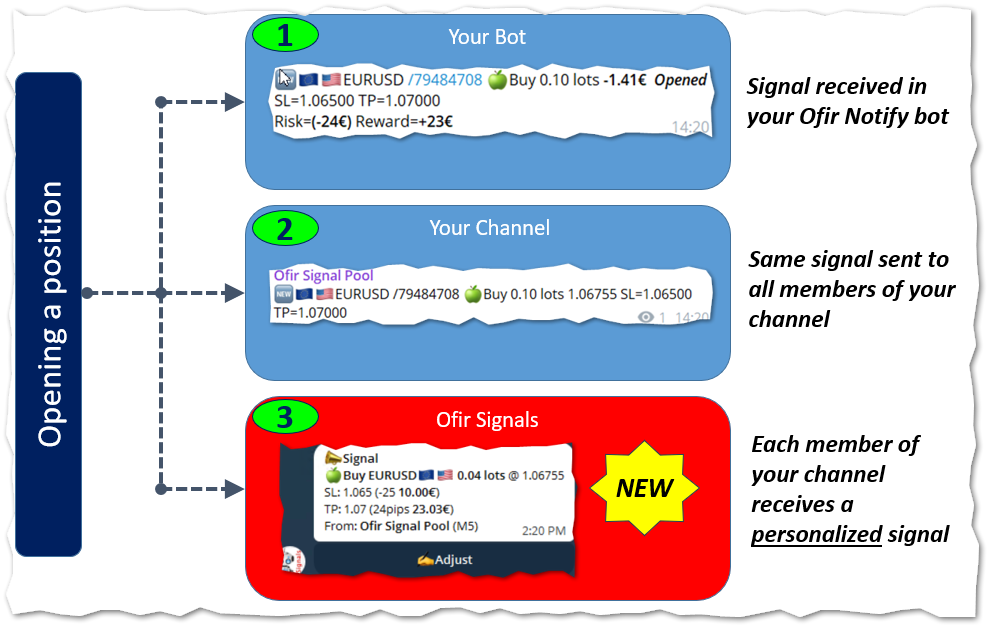
NEW :  integration with Ofir Signals to send personalized alerts

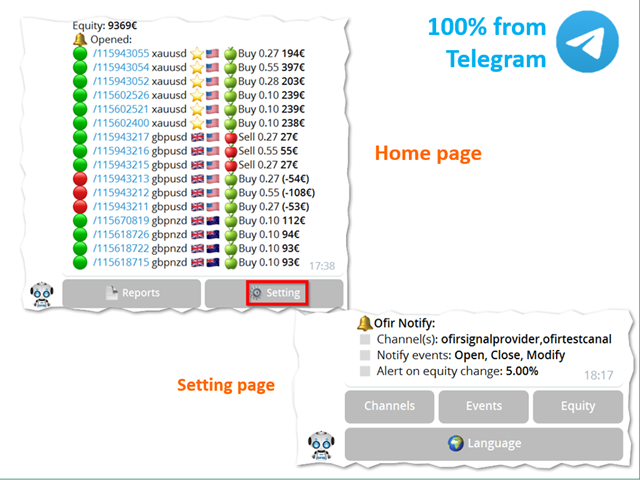
Ofir Notify is a tool which send alerts on trades to Telegram

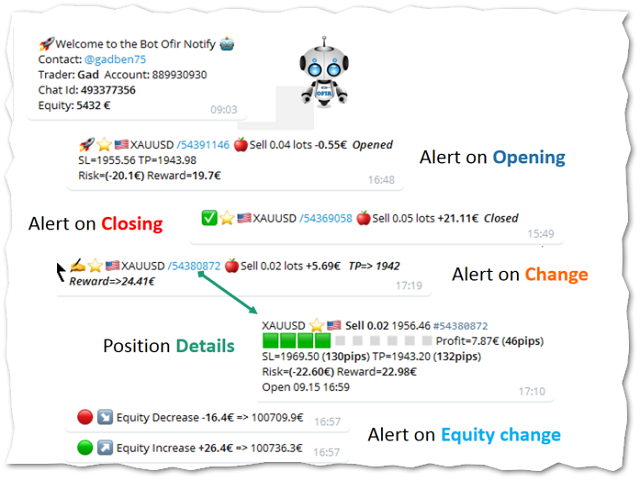
  1. Alert on any event concerning a position : Opening, Closing, modification (SL, TP)
  2. Send alerts to Chats, Groups and Channel
  3. Alert on Equity change
  4. Display Risk, Reward and progress of profit/lost for each position
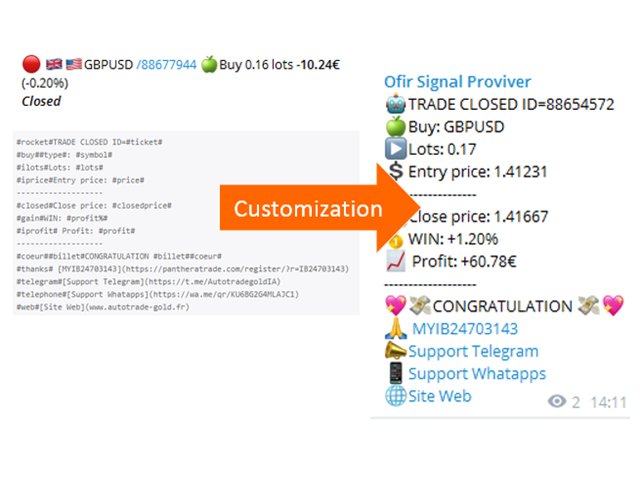
  5. Customization of alerts
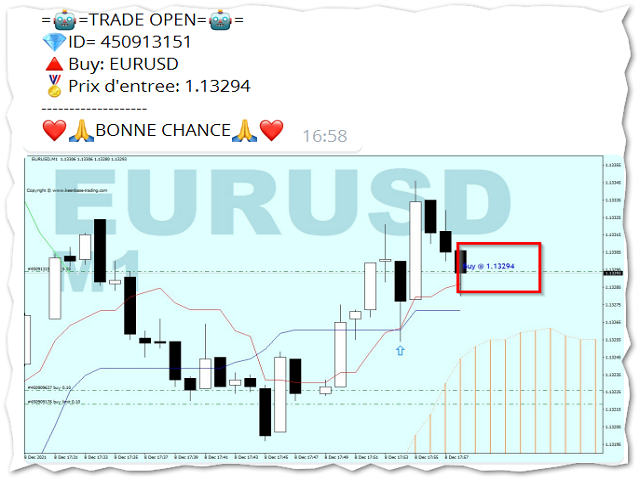
  6. Sending charts screenshots with alerts
  7. Send signals from your indicators or experts
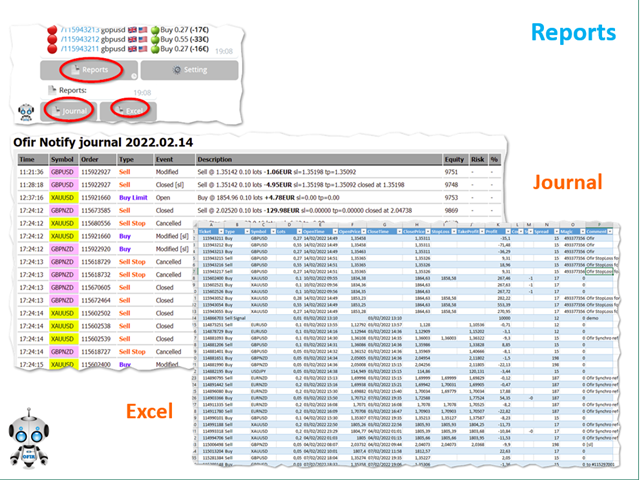
  8. Daily, weekly and monthly summaries
  9. Reply mode: send modification and closing alert as reply of the main alert (opening)
  10. Multi-lingual
  11. NEW : version 2 brings integration with Ofir Signals to send personalized alerts to your channel subscribers. Position sizes are calculated for each user, taking into account its level of risk. read more

More info in my Blog


Ofir Notify Setup instruction

  1. Open Telegram and search for "BotFather"
  2. Type /start and click/type /newbot to create a new bot
  3. Give your bot a nickname and username (e.g., nickname: MyNameAlerts and username: MyNameAlertsBot <-- username has to be ended by 'bot')
  4. Congratulations! You have created your Telegram bot.
  5. Save your bot API token (e.g. 1324115883:AAH2Z9PlxKX3Fce1e_m_w3AB7vA2EZZ_GAD)
  6. Back in MetaTrader 4, go to Tools > Options > Expert Advisors > tick 'Allowed WebRequest for listed URL' and add https://api.telegram.org.
  7. Attach the utility into your MetaTrader 4 chart and enter the Telegram Bot Token (from step 5)
  8. In Telegram open the Bot (search Bot username and start a chat with it)
  9. Press Start or enter /start
  10. You should get a message that the Chat Id is not correct. This message shows your Chat ID
  11. In Metatrader, open the utility properties and enter the Chat ID with the correct ID. This makes sure you are the only one who can use the Bot
  12. Back to Telegram, type /start . You should get information on your trading account number and equity
  13. Ofir Notify is ready to work for you

Properties

  1. Bot Api Token: The unique token of your bot. Do not share this information.
  2. Chat ID: Your Telegram Chat ID
All other settings are made directly by using the application from Telegram. More info in my Blog

Customization

Ofir Notify enables to customize the alerts sent to Chats or Channel.
This is based on using text files as templates.

Example of customization file:

#rocket#TRADE CLOSED ID=#ticket#
#buy##type#: #symbol#
#ilots#Lots: #lots#
#iprice#Entry price: #price#
-------------------
#closed#Close price: #closedprice#
#gain#WIN: #profit%#
#iprofit# Profit: #profit#
-------------------
#coeur##billet#CONGRATULATION #billet##coeur#
#thanks# [MYIB24703143](https://panthe....)
#telegram#[Support Telegram](https://t.me/....)

List of keywords to be used in template files
Keyword Description Example
#ticket# ticket numer 123456789
#symbol# symbol EURUSD
#flag# symbol flag
....AND MUCH MORE (Blog)


Sending screenshots

This feature enables to send chart screenshots with an alert in order to show Opening or Closing positions in a chart.

Integration with your own indicators and experts

This utility can be used by your own indicators and EA to send signals to Telegram. They just have to create a text file, containing the signal, to the following directory:
<Data Folder>/OfirNotify/<Your trading account Number/Inbox
You can use the following code in your indicator or EA:

string directory="Ofir Notify/"+IntegerToString(AccountInfoInteger(ACCOUNT_LOGIN))+"/Inbox";
string filename="Test.txt";
string signal="BUY EURUSD 1.20202 SL=1.201 TP=1.203";
saveStringFile(signal,directory+"/"+filename);
bool saveStringFile(string s,string fileName)
  {
   int handle=FileOpen(fileName,FILE_WRITE|FILE_TXT);
   if(handle==INVALID_HANDLE)
      return(false);
   FileWriteString(handle,s);
   FileClose(handle);
   return(true);
  }


Рекомендуем также
[ MT5 Version ] [ Discord Signals ]  MT4 to Telegram Signals Connect your broker account with Telegram and stop missing important notifications.  Would you like to receive   Telegram   notifications? Are you looking for a simple way to share trade signals with your followers? Do you need to start documenting your trades with an automated trading diary? This utility is simple to use and supports a wide variety of settings: Pick your desired Telegram group and enter the bot token and the chat id G
MQL Tool "Ofir Email to Telegram": Never Miss a Trading Alert Again! Tired of missing important alerts from your indicators and Expert Advisors (EAs)? Ofir Email to Telegram   is the solution you've been waiting for!   This revolutionary MQL tool automatically forwards all email alerts from your indicators and EAs directly to your Telegram account. Never again will you miss a trading opportunity or important notification! Here are just a few of the benefits of Ofir Email to Telegram: Quick and e
Mirror controller
Eugenio Bravetti
2 (1)
The new version of  MirrorSoftware 2021  has been completely rewriten and optimized.  This version requires to be loaded only on a single chart because  it can detect all actions on every symbol and not only the actions of symbol where it is loaded. Even the  graphics and the configuration mode  have been completely redesigned. The MirrorSoftware is composed of two components (all components are required to work):  MirrorController  (free indicator): This component must be loaded into the MASTER
FREE
Rainbow MT4 is a technical indicator based on Moving average with period 34 and very easy to use. When price crosses above MA and MA changes color to green, it’s a signal to buy. When price crosses below MA and MA changes color to red, it’s a signal to sell. The Expert advisor ( Rainbow EA MT4) based on Rainbow MT4 indicator, as you can see in the short video below is now available here .
FREE
Hello Traders! Version 3.0 of the script has been released!  What's new?  Thanks to your suggestions I have inserted these changes to the tool: 1 - Data input are now date picker, it will be easier and faster to set the data export period; 2 - A message box will check that there is not a file with the same name in your folder; 3 - Error message to check that data insert are correct. If you like this product, take a look to the FULL INTERFACE!   MT4 To Excel Interface This script is a very usefu
PZ Trade Pad EA
PZ TRADING SLU
4.29 (31)
Clos Утилита PZ Trade Pad EA позволяет торговать с помощью панели прямо на ценовом графике. Продукт имеет встроенное управление риском и может работать с уже открытыми сделками. Возможность совершать сделки прямо на ценовом графике Управление капиталом Возможность установки стоп-уровней Закрытие всех открытых сделок в один клик Удаление всех отложенных ордеров в один клик Частичное закрытие прибыльных сделок в один клик Без входных параметров. Применение Утилита проста в использовании. Выберите
FREE
Данный индикатор позволяет держать перед глазами все жизненно важные показатели счета, а также оповещает о некоторых событиях в соответствии с пользовательскими настройками. Держите руку на пульсе торговли. Элементы управления На основной панели индикатора отображаются следующие количественные показатели: символ графика, цены bid/ask, спред, свободная маржа, средства, общее количество ордеров и общая прибыль/убыток. Помимо этого, в этом окне также есть две кнопки: Alarm и Mute. Кнопка alarm зап
FREE
Every trader is watching over his account over and over.... trying to anlayse every system he or she has. With this tool you are able to  export your complete history of every account export withdrawls / deposits / rebates to a separate file export account status with balance / equity / current drawdown recalculate micro to standard lots / profits ...  export decimal by "." or ","  combine a series of Magic Numbers to one unique Magic Number   filter to ignore OrderComments.
================================ ENGLISH MANUAL ================================ Product Name: One-Click Close Utility v9.4 Developer: Gemini Partner Version: 9.40 Platform: MetaTrader 4 Type: Expert Advisor I. PRODUCT OVERVIEW --------------- One-Click Close is a professional order management utility designed for  MetaTrader 4 platform. It provides rapid batch closing operations through  intuitive button interface, integrated with intelligent risk management  system. Suitable for both manual
Quantum Falcon Signal Free is a smart visual trading indicator for MetaTrader 4 designed for Forex and Gold traders. The indicator combines: • Trend analysis • RSI momentum confirmation • MACD momentum filtering • ATR volatility filtering • Higher timeframe confirmation • Smart exit signal detection Main Features: • Smart Buy and Sell signals • Exit Buy / Exit Sell alerts • Real-time dashboard on chart • Professional candle arrows • Multi-timeframe trend confirmation • ATR market volatility filt
FREE
Reverse copier is a tool that will open opposite buy/sell orders from your master account. It will help you with low profit EA's that lose consistenly and turn it to wins. Feel free to ask for new functions/features and I will add it. Now it's a simple MT5 to MT4 bridge with straightforward logic of one position open/close.  How to install: https://www.mql5.com/en/market/product/141604
FREE
MT4 to Discord Signals
Diego Arribas Lopez
5 (1)
[ MT5 Version ] [ Telegram Signals ]  MT4 to Discord Signals Connect your broker account with Discord and stop missing important notifications.  Would you like to receive Discord notifications? Are you looking for a simple way to share trade signals with your followers? Do you need to start documenting your trades with an automated trading diary? This utility is simple to use and supports a wide variety of settings: Pick your desired Discord channel and enter its webhook URL Get notified when or
KFX Dashboard EA
Peter Kariuki Thande
** Automatically Adds to your existing trades that you open ** KFX Dashboard EA monitors Price Action using Candle Direction + Moving Average on Multiple currency pairs (selected by you) and on Multiple Timeframes (selected by you). The dashboard also reveals Currency Strength of pairs based on your Moving Average selection. KFX Dashboard EA option to set Stop Loss(SL) and Take Profit(TP) based on your selected Timeframe and ATR / Points settings. Trailing stop by ATR / Points also available (s
Trade History Exporter automatically exports trade history to a CSV (comma separated values) file. Trade History Exporter: - automatically exports trade history every time a trade is closed - allows you to manually force an export by using the "W" key on your keyboard - can use Order Comments as Magic Numbers - useful for instance when using a Trade Copier - calculates the Net Profit per trade
UR Control Panel
Krzysztof Jan Debski
5 (2)
Панель управления УР   Панель управления UR — это инструмент, которым я хочу поделиться с вами БЕСПЛАТНО. Это интерактивная панель, которая помогла мне в моей торговле и каждый день ускоряла сканирование рынка. Надеюсь, это соответствует вашим потребностям! Как пользоваться панелью управления УР? Это подвижная двойная панель с изменяемым размером, из которой: - Один из них показывает силу валюты на заданном таймфрейме - Второй позволяет опционам перемещаться между символами и таймфреймами на
FREE
Take a Break is a comprehensive account protection and risk management tool for MetaTrader. It acts as a kill switch that automatically pauses your EAs when drawdown limits are hit, keeping your account safe during high volatility and news events . Key features: Equity protection and balance protection with customizable thresholds Daily loss limit and daily profit target to stay within your risk rules Daily high watermark — locks in your highest equity/balance each day and enforces maximum drawd
FREE
OpenOrders
Andrey Chiganaev
Смысл данного скрипта в том, что вы очень быстро и с легкостью сможете заключать сделки (выставлять ордера) на рынке. Что умеет делать скрипт Покупать и продавать по рыночной цене; Выставлять отложенные ордера: Buy/Sell Limit и Buy/Sell Stop; Откроет сделку с объемом, который вы зададите; Рассчитывать и выставлять TakeProfit; Рассчитывать и выставлять StopLoss; Сам определяет, сколько знаков после запятой; Сам определяет инструмент, на который нанесли скрипт. Что вы получите вместе со скриптом
PropFolio Command Manager Pro | The Ultimate Multi-Symbol Arrow Execution Terminal Stop staring at the charts waiting for your custom indicator arrows to appear. PropFolio Command Manager Pro is an institutional-grade, multi-symbol execution terminal that instantly automates your favorite custom indicator. Simply type the name of your arrow indicator into the settings, and the Command Manager will scan up to 30 currency pairs, indices, or metals simultaneously. When your arrow fires, the EA veri
This indicator alerts you when/before new 1 or 5 minute bar candle formed. In other words,this indicator alerts you every 1/5 minutes. This indicator is especially useful for traders who trade when new bars formed. *This indicator don't work propery in strategy tester.Use this in live trading to check functionality. There is more powerful Pro version .In Pro version,you can choose more timeframe and so on. Input Parameters Alert_Or_Sound =Sound ----- Choose alert or sound or both to notify y
FREE
Screen logger
Sergey Likho
4.4 (5)
Screen logger with telegram — делает скриншоты всех открытых графиков MetaTrader 4.   Зачем нужен Учет поступающих котировок от брокера. В случае каких-либо корректировок этот момент будет зафиксирован Проверить работу индикатора и заметить случаи перерисовки или затирния сигналов Ведение собственного учета изменения торговых показателей на счете Создание видео записей реальной торговли из полученных снимков Преимущества Потребляет значительно меньше ресурсов чем любые программы записи экрана Ум
FREE
Tetris
Taras Slobodyanik
5 (1)
Игра Тетрис — известнейший тайм киллер теперь и в МТ. Игра развивает активную логику, внимание и скорость принятия решений. Это классический вариант игры, без излишеств, но вы все же сможете настроить размер стакана, масштаб игры, цвет фигур, и желаемую скорость. Игра сделана как индикатор. Клавиши управления: "WASD" или "Cursor" или "NUMPAD"; S — начало игры; C — продолжить предыдущую игру; P — пауза вкл/выкл; Space — бросить фигуру; Esc— выход в меню.
FREE
HMA Trend
Pavel Zamoshnikov
4.55 (71)
Трендовый индикатор, базирующийся на скользящей средней Хала (Hull Moving Average - HMA) с двумя периодами. Скользящая Хала является усовершенствованным вариантом скользящей средней, которая достаточно точно показывает момент разворота тренда, ее часто применяют в качестве фильтра сигналов. Сочетание двух периодов скользящей Хала полнее использует эти преимущества: HMA с медленным периодом определяет тренд, HMA с быстрым периодом - краткосрочные движения и сигналы в сторону тренда. Особенности
FREE
Данная панель из разряда: "Все в одном". Возможность контролировать одновременно: до 3-х символов; до 6-ти периодов; до 31-ти популярных сигналов. Возможность смотреть сумму по всем сигналам с учетом веса сигнала Версия для MetaTrader 4: https://www.mql5.com/ru/market/product/27880 Версия для MetaTrader 5: https://www.mql5.com/ru/market/product/27830 Параметры NUM_BAR - номер бара на котором происходит работа (для работы только по закрытым барам параметр > 0). timeframe_1....timeframe_6 - пара
FREE
С легкостью возьмите под контроль свою торговую рутину с революционным менеджером времени сделок. Этот мощный инструмент автоматизирует выполнение ордеров в назначенное время, изменяя ваш подход к торговле. Создавайте персонализированные списки задач для различных торговых действий, от покупки до выставления ордеров, без ручного вмешательства. Руководство по установке и вводу данных Trades Time Manager Если вы хотите получать уведомления о работе советника, добавьте наш URL в терминал MT4/MT5 (с
Самый быстрый способ поменять период. Подходит для трейдеров, использующих несколько графиков и таймфреймов. Размер форма и цвет настраиваются. Входные параметры Corner — выберите "Right lower chart corner" ("Нижний правый угол графика") в качестве угла размещения Color — цвет фона кнопки ColorText — цвет текста кнопки ColorOn — цвет фона кнопки для текущего периода ColorOnText — цвет текста кнопки для текущего периода Font — шрифт Arial, Verdana... FontSize — размер шрифта в пикселях DistanceX
FREE
Утилита отслеживает ваши текущие советники и управляет стоп-уровнями. Вы можете настроить, какие именно советники и валюты отслеживать. Утилита предназначена в основном для советников, которые, на ваш взгляд, плохо справляются с управлением стоп-уровнями. Установите нулевое магическое число, если вы хотите, чтобы советник отслеживал также и сделки, совершенные вручную. Поддержка скрытых уровней стоп-лосс и тейк-профит Поддержка динамического стоп-лосс на основе ATR Поддержка уровня безубытка для
Simply clock. Local time as default. There are possible to Select: Local Time /Server Time /GMT Time as input. Please take into account that the local time is the most accurate. However ,this clock always uses local time seconds, even If GMT / Server Time Is selected.  I solved it this way to get more accuracy. Delays can occur when changing minutes or hours, if local time is not selected.
FREE
MayaTradeManager предоставляет чистое и на 100% ручное управление сделками. В MayaTradeManager отсутствуют индикаторы и сигналы, поскольку все сделки совершаются исключительно пользователем. MayaTradeManager - это хороший инструмент для тех, кто располагает сигналом, но не имеет единого центра для удобного управления своими сделками. MayaTradeManager предоставляет удобное управление всеми сделками в одной простой панели. Примечание Размер лота можно редактировать в поле ввода. Нажмите на него,
FREE
Trade History Exporter automatically exports trade history to a CSV (comma separated values) file. Trade History Exporter: - automatically exports trade history every time a trade is closed - allows you to manually force an export by using the "W" key on your keyboard - can use Order Comments as Magic Numbers - useful for instance when using a Trade Copier - calculates the Net Profit per trade
Program for automatic placement of stop loss and take profit orders. Values are calculated as points distance from open price. BreakEven option is also included. all options could be applied to BUY, SELL separately or together. Enter values ​​in points in the fields on the right side of the menu and press dedicated button to aplly your settings. If in doubt, The instruction is displayed in the tooltip.
FREE
С этим продуктом покупают
Добро пожаловать в Trade Manager EA — лучший инструмент для управления рисками, предназначенный для упрощения, точности и эффективности торговли. Это не просто инструмент для размещения ордеров; это комплексное решение для удобного планирования торгов, управления позициями и усиленного контроля над рисками. Независимо от того, начинающий вы трейдер, опытный специалист или скальпер, нуждающийся в быстром исполнении, Trade Manager EA адаптируется к вашим потребностям и работает с любыми активами:
MT4 к Telegram Signal Provider - это простой в использовании и полностью настраиваемый инструмент, который позволяет отправлять сигналы в Telegram, превращая ваш аккаунт в поставщика сигналов. Формат сообщений полностью настраиваем! Однако для простого использования вы также можете выбрать предопределенный шаблон и включать или отключать определенные части сообщения. [ Демо ]  [ Руководство ] [ Версия для MT5 ] [ Версия для Discord ] [ Телеграм-канал ]  New: [ Telegram To MT5 ] Настройка Шаг за
The product will copy all telegram signal to MT4   ( which you are member  ) , also it can work as remote copier.  Easy to set up, copy order instant, can work with almost signal formats, image signal, s upport to translate other language to English Work with all type of channel or group, even channel have "Restrict Saving Content", work with  multi channel, multi MT5 Work as remote copier: with signal have ticket number, it will copy exactly via ticket number. Support to backtest signal. How to
TradePanel MT4
Alfiya Fazylova
4.84 (95)
Trade Panel — это многофункциональный торговый помощник. Приложение содержит более 50 торговых функций для ручной торговли и позволяет автоматизировать большинство торговых операций. Перед покупкой вы можете протестировать демоверсию на демо-счете. Скачать пробную версию приложения для демонстрационного аккаунта: https://www.mql5.com/ru/blogs/post/750864 . Полная инструкция здесь . Торговля. Позволяет совершать торговые операции в один клик: Открыть отложенные ордера и позиции с автоматическим р
PZ Trade Pad Pro MT4
PZ TRADING SLU
3.67 (3)
Это визуальная торговая панель, которая помогает вам легко размещать сделки и управлять ими, избегая человеческих ошибок и повышая вашу торговую активность. Он сочетает в себе простой в использовании визуальный интерфейс с надежным подходом к управлению рисками и положением [ Руководство по установке | Руководство по обновлению | Устранение неполадок | FAQ | Все продукты ] Удивительно простой в использовании Торгуйте легко с графика Торгуйте с точным управлением рисками, без проблем Сохранение
Trade Manager MT4 DaneTrades
Levi Dane Benjamin
4.09 (11)
Trade Manager, который поможет вам быстро входить и выходить из сделок, автоматически рассчитывая риск. Включает функции, которые помогут предотвратить чрезмерную торговлю, торговлю из мести и эмоциональную торговлю. Сделками можно управлять автоматически, а показатели эффективности счета можно визуализировать в виде графика. Эти функции делают эту панель идеальной для всех трейдеров, занимающихся ручной торговлей, и помогают улучшить платформу MetaTrader 4. Многоязычная поддержка. Версия MT5  |
Custom Alerts AIO: Универсальный сканер рынка — Без настройки Обзор Custom Alerts AIO — это самый быстрый и простой способ отслеживать рыночные сигналы в реальном времени на множестве инструментов без дополнительной настройки и без необходимости покупать другие продукты. В состав входят все необходимые индикаторы от Stein Investments, что делает этот инструмент идеальным решением «всё в одном» для трейдеров, ценящих простоту и эффективность. Просто установите на график и сразу получайте сигнал
ManHedger MT4
Peter Mueller
5 (2)
THIS EA IS A SEMI-AUTO EA, IT NEEDS USER INPUT. Manual & Test Version Please TEST this product before   BUYING  and watch my video about it. Contact me for user support or bug reports, or if you want the MT5 version! MT5 Version I do not guarantee any profits or financial success using this EA. With this Expert Advisor, you can: Implement your own   Zone Recovery   strategy to capitalize on trending markets. Create   Grid   trading strategies, to profit from ranging markets. Place orders easil
Unlimited Trade Copier Pro - это мощный инструмент для удаленного копирования сделок между несколькими счетами MetaTrader 4/MetaTrader 5, расположенными удаленно друг от друга, по сети интернет. Это идеальное решение для провайдеров сигналов, которые хотят поделиться своей торговлей с другими трейдерами по всему миру. Один поставщик может копировать сделки на неограниченное количество счетов-получателей, а один получатель также может копировать сделки неограниченного количества провайдеров. Пост
RedFox Copier Pro
Rui Manh Tien
4.7 (10)
Time saving and fast execution Whether you’re traveling or sleeping, always know that Telegram To Mt4 performs the trades for you. In other words, Our   Telegram MT4 Signal Trader  will analyze the trading signals you receive on your selected Telegram channels and execute them to your Telegram to MT4 account. Reduce The Risk Telegram To Mt4   defines the whole experience of copying signals from   Telegram signal copier to mt4 platforms. Users not only can follow all instructions from the signa
The product will copy all  Discord  signal   to MT4   ( which you are member  ) , also it can work as remote copier.  Easy to set up. Work with almost signal formats, support to translate other language to English Work with multi channel, multi MT4. Work with Image signal. Copy order instant, auto detect symbol. Work as remote copier: with signal have ticket number, it will copy exactly via ticket number. How to setup and guide: Let read all details about setup and download Discord To MetaTrader
MT4 to Discord Signal Provider — это удобный, полностью настраиваемый инструмент, предназначенный для отправки торговых сигналов напрямую в Discord. Этот инструмент превращает ваш торговый счет в эффективного поставщика сигналов. Настройте формат сообщений под свой стиль! Для удобства выберите из предварительно разработанных шаблонов и решите, какие элементы сообщения включить или исключить. [ Демо ] [ Руководство ] [ Версия MT5 ] [ Версия Telegram ]  New: [ Telegram To MT5 ] Настройка Следуйте
EchoTrade Telegram to MT4 Copier
Perpetual Chinemerem Vincent
5 (2)
EchoTrade Telegram to MT5 Copier Seamless, Instant, and Reliable Signal Copying - Direct from Telegram to MetaTrader 4! The product does not run in the strategy tester but you can get free trial version   here  for testing before purchase. Tired of manually executing trades from Telegram signals? EchoTrade automates the process, instantly copying trades from any Telegram channel or group directly into your MT5 account—accurately, efficiently, and without delay. Key Features: Universal Compatib
Riskless Pyramid
Snapdragon Systems Ltd
5 (1)
Introduction This powerful MT4 trade mangement EA offers a way potentially to aggressively multiply trade profits in a riskfree manner. Once a trade has been entered with a defined stoploss and take profit target then the EA will add three pyramid add-on trades in order to increase the overall level of profit. The user sets the total combined profit target to be gained if everything works out. This can be specified either as a multiple of the original trade profit or as a total dollar amount. Fo
VirtualTradePad PRO SE MT4 — расширенная торговая панель и рабочее пространство на графике для MetaTrader 4 VirtualTradePad PRO SE — это профессиональная торговая панель и рабочая среда управления сделками для MetaTrader 4 . Она помогает трейдерам быстрее открывать, сопровождать, защищать, закрывать и анализировать сделки из одного интерфейса на графике. Продукт создан для активных ручных трейдеров, которым нужно больше, чем простой набор кнопок. PRO SE объединяет исполнение в один клик, отложен
Специальное предложение для трейдеров – скидка 40% Advanced Trade Manager – универсальное решение для более быстрой, умной и безопасной ручной торговли. Преобразуйте свою ручную торговлю с помощью NextGen Trade Manager AI – профессиональной панели на графике, которая объединяет мгновенное исполнение ордеров, визуальное планирование сделок и мощное управление рисками в один интуитивно понятный инструмент. Исполняйте ордера, управляйте рисками и защищайте прибыль быстрее, чем когда-либо, не пок
Ultimate Trailing Stop EA
BLAKE STEVEN RODGER
4.33 (15)
This EA Utility allows you to manage (with advanced filtering) unlimited open orders (manual or EA) with 16 trailing stop methods: fixed, percent, ATR Exit, Chandelier Exit, Moving Average, Candle High Low Exit, Bollinger Bands, Parabolic, Envelope, Fractal, Ichimoku Kijun-Sen, Alligator, Exit After X Minutes or Bars, RSI and Stochastic. The trailing stop can be either real or virtual, and you can exit fully or with a partial close percent on touch or bar close.  Moreover, you can add (overrid
TradeMirror - это советник-копировщик для платформы MT4/MT5. Руководство по использованию Нажмите на ссылку Руководство по Trademirror , чтобы посмотреть больше инструкций. Почему TradeMirror Мы понимаем важность безопасности, стабильности и конфиденциальности для финансового программного обеспечения, поэтому мы приложили максимум усилий для детального укрепления этих трех элементов: Предоставляет удобный графический интерфейс, которым легко управлять Фокус на конфиденциальности и безопасности,
MT4 Professional Copy Trading System (Версия MT4) Сверхбыстрый LOCAL копир сделок промышленного уровня для профи и мульти-аккаунтов. Промышленная LOCAL-архитектура Работа в одной среде Windows (тот же ПК / та же Windows VPS). Низкая задержка, высокая стабильность, 24/7. Master / Slave / Self + Cross Copy (MT4 ↔ MT5) Master/Slave/Self-Copier. MT4→MT4, MT4→MT5, MT5→MT4, MT5→MT5. Важно: для MT4↔MT5 нужны обе версии (MT4 и MT5). Что делает Копирует открытия/изменения (SL/TP)/закрытия в реальном
Smart Channel M4
Vahidreza Heidar Gholami
The trend in the market can be predicted using trend lines but the problem is you don’t know where exactly the price is going to touch the trend line where you can put your pending orders on. Smart Channel Expert Advisor makes it possible to put an advanced channel around the price data, which can be configured to handle placing orders, opening and closing positions, managing risk per trade, spread, slippage, and trailing stop-loss and take-profit automatically. Features Money Management (Calcul
Local Trade Copier EA — это решение для индивидуальных трейдеров или менеджеров по работе с клиентами, которым необходимо выполнять торговые сигналы из внешних источников или которым необходимо управлять несколькими счетами одновременно, без необходимости использования МАМ или ПАММ-счета. Он копирует до 8 основных учетных записей на неограниченное количество подчиненных учетных записей. [ Руководство по установке | Руководство по обновлению | Устранение неполадок | Часто задаваемые вопросы | Вс
MultiOrder Assistent V3.0   - Your professional trading assistant for MetaTrader 4 The  MultiOrder Manager  is a powerful trading tool designed to optimize your trading while managing risk efficiently. With intuitive features and a user-friendly interface, this Tool is ideal for traders who want to manage multiple orders simultaneously without losing track.   Symbols: FX pairs, gold and cryptocurrencies Here you get a detailed description of the parameters and functions Manual     Features and
Comprehensive on chart trade panel with the unique ability to be controllable from mobile as well. Plus has a library of downloadable configuration, e.g. exit rules, extra panel buttons, pending order setup and more. Please see our product video. Works with all symbols not just currency pairs. Features On chart panel plus controllable from free app for Windows, iPhone and Android Built-in script engine with library of downloadable configuration, e.g. add 'Close All Trades in Profit' button, exit
Length Movement
Pavel Verveyko
5 (1)
Измеряет длину выбранного движения в пунктах, показывает время существования движения, а также скорость движения.     Выводит среднее значение каждого показателя.     Предназначен д ля вычисления предполагаемой цели на основании типичных движений рынка. Предполагаемая цель даст информацию о соотношении размера стопа к возможной прибыли и позволит не открывать позиции с маленькой ожидаемой прибылью. А также поможет определить точку, в которой логичнее закрыть позицию. Построение линии : нажима
Ultimate Trade Copier
BLAKE STEVEN RODGER
5 (2)
This trade copy utility allows you to instantly and seamlessly replicate and synchronize unlimited orders from multiple master accounts to multiple slave accounts on your local machine. You can create custom channels (or portfolios) with advanced filtering capabilities to copy from multiple master accounts to multiple slave accounts. Moreover, you can tailor these channels with a range of lot sizing and trade condition options to ensure that copied trades outperform the original source. You can
Trader Evolution MT4
Siarhei Vashchylka
5 (2)
"Trader Evolution" - Утилита, предназначенная для трейдеров, которые используют в своей работе волновой и технический анализ. Одна вкладка утилиты способна управлять капиталом и открывать ордера, а другая - помогать в построении волн Эллиотта, уровней поддержки и сопротивления, а также линий тренда. Инструкция/Мануал ( Обязательно читайте перед приобретением ) | Версия для МТ5 Преимущества 1. Торговля в несколько кликов. В панели доступны немедленные и отложенные ордера 2. Управление капиталом
Rocket FX Trading Manager PRO Note: Once you download the manager, message me for the background files The Ultimate All-in-One Trade Management Solution for MetaTrader 4 Version:   4.5 |   Platform:   MetaTrader 4 |   Category:   Utility / Trade Manager   Overview Rocket Fx Trading Manager v4.5 is a comprehensive, all-in-one trade management system designed to transform your trading experience. This powerful utility combines   intelligent position sizing ,   multi-target order placement
The Expert Advisor will help you forward all pop-up alert with screenshot from  MetaTrader 4 to Telegram channel/ group, also forward all notifications to Telegram. Parameters  -  Telegram Bot Token - create bot on Telegram and get token.  -  Telegram Chat ID  - input your Telegram user ID,  group / channel ID  -  Forward Alert - default true, to forward alert.  -  Send message as caption of Screenshot - default false, set true to send message below Screenshot  How to setup and guide  - Telegram
Automate Risk Management with Smart Trailing Stop Manager for MetaTrader 4 Looking for MetaTrader 5 version? I t is available separately in the Market:   Smart Trailing Stop Manager MT5 Full User Guide    –  Public channel:   CLICK HERE Struggling with manually adjusting stops and securing profits? Smart Trailing Stop Manager MT4 is an intelligent utility for MetaTrader 4 that automates trailing stops, break-even management, partial closes, and auto SL. Optimized specifically for MT4 users, it e
Crystal Trade Manager PRO – Продвинутая система контроля рисков и управления сделками для MT4 Бесплатная версия: https://www.mql5.com/en/market/product/150632 Обзор Crystal Trade Manager PRO (CTM) — это полнофункциональная утилита для MetaTrader 4, предназначенная для профессионального управления рисками, автоматизации сделок и обеспечения строгой торговой дисциплины. Система защищает капитал, контролирует дневную просадку, автоматически устанавливает SL/TP, обеспечивает быстрые команды управле
Другие продукты этого автора
This application is now replaced by Ofir Notify Light Edition (Free) or Ofir Notify (paid). Thank all for your positive feedbacks. Telegram Alerts is a tool which send alerts on trades to Telegram Alert on any event concerning a position : Opening, Closing, modification (SL, TP) Alert on Equity change Display Risk, Reward and progress of profit/lost for each position Send signals from your indicators or experts Multi-lingual If you are facing any issue using this utility, please contact me to
FREE
NEW :  integration with Ofir Signals to send personalized alerts Ofir Notify is a tool which send alerts on trades to Telegram Alert on any event concerning a position : Opening, Closing, modification (SL, TP) Send alerts to Chats, Groups and Channel Alert on Equity change Display Risk, Reward and progress of profit/lost for each position Customization of alerts Sending charts screenshots with alerts Send signals from your indicators or experts Multi-lingual NEW  : version 2 brings integration
FREE
Telegram Alerts
Gad Benisty
4.74 (19)
This application is now replaced by Ofir Notify Light Edition (Free) or Ofir Notify (paid). Thank all for your positive feedbacks. Ofir Notify is a tool which send alerts on trades to Telegram Alert on any event concerning a position : Opening, Closing, modification (SL, TP) Send alerts to Chats, Groups and Channel Alert on Equity change Display Risk, Reward and progress of profit/lost for each position Customization of alerts ( only in full edition ) Sending charts screenshots with alerts   
FREE
Ofir Blue exporter is a handy utility to export your orders history to a JSON file . You'll need it if you want to back-test Ofir blue or Ofir Hedging , using your own trading history. How it works: Install the indicator on a chart Press export all or export <current symbol> (for example GBPUSD) The indicator will create the json file in the directory files/ofirblue/export. This directory is in the common file area. The file will be automatically taken in charge by Ofir blue strategy tester
FREE
NEW :    integration with Ofir Signals to send personalized alerts Ofir Notify is a tool which send alerts on trades to Telegram Alert on any event concerning a position : Opening, Closing, modification (SL, TP) Send alerts to Chats, Groups and Channel Alert on Equity change Display Risk, Reward and progress of profit/lost for each position Customization of alerts Sending charts screenshots with alerts Send signals from your indicators or experts Multi-lingual NEW  : version 2 brings integratio
FREE
Ofir blue is the first full trading application for Telegram. It is proposed in 2 versions : OfirBlueLite (without trading) and OfirBluePro (with trading). The Pro version is still in beta (available on request).  To access Ofir Blue Lite, go to Telegram and open the bot @OfirBlueLite. All demos, tutorials and docs are available in Telegram. Join the Telegram group @OfirBlueUserGroup to get updated information and support. Features: Dashboard  ️ Account summary ️» Profit of the day ️» Eq
FREE
This free utility is a must to manage your risk. Very easy to calculate a new position size (number of lots), based on: Your equity Your risk per trade (% of equity) Your entry price Your stop loss This utility gives the right information to enter the market. A paid version is also available, Ofir Calculator+, to open the trade by a single click. Telegram Setup instruction Open your Telegram APP and search for "BotFather" Type  /start  and click/type  /newbot  to create a new bot Give your bot
FREE
Ofir Dashboard is the first level of the Ofir trading solutions. We are building the first full trading application from Telegram. The Dashboard is focused on giving you the best information about your account, positions, risk,... when you are away from keyboard. Everything is accessible from Telegram. More info in my Blog Enjoy! Ofir Notify, our very successful application for sending Notifications to Telegram (chat, channels, groups) is included in Ofir Dashboard.
MQL Tool "Ofir Email to Telegram": Never Miss a Trading Alert Again! Tired of missing important alerts from your indicators and Expert Advisors (EAs)? Ofir Email to Telegram   is the solution you've been waiting for!   This revolutionary MQL tool automatically forwards all email alerts from your indicators and EAs directly to your Telegram account. Never again will you miss a trading opportunity or important notification! Here are just a few of the benefits of Ofir Email to Telegram: Quick and e
NEW :    integration with Ofir Signals to send personalized alerts Ofir Notify is a tool which send alerts on trades to Telegram Alert on any event concerning a position : Opening, Closing, modification (SL, TP) Send alerts to Chats, Groups and Channel Alert on Equity change Display Risk, Reward and progress of profit/lost for each position Customization of alerts Sending charts screenshots with alerts Send signals from your indicators or experts Multi-lingual  NEW  : version 2 brings integrati
MQL Tool "Ofir Email to Telegram": Never Miss a Trading Alert Again! Tired of missing important alerts from your indicators and Expert Advisors (EAs)? Ofir Email to Telegram is the solution you've been waiting for! This revolutionary MQL tool automatically forwards all email alerts from your indicators and EAs directly to your Telegram account. Never again will you miss a trading opportunity or important notification! Here are just a few of the benefits of Ofir Email to Telegram: Quick and easy
Фильтр:
Нет отзывов
Ответ на отзыв