TradeManager Pro MT4

Introduction

Managing a trade by hand often means an order ticket, a lot calculator, a stop-loss to edit and a set of personal rules to keep in mind. Trade Manager Pro puts these tasks in one panel on your chart.

It is a manual trade manager, not an automated strategy. You decide when to enter. The panel handles order entry, position sizing, stop management and the risk limits you set for yourself.

Two design choices set it apart. First, it has a Real mode and a Virtual mode. Virtual mode is a complete simulated account with its own balance and statistics, so you can practise a routine with the same buttons and without opening any new position at your broker. Second, you can keep stop-loss and take-profit levels on your own computer instead of at the broker, and drag them on the chart.

It works on hedging and netting accounts, on any symbol and any chart timeframe.

Key features

Order entry. Market orders with one click, plus buy stop, sell stop, buy limit and sell limit orders placed at a distance in points that you type. Pending orders can be sent to the broker, or held by the panel and sent as a market order when price touches them. You can also arm the panel and click a price on the chart to place a held pending order there. Drag its line to move it.

Position sizing. Type a lot, pick one of seven presets, or switch on Auto Risk. Auto Risk calculates the lot from your stop-loss distance and a percentage of equity or balance. Three risk levels are available, 0.5, 1.5 and 3.0 percent by default, and all three can be changed.

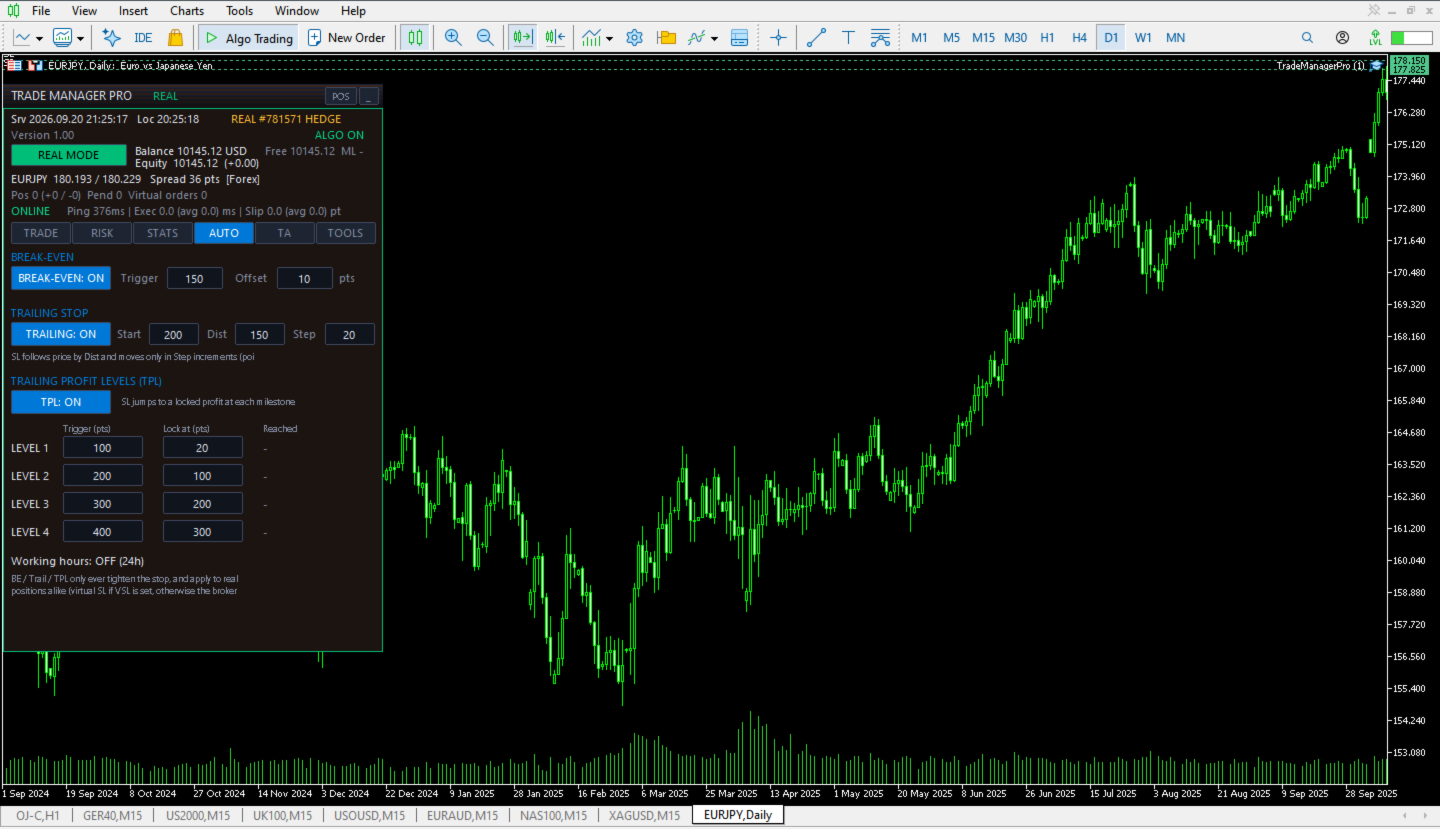
Stop management. Set stop-loss and take-profit in points, either sent to the broker or kept as virtual levels. Break-even, a trailing stop and four trailing profit levels only ever tighten a stop, never loosen it.

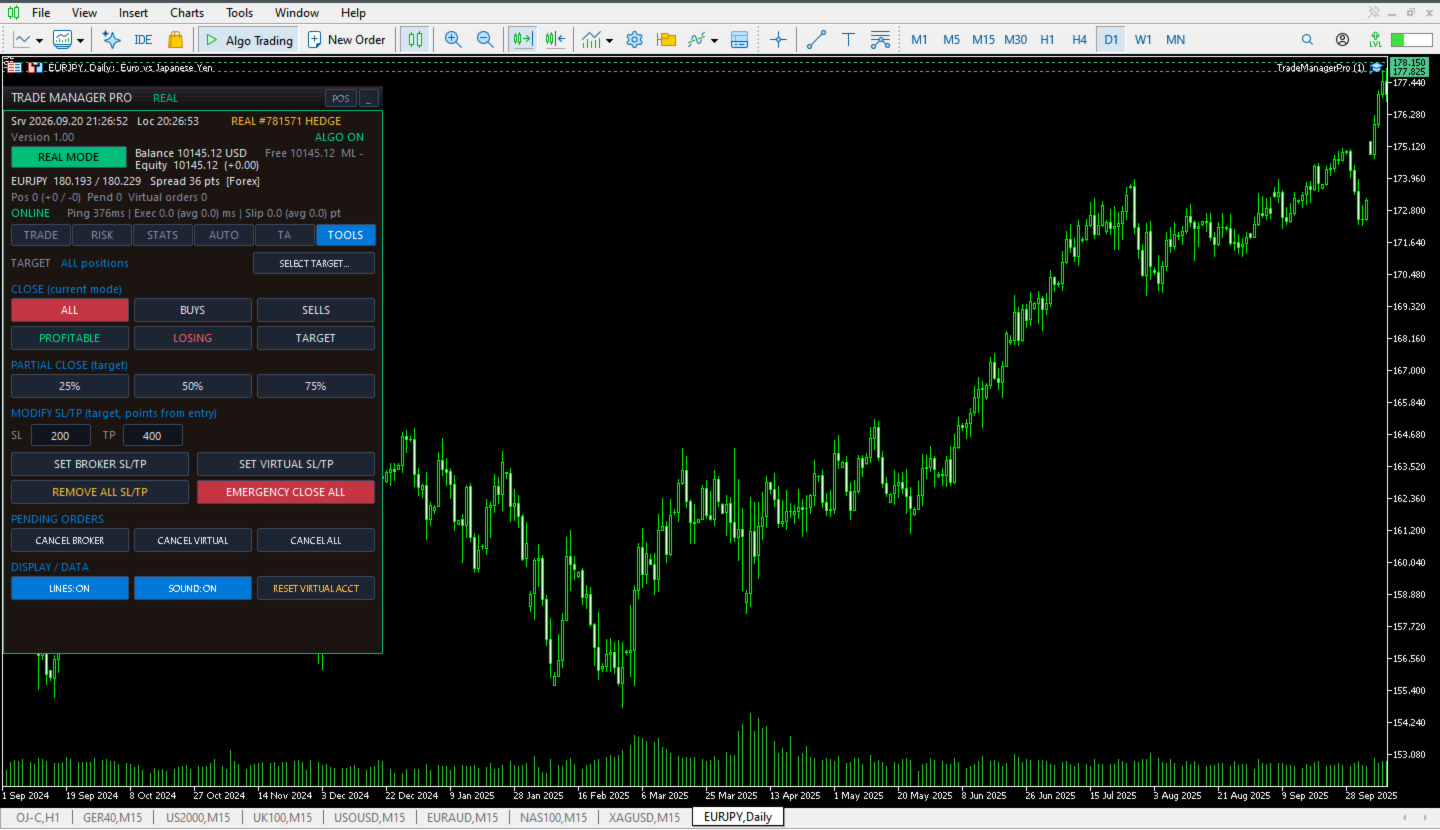
Position tools. Close all positions, only buys, only sells, only profitable, only losing, or one chosen position. Partial close at 25, 50 or 75 percent, scale in, scale out, hedge and reverse.

Templates. Scalping, Day trade and Swing templates set stop-loss, take-profit, risk level and automation in one click. Their distances are scaled for forex, metals, indices and crypto. A fourth slot stores your own settings.

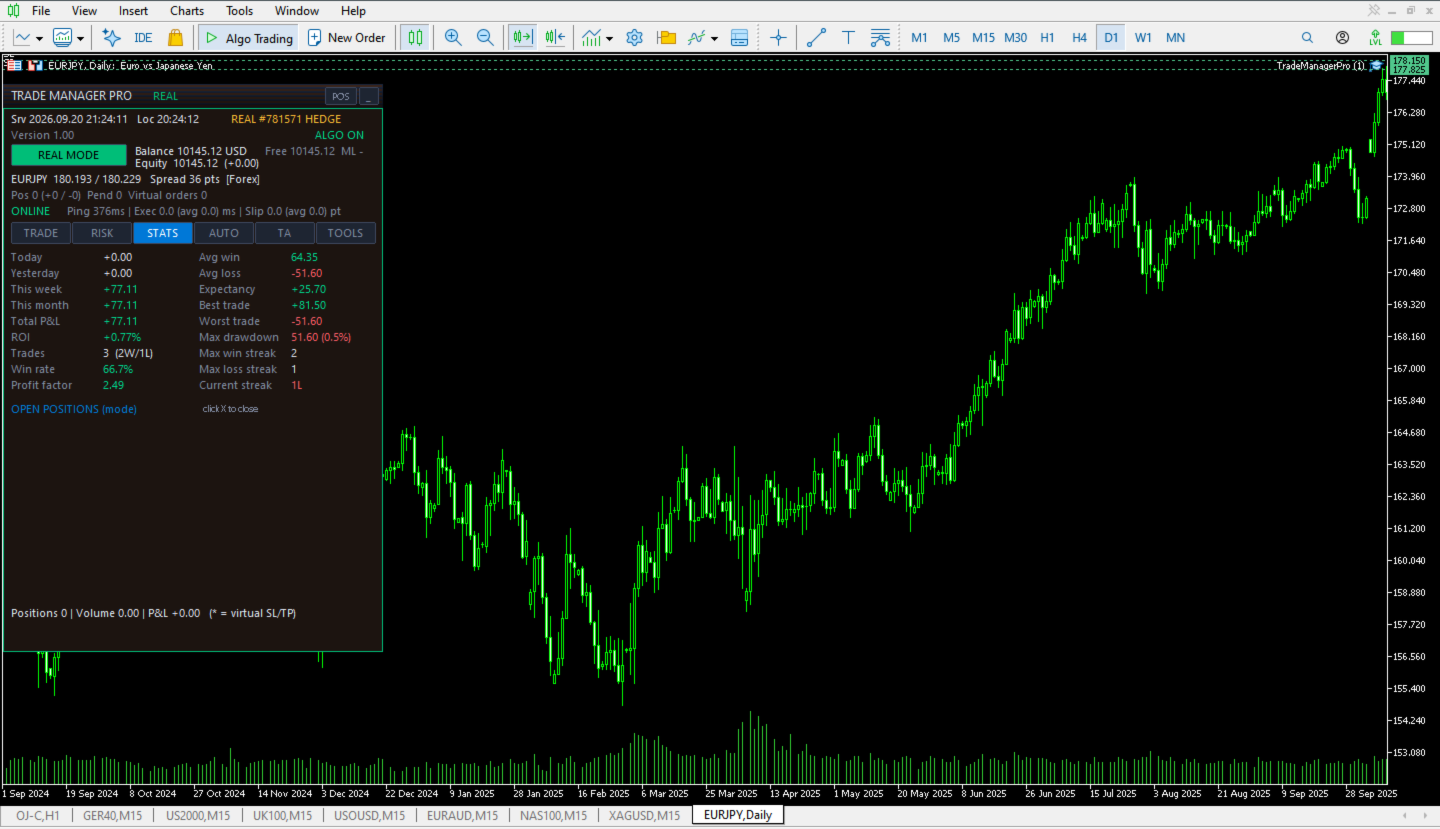
Statistics. Profit and loss for today, yesterday, this week and this month, plus win rate, profit factor, expectancy, average win and loss, streaks and maximum drawdown. A table lists open positions with a close button on each row. Each closed position counts as one trade.

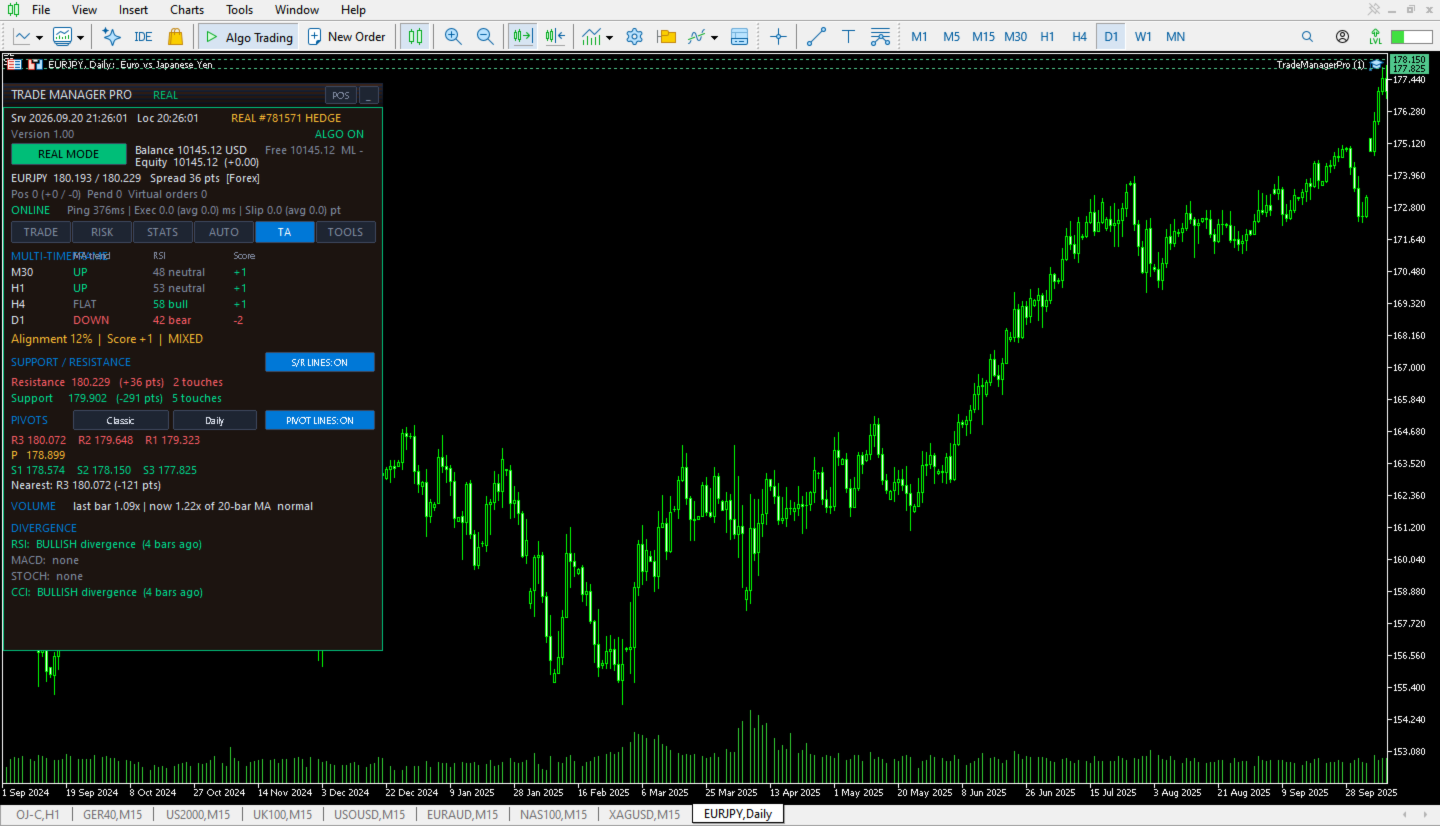
Market view. Trend and RSI on M30, H1, H4 and D1, support and resistance, four pivot point methods, volume compared with its average, and divergence between price and RSI, MACD, Stochastic or CCI. These readings are for information only. The panel does not trade on them.

Alerts and layout. On-chart banner, sound, and optional pop-up and push notifications. Drag the panel by its title bar, snap it to a corner or minimize it. Close all, reverse, emergency stop and account reset ask for confirmation. Keyboard shortcuts (hold Shift) can be switched off.

Risk management and settings

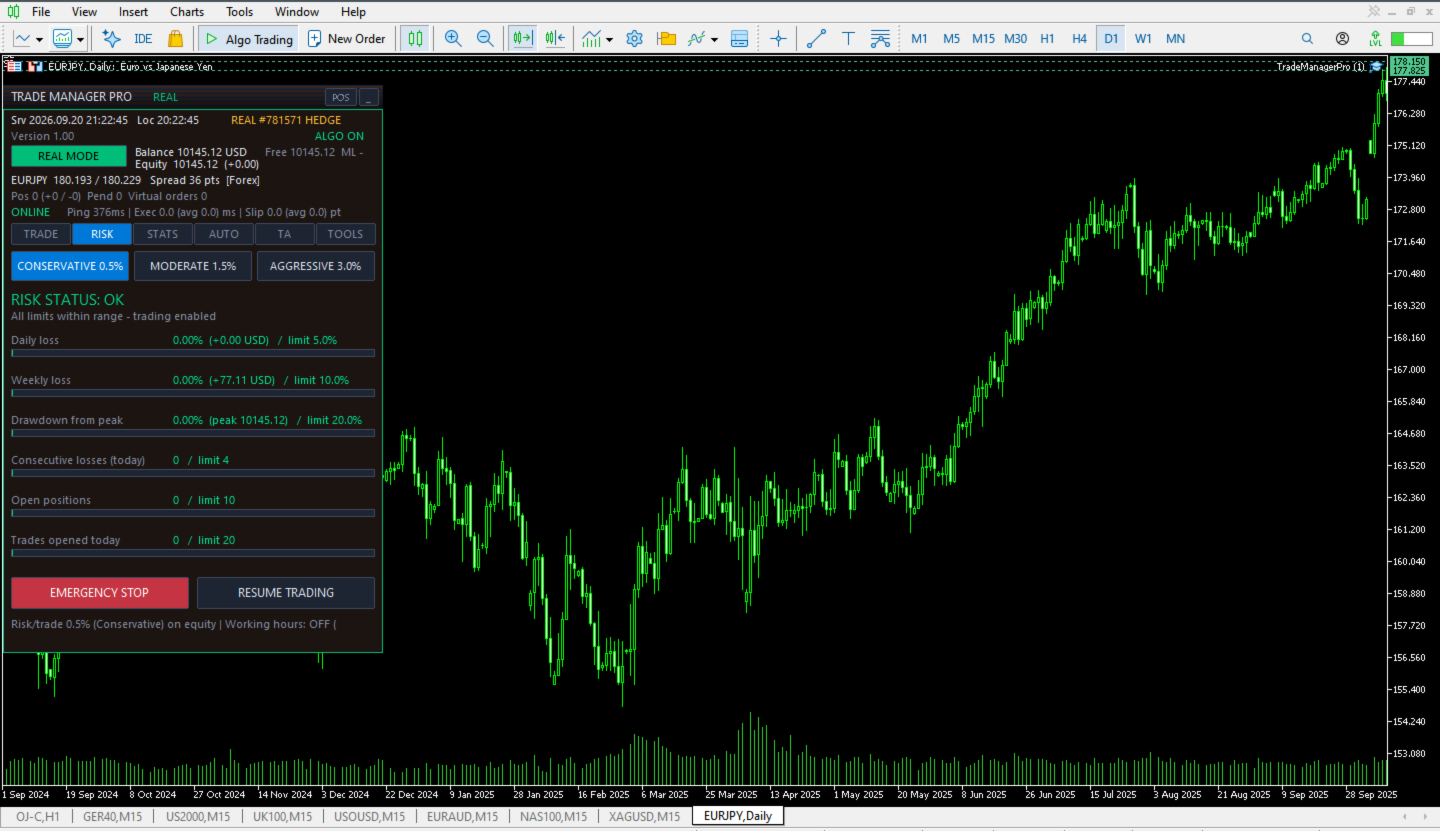
Risk limits. Six limits can be set, and each is switched off by entering 0: daily loss, weekly loss, drawdown from the equity peak, consecutive losses, open positions and trades per day. The defaults are 5 percent, 10 percent, 20 percent, 4, 10 and 20. A warning appears at 80 percent of the loss and drawdown limits. While a limit is exceeded the panel refuses new orders, and the drawdown limit stays active until you press Resume. You can also let the panel close all positions when a loss or drawdown limit is reached. Emergency Stop closes every position, cancels pending orders and halts trading until you press Resume.

Order checks. Before an order is sent the panel checks the connection, the algo trading permission, the symbol trade mode, optional working hours, the minimum reward to risk, available margin, the broker's minimum stop distance, the broker's volume cap per direction and its limit on pending orders. If a check fails, the panel says which one.

Inputs, in groups. General: magic number, order comment, managing other trades and other symbols, virtual account balance, confirmations and shortcuts. Execution: base slippage for forex, metals, indices and crypto, retries, minimum reward to risk and the share of free margin one order may use. Lot sizing and risk levels: default lot, lot limits, the three risk percentages, equity or balance basis and default stop-loss and take-profit. Automation: break-even, trailing and profit level triggers. Analysis: settings for the multi-timeframe view, support and resistance, pivots, volume and divergence. Working hours and alerts: trading window by time and weekday, banner, sound, pop-up and push.

Limits you should know about. Virtual stop-loss and take-profit work only while the panel is running on a connected terminal. If the terminal closes, the panel is removed or the connection drops, those positions have no stop at the broker. The close is a market order sent after price touches the level, so a fast market can fill beyond it. Use broker-side levels where that risk is not acceptable.

By default the panel manages every position on the chart symbol, including manual trades and trades opened by other Expert Advisors. To limit it to orders opened from the panel, turn off Manage manual trades / other EAs.

Loss limits are calculated from the trades the panel manages. The drawdown limit uses account equity.

The panel does not predict the market and does not promise any result. Trading leveraged instruments involves a risk of loss. Try the panel in Virtual mode and on a demo account before you use it on a live account.

Frequently asked questions

Does it open trades on its own?
No. Apart from pending orders that you placed yourself, it never opens a position. It can close positions: at a virtual stop, on Emergency Stop and, if you enable it, when a risk limit is reached.

Does Virtual mode send orders to my broker?
No new orders are sent. Positions that are already open in Real mode stay managed, so their virtual stops and automation keep running while the panel runs.

Which accounts and symbols does it support?
Hedging and netting accounts, and any symbol. The Hedge button needs a hedging account. On a netting account an opposite order would close the position, so the panel declines. Run one copy per symbol on each account.

Can I use it next to other Expert Advisors?
Yes. Set Manage manual trades / other EAs to false if you want it to leave their positions alone.

What happens if I close the terminal?
Broker-side orders and stops are not affected. Virtual stops stop working until the panel runs again. Settings, the virtual account and virtual stop levels are saved on your computer and restored at the next start.

Does it use DLLs or the internet?
No. It has no DLL calls and no web requests. Its files are kept in the terminal's Files folder on your computer.

Can I try it before buying?
The MetaTrader Market provides a demo that runs in the Strategy Tester. It does not run on a live chart. After purchase you can attach it to a demo account and start in Virtual mode.

How do I get started, and where do I ask questions?
Attach the panel to a demo chart, switch to Virtual mode, open a trade with a stop-loss and a take-profit, then try break-even and trailing. Set your limits on the Risk tab. When you are comfortable, move to Real mode with the minimum lot. Questions and bug reports are welcome in the Comments tab of this product. Updates are free and listed under What's New.
Рекомендуем также
Install as an EXPERT ADVISOR for it to work. This product will not work in strategy tester because it requires trades to be opened first.   Therefore, the 1 month rental option for $10 is included for you to test the product. That is the lowest price allowed by the website. The trailing stop loss (TSL) on MetaTrader 4 only works on set ranges. For example, if the TSL is set at 20 pips or 200 points, the trailing SL will move to sell/buy price only once 20 pips/200 points are gained. It does not
Полуавтоматический торговый робот Booster Seven помогает трейдеру торговат, решения о торговле в направленнии Buy или Sell принимает трейдер. У робота на графике выведенны функции Buy, Sell, Buy Stop, Sell Stop, Buy Limit, Sell limit и AUTO S/L. Также статистические параметры торговли. При выборе функции Buy торговля начнется открытием позиции Buy начальным лотом, имеющим соответствующие Stop Loss и Take Profit. Новая позиция открывается, когда цена на указанный пункт превысит отметку предыдушег
DD Stopper
Michail Manelidis
DD Stopper for MT4 | Protect Your Account from Excess Drawdown DD Stopper is a lightweight and powerful risk management utility for MetaTrader 4 that automatically closes all trades when your account drawdown reaches a defined amount in USD. Protect your capital. Trade with discipline. Eliminate emotional decisions. What This Tool Does DD Stopper continuously monitors your account and: Tracks real-time drawdown (Balance vs Equity or floating loss) Closes all open trades instantly when the
FREE
Рыночная информация и детальная статистика: анализ волатильности и ценовых баров. Ознакомьтесь с моим  Ассистентом трейдера : более 66 функций, включая этот инструмент  |   Свяжитесь со мной  если у вас есть вопросы Укажите любую валютную пару/торговый инструмент для получения информации: Рыночная информация: Текущий спред; Своп для длинных позиций (покупки); Своп для коротких позиций (продажи); Выберите таймфрейм и количество периодов для анализа изменения цены: Средняя волатильность; Максимал
Trade History Exporter automatically exports trade history to a CSV (comma separated values) file. Trade History Exporter: - automatically exports trade history every time a trade is closed - allows you to manually force an export by using the "W" key on your keyboard - can use Order Comments as Magic Numbers - useful for instance when using a Trade Copier - calculates the Net Profit per trade
News Panel
Radek Reznicek
5 (2)
News Panel  is a fully adjustable utility for Forex News. It can show upcoming news in InfoPanel as well as lable for upcoming and past news labels on the chart.  This utility also enables Upcoming news Alerts and Push notification. User can change number of upcoming news displayed, colors and many others. Instructions Alow WebRequest for Listed URLS in Metatrader Tools -> Options -> Expert Advisors tab (see screen or watch the video) Add " https://ec.forexprostools.com/ " to the list of allo
Советник DepoControl –   полный контроль над депозитом Closers   –   советник, контролирующий общее состояние счета и закрывающий ВСЕ рыночные ордера на счете при наступлении определенных условий. Советник закрывает ВСЕ ордера на счете при условиях (по прибыли): Закрывать ВСЕ ордера по общей прибыли на счете,   выраженной в деньгах . Например, в настройках указано   –   закрывать позиции при достижении прибыли в 100. Тогда советник закроет все рыночные ордера при общей прибыли на счете в 100 вал
FCK CurrencyStrength Pro
Patel Hitendrakumar Mahendrabhai
Hi Friends, " FCK Currency Strength Pro " is a auto & semi auto trading expert with direction of pair. Buy-Sell separate or multi currency in one click. The strategy of  FCK Currency Strength Pro  is a combination of custom indicator, Trendlines, Support & Resistance levels ( Price Action ) and most important secretive trading algorithm mentioned above. Download News Ex4 and csv file You need the following SDSnews.ex4 in MQL4/Libraries and the daylightsavings.csv in MQL4/Files. Only 4 of 5 copi
"Ichimoku Waves Meter"  Измеритель Волн Ишимоку  это професиональный инструмент для графического анализа с использованием действительных интерпретаций Ichimoku kinkōhyō! это графическая программа, позволяющая быстро и просто измерить пропорции между указанными точками на графике цены. Предлагаемый показатель ценового и временного диапазона является основным инструментом для анализа графика в соответствии со стратегией Ichimoku на платформе MT4. За короткий промежуток времени с помощью данного ин
Утилита отслеживает ваши текущие советники и управляет стоп-уровнями. Вы можете настроить, какие именно советники и валюты отслеживать. Утилита предназначена в основном для советников, которые, на ваш взгляд, плохо справляются с управлением стоп-уровнями. Установите нулевое магическое число, если вы хотите, чтобы советник отслеживал также и сделки, совершенные вручную. Поддержка скрытых уровней стоп-лосс и тейк-профит Поддержка динамического стоп-лосс на основе ATR Поддержка уровня безубытка для
================================ ENGLISH MANUAL ================================ Product Name: One-Click Close Utility v9.4 Developer: Gemini Partner Version: 9.40 Platform: MetaTrader 4 Type: Expert Advisor I. PRODUCT OVERVIEW --------------- One-Click Close is a professional order management utility designed for  MetaTrader 4 platform. It provides rapid batch closing operations through  intuitive button interface, integrated with intelligent risk management  system. Suitable for both manual
Trade History Exporter automatically exports trade history to a CSV (comma separated values) file. Trade History Exporter: - automatically exports trade history every time a trade is closed - allows you to manually force an export by using the "W" key on your keyboard - can use Order Comments as Magic Numbers - useful for instance when using a Trade Copier - calculates the Net Profit per trade
Close Assistant
Gheis Mohammadi
5 (2)
Close Assistant (CA)   is a utility for monitoring and closing a set of positions placed by trader or EA. It closes filtered orders in specified time or level or when a certain profit or loss of the total positions is reached. CA uses Zero Profit Lock function to save deposit when total profit falls to zero. Profit and loss levels can be set in fixed amount of account currency or percentage of balance. CA only monitor and work on filtered positions and don’t change anything else. It can use dif
SMT Trade Planner — профессиональный калькулятор рисков и панель исполнения ордеров прямо на графике MetaTrader. Он рассчитывает размер лота на основе ваших настроек риска, отображает визуальные линии входа, Stop Loss и Take Profit, которые можно перетаскивать на графике, проверяет сделку по настраиваемым правилам риска и позволяет исполнять сделки одним кликом.   Принцип работы Прикрепите Trade Planner к любому графику. Панель отображает информацию о счете и кнопки быстрого выбора риска. На гра
KFX Dashboard EA
Peter Kariuki Thande
** Automatically Adds to your existing trades that you open ** KFX Dashboard EA monitors Price Action using Candle Direction + Moving Average on Multiple currency pairs (selected by you) and on Multiple Timeframes (selected by you). The dashboard also reveals Currency Strength of pairs based on your Moving Average selection. KFX Dashboard EA option to set Stop Loss(SL) and Take Profit(TP) based on your selected Timeframe and ATR / Points settings. Trailing stop by ATR / Points also available (s
Introducing the OrderManager: A Revolutionary Utility for MT4 Manage your trades like a pro with the all-new Order Manager utility for MetaTrader 4. Designed with simplicity and ease-of-use in mind, the Order Manager allows you to effortlessly define and visualize the risk associated with each trade, enabling you to make informed decisions and optimize your trading strategy.  Key Features: Risk Management: Define the risk of your trades quickly and easily, allowing you to make better decisio
Stop checking charts one by one to discover which markets deserve your attention. Multi Market Scanner monitors multiple symbols and timeframes from a single panel, compares their technical conditions, and organizes the results by signal, score, alignment, and freshness. This helps you focus your analysis on the most relevant instruments without wasting time reviewing markets with no clear conditions. It is a market analysis and decision-support tool. It does not open, modify, or close trades: t
Spread Costs указывает размер убытка от спреда, а Swap Benefits - объем прибыли по ночным позициям. Spread Costs особенно важен для краткосрочных трейдеров, особенно скальперов, а Swap Benefits - важный индикатор для долгосрочных трейдеров. Так как спреды и свопы в платформе MetaTrader 4 указываются в пунктах, необходимо конвертировать их в валюту счета. Утилита отображает Spread Costs и Swap Benefits всех форекс-пар (включая золото XAU и серебро XAG) на разных типах счетов (USD, EUR и т.д.). Вс
PropFolio Command Manager Pro | The Ultimate Multi-Symbol Arrow Execution Terminal Stop staring at the charts waiting for your custom indicator arrows to appear. PropFolio Command Manager Pro is an institutional-grade, multi-symbol execution terminal that instantly automates your favorite custom indicator. Simply type the name of your arrow indicator into the settings, and the Command Manager will scan up to 30 currency pairs, indices, or metals simultaneously. When your arrow fires, the EA veri
One Click Trader - это инструмент для MetaTrader 4, который позволяет поднять вашу торговлю на новый уровень. Он позволяет открывать, управлять и закрывать сделки простым эффективным способом за один щелчок мыши. Стрелка вверх сворачивает панель OCT Стрелка вниз разворачивает панель OCT Стрелка вправо отображает следующую панель с дополнительными функциями Стрелка влево скрывает панель с дополнительными функциями Красная кнопка SELL позволяет открывать короткие рыночные ордера Красная кнопка SEL
Basket EA MT4
Juvenille Emperor Limited
4.33 (6)
Basket EA MT4 — мощный инструмент для фиксации прибыли и комплексная система защиты счёта, объединённые в простое и удобное решение. Его основная цель — обеспечить полный контроль над общей прибылью и убытками вашего торгового счёта, управляя всеми открытыми позициями как корзиной, а не по отдельности. Усовершённый набор функций включает уровни тейк-профита, стоп-лосса, безубытка и трейлинг-стоп. Эти параметры можно задавать как процент от баланса, фиксированную сумму в валюте счёта или в виде
Поднимите свой уровень предоставления сигналов форекс с помощью Telegram Signal Sender MT4 — мощной утилиты, разработанной для автоматизации и упрощения процесса отправки торговых сигналов в ваш Telegram-канал, идеально подходящей как для начинающих, так и для опытных поставщиков сигналов. Широко хвалится в торговых сообществах, таких как Forex Factory и Reddit’s r/Forex, и отмечается в обсуждениях на Investopedia и форумах MQL5 за эффективность в распространении сигналов, этот инструмент пользу
Одна диаграмма. Полный контроль. Перестаньте тратить время на управление объектами, цветами и настройками для каждой диаграммы отдельно.       Chart Sync Manager   , вы можете       синхронизируйте, копируйте и управляйте всеми вашими графиками MetaTrader       мгновенно — с помощью всего одной панели и нескольких сочетаний клавиш. Нарисуйте один раз и обновляйте везде. Открывайте и закрывайте диаграммы одним щелчком. Поддерживайте чистоту рабочего пространства с помощью       Управление объекта
Script to calculate equity and balance at a specific date and time.  This script makes up for a lack of MetaTrader account history, that does not show how the balance and equity changes in time. Balance calculation includes closed orders only. Equity calculation includes orders closed before and orders that are still open at the specified time. Example: date and time set to 2020/07/06 00:00. If I had a Buy 1 lot EURUSD position opened at price 1.12470 on the 2020/07/02, the program would ca
FREE
Indicator is able to alert by pop and acoustic alarm the achievement of the average price range of the last periods so as to be able to set our operation. It allows different percentage variables reached and periods of variation according to the parameters entered. Apply your reverse strategies to achieving that threshold so you get higher success rates. Indispensabile per le strategie reverse intraday.
MT4 to Telegram & Discord Notifier MT4 to Telegram & Discord Notifier is a lightweight and practical notification utility for MetaTrader 4 that automatically sends real-time trade updates to your Telegram and Discord channels. It is designed for traders who want to stay informed about trading activity without constantly watching the terminal. Once connected, the notifier delivers instant alerts whenever a trade is opened or closed, helping you monitor live activity, improve communication, and ke
FREE
Signal Provider Utility Pro (Telegram & Discord) The Professional Solution for Signal Providers. Automated Broadcasting | Smart GUI Panel | Performance Reports Stop managing your signals manually.   Signal Provider Utility Pro   is the realiable bridge between your MetaTrader 4 terminal and your community on Telegram and Discord. Designed for high-performance signal services, this tool gives you instant control over your broadcasts without ever needing to open the settings window. From   real-ti

SymbolAutoChanger PRO   There is also version for MetaTreader5 This tool allows you to automatically change the chart symbols in a row. Example: EUR → GBP → JPY → CHF → CAD → AUD → NZD You need only to set up interval in seconds between auto switch. Also, you can choose whether to switch between all symbols provided by your broker or only between symbols available in the Market Watch window. PRO version  has following featuters: Next button Previous button Pause/Continue botton With this extra
A Utility used for accounts with multiple open positions with Magic numbers added via Expert Advisors or manually. The Utility closes specific Magic number open positions when a certain profit in currency $ has been reached. The Utility also closes specific Magic numbers open positions with a break-even feature when the Expert Advisors or manually a certain amount of open positions has been placed. The Utility also closes all buy stops and sell stops when the "Take profit sum $" has been reache
FREE
Short Description A professional MT4 trade management utility for managing open trades, risk, trailing stop, break-even, partial close, daily loss guard and trade history directly from the chart. Full Description Smart Trade Manager Dashboard MT4 is a professional trade management panel built for traders who want faster control, clearer account visibility and stronger risk discipline directly from the chart. It is not a signal system and it does not open trades automatically. The dashboard focus
С этим продуктом покупают
Local Trade Copier EA MT4
Juvenille Emperor Limited
4.96 (111)
Local Trade Copier EA MT4 — это быстрый и гибкий копировщик сделок для копирования и управления сделками между несколькими счетами MetaTrader 4 на одном компьютере с Windows или Windows VPS. Он сочетает локальную синхронизацию сделок с настройками на стороне Receiver для управления размером лота, рисками, фильтрацией сделок, сопоставлением символов, управлением сделками и защитой счета. Настройте терминалы Transmitter и Receiver примерно за 1 минуту и копируйте ручные сделки или сделки, открыты
Добро пожаловать в Trade Manager EA — лучший инструмент для управления рисками, предназначенный для упрощения, точности и эффективности торговли. Это не просто инструмент для размещения ордеров; это комплексное решение для удобного планирования торгов, управления позициями и усиленного контроля над рисками. Независимо от того, начинающий вы трейдер, опытный специалист или скальпер, нуждающийся в быстром исполнении, Trade Manager EA адаптируется к вашим потребностям и работает с любыми активами:
Trade Assistant MT4
Evgeniy Kravchenko
4.43 (197)
Помогает рассчитать риск на сделку, простая установка нового ордера с помощью линий, управление ордерами с функциями частичного закрытия, 7 типов трейлинг-стопа и другие полезные функции. Дополнительные материалы и инструкции Инструкция по установке   -   Инструкция к приложению   -   Пробная версия приложения для демо счета Функция Линии   - отображает на графике линию открытия, стоп-лосс, тейк-профит. С помощью этой функции легко установить новый ордер и увидеть его дополнительные характери
Trade Indicator Assistant is a powerful MT4 utility designed to turn indicators into automated trading systems. Its main feature is the ability to automatically detect an indicator’s   BUY and SELL signal buffers , without requiring you to know the buffer numbers, search through indicator settings, or modify the indicator source code. Bonus Indicator: After purchasing Trade Indicator Assistant, contact me to receive Trade Signal Pro completely free as a bonus indicator. [Download Demo Version]
Exp COPYLOT CLIENT for MT4
Vladislav Andruschenko
4.69 (65)
Профессиональный копировщик сделок для MetaTrader 4 Быстрый, профессиональный и надежный копировщик сделок для MetaTrader 4 . COPYLOT позволяет копировать сделки Forex между терминалами MetaTrader 4 и MetaTrader 5 , обеспечивая гибкую синхронизацию для разных типов счетов и сценариев торговли. Версия COPYLOT MT4 поддерживает: MetaTrader 4 → MetaTrader 4 MetaTrader 5 Hedge → MetaTrader 4 MetaTrader 5 Netting → MetaTrader 4   Версия MT5 Полное описание + DEMO + PDF Как купить Как установить Как по
Take a Break
Eric Emmrich
5 (31)
Take a Break pauses your Expert Advisors when trading is a bad idea: before news, after a daily loss, outside your trading hours, or when a rule you wrote yourself says so. When the pause is over, your EAs simply continue. Account protection for all your EAs in one tool: news filter, drawdown and equity protection, time filter and custom rules. One EA on one chart protects the whole account, the free indicator gives every chart its own rules on top. Free demo | What is new in 26.09 | Support Ass
Trade Manager MT4 DaneTrades
Levi Dane Benjamin
4.09 (11)
Trade Manager, который поможет вам быстро входить и выходить из сделок, автоматически рассчитывая риск. Включает функции, которые помогут предотвратить чрезмерную торговлю, торговлю из мести и эмоциональную торговлю. Сделками можно управлять автоматически, а показатели эффективности счета можно визуализировать в виде графика. Эти функции делают эту панель идеальной для всех трейдеров, занимающихся ручной торговлей, и помогают улучшить платформу MetaTrader 4. Многоязычная поддержка. Версия MT5  |
Telegram to MT4 Multi-Channel Copier   автоматически копирует торговые сигналы из ваших Telegram-каналов прямо в MetaTrader 4. Без ботов, без браузерных расширений, без ручного копирования. Сигнал приходит в Telegram — и советник открывает сделку в вашем терминале за считанные секунды. А перед тем как копировать канал, встроенный бэктестер покажет, что этот канал сделал бы на вашем счёте. Продукт состоит из двух компонентов: приложения для Windows, которое слушает ваши Telegram-каналы, и этого с
MT4 к Telegram Signal Provider - это простой в использовании и полностью настраиваемый инструмент, который позволяет отправлять сигналы в Telegram, превращая ваш аккаунт в поставщика сигналов. Формат сообщений полностью настраиваем! Однако для простого использования вы также можете выбрать предопределенный шаблон и включать или отключать определенные части сообщения. [ Демо ]  [ Руководство ] [ Версия для MT5 ] [ Версия для Discord ] [ Телеграм-канал ]  New: [ Telegram To MT5 ] Настройка Шаг за
TradePanel MT4
Alfiya Fazylova
4.84 (95)
Trade Panel — это многофункциональный торговый помощник. Приложение содержит более 50 торговых функций для ручной торговли и позволяет автоматизировать большинство торговых операций. Инструкция к приложению: https://www.mql5.com/ru/blogs/post/756476 Пробная версия приложения для демо-счета: https://www.mql5.com/ru/blogs/post/750864 Как установить приложение: https://www.mql5.com/ru/blogs/post/750096 Как тестировать приложение в визуальном режиме: https://www.mql5.com/ru/blogs/post/770274 Как уст
VirtualTradePad mt4 Extra
Vladislav Andruschenko
4.85 (61)
Торговая Панель для торговли в 1 клик.  Работа с позициями и ордерами!  Торговля с  чарта  (график) или с  клавиатуры . С помощью нашей торговой панели Вы можете торговать   в один клик с графика   и совершать торговые операции в   30   раз быстрее стандартного управления в MetaTrader.  Автоматические расчеты параметров и функции, которые облегчают жизнь трейдеру и помогают трейдеру вести свою торговую деятельность в разы быстрее и удобнее. Графические подсказки и полная информация по торговым с
Копир->Удобное и быстрое взаимодействие с интерфейсом, пользователи могут использовать его сразу       ->>>> Рекомендуется использовать на компьютерах Windows или VPS Windows Функции: Разнообразные и персонализированные настройки копирования сделок: 1. Различные режимы лота могут быть установлены для различных источников сигналов. 2. Различные источники сигналов могут быть установлены для прямого и обратного копирования сделок. 3. Сигналы могут быть установлены с комментариями. 4. Следует ли ка
Скачать рабочую пробную версию Copy Cat More (Копи Кэт Мор) — копировщик сделок (Trade Copier) MT4 — это не просто локальный копировщик сделок; это полноценная система управления рисками и исполнения (risk management and execution framework), созданная для современных торговых задач. От челленджей проп-фирм (prop firm) до управления личным портфелем — он адаптируется к любой ситуации благодаря сочетанию надёжного исполнения, защиты капитала, гибкой настройки и продвинутой обработки сделок. Ко
King Trade Copier MT4
Mohammed Maher Al-sayed Mohammed Ahmed Saleh
5 (1)
King Trade Copier соединяет терминалы MetaTrader, запущенные на одном компьютере или VPS. Сделки, открытые на одном счёте, появляются на остальных. Файл содержит обе роли, поэтому одна и та же загрузка становится отправителем или получателем в зависимости от значения, которое вы зададите параметру Mode. На каждом графике панель показывает, отправляет этот терминал сигналы или принимает их, называет счёт на другой стороне, считает получателей, которые ответили, и показывает возраст последнего си
Smart Copy Local MT4
Kyra Nickaline Watson-gordon
5 (7)
Smart Copy is an Easy-to-Use EA that supports Multi Copying Metatrader4 and Metatrader5 and Local/Remote Copying. (Remote Version is coming soon) Free version is available on Smart Copy Local Free MT4 Specifications :     Real Time, Multi Terminal - Multi Account - MT4/MT5 trade copying     Copy from netting to hedge and hedge to netting is supported.     Fast and instant copy     All settings are input visually.     Easy modifying symbol names, prefix, suffix     Enable/Disable copying s
Multi Copy
Kaijun Wang
5 (1)
Копир->Удобное и быстрое взаимодействие с интерфейсом, пользователи могут использовать его сразу       ->>>> Рекомендуется использовать на компьютерах Windows или VPS Windows Основные функции: Нормальная скорость взаимодействия при копировании сделок составляет менее 0,5 с. Автоматически определять источники сигнала и отображать список учетных записей источников сигнала Автоматически сопоставлять символы, 95% наиболее часто используемых торговых символов на разных платформах (особые случаи, таки
Риск менеджер Риск менеджер - упростит отслеживание просадки и оповестит при критическом достижении указанного риска, а также закроет ордера при достижении критического (указанного) уровня риска. При превышении указанной просадки, можно выбрать два варианта событий Все ордера закрываются и фиксируется убыток. Терминал также полностью закрывается Вместо фиксирования убытка открывается противоположный ордер - и происходит локирование. Ни один ордер не закрывается. Логику раскрытия локов можно п
Trade Dashboard MT4
Fatemeh Ameri
4.96 (54)
Trade Dashboard simplifies how you open, manage, and control your trades, with built-in lot size calculation. It allows you to execute trades, manage risk, and control positions directly on the chart, with tools such as partial close, breakeven, and trailing stop. Designed to reduce manual work and help you stay focused on your trading decisions. A demo version is available for testing. Detailed explanations of features are provided within the MQL5 platform. Installation instructions are include
The product will copy all telegram signal to MT4   ( which you are member  ) , also it can work as remote copier.  Easy to set up, copy order instant, can work with almost signal formats, image signal, s upport to translate other language to English Work with all type of channel or group, even channel have "Restrict Saving Content", work with  multi channel, multi MT5 Work as remote copier: with signal have ticket number, it will copy exactly via ticket number. Support to backtest signal. How to
News Filter EA: Advanced Algo Trading Assistant News Filter EA is an advanced algo trading assistant designed to enhance your trading experience. By using the   News Filter EA , you can integrate a Forex economic news filter into your existing expert advisor, even if you do not have access to its source code. In addition to the news filter, you can also specify   trading days   and   hours   for your expert. The News Filter EA also includes   risk management   and   equity protection   features
Want automatically to put the pending order, take profit and stop loss? This EA will do it on your behalf! The Fibo Heart EA strategy will place limit order after the ‘check point’ breakout. The position will be triggered when the price make a successful retest. If not, the pending order will automatically deleted after price hit certain level. You also have option to enable market order (instant execution) and custom take profit in the inputs setting. This EA must be attached with Fibo Heart In
Unlimited Trade Copier Pro - это мощный инструмент для удаленного копирования сделок между несколькими счетами MetaTrader 4/MetaTrader 5, расположенными удаленно друг от друга, по сети интернет. Это идеальное решение для провайдеров сигналов, которые хотят поделиться своей торговлей с другими трейдерами по всему миру. Один поставщик может копировать сделки на неограниченное количество счетов-получателей, а один получатель также может копировать сделки неограниченного количества провайдеров. Пост
Bar Replay MT4
Hoang The Manh
3.43 (7)
Don't purchase before testing the Demo version first. DEMO version:   https://www.mql5.com/en/market/product/76917 __________________________________________________ This EA  - Tool allow you replay bar in Meta Trader 4 for back test. This Tool can back test in multi timeframe in only one chart. This Tool is very useful for Price action trader. It can work with Indicators, some indicators cannot works. So please download Demo to test before purchase.  Demo Version We do not accept refund in any
Это программа в виде советника, которая устанавливается на график MetaTrader 4. Затем, используя API с сайта Bittrex и Binance, он загружает историю альткоинов (altcoin). После выбора названия пары советник автоматически загружает всю историю по всем таймфреймам (Daily,H12,H4,H2,H1,M30,M15,M5,M3,M1), поэтому нет необходимости устанавливать несколько копий советника на разные графики. Вы можете выбрать одну пару Bittrex и 4 пары Binance при запуске одной копии советника и создать до 15 таймфреймо
Strategy Builder offers an incredible amount of functionality. It combines a trade panel with configurable automation (covert indicators into an EA), real-time statistics (profit & draw down) plus automatic optimization of SL, TP/exit, trading hours, indicator inputs. Multiple indicators can be combined into an single alert/trade signal and can include custom indicators, even if just have ex4 file or purchased from Market. The system is easily configured via a CONFIG button and associated pop-up
Grid Manual MT4
Alfiya Fazylova
4.71 (17)
Grid Manual — это торговая панель для работы с сеточными стратегиями. Утилита универсальная, имеет гибкие настройки и понятный интерфейс. Работает с сеткой ордеров не только в сторону усреднения убытков, но и в сторону наращивания прибыли. Трейдеру не нужно создавать и сопровождать сетку ордеров, это сделает утилита. Достаточно открыть ордер и Grid manual автоматически создаст ему сетку ордеров и будет сопровождать его до самого закрытия. Полная инструкция и демо-версия здесь . Основные особенно
Автоматически торгуйте зонами поддержки и сопротивления или спроса и предложения, как только вы определите ключевые области, из которых хотите торговать. Этот советник позволяет вам рисовать зоны покупки и продажи одним щелчком мыши, а затем размещать их именно там, где вы ожидаете разворота цены. Затем советник отслеживает эти зоны и автоматически совершает сделки на основе ценового действия, которое вы указываете для зон. После совершения первоначальной сделки советник выйдет с прибылью в про
PZ Trade Pad Pro MT4
PZ TRADING SLU
3.67 (3)
Это визуальная торговая панель, которая помогает вам легко размещать сделки и управлять ими, избегая человеческих ошибок и повышая вашу торговую активность. Он сочетает в себе простой в использовании визуальный интерфейс с надежным подходом к управлению рисками и положением [ Руководство по установке | Руководство по обновлению | Устранение неполадок | FAQ | Все продукты ] Удивительно простой в использовании Торгуйте легко с графика Торгуйте с точным управлением рисками, без проблем Сохранение
X2 Copy MT4
Liubov' Shkandrii
Быстрый. Точный. Инновационный. Технологичный. Откройте для себя мгновенное копирование сделок с революционным X2 Copy MT4. Всего за 10 секунд простой установки вы получите мощный инструмент для синхронизации сделок между терминалами MetaTrader на одном компьютере или Windows VPS с беспрецедентной скоростью. Управляете несколькими счетами, следуете сигналам или масштабируете свою стратегию — X2 Copy MT4 адаптируется к вашему рабочему процессу с непревзойдённой точностью и контролем. Работайте бы
TradeMirror - это советник-копировщик для платформы MT4/MT5. Руководство по использованию Нажмите на ссылку Руководство по Trademirror , чтобы посмотреть больше инструкций. Почему TradeMirror Мы понимаем важность безопасности, стабильности и конфиденциальности для финансового программного обеспечения, поэтому мы приложили максимум усилий для детального укрепления этих трех элементов: Предоставляет удобный графический интерфейс, которым легко управлять Фокус на конфиденциальности и безопасности,
Другие продукты этого автора
Market Maker Reversal Scanner — Multi-Symbol Daily Reversal Dashboard for MT4 By the time you've clicked through forty charts looking for a first red day at a monthly high, the setup you wanted has already closed. Market Maker Reversal Scanner reads your Market Watch, finds a fixed set of reversal and exhaustion patterns, scores each one on a transparent 10-point scale, and puts the results in a single sortable panel on one chart. You stop hunting. You start choosing. New in v12.1: a DAYS / SESS
Market Maker Signal Days v5.0: On-Chart Companion Indicator "Always think of your entry point as last night's close." – Paul Tudor Jones Introduction Attention: The Market Maker Reversal Scanner tells you which instruments to look at. Signal Days tells you what you're looking at once you get there. Version 5.0 now draws daily signals, liquidity levels and consolidation zones on the same chart, on a rebuilt engine. Interest: Attach it to any chart. It reads the daily timeframe, applies the same
By the time you've clicked through forty charts looking for a first red day at a monthly high, the setup you wanted has already closed. Market Maker Reversal Scanner reads your Market Watch, finds a fixed set of reversal and exhaustion patterns, scores each one on a transparent 10-point scale, and puts the results in a single sortable panel on one chart. You stop hunting. You start choosing. New in v12.1: a DAYS / SESSIONS switch. Sessions mode runs the same scanner on closed H4 candles and tags
Market Maker Signal Days v5.0: On-Chart Companion Indicator "Always think of your entry point as last night's close." – Paul Tudor Jones Introduction Attention: The Market Maker Reversal Scanner tells you which instruments to look at. Signal Days tells you what you're looking at once you get there. Version 5.0 now draws daily signals, liquidity levels and consolidation zones on the same chart, on a rebuilt engine. Interest: Attach it to any chart. It reads the daily timeframe, applies the same
Trade Manger PRO
Siyasanga Stephen Mabokela
Introduction Managing a trade by hand often means an order ticket, a lot calculator, a stop-loss to edit and a set of personal rules to keep in mind. Trade Manager Pro puts these tasks in one panel on your chart. It is a manual trade manager, not an automated strategy. You decide when to enter. The panel handles order entry, position sizing, stop management and the risk limits you set for yourself. Two design choices set it apart. First, it has a Real mode and a Virtual mode. Virtual mode is
Фильтр:
Нет отзывов
Ответ на отзыв