Telegram Trade Watcher

Telegram Notification System for MetaTrader - User Guide

This guide describes the functionalities of our Expert Advisor (EA) for MetaTrader that sends real‑time notifications via Telegram. The system is ideal for traders who want to stay updated on their trades—whether opened manually or by other EAs—and includes chart screenshots for visual context. In addition to standard trade open and close notifications, the system now also alerts you if an order is modified (for example, when the Stop Loss is updated or moved to Break Even).

Main Features

Startup Notification

  • What It Does:
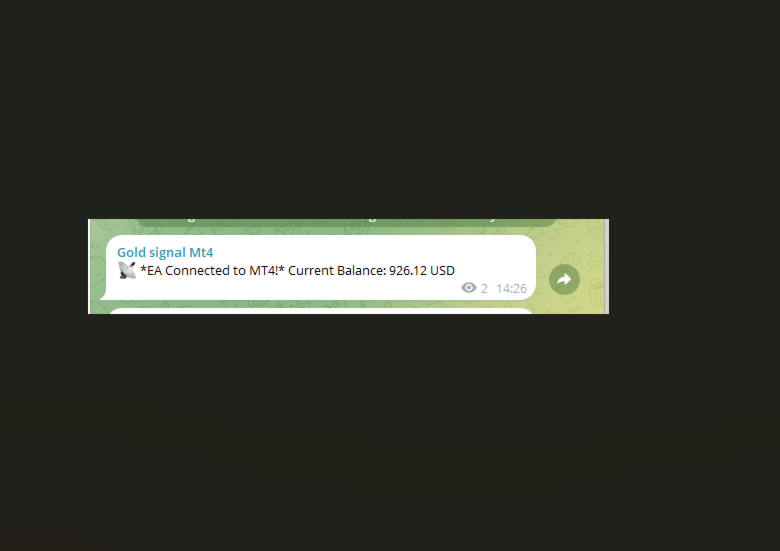
    When the EA is attached to a chart, it sends an initial Telegram message confirming the connection and displays the current account balance.

Trade Open Notification

  • What It Does:
    When a new trade is opened (either manually or via EA), the system immediately sends a message including:
    • Order ticket
    • Trade type (BUY/SELL)
    • Opening price
    • Lot size
    • Stop Loss (if set)
    • Risk/Reward Ratio (if both SL and TP are set; otherwise, “N/A”)
    • Timestamp of the trade opening
    • A screenshot of the chart for visual context

Trade Modification Notification

  • What It Does:
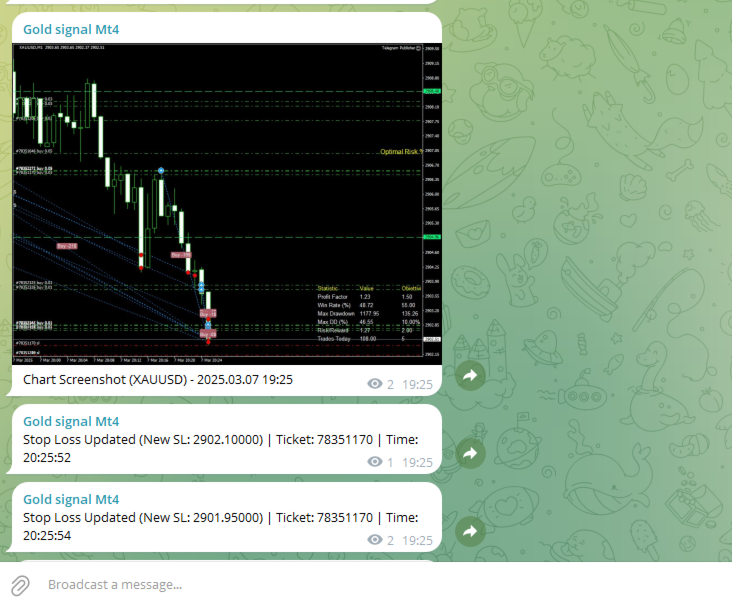
    The system continuously monitors open orders. If a modification is detected (for example, if the Stop Loss is updated), it sends a notification:
    • If the new Stop Loss is very close to the opening price (within a pre-defined threshold), the message indicates that the order has been moved to Break Even.
    • Otherwise, it sends a standard notification with the new Stop Loss value.

Trade Close Notification

  • What It Does:
    When a trade is closed, the system sends a detailed message including:
    • Order ticket
    • Opening and closing prices
    • Profit or loss
    • Reason for closure (e.g., Stop Loss hit, Take Profit hit, or manual closure)
    • Timestamp of the trade closure

Daily Summary

  • What It Does:
    At 23:00 each day (or at a configured time), if a daily summary hasn’t been sent within the last hour, the EA compiles and sends a summary that includes:
    • The date
    • Total number of trades
    • Number of winning and losing trades
    • Total profit or loss for the day

Requirements and Setup

1. Creating Your Telegram Bot

  • Step 1: Open Telegram and search for @BotFather.
  • Step 2: Send the command /newbot and follow the instructions to create your bot.
  • Step 3: You will receive an API Token (e.g., xxxx:yyyyyyy ). Save this token for later use.

2. Obtaining the Chat ID

  • Step 1: Add your bot to a Telegram group or channel, or use a service like @userinfobot to get your Chat ID.
  • Step 2: Copy the Chat ID; you will need to enter it into the EA configuration.

3. Configuring the EA in MetaTrader

  • Step 1: Open the MetaEditor and paste the EA source code.
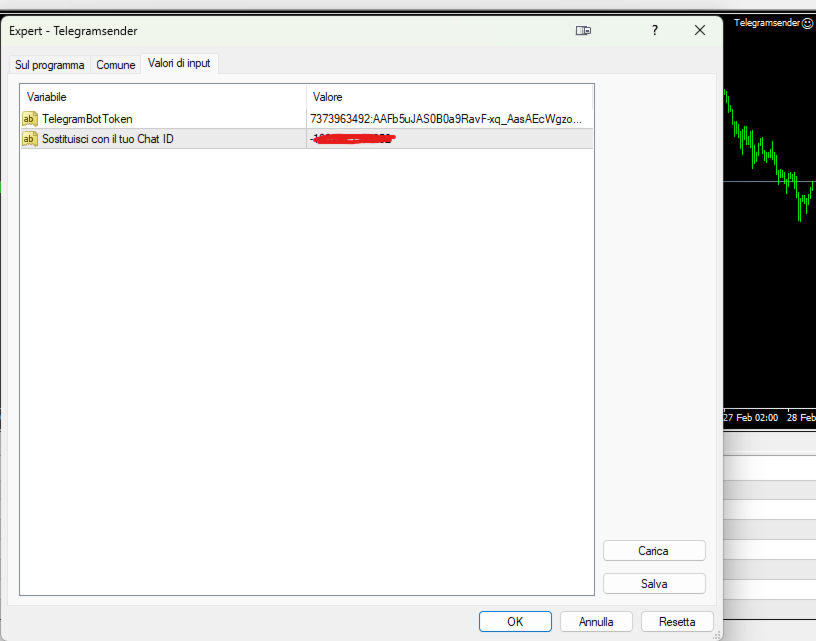
  • Step 2: Replace the constants TelegramBotToken and ChatId with your own values.
  • Step 3: Ensure the URL https://api.telegram.org is added to the list of allowed URLs in MetaTrader (Tools → Options → Expert Advisors → Allow WebRequest for listed URL).
  • Step 4: Compile the EA and attach it to the desired chart.

How the System Works

At EA Startup:

  • Notification:
    The EA sends an initial Telegram message confirming the connection and displaying the current account balance.

Order Monitoring:

  • On Trade Open:
    The EA continuously monitors open orders. When a new order is detected, it registers the order’s details (ticket, open price, lot size, Stop Loss, etc.), calculates the risk/reward ratio (if applicable), and sends a notification. A screenshot of the chart is captured at the moment of opening and sent to provide visual context.

  • On Trade Modification:
    For each active order, the EA checks if the Stop Loss has been changed.

    • If the new Stop Loss is very near the opening price (determined by a set threshold), it sends a notification indicating that the order has been moved to Break Even.
    • Otherwise, it sends a notification with the updated Stop Loss value.
  • On Trade Close:
    When a trade is closed, the EA sends a detailed message with the order’s ticket, opening/closing prices, profit or loss, the reason for closure, and the timestamp.

Chart Screenshot:

  • How It Works:
    The EA uses the ChartScreenShot() function to capture an image of the current chart when a trade is opened. This screenshot is then sent to Telegram using a multipart/form-data WebRequest, ensuring you have a visual snapshot of market conditions at the time of the trade.

Daily Summary:

  • How It Works:
    At 23:00 (or a configured time), if a daily summary has not already been sent within the last hour, the EA compiles statistics for the day (total trades, winning/losing trades, overall profit or loss) and sends them as a summary message to Telegram.

Benefits of the System

  • Real-Time Updates:
    Stay informed with immediate notifications on Telegram, eliminating the need to constantly monitor MetaTrader.

  • Visual Context:
    With chart screenshots, you get a clear visual representation of market conditions at the time of each trade.

  • Comprehensive Monitoring:
    The system tracks trades opened manually as well as those managed by other EAs, and now also alerts you to modifications like Stop Loss updates.

  • Enhanced Trade Information:
    Receive detailed trade data including lot size and risk/reward ratio, helping you make more informed decisions.

  • Daily Performance Summary:
    A concise end-of-day summary helps you review your trading performance effectively.

Support and Maintenance

If you have any questions, require further customizations, or need technical support, please do not hesitate to contact us. Our team is available to help you integrate and tailor the system to your trading needs.

Prodotti consigliati
Trade History Exporter automatically exports trade history to a CSV (comma separated values) file. Trade History Exporter: - automatically exports trade history every time a trade is closed - allows you to manually force an export by using the "W" key on your keyboard - can use Order Comments as Magic Numbers - useful for instance when using a Trade Copier - calculates the Net Profit per trade
Prendi facilmente il controllo della tua routine di trading con il rivoluzionario Trades Time Manager. Questo potente strumento automatizza l'esecuzione degli ordini in orari prestabiliti, trasformando il tuo approccio al trading. Crea elenchi di attività personalizzati per diverse azioni di trading, dall'acquisto all'impostazione degli ordini, il tutto senza intervento manuale. Trades Time Manager Guida all'installazione e agli input Se desideri ricevere notifiche sull'EA, aggiungi il nostro UR
Stoploss Supporter
Ugur Oezcan
5 (1)
This tool monitors your current Expert Advisors and manages stop losses and take profits. You can customize which EAs and/or which currencies to monitor. It is primarily meant for EAs that you feel manage stop losses and/or take profits poorly. If you want this tool to be able to monitor manual trades, please use '0' (zero) as the magic number. Supports hidden stoploss and take profit Supports ATR-calculated dynamic stoploss Supports Breakeven for individual trades Supports Trailing stop Lower r

Market Monitor
Rodrigo Rethka Goncalves
Market Monitor – Smart Asset Performance Dashboard for MT4 Turn your MetaTrader 4 into a professional trading intelligence center! Market Monitor is a powerful monitoring tool that displays, in real time, the most relevant performance metrics of each symbol being traded — helping you make faster, smarter, and more strategic decisions. What Does This Indicator Do? Market Monitor scans all open and historical orders, consolidates the data by symbol, and displays everything in visual pa
Hello Traders! Version 3.0 of the script has been released!  What's new?  Thanks to your suggestions I have inserted these changes to the tool: 1 - Data input are now date picker, it will be easier and faster to set the data export period; 2 - A message box will check that there is not a file with the same name in your folder; 3 - Error message to check that data insert are correct. If you like this product, take a look to the FULL INTERFACE!   MT4 To Excel Interface This script is a very usefu
Market View MT4
Kyra Nickaline Watson-gordon
5 (1)
Definition : Market View is a dashboard (scanner) to view price graphs of all symbols and all timeframes at a glance. The utility is designed user friendly and added a wide range of customization options. Main features of Market View : Visual settings window on the chart Customizable list of symbols and timeframes Different shapes : Real Candles, Schematic Candles, Arrows Customizable number of candles Changeable size of dashboard (scanner) Highlight timeframes with gaps on candles Open approp
Every trader is watching over his account over and over.... trying to anlayse every system he or she has. With this tool you are able to  export your complete history of every account export withdrawls / deposits / rebates to a separate file export account status with balance / equity / current drawdown recalculate micro to standard lots / profits ...  export decimal by "." or ","  combine a series of Magic Numbers to one unique Magic Number   filter to ignore OrderComments.
Trade History Exporter automatically exports trade history to a CSV (comma separated values) file. Trade History Exporter: - automatically exports trade history every time a trade is closed - allows you to manually force an export by using the "W" key on your keyboard - can use Order Comments as Magic Numbers - useful for instance when using a Trade Copier - calculates the Net Profit per trade
FCK CurrencyStrength Pro
Patel Hitendrakumar Mahendrabhai
Hi Friends, " FCK Currency Strength Pro " is a auto & semi auto trading expert with direction of pair. Buy-Sell separate or multi currency in one click. The strategy of  FCK Currency Strength Pro  is a combination of custom indicator, Trendlines, Support & Resistance levels ( Price Action ) and most important secretive trading algorithm mentioned above. Download News Ex4 and csv file You need the following SDSnews.ex4 in MQL4/Libraries and the daylightsavings.csv in MQL4/Files. Only 4 of 5 copi
KFX Dashboard EA
Peter Kariuki Thande
** Automatically Adds to your existing trades that you open ** KFX Dashboard EA monitors Price Action using Candle Direction + Moving Average on Multiple currency pairs (selected by you) and on Multiple Timeframes (selected by you). The dashboard also reveals Currency Strength of pairs based on your Moving Average selection. KFX Dashboard EA option to set Stop Loss(SL) and Take Profit(TP) based on your selected Timeframe and ATR / Points settings. Trailing stop by ATR / Points also available (s
News Panel
Radek Reznicek
5 (2)
News Panel  is a fully adjustable utility for Forex News. It can show upcoming news in InfoPanel as well as lable for upcoming and past news labels on the chart.  This utility also enables Upcoming news Alerts and Push notification. User can change number of upcoming news displayed, colors and many others. Instructions Alow WebRequest for Listed URLS in Metatrader Tools -> Options -> Expert Advisors tab (see screen or watch the video) Add " https://ec.forexprostools.com/ " to the list of allo
Spread Costs refers to the amount of the loss caused by the spread, and Swap Benefits refers to the amount of the income gained by overnight positions. Spread Costs is an important indicator for short-term traders, especially for scalping traders, and Swap Benefits is an important indicator for long-term traders. Since the spreads and swaps on the MetaTrader 4 platform are all expressed in points, we need to convert it into the amount expressed in the account currency. This tool can display the
Install as an EXPERT ADVISOR for it to work. This product will not work in strategy tester because it requires trades to be opened first.   Therefore, the 1 month rental option for $10 is included for you to test the product. That is the lowest price allowed by the website. The trailing stop loss (TSL) on MetaTrader 4 only works on set ranges. For example, if the TSL is set at 20 pips or 200 points, the trailing SL will move to sell/buy price only once 20 pips/200 points are gained. It does not
Basket EA MT4
Juvenille Emperor Limited
5 (5)
Basket EA MT4 è un potente strumento per la presa di profitto e un sistema completo di protezione del conto, tutto in una soluzione semplice e intuitiva. Il suo scopo principale è quello di offrire un controllo totale sul profitto e la perdita complessiva del conto, gestendo tutte le posizioni aperte a livello di "cestino" (basket) e non singolarmente. L’EA offre una serie completa di funzionalità a livello di basket, come take profit, stop loss, break even e trailing stop. Questi possono essere
OpenOrders
Andrey Chiganaev
The script allows you to quickly and easily open trades (place orders) on the market. Features Buy and sell at a market price; Place pending orders: Buy/Sell Limit and Buy/Sell Stop; Open a trade with a custom volume; Calculate and set TakeProfit; Calculate and set StopLoss; Auto defining the number of decimal places; Auto defining a symbol the script has been applied to. What you get with the script Ability to calculate each trade instantly; Ability not to enter all calculated values manually
Heaven Assistant: Simplify Your MT4 Management Simplify the management of the MetaTrader 4 (MT4) platform with the Heaven Assistant . This Expert Advisor (EA) is a robust tool that allows you to control and customize your trading environment in an efficient and user-friendly manner. Key Features: Multiple Pairs Opening: Quick access to most currency pairs, both major and minor, plus exotic pairs. The ability to open indices, metals, and cryptocurrencies with a single click. Template Change: Easi
close all profitable orders The set contains scripts for different purposes, facilitating work in the MetaTrader 4 terminal. If necessary, a screen is provided for some scripts. Before working on a real account, check (on a demo account) whether the required script responds to your tasks (for example, there is a script for opening five orders at the same time, by default the lot is set to 10; so that you do not accidentally open five positions with a total volume of 50 lots - be attentive))) Use
Double Win
Yu Zheng Wang
Introducing the OrderManager: A Revolutionary Utility for MT4 Manage your trades like a pro with the all-new Order Manager utility for MetaTrader 4. Designed with simplicity and ease-of-use in mind, the Order Manager allows you to effortlessly define and visualize the risk associated with each trade, enabling you to make informed decisions and optimize your trading strategy.  Key Features: Risk Management: Define the risk of your trades quickly and easily, allowing you to make better decisio
Smart EA Summary MT4
Abderrahmane Benali
Smart EA Summary MT4 – EA Profit Panel by Magic Number Do you run multiple Expert Advisors and want to track their individual performance? Smart EA Summary is a smart visual tool that displays the net profit/loss of all closed trades, grouped by Magic Number and Symbol, directly on your chart in a clean. Click Here for MT5 Version * Introductory Offer : the current price is only   49 USD   After the first 10 purchases, the price will increase to   75 USD , and gradually up to  99  USD   with up
NEW :    integration with Ofir Signals to send personalized alerts Ofir Notify is a tool which send alerts on trades to Telegram Alert on any event concerning a position : Opening, Closing, modification (SL, TP) Send alerts to Chats, Groups and Channel Alert on Equity change Display Risk, Reward and progress of profit/lost for each position Customization of alerts Sending charts screenshots with alerts Send signals from your indicators or experts Daily, weekly and monthly summaries Reply mode:
This program serves as an effective tool for sending messages through a Telegram bot using the MetaTrader platform. It enables you to send your trading recommendations related to the orders you open on the trading platform directly to your Telegram channel or group. These messages may include details about open trades and can be accompanied by illustrative images of the orders. Alternatively, they can be configured to be without images based on your preferences. This means that if you are the ow
API - Account Push Info is a Tool for "EVERYONE", who want to get the Live Statistics of an MT4 Trading Account, independent if you trade live or demo or automaticly or manual. It send the Report periodly to the Mobile Device with Push Message or to your Mail Account. The Report includes many important kind of Data, like: - a Specified Name for the Account / System - its a Live or Demo Account - Balance, Equity, - Drawdown in Currency and Percent, - Sum of Deposits, - Active Positions - Accou
Questa utility ti invierà una notifica dettagliata sul tuo cellulare e un avviso sul terminale MT4 non appena un pattern Candlestick che vuoi vedere appare sul grafico. La notifica contiene il simbolo, il Candlestick Pattern e il timeframe su cui il pattern si è formato. Dovrai collegare Metatrader 4 Mobile con il tuo terminale Windows. Ecco come fare qui. https://www.metatrader4.com/en/trading-platform/help/setup/settings_notifications Elenco dei pattern Candlestick che possono essere rileva
Draw Agent
Omar Alkassar
Draw Agent è progettato come un modo bello e innovativo per creare e gestire tutte le analisi dei grafici, gli scarabocchi, le note e altro ancora. Questo strumento fornisce un metodo di disegno a mano libera, per trattare lo spazio del grafico come una lavagna e disegnare a mano. Questo strumento di disegno a mano libera ti consente di disegnare sui grafici MT4/MT5, al fine di contrassegnare o evidenziare gli eventi sul grafico. È uno strumento utile se ti piace   disegnare manualmente le onde
RSI Dashboard is a great tool for quickest possible analysis of multiple currency pairs  at the same time in terms of Oversold or Overbought . All displayed and used by indicator symbols are freely to choose and are specified using a space separated list in parameters you're able to analyze not only predetermined ones, but everything that your broker offers, also commodities, equities, indices, ones with prefixes, suffixes etc. There are 3 types of alerts: alert notifications in the MT4 termin
Un grafico. Controllo totale. Smetti di perdere tempo a gestire oggetti, colori e impostazioni su ogni grafico separatamente. Con       Chart Sync Manager   , puoi       sincronizza, copia e controlla tutti i tuoi grafici MetaTrader       all'istante, utilizzando un solo pannello e poche scorciatoie. Disegna una volta, aggiorna ovunque. Apri e chiudi i grafici con un solo clic. Mantieni pulito il tuo spazio di lavoro con       gestione degli oggetti basata sui simboli   . E non perdere mai detta
Just Copier MT4
Agung Imaduddin
5 (4)
"Just copier" is designed to copy trading without any complicated settings. The copy can be done in one PC. One EA can be set as master (provider) or slave (receiver). The receiver lot can be set to multiple providers lots. Please also check this product at fxina.hostingerapp.com.  Any type of copy is available. MT4 -> MT5 MT4 -> MT4 MT5 -> MT5 MT5 -> MT4 If you want to copy MT4 -> MT5 or MT5 -> MT4, please purchase "Just copier" for MT4 and "Just copier" for MT5 separately. Just Copier can copy
DYJ news exchange factory è l' indicatore di analisi di mercato di base per gli strumenti di negoziazione del calendario e gli eventi macroeconomici. Qui puoi trovare notizie finanziarie e indicatori delle più grandi economie del mondo, dagli stati uniti e Dall' unione europea all' Australia e al giappone, per UN totale di 9 economie che coinvolgono più di 60 coppie di valute. Raccolta in tempo reale di oltre 800 indicatori macroeconomici ed eventi da fonti pubbliche. Ogni metrica presenta val
Good looking overview panel for the current instrument showing: Instrumentname Flags of involved currencies for forex or indicies Bid/Ask price Spread The look and location of the panel can also be configured. Here the desctiption of the useable parameters: panelFontName : Name of the system font that is used to paint all text. panelBackgroundColor : Background color of the panel. panelNeutralColor : Color of the text within that panel. panelBorderColor : Color of the panel border panelBorderAl
Ultimate MT4 Trade Manager help you to enter multiple (1-10) trades quickly from your pc or android. Trade Manager make trading safe . Precise and efficient placement tool that make it easy and fast to enter trades. Trade Manager will manage your trade from start to finish. No more entering sl or tp from your android, trade from work with automatic predefined sl and tp. Features: -Every trade will have a stop loss and take profit as defined in the ea. -Breakeven after first tp -Trailing sl from
Gli utenti di questo prodotto hanno anche acquistato
Trade Assistant MT4
Evgeniy Kravchenko
4.42 (192)
It helps to calculate the risk per trade, the easy installation of a new order, order management with partial closing functions, trailing stop of 7 types and other useful functions. Additional materials and instructions Installation instructions   -   Application instructions   -   Trial version of the application for a demo account Line function -   shows on the chart the Opening line, Stop Loss, Take Profit. With this function it is easy to set a new order and see its additional characteris
Local Trade Copier EA MT4
Juvenille Emperor Limited
4.96 (104)
Sperimenta una copia di trading eccezionalmente veloce con il Local Trade Copier EA MT4 . Con la sua facile configurazione in 1 minuto, questo copiatore di trading ti consente di copiare i trades tra diversi terminali di MetaTrader sullo stesso computer Windows o su Windows VPS con velocità di copia ultra veloci inferiori a 0.5 secondi. Che tu sia un trader principiante o professionista, Local Trade Copier EA MT4 offre una vasta gamma di opzioni per personalizzarlo alle tue esigenze specifiche.
Forex Trade Manager MT4
InvestSoft
4.98 (424)
Benvenuto a Trade Manager EA, lo strumento definitivo per la gestione del rischio , progettato per rendere il trading più intuitivo, preciso ed efficiente. Non è solo uno strumento per l'esecuzione degli ordini, ma una soluzione completa per la pianificazione delle operazioni, la gestione delle posizioni e il controllo del rischio. Che tu sia un principiante, un trader avanzato o uno scalper che necessita di esecuzioni rapide, Trade Manager EA si adatta alle tue esigenze, offrendo flessibilità s
The product will copy all telegram signal to MT4   ( which you are member  ) , also it can work as remote copier.  Easy to set up, copy order instant, can work with almost signal formats, image signal, s upport to translate other language to English Work with all type of channel or group, even channel have "Restrict Saving Content", work with  multi channel, multi MT5 Work as remote copier: with signal have ticket number, it will copy exactly via ticket number. Support to backtest signal. How to
Exp COPYLOT CLIENT for MT4
Vladislav Andruschenko
4.69 (65)
Copiatore commerciale per MetaTrader 4.       Copia le operazioni, le posizioni e gli ordini forex da qualsiasi conto. È uno dei migliori copiatori commerciali       MT4 - MT4, MT5 - MT4       per il       COPYLOT MT4       versione (o       MT4 - MT5 MT5 - MT5       per il       COPYLOT MT5       versione). Versione MT5 Descrizione completa   +DEMO +PDF Come comprare Come installare     Come ottenere i file di registro     Come testare e ottimizzare     Tutti i prodotti di Expforex Versione
Ultimate Extractor - Professional Trading Analytics for MT4 Ultimate Extractor transforms your MetaTrader 4 trading history into actionable insights with comprehensive analytics, interactive charts, and real-time performance tracking. Ability to combine multiple accounts and MT4 and MT5 into a single dashboard. What It Does Automatically analyzes your MT4 trading history across all Expert Advisors and generates detailed HTML reports with interactive visualizations. Tracks live performance metric
Il MT4 to Telegram Signal Provider è uno strumento facile da usare e completamente personalizzabile che consente l'invio di segnali a Telegram, trasformando il tuo account in un fornitore di segnali. Il formato dei messaggi è completamente personalizzabile! Tuttavia, per un uso semplice, puoi anche optare per un modello predefinito e abilitare o disabilitare parti specifiche del messaggio. [ Dimostrativo ]  [ Manuale ] [ Versione MT5 ] [ Versione Discord ] [ Canale Telegram ]  New: [ Telegram To
TradePanel MT4
Alfiya Fazylova
4.84 (89)
Trade Panel è un assistente commerciale multifunzionale. L'applicazione contiene più di 50 funzioni di trading per il trading manuale e consente di automatizzare la maggior parte delle operazioni di trading. Attenzione, l'applicazione non funziona nel tester di strategia. Prima dell'acquisto, puoi testare la versione demo su un conto demo. Versione demo qui . Istruzioni complete qui . Commercio. Ti consente di eseguire operazioni di trading con un clic: Apri ordini e posizioni pendenti con calco
Copy Cat More Trade Copier MT4 (Copia Gatto MT4) non è solo un semplice copiatore locale di operazioni; è un quadro completo di gestione del rischio ed esecuzione, progettato per le sfide del trading moderno. Dai challenge delle prop firm alla gestione dei conti personali, si adatta a ogni situazione grazie a una combinazione di esecuzione robusta, protezione del capitale, configurazione flessibile e gestione avanzata delle operazioni. Il copiatore funziona sia in modalità Master (mittente) che
PZ Trade Pad Pro MT4
PZ TRADING SLU
5 (2)
Effortlessly calculate lot sizes and manage trades to save time and avoid costly errors The Trade Pad Pro EA is a tool for the Metatrader Platform that aims to help traders manage their trades more efficiently and effectively. It has a user-friendly visual interface that allows users to easily place and manage an unlimited number of trades, helping to avoid human errors and enhance their trading activity. One of the key features of the Trade Pad Pro EA is its focus on risk and position manageme
Il Risk/Reward Tool è un Expert Advisor di livello professionale progettato per rivoluzionare il modo in cui pianifichi, visualizzi ed esegui le operazioni in MetaTrader 4. Che tu sia un trader discrezionale che apprezza una gestione precisa del rischio o uno sviluppatore di strategie che ha bisogno di testare visivamente le configurazioni di trading, questo strumento fornisce tutto ciò di cui hai bisogno in un'interfaccia elegante e intuitiva. A differenza dei calcolatori di posizione di base,
Copiatrice->Interazione dell'interfaccia comoda e veloce, gli utenti possono utilizzarla subito       ->>>> Si consiglia di utilizzarlo su computer Windows o VPS Windows Caratteristiche: Impostazioni di copy trading diversificate e personalizzate: 1. È possibile impostare diverse modalità di lotto per diverse fonti di segnale 2. È possibile impostare diverse fonti di segnale per il copy trading forward e reverse 3. I segnali possono essere impostati con commenti 4. Se calibrare il lotto in base
The News Filter
Leolouiski Gan
5 (25)
Questo prodotto filtra tutti gli esperti consulenti e i grafici manuali durante il periodo delle notizie, così non dovrai preoccuparti di improvvisi picchi di prezzo che potrebbero distruggere le tue impostazioni di trading manuali o le negoziazioni effettuate da altri esperti consulenti. Questo prodotto viene fornito anche con un sistema completo di gestione degli ordini che può gestire le tue posizioni aperte e gli ordini in sospeso prima della pubblicazione di qualsiasi notizia. Una volta che
TPSpro Trade PRO
Roman Podpora
4.67 (6)
Uno strumento in grado di calcolare istantaneamente la dimensione della posizione o il rischio in base a un dato livello di stop-loss è fondamentale sia per i trader professionisti che per quelli alle prime armi. L'utilità di trading TRADE PRO fornisce calcoli rapidi e precisi, aiutandoti a prendere decisioni in condizioni di mercato volatili e soggette a tempestività. VERSIONE MT5        /   Materiali di installazione aggiuntivi Funzioni principali: Originale. Semplice. Efficace. Un modo unic
Ultimate Trailing Stop EA
BLAKE STEVEN RODGER
4.33 (15)
This EA Utility allows you to manage (with advanced filtering) unlimited open orders (manual or EA) with 16 trailing stop methods: fixed, percent, ATR Exit, Chandelier Exit, Moving Average, Candle High Low Exit, Bollinger Bands, Parabolic, Envelope, Fractal, Ichimoku Kijun-Sen, Alligator, Exit After X Minutes or Bars, RSI and Stochastic. The trailing stop can be either real or virtual, and you can exit fully or with a partial close percent on touch or bar close.  Moreover, you can add (overrid
Trade Dashboard MT4
Fatemeh Ameri
4.96 (53)
Tired of complex order placement and manual calculations? Trade Dashboard is your solution. With its user-friendly interface, placing orders becomes effortless, by a single click, you can open trades, set stop loss and take profit levels, manage trade lot size, and calculate risk to reward ratios, allowing you to only focus on your strategy. Say goodbye to manual calculations and streamline your trading experience with Trade Dashboard. Download  Demo Version  right now. You can find  Details of
Trade Manager MT4 DaneTrades
Levi Dane Benjamin
4.09 (11)
Trade Manager per aiutarti a entrare e uscire rapidamente dalle operazioni calcolando automaticamente il tuo rischio. Incluse funzionalità che ti aiutano a prevenire l'eccessivo trading, il vendetta trading e il trading emotivo. Le operazioni possono essere gestite automaticamente e i parametri di performance del conto possono essere visualizzati in un grafico. Queste caratteristiche rendono questo pannello ideale per tutti i trader manuali e aiuta a migliorare la piattaforma MetaTrader 4. Suppo
DFGX Dashboard
Tsvetan Tsvetanov
5 (2)
Take your trading to the next level with DFGX - our second generation Dynamic Fibonacci Grid. This new, powerful and easy to use application is specially designed and optimized for contrarian intraday trading, scalping and news trading on the Forex market. This system is the ideal solution for active professional traders and scalpers who are looking for innovative ways to optimize their strategy. The system also provides excellent opportunity for new traders who want to learn to trade in a syste
Multi Copy
Kaijun Wang
5 (1)
Copiatrice->Interazione dell'interfaccia comoda e veloce, gli utenti possono utilizzarla subito       ->>>> Si consiglia di utilizzarlo su computer Windows o VPS Windows Funzioni di base: La velocità di interazione normale del copy trading è inferiore a 0,5 s Rileva automaticamente le sorgenti del segnale e visualizza un elenco degli account delle sorgenti del segnale Abbinamento automatico dei simboli, il 95% dei simboli di trading comunemente utilizzati su diverse piattaforme (casi speciali co
Trading History MT4
Siarhei Vashchylka
5 (9)
Trading History - A program for trading and money management on the history of quotes in stratagy tester. It can work with pending and immediate orders, and is equipped with trailing stop, breakeven and take profit functions. Very good for training and testing different strategies. Manual (Be sure to read before purchasing) Advantages 1. Allows you to test any trading strategy in the shortest possible time 2. An excellent simulator for trading training. You can gain months of trading experience
Migliora il tuo trading manuale: Trade Manager Assistant per una gestione automatizzata del rischio rapida e precisa Ottieni istruzioni di configurazione complete ed esplora le funzionalità di Trade Manager Assistant utilizzando la versione demo gratuita fornita. Per maggiori dettagli vedere   https://www.mql5.com/blogs/post/758625   .       . Il trading manuale richiede un'analisi attenta e decisioni rapide, ma il rischio di errori di esecuzione, incongruenze e confusione sui parametri di trad
Telegram Signal pro
Sara Sabaghi
4.86 (7)
What is it? Think about it, you can send all the orders/positions info to your telegram channel or group to create your community or VIP signals on telegram. Position info means this EA forward all of your new positions open details (Open price, Open time, Position Type, position Symbol and volume), positions changes ( SL or TP modifying or pending price changes) and position close (Close price, profit or loss, position duration time) and also EA Send NEWS alert (Economic calendar event) on you
News Filter EA MT4
Rashed Samir
5 (9)
News Filter EA: Advanced Algo Trading Assistant News Filter EA is an advanced algo trading assistant designed to enhance your trading experience. By using the   News Filter EA , you can integrate a Forex economic news filter into your existing expert advisor, even if you do not have access to its source code. In addition to the news filter, you can also specify   trading days   and   hours   for your expert. The News Filter EA also includes   risk management   and   equity protection   features
Averaging Helper
Sergey Batudayev
5 (2)
Strumento di supporto al trading: questo tipo di strumento di supporto al trading ti aiuterà a calcolare la media delle tue posizioni precedentemente non redditizie utilizzando due tecniche: media standard copertura con successiva apertura di posizioni in base all'andamento L'utility permette   di gestire contemporaneamente diverse posizioni aperte in direzioni diverse, sia per l'acquisto che per la vendita. Ad esempio, se hai aperto una posizione per la vendita e la seconda per l'acquisto, entr
With this Expert Advisor, you can seamlessly integrate various channel, arrow, and reversal indicators. It offers the flexibility to use all popular channel trading strategies, while also providing powerful tools to customize your trading conditions and risk management system.   The Expert Advisor opens orders when the price crosses the channel boundaries. Multiple crossing conditions are available for customization: Price touches boundary on re-entry into the channel Price touches boundary on
Fast Trade MT4
Alexey Valeev
4.8 (5)
This trading panel has been developed for fast and comfortable operation of the financial markets. It is equipped with the necessary functions for manual and semi-automated trading. Due to the presence of the order trailing feature, trailing stop and automatic closure by equity, profit, time. You can use it to automate your trading system. All you have to do is open a position and set the parameters for maintenance, everything else will be handled by the EA. If you want to limit your losses, set
Custom Alerts AIO: Monitora tutti i mercati — senza alcuna configurazione Panoramica Custom Alerts AIO è una soluzione di monitoraggio dei mercati pronta all’uso che non richiede alcuna configurazione. Tutti gli indicatori necessari — FX Power, FX Volume, FX Dynamic, FX Levels, IX Power — sono integrati internamente. Non vengono mostrati grafici, rendendolo ideale per generare alert in tempo reale in modo discreto ed efficiente. Supporta tutte le classi di asset offerte dal tuo broker: Forex,
Visualizza immediatamente la cronologia delle tue operazioni chiuse per giorno e settimana, le tue operazioni aperte correnti e l'esposizione forex su un grafico! Utilizza la mappa di calore per identificare le operazioni redditizie e dove si trova il tuo drawdown attuale all'interno del tuo portafoglio di trading. Pulsanti di chiusura rapida Utilizza i pulsanti di chiusura rapida per chiudere ogni operazione su un singolo simbolo, chiudere singole operazioni per intero o ottenere profitti o p
Hedge Trade
Mothusi Malau
️ Hedge Trade — Smart Fixed-Offset Hedging EA Turn adverse moves into controlled recovery cycles. Hedge Trade is a professional-grade MetaTrader 4 Expert Advisor that protects any open trade by automatically placing and managing one intelligent hedge order. It’s built for traders who prefer to open their own base position but want an automated, disciplined hedging system to manage drawdown and capture counter-moves — safely, transparently, and without martingale. Key Features Automatic Hedg
Zone Trader MT4
LEE SAMSON
5 (1)
Fai trading automaticamente su zone di supporto e resistenza o di domanda e offerta una volta identificate le aree chiave da cui vuoi fare trading. Questo EA ti consente di disegnare zone di acquisto e vendita con un solo clic e poi posizionarle esattamente dove ti aspetti che il prezzo cambi. L'EA monitora quindi quelle zone e farà trading automaticamente in base all'azione del prezzo che specifichi per le zone. Una volta che il trading iniziale è stato eseguito, l'EA uscirà in profitto nella
Altri dall’autore
VolumeFXanalyzer2
Thomas Bolognesi
VolumeFxAnalyzer can trade on all Forex pairs and indices. It is a trend following type system that analyzes the various volumes and enters into volumetric confirmations and trend strength. The system also works very well on indices such as SP500.   -No martingala/anti-martingala System - Position sizing and money manager in percentage % of Equity  - Take profit with multiplier -Session Trading Personalizable -Breakeven when position reaches some distance -Partial Close, For take some profit dur
Filtro:
Nessuna recensione
Rispondi alla recensione