Abiroid Dashboard Telegram EA

The Telegram EA can be used in conjunction with Abiroid Dashboard products.

Detailed blog post with screenshots explained:

https://www.mql5.com/en/blogs/post/758932


1. Abiroid Dashboards Setting:

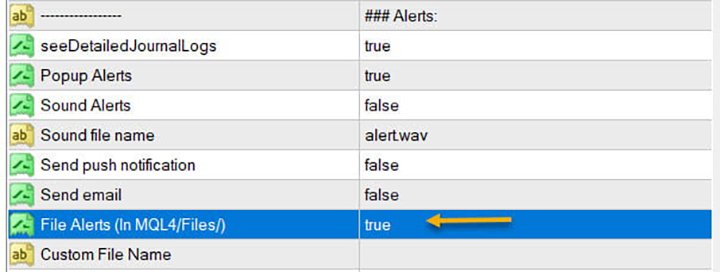
Within the Dashboard you have to set “File Alerts” to true. No need to give it a custom file name.

It will use default file name and File will be created inside MQL4/Files folder. They will use “Prefix” setting as prefix by default. Unless you specify a Custom File Name.

Then use this EA, and it will read these files and send Alerts and Screenshots to your Telegram channel.

The file format of csv example (in case you are not using it with any Abiroid Scanners, but with your own Custom Indicators):

Abiroid_Scanner_TDI,GBPCHF,M30,TDI Scanner: Strong BUY,2024.11.25 12:32,2024.11.25 09:00

Abiroid_Scanner_TDI,NZDCHF,M30,TDI Scanner: Strong BUY,2024.11.25 12:32,2024.11.25 09:00

Where:

Column 1: Name of Indicator

Column 2: Pairname

Column 3: Timeframe

Column 4: Alert

Column 5: Local machine time

Column 6: Broker server time


2. Create Telegram Channel and Telegram Bot:

To get alerts on your channel, you will need a Telegram Bot. Once created, you can add the bot to your Channel as an administrator. Bot name should have the word “bot” in it. Find something unique.

Easiest Way To Create a New Telegram Bot

  • Search for a bot on telegram with name “@BotFather”. We will find it through the search engine. After adding it to the list of contacts, we will start communicating with it using the /start command. As a response it will send you a list of all available commands
  • With the /newbot command we begin the registration of a new bot. We need to come up with two names. The first one is a name of a bot that can be set in your native language. The second one is a username of a bot in Latin that ends with a “bot” prefix. As a result, we obtain a token or API Key – the access key for operating with a bot through API as shown below


Next go to your channel in any Telegram client:

  1. Open Channel info (in app title)
  2. Choose  Administrators
  3. Add Administrator
  4. There will be no bots in contact list, so you need to search for it. Enter your bot’s username
  5. Clicking on it you make it as administrator.

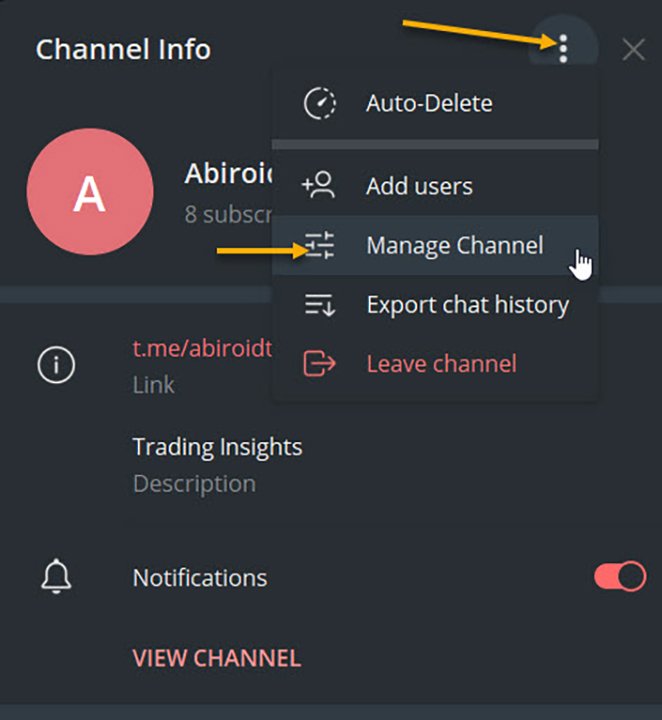
To check, go to Channel Info, click on Manage Channel. And you can make your channel Private if you like. Or leave it as Public.


3. Set up Abiroid Telegram EA:


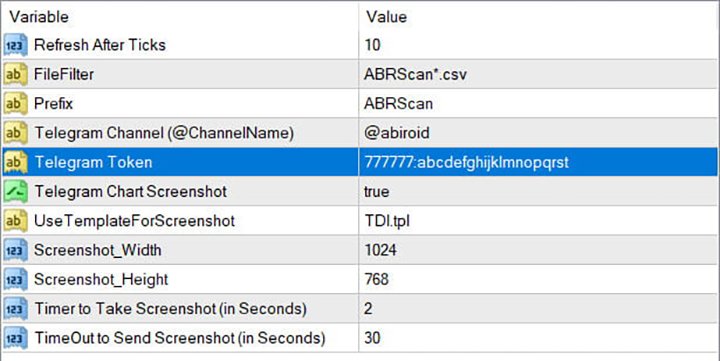
  • Refresh after ticks:  Set number of ticks after which the EA will refresh and check for available Dashboard Files.
  • FileFilter: Regex filter for finding files for which you need alerts. By default all Abiroid Dashboards use ABRScan prefix. But if you specify a Custom File Name in Dashboard settings, make sure the Filter here is changed as well.
  • Prefix: This will be used to create screenshot names
  • Telegram Channel: The Telegram channel where you need these alerts to go to. Note that your Bot should be added as an Admin in this channel.
  • Telegram Token: The API Token which you get when you create your bot.
  • Telegram Chart Screenshot: Whether you need screenshot of chart or not
  • Use Template For Screenshot: Use a template file name for screenshot. This tpl file should already exist in Templates folder.
  • Screenshot Width/Height: Screenshot will be a .png file. Define width and height as required
  • Timer to take Screenshot: Default is 2 seconds. This is wait time after chart is created and template applied, also after taking a screenshot and also wait time after screenshot is saved.
  • TimeOut to Send Screenshot: This is timeout to send screenshot to Telegram. In case of slow Internet problems, you can increase this as you like.

To get a screenshot, EA will open chart for that Pair/Timeframe, apply Template, then save screenshot and finally send screenshot to Telegram.

If screenshot is successful, you will get a message in Experts logs like:

2020.07.29 20:32:52.791 Abiroid_Dashboard_Telegram_Forwarder EURUSD,H1: Screenshot sent. Deleting file.

If you are not getting screenshots, check the Experts tab for error logs.

Known Issues:

Note:Sometimes if Metatrader app is already loaded with heavy indicators, this whole screenshot taking process might take longer than 2 seconds. And you might get error 5020.

This only happens if too many signals occur at the same time. This is a known issue with this EA, and only solution is to increase Screenshot timer.

Because metatrader gets too overloaded opening and closing multiple charts. If your template is heavy, this might even get worse, because 2 seconds wait timer won’t be enough.

Note: Sometimes in rare cases, when EA goes to close multiple charts it had opened for screenshot, it accidentally closes the EA main chart. This once again happens because of screenshot issues. I’m working on a fix. But haven’t been able to figure it out yet. This bug is very rare, so it’s a bit hard for me to reproduce and work on it.

In case of error sending screenshot, the screenshot will be saved in MQL4/Files folder. You can take a look at it there and delete it manually if you like.

Conclusion

This Telegram EA will also work with Indicators other than my Dashboards. But for that you will need to make sure that the indicators export Alerts into Files.

It’s completely free to use. I’ll keep fixing issues and updating it here on this website. If you download it here, you’ll get an email for updates if you like.

Hope you enjoy using it.


Рекомендуем также
Calc for MT4
Radim Kucera
5 (2)
Данный индикатор предоставляет все полезную информацию о символе, счете, позициях и прибыли. Он разработан, чтобы улучшить управление капиталом трейдеров. Параметры Calc можно условно разделить на несколько блоков. Каждый блок можно скрыть, настроить его цвет и другие свойства. Блок информации о символе: В этом блоке отображается информация о текущем спреде (SPREAD), стоимости пункта (POINT VALUE - в валюте депозита на 1 лот), своп для длинных (SWAP LONG) и коротких сделок (SWAP SHORT). Show sy
FREE
The   SMC Market Structure   indicator tracks key price action shifts using Smart Money Concepts (SMC), helping traders identify institutional behavior and overall trend direction. Pro version MT5 version It automatically detects and displays: Break of Structure (BOS)   – Signals continuation of trend Change of Character (CHOCH)   – Indicates potential reversal Swing Highs and Lows   – Used to define market structure and directional bias Each structural event is clearly marked on the chart, allo
FREE
Kalifx trailing stop EA
Calvin Andile Mahlangu
5 (7)
KALIFX Trailing Stop Utility for MetaTrader 4 The KALIFX Trailing Stop Utility is a tool for automated stop-loss management on the MetaTrader 4 platform. It monitors open positions and dynamically adjusts the stop-loss level as the price moves in favor of the trade. The utility can also place initial stop-loss and take-profit levels and apply breakeven rules once the trade reaches a defined profit distance. Core Functionality 1. Trailing Stop Logic When the market moves in the direction of an o
FREE
Это очень простой скрипт, но, возможно, он будет вам полезен. Он удаляет все объекты с графика. Я рекомендую назначить для него горячие клавиши для быстрого запуска.  Чтобы вы случайно не удалили объекты, скрипт запрашивает подтверждение. Удаленные объекты нельзя восстановить функцией "Отменить удаление" (Ctrl+Z).
FREE
ForexBob 1 Click Button is very impresive forex tool for scalpers: 1. Helpful in Closing multiple trades in just Single Click. 2. Scalper can benefits the most who always eager to close multiple trades in averaging and lock the profits fast. 3. It helps to avoid latency and so profits can be locked where we need. 4. Easy to Install, same as we install any expert advisor. 5. Speed of closing trades depends on your broker's server speed. If you find any improvements we are open to your feedback
FREE
Good morning, The following indicator is very useful when managing multiple trades on the same instrument. It allows you to see the average entry price for BUY and SELL trades. If there is an imbalance (as shown in the example photo), the indicator will display the averages of the SELL/BUY trades and a GOLD line that marks the breakeven price (excluding swap and commissions).
FREE
Account Info EA It is a tool that presents on the graph all the positions of the account, and specific information concerning the positions, but also the account. It enables the user to have an image of his account at a glance. Use like any expert advisor. You can't attach it in the same chart with other expert advisor. It does not have the ability to open or manage positions. You can attach it on any chart and any timeframe.
FREE
Простенький скрипт, в котором очень часто нуждаются трейдеры. Он калькулирует лот в процентах от депозита. Для соблюдения риск-менеджмента очень даже нужная вещь. В настройках присутствует только одна опция: MaxRisk - риск в процентах для вычисления лота. Даный помощник работает как стандартный скрипт, то есть запускается только один раз на соответствующем графике, после чего можно приступать к торговле с вычисленым лотом. Все гениальное просто! Успешной торговли!
FREE
Arlene Sessions Background is an indicator that draws colored vertical background on the chart depending on your session. You can see the version 1 here: https://www.mql5.com/en/market/product/68822 You can see more of my publications here: https://www.mql5.com/en/users/joaquinmetayer/seller If you only want to paint a session on your chart, you must set the color "none" to deactivate it.

FREE
Phone Trade Assistant
Krutik Piyushkumar Parekh
Smart Lot-Size Calculator And Trade Assistant for Mobile Trading Overview: This is the tool every trader in the market must have no matter if you are scalper, swing traders, day trader, or long term trader. This On-The-Go trading tool will help you stay disciplined and also stay free from daily trade management chores, Most traders face common problems like   1. Calculation of proper lot-size of a position to take controlled risk  2. Managing every trade and trailing stop-loss if trades goes in
FREE
MQLTA Auto Close Demo
MQL4 Trading Automation
Программа Auto Close помогает применять правила мани-менеджмента и управления риском. Утилита отслеживает баланс, средства на счете, свободные средства, общую прибыль и общий убыток, а также отправляет уведомления при достижении указанного порогового значения. В данной демо-версии отключены функции уведомления и закрытия, полная версия доступна по ссылке: https://www.mql5.com/ru/market/product/29141 Как он работает? Запустите программу Auto Close EA на графике и укажите параметры, которые нужно
FREE
When executing an order, whether through the Metatrader ticket on a computer or the Metatrader app on a mobile device, either manual or pending, Easy Trade will automatically set the take profit and stop loss levels, as well as a limit order with its respective take profit and stop loss levels. It follows the trading strategy for market open (US30, US100, US500), but it can be applied to any market asset.
FREE
This an utility indicator which displays the most important information of the current account and position (*). Displayed information: Information about the current account (Balance, Equity, Free Margin). Current spread, current drawdown (DD), planned profit, expected losses, etc. Number of open position(s), volume (LOT), profit. Today’s and yesterday’s range. Remaining time to the next candle. Last day profit information (with integrated IceFX ProfitInfo indicator). Risk-based LOT of informati

FREE
Artemis Vision Assist MT4 Artemis Vision Assist MT4 is an accessibility utility for MetaTrader 4, designed for traders who find the platform's default interface difficult to read. MT4's small text, dense labels, and compact controls can create real problems for traders with visual impairment, reduced eyesight, or chronic eye strain. This utility adds a large, high-contrast dashboard directly onto the chart, bringing key trading information into a format that is genuinely easier to see and intera
FREE
EasyClose MT4
Nina Yermolenko
4 (1)
A simple and convenient utility for closing orders. It can close both all orders together as well as buy, sell or pending orders separately. Has an intuitive graphical interface. MT5 version of the utility -  https://www.mql5.com/en/market/product/78599 If you like this utility, take a look at my other products -   https://www.mql5.com/en/users/nina_yermolenko/seller
FREE
На рынке существуют временные периоды когда торговля с большой вероятностью будет убыточна. Данный индикатор предупредит вас о подобных неторговых случаях и поможет сохранить вам деньги и время. Настройки Remind about non-trading periods: Expiration week - предупредить о экспирационной неделе Consumer index day - предупредить за день о новости Consumer index day NON FARM - предупредить за день о новости NON FARM Christmas - предупредить за день о Рождестве New Year Days 25.12 - 15.01 - предупре
FREE
Auto Stop Trail And Profit
Joaquin Nicolas Metayer
5 (1)
Auto Stop Trail And Profit is an expert advisor that monitors orders, when it detects that one has been placed, on the same chart that has been activated or on all assets, depending on its configuration, it will place its respective stop loss, take profit and perform trail stop loss (in a classic way, keeping a distance or "step by step"). You can see more of my products here: www.mql5.com/en/users/joaquinmetayer/seller
FREE
Tired of manually adjusting stops?   This powerful EA   automatically secures your profits   with dynamic trailing stops,   protecting gains   while letting winners run. No trade openings – just   effortless risk management   for your existing positions. Why Traders Love This EA Never Miss Profits Again Auto-locks gains   as price moves in your favor. Eliminates emotional decisions   – sticks to your predefined rules. Three Smart Trailing Modes Choose the method that fits your strategy: F
FREE
Trading Panel - Smart Stop Management A free professional trading panel for MT4, built to make manual execution faster, cleaner, and smarter. Trading Panel - Smart Stop Management helps you place Market, Limit, and Stop orders directly from the chart, manage position size, calculate TP/SL from volatility, and protect your execution from temporary spread widening during news, rollovers, or thin market conditions. The panel uses local smart stop logic based on the middle price, helping reduce
FREE
Safety
Sergey Ermolov
5 (2)
Думаю, всем известно такое правило управление капиталом, как «Сейф». Для тех, кто не в курсе, сейф предполагает закрытие половины позиции после того, как прибыль по сделке сровнялась с размером стопа. Таким образом, даже если цена разворачивается и цепляет стоп, Вы уже не потеряете деньги, т.к. точно такой же размер прибыли был получен при закрытии части позиции ранее. Советник Safety имеет всего одну настройку – лот закрытия. Оставив ее в положении 0, советник будет закрывать ровно половину сде
FREE
Time Scale
Taras Slobodyanik
4.87 (15)
Индикатор рисует шкалу времени на чарте. Вы можете указать смещение времени, настроить размер и шрифт для отображения на графике. Также вы можете выбрать желаемый формат отображения даты и времени. При зажатой средней кнопке мышки, и движении курсора, будет появляться ползунок на шкале. Параметры Hours (time shift) — сдвиг времени (часы); Minutes (time shift) — сдвиг времени (минуты); Show time on mouse — показывать время под указателем; Precise time scale    —  рассчитывать время между барами;
FREE
Current Price MT4
Keni Chetankumar Gajanan -
5 (1)
A simple and useful Current Price Panel, which displays magnified current Bid, Ask prices and spread, movable anywhere on chart window using the mouse. Also provides an option to have as text at a static location showing bid or ask price along with spread, shown at any location on the chart. Allows display as pips or points along with spread highlighted in distinct color if it crosses the threshold point for the previous 100 ticks. Includes an option to show or hide the last digit (pipette) of t
FREE
Scalping Day Trading Support Utility Scalping One MT4 free One position is displayed with one button. View P & L, Lot, and Point in real time. It is possible to switch the display of positions of only chart currencies and all currency pairs.  (The free version has only 3 positions) Supports automatic identification in Japanese and English   Account currency notation corresponds to dollar, euro, pound, yen (automatic identification) The timeline drawing function can be linked with the clock disp
FREE
Show Pips
Roman Podpora
4.26 (58)
Данный информационный индикатор будет полезен тем, кто всегда хочет быть в курсе текущей ситуации на счете. Индикатор отображает такие данные, как прибыль в пунктах, процентах и валюте, а также спред по текущей паре и время до закрытия бара на текущем таймфрейме.  VERSION MT5 -  Больше полезных индикаторов Существует несколько вариантов расположения информационной строки на графике: Справа от цены (бегает за ценой); Как комментарий (в левом верхнем углу графика); В выбранном углу экрана. Так же
FREE
IceFX TradeInfo
Norbert Mereg
4.77 (44)
TradeInfo от IceFX - утилита, отображающая наиболее важную информацию текущем счете и позициях на нем. Отображаемая информация: Информация о текущем счете (баланс, средства, свободная маржа). Текущий спред, текущая просадка (DD), планируемая прибыль, ожидаемый убыток и т.д. Количество открытых позиций, объем (LOT), прибыль. Диапазон за прошлый и текущий день. Оставшееся время до следующей свечи. Информация о прибыли за последний день (при помощи интегрированного индикатора IceFX ProfitInfo). Ло
FREE
INFOPad - информационная панель, создающая информацию по выбранной валютной паре в терминале МetaТrader 4. Существует 5 функций этого индикатора: Показывает основную и главную информацию по выбранному символу: цены Ask BID, Spread, Stop Level, Swap, Tick value, Commission; Показывает будущие цели SL target и TP Target (Количество пунктов установленного стоплосса и тейкпрофита, сумма в долларах); Показывает прибыль, полученную за периоды: Сегодня, Неделя, Месяц, Год, Общая прибыль по выбранной в
FREE
Самый быстрый способ поменять период. Подходит для трейдеров, использующих несколько графиков и таймфреймов. Размер форма и цвет настраиваются. Входные параметры Corner — выберите "Right lower chart corner" ("Нижний правый угол графика") в качестве угла размещения Color — цвет фона кнопки ColorText — цвет текста кнопки ColorOn — цвет фона кнопки для текущего периода ColorOnText — цвет текста кнопки для текущего периода Font — шрифт Arial, Verdana... FontSize — размер шрифта в пикселях DistanceX
FREE
Fully functional manual trade panel with risk/reward, auto SL, lot size calculation, one-click trading, hidden (virtual) stop loss/take profit and pending orders, scale in and out of trades (partial close), news events and more. Works with all symbols not just currency pairs. Brings an incredible amount of functionality to MetaTrader for free and for both demo and live accounts. Features Lot size calculation - based on % of account to risk, fixed amount or dynamic lots Automatic take profit base
FREE
Introducing the Professional Indicator ARKA – Candle Close Time Do you want to always know the exact remaining time for the current candle to close? Or do you want to instantly see the real-time broker spread right on your chart without any extra calculations? The ARKA – Candle Close Time indicator is designed exactly for this purpose: a simple yet extremely powerful tool for traders who value clarity, precision, and speed in their trading. Key Features: Displays the exact time re
FREE
Pips Meter ADR
Christianiel Robles Faustino
Objective: To show on the chart the current pip sizes of ADR, Spread, Bars, Day, Risk Reward and Shift Candle. Inputs: Select in which corner it will be displayed Set the X position of the indicator Set the Y position of the indicator Set the Font Style Set the Font Size Set the font color of current and last bar size Set the ADR font color Set the Spread color Set the day color Show/Hide the normal maximum spread on some symbols, suggested risk reward ration and last shift candle size in p
FREE
С этим продуктом покупают
Local Trade Copier EA MT4
Juvenille Emperor Limited
4.96 (110)
Опыт экстремально быстрого копирования сделок с помощью Local Trade Copier EA MT4 . Благодаря простой установке в течение 1 минуты этот копировщик сделок позволяет вам копировать сделки между несколькими терминалами MetaTrader на одном компьютере с Windows или на Windows VPS с крайне быстрыми скоростями копирования менее 0.5 секунды. Независимо от того, новичок вы или профессиональный трейдер, Local Trade Copier EA MT4 предлагает широкий спектр опций, чтобы настроить его под ваши конкретные пот
Добро пожаловать в Trade Manager EA — лучший инструмент для управления рисками, предназначенный для упрощения, точности и эффективности торговли. Это не просто инструмент для размещения ордеров; это комплексное решение для удобного планирования торгов, управления позициями и усиленного контроля над рисками. Независимо от того, начинающий вы трейдер, опытный специалист или скальпер, нуждающийся в быстром исполнении, Trade Manager EA адаптируется к вашим потребностям и работает с любыми активами:
Trade Assistant MT4
Evgeniy Kravchenko
4.43 (195)
Помогает рассчитать риск на сделку, простая установка нового ордера с помощью линий, управление ордерами с функциями частичного закрытия, 7 типов трейлинг-стопа и другие полезные функции. Дополнительные материалы и инструкции Инструкция по установке   -   Инструкция к приложению   -   Пробная версия приложения для демо счета Функция Линии   - отображает на графике линию открытия, стоп-лосс, тейк-профит. С помощью этой функции легко установить новый ордер и увидеть его дополнительные характери
Custom Alerts AIO: Универсальный сканер рынка — Без настройки Обзор Custom Alerts AIO — это самый быстрый и простой способ отслеживать рыночные сигналы в реальном времени на множестве инструментов без дополнительной настройки и без необходимости покупать другие продукты. В состав входят все необходимые индикаторы от Stein Investments, что делает этот инструмент идеальным решением «всё в одном» для трейдеров, ценящих простоту и эффективность. Просто установите на график и сразу получайте сигнал
Unlimited Trade Copier Pro - это мощный инструмент для удаленного копирования сделок между несколькими счетами MetaTrader 4/MetaTrader 5, расположенными удаленно друг от друга, по сети интернет. Это идеальное решение для провайдеров сигналов, которые хотят поделиться своей торговлей с другими трейдерами по всему миру. Один поставщик может копировать сделки на неограниченное количество счетов-получателей, а один получатель также может копировать сделки неограниченного количества провайдеров. Пост
Copy Cat More Trade Copier MT4 (Копия Кот MT4) — это не просто локальный торговый копировщик; это полноценная система управления рисками и исполнения, созданная для современных условий торговли. От испытаний в prop-фирмах до личного управления счетами — он адаптируется к любой ситуации, сочетая надежное исполнение, защиту капитала, гибкую настройку и расширенные функции обработки сделок. Копировщик работает как в режиме Master (отправитель), так и в режиме Slave (получатель), обеспечивая синхрон
Exp COPYLOT CLIENT for MT4
Vladislav Andruschenko
4.69 (65)
Профессиональный копировщик сделок для MetaTrader 4 Быстрый, профессиональный и надежный копировщик сделок для MetaTrader 4 . COPYLOT позволяет копировать сделки Forex между терминалами MetaTrader 4 и MetaTrader 5 , обеспечивая гибкую синхронизацию для разных типов счетов и сценариев торговли. Версия COPYLOT MT4 поддерживает: MetaTrader 4 → MetaTrader 4 MetaTrader 5 Hedge → MetaTrader 4 MetaTrader 5 Netting → MetaTrader 4   Версия MT5 Полное описание + DEMO + PDF Как купить Как установить Как по
TradePanel MT4
Alfiya Fazylova
4.84 (95)
Trade Panel — это многофункциональный торговый помощник. Приложение содержит более 50 торговых функций для ручной торговли и позволяет автоматизировать большинство торговых операций. Перед покупкой вы можете протестировать демоверсию на демо-счете. Скачать пробную версию приложения для демонстрационного аккаунта: https://www.mql5.com/ru/blogs/post/750864 . Полная инструкция здесь . Торговля. Позволяет совершать торговые операции в один клик: Открыть отложенные ордера и позиции с автоматическим р
The product will copy all telegram signal to MT4   ( which you are member  ) , also it can work as remote copier.  Easy to set up, copy order instant, can work with almost signal formats, image signal, s upport to translate other language to English Work with all type of channel or group, even channel have "Restrict Saving Content", work with  multi channel, multi MT5 Work as remote copier: with signal have ticket number, it will copy exactly via ticket number. Support to backtest signal. How to
Smart Channel M4
Vahidreza Heidar Gholami
The trend in the market can be predicted using trend lines but the problem is you don’t know where exactly the price is going to touch the trend line where you can put your pending orders on. Smart Channel Expert Advisor makes it possible to put an advanced channel around the price data, which can be configured to handle placing orders, opening and closing positions, managing risk per trade, spread, slippage, and trailing stop-loss and take-profit automatically. Features Money Management (Calcul
CloseIfProfitorLoss with Trailing
Vladislav Andruschenko
4.87 (31)
Close If Profit or Loss with Trailing для MetaTrader 4 — автоматическое закрытие по общей прибыли или убытку Надёжная торговая утилита для MetaTrader 4, которая автоматически закрывает позиции, когда общая прибыль или общий убыток достигает заданного уровня. Советник контролирует открытые сделки, считает плавающий результат, может использовать трейлинг прибыли и помогает закрывать позиции быстрее, чем ручная реакция трейдера. MetaTrader 4 до сих пор активно используют ручные трейдеры, скальперы
The News Filter
Leolouiski Gan
5 (25)
Этот продукт фильтрует всех экспертных советников и ручные графики во время новостей, так что вам не нужно беспокоиться о внезапных скачках цены, которые могут разрушить ваши ручные торговые настройки или сделки, введенные другими экспертными советниками. Этот продукт также поставляется с полной системой управления ордерами, которая может обрабатывать ваши открытые позиции и ордера на ожидание перед выпуском новостей. После покупки The News Filter вам больше не придется полагаться на встроенные
Trade copier MT4
Alfiya Fazylova
4.58 (33)
Trade Copier — это профессиональная утилита, предназначенная для копирования и синхронизации сделок между торговыми счетами. Копирование происходит от счета/терминала поставщика к счету/терминалу получателя, которые установлены на одном компьютере или vps. АКЦИЯ - Если вы уже приобрели "Trade copier MT5", вы можете получить "Trade copier MT4" бесплатно (для копирования MT4 > MT5 и MT4 < MT5). Для получения более подробной информации об условиях, пожалуйста, свяжитесь с нами через личные сообщени
Trading History MT4
Siarhei Vashchylka
5 (9)
Trading History - Программа для торговли и управления капиталом на истории котировок в тестере стратегий. Может работать с отложенными и немедленными ордерами, оснащена функциями трейлинг стопа, безубытка и тейкпрофита. Очень хорошо подходит для тренировок и тестирования различных стратегий. Инструкция/Мануал ( Обязательно читайте перед приобретением ) Преимущества 1. В кратчайшие сроки позволяет протестировать любую торговую стратегию 2. Отличный тренажёр для тренировок трейдинга. Можно получи
Trade Dashboard MT4
Fatemeh Ameri
4.96 (53)
Trade Dashboard simplifies how you open, manage, and control your trades, with built-in lot size calculation. It allows you to execute trades, manage risk, and control positions directly on the chart, with tools such as partial close, breakeven, and trailing stop. Designed to reduce manual work and help you stay focused on your trading decisions. A demo version is available for testing. Detailed explanations of features are provided within the MQL5 platform. Installation instructions are include
MT4 To Telegram Signal Bridge (RU) Повышайте эффективность своих торговых сигналов с нашим продвинутым Telegram Bridge EA Пришло время увлечь вашу аудиторию с помощью торговых обновлений в реальном времени, которые выглядят профессионально и визуально привлекательно. Попробуйте бесплатно, скачав   демо-версию здесь   - ПРИМЕЧАНИЕ: полностью рабочая, но только с торговыми парами EURUSD. Мы значительно инвестировали в удобные для пользователя функции, которые создают уникальный опыт для клиентов
Trade Manager MT4 DaneTrades
Levi Dane Benjamin
4.09 (11)
Trade Manager, который поможет вам быстро входить и выходить из сделок, автоматически рассчитывая риск. Включает функции, которые помогут предотвратить чрезмерную торговлю, торговлю из мести и эмоциональную торговлю. Сделками можно управлять автоматически, а показатели эффективности счета можно визуализировать в виде графика. Эти функции делают эту панель идеальной для всех трейдеров, занимающихся ручной торговлей, и помогают улучшить платформу MetaTrader 4. Многоязычная поддержка. Версия MT5  |
This is a simple utility which will put Automatic Stop Loss and Take Profit. It also has Trailing Stop Loss and Break Even features. The input value of the Stop Loss and Take Profit is in Pips. Whenever you open a trade it will put stop loss and take profit in pips automatically. *If you need a more practical stop loss and take profit for your trades then you may like this ATR based stop loss utility,  Here! Inputs: 1. SL and Trailing SL - This is the Stop Loss value in Pips. Also used as Traili
Ultimate Trailing Stop EA
BLAKE STEVEN RODGER
4.33 (15)
This EA Utility allows you to manage (with advanced filtering) unlimited open orders (manual or EA) with 16 trailing stop methods: fixed, percent, ATR Exit, Chandelier Exit, Moving Average, Candle High Low Exit, Bollinger Bands, Parabolic, Envelope, Fractal, Ichimoku Kijun-Sen, Alligator, Exit After X Minutes or Bars, RSI and Stochastic. The trailing stop can be either real or virtual, and you can exit fully or with a partial close percent on touch or bar close.  Moreover, you can add (overrid
OrderManager MT4
Lukas Roth
4.73 (26)
Представляем OrderManager : Революционный инструмент для MT4 Управляйте своими сделками как профессионал с новейшим инструментом Order Manager для MetaTrader 4. Разработанный с учетом простоты и удобства использования, Order Manager позволяет вам легко определять и визуализировать риски, связанные с каждой сделкой, что позволяет принимать обоснованные решения и оптимизировать вашу торговую стратегию. Для получения дополнительной информации о OrderManager, пожалуйста, обратитесь к руководству. [
Telegram to MT4 Multi-Channel Copier автоматически копирует торговые сигналы из ваших каналов Telegram напрямую в MetaTrader 4. Никаких ботов, никаких расширений браузера, никакого ручного копирования. Вы получаете сигнал в Telegram, и советник открывает сделку на вашем терминале за несколько секунд. Продукт включает два компонента: Windows-приложение, которое слушает ваши каналы Telegram, и этот эксперт (EA), который исполняет сигналы на вашем терминале MT4. Также доступна версия для MT5. Руков
Auto Trade Copier
Vu Trung Kien
4.76 (85)
Auto Trade Copier предназначен для копирования сделок между несколькими счетами / терминалами MT4 / MT5 со 100% точностью. С помощью этого инструмента вы можете действовать как поставщик (источник) или получатель (пункт назначения). Все торговые действия будут скопированы от поставщика к получателю без задержки. Этот копир можно использовать только на счетах MT4. Для счетов MT5 вы должны использовать Auto Trade Copier для MT5 или Trade Receiver Free для MT5. Демо-версия : Демо-версию для тести
The product will copy all  Discord  signal   to MT4   ( which you are member  ) , also it can work as remote copier.  Easy to set up. Work with almost signal formats, support to translate other language to English Work with multi channel, multi MT4. Work with Image signal. Copy order instant, auto detect symbol. Work as remote copier: with signal have ticket number, it will copy exactly via ticket number. How to setup and guide: Let read all details about setup and download Discord To MetaTrader
Telegram to MT4 Coppy
Sergey Batudayev
4 (10)
Telegram to MT4: Идеальное решение для копирования сигналов Упростите свою торговлю с Telegram to MT4 — современным инструментом, который копирует торговые сигналы прямо из каналов и чатов Telegram на вашу платформу MetaTrader 4, без необходимости использования DLL. Это мощное решение обеспечивает точное исполнение сигналов, широкие возможности настройки, экономит время и повышает вашу эффективность. [ Instructions and DEMO ] [ FAQ ] [ How atach logs properly ] [ Settings descrition ] Ключевые
Trendline EA
Carlos Oliveira
4.5 (10)
Trendline EA MT4 Trendline EA MT4 — это полуавтоматический советник (Expert Advisor) для MetaTrader 4, предназначенный для выполнения торговых действий или отправки уведомлений на основе трендовых линий, нарисованных пользователем. MetaTrader 4 не предоставляет встроенной функциональности для размещения или управления сделками непосредственно с помощью трендовых линий. Этот советник расширяет стандартные возможности платформы, отслеживая пользовательские трендовые линии и выполняя заранее заданн
Grid Manual MT4
Alfiya Fazylova
4.71 (17)
Grid Manual — это торговая панель для работы с сеточными стратегиями. Утилита универсальная, имеет гибкие настройки и понятный интерфейс. Работает с сеткой ордеров не только в сторону усреднения убытков, но и в сторону наращивания прибыли. Трейдеру не нужно создавать и сопровождать сетку ордеров, это сделает утилита. Достаточно открыть ордер и Grid manual автоматически создаст ему сетку ордеров и будет сопровождать его до самого закрытия. Полная инструкция и демо-версия здесь . Основные особенно
Fibo Alert Ultimate
ISO Financial Services
3.71 (7)
Индикатор добавляет алерты к вашим объектам "Линии Фибоначчи" (Fibo Retracement) и "Расширение Фибоначчи" (Fibo Expansion) на графике. Также предусмотрено удобное меню для легкого и быстрого изменения настроек объектов Фибоначчи! Особенности Алерты к линиям и расширениям Фибоначчи. Аудиоалерты, уведомления на мобильные устройства и электронную почту. До 20 уровней Фибоначчи. Постоянное звуковое оповещение через каждые несколько секунд до его отключения пользователем на графике. Одиночный аудиоа
RRBCTC uses real Tick data to create custom Range, Time, Renko and Volume bar charts for MT4. Tick data use is RRBCTC unique feature, which allows highest quality charting of current and historical price movement. Custom inputs provide option to create range bars with sizes from 0.1 pip all the way to 100+ pip and time bars periods from second all the way to a month. Charts are updated with new data in real time, allowing user use of MT4 indicators and advisors (EA). RRBCTC greatly extends MT4 c
Take a Break
Eric Emmrich
5 (31)
News filter, equity guard & session control for all your EAs — one tool, full protection Take a Break has evolved from a basic news filter into a comprehensive account protection solution . It pauses your other Expert Advisors during news events or based on custom filters. When trading resumes, it automatically restores your entire chart setup , including all EA settings. Why traders choose Take a Break One news filter for all your EAs — no more relying on individual built-in filters that may o
Edge Zone EA
FXsolutions
5 (1)
С этим советником вы будете следовать проверенному торговому принципу " купить дешевле и продать дороже " по умолчанию ! И вы сможете это делать, не отрываясь от повседневных обязанностей . Вы сможете торговать на младших таймфреймах, на которых вы не могли бы обойтись без такого советника. И самое лучшее, что всем управляете вы! Вы указать задать для советника Edge Zone EA где входить и где выходить. Вы можете это сделать за несколько часов до совершения самой сделки . Таким образом, этот совет
Другие продукты этого автора
Read detailed blogpost with screenshots here: https://www.mql5.com/en/blogs/post/764306 Note: This is the MT5 only version. The MT4 version is available here: https://www.mql5.com/en/market/product/149941 Features Kalman smoothing to reduce market noise. Supertrend bands for trend direction. Color-coded dots and arrows for quick reading. Arrow signals for trend continuation. Alerts for trend changes. Adjustable inputs for different styles. How to Use Green dots = bullish bias. Red dots = bea
Extreme TMA System with Arrows Indicator And Buy/Sell Boxes with Take Profit & Stop Loss This is a Non-Repainting Arrows Indicator based on the Extreme TMA System. It shows TMA cross signals and the best BUY/SELL signals. Along with the most predicted TakeProfit. And StopLoss based on TakeProfit ratio. Please note: This is an Arrows only Indicator. Dashboard is sold separately here: https://www.mql5.com/en/market/product/44825 About Indicator: This indicator shows BUY/SELL Signal Arrows and
This Scanner Dashboard uses the Extreme TMA System Arrows Indicator to show good BUY/SELL signals. This Product contains dashboard only. It does not contain the Abiroid_Arrow_Extreme_TMA.ex4 indicator. Arrows indicator is not necessary for dashboard to work.  To see arrows, you can buy the arrows indicator separately if you like: https://www.mql5.com/en/market/product/44822 Dash shows Slopes for current and Higher Timeframes. - 1st diamond is current TF. Next diamonds are higher TFs (Please Not
About: The Nadaraya-Watson Envelope is a sophisticated yet practical technical indicator that helps traders identify overbought and oversold conditions using advanced kernel regression methods. This is the MT5 only Version. For MT4 Version go here: https://www.mql5.com/en/market/product/158640/ Key Features ATR-Based Bands: Three upper and three lower bands provide graduated overbought/oversold zones Logarithmic Scale Calculation Center Line - bullish (teal) or bearish (red) What is the Nad
FREE
A Fibonacci indicator is best used with other indicators like Pivots, Support/Resistance etc. Price tends to use Fibo levels as Support or Resistance lines. So, this indicator is very useful to know when price might reverse or if a level is crossed, price might continue the trend. Also, to find the best Take Profit and StopLoss lines. Don't use Fibo Indicator alone for trading as it might not always be accurate. Use it to make your strategies better as a supporting indicator. Settings: Auto Fib
FREE
This indicator is based on Guppy's GMMA Strategy. And shows arrows when GMMA lines cross up or down. To have this indicator and get alerts for Multiple Timeframes and multiple Pairs you can check out the demo of this GMMA Trend Scanner indicator: https://www.mql5.com/en/market/product/38747 About GMMA In Brief: GMMA attempts to identify trends by combining two groups of moving averages with differing time periods: The long-term EMAs (30, 35, 40, 45, 50, and 60) the behaviors of investors that h
FREE
3 Level ZZ Semafor Scanner: This is a Dashboard indicator which uses 3LZZ Indicator in the background to find semafors. It will give priority to the semafors3 because they specify a strong signal. So, even if there is a sem1 or 2 on current bar, and if Sem3 was within "Check Previous Bars for Sem 3". Then it will show Sem3 instead. Read about this in detailed post: https://www.mql5.com/en/blogs/post/758250 And get all extra Indicators/Template from above link. Please note: Number of settings
This is a Sharkfin Arrows Indicator. Detailed explanation and TDI extras: https://www.mql5.com/en/blogs/post/759138 This indicator will show only Arrows. It does not have TDI symbols on chart. Please get the extras from links above for TDI indicators. Sharkfin Scanner (paid): https://www.mql5.com/en/market/product/123566 TDI Scanner Dash (paid): https://www.mql5.com/en/market/product/41826 About: This Indicator finds the Shark Fin Pattern. It will show an arrow in the current bar if RSI sha
FREE
How To Use Check out this post for detailed description on  All Indicator extras and template: https://www.mql5.com/en/blogs/post/758259 The Best Heiken Ashi System is a simple trading system for trading based only two indicators for generate signals: Heiken ashi smoothed and Vqzz indicator multi-timeframe. The system was created for scalping and day trading but can also be configured for higher time frames. As mentioned, the trading system is simple, you get into position when the two indica
FREE
This is an MT5 only version. For MT4: https://www.mql5.com/en/market/product/162600/ Read detailed blogpost here with screenshots and best settings: https://www.mql5.com/en/blogs/post/766909 Introduction This tool takes raw, noisy price data and transforms it into smooth, easy-to-read trend lines that make market direction much clearer. Whether you’re a day trader, swing trader, or long-term position trader, this indicator can adapt to your style thanks to flexible kernel selection, adjustab
Detailed blogpost: https://www.mql5.com/en/blogs/post/766378 Key Features Adaptive Upper/Lower bands Smooth Center Line Customizable Length (sensitivity) Non-Repainting (only current ongoing bar is updated every "Refresh After Ticks" number of ticks) Multiple Price Sources - Choose from close, open, high, low, median, typical, or weighted close Components: The Basis Line The smooth center line represents the weighted average of price. Think of this as the "true" price level when all the noise
FREE
Features: - Moving Average Slope for Max Past Bars - Slope Period - Slope Thresholds - Multiple Slope Type options - See slope visually as a histogram - Info Panel Show/Hide Slope Calculations and Types: The slope value is calculated using the Slope Period. Suppose Period is 5, it will check the MA value for bar (x) and bar (x+5). And find the slope angle between them. Read detailed description about Slope Types and Settings here: https://www.mql5.com/en/blogs/post/747651
FREE
Features: 1- Get OB/OS Levels from Golden MA Levels 2- Wait for Buy/Sell Start Level Cross 3- Optional: Should price cross Mid Level in earlier bars 4- Optional: Crossing bar High/Medium Volume 5- Optional: MA Stacked to check up/down trend for current TF 6- Optional: NRTR higher timeframes aligned Check Detailed blog post explained: https://www.mql5.com/en/blogs/post/758457 Levels with Buffers available here: Golden MA Levels Indicator: https://www.mql5.com/en/market/product/119515 Note: Arr
FREE
How the Indicator Works: This is a Multi-timeframe MA multimeter indicator which studies if price is above or below a particular EMA range and shows Red/Green/Yellow signals. Red: Price Below EMA range Green: Price above range Yellow: Price within range Indicator Properties: EMA Settings: - Default Period is 200. You can change all MA Settings like Period, MA Method (SMA, EMA, etc) or MA Applied Price (Close, Open, etc). - EMA Range list is a comma separated value list for different timeframes
FREE
Abiroid Multi Slope indicator allows you to calculate a Slope Histogram for any line of any indicator . Histogram is for 1 slope line only, but slope values can be calculated for 3 lines total. To have multiple histograms, add as many Slope indicators for custom indicators as you like on chart. You just need to provide the Indicator name, buffer value, slope's period and max number of bars back. By default it has slope calculation for TDI_v4.ex4 indicator. There is no way to specify parameters f
FREE
Moving Average Rainbow Stack: Free: Single Currency & Single Timeframe MA Stack Very useful for finding current and higher timeframe trends. Best suited for long term trend based trading. Use fewer MAs for quick scalping. And not suitable during low volatility. Only use during high volatility and steady trending markets. Use this to enhance your existing Trend based strategies to find best trends. Read detailed description https://abiroid.com/product/abiroid-ma-stack Available MTF and Scanner v
FREE
Description This scanner uses 3LZZ TRO ex4 and scans for Semafors at given “Shift” bar. Scanner Detailed Settings: https://www.mql5.com/en/blogs/post/747456 Other Settings: Set Periods for Semafor 1,2,3 Set alerts on/off for Semafor 1,2,3 Shift bar (Bar on which semafor is scanned) Refresh After Ticks (Number of ticks when dash is refreshed) This scanner is pretty simplistic version. And a more detailed version with a different strategy is available here: https://www.mql5.com/en/market/product
FREE
Features: - Current TF GMMA Cross and Trend (Mandatory Check.. G-Up/G-Down) - HTF GMMA Trend Check (Optional.. slanting arrow) - TDI or NRTR Trend Check (Optional.. diamond) Read post for detailed description and downloading extra indicators: https://www.mql5.com/en/blogs/post/758264 Scanner: This is a Dashboard Scanner for finding good trades using the GMMA method as base and TDI method for trend verification. All buttons for all Pairs and Timeframes are clickable and will change the chart f
Dashboard uses Ichimoku Strategy to find best trades. Get extra Indicators/Template: And read more about detailed Product Description and usage here: https://www.mql5.com/en/blogs/post/747457 Read more about Scanner Common features in detail here: https://www.mql5.com/en/blogs/post/747456 Features: Price Kumo Breakout Tenkan-Kijun Cross Chikou/CLoud and Chikou/Price Support/Resistance (SR-SS or SR-NRTR) Stochastic OB/OS and back Awesome Oscillator Higher Timeframe Ichimoku Trend Align
TDI Multi Timeframe Scanner: This Dashboard indicator uses the TDI (Trader's Dynamic Index) Indicator to find best trades. Read detailed How to Use Guide: https://www.mql5.com/en/blogs/post/758252 Extra indicators also available in above post. Checks for: - SharkFin Pattern Free indicator for SharkFin: https://www.mql5.com/en/market/product/42405/ - TDI Trend: Strong/Weak Trend Up/Down - TDI Signal: Strong/Medium/Weak Signal for Buy/Sell - Consolidation - Overbought/Oversold - Volatility Ban
Scanner Dashboard for Best Heiken Ashi VQZZ Arrows Indicator here: https://www.mql5.com/en/market/product/45900 Check out this post for detailed description on How To Use All Indicator extras and template: https://www.mql5.com/en/blogs/post/758259 Please note that if you are using too many pairs/timeframes, then VQZZ calculations might slow down the dashboard. So be careful not to use too many VQZZ Higher timeframes if you are using too many pairs. Also, VQZZ is based on higher timeframes. e.g
Abiroid Profit Percent Series 1: Arrows Indicator Stochastic Ichimoku with ATR Get the Scanner for free. For getting Profit Percentages for Multiple Timeframes and Multiple Pairs. And read detailed description about this indicator and all the settings here. And get extra Indicators, Templates and settings for download: https://abiroid.com/product/profit-percent-stoch-ichimoku-with-atr Watch the tutorial video here: https://youtu.be/C45-9kWPE2Q About The Strategy: This strategy has 3 main par
Profit Percent Series 2 The scanner dashboard available here (for  Free) : And read detailed information about MA Confluence here: https://www.mql5.com/en/blogs/post/747474 Here's a post about Common Settings for all Profit Percent Series Indicators: https://www.mql5.com/en/blogs/post/747456 Strategy: Main Signal Indicators (Any One): MA Cross (In-built) or Hull, OBV Cross, Heiken Ashi Cross Validation Indicators (Preferably less than 3): OBV (with Min Distance), Heiken Ashi, ADX, SuperTren
This is a slope indicator for COG (Center of Gravity) indicator.   Download extra COG Indicators and read detailed description and strategy here: https://www.mql5.com/en/blogs/post/759120 Description: You can set the Slope Threshold for indicating Buy/Sell heightened levels. In the above Image the Threshold is set to 0, because of that all Bullish slope is Green and Bearish is Red. Suppose we set Threshold to -10 and 10, then this is what we get: And also set Slope Period. Default is 5, which
This Indicator uses Center of Gravity (COG) Indicator to find you the best trades. It is a reversal based Swing Indicator which contains an  Arrows Indicator. That you can buy here from Metatrader Market. Check out this blog post for detailed How to Use Guide and links to free scanner: https://www.mql5.com/en/blogs/post/758262 Scanner needs this arrows indicator in same directory to run Copy scanner ex4 in same folder as your Arrows Indicator: MQL4/Indicators/Market/ All extra indicators and
This strategy is best used for Trend based trading. While market is trending, price still makes smaller ranges. Darvas boxes show breakouts from these small ranges, while still following the original market trend. Detailed Description: https://www.mql5.com/en/blogs/post/747919 Features: Darvas - Check Darvas Box Breakout -   Check Price Above/Below MA or Darvas Box has crossed MA -   Min, Max Box Height -   Max Distance Between Entry Price and Darvas Box Other Indicators: - NRTR Trend Check
Free scanner available here: https://abiroid.com/product/abiroid-ema-scalper Basic Strategy: 1: MA Crossover Up/Down Arrow (Mandatory Check) Optional Checks: 2: If NRTR Check On (Optional): For BUY: Check if NRTR blue and For SELL: NRTR Red If NRTR Shadow Distance On (Optional): Check price for 'x' bars back: at Shadow distance (ATR Multiplier distance) from NRTR line. 3: If High Volume bar On: Check if High Volume or if Medium (if on) Volume bar 'x' bars back 4: If HTF Trend Align On (Optiona
This is a Multi-currency multi-timeframe Support/Resistance Scanner Dashboard for Metatrader 4 (MT4) platform. Get all extras and download free demo here: https://www.mql5.com/en/blogs/post/760210 Read detailed description in post above. And get the SR Indicator for individual charts. Features: Scan Support/Resistance zones (also called Supply/Demand zones) Show alert when price is inside these zones and highlights the pair/timeframe Show or hide SR zones price nearest to current price (Price
This strategy is useful for small timeframe scalping and binary options. Best timeframes: M5,M15,M30 M1 timeframe is too unpredictable. So be careful with that. Read Detailed Description and Get All: - Free Demo - Free Scanner - Extra Indicators ex4 files from https://abiroid.com/product/abiroid-donchian-scanner-and-arrows Arrows Demo only works in strategy tester. So, Arrows Demo won't work with the free scanner. Scanner needs "Abiroid Donchian Arrow.ex4" to work. So make sure both arrows and
Read detailed description and Get Free Demo and extra indicators: https://www.mql5.com/en/blogs/post/758610 Features: Halftrend Arrow Scan: Scan Max Past Bars for Halftrend arrows. Show how many bars back the arrow occurred in a bracket Past Bars Back Alerts: Num of bars back for which scanner will send alerts Halftrend HTF Align: Scan Higher timeframes for Trend Direction of Halftrend Indicator and if trends align show a slanting Green/Red Arrow for Up/Down trend Semafor 3 Check: Few bars bef
Фильтр:
Нет отзывов
Ответ на отзыв