EasyClose MT4

4

A simple and convenient utility for closing orders. It can close both all orders together as well as buy, sell or pending orders separately. Has an intuitive graphical interface.

MT5 version of the utility - https://www.mql5.com/en/market/product/78599

If you like this utility, take a look at my other products - https://www.mql5.com/en/users/nina_yermolenko/seller


Video EasyClose MT4
Отзывы 1
Youngon
152
Youngon 2024.10.11 06:35 
 

Simple and Fast closing EA

Рекомендуем также
Calc for MT4
Radim Kucera
5 (2)
Данный индикатор предоставляет все полезную информацию о символе, счете, позициях и прибыли. Он разработан, чтобы улучшить управление капиталом трейдеров. Параметры Calc можно условно разделить на несколько блоков. Каждый блок можно скрыть, настроить его цвет и другие свойства. Блок информации о символе: В этом блоке отображается информация о текущем спреде (SPREAD), стоимости пункта (POINT VALUE - в валюте депозита на 1 лот), своп для длинных (SWAP LONG) и коротких сделок (SWAP SHORT). Show sy
FREE
OTRX Fimathe Backtest is a tool for the Trader or Enthusiast who uses the Fimathe technique created by Trader Marcelo Ferreira to carry out his training and validate if he can obtain profitability. In this tool you will be able to: 1. Define whether you are looking for a buy or sell entry. (Trend). 2. Define by clicking twice on the horizontal lines where your Reference Zone and your Neutral Zone will be. 3. Monitor the entry, subcycle and exit of the trade. 4. Trading Summary, Daily, Week
FREE
When executing an order, whether through the Metatrader ticket on a computer or the Metatrader app on a mobile device, either manual or pending, Easy Trade will automatically set the take profit and stop loss levels, as well as a limit order with its respective take profit and stop loss levels. It follows the trading strategy for market open (US30, US100, US500), but it can be applied to any market asset.
FREE
Fully functional manual trade panel with risk/reward, auto SL, lot size calculation, one-click trading, hidden (virtual) stop loss/take profit and pending orders, scale in and out of trades (partial close), news events and more. Works with all symbols not just currency pairs. Brings an incredible amount of functionality to MetaTrader for free and for both demo and live accounts. Features Lot size calculation - based on % of account to risk, fixed amount or dynamic lots Automatic take profit base
FREE
Auto BE break even EA
Calvin Andile Mahlangu
5 (2)
AUTO BE Utility – Breakeven Manager for MetaTrader 4 The AUTO BE Utility by KALIFX is a compact and efficient trade-management tool for MetaTrader 4. It automatically adjusts the stop-loss level to the breakeven point once the market price reaches a defined profit distance. This ensures that active trades are protected from reversals once they move into profit, without requiring manual intervention. Main Features Automatic Breakeven Control – Moves the stop-loss to breakeven when the price reac
FREE
StatsBar
Maksim Kalachev
StatBar 1.6 StatBar это простой индикатор показывающий баланс, заработок за сегодня, вчера и позавчера. Так же индикатор показывает: - Сервер; - Время по Гринвичу; - Серверное время; - Плечо; - Спред. Описание переменных: extern int Магик= "-1"; // Магик для статистики -1 = все 0 = ручные  extern string Symboll = "-1"; // Символ для статистики -1 = все 0 = текущий EURUSD = по EURUSD
FREE
Kalifx trailing stop EA
Calvin Andile Mahlangu
5 (6)
KALIFX Trailing Stop Utility for MetaTrader 4 The KALIFX Trailing Stop Utility is a tool for automated stop-loss management on the MetaTrader 4 platform. It monitors open positions and dynamically adjusts the stop-loss level as the price moves in favor of the trade. The utility can also place initial stop-loss and take-profit levels and apply breakeven rules once the trade reaches a defined profit distance. Core Functionality 1. Trailing Stop Logic When the market moves in the direction of an o
FREE
Confirmation Entry
Fawwaz Abdulmantaser Salim Albaker
Dear Valuable Friends ,   This New Free EA works as below : - waiting the M15 diagram to show the reverse or continuing of the trend - confirm  signal on H4 Diagram . - wait till the entry strategy is being extremely true  - put direct entry point (sell or Buy ) and put Pending Orders (P.O) in grid   All these will be Active after manually set in common parameters that u fully controlled . Check the pics to recognize .. for any Question write to me directly .. Best Luck  Best Luck  
FREE
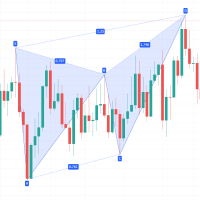
Description: This indicator draw ZigZag Line in multiple time frame also search for Harmonic patterns before completion of the pattern. Features: Five instances of ZigZag indicators can be configured to any desired timeframe and inputs. Draw Harmonic pattern before pattern completion. Display Fibonacci retracement ratios. Configurable Fibonacci retracement ratios. Draw AB=CD based on Fibonacci retracement you define. You can define margin of error allowed in Harmonic or Fibonacci calculations
FREE
Market Order Management Utility and strategy Tester in one solution. The software is equipped with a simple and intuitive interface, with risk management in lots, but also in money or percentage. Management of the market position trough BE and split of the profit and monitoring of the profits in money and percentage. Also usable for MT4 BactTest system with 4 different speed.
FREE
If you run an EA on a VPS, it is necessary to quickly notice if the server loses the connection to the broker. The ServerGuard24 EA checks the connection to the broker once a minute and sends the result to our monitoring server. There we notify you by e-mail, SMS, push and much more. The setup is super easy: 1. register at www.serverguard24.de 2. create a "Cron" check 3. copy the URL that is shown to you during the "Cron" check into the properties of the EA. And you can be sure that your Met
FREE
Общие сведения Советник отправляет уведомления на мобильный телефон, по электронной почте или подает звуковой сигнал при открытии и закрытии позиций на торговом счете. Данный советник не совершает торговых операций, а только наблюдает за ордерами и счетом. Запуск советника Для работы советника необходимо поместить файл NotifyMe_free.ex4 в папку каталог_терминала/experts (возможно, он туда уже помещен автоматически). В окне "Навигатор" ("Navigator") в разделе "Советники" ("Expert Advisors") долж
FREE
BeST_ Classic Pivot Points is an MT4 Indicator that is based on the widely known and definitely classic Pivot Point of a market prices activity. A pivot point is calculated as an average of significant prices (high,low,close) from the performance of a market in the prior trading period. If the market in the following period trades above the pivot point it is usually evaluated as a bullish sentiment, whereas trading below the pivot point is seen as bearish. A pivot point and the associated suppo
FREE
ExpertLines
Josemar Pinheiro
1 (1)
ExpertLines is a productivity expert to open orders by the breaking of the buy or sell lines, providing risk x reward and pips information on every trade. The expert can close the opened order by virtual lines of stop loss and take profit or by close buy or sell button. He also has a trailing stop resource if enabled. All this in a fast and easy way. Arm your trade with ExpertLines and have a good trade. Main Parameters Magic_Number - It is the magic number that the expert advisor uses to ident
FREE
Close_All_Trades_with_TP_SL is a reliable and efficient MQL4 Expert Advisor designed to simplify and automate trade management for all open positions on your MT4 account. This EA is especially useful for traders who open multiple trades quickly or use high-frequency strategies where manual TP/SL placement becomes difficult and time-consuming. The primary purpose of the EA is to ensure that every open trade—whether Buy or Sell—always has a predefined Take Profit (TP) and Stop Loss (SL) applied. M
FREE
Простенький скрипт, в котором очень часто нуждаются трейдеры. Он калькулирует лот в процентах от депозита. Для соблюдения риск-менеджмента очень даже нужная вещь. В настройках присутствует только одна опция: MaxRisk - риск в процентах для вычисления лота. Даный помощник работает как стандартный скрипт, то есть запускается только один раз на соответствующем графике, после чего можно приступать к торговле с вычисленым лотом. Все гениальное просто! Успешной торговли!
FREE
Trading panel for manual trading. Has a fairly wide functionality. Allows you to automatically calculate the order size, open both market and pending orders. It has a wide range of options for closing orders, it is possible to partially close orders, close orders after reaching a certain profit or loss, separately close profitable and unprofitable, buy and sell, as well as pending orders. The panel also contains a simple implementation of a grid of pending orders, reverse and lock functions, tr
FREE
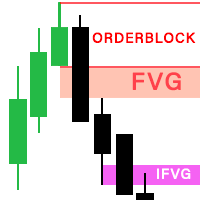
The latest version of Indicator is fully integrated into an all-in-one package, including: Fair Value Gaps (FVG).  Implied Fair Value Gap (IFVG).  OrderBlock (OB).  The options in the settings section are relatively easy to navigate, and you can even use them right away upon activation without encountering difficulties when using the default configuration. The indicator utilizes an algorithm to automatically draw and identify Order Blocks (OB), Fair Value Gaps (FVGs), and Implied Fair Value Gap
Ultra Scalper Pro
Vadim Korolyuk
4.29 (7)
Скальпирующий советник торгует от уровней дневной поддержки и сопротивления. Торговый эксперт не использует индикаторы. Рекомендуется использовать брокера с 5 знаками и низким спредом. Для защиты счёта от торговли во время расширения спреда добавлен параметр: "MaxSpread", в котором вы указываете максимально допустимый спред(15-20 пипсов). В месяц открывается 16-18 сделок в среднем. Преимущества: Эксперт всегда использует Takeprofit, Stoploss и Traillingstop; Эксперт не использует систему сетки и
FREE
Close Button
Wang Yu
4.76 (37)
Утилита позволяет легко закрывать ордера по их типу. Предусмотрены семь опций закрытия: Close All : закрыть все ордера, включая отложенные. Close Profit : закрыть все прибыльные ордера. Close Loss : закрыть все убыточные ордера. Close Stop : закрыть все стоп-ордера. Close Limit : закрыть все лимитные ордера. Close Buy: закрыть все ордера на покупку. Close Sell: закрыть все ордера на продажу. Также можно настроить расположение утилиты в окне графика.
FREE
Auto Stop Trail And Profit
Joaquin Nicolas Metayer
5 (1)
Auto Stop Trail And Profit is an expert advisor that monitors orders, when it detects that one has been placed, on the same chart that has been activated or on all assets, depending on its configuration, it will place its respective stop loss, take profit and perform trail stop loss (in a classic way, keeping a distance or "step by step"). You can see more of my products here: www.mql5.com/en/users/joaquinmetayer/seller
FREE
Simple RSI Forex Trading Strategy
Victor Manuel Valderrama Zamora
4 (1)
Diversify the risk in your trading account by combining our Expert Advisors. Build your own custom trading system here:   Simple Forex Trading Strategies The expert advisor opens trades when RSI indicator enter in oversold or overbought areas. The Stop Loss, Take Profit, and Trailing Stop are calculated based on the ATR indicator. The recommended currency pair is EURGBP and the recommended timeframe to operate and to do backtests is H4. This Expert Advisor can be profitable in any TimeFrame an
FREE
Rainbow MT4 is a technical indicator based on Moving average with period 34 and very easy to use. When price crosses above MA and MA changes color to green, it’s a signal to buy. When price crosses below MA and MA changes color to red, it’s a signal to sell. The Expert advisor ( Rainbow EA MT4) based on Rainbow MT4 indicator, as you can see in the short video below is now available here .
FREE
Diversify the risk in your trading account by combining our Expert Advisors. Build your own custom trading system here:   Simple Forex Trading Strategies The expert advisor opens trades when the SMAs cross and when the WPR has left overbought/oversold areas. The SMAs are also programmed to close the trades if the trend changes. The Stop Loss, Take Profit, and Trailing Stop are calculated based on the ATR indicator. The recommended currency pair is NZDUSD and the recommended timeframe to operat
FREE
Копирование торговых сигналов из Telegram канала в MetaTrader.  Утилита поможет легко и просто  копировать сделки из  вашего Телеграм  канала или чата в торговый терминал МетаТрейдер практически моментально   Это ДЕМО версия, ограничения - минимальный лот Оперативная поддержка в телеграм чате: https://t.me/forex4up_chat Шаблон для сигналов в Телеграм канале, чате (можно изменить в параметрах) SYMBOL=EURUSD, TYPE=SELL, PRICE= 0.00000 , LOT= 0.01 , STOPLOSS= 0.00000 , TAKEPROFIT= 0.00000 ,
FREE
Описание эксперта Алгоритм оптимизирован для торговли Nasdaq Торговый эксперт основан на постоянном ведении длинных позиций с ежедневной фиксации прибыли, если такова имеется и временном прекращении работы при осуществлении длительных коррекций. Принцип торговли эксперта, основан на исторической волатильности, торгуемого актива. Значения Размера коррекции (InpMaxMinusForMarginCallShort) и Максимального падения (InpMaxMinusForMarginCallLong), задаются вручную. Рекомендации по эксплуатации Ра
FREE
NAS100 Auto Sl And TP
Moustapha Boulouz
5 (2)
Представляем NAS100 Auto SL и TP Maker для MT4: Никогда больше не пропустите установку StopLoss и TakeProfit с нашим NAS100 Auto SL и TP Maker, незаменимым помощником для трейдеров, работающих на рынке Nasdaq 100 в MetaTrader 4. Этот инструмент предназначен для тех, кто ищет беспроблемное решение для автоматизации управления уровнями StopLoss и TakeProfit. Ключевые особенности: Эффективная автоматизация: Автоматически отслеживает сделки Nasdaq 100 без StopLoss и/или TakeProfit. Динамически регу
FREE
VR Color Levels MT4
Vladimir Pastushak
5 (1)
VR Color Levels — удобный инструмент для тех, кто применяет технический анализ с использованием таких элементов, как трендовая линия, прямоугольник и текст. Есть возможность добавлять текст непосредственно на график и делать скриншоты. Настройки, set файлы, демо версии, инструкции, решение проблем, можно получить в [блоге] Прочитать или написать отзывы можно по [ссылке] Версия для [MetaTrader 5] Работа с индикатором осуществляется в один клик . Для этого нужно нажать на кнопку с линией, после
FREE
Утилита Order Info Box предназначена для удобства контроля за установленными ордерами. При наличии ордеров утилита строит графические информермеры для каждого ордера, с указанием - типа ордера (направления позиции); - объема ордера; - прибыли (если ордер находится в рынке); - опционально магика ордера; - опционально комментария ордера. Кроме того, утилита строит информеры для ТейкПрофитов и СтопЛоссов ордеров, с указанием профита или убытка, который будет при исполнении этого ТейкПрофита или С
FREE
Free automatic fibonacci - это индикатор, который автоматически строит коррекции Фибоначчи, основываясь на количестве баров, выбранных в параметре BarsToScan. Линии Фибоначчи автоматически обновляются в реальном времени при появлении новых максимальных и минимальных значений среди выбранных баров. В настройках индикатора можно выбрать уровни, значения которых будут отображены. Также можно выбрать цвет уровней, что позволяет трейдеру прикреплять индикатор несколько раз с разными настройками и цве
FREE
С этим продуктом покупают
Trade Assistant MT4
Evgeniy Kravchenko
4.42 (193)
Помогает рассчитать риск на сделку, простая установка нового ордера с помощью линий, управление ордерами с функциями частичного закрытия, 7 типов трейлинг-стопа и другие полезные функции. Дополнительные материалы и инструкции Инструкция по установке   -   Инструкция к приложению   -   Пробная версия приложения для демо счета Функция Линии   - отображает на графике линию открытия, стоп-лосс, тейк-профит. С помощью этой функции легко установить новый ордер и увидеть его дополнительные характери
Добро пожаловать в Trade Manager EA — лучший инструмент для управления рисками, предназначенный для упрощения, точности и эффективности торговли. Это не просто инструмент для размещения ордеров; это комплексное решение для удобного планирования торгов, управления позициями и усиленного контроля над рисками. Независимо от того, начинающий вы трейдер, опытный специалист или скальпер, нуждающийся в быстром исполнении, Trade Manager EA адаптируется к вашим потребностям и работает с любыми активами:
Local Trade Copier EA MT4
Juvenille Emperor Limited
4.96 (107)
Опыт экстремально быстрого копирования сделок с помощью Local Trade Copier EA MT4 . Благодаря простой установке в течение 1 минуты этот копировщик сделок позволяет вам копировать сделки между несколькими терминалами MetaTrader на одном компьютере с Windows или на Windows VPS с крайне быстрыми скоростями копирования менее 0.5 секунды. Независимо от того, новичок вы или профессиональный трейдер, Local Trade Copier EA MT4 предлагает широкий спектр опций, чтобы настроить его под ваши конкретные пот
Copy Cat More Trade Copier MT4 (Копия Кот MT4) — это не просто локальный торговый копировщик; это полноценная система управления рисками и исполнения, созданная для современных условий торговли. От испытаний в prop-фирмах до личного управления счетами — он адаптируется к любой ситуации, сочетая надежное исполнение, защиту капитала, гибкую настройку и расширенные функции обработки сделок. Копировщик работает как в режиме Master (отправитель), так и в режиме Slave (получатель), обеспечивая синхрон
The product will copy all telegram signal to MT4   ( which you are member  ) , also it can work as remote copier.  Easy to set up, copy order instant, can work with almost signal formats, image signal, s upport to translate other language to English Work with all type of channel or group, even channel have "Restrict Saving Content", work with  multi channel, multi MT5 Work as remote copier: with signal have ticket number, it will copy exactly via ticket number. Support to backtest signal. How to
Trade copier MT4
Alfiya Fazylova
4.58 (33)
Trade Copier — это профессиональная утилита, предназначенная для копирования и синхронизации сделок между торговыми счетами. Копирование происходит от счета/терминала поставщика к счету/терминалу получателя, которые установлены на одном компьютере или vps. Перед покупкой вы можете протестировать демо-версию на демо-счете. Демо-версия здесь . Полная инструкция здесь . Основной функционал и преимущества: Русифицированный интерфейс, поддержку на русском языке. Поддерживает копирование МТ4 > МТ4, МТ
Exp COPYLOT CLIENT for MT4
Vladislav Andruschenko
4.69 (65)
Копировщик позиций/сделок/ордеров для MetaTrader 4 ( Для копирования на терминал MetaTrader 4 ). Копирует сделки, позиции, ордера с любых счетов, в том числе и счетов, открытых по инвест паролю. Один из лучших копировщиков сделок COPYLOT  МТ4 - МТ4, МТ5 - МТ4 для версии  COPYLOT MT4  ( или  МТ4 - МТ5  МТ5 - МТ5 для версии COPYLOT MT5)  на сегодняшний день. Версия МТ5 Полное описание +DEMO +PDF Как купить Как установить    Как получить файлы журналов   Как тестировать и оптимизировать    Все
Trade Dashboard MT4
Fatemeh Ameri
4.96 (53)
Tired of complex order placement and manual calculations? Trade Dashboard is your solution. With its user-friendly interface, placing orders becomes effortless, by a single click, you can open trades, set stop loss and take profit levels, manage trade lot size, and calculate risk to reward ratios, allowing you to only focus on your strategy. Say goodbye to manual calculations and streamline your trading experience with Trade Dashboard. Download  Demo Version  right now. You can find  Details of
MT4 к Telegram Signal Provider - это простой в использовании и полностью настраиваемый инструмент, который позволяет отправлять сигналы в Telegram, превращая ваш аккаунт в поставщика сигналов. Формат сообщений полностью настраиваем! Однако для простого использования вы также можете выбрать предопределенный шаблон и включать или отключать определенные части сообщения. [ Демо ]  [ Руководство ] [ Версия для MT5 ] [ Версия для Discord ] [ Телеграм-канал ]  New: [ Telegram To MT5 ] Настройка Шаг за
Это визуальная торговая панель, которая помогает вам легко размещать сделки и управлять ими, избегая человеческих ошибок и повышая вашу торговую активность. Он сочетает в себе простой в использовании визуальный интерфейс с надежным подходом к управлению рисками и положением [ Руководство по установке | Руководство по обновлению | Устранение неполадок | FAQ | Все продукты ] Удивительно простой в использовании Торгуйте легко с графика Торгуйте с точным управлением рисками, без проблем Сохранение
MT4 to Discord Signal Provider — это удобный, полностью настраиваемый инструмент, предназначенный для отправки торговых сигналов напрямую в Discord. Этот инструмент превращает ваш торговый счет в эффективного поставщика сигналов. Настройте формат сообщений под свой стиль! Для удобства выберите из предварительно разработанных шаблонов и решите, какие элементы сообщения включить или исключить. [ Демо ] [ Руководство ] [ Версия MT5 ] [ Версия Telegram ]  New: [ Telegram To MT5 ] Настройка Следуйте
Riskless Pyramid
Snapdragon Systems Ltd
5 (1)
Introduction This powerful MT4 trade mangement EA offers a way potentially to aggressively multiply trade profits in a riskfree manner. Once a trade has been entered with a defined stoploss and take profit target then the EA will add three pyramid add-on trades in order to increase the overall level of profit. The user sets the total combined profit target to be gained if everything works out. This can be specified either as a multiple of the original trade profit or as a total dollar amount. Fo
Trade Manager MT4 DaneTrades
Levi Dane Benjamin
4.09 (11)
Trade Manager, который поможет вам быстро входить и выходить из сделок, автоматически рассчитывая риск. Включает функции, которые помогут предотвратить чрезмерную торговлю, торговлю из мести и эмоциональную торговлю. Сделками можно управлять автоматически, а показатели эффективности счета можно визуализировать в виде графика. Эти функции делают эту панель идеальной для всех трейдеров, занимающихся ручной торговлей, и помогают улучшить платформу MetaTrader 4. Многоязычная поддержка. Версия MT5  |
Seconds Chart — уникальный инструмент для создания секундных графиков в MetaTrader 4 . С помощью Seconds Chart вы можете построить график с таймфреймом, заданным в секундах, получая идеальную гибкость и точность анализа, недоступную на стандартных минутных или часовых графиках. Например, таймфрейм S15 обозначает график со свечами продолжительностью 15 секунд. Вы можете использовать любые индикаторы, советники и скрипты. Работать с ними так же удобно, как и на стандартных графиках. В отличие от с
Trading History MT4
Siarhei Vashchylka
5 (9)
Trading History - Программа для торговли и управления капиталом на истории котировок в тестере стратегий. Может работать с отложенными и немедленными ордерами, оснащена функциями трейлинг стопа, безубытка и тейкпрофита. Очень хорошо подходит для тренировок и тестирования различных стратегий. Инструкция/Мануал ( Обязательно читайте перед приобретением ) Преимущества 1. В кратчайшие сроки позволяет протестировать любую торговую стратегию 2. Отличный тренажёр для тренировок трейдинга. Можно получи
Equity Protect Pro: Ваш эксперт по комплексной защите счетов для спокойной торговли Если вы ищете такие функции, как защита счета, защита капитала, защита портфеля, защита мультистратегий, защита прибыли, сбор прибыли, безопасность торговли, программы контроля рисков, автоматический контроль рисков, автоматическая ликвидация, условная ликвидация, запланированная ликвидация, динамическая ликвидация, скользящий стоп-лосс, закрытие в один клик, ликвидация в один клик и восстановление в один клик,
MetaQuant PRO is a professional account analytics dashboard for MetaTrader 4, built to give traders a clear, visual, and data-driven view of their trading performance directly inside MT4. It converts your account history into clean metrics, charts, and insights without relying on external websites or spreadsheets. Main features • Overview (full account) • Daily (today only) • Monthly (current month) • All-Time (entire history) Visual performance analysis • Smooth equity curve from real closed t
News Filter EA: Advanced Algo Trading Assistant News Filter EA is an advanced algo trading assistant designed to enhance your trading experience. By using the   News Filter EA , you can integrate a Forex economic news filter into your existing expert advisor, even if you do not have access to its source code. In addition to the news filter, you can also specify   trading days   and   hours   for your expert. The News Filter EA also includes   risk management   and   equity protection   features
Telegram to MT4 Coppy
Sergey Batudayev
3.75 (8)
Telegram to MT4: Идеальное решение для копирования сигналов Упростите свою торговлю с Telegram to MT4 — современным инструментом, который копирует торговые сигналы прямо из каналов и чатов Telegram на вашу платформу MetaTrader 4, без необходимости использования DLL. Это мощное решение обеспечивает точное исполнение сигналов, широкие возможности настройки, экономит время и повышает вашу эффективность. [ Instructions and DEMO ] [ FAQ ] Ключевые возможности Прямая интеграция с Telegram API Аутентиф
Copy Master mt4
Evgenii Aksenov
5 (5)
Эта утилита позволит вам копировать любые сделки с одного терминала с настройкой Master на другие терминалы с настройкой Slave В то же время вы можете выбрать, какие пары копировать, установить размер скопированного ордера по нескольким параметрам. Устанавливайте лимит убытков по просадке или копируйте только прибыльные сделки Вы можете копировать сделки с MT4 или MT5 на MT4 или MT5 других брокеров Теперь не составит труда скопировать сигналы любого эксперта, работающего в MT4, в терминал MT
Risk/Reward Tool — это профессиональный советник, созданный для того, чтобы революционизировать способ планирования, визуализации и исполнения сделок в MetaTrader 4. Независимо от того, являетесь ли вы дискреционным трейдером, ценящим точное управление рисками, или разработчиком стратегий, которому необходимо визуально тестировать торговые настройки, этот инструмент предоставляет всё необходимое в одном элегантном и интуитивно понятном интерфейсе. В отличие от простых калькуляторов позиций, Risk
Улучшите свою ручную торговлю: точное, быстрое и автоматизированное управление рисками с помощью Trade Manager Assistant Получите полные инструкции по настройке и изучите возможности Trade Manager Assistant, используя предоставленную бесплатную демо-версию. Более подробную информацию можно получить по ссылке   https://www.mql5.com/en/blogs/post/758625       . Ручная торговля требует тщательного анализа и быстрого принятия решений, но риск ошибок исполнения, несоответствий и путаницы в параметра
TradePanel MT4
Alfiya Fazylova
4.85 (92)
Trade Panel — это многофункциональный торговый помощник. Приложение содержит более 50 торговых функций для ручной торговли и позволяет автоматизировать большинство торговых операций. Внимание приложение не работает в тестере стратегий. Перед покупкой вы можете протестировать демоверсию на демо-счете. Демоверсия здесь . Полная инструкция здесь . Торговля. Позволяет совершать торговые операции в один клик: Открыть отложенные ордера и позиции с автоматическим расчетом риска. Открыть несколько ордер
Comprehensive on chart trade panel with the unique ability to be controllable from mobile as well. Plus has a library of downloadable configuration, e.g. exit rules, extra panel buttons, pending order setup and more. Please see our product video. Works with all symbols not just currency pairs. Features On chart panel plus controllable from free app for Windows, iPhone and Android Built-in script engine with library of downloadable configuration, e.g. add 'Close All Trades in Profit' button, exit
News Loader Pro
Vu Trung Kien
4.2 (5)
News Loader Pro автоматически обновляет каждую экономическую новость в реальном времени, используя детальную информацию из нескольких онлайн-источников. Продукт использует уникальную технологию для загрузки подробных данных с популярных Forex-сайтов. Перед предстоящим новостным релизом на ваше мобильное устройство/электронную почту высылается алерт. Также продукт отмечает новостные релизы на графике для дальнейшей работы. Новости - один из основных двигателей рынка. Работа с новостями позволяет
EchoTrade Telegram to MT4 Copier
Perpetual Chinemerem Vincent
5 (2)
EchoTrade Telegram to MT5 Copier Seamless, Instant, and Reliable Signal Copying - Direct from Telegram to MetaTrader 4! The product does not run in the strategy tester but you can get free trial version   here  for testing before purchase. Tired of manually executing trades from Telegram signals? EchoTrade automates the process, instantly copying trades from any Telegram channel or group directly into your MT5 account—accurately, efficiently, and without delay. Key Features: Universal Compatib
EASY Insight AIO – Всё-в-одном для умного и простого трейдинга Обзор Представьте, что вы можете просканировать весь рынок — Форекс, золото, криптовалюты, индексы и даже акции — всего за несколько секунд, без ручного просмотра графиков, сложной установки или настройки индикаторов. EASY Insight AIO — это ваш идеальный инструмент экспорта для трейдинга с поддержкой искусственного интеллекта. Он предоставляет полный снимок рынка в одном аккуратном CSV-файле — готовом к мгновенному анализу в ChatGP
--------------Welcome to use [MQL5 Signal Analyze Master]------------------  Function: Draw order tracks of MQL5 MT4 and MT5 signal on MT4 chart. [Using guide] 1.Use it as Experts. 2.Download history record from MQL5 signal(MT4 signal or MT5 signal).  3.Paste history record file below "MQL4/Files/" 4.Load [Signal Analyze Master] on the symbol chart what you want to analyze. 5.Paste the history record file name to parameter 'FileName' 6.Select  SignalType  match the history you download on MT4
Утилита связывает графики в MetaTrader 4. Вы меняете символ в главном окне, а утилита меняет все остальные автоматически. Установите утилиту на все графики, которые вы хотите связать. Установите один график главным . Меняйте символ в главном окне, а утилита поменяет все остальные автоматически. Входной параметр isMainChart - установите в значение true только для основного окна графика. Для всех остальных связанных окон установите false .
Easy Virtual Trader
Anoop Sivasankaran
4.89 (9)
Настройка Easy Virtual Trader> Вводит свои правила> Вы готовы торговать с мобильного или другого советника или где угодно ... Пусть робот управляет вашими сделками!     Этот мощный советник поможет вам автоматически управлять ВСЕМИ или СПЕЦИАЛЬНЫМИ сделками на основе ваших правил и настроек PRE-SET.     После того, как он настроен и запущен, вам больше не нужно следить за вашими заказами, программа будет следить за вашими заказами и контролировать их с помощью ваших предопределенных правил.
Другие продукты этого автора
EasyGRID MT5
Nina Yermolenko
5 (1)
The utility places a grid of pending orders . You can select the number of orders in the grid, the step between orders, multiplier for the order size, SL and TP levels, magic number etc. If you use a profit bucket , please note that it applies to all orders on the current currency pair with the current magic. If you want to use several grids with independent profit buckets at the same time, run several copies of the utility and specify different magics in the settings. MT4 version of the utility
FREE
EasyReverse MT5
Nina Yermolenko
5 (1)
Utility for order reversal. Closes orders on the chart on which it is launched and opens orders with the opposite direction instead of them. Has a simple and intuitive graphical interface. It is also possible to automatically reverse newly opened orders. MT4 version of the utility-  https://www.mql5.com/en/market/product/74771 If you like this utility, take a look at my other products - https://www.mql5.com/en/users/nina_yermolenko/seller


FREE
EasyGRID MT4
Nina Yermolenko
5 (8)
The utility places a grid of pending orders. You can select the number of orders in the grid, the step between orders, multiplier for the order size, SL and TP levels and the magic number. If you use a   profit bucket , please note that it applies to all orders on the current currency pair with the current magic. If you want to use several grids with independent profit buckets at the same time, run several copies of the utility and specify different magics in the settings. MT5 version of the ut
FREE
Trading panel for manual trading. Has a fairly wide functionality. Allows you to automatically calculate the order size, open both market and pending orders. It has a wide range of options for closing orders, it is possible to partially close orders, close orders after reaching a certain profit or loss, separately close profitable and unprofitable, buy and sell, as well as pending orders. The panel also contains a simple implementation of a grid of pending orders, reverse and lock functions, tr
FREE
EasyClose MT5
Nina Yermolenko
5 (1)
A simple and convenient utility for closing orders. It can close both all orders together as well as buy, sell or pending orders separately. Has an intuitive graphical interface. MT4 version of the utility -  https://www.mql5.com/en/market/product/78601 If you like this utility, take a look at my other products -   https://www.mql5.com/en/users/nina_yermolenko/seller

FREE
This utility is a graphical shell for other Expert Advisors that do not have their own graphical shell or whose graphical shell you do not like. Just run the utility on a free chart of any currency pair, specify in the input parameters the "Magic Number" of the advisor to which you want to connect the utility, and a graphical shell will appear on the graph, containing information about the traded currency pairs, current positions and trading results of your advisor. If you like this utility, tak
FREE
Skin for EA MT4
Nina Yermolenko
5 (1)
This utility is a graphical shell for other Expert Advisors that do not have their own graphical shell or whose graphical shell you do not like. Just run the utility on a free chart of any currency pair, specify in the input parameters the "Magic Number" of the advisor to which you want to connect the utility, and a graphical shell will appear on the graph, containing information about the traded currency pairs, current positions and trading results of your advisor. If you like this utility, ta
FREE
Utility for order reversal. Closes orders on the chart on which it is launched and opens orders with the opposite direction instead of them. Has a simple and intuitive graphical interface. It is also possible to automatically reverse newly opened orders. MT5 version of the utility -  https://www.mql5.com/en/market/product/74770 If you like this utility, take a look at my other products -   https://www.mql5.com/en/users/nina_yermolenko/seller

FREE
The utility opens an order in the opposite direction from already open positions on the currency pair on which it is launched, creating a lock of orders. The utility has a simple interface and is easy to use. MT4 version of the utility -  https://www.mql5.com/en/market/product/78127 If you like this utility, take a look at my other products -   https://www.mql5.com/en/users/nina_yermolenko/seller

FREE
Trading panel for manual trading. Has a fairly wide functionality. Allows you to automatically calculate the order size, open both market and pending orders. It has a wide range of options for closing orders, it is possible to partially close orders, close orders after reaching a certain profit or loss, separately close profitable and unprofitable, buy and sell, as well as pending orders. The panel also contains a simple implementation of a grid of pending orders, reverse and lock functions, tr
FREE
EasyLock MT4
Nina Yermolenko
5 (1)
The utility opens an order in the opposite direction from already open positions on the currency pair on which it is launched, creating a lock of orders. The utility has a simple interface and is easy to use. MT5 version of the utility -  https://www.mql5.com/en/market/product/78126 If you like this utility, take a look at my other products -   https://www.mql5.com/en/users/nina_yermolenko/seller

FREE
Account Info Manager (AIM)   - это утилита, предназначенная для просмотра информации по результатам работы советников на торговом счете. Утилита может группировать ордера по их мейджикам или комментариям, тем самым давая возможность проанализировать в отдельности результаты работы каждого советника, торговавшего на счете. С помощью этой утилиты вы можете просмотреть информацию по числу открытых советником ордеров, проценту прибыльных ордеров, величине прибыли, профит фактору, среднему размеру о
Trading panel for manual trading. Has a fairly wide functionality. Allows you to automatically calculate the order size, open both market and pending orders. It has a wide range of options for closing orders, it is possible to partially close orders, close orders after reaching a certain profit or loss, separately close profitable and unprofitable, buy and sell, as well as pending orders. The panel also contains a simple implementation of a grid of pending orders, reverse and lock functions, tr
The EA is based on artificial intelligence that you can train to trade using eight standard indicators. The EA is very flexible - all training and trading parameters used in the EA are available to the user. The EA has a news filter to reduce the risk of high currency fluctuations when big news is released, virtual stop loss and take profit levels allow you to hide these values ​​from your broker, high spread and slippage filters allow you to avoid losses when opening orders. During the first pa
The utility is designed to save funds on your trading account. There is support for three levels of minimum equity and free margin. For each level, you can set partial (by a certain percentage) or complete closing of all market orders. The partial close percentage is applied for each order separately based on its current size (i.e. the size at the time the equity or free margin reaches the appropriate level). Upon reaching the last third level, the utility can close all charts, which will make i
The utility displays in a convenient form the historical trades made on the account. You can filter trades by magic or comcent, display only profitable or losing trades, and only buy or sell trades. Using this utility, you can see trade entry and exit points, stop loss and take profit levels, trade profit, magic number and comment, order ticket and order size - you only need to run the utility on the chart of the currency pair you want information on get and customize the input parameters. MT5
Account Info Manager (AIM) - это утилита, предназначенная для просмотра информации по результатам работы советников на торговом счете. Утилита может группировать ордера по их мейджикам или комментариям, тем самым давая возможность проанализировать в отдельности результаты работы каждого советника, торговавшего на счете. С помощью этой утилиты вы можете просмотреть информацию по числу открытых советником ордеров, проценту прибыльных ордеров, величине прибыли, профит фактору, среднему размеру орд
Trading panel for manual trading. Has a fairly wide functionality. Allows you to automatically calculate the order size, open both market and pending orders. It has a wide range of options for closing orders, it is possible to partially close orders, close orders after reaching a certain profit or loss, separately close profitable and unprofitable, buy and sell, as well as pending orders. The panel also contains a simple implementation of a grid of pending orders, reverse and lock functions, tr
The EA is based on artificial intelligence that you can train to trade using eight standard indicators. The EA is very flexible - all training and trading parameters used in the EA are available to the user. The EA has a news filter to reduce the risk of high currency fluctuations when big news is released, virtual stop loss and take profit levels allow you to hide these values ​​from your broker, high spread and slippage filters allow you to avoid losses when opening orders. During the first pa
The utility is designed to save funds on your trading account. There is support for three levels of minimum equity and free margin. For each level, you can set partial (by a certain percentage) or complete closing of all market orders. The partial close percentage is applied for each order separately based on its current size (i.e. the size at the time the equity or free margin reaches the appropriate level). Upon reaching the last third level, the utility can close all charts, which will make i
The utility displays in a convenient form the historical trades made on the account. You can filter trades by magic or comcent, display only profitable or losing trades, and only buy or sell trades. Using this utility, you can see trade entry and exit points, stop loss and take profit levels, trade profit, magic number and comment, order ticket and order size - you only need to run the utility on the chart of the currency pair you want information on get and customize the input parameters. MT4
Фильтр:
Youngon
152
Youngon 2024.10.11 06:35 
 

Simple and Fast closing EA

Ответ на отзыв