 MetaTrader 5
 Эксперты
 Индикаторы
 Библиотеки
 Утилиты
 Виджеты
 Правила
Смотри обучающее видео по маркету на YouTube
Как купить торгового робота или индикатор
Запусти робота на
виртуальном хостинге
виртуальном хостинге
Протестируй индикатор/робота перед покупкой
Хочешь зарабатывать в Маркете?
Как подать продукт, чтобы его покупали
Торговые утилиты для MetaTrader 5 - 21
 Ниже представлены торговые программы, упрощающие трейдинг в MetaTrader 5. Наведите курсор на товар, чтобы прочесть описание товара и его предназначение.
Input Description The indicator provides flexible options to display trading history directly on the chart, including: Days to show Profit
Displays only trades executed within the last X days from the current time. Font Size
Allows selecting the font size used to display trade information on the chart. Show Volume
Enables or disables the display of trade volume for each position. Show Currency
Enables or disables the display of the currency unit for profit values. Color for Win Trade
Sets t
FREE

— Инструмент AI‑аналитики для ультракороткой торговли, полностью интегрированный с индикатором Super Fast Second Chart — Этот продукт — автоматическая AI‑система анализа, полностью связанная с фирменным индикатором . Достаточно сохранить скриншот графика — и AI за несколько секунд выдаст мульти‑таймфреймовый анализ, направление, уровень уверенности, условия разворота и следующую точку входа . В сочетании с фирменным индикатором AI получает также CSV‑данные (10–20 баров точных числовых значений)
FREE

Haunted Risk Calculator is a visual risk management panel for MT5 that calculates the correct lot size in real time based on your account balance, risk percentage, and stop-loss distance. HOW IT WORKS
Set your risk percentage or dollar amount, drag the SL and TP lines to your desired levels on the chart, and the panel instantly shows the calculated lot size, risk in dollars, reward-to-risk ratio, and expected profit. Execute with one click or a keyboard shortcut. FEATURES Draggable panel — grab
FREE

Торгуйте на funded-счёте, не беспокоясь о новостных правилах. Prop News Filter Pro — это Expert Advisor для соблюдения правил торговли на funded и prop firm счетах. Он автоматически защищает ваши сделки от строгого правила 2 минут до/после новостей, требований закрытия позиций перед выходными и праздниками, которые применяют большинство крупных prop-firm. Разработан специально для того, как профессиональные funded-трейдеры управляют новостным риском. Использует точную двухэтапную модель защиты
Chart Object Cleaner for MetaTrader 5 Clean up your MetaTrader 5 charts with this powerful script designed to remove graphical objects from the main chart and sub-windows effortlessly. Perfect for traders who need a clutter-free workspace and speed to focus on their strategies. This script, created by @LouisMattFX (version 1.02), allows you to selectively delete graphical objects based on your preferences. Whether it's annotations, trendlines, or other indicators on the main chart or s
FREE

Как запустить скрипт в MT5. Откройте MetaTrader 5. Нажмите Ctrl + N, чтобы открыть окно «Навигатор». Найдите папку Скрипты (Scripts). Перетащите мышкой RR Control Pro на график с открытой сделкой.
Как это работает.
Автоматический поиск: Как вы перетащите скрипт на график, скрипт сам найдет самую последнюю открытую позицию на вашем торговом счете. Определение направления: Скрипт проверяет, BUY это или SELL, чтобы правильно рассчитать расстояния. Формула: Соотношение считается как Прибыль / Рис
FREE

OrderCalc opens a window in the chart with the data of your orders:
Position size, stop loss, take profit, profit/loss
Only the positions for this symbol are displayed. If several positions exist, these are totalled and displayed in the last line. If you work with pyramids, you can see at a glance how big the total profit or loss is.
M can be used to display information about the symbol: Margin, spread, minimum order size, increment etc. R opens the risk calculator. A click in the chart calc
FREE

Risk Lot Calculator Utility
Risk Lot Calculator Utility is a simple and practical risk management tool for MetaTrader 5.
The utility helps traders calculate an appropriate lot size based on account balance or equity, selected risk percentage, and Stop Loss distance.
It is designed to make position sizing and trade planning faster and easier directly from the MetaTrader 5 chart.
MAIN FEATURES
- Automatic lot size calculation - Percentage-based risk management - Balance or Equity based calcu
FREE

Manual Assistant MT5 - это профессиональный инструмент для ручной торговли, который сделает ваш трейдинг быстрым и комфортным. Оснащена всеми необходимыми функционалами, которые позволят открывать, сопровождать и закрывать ордера и позиции одним кликом. Имеет простой и понятный интерфейс и подойдет как профессионалу, так и новичку.
Панель позволяет выставлять ордера на покупку и продажу одним нажатием на кнопку.
Основные возможности панели Работает с любыми торговыми инструментами. Панель п
FREE

Быстрые действия там, где счёт идёт на секунды Эта торговая панель изначально создана для работы с кастомными пользовательскими графиками , включая секундные таймфреймы.
Она корректно распознаёт реальный торговый символ , лежащий в основе пользовательского графика, и выполняет сделки именно по нему - без ручной привязки и дополнительных действий. Эта панель решает одну простую задачу:
сократить расстояние между решением и действием . Без лишних окон, подтверждений и постоянных переключений. Быст
FREE

OVERVIEW
Tanin EA17 Second Chart is a professional-grade utility EA built specifically for ultra-scalpers. Since MetaTrader 5 does not natively support second timeframes (like S10, S15), scalpers often face execution delays when analyzing external platforms and executing on MT5. EA17 bridges this gap by generating smooth, real-time custom second charts directly within your terminal. THE STORY BEHIND THE TOOL
As a scalper myself, I needed absolute speed and precision. I built this tool to elimin
FREE

ClickDesk Trader is a fast, manual trade-management desk for MetaTrader 5. Open, close and protect your trades in one click — or with keyboard hotkeys — while a clean HUD keeps your P&L, risk and market pressure in view. It does not decide for you; you stay in full control.
One-click desk & hotkeys - Buy / Sell, Close All, Close Buys, Close Sells — buttons and hotkeys (B, S, C, Q, W). - Lot stepping on the fly (L / K) with a hard lot cap.
Glowing toggle tools (press again to undo) - SL/T
FREE

Visual trading tool for MetaTrader 5 with automatic lot calculation, draggable SL/TP lines, risk-reward ratio display, and one-click execution.
Smart Lot OneClick Manager is a fast, intuitive, and clean visual trading assistant designed for MetaTrader 5. It streamlines your risk management and order execution directly on the chart, eliminating manual calculations and saving crucial seconds during high-volatility sessions. Key Features: Automatic Lot Calculation: Automatically calculates the exa
FREE

EA Utility Tool: Risk Consistency Manager The Risk Consistency Manager EA is a simple yet powerful tool that automates risk management across multiple open positions. It dynamically adjusts stop-loss levels to distribute a predefined total risk value (e.g., $10,000) evenly among all active trades. Key Features: Dynamic Risk Distribution: Automatically allocates an equal share of risk to each position (e.g. with total risk capital of $10,000, its will be distribute each trade with $3,333.33 risk
FREE

COASYN ATR Table is a multi-timeframe volatility reference for MetaTrader 5. It displays Average True Range across up to four user-selected timeframes and converts the values into pips for a cleaner comparison of how much the market is currently moving. The indicator does not generate signals, determine direction, or execute trades. Its purpose is simple: Use ATR as a ruler for current market movement. Features Up to 4 selectable timeframes Adjustable ATR length ATR displayed in pips Optional ra
FREE

Automated Utility & Risk Assistant (AURA) is the ultimate trading utility for MetaTrader 5, engineered for traders who demand precision, discipline, and total control. This is not just an order placement tool; it is a comprehensive Risk Infrastructure & Account Guardian (TradeCop) designed to eliminate emotional decision-making, automate complex math, and safeguard your account against prop-firm violations and execution errors. Whether you are a retail trader, a scalper, or a Prop-Firm challen
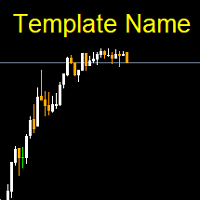
Template name allows you to write custom text that will show up on your charts. It allows you to position the text anywhere including selecting any color that you prefer. You can position the text at any of the 4 corners of your chart screen. This custom text can aid as a watermark for your screen shots. This text can act as a unique and true signature for your charts.
FREE
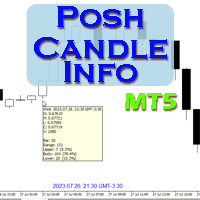
Show candle info with: Time in selected timezone Bar number Candle range points Upper wick points and percentage Body points and percentage Lower wick points and percentage Mark large/small candle body with customizable line. Settings group: Broker and local timezone. Lookback bars for candle marking. Large candle body Small candle body Date and time info with auto position or custom the x and y coordinate.
FREE

Axilgo Pip Piper CoPilot Elevate your trading game with the Axilgo Pip Piper CoPilot, the first in our revolutionary Pip Piper Series. This all-inclusive toolset is meticulously crafted for serious traders, focusing on key areas such as Risk Management, Trade Management, Prop Firm Rule Compliance, and Advanced Account Management . With CoPilot, you’re not just investing in a tool—you’re gaining a strategic partner in the intricate world of trading. Important Notice: To ensure you receive the fu
FREE

The "Takeandstop" script is a powerful tool designed to streamline your trading workflow by automatically setting Take Profit (TP) and Stop Loss (SL) levels on your MetaTrader 5 chart. This script is particularly useful for traders who want to efficiently manage their risk and reward without the hassle of manually calculating and entering these levels. Key Features: Effortless TP and SL Placement: With a few clicks, the script allows you to set predefined Take Profit and Stop Loss levels for you
FREE
Description Smart SL/TP Modifier Pro is a professional utility designed to help traders easily manage Stop Loss (SL) and Take Profit (TP) levels directly from their MetaTrader 5 chart.
It provides interactive on-chart control lines and intuitive buttons for quick modification of all active orders with just one click. This tool is especially useful for traders who manage multiple positions manually but want to ensure consistent and fast SL/TP adjustment. Main Features Modify all open trades
FREE

Специальное предложение: первые 100 скачиваний абсолютно БЕСПЛАТНО! После этого цена повысится до 30$. ️ 1. POSITION SIZING Sizing_Method: Выберите метод расчета лота (SIZING_LOTS для ручного ввода, SIZING_PCT_EQUITY для процента риска от эквити, SIZING_FIXED_CASH для фиксированного риска в USD). Sizing_ManualLots: Фиксированный размер лота (Активно при выборе SIZING_LOTS). Sizing_RiskPercent: Риск на сделку в процентах от средств на счете (эквити). Sizing_RiskCash: Фиксированная сумма риска
FREE

У вас есть возможность отвлечься от ежедневной рутинной торговли и не на долго погрузится в мир магии. Представляю вашему вниманию игру - карточный фокус. На языке mql можно делать не только советники, индикаторы, скрипты, но и такие вот небольшие игры. Я не только трейдер и программист, но и люблю в свободное время показывать карточные фокусы, раз уж так сложилось, я решил оцифровать один из своих любимых фокусов. Это было не так просто, учитывая что фокус содержит много ментализма. Фокус показ
FREE

Level Assistant - это эксперт помощник для ручной установки уровней поддержки и сопротивления. Трейдеры часто сами формируют свои уровни. При наличии множества графиков разных периодов уровень размножится на все графики. При установке горизонтальной линии на график Помощник предлагает преобразовать эту линию в уровень. При этом он сам определит цвет и толщину линии в зависимости от периода инструмента и где она находится относительно цены. Обозначит уровень надписью. Особенностью является то, чт
FREE

Swift Symbol Switch adds a clean, convenient symbol-switching panel directly to your chart, allowing you to move between Forex pairs, cryptocurrencies, commodities, metals, and other broker-supported instruments with a single click. There is no need to type symbol names, search through Market Watch, or repeatedly open MetaTrader menus. Simply select a symbol from the on-chart panel and the current chart updates instantly. The utility is designed for traders who monitor multiple markets and want
FREE
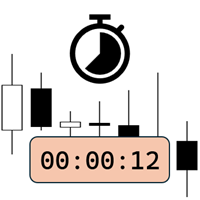
Candlestick Timer is a gadget by MT4Gadgets.com that quickly shows you the countdown to candle close / next candle. This information is useful in some strategies or when you need to be ready to react to news, volatility, market open/close and similar situations. The panels can be adjusted in position, size, color. You can also set a threshold to be alerted when the candle close/open, approach.
Features: Visual interface Size, position and colors adjustable Optional alert available Ease of use
FREE

Free for a limited time, grab it now! Please, if you like this utility, leave a review, it helps us build more tools like this.
Many retail traders fail because they enter trades when a market session is already "exhausted." Session Monitor gives you the context you need by comparing current price movement against historical session averages.
The utility calculates the absolute range (the distance between the highest and lowest price reached) during the session. It is a MT5 utility that trac
FREE

Product Overview DW Connection Monitor MT5 is a lightweight utility EA for MetaTrader 5 that keeps a constant eye on your terminal's connection to the broker and its network latency. The moment your connection drops — or comes back — it sends a push notification straight to your phone, so you always know the real state of your trading terminal, even when you're away from the screen. It's built for traders running EAs on a VPS or a home PC who need to be sure their automated strategies are actu
FREE

News Guard & Slippage Shield Overview This Expert Advisor is a protective utility for MetaTrader 5 accounts. It pauses trading around high-impact news releases and automatically closes any position that fills with excessive slippage. It runs at account level, so it can protect every Expert Advisor and Magic Number on the same account, not only trades it opens itself. The EA does not place any trades of its own. It is designed to run alongside your existing trading robots as a risk-control layer.
FREE

See Your Key Trading Measurements at a Glance Smart Pips Meter is a free utility that displays important market measurements directly on your chart—so you can make faster trading decisions without manually calculating pip distances. WHAT IT SHOWS ADR (Average Daily Range)
See the current ADR pip value directly on your chart. Current Candle Size
Instantly see the size of the current candle in pips. Previous Candle Size
Quickly check the size of the last completed candle.
FREE

Graph the take profit and stop loss levels of closed and open trades. Green rectangles for the take profit zone and red rectangles for the stop loss zone. It updates automatically when opening a trade and extends the rectangle to the last open candle. Useful for analyzing whether the trade limits have been chosen correctly. Its only input parameter is the date from which you want to start graphing, in the format year-month-day.
FREE
Утилита управляет любым параметром любого индикатора с помощью прокрутки колеса мышки. Вы можете установить данную утилиту и изменить интерфейс любого индикатора из стандартной поставки терминала . Для пользовательских индикаторов, а так-же купленных на "Market", есть утилита Universal Scroller . Принцип действия
Утилита управляет одним из параметров, который вы выберете, меняя его с помощью прокрутки колеса мышки. Активация режима прокрутки включается наведением курсора на кнопку, или нажатие
FREE
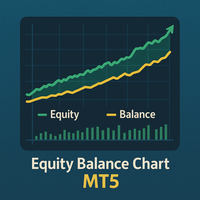
Equity Balance Chart (Indicator Description) This is an advanced MQL5 indicator designed to track and display an account's performance directly on the chart. It plots the account's Equity (in lime green) and Balance (in orange) as two separate lines in a sub-window. Its two primary features are: Persistent History: The indicator saves the equity and balance data from each bar to a history file. When you restart MetaTrader 5 or reload the indicator, it automatically loads this file to redraw the
FREE

APEXSYNC TRADE COPIER PRO - THE INSTITUTIONAL-GRADE COPYING REVOLUTION ULTRA-LOW LATENCY | SMART RISK INTELLIGENCE | PROP-FIRM SAFE Tired of slow, basic copiers that risk your capital? Meet ApexSync Pro - the next-generation trade copier engineered to DOMINATE the MT4/MT5 ecosystem with institutional-grade performance, AI-driven risk management, and prop-firm certified safety protocols. WHY APEXSYNC PRO BEATS EVERYTHING ELSE Feature Old Copiers APEXSYNC PRO Speed 500ms+ (slow) <200ms (blazing
FREE

Quantum Simulator – Discover the Power of Quantum Dynamic Risk Quantum Simulator is an Expert Advisor designed to demonstrate the effectiveness of the Quantum function, fully integrated into the RiskGuard Management system. Through a simple interface, you can simulate an equity curve starting from a fixed balance of €100,000 , using your own custom statistics: Win Rate (%) Average Risk/Reward Ratio Number of Trades Maximum Allowed Drawdown (Optional) Minimum Accepted Drawdown The EA performs a
FREE

Bid Ask Spread Display - Real-Time Price Monitor Instantly visualize crucial market pricing information directly on your chart with this lightweight, efficient script. Perfect for all trading styles, this tool provides: Key Features: Real-Time ASK Price (Red) Real-Time BID Price (Green) Spread Display in Points (Blue) ️ Fully Customizable : Position, fonts, colors High Performance : Updates 10x/second Clean Layout : Professional three-line display Self-Cleaning : Automatically
FREE

Institutional Protector — Analytics Dashboard & Account Guard
Institutional Protector combines two tools in one utility: a professional trading-analytics dashboard and a rule-based account protector (watchdog) that supervises every EA on your account by magic number. Everything lives in draggable floating windows with a modern, canvas-drawn interface.
️ Account protection (watchdog)
• Per-EA rules by magic number: daily loss %, max drawdown % (trailing-equity or balance based), max open posi
FREE

NHS Risk Manager NHS Risk Manager is a streamlined trade-management and risk-control Expert Advisor for MetaTrader 5. It is built for traders who want a cleaner and faster execution workflow with practical protection tools directly on the chart. The EA focuses on the core elements of disciplined manual trading: planning the trade visually, sizing the position correctly, protecting the account with hard rules, and managing open exposure with more structure and consistency. It is suitable for trad
FREE
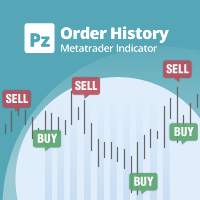
Индикатор общего назначения, отображающий историю сделок/ордеров любого живого графика, очень похожий на визуальный режим тестера стратегий. Это позволяет вам изучить реальную торговую историю любого конкретного символа в образовательных, улучшенных, обратно-инжиниринговых или диагностических целях. Его можно успешно использовать как с мастер-паролем, так и с паролем инвестора.
[ Руководство по установке | Руководство по обновлению | Устранение неполадок | Часто задаваемые вопросы | Все продукт
FREE

You can send MetaTrader screenshot easily to your identified telegram channel via press the send button that on the chart. TelegramBotToken: Telegram API credentials. You can create API credentials on my.telegram.org web page ChatId: Your telegram chatId. Secreenshots will be sending this channel - Please do not press the button repeatedly. This may cause your bot or ip address to be blocked. - You have to add telegram api address ( https://api.telegram.org ) in Option > Expert Advisors > Allow
FREE

Neuron Telegram Trade Broadcaster MT5 Neuron Telegram Trade Broadcaster MT5 — профессиональная мультиактивная утилита от NEURON QUANT SYSTEMS для автоматической передачи торговых операций MetaTrader 5 в группы или каналы Telegram. Система отслеживает ручные сделки и операции Expert Advisor , включая разные торговые инструменты счета. Основные функции Автоматические сигналы BUY и SELL Ручные сделки и сделки EA Мультиактивный мониторинг Рыночные и отложенные ордера Цена входа, лот, Stop Loss и Tak
FREE

Скрипт VR Object Delete All решает проблему мусора на графике, часто бывает нужно полностью очистить график от всего что на нем нанесено, комментарии, линии, объекты. Скрипт полностью все удалит, даже те объекты которые не видны. При своей работе VR Object Delete All в журнале терминала пишет все что делает, а так же имена удаляемых объектов. Отдельной строкой выводит количество удаленных объектов, в случае каких то ошибок выведет сообщение об ошибке. Скрипт писался с целью быстрого удаления и о
FREE

批量止損止盈同步管理器 這是一款專為 MT5 多持倉交易者 設計的持倉管理工具。 當同一個商品、同一個方向同時有多張持倉時,只需要手動修改其中一張持倉的 Stop Loss(SL)或 Take Profit(TP) ,工具就會自動把該持倉目前完整的 SL / TP,同步到其他相同商品、相同方向的持倉。 例如: XAUUSD BUY #1 XAUUSD BUY #2 XAUUSD BUY #3 如果將 #1 修改為: SL = 3300 TP = 3500 其他 XAUUSD BUY 持倉會自動同步成相同設定。 主要功能 批量同步 Stop Loss 批量同步 Take Profit 可同時同步 SL + TP 支援將 SL 或 TP 設為 0,批量移除 BUY 與 SELL 分開管理 不同商品分開管理 新開持倉不會立即觸發整批同步 啟動時只記錄現有持倉,不會自動修改 平倉後自動移除內部紀錄 一個圖表即可管理帳戶中的多個商品 分組方式 工具以: 商品 + 交易方向 作為同步群組。 例如: XAUUSD BUY XAUUSD SELL EURUSD BUY EURUSD SELL 全部視
FREE
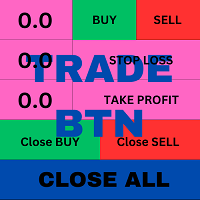
T his is an ON CHART trade management panel. In other words, ON CHART Lot Size, Buy, Sell, Stop Loss, Take Profit, Close Buy, Close Sell and Close All buttons! *IMPORTANT NOTE: Input settings are NOT usable. You can change or insert Stop Loss and Take Profit values only on the chart panel. (See the below video!) This one is MT5 version!
BUTTONS List: 1. Lot Size - (0.01) is default click on it and insert the lot size with which you want to open a trade. 2. Stop Loss - (0.0) is default click on
FREE

TradeManagerSmart is a useful addition to your MetaTrader 5 desktop. The window can be moved freely, and its functionality can be customised in the settings.
## The Profit/Loss shows the cumulated profit/loss for all open positions, not for each position/product !
Quick trading buttons (one-click trading) with the following features: Sell: Sell order Buy: Buy order Break-even: Immediately sets the stop-loss to the entry price (break-even) Close winners: Closes all positions that are in profit
FREE

InnovaDash Smart Sync — это официальный коннектор данных, предназначенный для прямого соединения вашего терминала MetaTrader с аналитической панелью InnovaDash Analytics.
Созданная для профессиональных трейдеров, эта легкая утилита работает в фоновом режиме, автоматически отправляя обновления вашего текущего капитала (equity), открытые позиции и исторические торговые данные в InnovaDash.
Почему InnovaDash?
InnovaDash — это премиальный облачный пакет количественной аналитики, который превраща
FREE

GMG KILL ZONE DISCIPLINE ENFORCER — FREE =========================================
The free discipline and risk management EA for MetaTrader 5 — for prop firm traders who trade the New York Kill Zone (ICT-style) manually, and need their rules enforced automatically.
You know the rules. One trade per session. Trade only the window. Be flat before the close. The problem was never knowing the rules — it is keeping them at the exact moment the market moves against you. This EA keeps them for you.
FREE

The PromptGen AI is a utility that generates AI prompts that are specific to your account, trading history and market context. WORKS WITH ALL LLMs. No more generic trading advice from AI agents, get custom trade ideas, trade management recommendations and even historical trade analytics and improvement advice that is relevant and specific to you, using expertly designed prompt templates that use your account details like Balance, Equity, Net Exposure, Price Quotes, Historical Trades and even tra
FREE

SR Zones & Pivot Panel EA - All-in-One Trading Tool SR Zones & Pivot Panel EA is a powerful hybrid tool that combines automatic Support/Resistance Zones , Daily Pivot Points , and a Compact Trading Panel into one interface. It helps traders visualize key price levels on any timeframe while executing trades quickly and efficiently. Designed for precision and speed, this tool keeps your chart clean while providing all the data you need for intraday trading. Key Features 1. Automatic Support
FREE

The Tick Data Record is a multi-symbol multi-timeframe Expert Advisor that records tick data for later graphical representation and analysis. General Description The Tick Data Record offers a(n) alternative/complement to the online/offline price charts displayed through the MT4/MT5 platform. The Expert Advisor permits to write and save the current/history values of Time, Bid, Ask, Spread, Last and Volume to a text file (“.txt”). The idea is to copy/open the obtained register to/in a spreadshe
FREE

TradingAssistant TA Interactive Manual & Semi-Automatic Trading Panel for MetaTrader 5 Trading Assistant Dashboard is a practical on-chart trading panel designed for traders who want fast manual order execution, flexible position management, and real-time multi-timeframe market information — all from one dashboard. Instead of navigating through multiple MT5 windows, the assistant places essential trading controls directly on the chart, allowing traders to manage positions and monitor market cond
FREE

Unlock lightning-fast trade replication across multiple MetaTrader 5 accounts on the same PC or VPS. The AW Local Trade Copier is designed for speed, reliability, and ease of use. Using an advanced shared-file architecture, it achieves near-zero latency (under 100ms) without locking your terminal or overloading your CPU. ️ IMPORTANT NOTICE: This system requires TWO files to work together (Master and Slave).
Get the FREE Slave version here: AW Trade Copier Slave KEY FEATURES Ultra-Fast Ex
FREE

Tired of switching charts to check higher timeframe structure? ZeroG CandleContext draws the current candles from up to 3 higher timeframes DIRECTLY on your chart, with a real-time close countdown timer.
Trade on M1–M15 and keep H1, H4, and D context visible at all times. No chart switching. No losing focus.
## WHAT DOES IT DO?
The indicator displays the last N candles (default: 3) from each selected higher timeframe, drawn as real candles to the right of th
FREE

MTM Manual Trade Manager is a professional trading dashboard designed for manual traders who want better control over risk and trade management.
This Expert Advisor does NOT open trades automatically. All trading decisions and order executions are fully controlled by the trader.
Main Features: - Manual Buy and Sell execution from the dashboard - Visual Stop Loss and Take Profit using drag & drop lines - Fixed Lot and Risk Percentage position sizing - Automatic Break Even management - Multiple
FREE

ВЫБОР ДЛЯ PROP-ФИРМ Готовы раскрыть свой финансовый потенциал? Приобретите Gold Digger сегодня и станьте настоящим ЗОЛОТОИСКАТЕЛЕМ! Описание Gold Digger EA: Использует тщательно анализируемую сеточную систему для достижения ежемесячной прибыли в размере 4-8%. Обзор Gold Digger — это сложный экспертный советник (EA), который использует передовую сеточную торговую систему, специально разработанную для торговли XAUUSD (Золотом). Цель EA — обеспечить стабильную ежемесячную прибыль в диапазоне 4-8%.
FREE

input double MaxLossLevel = 500.0; // Max Loss Level in account currency input double SafetyBufferMoney = 10.0; // Safe Buffer. In this case Threshold be 500+10 = 510 input int CheckEverySeconds = 2; input bool is_debugged = false; // Print additional messages in the Terminal
It will checks every CheckEverySeconds. If the total Loss of the account Go below Threshold of MaxLossLevel + SafeBufferMoney, then start Heding: for each open Position, open a new reversed Position with
FREE

## Version 2.50
I created this EA with the intention of making it free for everyone to use. It serves as a tool to assist in trading with money management, entering order lots according to a percentage of the account balance, and automatically setting TP/SL based on high/low prices.
In Version 2.50, The Auto TP/SL feature adjusts from the Line In (entry point), and Auto price in this version only shifts the entry line to the current price. Input settings: Ato update SL/TP Line >>> In version
FREE

Setting a chart up exactly the way you like it takes a few minutes. Doing it twenty times takes an afternoon. Chart Cloner opens exact copies of the chart you drop it on. Symbol, timeframe, colours, scale and chart mode always carry across, because that is what makes a copy a copy. You decide whether the attached Expert Advisor, the indicators and the drawn objects come with them. Point it at your Market Watch instead of a copy count and it opens one chart per symbol, every pair wearing the same
FREE

Introducing the Scalping Expert Advisor (EA) for Short Trades This Expert Advisor (EA) is meticulously designed for short trades scalping, offering a blend of precision and efficiency to maximize your trading performance. Below, we delve into the key functions and features that make this EA an essential tool for scalpers.
Key Features: Automatic Take Profit (TP) and Stop Loss (SL) Settings: Take Profit Input: Allows you to set a specific TP value, enabling precise control over your exit points
FREE

Elevate Your Trading with code4trading Premium Tools This free indicator is a sample of our commitment to quality. If you find this tool useful, we invite you to explore our Premium Professional Suite. Our paid products offer advanced institutional-grade features, optimized algorithms, and exclusive technical support designed to give you a definitive edge in the markets.
Visit our full catalog here: https://www.mql5.com/en/users/pablogx9/seller
ChartTrade Commander PRO MT5 is the ultimate s
FREE

Delving deep into the sphere of finance and trading strategies, I decided to conduct a series of experiments, exploring approaches based on reinforcement learning as well as those operating without it. Applying these methods, I managed to formulate a nuanced conclusion, pivotal for understanding the significance of unique strategies in contemporary trading.
FREE

WAP TP Stealth EA – Intelligent Basket Management for Precision Exits WAP TP Stealth EA is a specialized trade management expert advisor designed for traders who rely on basket strategies, recovery systems, and multi-position workflows. Instead of closing trades individually, the EA dynamically calculates the Weighted Average Price (WAP) of all open positions and executes a coordinated closure once your defined profit target is reached. This approach enables efficient drawdown management, smooth
FREE

ProTrade Panel – Speed, Precision, Professionalism Master the markets with the ultimate MT5 assistant. Are you tired of the slow, clumsy default execution in MT5?
Do you struggle to manage multiple orders during high volatility?
ProTrade Panel is designed for serious manual traders. It combines One-Click Execution, Breakout Pending Orders, Bulk Closing, and Visual Risk Management into one sleek, floating interface. Key Features Smart Drag & Drop : Long-press the header to move th
FREE

LayerGuard Pro - Professional Trade Management EA for MetaTrader 5 Product Description LayerGuard Pro is a sophisticated Expert Advisor designed exclusively for MetaTrader 5 that provides professional-grade trade management automation for your existing positions. Unlike traditional EAs that generate signals or open trades, LayerGuard Pro focuses on one critical aspect of trading: intelligent, automated management of Take Profit and Stop Loss levels. Core Philosophy: Management, Not Generation La
FREE

TradingTimeControl — это утилита, реализованная в виде советника для MetaTrader 5. Она автоматически закрывает все открытые позиции и удаляет отложенные ордера в заданное время каждый день. Утилита создана для трейдеров, которым нужна автоматизация управления позициями с гибкими настройками. Основные функции Закрывает позиции и ордера в указанное время ( CloseHour , CloseMinute ) ежедневно. Позволяет менять время закрытия в любой момент, сразу применяя новые настройки. Поддерживает MagicNumber
FREE

DCA Tool All-in-One – Утилита для автоматической и полуавтоматической торговли DCA в MetaTrader 5 Рекомендации по использованию DCA Tool All-in-One — это мощный торговый инструмент, который позволяет трейдерам реализовывать стратегии усреднения (DCA) в автоматическом и полуавтоматическом режимах , оптимизируя управление сделками на платформе MetaTrader 5 .
Перед использованием на реальном счете рекомендуется полностью изучить принцип работы утилиты, провести тщательное тестирование (backtest
FREE
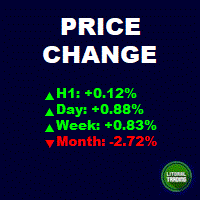
This is an informant indicator, very simple. It shows how much the price has chanded in percentage in certain period (month, week, day and actual period). It is discreet and small, does not visually posslute the chart. If your MT is not on portuguese idiom the indicator will automatically change to english. Check out our most complete tool for the market, the Trade Panel: https://www.mql5.com/en/market/product/42658 If you have any suggestion or find any bug, please, contact us. Enjoy!
This is
FREE

Fundamental Bias Dashboard for MetaTrader 5 Overview MacroEdge Pro is a comprehensive fundamental analysis panel that surfaces macro data, institutional positioning, and session timing in a single clean dashboard — directly on your chart. Designed for discretionary traders who need economic context without switching between tabs, terminals, or external tools. Rather than displaying raw numbers, MacroEdge Pro interprets them: beats vs misses, consecutive streaks, COT trend direction, kill zone ti
FREE

Get Economic Calendar History Script is an economic calendar data downloader. The time of the Economic Calendar is based on your broker's time, so if you are going to use the same calendar history file on different brokers, make sure their times are the same. The economic calendar history is organized as follows:
Time: Date and time of the news.
Importance: Degree of Possible impact of the news on the market.
Currency: Currency.
Country: Country.
Description: Description of the news.
Peri
FREE
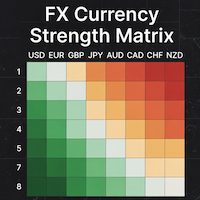
### MQL5 Marketplace Product Description FX Currency Strength Matrix – Professional MT5 Indicator
#### Overview The FX Currency Strength Matrix is a powerful, real-time visual tool that instantly reveals the true strength and weakness of all 8 major currencies in a clean, color-coded matrix format. No more guessing which currency is driving the pair – see the complete strength hierarchy at a glance and trade with institutional-level clarity.
#### Key Features - True 8×8 Currency
FREE
А знаете ли вы, почему MetaTrader Market - лучшее место для продажи торговых стратегий и технических индикаторов? Разработчику у нас не нужно тратить время и силы на рекламу, защиту программ и расчеты с покупателями. Всё это уже сделано.

Вы упускаете торговые возможности:
- Бесплатные приложения для трейдинга
- 8 000+ сигналов для копирования
- Экономические новости для анализа финансовых рынков
Регистрация
Вход
Вы принимаете политику сайта и условия использования
Если у вас нет учетной записи, зарегистрируйтесь