 MetaTrader 5
 Эксперты
 Индикаторы
 Библиотеки
 Утилиты
 Виджеты
 Правила
Смотри обучающее видео по маркету на YouTube
Как купить торгового робота или индикатор
Запусти робота на
виртуальном хостинге
виртуальном хостинге
Протестируй индикатор/робота перед покупкой
Хочешь зарабатывать в Маркете?
Как подать продукт, чтобы его покупали
Торговые утилиты для MetaTrader 5 - 15
 Ниже представлены торговые программы, упрощающие трейдинг в MetaTrader 5. Наведите курсор на товар, чтобы прочесть описание товара и его предназначение.
OsasFXea Diamond RapidFire Panel osasFXea · MetaTrader 4 & 5 OsasFXea Diamond RapidFire Panel One-click rapid trade panel for fast discretionary basket trading on gold, crypto, forex, and more. MT4 & MT5 Utilities Category Hedging accounts XAUUSD · BTCUSD · Forex Overview What it does RapidFire Panel places you in complete control of your basket trading workflow. Every core action — open, manage, close — is one click away on a branded dashboard that sits on your chart. The panel foll

Welcome, we introduce the Manual Grid Assistant, which can be an excellent complement to your manual grid trading! The Manual Grid Assistant is an efficient and sophisticated trading tool that perfectly complements manual grid trading strategies. This tool allows you to manage manually opened positions on your behalf while ensuring maximum profit and controlling risk. One of its main advantages is that it automatically closes all open positions when a predefined total pip reach or a specified p

TradeForge Pro – Trade Management Dashboard TradeForge Pro is a trade management utility designed for traders who want precise control over stop loss/take profit handling, position grouping, and trade execution. It provides an on-chart interface that allows Stop Loss and Take Profit levels to be managed virtually rather than sent directly to the broker ("Ghost Levels"), along with tools for managing multiple positions and trailing logic. It is designed for both scalpers requiring fast manual exe

Smart Trade Manager Pro Live Smart Trade Manager Pro is a manual trade management Expert Advisor for MetaTrader 5. It does not open trades automatically. It is designed for traders who enter positions manually and want structured risk-based exit management after the trade is open. The EA manages manual trades using the initial stop loss as the risk reference. Once a position has a valid stop loss, the EA can calculate R-multiple progress and manage partial closes, break-even, stop-loss locking,

Close All Pro MT5 – Fast PnL Control is a powerful trade manager MT5 utility that gives you total control over your trades. With a single click, you can close all MT5 orders, monitor real-time profit and loss, and manage your floating PnL directly from a clean on-chart panel. The tool is lightweight, responsive, and built to help traders save time, reduce emotional stress, and maintain focus. Whether you trade manually or through an EA, this MT5 profit panel provides the visibility and precisio

Protect your capital and lock in profits automatically with Account Guard Pro . This indispensable account management Expert Advisor ensures strict adherence to your daily risk limits. Set a maximum daily loss and a daily profit target—once either is reached, Guardian Pro instantly closes all open positions and pending orders, and halts all trading activity until the start of the next day. Its integrated visual dashboard provides a clear, real-time view of your daily P/L and current status. A cr

Trade Assistant MT5 — Trade Manager for Prop Firms
Trade Manager for MT5 that calculates position size, manages risk, visualises your trade setup in real time and protects your account with built-in daily loss and trade limits — everything you need to trade with consistency and pass your prop firm challenge.
> Trade Tab — Position Sizing & Execution
**Automatic lot calculation** Enter your risk as a percentage of account balance or as a fixed dollar amount and the panel instantly calculates t

The Best 1 Star rated Seconds Chart - Check the reviews that don't update the stars MT5 stops at the 1-minute chart. Advanced Seconds Chart MT5 goes below it, building real sub-minute OHLC candlesticks directly inside MT5 with full access to every indicator and drawing tool you already use. No plugins. No external feeds. Attach it to a chart and go. This product is now free. Download it, use it, and message me if anything does not work as described. I respond to every message and fix genuine iss

Утилита для ручной торговли с помощью "горячих клавиш". Позволяет моментально реагировать на текущую ситуацию на рынке. "Горячие клавиши" можно назначить на открытие/закрытие позиций по типу, открытие/закрытие всех позиций на текущем графике и удаление всех ордеров на текущем графике. Также можно задать "горячие клавиши" на пять предопределенных торговых объемов и переключаться между ними в зависимости от ситуации без необходимости периодически менять объем вручную. Также возможно задать автомат

Risk Manager Custom Version для MetaTrader 5
Risk Manager — это профессиональная утилита для контроля рисков в MT5. Советник не открывает сделки самостоятельно и не является торговой стратегией. Его задача — контролировать уже открытые позиции, ограничивать риски, управлять SL/TP, объёмом позиции и торговыми ограничениями.
Основные функции:
Индивидуальный Max Lot для выбранных инструментов — можно задать отдельный максимальный лот для 5 символов. Например: EURUSD = 1.2 lot, XAGUSD = 0.1 lot.

This is a special program that provides extra protection for each of your positions. Symbol Filter: Filter by trading symbol. The default is to select the symbol on the current chart, or you can choose all symbols. Magic Filter: Filter by magic number. You can specify a magic number. The default value of 0 means processing all orders. TakeProfit Point: Set the take-profit level in points. 0 means this function is not used. StopLoss Point: Set the stop-loss level in points. 0 means this function

Keep your MetaTrader 5 charts alive, updated, and always in sync — automatically.
The MT5 Auto Refresh Utility is a smart, zero-lag chart updater designed for traders who want real-time accuracy across every open chart. Whether you use complex dashboards, multi-timeframe systems, or long-running analysis setups, this utility ensures your charts stay active and refreshed without manual clicks or chart reloading. Why You’ll Love It Automatic Chart Refresh
Refreshes your MT5 chart at a fixed int

Faster execution, clearer order control, and better trading discipline. OCT Panel — Professional MT5 Trading Control Panel OCT Panel is built for traders who want faster execution, clearer order control, and better trading discipline. OCT Panel is a professional trading assistant panel designed for MetaTrader 5 .
It helps traders manage orders, positions, Stop Loss, Take Profit, pending orders, and trade execution more efficiently during manual trading. OCT is not a signal system and does not g
FREE

HMR Detector EA Важное примечание: Данный советник (EA) невозможно протестировать в Тестере стратегий, так как среда бэктестинга не симулирует реальные события высоких маржинальных требований (HMR) или неожиданные изменения маржи на стороне брокера. HMR Detector опирается на считывание реальных маржинальных условий непосредственно с сервера брокера. Поэтому его защитные функции следует оценивать на демо- или реальном торговом счете. Обзор: HMR Detector EA — это советник для MetaTrader 5, предназ

MT5 to MT5 Trade Copier – Fast and Reliable Trade Copying Solution The MT5 Trade Copier is a powerful tool designed to copy trades seamlessly between MetaTrader 5 accounts with minimal latency and high accuracy. Built for speed, flexibility, and ease of use, the copier works across different brokers, even when symbols use different prefixes or suffixes. This Expert Advisor is suitable for professional traders, signal providers, fund managers, and traders who manage multiple accounts. Key Featur
This Expert Advisor measures the broker execution time in milliseconds. Every 10 seconds (Refresh Seconds) , the EA opens a buy stop order far away from current price (1.5 x Ask), then modifies the (price, stop loss and take profit) of the created order by 5 pips then deletes it immediately.
Inputs Refresh Seconds: Number of seconds for each re-test, default 10 seconds.
Display Last: Last Execution time Min: Fastest execution time Max: Slowest Maximum execution time Avg: Average exec

Guardian Equity EA for MetaTrader 5 Guardian Equity EA is an Expert Advisor designed to automatically manage the closure of all open positions when predefined profit or drawdown levels are reached. It operates in real-time and is compatible with any broker or trading instrument supported by MetaTrader 5. Main Features Continuous monitoring of account balance and equity. Automatic closing of all trades if the maximum drawdown level is reached. Automatic closing if the configured profit target is
The Tick Flow Meter, also known as Tick Density Meter or Tick Counter, is an innovative indicator designed to provide deep insights into market dynamics down to the second.
It is a cutting-edge indicator crafted to measure the intensity and frequency of ticks within specific time intervals. By focusing on tick flow, this indicator offers traders a unique perspective on market liquidity, momentum, and volatility, empowering them to make informed trading decisions.
Key Features: Granular Time In
FREE

General Description Auto SL/TP Manager is a professional utility for MetaTrader 5 designed to automate the management of Stop Loss and Take Profit levels on open positions. The levels are calculated based on monetary risk values defined by the user, rather than fixed pip distances. This tool helps maintain consistent risk discipline without manual intervention. Main Functionality The EA continuously monitors all open positions and automatically applies Stop Loss and Take Profit levels when they

MSMO Lot Pilot — калькулятор размера позиции и информационная панель для MetaTrader 5, предназначенные для планирования сделки до её открытия. Он помогает ответить на один практический вопрос перед ручной сделкой: какой размер позиции соответствует выбранному вами риску? Укажите процент риска (Risk Percent), планируемое расстояние Stop Loss в пунктах инструмента и базу счёта (Account Base). MSMO Lot Pilot рассчитывает размер позиции на основе спецификаций инструмента, предоставляемых вашим броке
FREE

Prop Firm Risk Guardian MT5 — pass the risk rules, not just the profit target. Prop Firm Risk Guardian MT5 (click to download)
Application instructions Most prop-firm challenges are failed not because you can't trade — but because one bad day or a single oversized position breaches the daily or overall drawdown limit. Prop Firm Risk Guardian is a lightweight monitoring utility that enforces those limits for you, automatically , 24/5. It is a pure protection tool . It never opens trades, send

VENIQOR Smart Trade Copier PRO is more than a simple MT5 trade copier.
It combines fast local trade synchronization with flexible risk management, Account Protection and optional News Protection for every Receiver account. As with our other VENIQOR products, we welcome useful customer feedback and are happy to implement meaningful improvements and new features whenever possible. The same EA works as both Master and Receiver . One Master can copy trades to multiple Receivers running on the same

The Close In Quick Script is an optimized, high-performance MQL5 script designed to swiftly close all open positions for the current chart's symbol on the MetaTrader 5 platform. Engineered for speed and reliability, it leverages asynchronous trading, minimal system checks, and robust error handling to ensure seamless trade closure. Whether you're a day trader, scalper, or portfolio manager, this script is an essential tool for efficiently managing and exiting trades. Key Features: Asynchronous t
FREE

This indicator displays a customizable checklist directly on your chart, helping you stay disciplined and organized during trading. You can define your own list of tasks, position it anywhere on the screen, and adjust the appearance to match your setup. It’s ideal for pre-trade routines, strategy rules, or reminders to follow your trading plan. The indicator automatically manages and cleans up its text labels, ensuring no leftover objects remain when it is removed or updated.
FREE

Candle Time (MT5) The Candle Time indicator shows the remaining time for the current candle on the active chart timeframe. It adapts automatically to the chart period and updates on every tick. This is a charting utility; it does not provide trading signals and does not guarantee any profit. Main functions Display the time remaining for the current candle on any timeframe (M1 to MN). Color-coded state: green when price is above the open (up), gray when unchanged, and red when below the open (do
FREE

Trade Projector by Chart Reporter Plan the trade on the chart before you place it. Trade Projector is a MetaTrader 5 chart workspace for turning a trade idea into a clear, reviewable plan. Set the direction, place the Entry, Stop Loss and Take Profit levels, inspect the projected risk and reward, then choose whether to send a market or pending order. Make the decision visible Chart-native trade plan: Entry, Stop Loss and Take Profit levels are visible and draggable on the active chart. Risk and
FREE

This indicator show the candle remaining time on the chart and/or in the corner of the window. It also display notificaton (popup and push) when a new candle is formed (optional). You configure the timer on candles and at chart corner. I don't need to explain the functions because are very simple. MT4 version: https://www.mql5.com/en/market/product/38677 Any doubt or suggestion please contact us. Enjoy!
This is a free indicator, but it took hours to develop. If you want to pay me a coffee, I a
FREE

One Click Trade Manager for MT5 Trade Faster and Manage Your Positions with a Single Click Take full control of your trades with an intuitive one-click trading panel for MetaTrader 5. Whether you're entering new positions or managing multiple open trades, this EA helps you execute actions instantly without navigating multiple windows. No more manually closing orders one by one. Main Features Close All Positions Instantly close every open position on the current account. Close Profitable Pos

Synchronizes all open charts to the symbol of the chart this indicator is applied to.
SyncAllCharts is a MetaTrader 5 indicator that lets one main chart control the trading symbol shown on all other open charts. Change the symbol on the main chart, and the other charts follow while keeping their own timeframes. It helps you review the same market across several timeframes without changing each chart manually. How to use it Attach the indicator to one chart that you want to use as the main contr
FREE

Drag Drop Lot Size Calculator Overview Drag Drop Lot Size Calculator is a chart-based risk and position sizing tool for MetaTrader 5. It calculates the appropriate lot size based on your account balance (or equity), the selected risk percentage, and the stop-loss distance defined by a single horizontal line on the chart. A compact on-chart panel displays the key values in real time. Key Features One-line workflow: uses a single horizontal line as the stop-loss level Real-time lot size calculatio
FREE

K-line Terminator - a countdown tool that accurately grasps every second Core Summary: Still anxious about not knowing when the current candlestick will end? 'Candlestick Terminator' is an indispensable tool in your trading toolbox! It utilizes a clear and intuitive countdown timer to display the precise time remaining for the currently active candlestick in real-time, helping you avoid making hasty decisions during the chaotic moments of candlestick transitions, thus allowing you to enter, exit
FREE

Are you tired of erasing the objects on chart and then having to put them back in? What if you had a tool that would allow you to hide and show all objects any time? Cool, huh? That is why I developed this tool as an indicator. With it you hide all objects using a shortcut button on chart or the keyboard (customizable). If you have any suggestions or find a bug, please, contact us. Enjoy!
FREE

Gamma Edge Pro MT5 — GexBot Classic API Integration Gamma Edge Pro brings institutional-grade Gamma Exposure (GEX) data directly onto your MetaTrader 5 chart — the same data used by professional options traders to anticipate price magnets, hedging flows, and dealer positioning. Powered by the GexBot Classic API, this indicator automatically maps options market data from US-listed instruments onto any MT5 CFD instrument — Forex pairs, Gold, indices, and more — with intelligent price conversion bu

Overview Sessions Duck is a highly optimised, resource-efficient MetaTrader 5 indicator designed to automatically visualise the core global trading sessions (Asian, London, and New York) and display live, synchronised timezone data directly on your chart. Built specifically for performance, zero lag, and clean chart aesthetics, Sessions Duck provides day traders, scalpers, and session breakout traders with immediate market liquidity context without compromising terminal responsiveness—even when
FREE

RR TradePanel is a trade execution and management Expert Advisor for MetaTrader 5. It combines visual trade planning with automated risk management, allowing trades to be planned, executed, and managed directly from the chart. The panel includes an interactive Risk/Reward tool, automatic lot size calculation based on account risk, trade management automation, and manual management controls. It is suitable for traders who want consistent position sizing and faster trade execution. Trade Planning

GOLD RISK SIZER MT5 Калькулятор риска | Размер позиции | XAUUSD | Forex | CFD | Lot Size | Stop Loss | Risk Reward Gold Risk Sizer MT5 — бесплатный инструмент MetaTrader 5 для расчета размера позиции на основе капитала счета, выбранного риска и расстояния до Stop Loss. РАСЧЕТ Пользователь задает: Equity или Balance Risk % BUY / SELL Entry Stop Loss опционально Take Profit Инструмент рассчитывает: денежный риск расстояние до стопа Raw Lot Broker Lot фактический риск фактический риск % потенциальн
FREE

Click and Go Trade Manager: The Ultimate MT5 Execution Suite Precision Execution. Professional Performance Tracking. Total Control. In the world of Smart Money Concepts (SMC) , ICT, and high-frequency scalping, precision is your only edge. Most traders lose not because their analysis is wrong, but because their execution is slow and their psychology is undisciplined. The Hard Truth: If you are still manually calculating lot sizes or dragging lines while the price moves against you, you

The Pending Order Grid is a multi-symbol multi-timeframe script that enables multi-strategy implementation based on pending order grids. General Description
The Pending Order Grid allows the performing of a user-defined strategy through the creation of pending order grids. The script places pending orders of a given type (Buy Limit, Sell Limit, Buy Stop, or Sell Stop) at equidistant price levels to form each grid. The beginning and finish of every grid are defined by the Start Price and Sto

Boleta Prime Essential — one-click trading panel for MetaTrader 5 Open trades with the right lot size in one click. Boleta Prime Essential automatically calculates your position size from the risk percentage you choose and sends the order with stop loss and take profit already set. Features
• One-click market buy and sell
• Risk calculator: enter the account % and stop in points, and the panel calculates the lot
• Automatic stop loss and take profit, re-anchored to the actual fill price (exact
FREE
Script to load history of a symbol on determined timeframe (default M1).
It is extracted from the MQL5 documentation:
https://www.mql5.com/en/docs/series/timeseries_access
Adapted by Renato Fiche Junior #melhoresferramentas #renato #larissasihle #aguiatraders
Parâmetros de Entrada
- Start datetime : the initial datetime from the history will be loaded - Timeframe to be loaded: period that will be loaded
FREE

Quote Cost Parity is a MetaTrader 5 chart panel for forex majors and minors that share a quote currency. Pairs with the same quote have the same pip cost for a given lot. The indicator uses that correspondence directly: it calculates the cost once for the group, then shows that cost for three lot sizes. It acknowledges only these quote groups. JPY: USDJPY, EURJPY, GBPJPY, AUDJPY, NZDJPY, CADJPY, CHFJPY. Source : USDJPY. CHF: USDCHF, EURCHF, GBPCHF, AUDCHF, NZDCHF, CADCHF. Source : USDCHF. CAD:
FREE

Keep your stop loss and take profit hidden from the broker server. The utility closes the position at market when a hidden level is reached. How it works For every position that matches your filters, the utility creates a hidden stop loss and take profit from the open price (or the current price) using your point distances. Levels are stored per ticket as terminal global variables, so they survive a restart, and are checked on every tick and on a fast timer. A hidden break-even and a hidden trai
FREE

Scrolling far back in history on a low timeframe with the mouse wheel is slow and tiring. Middle Mouse AutoScroll adds the autoscroll you know from web browsers to your MetaTrader 5 charts. How it works Click the middle mouse button (wheel click) anywhere on the chart. A marker appears at that point. Move the mouse left or right of the marker. The chart scrolls in that direction. The further you move from the marker, the faster it scrolls. Click again or press Esc to stop. Hold mode: hold the mi
FREE

Trading Workspace Themes by Soecke is a free chart customization script for MetaTrader 5. Choose from eight color themes and apply your preferred appearance to the current chart or all open charts.
Included themes
DEEP_SPACE, MIDNIGHT_BLUE, VOLCANIC_AMBER, POLAR_DARK, SOFT_LITE, COASTLINE, AMETHYST_SOFT and SAKURA_MIST.
Each theme defines colors for the chart background, foreground, grid, bullish and bearish candles, bar outlines, chart line, price lines, stop levels and volume bars.
Feature
FREE

Prop Firm Smart Margin Calculator Know your lot size. Know your margin. Trade with precision. The Prop Firm Smart Margin Calculator is a practical MT5 trading tool designed to help you determine your position size and understand the estimated margin required before placing a trade . Simply enter your desired risk amount and stop-loss distance, and the calculator determines the appropriate trading volume based on your symbol's specifications. It also calculates the estimated margin required for

Shows the live spread, today's range against the daily ATR, the server time, GMT offset, the countdown and the open sessions. FEATURES Live spread in points and pips, colour coded tight, moderate or wide. Optional push alert. Today's range in pips, the daily ATR share, the server time, GMT offset, the countdown and the sessions. HOW TO USE IT 1. Attach it to any chart. 2. Set the spread limits for the symbol. 3. Choose the ATR period and corner. PARAMETERS InpCorner, InpOffsetX, InpOffsetY, InpS
FREE

This Tool is designed to automate one of the most critical aspects of trade management — setting and managing Stop Loss, Take Profit , and Trailing Stop levels — directly on your MetaTrader 5 platform.
Key Features:
Automatic SL, TSL and TP Placement: Instantly sets initial Stop Loss and Take Profit levels on any new position based on customizable parameters, helping to enforce disciplined risk and reward management.
Dynamic Trailing Stop: Automatically moves the Stop Loss to lock in profits
FREE

RADAH Dashboard is an advanced performance analytics utility for MetaTrader 5, designed to transform your account history into a clear, organized and interactive trading performance overview.
It does not open, modify or close trades. Its purpose is exclusively analytical, allowing you to review the performance of the entire account, a specific symbol, or a strategy identified by its Magic Number.
Chart View
Visualize your trading performance through an integrated balance/equity performance c
FREE
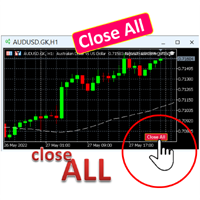
A simple button to completely close all existing open trades (both Buy and Sell) on the current chart .
Warning : Once the button is pressed, all open trades on the current chart will be deleted immediately without any more questions or dialogue.
Use this utility very carefully. We recommend that you do a trial of removing open trades on a demo account first, before trying to use this utility on a real account.
FREE

AI Advisor – пусть ИИ увидит ваш реальный торговый мир AI Advisor автоматически создаёт качественные промпты на основе ваших реальных данных счёта, которые можно сразу вставить в любой чат с ИИ.
Он помогает быстро разобрать состояние счёта, понять текущую рыночную картину по инструменту, выявить риски и найти потенциальные возможности для прибыли — так, чтобы ИИ опирался на вашу реальную торговлю, а не на догадки. Быстрые ссылки Download: AI Advisor v1.02.ex4 AI Advisor v1.02.ex5 Ins
FREE
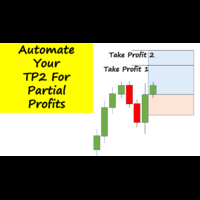
Have you ever been in a winning trade and wanted to close say half of position to lock in some profit. Well, this expert advisor does just that for you, and it's absolutely free. What you need to do is set what percentage of your trade you'd like closed and then set the price you like to close at. It that simple.
To get a better understanding of how it works, then watch the video below.
Note: The EA only works with one timeframe, changing timeframes will result in lose of all data by the EA i
FREE

Этот инструмент предлагает два ключевых преимущества: он улучшает удобство использования экономических индикаторов MT5 и обеспечивает их бесшовное использование в MT4. Например, вы можете эффективно использовать данные об экономических индикаторах более чем десятилетней давности для тренировки и тестирования стратегий. Кроме того, он совместим с PracticeSimulator для MT4, что делает его ценным инструментом для всего, начиная с тренировки на исторических данных и заканчивая реальной торговлей в M
FREE

**X-STOX News Command Center** turns MetaTrader 5's built-in Economic Calendar into a clean, always-visible command dashboard — and, uniquely, lets your Expert Advisors *read the same news data* so they can protect your account around high-impact events.
Built as a single lightweight indicator. No DLLs. No WebRequest. No external servers. Everything runs on the calendar data already inside your MT5 terminal.
**— What it does —**
• **Floating dashboard** — a compact, movable panel showing upco
FREE

You can use this tool to create as many pending orders (limit order) as you want in one button press. All inputs must be in points. You can use this useful tool when such as FED speech times. User Inputs:
MagicNumber = Magic number DeviationPoint = Deviation point number for limit orders Level = You can choise how many level do you want to create pending orders. BuyOrder = true/false SellOrder = true/false StartDistance = Distance between each level. StepDistance = Distance to be added increment
FREE

Settings Change Magic Number at The Top of the Setting to Zero for Manual Trade Profit threshold (pips) : this is the threshold (in pips) an order has to hit, before the SL is set and the SL starts trailing. Before the threshold is hit, the module will have no effect. Example: if this value is set to 30, then the SL will be set (and the trailing will start) when the order has a profit of 30 pips. Trail start value (pips) : the amount of pips where the SL starts trailing. The SL is set at: Open
FREE

ChartControl — лёгкий утилитарный индикатор для быстрой ручной навигации по графикам. Позволяет переключать символ и таймфрейм на текущем графике с помощью горячих клавиш — идеально для быстрого сканирования рынка без кликов мышью. Продукт распространяется только в виде EX5 (скомпилированный файл) . Ключевые возможности Быстрое переключение символов по списку Market Watch (Обзор рынка) Быстрое переключение таймфреймов по заданному набору (M1…MN1) Минимальная нагрузка на CPU (нет расчётов и отрис
FREE

AutoSLTP Assistant — Automated Trade Management Short Description AutoSLTP Assistant automatically manages Stop Loss, Take Profit, Break-Even, Trailing Stop and Partial Close for your existing MT5 positions. Fully configurable and compatible with manual trades, signals and other Expert Advisors. Full Description Automated trade management without changing your entry strategy. AutoSLTP Assistant monitors your existing positions and applies your predefined risk-management rules automatically. It d
FREE

This tool for the MetaTrader 5 trading platform allows setting the stop loss of open positions to breakeven (entry price) plus an adjustable distance in points. The stop loss is only adjusted if the position is already in profit.
Main functions:
Button: A button is displayed on the chart with the text "StopLoss to BreakEven". The color of the button can be customized, by default it is red.
User interaction: When you click the button, for all open positions that are in profit, the stop loss i
FREE

Это панель, которая кажется распространенной, однако она выходит далеко за пределы кнопок дополнительных кнопок для закрытия нескольких ордеров, она важна для тех, кто использует автономные генераторы графиков для Renko, Range, Ticks и т. П., Поскольку в Metatrader 5 вы не можете вручную обрабатывать ордера на графике, которая не является родной для платформы. «TRADE PANEL» выполняет заказы и выставляет отложенные ордера, предлагая те же ресурсы немедленного действия, которые доступны в обычн
FREE

Garner Risk Calculator for MetaTrader 5
## Visual trade planning, position sizing and manual order placement
Garner Risk Calculator is an MT5 Expert Advisor that brings trade planning and position sizing directly onto your chart. Position your Stop Loss and Take Profit, choose the amount you want to risk, and view the calculated lot size before placing an order.
The dark navy panel with blue accents provides a clear view of your proposed trade. It is a manually operated calculator and order-e
FREE

Indicator Trader EA v1.0 for MetaTrader 5
Universal EA that bridges any custom indicator's signals to automated trading
XAUUSD · Major Forex Pairs · Crypto | All Timeframes M1 ~ D1
Overview Indicator Trader EA is a universal Expert Advisor that automatically executes buy and sell orders based on signal buffers from any custom indicator.
With a single EA, you can connect any commercial indicator (SuperScalp Pro, Trend 7Filter Pro, etc.) directly — no extra coding required. Simply configur
FREE

## Version 2.50
I created this EA with the intention of making it free for everyone to use. It serves as a tool to assist in trading with money management, entering order lots according to a percentage of the account balance, and automatically setting TP/SL based on high/low prices.
In Version 2.50, The Auto TP/SL feature adjusts from the Line In (entry point), and Auto price in this version only shifts the entry line to the current price. Input settings: Ato update SL/TP Line >>> In version
FREE

Краткое описание:
Индикатор для визуальной оценки стоимости ценового движения в валюте депозита с интерактивным вводом объема сделки прямо на графике. Описание:
PriceRiskRuler — новый инструмент для оценки финансового результата движения цены перед открытием позиции.
Индикатор отрисовывает вертикальный ценовой отрезок и рассчитывает его стоимость в зависимости от заданного объема и спецификаций торгового инструмента. Основные функции: Интерактивный ввод объема: Поле для ввода лота расположен
FREE

Monte Carlo Risk Simulator shows how much worse a backtest could have gone with the same trades in a different order, and what more or less risk per trade does to its growth and drawdown. It reads saved Strategy Tester reports or the history of your account, runs thousands of simulations and writes one HTML page. How To Use Backtests: in the Strategy Tester, right click on the Backtest tab > Report > save it as HTML into MQL5\Files\RiskSimulator (File > Open Data Folder). Account: set "Trades to
FREE

Automatic Position Size Calculator for MT5 Calculate your position size in seconds and trade with better risk control. It helps traders calculate lot sizes based on their selected risk and place market or pending orders directly from the chart. Designed with a clean, customizable interface, it combines position sizing, order placement, and visual trade management in one easy-to-use tool. Key Features Automatic Position Sizing Calculate lot sizes based on your selected risk percentage. Automatic
FREE

TimeBar
TimeBar - это простой информационный индикатор, который показывает оставшееся время до закрытия бара, а также время, прошедшее с открытия бара и текущее время. Для удобства восприятия были добавлены два вида режима отображения: в виде комментария в левом верхнем углу графика, либо в виде графического объекта. Преимущества Выбор шрифта Размер шрифта. Можно задать любой. При комментировании он слишком маленький Можно передвигать объекты. Любое время можно выделить двойным нажатием мыши
FREE
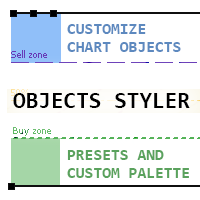
Objects Styler — это утилита, предоставляющая контекстно-зависимую панель для редактирования свойств стандартных графических объектов непосредственно на графике. Ключевой особенностью является мощная система шаблонов , которая позволяет пользователям сохранять, управлять и мгновенно применять сложные наборы стилей к объектам. Основные Функциональные Возможности Интерфейс и Взаимодействие Контекстная Активация: Панель вызывается кликом (или Shift + клик) по графическому объекту. Под
FREE

NeuronReplay — replay each of your closed trades one by one, bar-by-bar, and analyze exactly what happened Your trade history is just a list of numbers. NeuronReplay turns it into film. It lists every closed trade in a dashboard; click any one and it re-plays that single trade candle-by-candle on its own chart , exactly like stepping through the MetaTrader 5 Strategy Tester — but scoped to a real trade you already took. You see the entry, the stop, the target and the exit drawn in, a floating P&

Multi currency and multi timeframe scanner. Scans all instruments in "market watch" and gives either pc-alert or push-notification to the phone on a breakout. A breakout is by default defined as when a candle becomes longer than three ATR with a period of 300.
If you have the need for a custom buildt scanner, to scan for your particular setup. Please add a personal jobb under the Freelance section.
Functionality
Has spread filter , to not open stupid mega spread crypto currency charts. Has lo
FREE

Description: This utility automates Take Profit (TP) and Stop Loss (SL) levels for your trades, calculated in % of Balance. Example : if you type 1, it means 1% of your Balance . It ensures consistent risk management for all your positions. Crucial Note for Manual Traders: If you intend to use this utility on trades opened manually (without an Expert Advisor), you must change the 'Magic Number' setting to 0 (zero) . This allows the utility to correctly identify and manage your manual orders.
FREE
MetaTrader Маркет - торговые роботы и технические индикаторы для трейдеров, доступные прямо в терминале.
Платежная система MQL5.community разработана для сервисов платформы MetaTrader и автоматически доступна всем зарегистрированным пользователям сайта MQL5.com. Ввод и вывод денежных средств возможен с помощью WebMoney, PayPal и банковских карт.

Вы упускаете торговые возможности:
- Бесплатные приложения для трейдинга
- 8 000+ сигналов для копирования
- Экономические новости для анализа финансовых рынков
Регистрация
Вход
Вы принимаете политику сайта и условия использования
Если у вас нет учетной записи, зарегистрируйтесь