Risk Budget Panel

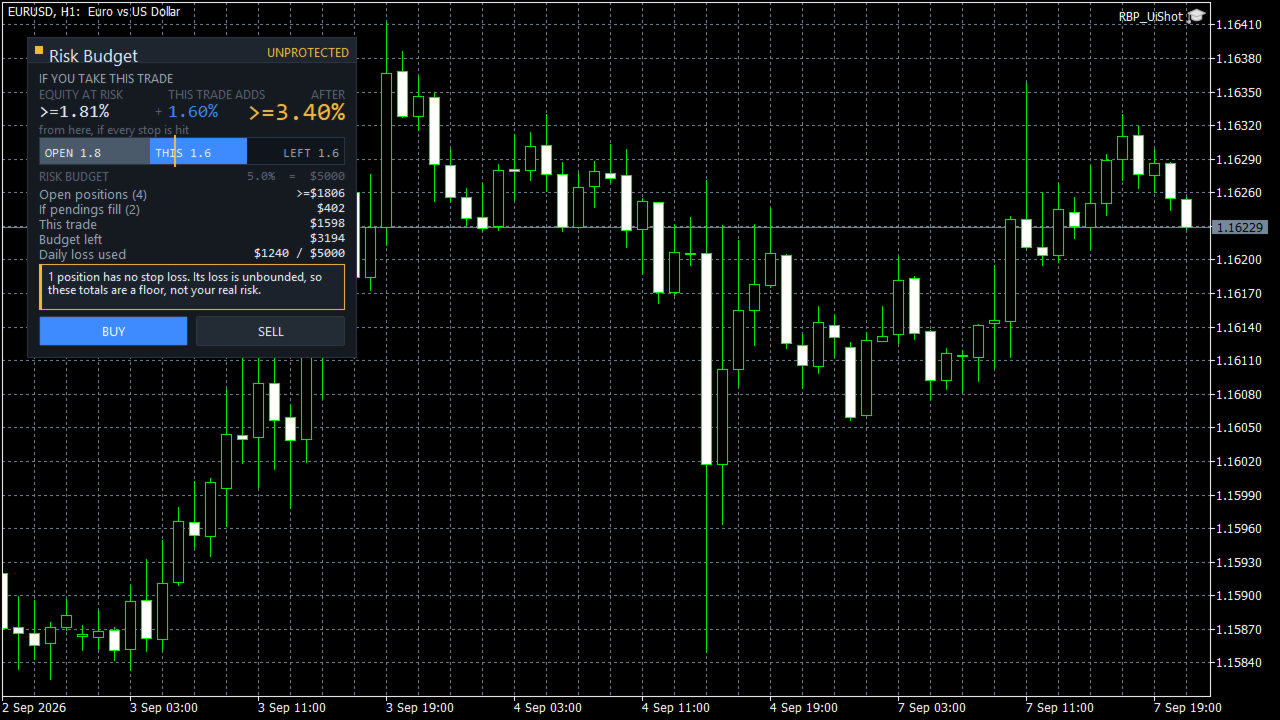
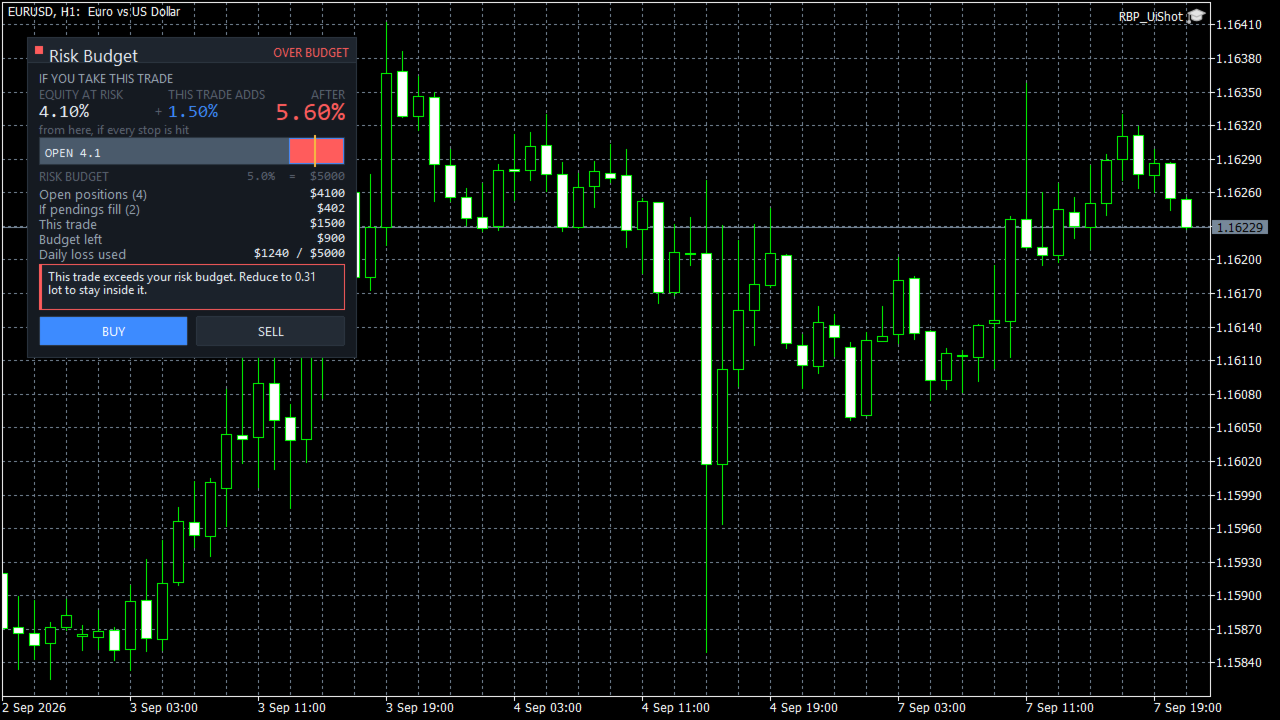
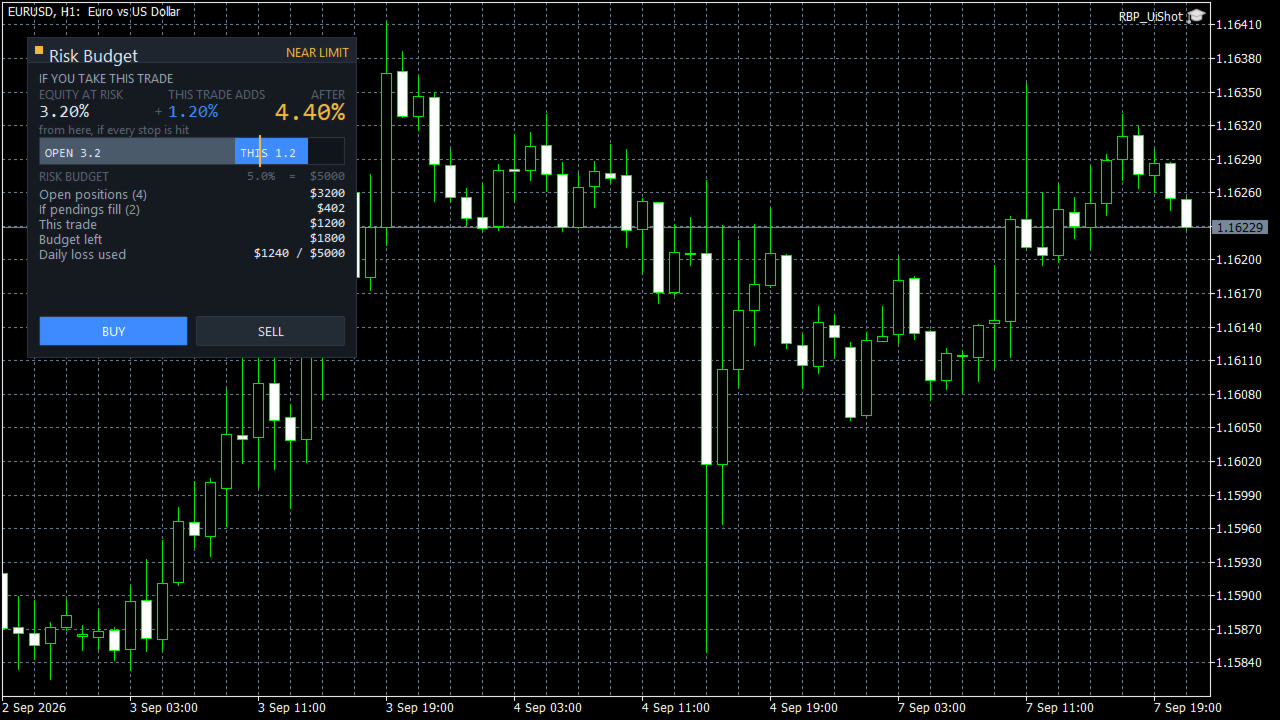
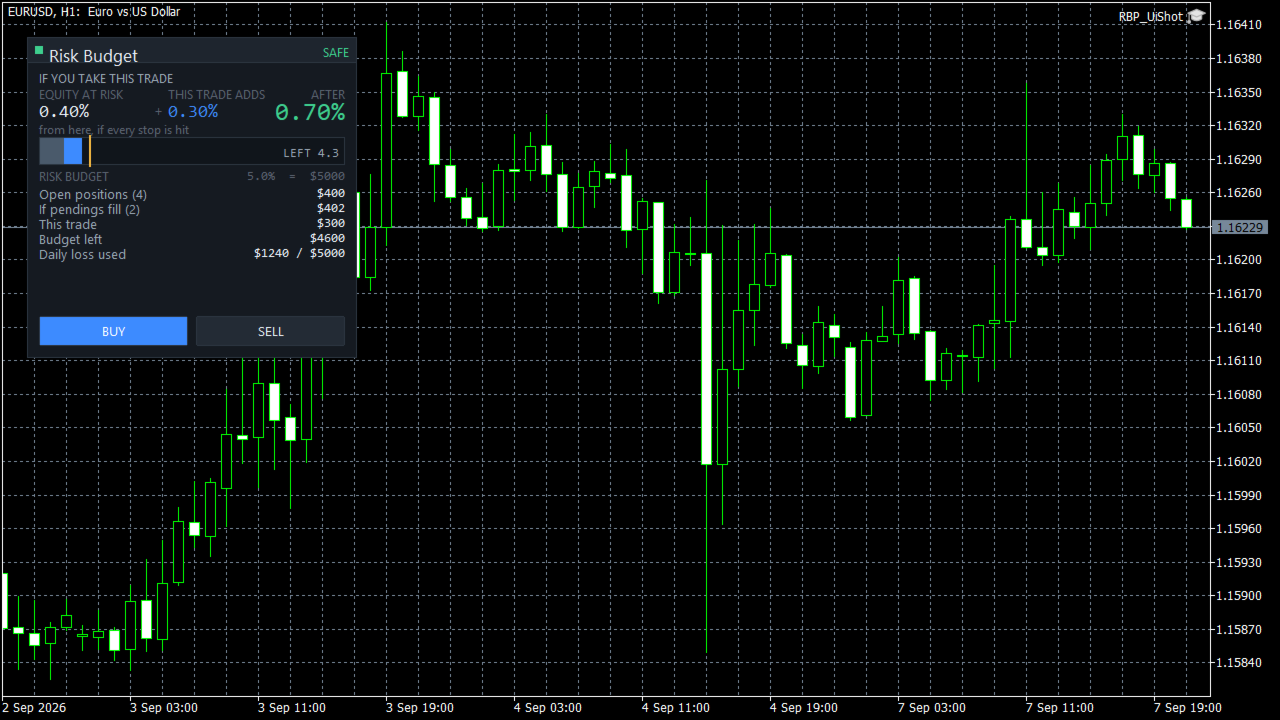
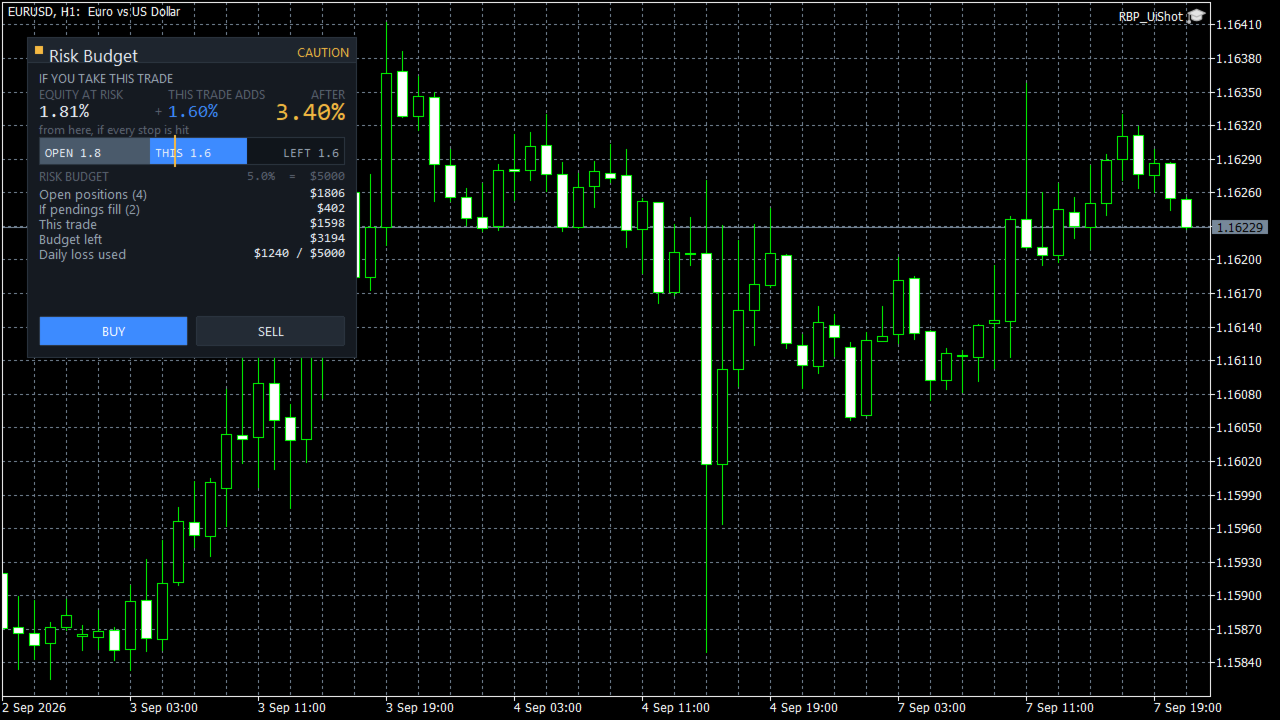
See what happens to your account risk before you take the next trade. Most panels answer "what lot size is 1% of my balance?". This one answers a different question: if I take this trade right now, what happens to the risk of my ENTIRE account? EQUITY AT RISK + THIS TRADE ADDS = AFTER Set 1% per trade and open eight positions and your account is carrying eight percent, not one. Risk Budget Panel keeps that total in front of you and shows what a planned trade would do to it before the order is sent. WHAT IT SHOWS Equity at risk What your account can still lose from this moment if every stop is hit. It covers every open position, on every symbol, not only the chart in front of you. This trade adds The risk of the trade you are planning, sized from your risk setting and your stop distance. After The total once the trade is on. This is the number the product exists for. Risk budget A single bar showing what is already committed, what this trade would add, and what is left. Your budget is the smaller of your maximum total account risk and what remains of your daily loss allowance. If pendings fill What your pending orders would add if every one of them triggered. Shown separately, never mixed into the headline, because pending orders are conditional. POSITIONS WITHOUT A STOP LOSS A position with no stop loss has no finite risk. This panel will not invent one. When you have an unprotected position, every total is shown as a floor with a "greater than or equal" prefix, the panel tells you how many positions are unprotected, and the status will not show as safe no matter how small the calculated number is. Most tools either ignore these positions or quietly treat them as zero risk. Both produce a confident number that is wrong. WHEN IT WILL NOT GIVE YOU A NUMBER If the symbol specification cannot be read, or a value cannot be converted to your account currency, the panel shows UNKNOWN and tells you which property is unavailable. It does not fall back to a plausible looking figure. A number you cannot trust is worse than no number. HOW RISK IS MEASURED Risk is measured from the current price to your stop, not from your entry price. This matters, and it is the part most people find surprising at first. If you are long from 1.1000 with a stop at 1.0900 and price moves to 1.1050, your equity at risk goes UP, not down. Your unrealised profit is now exposed too. Move the stop up and the number collapses. That is what the panel measures and what it teaches: your risk is not what you staked, it is what you can still lose. The risk shown when you entered the trade is kept as a separate figure and is never mixed into the total. BUILT FOR EVERY INSTRUMENT All figures are converted to your account currency by the terminal itself, so crosses, metals, indices and CFDs are handled correctly rather than by an assumed pip value. Volume is rounded down to the broker's volume step, never up, so a rounding step cannot push you past your budget. Stop distance is checked against the broker's minimum stop level. PERFORMANCE The panel does no work on incoming ticks. It recalculates when your positions or orders change, when you change an input, and on a slow timer. Redrawing is limited to the values that actually changed. Measured on the development machine, an idle update costs about 8 microseconds and the panel creates 40 chart objects, which do not grow over time. SETTINGS ARE REMEMBERED Your risk mode, budget, panel position and theme survive a terminal restart, a chart reload, and timeframe or symbol changes. Calculated risk is never stored and never restored from disk. It is always recomputed from your live account, so what you see is current. HOW TO USE 1. Attach Risk Budget Panel to any chart. 2. Set your risk per trade, your maximum total account risk and your daily loss allowance in the inputs. 3. Drag the stop line on the chart. The panel sizes the trade and updates the three numbers immediately. 4. Check the AFTER figure. If it is more than you want your account to carry, reduce the size or tighten the stop. 5. Press BUY or SELL when you are satisfied. IMPORTANT Figures are the risk to your configured stop levels under normal execution. A stop loss is a trigger price, not a guaranteed execution price. Weekend gaps, news gaps and slippage can result in a larger loss than shown. This is a risk information and trade management tool. It does not generate trading signals, it does not predict the market, and it does not trade on its own. It places an order only when you press a button. SUPPORT Please use the comments section of this product for questions and bug reports.
추천 제품
izi hedge is a tool that helps you manage risk, manage hedge orders and rebalance losing orders. How it works   It will place an order opposite to the order you placed with that currency pair.   If the order you place is correct, the reverse order will be automatically deleted   If the market unfortunately goes against your order and touches the hedge order, it will begin to calculate the hedging volume to limit the risk of the market going in reverse.
FREE
Title:   Smart Position Manager PRO - Advanced Risk & Position Manager Description: Smart Position Manager PRO is an all-in-one visual trade management and risk calculation tool designed for serious traders who prioritize iron discipline and strict risk management. Whether you are executing precise SMC or ICT setups on personal capital or managing large funded accounts on strict prop firms, this tool ensures you focus on counting percentages rather than emotional money swings. With a highly int
FREE
MT5 Trade Manager Pro
Anthony Dewayne Wasome
Trade Manager Pro is a MetaTrader 5 tool designed to assist with trade execution, position management, risk control, and account monitoring from a single on-chart interface. It is built to work alongside manual trading or automated systems and does not interfere with external Expert Advisors. The tool is intended for traders who require direct control over order execution and position management while maintaining consistent risk rules across different market conditions. Core Function The indica
Dashboard Signals aNa Magic ATR EA
Choawana Malaikitsanachalee
English Description aNa Magic ATR EA – Dashboard and Signals (MT5) ATR-based SL/TP (TP1–TP3), EMA200 trend filter, RSI gate, clean on-chart dashboard and segmented guide lines. MagicNumber support for multi-EA setups. What it does This Expert Advisor automates entries and risk targets using ATR. It filters the market with EMA(200) and an RSI range to avoid low-quality trades. A compact dashboard shows entry, TP1-TP3 and SL for both long and short. Lines are drawn as short segments (not full-wid
FREE
no Trade operation, Robot Set auto SL to every manually Trade from a Phone Automatic Phone TradeManager Need just Set on 1 Symbol Auto BE Trigger is added that immediately sets a stop-loss for every () But does NOT calculate position size based on risk, allows the fixed  SL to   adjusted dynamically drag on Chart or Menu. It protects capital around the clock, reduces emotional mistakes, and ensures consistent risk management.
FREE
Trade assistant pro v8
Ahmed Mohammed Bakr Bakr
2 (1)
FREE FREE FREE Trade Assistant MT5 – Professional Trading & Risk Management Panel Trade Assistant MT5 is an advanced trading panel designed to help traders execute orders faster, safer, and more professionally . It simplifies manual trading by combining smart order management , precise risk control , and one-click execution , making it ideal for both beginners and advanced traders. This tool does not trade automatically . Instead, it empowers you with full control while applying professional-gra
FREE
MT5 Trade Manager
Anthony Dewayne Wasome
MT5 Trade Manager is a MetaTrader 5 trade management panel designed to provide order execution, position monitoring, and risk control tools within a single interface. It operates as an on-chart dashboard with multiple pages for different trading functions. The tool is designed to support manual trading by centralizing trade operations and account monitoring in one place without requiring external applications. Interface Structure The dashboard is organized into six main sections: Dashboard Provi
FREE
(암호화폐 차트) Binance Future의 모든 기호를 사용자 지정 기호에 저장합니다. Binance Future의 기호에 "F" 접두사를 추가합니다. Binance Future의 기호를 따를 수 있는 인프라를 만듭니다. 도구 메뉴 >> 옵션 >> Expert Advisors에서 WebRequest를 허용하고 URL을 추가해야 합니다. https://fapi.binance.com 스크립트를 두 번 클릭하기만 하면 됩니다. 몇 초 만에 전체 목록을 볼 수 있습니다. 링크에서 제품을 참조하십시오 https://www.mql5.com/en/market/product/68694 설치 및 추가 지원을 위해 주저하지 말고 저희에게 연락하십시오. 설치 및 추가 지원을 위해 주저하지 말고 저희에게 연락하십시오.
FREE
ADAPTIVE CLOSER Manage many open positions as one book, from the chart Type: Utility (position manager) Symbols: Any Account: Hedging and Netting Opens trades: Only when you press a button 1. The problem this addresses One position is easy to manage. Six are not. Once several tickets are open — entered by hand, by different Expert Advisors, from a phone — the thing you actually care about is the combined result, and MetaTrader gives you no way to act on it. You end up closing tickets one at a t
FREE
Click Trading
Jawad Tauheed
5 (2)
One Click Trading – Auto TP SL Developer TraderLinkz Version 1.00 Category Utility What it does Adds missing TP and SL to your manual trades and pending orders Sets them once per ticket Lets you move TP and SL afterward Works on hedging and netting accounts Scans on every tick and reacts on trade events Why you want it You place faster entries You get consistent risk and exit targets You reduce fat finger errors You keep full manual control Quick start Attach the EA to any chart Keep TP and SL e
FREE
DynamicTrader 1
Markus Christer Ekengren
Smart Trade Manager EA – Simple, Visual, and Risk-Based Trading Take control of your trades with ease! This free Expert Advisor is designed for traders who want a fast, intuitive, and risk-based way to manage entries directly from the chart. Risk-Based Position Sizing – Just set your preferred % risk in the EA settings, and lot size is calculated automatically. One-Click Trading – Place trades instantly with two simple buttons: BUY or SELL . Interactive SL & TP Lines – Drag and drop stop-
FREE
Titan Trade Panel
Thi Ngoc Tram Le
4.5 (2)
효율적인 수동 거래를 위한 맞춤형 트레이드 패널 이 트레이드 패널은 MT5에서 수동 거래를 위한 도구를 제공하며, 거래 관리를 돕는 다양한 기능을 포함하고 있습니다. 이 패널은 주문 실행, 주문 관리, 포지션 모니터링 기능을 컴팩트한 인터페이스를 통해 제공합니다. 왜 이 트레이드 패널을 선택해야 할까요? 여러 거래를 동시에 관리하거나 거래 과정을 간소화하고 싶다면, 이 맞춤형 트레이드 패널이 포지션을 효율적으로 관리할 수 있도록 필요한 모든 기능을 제공합니다. 리스크를 제어하고 거래 성과를 쉽게 모니터링할 수 있습니다. 핵심 기능 이 패널은 사용자가 다음을 수행할 수 있는 시장 주문 관리 도구를 포함하고 있습니다: 사전에 설정한 스톱로스와 테이크프로핏 기준으로 시장가 주문 실행 지정한 가격 지점에 대기 주문(펜딩 오더) 배치 하나의 인터페이스에서 여러 주문 유형을 관리 현재 포지션과 대기 주문을 모니터링 주문 관리 기능 사용자는 다음과 같은 핵심 거래 관리 기능에 접근할 수 있습
FREE
Trade Asistant
Sebastian Rozalski
Trade Assistant is a practical position planning and trade management tool for MetaTrader 5, designed to help traders quickly define Entry, Stop Loss, Take Profit, position size, risk, potential profit, and Risk/Reward directly on the chart. Instead of performing manual calculations, everything is displayed and updated automatically as you adjust the trade. Key Features Graphical Trade Planning Trade Assistant allows you to build your entire trade setup directly on the chart. Choose: DRAW
AI Advisor – AI가 당신의 실제 트레이딩 세계를 보게 만드는 도구 AI Advisor는 당신의 실제 계좌 정보를 바탕으로 고품질 프롬프트를 자동 생성해, 어떤 AI 채팅창이든 바로 붙여넣어 쓸 수 있게 해줍니다. 계좌 현황을 빠르게 정리하고, 현재 종목 구조를 이해하며, 위험 지점을 파악하고, 잠재적인 수익 기회를 탐색할 수 있도록 도와줍니다. 즉, AI가 아무 근거 없이 추측하는 것이 아니라, 당신의 실제 트레이딩 상황 을 기반으로 생각하도록 만드는 도구입니다. 빠른 링크 Download:      AI Advisor v1.02.ex4      AI Advisor   v1.02.ex5 Installation guide AI Advisor  Version Overview FAQ & troubleshooting 사용 방법 – 3단계면 충분합니다 분석하고 싶은 종목 차트에서 AI Advisor를 실행합니다. 오른쪽 목록에서 현재 질문에 맞는 “AI Advisor 모드”(AI
FREE
WAP TP Stealth EA – Intelligent Basket Management for Precision Exits WAP TP Stealth EA is a specialized trade management expert advisor designed for traders who rely on basket strategies, recovery systems, and multi-position workflows. Instead of closing trades individually, the EA dynamically calculates the Weighted Average Price (WAP) of all open positions and executes a coordinated closure once your defined profit target is reached. This approach enables efficient drawdown management, smooth
FREE
목적: 마켓 워치 의 모든 심볼을 현재 시간 간격(TF)에 맞춰 default.tpl 템플릿으로 자동으로 열고, 현재 활성 차트를 제외한 모든 차트를 닫습니다. 수동 작업 없이 여러 종목을 빠르게 분석하기에 이상적입니다! 주요 기능: 자동화: 클릭 한 번으로 수십 개 차트를 열 수 있습니다. 안전성: 불필요한 차트를 닫고 현재 차트를 유지합니다. 유연성: 사용자 정의 default.tpl 템플릿 사용(사전 설정 필요!). 현재 시간 간격: 스크립트 실행 시 활성 차트의 TF와 동일하게 차트가 열립니다. 설치 방법: OpenAllSymbolsSafe.mq5 파일을 MetaTrader 5 터미널의 MQL5/Scripts 폴더에 복사합니다. 터미널을 재시작하거나 스크립트 목록을 새로 고칩니다(마우스 오른쪽 버튼 → 새로 고침 ). ️ 주의사항: default.tpl 이 MQL5/Profiles/Template/ 폴더에 있는지 확인하세요. 현재 차트를 제외
FREE
MT5용 NAS100 Auto SL 및 TP 메이커를 소개합니다: 메타트레이더 5에서 나스닥 100 시장을 탐색하는 트레이더에게 없어서는 안될 보조 도구인 NAS100 Auto SL 및 TP 메이커로 손절 및 테이크프로핏 설정을 다시는 놓치지 마세요. 이 도구는 손절 및 테이크프로핏 레벨을 자동으로 관리할 수 있는 원활한 솔루션을 찾는 분들을 위해 설계되었습니다. 주요 특징: 손쉬운 자동화: 스톱로스 및/또는 테이크프로핏 없이 나스닥 100 거래를 자동으로 모니터링합니다. 사용자가 구성한 설정에 따라 레벨을 동적으로 조정합니다. 다양한 주문 유형: 나스닥 100의 시장가 및 지정가 주문 모두와 호환됩니다. 메타트레이더 5에서 사용할 수 있는 다양한 주문 유형을 지원합니다. 맞춤형 구성: 사용자 친화적인 매개변수 설정으로 추적 기본 설정 및 손절/익절 수준을 사용자 지정할 수 있습니다. 유연한 범위: 실행되는 특정 NAS100 상품 또는 거래되는 모든 상품에 대해 손절 및 테이크프
FREE
Imagine flying a real aircraft without ever stepping into a flight simulator. That's what trading is like. You have to simulate your strategy before you can take it to a live market. It is good if you can simulate things speedily before even stepping into any live market, or before coming up with an automated system.  People don't have all day to stare at a higher timeframe chart until the entry signal finally arrives. That's why I built this so that you can simulate your strategy with speed. Th
FREE
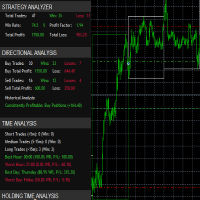
it's a fully built expert advisor with trading functionality with buy only or sell only or both options it's designed to be a tool that can be used for automate entry and exit in line with the overall Market Direction automatic  risk management parameters fully  comprehensive STRATEGY ANALYZER Section Total Trades: Shows the overall number of trades taken Win Rate: Displays percentage of winning trades (color-coded green if >50%, red if <50%) Total Profit/Loss: Shows absolute profit and loss v
FREE
Prop Firm Protector Basic
Janitha Sandaruwan Amaradasa Wickramasingha Arachchilage
5 (1)
Prop Firm Protector Lite - Essential Risk Management Tool A risk management utility designed to help traders monitor their trading activity according to predefined rules and limits. This tool runs in the background on any chart and monitors all trades regardless of their source, including manual trades, signal subscriptions, or other Expert Advisors. --- Core Features Symbol and Lot Monitoring: The symbol monitoring module allows you to define which currency pairs are permitted for trading.

FREE
Basket Take-Profit Utility Lite   is a free on-chart trade management tool for MetaTrader 5 that lets you close groups of trades the moment their   combined profit target   is reached — something MetaTrader cannot do natively. All settings are controlled directly from the interactive panel on your chart. No need to detach and re-attach the EA to change your target. Features: Group trades   by: All open positions · Specific symbol · Magic number Three target types   selectable from the panel: - F
FREE
FiT Panel Pro
Thonglak Janyakorn
Overview FiT Panel Pro is a professional-grade trade management panel designed for MetaTrader 5 traders who demand speed, precision, and full control over their trades. Built with a modern dark-theme UI, it combines one-click execution with advanced risk management, visual SL/TP drag lines, automatic Fibonacci-based levels, and comprehensive order management — all in a single, compact panel. Whether you are a scalper, day trader, or swing trader, FiT Panel Pro gives you the edge you need to exec
FREE
Lot Size Ruler
Joshua Akinetos Malik
SI Ruler A clean, one-click price ruler that shows points and exact dollar cost between any two levels on your chart. Every trader needs to quickly measure the distance between two price levels and know what it costs in real money. Most platforms make this harder than it should be. SI Ruler puts a single icon in the corner of your chart — click it, click your entry level, and drag to your stop or target. The label tells you instantly how many points that distance is and exactly what it costs in
FREE
The Ultimate All-In-One Trade Manager & Prop Firm Guardian for MT5. Nexus Pro Trade Manager is the most advanced, all-in-one trading assistant designed for both manual traders and Prop Firm challengers. Featuring a stunning, lag-free UI (Dark/Light mode), it completely transforms your MT5 into a professional trading terminal. Whether you are trading a personal account or trying to pass evaluations for FTMO, FundedNext, or other prop firms, Nexus Pro protects your capital, automates your risk cal
MT5 Tick Data - 실제 과거 틱 데이터 추가 자료 및 안내 전체 매뉴얼   -   MT4 버전   -   MT5 버전 전문가 어드바이저와 지표를 검증하고 백테스트하기 위한 실제 틱 데이터를 찾고 계신가요? 여기 있습니다! 당사 웹사이트에서 제공하는 MT5 Tick Data 패키지는 MetaTrader 5를 위한 진짜 과거 틱 데이터를 제공하여, 추정 가격이 아닌 실제 시장 조건과 실제 변동 스프레드로 전략 테스트를 실행할 수 있습니다. 틱 데이터 다운로드 센터에서 데이터를 내려받고 원클릭 인스톨러를 사용해 원하는 MetaTrader 5에 직접 설치하세요. 약 10분이면 됩니다. 전문가 어드바이저와 지표는 변경 없이 작동하며, 실제 틱을 사용하기 때문에 MetaTrader는 최고의 모델링 품질을 달성합니다. 주요 이점: 26개 심볼, 2003년부터 20년 이상의 과거 데이터. 외환, 지수, 금속, 에너지, 암호화폐 포함 낮음, 보통, 높음 스프레드 프로필을 갖춘 실제
FREE
MetaTrader 5용 RiskFrame Trade Manager 차트에서 전체 거래 계획을 만들고, 주문이 브로커에 도달하기 전에 검증하며, 같은 패널에서 포지션을 관리하세요. RiskFrame은 MetaTrader 5용 수동 거래 계획, 실행 및 포지션 관리 도구입니다. 자체 시장 아이디어를 가진 재량 트레이더가 이를 더 명확하게 주문으로 전환하도록 설계되었습니다. Entry, Stop Loss, Take Profit 및 선택적 TP2를 차트에 직접 배치합니다. RiskFrame은 선택한 위험으로 거래량을 계산하고, 계획된 위험과 예상 결과를 표시하며, 전송 전에 거래를 검증하고 같은 인터페이스에서 포지션을 관리합니다. RiskFrame은 신호를 생성하거나 독립적으로 거래하지 않습니다. 결정은 트레이더가 내리며, RiskFrame은 준비, 검증, 실행 및 관리를 지원합니다. 매뉴얼: 전체 RiskFrame 사용자 매뉴얼 열기 실행 전 전체 계획 확인 Visual Trade P
GDS RiskLab TradeDesk Free Manual Trading Desk and Risk-Control Utility for MetaTrader 5 GDS RiskLab TradeDesk is a free chart-based utility for traders who want a cleaner manual trading workspace in MetaTrader 5. It is designed as a simple execution-support and risk-control panel. The goal is to keep the trading process more organized: review the chart, plan the trade, keep risk visible and execute manually with more structure. This tool does not generate buy or sell signals. It does not predic
FREE
Nabeeha Trade Manager (Free for a Limited Time) Compact Manual Trade Manager for MetaTrader 5 & MetaTrader 4 Nabeeha Trade Manager is a lightweight and easy-to-use manual trading assistant that helps traders execute and manage trades directly from a compact on-chart panel. It is designed for traders who manually analyze the market but want faster execution, simple risk control, and convenient position management . Key Features One-Click Trading BUY and SELL buttons for quick trade execution. Au
Position Management EA Light (FREE) The Position Management EA Light is a simplified and user-friendly Expert Advisor (EA) designed to automate basic trade management functions effectively on MetaTrader 5. This free version is perfect for traders who want automated market or stop order execution with straightforward risk management features. Main Features: Order Types Supported: Market Orders (Buy & Sell) Stop Orders (Buy Stop & Sell Stop) Static Stop Loss & Take Profit: Predefined SL and TP val
FREE
Hard limits for prop firm and challenge accounts Prop firm rules are not suggestions. Breach the daily loss limit by one dollar and the account is gone, whatever the equity curve looked like an hour earlier. The problem is that the rule lives on the firm's server while your positions live in your terminal, and nothing in MetaTrader 5 connects the two. Prop Firm Circuit Breaker sits on one chart and watches the whole account. The name is literal: an exchange halts trading when a threshold is bre
FREE
이 제품의 구매자들이 또한 구매함
Trade Assistant MT5
Evgeniy Kravchenko
4.41 (216)
거래당 위험 계산, 라인을 사용한 손쉬운 신규 주문, 부분 청산 기능을 통한 주문 관리, 7가지 유형의 트레일링 스탑 및 기타 유용한 기능을 제공합니다. 추가 자료 및 지침 설치 지침   -   애플리케이션 지침   -   데모 계정용 애플리케이션 평가판 라인 기능       - 차트에 개시선, 손절매, 차익실현을 표시합니다. 이 기능을 사용하면 새로운 주문을 쉽게 하고 개봉 전에 추가 특성을 볼 수 있습니다. 위기 관리       -       위험 계산 기능은 설정된 위험과 손절매 주문의 크기를 고려하여 새 주문의 볼륨을 계산합니다. 이를 통해 손절매 크기를 설정하고 동시에 설정된 위험을 존중할 수 있습니다. 로트 계산 버튼 - 위험 계산을 활성화/비활성화합니다. 필요한 위험 값은 위험 필드에 0에서 100 사이의 백분율 또는 예금 통화로 설정됩니다. 설정 탭에서 위험 계산 옵션을 선택합니다. $ 통화, % 잔액, % 지분, % 자유 마진, % 사용자 정의, % AB 이전
Trade Manager EA에 오신 것을 환영합니다. 이 도구는 거래를 보다 직관적이고 정확하며 효율적으로 만들기 위해 설계된 궁극적인 리스크 관리 도구 입니다. 단순한 주문 실행 도구가 아닌, 원활한 거래 계획, 포지션 관리 및 리스크 제어를 위한 종합 솔루션입니다. 초보자부터 고급 트레이더, 빠른 실행이 필요한 스캘퍼에 이르기까지 Trade Manager EA는 외환, 지수, 상품, 암호화폐 등 다양한 시장에서 유연성을 제공합니다. Trade Manager EA를 사용하면 복잡한 계산은 이제 과거의 일이 됩니다. 시장을 분석하고 진입, 손절 및 익절 수준을 차트의 수평선으로 표시한 후 리스크를 설정하면, Trade Manager가 이상적인 포지션 크기를 즉시 계산하고 SL 및 TP 값을 실시간으로 표시합니다. 모든 거래가 간편하게 관리됩니다. 주요 기능: 포지션 크기 계산기 : 정의된 리스크에 따라 거래 크기를 즉시 결정합니다. 간단한 거래 계획 : 진입, 손절, 익절을 위한
Farmed Hedge Yield Farming | All Markets (Manual - Hybrid - Semi/Automated EA) VERIFIED TRADING RESULTS - Farmed Hedge Yield Axi Copy:  https://www.mql5.com/en/signals/2356376 - Farmed Hedge Yield Exn Copy:   https://www.mql5.com/en/signals/2356404 - Farmed Hedge Yield V Copy:  https://www.mql5.com/en/signals/2357156 * Before purchasing, please feel free to send me a message if you have any questions about the product or setup. - You can test the system using Strategy Tester: Visual Mode , a
베타 출시 Telegram to MT5 Signal Trader 는 곧 공식 알파 버전을 출시할 예정입니다. 일부 기능은 아직 개발 중이며, 작은 버그가 발생할 수 있습니다. 문제가 있으면 꼭 보고해 주세요. 여러분의 피드백은 소프트웨어 개선에 도움이 됩니다. Telegram to MT5 Signal Trader 는 Telegram 채널 또는 그룹의 거래 신호를 자동으로 MetaTrader 5 계정으로 복사하는 강력한 도구입니다. 공개 및 비공개 채널을 모두 지원하며, 여러 신호 제공자를 여러 MT5 계정에 연결할 수 있습니다. 소프트웨어는 빠르고 안정적으로 동작하며, 복사된 거래를 완벽히 제어할 수 있습니다. 인터페이스는 깔끔하며 대시보드와 차트가 시각적으로 구성되어 있고, 직관적인 네비게이션이 가능합니다. 여러 Signal Account를 관리하고, 공급자별 설정을 세밀하게 조정하며, 모든 동작을 실시간으로 모니터링할 수 있습니다. 필수 조건 MQL의 제한으로 인해 EA는 Te
TradePanel MT5
Alfiya Fazylova
4.88 (167)
Trade Panel은 다기능 거래 도우미입니다. 이 애플리케이션에는 50개 이상의 수동 거래 기능이 포함되어 있으며 대부분의 거래 작업을 자동화할 수 있습니다. 앱 사용 설명서 + 동영상 설명: https://www.mql5.com/en/blogs/post/756482 데모 계정용 앱 체험판: https://www.mql5.com/en/blogs/post/750865 앱 설치 방법: https://www.mql5.com/en/blogs/post/756239 시각 모드에서 앱 테스트 방법: https://www.mql5.com/en/blogs/post/770277 VPS MetaTrader에 앱 설치 방법: https://www.mql5.com/en/blogs/post/770190 거래. 한 번의 클릭으로 거래를 수행할 수 있습니다: 리스크 자동 계산과 함께 예약 주문 및 포지션 열기. 한 번의 클릭으로 여러 주문 및 포지션 열기. 주문 그리드 열기. 예약 주문 및 포지션을 그룹별로
Local Trade Copier EA MT5
Juvenille Emperor Limited
4.94 (148)
Local Trade Copier EA MT5 를 사용하여 매우 빠른 거래 복사 경험을 해보세요. 1분 안에 간편하게 설정할 수 있으며, 이 거래 복사기를 사용하면 Windows 컴퓨터 또는 Windows VPS에서 여러 개의 MetaTrader 터미널 간에 거래를 0.5초 미만의 초고속 복사 속도로 복사할 수 있습니다. 초보자든 전문가든   Local Trade Copier EA MT5 는 다양한 옵션을 제공하여 사용자의 특정 요구에 맞게 맞춤 설정할 수 있습니다. 이는 수익 잠재력을 높이려는 모든 사람을 위한 최고의 솔루션입니다. 지금 사용해보시고 이것이 왜 시장에서 가장 빠르고 쉬운 무역용 복사기인지 알아보세요! 팁: 여기 에서 데모 계정에서 Local Trade Copier EA MT5 데모 버전을 다운로드하여 사용해 볼 수 있습니다. 다운로드한 무료 데모 파일을 MT5 >> File >> Open Data Folder >> MQL5 >> Experts 폴더에 붙여넣고 터
================================================================================ POC BREAKOUT - V20.72. Full Professional Grade Toolkit ================================================================================ POC Breakout is a full MetaTrader 5 trading dashboard for discretionary traders who want breakout signals, Point of Control (POC) context, volume profiles, order flow, market structure, news, alerts, and advanced trade planning in one professional workspace. Attached directly to you
EA Overfitter
Stephen J Martret
That backtest looks great. But will it still be making money tomorrow, next week, next month? EA Overfitter re-runs your EA on 100 price histories it has never seen. One score tells you if the edge is real. A backtest tells you what an EA did on one price history — the one that happened to occur. What you cannot tell from it is how much of that result was the strategy and how much was the particular path. EA Overfitter answers that. It builds up to 100 synthetic price histories your EA has n
Telegram to MT5 Multi-Channel Copier 는 Telegram 채널의 트레이딩 시그널을 MetaTrader 5로 자동 복사합니다. 봇도, 브라우저 확장도, 수동 복사도 필요 없습니다. Telegram에 시그널이 도착하면 EA가 몇 초 안에 터미널에서 주문을 실행합니다. 제품은 두 가지 구성 요소로 이루어집니다: Telegram 채널을 수신하는 Windows 애플리케이션과, MT5 터미널에서 시그널을 실행하는 본 EA입니다. MT4 버전도 제공됩니다   여기 . 설정 가이드와 앱 다운로드:   https://www.mql5.com/en/blogs/post/768988 작동 방식 Windows 앱은 봇이 아닌 본인의 API 자격 증명으로 Telegram에 연결됩니다. 따라서 비공개·VIP 채널을 포함해 구독 중인 모든 채널, 그룹, 토픽을 읽을 수 있습니다. 직접 메시지를 보내는 시그널 봇, 개인 채팅, 심지어 나의 저장된 메시지도 소스로 사용할 수 있습니다. 시
Astro Trade MT5
Indra Maulana
5 (6)
25% discount on the release of the tool: only for the next 3 buyers Send a message to receive a demo version. AstroTrade Trading Assistant AstroTrade is a comprehensive multi-functional trading utility developed for the MetaTrader 5 platform. It integrates essential tools for trade execution, risk management, and technical monitoring into a single unified interface. The application is designed to assist traders in managing their daily operations through a visual and structured environment. Vi
HINN MagicEntry Extra
ALGOFLOW OÜ
4.74 (19)
HINN MAGIC ENTRY – the ultimate tool for entry and position management! SIMPLE. FASTEST. INTUITIVE. MAX AUTOMATED. Place orders by selecting a level directly on the chart! full description   ::  demo-version  :: 60-sec-video-description Key features: - Market, limit, and pending orders - Automatic lot size calculation - Automatic spread and commission accounting - Unlimited partitial take-profits  - Breakeven and trailing stop-loss and take-profit  functions - Invalidation leves - Intuitive, a
Premium Trade Manager - 코치가 내장된 트레이딩 패널 Premium Trade Manager 는 차트 안에 트레이딩 코치를 심어놓은 도구입니다. 주문을 확정하기 전에, AI 트레이딩 코치 Max가 설정된 거래를 직접 읽고 명확한 판단을 내려줍니다. 스톱이 규율 있는 접근 방식에 맞는지, 리스크 크기가 합리적인지, 고영향 뉴스 이벤트가 몇 분 후에 있는지, 프롭 펌 한도에 근접했는지. 그 아래에는 완전한 실행 엔진이 있습니다. 원클릭 리스크 기반 진입, 차트에서 드래그로 세우고 거래가 진행되는 동안에도 계속 움직일 수 있는 플랜, 최대 4단계 분할 익절, 7가지 트레일링 방식, 실시간 프롭 펌 컴플라이언스, 뉴스 가드, 그리고 자체 비용을 평가하는 스프레드까지. 결정은 당신이 내립니다. Max가 두 번째 시선으로 확인합니다. 패널이 그 이후의 모든 것을 처리합니다. 구매 전에 직접 체험해 보세요. 브라우저에서 라이브 패널을 직접 클릭해볼 수 있습니다. 구매 전에 실제
Exp COPYLOT CLIENT for MT5
Vladislav Andruschenko
3.97 (35)
MetaTrader 5용 전문 트레이드 복사기 MetaTrader 용 빠르고 전문적이며 신뢰할 수 있는 트레이드 복사기 입니다. COPYLOT 은 MT4와 MT5 터미널 간의 Forex 거래 복사를 지원하며, Hedge 및 Netting 계좌를 모두 지원합니다. COPYLOT MT5 버전 지원 구성: - MT5 Hedge → MT5 Hedge - MT5 Hedge → MT5 Netting - MT5 Netting → MT5 Hedge - MT5 Netting → MT5 Netting - MT4 → MT5 Hedge - MT4 → MT5 Netting MT4 버전 전체 설명 + DEMO + PDF 구매 방법 설치 방법 로그 파일 확인 방법 테스트 및 최적화 방법 Expforex의 모든 제품 MT4 터미널로도 거래를 복사할 수 있습니다(MT4 → MT4, MT5 → MT4): COPYLOT CLIENT for MT4 COPYLOT은 2개, 3개, 심지어 10개의 터미널과 동시에 작동할
Anchor Trade Manager
Kalinskie Gilliam
5 (8)
Anchor: The EA Manager Your EAs cannot see each other, but Anchor can. Anchor gives you one place to coordinate your EAs, manage risk, and decide when trading is allowed. It works alongside the trading bots you already use without any changes to them. The Problem One EA opens a trade. Then another starts trading. The next thing you know, you wake up to multiple grids built across your account. Each EA may be doing exactly what it was designed to do, but together they can place far more risk on y
파워 캔들 전략 스캐너 - 자체 최적화 다중 종목 설정 찾기 도구 파워 캔들 전략 스캐너는 마켓 워치에 등록된 모든 종목에 대해 파워 캔들 지표와 동일한 자체 최적화 엔진을 동시에 실행합니다. 하나의 패널에서 현재 통계적으로 거래 가능한 종목, 각 종목별 최적의 전략, 최적의 손절매/익절 조합을 알려주며, 새로운 신호가 발생하면 즉시 알림을 전송합니다. 이 도구는 Stein Investments 에코시스템의 일부입니다. 18개 이상의 도구와 함께 당신의 1대1 AI 트레이딩 멘토 Max.  항상 대기 중, 모든 인디케이터를 깊이 있게 이해, 무언가를 차근차근 생각해보고 싶은 순간에 도움을 줍니다.  https://stein.investments 에서 만나보세요 완벽한 시장 모니터링. 종목당 3,000건 이상의 자동 최적화. 2가지 알림 유형. 한 번의 클릭으로 차트를 전환하고 바로 거래하세요. 이 도구가 필요한 이유 대부분의 다중 종목 스캐너는 가격 변동만 보여줍니다. 티커별
Telegram To MT5 Ultra
Mirel Daniel Gheonu
5 (5)
Telegram To MT5 — 시그널 카피어 텔레그램 채널의 트레이딩 콜을 실제 MT5 주문으로 바꿔 드립니다 — 자동으로, 원하는 만큼의 계좌에서, 리스크와 규칙을 완전히 당신의 통제 아래 둡니다. Telegram To MT5는 이미 텔레그램에서 팔로우하고 있는 VIP / 시그널 채널을 당신의 MetaTrader 5 터미널에 연결합니다. 무료 동반 데스크톱 앱이 메시지를 읽고(봇을 차단하는 채널에서도 가능), 이 EA가 당신의 계좌에서 이를 실행합니다 — 당신만의 리스크 설정, 심볼 매핑, 익절(TP) 처리, 세션 및 뉴스 필터를 적용합니다. 이것은 블랙박스 전략이 아니라 시그널 카피어입니다. 어떤 채널을 신뢰할지, 각 거래의 수량과 관리 방식을 당신이 결정합니다. 단계별 설정 및 동반 앱 설치 가이드 작동 방식 [당신의 텔레그램 채널] -> [동반 데스크톱 앱] -> [MT5 + 이 EA] -> 주문 동반 데스크톱 앱(무료, 포함)은 당신의 텔레그램 계정으로 로그인하여 선택한
Grid Manual MT5
Alfiya Fazylova
4.73 (22)
"Grid Manual"은 주문 그리드 작업을 위한 거래 패널입니다. 이 유틸리티는 보편적이며 유연한 설정과 직관적인 인터페이스를 제공합니다. 그것은 손실을 평균화하는 방향뿐만 아니라 이익을 증가시키는 방향으로 주문 그리드와 함께 작동합니다. 거래자는 주문 그리드를 만들고 유지할 필요가 없으며 유틸리티에서 수행합니다. 거래자가 주문을 시작하는 것으로 충분하며 "Grid Manual"는 자동으로 그를 위한 주문 그리드를 생성하고 거래가 마감될 때까지 그와 동행할 것입니다. 전체 설명 및 데모 버전 여기 . 유틸리티의 주요 기능: 모바일 터미널을 포함하여 어떤 방식으로든 열린 주문과 함께 작동합니다. "제한" 및 "중지"의 두 가지 유형의 그리드와 함께 작동합니다. 고정 및 동적(ATR 표시기 기반)의 두 가지 유형의 그리드 간격 계산과 함께 작동합니다. 오픈 오더 그리드의 설정을 변경할 수 있습니다. 차트에서 각 주문 그리드의 손익분기점 수준을 표시합니다. 각 주문 그리드에 대한 이익
Signal TradingView to MT5 Pro Automator TradingView와 MetaTrader 5 간의 즉각적인 전문 실행 TradingView 알림과 MT5의 실제 실행을 연결하는 가장 강력한 커뮤니케이션 브리지로 거래 전략을 자동화하세요. 속도, 유연성 및 완벽한 위험 관리를 요구하는 트레이더를 위해 설계된 이 Expert Advisor는 모든 알림 메시지를 정확한 시장가 또는 지정가 주문으로 변환합니다. 강점 및 이점 범용 파싱 엔진(독점 기술): 모든 알림 형식에서 데이터를 자동으로 인식하고 추출할 수 있는 고급 기술입니다. 단일하고 엄격한 형식에 얽매일 필요가 없습니다. 시스템은 심볼, 액션, 가격, SL 및 TP를 자동으로 이해합니다. 실시간 실행: 지연 시간을 최소화하도록 최적화된 1초 미만의 초고속 폴링 기술. 신호 수신 후 몇 밀리초 내에 주문 실행이 이루어집니다. 기관 수준의 위험 관리: 다음 기준에 따른 자동적이고 정확한 로트(Lot) 크기 계
The News Filter MT5
Leolouiski Gan
4.78 (23)
이 제품은 뉴스 시간 동안 모든 전문가 어드바이저 및 수동 차트를 필터링하여 수동 거래 설정이나 다른 전문가 어드바이저가 입력한 거래가 파괴될 수 있는 급격한 가격 상승으로부터 걱정하지 않아도 됩니다. 이 제품은 또한 뉴스 발표 전에 열린 포지션과 대기 주문을 처리할 수 있는 완전한 주문 관리 시스템이 함께 제공됩니다.   The News Filter  를 구매하면 더 이상 내장 뉴스 필터에 의존할 필요가 없으며 이제부터 모든 전문가 어드바이저를 여기서 필터링할 수 있습니다. 뉴스 선택 뉴스 소스는 Forex Factory의 경제 캘린더에서 얻어집니다. USD, EUR, GBP, JPY, AUD, CAD, CHF, NZD 및 CNY와 같은 어떤 통화 기준으로 선택할 수 있습니다. Non-Farm (NFP), FOMC, CPI 등과 같은 키워드 식별을 기준으로 선택할 수도 있습니다. 저, 중, 고 영향을 가지는 뉴스를 필터링할 수 있도록 선택할 수 있습니다. 차트와 관련된 뉴스만 선
Trade Dashboard MT5
Fatemeh Ameri
4.95 (132)
Trade Dashboard simplifies how you open, manage, and control your trades, with built-in lot size calculation. It allows you to execute trades, manage risk, and control positions directly on the chart, with tools such as partial close, breakeven, and trailing stop. Designed to reduce manual work and help you stay focused on your trading decisions. A demo version is available for testing. Detailed explanations of features are provided within the MQL5 platform. Installation instructions are include
Strategy Ledger Pro
Abdullah Uygar Tuna
5 (1)
Strategy Ledger Pro 는 MetaTrader 5용 읽기 전용 계좌 분석 패널입니다. 계좌 결과를 Expert Advisor, 전략, 종목, 매직 넘버별로 분리해 보여줍니다. 모든 기능을 설명하는 상세 매뉴얼 . MetaTrader는 계좌 전체에 대해 하나의 잔고만 보여줍니다. 여러 EA가 함께 거래하면 그 잔고로는 각각의 기여를 알 수 없습니다. Strategy Ledger Pro는 계좌 내역을 읽고, 청산된 포지션을 재구성하고, 전략에 배정한 뒤 결과를 하나의 패널로 보여줍니다. 이 제품은 주문을 넣거나 수정하거나 청산하지 않습니다. 거래 전략을 포함하지 않고, 지표를 만들지 않으며, 차트 가격을 읽지 않습니다. 주요 기능 EA, 개별 전략, 종목 또는 매직 넘버별 결과. 사전 설정 기간과 사용자 지정 날짜 범위. 실현 및 미실현 결과, 오픈 노출, 거래 통계, 핍, 드로다운, 자산 곡선. 수수료, 스왑, 비용 부담률, 진입·청산 슬리피지 추정치와 합계. 고정 규
Trade Copier Ultimate
Janitha Sandaruwan Amaradasa Wickramasingha Arachchilage
5 (5)
Trade Copier Ultimate - Telegram to MT5 Signal Copier Trade Copier Ultimate automatically copies Telegram trading signals into MetaTrader 5. The EA can read signal messages, detect the symbol, order type, entry price, Stop Loss, Take Profit levels and selected update commands, then execute or manage the trade in MT5 using your lot and risk settings. It is more than a basic Telegram to MT5 copier. TCU also supports Bot API and user-account Bridge workflows, Discord signal routing, local MT5 to MT
FUTURES ORDERFLOW FOOTPRINT CHART Professional OrderFlow EA for MetaTrader 5 Version 1.01| Professional tool for real traders | Institutional-Grade Visualization STRATEGY TESTER USERS - PLEASE SELECT EVERY REAL TICK WHEN TESTING AND YOU HAVE DOWNLOADED HISTORICAL DATA. IF YOU SEE A WAITING SCREEN AND IT IS NOT DOWNLOADING, IT MEANS YOU HAVE LOW HISTORICAL DATA. TRY 1 MIN AND 5 MIN FIRST ON 1 DAY DATA. ONE DAY DATA SHOULD BE THE NEWEST AND MOST CURRENT DATE. PLEASE WAIT UNTIL THE MARKET HAS ROL
구매 후 저에게 메시지를 보내주시면 전체 매뉴얼 키트 + AI 기능을 테스트할 수 있는 3일간의 OpenAI API 체험 + 추가 보너스 선물을 제공해 드립니다 현재 가격은 8월 재출시 업데이트를 위한 기간 한정 할인 가격입니다 — 가격이 인상되기 전에 지금 에디션을 확보하세요. 다음 가격: $340 이것은 시장에서 지금까지 사용해 보았거나 본 어떤 트레이딩 패널과도 완전히 다릅니다. 현재 리테일 시장에서 이용할 수 있는 가장 혁신적인 AI 기반 트레이딩 패널 중 하나입니다. AI를 차트에 직접 연결한다고 상상해 보세요   — AI 추천, 계좌 감사, AI 트레이딩 신호 수신 및 클릭 한 번으로 실행. Telegram을 통해 스마트폰에서   전체 트레이딩 계좌를 관리한다고 상상해 보세요   — AI와 채팅하고, 즉각적인 알림을 받고, 거래를 관리하며 어디서든 계좌를 보호할 수 있습니다. 여러   EA를 실행하면서   각 EA의 성과를 개별적으로 모니터링하고, 거래를 관리하거나 특정
Trade copier MT5
Alfiya Fazylova
4.59 (54)
Trade Copier는 거래 계정 간의 거래를 복사하고 동기화하도록 설계된 전문 유틸리티입니다. 복사는 공급자의 계정/단말기에서 동일한 컴퓨터 또는 vps에 설치된 수신자의 계정/단말기로 발생합니다. 프로모션 - 이미 "Trade copier MT5"를 구매하셨다면, "Trade copier MT4"를 무료로 받으실 수 있습니다 (MT4 → MT5 및 MT4 ← MT5 복사용). 조건에 대한 자세한 정보를 원하시면, 개인 메시지를 통해 저희에게 문의해 주시기 바랍니다! 구매하기 전에 데모 계정에서 데모 버전을 테스트할 수 있습니다. 데모 버전 여기 . 전체 지침 여기 . 주요 기능 및 이점: 복사기는 "МТ5> МТ5", "МТ4> МТ5", "МТ5> МТ4" 복사를 지원합니다. 복사기는 데모 계정 > 실 계정, 실 계정 > 데모 계정, 데모 계정 > 데모 계정 및 실제 계정 > 실 계정 복사를 지원합니다. 복사기는 읽기 전용 암호가 적용된 투자자 계정에서 복사를 지원합니다. 하
Ultimate Extractor
Clifton Creath
5 (8)
Ultimate Extractor - Professional Trading Analytics for MT5 *****this is the local HTML version of Ultimate Extractor. !!!!!it is not compatible with Cloud!!!! For the online version please reach out to me directly****** Ultimate EA manager also now available when you use cloud pro and above for free!! Ultimate Extractor transforms your MetaTrader 5 trading history into actionable insights with comprehensive analytics, interactive charts, and real-time performance tracking. What It Does Automa
Risk Manager Pro MT5 is an account protection Expert Advisor for traders who want strict risk control inside MetaTrader 5. The utility monitors your account equity, daily and weekly results, drawdown, open positions, trade count, consecutive losses, and trading hours. When a configured limit is reached, it can automatically close positions, cancel pending orders, stop other EAs, send notifications, or close the terminal. Instead of relying on discipline during a stressful trading session, you de
Telegram To MT5 Receiver
Levi Dane Benjamin
4.53 (15)
가입한 모든 채널에서 (개인 및 제한된 채널 포함) 시그널을 바로 MT5로 복사합니다.   이 도구는 사용자를 고려하여 설계되었으며 거래를 관리하고 모니터하는 데 필요한 많은 기능을 제공합니다. 이 제품은 사용하기 쉽고 시각적으로 매력적인 그래픽 인터페이스로 제공됩니다. 설정을 사용자 정의하고 제품을 몇 분 안에 사용할 수 있습니다! 사용자 가이드 + 데모  | MT4 버전 | 디스코드 버전 데모를 시도하려면 사용자 가이드로 이동하십시오. Telegram To MT5 수신기는 전략 테스터에서 작동하지 않습니다! Telegram To MT5 특징 여러 채널에서 동시에 신호를 복사합니다. 개인 및 제한된 채널에서 신호를 복사합니다. Bot 토큰이나 채팅 ID가 필요하지 않습니다.   (원하는 경우에는 사용할 수 있습니다) 위험 % 또는 고정된 로트로 거래합니다. 특정 심볼을 제외합니다. 모든 신호를 복사할지 또는 복사할 신호를 사용자 정의할지 선택할 수 있습니다. 모든 신호를 인
Welcome to ENTRY IN THE ZONE WITH SMC MULTI TIMEFRAME Entry In The Zone and SMC Multi Timeframe is a real-time market analysis tool based on Smart Money Concepts (SMC), designed to analyze market structure, price direction, and key trading zones. It supports both Single-Timeframe Analysis and Multi-Timeframe Analysis, providing a clearer view of the overall market structure across multiple timeframes, with real-time BUY / SELL signals that do not repaint. It is designed to help filter trading op
The product will copy all telegram signal to MT5 ( which you are member) , also it can work as remote copier.  Easy to set up, copy order instant, can work with almost signal formats, image signal,  s upport to translate other language to English Work with all type of channel or group, even channel have "Restrict Saving Content", work with  multi channel, multi MT5 Work as remote copier: with signal have ticket number, it will copy exactly via ticket number. Support to backtest signal. How to s
제작자의 제품 더 보기
Session Range Desk
Erdem Mumin Kaynak
Session Range Desk Session Range Desk is a free MetaTrader 5 Expert Advisor for testing a configurable range-breakout approach. Set the broker-time start, choose how many completed bars define the range, and use touch or bar-close confirmation. Average True Range filtering, stop-distance position sizing and optional break-even and partial close are built in. Use it on hedging accounts, with one copy per symbol. The chart panel brings participating copies into a shared desk view within the same t
FREE
Check a pending stop order before you send it. A pending order can be refused for reasons the terminal can already show you: the price is not on the broker price grid, the volume is not a valid step, or the entry sits closer to the market than the symbol stops level allows. Pending Order Inspector MT5 reads those contract values and shows how your intended order compares with them, on the chart, before you place it yourself. Enter the price, volume, optional Stop Loss and optional Take Profit yo
FREE
CandleCat
Erdem Mumin Kaynak
CandleCat is a small animated companion that lives in the corner of your chart. It is not a trading system, not a signal generator and not an advisor. It never places, closes or modifies any order. It simply keeps you company while you work. The cat sits on its cushion, breathes, blinks, stretches, and falls asleep during quiet hours. When something happens, it notices. REACTS TO PRICE Perks up on an unusually large bullish candle. Startles on a sharp bearish candle. Looks at unusually long wi
FREE
필터:
리뷰 없음
리뷰 답변