One Hour Strategy Analyzer

it's a fully built expert advisor with trading functionality with buy only or sell only or both options it's designed to be a tool that can be used for automate entry and exit in line with the overall Market Direction automatic  risk management parameters fully  comprehensive


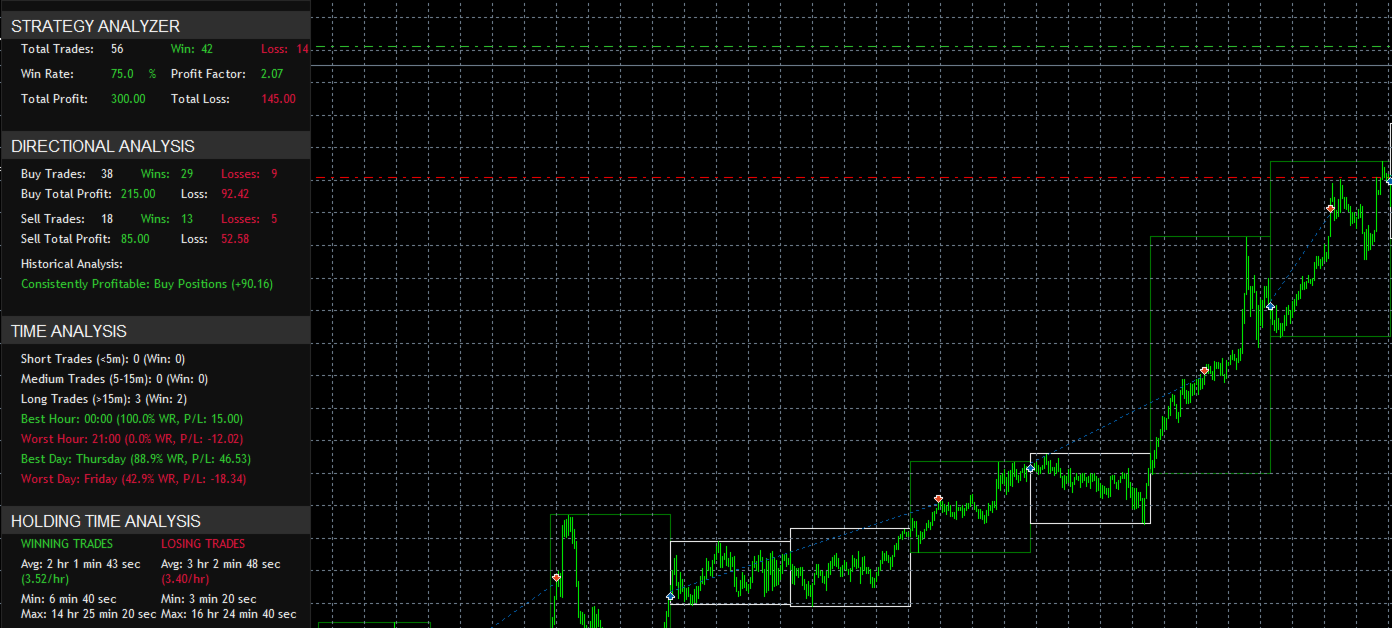
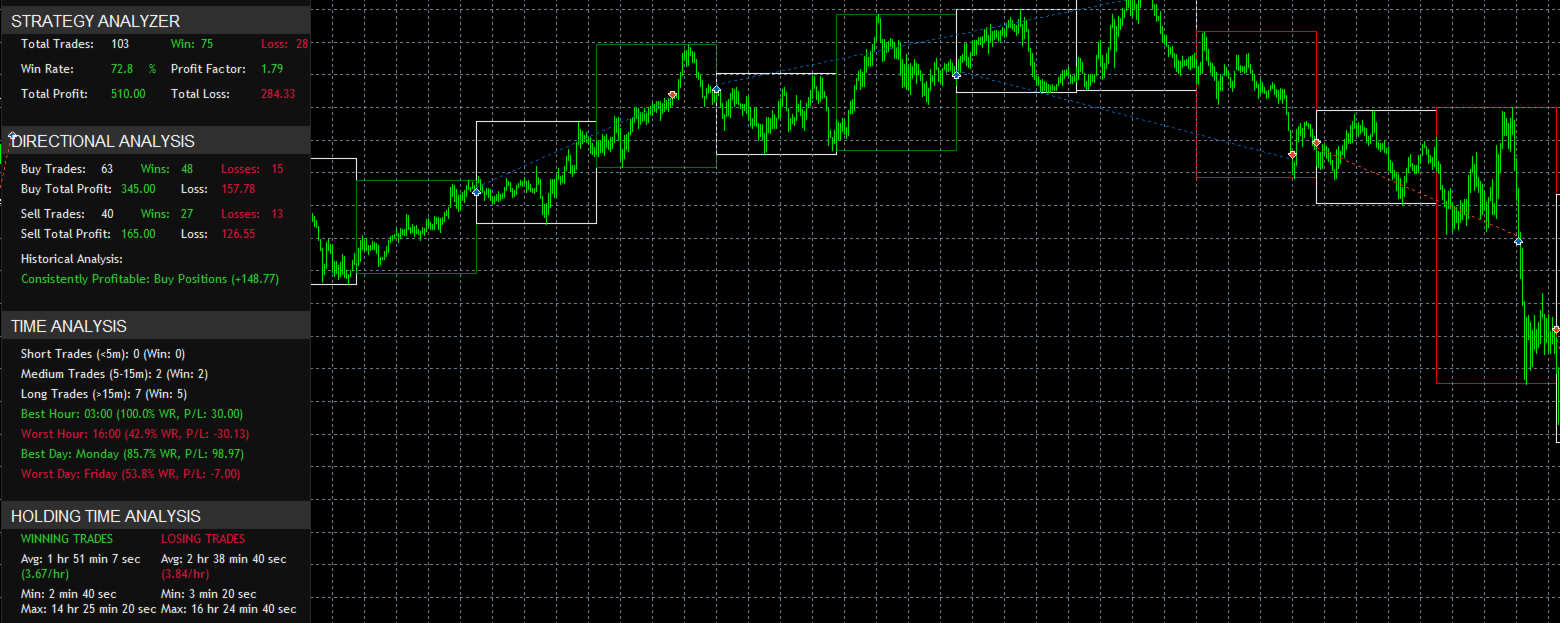
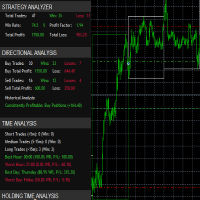
  1. STRATEGY ANALYZER Section

    • Total Trades: Shows the overall number of trades taken
    • Win Rate: Displays percentage of winning trades (color-coded green if >50%, red if <50%)
    • Total Profit/Loss: Shows absolute profit and loss values
    • Tracks largest wins and losses
    • Monitors current and maximum drawdown
    1. DIRECTIONAL ANALYSIS Section
    • Buy Trades Analysis:
      • Total number of buy trades
      • Number of winning and losing buy trades
      • Total profit from buy trades
      • Total losses from buy trades
    • Sell Trades Analysis:
      • Total number of sell trades
      • Number of winning and losing sell trades
      • Total profit from sell trades
      • Total losses from sell trades
    • Shows which direction (Buy/Sell) is more profitable historically
    • Color codes profits in green and losses in red
    1. TIME ANALYSIS Section
    • Trade Duration Categories:
      • Short Trades (<5 minutes): Count and win rate
      • Medium Trades (5-15 minutes): Count and win rate
      • Long Trades (>15 minutes): Count and win rate
    • Best Trading Hours:
      • Shows the most profitable hour of trading
      • Displays win rate and number of trades for that hour
    • Worst Trading Hours:
      • Shows the least profitable hour of trading
      • Displays win rate and number of trades for that hour
    • Best/Worst Trading Days:
      • Identifies most and least profitable days of the week
      • Shows performance metrics for each
    1. HOLDING TIME ANALYSIS Section
    • Winning Trades Statistics:
      • Average holding time for winning trades
      • Profit per hour rate
      • Shortest winning trade duration
      • Longest winning trade duration
    • Losing Trades Statistics:
      • Average holding time for losing trades
      • Loss per hour rate
      • Shortest losing trade duration
      • Longest losing trade duration

    • Trade Psychology
    • Helps maintain discipline by showing objective statistics
    • Provides clear metrics for performance evaluation
    • Helps identify patterns in trading behavior


    To use this EA effectively:

    1. Setup Process:
    • Set your preferred trading direction (Both, Buy only, or Sell only)
    • Adjust thresholds based on the currency pair's volatility
    •  The invisible stop loss and take profit is enabled by default it needs to be disabled  in order to initiate the dashboard  statistical data tracking in real time or in historical back testing
    1. Optimization Opportunities:
    • Adjust  RequiredConsecutiveBoxes  based on market conditions
    • Fine-tune movement thresholds for different currency pairs
    • Modify stop loss levels based on volatility
    • Adjust maximum trades based on your risk tolerance
    1. Best Practices:
    • Start with conservative settings
    • Use the dashboard to monitor performance
    • Adjust parameters based on statistical feedback
    • Pay attention to best/worst hours from the dashboard
    • Use the directional analysis to potentially filter trade direction
    1. Risk Management Features:
    • Maximum open trades limit
    • Stop loss protection
    • Slippage control
    • Direction filtering
    • Pattern confirmation requirements

    The EA combines technical analysis (box patterns) with risk management to automate trading decisions. It's designed to:

    • Identify trending movements
    • Confirm patterns before entry
    • Manage risk through various parameters
    • Provide visual feedback
    • Track performance metrics

    You can optimize its performance by:

    1. Analyzing the dashboard statistics
    2. Adjusting parameters based on performance
    3. Using direction filters during strong trends
    4. Setting appropriate risk levels
    5. Monitoring best/worst trading hours


    추천 제품
    AI Advisor – AI가 당신의 실제 트레이딩 세계를 보게 만드는 도구 AI Advisor는 당신의 실제 계좌 정보를 바탕으로 고품질 프롬프트를 자동 생성해, 어떤 AI 채팅창이든 바로 붙여넣어 쓸 수 있게 해줍니다. 계좌 현황을 빠르게 정리하고, 현재 종목 구조를 이해하며, 위험 지점을 파악하고, 잠재적인 수익 기회를 탐색할 수 있도록 도와줍니다. 즉, AI가 아무 근거 없이 추측하는 것이 아니라, 당신의 실제 트레이딩 상황 을 기반으로 생각하도록 만드는 도구입니다. 빠른 링크 Download:      AI Advisor v1.02.ex4      AI Advisor   v1.02.ex5 Installation guide AI Advisor  Version Overview FAQ & troubleshooting 사용 방법 – 3단계면 충분합니다 분석하고 싶은 종목 차트에서 AI Advisor를 실행합니다. 오른쪽 목록에서 현재 질문에 맞는 “AI Advisor 모드”(AI
    FREE
    Trade assistant pro v8
    Ahmed Mohammed Bakr Bakr
    FREE FREE FREE Trade Assistant MT5 – Professional Trading & Risk Management Panel Trade Assistant MT5 is an advanced trading panel designed to help traders execute orders faster, safer, and more professionally . It simplifies manual trading by combining smart order management , precise risk control , and one-click execution , making it ideal for both beginners and advanced traders. This tool does not trade automatically . Instead, it empowers you with full control while applying professional-gra
    FREE
    MT5용 NAS100 Auto SL 및 TP 메이커를 소개합니다: 메타트레이더 5에서 나스닥 100 시장을 탐색하는 트레이더에게 없어서는 안될 보조 도구인 NAS100 Auto SL 및 TP 메이커로 손절 및 테이크프로핏 설정을 다시는 놓치지 마세요. 이 도구는 손절 및 테이크프로핏 레벨을 자동으로 관리할 수 있는 원활한 솔루션을 찾는 분들을 위해 설계되었습니다. 주요 특징: 손쉬운 자동화: 스톱로스 및/또는 테이크프로핏 없이 나스닥 100 거래를 자동으로 모니터링합니다. 사용자가 구성한 설정에 따라 레벨을 동적으로 조정합니다. 다양한 주문 유형: 나스닥 100의 시장가 및 지정가 주문 모두와 호환됩니다. 메타트레이더 5에서 사용할 수 있는 다양한 주문 유형을 지원합니다. 맞춤형 구성: 사용자 친화적인 매개변수 설정으로 추적 기본 설정 및 손절/익절 수준을 사용자 지정할 수 있습니다. 유연한 범위: 실행되는 특정 NAS100 상품 또는 거래되는 모든 상품에 대해 손절 및 테이크프
    FREE
    EquityShield is a lightweight and dependable Expert Advisor (EA) for MetaTrader 5, crafted to protect your trading account from excessive losses with minimal resource usage. It monitors your account's equity drawdown and automatically closes all open positions and pending orders if the drawdown exceeds your specified threshold, either in percentage (%) or a fixed amount ($). Designed as a robust safety barrier, EquityShield ensures your capital remains secure during unexpected market volatility
    FREE
    Click Trading
    Jawad Tauheed
    5 (2)
    One Click Trading – Auto TP SL Developer TraderLinkz Version 1.00 Category Utility What it does Adds missing TP and SL to your manual trades and pending orders Sets them once per ticket Lets you move TP and SL afterward Works on hedging and netting accounts Scans on every tick and reacts on trade events Why you want it You place faster entries You get consistent risk and exit targets You reduce fat finger errors You keep full manual control Quick start Attach the EA to any chart Keep TP and SL e
    FREE
    MT5 Trade Manager Pro
    Anthony Dewayne Wasome
    Product Description Introduction Trade Manager Pro is a comprehensive, all-in-one trade management dashboard for MetaTrader 5 that puts every essential trading tool at your fingertips. Designed for both beginners and experienced traders, this professional-grade indicator transforms your chart into a powerful command center where you can execute trades, manage positions, monitor risk, and analyze your performance — all from a single, elegantly designed panel. Unlike cluttered, feature-heavy t
    FREE
    MT5 Trade Manager
    Anthony Dewayne Wasome
    MT5 Trade Manager - Multi-Page Dashboard Professional Trading Panel with Advanced Risk Management Transform your MetaTrader 5 trading experience with this comprehensive trade management system featuring a sleek, multi-page dashboard that gives you complete control while maintaining maximum chart visibility. Key Features 6 Interactive Pages DASHBOARD - Quick overview with real-time balance, equity, margin, and today's P/L. One-click BUY/SELL buttons and emergency close all positions. TRADE - Adva
    FREE
    Very often there are situations when you need to quickly close all open positions or close only under a certain condition... The Positions Close script closes open positions according to the selected settings. You can choose to close All positions , only Buy, only Sell You can also choose by which symbols to close positions: by all symbols or only by the current one, on the chart of which the script was thrown There is a filter for closing profitable or unprofitable positions, as well as bo
    FREE
    MT4 및 MT5 고급 거래 관리자로 거래를 혁신하십시오 Mt4 Version : https://www.mql5.com/en/market/product/107249 정밀하고 통제된 거래를 위해 궁극적인 도구인 우리의 MT4 및 MT5 고급 거래 관리자로 거래 전략을 강화하세요. 일반적인 거래 관리자와 달리, 우리의 거래 관리자는 시장 상황에 따라 동적으로 조정되며, 거래를 시작하자마자 자동으로 손절매와 목표 이익 수준을 설정합니다. 주요 기능: 자동 진입 전략: 거래 관리자의 자동 진입 전략으로 기회를 즉시 포착하세요. 거래를 시작할 때 시스템이 미리 정의된 손절매와 목표 이익을 전략적으로 설정하여 시작부터 규율있는 리스크 관리를 보장합니다. 동적 손절매 관리: 실시간으로 시장 변동에 반응하세요. 거래가 +0.50% 수익을 기록하면 시스템이 자동으로 손절매를 절반으로 줄여 이익을 보호하면서도 위험을 억제합니다. 손익분기점 보호: +1% 수익을 달성하면 안심하고 수익을 누리세요.
    FREE
    DCA Tool All-in-One – MetaTrader 5용 자동 및 반자동 DCA 트레이딩 유틸리티 사용 권장 사항 DCA Tool All-in-One 은 트레이더가 자동 및 반자동 모드로 Dollar Cost Averaging (DCA) 전략을 실행 하고 MetaTrader 5에서 포지션 관리 효율을 극대화 할 수 있도록 설계된 강력한 도구입니다. 실계좌 사용 전에 작동 방식을 충분히 이해하고, 백테스트를 수행하며, 시장 분석과 병행하여 활용할 것 을 권장합니다. 1. 개요 반복 작업 자동화 (지정가 주문, SL/TP, 트레일링 스탑, 부분 청산). 수동 판단 과 정확하고 빠른 자동 실행 을 결합. 가격 구역 기반 DCA 전략 을 더 안전하고 효율적으로 적용. 직관적인 컨트롤 패널 을 통해 진입 구역을 설정하고, 클릭 한 번으로 DCA 전략을 활성화하며 진입 타이밍과 방향을 완전히 제어 할 수 있습니다. 2. 주요 기능 2.1 반자동 모드 첫 거래는 수동으로,
    FREE
    Equity monitor This is a simple means change informer. I wrote it for myself, maybe someone will need it... 1. Displays the change in funds for the day. Every day, when the terminal is first launched, it remembers the current funds and monitors changes throughout the day. 2. The first day of the month, well remembers the money and, within months, to monitor changes. 3. Well, it displays the profit of the open position. To work, you need to create 4 global variables: gvarEqityDay , gvarEq
    FREE
    NS Financas Automatic Clear All Chart Indicators Script Automatically remove all indicators from your chart offered for free by NS Financas! Don't waste any more time deleting the indicators one by one. With this script it is possible in one click to remove all indicators from the screen to adjust your new strategy while still using the settings of your graph, in addition to the possibility of configuring keyboard shortcuts for quick access to the script. Take the opportunity to visit our cha
    FREE
    Gap Catcher
    Mikita Kurnevich
    5 (5)
    Read more about my products Gap Cather - is a fully automated trading algorithm based on the GAP (price gap) trading strategy. This phenomenon does not occur often, but on some currency pairs, such as AUDNZD, it happens more often than others. The strategy is based on the GAP pullback pattern. Recommendations:  AUDNZD  TF M1  leverage 1:100 or higher  minimum deposit 10 USD Parameters:  MinDistancePoints - minimum height of GAP  PercentProfit - percentage of profit relative to GAP level
    FREE
    SimpleTrade by Gioeste
    Giovanni Scelzi
    4 (3)
    Discover the power of automated trading with **SimpleTradeGioeste**, an Expert Advisor (EA) designed to optimize your trading operations in the Forex market. This innovative EA combines advanced trading strategies with proven technical indicators, offering an unparalleled trading experience. video backtest :  https://youtu.be/OPqqIbu8d3k?si=xkMX6vwOdfmfsE-A ****Strengths**** - **Multi-Indicator Strategy**: SimpleTradeGioeste employs an integrated approach that combines four main technical ind
    FREE
    이 유틸리티는 한 거래 계좌(Master)에서 다른 계좌(Slave)로 BUY/SELL 거래 개시를 자동으로 복사하며, SL 및 TP의 완전한 동기화, 부분 청산 지원, 그리고 선택 가능한 포지션 종료 동작을 제공합니다. Copy Trades는 서로 다른 컴퓨터나 VPS 서버에서 실행 중인 MT5 계좌 간 거래 복사를 가능하게 합니다. 터미널은 동일한 장치에서 실행될 필요가 없습니다. 이 유틸리티는 여러 계좌를 사용하여 수동 또는 자동 매매를 복제하려는 트레이더, 다양한 계좌 유형에서 전략을 테스트하려는 트레이더뿐만 아니라 안정적이고 동기화된 거래 복사가 필요한 프로프 트레이더, 트레이딩 팀 및 VPS 사용자에게 적합합니다. 지속적인 모니터링의 필요성을 줄이고 시간을 절약할 수 있습니다. Slave 계좌는 Master 계좌의 동작을 완전히 그대로 반영하며 독립적으로 거래 결정을 내리지 않습니다. 작동 방식: 이 유틸리티는 실시간으로 작동합니다. 계좌 1(Master)이 EURUSD
    FREE
    LT Trade Panel Lite
    Thiago Duarte
    4.58 (53)
    T Trade Panel Lite - Fast Execution & Free Trading Pad LT Trade Panel Lite   is the most practical and fastest trading pad for MetaTrader 5, designed for traders who seek total agility in manual execution. Perfect for Day Trading indices, stocks, and forex. This free version offers the essential tools for you to operate with professional precision at no cost. Key Features in the LITE Version: Instant Execution:   One-click Buy, Sell, and Close All (Flatten) buttons. Keyboard Shortcuts:
    FREE
    PZ Goldfinch Scalper EA MT5
    PZ TRADING SLU
    3.3 (54)
    This is the latest iteration of my famous scalper, Goldfinch EA, published for the first time almost a decade ago. It scalps the market on sudden volatility expansions that take place in short periods of time: it assumes and tries to capitalize of inertia in price movement after a sudden price acceleration. This new version has been simplified to allow the trader use the optimization feature of the tester easily to find the best trading parameters. [ Installation Guide | Update Guide | Troublesh
    FREE
    MRM-Bot PRO: Визуальный контроль маржи и разгона Вы устали высчитывать свободную маржу в уме, когда рынок летит против вас? Боитесь нажать кнопку доливки, потому что не знаете, выдержит ли депозит? MRM-Bot PRO — это не просто торговая панель. Это ваш личный штурман для агрессивного трейдинга, который переводит сложную математику управления капиталом в интуитивные линии на графике. Вы визуально контролируете каждый цент своего депозита за доли секунды. Для кого создан этот инструмент? Агресс
    FREE
    Smart Flow Pro - Trading Dashboard Core Features Dual Trading Modes Manual-Assisted Trading : Instant BUY/SELL buttons with configurable interval trading Time-Based Automation : Schedule trades at specific times with GMT offset adjustment Smart Time Management Real-time GMT Clock   with adjustable timezone offset Visual Countdown Timer   showing hours:minutes:seconds to next trade Automatic Daily Reset   with session management Color-coded countdown   (White > Yellow > Red as time approa
    FREE
    The RSI Engine
    Md Abdul Manann
    The RSI Engine EA 는 SPLpulse가 개발한 MetaTrader 5 (MT5) 플랫폼용 자동 거래 로봇입니다. 핵심 기능은 상대강도지수(RSI) 지표의 신호를 기반으로 거래 전략을 실행하는 것입니다. 이 EA는 고도로 설정 가능하여 사용자가 여러 RSI 기반 진입 전략을 선택하고, 확인 필터를 적용하며, 특정 위험 매개변수로 거래를 관리할 수 있습니다. 거래 전략 및 신호 EA의 로직은 주로 사용자가 선택할 수 있는 진입 및 청산 전략에 의해 구동됩니다. 진입 신호 사용자는 거래 신호를 생성하기 위해 다음 방법 중 하나 이상을 선택할 수 있습니다. RSI 다이버전스 (기본 전략): 기본적으로 활성화된 주요 전략은 RSI 다이버전스 기반 거래입니다. EA는 지난 60개의 바(설정 가능)를 스캔하여 가격 움직임과 RSI 지표가 반대 방향으로 움직일 때를 식별하며, 이는 종종 임박한 반전을 신호합니다. 강세 다이버전스 (매수 신호): 가격이 새로운 저점을 기록했지만 RSI
    FREE
    30-DAY FULLY FUNCTIONAL TRIAL – EXPERIENCE THE POWER OF BITBOT V6 ULTIMATE GRID & NEURAL MODEL BRAIN! Bitbot V6 Ultimate Grid is the most advanced and flexible grid trading system for MetaTrader 5, now enhanced with our AI-driven Neural Model Brain for truly adaptive and intelligent trading decisions. Whether you’re a professional algorithmic trader or an ambitious newcomer, Bitbot V6 gives you the performance, safety and transparency you need to scale your results to the next level. Key Featur
    FREE
    Accounts Protector MT5
    Vladimir Mametov
    5 (5)
    The Expert Advisor is designed to protect the account, fix profit (loss) and display current information about the account. Trading account protection is carried out by closing all open orders in the terminal and/or closing all charts. When running the Expert Advisor with default parameters, it will only display your account information and will be reduced in size. Next, you can set the conditions under which your trading account will be protected. Profit and loss limits can be set for daily pro
    FREE
    Break Runner
    Damaso Perez Moneo Suarez
    BreakRunner - 자동 거래 및 고급 리스크 관리 BreakRunner는 Price Action 기반의 스캘핑 전략과 고급 리스크 관리 기능을 제공하는 자동 거래를 원하는 트레이더를 위해 설계된 전문가 어드바이저입니다. 이 로봇은 가격 축적을 식별하고 중요한 최고점이나 최저점이 돌파되면 매수 또는 매도 주문을 실행합니다. 주요 특징 거래 전략: 가격 축적의 돌파를 인식하여 스캘핑 거래를 실행합니다. 권장 타임프레임은 5분이며, 설정 가능합니다. 리스크 관리: 변동 리스크: 이전 거래가 손실일 경우, 다음 거래에서 리스크를 증가시킬 수 있는 기능. 추가 리스크는 설정하여 이전 손실을 회복하는 데 도움이 됩니다. 거래는 SL로 종료되므로 "마틴게일" 방식은 아닙니다. 변동 SL/TP: 가격 축적 범위의 최고값 또는 최저값을 기준으로 SL과 TP를 자동으로 조정하며, 권장 비율은 1:2입니다. 고정 SL/TP: 각 자산에 맞게 고정된 SL/TP 값을 설정할 수 있습니다. 브레이크이
    FREE
    IMPORTANT NOTE: This is a professional Trade Management Utility and on-chart assistant. It is NOT an automated trading robot. It does not open trades on its own. The UltraFast Trade Manager MT5 is the ultimate execution and risk-management suite designed to give you absolute control over your manual and algorithmic trades. When managing multiple positions, calculating complex net break-even points, or constantly monitoring the economic calendar, hesitation can lead to costly mistakes. This utili
    FREE
    Introduction Welcome to the world of Forex trading, where every tick of the market can be influenced by news events. Introducing our expert advisor for MetaTrader, your ultimate tool for navigating the complexities of news trading. This innovative advisor is specifically designed to automate your trading strategy during key macroeconomic releases, ensuring you never miss an opportunity.  When important indicators are announced, volatility often spikes, creating potential for profit. Our expert
    FREE
    Budget Golden Scalper M1 — Trial Edition Built for traders who are tired of hype and ready for transparency Let’s be honest. If you have explored automated trading before, you have probably seen systems that looked perfect in backtests but behaved very differently in live markets. Many traders today are understandably cautious — and rightly so. Budget Golden Scalper M1 was created with this reality in mind. This is not marketed as a “holy grail” or a get-rich-quick robot. Instead, it is a str
    FREE
    Main Features: Trading Panel: Quick on-chart buttons for Buy, Sell, Close Profit, and Close All. Risk Management: Built-in Auto Lot calculation based on your specified risk percentage. Visual Tools: Automatically draws Supply/Demand zones and Fibonacci levels on the current chart. Market Data: Displays real-time ATR (Volatility) and RSI values directly on the panel. Optional Auto Mode: A basic automated trading function using EMA crossover and ATR volatility filter. Parameters to Note: RiskPerce
    FREE
    FiT Panel Pro
    Thonglak Janyakorn
    Overview FiT Panel Pro is a professional-grade trade management panel designed for MetaTrader 5 traders who demand speed, precision, and full control over their trades. Built with a modern dark-theme UI, it combines one-click execution with advanced risk management, visual SL/TP drag lines, automatic Fibonacci-based levels, and comprehensive order management — all in a single, compact panel. Whether you are a scalper, day trader, or swing trader, FiT Panel Pro gives you the edge you need to exec
    FREE
    The Impossible Coin
    Paul Raymond Heckles
    The Impossible Coin v1.53 BTCUSD session breakout + momentum continuation EA for the M5 timeframe. The EA identifies consolidation ranges during configurable session hours and waits for a confirmed breakout. Four independent scoring components (ADX, EMA, ATR, RSI) must all agree above a configurable threshold before any trade opens. A second momentum continuation strategy catches pullback entries in established trends. Every trade opens with a defined TP and SL. No martingale, no grid, and no av
    FREE
    목적: 마켓 워치 의 모든 심볼을 현재 시간 간격(TF)에 맞춰 default.tpl 템플릿으로 자동으로 열고, 현재 활성 차트를 제외한 모든 차트를 닫습니다. 수동 작업 없이 여러 종목을 빠르게 분석하기에 이상적입니다! 주요 기능: 자동화: 클릭 한 번으로 수십 개 차트를 열 수 있습니다. 안전성: 불필요한 차트를 닫고 현재 차트를 유지합니다. 유연성: 사용자 정의 default.tpl 템플릿 사용(사전 설정 필요!). 현재 시간 간격: 스크립트 실행 시 활성 차트의 TF와 동일하게 차트가 열립니다. 설치 방법: OpenAllSymbolsSafe.mq5 파일을 MetaTrader 5 터미널의 MQL5/Scripts 폴더에 복사합니다. 터미널을 재시작하거나 스크립트 목록을 새로 고칩니다(마우스 오른쪽 버튼 → 새로 고침 ). ️ 주의사항: default.tpl 이 MQL5/Profiles/Template/ 폴더에 있는지 확인하세요. 현재 차트를 제외
    FREE
    이 제품의 구매자들이 또한 구매함
    Trade Assistant MT5
    Evgeniy Kravchenko
    4.42 (210)
    거래당 위험 계산, 라인을 사용한 손쉬운 신규 주문, 부분 청산 기능을 통한 주문 관리, 7가지 유형의 트레일링 스탑 및 기타 유용한 기능을 제공합니다. 추가 자료 및 지침 설치 지침   -   애플리케이션 지침   -   데모 계정용 애플리케이션 평가판 라인 기능       - 차트에 개시선, 손절매, 차익실현을 표시합니다. 이 기능을 사용하면 새로운 주문을 쉽게 하고 개봉 전에 추가 특성을 볼 수 있습니다. 위기 관리       -       위험 계산 기능은 설정된 위험과 손절매 주문의 크기를 고려하여 새 주문의 볼륨을 계산합니다. 이를 통해 손절매 크기를 설정하고 동시에 설정된 위험을 존중할 수 있습니다. 로트 계산 버튼 - 위험 계산을 활성화/비활성화합니다. 필요한 위험 값은 위험 필드에 0에서 100 사이의 백분율 또는 예금 통화로 설정됩니다. 설정 탭에서 위험 계산 옵션을 선택합니다. $ 통화, % 잔액, % 지분, % 자유 마진, % 사용자 정의, % AB 이전
    Trade Manager EA에 오신 것을 환영합니다. 이 도구는 거래를 보다 직관적이고 정확하며 효율적으로 만들기 위해 설계된 궁극적인 리스크 관리 도구 입니다. 단순한 주문 실행 도구가 아닌, 원활한 거래 계획, 포지션 관리 및 리스크 제어를 위한 종합 솔루션입니다. 초보자부터 고급 트레이더, 빠른 실행이 필요한 스캘퍼에 이르기까지 Trade Manager EA는 외환, 지수, 상품, 암호화폐 등 다양한 시장에서 유연성을 제공합니다. Trade Manager EA를 사용하면 복잡한 계산은 이제 과거의 일이 됩니다. 시장을 분석하고 진입, 손절 및 익절 수준을 차트의 수평선으로 표시한 후 리스크를 설정하면, Trade Manager가 이상적인 포지션 크기를 즉시 계산하고 SL 및 TP 값을 실시간으로 표시합니다. 모든 거래가 간편하게 관리됩니다. 주요 기능: 포지션 크기 계산기 : 정의된 리스크에 따라 거래 크기를 즉시 결정합니다. 간단한 거래 계획 : 진입, 손절, 익절을 위한
    Local Trade Copier EA MT5
    Juvenille Emperor Limited
    4.96 (138)
    Local Trade Copier EA MT5 를 사용하여 매우 빠른 거래 복사 경험을 해보세요. 1분 안에 간편하게 설정할 수 있으며, 이 거래 복사기를 사용하면 Windows 컴퓨터 또는 Windows VPS에서 여러 개의 MetaTrader 터미널 간에 거래를 0.5초 미만의 초고속 복사 속도로 복사할 수 있습니다. 초보자든 전문가든   Local Trade Copier EA MT5 는 다양한 옵션을 제공하여 사용자의 특정 요구에 맞게 맞춤 설정할 수 있습니다. 이는 수익 잠재력을 높이려는 모든 사람을 위한 최고의 솔루션입니다. 지금 사용해보시고 이것이 왜 시장에서 가장 빠르고 쉬운 무역용 복사기인지 알아보세요! 팁: 여기 에서 데모 계정에서 Local Trade Copier EA MT5 데모 버전을 다운로드하여 사용해 볼 수 있습니다. 다운로드한 무료 데모 파일을 MT5 >> File >> Open Data Folder >> MQL5 >> Experts 폴더에 붙여넣고 터
    TradePanel MT5
    Alfiya Fazylova
    4.87 (154)
    Trade Panel은 다기능 거래 도우미입니다. 이 애플리케이션에는 50개 이상의 수동 거래 기능이 포함되어 있으며 대부분의 거래 작업을 자동화할 수 있습니다. 구매하기 전에 데모 계정에서 데모 버전을 테스트할 수 있습니다. 데모 계정용 애플리케이션 체험판 다운로드: https://www.mql5.com/en/blogs/post/750865 . 전체 지침 여기 . 거래. 한 번의 클릭으로 거래를 수행할 수 있습니다: 리스크 자동 계산과 함께 예약 주문 및 포지션 열기. 한 번의 클릭으로 여러 주문 및 포지션 열기. 주문 그리드 열기. 예약 주문 및 포지션을 그룹별로 닫기. 포지션 방향 전환 (Buy 닫기 > Sell 열기, Sell 닫기 > Buy 열기). 포지션 잠금 (부족한 포지션을 열어 Buy와 Sell 포지션의 수량을 동일하게 만들기). 모든 포지션 한 번의 클릭으로 부분적으로 닫기. 모든 포지션의 테이크 프로핏과 스톱로스를 같은 가격 수준에 설정. 모든 포지션의 스톱로스를
    Farmed Hedge Yield Farming | All Markets (Manual - Hybrid - Semi/Automated EA) MULTI-ASSET SUPPORT Trade any asset available on your broker - Forex: Major, Minor, Exotic pairs - Crypto: BTC, ETH, XRP, SOL, BNB - Stocks: Apple, Tesla, Amazon, Google, etc. - Commodities: Gold, Silver, Oil, Gas - Indices: US30, NAS100, SPX500, DAX40 - Any CFD your broker offers VERIFIED TRADING RESULTS - Farmed Hedge Yield Axi Copy:  https://www.mql5.com/en/signals/2356376 - Farmed Hedge Yield Exn Copy:   https:/
    Quant AI Agents is NOT AN Expert Advisor. Quant AI Agents   is a   multi-agent AI trading framework   that turns natural-language strategy prompts into live.  WANT THE SAME RESULTS AS MY LIVE SIGNAL?   Use the exact same brokers I do:   IC MARKETS , IC TRADING   .  Unlike the centralized stock market, Forex has no single, unified price feed.  Every broker sources liquidity from different providers, creating unique data streams. Other brokers can only achieve trading performance equivalent to 60
    베타 출시 Telegram to MT5 Signal Trader 는 곧 공식 알파 버전을 출시할 예정입니다. 일부 기능은 아직 개발 중이며, 작은 버그가 발생할 수 있습니다. 문제가 있으면 꼭 보고해 주세요. 여러분의 피드백은 소프트웨어 개선에 도움이 됩니다. Telegram to MT5 Signal Trader 는 Telegram 채널 또는 그룹의 거래 신호를 자동으로 MetaTrader 5 계정으로 복사하는 강력한 도구입니다. 공개 및 비공개 채널을 모두 지원하며, 여러 신호 제공자를 여러 MT5 계정에 연결할 수 있습니다. 소프트웨어는 빠르고 안정적으로 동작하며, 복사된 거래를 완벽히 제어할 수 있습니다. 인터페이스는 깔끔하며 대시보드와 차트가 시각적으로 구성되어 있고, 직관적인 네비게이션이 가능합니다. 여러 Signal Account를 관리하고, 공급자별 설정을 세밀하게 조정하며, 모든 동작을 실시간으로 모니터링할 수 있습니다. 필수 조건 MQL의 제한으로 인해 EA는 Te
    파워 캔들 전략 스캐너 - 자체 최적화 다중 종목 설정 찾기 도구 파워 캔들 전략 스캐너는 마켓 워치에 등록된 모든 종목에 대해 파워 캔들 지표와 동일한 자체 최적화 엔진을 동시에 실행합니다. 하나의 패널에서 현재 통계적으로 거래 가능한 종목, 각 종목별 최적의 전략, 최적의 손절매/익절 조합을 알려주며, 새로운 신호가 발생하면 즉시 알림을 전송합니다. 이 도구는 Stein Investments 에코시스템의 일부입니다. 18개 이상의 도구와 함께 당신의 1대1 AI 트레이딩 멘토 Max.  항상 대기 중, 모든 인디케이터를 깊이 있게 이해, 무언가를 차근차근 생각해보고 싶은 순간에 도움을 줍니다.  https://stein.investments 에서 만나보세요 완벽한 시장 모니터링. 종목당 3,000건 이상의 자동 최적화. 2가지 알림 유형. 한 번의 클릭으로 차트를 전환하고 바로 거래하세요. 이 도구가 필요한 이유 대부분의 다중 종목 스캐너는 가격 변동만 보여줍니다. 티커별
    Exp COPYLOT CLIENT for MT5
    Vladislav Andruschenko
    3.91 (33)
    MetaTrader 5용 전문 트레이드 복사기 MetaTrader 용 빠르고 전문적이며 신뢰할 수 있는 트레이드 복사기 입니다. COPYLOT 은 MT4와 MT5 터미널 간의 Forex 거래 복사를 지원하며, Hedge 및 Netting 계좌를 모두 지원합니다. COPYLOT MT5 버전 지원 구성: - MT5 Hedge → MT5 Hedge - MT5 Hedge → MT5 Netting - MT5 Netting → MT5 Hedge - MT5 Netting → MT5 Netting - MT4 → MT5 Hedge - MT4 → MT5 Netting MT4 버전 전체 설명 + DEMO + PDF 구매 방법 설치 방법 로그 파일 확인 방법 테스트 및 최적화 방법 Expforex의 모든 제품 MT4 터미널로도 거래를 복사할 수 있습니다(MT4 → MT4, MT5 → MT4): COPYLOT CLIENT for MT4 COPYLOT은 2개, 3개, 심지어 10개의 터미널과 동시에 작동할
    Trade Dashboard MT5
    Fatemeh Ameri
    4.94 (125)
    Trade Dashboard simplifies how you open, manage, and control your trades, with built-in lot size calculation. It allows you to execute trades, manage risk, and control positions directly on the chart, with tools such as partial close, breakeven, and trailing stop. Designed to reduce manual work and help you stay focused on your trading decisions. A demo version is available for testing. Detailed explanations of features are provided within the MQL5 platform. Installation instructions are include
    Trade copier MT5
    Alfiya Fazylova
    4.53 (43)
    Trade Copier는 거래 계정 간의 거래를 복사하고 동기화하도록 설계된 전문 유틸리티입니다. 복사는 공급자의 계정/단말기에서 동일한 컴퓨터 또는 vps에 설치된 수신자의 계정/단말기로 발생합니다. 프로모션 - 이미 "Trade copier MT5"를 구매하셨다면, "Trade copier MT4"를 무료로 받으실 수 있습니다 (MT4 → MT5 및 MT4 ← MT5 복사용). 조건에 대한 자세한 정보를 원하시면, 개인 메시지를 통해 저희에게 문의해 주시기 바랍니다! 구매하기 전에 데모 계정에서 데모 버전을 테스트할 수 있습니다. 데모 버전 여기 . 전체 지침 여기 . 주요 기능 및 이점: 복사기는 "МТ5> МТ5", "МТ4> МТ5", "МТ5> МТ4" 복사를 지원합니다. 복사기는 데모 계정 > 실 계정, 실 계정 > 데모 계정, 데모 계정 > 데모 계정 및 실제 계정 > 실 계정 복사를 지원합니다. 복사기는 읽기 전용 암호가 적용된 투자자 계정에서 복사를 지원합니다. 하
    YuClusters
    Yury Kulikov
    4.93 (43)
    Attention: You can view the program operation in the free version  YuClusters DEMO .  YuClusters is a professional market analysis system. The trader has unique opportunities to analyze the flow of orders, trade volumes, price movements using various charts, profiles, indicators, and graphical objects. YuClusters operates on data based on Time&Sales or ticks information, depending on what is available in the quotes of a financial instrument. YuClusters allows you to build graphs by combining da
    Premium Trade Manager - MetaTrader 5를 위한 빠르고 규율 잡힌 거래 관리 도구 Premium Trade Manager 는 MetaTrader 5용 빠른 차트 내 패널로, 모든 거래에서 기계적인 작업을 대신 처리합니다. 방향, 종목, 타이밍은 당신이 결정합니다 - 패널이 리스크에 맞춰 포지션 크기를 계산하고, 스톱과 타겟이 설정된 주문을 넣고, 분할 청산으로 스케일아웃하고, 스톱을 트레일하며, 경제 캘린더를 대신 모니터링합니다. 내장된 뉴스 인텔리전스는 한 걸음 더 나아가, 고정된 라벨이 아닌 실제로 측정된 시장 영향을 기준으로 예정 이벤트를 평가합니다. 하나의 패널로, 보유한 모든 포지션을, 모든 거래에서 동일한 규율 있는 루틴으로 관리합니다. 구매 전에 직접 체험해 보세요. 인터랙티브 walkthrough를 통해 브라우저에서 바로 라이브 패널을 클릭해 볼 수 있습니다 - 구매 전에 실제 사용감을 느낄 수 있는 가장 빠른 방법입니다. stein.inves
    MT5 to Telegram Signal Provider 는 사용하기 쉽고 완전히 커스터마이즈 가능한 유틸리티로, 특정 신호를 Telegram의 채팅, 채널 또는 그룹으로 전송하고, 귀하의 계정을 신호 제공자 로 만듭니다. 경쟁 제품과 달리 DLL 임포트를 사용하지 않습니다. [ 데모 ] [ 매뉴얼 ] [ MT4 버전 ] [ 디스코드 버전 ] [ 텔레그램 채널 ]  New: [ Telegram To MT5 ] 설정 단계별 사용자 가이드 가 제공됩니다. 텔레그램 API에 대한 지식은 필요하지 않습니다; 개발자가 제공하는 모든 것이 필요합니다. 주요 특징 구독자에게 보낸 주문 상세 정보를 커스터마이즈할 수 있습니다. 예를 들어, 브론즈, 실버, 골드와 같은 계층 구독 모델을 만들 수 있습니다. 골드 구독에서는 모든 신호를 받습니다. id, 심볼, 또는 코멘트로 주문을 필터링할 수 있습니다. 주문이 실행된 차트의 스크린샷이 포함됩니다 보낸 스크린샷에 닫힌 주문을 그려 추가 검증을 합니다
    AXR Prop Guard
    Stoyan Kirilov Karlov
    AXR Prop Guard AXR Prop Guard 는 MetaTrader 5용 계좌 전체 리스크 보호 유틸리티입니다. prop firm 트레이더, funded-account challenges, 그리고 개인 계좌의 진지한 리스크 보호를 위해 설계되었습니다. AXR 도구 라인의 일부입니다. 업데이트와 연락 옵션은 공식 MQL5 페이지를 이용해 주세요: AXR MQL5 Channel: 제품 업데이트, 릴리스 노트, 새로운 AXR 도구 Telegram: 판매자 프로필 열기 ; Telegram 연락처는 프로필 설명에 표시되어 있습니다. 구매 후 사용자 매뉴얼과 사용 가능한 set files를 받으려면 개인 메시지를 보내 주세요. 핵심 질문: 이 계좌가 아직 설정된 리스크 규칙 안에 있는가, 그리고 현재 거래가 Stop Loss에 도달하면 무엇이 더 잘못될 수 있는가? 왜 도움이 되는가 많은 funded account 실패는 진입 신호가 없어서 발생하지 않습니다. 원인은 규칙 위반입
    Seconds Chart MT5
    Boris Sedov
    4.59 (17)
    Seconds Chart - MetaTrader 5에서 초 단위 차트를 생성하는 독특한 도구입니다. Seconds Chart 를 사용하면 초 단위로 설정된 타임프레임으로 차트를 작성할 수 있어, 표준 분 또는 시간 단위 차트에서는 불가능한 유연성과 정밀한 분석이 가능합니다. 예를 들어, S15 타임프레임은 15초 동안의 캔들로 구성된 차트를 의미합니다. 사용자 정의 심볼을 지원하는 모든 인디케이터와 전문가 어드바이저를 사용할 수 있습니다. 이를 사용하는 것은 표준 차트에서 거래하는 것만큼 편리합니다. 표준 도구와 달리, Seconds Chart 는 초고속 타임프레임에서도 높은 정확도와 지연 없이 작업할 수 있도록 지원합니다. Seconds Chart의 장점 1초부터 900초까지 의 타임프레임 지원. 내장 틱 데이터베이스 덕분에 역사 데이터 즉시 로딩 . 실시간 데이터 업데이트로 지연이나 차이 없음 . 여러 초 단위 차트를 동시에 생성 가능. Seconds Chart가 이상적인 경우
    AntiOverfit PRO MT5
    Enrique Enguix
    5 (4)
    EA를 구매하기 전에, 이 시스템이 정말 버티는지 아니면 백테스트에서 운 좋게 좋아 보였던 것뿐인지 먼저 확인하세요. 대부분의 로봇은 보기 좋은 백테스트와 함께 판매됩니다. 우상향 곡선. 좋은 Profit Factor. 의심할 이유가 거의 없어 보입니다. 그런데도 그런 EA들 중 많은 수가 시장이 그 과거 구간처럼 움직이지 않기 시작하는 순간 무너지기 시작합니다. 왜 그럴까요? 백테스트가 증명하는 것은 딱 한 가지뿐이기 때문입니다. 그 전략이 특정한 하나의 가격 경로에서는 작동했다는 것. 다른 경로에서도 버틴다는 뜻은 아닙니다. 견고하다는 뜻도 아닙니다. 당연히 당신의 돈을 쓸 가치가 있다는 뜻도 아닙니다. 당신이 EA를 사는 이유는 과거의 예쁜 곡선을 감상하기 위해서가 아닙니다. 계속 변하는 시장에서 실제로 쓰기 위해서입니다. AntiOverfit PRO가 하는 일 AntiOverfit PRO는 MetaTrader 5용 Expert Advisor가 정말 탄탄한지, 아니면 특정한
    Copy Cat More Trade Copier MT5 (복사 고양이 MT5) 는 오늘날의 거래 과제를 위해 설계된 로컬 거래 복사기이자 완전한 위험 관리 및 실행 프레임워크입니다. 프롭펌 챌린지부터 개인 포트폴리오 관리까지, 견고한 실행, 자본 보호, 유연한 구성 및 고급 거래 처리의 조합으로 모든 상황에 적응합니다. 복사기는 마스터(송신자)와 슬레이브(수신자) 모드 모두에서 작동하며, 시장 주문과 예약 주문, 거래 수정, 부분 청산 및 헷지 청산 작업의 실시간 동기화를 제공합니다. 데모 및 실계좌, 거래 또는 투자자 로그인과 호환되며, EA, 터미널 또는 VPS가 재시작되어도 지속적인 거래 메모리 시스템을 통해 복구를 보장합니다. 고유 ID로 여러 마스터와 슬레이브를 동시에 관리할 수 있으며, 브로커 간 차이는 접두사/접미사 조정 또는 사용자 정의 심볼 매핑을 통해 자동으로 처리됩니다. 매뉴얼/설정  | Copy Cat More MT4 | 채널  특별 기능: 설정이 간편함 —
    HINN MagicEntry Extra
    ALGOFLOW OÜ
    4.71 (14)
    HINN MAGIC ENTRY – the ultimate tool for entry and position management! Place orders by selecting a level directly on the chart! full description   ::  demo-version  :: 60-sec-video-description Key features: - Market, limit, and pending orders - Automatic lot size calculation - Automatic spread and commission accounting - Unlimited partitial take-profits  - Breakeven and trailing stop-loss and take-profit  functions - Invalidation leves - Intuitive, adaptive, and customizable interface - Works
    Timeless Charts
    Samuel Manoel De Souza
    5 (5)
    Timeless Charts is an all-in-one trading utility for professional traders. It combines custom chart types such as Seconds Charts and Renko with advanced order flow analysis using Footprints , Clusters , Volume Profiles , VWAP studies, and anchored analysis tools for deeper market insight. Trading and position management are handled directly from the chart through an integrated trade management panel , while Market Replay and Virtual Accounts provide environments for practicing trading skills and
    Footprint Chart Pro — Professional OrderFlow EA for MetaTrader 5 Version 6.34 | Professional tool for real traders | Institutional-Grade Visualization DEMO USERS - PLEASE SELECT EVERY TICK / REAL TICK WHEN TESTING AND YOU HAVE DOWNLOADED HISTORICAL DATA. IF YOU SEE A WAITING SCREEN AND IT IS NOT DOWNLOADING, IT MEANS YOU HAVE LOW HISTORICAL DATA. TRY 1 MIN AND 5 MIN FIRST ON 1 DAY DATA. ONE DAY DATA SHOULD BE THE NEWEST AND MOST CURRENT DATE. PLEASE WAIT UNTIL THE MARKET HAS ROLLED OVER PERIOD.
    Anchor Trade Manager
    Kalinskie Gilliam
    5 (2)
    Anchor: The EA Manager Run your full EA portfolio without conflicts, without stacked risk, and without watching every chart yourself. Anchor coordinates up to 64 Expert Advisors on a single account so only one trades at a time. Attach Anchor to any chart. Type your EA names and magic numbers in one line. Anchor handles the rest. Built for portfolios. Built for discipline. Built for prop firms. The Problem Running multiple EAs on the same account creates risk. Two gold EAs can open opposite posit
    The Ultimate TradingView to MT5 Bridge Automation 수동 매매와 지연 시간(Latency) 문제에서 벗어나세요. TradingView to MT5 Copier PRO 는 트레이딩뷰(TradingView) 알람을 메타트레이더 5(MT5)에서 직접 실행할 수 있는 가장 빠르고 안정적인 브릿지입니다. 사용자 지정 지표, 전략 테스터 스크립트, 수동 작도 등 무엇을 사용하든, 이 EA는 초고속 웹소켓(WebSocket) 기술 을 사용하여 매매를 즉시 실행합니다. 단순한 복사기와 달리, 이 PRO 버전에는 Arena Statistics 가 포함되어 있습니다. 이는 차트에서 직접 매매 성과, 드로다운(Drawdown), 샤프 지수(Sharpe ratio)를 분석할 수 있는 전문적인 내장 대시보드입니다. 주요 기능 트레이드 복사기 (Trade Copier) 초고속 실행: 표준 WebRequest보다 빠른 WebSocket 연결을 사용하여 슬리피지(Slippa
    Bots Builder Pro MT5
    Andrey Barinov
    4.17 (6)
    This is exactly what the name says. Visual strategy builder . One of a kind. Turn your trading strategies and ideas into Expert Advisors without writing single line of code. Generate mql source code files with a few clicks and get your fully functional Expert Advisors, which are ready for live execution, strategy tester and cloud optimization. There are very few options for those who have no programming skills and can not create their trading solutions in the MQL language. Now, with Bots Builde
    The product will copy all telegram signal to MT5 ( which you are member) , also it can work as remote copier.  Easy to set up, copy order instant, can work with almost signal formats, image signal,  s upport to translate other language to English Work with all type of channel or group, even channel have "Restrict Saving Content", work with  multi channel, multi MT5 Work as remote copier: with signal have ticket number, it will copy exactly via ticket number. Support to backtest signal. How to s
    Ultimate Extractor
    Clifton Creath
    5 (9)
    Ultimate Extractor - Professional Trading Analytics for MT5 *****this is the local HTML version of Ultimate Extractor. !!!!!it is not compatible with Cloud!!!! For the online version please reach out to me directly****** Ultimate Extractor transforms your MetaTrader 5 trading history into actionable insights with comprehensive analytics, interactive charts, and real-time performance tracking. What It Does Automatically analyzes your MT5 trading history across all Expert Advisors and generates
    AlgoRadar
    Stephen J Martret
    5 (4)
    AlgoRadar is an on-chart analytics dashboard for MT5 that aggregates Expert Advisor performance across multiple accounts, brokers, and platforms, including both MT4 and MT5 data, into a single live view on your MT5 chart. All analysis runs from the chart interface, with no external applications or manual report processing required. EA Analysis and Ranking For traders running multiple Expert Advisors, AlgoRadar provides a consolidated view of each EA's performance across accounts. Active EAs a
    MetaTrader 5용 트레이딩 패널 — 차트와 키보드에서 실행하는 프로페셔널 원클릭 트레이딩 활동적인 트레이더를 위해 설계된 고급 Trading Panel로, MetaTrader 기본 인터페이스보다 훨씬 빠르고 직관적으로 포지션과 주문을 열고, 관리하고, 종료할 수 있습니다. 이 패널은 포지션 관리, 대기 주문 제어, 총수익 관리, 체결 속도를 하나의 전문적인 작업 공간에 통합하고 싶은 트레이더를 위한 솔루션입니다. 이것은 단순한 보조 유틸리티가 아닙니다. MetaTrader 5를 위한 진정한 trading cockpit입니다. 차트에서 직접 거래하고, 키보드로 빠르게 명령을 실행하며, 자동 계산과 시각적 가이드를 통해 수동 트레이딩을 더 빠르고, 더 명확하고, 더 편리하게 만들어 줍니다.  이 패널을 사용하면 차트에서 단 한 번의 클릭으로 거래를 실행할 수 있으며, 표준 MetaTrader 컨트롤보다 최대 30배 빠르게 거래 작업을 수행할 수 있습니다. MT4 버전 | 전체
    Advanced Dashboard Ultra
    Mirel Daniel Gheonu
    5 (2)
    MT5용 통계 대시보드 & 저널 ULTRA (Stats Dashboard & Journal ULTRA) 완벽한 트레이딩 지휘 본부: 분석, 자동화 및 뉴스 인텔리전스. Stats Dashboard ULTRA는 Pro 분석 도구의 궁극적인 진화형입니다. 이는 MetaTrader 5를 전문 트레이딩 스테이션으로 변모시키며, 기관급 성과 분석과 자동화된 뉴스 보호 및 고급 심리 지표를 결합합니다. 완전한 통제력을 원하는 수동 트레이더와 EA 포트폴리오 관리자를 위해 설계되었습니다. ULTRA 버전의 새로운 기능 뉴스 인텔리전스 엔진 (News Intelligence Engine): 뉴스를 보기만 하지 말고 분석하십시오. 대시보드는 과거 뉴스 이벤트가 오픈된 포지션에 어떤 영향을 미쳤는지 시뮬레이션하여 포지션을 보유할지 청산할지 알려줍니다. EA 봇 가드 (자동 보호): 중요도가 높은 뉴스(High-Impact News) 발표 중에 다른 전문가 자문(EA)을 자동으로 일시 중지하고 시장이
    Telegram to MT5 Multi-Channel Copier 는 Telegram 채널의 트레이딩 시그널을 MetaTrader 5로 자동으로 직접 복사합니다. 봇도, 브라우저 확장 프로그램도, 수동 복사도 필요 없습니다. Telegram에서 시그널을 받으면 EA가 몇 초 안에 터미널에서 거래를 엽니다. 제품은 두 가지 구성 요소를 포함합니다: Telegram 채널을 듣는 Windows 애플리케이션과 MT5 터미널에서 시그널을 실행하는 이 Expert Advisor입니다. MT4 버전도 사용할 수 있습니다. 설치 가이드 및 애플리케이션 다운로드: https://www.mql5.com/en/blogs/post/768988 작동 방식 Windows 애플리케이션은 봇이 아닌 사용자 본인의 API 자격 증명을 사용하여 Telegram에 연결합니다. 즉, 비공개 및 VIP 채널을 포함하여 가입한 모든 채널, 그룹 또는 포럼 토픽을 읽을 수 있습니다. 시그널을 감지하면 이를 파싱하여 EA로
    제작자의 제품 더 보기
    Entry Signal Probability
    Tevon R Gardiner
    5 (1)
    This indicator helps identify the   start  of significant market movements by analyzing candle patterns and their relative  price action strength  the indicator runs multiple simultaneous calculation every millisecond and it also does a triple set verification historically in order to calculate future probabilities the historical processing has to be completed before new Candlestick can be processed as one total set out of the total available history from the starting date and time in order to
    FREE
    Input Parameters JawPeriod   (default=9): Period for the blue line JawShift   (default=0): Shift for the blue line TeethPeriod   (default=7): Period for the red line TeethShift   (default=0): Shift for the red line LipsPeriod   (default=5): Period for the green line LipsShift   (default=0): Shift for the green line  Signals Bullish Conditions When price moves above all lines (all lines turn Lime) Potential buying opportunity Confirms upward momentum Bearish Conditions When price moves below all
    FREE
    The  Entry Signal Analyzer is a sophisticated MetaTrader 5 indicator designed to analyze and identify optimal trading hours based on price movement patterns. The indicator analyzes gold currency only  a updated version is currently being developed for other symbol  the indicator in the strategy tester is non-functional works on the real chart Statistical Analysis: Analyzes historical price movements for each hour of the trading day Tracks success rates and consistency of movements Calculates poi

    FREE
    The "Market Direction Analyzer" is a technical indicator designed to provide traders with a comprehensive analysis of market trends, momentum, and potential reversals. By integrating multiple analytical tools, it offers a multi-dimensional perspective on market conditions, aiding in more informed trading decisions. Using the Market Direction Analyzer in Trading: Trend Confirmation: By analyzing the aggregated sentiment score derived from its components, traders can confirm the prevailing market
    FREE
    This tool identifies  opportunitie levels by tracking where significant orders are being filled in the market  and monitors key price levels where institutional orders cluster, providing you with valuable insights into market structure and potential reversal points. Key Features: Smart Level Detection • Automatically identifies significant price levels where orders are being filled • Tracks both touch and rejection points to validate level strength • Merg Fully Customizable • Adjustable a
    FREE
    Key Features: • Multi-Zone Analysis: Track volume patterns across multiple customizable price zones • Real-Time Volume Tracking: Monitor buy/sell pressure as it develops • Dynamic Price Levels: Automatically adjusts zones around daily opening prices • Advanced Statistics: View detailed volume metrics and price action percentages Technical Capabilities: • Volume Distribution Analysis - Buy/Sell volume ratios - Volume imbalance detection - Total trading activity monitoring - Price action directio
    Trading concept: When price touches or exceeds the upper circle boundary = potential sell signal (overbought) When price touches or falls below the lower circle boundary = potential buy signal (oversold) The circle acts like a dynamic support/resistance band around the opening price The numbered points (1-24) help identify where in the cycle the price currently is This is similar to using Bollinger Bands or other envelope indicators, but with a fixed radius instead of standard deviations.
    필터:
    리뷰 없음
    리뷰 답변