
FiT Panel Pro
- 유틸리티
- 버전: 1.34
- 업데이트됨: 4 10월 2026

FiT Panel Pro is a professional-grade trade management panel designed for MetaTrader 5 traders who demand speed, precision, and full control over their trades. Built with a modern dark-theme UI, it combines one-click execution with advanced risk management, visual SL/TP drag lines, automatic Fibonacci-based levels, and comprehensive order management — all in a single, compact panel.
Whether you are a scalper, day trader, or swing trader, FiT Panel Pro gives you the edge you need to execute faster and manage risk smarter.
Key Features|
| Feature | Description |
| ⚡ | One-Click Trading | Instant BUY / SELL market execution with a single click. SL/TP toggle lets you trade with or without stop levels. |
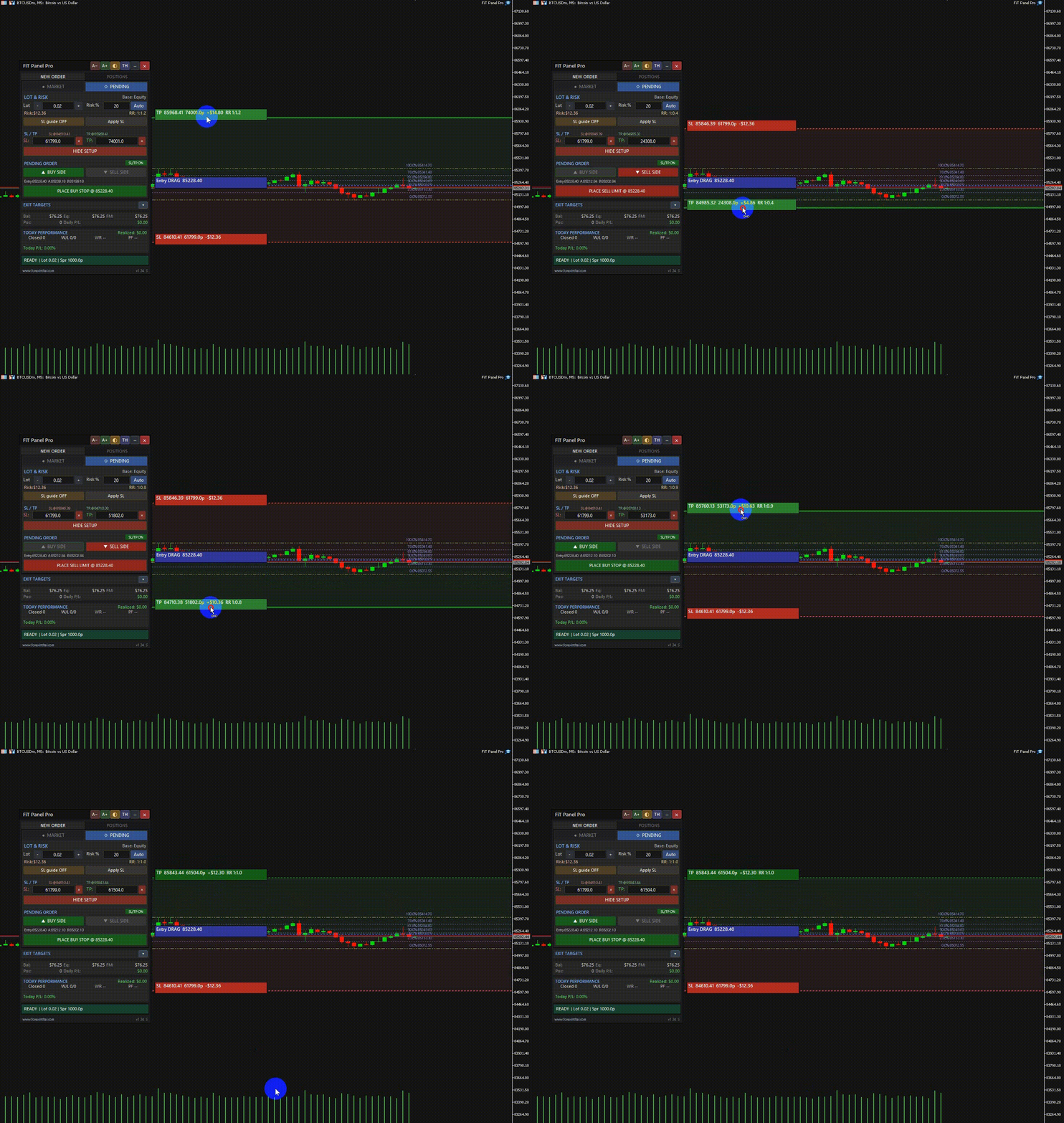
| 📊 | Visual SL/TP Lines | Drag interactive SL, TP, and Entry lines directly on the chart. Real-time price zones show risk/reward areas with color-coded shading. |
| 💰 | Smart Risk Calculator | Auto-calculate lot size from Risk% based on Balance, Equity, or Free Margin. Live Risk $ and Risk:Reward ratio display. |
| 📈 | Fibonacci Auto SL/TP | Automatically detect swing highs/lows and set SL/TP levels using Fibonacci retracement (configurable levels: 0.236, 0.382, 0.5, 0.618, etc.). |
| 📋 | Order Management | View all open positions by type (Buy/Sell) with live P&L. Close All, Close Winners, or Close Losers with one click — per direction or combined. |
| ⏰ | Pending Orders | Place Buy Limit, Sell Limit, Buy Stop, and Sell Stop orders with smart validation. Lock entry price or follow live price. |
| 🎯 | Target Profit/Loss | Set per-position profit target ($) and loss target ($) for automatic closing. Auto-monitors every tick. |
| 🛡️ | SL/TP ON/OFF Toggle | Quickly enable or disable SL/TP setting before execution. Perfect for news trading or scalping without stop levels. |
| 🌐 | Bilingual (EN/TH) | Full English and Thai language support. Switch instantly with one click — all labels, buttons, and tooltips update. |
| 💾 | State Persistence | All settings (lot, risk, SL/TP, tab, toggles) survive timeframe changes and chart switches via GlobalVariables. |
| 🖱️ | Draggable Panel | Move the panel anywhere on the chart by dragging the header. Minimize/restore to save screen space. |
| 🎨 | Fully Customizable | Change colors, fonts, sizes, default lot, risk base, SL/TP defaults, Fibonacci levels — everything through input parameters. |
1. Enable Algo Trading in MetaTrader 5 (required for execution).
2. Drag FiT Panel Pro onto any chart. Configure input parameters as needed.
3. Set your lot size and Risk%. Use the Auto button to calculate lot from risk.
4. Adjust SL/TP in pips or click Show Lines to drag levels on the chart.
5. Click BUY or SELL to execute instantly. Manage positions in the Orders tab.
6. Use Target Profit/Loss in Advanced section for automated position management.
Important Notes
• Magic Number: The EA only manages positions with its own Magic Number. Your other EAs and manual trades are not affected.
• Risk Warning: Trading involves significant risk of loss. Always use proper risk management. Past performance is not indicative of future results.
• State Persistence: All panel settings are saved via GlobalVariables. When you switch timeframes or reopen the chart, your settings are restored automatically.
Website: https://www.forexinthai.com/107655/
Developer: ForexInThai
If you have questions, suggestions, or need support, please contact us through the MQL5 Market messaging system or visit our website.












































사용자가 평가에 대한 코멘트를 남기지 않았습니다