Risk Budget Panel

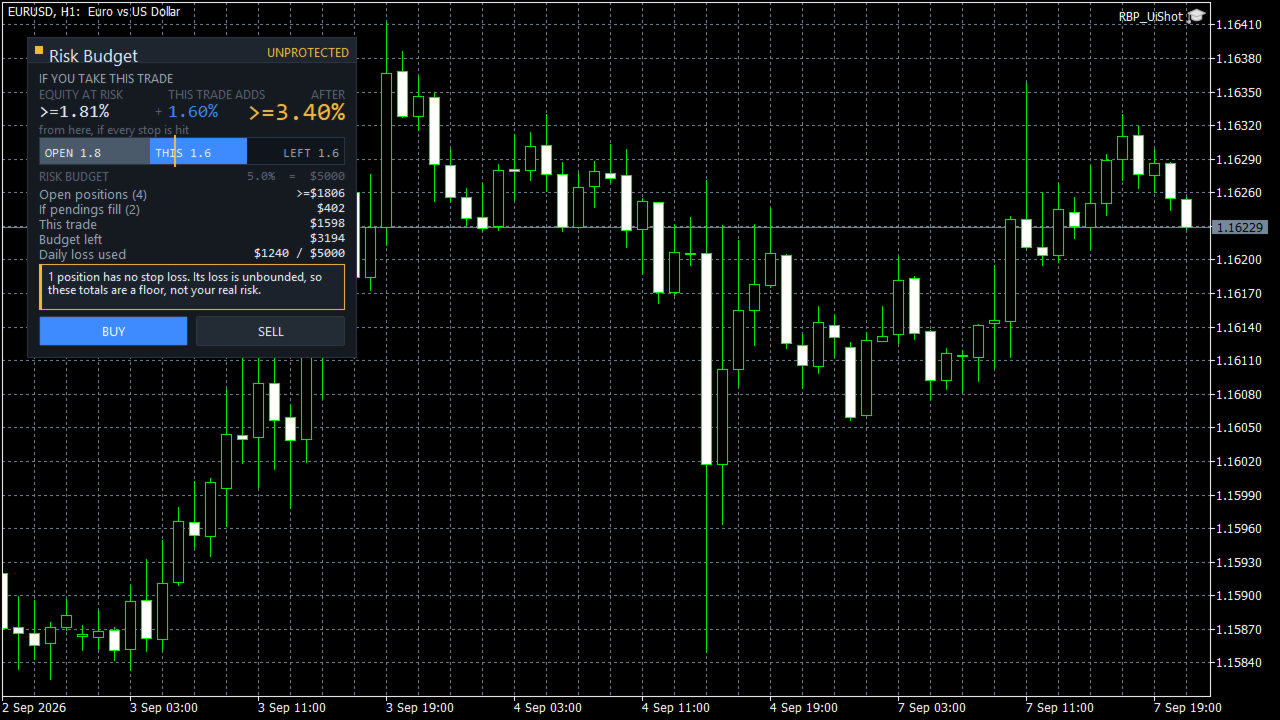
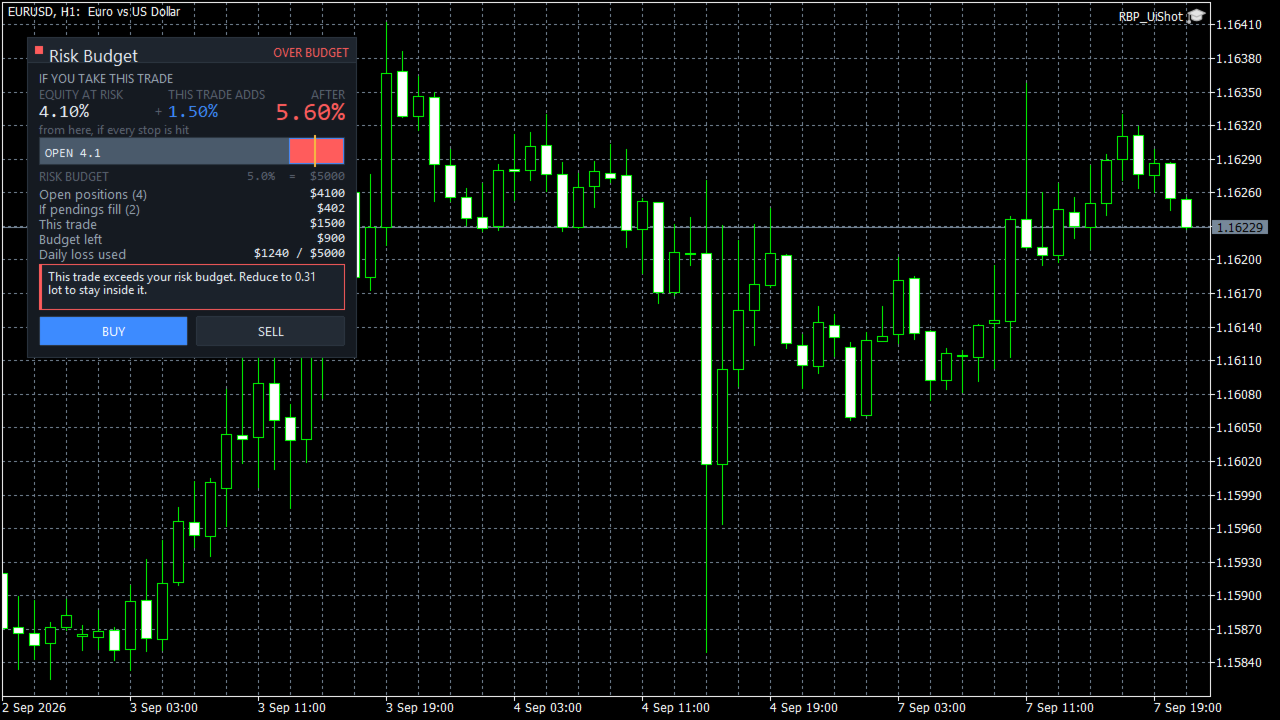
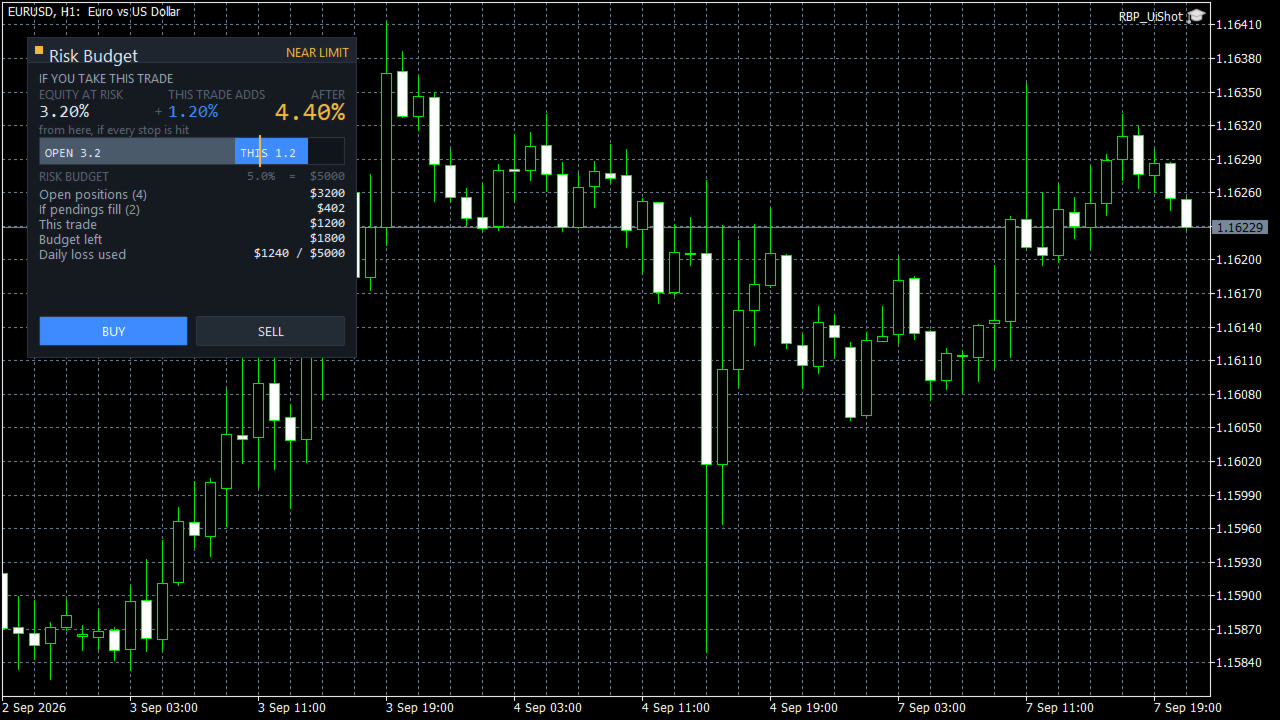
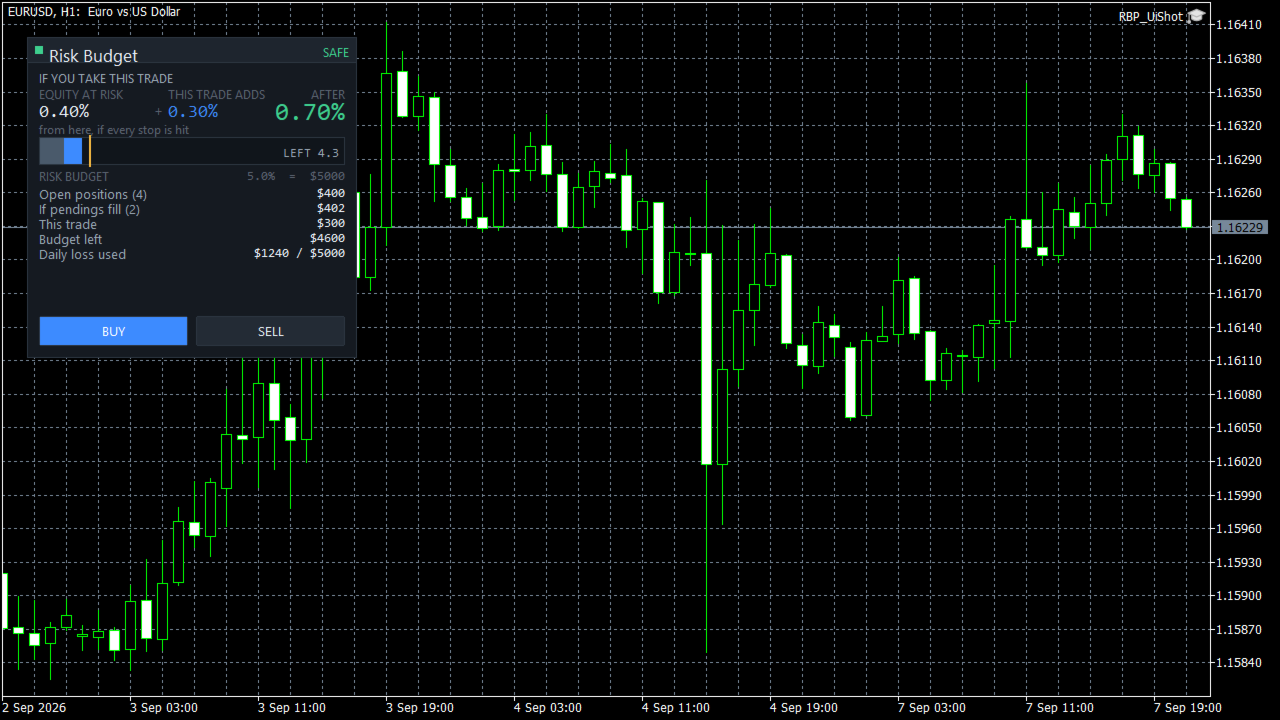
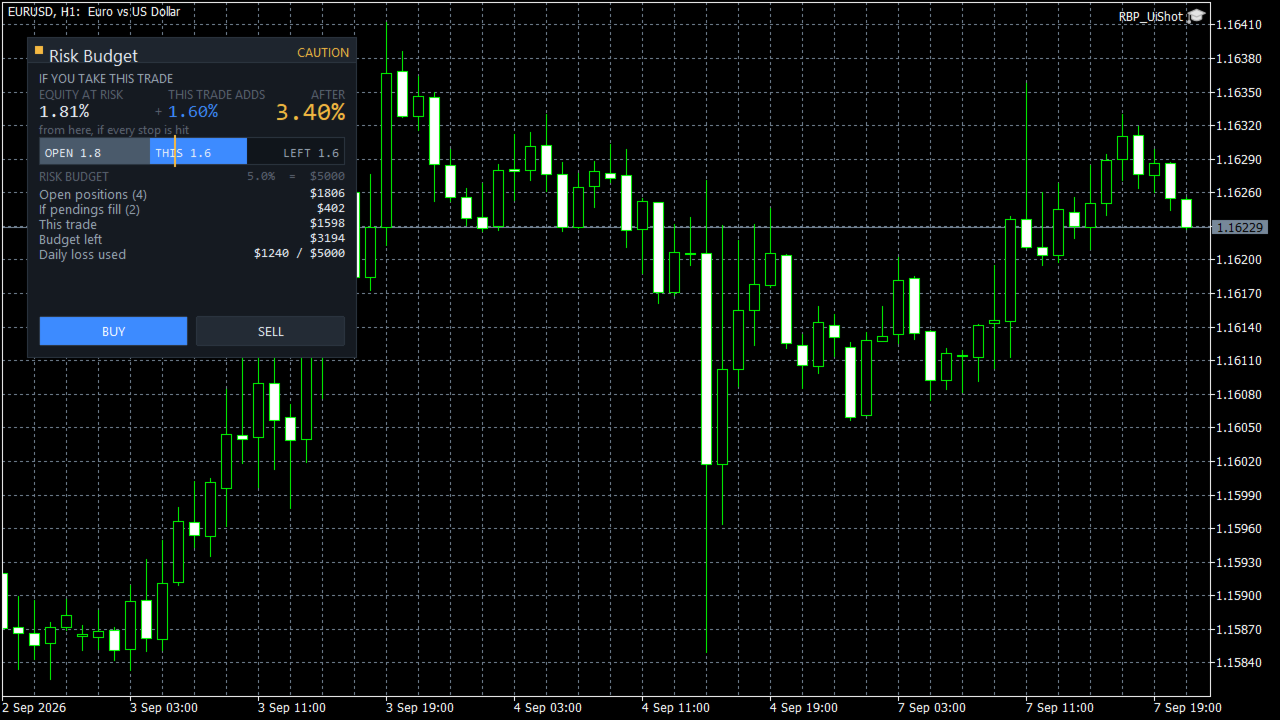
See what happens to your account risk before you take the next trade. Most panels answer "what lot size is 1% of my balance?". This one answers a different question: if I take this trade right now, what happens to the risk of my ENTIRE account? EQUITY AT RISK + THIS TRADE ADDS = AFTER Set 1% per trade and open eight positions and your account is carrying eight percent, not one. Risk Budget Panel keeps that total in front of you and shows what a planned trade would do to it before the order is sent. WHAT IT SHOWS Equity at risk What your account can still lose from this moment if every stop is hit. It covers every open position, on every symbol, not only the chart in front of you. This trade adds The risk of the trade you are planning, sized from your risk setting and your stop distance. After The total once the trade is on. This is the number the product exists for. Risk budget A single bar showing what is already committed, what this trade would add, and what is left. Your budget is the smaller of your maximum total account risk and what remains of your daily loss allowance. If pendings fill What your pending orders would add if every one of them triggered. Shown separately, never mixed into the headline, because pending orders are conditional. POSITIONS WITHOUT A STOP LOSS A position with no stop loss has no finite risk. This panel will not invent one. When you have an unprotected position, every total is shown as a floor with a "greater than or equal" prefix, the panel tells you how many positions are unprotected, and the status will not show as safe no matter how small the calculated number is. Most tools either ignore these positions or quietly treat them as zero risk. Both produce a confident number that is wrong. WHEN IT WILL NOT GIVE YOU A NUMBER If the symbol specification cannot be read, or a value cannot be converted to your account currency, the panel shows UNKNOWN and tells you which property is unavailable. It does not fall back to a plausible looking figure. A number you cannot trust is worse than no number. HOW RISK IS MEASURED Risk is measured from the current price to your stop, not from your entry price. This matters, and it is the part most people find surprising at first. If you are long from 1.1000 with a stop at 1.0900 and price moves to 1.1050, your equity at risk goes UP, not down. Your unrealised profit is now exposed too. Move the stop up and the number collapses. That is what the panel measures and what it teaches: your risk is not what you staked, it is what you can still lose. The risk shown when you entered the trade is kept as a separate figure and is never mixed into the total. BUILT FOR EVERY INSTRUMENT All figures are converted to your account currency by the terminal itself, so crosses, metals, indices and CFDs are handled correctly rather than by an assumed pip value. Volume is rounded down to the broker's volume step, never up, so a rounding step cannot push you past your budget. Stop distance is checked against the broker's minimum stop level. PERFORMANCE The panel does no work on incoming ticks. It recalculates when your positions or orders change, when you change an input, and on a slow timer. Redrawing is limited to the values that actually changed. Measured on the development machine, an idle update costs about 8 microseconds and the panel creates 40 chart objects, which do not grow over time. SETTINGS ARE REMEMBERED Your risk mode, budget, panel position and theme survive a terminal restart, a chart reload, and timeframe or symbol changes. Calculated risk is never stored and never restored from disk. It is always recomputed from your live account, so what you see is current. HOW TO USE 1. Attach Risk Budget Panel to any chart. 2. Set your risk per trade, your maximum total account risk and your daily loss allowance in the inputs. 3. Drag the stop line on the chart. The panel sizes the trade and updates the three numbers immediately. 4. Check the AFTER figure. If it is more than you want your account to carry, reduce the size or tighten the stop. 5. Press BUY or SELL when you are satisfied. IMPORTANT Figures are the risk to your configured stop levels under normal execution. A stop loss is a trigger price, not a guaranteed execution price. Weekend gaps, news gaps and slippage can result in a larger loss than shown. This is a risk information and trade management tool. It does not generate trading signals, it does not predict the market, and it does not trade on its own. It places an order only when you press a button. SUPPORT Please use the comments section of this product for questions and bug reports.
Prodotti consigliati
izi hedge is a tool that helps you manage risk, manage hedge orders and rebalance losing orders. How it works   It will place an order opposite to the order you placed with that currency pair.   If the order you place is correct, the reverse order will be automatically deleted   If the market unfortunately goes against your order and touches the hedge order, it will begin to calculate the hedging volume to limit the risk of the market going in reverse.
FREE
Title:   Smart Position Manager PRO - Advanced Risk & Position Manager Description: Smart Position Manager PRO is an all-in-one visual trade management and risk calculation tool designed for serious traders who prioritize iron discipline and strict risk management. Whether you are executing precise SMC or ICT setups on personal capital or managing large funded accounts on strict prop firms, this tool ensures you focus on counting percentages rather than emotional money swings. With a highly int
FREE
MT5 Trade Manager Pro
Anthony Dewayne Wasome
Trade Manager Pro is a MetaTrader 5 tool designed to assist with trade execution, position management, risk control, and account monitoring from a single on-chart interface. It is built to work alongside manual trading or automated systems and does not interfere with external Expert Advisors. The tool is intended for traders who require direct control over order execution and position management while maintaining consistent risk rules across different market conditions. Core Function The indica
Dashboard Signals aNa Magic ATR EA
Choawana Malaikitsanachalee
English Description aNa Magic ATR EA – Dashboard and Signals (MT5) ATR-based SL/TP (TP1–TP3), EMA200 trend filter, RSI gate, clean on-chart dashboard and segmented guide lines. MagicNumber support for multi-EA setups. What it does This Expert Advisor automates entries and risk targets using ATR. It filters the market with EMA(200) and an RSI range to avoid low-quality trades. A compact dashboard shows entry, TP1-TP3 and SL for both long and short. Lines are drawn as short segments (not full-wid
FREE
no Trade operation, Robot Set auto SL to every manually Trade from a Phone Automatic Phone TradeManager Need just Set on 1 Symbol Auto BE Trigger is added that immediately sets a stop-loss for every () But does NOT calculate position size based on risk, allows the fixed  SL to   adjusted dynamically drag on Chart or Menu. It protects capital around the clock, reduces emotional mistakes, and ensures consistent risk management.
FREE
Trade assistant pro v8
Ahmed Mohammed Bakr Bakr
2 (1)
FREE FREE FREE Trade Assistant MT5 – Professional Trading & Risk Management Panel Trade Assistant MT5 is an advanced trading panel designed to help traders execute orders faster, safer, and more professionally . It simplifies manual trading by combining smart order management , precise risk control , and one-click execution , making it ideal for both beginners and advanced traders. This tool does not trade automatically . Instead, it empowers you with full control while applying professional-gra
FREE
MT5 Trade Manager
Anthony Dewayne Wasome
MT5 Trade Manager is a MetaTrader 5 trade management panel designed to provide order execution, position monitoring, and risk control tools within a single interface. It operates as an on-chart dashboard with multiple pages for different trading functions. The tool is designed to support manual trading by centralizing trade operations and account monitoring in one place without requiring external applications. Interface Structure The dashboard is organized into six main sections: Dashboard Provi
FREE
(Grafici di criptovaluta) Salva tutti i simboli di Binance Future in simboli personalizzati. Aggiunge il prefisso "F" ai simboli in Binance Future. Crea l'infrastruttura in cui è possibile seguire i simboli in Binance Future. Dovresti consentire WebRequest dal menu Strumenti >> Opzioni >> Consulenti esperti e aggiungere l'URL: https://fapi.binance.com basta fare doppio clic sullo script. Hai l'intera lista in pochi secondi. vedere il prodotto nel link https://www.mql5.com/en/market/pro
FREE
ADAPTIVE CLOSER Manage many open positions as one book, from the chart Type: Utility (position manager) Symbols: Any Account: Hedging and Netting Opens trades: Only when you press a button 1. The problem this addresses One position is easy to manage. Six are not. Once several tickets are open — entered by hand, by different Expert Advisors, from a phone — the thing you actually care about is the combined result, and MetaTrader gives you no way to act on it. You end up closing tickets one at a t
FREE
Click Trading
Jawad Tauheed
5 (2)
One Click Trading – Auto TP SL Developer TraderLinkz Version 1.00 Category Utility What it does Adds missing TP and SL to your manual trades and pending orders Sets them once per ticket Lets you move TP and SL afterward Works on hedging and netting accounts Scans on every tick and reacts on trade events Why you want it You place faster entries You get consistent risk and exit targets You reduce fat finger errors You keep full manual control Quick start Attach the EA to any chart Keep TP and SL e
FREE
DynamicTrader 1
Markus Christer Ekengren
Smart Trade Manager EA – Simple, Visual, and Risk-Based Trading Take control of your trades with ease! This free Expert Advisor is designed for traders who want a fast, intuitive, and risk-based way to manage entries directly from the chart. Risk-Based Position Sizing – Just set your preferred % risk in the EA settings, and lot size is calculated automatically. One-Click Trading – Place trades instantly with two simple buttons: BUY or SELL . Interactive SL & TP Lines – Drag and drop stop-
FREE
Titan Trade Panel
Thi Ngoc Tram Le
4.5 (2)
Pannello di Trading Personalizzato per un Trading Manuale Efficiente Questo pannello di trading offre strumenti per il trading manuale su MT5, fornendo funzionalità che aiutano a gestire le operazioni. Il pannello include funzioni per l'esecuzione degli ordini, la gestione delle operazioni e il monitoraggio delle posizioni tramite un'interfaccia compatta. Perché scegliere questo pannello di trading? Che tu stia cercando di gestire più operazioni contemporaneamente o semplicemente di semplificar
FREE
Trade Asistant
Sebastian Rozalski
Trade Assistant is a practical position planning and trade management tool for MetaTrader 5, designed to help traders quickly define Entry, Stop Loss, Take Profit, position size, risk, potential profit, and Risk/Reward directly on the chart. Instead of performing manual calculations, everything is displayed and updated automatically as you adjust the trade. Key Features Graphical Trade Planning Trade Assistant allows you to build your entire trade setup directly on the chart. Choose: DRAW
AI Advisor – Permetti all’AI di vedere davvero il tuo mondo di trading AI Advisor genera automaticamente prompt di alta qualità a partire dalle informazioni reali del tuo conto, pronti da incollare in qualsiasi chat AI. Ti aiuta a riassumere velocemente lo stato del conto, capire la struttura attuale dei mercati, individuare i rischi e scoprire potenziali opportunità di profitto, così che l’AI ragioni sulla tua situazione reale e non su ipotesi vaghe. Link rapidi Download:      AI Advisor v1.02.
FREE
WAP TP Stealth EA – Intelligent Basket Management for Precision Exits WAP TP Stealth EA is a specialized trade management expert advisor designed for traders who rely on basket strategies, recovery systems, and multi-position workflows. Instead of closing trades individually, the EA dynamically calculates the Weighted Average Price (WAP) of all open positions and executes a coordinated closure once your defined profit target is reached. This approach enables efficient drawdown management, smooth
FREE
Scopo: Apre automaticamente i grafici di tutti i simboli della Watchlist utilizzando il template default.tpl sul timeframe corrente (TF) , chiudendo tutti gli altri grafici (tranne quello attivo). Perfetto per analizzare rapidamente più strumenti senza sforzo manuale! Caratteristiche: Automazione: Apre decine di grafici con un clic. Sicurezza: Chiude i grafici superflui, mantenendo quello attivo. Flessibilità: Usa il tuo template default.tpl (configuralo in anticipo!). Timeframe c
FREE
NAS100 Auto Sl And TP MT5
Moustapha Boulouz
5 (2)
Vi presentiamo NAS100 Auto SL e TP Maker per MT5: Non perdete mai più l'impostazione di StopLoss e TakeProfit con il nostro NAS100 Auto SL e TP Maker, un assistente indispensabile per i trader che navigano sul mercato del Nasdaq 100 su MetaTrader 5. Questo strumento è stato progettato per coloro che cercano una soluzione perfetta per automatizzare la gestione dei livelli di StopLoss e TakeProfit. Caratteristiche principali: Automazione senza sforzo: Monitora automaticamente le operazioni sul N
FREE
Imagine flying a real aircraft without ever stepping into a flight simulator. That's what trading is like. You have to simulate your strategy before you can take it to a live market. It is good if you can simulate things speedily before even stepping into any live market, or before coming up with an automated system.  People don't have all day to stare at a higher timeframe chart until the entry signal finally arrives. That's why I built this so that you can simulate your strategy with speed. Th
FREE
it's a fully built expert advisor with trading functionality with buy only or sell only or both options it's designed to be a tool that can be used for automate entry and exit in line with the overall Market Direction automatic  risk management parameters fully  comprehensive STRATEGY ANALYZER Section Total Trades: Shows the overall number of trades taken Win Rate: Displays percentage of winning trades (color-coded green if >50%, red if <50%) Total Profit/Loss: Shows absolute profit and loss v
FREE
Prop Firm Protector Basic
Janitha Sandaruwan Amaradasa Wickramasingha Arachchilage
5 (1)
Prop Firm Protector Lite - Essential Risk Management Tool A risk management utility designed to help traders monitor their trading activity according to predefined rules and limits. This tool runs in the background on any chart and monitors all trades regardless of their source, including manual trades, signal subscriptions, or other Expert Advisors. --- Core Features Symbol and Lot Monitoring: The symbol monitoring module allows you to define which currency pairs are permitted for trading.

FREE
Basket Take-Profit Utility Lite   is a free on-chart trade management tool for MetaTrader 5 that lets you close groups of trades the moment their   combined profit target   is reached — something MetaTrader cannot do natively. All settings are controlled directly from the interactive panel on your chart. No need to detach and re-attach the EA to change your target. Features: Group trades   by: All open positions · Specific symbol · Magic number Three target types   selectable from the panel: - F
FREE
FiT Panel Pro
Thonglak Janyakorn
Overview FiT Panel Pro is a professional-grade trade management panel designed for MetaTrader 5 traders who demand speed, precision, and full control over their trades. Built with a modern dark-theme UI, it combines one-click execution with advanced risk management, visual SL/TP drag lines, automatic Fibonacci-based levels, and comprehensive order management — all in a single, compact panel. Whether you are a scalper, day trader, or swing trader, FiT Panel Pro gives you the edge you need to exec
FREE
Lot Size Ruler
Joshua Akinetos Malik
SI Ruler A clean, one-click price ruler that shows points and exact dollar cost between any two levels on your chart. Every trader needs to quickly measure the distance between two price levels and know what it costs in real money. Most platforms make this harder than it should be. SI Ruler puts a single icon in the corner of your chart — click it, click your entry level, and drag to your stop or target. The label tells you instantly how many points that distance is and exactly what it costs in
FREE
The Ultimate All-In-One Trade Manager & Prop Firm Guardian for MT5. Nexus Pro Trade Manager is the most advanced, all-in-one trading assistant designed for both manual traders and Prop Firm challengers. Featuring a stunning, lag-free UI (Dark/Light mode), it completely transforms your MT5 into a professional trading terminal. Whether you are trading a personal account or trying to pass evaluations for FTMO, FundedNext, or other prop firms, Nexus Pro protects your capital, automates your risk cal
MT5 Tick Data - Dati storici reali dei tick Materiali aggiuntivi e istruzioni Manuale completo   -   Versione MT4   -   Versione MT5 Cerchi dati reali di tick per convalidare e fare backtesting dei tuoi expert advisor e indicatori? Li hai trovati! Il nostro pacchetto MT5 Tick Data, disponibile sul nostro sito web, ti fornisce dati storici genuini di tick per MetaTrader 5, in modo che i test della tua strategia vengano eseguiti in condizioni reali di mercato con spread reali e variabili invece
FREE
RiskFrame Trade Manager for MetaTrader 5 Shape the trade plan around the chart. Size it from risk, check it before sending, and manage the resulting position from the same workspace. RiskFrame is a manual trade-planning, execution and position-management utility for discretionary MetaTrader 5 traders. Its central workflow is a flexible Visual Trade Plan that can be positioned, resized and flipped around the area you are analysing instead of forcing the chart to fit around the panel. Entry, St
GDS RiskLab TradeDesk Free Manual Trading Desk and Risk-Control Utility for MetaTrader 5 GDS RiskLab TradeDesk is a free chart-based utility for traders who want a cleaner manual trading workspace in MetaTrader 5. It is designed as a simple execution-support and risk-control panel. The goal is to keep the trading process more organized: review the chart, plan the trade, keep risk visible and execute manually with more structure. This tool does not generate buy or sell signals. It does not predic
FREE
Nabeeha Trade Manager (Free for a Limited Time) Compact Manual Trade Manager for MetaTrader 5 & MetaTrader 4 Nabeeha Trade Manager is a lightweight and easy-to-use manual trading assistant that helps traders execute and manage trades directly from a compact on-chart panel. It is designed for traders who manually analyze the market but want faster execution, simple risk control, and convenient position management . Key Features One-Click Trading BUY and SELL buttons for quick trade execution. Au
Position Management EA Light (FREE) The Position Management EA Light is a simplified and user-friendly Expert Advisor (EA) designed to automate basic trade management functions effectively on MetaTrader 5. This free version is perfect for traders who want automated market or stop order execution with straightforward risk management features. Main Features: Order Types Supported: Market Orders (Buy & Sell) Stop Orders (Buy Stop & Sell Stop) Static Stop Loss & Take Profit: Predefined SL and TP val
FREE
Hard limits for prop firm and challenge accounts Prop firm rules are not suggestions. Breach the daily loss limit by one dollar and the account is gone, whatever the equity curve looked like an hour earlier. The problem is that the rule lives on the firm's server while your positions live in your terminal, and nothing in MetaTrader 5 connects the two. Prop Firm Circuit Breaker sits on one chart and watches the whole account. The name is literal: an exchange halts trading when a threshold is bre
FREE
Gli utenti di questo prodotto hanno anche acquistato
Trade Assistant MT5
Evgeniy Kravchenko
4.41 (216)
It helps to calculate the risk per trade, the easy installation of a new order, order management with partial closing functions, trailing stop of 7 types and other useful functions. Additional materials and instructions Installation instructions - Application instructions - Trial version of the application for a demo account Line function -   shows on the chart the Opening line, Stop Loss, Take Profit. With this function it is easy to set a new order and see its additional characteristics bef
Forex Trade Manager MT5
InvestSoft
4.98 (675)
Benvenuto a Trade Manager EA, lo strumento definitivo per la gestione del rischio , progettato per rendere il trading più intuitivo, preciso ed efficiente. Non è solo uno strumento per l'esecuzione degli ordini, ma una soluzione completa per la pianificazione delle operazioni, la gestione delle posizioni e il controllo del rischio. Che tu sia un principiante, un trader avanzato o uno scalper che necessita di esecuzioni rapide, Trade Manager EA si adatta alle tue esigenze, offrendo flessibilità s
FarmedHedge Pair Trading Dashboard
Tanapisit Tepawarapruek
5 (4)
Farmed Hedge Yield Farming | All Markets (Manual - Hybrid - Semi/Automated EA) VERIFIED TRADING RESULTS - Farmed Hedge Yield Axi Copy:  https://www.mql5.com/en/signals/2356376 - Farmed Hedge Yield Exn Copy:   https://www.mql5.com/en/signals/2356404 - Farmed Hedge Yield V Copy:  https://www.mql5.com/en/signals/2357156 * Before purchasing, please feel free to send me a message if you have any questions about the product or setup. - You can test the system using Strategy Tester: Visual Mode , a
Versione Beta Telegram to MT5 Signal Trader è quasi pronto per il rilascio ufficiale in versione alpha. Alcune funzionalità sono ancora in fase di sviluppo e potresti riscontrare piccoli bug. Se riscontri problemi, ti preghiamo di segnalarli, il tuo feedback aiuta a migliorare il software per tutti. Telegram to MT5 Signal Trader è uno strumento potente che copia automaticamente segnali di trading da canali o gruppi Telegram al tuo account MetaTrader 5 . Supporta canali pubblici e privati e cons
TradePanel MT5
Alfiya Fazylova
4.88 (167)
Trade Panel è un assistente commerciale multifunzionale. L'applicazione contiene più di 50 funzioni di trading per il trading manuale e permette di automatizzare la maggior parte delle attività commerciali. Istruzioni per l'applicazione + video tutorial: https://www.mql5.com/it/blogs/post/762331 Versione di prova dell'applicazione per un conto demo: https://www.mql5.com/it/blogs/post/762419 Come installare l'applicazione: https://www.mql5.com/it/blogs/post/762362 Come testare l'applicazione in m
Local Trade Copier EA MT5
Juvenille Emperor Limited
4.94 (148)
Sperimenta una copia di trading eccezionalmente veloce con il   Local Trade Copier EA MT5 . Con la sua facile configurazione in 1 minuto, questo copiatore di trading ti consente di copiare i trades tra diversi terminali di MetaTrader sullo stesso computer Windows o su Windows VPS con velocità di copia ultra veloci inferiori a 0.5 secondi. Che tu sia un trader principiante o professionista,   Local Trade Copier EA MT5   offre una vasta gamma di opzioni per personalizzarlo alle tue esigenze speci
================================================================================ POC BREAKOUT - V20.72. Full Professional Grade Toolkit ================================================================================ POC Breakout is a full MetaTrader 5 trading dashboard for discretionary traders who want breakout signals, Point of Control (POC) context, volume profiles, order flow, market structure, news, alerts, and advanced trade planning in one professional workspace. Attached directly to you
EA Overfitter
Stephen J Martret
That backtest looks great. But will it still be making money tomorrow, next week, next month? EA Overfitter re-runs your EA on 100 price histories it has never seen. One score tells you if the edge is real. A backtest tells you what an EA did on one price history — the one that happened to occur. What you cannot tell from it is how much of that result was the strategy and how much was the particular path. EA Overfitter answers that. It builds up to 100 synthetic price histories your EA has n
Telegram to MT5 MultiChannel Copier
Sergio Marquez Uroz
4.46 (13)
Telegram to MT5 Multi-Channel Copier   copia automaticamente i segnali di trading dai tuoi canali Telegram direttamente su MetaTrader 5. Niente bot, niente estensioni del browser, niente copia manuale. Il segnale arriva su Telegram e l'EA apre l'operazione nel tuo terminale in pochi secondi. Il prodotto include due componenti: un'applicazione Windows che ascolta i tuoi canali Telegram, e questo Expert Advisor che esegue i segnali nel tuo terminale MT5. È disponibile anche una versione per MT4  
Astro Trade MT5
Indra Maulana
5 (6)
25% discount on the release of the tool: only for the next 3 buyers Send a message to receive a demo version. AstroTrade Trading Assistant AstroTrade is a comprehensive multi-functional trading utility developed for the MetaTrader 5 platform. It integrates essential tools for trade execution, risk management, and technical monitoring into a single unified interface. The application is designed to assist traders in managing their daily operations through a visual and structured environment. Vi
HINN MagicEntry Extra
ALGOFLOW OÜ
4.74 (19)
HINN MAGIC ENTRY – the ultimate tool for entry and position management! SIMPLE. FASTEST. INTUITIVE. MAX AUTOMATED. Place orders by selecting a level directly on the chart! full description   ::  demo-version  :: 60-sec-video-description Key features: - Market, limit, and pending orders - Automatic lot size calculation - Automatic spread and commission accounting - Unlimited partitial take-profits  - Breakeven and trailing stop-loss and take-profit  functions - Invalidation leves - Intuitive, a
Premium Trade Manager - Il pannello di trading con un coach integrato Premium Trade Manager porta un coach di trading direttamente nel tuo grafico, con un motore di esecuzione completo al di sotto. Imposta il trade come fai sempre, poi lascia che Max, il tuo coach di trading IA, legga esattamente quel setup rispetto al tuo conto live e ti dia un verdetto chiaro prima che tu confermi: lo stop rispetta un approccio disciplinato, il rischio è ragionevole, c'è un evento ad alto impatto tra pochi min
Exp COPYLOT CLIENT for MT5
Vladislav Andruschenko
3.97 (35)
Copiatore professionale di trade per MetaTrader 5 Un copiatore di trade veloce, professionale e affidabile per MetaTrader . COPYLOT consente di copiare operazioni Forex tra terminali MT4 e MT5 con supporto per conti Hedge e Netting . La versione MT5 di COPYLOT supporta: - MT5 Hedge → MT5 Hedge - MT5 Hedge → MT5 Netting - MT5 Netting → MT5 Hedge - MT5 Netting → MT5 Netting - MT4 → MT5 Hedge - MT4 → MT5 Netting Versione MT4 Descrizione completa + DEMO + PDF Come acquistare Come installare Come ot
Anchor Trade Manager
Kalinskie Gilliam
5 (8)
Anchor: The EA Manager Your EAs cannot see each other, but Anchor can. Anchor gives you one place to coordinate your EAs, manage risk, and decide when trading is allowed. It works alongside the trading bots you already use without any changes to them. The Problem One EA opens a trade. Then another starts trading. The next thing you know, you wake up to multiple grids built across your account. Each EA may be doing exactly what it was designed to do, but together they can place far more risk on y
Power Candles Strategy Scanner - Strumento di ricerca configurazioni multi-simbolo con ottimizzazione automatica Power Candles Strategy Scanner utilizza lo stesso motore di auto-ottimizzazione che alimenta l'indicatore Power Candles, applicandolo a tutti i simboli presenti nel tuo Market Watch, uno accanto all'altro. Un unico pannello ti indica quali simboli sono statisticamente negoziabili in questo momento, quale strategia è vincente su ciascuno di essi, la coppia ottimale di Stop Loss / Take
Telegram To MT5 Ultra
Mirel Daniel Gheonu
5 (5)
Telegram To MT5 — Copiatore di segnali Trasforma le indicazioni di trading dei tuoi canali Telegram in veri ordini MT5 — automaticamente, su quanti account vuoi, con rischio e regole totalmente sotto il tuo controllo. Telegram To MT5 collega i canali VIP / di segnali che già segui su Telegram al tuo terminale MetaTrader 5. Un'app desktop companion gratuita legge i messaggi (anche dai canali che bloccano i bot), e questo Expert Advisor li esegue sul tuo conto — applicando le tue impostazioni di r
Grid Manual MT5
Alfiya Fazylova
4.73 (22)
Grid Manual è un pannello di trading per lavorare con una griglia di ordini. L'utilità è universale, ha impostazioni flessibili e un'interfaccia intuitiva. Funziona con una griglia di ordini non solo nella direzione delle perdite, ma anche nella direzione dell'aumento dei profitti. Il trader non ha bisogno di creare e mantenere una griglia di ordini, lo farà l'utilità. È sufficiente aprire un ordine e il manuale di Grid creerà automaticamente una griglia di ordini per esso e lo accompagnerà fino
Signal Trading View to MT5 Pro
Mirel Daniel Gheonu
4.5 (2)
Signal TradingView to MT5 Pro Automator Esecuzione professionale istantanea tra TradingView e MetaTrader 5 Automatizza la tua strategia di trading con il ponte di comunicazione più robusto tra gli alert di TradingView e l'esecuzione reale in MT5. Progettato per i trader che richiedono velocità, flessibilità e una gestione del rischio impeccabile, questo Expert Advisor trasforma qualsiasi messaggio di avviso in un preciso ordine a mercato o limite. PUNTI DI FORZA E VANTAGGI Motore di Parsing Univ
The News Filter MT5
Leolouiski Gan
4.78 (23)
Questo prodotto filtra tutti gli esperti consulenti e i grafici manuali durante il periodo delle notizie, così non dovrai preoccuparti di improvvisi picchi di prezzo che potrebbero distruggere le tue impostazioni di trading manuali o le negoziazioni effettuate da altri esperti consulenti. Questo prodotto viene fornito anche con un sistema completo di gestione degli ordini che può gestire le tue posizioni aperte e gli ordini in sospeso prima della pubblicazione di qualsiasi notizia. Una volta che
Trade Dashboard MT5
Fatemeh Ameri
4.95 (132)
Trade Dashboard simplifies how you open, manage, and control your trades, with built-in lot size calculation. It allows you to execute trades, manage risk, and control positions directly on the chart, with tools such as partial close, breakeven, and trailing stop. Designed to reduce manual work and help you stay focused on your trading decisions. A demo version is available for testing. Detailed explanations of features are provided within the MQL5 platform. Installation instructions are include
Strategy Ledger Pro
Abdullah Uygar Tuna
5 (1)
Strategy Ledger Pro è un pannello di analisi del conto in sola lettura per MetaTrader 5. Separa i risultati del conto per Expert Advisor, strategia, simbolo e magic number. Manuale  dettagliato con ogni funzione spiegata. MetaTrader mostra un unico saldo per l'intero conto. Quando più Expert Advisor operano insieme, quel saldo non mostra il contributo di ciascuno. Strategy Ledger Pro legge lo storico del conto, ricostruisce le posizioni chiuse, le assegna alle strategie e presenta i risultati
Trade Copier Ultimate
Janitha Sandaruwan Amaradasa Wickramasingha Arachchilage
5 (5)
Trade Copier Ultimate - Telegram to MT5 Signal Copier Trade Copier Ultimate automatically copies Telegram trading signals into MetaTrader 5. The EA can read signal messages, detect the symbol, order type, entry price, Stop Loss, Take Profit levels and selected update commands, then execute or manage the trade in MT5 using your lot and risk settings. It is more than a basic Telegram to MT5 copier. TCU also supports Bot API and user-account Bridge workflows, Discord signal routing, local MT5 to MT
FUTURES ORDERFLOW FOOTPRINT CHART Professional OrderFlow EA for MetaTrader 5 Version 1.01| Professional tool for real traders | Institutional-Grade Visualization STRATEGY TESTER USERS - PLEASE SELECT EVERY REAL TICK WHEN TESTING AND YOU HAVE DOWNLOADED HISTORICAL DATA. IF YOU SEE A WAITING SCREEN AND IT IS NOT DOWNLOADING, IT MEANS YOU HAVE LOW HISTORICAL DATA. TRY 1 MIN AND 5 MIN FIRST ON 1 DAY DATA. ONE DAY DATA SHOULD BE THE NEWEST AND MOST CURRENT DATE. PLEASE WAIT UNTIL THE MARKET HAS ROL
Scrivimi dopo l’acquisto per ricevere il kit completo del manuale + 3 giorni di prova dell’API OpenAI per testare le funzionalità AI + un altro regalo bonus Il prezzo attuale è uno sconto limitato per l’aggiornamento del rilancio di agosto — assicurati subito la tua edizione prima che il prezzo aumenti. Prossimo prezzo: $340 È completamente diverso da qualsiasi pannello di trading tu abbia mai provato o visto sul mercato. È uno dei pannelli di trading basati sull’IA più innovativi attualmente d
Trade copier MT5
Alfiya Fazylova
4.59 (54)
Trade Copier è un'utilità professionale progettata per copiare e sincronizzare le transazioni tra conti di trading. La copiatura avviene dal conto/terminale del fornitore al conto/terminale del destinatario, che sono installati sullo stesso computer o vps. PROMOZIONE - Se avete già acquistato il "Trade copier MT5", potete ottenere gratuitamente il "Trade copier MT4" (per la copia MT4 > MT5 e MT4 < MT5). Per maggiori informazioni sulle condizioni, vi preghiamo di contattarci tramite messaggi priv
Ultimate Extractor
Clifton Creath
5 (8)
Ultimate Extractor - Professional Trading Analytics for MT5 *****this is the local HTML version of Ultimate Extractor. !!!!!it is not compatible with Cloud!!!! For the online version please reach out to me directly****** Ultimate EA manager also now available when you use cloud pro and above for free!! Ultimate Extractor transforms your MetaTrader 5 trading history into actionable insights with comprehensive analytics, interactive charts, and real-time performance tracking. What It Does Automa
Risk Manager Pro MT5
Roman Zhitnik
5 (8)
Risk Manager Pro MT5 is an account protection Expert Advisor for traders who want strict risk control inside MetaTrader 5. The utility monitors your account equity, daily and weekly results, drawdown, open positions, trade count, consecutive losses, and trading hours. When a configured limit is reached, it can automatically close positions, cancel pending orders, stop other EAs, send notifications, or close the terminal. Instead of relying on discipline during a stressful trading session, you de
Telegram To MT5 Receiver
Levi Dane Benjamin
4.53 (15)
Copia i segnali da qualsiasi canale di cui sei membro (compresi quelli privati e ristretti) direttamente sul tuo MT5.  Questo strumento è stato progettato con l'utente in mente offrendo molte funzionalità necessarie per gestire e monitorare gli scambi. Questo prodotto è presentato in un'interfaccia grafica facile da usare e visivamente accattivante. Personalizza le tue impostazioni e inizia ad utilizzare il prodotto in pochi minuti! Guida per l'utente + Demo  | Versione MT4 | Versione Discord
Welcome to ENTRY IN THE ZONE WITH SMC MULTI TIMEFRAME Entry In The Zone and SMC Multi Timeframe is a real-time market analysis tool based on Smart Money Concepts (SMC), designed to analyze market structure, price direction, and key trading zones. It supports both Single-Timeframe Analysis and Multi-Timeframe Analysis, providing a clearer view of the overall market structure across multiple timeframes, with real-time BUY / SELL signals that do not repaint. It is designed to help filter trading op
The product will copy all telegram signal to MT5 ( which you are member) , also it can work as remote copier.  Easy to set up, copy order instant, can work with almost signal formats, image signal,  s upport to translate other language to English Work with all type of channel or group, even channel have "Restrict Saving Content", work with  multi channel, multi MT5 Work as remote copier: with signal have ticket number, it will copy exactly via ticket number. Support to backtest signal. How to s
Altri dall’autore
Session Range Desk
Erdem Mumin Kaynak
Session Range Desk Session Range Desk is a free MetaTrader 5 Expert Advisor for testing a configurable range-breakout approach. Set the broker-time start, choose how many completed bars define the range, and use touch or bar-close confirmation. Average True Range filtering, stop-distance position sizing and optional break-even and partial close are built in. Use it on hedging accounts, with one copy per symbol. The chart panel brings participating copies into a shared desk view within the same t
FREE
Check a pending stop order before you send it. A pending order can be refused for reasons the terminal can already show you: the price is not on the broker price grid, the volume is not a valid step, or the entry sits closer to the market than the symbol stops level allows. Pending Order Inspector MT5 reads those contract values and shows how your intended order compares with them, on the chart, before you place it yourself. Enter the price, volume, optional Stop Loss and optional Take Profit yo
FREE
CandleCat
Erdem Mumin Kaynak
CandleCat is a small animated companion that lives in the corner of your chart. It is not a trading system, not a signal generator and not an advisor. It never places, closes or modifies any order. It simply keeps you company while you work. The cat sits on its cushion, breathes, blinks, stretches, and falls asleep during quiet hours. When something happens, it notices. REACTS TO PRICE Perks up on an unusually large bullish candle. Startles on a sharp bearish candle. Looks at unusually long wi
FREE
Filtro:
Nessuna recensione
Rispondi alla recensione