MT5 Trade Manager Pro

Product Description

Introduction

Trade Manager Pro is a comprehensive, all-in-one trade management dashboard for MetaTrader 5 that puts every essential trading tool at your fingertips. Designed for both beginners and experienced traders, this professional-grade indicator transforms your chart into a powerful command center where you can execute trades, manage positions, monitor risk, and analyze your performance — all from a single, elegantly designed panel.

Unlike cluttered, feature-heavy tools that overwhelm you with unnecessary complexity, Trade Manager Pro focuses on what truly matters: speed, precision, and control. Every feature has been carefully engineered to help you make faster decisions, protect your capital with intelligent risk management, and maintain full visibility over your trading activity across multiple symbols and sessions. Whether you are scalping on the M1 timeframe or swing trading on H4, this tool adapts to your style seamlessly.

Key Features at a Glance

The following table provides a high-level overview of the core feature categories included in Trade Manager Pro. Each section is accessible via the tabbed navigation panel and has been designed for rapid interaction with minimal clicks.

Category

Capabilities

Trade Execution

One-click Buy/Sell, custom lot sizes, SL/TP in pips, comment field, smart 

Trade Manager Pro  |  Product Description

Category

Capabilities

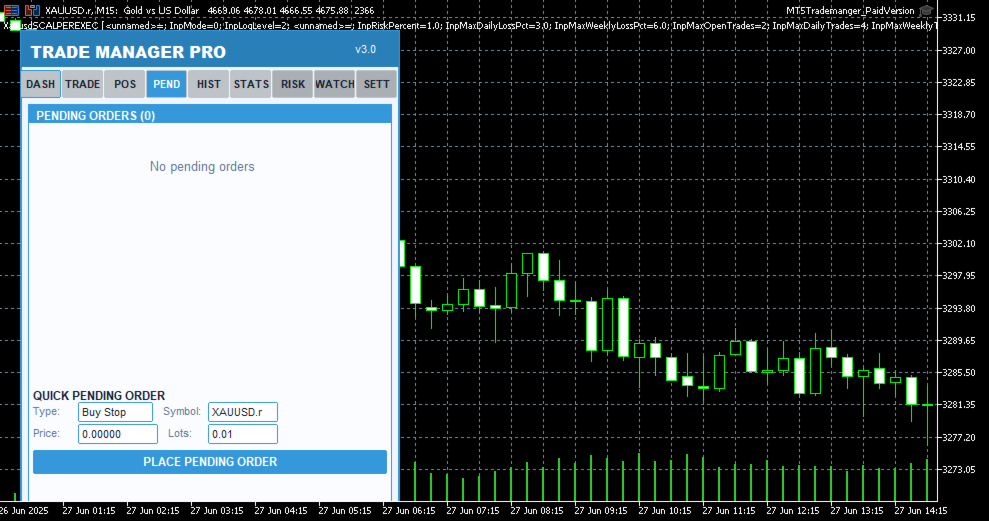
lot calculator, trade confirmation dialog, pending order management (Buy Stop, Sell Stop, Buy Limit, Sell Limit)

Position Management

Real-time position list with ticket tracking, floating P/L display, individual close, partial close, close all, scroll through positions, position type badges

Risk Management

Trailing stop automation, break-even automation, daily loss limit, max spread protection, trade execution blocking during high spread, max open positions limit

Session Analytics

Asian/London/New York session P/L breakdown, daily P/L tracking, floating P/L summary, win rate calculation, total trade count

Watchlist

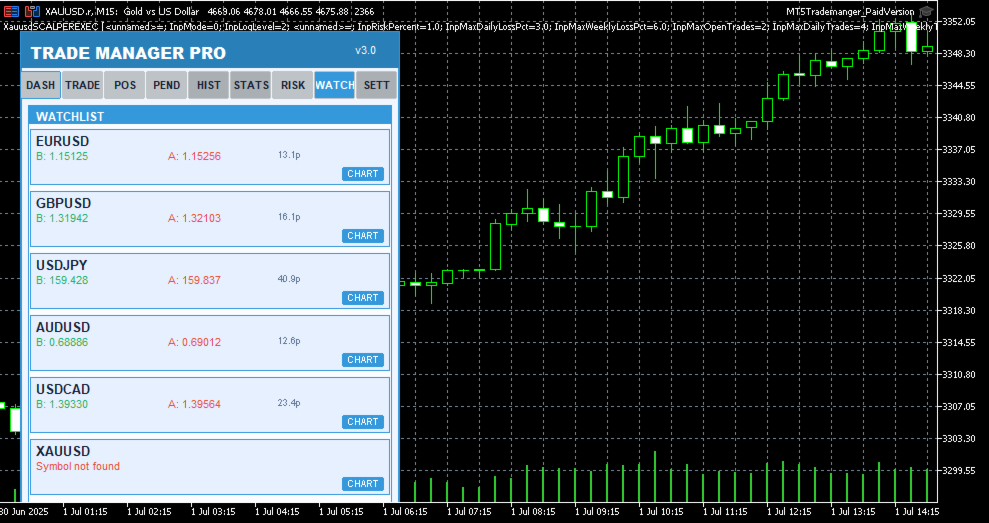
Multi-symbol price monitoring (6 symbols), one-click chart switching, real-time bid/ask display, spread visualization

Performance Stats

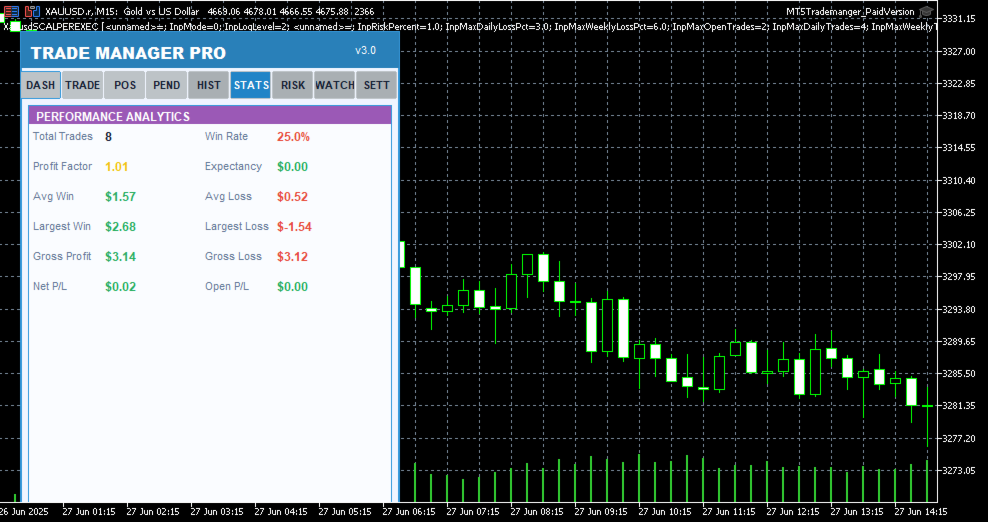
Win rate, total trades, winning trades, profit factor tracking, floating P/L across all positions

Trading Schedule

Customizable trading hours per day, weekday selection, auto block trades outside schedule, visual market closed indicator

UI / Themes

4 color themes (Light, Dark, Midnight, Forest), draggable panel, resizable layout, card-based sections, confirmation dialogs, status bar alerts

Table 1: Core Feature Categories

Detailed Feature Breakdown

One-Click Trade Execution

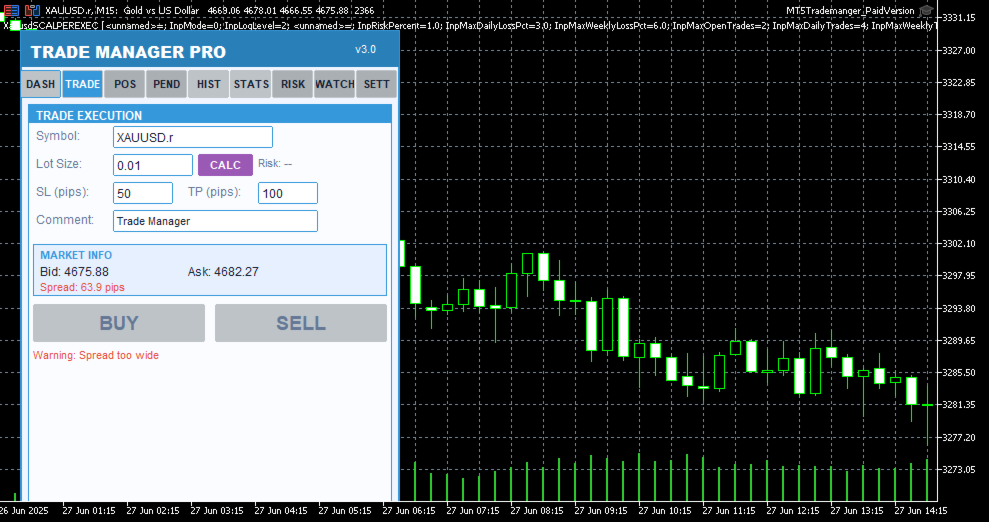
The Trade Execution page provides everything you need to open and manage trades rapidly. Enter your symbol, lot size, stop-loss in pips, take-profit in pips, and an optional comment — then hit Buy or Sell with a single click. The built-in smart lot calculator automatically determines the optimal lot size based on your risk percentage, account equity, and stop-loss distance, ensuring you never risk more than you intend to on any single trade. Before every execution, a confirmation dialog displays the trade details so you can verify your parameters before committing capital.

Pending order support is also included, allowing you to set up Buy Stop, Sell Stop, Buy Limit, and Sell Limit orders directly from the panel. Each pending order appears in a dedicated tab where you can monitor its status, view entry price, SL/TP levels, and delete orders that are no longer needed. The 

Trade Manager Pro  |  Product Description

real-time market info section shows current bid, ask, and spread values so you always have full context before placing a trade.

Intelligent Risk Management

Risk management is the cornerstone of consistent profitability, and Trade Manager Pro delivers a comprehensive suite of automated risk controls that work silently in the background to protect your account. The trailing stop feature automatically adjusts your stop-loss as the market moves in your favor, locking in profits while giving your trades room to breathe. You configure the trigger distance and step size, and the system handles the rest on every tick.

The break-even automation moves your stop-loss to the entry price (plus a configurable profit buffer) once the price reaches your specified trigger level, effectively eliminating risk on the trade. The daily loss limit automatically blocks all new trade executions once your cumulative daily losses exceed your predefined threshold, preventing emotional revenge trading. Additionally, the spread monitor warns you when the current spread exceeds your maximum allowed level and can block trade execution entirely during periods of high spread, protecting you from entering trades with unfavorable execution conditions.

All risk management features can be toggled on or off individually via the Settings page, and your preferences are saved across sessions using GlobalVariables. This means your configuration persists even after restarting MetaTrader or switching between charts.

Session-Based Analytics

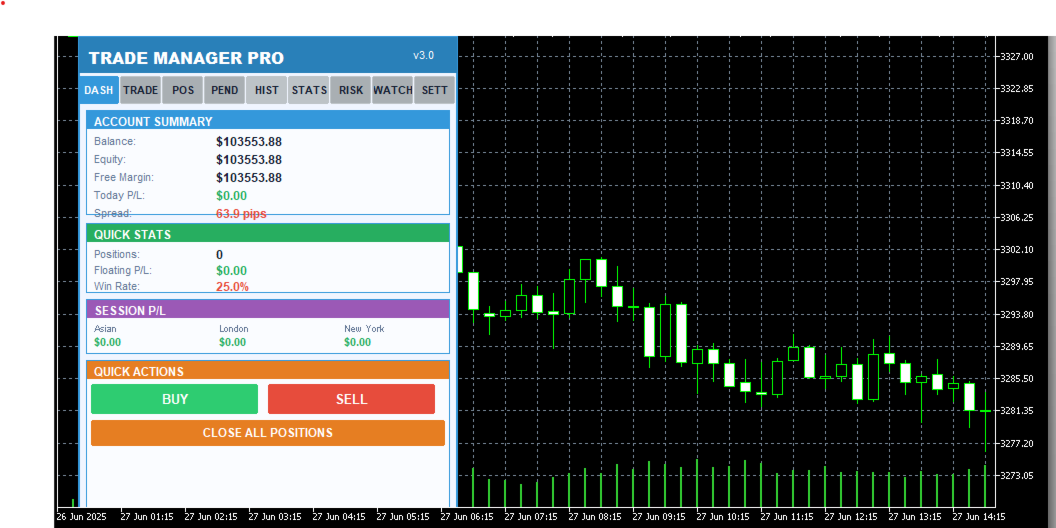
Understanding which trading sessions are most profitable for your strategy is essential for long-term improvement. Trade Manager Pro automatically tracks your closed-trade profit and loss across three major forex sessions: Asian (00:00–08:00 server time), London (08:00–16:00), and New York (13:00–22:00). The session P/L breakdown is displayed on the Dashboard page, giving you an instant snapshot of where your edge lies.

The dashboard also displays your account balance, equity, free margin, daily P/L, total open positions, floating P/L, and win rate. All values update in real time, providing you with a comprehensive overview of your account health without needing to switch between multiple terminal windows or external tools.

Multi-Symbol Watchlist

The Watchlist page lets you monitor up to six symbols simultaneously, displaying real-time bid and ask prices along with the current spread for each instrument. One-click chart switching allows you to instantly navigate to any watched symbol on your current chart, eliminating the need to manually search through the Market Watch window. Default symbols include EURUSD, GBPUSD, USDJPY, AUDUSD, USDCAD, and XAUUSD, covering the most popular forex pairs and gold.

Professional Themes & UI

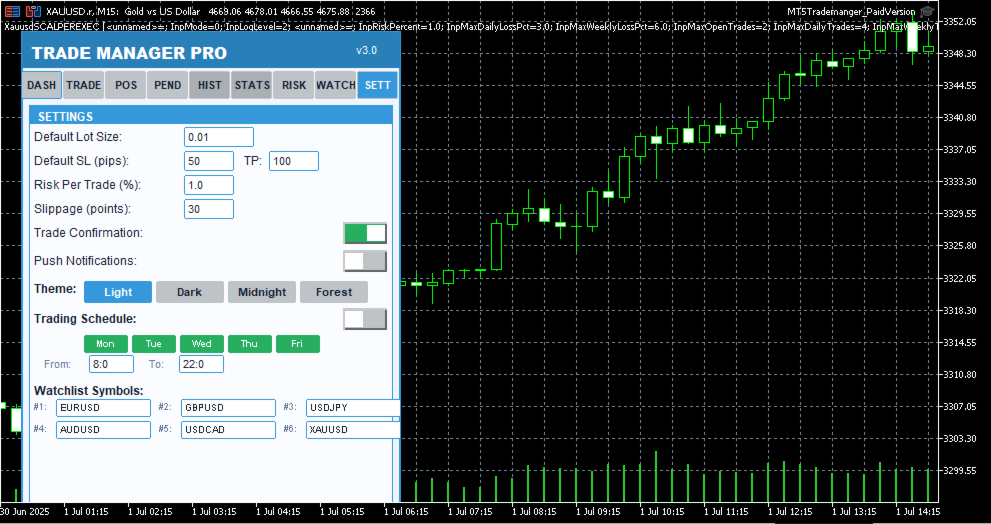
Trade Manager Pro includes four professionally designed color themes that you can switch between instantly from the Settings page: Light (clean blue tones for daytime trading), Dark (low-contrast dark theme to reduce eye strain during extended sessions), Midnight (deep navy tones inspired by 

Trade Manager Pro  |  Product Description

nighttime charting), and Forest (green-toned natural palette). Your theme preference is saved across sessions and applies to every element of the panel, including cards, buttons, labels, and status indicators.

The panel is fully draggable — click and drag the header to reposition it anywhere on your chart. All UI elements use card-based layouts with color-coded sections, making it easy to scan information at a glance. The status bar at the bottom provides real-time feedback for every action, including trade confirmations, error messages, and risk alerts, with color-coded messages that fade after five seconds to keep your workspace clean.

Why Traders Choose Trade Manager Pro

There are many trade management tools available on the MetaTrader Market, but Trade Manager Pro stands out for several reasons that directly impact your trading performance and daily workflow:

Everything in One Panel: No more juggling between multiple indicators, EAs, and scripts. Trade Manager Pro consolidates trade execution, position management, risk controls, analytics, and watchlist monitoring into a single, compact dashboard that sits cleanly on your chart. This reduces cognitive load and decision latency, especially during fast-moving market conditions where every second counts.

Battle-Tested Risk Controls: The automated trailing stop, break-even, daily loss limit, and spread monitor work together to create a safety net around your account. These features are not theoretical — they are the exact same risk management tools used by professional fund managers and proprietary trading desks, now accessible to retail traders in a simple, configurable interface.

Zero Learning Curve: Despite its extensive feature set, Trade Manager Pro is designed for immediate usability. The tabbed interface is intuitive, every button is clearly labeled, and all settings come pre-configured with sensible defaults. You can be up and running in under two minutes, and the confirmation dialogs ensure you never execute a trade by accident.

Session-Persistent Settings: Your theme preference, risk management toggles, trailing stop parameters, break-even settings, and daily loss limits are all saved using MetaTrader GlobalVariables. This means your configuration survives chart restarts, terminal restarts, and even computer reboots. Set it up once, and it stays configured until you decide to change it.

Lightweight & Non-Intrusive: Trade Manager Pro runs as an indicator (not an Expert Advisor), which means it does not interfere with your existing EAs, does not require special execution permissions, and uses minimal CPU and memory resources. The panel occupies a fixed, compact area on your chart and can be repositioned by dragging the header.

How to Get Started

Getting started with Trade Manager Pro takes less than two minutes. Follow these simple steps to 

Trade Manager Pro  |  Product Description

begin using the panel on your charts:

Purchase and download Trade Manager Pro from the MetaTrader Market. The file will be automatically installed to your MetaTrader 5 terminal.

Open any chart in MetaTrader 5. From the Navigator panel, find Trade Manager Pro under the Indicators section and drag it onto your chart.

Configure your input parameters when prompted: set your default lot size, SL/TP in pips, magic number, risk percentage, and preferred theme. All values come pre-configured with sensible defaults.

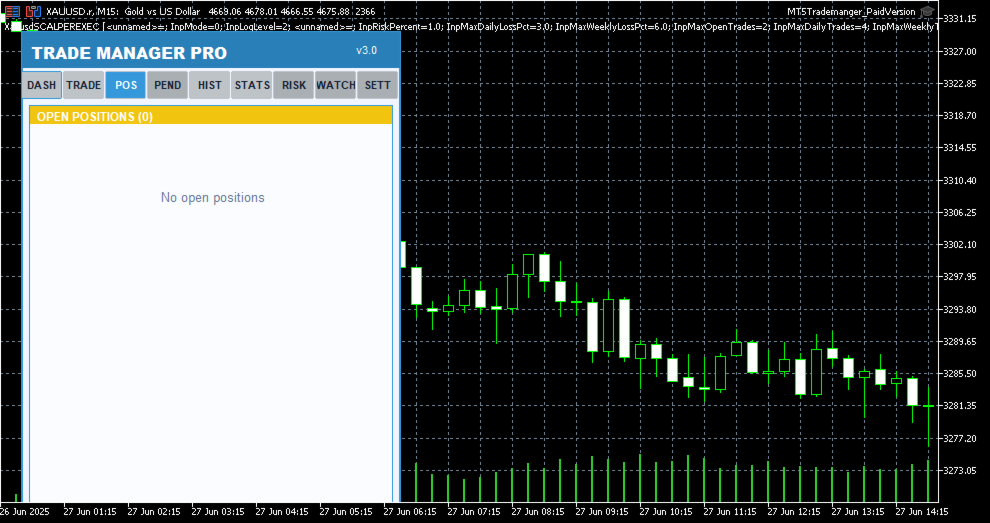
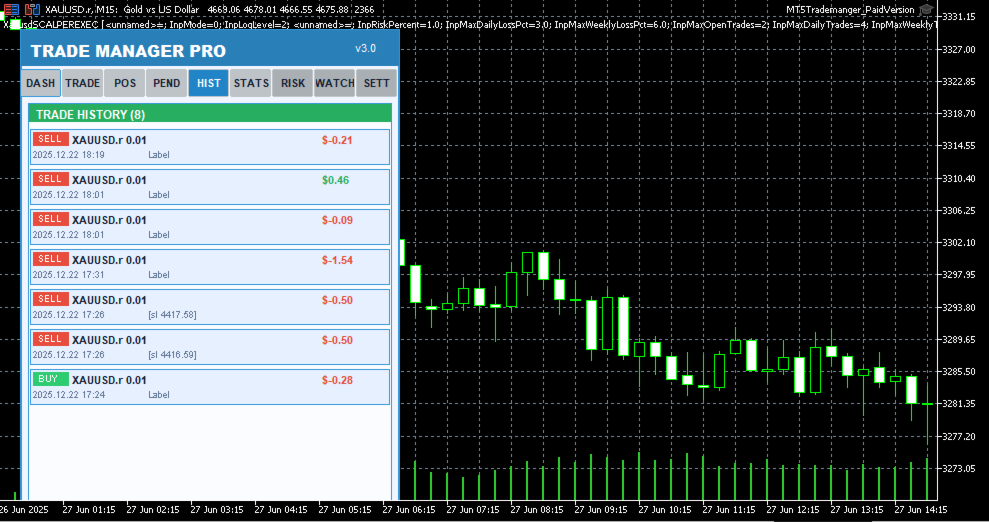
The Trade Manager Pro panel will appear on your chart. Use the tabbed navigation to access Dashboard, Trade, Positions, Pending, History, Stats, Risk, Watchlist, and Settings pages.

Customize your risk management settings on the Settings page and toggle features on or off as needed. Your preferences are saved automatically.

Start trading! Use the one-click Buy/Sell buttons, manage positions from the Positions tab, and monitor your performance from the Dashboard.

Input Parameters

Trade Manager Pro provides a comprehensive set of input parameters organized into logical groups. The following table lists all configurable options along with their default values and descriptions. All runtime-changeable settings (risk toggles, theme, schedule) can also be modified via the Settings page without needing to reattach the indicator.

Parameter

Default

Description

DefaultLotSize

0.01

Default lot size for trade execution

DefaultSL

50

Default stop-loss in pips

DefaultTP

100

Default take-profit in pips

Slippage

30

Maximum allowed slippage in points

MagicNumber

123456

Expert advisor magic number for position filtering

RiskPercentPerTrade

1.0

Risk percentage per trade for smart lot calculator

UseAutoStopLoss

true

Automatically set stop-loss on trade execution

UseAutoTakeProfit

true

Automatically set take-profit on trade execution

UseTrailingStop

false

Enable automated trailing stop management

TrailingStopDistance

30

Trailing stop activation distance in pips

Trade Manager Pro  |  Product Description

Parameter

Default

Description

TrailingStopStep

10

Trailing stop step size in pips

UseBreakEven

true

Enable break-even automation

BreakEvenTrigger

30

Break-even trigger distance in pips

BreakEvenProfit

10

Break-even profit buffer in pips

UseMaxDailyLoss

true

Enable daily loss limit protection

MaxDailyLoss

500.0

Maximum allowed daily loss in account currency

MaxSpreadPips

30.0

Maximum allowed spread in pips (execution blocked above)

MaxOpenPositions

20

Maximum number of simultaneous open positions

StartTheme

THEME_LIGHT

Initial color theme (Light/Dark/Midnight/Forest)

PanelCorner

0

Panel anchor corner (0=top-left, 1=top-right, etc.)

PanelOffsetX

20

Horizontal offset from anchor corner in pixels

PanelOffsetY

30

Vertical offset from anchor corner in pixels

Table 2: Input Parameters Reference

System Requirements

Trade Manager Pro has been designed to run on any system that supports MetaTrader 5. The following are the minimum requirements for smooth operation:

MetaTrader 5 build 2361 or higher (recommended: latest build)

Windows 7 / 8 / 10 / 11, or MetaTrader 5 for macOS / Linux

Any internet connection sufficient for trading (trade execution requires broker connectivity)

Minimum screen resolution of 1280x720 (recommended: 1920x1080 or higher for optimal panel visibility)

Allow DLL imports and automated trading enabled in terminal settings

Version History

Trade Manager Pro  |  Product Description

Trade Manager Pro is actively maintained and updated based on trader feedback. Below is the changelog for recent versions:
추천 제품
Key Features: 200+ Fully Implemented Patterns   across all categories Advanced Market Structure Analysis Smart Money Integration   (Wyckoff, Order Blocks, Liquidity) Professional Risk Management Multi-Timeframe Analysis AI-Powered Confidence Scoring Advanced Visualization Real-time Alerts Pattern Categories: Single Candle Patterns (Hammer, Doji, Marubozu, etc.) Multi-Candle Patterns (Engulfing, Stars, Harami, etc.) Chart Patterns (Head & Shoulders, Cup & Handle, Triangles, etc.) Harmonic Pattern
FREE
Grid Manual MT5
Alfiya Fazylova
4.9 (21)
"Grid Manual"은 주문 그리드 작업을 위한 거래 패널입니다. 이 유틸리티는 보편적이며 유연한 설정과 직관적인 인터페이스를 제공합니다. 그것은 손실을 평균화하는 방향뿐만 아니라 이익을 증가시키는 방향으로 주문 그리드와 함께 작동합니다. 거래자는 주문 그리드를 만들고 유지할 필요가 없으며 유틸리티에서 수행합니다. 거래자가 주문을 시작하는 것으로 충분하며 "Grid Manual"는 자동으로 그를 위한 주문 그리드를 생성하고 거래가 마감될 때까지 그와 동행할 것입니다. 전체 설명 및 데모 버전 여기 . 유틸리티의 주요 기능: 모바일 터미널을 포함하여 어떤 방식으로든 열린 주문과 함께 작동합니다. "제한" 및 "중지"의 두 가지 유형의 그리드와 함께 작동합니다. 고정 및 동적(ATR 표시기 기반)의 두 가지 유형의 그리드 간격 계산과 함께 작동합니다. 오픈 오더 그리드의 설정을 변경할 수 있습니다. 차트에서 각 주문 그리드의 손익분기점 수준을 표시합니다. 각 주문 그리드에 대한 이익
Bneu Trade Manager Pro
Marvinson Salavia Caballero
**Bneu Trade Manager Pro** is an advanced trading utility Expert Advisor for MetaTrader 5 that extends the functionality of the free version with automated trade management features, risk protection systems, and compliance tools for proprietary trading firm challenges. **All Free Version Features Included** All features from the free version are included in the PRO version. This includes visual trade management with drag-and-drop lines, risk-based position sizing, one-click order execution, p
Advanced MT5 Indicator: Precision-Powered with Pivot Points, MAs & Multi-Timeframe Logic Unlock the full potential of your trading strategy with this precision-engineered MetaTrader 5 indicator —an advanced tool that intelligently blends Pivot Points , Adaptive Moving Averages , and Multi-Timeframe Analysis to generate real-time Buy and Sell signals with high accuracy.    If you want to test on Real Market, Let me know. I will give the Demo file to run on Real Account.    Whether you're a scal
The only EA for TRADING PSYCHOLOGY:Discipline, Mindset Training & Risk Control  Checklist-Enforced Trading (No trades allowed until  strategy checklist is met)  1-Click Revenge Trade Blocker (Auto-freezes account after losses)  Overtrading Circuit Breaker (Hard daily trade limits enforced)  Neuroplasticity Training (Rewires retail habits into institutional discipline)  Institutional Risk Protocols (Auto SL/TP, position sizing, daily loss cutoffs)  Prop Firm  and account Safeguard (Preve
Ever took a trade and when you come back to the termainal to check on the status of the position, you realized the market has gone so far in the opposite direction or it has hit your stoploss. Well this system is here to help manage those moments price doesn't go in your desired direction. Consider this to be the insurance your account needs for your trading business. This tool manages manual trades and e.a. triggered trades. However be aware that some e.a.s are programmed to override other e.a.
Panha Scalping EA MT5
Huy Phanna
2.75 (4)
PANHA SCALPING EA MT5 PANHA SCALPING EA MT5 is a professional automated scalping system designed to trade fast-moving forex markets using real-time market direction and advanced position control. The EA focuses on precise entries, controlled exposure, and intelligent basket-level profit and risk management, making it suitable for traders who want structured, automated scalping without complex configuration. Strategy Overview Market-direction based scalping Designed for fast-moving forex symbo
FREE
Hello friends. I wrote this utility specifically for use in my profile with a large number of Expert Advisors and sets ("Joint_profiles_from_grid_sets"   https://www.mql5.com/en/blogs/post/747929 ). Now, in order to limit losses on the account, there is no need to change the "Close_positions_at_percentage_of_loss" parameter on each chart. Just open   one   additional chart, attach this utility and set the desired percentage for closing all trades on the account. The utility has the following fu
AurumAlert
Samuel Yip Jing Han
AurumAlert — CCI Gold Swing EA v6 A fully automated MetaTrader 5 Expert Advisor for swing trading XAUUSD (Gold) on the H1 timeframe . AurumAlert combines a dual-CCI crossover system with divergence detection, an ADX trend filter, and an H1 RSI confirmation layer to identify high-probability trend-following entries on Gold. The ATR trailing stop rides extended moves and locks in profit progressively. Technical support is provided for XAUUSD H1 only. Hedging account required.Full documentation fil
Imagine flying a real aircraft without ever stepping into a flight simulator. That's what trading is like. You have to simulate your strategy before you can take it to a live market. It is good if you can simulate things speedily before even stepping into any live market, or before coming up with an automated system.  People don't have all day to stare at a higher timeframe chart until the entry signal finally arrives. That's why I built this so that you can simulate your strategy with speed. Th
FREE
Bober Real MT5
Arnold Bobrinskii
4.76 (17)
Bober Real MT5 is a fully automatic Forex trading Expert Advisor. This robot was made in 2014 year and did a lot of profitbale trades during this period. So far over 7000% growth on my personal account. There was many updates but 2019 update is the best one. The robot can run on any instrument, but the results are better with EURGBP, GBPUSD, on the M5 timeframe. Robot doesn't show good results in tester or live account if you run incorrect sets. Set files for Live accounts availible only for cu
가격으로 TP 및 SL 설정 – MT5 자동 주문 수정기 모든 거래에 대해 정확한 TP 및 SL 가격 수준 자동 설정 ️ 모든 통화쌍 및 EA와 호환, 심볼 또는 매직넘버로 필터링 가능 이 EA는 직접 가격 값(예: EURUSD의 1.12345)을 사용하여 거래의 정확한 테이크프로핏(TP)과 스톱로스(SL) 수준을 정의하고 적용합니다. 포인트나 핍 없음. 모든 주문 또는 선택된 심볼/매직넘버에 대해 깔끔하고 정확한 거래 관리가 가능합니다. 주요 기능: 정확한 가격으로 TP 및 SL 즉시 수정 모든 주문, 현재 심볼 또는 특정 매직넘버에 적용 ️ 0을 입력하여 거래의 TP 또는 SL 제거 차트에 연결되면 완전 자동 작동 모든 거래 자산과 호환 적합 대상: 빠른 TP/SL 제어를 원하는 수동 트레이더 기본 종료 로직을 재정의해야 하는 EA 사용자 복잡한 포지션을 관리하는 다중 주문 트레이더 질문이나 제안이 있으신가요?
SPECIAL LAUNCH OFFER: $30 (1-Month Rent) Limited time offer to build our community and gather feedback! AmbM GOLD Institutional Scalper A high-precision M5 algorithm for XAUUSD (Gold) , engineered to trade exclusively at Institutional Liquidity Levels ($5/$10 psychological marks). PERFORMANCE DATA (BUY ONLY) • Win Rate: 87.09%. • Safe Growth: +$4,113 profit on $10k (13.75% Max Drawdown). • Extreme Stress Test: Successfully generated +$22,997 in a 5-year stress test (2020-2026), proving
PROMO: ONLY 10 LEFT AT $90! Next price:        $199 Price will be kept high to limit number of users for this strategy. This EA starts trading at the open of   London (UK) Session . It is based on analysis of advanced statistical distributions combined with short to medium term reversal patterns which have mean-reversion attributes. The EA includes several smart features and allows you to trade with a fixed or automatic lot size. The EA is not sensitive to spreads but can be backtested on both
SL TP Manager Utility MT5
AL MOOSAWI ABDULLAH JAFFER BAQER
SL-TP Manager Utility for MT5 - Professional Risk Management Tool Advanced Position Protection & Profit Management SL-TP Manager Utility is a powerful, intuitive tool designed for traders who want precise control over their risk management. This utility provides a sleek interface for setting, modifying, and managing your Stop Loss, Take Profit, and Trailing Stop levels with just a few clicks. Key Features: Dual Mode Operation: Set values in pips or absolute price with a simple toggle Independent
Talents ATR Scalper Utility (MT5) The Talents ATR Scalper Utility is a professional-grade trade execution and management tool built for MetaTrader 5. Inspired by the Biblical Parable of the Talents , this utility is designed to help traders multiply their potential with precision risk control, one-click simplicity, and advanced automation. Whether you’re scalping forex, gold, or indices, this tool delivers speed, consistency, and confidence. Key Features One-Click Trade Preview Click below price
Fuzzy Predictor EA
Renato Takahashi
Fuzzy Predictor EA is based on fuzzy logic strategy based on candlestick analysis , according to number of consecutives long or short candles, percent of long or short candles on a fixed candlestick sample, percent of shadow on this sample or upper and lower shadows on reversal candlesticks for reversal analysis. When the EA analysis all this parameters, it decides, based on its fuzzy strategy, which trade will be better: trend or reversal. Takeprofit and Stoploss is based on candlesticks sample
This PORTFOLIO of 3 strategies has been developed, tested and traded live on DAX H1 timeframe. Multiple EAs traded together will lead to a BIGGER PROFITS and SMOOTHER EQUITY CURVE. 3 not correlated EAs logics for DAX H1 timeframe merged to a single strategy. Very SIMPLE STRATEGIES with only FEW PARAMETERS.  Every trade has his own logic for STOP LOSS. To catch the profits every strategy uses different approach - some has TAKE PROFIT, some uses TIME BASED EXITS or PROFIT TRAILING. EA has been b
This PORTFOLIO of 3 strategies has been developed, tested and traded live on DAX M30 timeframe. Multiple EAs traded together will lead to a BIGGER PROFITS and SMOOTHER EQUITY CURVE. 3 not correlated EAs logics for DAX M30 timeframe merged to a single strategy. Very SIMPLE STRATEGIES with only FEW PARAMETERS.  Every trade has his own logic for STOP LOSS. To catch the profits every strategy uses different approach - some has TAKE PROFIT, some uses TIME BASED EXITS or PROFIT TRAILING. EA has been
This is the HFT Flame Ea....This is a complex Expert Advisor that basically pick trades from price movements, it is also a none-martingale mechanism with netting strategy that makes this Ea more interested and profitable throughout your trading journey. The HFT Flame EA can be super consistent on profits depending on the inputs selected for your style of trading. This is a hand free trading robot that can trade your way to success while you are away from the charts, another perfect advantage abo
It Will Close Your All Trade   in Half of second  no matter you open 100 plus trade open it will close all trade half of second  . it good work for 1 -5 min scalping   this Ea have  many function see the pic i uploaded   there  . ea that have function close all trade , close all lossing trade , close all profit trade . also have lot system where you can put your  expected lot and buy sell button and it can close 100 trade in 1 second  
BTC Master Pro
Farzad Saadatinia
4.58 (12)
BTC Master Pro — 규율 있는 비트코인 트레이딩을 위한 신뢰할 수 있는 파트너. 최신 버전은 OpenAI 인공지능 기술 이 통합되어, 높은 변동성을 가진 암호화폐 시장 환경에서 더욱 정교한 실행과 향상된 거래 필터링을 제공합니다. 이 전문 Expert Advisor는 MetaTrader 5 플랫폼에서 Bitcoin (BTCUSD) 거래를 위해 특별히 설계되었으며, 구조화된 실행, 노출 관리, 그리고 지능적인 리스크 관리에 중점을 두고 있습니다. 가격: $499  →  다음 단계: $699  →  최종 가격: $999 LIVE SIGNAL HERE OpenAI 기반 실행 필터 최신 버전은 OpenAI 기술을 활용하여 실시간 시장 상황을 분석하고, 품질이 낮거나 신뢰도가 부족한 거래 설정을 필터링합니다. AI 안전 레이어: 인공지능 모듈은 거래 실행 전에 작동하는 2단계 승인 시스템으로 설계되었습니다. 이는 예측 도구가 아닌 실행 필터로만 사용됩니다. 모든 거래는 구조화
The Fractal Trend Master is one of the most powerful and sophisticated Expert Advisors on the market, designed to protect traders' capital while maximizing profit opportunities. Based on Bill Williams' renowned methodology, this EA uses three essential technical analysis tools: the Alligator indicator , fractals , and the Gator Oscillator , creating a robust and precise framework for identifying and following market trends. This EA was designed with a focus on advanced risk management and capita
Exclusive EA for FOREX HEDGE account The EA (FuzzyLogicTrendEA) is based on fuzzy logic strategies based on the analysis of a set of 5 indicators and filters. Each indicator and filter has a weight in the calculation and, when the fuzzy logic result reaches the value defined in the EA parameter, a negotiation is opened seeking a pre-defined gain. As additional functions it is possible to define maximum spread, stop loss and so on . Recommended Symbol: EURUSD, AUDUSD, GBPUSD, NZDUSD, USDCAD, AUD


Neopips Engine EA
Md Billal Hossain
NeoPips Engine EA – 궁극의 트레이딩 혁명이 도래했습니다! "트레이딩의 진정한 힘은 다른 사람들이 놓치는 것을 보는 것입니다. NeoPips Engine은 시장을 따라가는 것이 아니라, 시장을 정복합니다." NeoPips Engine EA 소개: 당신의 똑똑한 트레이딩 동반자 NeoPips Engine EA는 평범한 트레이딩 로봇이 아닙니다. 정밀성, 적응력, 그리고 장기적인 성과를 요구하는 트레이더들을 위해 설계된 다차원적이고 AI에 최적화된 전문가 자문입니다. 경직된 규칙을 가진 구식 봇과 달리, NeoPips Engine은 살아있는 전략입니다. 실시간으로 시장에 대해 생각하고, 학습하고, 적응합니다. 이것은 단순한 자동화가 아니라, 진화의 움직임입니다. 차세대 인텔리전스: 당신을 자유롭게 하는 핵심 기능 AI 기반 의사 결정 동적 패턴 인식 예측 추세 분석 실시간 데이터 기반 스마트 진입/청산 로직 다중 엔진 전략
PipFinite EA Trend PRO MT5
Karlo Wilson Vendiola
3.67 (9)
The Official Automated Version of the Powerful Indicator PipFinite Trend PRO EA Trend PRO trades the signal of PipFinite Trend PRO and manages the trade depending on the user's preference. The EA includes many customizable features that can further enhance the Trend PRO trading strategy. Features like Entry and Exit Filters, Higher Timeframe Filter, Stoploss, Takeprofit, Breakeven, Trailing Stop, News Filter and MORE! The Innovative Solution EA Trend PRO was created to make your trading more
Gold Crazy EA MT5
Nguyen Nghiem Duy
Gold Crazy EA   is an Expert Advisor designed specifically for trading Gold H1/ EU M15. It use some indicators to find the good Entry. And you can set SL or you can DCA if you want. It can be an Scalping or an Grid/ Martingale depend yours setting. This EA can Auto lot by Balance, set risk per trade. You also can set TP/ SL for earch trade or for basket of trade. - RSI_PERIOD - if = -1, then the default strategy works, if >0, then the RSI strategy works - MAX_ORDERS - to trade with only 1 order,
The Gold Scalping Auto Entry is an automated trading system developed specifically for the XAUUSD instrument. The Expert Advisor operates by analyzing structural price action, volume, and momentum across multiple timeframes to identify and execute trades. The system does not use grid or martingale strategies. Every trade is executed with a predefined stop loss and relies on calculated risk management parameters. The Expert Advisor is written in pure MQL5, contains no DLL calls, and requires no
FREE
SolarTrade Suite Financial Robot: LaunchPad Market Expert - 거래를 시작하도록 설계되었습니다! 이 거래 로봇은 특별하고 혁신적이며 고급 알고리즘을 사용하여 가치를 계산합니다. 금융 시장의 세계에서 여러분의 조수입니다. SolarTrade Suite 시리즈의 지표 세트를 사용하여 이 로봇을 시작할 순간을 더 잘 선택하세요. 설명 하단에서 SolarTrade Suite 시리즈의 다른 제품을 확인하세요. 투자와 금융 시장의 세계를 자신 있게 탐색하고 싶으신가요? SolarTrade Suite Financial Robot: LaunchPad Market Expert는 정보에 입각한 투자 결정을 내리고 수익을 늘리는 데 도움이 되도록 만들어진 혁신적인 소프트웨어입니다. SolarTrade Suite Financial Robot: LaunchPad Market Expert의 장점: - 정확한 계산: 로봇은 고급 알고리즘과 분석 방법을 사
Fvg Edge
Ahmad Meftah Abdulsalam Alawwami
5 (2)
FVG Smart Zones – 무료 버전 MetaTrader 5 (MT5)용 공정 가치 갭(FVG) 탐지 지표 단순한 지표가 아닌 실제 트레이딩 도구 를 찾고 계신가요? FVG Smart Zones – 무료 버전 은 **공정 가치 갭(FVG)**을 자동으로 감지하고 차트에 고확률 거래 구역 을 표시하여 전문적인 시장 통찰력을 제공합니다. 다음을 따르는 트레이더를 위해 설계됨: 스마트 머니 컨셉(SMC) ICT 트레이딩 컨셉 가격 행동(Price Action) 수요와 공급 분석 기관 트레이딩 전략 이 지표는 가격이 반응할 가능성이 높은 구역 에 집중할 수 있도록 도와줍니다. 주요 기능: 스마트 존 감지 상승 및 하락 FVG 자동 감지 깔끔하고 전문적인 시각적 구역 약하거나 관련 없는 갭 제거를 위한 지능형 필터링 고급 확인 기능 상위 시간대(HTF) 컨플루언스 확인 가격이 채워지면 유효하지 않은 구역 자동 제거 활성 구역과 채워
FREE
이 제품의 구매자들이 또한 구매함
Trade Assistant MT5
Evgeniy Kravchenko
4.42 (207)
거래당 위험 계산, 라인을 사용한 손쉬운 신규 주문, 부분 청산 기능을 통한 주문 관리, 7가지 유형의 트레일링 스탑 및 기타 유용한 기능을 제공합니다. 추가 자료 및 지침 설치 지침   -   애플리케이션 지침   -   데모 계정용 애플리케이션 평가판 라인 기능       - 차트에 개시선, 손절매, 차익실현을 표시합니다. 이 기능을 사용하면 새로운 주문을 쉽게 하고 개봉 전에 추가 특성을 볼 수 있습니다. 위기 관리       -       위험 계산 기능은 설정된 위험과 손절매 주문의 크기를 고려하여 새 주문의 볼륨을 계산합니다. 이를 통해 손절매 크기를 설정하고 동시에 설정된 위험을 존중할 수 있습니다. 로트 계산 버튼 - 위험 계산을 활성화/비활성화합니다. 필요한 위험 값은 위험 필드에 0에서 100 사이의 백분율 또는 예금 통화로 설정됩니다. 설정 탭에서 위험 계산 옵션을 선택합니다. $ 통화, % 잔액, % 지분, % 자유 마진, % 사용자 정의, % AB 이전
VERIFIED TRADING RESULTS - Farmed Hedge Yield Axi Copy:  https://www.mql5.com/en/signals/2356376 - Farmed Hedge Yield Exn Copy:   https://www.mql5.com/en/signals/2356404 - Farmed Hedge Yield V Copy:  https://www.mql5.com/en/signals/2357156 Contact me via private message to receive the User Manual and Setup. * Thai Lauguage Support Available Farmed Hedge Yield Farming - Professional Pair Trading Dashboard (Manual - Hybrid - Semi/Automated EA) VERSION 3 - WILD HARVEST UPDATE Trading Approac
HINN Lazy Trader
ALGOFLOW OÜ
5 (2)
The core idea: using the user interface, you configure the parameters the chart must meet before entering a position (or positions), choose which entry models to use, and set the rules for when trading and planning should end. Lazy Trader  handles the rest: it  takes over all the routine chart watching and execution! full description  :: 3 key videos [1] ->  [2]   ->  [3] What can it do? - Understands Larry Williams market structure - Understands swing market structure by Michael Huddleston
The product will copy all telegram signal to MT5 ( which you are member) , also it can work as remote copier.  Easy to set up, copy order instant, can work with almost signal formats, image signal,  s upport to translate other language to English Work with all type of channel or group, even channel have "Restrict Saving Content", work with  multi channel, multi MT5 Work as remote copier: with signal have ticket number, it will copy exactly via ticket number. Support to backtest signal. How to s
Crypto Charting
Rajesh Kumar Nait
5 (5)
Crypto Charting for MT5 – MetaTrader 5용 암호화폐 차트 통합 도구 개요 Crypto Charting for MT5는 WebSocket을 통해 실시간 OHLC 차트 데이터를 제공합니다. 여러 거래소를 지원하며 MT5에서 자동으로 데이터가 동기화됩니다. 기능 WebSocket을 통한 실시간 차트 자동 역사 데이터 업데이트 네트워크 중단 시 예약된 동기화 모든 MT5 타임프레임 지원 OHLCV 데이터 지원 전략 테스터 지원 자동 재연결 기능 지원 거래소 Binance, Bybit, OKX, KuCoin, MEXC, Gate.io, Bitget, XT.com 추가 정보 Crypto Ticks 라는 별도 제품에서 틱 데이터와 오더북 정보를 제공합니다. 참고 사항 DLL 미사용, VPS 환경에 적합합니다. Strategy Tester에서는 WebRequest 기능이 작동하지 않습니다. 데모가 필요하신 경우 MQL5의 개인 메시지를 통해 문의하십시오. Full
Footprint Chart Pro — Professional OrderFlow EA for MetaTrader 5 Version 6.34 | Professional tool for real traders | Institutional-Grade Visualization DEMO USERS - PLEASE SELECT EVERY TICK / REAL TICK WHEN TESTING AND YOU HAVE DOWNLOADED HISTORICAL DATA. IF YOU SEE A WAITING SCREEN AND IT IS NOT DOWNLOADING, IT MEANS YOU HAVE LOW HISTORICAL DATA. TRY 1 MIN AND 5 MIN FIRST ON 1 DAY DATA. ONE DAY DATA SHOULD BE THE NEWEST AND MOST CURRENT DATE. PLEASE WAIT UNTIL THE MARKET HAS ROLLED OVER PERIOD.
Ultimate Extractor
Clifton Creath
5 (9)
Ultimate Extractor - Professional Trading Analytics for MT5 *****this is the local HTML version of Ultimate Extractor. For the online version please reach out to me directly****** Ultimate Extractor transforms your MetaTrader 5 trading history into actionable insights with comprehensive analytics, interactive charts, and real-time performance tracking. What It Does Automatically analyzes your MT5 trading history across all Expert Advisors and generates detailed HTML reports with interactive vi
YuClusters
Yury Kulikov
4.93 (43)
Attention: You can view the program operation in the free version  YuClusters DEMO .  YuClusters is a professional market analysis system. The trader has unique opportunities to analyze the flow of orders, trade volumes, price movements using various charts, profiles, indicators, and graphical objects. YuClusters operates on data based on Time&Sales or ticks information, depending on what is available in the quotes of a financial instrument. YuClusters allows you to build graphs by combining da
Telegram To MT5 Receiver
Levi Dane Benjamin
4.31 (16)
가입한 모든 채널에서 (개인 및 제한된 채널 포함) 시그널을 바로 MT5로 복사합니다.   이 도구는 사용자를 고려하여 설계되었으며 거래를 관리하고 모니터하는 데 필요한 많은 기능을 제공합니다. 이 제품은 사용하기 쉽고 시각적으로 매력적인 그래픽 인터페이스로 제공됩니다. 설정을 사용자 정의하고 제품을 몇 분 안에 사용할 수 있습니다! 사용자 가이드 + 데모  | MT4 버전 | 디스코드 버전 데모를 시도하려면 사용자 가이드로 이동하십시오. Telegram To MT5 수신기는 전략 테스터에서 작동하지 않습니다! Telegram To MT5 특징 여러 채널에서 동시에 신호를 복사합니다. 개인 및 제한된 채널에서 신호를 복사합니다. Bot 토큰이나 채팅 ID가 필요하지 않습니다.   (원하는 경우에는 사용할 수 있습니다) 위험 % 또는 고정된 로트로 거래합니다. 특정 심볼을 제외합니다. 모든 신호를 복사할지 또는 복사할 신호를 사용자 정의할지 선택할 수 있습니다. 모든 신호를 인
Neowave Chart Plotter
Bahador Baradari
5 (1)
This Expert Advisor is applicable to plot wave charts as per the NeoWave  method (Neely Extension of Wave Theory).  NeoWave is a scientific, objective and revolutionary style of Elliott Wave Theory that was invented by Glenn Neely in 1990 in the “Mastering Elliott Wave” book. To start analyzing with this method, we need a particular chart called the Wave Chart or Cash Data chart . This is the first step for a good wave analysis. To draw this chart, Highs and Lows should be plotted in the order t
Custom Timeframe Manager Pro: MetaTrader 5 의 무제한 타임프레임 터미널의 기본 설정은 종종 가격 움직임의 중요한 세부 사항을 숨깁니다. 분석을 클래식 주기로만 제한하면 트레이더는 추세의 시작점과 진정한 변동성 수준을 놓칠 위험이 있습니다. Custom Timeframe Manager Pro는 차트 생성에 대한 모든 제한을 없애주는 전문가용 솔루션입니다. 소수점 및 특수 주기를 포함한 모든 사용자 지정 주기를 생성할 수 있으며, 생성된 주기는 편리한 제어판에 즉시 표시됩니다. 사용 가능한 주기 유형: 초 단위: S1부터 시작하는 모든 값 (예: S5, S15, S30). 소수점 단위: M1.5, H1.5 또는 D1.2와 같은 고유한 주기. 사용자 지정: 다중 일봉(D2, D3) 및 다중 주봉(W2) 차트. 주요 기술적 이점: 인프라 접근 방식 (Custom Symbols): 이 도구는 터미널 데이터베이스에 실제 거래 심볼을 생성합니다. 이를 통해 사용
EasyInsight AIO MT5
Alain Verleyen
4.92 (12)
EASY Insight AIO – 스마트하고 손쉬운 트레이딩을 위한 올인원 솔루션 개요 외환, 금, 암호화폐, 지수, 심지어 주식까지 — 전 시장을 몇 초 만에, 수동 차트 확인이나 복잡한 설치, 인디케이터 설정 없이 스캔할 수 있다고 상상해 보세요. EASY Insight AIO 는 AI 기반 트레이딩을 위한 궁극의 플러그 앤 플레이(Plug & Play) 데이터 내보내기 도구입니다. 단 하나의 깔끔한 CSV 파일로 전체 시장 스냅샷을 제공하며, ChatGPT, Claude, Gemini, Perplexity 등 다양한 AI 플랫폼에서 즉시 분석할 수 있습니다. 창 전환, 복잡함, 차트 오버레이는 더 이상 필요 없습니다. 자동으로 내보내지는 순수하고 구조화된 데이터 인사이트만으로, 반복적인 차트 감시 대신 데이터 기반의 스마트한 의사결정에 집중할 수 있습니다. 왜 EASY Insight AIO인가요? 진정한 올인원 • 별도의 설정, 인디케이터 설치, 차트 오버레이가 필요 없습
Signal TradingView to MT5 Pro Automator TradingView와 MetaTrader 5 간의 즉각적인 전문 실행 TradingView 알림과 MT5의 실제 실행을 연결하는 가장 강력한 커뮤니케이션 브리지로 거래 전략을 자동화하세요. 속도, 유연성 및 완벽한 위험 관리를 요구하는 트레이더를 위해 설계된 이 Expert Advisor는 모든 알림 메시지를 정확한 시장가 또는 지정가 주문으로 변환합니다. 강점 및 이점 범용 파싱 엔진(독점 기술): 모든 알림 형식에서 데이터를 자동으로 인식하고 추출할 수 있는 고급 기술입니다. 단일하고 엄격한 형식에 얽매일 필요가 없습니다. 시스템은 심볼, 액션, 가격, SL 및 TP를 자동으로 이해합니다. 실시간 실행: 지연 시간을 최소화하도록 최적화된 1초 미만의 초고속 폴링 기술. 신호 수신 후 몇 밀리초 내에 주문 실행이 이루어집니다. 기관 수준의 위험 관리: 다음 기준에 따른 자동적이고 정확한 로트(Lot) 크기 계
Unlimited Trade Copier Pro MT5 is a tool to copy trade remotely to multiple MT4, MT5 and cTrader accounts at different computers/locations over internet. This is an ideal solution for you if you are a signal provider and want to copy your trades to other receivers globally on your own rules. One provider can copy trades to multiple receivers and one receiver can get trade from multiple providers as well. The provider can even set the subscription expiry for each receiver, so that receiver will n
ManHedger MT5
Peter Mueller
4.83 (6)
THIS EA IS A SEMI-AUTO EA, IT NEEDS USER INPUT. Manual & Test Version Please TEST this product before BUYING  and watch my video about it. The price of the ManHedger will increase to 250$ after 20 copies sold. Contact me for user support or bug reports or if you want the MT4 version! MT4 Version  I do not guarantee any profits or financial success using this EA. With this Expert Advisor, you can: Implement your own Zone Recovery strategy to capitalize on trending markets. Create Grid trading s
The product is used to trade base on any Alert signal in MT5 Easy to setup, simple format with custom keyword All option to management orders as trailing stop, breakeen, partial close, time filter, news filter ... Option to auto open grid orders How to setup and guide: Let read all details about setup and download indicator for auto get   Alert Signal   here Do not buy if you even can not install demo EA to your VPS ( some VPS block download EA from mql5 market) We always bring customers high q
Custom Alerts AIO: 다중 시장을 동시에 모니터링 – 설정 없이 즉시 사용 가능 개요 Custom Alerts AIO 는 복잡한 설정 없이 즉시 사용할 수 있는 통합 시장 모니터링 도구입니다. FX Power, FX Volume, FX Dynamic, FX Levels, IX Power 등 필요한 모든 지표가 내장되어 있어 별도의 설치나 구성 없이 알림 기능을 바로 사용할 수 있습니다. 차트 그래픽 없이 작동하며, Forex, 금속, 지수, 암호화폐 등 주요 자산군을 모두 지원합니다. 주식(Symbols)은 별도로 입력하여 추가할 수 있으나, MetaTrader에서는 일반적으로 제한적으로만 사용됩니다. 1. 왜 Custom Alerts AIO를 선택해야 하나요? 추가 라이선스가 필요 없습니다 • 모든 Stein Investments 지표가 내장되어 있어 별도 구매가 필요 없습니다. • 즉시 알림 기능을 시작할 수 있어 빠르고 간편합니다. 모든 시장을 하나의 도구로
GRat Binance
Ivan Titov
1 (1)
Trade on Binance in MT5! GRat_Crypto is a tool for manual and automated trading , including ANY available EA, ANY  cryptocurrency  on most popular crypto exchange Binance in the familiar MT5 environment 24/7. Features 1. ALL instruments of the 5 most popular crypto exchange  Binance . 2. The ability to place ANY type of order available in MT5, both market and pending, to modify orders and positions, to delete orders and close positions (even partially), to set trailing stop and trailing profit.
Features   With MT5 to Interactive Brokers(IB) Trader, you can: 1. Load chart data from IB to MT5, and Analyze with all standard or customer Indicators. 2. Place Orders to IB Account Directly in MT5. 3. Make your Own EAs upon IB Securities by only making minus changes of the trading function. Usage 1) Installation Copy the "Mt5ToIBTraderEn.ex4" and sample files to [MT5 Data Folder]->MQL5->Experts.  2)  MT5 Settings Add the IP Address to the MT5 Allowed URLs in 'Tools->Options->Expert Adviso
************************************************************************************************************************************** GoldMine Train은 Gold를 위한 트렌드 트레이딩 전략 EA입니다. 운영자는 주요 트렌드 방향을 결정하고 Train에 이동을 지시합니다. Train은 해당 방향으로 지속적으로 매수/매도를 합니다. Lot 볼륨은 계정 잔액과 사전 설정된 레버리지 비율에 따라 달라집니다. 운영자가 트렌드 방향을 변경하면 Train이 멈추고 이익을 잠급니다. 사용자는 차트의 버튼을 사용하여 트렌드 방향을 쉽게 선택할 수 있습니다. ******************************* ***************** ********************** ***************** ********************** *********
The Expert Advisor will help you forward all alert from  MetaTrader 5 to Telegram channel/ group.  All alert must save to folder <Data folder>MQL5\Files\Alerts\ , text file with format *.txt and screenshot with format *.gif or *.png. Parameters: - Telegram Bot Token: - create bot on Telegram and get token. - Telegram Chat ID:  - input your Telegram user ID,  group / channel ID - Forward Alert: - default true, to forward alert. - Send message as caption of Screenshot: - default false, set true t
FuturesGate
Laurent Xavier Richer
MT5 → Futures API Bridge Mirror your MT5 trades into an external futures platform in real time—perfect for running your favorite Expert Advisor (EA) on MT5 while executing on supported external futures accounts. NEW in v2.0: Multi-Symbol Support (Trade Nasdaq, S&P, and Dow from one chart), List-Based Filtering. Click here to read the Full Manual & Setup Guide Key Features Multi-Symbol Control: Manage trades for multiple instruments simultaneously from a single chart instance using the new "
Dynamic Fibonacci Grid
Tsvetan Tsvetanov
5 (1)
MT5용 Dynamic Fibonacci Grid Dashboard 최신 버전을 소개합니다. 많은 새로운 기능이 추가된 이번 대시보드는 거래 경험을 완전히 변화시키며, 시장과 가격 움직임을 완전히 새로운 관점에서 볼 수 있게 합니다. 여러 시간대와 여러 심볼을 동시에 분석하여 새로운 가능성을 발견하세요. 수동 거래와 포지션 관리에 친화적인 사용자 인터페이스와 미리 정의된 자동 전략을 적용할 수 있는 확장된 기능을 제공합니다. 또한 DFG는 이제 전략 테스터(Strategy Tester)에서 트레이딩 시뮬레이터로 완벽하게 작동하며, 과거 데이터를 사용하여 다양한 거래 조건을 재현할 수 있습니다. 시각 모드에서 수동 거래를 연습하고, 고속 모드에서 자동 전략을 테스트할 수 있습니다. 주요 기능 • Dynamic Fibonacci Bands 개념을 기반으로 한 다중 시간대 및 다중 심볼 고급 기술 분석 실시간 시장 모니터링 대시보드를 통해 탁월한 효율성을 경험할 수 있습니다. M1,
The product will copy all  Discord  signal   to MT5   ( which you are member  ) , also it can work as remote copier.  Easy to set up. Work with almost signal formats, support to translate other language to English Work with multi channel, multi MT5. Work with Image signal. Copy order instant, auto detect symbol. Work as remote copier: with signal have ticket number, it will copy exactly via ticket number. How to setup and guide: Let read all details about setup and download Discord To MetaTrader
Mt5 To InterativeBrokers Copier allows you to copy deals from MT5 account to Interactive Brokers. With this, you can run your EA strategy on a MT5 Demo/Real Account, then copy all the deals to Interactive Brokers account real time. Features: 1. Copy or Invert-Copy deals Realtime from MT5 to IB Account. 2. Synchronizing positions of both accounts periodicaly, in case any missing copying. 3. You can choose only Buy position or Sell position. Symbols Setup: General Format:  {MT Symbol} -> {IB S
Mentfx Mmanage mt5
Anton Jere Calmes
4.25 (8)
The added video will showcase all functionality, effectiveness, and uses of the trade manager. Drag and Drop Trade Manager. Draw your entry and have the tool calculate the rest. Advanced targeting and close portions of a trade directly available in tool (manage trades while you sleep). Market order or limit order on either side with factored spread. Just draw the entry, the tool does the rest. Hotkey setup to make it simple. Draw where you want to enter, and the stop loss, the tool calculates al
Ultimate Trailing Stop EA MT5
BLAKE STEVEN RODGER
4.13 (8)
This EA Utility allows you to manage (with advanced filtering) unlimited open orders (manual or EA) with 16 trailing stop methods: fixed, percent, ATR Exit, Chandelier Exit, Moving Average, Candle High Low Exit, Bollinger Bands, Parabolic, Envelope, Fractal, Ichimoku Kijun-Sen, Alligator, Exit After X Minutes or Bars, RSI and Stochastic. The trailing stop can be either real or virtual, and you can exit fully or with a partial close percent on touch or bar close.  Moreover, you can add (override
Trade Copier Pro MT5 is a tool to copy trade remotely to multiple MT4, MT5 and cTradfer accounts at different computers/locations over internet. This is an ideal solution for you if you are a signal provider and want to copy your trades to other receivers globally on your own rules. One provider can copy trades to multiple receivers and one receiver can get trade from multiple providers as well. The provider can even set the subscription expiry for each receiver, so that receiver will not be abl
GRat Crypto
Ivan Titov
4.5 (2)
Trade on crypto exchanges in MT5! GRat_Crypto is a tool for manual and automated trading , including ANY available EA, ANY  cryptocurrency  on most popular crypto exchanges in the familiar MT5 environment 24/7. Features 1. ALL instruments of the 9 most popular crypto exchanges are available: Binance, BingX, Bybit, Coinbase, CoinEx, Kraken,   KuCoin, MEXC and OKX . 2. The ability to place ANY type of order available in MT5, both market and pending, to modify orders and positions, to delete order
PineChart
Muhammad Minhas Qamar
Developed by MMQ —  PineChart: Run PineScript Inside MT5 With A Modern Charting Experience An MQL5 Expert Advisor that runs Pine Script indicators and strategies directly inside MetaTrader 5. PineChart includes a full Pine Script interpreter so you can use your existing Pine Script v5/v6 source code without manually rewriting anything in MQL5. Links [  Website  |  Documentation  |  Demo ] NOTE: Downloading demo through MQL5 will give you limited functionality. To experience PineChart fully, dow
제작자의 제품 더 보기
Ultimate Gold Breakout
Anthony Dewayne Wasome
Ultimate Gold Breakout Professional XAUUSD Breakout Expert Advisor Ultimate Gold Breakout is a systematic Expert Advisor designed to trade daily breakout movements on Gold (XAUUSD) using clearly defined price levels and structured risk management. It is built for ECN and prop trading environments where execution quality and capital protection are critical. Strategy Overview The EA identifies the previous day’s high and low and prepares trades for potential breakout moves from these levels. Trade
MT5 Trade Manager
Anthony Dewayne Wasome
MT5 Trade Manager - Multi-Page Dashboard Professional Trading Panel with Advanced Risk Management Transform your MetaTrader 5 trading experience with this comprehensive trade management system featuring a sleek, multi-page dashboard that gives you complete control while maintaining maximum chart visibility. Key Features 6 Interactive Pages DASHBOARD - Quick overview with real-time balance, equity, margin, and today's P/L. One-click BUY/SELL buttons and emergency close all positions. TRADE - Adva
FREE
필터:
리뷰 없음
리뷰 답변