Phoenix Trade Manager MT5
- 유틸리티
-
Mohamed Samsudeen
 라이브 트레이딩과 알고리즘 전략 개발 분야에서 15년 이상의 실전 경험을 바탕으로, 저희는 MetaTrader 4 및 MetaTrader 5을 위한 가장 진보적이고 안정적이며 성능 중심적인 전문가 자문(EA) 제공에 전념하고 있습니다. 저희 여정은 시장 행동을 이해하고자 하는 깊은 열정에서 시작되었으며, 알고리즘 트레이딩 분야에서 수년간의 혁신으로 진화했습니다. 출시되는 모든 제품은 기술적 정밀성, 스마트한 리스크 관리 및 시장이 실제로 어떻게 움직이는가에 대한 현실적 이해를 기반으로 구축됩니다.
 - 버전: 7.1
- 업데이트됨: 12 6월 2026
- 활성화: 10
Phoenix Trade Manager MT5
User Guide and Demo version download: CLICK HERE
Installation Guide: CLICK HERE
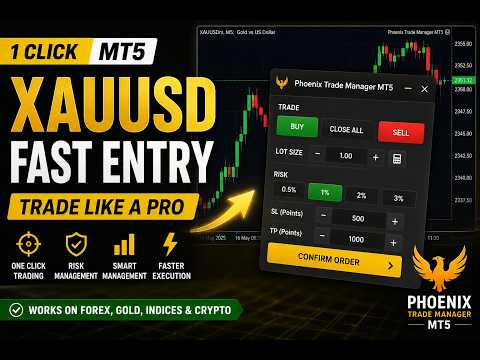
Phoenix Trade Manager is a manual trading assistant for MetaTrader 5. It is an on-chart trade panel that puts order entry, position management, risk control and account protection into one window, so you can manage trades directly from the chart without opening separate dialogs. It is designed for one-click trading, scalping and day trading on any symbol and timeframe.
This is a trade management utility for manual trading. It does not open trades on its own and does not predict the market.
One-Click Trading and Order Entry
- One-click trading: Buy and Sell at market with your preset lot, Stop Loss and Take Profit.
- Pending orders: Buy Limit, Sell Limit, Buy Stop and Sell Stop with offset in points or percent.
- Lot and risk sizing: fixed lot, risk percent of balance, fixed money risk, or automatic lot based on balance and selected leverage.
- Reward-to-risk Take Profit and Stop Loss, set directly as R multiples.
- Multiple Take Profit levels (up to 10) with a common Stop Loss or a Stop Loss per level, for partial position scaling.
- Visual trade lines: drag or click to place entry, Stop Loss and Take Profit lines on the chart before sending the order.
- Optional virtual Stop Loss and Take Profit, hidden Stop Loss and Take Profit, and OCO handling.
Position Manager and Trade Manager Tools
- Break Even: move the Stop Loss to entry automatically after a set distance, with an offset.
- Trailing stop with several methods: fixed points, fractals, moving average, Parabolic SAR, ATR, partial trailing and recent high or low.
- Close tab: close all, close buys, close sells, close profitable, close losing, or close a percentage of open volume.
- Auto-close conditions: close all positions when floating profit or loss reaches a set amount.
- Post-close report showing realized profit and loss, number of trades, wins and losses.
PRO Suite
- Speed: Fast Mode for instant one-click trading without confirmation, keyboard hotkeys for Buy, Sell, close, lot change and reverse, and optional auto-reverse after a trade closes.
- Equity Guard (risk manager): daily loss limit and daily profit target in money or percent, with an option to close positions only or close and lock the panel.
- Spread Monitor: live spread with color-coded status, session high and average, and an optional spread filter that queues an order until the spread drops below your maximum, with a timeout.
- Candle Timer: large countdown to the close of the current candle, with warning and final-second alerts and a tick-speed meter for market activity.
- Session Manager: shows Tokyo, London, New York and Overlap sessions on server, local or GMT time, with a kill switch to block new trades or close all at a set time, and an optional session filter.
Interface
- 5 themes and 11 interface languages.
- Draggable panel and movable hotkey strip, with saved layout between sessions.
- Built-in guide for each PRO tool.
- Works in the Strategy Tester, including visual mode, for practice.
How to use
- Attach Phoenix Trade Manager to any chart and allow the panel to load.
- On the Trade tab, set your lot or risk, Stop Loss and Take Profit, then click Buy or Sell, or place a pending order.
- Use the Close tab to close positions in one click or by percentage, or set auto-close profit and loss levels.
- Turn on Break Even and Trailing to manage open trades automatically.
- Open the Pro tab to enable Equity Guard, the Spread Monitor, the Candle Timer and the Session Manager.
- Open the Settings tab to choose your theme, language and panel options.