Phoenix Trade Manager MT5

  • Utilità
  • Mohamed Samsudeen
    Mohamed Samsudeen
    • Chief Forex Trading Strategist al  UAE
    • India
    • 1766
    4.3 (6)
    Con oltre 15 anni di esperienza pratica sia nel trading live che nello sviluppo di strategie algoritmiche, siamo dedicati a fornire gli Expert Advisor (EA) più avanzati, stabili e orientati alle prestazioni disponibili per MetaTrader 4 e MetaTrader 5. Il nostro percorso è iniziato con una profonda
  • Versione: 7.1
  • Aggiornato: 12 giugno 2026
  • Attivazioni: 10

Phoenix Trade Manager MT5 

User Guide: CLICK HERE

Installation Guide: CLICK HERE


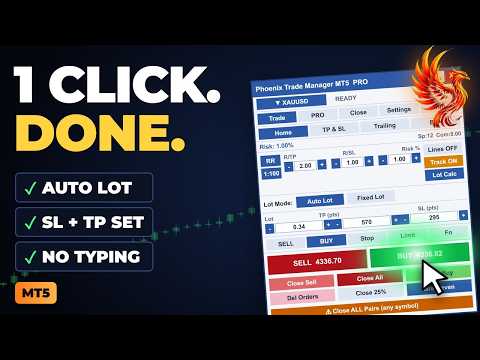
Phoenix Trade Manager is a manual trading assistant for MetaTrader 5. It is an on-chart trade panel that puts order entry, position management, risk control and account protection into one window, so you can manage trades directly from the chart without opening separate dialogs. It is designed for one-click trading, scalping and day trading on any symbol and timeframe.


This is a trade management utility for manual trading. It does not open trades on its own and does not predict the market.


One-Click Trading and Order Entry

  • One-click trading: Buy and Sell at market with your preset lot, Stop Loss and Take Profit.
  • Pending orders: Buy Limit, Sell Limit, Buy Stop and Sell Stop with offset in points or percent.
  • Lot and risk sizing: fixed lot, risk percent of balance, fixed money risk, or automatic lot based on balance and selected leverage.
  • Reward-to-risk Take Profit and Stop Loss, set directly as R multiples.
  • Multiple Take Profit levels (up to 10) with a common Stop Loss or a Stop Loss per level, for partial position scaling.
  • Visual trade lines: drag or click to place entry, Stop Loss and Take Profit lines on the chart before sending the order.
  • Optional virtual Stop Loss and Take Profit, hidden Stop Loss and Take Profit, and OCO handling.


Position Manager and Trade Manager Tools

  • Break Even: move the Stop Loss to entry automatically after a set distance, with an offset.
  • Trailing stop with several methods: fixed points, fractals, moving average, Parabolic SAR, ATR, partial trailing and recent high or low.
  • Close tab: close all, close buys, close sells, close profitable, close losing, or close a percentage of open volume.
  • Auto-close conditions: close all positions when floating profit or loss reaches a set amount.
  • Post-close report showing realized profit and loss, number of trades, wins and losses.


PRO Suite

  • Speed: Fast Mode for instant one-click trading without confirmation, keyboard hotkeys for Buy, Sell, close, lot change and reverse, and optional auto-reverse after a trade closes.
  • Equity Guard (risk manager): daily loss limit and daily profit target in money or percent, with an option to close positions only or close and lock the panel.
  • Spread Monitor: live spread with color-coded status, session high and average, and an optional spread filter that queues an order until the spread drops below your maximum, with a timeout.
  • Candle Timer: large countdown to the close of the current candle, with warning and final-second alerts and a tick-speed meter for market activity.
  • Session Manager: shows Tokyo, London, New York and Overlap sessions on server, local or GMT time, with a kill switch to block new trades or close all at a set time, and an optional session filter.


Interface

  • 5 themes and 11 interface languages.
  • Draggable panel and movable hotkey strip, with saved layout between sessions.
  • Built-in guide for each PRO tool.
  • Works in the Strategy Tester, including visual mode, for practice.


How to use

  1. Attach Phoenix Trade Manager to any chart and allow the panel to load.
  2. On the Trade tab, set your lot or risk, Stop Loss and Take Profit, then click Buy or Sell, or place a pending order.
  3. Use the Close tab to close positions in one click or by percentage, or set auto-close profit and loss levels.
  4. Turn on Break Even and Trailing to manage open trades automatically.
  5. Open the Pro tab to enable Equity Guard, the Spread Monitor, the Candle Timer and the Session Manager.
  6. Open the Settings tab to choose your theme, language and panel options.
    Prodotti consigliati
    Trade Control Panel
    Jerry Jilun Anak Liban
    Trade Control Panel Function Normal One Click Function Close All Close All Profit Close All Loss Close All Pending Order Close All Sell Close All Buy Advance One Click Function 1.  Close Partial Lot Sell by Percent It will help you partial close for all open position by desire percent you wanted. No longer partial close one by one for every open position Manual input for desire percent 2. Close Partial Lot Buy by Percent It will help you partial close for all open position by desire percent
    Clonify PRO MT5
    Andrej Hermann
    5 (1)
    Clonify PRO - Copiatore locale di operazioni per MT5 e MT4            (  Local trade copier for MT4   https://www.mql5.com/ru/market/product/15992   ) Strumento professionale per copiare operazioni tra account MT5 e MT4 (tramite la cartella condivisa "Common"). FUNZIONI: 1. MITTENTE (Sender): Esporta operazioni in tempo reale Invia tutto (senza filtri) Non richiede impostazioni aggiuntive 2. RICEVITORE (Receiver): Copia operazioni. Magic Number: Utilizza l'ID dell'account del mittente (predefini
    Rilevatore di Alto Margine Richiesto (HMR) per MT5 Rileva gli eventi di Alto Margine Richiesto (HMR) di Exness e scegli cosa fare con i tuoi trade aperti. Il Rilevatore HMR è un'utility per MetaTrader 5 progettata per monitorare il tuo conto per le condizioni HMR e rispondere automaticamente in base alle tue impostazioni. Cos'è l'HMR? L'HMR è una condizione legata al margine che si verifica su determinati strumenti in periodi in cui si applicano requisiti di margine più elevati. Con posizioni ap
    https://youtu.be/OKOJXSCGY-4Per2 Trade Manager — Manual Trading Panel for MetaTrader 5 Per2 Trade Manager is a trading utility designed for manual order execution, risk management, and position management directly on MetaTrader 5 charts. The tool helps traders manage their trades through an intuitive on-chart interface. Key Features Place market and pending orders directly from the chart. Set Stop Loss and Take Profit using interactive price lines. Calculate position size based on a predefined m
    Trade Manager JM
    Jonathan Ferreira De Magalhaes
    Efficient Manual Trading Panel for Professional Traders === TRADING SESSIONS DISPLAY & BAR TIMER INCLUDED === Trade Manager JM is a comprehensive, intuitive utility designed to revolutionize manual order execution and management on MetaTrader 5. Built for speed and precision, this panel consolidates everything a serious manual trader needs into a single, sleek interface. Stop wasting precious seconds calculating lot sizes or manually setting SL/TP levels. Trade Manager JM allows you to focus pur
    Trailing Stop Manager MT5 Trailing Stop Manager MT5 is a flexible trade management utility for MetaTrader 5 that automatically moves the Stop Loss as price moves in your favor. It is designed for traders who want to protect profits and manage open positions automatically while keeping control over how and which positions are managed. The manager currently includes two trailing methods: • Standard Trailing Stop • Fractals Trailing Stop It also includes a compact trading panel for opening, managi
    Sessions and News Panel
    Claudiu-georgian Zavera
    Sessions and News Panel An on-chart dashboard that shows the world's trading sessions and the economic calendar in real time, plus an optional News Guard that can protect your account around high-impact news. This is a utility / information panel. It does NOT open trades on its own and it is NOT a signal system. Its only trading action is the optional News Guard, which can cancel pending orders and/or close open positions around scheduled news - and only when you explicitly enable it. -------
    FREE
    Lot Sizer & Dynamic Risk Management Panel for MT5 Take full control of your trading risk with Lot Sizer & Dynamic Risk Management Panel —an essential, high-speed execution utility designed for discretionary traders, prop firm account evaluators, and scalp/intraday traders. Calculating position size manually during fast-moving market sessions (London/New York opens or news releases) leads to execution delays and costly sizing errors. This interactive panel automates your risk management directly
    Gerenciador de ordens manuais
    Rodrigo Oliveira Malaquias
    Robot Manual Order Manager is a tool that allows you to automatically include Stop Loss, Breakeven, Take Profit and partials in open trades. Be it a market order or a limit order. Besides, it automatically conducts your trade, moving your stop or ending trades, according to the parameters you choose. To make your operations more effective, the Manual Orders Manager Robot has several indicators that can be configured to work on your trade. Among the options you can count on the features: Conducti
    Guardian Magic GT
    Carlos Eduardo Rivas Istacuy
    Guardian Magic GT - Risk Management Expert Advisor for MetaTrader 5 PROTECT YOUR TRADING CAPITAL WITH INTELLIGENT RISK MANAGEMENT Guardian Magic GT is a professional-grade Expert Advisor designed to safeguard your trading operations by implementing sophisticated risk control mechanisms. Whether you run a single bot or manage multiple automated trading systems simultaneously, Guardian Magic GT provides real-time monitoring and automatic position management to ensure your account stays within your
    Simple Position Manager
    Mathew Louis Sau Kinminja
    Simple Position Manager is a professional-grade MT5 script designed for efficient trade management. This versatile tool allows traders to quickly apply Take Profit, Stop Loss, and Breakeven settings across multiple open positions with precision and reliability. Key Features Multi-Position Management Apply TP/SL to all open positions of the current symbol simultaneously Intelligent position filtering by symbol Batch modification capabilities Smart Breakeven Technology Automated breakeven tri
    FREE
    TradeDock Pro
    Alex Michael Murray
    TradeDock Pro (MT5) — One-Click Trade Manager Panel TradeDock Pro is a sleek and professional one-click trade panel for MetaTrader 5 designed for fast manual execution and simple trade management. Built for traders who want a clean interface, quick order placement, and essential management tools — without complicated settings or typing. Can be used on any market. KEY FEATURES One-Click BUY / SELL Lot size control on chart (0.01 – 99.99) SL toggle + SL in points TP toggle + TP in points Trailing
    The real‑time view of what is happening inside the market. Footprint Secrets brings detailed analysis directly into MetaTrader 5. It shows where volume is trading, how buyers and sellers are interacting, and how liquidity shifts as the market evolves. Designed for traders who want a precise, real‑time understanding of market behavior. Check out the free preview version here:  https://www.mql5.com/en/market/product/172398 Benefits for the Trader See the real activity behind price . Footprint ch
    Akihiko
    Dragan Drenjanin
    2.5 (2)
    Akihiko is a sophisticated trading robot distinguished by its minimalist user interface, designed to deliver powerful functionality with simplicity at its core. To further enhance its capabilities, I’m excited to announce the release of version 19, a significant update that refines its performance and usability. This robot integrates a versatile strategy, blending multiple options to adapt to diverse market conditions. It employs carefully crafted rules for initiating both long and short positi
    Partial
    Pablo Filipe Soares De Almeida
    Partial Close Manager – Strumento di Regolazione del Volume di Trading Questo strumento consente di chiudere parzialmente le operazioni aperte in MetaTrader 5. Funzionalità Chiusura Parziale: Chiudi parte delle operazioni aperte con un solo clic. Calcolo del Volume: Calcola automaticamente il volume da chiudere, evitando inserimenti manuali. Supporto Multi-Ordine: Applica la chiusura parziale a tutti gli ordini aperti dello stesso simbolo. Tabella Trascinabile: Clicca e tieni premuto l’intestazi
    ALIEN Telegram Master PRO MT5 Advanced Telegram Signal & Trading Account Monitoring System One Expert Advisor. All Charts. Multiple Trading Instruments. Multiple Telegram Channels. Four Languages. ALIEN Telegram Master PRO MT5 is a professional Telegram notification and trading activity monitoring system for MetaTrader 5. The Expert Advisor automatically monitors trading activity, indicator BUY/SELL signals, manual and automated trades, Stop Loss and Take Profit modifications, pending orders, an
    FREE
    THIS PRODUCT CAN NOT BE TEST IN STRATEGY TESTER. PLEASE TRY DEMO VERSION: https://www.mql5.com/en/market/product/58096 RISK AND TRADE MANAGER RISK AND TRADE MANAGER   is an advanced trading panel designed for manual trading.   Utility helps to manage trades effectively and efficiently with a single click. MAIN FEATURES Convert and display Stop Loss (SL)   Pips into % and amount to view the clear picture of the trades if SL hits. Fund allocation for individual trade in % and in amount. Get alert
    Maria Trade Manager MT5
    Murodillo Eshkuvvatov
    Maria Trade Manager è una postazione di trading per chi opera manualmente, direttamente sul tuo grafico MetaTrader 5. Prima che tu clicchi BUY o SELL, il pannello disegna il piano del trade sul grafico: ingresso, zone di stop loss e take profit con l'importo a rischio, il guadagno potenziale e il rapporto rischio/rendimento. Trascina una linea per modificare il piano, poi apri l'ordine con un clic. Una volta aperto il trade, il pannello continua a proteggerlo con breakeven, trailing stop, take p
    PropBlaster Daily Loss Guard - Daily Loss Limit Guard Free risk-management utility that stops you from breaking your daily loss limit. It closes rule-breaking trades, can close everything at the limit, caps trades per day and makes a stop loss mandatory. It never opens a trade. 100 % native MQL5 - no DLLs, no web requests. Quick start 1. Attach the EA to one chart only (any symbol) and allow Algo Trading. It watches the whole account. 2. Set the daily loss limit in % and the server hour at whi
    FREE
    Forget about enabling templates when you launch the window. Auto Template Master Service  is a professional utility tool that runs as a system service in MetaTrader 5, and it will do it for you. Unlike traditional indicators or expert advisors (EAs), the program runs in the background of the entire terminal and doesn't require you to add it to each window individually. As soon as you open a new chart of any instrument (Forex, Stocks, Crypto), the service immediately detects the new window and a
    Top Trade Manager per MT5 - Pannello di controllo delle operazioni, calcolatore della dimensione della posizione e gestore del rischio Top Trade Manager è un gestore di trading completo per MetaTrader 5 : un pannello di controllo, un calcolatore della dimensione della posizione e un gestore del rischio, tutto in uno. Trascina il punto di ingresso, lo stop loss e il take profit sul grafico e la dimensione del lotto, il rischio e il profitto verranno calcolati istantaneamente. Quindi gestisci la
    Easy EA for closing positions with profit or loss. All positions of chart's symbol are counted separately. Settings: TPforSymbol — set profit amount to indicate when to close every positions for the symbol of the chart. Swap and commission are decreasing your profit. SLforSymbol — set SL amount to indicate SL for every positions for the symbol of the chart. Swap and commission are increasing your loss. SLforSyblol is always below/equal zero.
    Lot Architect
    Do Thi Phuong Anh
    Lot Architect — Trade Panel & Risk-Based Position Size Calculator for MT5 Lot Architect is a one-click trade panel and risk-based position size calculator for MetaTrader 5. It works out your exact lot size from the risk you choose, shows risk, reward and risk-to-reward (R:R) before you enter, and places Market, Limit or Stop orders in a single click. In short: position sizing, risk management and fast trade execution in one clean panel on your chart. The problem every trader knows Most accounts
    Synchronizer
    PATRICK PAARSCH
    This Expert Advisor monitors all open positions across all symbols in MetaTrader 5. Whenever a Stop Loss (SL) or Take Profit (TP) is manually set or adjusted on any position, the EA automatically applies that value to all other open positions , regardless of symbol or order type (Buy/Sell). This ensures consistent and synchronized SL and TP levels across your account. Perfect for mobile trading via tablet or smartphone!
    FREE
    EasyClose MT5
    Nina Yermolenko
    5 (1)
    A simple and convenient utility for closing orders. It can close both all orders together as well as buy, sell or pending orders separately. Has an intuitive graphical interface. MT4 version of the utility -  https://www.mql5.com/en/market/product/78601 If you like this utility, take a look at my other products -   https://www.mql5.com/en/users/nina_yermolenko/seller
    FREE
    **Forex Trade Manager Pro MT5** **Trade Manager MT5** è un utility completa per la gestione delle operazioni di trading per MetaTrader 5 che ti offre il controllo totale su ogni aspetto della tua posizione, dal momento in cui pianifichi un'operazione al momento in cui la chiudi. È progettato per i trader che prendono sul serio il rischio, dal principiante che costruisce disciplina allo scalper professionista che necessita di esecuzione immediata su più posizioni. Lo strumento si aggancia a qu
    DTK Scalping Panel
    Thiago Pereira Pinho
    A powerful and intuitive trade management tool designed for scalpers and intraday traders. Created to complement the Nampim Samba Scalper strategy , it allows traders to open, manage, and close positions quickly without leaving the chart.  Key Features: Customizable trading panel – choose position (left, right, center, top, bottom). One-click trading buttons – instantly open Buy/Sell trades with pre-set lot sizes. Close management – close last 1/2/3 trades or all Buy/Sell positions with one clic
    MetaTrader 5 Trade Manager — Virtual SL/TP, OCO Orders, Multi-Position TheMegathron Trade Manager Professional Trade Execution and Risk Management Panel for MetaTrader 5 ================================================================================ OVERVIEW -------- TheMegathron Trade Manager is a trade execution panel I built out of necessity. Most panels on the market either do too little or bury the useful features behind complicated menus. This one is designed to get out of your way —
    Your account on your phone: push notifications for equity drops, low margin, trades without a stop, Algo Trading switched off, lost connection, every trade and a daily summary. Running EAs on a VPS, or leaving a manual trade open while you are away? Ballast Account Alerts watches the whole account and tells your phone (MT5 mobile app push), the terminal (alert) or your e-mail. Alarms Equity down X% since the start of the day (default 5%), or below a fixed amount. Margin level below X% (default 2
    momentumFX99 – Profesionálny manuálny mriežkový a exekučný panel momentumFX99 je vysokorýchlostný panel pre manuálne obchodovanie s jedným kliknutím určený pre obchodníkov, ktorí chcú okamžite vykonávať presné mriežky čakajúcich objednávok. Namiesto manuálneho výpočtu a zadávania viacerých objednávok počas rýchlych pohybov na trhu vám tento nástroj umožňuje nasadiť plne chránenú 5-úrovňovú trendovú mriežku jediným kliknutím. Dáva vám plnú kontrolu nad vašou realizáciou, čo vám umožňuje zachytiť
    Gli utenti di questo prodotto hanno anche acquistato
    FarmedHedge Pair Trading Dashboard
    Tanapisit Tepawarapruek
    5 (7)
    Farmed Hedge Yield Farming | All Markets (Manual - Hybrid - Semi/Automated EA) VERIFIED TRADING RESULTS - Farmed Hedge Yield Axi Copy:  https://www.mql5.com/en/signals/2356376 - Farmed Hedge Yield Exn Copy:   https://www.mql5.com/en/signals/2356404 - Farmed Hedge Yield V Copy:  https://www.mql5.com/en/signals/2357156 IMPORTANT NOTICE: FarmedHedge is a MANUAL-FOCUSED TRADING UTILITY ,not a fully automated EA. Results shown on this Signal include manual trades and overall strategic management.
    EA Overfitter
    Stephen J Martret
    5 (5)
    That backtest looks great. But will it still be making money tomorrow, next week, next month? EA Overfitter re-runs your EA on 100 price histories it has never seen. One score tells you if the edge is real. A backtest tells you what an EA did on one price history — the one that happened to occur. What you cannot tell from it is how much of that result was the strategy and how much was the particular path. EA Overfitter answers that. It builds up to 100 synthetic price histories your EA has n
    AI Agents Supervisor
    Ho Tuan Thang
    5 (1)
    AI Agent Supervisor is NOT an Expert Advisor. AI Agent Supervisor   is a   multi-agent AI risk & portfolio supervisor   that watches every EA on your account and intervenes in real time.  WANT AN AI PORTFOLIO MANAGER WATCHING YOUR FLEET 24/7?   Run your fleet on the same brokers I do:   IC MARKETS , IC TRADING   .  Unlike the centralized stock market, Forex has no single, unified price feed.  Every broker sources liquidity from different providers, creating unique data streams. The Supervisor r
    ================================================================================ POC BREAKOUT - V20.72. Full Professional Grade Toolkit ================================================================================ POC Breakout is a full MetaTrader 5 trading dashboard for discretionary traders who want breakout signals, Point of Control (POC) context, volume profiles, order flow, market structure, news, alerts, and advanced trade planning in one professional workspace. Attached directly to you
    Unlimited Trade Copier Pro MT5 is a tool to copy trade remotely to multiple MT4, MT5 and cTrader accounts at different computers/locations over internet. This is an ideal solution for you if you are a signal provider and want to copy your trades to other receivers globally on your own rules. One provider can copy trades to multiple receivers and one receiver can get trade from multiple providers as well. The provider can even set the subscription expiry for each receiver, so that receiver will n
    News Trade EA MT5
    Konstantin Kulikov
    4.55 (11)
    Presento un utile robot che io stesso utilizzo da diversi anni. Questo robot può essere utilizzato sia in modalità semiautomatica che completamente automatica. >>> Chat <<< Il programma contiene le impostazioni flessibili per fare trading sulle notizie del calendario economico. Non può essere verificato nel tester delle strategie. Soltanto il vero lavoro. Scarica l'ultimo archivio di impostazioni: https://www.mql5.com/en/blogs/post/747929 Monitoraggio dei segnali: https://www.mql5.com/en/signa
    The product will copy all telegram signal to MT5 ( which you are member) , also it can work as remote copier.  Easy to set up, copy order instant, can work with almost signal formats, image signal,  s upport to translate other language to English Work with all type of channel or group, even channel have "Restrict Saving Content", work with  multi channel, multi MT5 Work as remote copier: with signal have ticket number, it will copy exactly via ticket number. Support to backtest signal. How to s
    REVDEN AI Desk: gestisci il tuo trading da un'unica conversazione con la tua IA, sul contesto di mercato di REVDEN Immagina di gestire il tuo trading da un'unica conversazione. REVDEN AI Desk la porta in MetaTrader 5: chiedi alla tua IA come legge il mercato, e lei risponde dal contesto completo di REVDEN sui simboli che operi, con il loro stato, il loro quadro di rischio e le pubblicazioni in arrivo. Le sue proposte arrivano con ingresso, stop, target e rischio, e tu approvi quelle che ti convi
    EA Auditor
    Stephen J Martret
    5 (7)
    EA Auditor is an independent analysis tool for traders evaluating Expert Advisors and trading signals on MetaTrader 5. It audits backtest reports, reviews posted developer signals, and cross-verifies the two against each other to help traders assess strategies before committing capital. The MQL5 market offers a wide range of Expert Advisors from many developers, with varying approaches, quality, and transparency. EA Auditor provides a consistent, data-driven framework for reviewing them, answer
    GRat Crypto
    Ivan Titov
    4.5 (2)
    Trade on crypto exchanges in MT5 with no limits! GRat_Crypto is a tool for manual and automated trading , including ANY available EA, ANY  cryptocurrency  on most popular crypto exchanges in the familiar MT5 environment 24/7. Features 1. ALL instruments of the 9 most popular crypto exchanges are available: Binance, BingX, Bybit, Coinbase, CoinEx, Kraken,   KuCoin, MEXC and OKX . 2. The ability to place ANY type of order available in MT5, both market and pending, to modify orders and positions,
    RETAILBERG FOOTPRINT CHART PRO — Order-Flow Workspace for MetaTrader 5 Version 7.00  |  Professional System  |  31 tools  |  One chart A full 150-page illustrated User Manual is included. Please read the full manual to understand this feature packed footprint chart elements and ui. https://www.mql5.com/en/blogs/post/777982 DEMO / STRATEGY TESTER — PLEASE READ FIRST
    Strategy Builder offers an incredible amount of functionality. It combines a trade panel with configurable automation (covert indicators into an EA), real-time statistics (profit & draw down) plus automatic optimization of SL, TP/exit, trading hours, indicator inputs. Multiple indicators can be combined into an single alert/trade signal and can include custom indicators, even if just have ex4 file or purchased from Market. The system is easily configured via a CONFIG button and associated pop-u
    Bots Builder Pro MT5
    Andrey Barinov
    4.17 (6)
    This is exactly what the name says. Visual strategy builder . One of a kind. Turn your trading strategies and ideas into Expert Advisors without writing single line of code. Generate mql source code files with a few clicks and get your fully functional Expert Advisors, which are ready for live execution, strategy tester and cloud optimization. There are very few options for those who have no programming skills and can not create their trading solutions in the MQL language. Now, with Bots Builde
    The Patch
    Mian Rameez Ali
    The Patch It never opens a trade. It walks behind the ones that did. Every open position, every pending order — checked twice a second for the one thing that's easy to forget: a stop, a target. Found bare, it doesn't ask. It writes the missing number in, measured in points from wherever the position began, and moves on to the next. No strategy, no opinion on direction. Just the quiet assumption that nothing should ever sit on the market unprotected — not because someone decided it shouldn't,
    YuClusters
    Yury Kulikov
    4.93 (43)
    Attention: You can view the program operation in the free version  YuClusters DEMO .  YuClusters is a professional market analysis system. The trader has unique opportunities to analyze the flow of orders, trade volumes, price movements using various charts, profiles, indicators, and graphical objects. YuClusters operates on data based on Time&Sales or ticks information, depending on what is available in the quotes of a financial instrument. YuClusters allows you to build graphs by combining da
    MT5 Trading Deck
    Manuel Michiels
    5 (2)
    One button. One trade. MT5 Trading Deck is a hotkey trading panel for MetaTrader 5 that turns the platform into a keyboard-driven execution cockpit. Stop loss, take profit and lot size are pre-calculated for every key; the moment you press, a market order is live on the broker. A complete technical user manual is attached in the product Comments section. It documents every input parameter, the full hotkey map, the recommended Stream Deck XL layout, and the advanced workflows for Pre-Limit orders
    Floor Watch
    Syed Tauqeer Hussain Shah
    Floor Watch One number, watched every thirty seconds: how far equity has fallen since the day began — or since its highest point, if it's told to trail the peak instead of the open. Cross the line and it doesn't argue. Every open position closes, every pending order vanishes, and anything that slips through afterward gets shut the moment it appears. Not asked. Removed. The floor holds until the clock turns 5 AM Pakistan time — then, and only then, does the day start over. One rule. No except
    FUTURES ORDERFLOW FOOTPRINT CHART Professional OrderFlow EA for MetaTrader 5 Version 1.01| Professional tool for real traders | Institutional-Grade Visualization STRATEGY TESTER USERS - PLEASE SELECT EVERY REAL TICK WHEN TESTING AND YOU HAVE DOWNLOADED HISTORICAL DATA. IF YOU SEE A WAITING SCREEN AND IT IS NOT DOWNLOADING, IT MEANS YOU HAVE LOW HISTORICAL DATA. TRY 1 MIN AND 5 MIN FIRST ON 1 DAY DATA. ONE DAY DATA SHOULD BE THE NEWEST AND MOST CURRENT DATE. PLEASE WAIT UNTIL THE MARKET HAS ROL
    The product will copy all  Discord  signal   to MT5   ( which you are member  ) , also it can work as remote copier.  Easy to set up. Work with almost signal formats, support to translate other language to English Work with multi channel, multi MT5. Work with Image signal. Copy order instant, auto detect symbol. Work as remote copier: with signal have ticket number, it will copy exactly via ticket number. How to setup and guide: Let read all details about setup and download Discord To MetaTrader
    EasyInsight AIO MT5
    Alain Verleyen
    4.92 (12)
    EASY Insight AIO – La soluzione all-in-one per un trading intelligente e senza sforzo Panoramica Immagina di poter analizzare l’intero mercato — Forex, Oro, Cripto, Indici e persino Azioni — in pochi secondi, senza dover controllare manualmente i grafici, installare indicatori o affrontare configurazioni complicate. EASY Insight AIO è il tuo strumento definitivo di esportazione per il trading alimentato dall’IA, pronto all’uso. Offre una panoramica completa del mercato in un unico file CSV pul
    Un solo acquisto. Tutti i miei indicatori per MT4 e MT5, disponibili oggi e pubblicati in futuro, senza costi aggiuntivi. Dopo l’acquisto, contattami per sapere come riceverli. È previsto un aumento di 50$ ogni 10 acquisti, fino a 999$. Si applica il prezzo del Market al momento del pagamento. Mantieni l’indicatore di cui ti fidi. Automatizza il lavoro che lo circonda. Il tuo segnale. Le tue regole. La tua esecuzione. Hai già un indicatore MT5 su cui fai affidamento, ma devi ancora sorvegliare
    Ultimate Extractor
    Clifton Creath
    5 (7)
    Ultimate Extractor - Professional Trading Analytics for MT5 *****this is the local HTML version of Ultimate Extractor. !!!!!it is not compatible with Cloud!!!! For the online version please reach out to me directly****** Ultimate EA manager also now available when you use cloud pro and above for free!! Ultimate Extractor transforms your MetaTrader 5 trading history into actionable insights with comprehensive analytics, interactive charts, and real-time performance tracking. What It Does Automa
    Master Your Trading Discipline   Stop losing your hard-earned gains to overtrading and emotional decisions. The Discipline Tool is your ultimate trading assistant, ensuring strict risk management in real-time. Key Protection Features: Advanced Drawdown Defense : Automatically halts trading if your daily drawdown exceeds a preset threshold (percentage or dollar amount). Real-Time Equity Lock : Safeguard profits by referencing peak equity, ensuring drawdown stays within control. Hard Profit Target

    Titan Machinist - Your Professional Management System for MetaTrader                                                                                                                                 Transform Your Trading with Automated Position Management Tired of having to manually manage every single trade? Titan Machinist is the ultimate solution to automate your trade management, allowing you to trade like a true professional. Suitable for any trading technique: one s
    Trading Chaos Expert
    Hennadii Stanilevych
    5 (11)
    This software has no equals in the world and represents a universal trade "console" covering trading signals, automated market entry, setting of Stop Loss and Take Profit, as well as Trailing Profit for multiple trades at the same time in a single open window. Intuitive control of the Expert Advisor in "three clicks" ensures a comprehensive use of all its functions on different computers, including tablets PCs. Interacting with additional signal indicators that mark the chart to give a real mark
    Dealer Panel
    Mian Rameez Ali
    Dealer's Panel No signal decides anything here — a hand does. One click, and the panel calculates what's underneath: lot size from risk, target from a 30-step balance ladder that remembers exactly how far an account has climbed. Toggle between market and pending without touching an input field. Set a stop, and the take-profit can write itself — a fixed share of the balance, translated into price with no arithmetic left for the trader to get wrong. One trade live at a time; it won't let a seco
    Copy your MT5 trades to Interactive Brokers You keep using MT5. Every order you open or close is sent to your IB account. In real time. No coding. No changes to your strategy or EA. Try it first Rent 1 month: $30. Test on a live or paper account. What it does Real-time copying: same direction, reverse, or one side only. Map any MT5 symbol to any IB symbol. Set a lot ratio for each. Forex, Futures, Stocks, CFDs, Metals and Crypto. Position sync: both accounts checked, any difference fixed. Optio
    Quant AI Agents
    Ho Tuan Thang
    5 (1)
    Quant AI Agents are independent trading Expert Advisors. Instead of trading using a fixed strategy like other conventional EAs, Quant AI Agents   is a   multi-agent AI trading framework   that turns natural-language strategy prompts into live.  WANT THE SAME RESULTS AS MY LIVE SIGNAL?   Use the exact same brokers I do:   IC MARKETS , IC TRADING   .  Unlike the centralized stock market, Forex has no single, unified price feed.  Every broker sources liquidity from different providers, creating un
    EA Slipstream
    Stephen J Martret
    5 (1)
    Your backtest filled every order at the price it asked for. Your account does not. EA Slipstream measures what execution costs your EA, using your own fills, slippages and spreads to show you the true performance of your EA. A backtest prices every trade at the level the EA named. In live trading a pending order fills at whatever price is available when it triggers, a stop closes wherever the market is when it is hit, and the spread at that moment is whatever the account was quoting. The differ
    Global Investing FX Terminal
    Santiago Nicolas Pla Casuriaga
    5 (1)
    Il Global Investing FX Terminal è una dashboard FX tutto-in-uno per MetaTrader 5 — tassi di politica monetaria delle banche centrali, posizionamento COT del CFTC, ranking carry, sorprese economiche, skew delle opzioni, sentiment retail e correlazioni, tredici pannelli in totale — resa su un singolo overlay canvas privo di sfarfallio e aggiornata ogni 10 secondi da un singolo EA allegato. Nessun software esterno richiesto. L'analisi FX professionale richiede accesso simultaneo a dati che normalme
    Altri dall’autore
    Black Thunder EA MT5
    Mohamed Samsudeen
    3.67 (3)
    NO GRID, NO MARTINGALE $539 instead of $1499. 10 copies left at this price Backtest recommended broker: IC Market BLACK THUNDER is a fully automated Expert Advisor for Meta Trader 5. It applies a breakout scalping method on XAUUSD, placing Buy Stop and Sell Stop pending orders when its entry conditions are met. The Expert Advisor does not use grid, martingale, averaging or recovery techniques. Every position is opened with a Stop Loss, and a trailing stop adjusts the stop level as price moves
    Moon Rider EA MT5
    Mohamed Samsudeen
    5 (1)
    $229 instead of $949. 10 copies left at this price NO GRID, NO MARTINGALE INSTALLATION GUIDE Moon Rider — MT5 Expert Advisor Moon Rider is an automated MT5 Expert Advisor designed primarily for XAUUSD (Gold) using an advanced breakout-based trading approach. The EA combines breakout analysis with automated risk, money and trade management. It is designed for traders who want a systematic automated approach without the need for constant manual intervention. LIVE SIGNAL Installation guidance,
    Advance AI Scanner
    Mohamed Samsudeen
    5 (1)
    Advance AI Scanner is a multi-symbol analysis indicator for MetaTrader 5. It scans Forex pairs, metals, energy, stock indices and cryptocurrencies at the same time and rates each instrument with its own self-training model. It explains in plain English what moved each market and why, and it estimates how far upcoming economic news usually moves each symbol, measured on your broker's own price history. $199 instead of $499. 10 copies left at this price. One time purchase  Installation and User
    Prop Firm Trade Manager MT5  Managing risk and staying compliant with strict evaluation rules requires absolute precision. The Prop Firm Trade Manager MT5 is a professional trading panel MT5 designed to streamline your manual execution, automate complex calculations, and protect your funding account from rule violations. Click for USER GUIDE Featuring mt5 advanced dashboards, this tool displays real-time data directly on your main chart. It functions as an all-in-one trade manager for mt5, com
    Multi-Strategy Scanner is a technical indicator for MetaTrader 5. It monitors multiple technical analysis methods and displays signal indications based on user-defined configurations. This product does not execute trades or manage positions. Included Analysis MethodsThe indicator evaluates the following methods: Trend Pullback Liquidity Sweep Breakout and Retest Asian Range Breakout VWAP Reversal Opening Range Breakout (ORB) Bollinger Band Squeeze Fibonacci Pullback Supply and Demand Volatility


    Copy trades between MT4 multi accounts and MT5  multi accounts  on the same computer — instantly, reliably, completely offline. Trade once on the Master account and up to 100 Receiver accounts follow in about 5–10 ms speed. No internet bridge, no cloud service, no DLLs, no complicated setup. One EA does everything: attach it to a chart, choose Master or Receiver, and you are done. USER GUIDE  The same guide is also available for MT4 How to Install Two or More MetaTrader 5 (MT5) Terminals on On
    Copy trades between MT5 multi accounts and MT4  multi accounts  on the same computer — instantly, reliably, completely offline. Trade once on the Master account and up to 100 Receiver accounts follow in about 5–10 ms speed. No internet bridge, no cloud service, no DLLs, no complicated setup. One EA does everything: attach it to a chart, choose Master or Receiver, and you are done. USER GUIDE How to Install Two or More MetaTrader 5 (MT5) Terminals on One Windows PC? To copy trades between MT5
    Filtro:
    Nessuna recensione
    Rispondi alla recensione