TrendlineEA Pro

5

Trendline PRO MT5

Trendline PRO MT5는 사용자가 만든 추세선과 차트 레벨을 기준으로 거래를 실행하고, 포지션을 관리하거나 알림을 보내는 MetaTrader 5용 반자동 Expert Advisor입니다.

이 Expert Advisor는 거래 신호를 생성하지 않으며 내장 거래 전략을 포함하지 않습니다. 모든 진입, 청산, 리스크 설정, 관리 규칙은 사용자가 차트에서 정의합니다. 이 제품은 자신의 분석에서 이미 추세선, 돌파 레벨, 지지와 저항, 계획된 가격 구역을 사용하는 트레이더를 위해 설계되었습니다.

기존 Trendline EA MT5와 비교하면 PRO 버전은 시각적 차트 패널, 인터랙티브 TP 및 SL 구역, OCO 진입 페어, 라인별 거래량, auto-breakeven, trailing stop, 차트 저장 유지, hedging 및 netting 계좌에 대한 향상된 지원을 추가합니다.

기능 개요

시각적 거래 계획

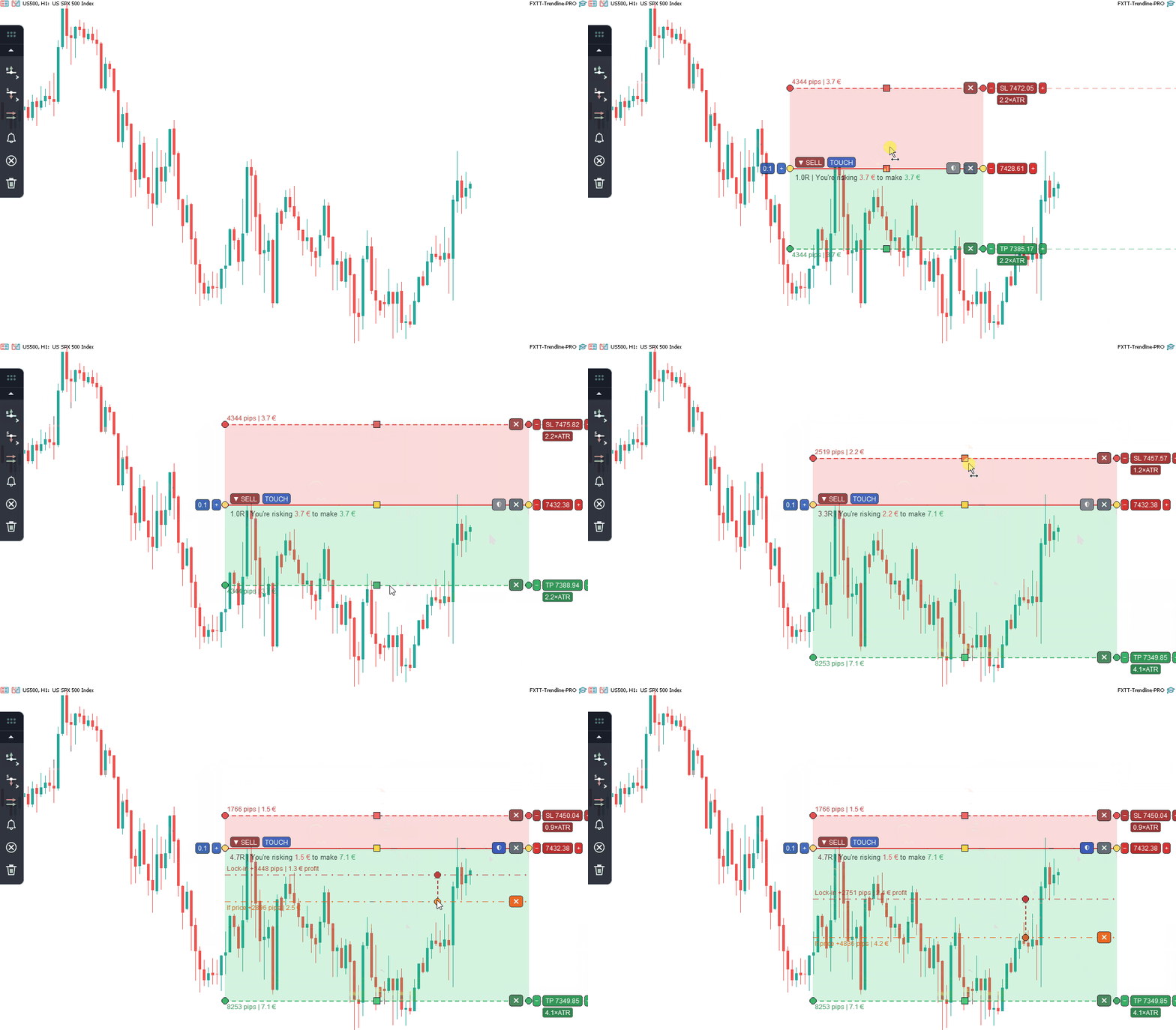
  • 차트 패널에서 진입, 돌파, OCO, 청산, 알림 라인 추가
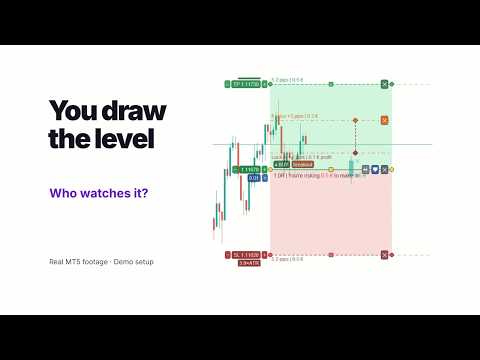
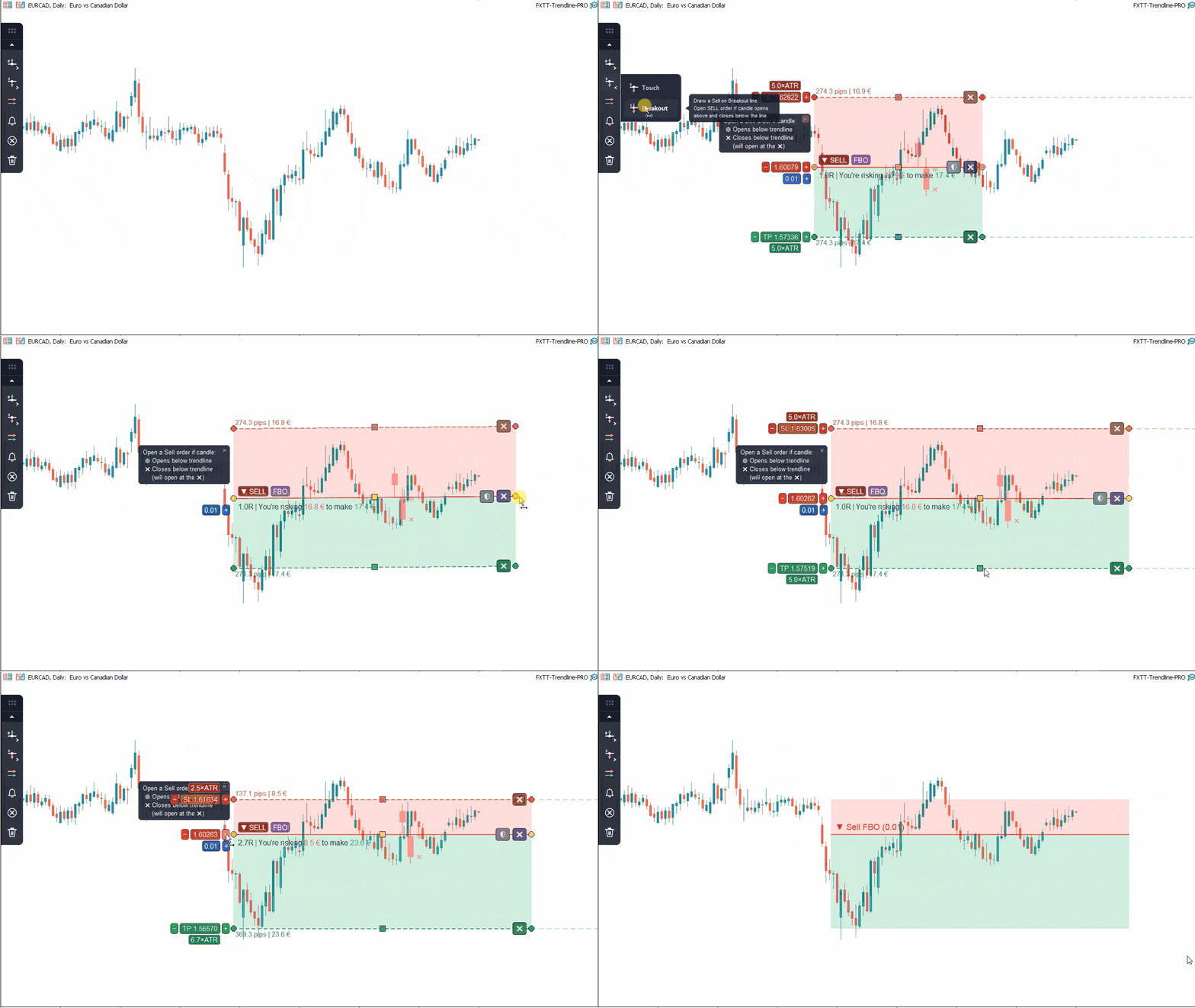
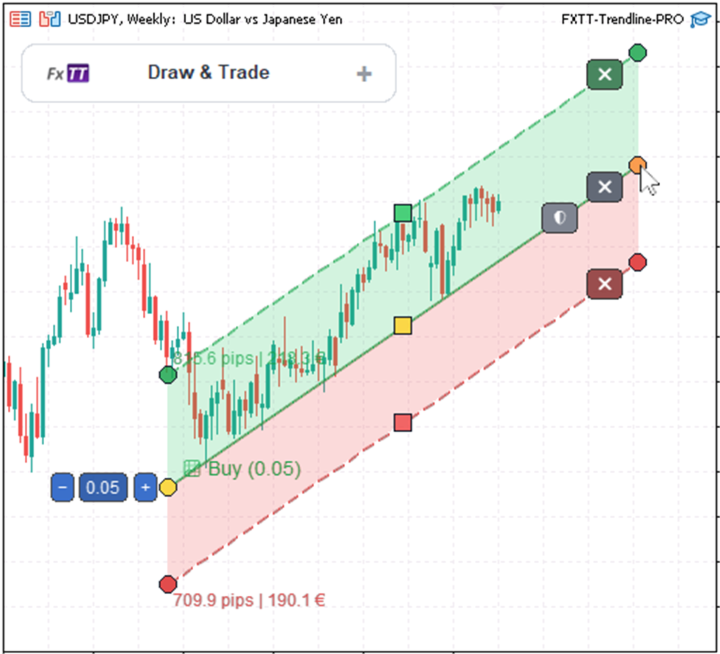
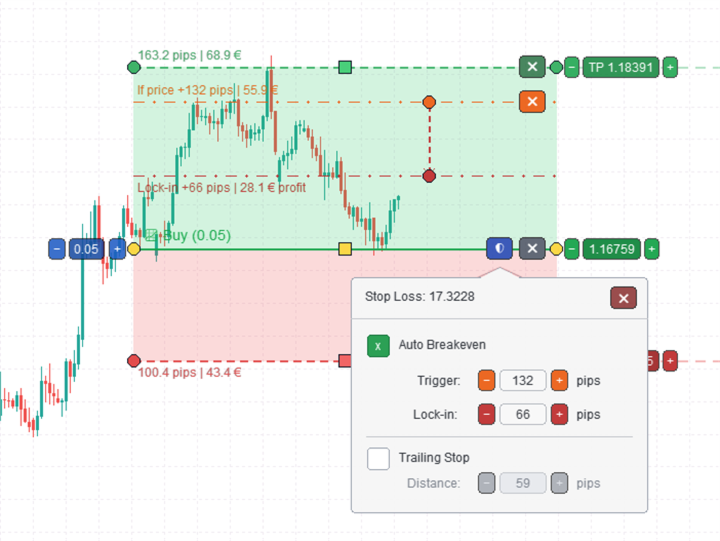
  • take-profit 및 stop-loss 구역을 차트에 직접 배치
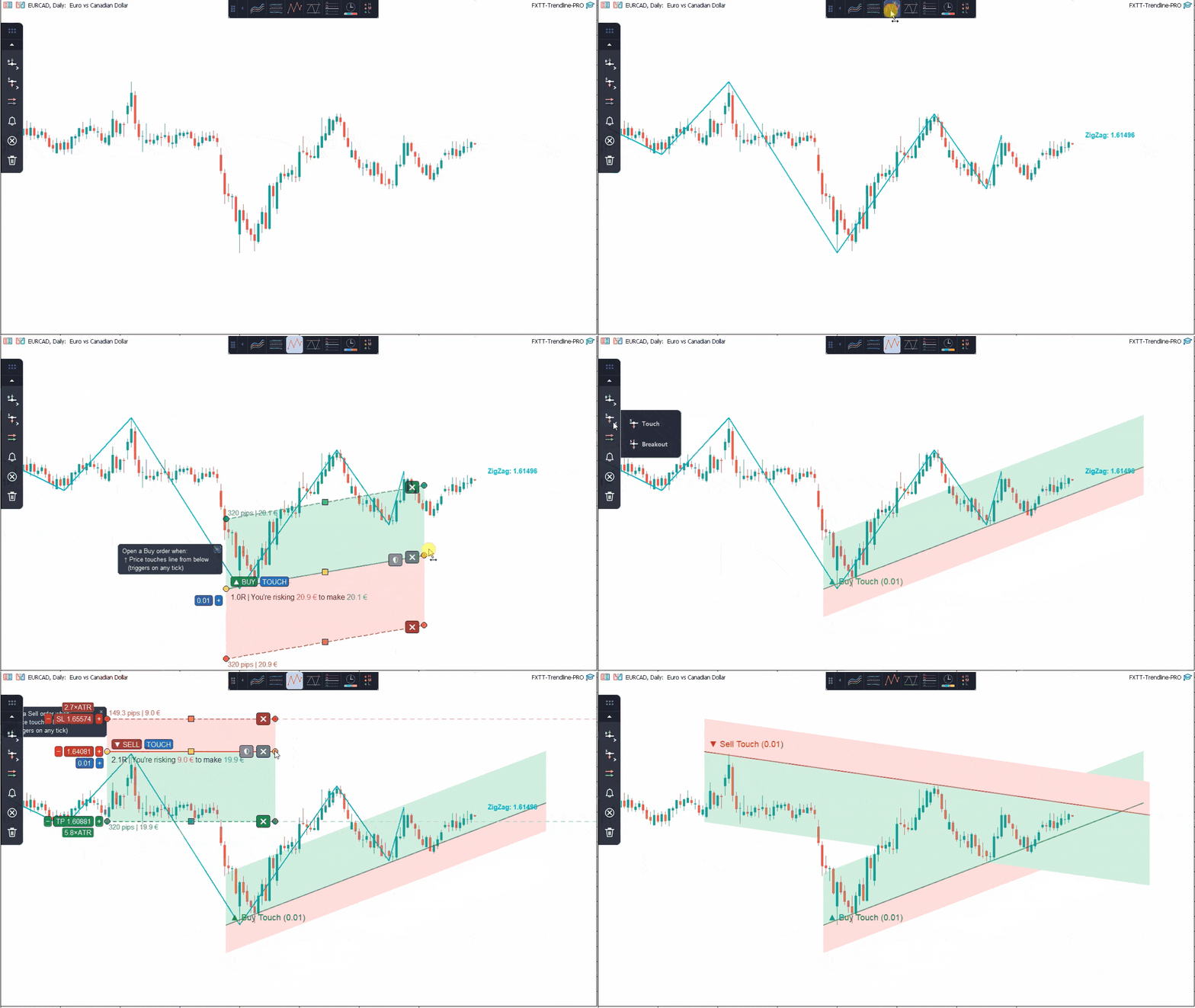
  • 수평 또는 기울어진 TP 및 SL 구역 사용
  • 라인별로 거래량, TP, SL, auto-breakeven, trailing stop 설정
  • 거래가 열리기 전에 pip 거리와 계좌 통화 기준 가치를 확인
  • 차트 재로드, 템플릿 저장, Strategy Tester 시각 모드 이후 라인 저장 및 복원

주문 실행

  • 가격이 사용자가 정의한 라인에 도달하면 buy 또는 sell 포지션 열기
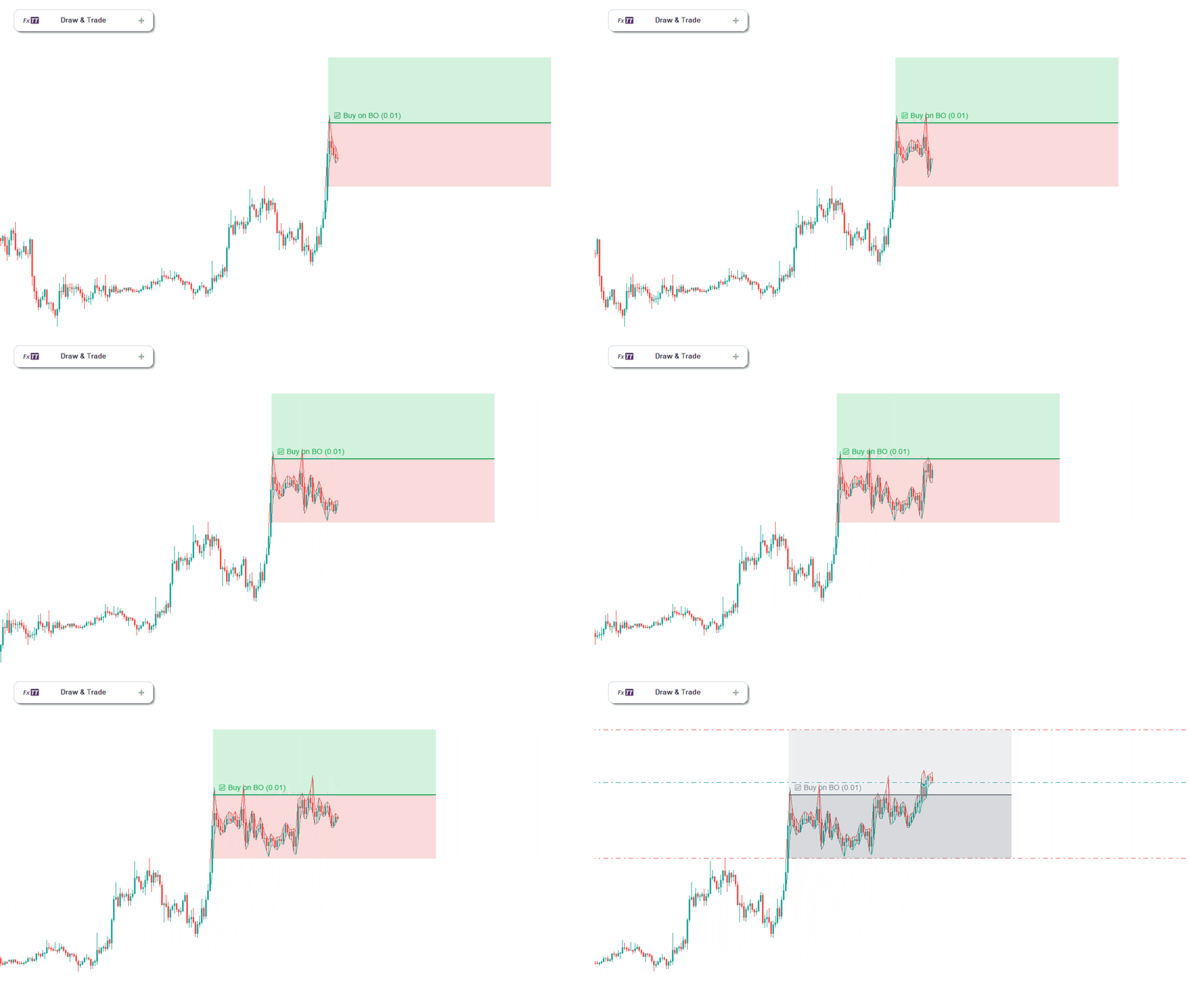
  • 마감된 캔들 몸통으로 돌파 진입 확인
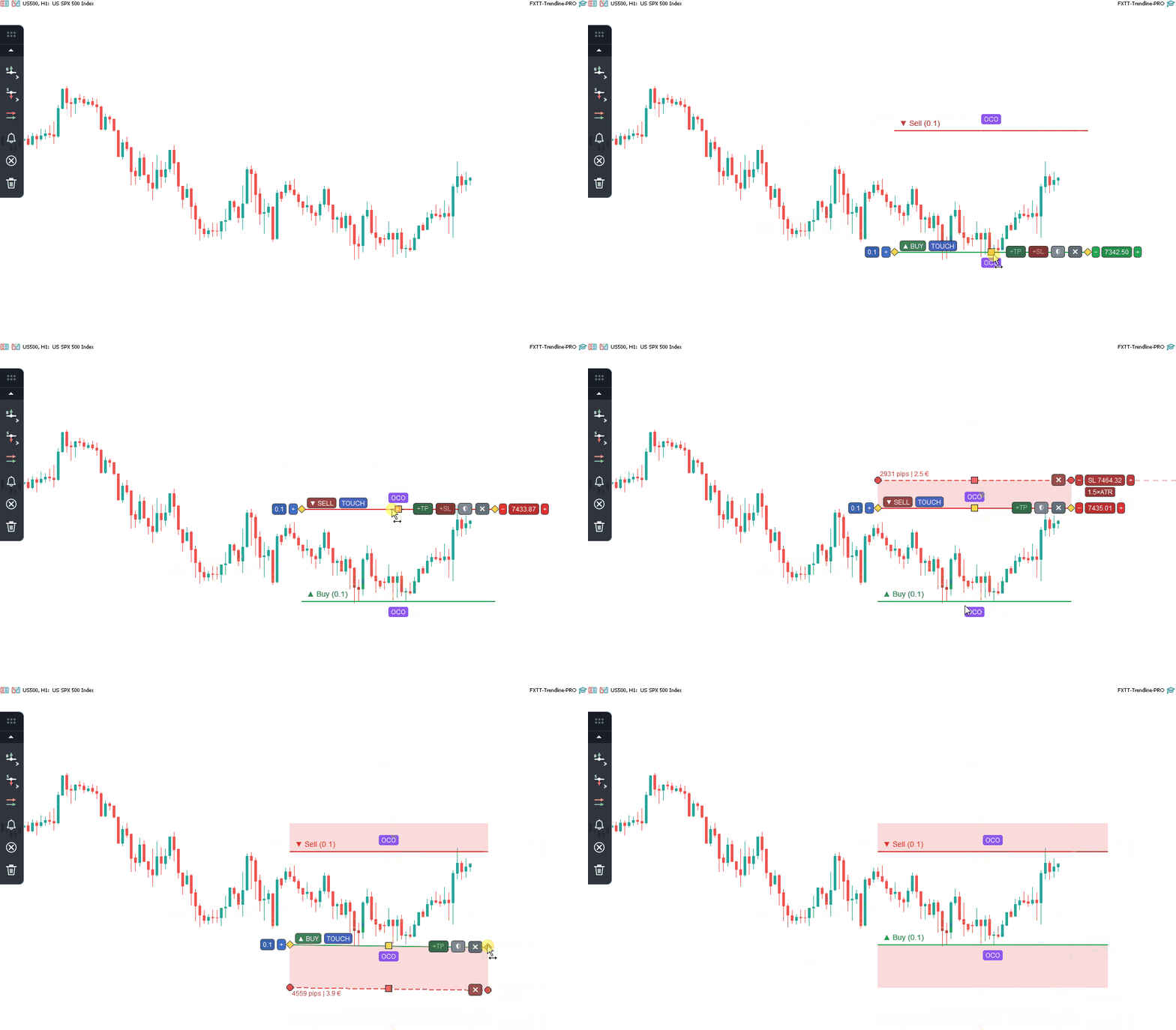
  • OCO 페어를 사용하여 한쪽이 열리면 반대쪽 연결 진입 라인을 비활성화
  • 심볼의 최소, 최대, 거래량 스텝을 준수하며 라인별 거래량 적용
  • 주문 배치 전에 최대 스프레드와 마진 확인
  • SL, TP 및 보호 규칙 적용 시 브로커 stop level 및 freeze level 준수

거래 관리

  • 청산 라인에서 일치하는 모든 포지션 닫기
  • 청산 라인에서 부분 거래량 닫기
  • 설정된 트리거 거리 이후 stop loss를 breakeven으로 이동
  • auto-breakeven 적용 시 설정 가능한 pip 수 잠금
  • 가격이 수익 방향으로 움직일 때 stop loss 추적
  • hedging 및 netting 계좌 모두 지원

알림 및 수동 워크플로

  • 거래를 열거나 닫지 않고 알림 라인 사용
  • MT5 팝업 알림, 터미널 사운드, Journal 메시지 수신
  • MetaTrader 터미널에서 활성화된 경우 모바일 push 알림 수신
  • EA 입력에서 거래 주문을 비활성화하여 제품을 추세선 알림 도구로 실행

AI 에이전트 제어

  • Claude Desktop, Claude Code 또는 Codex는 터미널의 Common Files 폴더에 있는 로컬 파일 메일박스를 통해 Trendline PRO 라인을 다룰 수 있습니다. 이 기능에서 EA는 DLL을 사용하지 않고 네트워크 요청도 보내지 않습니다.
  • 기본값은 꺼짐입니다. 입력 파라미터 "File mailbox access level"에서 Read only, Alert lines only 또는 Full을 선택합니다.
  • Read only에서는 에이전트가 라인 목록과 시세, 가격 이력, 스윙 포인트를 읽고, 잔고, 자산, 증거금, 보유 포지션, 대기 주문을 보여 주는 읽기 전용 계좌 개요도 읽을 수 있습니다.
  • Alert lines only에서는 알림 라인을 추가, 변경, 삭제할 수도 있습니다.
  • Full에서는 모든 Trendline PRO 라인을 추가, 변경, 삭제할 수 있습니다. 에이전트가 추가한 진입 라인은 직접 그린 라인과 같은 규칙으로 거래를 열 수 있습니다.
  • 에이전트는 포지션을 직접 열거나 닫거나 수정하지 않으며, 계좌 개요도 계좌의 어떤 것도 바꾸지 않습니다.
  • AI 클라이언트를 연결하려면 무료 Trendline PRO 에이전트 컴패니언이 필요합니다. Windows 10 또는 11과 Node.js 18 이상에서 작동합니다. MQL5 개인 메시지로 요청하세요.
  • 에이전트 제어는 Strategy Tester에서 작동하지 않습니다.

기본 사용법

  1. Trendline PRO MT5를 차트에 적용
  2. 시각적 패널에서 필요한 라인 유형 선택
  3. 라인을 필요한 가격 레벨로 이동
  4. 필요하면 거래량, TP 구역, SL 구역, breakeven 또는 trailing stop 설정
  5. 알림만 사용하거나 거래 주문 실행 허용
  6. Expert Advisor가 가격을 모니터링하고 조건이 충족되면 설정된 규칙을 적용

라인 유형

진입 라인

  • 터치 시 buy
  • 터치 시 sell
  • 마감 캔들로 확인된 돌파 시 buy
  • 마감 캔들로 확인된 돌파 시 sell
  • 연결된 OCO buy 및 sell 페어

포지션 관리 라인

  • 일치하는 모든 포지션 닫기
  • 부분 거래량 닫기
  • 진입 라인 설정에서 auto-breakeven 적용
  • 진입 라인 설정에서 trailing stop 적용

알림 라인

  • 가격이 라인을 교차할 때 알림
  • 알림 라인은 주문을 열거나 닫지 않음

심볼 및 계좌 호환성

Trendline PRO MT5는 MetaTrader 5가 지원하고 브로커가 허용하는 모든 심볼과 timeframe에서 사용할 수 있으며, forex, metals, indices, commodities를 포함합니다. 각 차트 인스턴스는 독립적입니다. 주문 실행은 브로커 권한, 스프레드, 마진, 심볼 거래 규칙, 플랫폼 연결의 영향을 받습니다.

입력 파라미터

  • 거래 주문 허용 또는 차단
  • 최대 허용 스프레드
  • EA 거래 식별용 Magic number
  • 새 라인의 기본 lot size
  • 포인트 단위 가격 버튼 스텝
  • 드래그 핸들 크기 및 클릭 민감도
  • 다시 그리기 간격
  • 패널 위치 및 DPI scale
  • 드래그한 패널 위치 저장
  • Journal로 보내는 Debug messages

Strategy Tester 참고

Trendline PRO MT5는 차트에 이미 존재하는 라인을 평가합니다. Strategy Tester 사용 시 필요한 라인을 미리 그리고 차트 템플릿에 저장한 뒤 시각 모드에서 테스트를 실행하십시오. 테스트가 라인 없는 빈 차트에서 시작되면 거래 또는 알림 동작이 트리거되지 않습니다.

자주 묻는 질문

Expert Advisor가 자동으로 거래하나요?
아니요. 사용자가 차트에서 설정한 동작만 실행합니다.

거래 신호를 생성하나요?
아니요. 내장 전략은 없습니다. 모든 setup은 사용자가 정의합니다.

알림 전용으로 사용할 수 있나요?
예. EA 입력에서 거래 주문을 차단할 수 있으며, 알림 라인은 계속 작동합니다.

OCO란 무엇인가요?
OCO는 One-Cancels-Other를 의미합니다. 연결된 진입 라인 하나가 거래를 열면 반대쪽 연결 라인이 비활성화됩니다.

hedging 및 netting 계좌를 지원하나요?
예. 두 계좌 유형 모두 지원됩니다.

모든 심볼과 timeframes와 호환되나요?
브로커가 지원하는 모든 MetaTrader 5 심볼과 timeframe에서 실행할 수 있으며, 브로커 거래 규칙의 적용을 받습니다.

VPS가 필요한가요?
VPS는 선택 사항이며 사용자의 실행 및 모니터링 요구에 따라 달라집니다.

지원은 어떻게 받나요?
지원은 MQL5 제품 댓글과 MQL5 메시지를 통해 영어와 스페인어로 제공됩니다.

중요 참고 사항

  • 이것은 반자동 실행 및 알림 도구입니다
  • 거래 전략 또는 신호 서비스는 포함되지 않습니다
  • 주문 실행을 위해 MetaTrader 5 Algo Trading이 활성화되어야 합니다
  • 주문 실행을 위해 EA 입력에서 거래 주문이 허용되어야 합니다
  • 알림 라인은 포지션을 열거나 닫지 않습니다
  • 거래 결과는 사용자 설정, 시장 조건, 브로커 규칙, 스프레드, 연결, 실행 품질에 따라 달라집니다
  • 실거래 전 demo account에서 테스트를 권장합니다
리뷰 1
Pedrojoserascon
61
Pedrojoserascon 2026.09.27 17:25 

He comprado recientemente este producto y cubre mis necesidades operativas. Las dudas que he tenido una vez instalado el producto me han sido resueltas por Carlos a la mayor brevedad, su asistencia excelente. Además me ha pedido posibles mejoras para el producto, lo que demuestra que está comprometido con este EA que vende. Sería de agradecer que fuese mejorando con las opiniones de los usuarios. Es un EA que está un paso más de los que trabajan con líneas y fractales porque permite filtrar muchas falsas rupturas...a la larga supone ahorro de operaciones fallidas. Siempre he utilizado ea´s que trabajan con líneas e indudablemente me quedo con este. Además es importante la relación calidad-precio. Gracias, Carlos sigue por este camino.

추천 제품
RRtoolBox
David Ruiz Moreno
RRtoolbox - Professional Tools: Risk:Reward Trading Tool (SL/TP Horizontals + Pending orders + Diagonals), Alerts set on trend lines (for alerts on diagonal levels), SelfManagement (BE, partials...), close/cancelling by time, Statistics, Info and trading on chart. One-Click Trading with Visual Risk:Reward Management RRtoolbox is a comprehensive trading panel that combines one-click order execution,  statistics and  powerful visual Risk:Reward tools, alerts set with trendlines, on chart butt
Advanced 1-Click Risk Panel is a precise and lightning-fast risk management utility for MetaTrader 5. It automatically calculates your exact position size based on chart drag-and-drop Stop Loss line and account risk percentage. Key Features Dynamic SL Line & Dynamic Lot: Simply drag the horizontal SL line on your chart—the panel dynamically calculates your exact lot size instantly. 1-Click Execution: Place instant BUY/SELL orders with automated Stop Loss and Take Profit based on your predefin
SFG Grid Manager MT5 – Intelligentes Grid- und Spiegel-System Der SFG Grid Manager MT5 ist ein professioneller, automatischer Grid-Manager, der eine bestehende Position (manuell oder durch einen anderen EA eröffnet) verfolgt und bei jedem definierten Schritt ( GridPips ) eine Durchschnittsorder eröffnet. Sobald die Hauptposition geschlossen oder entfernt wird, schließt der Manager automatisch alle von ihm eröffneten Grid-Trades. Er funktioniert mit allen Brokern, die Netting- oder Hedging-Kon
Key Benefits at a Glance: Lorentzian ML signal generation Majority voting across 3 timeframes Automatic market regime detection Smart equity recovery with group profit targets 1% risk‑based adaptive lot sizing ATR‑based dynamic SL/TP & trailing Emergency drawdown cut Live on‑chart info panel Hybrid Lorentzian Gold ML EA v2.0 – Intelligent Adaptive Trading for XAUUSD Next‑Gen Machine Learning Core A Lorentzian KNN classifier analyzes 5 normalized features (RSI, WaveTren
FREE
Pattern Recognition EA
Claudiu-georgian Zavera
Pattern Recognition EA - From Learn to Earn. The market repeats itself. This EA finds every past repeat of the current candle sequence - and lets history vote the direction. ONE SHAPE. EVERY REPEAT IN HISTORY VOTES. The last N candles on your signal timeframe form a shape. The EA scans the history you choose - a fixed number of bars or everything your broker provides - for the SAME shape, and checks what happened next, every single time. Only when enough repeats exist AND a clear majority of t
Grid Trading EA is a semi-automated one-click trading EA for both Normal Trading and Grid/Martingale Trading . Normal Trading Simply click Buy or Sell directly from the chart. The EA will automatically manage trades by: Setting Stop Loss and Take Profit Managing Trailing Stop Grid / Martingale Trading (For Hedging Account Type Only) When Grid Trading mode is enabled, the EA will automatically open additional grid orders at specified distances while increasing the lot size based on your settings.
Forex Trading Panel MT5 is a manual trading assistant for MetaTrader 5 designed to simplify order execution and trade management directly from the trading chart. It provides an integrated trading panel that allows traders to open market positions, place pending orders, configure position sizes, and manage existing trades without relying on the standard MT5 trading interface. The EA combines essential manual trading functions with configurable money management, automated Stop Loss management, and
Prop Firm Shield Full
Pablo Adolfo Cantos
Prop Firm Shield is a risk management panel for MetaTrader 5, built for prop firm traders who need control over their daily limits. You configure each limit and the tool watches the account around the clock, acting automatically when a limit is reached: closing positions, deleting pending orders and blocking new trading until the next day. Features: - Daily Take Profit - three modes: fixed USD, percent of the day-start balance, or target balance - Daily Stop Loss - three modes: fixed USD, percen
Risk Ruler
AL MOOSAWI ABDULLAH JAFFER BAQER
Risk Ruler Plan every trade with precision before you enter the market. Risk Ruler is a professional on-chart position sizing and risk management tool for MetaTrader that helps traders calculate the optimal trade size based on their predefined risk. By simply dragging the Entry, Stop Loss, and Take Profit lines directly on the chart, all essential trading calculations update instantly, allowing you to make informed decisions before placing a trade. Designed for both manual and professional trade
Overview Mirror Signals Service EA (Text only)   is a powerful monitoring Expert Advisor that automatically sends   real-time Telegram notifications   for all important trade events on your MetaTrader 5 account. It is engineered specifically for   signal providers ,   trade-copier operators ,   auditors ,   educators , and   professional trading services   that require immediate, detailed, and reliable reporting. Everything from   entries, exits, SL/TP changes, comment changes, trailing sto
Trade Assistant 38 in 1
Makarii Gubaydullin
4.91 (23)
다기능 도구: 로트 계산기, 그리드 주문, R/R 비율, 트레이드 관리자, 수급 구역, 가격 행동 등 데모 버전   |   사용자 설명서 트레이드 어시스턴트   는 전략 테스터에서 작동하지 않습니다 :   여기에서 데모 버전을 다운로드  하여 유틸리티 를 테스트하세요. 질문/개선 아이디어/버그 발견 시 연락주세요 MT4 버전이 필요하시면 여기 에서 이용 가능합니다 거래   프로세스 를 간소화, 가속화, 자동화하세요. 이   대시보드 로 표준 터미널 기능을 확장합니다. 트레이딩 패널은  모든 거래 상품에서 작동: 외환, 주식, 지수, 암호화폐 등. 1. 새 거래 개시 : 로트 / 위험 / RR 계산 : 수동 거래를 위한 위험 관리 로트 계산기 (위험 크기 기반 거래량 계산) 위험 계산기 (로트 크기 기반 위험 금액) 위험 대비 보상   비율 그리드 주문:  + 동적 간격 옵션, 로트 분할 옵션 주문 활성화 트리거, + 매수 스톱리밋 / 매도 스톱리밋 가상 SL, 가상 TP (숨김

Imagine flying a real aircraft without ever stepping into a flight simulator. That's what trading is like. You have to simulate your strategy before you can take it to a live market. It is good if you can simulate things speedily before even stepping into any live market, or before coming up with an automated system.  People don't have all day to stare at a higher timeframe chart until the entry signal finally arrives. That's why I built this so that you can simulate your strategy with speed. Th
FREE
Truvana Trend Campaign Manager EA (TCM) Advanced Basket Management & Profit Locking Tool for Trend Traders Short Description Turn strong trends into managed campaigns. Truvana TCM is a professional trade management EA designed for traders who already know how to identify trends and execute entries. The EA automatically manages basket expansion, validates risk before adding positions, and locks profits using a broker-side Basket Stop Price (BSP). No martingale. No grid recovery. No signal genera
Bastion is a monitor-and-close-only risk manager for prop-firm traders. It watches your account against your firm's daily-loss and maximum-drawdown limits in real time and force-closes your open positions BEFORE you cross a line. It never opens a trade of its own, so it stays fully within the tools allowed by FTMO, FundedNext, The5ers, FTUK and FXIFY. Why traders fail challenges A large share of failed evaluations end on a single daily-loss breach: a moment of inattention, a news spike, one tra
Manus Pro
Itumeleng Mohlouwa Kgotso Tladi
MANUS PRO EA The Trading Revolution You've Been Waiting For Are you TIRED of watching other traders make consistent profits while your account bleeds red?   The financial markets don't wait for anyone – and neither should you. MANUS PRO isn't just another Expert Advisor... it's your   TICKET TO FINANCIAL FREEDOM . Why MANUS PRO is Different (And Why Everyone's Talking About It) FOR BEGINNERS: Your Trading Mentor That Never Sleeps Zero Learning Curve   – Install, activate, and watch it wo
BTC Master Pro
Farzad Saadatinia
4.64 (14)
BTC Master Pro — 규율 있는 비트코인 트레이딩을 위한 신뢰할 수 있는 파트너. 최신 버전은 OpenAI 인공지능 기술 이 통합되어, 높은 변동성을 가진 암호화폐 시장 환경에서 더욱 정교한 실행과 향상된 거래 필터링을 제공합니다. 이 전문 Expert Advisor는 MetaTrader 5 플랫폼에서 Bitcoin (BTCUSD) 거래를 위해 특별히 설계되었으며, 구조화된 실행, 노출 관리, 그리고 지능적인 리스크 관리에 중점을 두고 있습니다. 가격: $699  →  다음 단계: $999  →  최종 가격: $999 LIVE SIGNAL HERE OpenAI 기반 실행 필터 최신 버전은 OpenAI 기술을 활용하여 실시간 시장 상황을 분석하고, 품질이 낮거나 신뢰도가 부족한 거래 설정을 필터링합니다. AI 안전 레이어: 인공지능 모듈은 거래 실행 전에 작동하는 2단계 승인 시스템으로 설계되었습니다. 이는 예측 도구가 아닌 실행 필터로만 사용됩니다. 모든 거래는 구조화
Noize Absorption Index
Ekaterina Saltykova
Noize Absorption Index - is the manual trading system that measures the difference of pressure between bears forces and bulls forces. Green line - is a noize free index that showing curent situation. Zero value of index shows totally choppy/flat market.Values above zero level shows how powerfull bullish wave is and values below zero measures bearish forces.Up arrow appears on bearish market when it's ready to reverse, dn arrow appears on weak bullish market, as a result of reverse expectation.
Alpha Bullish Engine MT5 Overview Alpha Bullish Engine(No Martingale, no Grid) is a professional Expert Advisor for MetaTrader 5 designed to identify and trade high-quality market bullish opportunities while maintaining a strong focus on risk management and capital preservation. Built with a combination of trend analysis, momentum assessment, and intelligent trade management, the EA is designed to operate in favorable market conditions while avoiding unnecessary exposure during less suitable env
Trading Utility for Forex Currency Pairs Only not for Gold  Functions Auto Lot Calculation based on Risk Auto stoploss  Auto TakeProfit Breakeven Auto Close Half % Close in percentage with respect to the PIPs Pending Orders BuyLimit Sell Limit with distances BuyStop Sell Stop    with distances Trading Informations Risk in percentage For Multiple trades Combine Takeprofit and Combine Stoplosses
Equity Master Stop v2 MT5
Frank William Jr Colbert
Trading tool combining a sophisticated equity stop-loss, dynamic take-profit management (Breakeven & Trailing), and symbol-group-based closing logic. It is a complete risk management and trade supervision tool. Features: All features of `Equity Master Stop v1` (floating profit/loss limits, exit protection, skip hours). Take-Profit Override: Can force a TP on any order to lock in a `MAX_FLOATING_PROFIT`. Step Breakeven: Locks in increasing amounts of profit as a trade moves favorably (e.g., aft
안티 그리드 포지션 프로텍터(Anti Grid Position Protector)   는 하락세 회복을 희망하면서 손실 포지션에 추가하려는 유혹이나 의도하지 않은 헤징을 시도하는 유혹으로부터 사용자를 보호하기 위해 설계된 유틸리티 도구입니다. ------------------------입력------------ ---- 손실 포지션에 대한 헤징을 허용하시겠습니까? -   기존   손실   포지션(동일 기호) 에서   반대 방향   으로 거래 개시(보류 주문 또는 시장 실행)를 허용/불허하는 참/거짓 입력   (값을 전환하려면 두 번 클릭)   입니다. "손실" 포지션을 식별하는 방법   - 두 가지 옵션(   손절매   및   손익   ). "StopLoss"를 선택하면 실행 중인 포지션에 손실 영역에 손절매가 있는 경우 손절매가 손익 분기점 수준을 초과하지 않는 한 도구에서 새 거래를 허용하지 않습니다. 마찬가지로, "PnL"을 선택하면 부동 포지션이 이익(>$0)이 아닌 이상
Pro Gold System Indicator
PEDRO JOAQUIM GONCALVES GOMES
ADVANCED FUNCTIONALITIES: Trend Score (0-100) with visual bar Intelligent signals with adjustable strength (1-10) Risk management with automatic TP/SL Audible and visual alerts Price zones with smooth filling Multi-indicator analysis (RSI, ATR, BB, EMAs) DESIGN FEATURES Modern Visual: Smooth and well-spaced lines (EMA with 2-3px width) Vibrant and professional colors (Sky Blue, Orange, Gold) Modern arrows (code 233/234) for buy/sell signals Configurable dark/light theme Adjustable transparency f
Exclusive Imperium MT5 — 자동화 거래 시스템 Exclusive Imperium MT5 는 MetaTrader 5용 전문가 어드바이저(EA)로, 시장 분석 알고리즘과 리스크 관리에 기반합니다. EA는 완전히 자동으로 작동하며 트레이더의 개입은 최소화됩니다. 주의! 구매 후 즉시 저에게 연락하세요 — 설정 지침을 받으실 수 있습니다! 중요: 모든 예시, 스크린샷 및 테스트는 데모 목적일 뿐입니다. 특정 통화쌍이 한 브로커에서 좋은 결과를 보여도 다른 브로커에서도 동일하다는 의미는 아닙니다. 각 브로커는 고유한 시세, 스프레드 및 거래 조건을 가지고 있습니다. 따라서 각 통화쌍은 사용자가 개별적으로 최적화해야 합니다 그리고 실제 계좌에서는 단일 통화 모드 로만 실행해야 합니다 — 각 쌍을 별도로 실행하세요. 다중 통화 모드 스크린샷은 단순히 예시입니다. 시장 상황은 변하기 때문에 최적화는 최소 연 1회 반복하는 것이 좋습니다. 중요 정보: EA의 데모 버전은 평가용으로

GoldMaster X
Jim Ariel Camarce Ignao
GoldMaster X is a next-generation automated trading system engineered for traders who demand precision, consistency, and intelligent risk management. Powered by advanced candlestick pattern recognition, adaptive ATR-based Stop Loss and Take Profit, dynamic position sizing, and multiple trailing stop strategies, GoldMaster X identifies high-probability trading opportunities while protecting your capital. Designed with a professional trading dashboard, market bias filtering, and smart session mana
Awesome Oscillator by Bill Williams with the ability to fine-tune and replace the averaging algorithms of the indicator, which significantly expands the possibilities of using this oscillator in algorithmic trading and brings it closer in its properties to such an indicator as the MACD. To reduce price noise, the final indicator is processed with an additional Smooth averaging. The indicator has the ability to give alerts, send mail messages and push signals when the direction of movement of th
Recovery Assistant Pro for MT5 Manual Recovery Trading Assistant Recovery Assistant Pro is a Manual Trading Assistant EA for Recovery trade calculations and management. Helps calculate the appropriate Lot Size. Designed to calculate Recovery trade parameters based on floating loss and the selected Target USD. Simplifies Recovery calculations that would otherwise require manual calculation. The trading panel provides direct access to the main Recovery functions from the chart. Includes a Recov
BTC Trading Assistant EA (MT5) Manual trading assistant that helps place and manage trades with automated risk and stop management. Overview BTC Trading Assistant EA is a utility Expert Advisor for MetaTrader 5 intended for manual traders. It provides a chart interface to execute BUY/SELL/CLOSE actions and automates selected trade management functions such as position sizing, initial SL/TP placement, break-even, trailing stop and optional partial profit taking. This EA does not generate trade si
Before installing the HeatMap indicator make sure you are using a broker that gives you access to the Depth of market (DOM) !! This indicator creates a heatmap on your chart allowing you to see the buy or sell limit orders easily and in real time. You have the possibility to change the setting and the colors of the HeatMap in order to adapt to all markets and all charts. Here is an example of a setting you can use with the NASDAQ100 on the AMPGlobal broker :  https://www.youtube.com/watch?v=x0Y
숫자 시퀀스 중 하나를 "산불 시퀀스"라고 합니다. 가장 아름다운 새로운 시퀀스 중 하나로 인식되었습니다. 주요 특징은 이 시퀀스가 ​​가장 짧은 경우에도 선형 추세를 피한다는 것입니다. 이 지표의 기초를 형성한 것은 이 속성입니다. 금융 시계열을 분석할 때 이 지표는 가능한 모든 추세 옵션을 거부하려고 합니다. 그리고 그가 실패하는 경우에만 그는 추세의 존재를 인식하고 적절한 신호를 제공합니다. 이 접근 방식을 통해 새로운 트렌드가 시작되는 순간을 정확하게 결정할 수 있습니다. 그러나 거짓 긍정도 가능합니다. 숫자를 줄이기 위해 이 표시기에 추가 필터가 추가되었습니다. 새 막대가 열리면 신호가 생성됩니다. 어떤 경우에도 다시 그리기가 발생하지 않습니다. 표시 매개변수: Applied Price   - 적용된 가격 상수. Period Main   - 표시기의 기본 기간, 유효한 값은 5 - 60 이내입니다. Period Additional   - 추가 기간, 이 매개변수의 유효한
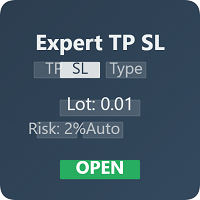
Expert TP SL v04 - Professional Trading Assistant with AI Motivation System Advanced manual trading tool with automatic risk management, overtrading protection, and intelligent psychological support for disciplined trading. PRODUCT OVERVIEW Expert TP SL v04 is a comprehensive trading assistant designed for manual traders who want to maintain emotional discipline while automating risk calculations. This isn't just another order placement tool - it's a complete trading psychology system that pr
이 제품의 구매자들이 또한 구매함
Trade Assistant MT5
Evgeniy Kravchenko
4.43 (216)
거래당 위험 계산, 라인을 사용한 손쉬운 신규 주문, 부분 청산 기능을 통한 주문 관리, 7가지 유형의 트레일링 스탑 및 기타 유용한 기능을 제공합니다. 추가 자료 및 지침 설치 지침   -   애플리케이션 지침   라인 기능       - 차트에 개시선, 손절매, 차익실현을 표시합니다. 이 기능을 사용하면 새로운 주문을 쉽게 하고 개봉 전에 추가 특성을 볼 수 있습니다. 위기 관리       -       위험 계산 기능은 설정된 위험과 손절매 주문의 크기를 고려하여 새 주문의 볼륨을 계산합니다. 이를 통해 손절매 크기를 설정하고 동시에 설정된 위험을 존중할 수 있습니다. 로트 계산 버튼 - 위험 계산을 활성화/비활성화합니다. 필요한 위험 값은 위험 필드에 0에서 100 사이의 백분율 또는 예금 통화로 설정됩니다. 설정 탭에서 위험 계산 옵션을 선택합니다. $ 통화, % 잔액, % 지분, % 자유 마진, % 사용자 정의, % AB 이전 일, % AB 이전 주, % AB 이전
Trade Manager EA에 오신 것을 환영합니다. 이 도구는 거래를 보다 직관적이고 정확하며 효율적으로 만들기 위해 설계된 궁극적인 리스크 관리 도구 입니다. 단순한 주문 실행 도구가 아닌, 원활한 거래 계획, 포지션 관리 및 리스크 제어를 위한 종합 솔루션입니다. 초보자부터 고급 트레이더, 빠른 실행이 필요한 스캘퍼에 이르기까지 Trade Manager EA는 외환, 지수, 상품, 암호화폐 등 다양한 시장에서 유연성을 제공합니다. Trade Manager EA를 사용하면 복잡한 계산은 이제 과거의 일이 됩니다. 시장을 분석하고 진입, 손절 및 익절 수준을 차트의 수평선으로 표시한 후 리스크를 설정하면, Trade Manager가 이상적인 포지션 크기를 즉시 계산하고 SL 및 TP 값을 실시간으로 표시합니다. 모든 거래가 간편하게 관리됩니다. 주요 기능: 포지션 크기 계산기 : 정의된 리스크에 따라 거래 크기를 즉시 결정합니다. 간단한 거래 계획 : 진입, 손절, 익절을 위한
Farmed Hedge Yield Farming | All Markets (Manual - Hybrid - Semi/Automated EA) VERIFIED TRADING RESULTS - Farmed Hedge Yield Axi Copy:  https://www.mql5.com/en/signals/2356376 - Farmed Hedge Yield Exn Copy:   https://www.mql5.com/en/signals/2356404 - Farmed Hedge Yield V Copy:  https://www.mql5.com/en/signals/2357156 IMPORTANT NOTICE: FarmedHedge is a MANUAL-FOCUSED TRADING UTILITY ,not a fully automated EA. Results shown on this Signal include manual trades and overall strategic management.
Telegram to MT5 Multi-Channel Copier   는 Telegram 및 Discord 채널의 트레이딩 시그널을 MetaTrader 5로 자동 복사합니다. 봇도, 브라우저 확장도, 수동 복사도 필요 없습니다. Telegram이나 Discord에 시그널이 도착하면 EA가 몇 초 안에 터미널에서 주문을 실행합니다. 그리고 채널을 복사하기 전에, 내장 백테스터가 그 채널이 내 계좌에서 어떤 결과를 냈을지 보여줍니다. 제품은 두 가지 구성 요소로 이루어집니다: Telegram 채널을 수신하는 Windows 애플리케이션과, MT5 터미널에서 시그널을 실행하는 본 EA입니다. MT4 버전도 제공됩니다   여기 . 구매 전에 사용해 보세요:   애플리케이션은 무료로 다운로드할 수 있습니다. 본인의 채널을 연결하고 각 시그널이 어떻게 읽히는지 확인하세요. Backtest 탭과 실제 거래에는 구매하거나 임대한 EA가 필요합니다. 이 페이지의 무료 데모는 전략 테스터에서만 실행되며
EA Overfitter
Stephen J Martret
5 (4)
That backtest looks great. But will it still be making money tomorrow, next week, next month? EA Overfitter re-runs your EA on 100 price histories it has never seen. One score tells you if the edge is real. A backtest tells you what an EA did on one price history — the one that happened to occur. What you cannot tell from it is how much of that result was the strategy and how much was the particular path. EA Overfitter answers that. It builds up to 100 synthetic price histories your EA has n
TradePanel MT5
Alfiya Fazylova
4.89 (174)
Trade Panel은 다기능 거래 도우미입니다. 이 애플리케이션에는 50개 이상의 수동 거래 기능이 포함되어 있으며 대부분의 거래 작업을 자동화할 수 있습니다. 앱 사용 설명서: https://www.mql5.com/en/blogs/post/756482 데모 계정용 앱 체험판: https://www.mql5.com/en/blogs/post/750865 앱 설치 방법: https://www.mql5.com/en/blogs/post/756239 시각 모드에서 앱 테스트 방법: https://www.mql5.com/en/blogs/post/770277 VPS MetaTrader에 앱 설치 방법: https://www.mql5.com/en/blogs/post/770190 거래. 한 번의 클릭으로 거래를 수행할 수 있습니다: 리스크 자동 계산과 함께 예약 주문 및 포지션 열기. 한 번의 클릭으로 여러 주문 및 포지션 열기. 주문 그리드 열기. 예약 주문 및 포지션을 그룹별로 닫기. 포지션
News Trade EA MT5
Konstantin Kulikov
4.55 (11)
제가 몇 년 동안 사용하고 있는 유용한 로봇을 소개드립니다. 반자동뿐만 아니라 자동 모드로도 사용할 수 있습니다. >>> Chat <<< 본 프로그램에는 경제 캘린더의 뉴스별로 유연한 거래 설정이 포함되어 있습니다. 전략 테스터에서 확인할 수 없습니다. 진짜 작업뿐입니다. 최신 설정 아카이브 다운로드: https://www.mql5.com/en/blogs/post/747929 신호 모니터링: https://www.mql5.com/en/signals/author/test-standart 이 전문가를 위해 고유 설정 세트를 만들 때 블로그의 모든 매개변수에 대한 설명을 참조하십시오: https://www.mql5.com/en/blogs/post/748545 . 기본 설정 설명 작업은 한 차트에서 GBP(GBPUSD, EURGBP, GBPJPY, GBPCAD, GBPAUD, GBPCHF)와 쌍으로 이루어집니다. GBP는 가장 변동성이 큰 통화로서 거래 수행 시 거래를 성공적으로
Power Candles Strategy Scanner: 스스로 최적화하는 멀티 심볼 셋업 파인더 작은 움직임마다 울리는 스캐너는 결국 무시하게 됩니다. 분주한 캔들 마감 한 번에 알림이 연달아 쏟아지고, 정작 실제로 거래하는 단 하나의 셋업은 소음에 묻혀 버립니다. Power Candles Strategy Scanner 는 스스로 최적화하는 Power Candles 엔진을 Market Watch의 모든 심볼에서 실행하고, 당신이 직접 정한 필터를 통과한 것만 알려줍니다. 기준은 마지막 확정 캔들의 강도, 셋업의 손익비, 실시간 스프레드, 그리고 당신이 거래하는 자산군입니다. 심볼이 리스트에 들어오면 스캐너가 당신을 부릅니다. 필터로 걸러낸 것은 모두 조용히 남아 있고, 같은 캔들 마감에서 나온 모든 신호는 하나의 메시지로 도착합니다. 구매 전에 패널과 모든 필터를 확인하세요. 스크린샷, 전체 기능 투어, Power Candles와 함께 쓰는 워크플로: stein.investment
내 거래 규칙에 맞춰 Telegram 신호 복사 Telegram to MT5 Signal Trader 는 공개 및 비공개 Telegram 채널과 그룹의 텍스트 기반 거래 신호를 MetaTrader 5로 자동 복사합니다. 하나의 데스크톱 앱에서 여러 신호 제공자와 MT5 계좌를 관리하고, 제공자마다 위험 관리 및 거래 설정을 개별적으로 지정 할 수 있습니다. 신호 복사에는 Telegram 봇이나 API 설정이 필요하지 않습니다. 전화번호 또는 QR 코드로 본인의 Telegram 계정에 로그인한 후, 이미 가입한 채널이나 그룹을 선택하면 됩니다. 봇을 만들거나 Telegram API 토큰, API ID 또는 API 해시를 입력할 필요가 없습니다. 포지션 크기를 선택하고, 여러 익절 목표에 청산 물량을 배분하며, 손익분기점 이동과 트레일링 스톱을 자동화하세요. 제공자의 신호를 따르면서도 실제 거래 방식은 직접 설정할 수 있습니다. 이 제품은 MT5 Expert Advisor와 필수 Win
================================================================================ POC BREAKOUT - V20.72. Full Professional Grade Toolkit ================================================================================ POC Breakout is a full MetaTrader 5 trading dashboard for discretionary traders who want breakout signals, Point of Control (POC) context, volume profiles, order flow, market structure, news, alerts, and advanced trade planning in one professional workspace. Attached directly to you
The product will copy all telegram signal to MT5 ( which you are member) , also it can work as remote copier.  Easy to set up, copy order instant, can work with almost signal formats, image signal,  s upport to translate other language to English Work with all type of channel or group, even channel have "Restrict Saving Content", work with  multi channel, multi MT5 Work as remote copier: with signal have ticket number, it will copy exactly via ticket number. Support to backtest signal. How to s
VirtualTradePad PRO SE MT5 — MetaTrader 5용 전문 트레이딩 컨트롤 센터 VirtualTradePad PRO SE 는 MetaTrader 5 용 프리미엄 차트 기반 트레이딩 패널이자 거래 관리 워크스페이스입니다. 더 빠른 주문 실행, 더 명확한 포지션 관리, 구조화된 거래 관리, 시각적인 레벨 계획, 그리고 차트에서 직접 작업하는 전문적인 워크플로를 원하는 트레이더를 위해 설계되었습니다. 이 제품은 단순한 BUY / SELL 패널이 아닙니다. PRO SE는 수동 트레이딩, 예약 주문, 포지션 관리, 부분 청산, 바스켓 손익 관리, 평균가 레벨, ATM 규칙, 신호 모니터링, 실시간 시장 정보, 전략 테스터 (Strategy Tester) 워크플로, VPS 중심 운용을 하나의 연결된 인터페이스로 통합합니다. MT4 버전 | 전체 설명 및 스크린샷 | 구입 방법 | 설치 방법 | 로그 파일을 얻는 방법 | 테스트 및 최적화 방법 | Expforex의 모든
다음 업데이트 — 버전 2.52 곧 출시! [신규] 시장 분석 및 트레이딩 워크플로를 향상시키기 위해 설계된 4가지 주요 신규 기능을 기대해 주세요. 트레이딩 요구 사항을 충족하도록 설계된 4가지 새로운 기능으로 시장 분석을 한 단계 더 발전시킵니다. 다음 기능을 소개합니다: 1. TRADE OVERVIEW DASHBOARD 2. CONFLUENCE AT ZONE 3. STRONG & WEAK HIGH/LOW 4. OTE 1. TRADE OVERVIEW DASHBOARD 시장 전체 상황을 더 쉽게 파악할 수 있도록 도와주는 대시보드입니다. 트레이딩 의사결정을 지원하는 가이드를 제공하며, 하나의 화면에서 시장을 분석하고 체계적으로 트레이딩을 계획할 수 있도록 도와줍니다. 멀티 타임프레임 시장 개요 (Multi-Timeframe Market Overview) 시장 방향과 가격 구조를 더욱 명확하게 파악 시장 상황을 빠르게 확인 체계적인 시장 분석 및 진입 계획을 위한 가이드 2. CO
News Filter EA
Rashed Samir
5 (2)
News Filter EA: Advanced Algo Trading Assistant News Filter EA is an advanced algo trading assistant designed to enhance your trading experience. By using the News Filter EA , you can integrate a Forex economic news filter into your existing expert advisor, even if you do not have access to its source code. In addition to the news filter, you can also specify trading days and hours for your expert. The News Filter EA also includes risk management  and equity protection features. MT4 Version Ma
Strategy Builder offers an incredible amount of functionality. It combines a trade panel with configurable automation (covert indicators into an EA), real-time statistics (profit & draw down) plus automatic optimization of SL, TP/exit, trading hours, indicator inputs. Multiple indicators can be combined into an single alert/trade signal and can include custom indicators, even if just have ex4 file or purchased from Market. The system is easily configured via a CONFIG button and associated pop-u
EA Auditor
Stephen J Martret
5 (7)
EA Auditor is an independent analysis tool for traders evaluating Expert Advisors and trading signals on MetaTrader 5. It audits backtest reports, reviews posted developer signals, and cross-verifies the two against each other to help traders assess strategies before committing capital. The MQL5 market offers a wide range of Expert Advisors from many developers, with varying approaches, quality, and transparency. EA Auditor provides a consistent, data-driven framework for reviewing them, answer
EA Portfolio Control & Cloud Monitoring for MetaTrader 5 Your EAs manage trades. KONTROL_01 manages your EAs. A control system for traders running multiple Expert Advisors on the same account. Coordinate EA activity, manage trading risks and monitor your setup remotely. A detailed User Manual is available via DM after purchase. IN PRACTICE Multiple EAs. No coordination. Your EAs trade independently, unaware of each other's activity. KONTROL_01 coordinates them, limits simultaneous activity a
Trade Manager DaneTrades
Levi Dane Benjamin
4.13 (31)
거래 관리자는 위험을 자동으로 계산하는 동시에 거래를 빠르게 시작하고 종료하는 데 도움을 줍니다. 과잉 거래, 복수 거래 및 감정 거래를 방지하는 데 도움이 되는 기능이 포함되어 있습니다. 거래를 자동으로 관리할 수 있으며 계정 성과 지표를 그래프로 시각화할 수 있습니다. 이러한 기능은 이 패널을 모든 수동 거래자에게 이상적으로 만들고 MetaTrader 5 플랫폼을 향상시키는 데 도움이 됩니다. 다중 언어 지원. MT4 버전  |  사용자 가이드 + 데모 트레이드 매니저는 전략 테스터에서 작동하지 않습니다. 데모를 보려면 사용자 가이드로 이동하세요. 위기 관리 % 또는 $를 기준으로 위험 자동 조정 고정 로트 크기 또는 거래량과 핍을 기반으로 한 자동 로트 크기 계산을 사용하는 옵션 RR, Pips 또는 Price를 사용한 손익분기점 손실 설정 추적 중지 손실 설정 목표 달성 시 모든 거래를 자동으로 마감하는 최대 일일 손실률(%)입니다. 과도한 손실로부터 계정을 보호하고 과도한
Local Trade Copier EA 는 외부 소스에서 거래 신호를 실행해야 하거나 MAM 또는 PAMM 계정 없이 동시에 여러 계정을 관리해야 하는 개인 거래자 또는 계정 관리자를 위한 솔루션입니다. 최대 8개의 마스터 계정에서 무제한 슬레이브 계정으로 복사합니다. [ 설치 가이드 | 업데이트 가이드 | 문제 해결 | 자주하는 질문 | 모든 제품 ] 100% 자체 호스팅 설치 및 사용이 간편함 설치 프로그램, 구성 파일, 서버, 메모리 파이프 또는 DLL이 사용되지 않음 EA를 영원히 사용하기 위한 1000번의 활성화 로컬 실행, 네트워크 대기 시간 없음 필요한 모든 기능을 구현합니다. 최대 8개의 마스터 계정 및 무제한 슬레이브 계정 모든 브로커 및 DD/NDD/ECN/STP 실행과 함께 작동 다른 계정 통화를 사용하는 계정에서 작동 라이브 계정과 데모 계정 간에 구분 없이 작동 마스터 및 슬레이브 계정에서 기호 이름의 접미사 지원 매직 넘버 및 주문 댓글로 필터링 다른 거래
MetaTrader 5용 order block, BOS, ChoCH 전문가 어드바이저, Telegram 알림 포함 SMC Trade Pilot MT5는 차트의 시장 구조를 읽고 신호를 Telegram으로 전송합니다. 구조 돌파(BOS)와 성격 변화(ChoCH)를 표시하고, 강도 점수가 있는 order block 을 그리며, fair value gap(FVG)과 liquidity sweep을 추적하고, point of control, value area high, value area low가 포함된 volume profile을 표시하며, 멀티 타임프레임 패널, 컨플루언스 점수, kill zone 세션을 갖춘 간결한 대시보드에 모두 요약합니다. 종가에 표시하고, 그다음 확정 돌파는 캔들 종가 즉시 PENDING 으로 표시되며, 어떤 확인보다 먼저 나타납니다. 새로운 고점 또는 저점이 확인하면 확정으로 바뀌고, 설정한 캔들 수가 지나면 스스로 만료되며, 가격이 무효화하면 사라집니다. 하나
MT5 to Telegram Signal Provider 는 사용하기 쉽고 완전히 커스터마이즈 가능한 유틸리티로, 특정 신호를 Telegram의 채팅, 채널 또는 그룹으로 전송하고, 귀하의 계정을 신호 제공자 로 만듭니다. 경쟁 제품과 달리 DLL 임포트를 사용하지 않습니다. [ 데모 ] [ 매뉴얼 ] [ MT4 버전 ] [ 디스코드 버전 ] [ 텔레그램 채널 ]  New: [ Telegram To MT5 ] 설정 단계별 사용자 가이드 가 제공됩니다. 텔레그램 API에 대한 지식은 필요하지 않습니다; 개발자가 제공하는 모든 것이 필요합니다. 주요 특징 구독자에게 보낸 주문 상세 정보를 커스터마이즈할 수 있습니다. 예를 들어, 브론즈, 실버, 골드와 같은 계층 구독 모델을 만들 수 있습니다. 골드 구독에서는 모든 신호를 받습니다. id, 심볼, 또는 코멘트로 주문을 필터링할 수 있습니다. 주문이 실행된 차트의 스크린샷이 포함됩니다 보낸 스크린샷에 닫힌 주문을 그려 추가 검증을 합니다
Dealer's Panel No signal decides anything here — a hand does. One click, and the panel calculates what's underneath: lot size from risk, target from a 30-step balance ladder that remembers exactly how far an account has climbed. Toggle between market and pending without touching an input field. Set a stop, and the take-profit can write itself — a fixed share of the balance, translated into price with no arithmetic left for the trader to get wrong. One trade live at a time; it won't let a seco
Astro Trade MT5
Indra Maulana
5 (8)
25% discount on the release of the tool: only for the next 3 buyers Send a message to receive a demo version. AstroTrade Trading Assistant AstroTrade is a comprehensive multi-functional trading utility developed for the MetaTrader 5 platform. It integrates essential tools for trade execution, risk management, and technical monitoring into a single unified interface. The application is designed to assist traders in managing their daily operations through a visual and structured environment. Vi
Elliott Wave Helper
Siarhei Vashchylka
4.93 (14)
Elliott Wave Helper is a panel for constructing wave analysis. Manual (Be sure to read before purchasing) | Version for MT4 Advantages 1. Constructing wave analysis and wave structure in a few clicks 2. Availability of all wave analysis patterns, including triangles and combinations 3. All nine wave display styles, including a special circle font 4. Change colors and display styles of wave groups directly from the chart 5. Binding all elements to a set timeframe or timeframes 6. A template syste
RETAILBERG FOOTPRINT CHART PRO — Order-Flow Workspace for MetaTrader 5 Version 7.00  |  Professional System  |  31 tools  |  One chart A full 150-page illustrated User Manual is included. Please read the full manual to understand this feature packed footprint chart elements and ui. https://www.mql5.com/en/blogs/post/777982 DEMO / STRATEGY TESTER — PLEASE READ FIRST
REVDEN AI Desk: REVDEN의 시장 컨텍스트 위에서, 당신만의 AI와 나누는 하나의 대화로 트레이딩을 운영하세요 하나의 대화로 트레이딩을 운영한다고 상상해 보세요. REVDEN AI Desk 는 이를 MetaTrader 5로 가져옵니다. 당신만의 AI에게 시장을 어떻게 읽는지 물으면, AI는 당신이 거래하는 종목에 대한 REVDEN의 전체 컨텍스트, 즉 각 종목의 상태와 리스크 현황, 예정된 발표를 바탕으로 답합니다. AI의 제안은 진입, 스톱, 타겟, 리스크를 갖추고 도착하며, 맞는 제안을 당신이 승인합니다. 규칙도 같은 방식으로 바뀝니다. 무엇을 바꿀지 적으면 AI가 새 룰북의 초안을 작성하고, 받아들일지 버릴지는 당신이 정합니다. 대화를 둘러싸고 시장 전체가 하나의 화면에 펼쳐집니다. 데스크와 설정 가이드를 확인하세요. 모든 화면, 모든 설정, 그리고 당신만의 AI와 함께하는 첫 단계: stein.investments/products/revden-ai-desk 당신
Anchor Trade Manager
Kalinskie Gilliam
5 (8)
Your EAs cannot see each other, but Anchor can. Anchor gives you one place to coordinate your EAs, manage risk, and decide when trading is allowed. It works alongside the trading bots you already use without any changes to them. The Problem One EA opens a trade. Then another starts trading. The next thing you know, you wake up to multiple grids built across your account. Each EA may be doing exactly what it was designed to do, but together they can place far more risk on your account than you in
Telegram to MT5 signal copier: copy trading signals from Telegram channels and groups into MetaTrader 5 automatically, including entry zones, several take profits and edited messages. Telegram Signal Copier copies the trade signals of the Telegram channels you follow into MetaTrader 5 — including entry zones, several take profits, edited messages and every follow-up the provider posts later: break-even, close all, close half or a percentage, move SL or TP, cancel the pending order, "TP1 hit", "S
TradingView-grade charts, native in MT5, with Pine Script v4 and up support A complete charting replacement built inside MetaTrader 5: a custom rendering engine, a Pine Script v4-v6 interpreter, 10+ built-in indicators, professional drawing tools, multi-chart layouts, a forex sessions overview, a bar replay simulator, and an integrated trade manager with risk-based position sizing. One license. Free updates for life. Why ChartZephyr MT5 gives you world-class execution. Its charting engine hasn't
KT Equity Protector MT5
KEENBASE SOFTWARE SOLUTIONS
3.6 (5)
An equity protection EA for MetaTrader that enforces your loss limits and profit target for you: when your account reaches a rule you set, it closes your trades on every symbol, before one bad day turns into a lost account. It suits prop firm challenges and personal accounts alike. Attach it to one chart, answer a few questions in the on-chart setup wizard, and it watches your whole account in the background while you trade by hand or with other EAs. What it protects Daily loss limit: a percenta
제작자의 제품 더 보기
Trendline EA MT5
Carlos Oliveira
4.8 (15)
Trendline EA MT5 Trendline EA MT5는 사용자가 그린 추세선을 기반으로 거래 실행 또는 알림을 수행하도록 설계된 MetaTrader 5용 반자동 전문가 어드바이저(EA)입니다. MetaTrader 5는 추세선을 통해 직접 거래를 실행하거나 관리하는 기본 기능을 제공하지 않습니다. 본 전문가 어드바이저는 사용자가 정의한 추세선을 모니터링하고, 가격이 해당 추세선과 상호작용할 때 사전에 정의된 동작을 실행함으로써 플랫폼의 표준 동작을 확장합니다. 본 전문가 어드바이저는 어떠한 거래 전략도 정의하거나 적용하지 않습니다. 모든 거래 로직과 의사결정은 전적으로 사용자의 통제 하에 있습니다. 추가 자료 사용자 가이드 및 문서 MT4 버전 기능 개요 추세선 기반 거래 실행 가격이 추세선을 터치, 돌파 또는 되돌림할 때 매수 또는 매도 실행 각 추세선별로 스톱로스, 테이크프로핏 및 거래 수량 설정 가능 캔들 종가 또는 가격과 추세선 간의 거리에 따라 동작 트리거 모니터링 및
Trendline EA
Carlos Oliveira
4.5 (10)
Trendline EA MT4 Trendline EA MT4는 사용자가 그린 추세선을 기반으로 거래 실행 또는 알림을 수행하도록 설계된 MetaTrader 4용 반자동 Expert Advisor입니다. MetaTrader 4는 추세선에서 직접 주문을 실행하거나 관리하는 기본 기능을 제공하지 않습니다. 이 Expert Advisor는 사용자가 정의한 추세선을 모니터링하고 가격이 추세선과 상호작용할 때 사전에 정의된 작업을 실행함으로써 플랫폼의 기본 기능을 확장합니다. 이 Expert Advisor는 어떠한 거래 전략도 정의하거나 적용하지 않습니다. 모든 거래 로직과 의사결정은 전적으로 사용자의 통제하에 있습니다. 추가 자료 사용자 가이드 및 문서 MT5 버전 기능 개요 추세선 기반 거래 실행 가격이 추세선을 터치, 돌파 또는 되돌림할 때 매수 또는 매도 실행 각 추세선별로 손절매, 이익실현 및 거래량 설정 캔들 마감 또는 추세선과의 가격 거리 기준으로 작업 트리거 모니터링 및 알림 터
FxTT News Feed FxTT News Feed는 ChartDeck PRO를 위한 무료 동반 Expert Advisor입니다. 매매 로직이 없으며 주문을 내지 않고, 포지션을 관리하지 않고, 시세를 읽지 않습니다. MetaTrader 4 지표는 네트워크 요청을 할 수 없으므로, 타이머에 따라 경제 캘린더 데이터를 가져와 로컬 파일에 기록합니다. 터미널의 아무 차트에나 한 번 적용하십시오. 인스턴스 하나가 해당 터미널의 모든 ChartDeck PRO 차트에 서비스를 제공합니다. 이 프로그램은 ChartDeck PRO의 일간 뉴스 행을 위한 전제 조건이며, 범용 도구가 아닙니다. ChartDeck PRO가 설치되어 있지 않으면 할 일이 없습니다. 이 프로그램이 하는 일 기본적으로 15분마다 타이머에 따라 FxTT 경제 캘린더 피드를 요청합니다 결과를 ChartDeck PRO의 일간 뉴스 행이 읽는 로컬 파일에 기록합니다 요청이 실패하면 이전 데이터를 유지하고 실패 사유를 보고하므로
FREE
TrendlineEA Pro MT4
Carlos Oliveira
5 (1)
Trendline PRO MT4 Trendline PRO MT4는 MetaTrader 4용 반자동 Expert Advisor로, 사용자가 직접 그린 추세선과 차트 레벨을 기준으로 주문을 열고 관리하거나 알림을 보냅니다. 내장 전략이 없으며 신호도 생성하지 않습니다. 모든 진입, 청산 및 위험 규칙은 차트에서 직접 설정하므로, 추세선, 돌파 레벨, 지지선과 저항선, 채널 또는 가격 구간을 기준으로 이미 거래를 계획하는 트레이더를 위한 도구입니다. MetaTrader 4에서는 이러한 레벨을 그릴 수 있지만, 이를 바탕으로 동작하지는 않습니다. Trendline PRO MT4는 각 선을 규칙으로 바꿉니다. 가격이 선에 닿을 때 매수 또는 매도하거나, 캔들이 선을 돌파한 상태로 마감한 뒤에만 진입하거나, 포지션 일부를 청산하거나, 단순히 알림을 보낼 수 있습니다. 기존 Trendline EA MT4와 비교해 PRO 버전에는 차트 시각 패널, 대화형 TP 및 SL 구간, OCO 진입 쌍, 선
ChartDeck PRO MT4
Carlos Oliveira
ChartDeck PRO ChartDeck PRO는 이동평균, 볼린저 밴드, ZigZag, 지지선 및 저항선, 피벗 포인트, 거래 세션, 경제 뉴스 등 7가지 MetaTrader 4 차트 도구를 하나의 인디케이터에 담았습니다. 차트의 아이콘 패널 하나로 별도의 인디케이터 7개와 각 인디케이터의 속성 대화상자 7개를 대신할 수 있습니다. 각 도구는 아이콘을 한 번 클릭해 켜거나 끌 수 있습니다. 패널 옆의 설정 창에서 차트 위에 표시되는 파라미터를 바로 변경할 수 있어 속성 대화상자를 다시 열 필요가 없습니다. 각 도구는 자체 타임프레임, 파라미터 및 알림 설정을 유지하므로 멀티 타임프레임 레이아웃에도 인디케이터 하나만 있으면 됩니다. 켜 둔 도구만 계산되고 그려집니다. 7가지 도구 Triple MA: 각각 기간, 타임프레임, 계산 방식 및 적용 가격을 따로 설정할 수 있는 이동평균 3개 Bollinger Bands: 각기 다른 기간, 편차 및 타임프레임을 설정할 수 있는 상단, 중간
Equity Tracker MT5 Equity Tracker MT5는 Telegram 및 Discord 메시지를 통해 거래 계좌 정보를 알려주는 MetaTrader 5용 모니터링 Expert Advisor입니다. 거래 활동, 계좌 상태 및 터미널 상태를 보고하므로 터미널을 계속 지켜볼 필요가 없습니다. 이 Expert Advisor는 거래를 열거나 수정하거나 종료하지 않습니다. 계좌를 모니터링하고 알림만 전송하므로, 주문 실행에 영향을 주지 않으면서 수동 전략이나 다른 Expert Advisor와 함께 실행할 수 있습니다. 모니터링 항목 Equity Tracker MT5는 계좌를 지속적으로 확인하고, 사용자가 설정한 조건이 충족되면 메시지를 전송합니다. 자산과 낙폭의 임계값을 설정하고 마진 수준을 확인할 수 있으며, 계좌의 거래 활동에 대한 알림도 받을 수 있습니다. 선택 사항인 하트비트 기능은 터미널과 Expert Advisor가 실행 중인지 확인할 수 있도록 정기적인 상태 메시지
ChartDeck PRO
Carlos Oliveira
ChartDeck PRO ChartDeck PRO는 이동평균, 볼린저 밴드, ZigZag, 지지 및 저항, 피벗 포인트, 거래 세션, 경제 뉴스를 하나로 결합한 MetaTrader 5 지표입니다. 일곱 가지 도구를 모두 차트의 도킹 가능한 아이콘 패널에서 제어하므로, 지표 하나로 별도의 지표 일곱 개를 대체할 수 있습니다. 각 도구는 아이콘을 한 번 클릭해 켜거나 끌 수 있습니다. 패널 옆의 설정 창에서 지표 속성 대화상자를 다시 열지 않고 차트에서 바로 매개변수를 변경할 수 있습니다. 각 도구는 자체 시간대, 매개변수 및 알림 설정을 유지하므로 다중 시간대 레이아웃에도 지표 하나만 있으면 됩니다. 켜 둔 도구만 계산되고 표시됩니다. 일곱 가지 도구 Triple MA: 각각 고유한 기간, 시간대, 계산 방식 및 적용 가격을 사용하는 세 개의 이동평균 볼린저 밴드: 각각 고유한 기간, 편차 및 시간대를 사용하는 상단, 중간, 하단 밴드 ZigZag: 지표 내에서 계산되는 깊이, 편차,
필터:
Pedrojoserascon
61
Pedrojoserascon 2026.09.27 17:25 

He comprado recientemente este producto y cubre mis necesidades operativas. Las dudas que he tenido una vez instalado el producto me han sido resueltas por Carlos a la mayor brevedad, su asistencia excelente. Además me ha pedido posibles mejoras para el producto, lo que demuestra que está comprometido con este EA que vende. Sería de agradecer que fuese mejorando con las opiniones de los usuarios. Es un EA que está un paso más de los que trabajan con líneas y fractales porque permite filtrar muchas falsas rupturas...a la larga supone ahorro de operaciones fallidas. Siempre he utilizado ea´s que trabajan con líneas e indudablemente me quedo con este. Además es importante la relación calidad-precio. Gracias, Carlos sigue por este camino.

리뷰 답변