GR Statistics and Monitoring

- Statistics and monitoring of account

- Sending screenshot to TG and push notification to the phone :

  • bot report by schedule and by pressing the button;
  • notifications of the drawdown (in % or currency) of a symbol and/or account by schedule;

- Closing the position of the symbol by pressing its current profit/loss

My bot's token is written in the "Bot token (0=off)" parameter. To work it, you need to find it in search of TG called "GR_BOT_MT5_TO_TG_bot" and send a message "/start"After that, you can click on the screenshot sending button + push on the terminal graph. You can also use your bot by doing the same actions with him

All questions and wishes can be written in Telegram. Contact is indicated in the bot in the "General" section

추천 제품
외환 포트폴리오를 관리하십시오. 당신이 서 있는 위치, 효과가 있는 것과 통증을 유발하는 것을 즉시 확인하십시오! MT4 버전은 여기에서 사용 가능: https://www.mql5.com/en/market/product/58375 Trade Manager 대시보드는 현재 외환 시장에서 각 포지션이 어디에 있는지 한 눈에 보여주고 위험 관리 및 통화 노출을 더 쉽게 이해할 수 있도록 설계되었습니다. 여러 포지션 또는 거래 그리드 및 바스켓 전략을 사용하여 점진적으로 시장으로 확장하는 거래자의 경우 이것이 핵심 정보입니다. 터미널에서 여러 위치를 모니터링하는 것은 종종 관리하기 어렵습니다. 저조한 위험을 과도하게 활용하고 사용하는 것은 신규 거래자와 일부 숙련된 거래자가 직면한 주요 문제입니다. 거래 관리자는 각 통화에 대한 노출을 개별적으로 표시하여 한 번에 양방향 거래를 하지 않도록 합니다. 특징: 공개 거래 - 통화 쌍별로 정렬된 현재 공개 거래를 모두 봅니다. 쌍뿐만 아니
Close All Button EA
Abraham Theuri Wangui
4.6 (5)
손쉬운 거래 관리를 위한 궁극의 솔루션인 MQL5 유틸리티 버튼을 소개합니다! 클릭 한 번으로 모든 오픈 포지션을 즉시 청산할 수 있어 거래 경험이 그 어느 때보다 원활하고 효율적입니다. 이 혁신적인 도구는 단순성을 염두에 두고 설계되어 모든 수준의 거래자가 쉽게 사용할 수 있도록 합니다. 노련한 전문가이든 초보자이든 MQL5 유틸리티 버튼은 번거롭지 않고 쉽게 거래를 관리할 수 있는 방법을 제공합니다. 이 버튼은 모든 오픈 포지션을 청산하는 프로세스를 단순화할 뿐만 아니라 귀중한 시간을 절약해 줍니다. 더 이상 각 위치를 하나씩 수동으로 닫을 필요가 없습니다 - MQL5 유틸리티 버튼은 단 몇 초 만에 모든 작업을 수행합니다. 그래서 왜 기다려? 오늘 MQL5 유틸리티 버튼을 다운로드하고 거래를 한 단계 끌어올리십시오. 간단하고 효율적이며 바로 사용할 수 있습니다 - 거래 관리 프로세스를 간소화하려는 거래자에게 완벽한 도구입니다.
FREE
AUTO RISK MANAGER PRO: 포렉스 거래에서 당신의 파트너! AUTO RISK MANAGER PRO_MT4 — MT4용 버전 데모 버전 + 자세한 설명 감정 때문에 돈을 잃는 것을 멈추세요! 이제 전문가 알고리즘에게 리스크 관리를 맡길 때입니다. 한번 상상해 보세요: 시장이 갑자기 당신의 포지션  으로 움직이는데, 그 순간 당신은 잠을 자거나, 일하거나, 가족과 시간을 보내고 있습니다. 익숙한 이야기인가요? Auto Risk Manager Pro — 더 이상 그렇지 않습니다! 장점 혁신적인 리스크 관리 접근 방식 24/7 자동 자본 보호 당신이 컴퓨터 앞에 없을 때도 작동 정확한 이익 목표 — 필요한 순간에 수익 고정 엄격한 손실 제한 — 치명적인 손실을 차단 멀티통화 지원 — 모든 거래 상품과 호환 차트를 닫아 EA까지 함께 언로드 가능 컨트롤 패널 Control Panel Settings PanelColor = clrDarkSlateGray; — 패널 색상
Multi trades update
Abdelaziz Omar Abdelaziz Nader
Core Features: Profit Target Control: Automatically closes all open positions once a defined total profit value is reached. Drawdown Protection: Monitors total floating losses and closes all trades if the loss exceeds a set percentage of the account balance. Trading Halt on Target: Automatically stops further trading once a desired percentage profit of account balance is achieved. Dynamic SL/ TP Adjustment: Optionally adjusts Take Profit and Stop Loss for all open trades to pr
FREE
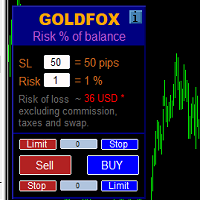
손절매(핍 단위) 및 계정 잔액의 위험 비율을 고려한 거래 로트의 자동 계산. Expert Advisor 패널은 왼쪽 상단의 차트에 있습니다. 어드바이저의 패널에서 스톱로스(핍 손실)의 크기와 잔액에서 위험 비율을 선택할 수 있습니다. 보류 중인 주문에 대해 현재 가격과의 편차를 핍 단위로 설정할 수 있습니다. 붉은 색은 손절매가 발동될 때 잃을 수 있는 예금 통화의 금액을 나타내며 이 금액에는 수수료, 스왑 및 세금이 포함되지 않습니다.    주요 외환 통화 쌍인, XAUUSD(금), BTCUSD, ETHUSD에 이 어드바이저를 사용하는 것이 좋습니다! 다른 기기의 경우 계산의 특성을 고려하여 오류가 발생할 수 있습니다! 대부분의 외환 상품에 대해 점 뒤에 5자리 숫자가 있는 계정을 권장합니다.       설명 - 손실 위험. 예금 통화의 위험 금액은 고문의 정보 패널에 빨간색으로 표시됩니다. 이 값은 미결제 주문(또는 보류된 주문)에 해당합니다. 단, 상품의 마진이 이 위
RenkoChart EA
Paulo Henrique Da Silva
4.6 (5)
The RenkoChart tool presents an innovative and highly flexible approach to visualizing market data in MetaTrader 5. This expert creates a custom symbol with Renko bricks directly on the chart, displaying accurate prices at the respective opening date/time for each brick. This feature makes it possible to apply any indicator to the Renko chart. Furthermore, this tool also allows access to historical brick data through native methods in the MQL5 programming language, such as iOpen, iHigh, iLow and
FREE
This MetaTrader 5 script -  design to manage your workspace to close all open charts except the most recently active one. Perfect for traders who need a quick and reliable way to declutter their platform while keeping the current chart in focus. Key Features: One-Click Convenience: Instantly closes all charts except the active one, streamlining your workspace. Safe and Efficient: Skips the current chart to ensure uninterrupted analysis. Error Handling: Robust error detection with detailed loggi

FREE
One click to close all (OCCA) provides you posibility to close all open position with one click. Here is no any settings, just run the script and all your open positions will be closed and it will happen very fast ! Works with all types of accounts, with all currency pairs and any broker. The number of open positions is not limited. The script will be useful for trading strategies, in which you need to manage a large number of positions.
See AutoTrade deals ONLY on select charts If you attach this indicator to the chart, all the Autotrade deals will be removed from chart display. This solves the problem that deals on chart is turned on Universally. Now turn on the Universal show deal on charts. Attach this indicator to the charts that you do not want to see the deals. E.g. if you are trading m1 chart, it may clutter your h1 chart bar.
Smart Panel Trade
Nereu Ferreira Junior
Make Trades in MetaTrader 5 with Profit Panel! If you are a MetaTrader 5 trader, you know how important it is to act quickly and accurately. With this in mind, we created the Profit Panel – an essential tool for negotiations What is the Profit Panel? Designed to make your daily trading easier. It offers a simplified and intuitive interface where you can open, manage and close transactions with just a few clicks. How does it work? The MT5 Trading Dashboard puts all the most important trading func
This utility displays the information required for making trades on each opened chart. For example: spread value, swap value; triple swap day; session closing time; ATR of the symbol by Gerchik; total profit/loss for the current symbol; the number of trades made earlier; the percentage change in the quotes of 6 selected instruments; and much more. The spread value is always shown. The rest of the information is displayed depending on the settings: Show total orders at the moment (long, short) .
FREE
Manual Assistant Pro
Kmwgdhanushkabandara Senevirathna
MT5 Smart Dashboard   is the ultimate tool for manual traders who want speed and automatic risk management. It transforms your chart into a professional trading station with a clean dark theme. Key Features: Fast Execution Panel: Open   Buy   and   Sell   trades instantly. Place   Pending Orders   (Limit & Stop) with one click. Adjust   Lot Size   and   Price   easily via buttons (+/-). ️ Automatic Risk Management: Auto Break-Even (BE):   Moves your Stop Loss to the entry price automatically
FREE
The 2025 Breakout Strategy EA is an automated solution designed to capture breakout opportunities with advanced risk management. Utilizing market bias analysis, ATR-based stop loss and take profit, and a customizable risk-reward ratio, this EA ensures precise trade execution. Key Features: Breakout Strategy : Identifies high-potential breakout trades. Customizable Trading Sessions : Set your preferred trading hours, including automatic activation for the New York session. Risk Management : Use A
FREE
Smoothing Oscillator   is an ea based on the Smoothing oscillator indicator.  https://www.mql5.com/es/market/product/59188 This ea uses the indicator's trend exhaustion signal to initiate a countertrend strategy. The system has a costly lotage, although it can have more than one operation open at a time It does not require large capital or margin requirements to be operated. You can download the demo and test it yourself.  Very stable growth curve as result of smart averaging techniques. "Safet
T Manager for Price action Traders

Haidar, Lionel Haj Ali
4.5 (10)
T Manager, the ultimate trade management solution designed by traders for traders. If you are searching for a simple and efficient trade panel, trade manager, or trade assistant, you are at the right place.   The market contains a diverse number of those tools , but this one is designed by traders for traders . I designed this tool, and I am using it daily. Take my advice and stop buying tools blended with un-useful features that you will never use,   T Manager provides you with the essential y

Quick Trade Manager (QTM) 는 MT5 차트에서 빠르고 직관적인 트레이딩을 할 수 있는 편리한 도구입니다. QTM은 원클릭 트레이딩을 더욱 편리하게 만들어주며, 차트에서 직접 빠르게 거래할 수 있는 기능을 확장합니다. 설정된 위험 비율에 따라 포지션 크기를 자동으로 계산할 수 있습니다. 또한 모든 사용자 정의(합성) 심볼을 완벽하게 지원합니다. 예를 들어, QTM을 Seconds Chart 로 생성된 초(秒) 차트에서도 트레이딩에 활용할 수 있습니다. 단축키 CTRL+SHIFT를 누른 상태에서 차트를 클릭하면 시장가 주문 계획 모드가 활성화됩니다. CTRL+SHIFT를 누른 상태에서 차트를 더블 클릭하면 지정가 주문 계획 모드가 활성화됩니다. SHIFT를 누른 상태에서 가격 라인을 드래그합니다. CTRL을 누른 상태에서 SL/TP 라인을 드래그합니다. TAB을 누른 상태에서 마우스 휠을 스크롤하여 주문을 선택합니다. 마우스 왼쪽 버튼을 누른 상태에서 [B] 키를 눌
FREE
EW Close All – 한 번 클릭. 모두 종료. EW Close All 은 가볍고 다국어 지원 Expert Advisor로, 단 한 번의 버튼 클릭만으로 모든 오픈 포지션을 즉시 청산하고 모든 대기 주문을 취소할 수 있습니다. 모든 오픈 포지션 청산   모든 대기 주문 취소   모든 심볼과 모든 타임프레임에서 작동   다국어 인터페이스 지원   깔끔하고 빠르고 안정적 빠른 청산, 리스크 관리, 장 마감 전 정리 작업에 완벽합니다. 항상 완벽한 컨트롤 — EW Close All로 단 몇 초 만에 모든 것을 종료하세요! EW Close All – 한 번 클릭. 모두 종료. EW Close All 은 가볍고 다국어 지원 Expert Advisor로, 단 한 번의 버튼 클릭만으로 모든 오픈 포지션을 즉시 청산하고 모든 대기 주문을 취소할 수 있습니다. 모든 오픈 포지션 청산   모든 대기 주문 취소   모든 심볼과 모든 타임프레임에서 작동  
FREE
SymbolMonitor
Oleksandr Kashyrnyi
SymbolMonitor 1.3 – 당신의 트레이딩을 완벽하게 제어하세요! 여러 종목을 거래하며 실시간으로 수익을 확인하고 싶으신가요? SymbolMonitor 1.3 은 각 종목의 수익성을 자동으로 분석 하고, 유연한 설정과 알림 기능 을 제공하는 강력한 전문가 어드바이저(EA)입니다! 1.3 버전의 새로운 기능 사용자 맞춤형 시각적 설정 – 글꼴, 크기 및 텍스트 색상 조정 가능 자동 알림 기능 – 목표 수익에 도달하면 알림을 받음 정확한 수익 계산 – 총 거래량, 수익, 스왑 및 수수료 표시 실시간 데이터 업데이트 – 모든 데이터가 자동으로 새로고침됨 2개 언어 지원 – Русский / English (설정에서 변경 가능) 중요! 1랏당 수수료는 직접 입력해야 합니다 , 왜냐하면 브로커 및 종목별로 다르기 때문입니다. 정확한 순이익 계산을 위해 설정에서 값을 지정하세요! SymbolMonitor가 필요한 사람 다중 자
Script to calculate equity and balance at a specific date and time.  This script makes up for a lack of MetaTrader account history, that does not show how the balance and equity changes in time. Balance calculation includes closed orders only. Equity calculation includes orders closed before and orders that are still open at the specified time. Example: date and time set to 2020/07/06 00:00. If I had a Buy 1 lot EURUSD position opened at price 1.12470 on the 2020/07/02, the program would ca


FREE
TC-Supportは手動取引とEA運用のために開発されたパネルになります。 このパネルでは、リスクリワード、リスク計算、リスク管理など資金管理、 トレーリングストップ機能、ブレークイーブンなどポジション管理が可能になります。 その他、便利な機能があります。 詳細な情報はこちらにサイトがあります。 デモ口座で動作するEAはこちらに置いてあります。   https://toushika.top/ mt5-tc-support / Disable Auto Trading  の 機能はMQL5では外部のDLLの利用は許可されませんので使用できません。 おもな機能一覧 資金管理 リスクリワード計算 ロット計算 損失金額計算 最大ロット数の設定 設定したリスクパーセンテージでヘッジポジション EA運用 最大損失金額またはパーセンテージによる強制クローズ EA運用 資金破綻回避  ポジション管理 成行、指値、Stop Limit注文に対応 ポジションを部分的にクローズ トレーリングストップ機能 一定の距離を超えてたらSLを移動 利確条件設定
Click Trading
Jawad Tauheed
5 (1)
One Click Trading – Auto TP SL Developer TraderLinkz Version 1.00 Category Utility What it does Adds missing TP and SL to your manual trades and pending orders Sets them once per ticket Lets you move TP and SL afterward Works on hedging and netting accounts Scans on every tick and reacts on trade events Why you want it You place faster entries You get consistent risk and exit targets You reduce fat finger errors You keep full manual control Quick start Attach the EA to any chart Keep TP and SL e
FREE
TP & SL Calculator Indicator for MT5 The Take Profit & Stop Loss Calculator Indicator is an effective risk and capital management tool designed for MetaTrader 5. It helps traders easily determine and set take profit (TP) and stop loss (SL) levels directly on the chart. This indicator improves trading efficiency through its dedicated control panel, which includes: Creating and managing TP and SL levels for both Buy and Sell positions Calculating trade volume in lots Displaying the Risk-to-Reward
FREE
Professional Footprint Chart EA - Complete Order Flow Trading Suite See What Market Makers See! The most comprehensive order flow analysis tool for MetaTrader 5. Get institutional-grade volume analysis, real-time DOM, Time & Sales, and intelligent trade signals - all in one powerful EA. 6 Professional Panels - Complete order flow analysis suite Real-Time Tick Data - Live bid/ask volume at every price level Automatic Imbalance Detection - Spot institutional activity instantly Smart Chart Analyst
SimpleTrade by Gioeste
Giovanni Scelzi
4 (3)
Discover the power of automated trading with **SimpleTradeGioeste**, an Expert Advisor (EA) designed to optimize your trading operations in the Forex market. This innovative EA combines advanced trading strategies with proven technical indicators, offering an unparalleled trading experience. video backtest :  https://youtu.be/OPqqIbu8d3k?si=xkMX6vwOdfmfsE-A ****Strengths**** - **Multi-Indicator Strategy**: SimpleTradeGioeste employs an integrated approach that combines four main technical ind
FREE
Order Trailing
Makarii Gubaydullin
오더 트레일링: 시장이 움직일 때 최적의 실행 가격 얻기 보류 중인 주문의 트레일링을 통해 지정된 거리에서 진입 가격까지의 거리를 유지할 수 있습니다. 시장 가격이 주문에서 멀어지면 주문이 이동합니다. 다기능 유틸리티 : 66+ 기능, 이 도구 포함 | 질문이 있으면 연락하세요 | MT4 버전 오더 트레일링을 활성화하려면 패널에서 4가지 주요 매개변수를 설정해야 합니다: 1. 심볼 또는 트레이드 , 트레일링이 적용됩니다: 현재 [Symbol] / [ALL] 심볼, 또는 특정 트레이드 [Ticket]. [Symbol] 또는 [ALL] 규칙 외에도 - 특정 트레이드에 대해 별도의 규칙을 설정할 수 있습니다, 티켓 번호로: 별도의 [Ticket]에 대한 규칙이 우선합니다. 2. 보류 중인 주문에 트레일링이 활성화되는 순간 : [ 실행 후 즉시 ]: 주문이 배치될 때 지연 없음 ; [보류 중 > 보다]: 트레일링은 지정된 시간 후 에 시작됩니다; 3. 현재 시장 가격에서 진입 가격까지의
Elevate your trading with this Metatrader 5 expert – the Position Volume Calculator. This tool takes the guesswork out of risk management and profit optimization. Simply input your desired stop-loss points with dragging the stop-loss line, and let the expert advisor compute the optimal position volume for your trade. Plus, with customizable reward ratios, it's easier than ever to set your take-profit points for maximum gains. Trade with confidence and precision. Try the Position Volume Calculat
FREE
최적화된 거래 및 리스크 관리를 위한 유틸리티 도구 이 고급 유틸리티 도구는 거래 성능을 향상시키고 리스크를 최소화하는 데 목적을 둡니다. 감정적인 거래 결정을 방지하며, 복수 거래나 탐욕에 기반한 행동을 피하여 시장에서의 규율 있는 접근을 보장합니다. 주요 기능 자동 손절매 및 이익 실현 거래 실행 시 자동으로 손절매 및 이익 실현 수준을 설정하여 포지션을 효과적으로 보호합니다. 거래 간 시간 거래 간에 사용자 정의 가능한 대기 시간을 설정할 수 있습니다(예: 15분). 대기 시간 동안 거래 버튼이 비활성화되며, 경고음이 제공됩니다. 일일 손실 한도 사용자가 일일 손실 한도(예: $20)를 설정할 수 있습니다. 한도에 도달하면 알림이 발생하고 거래 기능이 비활성화됩니다. 일일 이익 한도 손실 한도와 비슷하게, 사용자는 일일 이익 목표(예: $40)를 설정할 수 있습니다. 목표를 달성하면 알림이 표시되고 거래 버튼이 비활성화됩니다. 손익분기점 조정 지정된 이익 수준에 도달하면 손절매
Quick Style MT5
Maxim Polishchuk
4.73 (11)
The Quick Style utility is designed for facilitation and acceleration of working with the properties of graphical objects. Left-click a graphical object while holding the Shift key to open the quick access window for configuring the object properties. In the window, you can change the color, style and line width with one click, including those of other graphical objects. All changes are displayed immediately. To close the Quick Style , simply click the free space on the chart. The utility is eas
FREE
Closing Assistant Eval MT5 Streamline trade management with this efficient tool - close multiple trades instantly with a single click. Designed for fast exits in volatile market conditions, it ensures quick action when every second counts. Widget Categories Trading Tools Trendline Trading - Draw trigger lines on charts for automatic trade execution. Suitable for breakout and channel strategies with dynamic stops. Trading Assistant - Visual trade configuration with automatic risk calculations.
FREE
Trend Risk Monitor
Kenneth Michael Chambers
TREND RISK MONITOR EA - USER GUIDE ---------------------------------------------------- 1. OVERVIEW The Trend Risk Monitor is not a trading robot that opens new positions. Instead, it is a sophisticated risk management utility designed to work alongside another Expert Advisor (EA) on your trading account. Its primary purpose is to actively monitor trades opened by a specific EA (identified by a "Magic Number") and provide a real-time assessment of the market risk associated with each open posit
이 제품의 구매자들이 또한 구매함
Trade Manager EA에 오신 것을 환영합니다. 이 도구는 거래를 보다 직관적이고 정확하며 효율적으로 만들기 위해 설계된 궁극적인 리스크 관리 도구 입니다. 단순한 주문 실행 도구가 아닌, 원활한 거래 계획, 포지션 관리 및 리스크 제어를 위한 종합 솔루션입니다. 초보자부터 고급 트레이더, 빠른 실행이 필요한 스캘퍼에 이르기까지 Trade Manager EA는 외환, 지수, 상품, 암호화폐 등 다양한 시장에서 유연성을 제공합니다. Trade Manager EA를 사용하면 복잡한 계산은 이제 과거의 일이 됩니다. 시장을 분석하고 진입, 손절 및 익절 수준을 차트의 수평선으로 표시한 후 리스크를 설정하면, Trade Manager가 이상적인 포지션 크기를 즉시 계산하고 SL 및 TP 값을 실시간으로 표시합니다. 모든 거래가 간편하게 관리됩니다. 주요 기능: 포지션 크기 계산기 : 정의된 리스크에 따라 거래 크기를 즉시 결정합니다. 간단한 거래 계획 : 진입, 손절, 익절을 위한
TradePanel MT5
Alfiya Fazylova
4.86 (147)
Trade Panel은 다기능 거래 보조원입니다. 이 애플리케이션에는 수동 거래를 위한 50개 이상의 거래 기능이 포함되어 있으며 대부분의 거래 작업을 자동화할 수 있습니다. 전략 테스터에서는 애플리케이션이 작동하지 않습니다. 구매하기 전에 데모 계정에서 데모 버전을 테스트할 수 있습니다. 데모 버전 여기 . 전체 지침 여기 . 거래. 한 번의 클릭으로 거래 작업을 수행할 수 있습니다: 자동 위험 계산을 통해 지정가 주문 및 포지션을 엽니다. 한 번의 클릭으로 여러 주문과 포지션을 열 수 있습니다. 주문 그리드를 엽니다. 그룹별 대기 주문 및 포지션을 마감합니다. 포지션 반전(매수 청산 후 매도 개시 또는 매도 청산 후 매수 개시). 포지션 고정(매수 포지션과 매도 포지션의 양을 동일하게 하는 추가 포지션 개설). 한 번의 클릭으로 모든 포지션을 부분 청산합니다. 모든 포지션의 이익실현과 손절매를 동일한 가격 수준으로 설정합니다. 모든 포지션에 대한 손절매를 해당 포지션의 손익 분기
Ultimate Extractor
Clifton Creath
5 (7)
Ultimate Extractor - Professional Trading Analytics for MT5 Ultimate Extractor transforms your MetaTrader 5 trading history into actionable insights with comprehensive analytics, interactive charts, and real-time performance tracking. What It Does Automatically analyzes your MT5 trading history across all Expert Advisors and generates detailed HTML reports with interactive visualizations. Tracks live performance metrics including open positions, floating P/L, and drawdown in real-time. Supports
YuClusters
Yury Kulikov
4.93 (43)
Attention: You can view the program operation in the free version  YuClusters DEMO .  YuClusters is a professional market analysis system. The trader has unique opportunities to analyze the flow of orders, trade volumes, price movements using various charts, profiles, indicators, and graphical objects. YuClusters operates on data based on Time&Sales or ticks information, depending on what is available in the quotes of a financial instrument. YuClusters allows you to build graphs by combining da
Unlimited Trade Copier Pro MT5 is a tool to copy trade remotely to multiple MT4, MT5 and cTrader accounts at different computers/locations over internet. This is an ideal solution for you if you are a signal provider and want to copy your trades to other receivers globally on your own rules. One provider can copy trades to multiple receivers and one receiver can get trade from multiple providers as well. The provider can even set the subscription expiry for each receiver, so that receiver will n
Mt5 To InterativeBrokers Copier allows you to copy deals from MT5 account to Interactive Brokers. With this, you can run your EA strategy on a MT5 Demo/Real Account, then copy all the deals to Interactive Brokers account real time. Features: 1. Copy or Invert-Copy deals Realtime from MT5 to IB Account. 2. Synchronizing positions of both accounts periodicaly, in case any missing copying. 3. You can choose only Buy position or Sell position. Symbols Setup: General Format:  {MT Symbol} -> {IB S
The product will copy all telegram signal to MT5 ( which you are member) , also it can work as remote copier.  Easy to set up, copy order instant, can work with almost signal formats, image signal,  s upport to translate other language to English Work with all type of channel or group, even channel have "Restrict Saving Content", work with  multi channel, multi MT5 Work as remote copier: with signal have ticket number, it will copy exactly via ticket number. Support to backtest signal. How to s
EasyInsight AIO MT5
Alain Verleyen
4.91 (11)
EASY Insight AIO – 스마트하고 손쉬운 트레이딩을 위한 올인원 솔루션 개요 외환, 금, 암호화폐, 지수, 심지어 주식까지 — 전 시장을 몇 초 만에, 수동 차트 확인이나 복잡한 설치, 인디케이터 설정 없이 스캔할 수 있다고 상상해 보세요. EASY Insight AIO 는 AI 기반 트레이딩을 위한 궁극의 플러그 앤 플레이(Plug & Play) 데이터 내보내기 도구입니다. 단 하나의 깔끔한 CSV 파일로 전체 시장 스냅샷을 제공하며, ChatGPT, Claude, Gemini, Perplexity 등 다양한 AI 플랫폼에서 즉시 분석할 수 있습니다. 창 전환, 복잡함, 차트 오버레이는 더 이상 필요 없습니다. 자동으로 내보내지는 순수하고 구조화된 데이터 인사이트만으로, 반복적인 차트 감시 대신 데이터 기반의 스마트한 의사결정에 집중할 수 있습니다. 왜 EASY Insight AIO인가요? 진정한 올인원 • 별도의 설정, 인디케이터 설치, 차트 오버레이가 필요 없습
Crypto Ticks and Depth
Rajesh Kumar Nait
5 (1)
MetaTrader 5용 Crypto Ticks – 실시간 암호화폐 틱 데이터 및 오더북 통합 개요 Crypto Ticks는 주요 암호화폐 거래소의 실시간 틱 데이터와 오더북 깊이를 MetaTrader 5에 직접 스트리밍합니다. 스캘핑, 알고리즘 트레이딩, 전략 테스트를 위한 정밀 데이터를 원하는 트레이더를 위해 설계되었습니다. 지원 거래소 Binance: 스팟 (차트창에 오더북 표시) 및 선물 (다중 종목 오더북 지원) KuCoin: 스팟 및 선물 (차트 오더북 지원) Bybit: 선물 및 역방향 선물 XT.com: 스팟 및 선물 주요 기능 WebSocket을 통한 실시간 틱 스트리밍 Binance 스트림 지원: @trade, @ticker, @bookTicker, @aggTrade API를 통한 완전한 OHLCV 히스토리 업데이트 오더북 시각화 (최고 매수/매도 + 레벨) 자동 재연결로 안정성 유지 정확한 캔들 차트를 위한 예약 데이터 교체 MT5 재시작 시 자동 히스토리 업데
Telegram To MT5 Receiver
Levi Dane Benjamin
4.53 (15)
가입한 모든 채널에서 (개인 및 제한된 채널 포함) 시그널을 바로 MT5로 복사합니다.   이 도구는 사용자를 고려하여 설계되었으며 거래를 관리하고 모니터하는 데 필요한 많은 기능을 제공합니다. 이 제품은 사용하기 쉽고 시각적으로 매력적인 그래픽 인터페이스로 제공됩니다. 설정을 사용자 정의하고 제품을 몇 분 안에 사용할 수 있습니다! 사용자 가이드 + 데모  | MT4 버전 | 디스코드 버전 데모를 시도하려면 사용자 가이드로 이동하십시오. Telegram To MT5 수신기는 전략 테스터에서 작동하지 않습니다! Telegram To MT5 특징 여러 채널에서 동시에 신호를 복사합니다. 개인 및 제한된 채널에서 신호를 복사합니다. Bot 토큰이나 채팅 ID가 필요하지 않습니다.   (원하는 경우에는 사용할 수 있습니다) 위험 % 또는 고정된 로트로 거래합니다. 특정 심볼을 제외합니다. 모든 신호를 복사할지 또는 복사할 신호를 사용자 정의할지 선택할 수 있습니다. 모든 신호를 인
Strategy Builder offers an incredible amount of functionality. It combines a trade panel with configurable automation (covert indicators into an EA), real-time statistics (profit & draw down) plus automatic optimization of SL, TP/exit, trading hours, indicator inputs. Multiple indicators can be combined into an single alert/trade signal and can include custom indicators, even if just have ex4 file or purchased from Market. The system is easily configured via a CONFIG button and associated pop-u
HINN Lazy Trader
ALGOFLOW OÜ
5 (2)
Lazy Trader is your personal risk management assistant that independently finds the best market entries, manages positions, and helps you extract maximum profit from every trading idea! It monitors charts from M1 to W1 , finds optimal entry points based on your parameters, and manages trades without your involvement: - Got an idea on the daily chart? No need to wait for lower timeframes to form a signal — Lazy Trader will check everything and open all necessary positions while you live your lif
MT5용 Dynamic Fibonacci Grid Dashboard 최신 버전을 소개합니다. 많은 새로운 기능이 추가된 이번 대시보드는 거래 경험을 완전히 변화시키며, 시장과 가격 움직임을 완전히 새로운 관점에서 볼 수 있게 합니다. 여러 시간대와 여러 심볼을 동시에 분석하여 새로운 가능성을 발견하세요. 수동 거래와 포지션 관리에 친화적인 사용자 인터페이스와 미리 정의된 자동 전략을 적용할 수 있는 확장된 기능을 제공합니다. 또한 DFG는 이제 전략 테스터(Strategy Tester)에서 트레이딩 시뮬레이터로 완벽하게 작동하며, 과거 데이터를 사용하여 다양한 거래 조건을 재현할 수 있습니다. 시각 모드에서 수동 거래를 연습하고, 고속 모드에서 자동 전략을 테스트할 수 있습니다. 주요 기능 • Dynamic Fibonacci Bands 개념을 기반으로 한 다중 시간대 및 다중 심볼 고급 기술 분석 실시간 시장 모니터링 대시보드를 통해 탁월한 효율성을 경험할 수 있습니다. M1,
CRT Pro Trading EA Ultimate v10 - 전문 패턴 스캐너 개요 CRT Pro Trading EA Ultimate v10은 Helios Technologies가 개발한 고급 멀티 심볼 Expert Advisor로, 지능형 추세 정렬을 갖춘 CRT(통합-조작-분배) 패턴을 감지하고 거래하는 데 특화되어 있습니다. 이 EA는 기관 거래 개념과 스마트 신호 관리를 결합하여 여러 시장에서 고확률 거래 기회를 제공합니다. 주요 기능 추세 정렬 신호 생성 스마트 추세 분석: 지배적인 시장 추세와 일치하는 신호만 생성 다중 타임프레임 확인: 상위 타임프레임 분석을 사용하여 낮은 확률 설정 필터링 적응형 신호 방향: 강세 추세 = 매수 신호만, 약세 추세 = 매도 신호만, 중립 추세 = 양방향 허용 다중 심볼 시장 스캐너 12개 이상의 상품 지원: EURUSD, GBPUSD, USDJPY, USDCHF, AUDUSD, USDCAD, EURGBP, XAUUSD, US30
Advanced trading tool: One click smart orders that execute under your conditions Developed by trader for trading community:  position size calculator (lot size), open position after price action, strategy builder, set and forget trading, mobile notifications Risk Management -  Risk percentage position size calculator, gain percentage, target risk reward ratio, spread and commissions are included in calculations 7 Advanced order types  - Set and forget trading with price action automation (OCO,
Comprehensive on chart trade panel with the unique ability to be controllable from mobile as well. Plus has a library of downloadable configuration, e.g. exit rules, extra panel buttons, pending order setup and more. Please see our product video. Works with all symbols not just currency pairs. Features On chart panel plus controllable from free app for Windows, iPhone and Android Built-in script engine with library of downloadable configuration, e.g. add 'Close All Trades in Profit' button, exit
Mentfx Mmanage mt5
Anton Jere Calmes
4.25 (8)
The added video will showcase all functionality, effectiveness, and uses of the trade manager. Drag and Drop Trade Manager. Draw your entry and have the tool calculate the rest. Advanced targeting and close portions of a trade directly available in tool (manage trades while you sleep). Market order or limit order on either side with factored spread. Just draw the entry, the tool does the rest. Hotkey setup to make it simple. Draw where you want to enter, and the stop loss, the tool calculates al
Trade Copy is an EA-shaped tool that replicates the trades done on a Meta Trader 5 to all Meta Traders 5 opened on same computer. Is useful if you want to trade more than once account yours or if you want to work with third party account management. Demo version:  https://www.mql5.com/pt/market/product/40906 MT4 version:  https://www.mql5.com/pt/market/product/40902/ Configurations: MAIN OPTIONS Idiom - change to English or Portuguese. Copy trades from - specify if the trades will be copied fro
Crypto Charting
Rajesh Kumar Nait
5 (5)
Crypto Charting for MT5 – MetaTrader 5용 암호화폐 차트 통합 도구 개요 Crypto Charting for MT5는 WebSocket을 통해 실시간 OHLC 차트 데이터를 제공합니다. 여러 거래소를 지원하며 MT5에서 자동으로 데이터가 동기화됩니다. 기능 WebSocket을 통한 실시간 차트 자동 역사 데이터 업데이트 네트워크 중단 시 예약된 동기화 모든 MT5 타임프레임 지원 OHLCV 데이터 지원 전략 테스터 지원 자동 재연결 기능 지원 거래소 Binance, Bybit, OKX, KuCoin, MEXC, Gate.io, Bitget, XT.com 추가 정보 Crypto Ticks 라는 별도 제품에서 틱 데이터와 오더북 정보를 제공합니다. 참고 사항 DLL 미사용, VPS 환경에 적합합니다. Strategy Tester에서는 WebRequest 기능이 작동하지 않습니다. 데모가 필요하신 경우 MQL5의 개인 메시지를 통해 문의하십시오. Full
The product will copy all  Discord  signal   to MT5   ( which you are member  ) , also it can work as remote copier.  Easy to set up. Work with almost signal formats, support to translate other language to English Work with multi channel, multi MT5. Work with Image signal. Copy order instant, auto detect symbol. Work as remote copier: with signal have ticket number, it will copy exactly via ticket number. How to setup and guide: Let read all details about setup and download Discord To MetaTrader
Gold instrument scanner is the chart pattern scanner to detect the triangle pattern, falling wedge pattern, rising wedge pattern, channel pattern and so on. Gold instrument scanner uses highly sophisticated pattern detection algorithm. However, we have designed it in the easy to use and intuitive manner. Advanced Price Pattern Scanner will show all the patterns in your chart in the most efficient format for your trading. You do not have to do tedious manual pattern detection any more. Plus you
Custom Alerts AIO: 다중 시장을 동시에 모니터링 – 설정 없이 즉시 사용 가능 개요 Custom Alerts AIO 는 복잡한 설정 없이 즉시 사용할 수 있는 통합 시장 모니터링 도구입니다. FX Power, FX Volume, FX Dynamic, FX Levels, IX Power 등 필요한 모든 지표가 내장되어 있어 별도의 설치나 구성 없이 알림 기능을 바로 사용할 수 있습니다. 차트 그래픽 없이 작동하며, Forex, 금속, 지수, 암호화폐 등 주요 자산군을 모두 지원합니다. 주식(Symbols)은 별도로 입력하여 추가할 수 있으나, MetaTrader에서는 일반적으로 제한적으로만 사용됩니다. 1. 왜 Custom Alerts AIO를 선택해야 하나요? 추가 라이선스가 필요 없습니다 • 모든 Stein Investments 지표가 내장되어 있어 별도 구매가 필요 없습니다. • 즉시 알림 기능을 시작할 수 있어 빠르고 간편합니다. 모든 시장을 하나의 도구로
HYT utility
Sergey Batudayev
HYT(Help Your Trading)   는 두 가지 주요 기술을 사용하여 손실 포지션의   평균을 낮추는 데   도움이 되도록 설계된 도구입니다. 표준 평균화. 추세 방향으로 포지션을 개시하여 헤지하는 방식입니다. 이 도구를 사용하면 매수와 매도 모두에서 여러 방향으로 개설된 여러 포지션을 관리할 수 있습니다. HYT는 다음 포지션의 크기, 주문 가격, 평균화 방향, 지정된 이익 실현 수준으로 포지션을 마감하는 것을 자동으로 계산합니다. 또한 매수 및 매도 버튼을 사용하여 포지션을 개설하고, 원하는 이익 실현 수준과 초기 로트를 지정하는 옵션도 제공합니다. 사용을 시작   하려면 도구를 차트로 끌어다 놓고, 이익 실현 수준을 설정한 후 "평균화 시작" 버튼을 클릭하면 됩니다. 초기 포지션이 너무 크지 않도록   주의하고, 평균화할 때 도구가 포지션 크기를 늘리므로 추가 비용이 발생할 수 있음을 대비하세요. HYT는   자동 거래   도 가능합니다. 자동 거래가 활성화되면, 도구
RiskGuard Management
MONTORIO MICHELE
5 (22)
ATTENTION For a free trial version, visit my website. Manual QUANTUM RiskGuard Management — Your ultimate ally for uncompromising trading. Lot Calculator — Automatic lot size calculation. Quantum — Automatic risk to maximize profits and reduce drawdowns. Automatic Journal — Included and freely downloadable from my website. Automatic Screenshot — Two screenshots: one at entry and one at exit. Partial Profit — Smartly managed partial exits. Smartphone Trading — Place orders from your mobile, mana
Riskless Pyramid Mt5
Snapdragon Systems Ltd
3.5 (2)
Introduction This powerful MT4 trade mangement EA offers a way potentially to aggressively multiply trade profits in a riskfree manner. Once a trade has been entered with a defined stoploss and take profit target then the EA will add three pyramid add-on trades in order to increase the overall level of profit. The user sets the total combined profit target to be gained if everything works out. This can be specified either as a multiple of the original trade profit or as a total dollar amount. Fo
Patrex pro
Chioma Obunadike
5 (1)
Patrex Pro: Maximize Your Trading Potential Patrex Pro is an advanced trading bot designed to help traders optimize their trading strategies and maximize their potential returns. With its cutting-edge technology and user-friendly interface, Patrex Pro is the ultimate tool for traders seeking to elevate their trading game. Get MT4 Version Key Features: 1. Position Hedging: Patrex Pro allows users to hedge their positions based on their individual risk tolerance and market analysis. 2. Advanced R
Remote Trade Copier is an advanced tool designed for efficiently copying trades between accounts in both local and remote modes. It allows for lightning-fast order replication from a master account to a slave account. In local mode, trades are copied instantly, while in remote mode, the copying process takes less than 1 second. MT4 Version (Only Local) MT5 Version (Only Local) MT4 Full Version (Local & Remote) Local mode refers to both MetaTrader platforms being installed on the same system,
Bots Builder Pro MT5
Andrey Barinov
4.17 (6)
This is exactly what the name says. Visual strategy builder . One of a kind. Turn your trading strategies and ideas into Expert Advisors without writing single line of code. Generate mql source code files with a few clicks and get your fully functional Expert Advisors, which are ready for live execution, strategy tester and cloud optimization. There are very few options for those who have no programming skills and can not create their trading solutions in the MQL language. Now, with Bots Builde
Local Trade Copier EA 는 외부 소스에서 거래 신호를 실행해야 하거나 MAM 또는 PAMM 계정 없이 동시에 여러 계정을 관리해야 하는 개인 거래자 또는 계정 관리자를 위한 솔루션입니다. 최대 8개의 마스터 계정에서 무제한 슬레이브 계정으로 복사합니다. [ 설치 가이드 | 업데이트 가이드 | 문제 해결 | 자주하는 질문 | 모든 제품 ] 100% 자체 호스팅 설치 및 사용이 간편함 설치 프로그램, 구성 파일, 서버, 메모리 파이프 또는 DLL이 사용되지 않음 EA를 영원히 사용하기 위한 1000번의 활성화 로컬 실행, 네트워크 대기 시간 없음 필요한 모든 기능을 구현합니다. 최대 8개의 마스터 계정 및 무제한 슬레이브 계정 모든 브로커 및 DD/NDD/ECN/STP 실행과 함께 작동 다른 계정 통화를 사용하는 계정에서 작동 라이브 계정과 데모 계정 간에 구분 없이 작동 마스터 및 슬레이브 계정에서 기호 이름의 접미사 지원 매직 넘버 및 주문 댓글로 필터링 다른 거래
Effortlessly calculate lot sizes and manage trades to save time and avoid costly errors The Trade Pad Pro EA is a tool for the Metatrader Platform that aims to help traders manage their trades more efficiently and effectively. It has a user-friendly visual interface that allows users to easily place and manage an unlimited number of trades, helping to avoid human errors and enhance their trading activity. One of the key features of the Trade Pad Pro EA is its focus on risk and position manageme
제작자의 제품 더 보기
Surf EA MT5
Rustem Gabetdinov
Surf EA  is a fully automatic grid based Expert Advisor that looks for reversal areas on the chart MT4 version:   https://www.mql5.com/ru/market/product/96627 Nature of work: The EA uses several patterns, indicators and other important conditions to search for signals Buy and sell positions are independent of each other Only one order can be opened on one bar of the current period The indicators used in the EA are included in the standard set of the terminal Recommendations: Trading pair: AUDCA
FREE
Surf EA
Rustem Gabetdinov
5 (1)
Surf EA is a fully automatic grid based Expert Advisor that looks for reversal areas on the chart MT5 version:   https://www.mql5.com/ru/market/product/99693 Nature of work: The EA uses several patterns, indicators and other important conditions to search for signals Buy and sell positions are independent of each other Only one order can be opened on one bar of the current period The indicators used in the EA are included in the standard set of the terminal Recommendations: Trading pair: AUDCAD
FREE
필터:
리뷰 없음
리뷰 답변