Quick Trade Manager

5

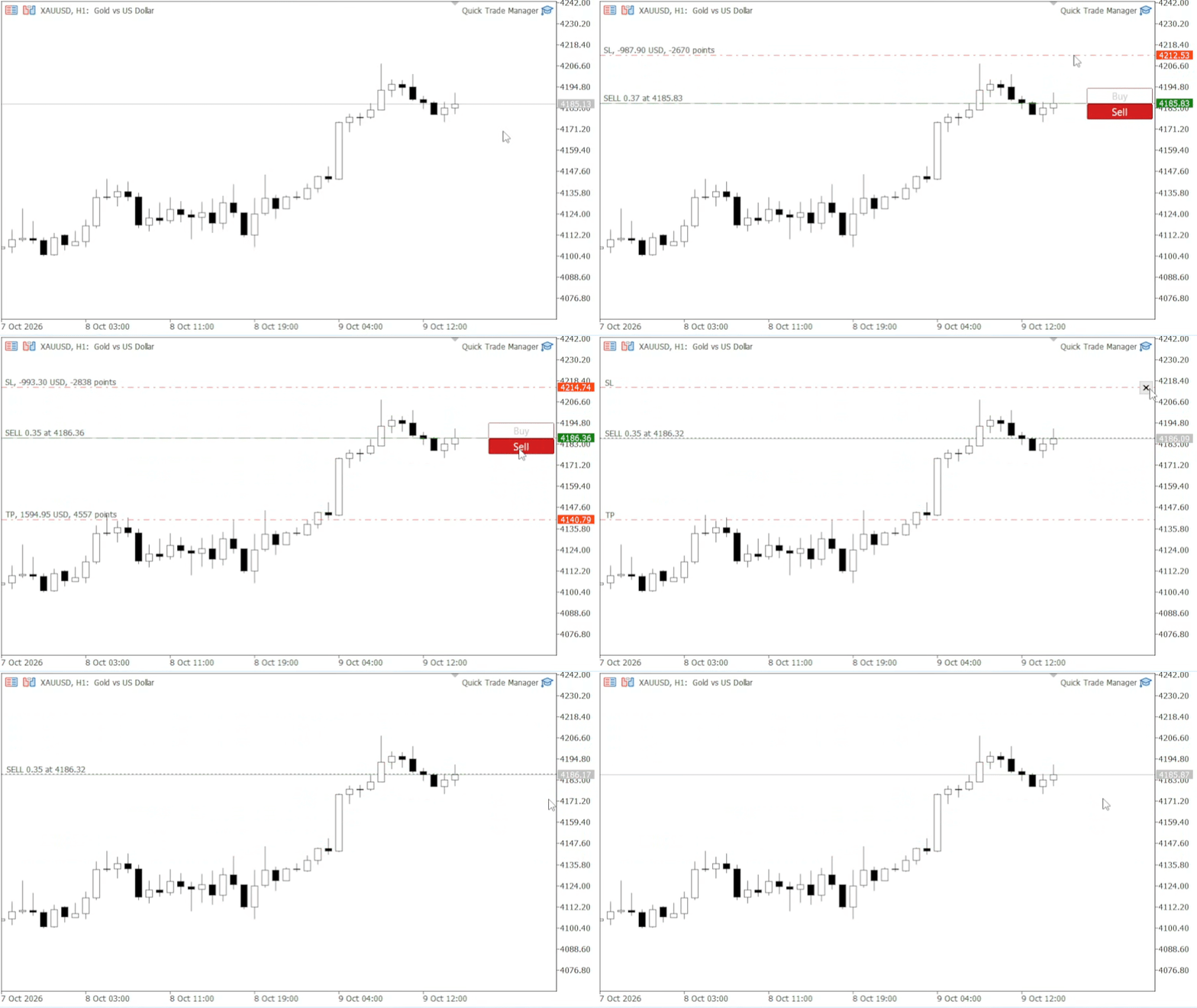
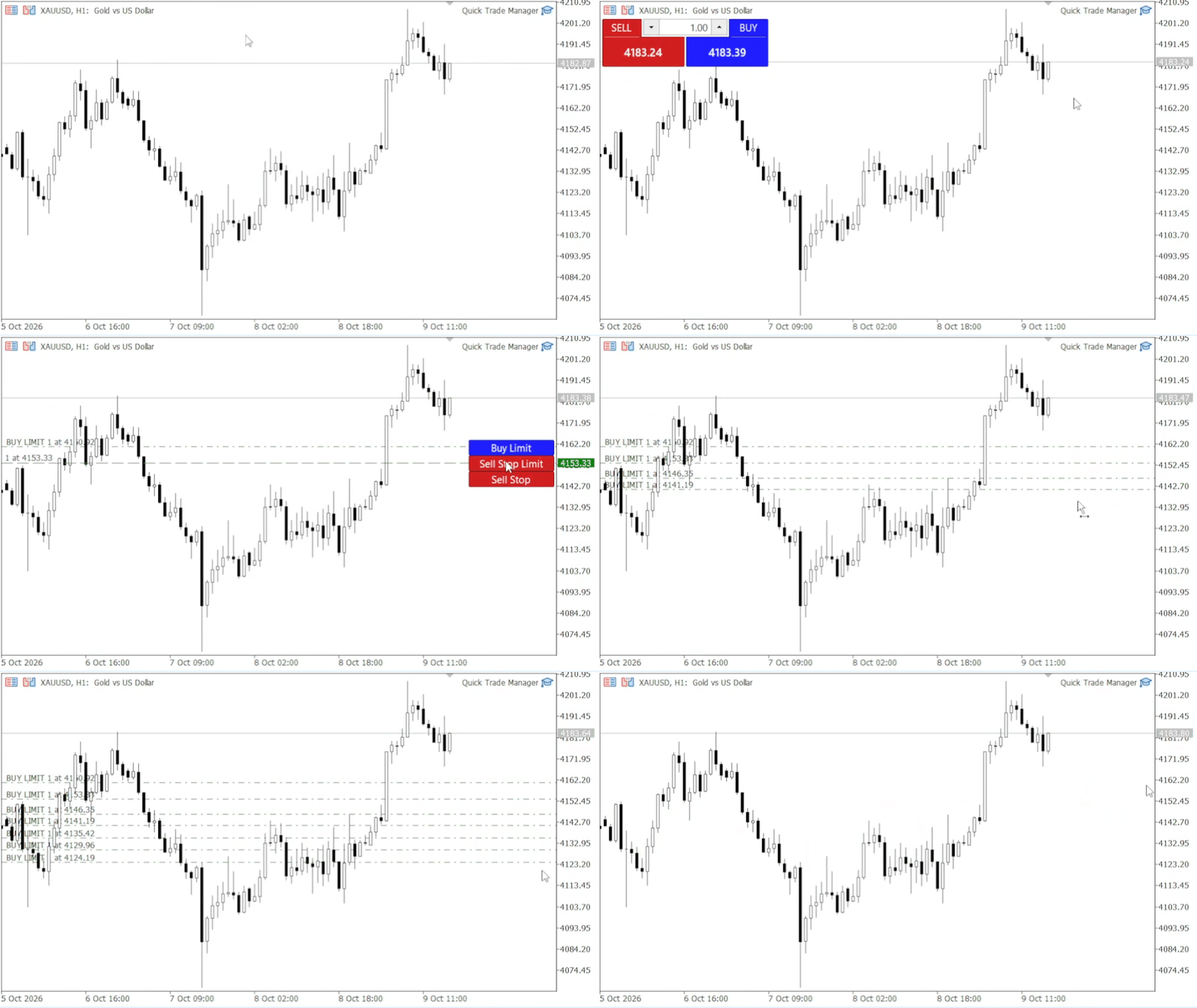
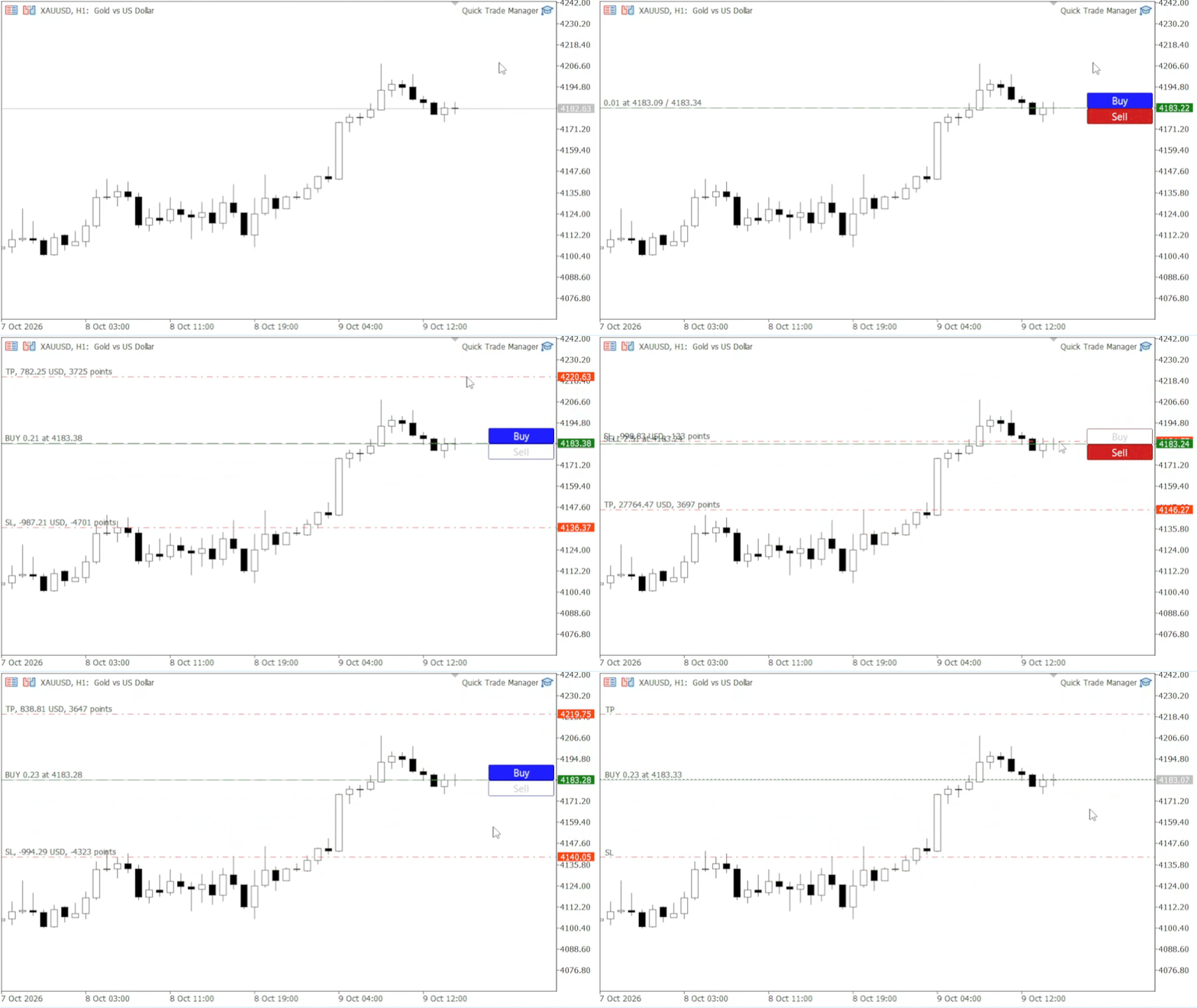
Quick Trade Manager (QTM)는 MT5 차트에서 빠르고 직관적인 트레이딩을 할 수 있는 편리한 도구입니다.

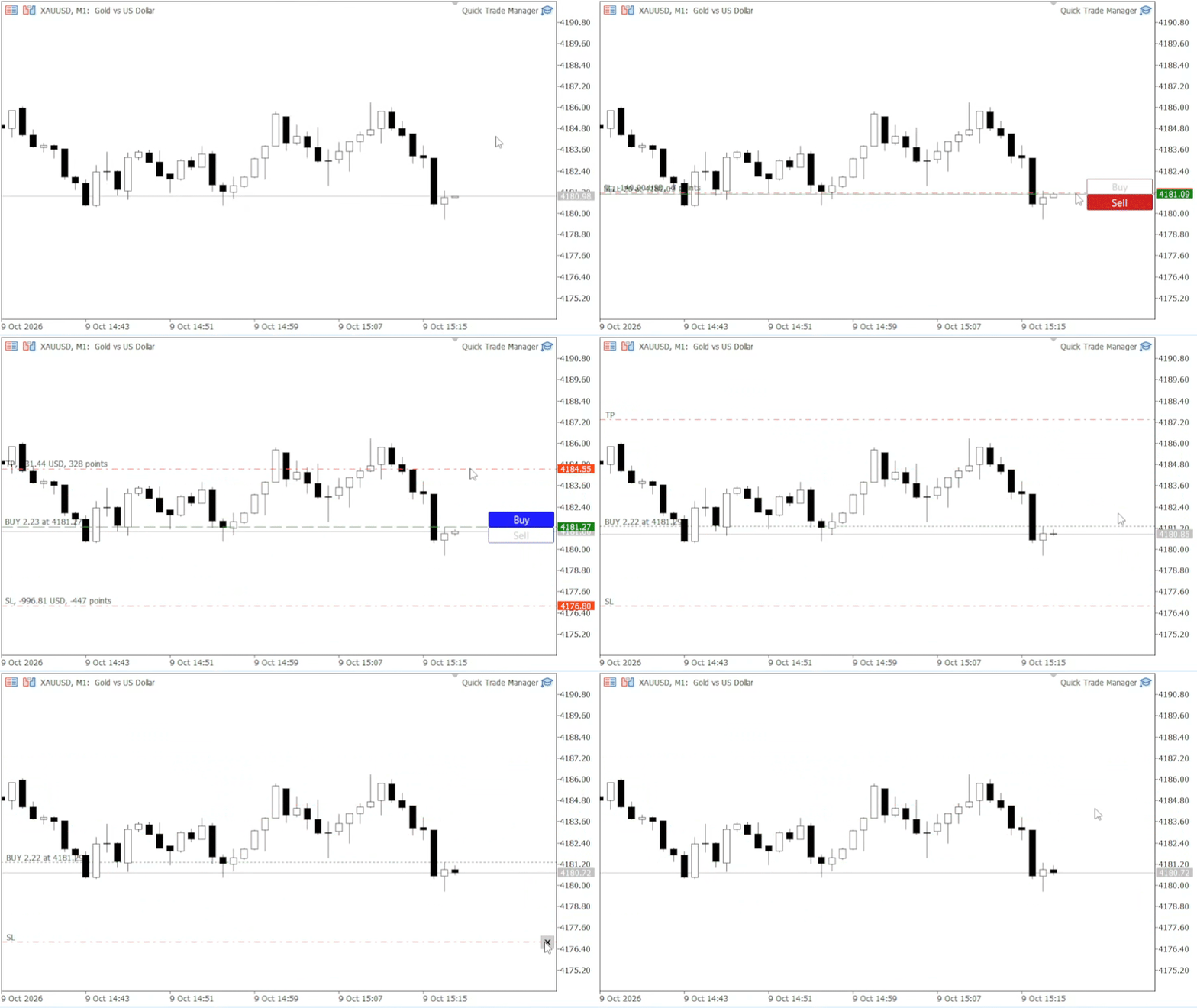
QTM은 원클릭 트레이딩을 더욱 편리하게 만들어주며, 차트에서 직접 빠르게 거래할 수 있는 기능을 확장합니다. 설정된 위험 비율에 따라 포지션 크기를 자동으로 계산할 수 있습니다. 또한 모든 사용자 정의(합성) 심볼을 완벽하게 지원합니다. 예를 들어, QTM을 Seconds Chart로 생성된 초(秒) 차트에서도 트레이딩에 활용할 수 있습니다.

단축키

  • CTRL+SHIFT를 누른 상태에서 차트를 클릭하면 시장가 주문 계획 모드가 활성화됩니다.

  • CTRL+SHIFT를 누른 상태에서 차트를 더블 클릭하면 지정가 주문 계획 모드가 활성화됩니다.

  • SHIFT를 누른 상태에서 가격 라인을 드래그합니다.

  • CTRL을 누른 상태에서 SL/TP 라인을 드래그합니다.

  • TAB을 누른 상태에서 마우스 휠을 스크롤하여 주문을 선택합니다.

  • 마우스 왼쪽 버튼을 누른 상태에서 [B] 키를 눌러 매수 주문을 체결합니다.

  • 마우스 왼쪽 버튼을 누른 상태에서 [S] 키를 눌러 매도 주문을 체결합니다.

  • 마우스 왼쪽 버튼을 누른 상태에서 [Q] 키를 눌러 매매 패널을 표시/숨깁니다.

  • ESC 키를 눌러 현재 작업을 취소합니다.

Quick Trade Manager를 통해 쉽고 편리하며 안전한 거래를 경험하세요. 리스크를 완벽히 제어하며 몇 번의 움직임으로 주문을 관리할 수 있습니다.


상세 정보

#Tags: 거래 매니저, 차트 거래, 빠른 거래, 거래 패널, 빠른 거래 패널, 트레이딩 패널, 주문 관리, 주문 계획, 위험 관리, 사용자 정의 심볼, 합성 심볼, 트레일링 스탑, 트레일링, 브레이크 이븐, 자동 볼륨 계산, 볼륨 계산, 위험 관리, breakeven, trailing stop.
리뷰 7
itakhola
516
itakhola 2025.05.20 16:11 
 

Good utility. I like it. Please add the option to change the size of the panel and font.

alejandro Burgos
55
alejandro Burgos 2025.03.21 06:33 
 

Works very good

RS4950
39
RS4950 2024.12.25 10:57 
 

Hi, Could you upgrade this EA and remove or make a true-or-false option where the lines in the upper right corner disappear? They are very annoying. Thanks.

Thank you for the quick upgrade and your work. 👍

추천 제품
Close All in 1s
Seng Yang
4.68 (22)
Hello, Every one  A script to close all market positions and/or pending orders. ----------------------------------------------------------------------------------- This is Close All      market positions and/or pending orders button  You can close all orders in 1 second by one click  For advanced version:  Advanced:  https://www.mql5.com/en/market/product/77763           https://www.mql5.com/en/market/product/89311 Key:  1 Close all button: The script will close All orders market + pending
FREE
Breakeven Bot
Gabriel Paul Ange Perrin
Optimize your trading management with Breakeven Bot, the essential tool for active traders managing multiple positions at once. No more wasting time manually adjusting your stops—one click is all it takes to secure your profits! Main Feature: ️ "BREAKEVEN" Button – Instantly set all profitable positions to breakeven and protect your gains quickly. ️ Customization Options: Set breakeven in pips or currency, depending on your preference. Choose whether breakeven should be at the entr
FREE
Click Trading
Jawad Tauheed
5 (1)
One Click Trading – Auto TP SL Developer TraderLinkz Version 1.00 Category Utility What it does Adds missing TP and SL to your manual trades and pending orders Sets them once per ticket Lets you move TP and SL afterward Works on hedging and netting accounts Scans on every tick and reacts on trade events Why you want it You place faster entries You get consistent risk and exit targets You reduce fat finger errors You keep full manual control Quick start Attach the EA to any chart Keep TP and SL e
FREE
MMTrade
Alexander Martynov
5 (3)
This tool is designed to quickly calculate the lot depending on the Stop Loss. The control is done by hot keys By default: 1 - Limit order price level 2 - Stop Loss Level 3 - Take Profit Level Space Bar - Open an order Escape - Cancel All 9 - Open 2 orders Market Order To open a Market order, click (2) and set up Stop Loss with the mouse If you want to put Take Profit - click (3) and set up Take Profit with the mouse
FREE
Bneu Trade Manager
Marvinson Salavia Caballero
**Bneu Trade Manager** is a trading utility Expert Advisor for MetaTrader 5 designed to assist traders in managing their trading operations through a visual panel interface. This free version provides essential trade management tools suitable for manual traders who want to manage trades efficiently using a graphical interface. **Main Functionality** **Visual Trade Management:** The utility provides drag-and-drop horizontal lines on the chart for stop loss and take profit placement. Users can
FREE
Trade Control Panel
Jerry Jilun Anak Liban
Trade Control Panel Function Normal One Click Function Close All Close All Profit Close All Loss Close All Pending Order Close All Sell Close All Buy Advance One Click Function 1.  Close Partial Lot Sell by Percent It will help you partial close for all open position by desire percent you wanted. No longer partial close one by one for every open position Manual input for desire percent 2. Close Partial Lot Buy by Percent It will help you partial close for all open position by desire percent
CloseAllPosition
Konstantin Chernov
4 (2)
A script for closing positions If you need to quickly close several positions, this script will make all the routine for you! The script does not have any input parameters. Allow AutoTrading before running the script. Usage: Run the script on a chart. If you need to specify the maximal deviation and the number of attempts to close positions, use the script with input parameters https://www.mql5.com/en/market/product/625 You can download MetaTrader 4 version here: https://www.mql5.com/en/market/
FREE
모든 스톱로스 및 테이크프로핏 삭제 — SL/TP 수준을 즉시 제거하는 간단한 솔루션 한 번의 클릭으로 모든 스톱로스 및 테이크프로핏 수준을 제거하세요! 모든 스톱로스 및 테이크프로핏 삭제 는 모든 열린 포지션에서 SL 및 TP 수준을 빠르고 효율적으로 제거하려는 트레이더를 위해 설계된 편리한 스크립트입니다. 간단한 작동과 즉각적인 실행은 동적 시장 조건에서 필수적인 도구가 됩니다. 주요 장점: • 시간 절약: 각 포지션을 수동으로 수정할 필요가 없습니다 — 모든 것이 자동으로 처리됩니다. • 다중 심볼 지원: 스크립트는 모든 거래 중인 심볼에서 수준을 제거합니다. • 사용 용이성: 스크립트를 차트에 드래그하기만 하면 됩니다 — 작업 완료! • 신뢰성: 실행 전에 각 포지션을 확인하여 정확성을 보장합니다. 사용 방법: Übrigens: Ein Skript, das alle Stop Loss- und Take Profit-Level nur auf dem ausgewählten Symb
FREE
Martingale Assistant
Mohammad Elyas Qaderi
Donation: USDT (TRC20) : TQJsYp64FgLLeQiyNnS6hhCNBjnz4ykbT1 USDT (BEP20, Polygon) : 0x5b50AaaE515452071D395D28BC3D78d16279D168 You can use this expert to execute Martingale orders for you open positions. This expert will add to your positions with a pre-defined loss step. For choosing open positions you can use Symbol Name or Magic Number . Also the loss step will be defined by currency or pips. All positions that refer to a certain order will be closed by entered Profit from input section. For

FREE
DTK Scalping Panel
Thiago Pereira Pinho
A powerful and intuitive trade management tool designed for scalpers and intraday traders. Created to complement the Nampim Samba Scalper strategy , it allows traders to open, manage, and close positions quickly without leaving the chart.  Key Features: Customizable trading panel – choose position (left, right, center, top, bottom). One-click trading buttons – instantly open Buy/Sell trades with pre-set lot sizes. Close management – close last 1/2/3 trades or all Buy/Sell positions with one clic
FREE
EA utility to help you with your Discipline for New Traders. When Balance Drop below set Daily Max Percentage Draw Down Balance. Any new trades open after the DD Threshold reached, Bot will close any new trades instantly and will keep canceling any pending orders placed as well until the Next Daily Candle is formed or EA is removed. Note: 1. Please Attached EA Utility before start trading for the day.  2. Set Timeframe before attaching EA utility to the chart. If timeframe changed after taking a
FREE
Quick Exit
Jefferson Judge Metha
This MT5 Utility is designed to simplify the process of managing multiple trades. If you have several open positions, it can be time-consuming to close each one manually. With this tool, you can easily close all profit trades, losing trades, or just the trades that are linked to the chart you're currently viewing. It saves you time and effort by allowing you to manage your trades with just a few clicks, making your trading experience smoother and more efficient. Whether you're focusing on profit
FREE
️ Trade Manager oneclick  ( Reverse Trade,  Partial Close,  Breakeven, Close All Running Trade )   control – Smart Manual Trade Control for MT5 Trade Manager oneclick control is a powerful yet lightweight trade management utility built for manual traders who want precise control over their open positions — directly from the MT5 chart. This EA does not open or close trades automatically based on any strategy. It simply provides one-click management tools to handle your running trades efficient
FREE
The Panel
Ahmed Alaaeldin Abdulrahman Ahmed Elherzawi
The Panel will read the floating profit/loss for the symbol of your chart and will plot the profit/loss numbers on the chart. It will work with manual trades or trades made by any expert advisor. The Panel shows the Max Drawdown in the base currency, floating profit/loss for both buy and sell orders. It will also show the same in Pips. The Panel is movable on the chart, so you can drag it using the mouse cursor.
FREE
Morwa Symbols
Michael Mafate Mogajane
Smart Watermark Displays current symbol + timeframe Shows account name (or custom text) Customizable font/color/position One-Click Tools Timeframe Switcher:   Quick-access buttons (M1 to D1) Drawing Tools:   Create horizontal lines, trendlines, and Fibonacci retracements with consistent sizing Object Cleanup:   "Delete" button removes all indicator-created drawings Pips Meter Real-time P/L tracking in pips Color-coded (green/red) for profit/loss Supports magic number filtering Chart Zoom Contro
FREE
Indicator Removal Script for MetaTrader 5 (Version 1.4) The Delete  All Indicators Script is a powerful and user-friendly tool designed for MetaTrader 5 (MT5) to instantly remove all indicators from the main chart, sub-windows, or both, with a single click. Developed by Louis MattFX , this script (Version 1.4) simplifies chart management, saving traders time and effort when resetting their workspace for fresh analysis or new trading strategies. Key Features Flexible Removal Options : Choose to c
FREE
Look Back My Trading History MT5
Sa No Tsuyoshi Kokorozashi
5 (2)
Description This is a utility tool for MT5 reminding traders of all the entry points by highlighting trading history. For those who just started to learn trading, one of the most efficient tips to improve their trading skill is to look back their own trading history. However, trade history arrow shown on MT5 chart is simply too small to find out, which will keep traders away from reviewing their trade, especially stupid mistakes like overtrading. By clearly showing their trade history and face i
FREE
One Click Close MT5 is an EA which allows you close orders quickly. EA display on chart two buttons. The first button "Close All Positions" is using to close all opened orders. The second button "Close Profit Positions" is using to close only profitable orders. EA is closing orders for all available symbols, not only for chart symbol. In EA params you can set distance from upper chart frame (Y Offset) and from left chart frame (X Offset). For installation EA it is only need to copy One Click Clo
FREE
Prop Edge Heartbeat
Nuno Madeira Amaro Pire Costa
EA to prevent inactivity violations on prop firms. This EA will scout for your most recent trade and if it is older than the number of days defined, will enter a micro lot position size 0.01 on the pair defined. It is recommended to use a tight spread pair like EURUSD. This EA will not act as long as you have at least one trade in the last X days (defined on config). This EA will not place other trades or modify existing position.
FREE
SuperGridder
Jere Katainen
4.71 (7)
This utility allows creating any amount of grid orders just by  clicking with the mouse.  Instructions: Trading mode Deleting mode Press ctrl and click with mouse to start drawing a grid While drawing, press shift to cancel Release buttons to send orders Press shift and click with mouse to draw a removal line Release buttons to   confirm removal: EA deletes every pending order that the line touches Inputs: - 3 options to calculate the grid sizing: Fixed points distance between grid level
FREE
AQ RiskOptimizer MT5
HIT HYPERTECH INNOVATIONS LTD
4 (1)
Risk Optimizer is the absolute solution for applying risk management on your account. Bad risk management is the main reason that causes traders to lose money. Risk Optimizer calculates and suggests the correct lot size for each position according to your personal, customized risk profile. You can give directly your preferred risk as percentage (%) for each position or you can trust our algorithms to calculate and optimize according to your risk category selection. But it is not only that! Selec
FREE
FXTrade Panel
Sakariya Bhaskar Nitinbhai
FXTrade Panel – 스마트하고 빠른 MT5 거래 관리자 FXTrade Panel은 원클릭 거래 실행 및 관리를 통해 거래 효율성을 높이도록 설계된 MetaTrader 5용 고급이면서도 사용하기 쉬운 거래 도구입니다. 주요 기능: • 계좌 개요: 계좌 번호, 레버리지, 잔고 및 현재 스프레드를 표시합니다.   • 로트 크기 제어: 직관적인 +/− 버튼으로 로트 크기를 조절할 수 있습니다.   • 리스크 관리: 핍 단위로 Stop Loss(SL), Take Profit(TP1, TP2) 및 Trailing Stop(TS)을 설정합니다.   • 원클릭 거래: BUY 및 SELL 주문을 즉시 실행합니다.   포지션 관리: • Close Buy — 모든 활성 매수 포지션을 닫습니다.   • Close Sell — 모든 활성 매도 포지션을 닫습니다.   • Close All — 모든 포지션을 청산합니다.   • Close Profit — 이익이 발생한 거래만 닫습니다.   •
FREE
The SmartTrader Panel  is a powerful and intuitive trading panel designed to streamline trade execution and risk management in MetaTrader. With its sleek and user-friendly interface, traders can quickly manage their positions, calculate risk metrics, and execute trades with precision. Key Features: One-Click Trading: Easily place Buy or Sell orders with a single click. Risk Management: Automatically calculates risk percentage, risk-reward ratio, and potential profit/loss. Customizable Trad
FREE
This MetaTrader 5 script -  design to manage your workspace to close all open charts except the most recently active one. Perfect for traders who need a quick and reliable way to declutter their platform while keeping the current chart in focus. Key Features: One-Click Convenience: Instantly closes all charts except the active one, streamlining your workspace. Safe and Efficient: Skips the current chart to ensure uninterrupted analysis. Error Handling: Robust error detection with detailed loggi
FREE
EA Agulhada do Didi
Devscode Desenvolvimento de Softwares LTDA
이 Expert Advisor는 Didi Index 지표의 로직을 기반으로 MetaTrader 5에서 거래를 자동화하기 위해 개발되었습니다. EA는 사용자가 설정한 규칙과 매개변수에 따라 모든 거래를 차트 상에서 자동으로 실행합니다. 이 로봇의 개념은 명확하고 객관적인 진입 및 관리 로직을 적용하여, 외부 연동이나 추가 라이브러리 없이도 트레이더가 거래 실행 상태를 쉽게 확인할 수 있도록 하는 데 있습니다. 주요 기능 자동 거래 Didi Index 지표 로직을 기반으로 거래가 자동 실행됩니다. 거래 시간 설정 EA가 거래를 수행할 수 있는 시간대를 설정할 수 있으며, 설정된 시간 외에는 새로운 거래가 열리지 않습니다. 트레일링 스탑 설정된 조건에 따라 가격 움직임을 따라 자동으로 스탑을 조정합니다. 자동 브레이크이븐 지정된 조건이 충족되면 스탑을 진입 가격으로 자동 이동합니다. 차트 정보 패널 차트 상에 EA의 운영 정보를 표시하여 거래와 로봇 상태를 실시간으로 모니터링할
FREE
Quick Style MT5
Maxim Polishchuk
4.75 (12)
The Quick Style utility is designed for facilitation and acceleration of working with the properties of graphical objects. Left-click a graphical object while holding the Shift key to open the quick access window for configuring the object properties. In the window, you can change the color, style and line width with one click, including those of other graphical objects. All changes are displayed immediately. To close the Quick Style , simply click the free space on the chart. The utility is eas
FREE
PositionCalculatorMT5
Nguyen Duy Trung
4.49 (43)
Position Calculator calculates how many lots to trade based on: Entry and stop-loss levels Risk tolerance Account size (balance, equity, or even your savings account) Account currency Currency exchange rates - The main tab of the panel provides the primary control over the EA's functions and serves to output the most important calculation results: the position size, risk, reward, and risk-to-reward ratio. - The risk tab can help you assess current and potential risk and reward profile. Using a s
FREE
Dynamic ATR TP Ratio The ATR Take Profit Manager Expert Advisor (EA) automatically calculates and adjusts the take profit (TP) level for your open trades, based on market volatility. This EA uses the Average True Range (ATR) indicator, which measures market volatility, to set your TP level, ensuring it adapts to the current market conditions. What is ATR? The Average True Range (ATR) is a technical indicator that shows the volatility of an asset over a specific period. It measures how much the
FREE
거래원 여러분 안녕하세요!저는 당신의 거래 조수입니다.더 이상 말하지 말고, 내가 너에게 나의 특기를 알려줄게. 1.나는 당신의 창고를 관리하는 데 능숙하다, 당신이 어느 쪽에서 주문하든, 나는 가장 먼저 당신을 도와 합리적인 손실 방지선과 이동 손실 방지선을 추가할 수 있습니다. 2.나는 너를 도와 상승과 하락을 회피하고 원칙을 지키지 못하는 인간성의 약점을 근원적으로 근절할 수 있다. 3. 귀하가 참고할 수 있도록 최적 지점에서 귀하의 모바일 MT5 클라이언트에 알림 메시지를 보냅니다. 물론 귀하는 모바일 장치 내의 MetaTrader 5 APP의 MetaQuotes ID를 MetaTrader 5 클라이언트 --> 옵션 --> 알림 --> MetaQuotes ID의 편집 상자에 등록하고 알림 지점 확인을 눌러야 합니다. 4. 정책 테스트에서 수동 시뮬레이션 디스크 연습을 잘 지원합니다. 5. 저에게 연락하면 추가 AI 보조 클라이언트 슈퍼 보조 프로그램을 얻을 수 있습니다. 참
MT5용 NAS100 Auto SL 및 TP 메이커를 소개합니다: 메타트레이더 5에서 나스닥 100 시장을 탐색하는 트레이더에게 없어서는 안될 보조 도구인 NAS100 Auto SL 및 TP 메이커로 손절 및 테이크프로핏 설정을 다시는 놓치지 마세요. 이 도구는 손절 및 테이크프로핏 레벨을 자동으로 관리할 수 있는 원활한 솔루션을 찾는 분들을 위해 설계되었습니다. 주요 특징: 손쉬운 자동화: 스톱로스 및/또는 테이크프로핏 없이 나스닥 100 거래를 자동으로 모니터링합니다. 사용자가 구성한 설정에 따라 레벨을 동적으로 조정합니다. 다양한 주문 유형: 나스닥 100의 시장가 및 지정가 주문 모두와 호환됩니다. 메타트레이더 5에서 사용할 수 있는 다양한 주문 유형을 지원합니다. 맞춤형 구성: 사용자 친화적인 매개변수 설정으로 추적 기본 설정 및 손절/익절 수준을 사용자 지정할 수 있습니다. 유연한 범위: 실행되는 특정 NAS100 상품 또는 거래되는 모든 상품에 대해 손절 및 테이크프
FREE
이 제품의 구매자들이 또한 구매함
Trade Assistant MT5
Evgeniy Kravchenko
4.42 (208)
거래당 위험 계산, 라인을 사용한 손쉬운 신규 주문, 부분 청산 기능을 통한 주문 관리, 7가지 유형의 트레일링 스탑 및 기타 유용한 기능을 제공합니다. 추가 자료 및 지침 설치 지침   -   애플리케이션 지침   -   데모 계정용 애플리케이션 평가판 라인 기능       - 차트에 개시선, 손절매, 차익실현을 표시합니다. 이 기능을 사용하면 새로운 주문을 쉽게 하고 개봉 전에 추가 특성을 볼 수 있습니다. 위기 관리       -       위험 계산 기능은 설정된 위험과 손절매 주문의 크기를 고려하여 새 주문의 볼륨을 계산합니다. 이를 통해 손절매 크기를 설정하고 동시에 설정된 위험을 존중할 수 있습니다. 로트 계산 버튼 - 위험 계산을 활성화/비활성화합니다. 필요한 위험 값은 위험 필드에 0에서 100 사이의 백분율 또는 예금 통화로 설정됩니다. 설정 탭에서 위험 계산 옵션을 선택합니다. $ 통화, % 잔액, % 지분, % 자유 마진, % 사용자 정의, % AB 이전
Trade Manager EA에 오신 것을 환영합니다. 이 도구는 거래를 보다 직관적이고 정확하며 효율적으로 만들기 위해 설계된 궁극적인 리스크 관리 도구 입니다. 단순한 주문 실행 도구가 아닌, 원활한 거래 계획, 포지션 관리 및 리스크 제어를 위한 종합 솔루션입니다. 초보자부터 고급 트레이더, 빠른 실행이 필요한 스캘퍼에 이르기까지 Trade Manager EA는 외환, 지수, 상품, 암호화폐 등 다양한 시장에서 유연성을 제공합니다. Trade Manager EA를 사용하면 복잡한 계산은 이제 과거의 일이 됩니다. 시장을 분석하고 진입, 손절 및 익절 수준을 차트의 수평선으로 표시한 후 리스크를 설정하면, Trade Manager가 이상적인 포지션 크기를 즉시 계산하고 SL 및 TP 값을 실시간으로 표시합니다. 모든 거래가 간편하게 관리됩니다. 주요 기능: 포지션 크기 계산기 : 정의된 리스크에 따라 거래 크기를 즉시 결정합니다. 간단한 거래 계획 : 진입, 손절, 익절을 위한
Local Trade Copier EA MT5
Juvenille Emperor Limited
4.96 (126)
Local Trade Copier EA MT5 를 사용하여 매우 빠른 거래 복사 경험을 해보세요. 1분 안에 간편하게 설정할 수 있으며, 이 거래 복사기를 사용하면 Windows 컴퓨터 또는 Windows VPS에서 여러 개의 MetaTrader 터미널 간에 거래를 0.5초 미만의 초고속 복사 속도로 복사할 수 있습니다. 초보자든 전문가든   Local Trade Copier EA MT5 는 다양한 옵션을 제공하여 사용자의 특정 요구에 맞게 맞춤 설정할 수 있습니다. 이는 수익 잠재력을 높이려는 모든 사람을 위한 최고의 솔루션입니다. 지금 사용해보시고 이것이 왜 시장에서 가장 빠르고 쉬운 무역용 복사기인지 알아보세요! 팁: 여기 에서 데모 계정에서 Local Trade Copier EA MT5 데모 버전을 다운로드하여 사용해 볼 수 있습니다. 다운로드한 무료 데모 파일을 MT5 >> File >> Open Data Folder >> MQL5 >> Experts 폴더에 붙여넣고 터
TradePanel MT5
Alfiya Fazylova
4.86 (148)
Trade Panel은 다기능 거래 보조원입니다. 이 애플리케이션에는 수동 거래를 위한 50개 이상의 거래 기능이 포함되어 있으며 대부분의 거래 작업을 자동화할 수 있습니다. 전략 테스터에서는 애플리케이션이 작동하지 않습니다. 구매하기 전에 데모 계정에서 데모 버전을 테스트할 수 있습니다. 데모 버전 여기 . 전체 지침 여기 . 거래. 한 번의 클릭으로 거래 작업을 수행할 수 있습니다: 자동 위험 계산을 통해 지정가 주문 및 포지션을 엽니다. 한 번의 클릭으로 여러 주문과 포지션을 열 수 있습니다. 주문 그리드를 엽니다. 그룹별 대기 주문 및 포지션을 마감합니다. 포지션 반전(매수 청산 후 매도 개시 또는 매도 청산 후 매수 개시). 포지션 고정(매수 포지션과 매도 포지션의 양을 동일하게 하는 추가 포지션 개설). 한 번의 클릭으로 모든 포지션을 부분 청산합니다. 모든 포지션의 이익실현과 손절매를 동일한 가격 수준으로 설정합니다. 모든 포지션에 대한 손절매를 해당 포지션의 손익 분기
베타 출시 Telegram to MT5 Signal Trader 는 곧 공식 알파 버전을 출시할 예정입니다. 일부 기능은 아직 개발 중이며, 작은 버그가 발생할 수 있습니다. 문제가 있으면 꼭 보고해 주세요. 여러분의 피드백은 소프트웨어 개선에 도움이 됩니다. 가격은 20건 판매 후 인상됩니다. 남은 $90 카피: 2/20 . Telegram to MT5 Signal Trader 는 Telegram 채널 또는 그룹의 거래 신호를 자동으로 MetaTrader 5 계정으로 복사하는 강력한 도구입니다. 공개 및 비공개 채널을 모두 지원하며, 여러 신호 제공자를 여러 MT5 계정에 연결할 수 있습니다. 소프트웨어는 빠르고 안정적으로 동작하며, 복사된 거래를 완벽히 제어할 수 있습니다. 인터페이스는 깔끔하며 대시보드와 차트가 시각적으로 구성되어 있고, 직관적인 네비게이션이 가능합니다. 여러 Signal Account를 관리하고, 공급자별 설정을 세밀하게 조정하며, 모든 동작을 실시간으로
Trade Dashboard MT5
Fatemeh Ameri
4.96 (114)
Tired of complex order placement and manual calculations? Trade Dashboard is your solution. With its user-friendly interface, placing orders becomes effortless, by a single click, you can open trades, set stop loss and take profit levels, manage trade lot size, and calculate risk to reward ratios, allowing you to only focus on your strategy. Say goodbye to manual calculations and streamline your trading experience with Trade Dashboard. Download  Demo Version  right now. You can find  Details of
Farmed Hedge Yield Farming - Professional Pair Trading Dashboard (Manual - Hybrid - Semi/Automated EA) VERSION 3 - WILD HARVEST UPDATE Trading Approach: - Manual Trading: Primary focus - Auto Pilot: Optional supplementary feature - Full Automation: Not the main purpose Recommended Timeframe: H1-H4 DEMO VERSION Download the free demo to test functionality. Use Strategy Tester with Visual Mode to see how it works. VERIFIED TRADING RESULTS - Farmed Hedge Yield Axi Copy: https://www.mql5.com/en/si
Trade copier MT5
Alfiya Fazylova
4.61 (36)
Trade Copier는 거래 계정 간의 거래를 복사하고 동기화하도록 설계된 전문 유틸리티입니다. 복사는 공급자의 계정/단말기에서 동일한 컴퓨터 또는 vps에 설치된 수신자의 계정/단말기로 발생합니다. 구매하기 전에 데모 계정에서 데모 버전을 테스트할 수 있습니다. 데모 버전 여기 . 전체 지침 여기 . 주요 기능 및 이점: 복사기는 "МТ5> МТ5", "МТ4> МТ5", "МТ5> МТ4" 복사를 지원합니다. 복사기는 데모 계정 > 실 계정, 실 계정 > 데모 계정, 데모 계정 > 데모 계정 및 실제 계정 > 실 계정 복사를 지원합니다. 복사기는 읽기 전용 암호가 적용된 투자자 계정에서 복사를 지원합니다. 하나의 공급자 터미널은 여러 수신 터미널로 트랜잭션을 보낼 수 있고 하나의 수신 터미널은 여러 공급자 터미널에서 트랜잭션을 수신할 수 있습니다. 복사기는 귀하 또는 귀하의 고문이 거래하는 동일한 터미널에서 작동할 수 있습니다. 높은 복사 속도(0.5초 미만). 복사기에는 간편
MarketCoachPanel
Maria Makarchuk
4 (1)
MarketCoach Panel — инструмент дисциплины и контроля риска для трейдера MarketCoach Panel — это вспомогательная панель для MetaTrader 5, разработанная для повышения дисциплины в торговле, контроля риска и принятия более осознанных решений. Приложение не совершает сделки и не является торговым советником. Оно помогает трейдеру анализировать текущую ситуацию и соблюдать собственные правила стратегии. Основные возможности • Расчёт лота по риску Автоматический расчёт объёма позиции на основе: проце
HINN MagicEntry Extra
ALGOFLOW OÜ
4.67 (12)
HINN MAGIC ENTRY – the ultimate tool for entry and position management! Place orders by selecting a level directly on the chart! full description   ::  demo-version  :: 60-sec-video-description Key features: - Market, limit, and pending orders - Automatic lot size calculation - Automatic spread and commission accounting - Unlimited partitial take-profits  - Breakeven and trailing stop-loss and take-profit  functions - Invalidation leves - Intuitive, adaptive, and customizable interface - Works
Exp COPYLOT CLIENT for MT5
Vladislav Andruschenko
3.82 (34)
MT5용 트레이드 복사기는 metaТrader 5 플랫폼용 트레이드 복사기입니다   . 그것은 사이의   외환 거래를 복사합니다       모든 계정   COPYLOT MT5 버전의 경우   MT5   -   MT5, MT4   -   MT5 (또는 COPYLOT MT4 버전의 경우   MT4 -   MT4 MT5   -  MT4) 믿을 수 있는 복사기! MT4 버전 전체 설명   +DEMO +PDF 구입 방법 설치하는 방법     로그 파일을 얻는 방법     테스트 및 최적화 방법     Expforex의 모든 제품 МТ4 터미널에서 거래를 복사할 수도 있습니다(   МТ4   -   МТ4, МТ5   -   МТ4   ):   COPYLOT CLIENT for MT4 이 버전은 МТ5   -   МТ5, МТ4   -   МТ5   터미널 간을 포함합니다. 거래 복사기는 2/3/10 터미널 사이의 거래/포지션을 복사하기 위해 만들어졌습니다. 데모 계정 및 투자 계정에서
PhantomBreak Radar — индикатор для MetaTrader 5, предназначенный для выявления ложных пробоев уровней (fake breakout) и рыночных ловушек. Инструмент помогает трейдерам находить моменты, когда цена прокалывает экстремум диапазона, но затем возвращается обратно — формируя потенциальную точку входа в противоположном направлении. Индикатор автоматически анализирует ценовой диапазон за выбранный период, отслеживает выход за его границы и фиксирует повторный вход цены внутрь диапазона. В таких ситуаци
Copy Cat More Trade Copier MT5 (복사 고양이 MT5) 는 오늘날의 거래 과제를 위해 설계된 로컬 거래 복사기이자 완전한 위험 관리 및 실행 프레임워크입니다. 프롭펌 챌린지부터 개인 포트폴리오 관리까지, 견고한 실행, 자본 보호, 유연한 구성 및 고급 거래 처리의 조합으로 모든 상황에 적응합니다. 복사기는 마스터(송신자)와 슬레이브(수신자) 모드 모두에서 작동하며, 시장 주문과 예약 주문, 거래 수정, 부분 청산 및 헷지 청산 작업의 실시간 동기화를 제공합니다. 데모 및 실계좌, 거래 또는 투자자 로그인과 호환되며, EA, 터미널 또는 VPS가 재시작되어도 지속적인 거래 메모리 시스템을 통해 복구를 보장합니다. 고유 ID로 여러 마스터와 슬레이브를 동시에 관리할 수 있으며, 브로커 간 차이는 접두사/접미사 조정 또는 사용자 정의 심볼 매핑을 통해 자동으로 처리됩니다. 매뉴얼/설정  | Copy Cat More MT4 | 채널  특별 기능: 설정이 간편함 —
The product will copy all telegram signal to MT5 ( which you are member) , also it can work as remote copier.  Easy to set up, copy order instant, can work with almost signal formats, image signal,  s upport to translate other language to English Work with all type of channel or group, even channel have "Restrict Saving Content", work with  multi channel, multi MT5 Work as remote copier: with signal have ticket number, it will copy exactly via ticket number. Support to backtest signal. How to s
Seconds Chart MT5
Boris Sedov
4.59 (17)
Seconds Chart — MetaTrader 5에서 초 단위 차트를 생성하는 독특한 도구입니다. Seconds Chart 를 사용하면 초 단위로 설정된 타임프레임으로 차트를 작성할 수 있어, 표준 분 또는 시간 단위 차트에서는 불가능한 유연성과 정밀한 분석이 가능합니다. 예를 들어, S15 타임프레임은 15초 동안의 캔들로 구성된 차트를 의미합니다. 사용자 정의 심볼을 지원하는 모든 인디케이터와 전문가 어드바이저를 사용할 수 있습니다. 이를 사용하는 것은 표준 차트에서 거래하는 것만큼 편리합니다. 표준 도구와 달리, Seconds Chart 는 초고속 타임프레임에서도 높은 정확도와 지연 없이 작업할 수 있도록 지원합니다. Seconds Chart의 장점 1초부터 900초까지 의 타임프레임 지원. 내장 틱 데이터베이스 덕분에 역사 데이터 즉시 로딩 . 실시간 데이터 업데이트로 지연이나 차이 없음 . 여러 초 단위 차트를 동시에 생성 가능. Seconds Chart가 이상적인 경우
Ultimate Extractor
Clifton Creath
5 (9)
Ultimate Extractor - Professional Trading Analytics for MT5 *****this is the local HTML version of Ultimate Extractor. Check out Ultimate Extractor Cloud on mql5 for the Cloud version****** Ultimate Extractor transforms your MetaTrader 5 trading history into actionable insights with comprehensive analytics, interactive charts, and real-time performance tracking. What It Does Automatically analyzes your MT5 trading history across all Expert Advisors and generates detailed HTML reports with inte
Equity Protect Pro: 안심 거래를 위한 종합 계좌 보호 전문가 계좌 보호, 자산 보호, 포트폴리오 보호, 다중 전략 보호, 수익 보호, 수익 확보, 거래 보안, 위험 관리 프로그램, 자동 위험 관리, 자동 청산, 조건부 청산, 예약 청산, 동적 청산, 추적 손절매, 원클릭 종료, 원클릭 청산, 원클릭 복원 등의 기능을 찾고 있다면 Equity Protect Pro가 바로 필요한 프로그램입니다. 설정이 간편하고 사전 설정된 조건이 충족되면 모든 차트를 닫을 수 있으며 신호 구독 취소도 지원합니다(이는 모든 거래 프로그램도 중지됨을 의미합니다). 이 시점에서 새로운 주문이 생성되지 않으며 최종적으로 모든 주문이 종료되어 예상치 못한 손실을 효과적으로 방지하고 안심하고 거래할 수 있습니다. Equity Protect Pro Demo Version for yo u to test   Equity Protect Pro MT4 Demo.ex4 Equity Protect Pro M
Telegram to MT5 Coppy
Sergey Batudayev
5 (8)
Telegram에서 MT5로:   최고의 신호 복사 솔루션 DLL 없이도 Telegram 채널과 채팅에서 MetaTrader 5 플랫폼으로 거래 신호를 직접 복사하는 최신 도구인 Telegram to MT5를 사용하여 거래를 간소화하세요. 이 강력한 솔루션은 정밀한 신호 실행, 광범위한 사용자 정의 옵션을 제공하고 시간을 절약하며 효율성을 높여줍니다. [ Instructions and DEMO ] 주요 특징 직접 Telegram API 통합 전화번호와 보안 코드를 통해 인증하세요. 사용자 친화적인 EXE 브리지를 통해 채팅 ID를 쉽게 관리하세요. 여러 채널/채팅을 추가, 삭제, 새로 고침하여 동시에 신호를 복사합니다. 고급 필터를 사용한 신호 파싱 예외 단어(예: "보고서", "결과")가 포함된 원치 않는 신호를 건너뜁니다. 유연한 SL 및 TP 형식을 지원합니다: 가격, 핍 또는 포인트. 가격 대신 포인트를 지정하는 신호에 대한 진입 포인트를 자동으로 계산합니다. 주문 맞춤화 및
한 번의 클릭으로 거래할 수 있는 거래 패널.   위치 및 주문 작업!   차트 또는 키보드에서 거래. 당사의 거래 패널을 사용하면 차트에서 직접 클릭 한 번으로 거래를 실행할 수 있으며 표준 MetaTrader 컨트롤보다 30배 빠르게 거래 작업을 수행할 수 있습니다. 매개변수와 기능의 자동 계산을 통해 트레이더는 더욱 빠르고 편리하게 거래할 수 있습니다. 그래픽 팁, 정보 라벨, 무역 거래에 대한 전체 정보는 MetaTrader 차트에 있습니다. MT4 버전 전체 설명   +DEMO +PDF 구입 방법 설치하는 방법     로그 파일을 얻는 방법     테스트 및 최적화 방법     Expforex의 모든 제품 열기 및 닫기, 반전 및 잠금, 부분 닫기/오토로트. 가상/실제 손절매/이익 실현/후행 정지/손익분기점, 주문 그리드 ... MetaТrader 5   의 주요 주문 거래 컨트롤 패널: 구매, 판매, 구매 중지, 구매 제한, 판매 중지, 판매 제한, 닫기, 삭제, 수
Trade Manager DashPlus
Henry Lyubomir Wallace
5 (13)
DashPlus 는 MetaTrader 5 플랫폼에서 거래 효율성과 효과를 향상시키기 위해 설계된 고급 거래 관리 도구입니다. 리스크 계산, 주문 관리, 고급 그리드 시스템, 차트 기반 도구 및 성과 분석 등 포괄적인 기능을 제공합니다. 주요 기능 1. 리커버리 그리드 불리한 시장 상황에서 거래를 관리하기 위한 평균화 및 유연한 그리드 시스템을 구현합니다. 거래 회복을 최적화할 수 있도록 전략적인 진입 및 종료 포인트를 제공합니다. 2. 스택 그리드 강한 시장 움직임 동안 포지션을 추가하여 유리한 거래에서 잠재적 수익을 극대화하도록 설계되었습니다. 유리한 시장 트렌드에서 승률을 높이며 거래를 확장할 수 있도록 합니다. 3. 손익(P&L) 라인 차트에서 잠재적인 수익 및 손실 시나리오를 시각적으로 표현합니다. 설정을 조정하고 P&L 라인을 드래그하여 실행 전에 다양한 거래 결과를 평가할 수 있습니다. 4. 바스켓 모드 동일한 심볼에 여러 포지션을 단일 집계 포지션으로 결합하여 관리합니
MT5 to Telegram Signal Provider 는 사용하기 쉽고 완전히 커스터마이즈 가능한 유틸리티로, 특정 신호를 Telegram의 채팅, 채널 또는 그룹으로 전송하고, 귀하의 계정을 신호 제공자 로 만듭니다. 경쟁 제품과 달리 DLL 임포트를 사용하지 않습니다. [ 데모 ] [ 매뉴얼 ] [ MT4 버전 ] [ 디스코드 버전 ] [ 텔레그램 채널 ]  New: [ Telegram To MT5 ] 설정 단계별 사용자 가이드 가 제공됩니다. 텔레그램 API에 대한 지식은 필요하지 않습니다; 개발자가 제공하는 모든 것이 필요합니다. 주요 특징 구독자에게 보낸 주문 상세 정보를 커스터마이즈할 수 있습니다. 예를 들어, 브론즈, 실버, 골드와 같은 계층 구독 모델을 만들 수 있습니다. 골드 구독에서는 모든 신호를 받습니다. id, 심볼, 또는 코멘트로 주문을 필터링할 수 있습니다. 주문이 실행된 차트의 스크린샷이 포함됩니다 보낸 스크린샷에 닫힌 주문을 그려 추가 검증을 합니다
Anchor: The EA Manager A coordination system for traders running multiple EAs. Anchor ensures only one EA can trade at a time, preventing conflicting positions and keeping your portfolio safer. Attach Anchor to any chart. Configure your EAs and their magic numbers. Anchor handles the rest. Built for portfolios. Built for discipline. Built for prop firms. The Problem Running multiple EAs on the same account creates risk. Two gold EAs can open opposite positions on the same candle. Three EA
Trade Manager DaneTrades
Levi Dane Benjamin
4.36 (28)
거래 관리자는 위험을 자동으로 계산하는 동시에 거래를 빠르게 시작하고 종료하는 데 도움을 줍니다. 과잉 거래, 복수 거래 및 감정 거래를 방지하는 데 도움이 되는 기능이 포함되어 있습니다. 거래를 자동으로 관리할 수 있으며 계정 성과 지표를 그래프로 시각화할 수 있습니다. 이러한 기능은 이 패널을 모든 수동 거래자에게 이상적으로 만들고 MetaTrader 5 플랫폼을 향상시키는 데 도움이 됩니다. 다중 언어 지원. MT4 버전  |  사용자 가이드 + 데모 트레이드 매니저는 전략 테스터에서 작동하지 않습니다. 데모를 보려면 사용자 가이드로 이동하세요. 위기 관리 % 또는 $를 기준으로 위험 자동 조정 고정 로트 크기 또는 거래량과 핍을 기반으로 한 자동 로트 크기 계산을 사용하는 옵션 RR, Pips 또는 Price를 사용한 손익분기점 손실 설정 추적 중지 손실 설정 목표 달성 시 모든 거래를 자동으로 마감하는 최대 일일 손실률(%)입니다. 과도한 손실로부터 계정을 보호하고 과도한
Local Trade Copier EA 는 외부 소스에서 거래 신호를 실행해야 하거나 MAM 또는 PAMM 계정 없이 동시에 여러 계정을 관리해야 하는 개인 거래자 또는 계정 관리자를 위한 솔루션입니다. 최대 8개의 마스터 계정에서 무제한 슬레이브 계정으로 복사합니다. [ 설치 가이드 | 업데이트 가이드 | 문제 해결 | 자주하는 질문 | 모든 제품 ] 100% 자체 호스팅 설치 및 사용이 간편함 설치 프로그램, 구성 파일, 서버, 메모리 파이프 또는 DLL이 사용되지 않음 EA를 영원히 사용하기 위한 1000번의 활성화 로컬 실행, 네트워크 대기 시간 없음 필요한 모든 기능을 구현합니다. 최대 8개의 마스터 계정 및 무제한 슬레이브 계정 모든 브로커 및 DD/NDD/ECN/STP 실행과 함께 작동 다른 계정 통화를 사용하는 계정에서 작동 라이브 계정과 데모 계정 간에 구분 없이 작동 마스터 및 슬레이브 계정에서 기호 이름의 접미사 지원 매직 넘버 및 주문 댓글로 필터링 다른 거래
Smart Stop Manager – 전문 트레이더 수준의 자동 스톱로스 실행 개요 Smart Stop Manager는 Smart Stop 라인업의 실행 계층으로, 여러 개의 오픈 포지션을 보유한 트레이더를 위해 설계된 구조적이고 신뢰할 수 있으며 완전 자동화된 스톱로스 관리 시스템입니다. 모든 활성 거래를 지속적으로 모니터링하고, Smart Stop 시장 구조 로직을 사용해 최적의 스톱레벨을 계산하며, 명확하고 투명한 규칙에 따라 스톱을 자동으로 업데이트합니다. 단일 자산부터 전체 멀티심볼 포트폴리오까지, Smart Stop Manager는 모든 거래에 규율, 일관성, 그리고 완전한 리스크 가시성을 제공합니다. 감정적 판단을 제거하고, 수동 작업을 줄이며, 모든 스톱이 항상 시장 구조 기반의 논리적 진행을 따르도록 보장합니다. 하이라이트 시장 구조 기반 자동 스톱 배치 • 모든 오픈 포지션을 평가하여 Smart Stop 로직에 기반한 최적의 스톱로스를 자동 적용합니다. 포트폴
Custom Alerts AIO: 다중 시장을 동시에 모니터링 – 설정 없이 즉시 사용 가능 개요 Custom Alerts AIO 는 복잡한 설정 없이 즉시 사용할 수 있는 통합 시장 모니터링 도구입니다. FX Power, FX Volume, FX Dynamic, FX Levels, IX Power 등 필요한 모든 지표가 내장되어 있어 별도의 설치나 구성 없이 알림 기능을 바로 사용할 수 있습니다. 차트 그래픽 없이 작동하며, Forex, 금속, 지수, 암호화폐 등 주요 자산군을 모두 지원합니다. 주식(Symbols)은 별도로 입력하여 추가할 수 있으나, MetaTrader에서는 일반적으로 제한적으로만 사용됩니다. 1. 왜 Custom Alerts AIO를 선택해야 하나요? 추가 라이선스가 필요 없습니다 • 모든 Stein Investments 지표가 내장되어 있어 별도 구매가 필요 없습니다. • 즉시 알림 기능을 시작할 수 있어 빠르고 간편합니다. 모든 시장을 하나의 도구로
Cerberus Equity Watcher
Samuel Bandi Roccatello
5 (3)
Cerberus the Equity Watcher는 귀하의 계정 자산을 지속적으로 모니터링하고 잘못된 EA 또는 재량 트레이더인 경우 감정적 행동으로 인해 발생하는 주요 손실을 방지하는 위험 관리 도구입니다. 버그가 있을 수 있거나 예상치 못한 시장 상황에서 잘 수행되지 않을 수 있는 EA에 의존하는 체계적 거래자에게 매우 유용합니다. Cerberus를 사용하면 최소 자산 가치와 (선택적으로) 최대 가치를 설정할 수 있습니다. 둘 중 하나에 도달하면 모든 위치가 평평해지고 모든 보류 중인 주문이 닫히고 모든 EA가 "죽습니다". 모든 위치를 평평하게 하면 알림이 사용자 휴대폰으로 전송되고 명확한 메시지가 화면에 표시됩니다. "평평화" 이후에 Cerberus는 주식 가치를 계속 주시하고 다시 초기화될 때까지 추가 거래 시도를 중단합니다. Cerberus가 수행하는 모든 작업은 화면에 명확하게 표시되고 Expert Advisor 탭에 보고되며 사용자에게 알림이 전송됩니다. 사용자의 실수
Risk Manager for MT5
Sergey Batudayev
4.35 (17)
MT5의 Expert Advisor Risk Manager는 매우 중요하며 제 생각에는 모든 거래자에게 필요한 프로그램입니다. 이 Expert Advisor를 사용하면 거래 계정의 위험을 제어할 수 있습니다. 위험 및 이익 통제는 금전적 측면과 백분율 측면에서 모두 수행될 수 있습니다. Expert Advisor가 작동하려면 통화 쌍 차트에 첨부하고 예금 통화 또는 현재 잔액의 %로 허용되는 위험 값을 설정하기만 하면 됩니다. [Instruction for Risk Manager parameters] 어드바이저 기능 이 위험 관리자는 위험을 제어하는 ​​데 도움이 됩니다. - 거래를 위해 - 하루 - 일주일 동안 - 한 달 동안 당신은 또한 제어할 수 있습니다 1) 거래 시 최대 허용 랏 2) 1일 최대 주문 수 3) 하루 최대 수익 4) 지분 인수 이익 설정 그게 다가 아닙니다. 설정에서 자동 설정을 지정하면 고문이 기본 SL 및 TP를 설정할 수도 있습니다. 상
YuClusters
Yury Kulikov
4.93 (43)
Attention: You can view the program operation in the free version  YuClusters DEMO .  YuClusters is a professional market analysis system. The trader has unique opportunities to analyze the flow of orders, trade volumes, price movements using various charts, profiles, indicators, and graphical objects. YuClusters operates on data based on Time&Sales or ticks information, depending on what is available in the quotes of a financial instrument. YuClusters allows you to build graphs by combining da
The Expert Advisor is a comprehensive risk manager helping users to control their trading activities. With this tool being a safeguard you can easily configure various risk parameters. When any limit is exceeded, the risk manager can force close opened positions, close other EAs, and even close the terminal to prevent emotional trading that doesn't correspond to your trading strategy. Risk Manager Settings Account Protection Check min equity limit to close all (account currency) - check the min
제작자의 제품 더 보기
Seconds Chart MT5
Boris Sedov
4.59 (17)
Seconds Chart — MetaTrader 5에서 초 단위 차트를 생성하는 독특한 도구입니다. Seconds Chart 를 사용하면 초 단위로 설정된 타임프레임으로 차트를 작성할 수 있어, 표준 분 또는 시간 단위 차트에서는 불가능한 유연성과 정밀한 분석이 가능합니다. 예를 들어, S15 타임프레임은 15초 동안의 캔들로 구성된 차트를 의미합니다. 사용자 정의 심볼을 지원하는 모든 인디케이터와 전문가 어드바이저를 사용할 수 있습니다. 이를 사용하는 것은 표준 차트에서 거래하는 것만큼 편리합니다. 표준 도구와 달리, Seconds Chart 는 초고속 타임프레임에서도 높은 정확도와 지연 없이 작업할 수 있도록 지원합니다. Seconds Chart의 장점 1초부터 900초까지 의 타임프레임 지원. 내장 틱 데이터베이스 덕분에 역사 데이터 즉시 로딩 . 실시간 데이터 업데이트로 지연이나 차이 없음 . 여러 초 단위 차트를 동시에 생성 가능. Seconds Chart가 이상적인 경우
This Expert Advisor is based on the "Ilan 1.6 Dynamic" Advisor with full preservation of the idea and input parameters. The "Ilan 1.6 Dynamic" advisor is the predecessor of all Ilans and the most recognizable Martingale method Forex advisor. The number of titles given to this development can hardly be counted. In fact, the Advisor uses a simple trading strategy based on two standard technical indicators - RSI (Relative Strength Index) and CCI (Commodity Channel Index) . The first one is used to
Seconds Chart — MetaTrader 4에서 초 단위 차트를 생성하는 독특한 도구입니다. Seconds Chart 를 사용하면 초 단위로 설정된 타임프레임으로 차트를 작성할 수 있어, 표준 분 또는 시간 단위 차트에서는 불가능한 유연성과 정밀한 분석이 가능합니다. 예를 들어, S15 타임프레임은 15초 동안의 캔들로 구성된 차트를 의미합니다. 모든 인디케이터, 전문가 자문(EA), 스크립트를 사용할 수 있으며, 표준 차트와 동일한 편리함으로 작업할 수 있습니다. 표준 도구와 달리, Seconds Chart 는 초고속 타임프레임에서도 높은 정확도와 지연 없이 작업할 수 있도록 지원합니다. Seconds Chart의 장점 1초부터 900초까지 의 타임프레임 지원. 즉시 로딩 MT5 터미널의 틱 데이터베이스 가져오기로 역사적 데이터를 빠르게 불러옵니다. MT5 터미널에서 Tick Database 유틸리티를 먼저 실행해야 틱 데이터베이스를 가져올 수 있습니다. 실시간 데이터 업데
터미널 간 거래 복사를 위한 전문적인 솔루션. RS Trade Copier 는 MetaTrader 4 터미널 간 거래 신호를 복사하는 안정적이고 유연한 시스템입니다. 이 프로그램은 경험 많은 트레이더, 신호 서비스, 개인 투자자 모두에게 적합합니다. 하나 또는 여러 공급자(provider)로부터 하나 또는 여러 클라이언트(client)로 신호를 정확하게 전송하며 지연 시간을 최소화합니다. 간단한 자동 설정부터 고급 수동 구성까지 지원합니다. 수동 또는 다른 EA로 열린 주문에 간섭하지 않음. 모든 작업이 MT4 내부에서 로컬로 처리 되며 외부 서버 의존성 없음. 2008년부터 개발되어 오랜 기간 테스트를 거쳤으며 실제 거래에서 사용되고 있습니다. 주요 기능 두 가지 모드: 공급자(Provider) 와 클라이언트(Client) . 자동 공급자 감지 기능. 각 심볼에 대한 유연한 복사 규칙 . 부분 청산 완벽 지원. 역방향 복사 기능: 거래 반전 가능. 심볼 자동 조정 : 다른 브로커에
Exact Time — detailed time on the seconds chart. The utility shows the opening time of the selected candle. This is necessary when working with seconds charts. For example, it can be used on a seconds chart built using the Seconds Chart utility. Inputs Base corner — the chart corner to which an object Is attached. X distance — the horizontal distance from the chart corner. Y distance — the vertical distance from the chart corner. Text font — font name Font size — font size Color — text color
FREE
Tick History Loader is an essential auxiliary tool that downloads the full available tick history for any symbol in your MT5 terminal. The script performs a deep synchronization with the trading server, sequentially requesting and saving the entire tick history from the earliest available date. This is necessary for the correct operation of advanced analytical tools that require complete market data. The obtained tick history serves as the basis for building custom charts with a timeframe in sec
FREE
Tick Database — export of tick database from MT5 terminal to MT4. The utility provides access to the tick database in real time. This is necessary to generate synthetic charts in the MT4 terminal, which initially does not provide for loading a tick database. For example, you can organize permanent access to the tick database for the Seconds Chart utility. If the opening time of the last candle in the terminals is different, then you need to specify the time offset in hours. Example We open M1 ch
FREE
Exact Countdown Timer — shows the remaining time before the current bar closes and a new bar forms. A fast and exact countdown timer will help you find the best moment to open a position. For example, it can be used on a seconds chart built using the Seconds Chart utility. Inputs Base corner — the chart corner to which an timer Is attached. X distance — the horizontal distance from the chart corner. Y distance — the vertical distance from the chart corner. Text font — font name Font size — font
FREE
The programmable signal panel analyzes the charts of all available symbols and timeframes and sends a notification about the appearance of a trading signal. You can program all the necessary signals using the free binding indicator "Signal Collection". The binding   indicator is provided with open source code. Thus, it is possible to program all the necessary signals for subsequent use in conjunction with the signal panel. The signal panel can not only analyze charts, but also manage these chart
FREE
Chart Service — improving the charts of the custom symbol. The service shows trading levels on the chart of a custom symbol. For example, it can be used when working on a seconds chart built using the Seconds Chart utility. Unlike Expert Advisors, indicators and scripts, services are not linked to a specific chart. Such applications run in the background and are launched automatically when the terminal is started (if they were previously launched). Use the Navigator to manage services. Services
FREE
DigitalFilterA
Boris Sedov
5 (5)
The algorithm of this indicator is based on a high-performance digital filter. The unique digital filtering algorithm allows receiving timely trading signals and estimating the current situation objectively while conducting technical analysis. The indicator is effective on small and big timeframes. Unlike common classic indicators, digital filtering method can significantly reduce the phase lag, which in turn allows obtaining a clear signal earlier than when using other indicators.
TickChart
Boris Sedov
5 (1)
Tick Chart — full-featured chart for MetaTrader 4. A utility for creating and working with a tick chart in the MetaTrader 4 terminal. You can create a tick chart that works exactly the same as a regular chart. You can apply indicators, Expert Advisors and scripts to the tick chart. You get a fully functional tick chart on which you can work just as well as on a regular chart. You can enable the output of the Ask price data. The data are generated in the form of the upper shadow of a tick bar. Fr
Tick Volume Chart — fixed volume bars for MetaTrader 4. The tool creates charts on which each candle has a fixed tick volume. Data sampling is carried out not by time but by the tick volume. Each bar contains a given (fixed) tick volume. Tick volume can be adjusted by changing the value of the Volume parameter. You can apply indicators, Expert Advisors and scripts to the tick chart. You get a fully functional chart, on which you can work just as well as on a regular chart. In the process of work
EXP DFA
Boris Sedov
This Expert Advisor can work in three different modes, which can be configured by changing the input parameters. The Expert Advisor performs trading operations based on the signals of the built-in indicator "Digital Filter A". The algorithm of this indicator is based on a highly efficient digital filter. The indicator resembles a moving average, but has one significant difference — the digital filtering algorithm. This algorithm is based on a mathematical model of a digital filter with adaptive
Ilan Dynamic Pro
Boris Sedov
4 (6)
Ilan Dynamic Pro: A New Level of Algorithmic Trading Ilan Dynamic Pro is a unique modification of the popular Ilan 1.6 Dynamic Expert Advisor, which has earned the trust of traders worldwide. At the core of the advisor lies a proven position averaging algorithm, allowing a series of unidirectional orders to be closed at a common TakeProfit level. However, in this version, everything has been taken to a new level. The entire code has been written from scratch, and the analytical block has been co
RenkoChart
Boris Sedov
5 (1)
Renko Chart — opens renko charts for MetaTrader 4. Renko charts can be created using this utility with all bars being in the form of Renko "bricks". All bars on the renko chart are the same size, which can be changed to get the desired chart. You can add indicators, EAs and scripts to the resulting chart. You get the completely operational chart which can be processed just like a regular one. The Renko Chart utility is not only history based, but also builds online. At the same time, the data is
Range Bar Chart — opens range bar charts for MetaTrader 4. The utility allows you to create charts of range bars on which all candlesticks are the same size and may have shadows. Data on the range bar chart are distributed by the bar size, rather than by the time. Each bar represents the price movement instead of time period. It works simple – the bar is not drawn as long as the price does not move. You can add indicators, EAs and scripts to the resulting chart. You get the completely operationa
필터:
itakhola
516
itakhola 2025.05.20 16:11 
 

Good utility. I like it. Please add the option to change the size of the panel and font.

Boris Sedov
11163
개발자의 답변 Boris Sedov 2025.05.20 20:59
Thanks!
BacktestPro LLC
68005
Sie Samuel Roland Youl 2025.05.04 23:47 
 

사용자가 평가에 대한 코멘트를 남기지 않았습니다

Boris Sedov
11163
개발자의 답변 Boris Sedov 2025.05.05 10:59
Thanks!
alejandro Burgos
55
alejandro Burgos 2025.03.21 06:33 
 

Works very good

Boris Sedov
11163
개발자의 답변 Boris Sedov 2025.03.21 06:43
Thanks!
[삭제] 2025.02.26 01:29 
 

사용자가 평가에 대한 코멘트를 남기지 않았습니다

Boris Sedov
11163
개발자의 답변 Boris Sedov 2025.02.26 14:44
Thanks!
RS4950
39
RS4950 2024.12.25 10:57 
 

Hi, Could you upgrade this EA and remove or make a true-or-false option where the lines in the upper right corner disappear? They are very annoying. Thanks.

Thank you for the quick upgrade and your work. 👍

Boris Sedov
11163
개발자의 답변 Boris Sedov 2025.01.24 16:19
Thanks!
Golub2017
84
Golub2017 2024.12.24 07:42 
 

사용자가 평가에 대한 코멘트를 남기지 않았습니다

Boris Sedov
11163
개발자의 답변 Boris Sedov 2024.12.24 10:06
Большое спасибо!
Moacaci
21
Moacaci 2024.12.09 01:30 
 

Hello, I entered a sell limit order and added stop loss and take profit just for testing. Once the order was placed I was unable to cancel it. How to cancel orders already entered?

Boris Sedov
11163
개발자의 답변 Boris Sedov 2024.12.20 18:05
To cancel a pending order, hover over the price line and click on the "delete" pop-up button.
리뷰 답변