Symbol Spec Inspector

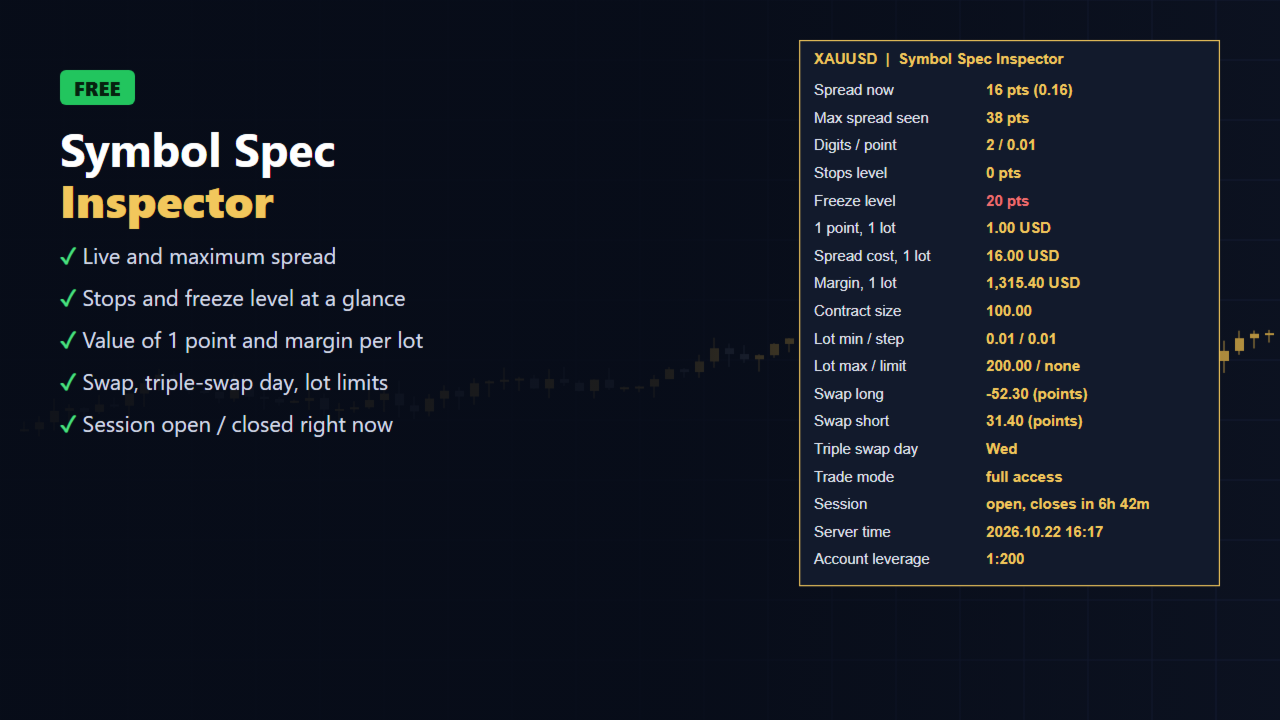
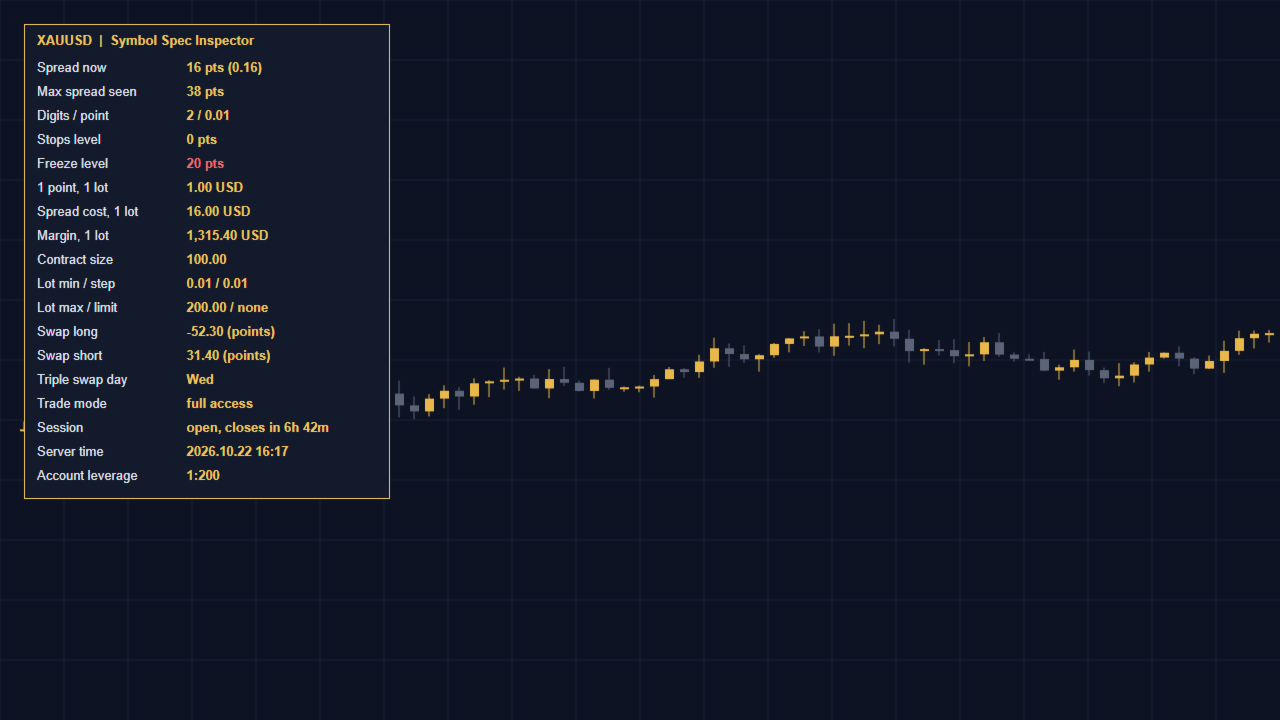
Symbol Spec Inspector shows the real trading conditions of the chart symbol in one compact panel. Your broker's specification window hides most of these values, and some of them change during the day. The panel updates every second.

What you see

  • Live spread in points and in price, plus the maximum spread seen since the panel was attached
  • Stops level and freeze level (highlighted when they are not zero)
  • Value of one point for 1.0 lot and the cost of the current spread for 1.0 lot, in your account currency
  • Margin required for 1.0 lot at the current price
  • Contract size, minimum / step / maximum lot and the symbol volume limit
  • Swap long and short with the swap mode, and the triple-swap day
  • Trade mode (full, close only, long only, short only, disabled)
  • Session status: open with time to close, or closed now
  • Server time and account leverage

Who it is for

  • Traders who compare brokers or account types and want the real numbers, not the advertised ones
  • Gold and index traders who need to know the value of a point before sizing a position
  • EA developers who need to check stops and freeze levels before testing

Notes

  • Information only: the indicator never opens, modifies or closes orders.
  • Works on any symbol and timeframe, on hedging and netting accounts.
  • Inputs: panel side (left or right), offsets, font size and colours.

Need to size positions by risk as well? Try the free SL Line Lot Calculator from the same author. For one-click trading with risk-based lots, see Risk Pilot Panel.
おすすめのプロダクト
Position Selective Close MT5
Francisco Manuel Vicente Berardo
The Position Selective Close is a multi-symbol multi-timeframe script used to close simultaneously various positions.  General Description   The Position Selective Close   possesses   three operation modes (Intersection,   Union   and All) that control the way   as   four position features (symbol, magic number,   type   and profit) are used. The modes, available through the Selection Mode input parameter, relate to the features, available through the “Select by Feature” and “Feature” input pa
FREE
The Candle Countdown Timer for MetaTrader 4 (also available for MT5) is a vital indicator designed to help you manage your trading time effectively. It keeps you updated about market open and close times by displaying the remaining time before the current candle closes and a new one forms. This powerful tool enables you to make well-informed trading decisions. Key Features: Asia Range: Comes with an option to extend the range. Broker Time, New York, London Time: Displays the current broker time
FREE
TRADE COMMANDER ULTIMATE MT5 Professional Trading, Risk Management and Account Protection Panel Trade Commander Ultimate MT5 is an all-in-one utility designed to help manual traders and Expert Advisor users execute, manage and protect trades from one professional black dashboard. It does not provide trading signals. It focuses on disciplined execution, position management and account-level risk control. IMPORTANT BEFORE USING ACCOUNT PROTECTION The Daily Profit Target and Daily Loss Limit must
FREE
Follow The Line MT5
Oliver Gideon Amofa Appiah
4.6 (35)
This indicator obeys the popular maxim that: "THE TREND IS YOUR FRIEND" It paints a GREEN line for BUY and also paints a RED line for SELL. (you can change the colors). It gives alarms and alerts of all kinds. IT DOES NOT REPAINT and can be used for all currency pairs and timeframes. Yes, as easy and simple as that. Even a newbie can use it to make great and reliable trades. NB: For best results, get my other premium indicators for more powerful and reliable signals. Get them here: https://www.m
FREE
Free automatic Fibonacci is an indicator that automatically plots a Fibonacci retracement based on the number of bars you select on the BarsToScan setting in the indicator. The Fibonacci is automatically updated in real time as new highest and lowest values appears amongst the selected bars. You can select which level values to be displayed in the indicator settings. You can also select the color of the levels thus enabling the trader to be able to attach the indicator several times with differe
FREE
Ninja Trend Matrix MT5 Ninja Trend Matrix MT5は、複数時間足のトレンド方向、相対的な強さ、ATRベースのボラティリティを1つのパネルにまとめるMetaTrader 5用インジケーターです。現在の相場環境をすばやく確認し、裁量判断や別の取引システムを使用する前の状況整理に役立ちます。 このインジケーターは注文、変更、決済を行いません。エントリー矢印、TP、SL、勝率、利益予測も表示しません。 主な機能 選択した各時間足を STRONG UP、UP、RANGE、DOWN、STRONG DOWN、N/A に分類 0~100の相対的なトレンド強度を表示 ATRを利用した LOW、NORMAL、HIGH、SHOCK のボラティリティ表示 EMA 20/EMA 50、EMAの傾き、高値・安値構造、ADX、+DI/-DIを組み合わせた判定 形成中の足ではなく確定足を使用 ドラッグ移動、最小化、自動画面配置、コンパクトグリッド 時間足 DEFAULTはM5、M15、H1、H4、D1を表示します。CUSTOMではM1,M5,M30,H1,W1,MN1のようにカ
FREE
MACD Enhanced
Nikita Berdnikov
4 (4)
Introducing the MACD  Enhanced – an advanced MACD (Moving Average Convergence Divergence) indicator that provides traders with extended capabilities for trend and momentum analysis in financial markets. The indicator uses the difference between the fast and slow exponential moving averages to determine momentum, direction, and strength of the trend, creating clear visual signals for potential entry and exit points. Attention! To achieve the best results, it is recommended to adapt the indicator
FREE
FibRetrace Zones 直近スイングのフィボナッチ・リトレースメント・ゾーン FibRetrace Zones は FibRetrace EA の無料ビジュアル補助インジケーターです。フィボナッチ・リトレースメント水準を描画し、直近スイングの押し目・戻りゾーンを強調表示するため、取引前にエントリー位置を確認できます。 ゾーンは方向別に色分けされます。強気セットアップは緑、弱気セットアップは赤。あらゆる銘柄・時間足で動作します。 主な機能 ルックバック調整可能な自動スイング検出 古典的フィボナッチ水準(23.6%、38.2%、50%、61.8%、78.6%)、個別に切替可能 色設定可能な押し目ゾーンの強調表示 方向による色分け:緑 = 強気、赤 = 弱気 バー確定で確定表示。形成中バーのリアルタイム更新はオプション 使い方 任意のチャートに適用します。価格が色付きゾーンまで押した位置が、FibRetrace がエントリーを探す場所です。フィボナッチラインを使って手動で指値注文を置くこともできます。 自動化する FibRetrace EA はこの同じゾーンを自動で取引します。1銘
FREE
概要 このインジケーターは、クラシックな ドンチャンチャネル を強化したバージョンで、実践的なトレード機能を追加しています。 標準の3本線(上限、下限、中央線)に加え、 ブレイクアウト を検出し、チャート上に矢印で視覚的に表示します。また、チャートを見やすくするために、 現在のトレンド方向と逆側のラインのみを表示 します。 インジケーターの機能: 視覚的シグナル :ブレイクアウト時にカラフルな矢印を表示 自動通知 :ポップアップ、プッシュ通知、Eメール RSIフィルター :市場の相対的な強弱に基づいてシグナルを検証 カスタマイズ可能 :色、ラインの太さ、矢印コード、RSI閾値など 動作原理 ドンチャンチャネルは次のように計算します: 上限線 :直近N本のクローズ済みローソク足の最高値 下限線 :直近N本のクローズ済みローソク足の最安値 中央線 :最高値と最安値の平均値 上方ブレイクアウト は終値が上限線を超えたときに発生し、 下方ブレイクアウト は終値が下限線を下回ったときに発生します。 インジケーターは以下を行います: 3本のドンチャンラインを描画 方向転換後の最初のブレイクアウト
FREE
この情報インジケーターは、アカウントの現在の状況を常に把握したい人にとって役立ちます。 VERSION MT 4 -   More useful indicators このインジケーターには、ポイント、パーセンテージ、通貨での利益、現在のペアのスプレッド、現在の時間枠でバーが閉じるまでの時間などのデータが表示されます。 チャート上に情報線を配置するには、いくつかのオプションがあります。 価格の右側 (価格の後ろにあります)。 コメントとして (グラフの左上隅に); 画面の選択した隅。 情報区切り記号を選択することもできます。 | / \ # このインジケーターは使いやすく、非常に有益です。設定で不要な情報項目を無効にすることも可能です。 設定 外観の種類     - 情報行の表示タイプ。次の 3 つのオプションがあります。 価格に従ってください     - 価格に従う。 コメントとして     - コメントとして; 画面の選択した隅に     - 画面の選択した隅にあります。 添付用グラフコーナー     - 表示タイプを選択した場合 画面の選択されたコーナーでは、この項目を使用して
FREE
EARLY ACCESS The first users can download Riskonix for FREE. This is a limited early release to gather feedback and improve the product. Users who download now will get: • Free access before price increase • Priority updates • Direct support ️ Price will increase soon. Riskonix is a professional trading panel for MetaTrader 5 designed to simplify execution, automate risk management and improve trading precision. Built for serious traders, Riskonix combines smart automation with full m
FREE
概要 Heiken Ashi Smoothwaveは、メインチャートウィンドウ上でチャートを直接スムージングされた平均足キャンドルに変換し、標準キャンドルを置き換えてよりクリーンなトレンドビューを提供します。別ウィンドウ不要、シンプルな表示。 動作の仕組み 各バーで実際の価格データから平均足のOHLC値を計算します。 カラー表示された平均足キャンドルをメインチャート上に直接描画します。 ネイティブのチャートキャンドルを自動的に非表示にし、平均足キャンドルのみを表示します。 インジケーターを削除すると、標準キャンドルが自動的に復元されます。 入力パラメータ 設定可能なパラメータはありません。アタッチするだけで使用できます。 推奨設定 あらゆる銘柄、あらゆる時間足に対応。Forex、ゴールド、指数、MetaTrader 5で利用可能なすべての銘柄で動作します。 スクリーンショット Heiken Ashi Smoothwave適用後のチャート、ネイティブキャンドルは自動的に非表示。 免責事項 本インジケーターはトレンド分析のための視覚的ツールであり、売買シグナルを生成するものではあ
FREE
Are you tired of drawing trendlines every time you're analyzing charts? Or perhaps you would like more consistency in your technical analysis. Then this is for you. This indicator will draw trend lines automatically when dropped on a chart. How it works Works similar to standard deviation channel found on mt4 and mt5. It has 2 parameters: 1. Starting Bar 2. Number of bars for calculation The   starting bar   is the bar which drawing of the trend lines will begin, while the   number of bars for c
FREE
Important Lines
Terence Gronowski
4.88 (24)
This indicator displays Pivot-Lines, preday high and low, preday close and the minimum and maximum of the previous hour. You just have to put this single indicator to the chart to have all these important lines, no need to setup many single indicators. Why certain lines are important Preday high and low : These are watched by traders who trade in a daily chart. Very often, if price climbs over or falls under a preday low/high there is an acceleration in buying/selling. It is a breakout out of a
FREE
MACD Colored ZeroLag
Farzin Sadeghi Bonjar
4.73 (11)
It is the MQL5 version of zero lag MACD that was available for MT4 here: https://www.mql5.com/en/code/9993 Also there was a colored version of it here but it had some problems: https://www.mql5.com/en/code/8703 I fixed the MT4 version which has 95 lines of code. It took me 5 days to write the MT5 version.(reading the logs and testing multiple times and finding out the difference of MT5 and MT4!) My first MQL5 version of this indicator had 400 lines of code but I optimized my own code again and n
FREE
TrendVision AI
Murtadha Majid Jeyad Al-Khuzaie
TrendVision AI – Smart Trend Channels & Price Forecasting for MetaTrader 5 Discover market structure and explore potential future price direction with TrendVision AI, an advanced technical indicator for MetaTrader 5 that combines automatic trendline analysis with a machine-learning-based price forecasting model. How Does TrendVision AI Work? TrendVision AI analyzes historical candlestick data within a configurable lookback window. It automatically draws two trendlines directly on the chart:
FREE
無限からの通貨の強さを測定するためのこの革新的な指標は、長い間取引されているダフ屋やトレーダーにとって不可欠な助手です。 通貨の強さ/弱さを分析するためのシステムは、世界の主要なトレーダーによって市場で長い間知られており、使用されてきました。 任意の裁定取引は、この分析なしでは完全ではありません。 私たちの指標は、互いに関連して基本通貨の強さを簡単に決定します。 これは、インスタント分析を可能にし、最強のエントリポイントを検索し、すべてまたは現在の通貨ペアの折れ線グラフが表示されます。 インジケータは直感的で、すぐに見つけて任意のペアに切り替えることができ、地下室とメインチャートの両方に配置できるモバイルパネルがあります。 通貨の強さの変化の通知のタイマーモードは、トレーダーに電話で通知を受け取る機会を与えます。  通貨パワーメーターインフィニティ指標を使用するためのいくつかの戦略: 1. 通貨の強さの線形表示のチャートを使用して、交差点を新興トレンドの信号として検索します 2. トレンド反転信号が表示された後、強い通貨の方向に頭皮 3. 通貨の強さの発散分析を使用して、現在の
FREE
Description : Rainbow MT5 is a technical indicator based on Moving Average with period 34 and very easy to use. When price crosses above MA and MA changes color to green, then this is a signal to buy. When price crosses below MA and MA changes color to red, then this is a signal to sell. The Expert advisor ( Rainbow EA MT5 ) based on Rainbow MT5 indicator is now available here . MT4 version is available here .
FREE
Donchian Pro
Paulo Henrique Faquineli Garcia
5 (3)
The Donchian Channel Channels are among the most popular tools of technical analysis, as they visually convey to the analyst the limits within which most price movement tends to occur. Channel users know that valuable information can be obtained at any time, whether prices are in the central region of a band or close to one of the border lines. One of the best known techniques to explore these concepts is Bollinger Bands. However, John Bollinger was not the only one to research the application
FREE
現在および前回の日・週・月の始値をラベル付きのラインで描画します。多くのデイトレーダーがバイアスや反応ポイントとして使うレベルです。 主な機能 確定足で計算され、値はリペイントしません あらゆるシンボルと時間足で動作 すべての期間、レベル、色は入力パラメータで変更可能 最大バー数の設定によりリソース消費が軽量 インジケーターを削除するとオブジェクトは自動的に削除されます 入力パラメータ ライン: 日の始値を表示、週の始値を表示、月の始値を表示、それぞれの表示期間数、日の色、週の色、月の色。 表示: 計算する最大バー数。 注意 これは分析ツールです。トレードは行いません。
FREE
The indicator identifies when a divergence occurs between price and an indicator or oscillator. It identifies both regular and hidden divergences. Combined with your own rules and techniques, this indicator will allow you to create (or enhance) your own powerful system. For higher probability setups I can recommend you to use my Supply Demand indicator and trade only if the divergence occurs inside a zone. Supply zone for bearish div and demand zone for bullish div. The optimal scenario is if it
FREE
「Haven Key Levels PDH PDL」   インジケーターは、トレーダーがチャート上の主要なレベルを視覚化するのに役立ちます。次のレベルを自動的にマークします: DO (Daily Open)   — 日足の始値。 NYM (New York Midnight)   — ニューヨーク時間の深夜0時のレベル。 PDH (Previous Day High)   — 前日の高値。 PDL (Previous Day Low)   — 前日の安値。 WO (Weekly Open)   — 週足の始値。 MO (Monthly Open)   — 月足の始値。 PWH (Previous Week High)   — 前週の高値。 PWL (Previous Week Low)   — 前週の安値。 CMH (Current Month High)   — 当月の高値。 CML (Current Month Low)   — 当月の安値。 PMH (Previous Month High)   — 前月の高値。 PML (Previous Month Low)   — 前月の
FREE
TradeVisonPro Forex Analyzer Pro MT5取引口座分析・モニタリングダッシュボード TradeVisonPro Forex Analyzer Proは、MetaTrader 5ユーザー向けに設計された取引分析および口座モニタリングソリューションです。 本製品は、MT5の取引データを構造化されたWebダッシュボードに整理し、口座情報の確認、保有ポジションの監視、取引履歴の分析、戦略の追跡、トレードジャーナルの記録、パフォーマンス統計の確認を可能にします。 TradeVisonPro Forex Analyzer Proは、取引情報を整理し、対応するデスクトップおよびモバイルWebブラウザからアクセスできるようにすることを目的としています。 主な機能 • MT5口座ダッシュボード • 保有ポジション監視 • 取引履歴分析 • トレードカレンダー • 戦略追跡 • トレードジャーナル • 口座パフォーマンス統計 • パフォーマンスレポート • 取引通知 • 複数口座対応 • 共有可能な読み取り専用レポート MT5口座ダッシュボード MetaTrader 5取引口
FREE
Hourly xx:00 Candle Direction Signal for MT5 Know the direction of every hourly opening candle. The Hourly xx:00 Candle Direction Signal automatically analyzes the candle that starts exactly at xx:00 on your selected timeframe (M1–H1) and instantly tells you whether it closed LONG , SHORT , or DOJI . Designed for traders who want a simple and reliable hourly bias, the indicator displays clear chart signals and can send real-time notifications to your desktop or mobile device. Features Detects
FREE
Donchian Channel is an indicator created by Richard Donchian. It is formed by taking the highest high and the lowest low of the last specified period in candles. The area between high and low is the channel for the chosen period. Its configuration is simple. It is possible to have the average between the upper and lower lines, plus you have alerts when price hits one side. If you have any questions or find any bugs, please contact me. Enjoy!
FREE
MultiTimeframe Info Feed (MIF) Indicator Description: MultiTimeframe Info Feed (MIF) is a smart MQL5 indicator that displays a dynamic, real-time info panel directly on your chart, offering powerful insight into current market conditions. Key features include: Real-time display of Open, High, Low, Close, and live Tick price Tick Rate (ticks per second) for assessing market activity Auto-calculated Entry Price on new candle formation Signal direction detection (BUY / SELL) Price action pattern re
FREE
Intraday Spark Chart Overview Intraday Spark Chart is an MT5 indicator for intraday analysis. It converts the current price change of a symbol into a percentage of the daily opening price and plots the result in a separate subwindow. Every trading day starts again from the zero line, so each day is drawn as a separate segment and the intraday move of the current day can be observed directly. The indicator is a data visualization tool. It does not generate trading signals and does not provide inv
FREE
Signalator Trade Summary Panel MT5 は、口座、ポジション、シンボル、リスクの状況をチャート上で明確に確認できる無料のローカル MetaTrader 5 ユーティリティです。 Signalator Trading and Analysis Ecosystem の一部であり、口座監視、市場分析、シンボルスキャン、アラート、トレーダーのワークフロー改善を目的とした実用的な MetaTrader ツール群です。 このパネルは、口座・ポジション監視に加えて、統合 Symbol Inspector とトレード前の Lot Size / Risk Calculator を搭載しています。Floating P/L、エクスポージャー、SL/TP カバー状況、ブローカーのシンボル仕様、予定トレードのリスクを複数のターミナルタブを切り替えずに確認できます。 市場スキャン、トレンド確認、multi-timeframe アラートには、関連する Signalator 製品も利用できます: MT4 Summary Panel  -  Multi TF Symbol Scanner
FREE
Indicator and Expert Adviser  EA Available in the comments section of this product. Download with Indicator must have indicator installed for EA to work. Mt5 indicator alerts for bollinger band and envelope extremes occurring at the same time. Buy signal alerts occur when A bullish candle has formed below both the lower bollinger band and the lower envelope  Bar must open and close below both these indicators. Sell signal occur when A bear bar is formed above the upper bollinger band and upper
FREE
TradeQL
Abdiel Aviles Jimenez
The TradeQL Indicator is a customizable tool that highlights specific trading patterns on candlestick charts. Users can define patterns through TradeQL queries, which the indicator then applies to the chart, visually representing matches and captured groups. Ideal for identifying complex trade setups in real-time. TradeQL queries are specified using the TradeQL Language. See https://github.com/abdielou/tradeql for more details. This language is expressed as a regular expression. The language al
FREE
このプロダクトを購入した人は以下も購入しています
Trade Assistant MT5
Evgeniy Kravchenko
4.43 (216)
取引 ごとのリスクの 計算、新規注文 の 簡単 な 設置、部分的 な 決済機能 を 持 つ 注文管理、 7 種類 のトレーリングストップなど 、便利 な 機能 を 備 えています 。 追加の資料と説明書 インストール手順   -   アプリケーションの手順   ライン機能 チャート上にオープニングライン、ストップロス、テイクプロフィットを表示します。この機能により、新規注文を簡単に設定することができ、注文を出す前にその特徴を確認することができます。   リスク計算 リスク計算機能は、設定されたリスクとストップロス注文のサイズを考慮して、新規注文のボリュームを計算します。ストップロスの大きさを自由に設定できると同時に、設定したリスクを守ることができます。 Lot calc ボタン - リスク 計算 を 有効 / 無効 にします 。 Risk フィールドでは 、必要 なリスクの 値 を 0 から 100 までのパーセンテージまたは 預金通貨 で 設定 します 。 設定」 タブで 、 リスク 計算 の 種類 を 選択 します :「 $ 通貨」、「 % 残高」、「 % エクイティ 」、「
Trade Manager EAへようこそ。これは、取引をより直感的、正確、そして効率的にするために設計された究極の リスク管理ツール です。これは単なるオーダー実行ツールではなく、包括的な取引計画、ポジション管理、リスク管理のためのソリューションです。初心者から上級者、迅速な実行を必要とするスキャルパーまで、Trade Manager EAはあらゆるニーズに対応し、為替、指数、商品、暗号通貨などさまざまな市場で柔軟に対応します。 Trade Manager EAを使用すると、複雑な計算が過去のものになります。市場を分析し、エントリーポイント、ストップロス、テイクプロフィットのレベルをチャート上のラインでマークし、リスクを設定するだけで、Trade Managerが最適なポジションサイズを即座に計算し、SLとTPをピップ、ポイント、口座通貨でリアルタイムに表示します。すべての取引が簡単かつ効果的に管理されます。 主な機能: ポジションサイズ計算機 :定義されたリスクに基づいて取引サイズを瞬時に決定します。 簡単な取引計画 :エントリー、ストップロス、テイクプロフィットを設定するためのド
Local Trade Copier EA MT5
Juvenille Emperor Limited
4.94 (149)
Local Trade Copier EA MT5 は、同一の Windows PC または Windows VPS 上で稼働する複数の MetaTrader 5 口座間で、取引をコピーおよび管理するための高速で柔軟なトレードコピーツールです。 ローカルでの取引同期に加え、Receiver 側でロットサイズ、リスク管理、取引フィルター、シンボルマッピング、取引管理、口座保護を個別に設定できます。 Transmitter と Receiver のターミナルは約 1分 で設定でき、同一ブローカーまたは異なるブローカーの口座間で、手動取引や EA による取引をコピーできます。適切な条件下では、ローカルの MetaTrader ターミナル間で取引情報を 0.5秒未満 で同期できます。実際の約定速度は、ブローカーのレイテンシー、ネットワーク状況、PC/VPS の性能、ターミナルの負荷によって異なります。 ご購入前に無料デモをお試しください Local Trade Copier EA MT5 の完全機能版無料デモ を、MT5 デモ口座で 1回につき4時間 テストできます。 Local Trad
Telegram to MT5 Multi-Channel Copier   は、 Telegram と Discord チャンネルのトレードシグナルを MetaTrader 5 へ自動コピーします。ボット不要、ブラウザ拡張不要、手動コピー不要。Telegram や Discord にシグナルが届くと、EA が数秒であなたのターミナルに注文を出します。 さらに、チャンネルをコピーする前に、内蔵バックテスターでそのチャンネルがあなたの口座でどう動いたかを確認できます。 製品は 2 つのコンポーネントで構成されます:Telegram チャンネルを監視する Windows アプリと、MT5 ターミナルでシグナルを執行する本 EA です。MT4 版もあります   こちら . セットアップガイドとアプリのダウンロード:   https://www.mql5.com/en/blogs/post/768988 Telegramのシグナルチャンネルをバックテストする方法 をご覧ください。 現在の価格は今後値上げされます。 仕組み アプリはあなた自身の Telegram アカウントで接続するため、フォロ
Farmed Hedge Yield Farming | All Markets (Manual - Hybrid - Semi/Automated EA) VERIFIED TRADING RESULTS - Farmed Hedge Yield Axi Copy:  https://www.mql5.com/en/signals/2356376 - Farmed Hedge Yield Exn Copy:   https://www.mql5.com/en/signals/2356404 - Farmed Hedge Yield V Copy:  https://www.mql5.com/en/signals/2357156 IMPORTANT NOTICE: FarmedHedge is a MANUAL-FOCUSED TRADING UTILITY ,not a fully automated EA. Results shown on this Signal include manual trades and overall strategic management.
自分の取引ルールで Telegram のシグナルをコピー Telegram to MT5 Signal Trader は、Telegram の公開・非公開チャンネルやグループから、テキスト形式の取引シグナルを MetaTrader 5 へ自動でコピーします。1つのデスクトップアプリで複数の配信者と MT5 口座を管理し、 配信者ごとにリスクと取引設定を個別に指定 できます。 シグナルのコピーに Telegram ボットや API 設定は必要ありません。 電話番号または QR コードでご自身の Telegram アカウントにログインし、すでに参加しているチャンネルやグループを選ぶだけです。ボットの作成や、Telegram API トークン、API ID、API hash の入力は不要です。 ポジションサイズを選び、複数の利確水準に分けて決済し、建値へのストップ移動やトレーリングストップを自動化できます。配信者のシグナルを受け取りながら、実際の取引方法は自分で管理できます。 本製品は、この MT5 エキスパートアドバイザ(EA)と、必須の Windows 連携アプリで構成されます。 インス
TradePanel MT5
Alfiya Fazylova
4.88 (170)
Trade Panelは多機能なトレーディングアシスタントです。アプリには手動取引用の50以上のトレーディング機能が搭載されており、ほとんどの取引作業を自動化することができます。 アプリの説明書: https://www.mql5.com/en/blogs/post/756482 デモ口座用アプリの試用版: https://www.mql5.com/en/blogs/post/750865 アプリのインストール方法: https://www.mql5.com/en/blogs/post/756239 アプリをビジュアルモードでテストする方法: https://www.mql5.com/en/blogs/post/770277 VPSのMetaTraderにアプリをインストールする方法: https://www.mql5.com/en/blogs/post/770190 取引。 ワンクリックで取引操作を行うことができます: リスクを自動計算して指値注文やポジションを開く。 複数の注文やポジションをワンクリックで開く。 注文のグリッドを開く。 保留中の注文やポジションをグループごとに閉じる
================================================================================ POC BREAKOUT - V20.72. Full Professional Grade Toolkit ================================================================================ POC Breakout is a full MetaTrader 5 trading dashboard for discretionary traders who want breakout signals, Point of Control (POC) context, volume profiles, order flow, market structure, news, alerts, and advanced trade planning in one professional workspace. Attached directly to you
Strategy Ledger Pro
Abdullah Uygar Tuna
5 (11)
日本語に対応しました。 Strategy Ledger Pro は、MetaTrader 5 用の読み取り専用の口座分析パネルです。口座の成績をエキスパートアドバイザー(EA)、戦略、銘柄、マジックナンバーごとに分け、それぞれが実際にどれだけ貢献しているかを明らかにします。 パネルは 11 言語に対応しています:English、Français、Deutsch、Español、Italiano、Português、Русский、Türkçe、中文、日本語、한국어。 デモをダウンロードする前に。 Market では、有料製品のデモはストラテジーテスター内でのみ実行されます。このパネルはご自身の口座の取引を分析しますが、ストラテジーテスターには読み取る口座履歴がないため、デモは空のパネルで起動し、その旨を表示します。これはデモの仕組みによるもので、製品の制限ではありません。 この説明内の動画では、実口座でのパネルの動作をご覧いただけます。 すべての機能を解説した詳しい マニュアル (英語)と、情報交換やお知らせのための AureusAI Trading Suite グループをご用意し
News Trade EA MT5
Konstantin Kulikov
4.55 (11)
僕自身が数年間使っている便利なロボットをご紹介します。半自動モードでも完全自動モードでもお使いいただけます。 >>> Chat <<< 当プログラムは経済指標カレンダーで発表されるニュースをもとにした取引の柔軟な設定が可能です。戦略テスターでは確認不可です。実際の取引のみです。端末の設定メニューを開いて許可URLリストにニュースサイトを追加する必要があります。サービス > 設定 > エキスパート・アドバイザーをクリックしてください。”次のURLの WebRequestを許可する:"にチェックを入れてください。次のURLを追加してください(空白は削除します): https://  nfs.faireconomy.media 最新の設定アーカイブをダウンロードしてください: https://www.mql5.com/en/blogs/post/747929 シグナルモニタリング: https://www.mql5.com/en/signals/author/test-standart 当該エキスパート・アドバイザーのためのカスタマイズ設定セットを作る場合は、ブログの全パラメータの説明
Master Your Trading Discipline   Stop losing your hard-earned gains to overtrading and emotional decisions. The Discipline Tool is your ultimate trading assistant, ensuring strict risk management in real-time. Key Protection Features: Advanced Drawdown Defense : Automatically halts trading if your daily drawdown exceeds a preset threshold (percentage or dollar amount). Real-Time Equity Lock : Safeguard profits by referencing peak equity, ensuring drawdown stays within control. Hard Profit Target
The product will copy all telegram signal to MT5 ( which you are member) , also it can work as remote copier.  Easy to set up, copy order instant, can work with almost signal formats, image signal,  s upport to translate other language to English Work with all type of channel or group, even channel have "Restrict Saving Content", work with  multi channel, multi MT5 Work as remote copier: with signal have ticket number, it will copy exactly via ticket number. Support to backtest signal. How to s
Exp COPYLOT CLIENT for MT5
Vladislav Andruschenko
3.97 (35)
MetaTrader 5 用のプロフェッショナル取引コピー機 MetaTrader 向けの高速・高性能・信頼性の高い 取引コピー機 です。 COPYLOT は、MT4 と MT5 のターミナル間で Forex 取引をコピーでき、 Hedge 口座と Netting 口座の両方に対応しています。 COPYLOT MT5 版の対応構成: - MT5 Hedge → MT5 Hedge - MT5 Hedge → MT5 Netting - MT5 Netting → MT5 Hedge - MT5 Netting → MT5 Netting - MT4 → MT5 Hedge - MT4 → MT5 Netting MT4 版 完全な説明 + DEMO + PDF 購入方法 インストール方法 ログファイルの取得方法 テストと最適化の方法 Expforex のすべての製品 MT4 ターミナルへのコピーも可能です(MT4 → MT4、MT5 → MT4): COPYLOT CLIENT for MT4 COPYLOT は、2台、3台、さらには10台のターミナル間で同時に動作できる、プロフェッ
HINN MAGIC ENTRY – the ultimate tool for entry and position management! SIMPLE. FASTEST. INTUITIVE. MAX AUTOMATED. Place orders by selecting a level directly on the chart! full description   ::  demo-version  :: 60-sec-video-description Key features: - Market, limit, and pending orders - Automatic lot size calculation - Automatic spread and commission accounting - Unlimited partitial take-profits  - Breakeven and trailing stop-loss and take-profit  functions - Invalidation leves - Intuitive, a
EASY Insight AIO – スマートで手間いらずな取引のオールインワンソリューション 概要 数秒で市場全体——FX、ゴールド、暗号資産、指数、さらには株式まで——を、手作業のチャート確認や複雑なセットアップ・インジケーター導入なしにスキャンできたらどうでしょうか? EASY Insight AIO はAIトレードのための究極のプラグ&プレイ型エクスポートツールです。市場全体のスナップショットを、クリーンなCSVファイルで一括出力。ChatGPT、Claude、Gemini、Perplexityなど、さまざまなAIプラットフォームで即座に解析できます。 ウィンドウの切り替えやグラフのごちゃごちゃしたオーバーレイはもう不要。自動エクスポートされる純粋で構造化されたインサイトだけで、無駄なチャート監視に悩まされず、スマートなデータ主導の判断に集中できます。 なぜEASY Insight AIOなのか? 本当のオールインワン • セットアップ不要、インジケーターのインストール不要、チャートへのオーバーレイ不要。インストールして起動し、エクスポートするだけです。 マルチアセット対
サポートが必要ですか?設定方法は?ご質問は?こちらでお客様の言語でどうぞ、迅速に返信します: https://www.mql5.com/en/market/product/139088/comments 動作デモ版ダウンロード Copy Cat More (コピーキャット・モア) MT5 トレードコピー (Trade Copier) は、ローカルのトレードコピーであり、今日のトレード課題のために設計された完全なリスク管理・執行フレームワークです。プロップファーム (prop firm) のチャレンジから個人のポートフォリオ管理まで、堅牢な執行、資金保護、柔軟な設定、高度なトレード処理の組み合わせによって、あらゆる状況に適応します。 このコピーは、マスター (Master、送信側) とスレーブ (Slave、受信側) の両モードで動作し、成行注文・指値注文、トレードの変更、部分決済、両建て決済 (Close By) 操作をリアルタイムで同期します。デモ口座と実口座、トレード用ログインと投資家ログインの両方に対応し、永続的トレードメモリ (Persistent Trade Memory
MT5 to Telegram Signal Provider は、Telegramのチャット、チャンネル、またはグループに 指定された シグナルを送信することができる、完全にカスタマイズ可能な簡単なユーティリティです。これにより、あなたのアカウントは シグナルプロバイダー になります。 競合する製品とは異なり、DLLのインポートは使用していません。 [ デモ ] [ マニュアル ] [ MT4版 ] [ Discord版 ] [ Telegramチャンネル ]  New: [ Telegram To MT5 ] セットアップ ステップバイステップの ユーザーガイド が利用可能です。 Telegram APIの知識は必要ありません。必要な全ては開発者から提供されます。 主な特長 購読者に送信する注文の詳細をカスタマイズする機能 例えば、Bronze、Silver、Goldといった階層型のサブスクリプションモデルを作成できます。Goldサブスクリプションでは、すべてのシグナルが提供されます。 id、シンボル、またはコメントによって注文をフィルターできます 注文が実行されたチャート
Telegram To MT5 — シグナルコピア Telegram チャンネルのトレードコールを、実際の MT5 注文に変換します — 自動で、好きなだけの口座に対応し、リスクとルールは完全にあなたの管理下に置けます。 Telegram To MT5 は、あなたが Telegram で既にフォローしている VIP / シグナルチャンネルを MetaTrader 5 端末に接続します。無料の付属デスクトップアプリがメッセージを読み取り(ボットを禁止しているチャンネルでも可能)、この EA があなたの口座でそれらを執行します — あなた自身のリスク設定、シンボルマッピング、テイクプロフィット処理、セッションおよびニュースフィルターを適用します。 これはシグナルコピアであり、ブラックボックス戦略ではありません。どのチャンネルを信頼するか、各トレードのロットと管理方法をあなたが決めます。 ステップバイステップの設定と付属アプリのインストールガイド 仕組み [あなたの Telegram チャンネル] -> [付属デスクトップアプリ] -> [MT5 + この EA] -> 注文 付属デスクトッ
Signal TradingView to MT5 Pro Automator TradingViewとMetaTrader 5間の即時プロフェッショナル実行 TradingViewのシグナル(アラート)とMT5での実際の約定を繋ぐ、最も強固なコミュニケーションブリッジで、取引戦略を自動化します。スピード、柔軟性、そして完璧なリスク管理を求めるトレーダー向けに設計されたこのExpert Advisorは、あらゆるアラートメッセージを正確な成行または指値注文に変換します。 強みと利点 ユニバーサルパーシングエンジン(独自技術): あらゆるアラート形式からデータを自動的に認識し、抽出できる高度なテクノロジー。単一の固定フォーマットに制限されることはありません。システムはシンボル(銘柄)、アクション、価格、SL(ストップロス)、TP(テイクプロフィット)を自動的に理解します。 リアルタイム実行: レイテンシ(遅延)を最小限に抑えるよう最適化された、1秒未満の超高速ポーリング技術。シグナルを受信してから数ミリ秒以内に注文が実行されます。 機関投資家レベルのリスク管理: 以下に基づく自動かつ正確
Power Candles Strategy Scanner - 自動最適化型マルチシンボル設定ファインダー パワーキャンドル・ストラテジー・スキャナーは 、パワーキャンドル・インジケーターを駆動するのと全く同じ自己最適化エンジンを、マーケットウォッチに登録されているすべての銘柄に対して並行して実行します。1つのパネルで、現在統計的に取引可能な銘柄、各銘柄で勝率の高い戦略、最適なストップロス/テイクプロフィットの組み合わせが表示され、新たなシグナルが発生した瞬間に通知が届きます。 このツールは、Stein Investmentsのエコシステムの一部です。  18種類以上のツールをすべて閲覧し、AIを活用したセットアップの推奨を受け取り、  https://stein.investments でコミュニティに参加しましょう 市場動向を網羅。銘柄ごとに3,000件以上の自動最適化。2種類のアラート。ワンクリックでチャートを切り替えて即座にアクション。 なぜこれが必要なのか 多くのマルチ銘柄スキャナーは、 価格の動き (ボラティリティ、変動率、銘柄ごとのRSI)を表示するだけです。それ
Trade copier MT5
Alfiya Fazylova
4.61 (57)
Trade Copierは、取引口座間の取引をコピーして同期するように設計された専門的なユーティリティです。 コピーは、同じコンピューターまたはvps にインストールされている、サプライヤーのアカウント/端末から受信者のアカウント/端末に行われます。 購入する前に、デモ アカウントでデモ バージョンをテストできます。 デモ版 こちら 。 詳細な説明は こちら 。 主な機能と利点: MT5ネッティングアカウントを含む、MT5> MT5、MT4> MT5、MT5> MT4のコピーをサポートします。 高いコピー速度(0.5秒未満)。 ベンダーモードと受信者モードは同じ製品内に実装されています。 チャートから直接リアルタイムでコピーを制御できる、簡単で直感的なインターフェイス。 接続が切断されたり、端末が再起動されたりしても、設定と位置が失われることはありません。 コピーするシンボルを選択できます。また、受信者のシンボルを置き換えることもできます(例:EURUSD> USDJPY)。 各シンボルごとにコピーの個別設定を行うことができます。 バックコピーをサポートします。 特定の注文のみのコピー
The Patch It never opens a trade. It walks behind the ones that did. Every open position, every pending order — checked twice a second for the one thing that's easy to forget: a stop, a target. Found bare, it doesn't ask. It writes the missing number in, measured in points from wherever the position began, and moves on to the next. No strategy, no opinion on direction. Just the quiet assumption that nothing should ever sit on the market unprotected — not because someone decided it shouldn't,
MetaTrader 5 用トレーディングパネル — チャートとキーボードから行うプロフェッショナルなワンクリック取引 アクティブトレーダーのために設計された高機能 Trading Panel。標準の MetaTrader 操作よりも、はるかに速く、直感的に、そして効率的に取引を実行できます。 本パネルは、ポジション管理、未決注文管理、利益コントロール、執行スピードをひとつのプロフェッショナルなワークスペースに集約した実践的なソリューションです。 これは単なる補助ツールではありません。MetaTrader 5 のための本格的な trading cockpit です。チャートから直接操作し、キーボードで素早くコマンドを実行し、自動計算や視覚的なガイドを活用することで、手動トレードをより速く、より明確に、より快適にします。 このパネルを使えば、チャート上からワンクリックで注文を実行でき、標準の MetaTrader コントロールと比べて最大 30 倍速く取引操作を行うことができます。 新しいプレミアム版が利用可能です: VirtualTradePad PRO SE で取引ワークフローを強
Grid Manual MT5
Alfiya Fazylova
4.73 (22)
「Grid Manual」は、注文のグリッドを操作するための取引パネルです。 ユーティリティはユニバーサルで、柔軟な設定と直感的なインターフェイスを備えています。 それは、損失を平均化する方向だけでなく、利益を増やす方向でも注文のグリッドで機能します。 トレーダーは注文のグリッドを作成して維持する必要はありません。 すべてが「Grid Manual」によって行われます。 注文を開くだけで十分であり、「Grid Manual」は注文のグリッドを自動的に作成し、非常に閉じるまでそれに付随します。 完全な説明とデモバージョン ここ。 ユーティリティの主な機能と機能 ユーティリティは、モバイル端末から開かれた注文を含め、あらゆる方法で開かれた注文を処理します。 「制限」と「停止」の2種類のグリッドで機能します。 グリッド間隔の計算には、固定と動的(ATRインジケーターに基づく)の2つの方法で機能します。 オープンオーダーグリッドの設定を変更できます。 チャート上の各注文グリッドの損益分岐点を表示します。 各注文グリッドの利益率を表示します。 ワンクリックでグリッドから収益性の高い注文を閉じるこ
Your EAs cannot see each other, but Anchor can. Anchor gives you one place to coordinate your EAs, manage risk, and decide when trading is allowed. It works alongside the trading bots you already use without any changes to them. The Problem One EA opens a trade. Then another starts trading. The next thing you know, you wake up to multiple grids built across your account. Each EA may be doing exactly what it was designed to do, but together they can place far more risk on your account than you in
RETAILBERG FOOTPRINT CHART PRO — Order-Flow Workspace for MetaTrader 5 Version 7.00  |  Professional System  |  31 tools  |  One chart A full 150-page illustrated User Manual is included. Please read the full manual to understand this feature packed footprint chart elements and ui. https://www.mql5.com/en/blogs/post/777982 DEMO / STRATEGY TESTER — PLEASE READ FIRST
TelegramからMT5へ: 究極のシグナルコピーソリューション Telegram to MT5 を使えば、取引がシンプルになります。DLL を必要とせず、Telegram のチャンネルやチャットから MetaTrader 5 プラットフォームに取引シグナルを直接コピーできる最新ツールです。この強力なソリューションは、正確なシグナル実行、豊富なカスタマイズオプション、時間の節約、そして効率性の向上を実現します。 [ Instructions and DEMO ] 主な特徴 直接的なTelegram API統合 電話番号とセキュアコードで認証します。 ユーザーフレンドリーな EXE ブリッジを通じてチャット ID を簡単に管理できます。 複数のチャネル/チャットを追加、削除、更新して、同時に信号をコピーします。 高度なフィルターによる信号解析 例外的な単語 (例: 「レポート」、「結果」) を含む不要な信号をスキップします。 柔軟な SL および TP 形式 (価格、ピップ、ポイント) をサポートします。 価格ではなくポイントを指定するシグナルのエントリ ポイントを自動的に計算します。
この製品は、ニュースタイム中にすべてのエキスパートアドバイザーと手動チャートをフィルタリングするため、急激な価格変動によるマニュアルトレードのセットアップの破壊や他のエキスパートアドバイザーによって入力された取引について心配する必要はありません。この製品には、ニュースのリリース前にオープンポジションとペンディングオーダーを処理できる完全な注文管理システムも付属しています。 The News Filter  を購入すると、将来のエキスパートアドバイザーのためにビルトインのニュースフィルターに頼る必要はなく、今後はすべてのエキスパートアドバイザーをここからフィルタリングできます。 ニュース選択 ニュースソースは、Forex Factoryの経済カレンダーから取得されます。 USD、EUR、GBP、JPY、AUD、CAD、CHF、NZD、CNYなど、任意の通貨数に基づいて選択できます。 Non-Farm(NFP)、FOMC、CPIなどのキーワード識別に基づいて選択することもできます。 影響レベルによってフィルタリングするニュースを選択することができ、低、中、高の影響範囲から選択できます。
Trade Indicator Assistant   is a powerful MT5 utility designed to turn indicators into automated trading systems. Its main feature is the ability to automatically detect an indicator’s   BUY and SELL signal buffers , without requiring you to know the buffer numbers, search through indicator settings, or modify the indicator source code. Bonus Indicator:   After purchasing Trade Indicator Assistant, contact me to receive   Trade Signal Pro   completely free as a bonus indicator. [Download Demo V
作者のその他のプロダクト
GoldLab Multi Strategy は XAUUSD(ゴールド)用のエキスパートアドバイザーで、1つのチャートから5つの時間足で5つの独立した戦略を動かします。各モジュールは個別にオン/オフでき、それぞれ独自のストップロス、テイクプロフィット、マジックナンバーを持つため、互いのポジションを管理することはありません。 5つのモジュール - M1 Scalper:RSI で確認した EMA 8/21 のクロス。M15 EMA 50 のトレンド方向のみ。スプレッドに敏感なため初期設定はオフ。 - M5 Pullback:価格が EMA 20 に触れ、反発の足で戻して確定。H1 EMA 50 の上昇/下降方向に従う。 - M15 Breakout:20本チャネルの外側で確定、ADX 22 以上かつ +DI/-DI が一致、H4 トレンド方向。 - M30 Swing:ゼロラインの反対側からの MACD クロス、価格が EMA 200 のトレンド側、H4 トレンドでフィルター。 - H1 Trend:EMA 21 が EMA 55 の上/下、EMA 21 への押し目で ADX 20
GoldLab Trend Pullback は XAUUSD(ゴールド)用の EA です。トレンド方向に取引し、エントリー前に押し目・戻りを待ちます。すべての取引にストップロスが設定され、ポジションサイズは口座残高から計算されます。 取引方法 - トレンドフィルター:H4 の EMA 50 のトレンド方向にのみ取引します。 - 相場環境:H1 の ADX と DI を使い、トレンド相場とレンジ相場を区別します。トレンド中は押し目・戻りでのエントリーを探し、どちらでもない場合は待機します。 - エントリー:M15 チャートで価格が EMA 20 まで戻り、再びトレンド方向で確定する必要があります。 - レンジモード(任意、初期設定はオフ):ADX が低いときに Bollinger Bands + RSI による平均回帰エントリーを行います。 リスク管理 - 1 取引あたりのリスク %:ストップロスに達した場合の損失が残高の指定 %(初期設定 1%)程度になるようにロットを計算します。固定ロットも使用できます。 - ATR ストップロス(初期設定 1.5 x ATR H1)。ボラテ
GoldWick Candle Rejection は XAUUSD(ゴールド)用の EA で、すべての判断を確定済みのローソク足だけで行います。トレンド方向の反発ヒゲ(リジェクションウィック)と、同じ色の確定足2本を探します。すべての取引にストップロスとテイクプロフィットを設定します。 取引方法 - シグナル1、反発ヒゲ:直近の確定した M15 足に長い下ヒゲ(ゴールドでデフォルト 3.00 USD 以上)があれば買い、長い上ヒゲがあれば売りを建てます。デフォルトでは、ヒゲが EMA 50 のトレンド方向を向いている必要があります。 - シグナル2、2本足:直近の確定足2本が同じ色の場合、その方向にエントリーします。このシグナルにはトレンドフィルターを有効にできます。 - 2つのシグナルは独立して動作させることも、両方の一致を条件にすることもできます。方向が逆の場合はエントリーしません。 - 判断は足の確定後、1本につき1回です。デフォルトでは1本の足につき1取引、同時に保有するポジションは1つです。 リスク管理 - すべての取引に固定のストップロスとテイクプロフィット(ゴール
Asian-range breakout EA for the London open. One trade per side per day, stop at the other side of the range, R-multiple target, session-end exit. GoldLab London Breakout is a fully automated Expert Advisor for MetaTrader 5. It is designed for XAUUSD (gold) and also runs on other symbols such as EURUSD. How it trades Builds the Asian range - the highest high and lowest low between the Range start hour and Range end hour (server time, default 00:00-07:00), measured on M15 bars. Filters the range
New York opening-range breakout EA: closed-bar breakout or retest entry, tick-volume and ATR filters, stop at the range, time exit. Built for gold. GoldLab NY Opening Range is a fully automated Expert Advisor for MetaTrader 5. It is designed for XAUUSD (gold) and also runs on other symbols such as EURUSD. How it trades Opening range - the high and low of the first N minutes (default 30) of the New York session, starting at the NY session start time you set in server time (default 13:30 - set 16:
RSI divergence EA: regular bullish/bearish divergence on closed bars, confirmation candle, stop beyond the swing, R or opposite-swing target. GoldLab RSI Divergence is a fully automated Expert Advisor for MetaTrader 5. It is designed for XAUUSD (gold) and also runs on other symbols such as EURUSD. How it trades Swing detection - swing lows and highs are found on closed bars with a configurable strength (default 3 bars on each side). Nothing repaints: a swing only counts once the bars after it ha
Volatility-squeeze breakout EA: Bollinger width / Keltner squeeze, expansion breakout with the EMA trend, stop trailed on the middle band. GoldLab Bollinger Squeeze is a fully automated Expert Advisor for MetaTrader 5. It is designed for XAUUSD (gold) and also runs on other symbols such as EURUSD. How it trades Squeeze detection - volatility is considered compressed when the Bollinger Band width is near its lowest of the last N bars, and/or when the Bollinger Bands sit inside a Keltner Channel (
Supertrend trend-following EA: closed-bar flip with higher-timeframe agreement, partial close at 1R, stop trailed on the Supertrend line. GoldLab Supertrend Rider is a fully automated Expert Advisor for MetaTrader 5. It is designed for XAUUSD (gold) and also runs on other symbols such as EURUSD. How it trades Supertrend calculated in code - the classic ATR-based Supertrend (default ATR 10, multiplier 3) is computed inside the EA on closed bars; no external indicator files are needed. Entry on a
Ichimoku trend EA for XAUUSD: Tenkan/Kijun cross confirmed by the cloud and Chikou, stop beyond Kijun, Kijun trailing stop, risk-% sizing. GoldLab Ichimoku Cloud is an Expert Advisor that trades the classic Ichimoku Kinko Hyo trend method. It was designed for XAUUSD (Gold) and also runs on forex pairs and other CFDs. Every trade has a stop-loss. How it trades Trigger: a Tenkan-sen / Kijun-sen cross within the last few closed bars (default 3). Cloud filter: buys only when price closes above the K
Turtle-style Donchian breakout EA for XAUUSD: System 1 (20/10) or System 2 (55/20), ATR (N) stops and sizing, optional pyramiding, channel exits. GoldLab Turtle Channel is an Expert Advisor based on the well-known Turtle trading rules: buy new highs, sell new lows, size positions by volatility and let winners run. It was designed for XAUUSD (Gold) and also runs on forex pairs, indices and other CFDs. Every trade has a stop-loss. How it trades Entry: a closed bar beyond the Donchian channel - Sys
Trend pullback EA for XAUUSD: 8/13/21/34/55 EMA ribbon alignment + MACD histogram turn after a pullback. Exits when the ribbon disorders. GoldLab MACD Ribbon is an Expert Advisor that combines an EMA ribbon with the MACD histogram to join established trends after a pullback. It was designed for XAUUSD (Gold) and also runs on forex pairs and other CFDs. Every trade has a stop-loss. How it trades Trend: the EMA ribbon (8, 13, 21, 34, 55) must be fully aligned - every faster EMA above the slower on
Range mean-reversion EA for XAUUSD: fades outer Keltner touches when ADX is low, RSI is stretched and the bar rejects. Targets the middle EMA. GoldLab Keltner Reversion is a mean-reversion Expert Advisor for ranging markets. It was designed for XAUUSD (Gold) and also runs on forex pairs and other CFDs. It deliberately stays out of strong trends. Every trade has a stop-loss. How it trades Regime filter: new trades only while ADX is below the threshold (default 25) - the market is ranging. Setup:
Fibonacci pullback EA for XAUUSD: finds the last impulse swing, enters the 50-61.8% zone on a confirmation candle, stop past 78.6%, target 127.2%. GoldLab Fibo Pullback is an Expert Advisor that trades Fibonacci retracements of the most recent impulse move. It was designed for XAUUSD (Gold) and also runs on forex pairs and other CFDs. All swing detection is done inside the EA - no external indicators are needed. Every trade has a stop-loss. How it trades Swing detection: swing highs and lows are
Trend pullback EA: trades Stochastic hooks out of oversold / overbought only in the direction of a rising / falling trend EMA. Stoch Hook Pilot is a fully automated Expert Advisor for MetaTrader 5 - trend-following Stochastic hook entries. Buys oversold dips in an uptrend, sells overbought rallies in a downtrend. It is designed for XAUUSD (gold) and also runs on forex majors such as EURUSD and GBPUSD. How it trades Trend filter - longs only when the last close is above a rising trend EMA (defaul
Trend EA: enters on Parabolic SAR flips only when ADX shows a real trend and the DI lines and trend EMA agree. SAR Falcon is a fully automated Expert Advisor for MetaTrader 5 - Parabolic SAR flips confirmed by ADX. Catches fresh trends when the Parabolic SAR flips with ADX strength. It is designed for XAUUSD (gold) and also runs on forex majors such as EURUSD and GBPUSD. How it trades SAR flip - the Parabolic SAR dot moves from above the candles to below them (buy) or from below to above (sell)
Trend EA built on Heikin Ashi candles: enters on a strong colour flip (no opposite wick) in the direction of the EMA trend. Heikin Titan is a fully automated Expert Advisor for MetaTrader 5 - Heikin Ashi colour-flip trend entries. Smooths the noise with Heikin Ashi and rides clean trend legs. It is designed for XAUUSD (gold) and also runs on forex majors such as EURUSD and GBPUSD. How it trades Heikin Ashi candles are calculated inside the EA from normal price data (no extra indicator needed). C
Price-action EA: trades the breakout of an inside-bar (mother bar) pattern in the direction of the trend EMA. Inside Bar Hunter is a fully automated Expert Advisor for MetaTrader 5 - inside-bar breakout with trend filter. Compression, then release - trades the break of the mother bar. It is designed for XAUUSD (gold) and also runs on forex majors such as EURUSD and GBPUSD. How it trades Pattern - a mother bar followed by an inside bar (lower high and higher low). The mother bar range must be bet
Intraday mean-reversion EA: fades stretches beyond the daily VWAP standard-deviation bands back to the VWAP line. VWAP Magnet is a fully automated Expert Advisor for MetaTrader 5 - intraday VWAP band mean reversion. Price stretched far from VWAP tends to snap back - this EA trades the snap. It is designed for XAUUSD (gold) and also runs on forex majors such as EURUSD and GBPUSD. How it trades Daily VWAP - volume-weighted average price is rebuilt from the first bar of each server day, with standa
Level-trading EA: buys rejections of the daily S1 pivot support and sells rejections of the R1 resistance, targeting the central pivot. Pivot Sentinel is a fully automated Expert Advisor for MetaTrader 5 - daily pivot S1 / R1 bounce trading. Classic floor-trader pivots, traded automatically. It is designed for XAUUSD (gold) and also runs on forex majors such as EURUSD and GBPUSD. How it trades Pivots - the central pivot P, support S1 and resistance R1 are calculated each day from the previous da
Trend pullback EA: enters when the CCI climbs back out of its oversold zone in an uptrend (or drops out of overbought in a downtrend). CCI Comet is a fully automated Expert Advisor for MetaTrader 5 - CCI pullback re-entry in the trend. Uses the CCI to time pullbacks inside a trend. It is designed for XAUUSD (gold) and also runs on forex majors such as EURUSD and GBPUSD. How it trades Trend - buys only when price is above a rising trend EMA (default 100), sells only below a falling one. Pullback
Price-action EA: trades bullish / bearish engulfing candles that form at the trend EMA during a pullback in an established trend. Engulf Striker is a fully automated Expert Advisor for MetaTrader 5 - engulfing candles at the trend EMA. Engulfing candles where they matter - at the trend line. It is designed for XAUUSD (gold) and also runs on forex majors such as EURUSD and GBPUSD. How it trades Trend - fast EMA (default 50) above the slow EMA (default 200) for buys, below for sells. Location - th
Trend EA: fast / medium EMA crossover taken only when both sit on the right side of a rising or falling slow EMA. Triple EMA Arrow is a fully automated Expert Advisor for MetaTrader 5 - three-EMA crossover trend system. Three EMAs lined up like an arrow - the trend is your entry. It is designed for XAUUSD (gold) and also runs on forex majors such as EURUSD and GBPUSD. How it trades Three EMAs - fast (default 8), medium (default 21) and slow (default 55). Entry - the fast EMA crosses the medium E
Bill Williams trend EA: trades breakouts of the latest fractal when the Alligator is awake (lips, teeth and jaw fanned out in order). Alligator Fractal Rover is a fully automated Expert Advisor for MetaTrader 5 - Bill Williams Alligator + fractal breakouts. Wakes up with the Alligator and hunts fractal breakouts. It is designed for XAUUSD (gold) and also runs on forex majors such as EURUSD and GBPUSD. How it trades Alligator awake - lips above teeth above jaw for buys (the opposite order for sel
Trend EA: enters when Aroon Up crosses Aroon Down (or the reverse) with the leading line above a strength level, optionally filtered by a trend EMA. Aroon Voyager is a fully automated Expert Advisor for MetaTrader 5 - Aroon crossover trend entries. Measures how recently price made new highs or lows - and follows the side that is winning. It is designed for XAUUSD (gold) and also runs on forex majors such as EURUSD and GBPUSD. How it trades Aroon (default 25 bars) is calculated inside the EA: Aro
Trend EA: trades +DI / -DI crossovers of the Directional Movement System only while ADX is above a minimum and rising. DI Crossfire is a fully automated Expert Advisor for MetaTrader 5 - +DI / -DI crossovers with rising ADX. Wilder's Directional Movement System, traded with discipline. It is designed for XAUUSD (gold) and also runs on forex majors such as EURUSD and GBPUSD. How it trades DI cross - +DI crosses above -DI on the last closed bar for buys, -DI crosses above +DI for sells. Trend stre
Trend EA: enters when the Hull Moving Average turns up or down, in the direction of a slower trend EMA. Hull Glider is a fully automated Expert Advisor for MetaTrader 5 - Hull Moving Average turns with a trend filter. A fast, smooth Hull Moving Average that turns with the market. It is designed for XAUUSD (gold) and also runs on forex majors such as EURUSD and GBPUSD. How it trades Hull Moving Average (default 30) is calculated inside the EA from WMA(2 x WMA(n/2) - WMA(n), sqrt n) - fast but smo
Trend pullback EA based on Dr. Elder's method: buys when the short Force Index turns back above zero in an uptrend, sells when it turns below zero in a downtrend. Force Pulse is a fully automated Expert Advisor for MetaTrader 5 - Elder Force Index pullbacks in a trend. Uses the Force Index to catch the end of a pullback. It is designed for XAUUSD (gold) and also runs on forex majors such as EURUSD and GBPUSD. How it trades Trend - the trend EMA (default 50) must be rising for buys (falling for s
Short-term mean-reversion EA: buys deep RSI(2) pullbacks while price is above the 200 SMA and sells RSI(2) spikes below it, exiting on the snap back. RSI2 Snapback is a fully automated Expert Advisor for MetaTrader 5 - short-term RSI(2) pullbacks above the 200 SMA. Buys short, sharp dips in a long-term uptrend - and gets out on the bounce. It is designed for XAUUSD (gold) and also runs on forex majors such as EURUSD and GBPUSD. How it trades Long-term filter - buys only when the last close is ab
Statistical mean-reversion EA: fades closes that sit more than a set number of standard deviations from the moving average, targeting the average. Zscore Return is a fully automated Expert Advisor for MetaTrader 5 - statistical z-score mean reversion. Measures how far price has stretched in standard deviations - and trades the return. It is designed for XAUUSD (gold) and also runs on forex majors such as EURUSD and GBPUSD. How it trades Z-score = (close - SMA) / standard deviation over the same
Price-action EA: trades pin bars (long-nosed rejection candles) that form at a fresh N-bar high or low. Pinbar Ranger is a fully automated Expert Advisor for MetaTrader 5 - pin bar rejections at fresh highs and lows. A long wick at a fresh extreme shows rejection - this EA trades it. It is designed for XAUUSD (gold) and also runs on forex majors such as EURUSD and GBPUSD. How it trades Location - the candle must make the lowest low (for buys) or highest high (for sells) of the last N bars (defau
フィルタ:
レビューなし
レビューに返信