Signalator Trade Summary Panel MT5
- ユーティリティ
- バージョン: 1.4
- アップデート済み: 5 9月 2026

Signalator Trade Summary Panel MT5 は、口座、ポジション、シンボル、リスクの状況をチャート上で明確に確認できる無料のローカル MetaTrader 5 ユーティリティです。
Signalator Trading and Analysis Ecosystem の一部であり、口座監視、市場分析、シンボルスキャン、アラート、トレーダーのワークフロー改善を目的とした実用的な MetaTrader ツール群です。
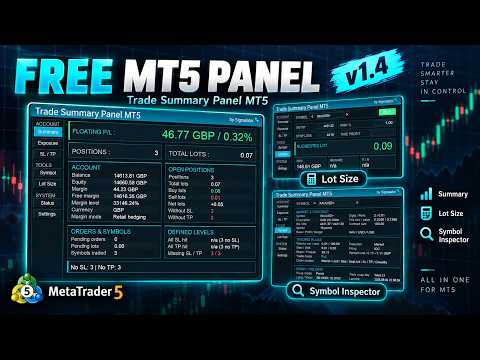
このパネルは、口座・ポジション監視に加えて、統合 Symbol Inspector とトレード前の Lot Size / Risk Calculator を搭載しています。Floating P/L、エクスポージャー、SL/TP カバー状況、ブローカーのシンボル仕様、予定トレードのリスクを複数のターミナルタブを切り替えずに確認できます。
市場スキャン、トレンド確認、multi-timeframe アラートには、関連する Signalator 製品も利用できます:
標準の Trade タブでは個別ポジションを確認できますが、複数のトレードやシンボルが開いている場合、口座全体の状況を素早く把握するのは簡単ではありません。Signalator Trade Summary Panel MT5 は、重要な口座・エクスポージャー・リスク情報を1つのコンパクトなダッシュボードに整理します。
Summary セクションでは、Floating Profit/Loss、Balance に対する Floating P/L の割合、Balance、Equity、Margin、Free Margin、Margin Level、オープンポジション、Total Lots、BUY Lots、SELL Lots、Net Lots、Stop Loss または Take Profit が設定されていないポジションを表示します。
Symbol Exposure はオープンポジションをシンボル別にまとめ、トレード数、Lots、現在の P/L、監視対象の損失レベルを表示します。SL / TP セクションでは、定義済みのすべての Stop Loss または Take Profit に到達した場合の口座結果を推定し、保護レベルが不足しているポジションも確認できます。
統合 Symbol Inspector では Market Watch のシンボルを切り替えながら、Bid/Ask、Spread、Point / Tick 値、Contract Size、Volume Limit、Execution Mode、Order Mode、Swap 情報、Trading 制限など、ブローカーが提供する契約・取引仕様を確認できます。
統合 Lot Size Calculator は、Symbol、Entry Price、Stop Loss、任意の Take Profit、Risk % を使って BUY / SELL の事前計画を行えます。ブローカーの Volume Limit とシンボル設定を考慮し、Suggested Lot、金額リスク、Potential Reward、Risk / Reward を推定します。
主な機能:
- ローカル MT5 口座・ポジションダッシュボード
- Floating P/L と Balance 比率
- Balance、Equity、Margin、Free Margin の概要
- オープンポジションと Lot Exposure の概要
- Stop Loss または Take Profit のないポジション
- Pending Orders と Pending Lots
- シンボル別 Exposure
- 推定 SL / TP 口座結果
- 統合 Symbol Inspector
- 統合 Lot Size / Risk Calculator
- Market Watch シンボル切替
- Dark、Light、Dune テーマ
- 英語、スペイン語、ロシア語、中国語インターフェース
- Desktop、Laptop、VPS 画面向けレスポンシブレイアウト
使い方:
1. Signalator Trade Summary Panel MT5 を任意のチャートに追加します。
2. Summary と Exposure で現在の口座とオープンポジションを確認します。
3. SL / TP で保護カバーと定義済み口座結果を確認します。
4. Symbol で Market Watch 銘柄のブローカー仕様を確認します。
5. Lot Size で手動発注前に Entry、SL、TP、Risk を評価します。
6. Settings でテーマとインターフェース言語を選択します。
このユーティリティは、監視、確認、トレード前計算専用です。トレードの新規発注、決済、変更は行わず、Trading Signal も送信しません。
このパネルは DLL import、WebRequest、外部サーバー接続を使用しません。すべての計算は MetaTrader 5 内でローカルに実行されます。
重要:計算値は、ブローカー提供のシンボルデータ、口座データ、Tick Value、Tick Size、現在価格、オープンポジションに基づく推定値です。トレード判断の前に、重要な取引・リスク値を必ず手動で確認してください。