OrderHelper MT4

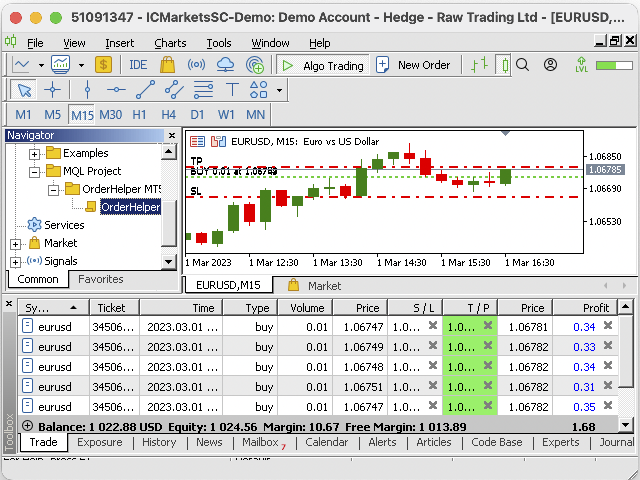
OrderHelper script is super easy and trader friendly to use. It would boost your trading experience. Because it is designed to open one to multiple orders quickly with just one click. Besides using the OrderHelper script, traders can define various parameters for open orders such as the symbol, order type, lot size, stoploss, takeprofit and more. Basically, with this script traders can manage their open orders more efficiently and save their trading time.


OrderHelper manages:

• Open the number of orders as many as you want.

• Can choose a specific symbol without changing the charts.

• Place orders in any timeframe.

• Order type helps instant and pending orders.

• Can set stoploss and takeprofit. 

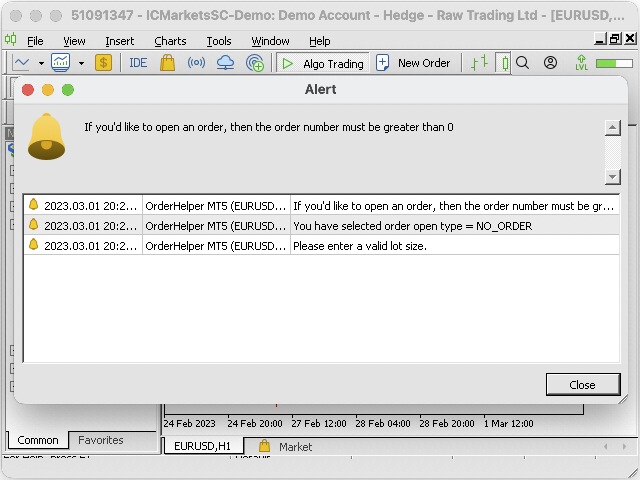
• Show alerts if you forget to set proper inputs.


Input details:

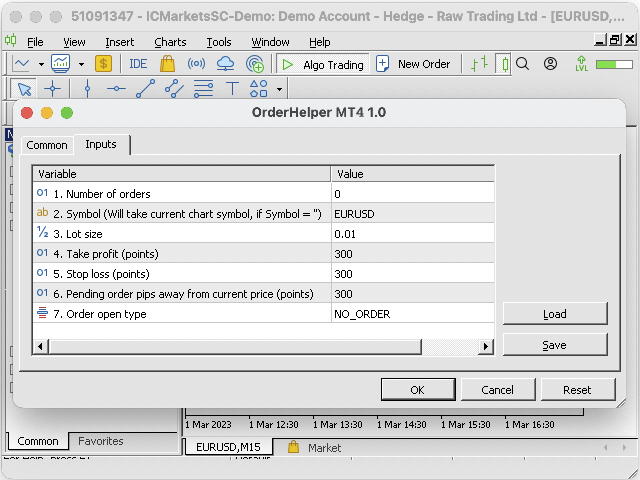
1. Number of orders: Enter number of orders you want to open (0 means no order will open)

2. Symbol: Enter the symbol name according to the broker's symbol name displayed on the MetaTrader platform (for entering correct symbol name like EURUSD/EURUSDm/EURUSD.micro, please check from menubar, View -> Market Watch -> Get symbol name from here). If you leave empty without entering any symbol name then order will be placed on the current open chart.

3. Lot size: Minimum lot size is 0.01

4. Stoploss: Enter stoploss level in points (0 means no SL will set)

5. Takeprofit: Enter takeprofit level in points (0 means no TP will set)

If orders SL/TP greater than 0, then check the minimum points allowed by the broker for that particular symbol,  check it from menubar, View -> Market Watch -> Symbol -> Right click -> Specification -> Stops level

6. Pending order pips: Enter number of pips for pending orders which is distant from current price level in points (0 means inactive pending orders)

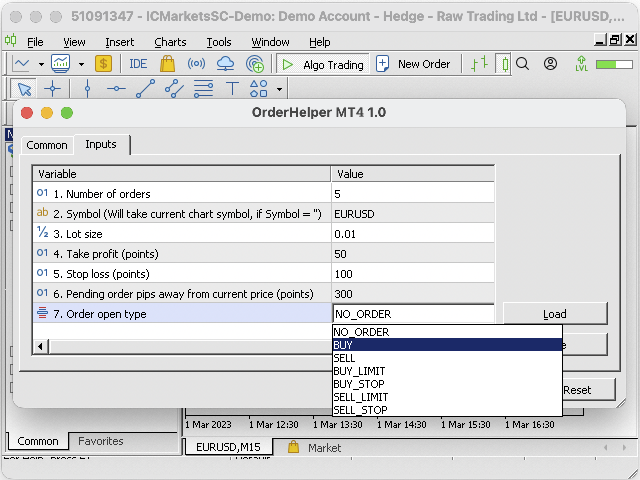
7. Order type: Select order open type from dropdown list, there are seven types 

       i) NO_ORDER: Default selection, no order will open

      ii) BUY: Open buy order on the market current price

     iii) SELL: Open sell order on the market current price

     iv) BUY_LIMIT: Order places at a lower price than the market current price level

      v) BUY_STOP: Order places at a higher price than the market current price level

     vi) SELL_LIMIT: Order places at a higher price than the market current price level

    vii) SELL_STOP: Order places at a lower price than the market current price level


Note: please make sure your MetaTrader auto trading (Algo Trading) is on.

After downloading this product, if you have any queries, please don’t hesitate to message me. Finally, any suggestions to improve this product are really appreciated and would love to hear from you.
おすすめのプロダクト
Hola Traders. Lot - lot size for pending orders. Martingale - double lot size of pending orders. *(No Martingale = 1.00) TotalGridEachSide - unit each side of pending orders. SpaceOfFirstOrder - distance for the first order in points. Take Profit - profit in points. Stop Loss - loss in points. The entire positioning uses POINTS only. (10 point = 1 pip) and you can open order BUYLIMIT, SELLLIMIT, ALLBUYANDSELL you can Close Pending, Close orders Profit and Loss and Close All ***  ideas for usin
The   UZFX - Delete All Drawing and Objects on Chart Instantly   is a simple yet powerful MetaTrader 4 (MT4) script designed to instantly remove all drawing objects from the active chart. This script is useful for traders who need to quickly clear their charts from technical analysis drawings, trend lines, Fibonacci tools, text labels, and other objects without manually deleting them one by one. Features: Deletes all objects and drawings on the active chart. Works instantly with a single execut
FREE
現在の取引口座の取引履歴のエクスポートを実行します。 ファイルは MQL4/Files ターミナルフォルダに保存されます( メインターミナルメニューから開くことができます:     ファイル->データディレクトリを開く     (Ctrl + Shift + D)そしてフォルダに移動します     MQL5 /ファイル)     または端末の Common/Files フォルダにあります。 ファイル名は自動的に生成されるか、スクリプトパラメータを使用して手動で設定されます。 履歴ファイルは、EAを使用して別の取引サーバーで同じ取引シーケンスをシミュレートするために使用できます   シンプルヒストリーレシーバー 。 ファイルの名前: ファイル名を 指定するか、フィールドを空白のままにして、ファイル名を自動的に生成します。 区切り 文字:CSVファイル(カンマ'、'またはセミコロン';')および小数点(ピリオド'。'またはカンマ'、')のデータ部分の区切り記号を設定します ファイルを共通フォルダに保存     :Trueの場合、ファイルはCommon/Filesフォルダーに保存されます。
FREE
Hola Traders. Lot - lot size for pending orders. Martingale - double lot size of pending orders. *(No Martingale = 1.00) TotalGridEachSide - unit each side of pending orders. SpaceOfFirstOrder - distance for the first order in points. Take Profit - profit in points. Stop Loss - loss in points. The entire positioning uses POINTS only. (10 point = 1 pip) and you can open order BUYSTOP, SELLSTOP, ALLBUYANDSELL you can Close Pending, Close orders Profit and Loss and Close All ***  ideas for using
Introduction: You can download free version from here:  https://www.mql5.com/en/market/product/45252 Indicator Profitability Check is a custom script which will check the profitability of a buy-sell arrow based custom indicator’s signal profitability. So traders who are very confusing for a buy-sell arrow based custom signal indicator, should it test/use in live/demo account, then they now can make their decision very quickly by checking this profitability process with this script. This checking
Shield ME
Mohamed Zein Mohamed Zein Soliman
The shield allows the trader to easily close all profit / loss positions instantly while being able to protect winning positions. Every trader needs it in their day trading with one click. Features : one click close all positions in profit. one click close all positions in loss one click protect all positions in profit. are you suggest more features ? please contact me!. NOTE:  demo will not work in backtest because it not support button action.  
チャート上の透かし:シンボル+時間枠/または独自のテキスト 私の#1ユーティリティ  66+機能が含まれています| ご質問がある場合は私に連絡 インジケータの設定では、次の設定を行うことができます: フォントサイズ; テキストの色; フォント名; ポジション: 1=左上; 2=右上; 3=左下; 4=右下; 5=センター; 現在の時間枠を表示:オン/オフ; 削除するシンボルの接頭辞(n_audcad-->AUDCAD); 削除するシンボルのサフィックス(USD CAD pro-->USD CAD); カスタムテキストを表示:有効にすると、以下に指定された独自のテキストが表示されます: あなた自身の透かし; 私の#1ユーティリティ  66+機能が含まれています| ご質問がある場合は私に連絡
PopitPros
Shahrulizam Bin Abdul Rashid
POPITPROS V2 MUTLTI ORDER SCALPING SYSTEM FOR MT4 The legendary scalper is on the market!.  Great For Scalping. PopitPros allows you to open multiple positions at the same price as well as close multiple positions at the same price. It allows you to setting multiple Trailing Stop Loss at the same price and has Breakeven feature as well. The setting is very simple. Set the value number of orders that you would like to open/trade and also the lot size. Keep in mind don't over leverage your accoun
THIS PRODUCT CAN NOT BE TEST IN STRATEGY TESTER. PLEASE TRY DEMO VERSION: https: //www.mql5.com/en/market/product/58082 FIRST 10 COPIES AT 30 USD, NEXT PRICE WOULD BE 50 USD RISK AND TRADE MANAGER RISK AND TRADE MANAGER   is an advanced trading panel designed for manual trading.   Utility helps to manage trades effectively and efficiently with a single click. MAIN FEATURES Convert and display Stop Loss (SL)   Pips into % and amount to view the clear picture of the trades if SL hits. Fund alloca
The indicator shows key volumes confirmed by the price movement. The indicator allows you to analyze volumes in the direction, frequency of occurrence, and their value. There are 2 modes of operation: taking into account the trend and not taking into account the trend (if the parameter Period_Trend = 0, then the trend is not taken into account; if the parameter Period_Trend is greater than zero, then the trend is taken into account in volumes). The indicator does not redraw . Settings History_S
The   UZFX - Close All Open Buy & Sell Orders Instantly   script for MetaTrader 4 (MT4) is a powerful tool that enables traders to   immediately close all active market positions   with a single execution. This script is ideal for emergency trade management, helping traders quickly exit the market during high volatility, news events, or strategy adjustments. Features: Closes   all open Buy and Sell positions   across all symbols. Uses the latest   Bid/Ask price   for accurate execution. Helps t
FREE
MetaTrader 4 (MT4)用のUZFX - Delete Only Pending Ordersスクリプトは、取引口座からすべての未決注文(買い指値、売り指値、買い逆指値、売り逆指値)を自動的に削除するシンプルで効果的なツールです。このスクリプトは、有効な市場ポジションに影響を与えることなく、保留中の注文を即座に消去したいトレーダーに最適です。 他のMT4/MT5インジケーターとEAをチェックする >> こちら 特徴 すべての未決注文(買い指値、売り指値、買い逆指値、売り逆指値)を削除します。 未決済のマーケットポジションには影響しません。 Expertsタブを介してリアルタイムの執行フィードバックを提供します。 トレーダーが手動で操作することなく、未決注文のストラテジーを素早くリセットできます。 使用方法 MT5チャートにスクリプトを添付します。 スクリプトは自動的にすべての未決注文をスキャンして削除します。 削除された各注文の確認メッセージが Experts タブに表示されます。 注: このスクリプトは有効な取引を決済するのではなく、未決注文を削除するだけです。 ス
FREE
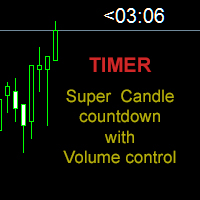
Candle close countdown indicator. Almost all indicators work by ticks and therefore stop counting when the price stops in moments of little volatility. This indicator does not stop and remains synchronized with the broker's clock. It also has other functions that can help the trader. All features are configurable and you can choose if you want to use it or not: - Volume control:                         the counter changes color when the current candle has a higher volume of contracts than the pr
Market Monitor
Rodrigo Rethka Goncalves
Market Monitor – Smart Asset Performance Dashboard for MT4 Turn your MetaTrader 4 into a professional trading intelligence center! Market Monitor is a powerful monitoring tool that displays, in real time, the most relevant performance metrics of each symbol being traded — helping you make faster, smarter, and more strategic decisions. What Does This Indicator Do? Market Monitor scans all open and historical orders, consolidates the data by symbol, and displays everything in visual pa
Fibo Color Levels
Marlon Campos da Silva
4 (4)
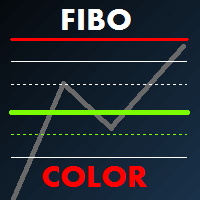
Fibo Color Levels is an amazing tool for Fibonacci lovers. You can customize your preferred values, styles and formats of each level and set the color levels according to their importance. Fibo Color Levels Not add object fibonacci retracement automatically . The purpose of this indicator is not it. So you need to manually add the Fibonacci Retracement in your chart, as usually already do. Use the standard tool Fibonacci Retracement in your MT4, draw the Fibo according to the swing-high and/or s
This indicator helps you control several pairs in a small workspace, therefore, it is not necessary to open several charts on the platform to do so. The indicator shows sequentially up to 6 different pairs, besides that each of these pairs has a button with which you can stop the indicator to observe the selected pair. Place the indicator on a chart to monitor several pairs and the rest of your space use it on the chart of the pair you wish to observe in detail.    MT5 version          Parameter
Order Selective Delete MT4
Francisco Manuel Vicente Berardo
The Order Selective Delete is a multi-symbol multi-timeframe script used to delete simultaneously various pending orders.  General Description   The Order Selective Delete   possesses   three operation modes (Intersection,   Union   and All) that control the way   as   three pending order features (symbol, magic   number   and type) are used. The modes, available through the Selection Mode input parameter, relate to the features, available through the “Select by Feature” and “Feature” input pa
FREE
Crypto_Forex インジケーター HTF OsMA オシレーター(MT4 対応) - HTF OsMA は、市場で最も優れたトレンドインジケーターの一つです。HTF は Higher Time Frame(高時間枠)の略です。 - このインジケーターは、プライスアクションエントリーや他のインジケーターと組み合わせたマルチタイムフレーム取引システムに最適です。 - HTF OsMA インジケーターを使用すると、高時間枠の OsMA を現在のチャートに表示できます --> これはプロフェッショナルな取引アプローチです。 // 優れたトレードロボットとインジケーターは、こちらから入手できます: https://www.mql5.com/en/users/def1380/seller これは、この MQL5 ウェブサイトでのみ提供されるオリジナル製品です。
未決済トレードの結果を計算するためのインフォーマー 私の  #1 Trade Manager : 66+ の機能、このツールを含む  |   ご質問があればお問い合わせください   情報パネルは未決済注文を2つのカテゴリに分類します: 買い 売り 各カテゴリについて、シンボルと現在のピップ数が表示されます。 すべての未決済トレードの合計結果が下に表示されます。 通知はボタンをクリックするだけで有効または無効にできます: 通知が有効になっている場合、どのシンボルでも利益が指定値を超えたときに知ることができます。 通知を受けるピップ数は手動で設定するか、+ と - ボタンを使用して設定します(ステップは設定で調整)。通知はターミナル、メール、モバイルアプリで利用可能です。 通知オプションは損失ポジションにも利用可能:損失が指定値を超えたとき。 インターフェースを折りたたむ機能があります(右上隅):折りたたまれたパネルは不要なときにワークスペースを占有しません。 必要に応じて、表示色を設定で変更できます。 設定可能: 1) 通知: 通知を受けるデフォルトのピップ数(後でインターフェースで
Bongo AUDCHF
Suvashish Halder
3 (4)
This EA only created for AUDCHF with an Risk Reward 1:2 Download Set Files - CLICK HERE NO GRID, NO MARTINGALE and NO MORE OVERTRADING.     Add This to Activate News Filter -  https://ec.forexprostools.com/ Features :-  Symbol AUDCHF Brokers IC Markets, Tickmill, Pepperstone Account Type Raw Spread, Pro, Razor Leverage  Recommended 1:500  Timeframe  15M Settings  Download Minimum Deposit  $100 Risk Reward  1:2 Strategy Market Movement Why Should You Use This EA: Market Movement Strategy. Hard
FREE
The EA automatically opens the orders when price crossing/touching lines, which were drawn by the user. Two scenarios are possible. When you expect the price to stay in the channel. When you expect that the price will not remain in the channel after the break off it. If you want use first scenario - you must set in settings Trade mode = “False_Breaking_Channel”. If you want use second scenario - you must set in settings Trade mode = “Breaking_Channel”. When you run EA, you must draw two trend li
FREE
New version 1.22. Partagas    The AG algorithm is an element of a comprehensive trading system for trading a basket of currencies across 8 major currencies across all 28 currency pairs. The algorithm serves as a signal block for determining entry/exit from a position. To collect initial values, AG uses data from the CSS Currency Slope Strength cluster indicator. This indicator was not chosen by chance - it performed very well during testing of the algorithm. A. AG determines the width of the e
FREE
MultiTP Trade Manager EA — Advanced Trade Management Made Effortless (MT4) Limited Offer – First 100 Downloads FREE! Be among the first 100 traders to download Trade Anchor Manager (MT4/MT5) completely free of charge. Hurry – once the limit is reached, the offer closes instantly! After trying it out, we’d love if you could leave a review and share your thoughts – your feedback helps us improve and lets other traders know what to expect. Need this Trade Anchor Manager for MT5?  http
FREE
Библиотека для расчета формул. Формула задается строкой. Можно задавать формулу в строковой переменой в окне свойств. Формула может включать арифметические действия "+-/*" и все функции кроме MathRand(): abs(), arccos(), arcsin(), arctan(), sin(), cos(), tan(), exp(), log(), mod(), max(), min(), pow(), ceil(), sqrt(), log10(), floor(), round(). Кроме этого в формулу могут входить числа (если число дробные, то разделитель точка) и аргументы. Аргумент начинается с буквы "а" (латинская) и номера, н
FREE
MetaCOT 2 CFTC ToolBox Demo is a special demo version of a full-featured library MetaCOT 2 CFTC ToolBox MT4 . The demo version does not have any limitations, but it outputs data with a delay in contrast to the full version. The library provides access to the CFTC reports (U.S. Commodity Futures Trading Commission) reports straight from the MetaTrader terminal. The library includes all indicators that are based on these reports. With this library you do not need to purchase each MetaCOT indicator
FREE
The  Silver Volatility Trend Line for MT4 is an EA that helps you trade using the trendlines, drawn on your chart. It basically allows you to send and manage orders using trend lines. It automatically calculates the True Range of your asset to allow you to send orders well calibrated with the market volatility. Take Profit and Stop Loss are calculated in number of True Range. You can do that for two different orders at the same time , so that you can trade two different kind of risk / profit rat
「一目均衡表」の専門的な使い方は、一目均衡表を正しく解釈してグラフを分析することです! はトレーダーが価格グラフ上の指定された点間の比率を素早く簡 単に測定できるようにするグラフィックプログラムです。この時間と価格の指標は、MT4 プラットフォームの一目の戦略に従って図表を分析するための基本的なツールです。この ツールを使用すると、 非常に短期間での価格波だけでなく、時間波の洞察に満ちた完全な 分析も可能になります。分析の実行に費やされる労力は、エクセルを使用して実行される 同様の測定および計算と比較して、何度も最小限に抑えられます。指標は、一目均衡表戦 略を使用するトレーダーの知識と経験、およびそれらの期待を考慮して設計されています。 提示されたツールは私たちの仕事の結果です。 指標のモジュール構造により、論理的な順序で分析を実行できます。このプロセスは過去 の波に関するデータを収集することから始まり、それが将来の市場の動きを計算するため の基礎となります。 計算で考慮されるデータは、予測の正確さにとって非常に重要です。 この操作は最小限に抑えられ、即座に測定値が得られます。 この測
The Definitive Performance Testing Solution for MetaTrader Environments What This Tool Does This specialized benchmark utility measures the performance of your MetaTrader environment, providing insights that impact your trading execution. Unlike generic system benchmarks, this tool evaluates performance specifically within the MetaTrader runtime environment. For Professional Traders & Developers: Performance Metrics : Measurements of calculation throughput and memory efficiency Trading-Specific
EASY Insight – スマートなトレードはここから始まる 概要 もし数秒で市場全体(FX、ゴールド、暗号通貨、指数、株式まで)を、手作業のチャート確認なしでスキャンできたらどうでしょう? EASY Insight は、インジケーターデータを実践的なトレードインテリジェンスに変換する、AI対応のエクスポートツールです。無駄な推測や視覚的な混乱に疲れたトレーダーのために設計されており、市場全体のスナップショットを1つのクリーンなCSVファイルで提供します。 これまでとは全く違う新しいトレード体験です。ウィンドウの切り替えも、グラフのごちゃごちゃしたオーバーレイもありません。FX Power (FXP)、FX Volume (FXV)、FX Dynamic (FXD)、FX Levels (FXL)、そして非FX資産用のIX Power (IXP) ― あなたがすでに知っているツールから得られる、純粋に構造化されたインサイトだけ。 さらに便利さを求めるなら、 EASY Insight AIO を選んでください。すべてが1つのインストールに含まれ、設定不要。チャート上にインジケータ
Rainbow MT4 is a technical indicator based on Moving average with period 34 and very easy to use. When price crosses above MA and MA changes color to green, it’s a signal to buy. When price crosses below MA and MA changes color to red, it’s a signal to sell. The Expert advisor ( Rainbow EA MT4) based on Rainbow MT4 indicator, as you can see in the short video below is now available here .
FREE
このプロダクトを購入した人は以下も購入しています
Local Trade Copier EA MT4
Juvenille Emperor Limited
4.96 (106)
Local Trade Copier EA MT4 による、驚くほど高速な取引コピーを体験してください。1分で簡単にセットアップできるこの取引コピー機は、同じWindowsコンピュータまたはWindows VPS上の複数のMetaTrader端末間で取引をコピーすることができ、0.5秒未満の高速コピースピードを実現します。 初心者であろうとプロのトレーダーであろうと、 Local Trade Copier EA MT4 には、あなたの特定のニーズに合わせてカスタマイズするための幅広いオプションが用意されています。これは、利益の可能性を高めたい人にとって究極のソリューションです。 今すぐ試してみて、これが市場で最も速くて簡単なトレードコピー機である理由を理解してください。 ヒント: デモアカウントで Local Trade Copier EA MT4 デモバージョンをダウンロードして試すことができます: ここ ダウンロードした無料のデモ ファイルを MT4 >> ファイル >> データ フォルダを開く >> MQL4 >> Experts フォルダに貼り付けて、ターミナルを再起動しま
Trade Assistant MT4
Evgeniy Kravchenko
4.42 (192)
取引 ごとのリスクの 計算、新規注文 の 簡単 な 設置、部分的 な 決済機能 を 持 つ 注文管理、 7 種類 のトレーリングストップなど 、便利 な 機能 を 備 えています 。 追加の資料と説明書 インストール手順 - アプリケーションの手順 - デモアカウント用アプリケーションの試用版 ライン機能 チャート上にオープニングライン、ストップロス、テイクプロフィットを表示します。この機能により、新規注文を簡単に設定することができ、注文を出す前にその特徴を確認することができます。   リスク計算 リスク計算機能は、設定されたリスクとストップロス注文のサイズを考慮して、新規注文のボリュームを計算します。ストップロスの大きさを自由に設定できると同時に、設定したリスクを守ることができます。 Lot calc ボタン - リスク 計算 を 有効 / 無効 にします 。 Risk フィールドでは 、必要 なリスクの 値 を 0 から 100 までのパーセンテージまたは 預金通貨 で 設定 します 。 設定」 タブで 、 リスク 計算 の 種類 を 選択 します :「 $ 通貨」、「 % 残
Copy Cat More Trade Copier MT4 (コピー猫MT4) は単なるローカル取引コピーツールではなく、現代の取引課題に対応するために設計された完全なリスク管理と実行フレームワークです。Propファームのチャレンジから個人の資産管理まで、強力な実行力、資金保護、柔軟な設定、高度な取引処理を組み合わせ、あらゆる状況に適応します。 このコピーツールは Master(送信側) と Slave(受信側) の両モードで動作し、成行注文や指値注文のリアルタイム同期、取引修正、部分決済、Close By 操作をサポートします。デモ口座・リアル口座の両方に対応し、取引用パスワードまたは投資家パスワードでも利用可能です。Persistent Trade Memory 技術により、EA・ターミナル・VPS が再起動しても復元可能です。複数の Master と Slave を同時に管理でき、ブローカー間の違いはプレフィックス/サフィックスの自動調整やシンボルマッピングで処理されます。 マニュアル/設定: Copy Cat Trading Copier マニュアル Copy Cat Mo
Trade Manager EAへようこそ。これは、取引をより直感的、正確、そして効率的にするために設計された究極の リスク管理ツール です。これは単なるオーダー実行ツールではなく、包括的な取引計画、ポジション管理、リスク管理のためのソリューションです。初心者から上級者、迅速な実行を必要とするスキャルパーまで、Trade Manager EAはあらゆるニーズに対応し、為替、指数、商品、暗号通貨などさまざまな市場で柔軟に対応します。 Trade Manager EAを使用すると、複雑な計算が過去のものになります。市場を分析し、エントリーポイント、ストップロス、テイクプロフィットのレベルをチャート上のラインでマークし、リスクを設定するだけで、Trade Managerが最適なポジションサイズを即座に計算し、SLとTPをピップ、ポイント、口座通貨でリアルタイムに表示します。すべての取引が簡単かつ効果的に管理されます。 主な機能: ポジションサイズ計算機 :定義されたリスクに基づいて取引サイズを瞬時に決定します。 簡単な取引計画 :エントリー、ストップロス、テイクプロフィットを設定するためのド
Exp COPYLOT CLIENT for MT4
Vladislav Andruschenko
4.69 (65)
MetaTrader4のコピー機を取引します。     それは任意の口座からの外国為替取引、ポジション、注文をコピーします。 それは最高の貿易コピー機の1つです     MT4 - MT4、MT5 - MT4     のために     COPYLOT MT4     バージョン(または     MT4 - MT5  MT5 - MT5     のために     COPYLOT MT5     バージョン)。 MT5のバージョン 完全な説明   +DEMO +PDF 購入する方法 インストールする方法     ログファイルの取得方法     テストと最適化の方法     Expforex のすべての製品 のコピー機 バージョン       MetaTrader 5 ターミナル(   МТ5 - МТ5、МТ4 - МТ5   )-   コピーロットクライアントMT5 独自のコピーアルゴリズムにより、すべての取引がマスターアカウントからクライアントアカウントに正確にコピーされます。 また、動作速度が速いことでも知られています。タフなエラー処理。 強力な機能セット。 プログラムは、複数
The product will copy all telegram signal to MT4   ( which you are member  ) , also it can work as remote copier.  Easy to set up, copy order instant, can work with almost signal formats, image signal, s upport to translate other language to English Work with all type of channel or group, even channel have "Restrict Saving Content", work with  multi channel, multi MT5 Work as remote copier: with signal have ticket number, it will copy exactly via ticket number. Support to backtest signal. How to
MT4 to Telegram Signal Provider は使いやすく、完全にカスタマイズ可能なツールで、Telegramに信号を送信し、あなたのアカウントを信号提供者に変えることができます。 メッセージのフォーマットは 完全にカスタマイズ可能です! しかし、簡単な使用のために、あらかじめ定義されたテンプレートを選択し、メッセージの特定の部分を有効または無効にすることもできます。 [ デモ ]   [ マニュアル ] [ MT5バージョン ] [ Discordバージョン ] [ Telegramチャンネル ]  New: [ Telegram To MT5 ] セットアップ ステップバイステップの ユーザーガイド が利用可能です。 Telegram APIの知識は必要ありません。開発者が必要なものをすべて提供します。 主要機能 購読者に送信される注文の詳細をカスタマイズする機能 例えばブロンズ、シルバー、ゴールドなど、階層型のサブスクリプションモデルを作成できます。ゴールドサブスクリプションでは、すべての信号が得られますなど。 ID、シンボル、またはコメントによる注文のフ
EASY Insight AIO – スマートで手間いらずな取引のオールインワンソリューション 概要 数秒で市場全体——FX、ゴールド、暗号資産、指数、さらには株式まで——を、手作業のチャート確認や複雑なセットアップ・インジケーター導入なしにスキャンできたらどうでしょうか? EASY Insight AIO はAIトレードのための究極のプラグ&プレイ型エクスポートツールです。市場全体のスナップショットを、クリーンなCSVファイルで一括出力。ChatGPT、Claude、Gemini、Perplexityなど、さまざまなAIプラットフォームで即座に解析できます。 ウィンドウの切り替えやグラフのごちゃごちゃしたオーバーレイはもう不要。自動エクスポートされる純粋で構造化されたインサイトだけで、無駄なチャート監視に悩まされず、スマートなデータ主導の判断に集中できます。 なぜEASY Insight AIOなのか? 本当のオールインワン • セットアップ不要、インジケーターのインストール不要、チャートへのオーバーレイ不要。インストールして起動し、エクスポートするだけです。 マルチアセット対
Trade copier MT4
Alfiya Fazylova
4.58 (33)
Trade Copierは、取引口座間の取引をコピーして同期するように設計された専門的なユーティリティです。 コピーは、同じコンピューターまたはvps にインストールされている、サプライヤーのアカウント/端末から受信者のアカウント/端末に行われます。 購入する前に、デモ アカウントでデモ バージョンをテストできます。 デモ版 こちら 。 詳細な説明は こちら 。 主な機能と利点: MT5ネッティングアカウントを含む、MT4> MT4、MT4> MT5、MT5> MT4のコピーをサポートします。 高いコピー速度(0.5秒未満)。 ベンダーモードと受信者モードは同じ製品内に実装されています。 チャートから直接リアルタイムでコピーを制御できる、簡単で直感的なインターフェイス。 接続が切断されたり、端末が再起動されたりしても、設定と位置が失われることはありません。 コピーするシンボルを選択できます。また、受信者のシンボルを置き換えることもできます(例:EURUSD> USDJPY)。 バックコピーをサポートします。 特定の注文のみのコピーを有効にする機能。 取引開始価格の最大差と最大遅延時間を
THIS EA IS A SEMI-AUTO EA, IT NEEDS USER INPUT. Manual & Test Version Please TEST this product before   BUYING  and watch my video about it. Contact me for user support or bug reports, or if you want the MT5 version! MT5 Version I do not guarantee any profits or financial success using this EA. With this Expert Advisor, you can: Implement your own   Zone Recovery   strategy to capitalize on trending markets. Create   Grid   trading strategies, to profit from ranging markets. Place orders easil
Tired of complex order placement and manual calculations? Trade Dashboard is your solution. With its user-friendly interface, placing orders becomes effortless, by a single click, you can open trades, set stop loss and take profit levels, manage trade lot size, and calculate risk to reward ratios, allowing you to only focus on your strategy. Say goodbye to manual calculations and streamline your trading experience with Trade Dashboard. Download  Demo Version  right now. You can find  Details of
EchoTrade Telegram to MT5 Copier Seamless, Instant, and Reliable Signal Copying - Direct from Telegram to MetaTrader 4! The product does not run in the strategy tester but you can get free trial version   here  for testing before purchase. Tired of manually executing trades from Telegram signals? EchoTrade automates the process, instantly copying trades from any Telegram channel or group directly into your MT5 account—accurately, efficiently, and without delay. Key Features: Universal Compatib
Local Trade Copier EA は、MAMまたはPAMMアカウントを必要とせずに、外部ソースからのトレードシグナルを実行する必要がある、または同時に複数のアカウントを管理する必要がある個々のトレーダーまたはアカウントマネージャー向けのソリューションです。最大8つのマスターアカウントから無制限のスレーブアカウントにコピーします [ インストールガイド | アップデートガイド | トラブルシューティング | FAQ | すべての製品 ] 100%セルフホスト インストールと使用が簡単 インストーラー、構成ファイル、サーバー、メモリパイプ、DLLは使用されていません EAを永久に使用するための1000回のアクティベーション ローカル実行、ネットワーク遅延なし それはあなたがこれまでに必要とするすべての機能を実装します: 最大8つのマスターアカウントと無制限のスレーブアカウント すべてのブローカーおよびDD / NDD / ECN / STP実行で動作します 異なる口座通貨の口座で動作します ライブアカウントとデモアカウントの間で区別なく機能します マスターアカウントとスレーブア
Trading History - A program for trading and money management on the history of quotes in stratagy tester. It can work with pending and immediate orders, and is equipped with trailing stop, breakeven and take profit functions. Very good for training and testing different strategies. Manual (Be sure to read before purchasing) Advantages 1. Allows you to test any trading strategy in the shortest possible time 2. An excellent simulator for trading training. You can gain months of trading experience
TelegramからMT4へ: 究極のシグナルコピーソリューション Telegram to MT4 は、DLLを必要とせず、TelegramのチャンネルやチャットからMetaTrader 4プラットフォームに取引シグナルを直接コピーできる最先端のユーティリティです。この堅牢なソリューションは、比類のない精度とカスタマイズオプションにより、シグナルのシームレスな実行を保証し、時間を節約し、効率性を向上させます。 [ Instructions and DEMO ] 主な特徴 直接的なTelegram API統合 電話番号とセキュアコードで認証します。 ユーザーフレンドリーな EXE ブリッジを使用して、チャット ID を簡単に取得および管理します。 複数のチャネル/チャットを追加、削除、更新して、同時に信号をコピーします。 高度なフィルターによる信号解析 カスタム例外語 (例: 「レポート」、「概要」) を含む不要な信号をスキップします。 柔軟な SL および TP 形式 (価格、ピップ、ポイント) をサポートします。 シグナルが価格ではなくポイントを指定する場合、エントリ ポイントを自動
TradePanel MT4
Alfiya Fazylova
4.84 (89)
Trade Panel は、多機能の取引アシスタントです。このアプリケーションには手動取引用の 50 を超える取引機能が含まれており、ほとんどの取引操作を自動化できます。 注意、アプリケーションはストラテジー テスターでは動作しません。購入する前に、デモアカウントでデモ版をテストできます。デモ版 ここ 。 完全な手順 こちら 。 取引。 ワンクリックで取引操作を実行できます: 自動リスク計算を使用して未決の注文とポジションをオープンします。 ワンクリックで複数の注文とポジションをオープンします。 注文グリッドを開きます。 未決の注文とポジションをグループごとにクローズします。 ポジション反転 (買いを閉じて売りを開く、または売りを閉じて買いを開く)。 ポジションをロックします(買いポジションと売りポジションの量を均等にする追加のポジションをオープンします)。 ワンクリックですべてのポジションを部分的にクローズします。 すべてのポジションのテイクプロフィットとストップロスを同じ価格レベルに設定します。 すべてのポジションのストップロスをポジションの損益分岐点レベルに設定します。 注文とポ
Time saving and fast execution Whether you’re traveling or sleeping, always know that Telegram To Mt4 performs the trades for you. In other words, Our   Telegram MT4 Signal Trader  will analyze the trading signals you receive on your selected Telegram channels and execute them to your Telegram to MT4 account. Reduce The Risk Telegram To Mt4   defines the whole experience of copying signals from   Telegram signal copier to mt4 platforms. Users not only can follow all instructions from the signa

MT4のエキスパートアドバイザーリスクマネージャーは非常に重要であり、私の意見ではすべてのトレーダーにとって必要なプログラムです。 このエキスパートアドバイザーを使用すると、取引口座のリスクを管理することができます。リスクと利益の管理は、金銭的およびパーセンテージの両方で実行できます。 エキスパートアドバイザーが機能するには、それを通貨ペアチャートに添付し、許容可能なリスク値を預金通貨または現在の残高の%で設定するだけです。 アドバイザ機能 このリスクマネージャーは、リスクの管理を支援します。 -取引のために -1日あたり - 1週間 - ひと月ほど 制御することもできます 1)取引時の最大許容ロット 2)1日あたりの最大注文数 3)1日あたりの最大利益 4)エクイティを引き受ける利益を設定する それだけではありません。設定で自動設定を指定した場合、アドバイザーはデフォルトのSLとTPを設定することもできます。 アドバイザーは各イベントにアラートを添えて、注文を削除する理由を説明します。たとえば、あなたが開封し、6番目の注文を開封し、1日あたり5つの注文のみを開封す
Everything for chart Technical Analysis indicator MT4 in one tool Draw your supply demand zone with rectangle and support resistance with trendline and get alerts to mobile phone or email alert -  Risk reward indicator Video tutorials, manuals, DEMO download   here .  Find contacts on my   profile . 1.   Extended rectangles and trendlines Object will be extended to the right edge of the chart when price will draw new candles on chart. This is rectangle extender or trendline extender. 2. Price to
革新的な X2 Copy MT4 で瞬時のトレードコピーを発見しましょう。わずか10秒のセットアップで、単一のWindowsコンピューターまたはVPS上のMetaTrader端末間でのトレード同期を、前例のない速度(0.1秒未満)で行う強力なツールを手に入れられます。 複数の口座を管理していても、シグナルをフォローしていても、戦略を拡大していても、X2 Copy MT4 は比類のない精度とコントロールであなたのワークフローに適応します。待つのはやめてください — 市場をリードする速度と信頼性でコピーを開始しましょう。今すぐ トライアル版 をダウンロードしてください。 *重要:MT5端末での作業には、別途 X2 Copy MT5 バージョンが必要です X2 Copy MT4/5 の設定と機能の説明 | X2 Copy トライアル版のインストール方法 特徴 高速コピー — 0.1秒未満でのトレード転送 すべてのコピータイプのユニバーサルサポート:MT4>MT4, MT4>MT5, MT5>MT4, MT5>MT5 直感的なインターフェースで10秒で即時セットアップ 24時間年中無休の安定動
Trailing Stop Universal MT4 / MT5 utility is a multifunctional tool for protecting floating profit on open positions and reducing possible risks in trading. To realize these goals, the tool offers the user the following features. Breakeven function - transfers a position to breakeven when the profit of the position allows it. If this function is enabled and the conditions of its operation are met, it moves the StopLoss order to the opening price of the position or even to the profitable area of
Unlimited Trade Copier Pro is a tool to copy trade remotely to multiple MT4, MT5 and cTrader accounts at different computers/locations over internet. This is an ideal solution for you if you are a signal provider and want to copy your trades to other receivers globally on your own rules. One provider can copy trades to multiple receivers and one receiver can get trade from multiple providers as well. The provider can even set the subscription expiry for each receiver, so that receiver will not b
これは、トレンドラインPROインジケーターの自動パラメータオプティマイザです 簡単かつ迅速に、あなたのお気に入りのトレンドラインプロインジケーターに最適なパラメータを選択します。 最適化には数秒しかかかりません。 オプティマイザでは、振幅、TP1-TP3、StopLoss、および選択した履歴セクション(日)の時間フィルタとHTFフィルタの値など、各ペアと期間に最適なパラメータを見つ 異なる時間枠を最適化するには、異なる範囲の履歴が必要です: M5-M15計算範囲パラメータ(日)=60(三ヶ月)を設定します。 M30-H1計算範囲パラメータ(日)=120(6ヶ月)を設定します。 H4パラメータの計算範囲(日数)を設定する=240(1年) D1-W1パラメータ計算範囲(日)=720(三年)を設定します。 MN1パラメータ計算範囲(日)=1200(五年)を設定します。 最適化後、パラメータはmql4>Files>T R E N D Lineoptimizedsettingsフォルダ内の既製のセットファイルに自動的に保存されます オプティマイザユーティリティの使用方法: 最適化
MT4/MT5 Dual Copier Pro: Skyrocket Your Trading Success with Seamless Precision! Youtube Demonstration: https://youtu.be/auW00CG386o?si=Du2axdoBzTmUJ3yp Unlock the power of automated trade replication with Dual Copier Pro, the ultimate Expert Advisor (EA) designed to revolutionize your trading experience on MetaTrader 4 and MetaTrader 5. Whether you are a seasoned trader, a hedge fund manager, or a prop firm guru, this robust, feature-packed tool ensures your trades are copied with lightning-fa
News Filter EA: Advanced Algo Trading Assistant News Filter EA is an advanced algo trading assistant designed to enhance your trading experience. By using the   News Filter EA , you can integrate a Forex economic news filter into your existing expert advisor, even if you do not have access to its source code. In addition to the news filter, you can also specify   trading days   and   hours   for your expert. The News Filter EA also includes   risk management   and   equity protection   features
PnL Calendar MT4
Keni Chetankumar Gajanan -
PnL Calendar ... analyse to profit PnL Calendar transforms your trading history into a clear calendar view, helping you spot profitable days, monitor risk in real time, and unify accounts with the new Multi‑Broker data export feature. Core Features Calendar Panel: Profit breakdowns by day, week, month, and year Account Panel: Balance, equity, margin alerts, multi‑timeframe summaries, overnight gap adjustments Risk Dashboard: Leverage, drawdown, profit factor, consistency ratio, holding time, ri
Smart Copy Local MT4
Kyra Nickaline Watson-gordon
5 (7)
Smart Copy is an Easy-to-Use EA that supports Multi Copying Metatrader4 and Metatrader5 and Local/Remote Copying. (Remote Version is coming soon) Free version is available on Smart Copy Local Free MT4 Specifications :     Real Time, Multi Terminal - Multi Account - MT4/MT5 trade copying     Copy from netting to hedge and hedge to netting is supported.     Fast and instant copy     All settings are input visually.     Easy modifying symbol names, prefix, suffix     Enable/Disable copying s
この製品は、ニュースタイム中にすべてのエキスパートアドバイザーと手動チャートをフィルタリングするため、急激な価格変動によるマニュアルトレードのセットアップの破壊や他のエキスパートアドバイザーによって入力された取引について心配する必要はありません。この製品には、ニュースのリリース前にオープンポジションとペンディングオーダーを処理できる完全な注文管理システムも付属しています。 The News Filter  を購入すると、将来のエキスパートアドバイザーのためにビルトインのニュースフィルターに頼る必要はなく、今後はすべてのエキスパートアドバイザーをここからフィルタリングできます。 ニュース選択 ニュースソースは、Forex Factoryの経済カレンダーから取得されます。 USD、EUR、GBP、JPY、AUD、CAD、CHF、NZD、CNYなど、任意の通貨数に基づいて選択できます。 Non-Farm(NFP)、FOMC、CPIなどのキーワード識別に基づいて選択することもできます。 影響レベルによってフィルタリングするニュースを選択することができ、低、中、高の影響範囲から選択できます。
Strategy Builder offers an incredible amount of functionality. It combines a trade panel with configurable automation (covert indicators into an EA), real-time statistics (profit & draw down) plus automatic optimization of SL, TP/exit, trading hours, indicator inputs. Multiple indicators can be combined into an single alert/trade signal and can include custom indicators, even if just have ex4 file or purchased from Market. The system is easily configured via a CONFIG button and associated pop-up
概要 TradeSync Proは、同一コンピュータ上で稼働するMetaTrader端末間でのローカル取引同期用に設計された技術的なユーティリティです。口座管理、異なるブローカー間での約定比較、および戦略的な取引の複製(コピートレード)に最適化されています。 ライセンスとクロスプラットフォーム互換性 本ソフトウェアは、使用するプラットフォームに応じて様々な同期シナリオをサポートしています。以下の要件にご注意ください:   単一プラットフォーム: MT4からMT4へコピーする場合はMT4版が必要です。MT5からMT5の場合はMT5版が必要です。   クロスプラットフォーム: MT4とMT5間(双方向)で同期を行うには、ユーザーはMT4版とMT5版の両方の製品を所有している必要があります。   インストール: ローカル接続を確立するため、両方の端末が同一のハードウェア上で稼働している必要があります。 技術機能リスト 送信モード (Transmitter Mode):   ローカルファイルシステムへの取引操作のリアルタイム配信。   マジックナンバー(Magic Number)によるフィルタ
作者のその他のプロダクト
OrderHelper script is super easy and trader friendly to use. It would boost your trading experience. Because it is designed to open one to multiple orders quickly with just one click. Besides using the OrderHelper script, traders can define various parameters for open orders such as the symbol, order type, lot size, stoploss, takeprofit and more. Basically, with this script traders can manage their open orders more efficiently and save their trading time. OrderHelper manages: Open the number of
Inspiration EA is an innovative, fully automated Expert Advisor (EA) designed for forex traders seeking consistency, accuracy, and sustainable monthly profits. Developed through a long period of market data analysis, and backtesting, the EA has coded with sophisticated algorithms, multi-timeframe analysis, and a complex trading strategy that incorporates a combination of market patterns, support and resistance analysis, technical indicators, and an advanced recovery system. Regardless of market
フィルタ:
レビューなし
レビューに返信