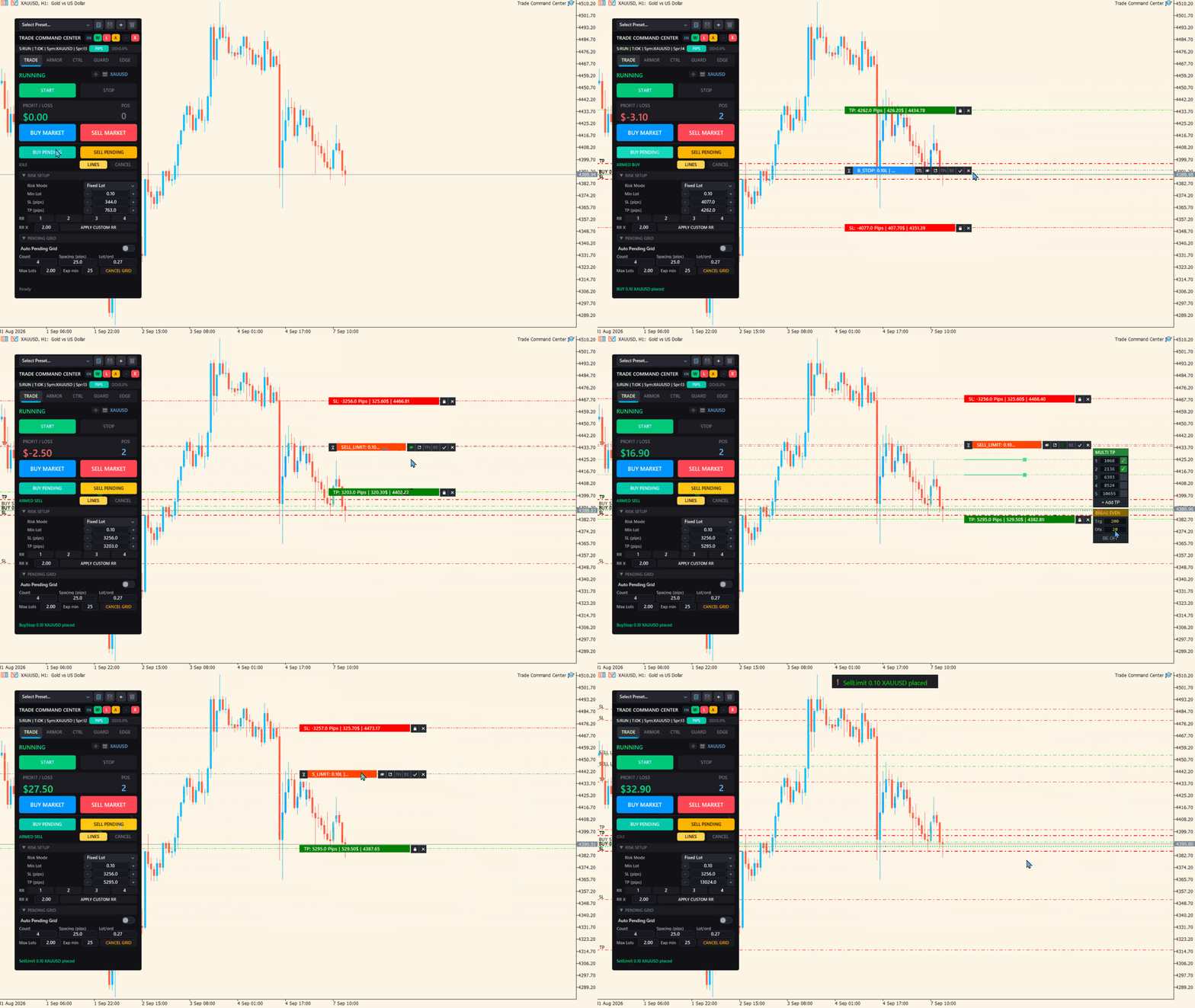
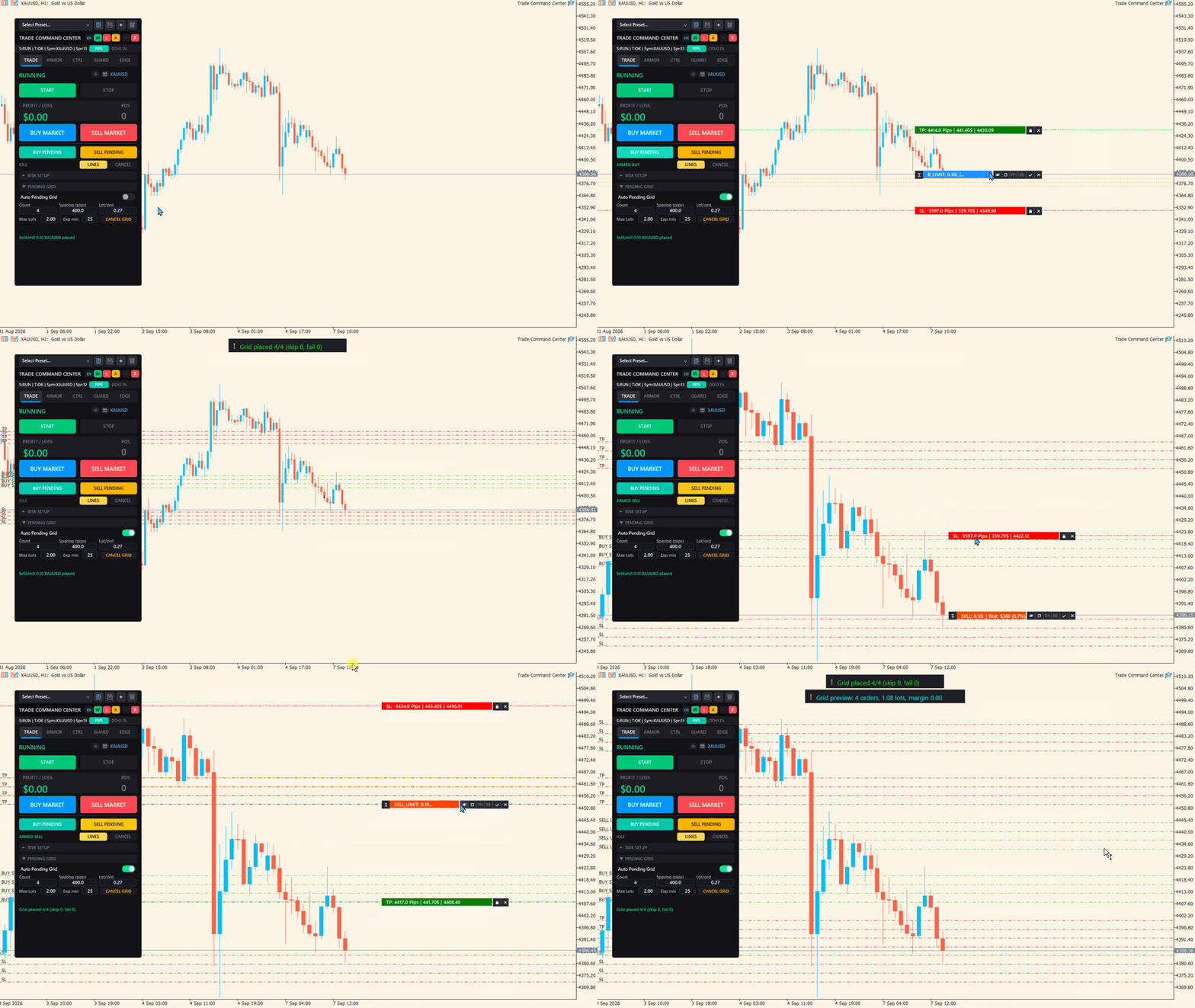
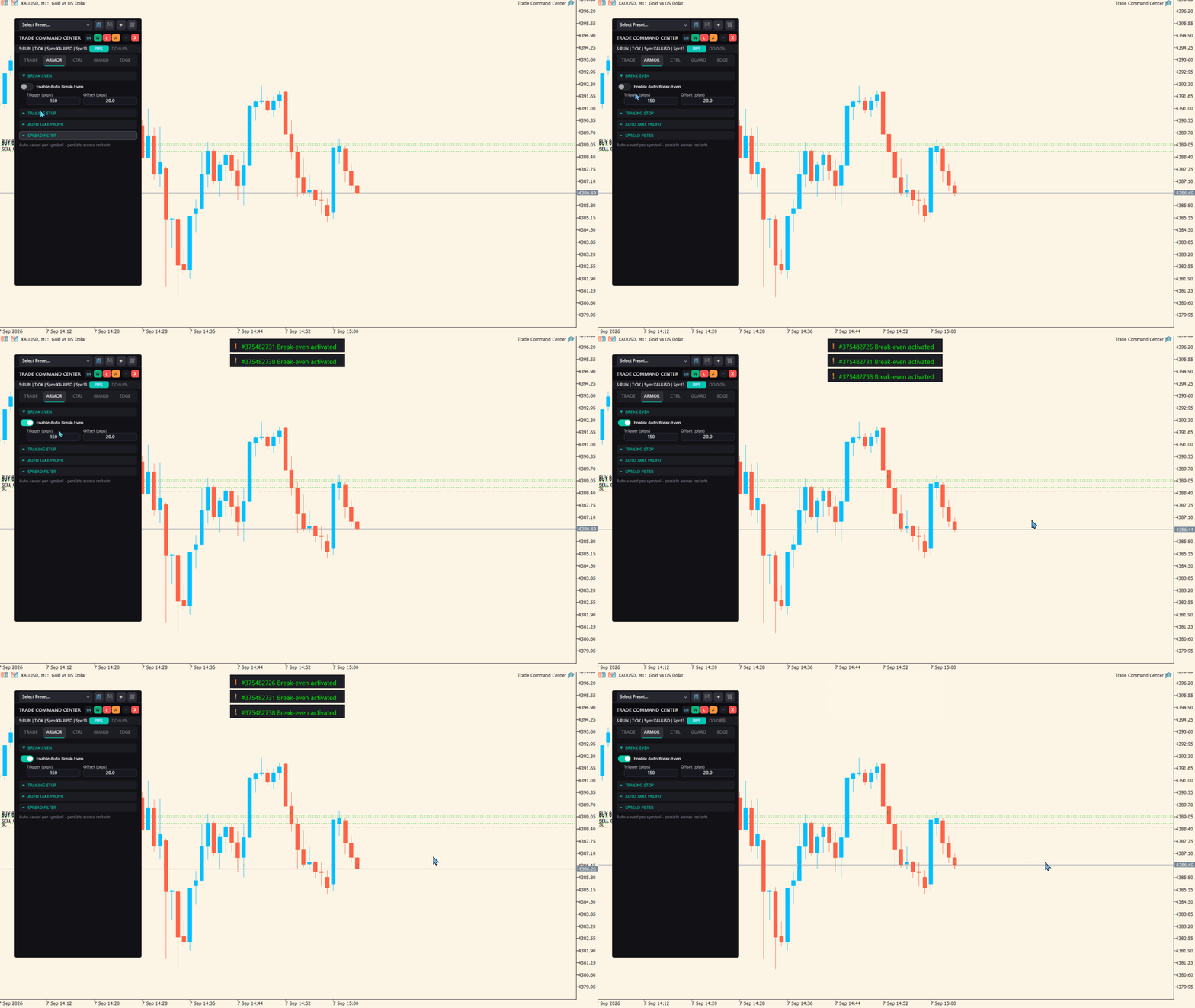
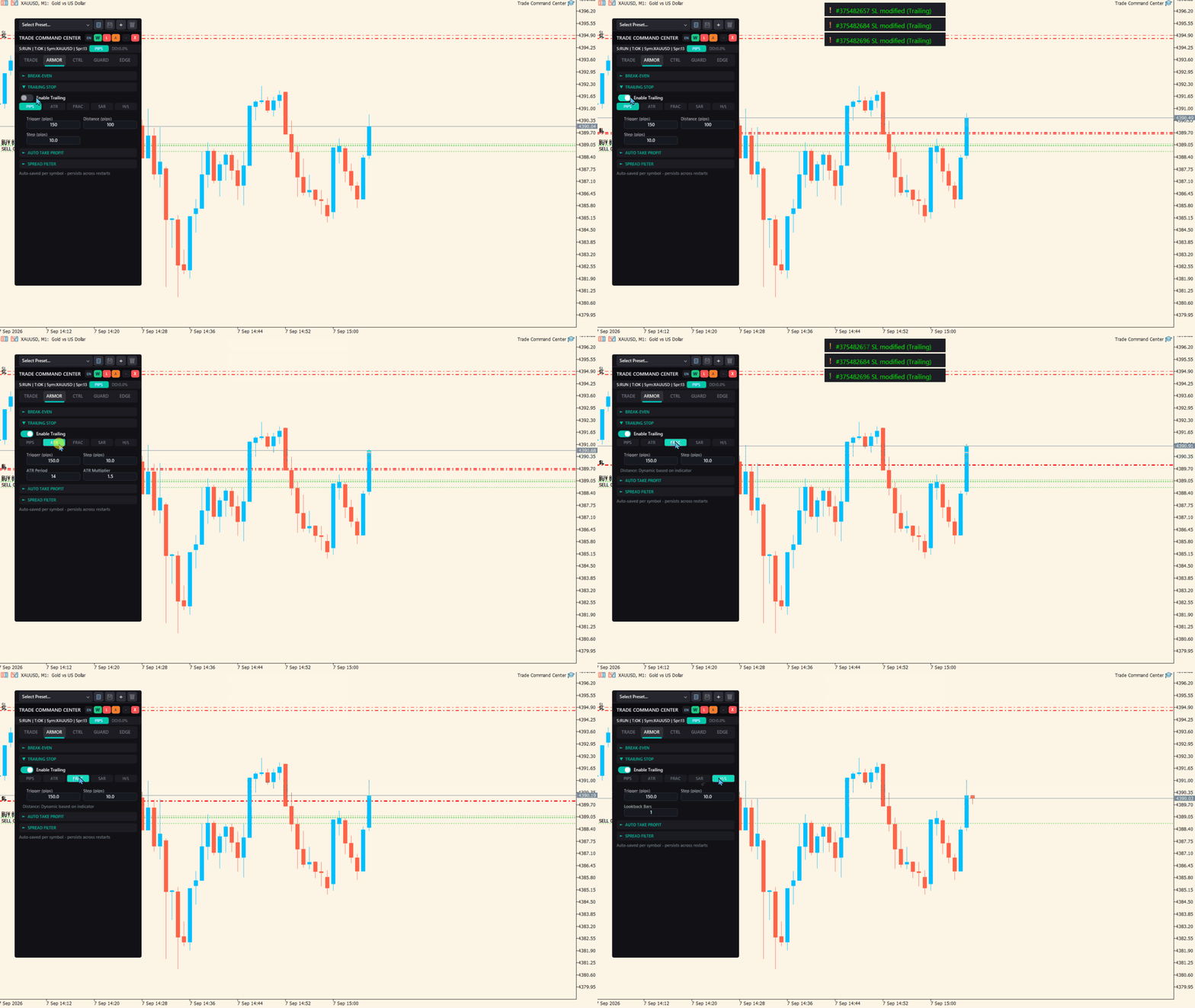
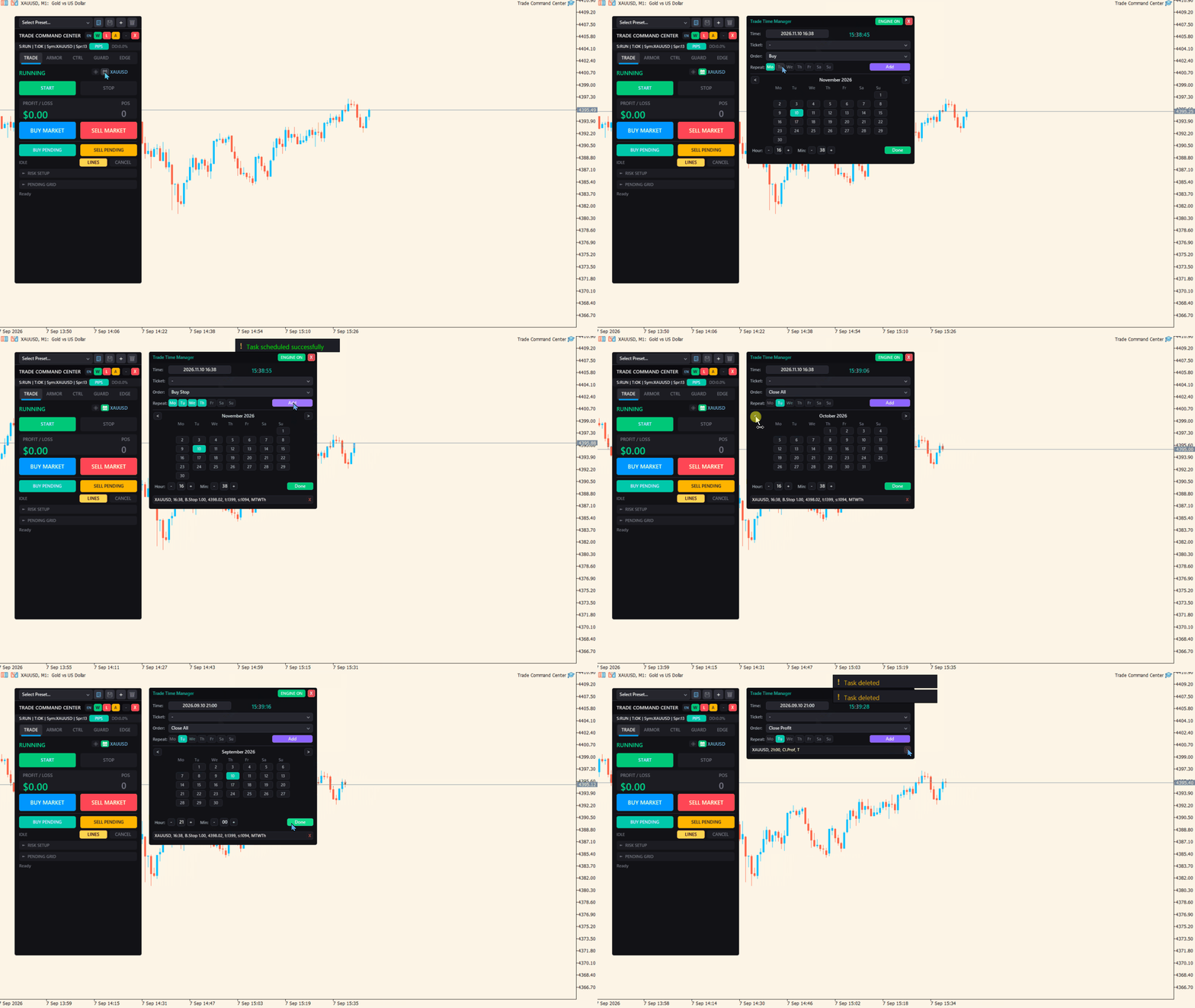
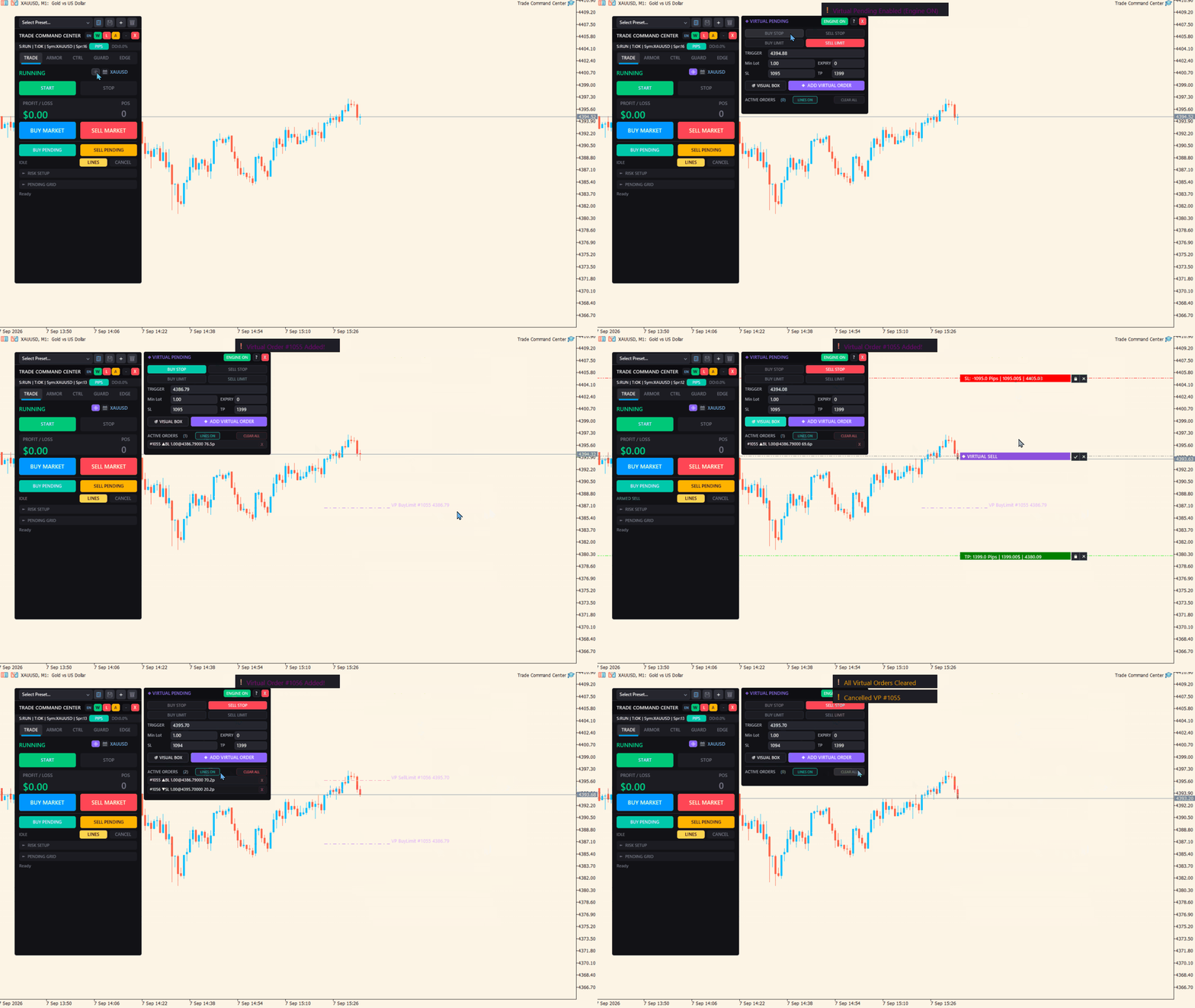
Trade Command Center

5

ファンド口座。一度のロット計算ミス。ドローダウン上限を突破。口座閉鎖。
戦略が悪かったのではない。執行の瞬間にリスクが管理されていなかったからだ。

Trade Command Center はビジュアル注文執行・リスク管理パネルです。
SL距離からロットを計算。ポジションを自動管理。ドローダウン上限をリアルタイム監視。
5タブ。1チャートパネル。DLLなし。外部接続なし。

正確な執行とプロップファーム準拠を必要とする裁量トレーダー向けに設計。
プロップファーム系ルールに対応した柔軟なRisk Guard設定。日次損失、週次損失、エクイティ・ドローダウン、フローティング損失に対応。

コア機能

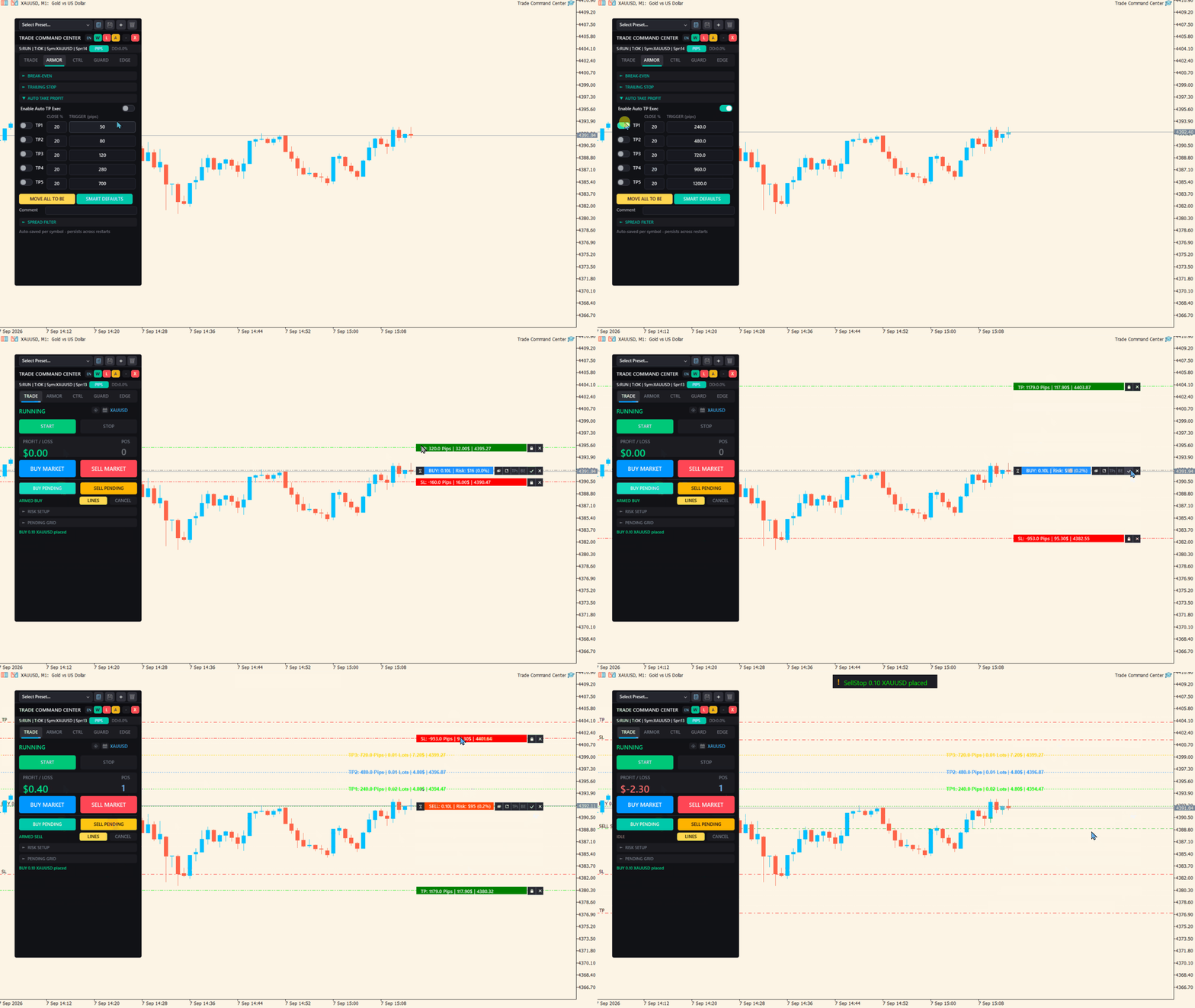
  • ビジュアル・トレード・プランニング:チャート上でEntry、SL、TPボックスをドラッグ。ロット、ピップス距離、ドル金額、R:Rをリアルタイム表示。ワンクリック執行。
  • リスク計算:リスクモードを選択 — 残高比率、固定金額、固定ロット。パネルがポジションサイズを自動計算。
  • カスタムR:Rコントロール:クイックRRボタン、または独自のリワード:リスク目標を入力して、より素早く計画。
  • マルチレベル・テイクプロフィット:最大5段階の部分決済。各レベルに独自のトリガー距離と決済割合。
  • オーバーライド付きブレイクイーブン:グローバルBE設定を全ポジションに適用。個別取引はカスタムトリガーとオフセットで上書き可能。
  • トレイリングストップ:SLが定義距離で価格を追従。ステップサイズで更新頻度を制御。
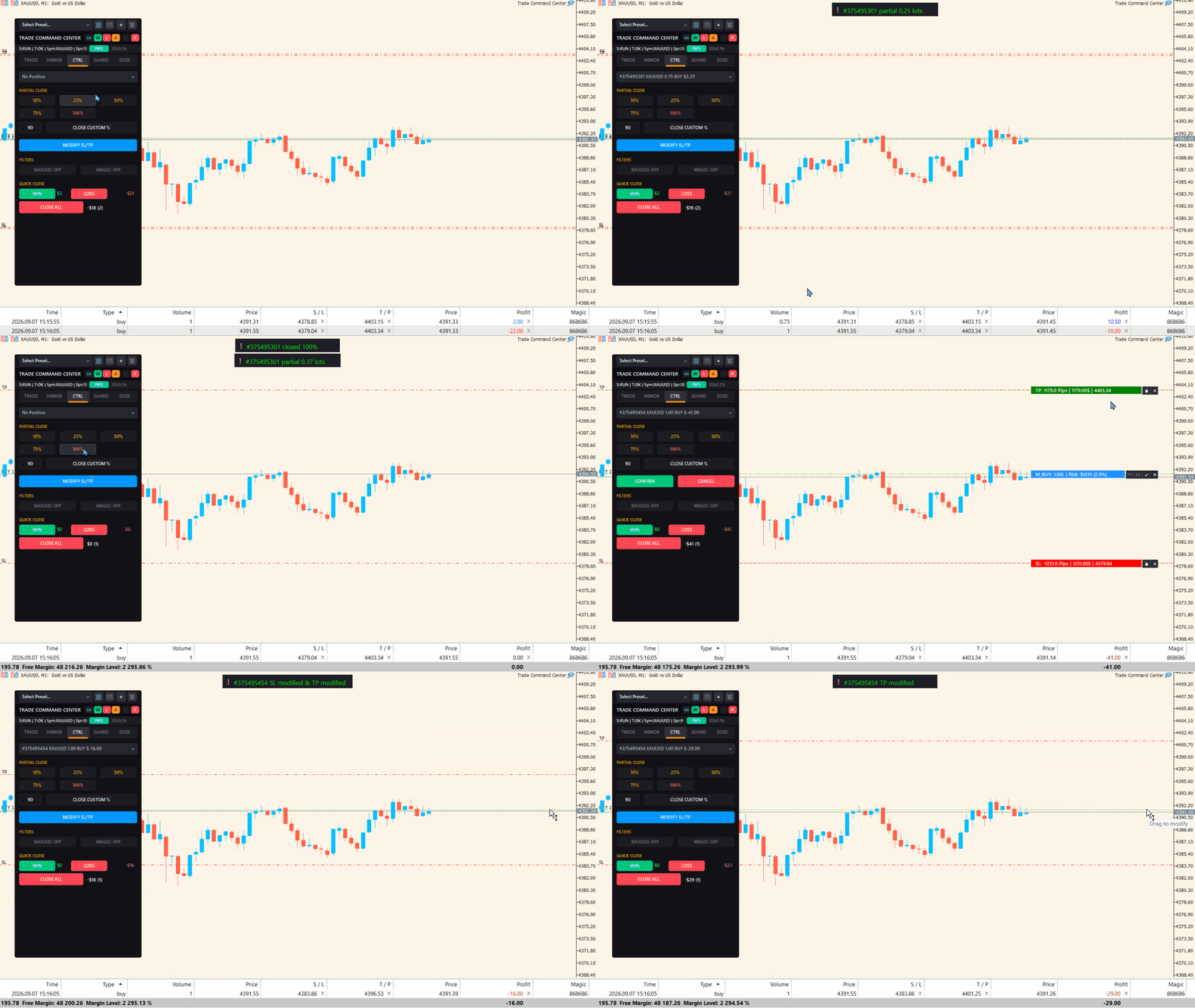
  • ポジション管理:プリセット比率で部分決済。損益ステータス別にクイック決済。シンボル・マジックフィルター対応。
  • Pending Grid:数量、間隔、注文ごとのロット、期限、最大総エクスポージャー管理で複数の指値・逆指値注文を計画。
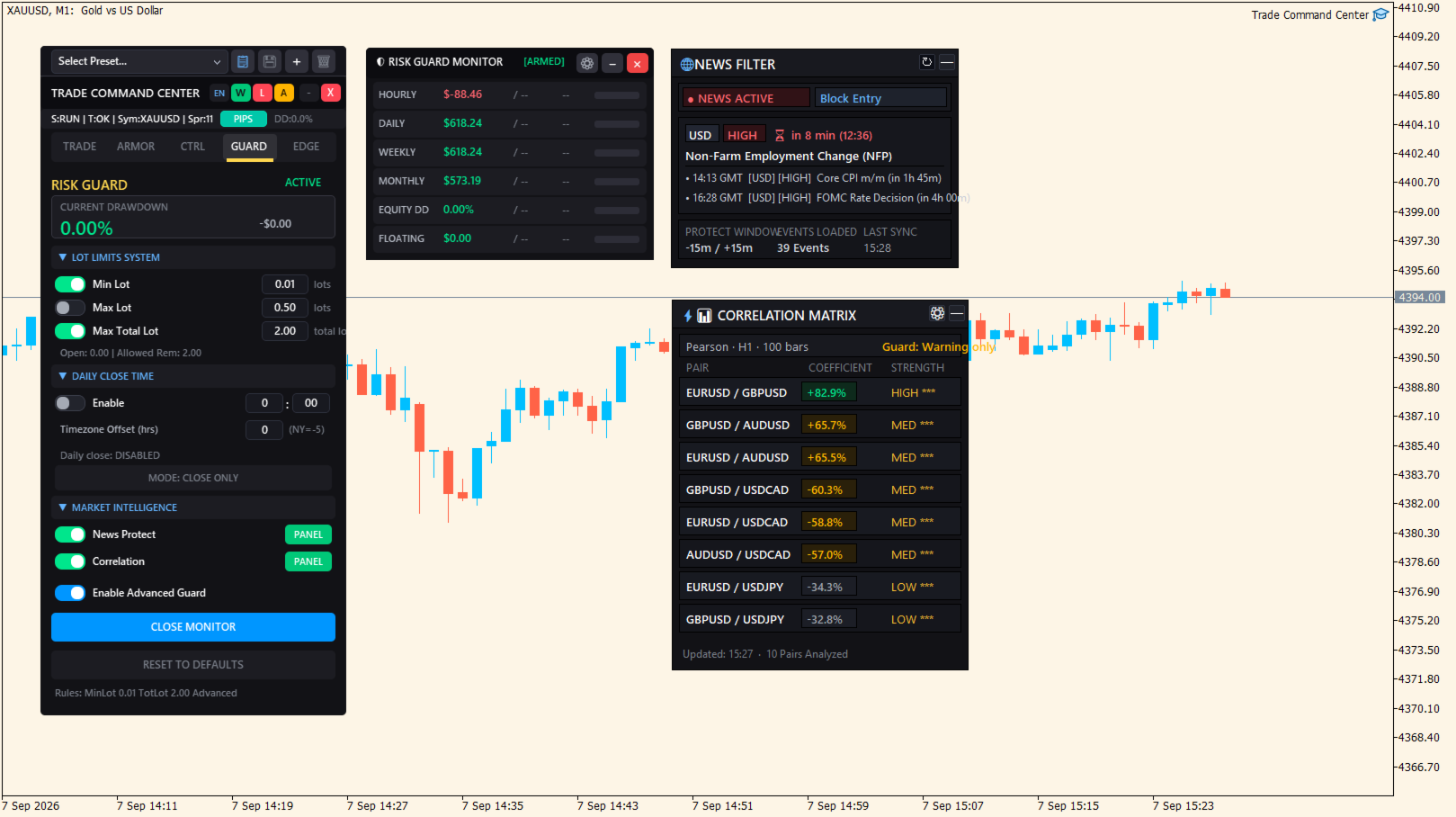
  • ニュース保護:重要な経済指標の前後に、新規エントリーをブロック。前後の分数は自由に設定可能。
  • 相関分析:シンボル間の相関を監視し、相関の高いポジションを建てる前に警告を表示。
  • フローティング Market Intel パネル:ニュース/相関パネルをドラッグ・最小化・再表示。配置はチャートごとに保存。
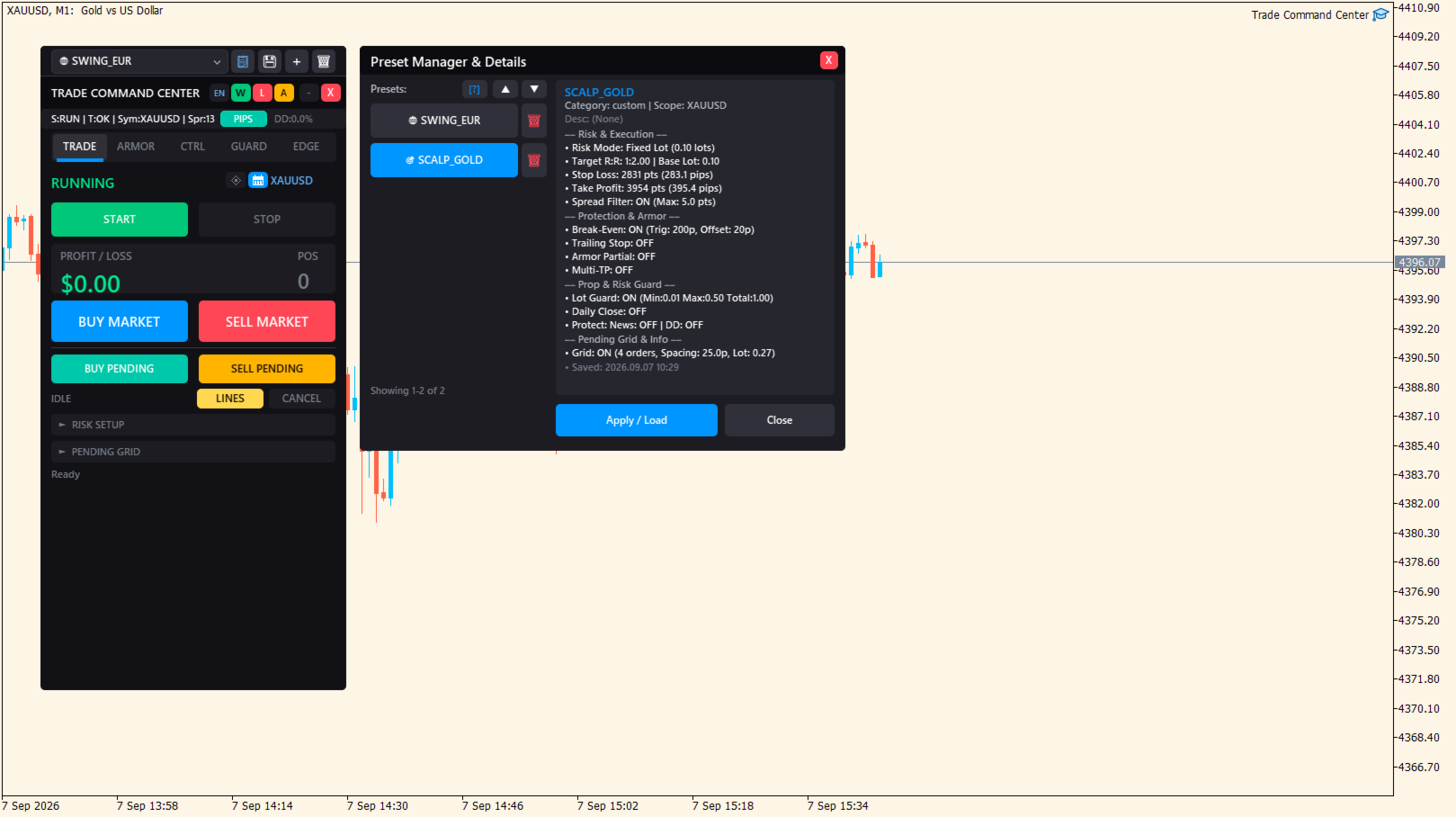
  • プリセットプロファイル:市場やトレードスタイルごとの好みの設定を保存・再読込。

Risk Guard(プロップファーム対応)

2層の保護が口座を継続的に監視します。

基本保護:

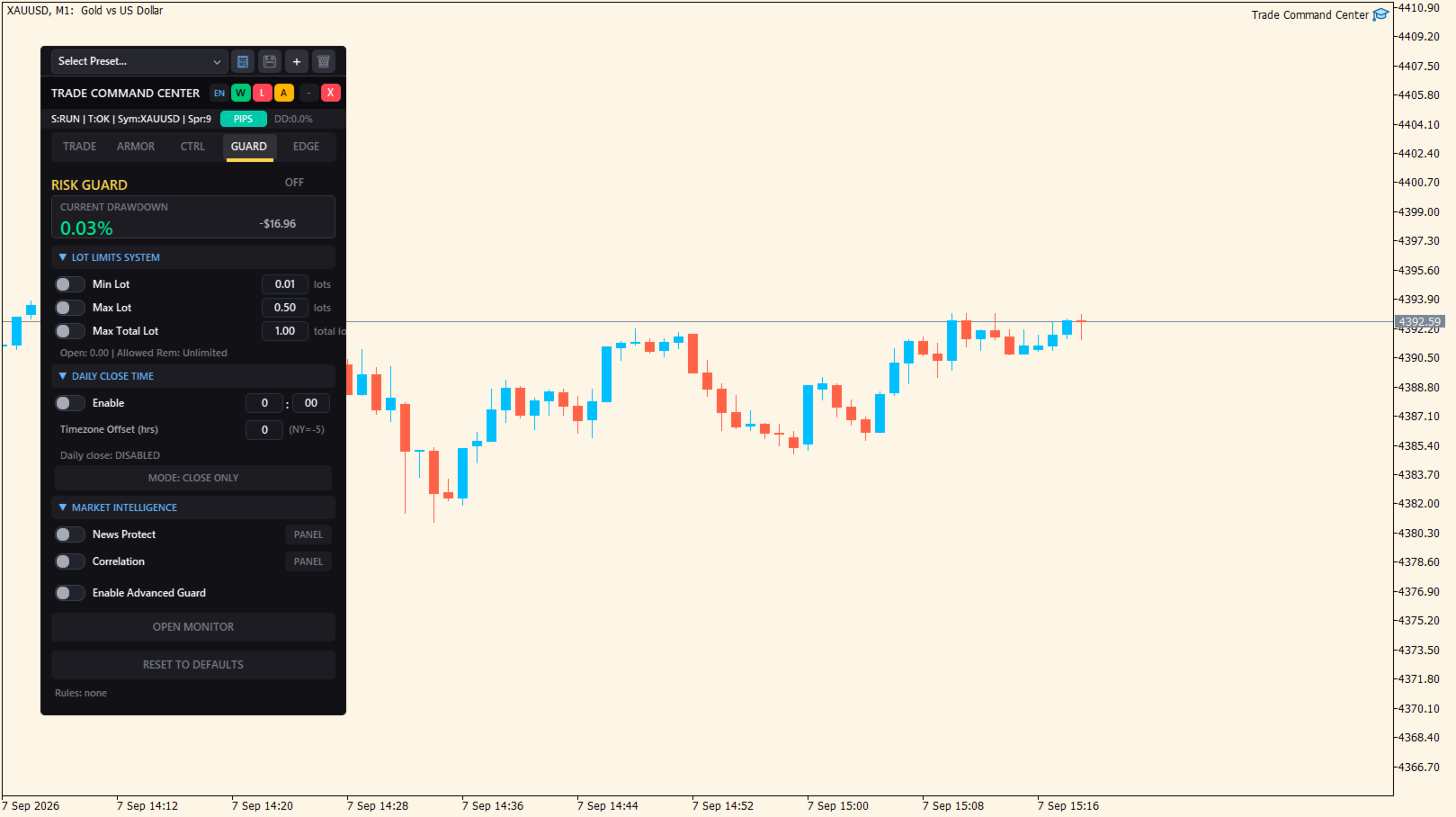
  • 最大ロット:指定ロット上限を超えるポジションを自動決済
  • 最大ドローダウン:日次ドローダウンが閾値を超えた時点で全ポジション決済
  • デイリー・オートクローズ:指定時刻に全ポジション決済。タイムゾーンオフセット設定可能

高度モニター(6指標):

  • 時間損失 — 直近1時間の決済P/L上限
  • 日次損失 — 当日開始からの決済P/L
  • 週次損失 — 今週開始からの決済P/L
  • 月次損失 — 今月開始からの決済P/L
  • エクイティ・ドローダウン — セッション最高値からの割合
  • フローティング損失 — 含み損P/L上限

各指標にカラー進捗バー(緑、橙、赤)。
いずれかの上限到達時、全ポジションを即座に決済。
Risk Guardは完全にカスタマイズ可能で、取引前に有効ルールを明確に確認できます。
GUARDタブでは、取引前に有効なルールも要約表示されます。

Pending Gridの安全機能

  • 複数注文設定の過大化を防ぐため、グリッド合計ロットの上限を設定
  • Pending Grid注文の有効期限を設定
  • パネルからPending Grid注文を直接キャンセル
  • 配置前にグリッド数、合計ロット、推定証拠金をプレビュー

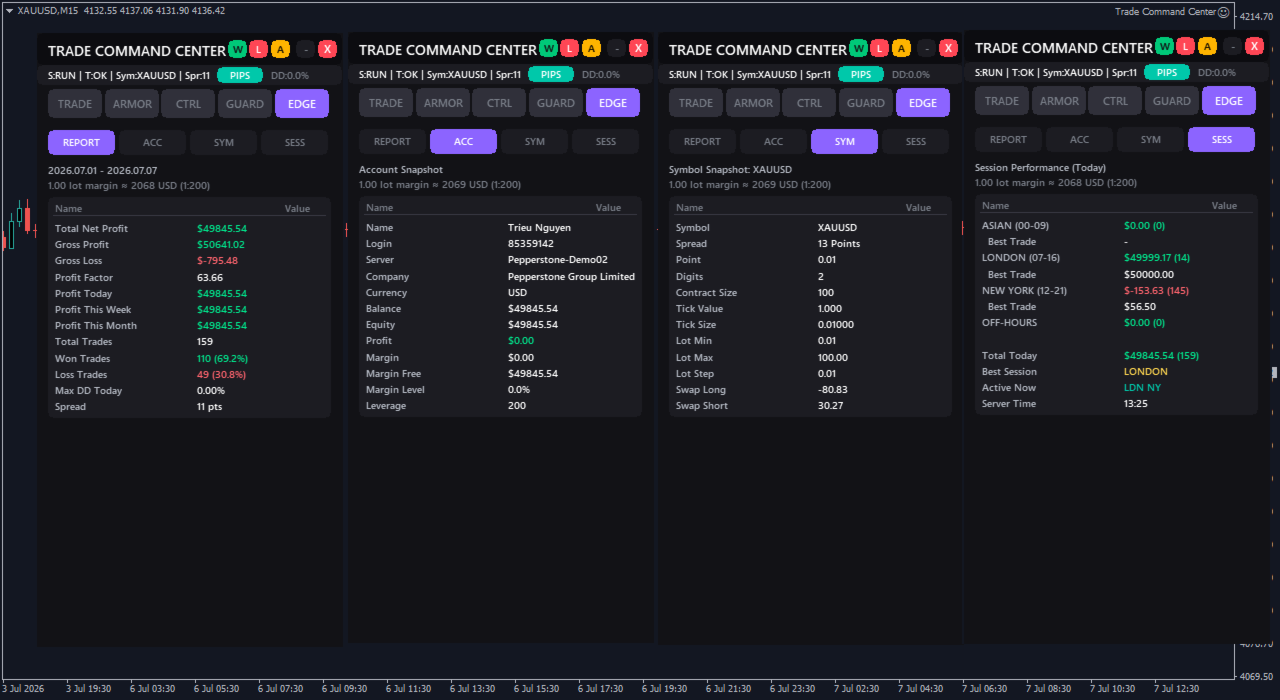
セッション分析(EDGEタブ)

  • パフォーマンスレポート:プロフィットファクター、勝率、粗利/粗損、今日/今週/今月P/L、最大日中ドローダウン。全数値にスワップ・手数料込み。
  • 口座スナップショット:残高、エクイティ、証拠金レベル、レバレッジ — リアルタイム更新。
  • シンボル情報:スプレッド、ティック値、コントラクトサイズ、スワップレート、ボリューム上限。
  • セッションビュー:アジア、ロンドン、ニューヨーク、時間外セッションごとのトレード成績を確認。

差別化ポイント

  • ポジション単位のBEオーバーライド:個別取引はグローバル設定と異なるトリガー・オフセットを使用可能。値は注文コメントに保存。EA再起動後も維持。
  • 6指標リスクダッシュボード:時間、日次、週次、月次損失、エクイティ・ドローダウン、フローティング損失を同時監視。単一指標ではない。
  • ビジュアル執行:価格入力の代わりにボックスをドラッグ。執行前にR:Rを確認。入力ミスを削減。
  • 明確な取引フィードバック:注文がブロックまたは失敗した場合、パネルが即座に理由を表示。
  • シンボル別メモリ:XAUUSD、EURUSD、指数、その他シンボルごとに好みの設定を保持可能。

パネル構成

TRADE — ビジュアルモード、リスク計算、ワンクリック執行
ARMOR — ブレイクイーブン、トレイリングストップ、マルチレベルTP、スプレッドフィルター
CTRL — ポジションナビゲーター、部分決済、SL/TP変更
GUARD — リスク上限、ドローダウン表示、プロップファーム・プリセット
EDGE — セッション実績、品質指標

ヘッダーバーはアクティブタブに関係なくリアルタイムでドローダウン率を表示。
全設定はセッション間で保持。より素早く設定したいときは、プリセットを保存・読み込みできます。

Trade Command Centerがやらないこと

エントリーシグナルやトレード推奨は生成しません。
価格の方向を予測しません。
市場状況に基づいて自動でトレードを行いません。
プロップファーム・チャレンジの合格や損失回避を保証しません。

執行ツール、自動ポジション管理、リスク上限の執行を提供。
戦略とタイミングの判断はすべてあなた自身の決定です。
あなたが定義した制限のみを執行します。

クイックスタート

1つのチャートに添付。ビジュアルモードをクリック。Entry、SL、TPをドラッグ配置。リスク率を設定。BUYまたはSELLをクリック。
GUARDタブの上限を設定。プリセットを保存。定義したルールをパネルに管理させます。

技術メモ

ポジション管理は200msごとに更新。
ヘッジ口座に対応。
DLL不要。外部接続なし。 設定とプリセットは端末内にローカル保存されます。

リスク開示

トレードには大きな損失リスクが伴います。
Trade Command Centerはリスク管理ツールを提供しますが、トレード結果を保証しません。
実資金使用前に、すべての機能をデモ口座でテストしてください。

Trade Command Center
ユーザーガイド: https://www.mql5.com/en/blogs/post/767906
ご質問・ご提案:下記のコメント欄またはプロフィールをご利用ください。

レビュー 2
BigBowl23
19
BigBowl23 2026.02.22 13:28 
 

Great tool to use for risk management, I have absolutely no complaints, everything works as promised. The only improvement that I feel could be made could be made to make the tool even better is a trigger in pts for the trailing stop so that it activates only after you've secured your desired amount from each trade. I feel this accompanied with the partial TP increments will allow users to lock in ore profits incase price reverses. Overall though, very pleased with the product!

tjdaytrader414
347
tjdaytrader414 2026.02.17 19:10 
 

at first I thought this was not good because of the freezing but after I restarted my pc and started working with it, now it is working as described. Great features and risk control. for the price its a great Trade Manager. A few bugs to fix and making it smoother with less freezing would be great. Considering it's a new software. I'm happy with this purchase and the software. Thank You! I do recommend!

おすすめのプロダクト
The account manager has a set of functions necessary for trading, which take into account the results of the entire account in total, and not for each individual open position: Trailing stop loss. Take profit. Break-even on the amount of profit. Breakeven by time. Stop Loss Typically, each of these options can be applied to each individual trade. As a result, the total profit on the account may continue to increase, and individual positions will be closed. This does not allow you to get the maxi
Pending Orders Grid Complete System opens any combination of Buy Stop, Sell Stop, Buy Limit and Sell Limit pending orders and closes all existing pending orders. You will be able to Drag-and-Drop the Script on the chart and it will pick up the start price for the first position in the grid from the "Drop" point. Usually it should be in the area of Support/Resistance lines. Input Parameters Before placing all pending orders, the input window is opened allowing you to modify all input parameters:
Equity Guard AI Professional account protection system that closes trades and removes EAs when drawdown limits are breached.Equity Guard is a professional account protection utility designed to safeguard your trading capital. This tool monitors your account equity and drawdown in real-time, automatically executing protective measures when predefined risk thresholds are exceeded. Perfect for prop firm traders, FTMO challenges, and personal accounts. How It Works Equity Guard continuously monito
Overview AlphaForge Range Chart is a professional non-trading range-bar charting utility for MetaTrader 5. It generates live Range charts as MT5 custom symbols, helping traders analyze price movement through fixed-range bars instead of standard time-based candles. Unlike visual-only overlays, the generated Range chart behaves like a real MT5 custom-symbol chart. This means you can open it as a normal chart, apply templates, draw analysis objects, and add indicators directly to the Range chart fo
Neuron Replay — Bar Replay & Paper‑Trading Trainer Neuron Replay turns any MetaTrader 5 chart into a TradingView‑style market replay and risk‑free practice simulator . Rewind any symbol to any point in its history, then step through it bar‑by‑bar — or auto‑play it — and practice your entries, exits and trade management on a fully interactive on‑chart panel. Every trade is 100% simulated (paper / "ghost" trading): the tool never sends a single real order to your account, so you can train your str
DD Guardian Bot — User Guide Requirements MetaTrader 5 (any broker) A Telegram account Step 1 — Create your Telegram Bot Open Telegram and search for @BotFather Send /newbot and follow the prompts to set a name and username BotFather will reply with a Bot Token — copy and save it Send any message to your new bot (e.g. /start ) so it can detect your Chat ID Open the following URL in a browser to find your Chat ID: https://api.telegram.org/bot&lt ;YOUR_TOKEN>/getUpdates Look for "chat":{"id": 12
A script for quick reversing positions and/or orders. If you need to reverse a position with the same volume, open an opposite position of a different volume or change the type of existing orders (for example, Buy Limit -> Sell Limit, Buy Stop -> Sell Limit, etc.) with the same or different take profit/stop loss, this script will make all the routine for you! Allow AutoTrading before running the script. Usage: Run the script on a chart. Input Parameters: Language of messages displayed (EN, RU, D
Operative Management Pro – Advanced Trading Utility Operative Management Pro is a smart visual tool for traders who want to analyze and simulate their trades before placing them on the market. This panel displays in real-time the most important parameters of the current symbol: Current price and minimum lot size Required margin Spread cost in USD and pips Take Profit and Stop Loss value in USD Automatic risk and reward calculation With just a click on the chart, you can simulate BUY or SELL t
Advanced Trailing Stop & Break-Even Expert Advisor with Partial Profit Taking Overview Unlock the full potential of your trading strategy with this Expert Advisor that automates trade management to maximize profits and minimize losses. Designed for both novice and experienced traders, this EA offers precise control over your trades with customizable trailing stops, break-even protection, and partial profit taking — all working seamlessly to protect your capital and lock in gains. Key Features Dy
ProTrading Panel — 裁量トレードのための究極のアシスタント ProTrading Panel で、あなたの裁量トレードを次のステージへと引き上げましょう。このエキスパートアドバイザー(EA)は、迅速な注文執行のために設計されており、チャートの作業スペースを邪魔することなく美しく収まる、目に優しい垂直型のインターフェースを採用しています。画面上でのマウスクリックを好む方にも、キーボードのショートカットを使って電光石火のスピードで取引したい方にも、このツールは最適です。 主な機能: 高精度なリスク管理: ストップロス(SL)をポイント単位で設定するだけで、ご希望のリスクリワード比率(R:R)に基づいてテイクプロフィット(TP)を自動的に計算します。 高度なトレーリングストップ: 利益を自動的に確保します。トレーリングストップ機能の有効/無効を切り替えることができ、開始ポイント、ステップ、ディスタンスをポイント単位で自由に変更できます。 リアルタイムの損益追跡: 本日の損益( Today's P/L = 確定損益 + 現在の含み損益)と、含み損益( Floating P/L
Why choose Trading Pal EA: This is a EA utility that auto-manage your   positions ' Stop-Loss (SL) and Take-Profits (TP) dynamically. When opening a single   position , it is easy to set the SL and TP manually. But when dealing with multiple   positions , it can be very tedious or   overwhelming   to fill in so many SL and TP values consistently, especially in a short span of time, like in scalping. Over time and after many such trades, trading itself can become a chore. That is where this EA c
1 つのチャートで完全な制御を実現。 各チャートのオブジェクト、色、設定を個別に管理する時間を無駄にする必要はありません。     チャート同期マネージャーを 使用すると、     すべてのMetaTraderチャートを同期、コピー、制御します   たった 1 つのパネルといくつかのショートカットを使用して、瞬時に実行できます。 一度描いたら、どこでも更新。チャートをワンクリックで開閉。ワークスペースを整理整頓。     シンボルベースのオブジェクト管理 。重要な詳細を見逃すことはありません。     スプレッド表示、カウントダウンタイマー、ローソク足クローズアラートなど。 時間を節約し、エラーを減らし、よりスマートに取引します。 Chart Sync Manager インストールと入力ガイド EA に関する通知を受け取りたい場合は、URL (   http://www.betasoft.dev   ) MT4/MT5 ターミナル (スクリーンショットを参照) を追加します。 MT4バージョン https://www.mql5.com/en/market/product/1484
Open Trade MT5
Frank William Jr Colbert
A basic entry and position management EA that opens trades on multiple currency pairs at specific times. It includes its own internal trailing stop and take-profit logic, as well as integrated "end-of-day" and "Friday" profit-close features from the other scripts. Features: Opens trades on user-defined `PairsSet1` through `Set6` at specific `TradeTime` inputs. Configurable position sizing (`Lots`), Stop Loss, and Take Profit. Includes its own `TrailOrders` function that trails both SL and TP b
Do not buy before seeing the Danko Trend Color product, as this panel is a way to view a summary of this indicator on various timeframes. The Danko DTC Panel utility allows you to look at the trend in up to 5 timeframes. When clicking on the timeframe texts, a new window will open with the indicator plotted on the screen so you can see the complete chart. The width of the panel, with the amount of candles you want to see, is customizable, see the images below. Ao clicar nos textos dos timeframe
Draw Agent は、すべてのチャート分析、落書き、メモなどを作成および管理するための美しく革新的な方法として設計されています。 このツールは、チャート スペースを黒板として扱い、手で描くためのフリーハンド描画方法を提供します。 このフリーハンド描画ツールを使用すると、MT4/MT5 チャートに描画して、チャート上のイベントをマークまたは強調表示できます。 エリオット波動を手で下書きしたり、チャートに線を引いたり、チャートにアイデアを示したりしたい場合に 役立つツールです。クライアント向けのライブウェビナーを実行している場合、またはスクリーンショットやチャートファイルを人々に配布している場合に特に役立ちます同じように。 Draw Agent のインストールと入力ガイド EA追加URL(   http://autofxhub.com   )MT4/MT5端末(スクリーンショット参照) に関する通知を受け取りたい場合 。 MT4 バージョン https://www.mql5.com/en/market/product/14929 MT5 バージョン https://www.mql5.
TradingX Hotkeys
Johannes Stephanus Lombard
Inputs Available Lotsizes Partial Close % You can change lotsizes as you require On an open chart click once to select chart to be able to use hotkeys on specific chart. All Pairs can be used with this expert We created this expert to be able to still trade C300 with a 0.06 Lotsize If you enter a 0.6 lot and close 0.90% you can trade with 0.06 Lot Keys to be used: B -Buy S -Sell C -Close Profitable D -Breakeven (Note if stoploss is set it won't break even) P -Partial close X -Close all
Signals Executor for Telegram is a Utility that allows you to execute and manage positions from messages sent in Telegram Chats. Chat messages are processed to check for the existence of commands, and the command will be executed if its parameters are valid. You need the Telegram Bot Token and Chat Id to configure the input parameters. It is possible to restrict the sending of commands through the User Id, which must be configured in the input parameters. Valid Commands: Buy and Sell: Market or
AKCAP Hotkey Tool
AK Capital Markets Limited
5 (3)
Special offer for the next 10 copies Are you tired of manually navigating through menus and inputting data every time you want to execute a trade or open an order on Meta Trader? Our hotkey tool is here to make your life easier and boost your trading efficiency. Our tool is natively coded for lightning-fast performance and comes loaded with all the features you could possibly want. From pending orders and OCO orders to trailing and multiple buckets, it has everything a scalper could need. And
The Definitive Performance Testing Solution for MetaTrader Environments What This Tool Does This specialized benchmark utility measures the performance of your MetaTrader environment, providing insights that impact your trading execution. Unlike generic system benchmarks, this tool evaluates performance specifically within the MetaTrader runtime environment. For Professional Traders & Developers: Performance Metrics : Measurements of calculation throughput and memory efficiency Trading-Specific
This service is designed to stream online cryptocurrency quotes   from the Binance exchange to your MetaTrader 5 terminal. You will find it perfectly suitable if you want to see the quotes of cryptocurrencies in real time — in the Market watch window and on the MetaTrader 5 charts. After running the service, you will have fully featured and automatically updated  cryptocurrency charts in your MetaTrader 5. You can apply templates, color schemes, technical indicators and any non-trading tools to
Play Trading
Juan Luis De Frutos Blanco
Play Trading: Get started in trading by playing and learning how Limit (rebound) and Stop (continuation) orders work. From a mobile and transparent panel (by clicking on the header), anticipate market developments and place Limit and/or Stop orders. Set the initial distance to generate the grid with the number of orders you want (for each type of order). Set the take profit points and lot size as you wish.   Set the type of orders you want: BUY – SELL – NO (delete orders) – BOTH (Buy and Sell
FREE
The utility is designed to send signals from MT4 to Telegram. It has several unique features, allowing not only the sending of trade signals but also the following functionalities: Send messages directly from the terminal to Telegram Send emojis along with custom text Send text and images from Telegram All of these features enable users to manage a signal channel while focusing on trading and finding quality signals. Customizable Signal Messages You can fully customize the signal message: Specif
This is an utility for MetaTrader 5 designed to send notifications to a Telegram bot regarding trading activity on the terminal. The EA monitors changes in positions and orders, then sends structured messages to specified Telegram chats through the Telegram Bot API. It can optionally include chart screenshots when positions are opened. The EA uses the WebRequest function to communicate with the Telegram API. No additional servers or external services are required. Main Features Position Activity
Quant_Bot Studio Professional Expert Advisor for MetaTrader 5 Quant_Bot Studio is a professional-grade Expert Advisor designed for traders who require structured execution, disciplined risk control, and scalable trading operations. Built on Smart Money Concepts (SMC), it automates high-probability trade execution across forex, commodities, and indices while maintaining strict risk management at every stage. The system eliminates emotional decision-making and enables continuous, rule-based tradi
This EA help trader to manage his pending orders, when you place many Pending Orders this utility monitor them and when of them get filed (executed) the EA cancel and delete all rest of pending orders, to avoid  opening of all of pending orders at the same time , and lose your risk management. this utility is very useful for trader when he /she is not available on the desk.
CopyTrader Pro FAST MT5 — FREE Real-Time Trade Copier | MT4 ↔ MT5 Cross-Platform | 20ms Latency CopyTrader Pro FAST is a professional trade copier Expert Advisor that copies trades between MetaTrader terminals in real time using a high-speed file-based communication system. No VPS, no network setup, no DLL — just attach and copy. FREE VERSION : Copies up to 1 trade at a time. Upgrade to Full version for unlimited copying. Key Features 20ms refresh rate — independent of tick arrival, uses
FREE
QuickTrade Panel — One-Click Buy/Sell with Live Risk & Reward Preview Trade faster and smarter, directly from the chart — no order window required. QuickTrade Panel is a lightweight, fully manual trading panel for MetaTrader 5. It sits on your chart as a draggable floating window, giving you instant Buy/Sell execution with full control over lot size, stop loss, take profit, and risk-to-reward — all visible before you click. Key Features One-click Buy / Sell execution Large, color-coded SELL and
️ UMNi-CMND MT5 Remote Command & Trade Control System UMNi-CMND turns Telegram into a full remote control panel for your MetaTrader terminal. Send commands from your phone to open trades, manage positions, query account status, and receive complete trade telemetry — all without touching the platform. KEY FEATURES Full remote trade execution via Telegram Open, close, and manage positions by command Move SL/TP, set breakeven, partial close Live status, account, and position
応答時間は数秒になる可能性があるため、ボットには辛抱強く待ってください。応答します。送信を押して、待ってください。これは、MT5 および MQL5 用のシンプルなチャット GPT ボットです。コメントで、入力に API キーを追加し、Expert Advisor タブの Web リクエストに以下を追加します: MQL5 および MT5 で AI とチャットします。プロンプトには MQL5 または MT5 が含まれている必要があります。そうでない場合は応答しません。MT5 および MQL5 でのみトレーニングされています。バックテストではなく、リアルタイム チャートでのみ機能することに注意してください。入力に ​​API キーを追加し、Expert Advisor タブの Web リクエストにこれらを追加します: MT4 バージョン: https://www.mql5.com/en/market/product/118576 このチャットボットは、ユーザーが Meta Trader 5 (MT5) および MQL5 とより効率的にチャットできるように設計されたツールです。これは、
** ワンクリック・建値決済保護 ** ワンクリックでトレード資金を即座に保護します。手動でポジションを建てた後、ボタンを押すだけで、含み益が出ているすべてのポジションのストップロスをエントリー価格(建値)に移動させます。これにより、利益が出ているトレードのリスクを排除し、含み損のポジションには影響を与えません。 ** 仕組み ** 通常通りトレードを開始します。パネルには利益・損失ポジションの数がリアルタイムで表示されます。利益を確保する準備ができたら、「 SET SL TO ENTRY 」ボタンをクリックしてください。利益が出ている全ポジションのストップロスが即座にエントリー価格に移動します。 ** 主な機能 **   * パネルは価格軸やチャートを邪魔しない右側に配置。ドラッグで移動可能。   * 利益が出ているポジションのみを保護し、損失中のポジションはスキップ。   * 1 回のクリックで最大 100 ポジションまで同時処理。   * リアルタイムの自動売買( AutoTrading )ステータス表示。   * 全てのブローカー、および XAUUSD 、 BTCUSD 等の
このプロダクトを購入した人は以下も購入しています
Trade Assistant MT5
Evgeniy Kravchenko
4.43 (213)
取引 ごとのリスクの 計算、新規注文 の 簡単 な 設置、部分的 な 決済機能 を 持 つ 注文管理、 7 種類 のトレーリングストップなど 、便利 な 機能 を 備 えています 。 追加の資料と説明書 インストール手順   -   アプリケーションの手順   -   デモアカウント用アプリケーションの試用版 ライン機能 チャート上にオープニングライン、ストップロス、テイクプロフィットを表示します。この機能により、新規注文を簡単に設定することができ、注文を出す前にその特徴を確認することができます。   リスク計算 リスク計算機能は、設定されたリスクとストップロス注文のサイズを考慮して、新規注文のボリュームを計算します。ストップロスの大きさを自由に設定できると同時に、設定したリスクを守ることができます。 Lot calc ボタン - リスク 計算 を 有効 / 無効 にします 。 Risk フィールドでは 、必要 なリスクの 値 を 0 から 100 までのパーセンテージまたは 預金通貨 で 設定 します 。 設定」 タブで 、 リスク 計算 の 種類 を 選択 します :「 $ 通
Trade Manager EAへようこそ。これは、取引をより直感的、正確、そして効率的にするために設計された究極の リスク管理ツール です。これは単なるオーダー実行ツールではなく、包括的な取引計画、ポジション管理、リスク管理のためのソリューションです。初心者から上級者、迅速な実行を必要とするスキャルパーまで、Trade Manager EAはあらゆるニーズに対応し、為替、指数、商品、暗号通貨などさまざまな市場で柔軟に対応します。 Trade Manager EAを使用すると、複雑な計算が過去のものになります。市場を分析し、エントリーポイント、ストップロス、テイクプロフィットのレベルをチャート上のラインでマークし、リスクを設定するだけで、Trade Managerが最適なポジションサイズを即座に計算し、SLとTPをピップ、ポイント、口座通貨でリアルタイムに表示します。すべての取引が簡単かつ効果的に管理されます。 主な機能: ポジションサイズ計算機 :定義されたリスクに基づいて取引サイズを瞬時に決定します。 簡単な取引計画 :エントリー、ストップロス、テイクプロフィットを設定するためのド
Local Trade Copier EA MT5
Juvenille Emperor Limited
4.96 (142)
Local Trade Copier EA MT5 による、驚くほど高速な取引コピーを体験してください。1分で簡単にセットアップできるこの取引コピー機は、同じWindowsコンピュータまたはWindows VPS上の複数のMetaTrader端末間で取引をコピーすることができ、0.5秒未満の高速コピースピードを実現します。 初心者であろうとプロのトレーダーであろうと、 Local Trade Copier EA MT5 には、あなたの特定のニーズに合わせてカスタマイズするための幅広いオプションが用意されています。これは、利益の可能性を高めたい人にとって究極のソリューションです。 今すぐ試してみて、これが市場で最も速くて簡単なトレードコピー機である理由を理解してください。 ヒント: デモアカウントで Local Trade Copier EA MT5 デモバージョンをダウンロードして試すことができます: ここ ダウンロードした無料のデモ ファイルを MT5 >> ファイル >> データ フォルダを開く >> MQL5 >> Experts フォルダに貼り付けて、ターミナルを再起動しま

TradePanel MT5
Alfiya Fazylova
4.88 (160)
Trade Panelは多機能なトレーディングアシスタントです。アプリには手動取引用の50以上のトレーディング機能が搭載されており、ほとんどの取引作業を自動化することができます。 購入前に、デモアカウントでアプリのデモ版をテストすることができます。デモアカウント用のアプリの試用版をダウンロードするには、次のリンクをご利用ください: https://www.mql5.com/en/blogs/post/750865 。 完全な手順 こちら 。 取引。 ワンクリックで取引操作を行うことができます: リスクを自動計算して指値注文やポジションを開く。 複数の注文やポジションをワンクリックで開く。 注文のグリッドを開く。 保留中の注文やポジションをグループごとに閉じる。 ポジションの方向を反転(Buyを閉じてSellを開く、またはSellを閉じてBuyを開く)。 ポジションをブロックする(不足している量のポジションを開くことでBuyとSellのポジション量を等しくする)。 すべてのポジションを部分的にワンクリックで閉じる。 すべてのポジションの利食い(Take Profit)および損切り(Sto
ベータリリース Telegram to MT5 Signal Trader はまもなく正式なアルファ版をリリースします。いくつかの機能はまだ開発中で、小さな不具合に遭遇する可能性があります。問題が発生した場合はぜひご報告ください。皆さまのフィードバックがソフトウェア改善に役立ちます。 Telegram to MT5 Signal Trader は、 Telegram のチャンネルやグループからの取引シグナルを自動的に MetaTrader 5 にコピーする強力なツールです。 パブリックおよびプライベートの両方のチャネルに対応し、複数のシグナル提供元を複数のMT5口座に接続可能です。ソフトウェアは高速で安定し、すべての取引を細かく制御できます。 インターフェースは直感的で、ダッシュボードとチャートは見やすく設計されており、リアルタイムで動作状況をモニターできます。 必要環境 MQL の制限により、EA は Telegram と通信するためのデスクトップアプリが必要です。 インストーラーは公式の インストールガイド にあります。 主な機能 マルチプロバイダー: 複数の Telegram
Power Candles Strategy Scanner - 自動最適化型マルチシンボル設定ファインダー パワーキャンドル・ストラテジー・スキャナーは 、パワーキャンドル・インジケーターを駆動するのと全く同じ自己最適化エンジンを、マーケットウォッチに登録されているすべての銘柄に対して並行して実行します。1つのパネルで、現在統計的に取引可能な銘柄、各銘柄で勝率の高い戦略、最適なストップロス/テイクプロフィットの組み合わせが表示され、新たなシグナルが発生した瞬間に通知が届きます。 このツールは、Stein Investmentsのエコシステムの一部です。  18種類以上のツールをすべて閲覧し、AIを活用したセットアップの推奨を受け取り、  https://stein.investments でコミュニティに参加しましょう 市場動向を網羅。銘柄ごとに3,000件以上の自動最適化。2種類のアラート。ワンクリックでチャートを切り替えて即座にアクション。 なぜこれが必要なのか 多くのマルチ銘柄スキャナーは、 価格の動き (ボラティリティ、変動率、銘柄ごとのRSI)を表示するだけです。それ
Farmed Hedge Yield Farming | All Markets (Manual - Hybrid - Semi/Automated EA) MULTI-ASSET SUPPORT Trade any asset available on your broker - Forex: Major, Minor, Exotic pairs - Crypto: BTC, ETH, XRP, SOL, BNB - Stocks: Apple, Tesla, Amazon, Google, etc. - Commodities: Gold, Silver, Oil, Gas - Indices: US30, NAS100, SPX500, DAX40 - Any CFD your broker offers VERIFIED TRADING RESULTS - Farmed Hedge Yield Axi Copy:  https://www.mql5.com/en/signals/2356376 - Farmed Hedge Yield Exn Copy:   https:/
Quant AI Agents are independent trading Expert Advisors. Instead of trading using a fixed strategy like other conventional EAs, Quant AI Agents   is a   multi-agent AI trading framework   that turns natural-language strategy prompts into live.  WANT THE SAME RESULTS AS MY LIVE SIGNAL?   Use the exact same brokers I do:   IC MARKETS , IC TRADING   .  Unlike the centralized stock market, Forex has no single, unified price feed.  Every broker sources liquidity from different providers, creating un
Exp COPYLOT CLIENT for MT5
Vladislav Andruschenko
3.94 (34)
MetaTrader 5 用のプロフェッショナル取引コピー機 MetaTrader 向けの高速・高性能・信頼性の高い 取引コピー機 です。 COPYLOT は、MT4 と MT5 のターミナル間で Forex 取引をコピーでき、 Hedge 口座と Netting 口座の両方に対応しています。 COPYLOT MT5 版の対応構成: - MT5 Hedge → MT5 Hedge - MT5 Hedge → MT5 Netting - MT5 Netting → MT5 Hedge - MT5 Netting → MT5 Netting - MT4 → MT5 Hedge - MT4 → MT5 Netting MT4 版 完全な説明 + DEMO + PDF 購入方法 インストール方法 ログファイルの取得方法 テストと最適化の方法 Expforex のすべての製品 MT4 ターミナルへのコピーも可能です(MT4 → MT4、MT5 → MT4): COPYLOT CLIENT for MT4 COPYLOT は、2台、3台、さらには10台のターミナル間で同時に動作できる、プロフェッ
Telegram to MT5 Multi-Channel Copier は、Telegram チャンネルのトレードシグナルを MetaTrader 5 に自動的に直接コピーします。ボットも、ブラウザ拡張機能も、手動コピーも不要。Telegram でシグナルを受信すると、EA が数秒でターミナル上でトレードをオープンします。 本製品は 2 つのコンポーネントで構成されています:Telegram チャンネルを監視する Windows アプリケーションと、MT5 ターミナルでシグナルを実行するこの Expert Advisor です。MT4 版も利用可能です。 セットアップガイドとアプリケーションのダウンロード: https://www.mql5.com/en/blogs/post/768988 動作原理 Windows アプリケーションは、ボットではなくあなた自身の API 認証情報を使用して Telegram に接続します。つまり、プライベートおよび VIP チャンネルを含む、購読しているあらゆるチャンネル、グループ、トピックを読み取ることができます。シグナルを検出すると、それを解析し
YuClusters
Yury Kulikov
4.93 (43)
Attention: You can view the program operation in the free version  YuClusters DEMO .  YuClusters is a professional market analysis system. The trader has unique opportunities to analyze the flow of orders, trade volumes, price movements using various charts, profiles, indicators, and graphical objects. YuClusters operates on data based on Time&Sales or ticks information, depending on what is available in the quotes of a financial instrument. YuClusters allows you to build graphs by combining da
================================================================================ POC BREAKOUT - V20.72. Full Professional Grade Toolkit ================================================================================ POC Breakout is a full MetaTrader 5 trading dashboard for discretionary traders who want breakout signals, Point of Control (POC) context, volume profiles, order flow, market structure, news, alerts, and advanced trade planning in one professional workspace. Attached directly to you
Seconds Chart - MetaTrader 5で秒足チャートを作成するユニークなツールです。 Seconds Chart を使用すると、秒単位のタイムフレームでチャートを構築でき、標準的な分足や時間足チャートでは得られない柔軟性と分析精度を実現します。例えば、 S15 は15秒足を表します。カスタムシンボルをサポートしているインジケーターやEAをすべて使用できます。標準的なチャートと同様に便利に操作できます。 標準的なツールとは異なり、 Seconds Chart は超短期のタイムフレームでも高い精度と遅延なく作業できるように設計されています。 Free Demo: Seconds Chart v2.29 Demo.ex5 無料デモをダウンロードしてご自身でお確かめください: 完全機能版 - すべての機能が利用可能 24時間テスト - 精度と利便性を評価するのに十分な時間 デモ口座のみ - ほとんどのブローカーで簡単に開設可能 GBPCADチャートのみ - ほとんどの端末で利用可能 これらの制限はデモ版のみに適用されます。製品版は、あらゆる口座タイプ(リアル、デモ、コンテス
Trade Dashboard simplifies how you open, manage, and control your trades, with built-in lot size calculation. It allows you to execute trades, manage risk, and control positions directly on the chart, with tools such as partial close, breakeven, and trailing stop. Designed to reduce manual work and help you stay focused on your trading decisions. A demo version is available for testing. Detailed explanations of features are provided within the MQL5 platform. Installation instructions are include
Premium Trade Manager - コーチ内蔵型トレードパネル Premium Trade Manager は、AIトレーディングコーチをあなたのチャートの中に置き、その下に完全な執行エンジンを備えたツールです。いつも通りにトレードをセットアップし、あなた専任のAIトレーディングコーチ Max にそのセットアップをそのまま読み取らせて、発注前に率直な見解を伝えてもらいましょう。ストップの幅が規律あるアプローチに合っているか、リスクサイズは適切か、高影響のニュースイベントが数分後に迫っていないか、プロップファームの制限に近づいていないか。その下には、クリックの後をすべて処理するエンジンが備わっています。ワンクリックのリスクサイズ計算による発注、ドラッグ可能なストップ・ターゲットライン、最大4段階の分割利確、7種類のトレール方式、リアルタイムのプロップファームコンプライアンス、ニュースガード、そしてコストを自ら採点するスプレッド機能。判断はあなたが下す。Max がもう一度確認する。後のことはすべてパネルが担う。 購入前に実際に触れて試せます。 ブラウザ上でライブパネルをそのまま
Trade copier MT5
Alfiya Fazylova
4.57 (46)
Trade Copierは、取引口座間の取引をコピーして同期するように設計された専門的なユーティリティです。 コピーは、同じコンピューターまたはvps にインストールされている、サプライヤーのアカウント/端末から受信者のアカウント/端末に行われます。 キャンペーン - すでに「Trade copier MT5」をご購入の方は、「Trade copier MT4」を無料で入手できます(MT4 → MT5 および MT4 ← MT5 のコピー用)。詳細な条件については、どうぞ個別メッセージでお問い合わせください。 購入する前に、デモ アカウントでデモ バージョンをテストできます。 デモ版 こちら 。 詳細な説明は こちら 。 主な機能と利点: MT5ネッティングアカウントを含む、MT5> MT5、MT4> MT5、MT5> MT4のコピーをサポートします。 高いコピー速度(0.5秒未満)。 ベンダーモードと受信者モードは同じ製品内に実装されています。 チャートから直接リアルタイムでコピーを制御できる、簡単で直感的なインターフェイス。 接続が切断されたり、端末が再起動されたりしても、設定と位

Timeless Charts
Samuel Manoel De Souza
5 (7)
Timeless Charts is an all-in-one trading utility for professional traders. It combines custom chart types such as Seconds Charts and Renko with advanced order flow analysis using Footprints , Clusters , Volume Profiles , VWAP studies, and anchored analysis tools for deeper market insight. Trading and position management are handled directly from the chart through an integrated trade management panel , while Market Replay and Virtual Accounts provide environments for practicing trading skills and
FUTURES ORDERFLOW FOOTPRINT CHART Professional OrderFlow EA for MetaTrader 5 Version 1.01| Professional tool for real traders | Institutional-Grade Visualization STRATEGY TESTER USERS - PLEASE SELECT EVERY REAL TICK WHEN TESTING AND YOU HAVE DOWNLOADED HISTORICAL DATA. IF YOU SEE A WAITING SCREEN AND IT IS NOT DOWNLOADING, IT MEANS YOU HAVE LOW HISTORICAL DATA. TRY 1 MIN AND 5 MIN FIRST ON 1 DAY DATA. ONE DAY DATA SHOULD BE THE NEWEST AND MOST CURRENT DATE. PLEASE WAIT UNTIL THE MARKET HAS ROL
Trade Manager DashPlus
Henry Lyubomir Wallace
5 (13)
DashPlus は、MetaTrader 5プラットフォーム上での取引効率と効果を向上させるために設計された高度なトレード管理ツールです。リスク計算、注文管理、高度なグリッドシステム、チャートベースのツール、パフォーマンス分析など、包括的な機能を提供します。 主な機能 1. リカバリーグリッド 逆境の市場環境下で取引を管理するための平均化および柔軟なグリッドシステムを実装します。 取引回復のための戦略的なエントリーおよびエグジットポイントを可能にします。 2. スタックグリッド 強い市場の動きの中でポジションを追加することで、有利な取引での潜在的なリターンを最大化するように設計されています。 トレンド市場で利益を得られるよう、勝ち取引を拡大します。 3. 損益(P&L)ライン チャート上に直接、潜在的な利益と損失のシナリオを視覚的に表示します。 設定を調整し、P&Lラインをドラッグして、実行前にさまざまな取引結果を評価します。 4. バスケットモード 同じシンボルでの複数ポジションの管理を簡素化し、それらを単一の集約ポジションにまとめます。 平均価格に基づいて、ストップロスやテイクプ
AI Agent Supervisor is NOT an Expert Advisor. AI Agent Supervisor   is a   multi-agent AI risk & portfolio supervisor   that watches every EA on your account and intervenes in real time.  WANT AN AI PORTFOLIO MANAGER WATCHING YOUR FLEET 24/7?   Run your fleet on the same brokers I do:   IC MARKETS , IC TRADING   .  Unlike the centralized stock market, Forex has no single, unified price feed.  Every broker sources liquidity from different providers, creating unique data streams. The Supervisor r
Anchor: The EA Manager Run your full EA portfolio without conflicts, without stacked risk, and without watching every chart yourself. Anchor coordinates up to 64 Expert Advisors on a single account. Attach Anchor to any chart. Type your EA names and magic numbers in one line. Click OK. Anchor begins coordinating immediately. Built for portfolios. Built for discipline. Built for prop firms. The Problem Running multiple EAs on the same account creates risk. Two gold EAs can open opposite positions
EASY Insight AIO – スマートで手間いらずな取引のオールインワンソリューション 概要 数秒で市場全体——FX、ゴールド、暗号資産、指数、さらには株式まで——を、手作業のチャート確認や複雑なセットアップ・インジケーター導入なしにスキャンできたらどうでしょうか? EASY Insight AIO はAIトレードのための究極のプラグ&プレイ型エクスポートツールです。市場全体のスナップショットを、クリーンなCSVファイルで一括出力。ChatGPT、Claude、Gemini、Perplexityなど、さまざまなAIプラットフォームで即座に解析できます。 ウィンドウの切り替えやグラフのごちゃごちゃしたオーバーレイはもう不要。自動エクスポートされる純粋で構造化されたインサイトだけで、無駄なチャート監視に悩まされず、スマートなデータ主導の判断に集中できます。 なぜEASY Insight AIOなのか? 本当のオールインワン • セットアップ不要、インジケーターのインストール不要、チャートへのオーバーレイ不要。インストールして起動し、エクスポートするだけです。 マルチアセット対
動作デモ版ダウンロード Copy Cat More (コピーキャット・モア) MT5 トレードコピー (Trade Copier) は、ローカルのトレードコピーであり、今日のトレード課題のために設計された完全なリスク管理・執行フレームワークです。プロップファーム (prop firm) のチャレンジから個人のポートフォリオ管理まで、堅牢な執行、資金保護、柔軟な設定、高度なトレード処理の組み合わせによって、あらゆる状況に適応します。 このコピーは、マスター (Master、送信側) とスレーブ (Slave、受信側) の両モードで動作し、成行注文・指値注文、トレードの変更、部分決済、両建て決済 (Close By) 操作をリアルタイムで同期します。デモ口座と実口座、トレード用ログインと投資家ログインの両方に対応し、永続的トレードメモリ (Persistent Trade Memory) システムにより、EA・端末・VPS が再起動しても復旧を保証します。一意の ID により複数のマスターとスレーブを同時に管理でき、ブローカー間の差異は接頭辞/接尾辞の調整やカスタムシンボルマッピングに
Footprint Chart Pro — Professional OrderFlow EA for MetaTrader 5 Version 6.34 | Professional tool for real traders | Institutional-Grade Visualization DEMO USERS - PLEASE SELECT EVERY TICK / REAL TICK WHEN TESTING AND YOU HAVE DOWNLOADED HISTORICAL DATA. IF YOU SEE A WAITING SCREEN AND IT IS NOT DOWNLOADING, IT MEANS YOU HAVE LOW HISTORICAL DATA. TRY 1 MIN AND 5 MIN FIRST ON 1 DAY DATA. ONE DAY DATA SHOULD BE THE NEWEST AND MOST CURRENT DATE. PLEASE WAIT UNTIL THE MARKET HAS ROLLED OVER PERIOD.
MetaTrader 5 用トレーディングパネル — チャートとキーボードから行うプロフェッショナルなワンクリック取引 アクティブトレーダーのために設計された高機能 Trading Panel。標準の MetaTrader 操作よりも、はるかに速く、直感的に、そして効率的に取引を実行できます。 本パネルは、ポジション管理、未決注文管理、利益コントロール、執行スピードをひとつのプロフェッショナルなワークスペースに集約した実践的なソリューションです。 これは単なる補助ツールではありません。MetaTrader 5 のための本格的な trading cockpit です。チャートから直接操作し、キーボードで素早くコマンドを実行し、自動計算や視覚的なガイドを活用することで、手動トレードをより速く、より明確に、より快適にします。 このパネルを使えば、チャート上からワンクリックで注文を実行でき、標準の MetaTrader コントロールと比べて最大 30 倍速く取引操作を行うことができます。 新しいプレミアム版が利用可能です: VirtualTradePad PRO SE で取引ワークフローを強
Trade Manager は、リスクを自動的に計算しながら、取引を迅速に開始および終了するのに役立ちます。 過剰取引、復讐取引、感情的な取引を防止する機能が含まれています。 取引は自動的に管理され、アカウントのパフォーマンス指標はグラフで視覚化できます。 これらの機能により、このパネルはすべてのマニュアル トレーダーにとって理想的なものとなり、MetaTrader 5 プラットフォームの強化に役立ちます。多言語サポート。 MT4バージョン  |  ユーザーガイド + デモ Trade Manager はストラテジー テスターでは機能しません。 デモについてはユーザーガイドをご覧ください。 危機管理 % または $ に基づくリスクの自動調整 固定ロットサイズを使用するか、ボリュームとピップに基づいた自動ロットサイズ計算を使用するオプション RR、Pips、または価格を使用した損益分岐点ストップロス設定トレーリングストップロス設定 目標に達したときにすべての取引を自動的に終了するための 1 日あたりの最大損失 (%)。 過度のドローダウンからアカウントを保護し、オーバートレードを防ぎます
The Ultimate TradingView to MT5 Bridge Automation 手動取引や遅延の問題に終止符を。 TradingView to MT5 Copier PRO は、TradingViewのアラートをMetaTrader 5で直接実行するための、最速かつ最も信頼性の高いブリッジツールです。カスタムインジケーター、ストラテジーテスターのスクリプト、または手動の描画ツールを使用しているかに関わらず、このEAは 高速WebSocket技術 を使用して即座にトレードを実行します。 単純なコピーツールとは異なり、このPROバージョンには Arena Statistics が含まれています。これは、トレードパフォーマンス、ドローダウン、シャープレシオをチャート上で直接分析できる、プロ仕様の統合ダッシュボードです。 主な機能 トレードコピー機能 (Trade Copier) 超高速約定: WebSocket接続(標準的なWebRequestよりも高速)を使用し、スリッページを最小限に抑えます。 ユニバーサルブローカー対応: あらゆるブローカー および プロップファーム
EA Auditor
Stephen J Martret
5 (3)
EA Auditor is an independent analysis tool for traders evaluating Expert Advisors and trading signals on MetaTrader 5. It audits backtest reports, reviews posted developer signals, and cross-verifies the two against each other to help traders assess strategies before committing capital. The MQL5 market offers a wide range of Expert Advisors from many developers, with varying approaches, quality, and transparency. EA Auditor provides a consistent, data-driven framework for reviewing them, answer
The product will copy all telegram signal to MT5 ( which you are member) , also it can work as remote copier.  Easy to set up, copy order instant, can work with almost signal formats, image signal,  s upport to translate other language to English Work with all type of channel or group, even channel have "Restrict Saving Content", work with  multi channel, multi MT5 Work as remote copier: with signal have ticket number, it will copy exactly via ticket number. Support to backtest signal. How to s
作者のその他のプロダクト
NFP発表時の価格急騰。日次損失限度額が数秒で超過。口座が制限されました。 これは、高ボラティリティイベント中に証拠金が手動反応より速く低下するときに発生します。 PropFirm Risk Guardは、証拠金をリアルタイムで監視し、定義した限度額に近づくと自動的に反応します。 厳格なリスク規則を持つプロップファームチャレンジ向けに設計:FTMO、The5ers、Funded Trading Plus、MFF。 パーセンテージベース(日次5%、最大10%)および米ドルベースのドローダウン計算の両方をサポートし、異なる企業の要件に対応します。 高ボラティリティシナリオに最適化:金(XAUUSD)取引、主要指数、ニュースイベント、オーバーナイトギャップ。 主な機能: リアルタイム証拠金監視: 日次および口座のドローダウンを100ミリ秒ごとに追跡します。限度額に近づくと反応し、さらなる損失を防ぎます。 ソフト/ハード保護モード: ソフトモードは、ポジションを閉じる前にカウントダウンタイマー付きの警告を提供します。ハードモードは即座に実行します。反応スタイルを選択できます。 決済済み損益の時
Manual position management. Missing SL. Price moves against you. No protection. Trade Manager Lite automates Stop Loss, Take Profit, Trailing Stop, and Break-Even for your open positions. Attach to one chart. Configure your default SL/TP distance. Let it manage your positions automatically. What's Included (FREE Version) Auto SL/TP: Applies missing Stop Loss and Take Profit to positions based on your configured distance in points Trailing Stop: Adjusts SL dynamically as price moves in your favor
FREE
SMC Liquidity Channel Guard Prices reverse just as your breakout trade triggers. Account suffers unexpected drawdown. Because standard channels ignore institutional liquidity sweeps and trap retail stop-loss orders. This utility automatically monitors highest buy-side and lowest sell-side liquidity pools to flag false breakouts. Key Features: Dynamic Liquidity Tracking: Maps Buy-Side (BSL) and Sell-Side (SSL) boundaries without lagging moving averages. Sweep Identification: Prints precise direct
FREE
Morvan
Nguyen Thanh Trieu
MORVAN 私はMorvanです。 方向を読み、構造を待ち、価格が動きが展開する可能性が最も高いレベルに達した時にのみ仕掛けます。 推測なし。リベンジトレードなし。ノイズの中でローソク足を追いかけることなし。 構造が揃った時にのみ執行し、エントリーからエグジットまで全てのポジションを規律を持って管理します。 ほとんどのトレーダーはチャートが読めないから負けるのではありません。エントリーが遅すぎ、ポジションサイズが緩すぎ、流動性が狙うところにストップを置き、感情が出口判断を上書きするから負けるのです。 私はその弱点を排除するために設計されました。 私は市場を予測しません。する必要がないのです。 バイアスを読み、構造の形成を待ち、継続またはブレイクアウトがより高い確率の結果となるゾーンに価格が到達した時にのみ展開します。 運用方法 私の執行フレームワークは3つの原則に基づいています: トレンドが第一。構造が第二。リスクは常に。 まず、上位時間軸の構造から支配的な市場方向を読みます。方向が不明確なら、ポジションを取りません。 次に、継続圧力が最も強い価格ゾーンを見つけます。ノイズには飛び込
Volume Pressure Meter breakdown tick volume to reveal the buying and selling pressure inside every candle. Unlike standard volume which only shows total activity, this indicator splits volume to show who is actually in control of the market. It helps you identify trend strength and spot potential reversals through volume divergence. Key Features: Pressure Gauge: Visual bar showing real-time Buy vs Sell percentages. Trend Bias: Automatically identifies if the market is dominated by Buyers or Sell
FREE
Smart Session Box Displays Asia, London, and New York trading sessions with automatic timezone adjustment and session overlap highlighting. Main Features Complete session analysis with no limitations. Key Features The indicator draws session boxes with high and low lines for each trading session. Session overlaps are highlighted with distinct colors to identify high liquidity periods. Breakout alerts notify when price crosses previous session levels. A control panel provides quick toggles for al
FREE
負けているのは戦略のせいではない タイミングのせいだ 直近10回の負けトレードを思い出してくれ。そのうちの何回が「タイミングが悪い」ことが原因だったか まさに相場が圧縮されているとき、保合いで方向感がないとき、あるいはすでに値動きが尽きたときに入っていなかったか?多くのトレーダーは悪くない戦略を持っている。チャートの読み方もできる。サポートやレジスタンスの概念も理解している。それでも負け続けるのは、相場の状態に関係なく同じ戦略を使い続けているからだ まるで全てのローソク足が同じエネルギーを持つかのように。 実際にはそうではない。そしてそのことは、あなた自身が一番よくわかっているはずだ。 相場は呼吸する。周期的に動く。圧縮し、拡大し、トレンドを形成し、休息する。 Volatility Helix Engine は、相場が今どの状態にあるのかをチャート上にリアルタイムで表示するインジケーターだ。これにより、あなたは勘に頼ったトレードをやめ、コンテキストを持ったトレードを始めることができる。 全ての相場が繰り返す4つの隠れたフェーズ あらゆる銘柄、あらゆるタイムフレーム
FREE
Session and Cycle Zone Mapper Session and Cycle Zone Mapper displays the Asian, London, and New York trading sessions directly on your MetaTrader 5 chart. Each session is drawn as a colored box showing the high, low, and pip range. The indicator also plots the Asian range as extended key levels, marks previous day high and low, and includes a 24-hour volatility heatmap. Session countdown timers and a dashboard panel keep you oriented within the trading day without switching timeframes or openin
FREE
大きなボディを持つローソク足が確定。ブレイクアウトのように見える。エントリー。 次のバーが反転し、ストップアウト。出来高は平均的で、モメンタムはすでに衰えていた。 Impulse Momentum Shift は真のインパルスを持つバーを識別し、そのインパルスが反転する瞬間をマークします。 多くのトレーダーはローソク足のサイズだけを見ます。しかし本物のインパルスには3つの要素が必要です:ボディの支配性、直近平均を上回る出来高スパイク、そしてATRで正規化された方向性モメンタム。 このインジケーターは3次元すべてで各バーをスコアリングし、5色のインパルスカラースケールでチャートをペイントし、強いインパルスフェーズが方向を反転させた瞬間にシフト矢印を配置します——確定済みバーのみ。 表示内容: 5色インパルスキャンドル: 強い強気インパルスはブライトブルー、中程度はライトブルー、中立はグレー、中程度の弱気はコーラル、強い弱気はクリムゾン。各バーはリアルタイムで0〜100のスコアを取得 Impulse Trail ライン: ATRベースの動的ラインで、支配的なインパルス方向にラチェット式に追
FREE
Confluence Bias Map Analyzing multiple indicators across different timeframes often leads to conflicting signals, causing traders to enter too late or hesitate during critical market moves. This inconsistency occurs because individual tools like moving averages, oscillators, and volume meters are monitored in isolation, lacking a unified perspective. Confluence Bias Map solves this by aggregating trend, momentum, volatility, and volume indicators into a single, real-time score (0 to 100) display
FREE
Murrey Math Channels Identifying key market reversal points and core trading ranges can be challenging. Traditional analysis often lacks clear mathematical structure, leading to inconsistent entries. Murrey Math Channels provides a mathematically grounded price framework based on the Law of Octaves to help traders define precise support, resistance, and reversal zones. How to Read the Chart: The indicator divides the price action into 8 main octaves (levels), each representing a different marke
FREE
Price breaks out. You want the continuation, but the entry usually comes too early, too late, or directly into a weak pullback. Without structure, most traders can see the move but still cannot define where the retracement remains healthy and where the setup starts to fail. Pullback Execution Map turns the current swing into a visual execution plan on the chart and a pullback meter below price. What it shows: Fibonacci execution pocket: Maps the active swing with a clear pullback pocket from the
FREE
Volume Pressure Meter MT5 ローソク足は強く見えた。出来高は高く見えた。ブレイクアウトでエントリーした。 数分で価格が反転した。その動きには真の参加がなかった。 Volume Pressure Meterは機関投資家が見ているものを明らかにする:価格の動きの背後に実際の買い圧力または売り圧力が存在するか、それとも空虚な出来高に対してトレードしているか。 M5からH4のタイムフレームでゴールド(XAUUSD)、インデックス、主要外国為替ペアを分析するイントラデイおよびスイングトレーダー向けに設計されています。8つの機関レベルの出来高分析ツールを、AIパターン認識とリアルタイム確率計算を備えた1つの統合システムに融合しています。 表示内容 HUD(ヘッドアップディスプレイ)インターフェース: シグナルステータス: 現在の市場推奨(BUY、SELL、WAIT、AVOID)をリアルタイムで更新 圧力バランスゲージ: 買い手と売り手の参加を色分けされた強度で視覚的に表現 シグナルスコア: 複数の出来高確認要素に基づく0から10までの強度評価 勝率確率: 現在の条件と過去の
Smart Confluence Radar 3つの指標を個別に分析してコンフルエンスを見つけるには時間がかかります。マルチタイムフレームのオーバーレイ、アラート、セッションフィルターについては、 Smart Confluence Radar Advanced をご覧ください。 Smart Confluence Radar は、ATR 拡張、出来高モメンタム、変化率を1つの視覚的なレイヤーにまとめ、ローソク足に直接重ねて表示します。 表示内容: 色付きローソク足: 明るい色 = 高コンフルエンス(スコア ≥70)。薄い色 = 中。グレー = 低モメンタム。 モメンタムライン: チャートに描画。青 = 買い圧力、赤 = 売り圧力、グレー = 中立。 バーラベル(+/-): 高コンフルエンスの確定バーのみ表示。上昇バーの下に "+"、下降バーの上に "-"。 バーカウントダウン: 右上 — 現在の時間足と残り秒数。 適用場面: ゴールド(XAUUSD)、主要通貨ペア、指数の日中取引。M5〜H4。 このツールができないこと: 売買シグナルを自動生成しません。 将来の価格動向を予測しません。
FREE
Smart Entry Levels - Fractal and ATR Based Indicator Smart Entry Levels identifies key support and resistance zones using classical fractal detection and ATR-based volatility measurement. The indicator is designed for clarity, stability, and compliance with MQL5 Market rules. Features Upper Zone - Resistance area based on recent fractal highs Lower Zone - Support area based on recent fractal lows ATR-based sizing - Zones adapt dynamically to market volatility with selectable timeframe Non-repain
FREE
Keltner Breakout Caught in market chop. Fake breakouts trigger unwanted trades. Because standard indicators lack dynamic volatility context. This utility automatically combines a Dynamic Volatility Channel, Dual MA trend detection, and RSI momentum filtering into one visual system. Key Features: Trend Cloud: Visually fills the trend zone with a dynamic Keltner-style volatility channel. Multi-Factor Breakout: Only issues a signal when price breaks the volatility channel AND trend/momentum confirm
FREE
Parabolic Trend Corridor Identifying trend direction and volatility boundaries is a common challenge for day traders. Standard indicators often lack a holistic view of both trend structure and market noise. Parabolic Trend Corridor solves this by combining the adaptive nature of Parabolic SAR with dynamic ATR volatility bands. Key Features: Adaptive Trend Core: Uses Parabolic SAR as the foundation to follow price movement and volatility changes without lag. Dual-Color Cloud: Dynamic visual feedb
FREE
ターミナルを開きます。3つのポジションが動いています。チャートが動いています。 しかし、ロンドンは今本当にアクティブですか?それともニューヨーク前のノイズですか? Session Pulse Monitorは、取引セッションのリアルタイムステータス、ボラティリティコンテキスト、各ポジションのエントリーセッションをチャート上に直接表示します。 複数のセッションにまたがってポジションを管理し、市場に機関投資家の参加があるかを知る必要があるトレーダー向けに設計されています。 すべてのシンボルで動作 — ゴールド(XAUUSD)、主要FX通貨ペア、インデックスに最適化。 表示内容: リアルタイムセッションステータス: アジア、ロンドン、ニューヨークのLIVE/カウントダウン表示。 ボラティリティコンテキスト: 各セッションの過去のボラティリティ状態(HIGH / MED / LOW)を表示。 トレードタギング: 各オープンポジションにエントリーセッション(アジア、ロンドン、ニューヨーク、重複)を表示。 セッションカウントダウン: アクティブセッションの残り時間と次のセッションの開始時間。 この
FREE
追加の資料と説明書 インストールの説明   -   使用方法   -   デモ口座用のアプリケーションの体験版 ファンド口座。一度のロット計算ミス。ドローダウン上限を突破。口座閉鎖。 戦略が悪かったのではない。執行の瞬間にリスクが管理されていなかったからだ。 Trade Command Center   はビジュアル注文執行・リスク管理パネルです。 SL距離からロットを計算。ポジションを自動管理。ドローダウン上限をリアルタイム監視。 5タブ。1チャートパネル。DLLなし。外部接続なし。 正確な執行とプロップファーム準拠を必要とする裁量トレーダー向けに設計。 プロップファーム系ルールに対応した柔軟なRisk Guard設定。日次損失、週次損失、エクイティ・ドローダウン、フローティング損失に対応。 コア機能 ビジュアル・トレード・プランニング: チャート上でEntry、SL、TPボックスをドラッグ。ロット、ピップス距離、ドル金額、R:Rをリアルタイム表示。ワンクリック執行。 リスク計算: リスクモードを選択 — 残高比率、固定金額、固定ロット。パネルがポジションサイズを自動計算。 カ
You read the breakout correctly. Price pushed through the level. You entered. Then it reversed — and stopped you out before the real move happened. GoldStructure Pro identifies that pattern before you enter, not after. Gold fakes breakouts constantly. A candle closes above resistance, volume looks right, structure seems clear — then price snaps back and hunts your stop. Most indicators cannot separate a confirmed expansion from a liquidity sweep. GoldStructure Pro classifies every breakout in re
良いセットアップ。間違った市場状態。トレードは実行される前に無効になる。 広いスプレッド、セッション外の時間帯、ボラティリティの急騰、高インパクトニュースへの近接——すべてが実行前にエッジを破壊する。 Market Bias Monitor はライブ環境を分類し、実行品質を0から100でスコアリングし、条件が変化した瞬間に通知します。 ゴールド(XAUUSD)、Forex通貨ペア、インデックスをM5からW1のタイムフレームで分析する裁量および半自動トレーダー向けに設計されています。レジーム、セッション、スプレッド、ニュースリスク、マルチタイムフレームバイアスのアラインメントをリアルタイムで監視します。 何を表示するか: 市場レジーム分類: ATRボラティリティと移動平均からの価格偏差を使用してTREND、RANGE、TRANSITION、またはHIGH RISKを識別——不安定なレジーム中の実行を回避するために。 Market Quality Score(0-100): レジーム、スプレッド、ボラティリティ、セッション、バイアスの明瞭度、ニュース近接度からの複合スコア——条件を客観的に
SMC Liquidity Channel Guard Premium レジスタンスを上抜けブレイクアウト。ストップロスはすぐ下に設置。 価格は即座に反転——本当の動きが始まる前にリテールのエントリーを罠にかける流動性スイープ。 SMC Liquidity Channel Guard Premiumは、機関投資家の流動性プールをリアルタイムでマッピングし、方向性トレンドロジックでスイープをフィルタリングし、マルチタイムフレームのコンテキストで確認済みセットアップを提供します。 ゴールド(XAUUSD)、インデックス、主要FXペアをM5からD1で分析するSmart Money Conceptトレーダー向けに設計。構造的流動性境界における機関投資家のストップハント行動の特定に最適化。 表示内容: ダイナミック流動性チャネル: バイサイド(BSL)とセルサイド(SSL)の境界をマッピング——ストップロスクラスターの蓄積場所を確認 機関スイープ検出: 価格が流動性プールを突破してもチャネル内で引ける場合を特定——ストップハント反転を発見 高確信シグナル: スイープがトレンドフィルターと一致した
活発に見える市場で取引を開始。しかしセッション終了まで残り12分。 流動性が低下し、スプレッドが拡大。ポジションは方向感なく漂う。 Session Pulse Monitor Advancedはリアルタイムのセッション分析を提供 — ライブ状態、過去のパフォーマンス統計、チャート上のビジュアルゾーン、ATR予測、セッション切替アラート — 常にどのセッションで取引しているかを把握できます。 アジア、ロンドン、ニューヨークセッションでポジションを管理するトレーダー向けに設計。単なる時計以上の機能を提供。 全シンボルに対応 — ゴールド(XAUUSD)、主要FX通貨ペア、セッション切替時に最も大きな価格変動が生じるインデックスに最適化。 主な機能: リアルタイムセッションパネル: アジア、ロンドン、ニューヨークセッションのLIVE/カウントダウン表示。ティックごとに更新。 セッション別パフォーマンス統計: セッションごとの勝率、平均損益、取引数 — 30日間の口座履歴から算出。どのセッションが戦略に合っているかを把握。 セッションハイライトゾーン: 過去5日間の各セッションにカラーコード付
構造は確認済み。オーダーブロックも一致。ブレイクアウトでエントリーした。 価格は40pips反転した。プレミアムゾーン、FVGのサポートなし、キルゾーン時間外だったことを見逃していた。 3つの要素が「ノー」と言っていた。確認したのは1つだけだった。 SMC Confluence Score MT5 は8つの機関投資家分析レイヤーを同時にスキャンし、ブル/ベアのコンフルエンススコア(0-10)をリアルタイムで出力します。 インジケーターやタイムフレームを切り替える代わりに、トレード前にすべてのSMC要素を1つのパネルで確認できます。 表示内容: コンフルエンススコア (0-10): OB、FVG、構造、ゾーン、セッション、流動性、HTF方向を1つの数値に統合。セットアップの質を一目で把握。 市場構造 (BOS + CHoCH): スイングと内部レベルの検出。エントリー前にトレンド転換を確認。 強度評価付きオーダーブロック: 未消化OBの出来高ベース強度インジケーター。機関がポジションを置いているゾーンを優先。 フェアバリューギャップ (FVG): ATRフィルター済みの不均衡のみ。ノイズ
Many pullbacks look tradable for a moment, but the expensive mistake comes from treating every retracement as equal. The real workflow problem is deciding whether the pullback is still worth your attention, whether it is only building, or whether it should be ignored completely. Pullback Execution Map Confluence is built as a decision-first pullback engine: it separates WAIT, BUILD, READY and AVOID conditions before it draws a full execution plan. What this version adds: Decision states instead
Liquidity Trap Confirmation 活発なデイトレード時間帯では、価格が明確な流動性ポイントを先に取りに行き、その後セットアップが本当に整う前に反転することがあります。 Liquidity Trap Confirmation は、より多くのシグナルを求めるのではなく、質の低いエントリーを減らしたい裁量トレーダー向けの バークローズ確認ツールです。流動性、構造、ディスプレイスメント、ボラティリティ、市場コンテキストを評価し、 そのセットアップを監視すべきか、準備すべきか、確認済みか、無効か、見送るべきかを示します。 表示内容 アクティブな流動性ゾーンと、そのライフサイクルをチャート上に表示します。 NO TRADE、WATCH、ARMED、CONFIRMED、INVALID の状態を表示します。 構造、ディスプレイスメント、ボラティリティ、コンテキストを組み合わせた確認ロジックを提供します。 信頼度、invalidaiton、アクティブプロファイル、リスクゲート、次の行動を示す判断パネルを表示します。 CONFIRMED と INVALID のアラートに加え、コンテキ
Ultimate Trader Suite is a professional all-in-one indicator for MetaTrader 5, combining five independent analytical modules into a single clean chart interface. Designed for traders who follow institutional price action methodology, it eliminates the need to stack multiple separate indicators. Key features Trend Engine Dual EMA system (fast/slow) combined with an ATR-based Supertrend band. Color-coded direction lines and automatic crossover arrows mark confirmed trend shifts on closed bars only
Confluence Bias Map Multi TF Reading six timeframes at once from separate charts takes time — and by the time you align them all, the setup is already gone. Signals conflict because each timeframe tells a different story with no way to combine them into a single, objective view. Confluence Bias Map Multi TF scans up to six fully customizable timeframes simultaneously, aggregates trend, momentum, volatility, and volume data into a single weighted score (0 to 100), and displays it on one interacti
コンテキストなしでトレードする感覚を、あなたはもう知っている あなたはすべて正しくやった。チャートを研究し、プライスアクションを学び、戦略を見つけた——紙の上ではうまくいく戦略を。しかし、ライブトレードに座ると、何かがいつも間違う。ブレイクアウトに入ったと思ったらフェイクアウトだった。トレンドがすでに終わった後もポジションを持ち続けた。レンジで何時間も小損失を繰り返し、動きが来るのを待った——そしてそれはあなたがクローズした5分後に来た。 これは戦略の問題ではない。あなたは悪いトレーダーではない。あなたは間違ったフェーズでトレードしているのだ。 Volatility Helix Engine Advanced は、市場の隠された状態を明らかにする完全なボラティリティインテリジェンスシステムです。1ドルをリスクにさらす前に、自分がどのような市場に立っているかを常に把握できます。未来を予測するのではありません。より価値のあることをします:今何が起きているか、市場がどのフェーズに入ったか、どれほどのエネルギーが蓄積されているか、そしてそのエネルギーがいつ解放されようとしているかを表示します
Session And Kill Zone Mapper Session And Kill Zone Mapper is a session indicator for MetaTrader 5 built around the session-based framework that many intraday traders follow. It draws colored session boxes for the Asian, London, and New York sessions, each displaying its pip range and countdown timer. It marks the Asian session range and tracks price breakouts beyond it. It plots previous day, week, and month high and low levels. It calculates per-session VWAP with standard deviation bands. It i
フィルタ:
BigBowl23
19
BigBowl23 2026.02.22 13:28 
 

Great tool to use for risk management, I have absolutely no complaints, everything works as promised. The only improvement that I feel could be made could be made to make the tool even better is a trigger in pts for the trailing stop so that it activates only after you've secured your desired amount from each trade. I feel this accompanied with the partial TP increments will allow users to lock in ore profits incase price reverses. Overall though, very pleased with the product!

Nguyen Thanh Trieu
11607
開発者からの返信 Nguyen Thanh Trieu 2026.02.22 13:40
Thanks so much for the 5-star review! I'm thrilled to hear the tool is hitting the mark for your risk management. I really appreciate the suggestion regarding the trailing stop trigger-that's a fantastic idea to pair with partial TP for locking in profits. I'll definitely note this down and look into adding it in a future update. Thanks again for the support and the great feedback! Trade safe and wishing you many green pips!
tjdaytrader414
347
tjdaytrader414 2026.02.17 19:10 
 

at first I thought this was not good because of the freezing but after I restarted my pc and started working with it, now it is working as described. Great features and risk control. for the price its a great Trade Manager. A few bugs to fix and making it smoother with less freezing would be great. Considering it's a new software. I'm happy with this purchase and the software. Thank You! I do recommend!

Nguyen Thanh Trieu
11607
開発者からの返信 Nguyen Thanh Trieu 2026.02.18 01:58
Glad to hear the manager is working well for you! I'm constantly working on performance tweaks and new features based on user feedback. Thanks for the recommendation and the 5-star support!
レビューに返信