
Trade Command Center
- 유틸리티
-
Nguyen Thanh Trieu
 소프트웨어 개발자이자 트레이더입니다. 제가 직접 매매에 사용하는 실용적인 MetaTrader 5 도구를 만듭니다.
시장 구조, 프라이스 액션 로직, 리스크 시각화, 커스텀 지표와 유틸리티를 주로 다룹니다.
깨끗한 코드, 안정적인 실행, 보기 쉬운 화면을 중요하게 생각합니다. 제품 하나마다 하나의 구체적인 문제를 해결합니다. 수익을 약속하지 않습니다.
좋은 도구는 당신을 대신해 결정하지 않습니다. 더 잘 보고 판단하도록 돕는 것입니다. - 버전: 2.80
- 업데이트됨: 30 9월 2026
- 활성화: 10
랏 수 계산의 고민은 이제 그만. 모든 거래를 완벽하게 통제하십시오.
외부 계산기 웹사이트에서 랏 수를 계산하느라 15초를 낭비하다 눈앞에서 완벽한 진입 타점을 놓쳐본 적 있으신가요? 아니면 골드(XAUUSD)에서 랏 수를 잘못 입력해 단 한 번의 실수로 몇 주 동안 쌓아온 원칙과 수익을 허무하게 날려버린 적은 없으신가요?
Trade Command Center (TCC)는 여러분의 MetaTrader 5 차트를 전문가 수준의 트레이딩 콕핏으로 바꿔줍니다. 복잡한 암산과 계산기를 완전히 없애고, 강력한 하드 리스크 규칙으로 소중한 자본을 지키며, 차트 위에서 단 1클릭으로 즉각적인 주문 실행을 지원합니다.
초 단위로 승부하는 고속 스캘핑부터 여러 통화쌍의 스윙 트레이딩, 그리고 엄격한 드로우다운 규칙이 적용되는 프랍펌(Prop Firm) 펀디드 계좌에 이르기까지, TCC는 주문 버튼을 누르기 전 모든 포지션이 여러분이 설정한 리스크 한도를 완벽히 준수하도록 보장합니다.
수동 트레이더들이 Trade Command Center를 신뢰하는 이유
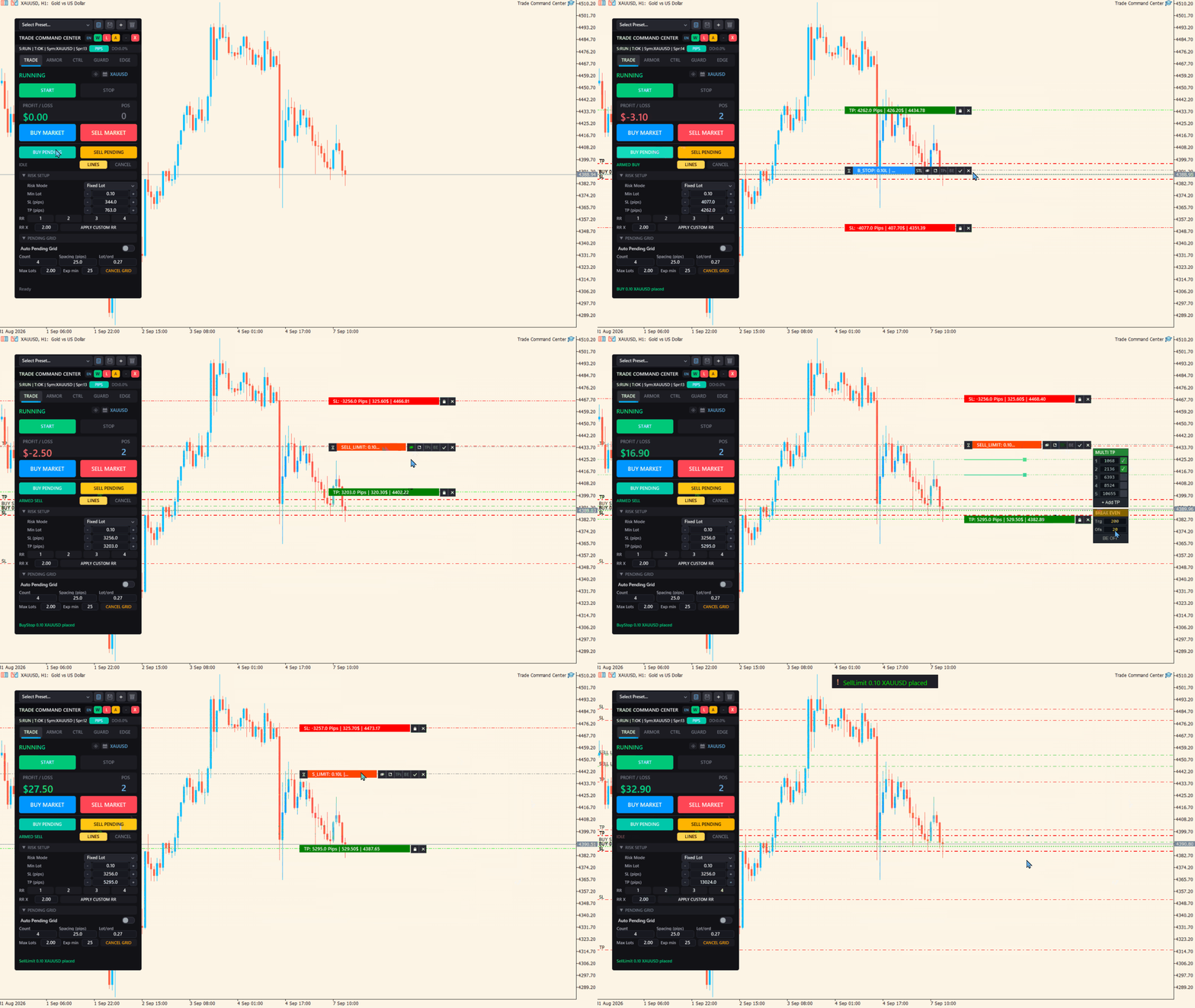
- 1초 만에 끝나는 정밀 랏 계산: 차트 위의 손절(Stop Loss) 라인을 시장 지지·저항 구조에 맞게 드래그하십시오. 계좌 평가잔고(Equity)의 1%, 고정 150달러 리스크, 또는 잔고 대비 비율 등 선택한 리스크에 정확히 맞춘 최적의 랏 수를 즉시 계산합니다. 엑셀이나 계산기가 전혀 필요 없습니다.
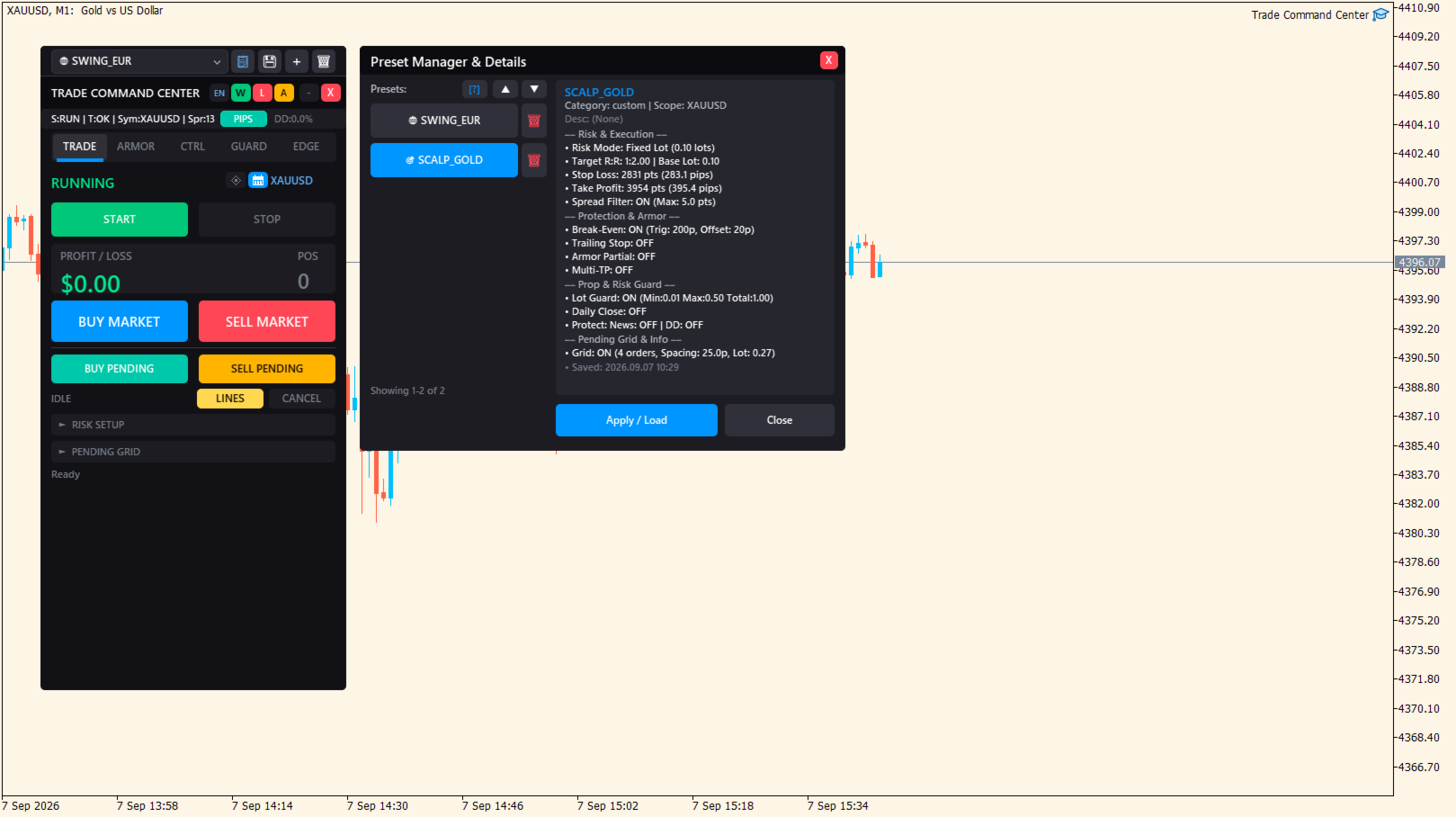
- 전략 프리셋 바 (v2.60): 상단 바에서 단 1클릭으로 스캘핑, 데이 트레이딩, 스윙, 프랍펌 설정을 즉시 전환할 수 있습니다. EURUSD에서 XAUUSD나 나스닥으로 전환할 때 매번 파라미터를 다시 입력할 필요가 없습니다.
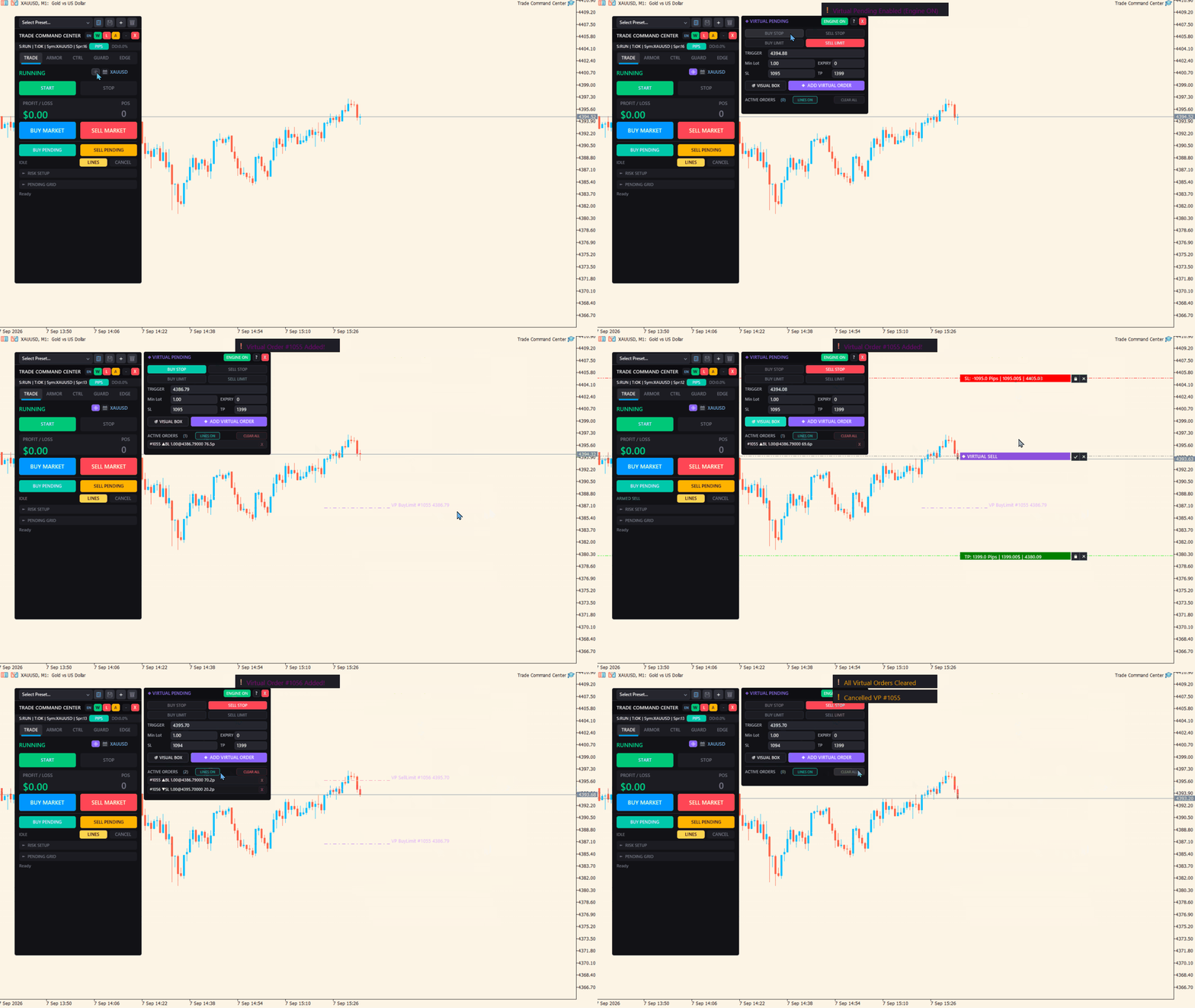
- 스텔스 가상 대기 주문 (Virtual Pending): 주문을 브로커 서버에 미리 노출하지 않고 터미널 메모리에 가상으로 유지하다가, 가격이 레벨을 터치하는 순간 시장가로 즉각 발주합니다. 브로커의 까다로운 스탑 레벨(Stop Level) 제한을 우회하고 스탑 헌팅(Stop Hunting)으로부터 안전하게 보호합니다.
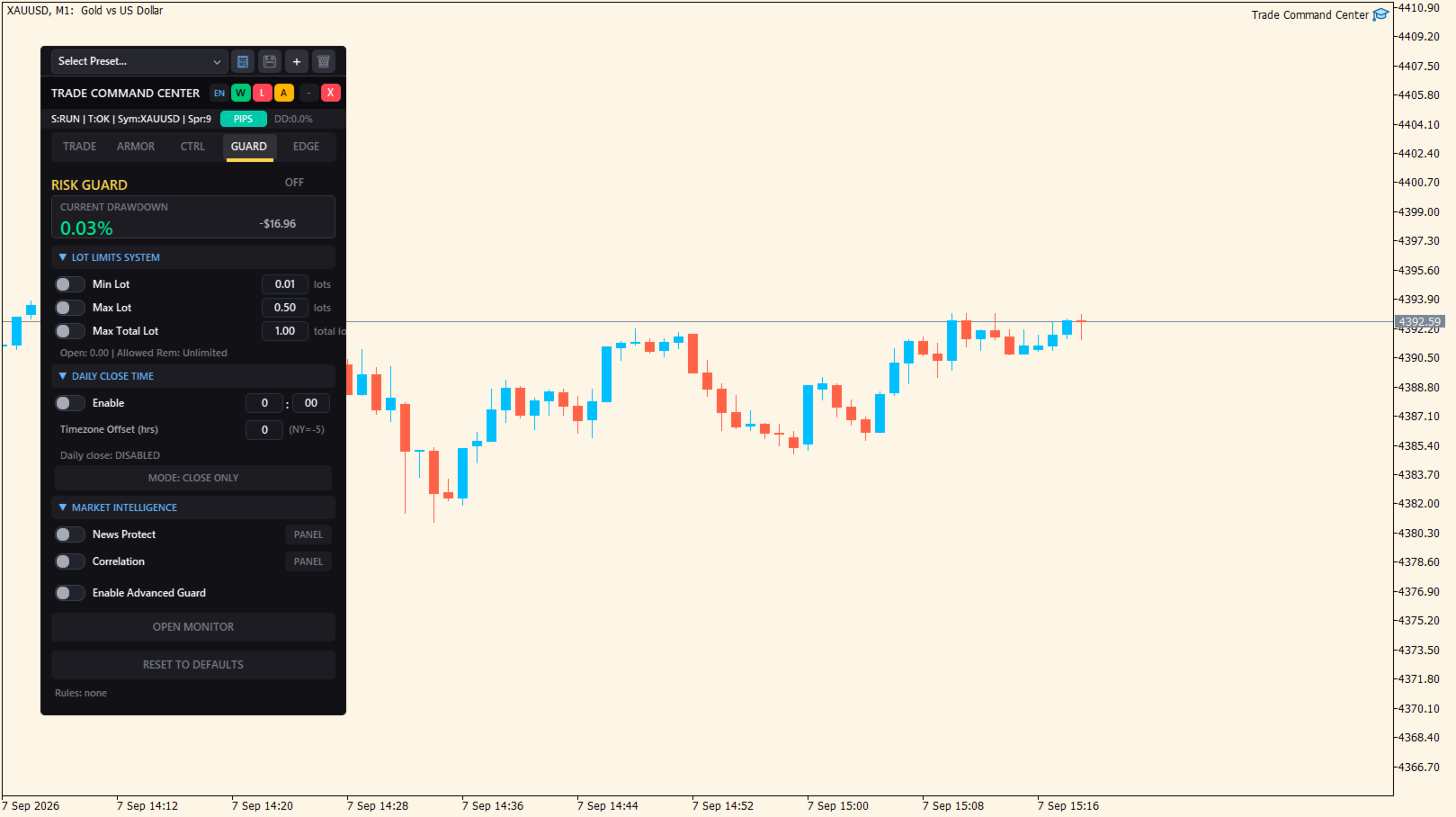
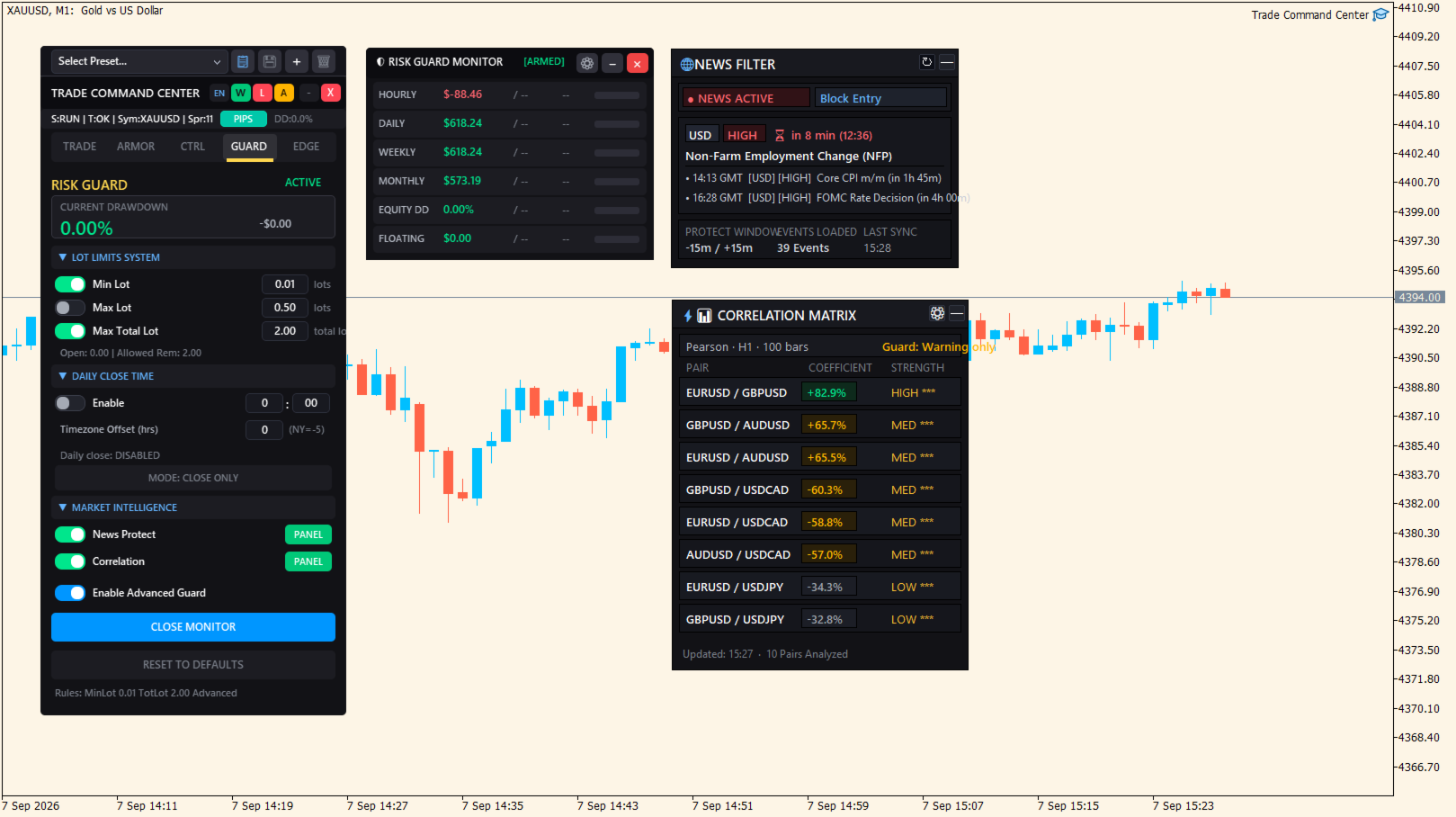
- 강력한 드로우다운 락 (Guard): 일일 손실 한도, 최대 총 보유 랏 수, 평가잔고 드로우다운 한도를 설정하십시오. 위험 임계치에 도달하는 즉시 신규 진입을 잠그고 열려 있는 모든 포지션을 비상 청산하여 계좌 파극이나 탈락을 원천 차단합니다.
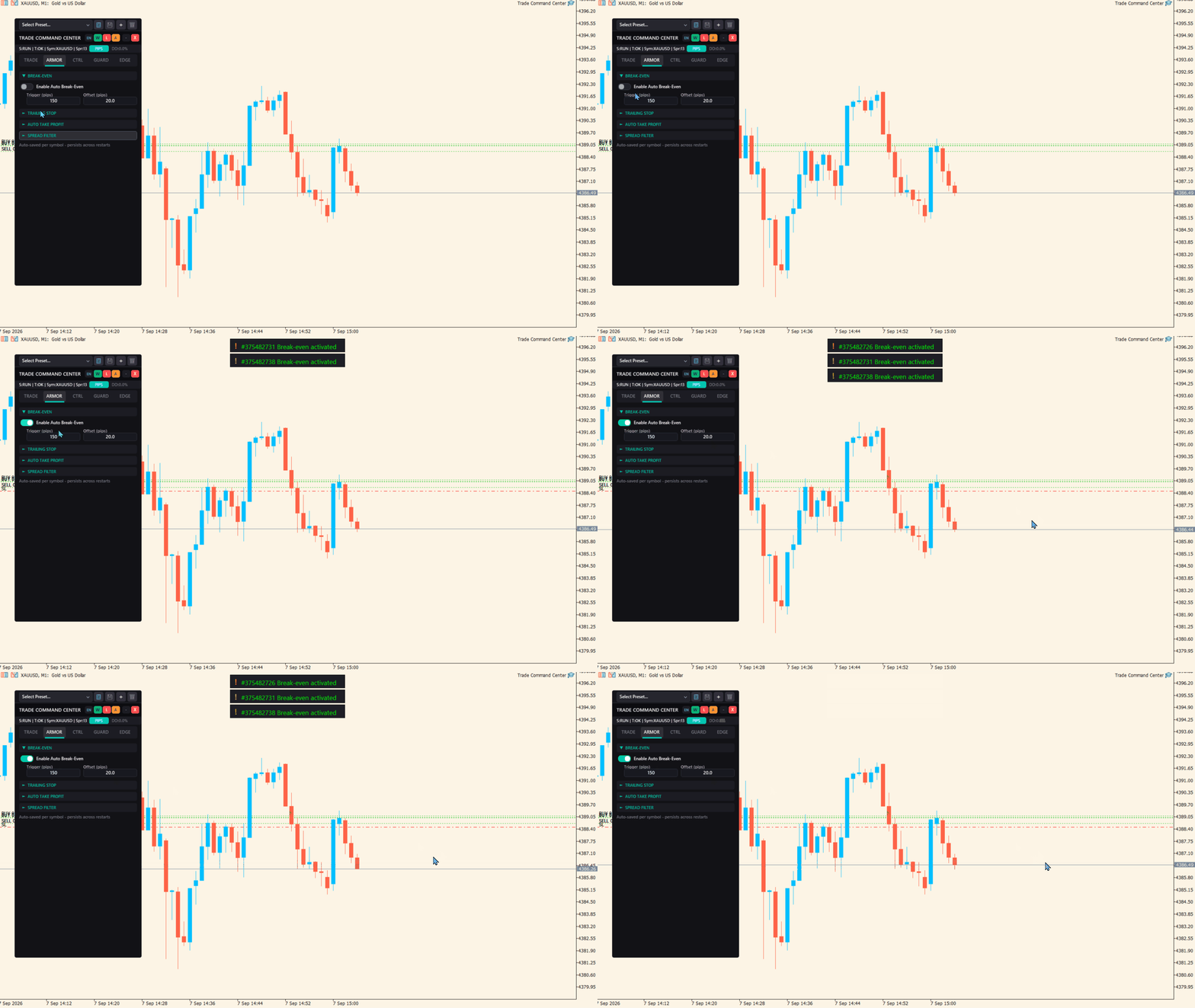
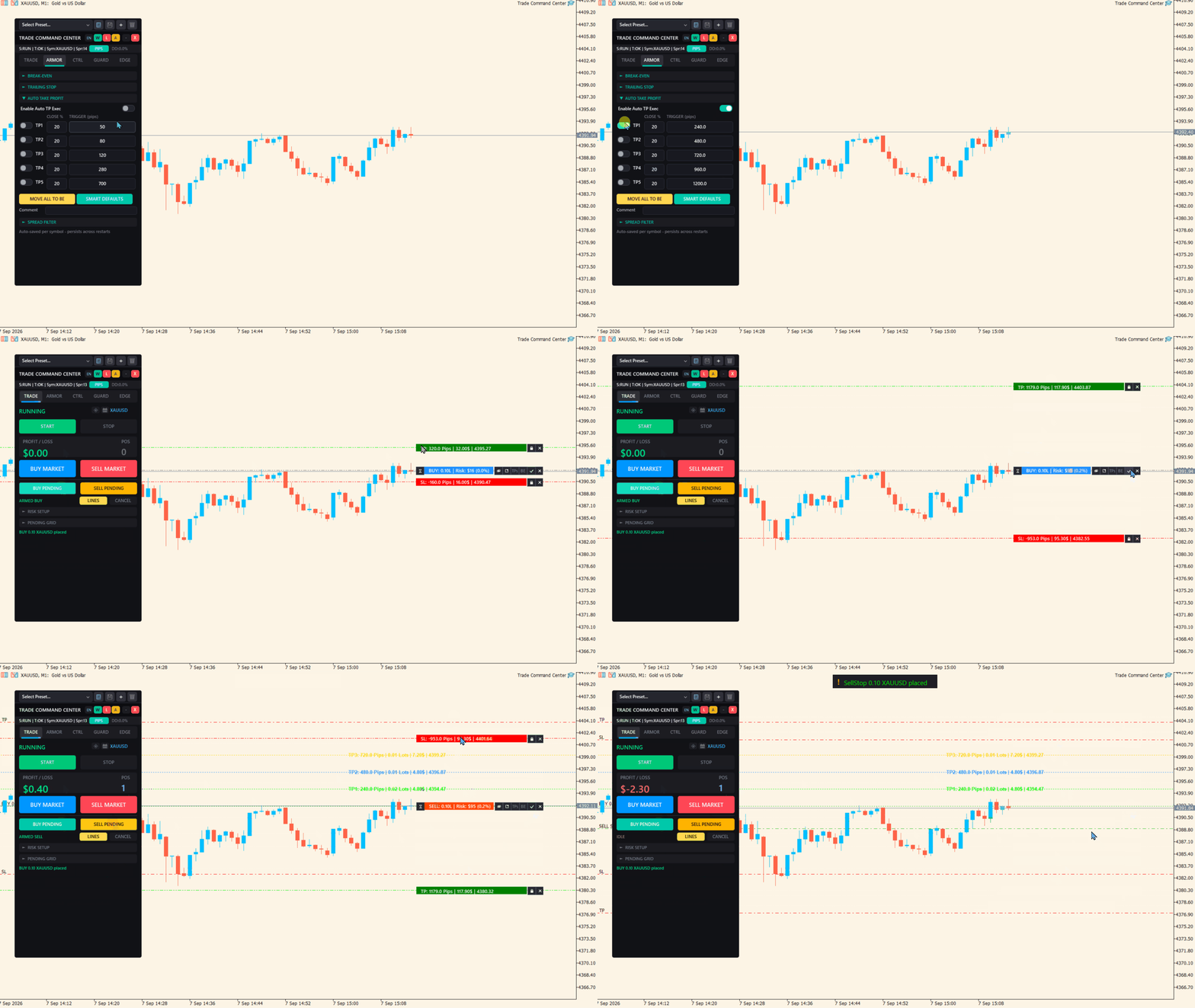
- 손댈 필요 없는 자동 포지션 방어 (Armor): 수익 보전 오프셋이 포함된 자동 본전 이동(Break-Even), 최대 5단계 부분 익절(Partial TP), 그리고 4가지 적응형 트레일링 스톱 모델(ATR 변동성, 프랙탈 고저점, 파라볼릭 SAR, 캔들 고저점).
- 30개 이상의 맞춤형 단축키: 시장가 진입, 가상 대기 주문 배치, 부분 청산, 본전 이동, 차트 캡처까지 Shift 조합 키를 지원하는 직관적인 키보드 단축키로 게이밍 수준의 초고속 실행이 가능합니다.
5대 핵심 기능 탭 안내
| 모듈 | 핵심 역할 | 주요 도구 및 기능 |
|---|---|---|
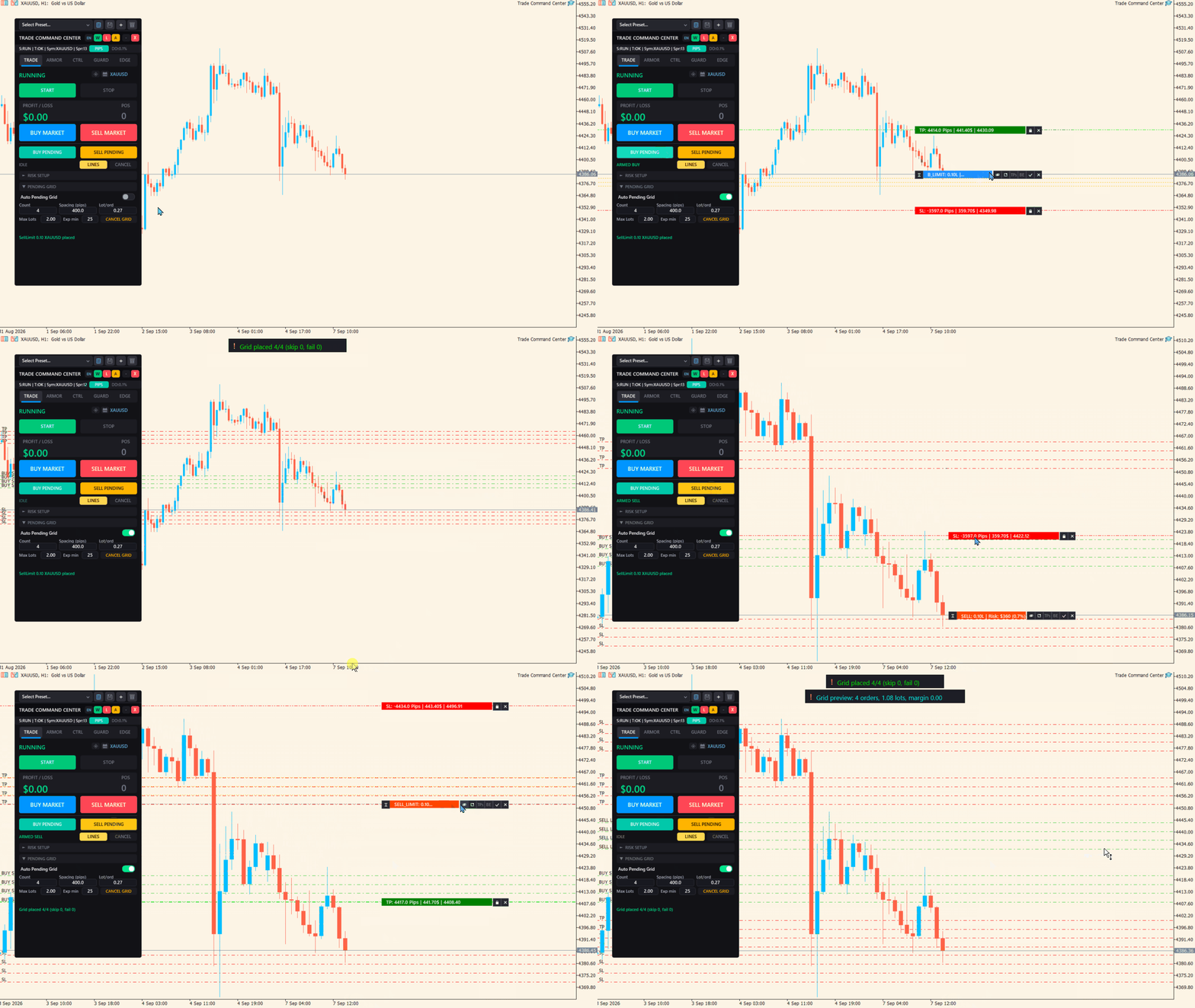
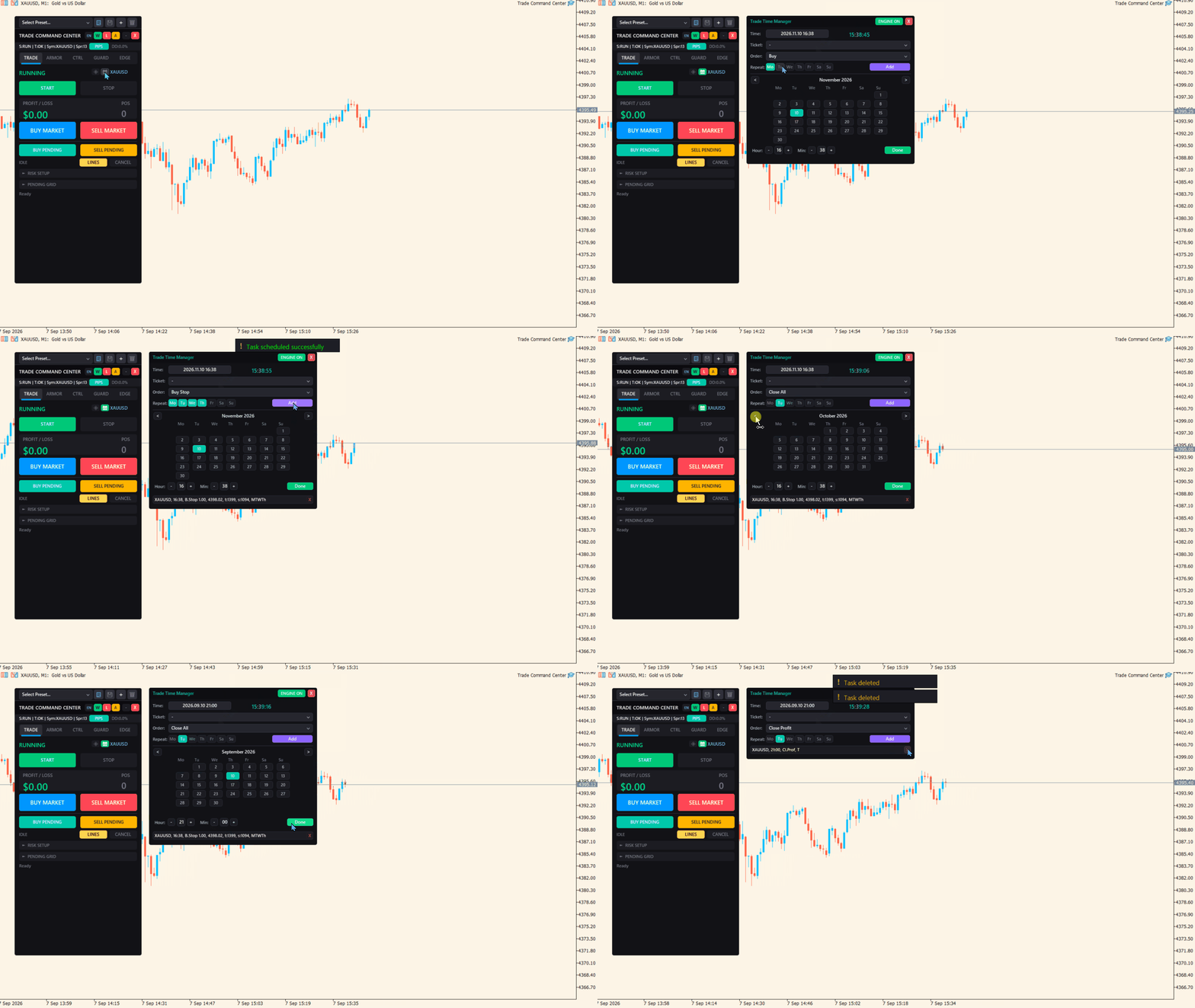
| TRADE | 시각적 주문 계획, 리스크 기반 자동 랏 계산, 스텔스 가상 대기 주문, 예약 주문 자동화. | 차트 인터랙티브 드래그 라인, 1클릭 BUY/SELL, Virtual Pending 패널, 타임 매니저. |
| ARMOR | 자동화된 포지션 보호, 다단계 분할 익절, 추세 추종 트레일링 스톱. | 본전 이동 + 수익 오프셋, 5단계 부분 청산(자동 청산 %), 4가지 동적 트레일링 모드(ATR/SAR/캔들/프랙탈). |
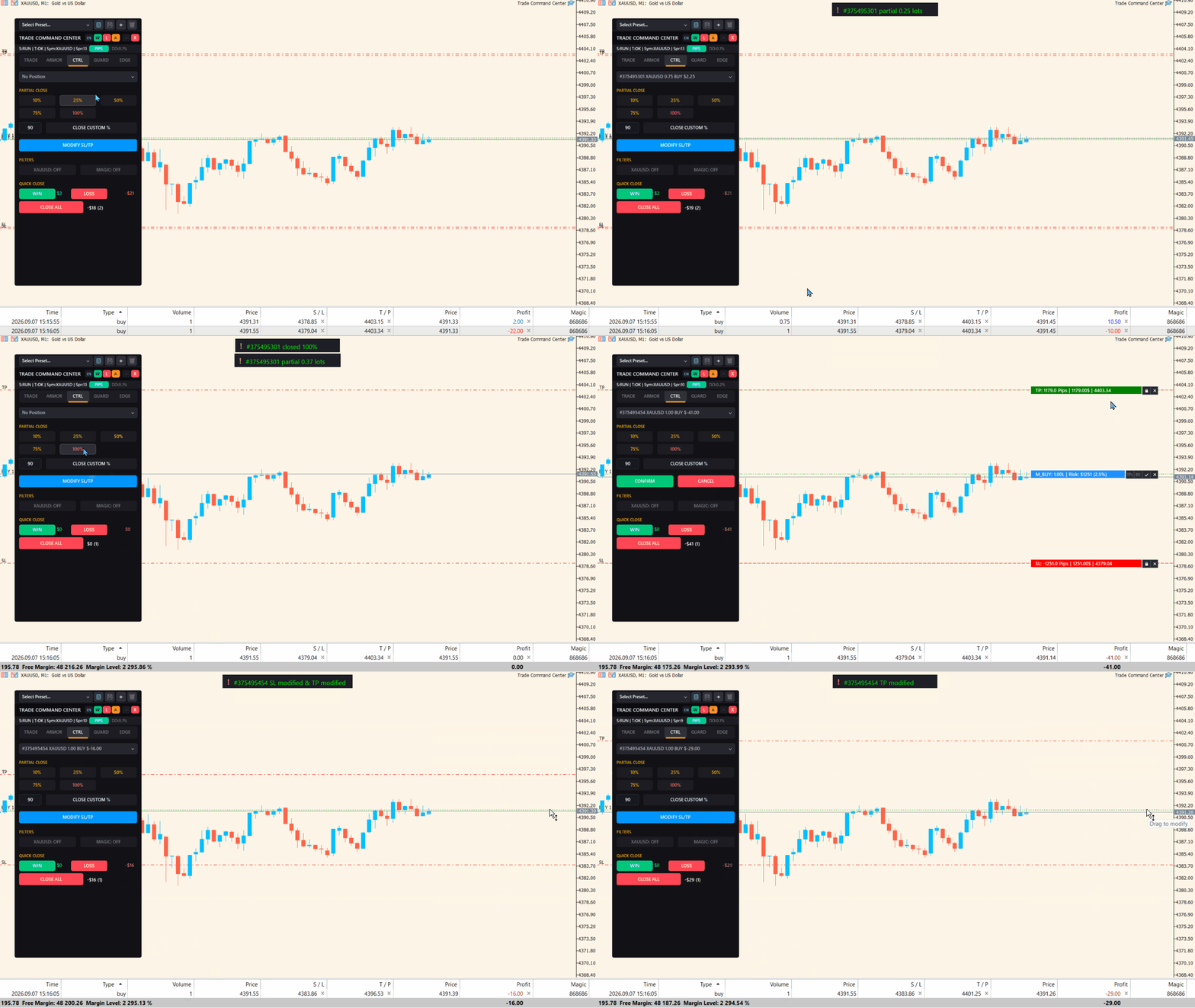
| CTRL | 복수 포지션 통합 대시보드, 일괄 제어, 포지션 필터링. | 종목/매직넘버별 필터, 1클릭 수익 포지션 청산 / 손실 포지션 청산 / 전량 청산. |
| GUARD | 프랍펌 규정 준수 및 계좌 자본 절대 보호를 위한 강제 실행 방벽. | 단일 포지션 최대 랏, 계좌 총 랏 제한, 시차 보정 일일 자동 청산, 6대 손실 모니터링 메트릭. |
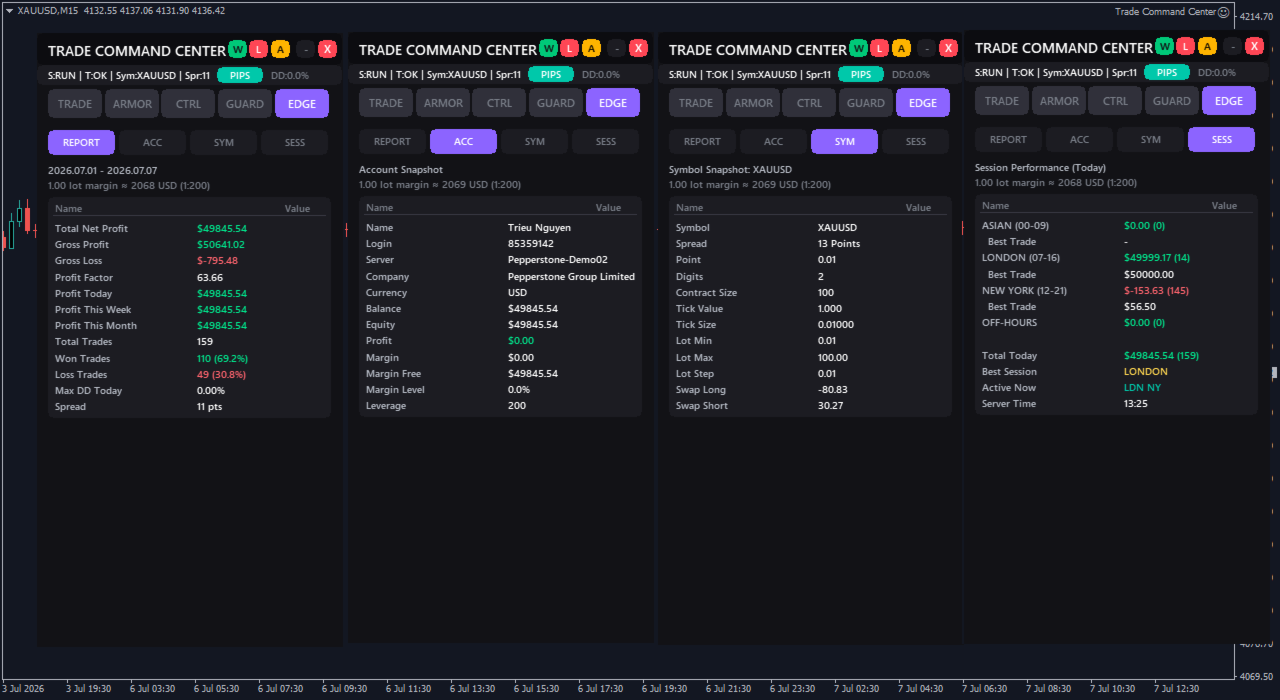
| EDGE | 실시간 일중 성과 분석 및 시장 인텔리전스. | 실시간 승률, 프로핏 팩터, 유동 드로우다운 미터, UTC 경제 뉴스 필터 & 통화 상관관계 매트릭스. |
실전 매매 시나리오: TCC가 여러분을 보호하는 방식
1. 프랍펌 챌린지 도전자
엄격한 5%($5,000) 일일 손실 한도가 걸려 있는 10만 달러 계좌를 운용 중입니다. GUARD 탭에서 일일 손실 한도를 $4,500로 설정하고 뉴욕 시간 16:45 자동 청산을 활성화하십시오. 예상치 못한 급변동으로 손실이 위험 구역에 근접하면 TCC가 즉시 모든 포지션을 시장가로 전량 정리하고 당일 매매를 차단하여, 단 한 번의 멘탈 흔들림으로 계좌를 날리는 일을 방지합니다.
2. 골드 & 지수 초단타 스캘퍼
골드(XAUUSD)와 나스닥(US30)처럼 변동성이 극심한 종목은 수동으로 계산할 시간이 없습니다. 키보드에서 B 키를 누르면 시각적 주문 박스가 즉시 나타납니다. SL 라인을 직근 스윙 저점으로 드래그하고 Space 바를 눌러 즉시 진입하십시오. 랏 수는 밀리초 단위로 소수점까지 정밀 계산되며, 가격이 20핍 진행되는 즉시 자동 본전 확보가 가동됩니다.
3. 고변동성 경제 뉴스 트레이더
미국 비농업 고용지표(NFP)나 CPI 발표 전에는 브로커의 스탑 레벨 제한으로 인해 현재가 30~50포인트 이내에 대기 주문을 둘 수 없습니다. Virtual Pending 엔진을 열고 현재가 10포인트 거리에 Buy Stop과 Sell Stop을 설정하십시오. 브로커는 아무것도 볼 수 없으며, 가격이 라인을 돌파하는 순간 로컬에서 밀리초 단위 시장가 주문이 격발됩니다.
4. 추세 스윙 트레이더
계좌 리스크 1.5%로 포지션에 진입합니다. ARMOR 탭에서 손익비 1:1 도달 시 40% 물량을 정리하고 손절을 진입가 + 5포인트 수익 지점으로 끌어올리도록 구성합니다. 1:2 지점에서 추가로 30%를 익절하고, 나머지 30% 잔여 물량은 ATR 트레일링 스톱에 맡겨 심리적 압박 없이 일봉 추세를 끝까지 누릴 수 있습니다.
60초 퀵 스타트 가이드
- 차트에 적용: MT5 네비게이터 창에서 Trade Command Center를 원하는 차트로 드래그합니다.
- 알고리즘 거래 허용: MT5 상단 툴바의 "알고리즘 거래" 버튼이 녹색으로 켜져 있는지 확인합니다.
- 리스크 설정: TRADE 탭에서 리스크 산정 방식( 잔고 % , 평가잔고 % , 또는 고정 $ 금액 )을 선택하고 값을 입력합니다.
- 차트에서 시각적 계획: BUY MARKET, SELL MARKET, 또는 PENDING 버튼을 클릭합니다. 차트 위의 진입가, SL, TP 라인을 드래그하면 정확한 랏 수와 손실 금액이 라인 위에 실시간 표시됩니다.
- 확인 및 실행: 차트의 CONFIRM 버튼을 클릭하거나 지정된 단축키를 누릅니다. 진입부터 청산까지 TCC가 자동으로 완벽히 관리합니다.
자주 묻는 질문 (FAQ)
Trade Command Center를 프랍펌 계좌(FTMO, FundedNext, Funding Pips 등)에서 사용할 수 있나요?
네, 100% 안전하게 사용 가능합니다. TCC는 레이턴시 아비트라지, 고빈도 틱 스캘핑, 마틴게일 등의 규정 위반 방식을 전혀 사용하지 않습니다. 프랍펌의 까다로운 손실 한도를 철저히 준수하도록 돕기 위해 개발된 전문 수동 매매 보조 도구입니다.
외부 DLL이나 타사 웹 서비스 연동이 필요한가요?
아닙니다. TCC는 100% 순수 네이티브 MQL5로 제작되었습니다. 외부 DLL을 일절 사용하지 않아 초고속 실행 속도, 완벽한 보안, 그리고 무중단 VPS 호환성을 보장합니다.
여러 차트와 다양한 종목에서 동시에 사용할 수 있나요?
네, 가능합니다. TCC는 패널 위치, 사용자 맞춤 프리셋, 활성화된 파라미터를 종목 및 타임프레임별로 독립적으로 저장합니다. MT5 터미널을 재부팅해도 모든 설정이 그대로 유지됩니다.
기존에 사용 중인 다른 EA나 수동 주문에 영향을 주나요?
전혀 영향을 주지 않습니다. 매직 넘버(Magic Number) 필터를 설정하여 TCC로 진입한 포지션만 독립적으로 제어할 수도 있고, 해당 종목의 모든 포지션을 통합 관리하도록 설정할 수도 있습니다.
기술 사양 및 요구 사항
- 지원 플랫폼: MetaTrader 5 (헤징 Hedging 및 네팅 Netting 계좌 모두 완벽 지원).
- 지원 자산: 외환(FX), 귀금속(골드, 실버), 주가지수(US30, NAS100, DAX40), 원자재(오일), 암호화폐.
- 지원 언어: 영어, 러시아어, 중국어, 일본어, 한국어, 독일어, 프랑스어, 스페인어, 포르투갈어, 이탈리아어, 터키어, 베트남어.
- 그래픽 엔진: 초경량 고성능 네이티브 Canvas 그래픽 엔진을 적용하여 차트 렉이나 프레임 저하가 전혀 없습니다.
위험 고지 및 중요 공지
Trade Command Center는 거래 실행 지원 및 자금 관리 유틸리티이며 매매 신호, 투자 자문, 자동 진입 추천을 제공하지 않습니다. 외환 및 CFD 파생상품 거래는 높은 손실 위험을 수반하며 모든 투자자에게 적합하지 않을 수 있습니다. 감당할 수 없는 손실 위험이 있는 자금으로는 거래하지 마십시오. 실제 자금을 투입하기 전 반드시 데모 계좌에서 모든 기능과 설정을 충분히 테스트하시기 바랍니다.
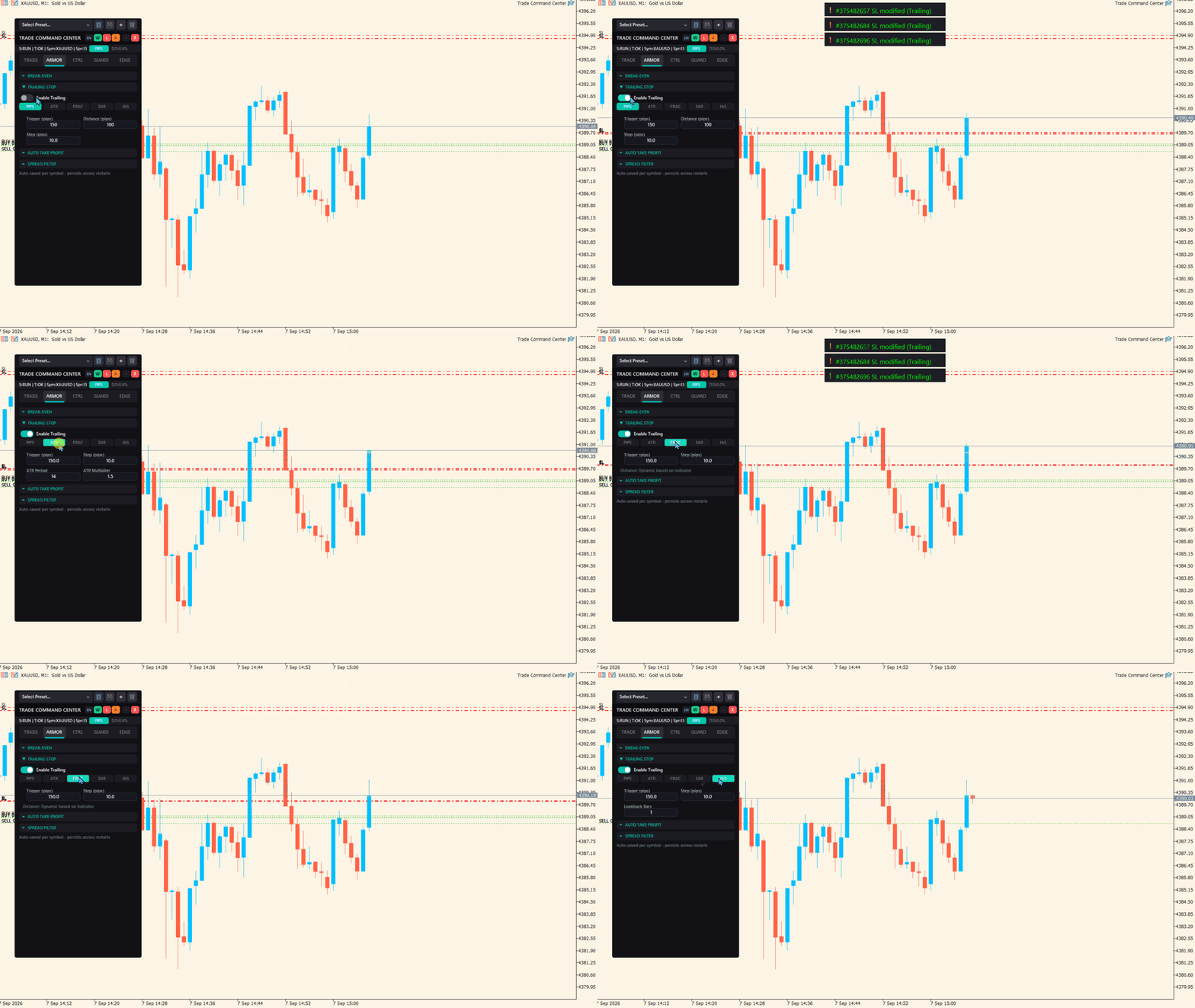


















































Great tool to use for risk management, I have absolutely no complaints, everything works as promised. The only improvement that I feel could be made could be made to make the tool even better is a trigger in pts for the trailing stop so that it activates only after you've secured your desired amount from each trade. I feel this accompanied with the partial TP increments will allow users to lock in ore profits incase price reverses. Overall though, very pleased with the product!