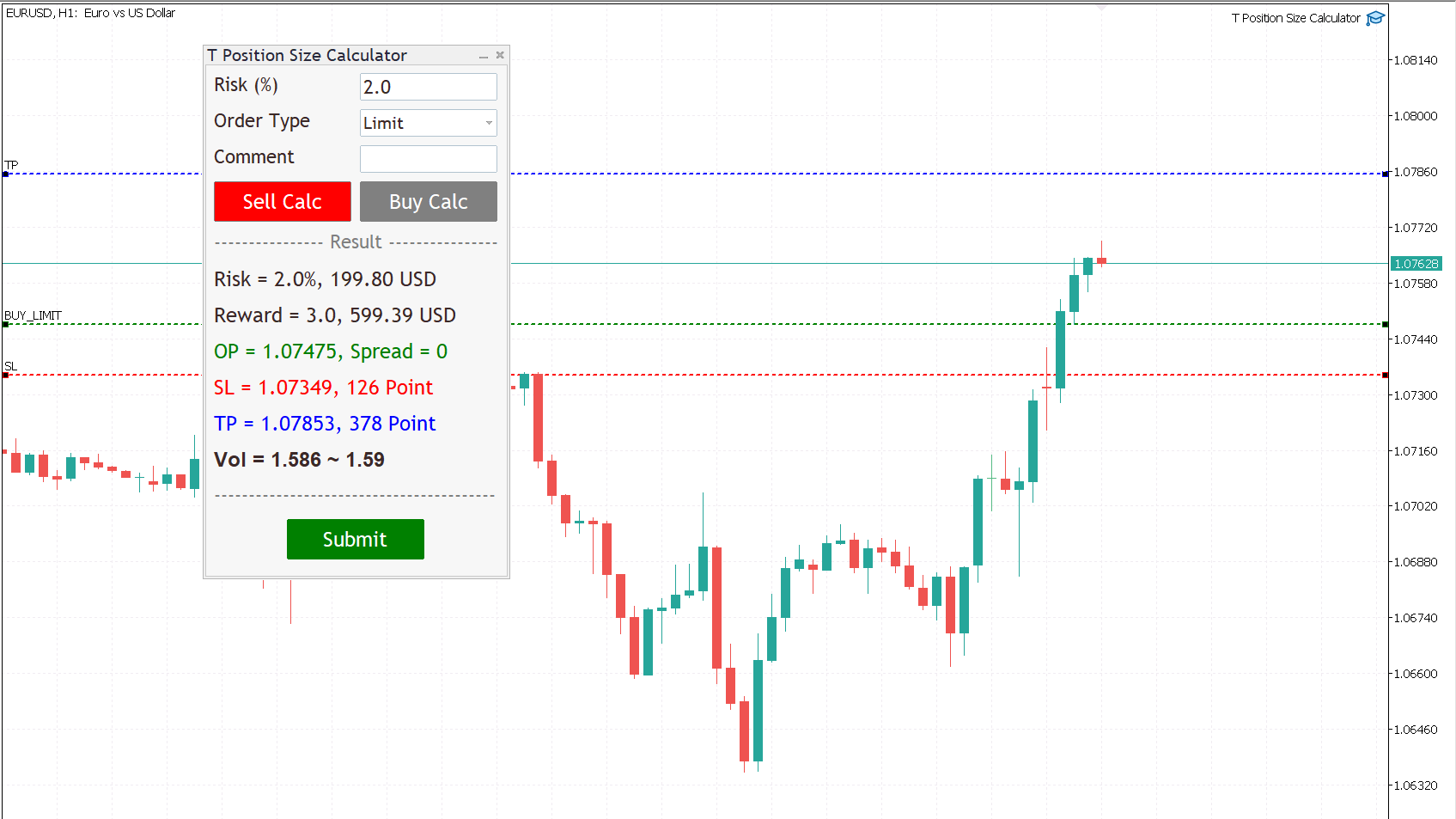
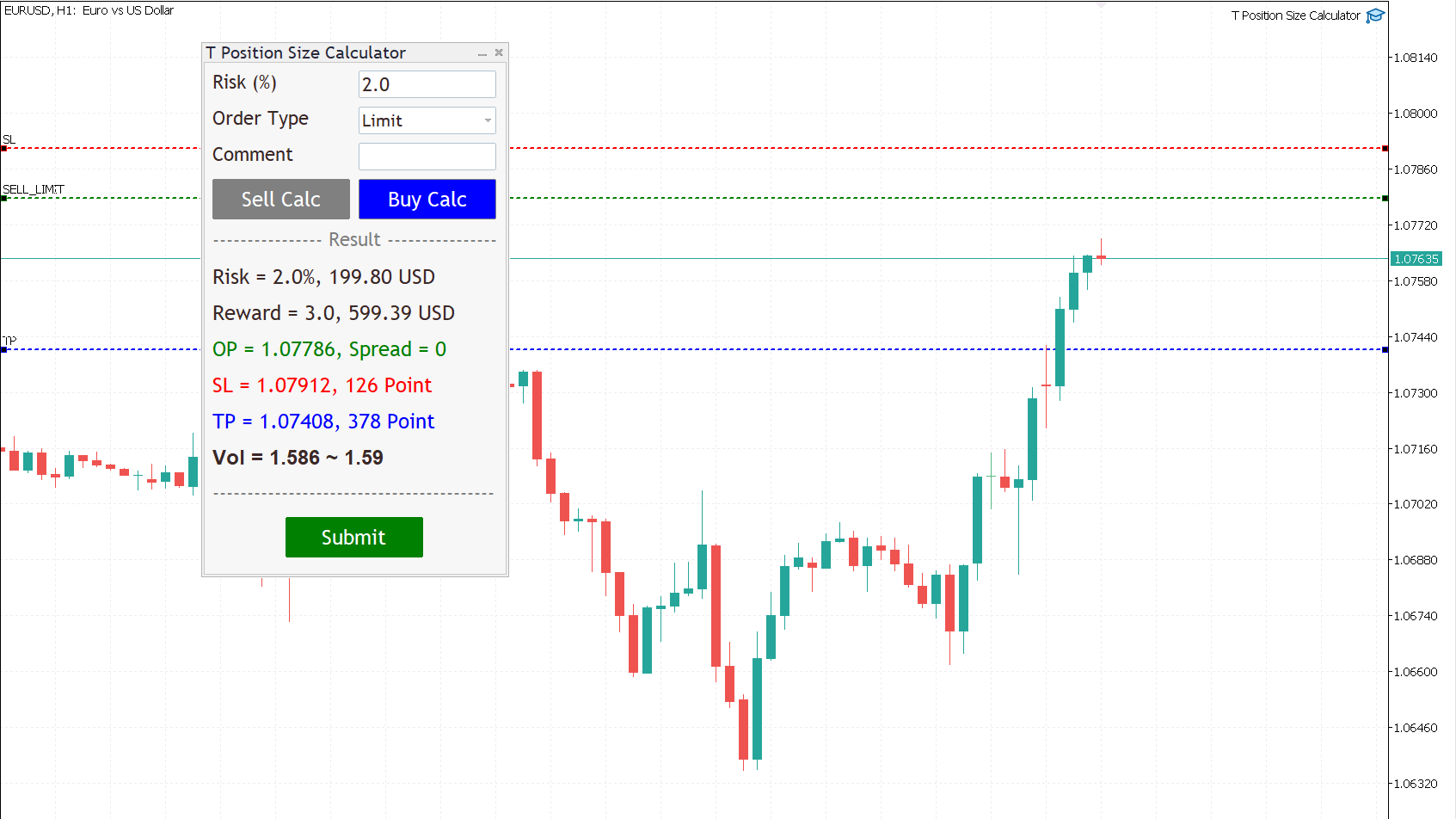
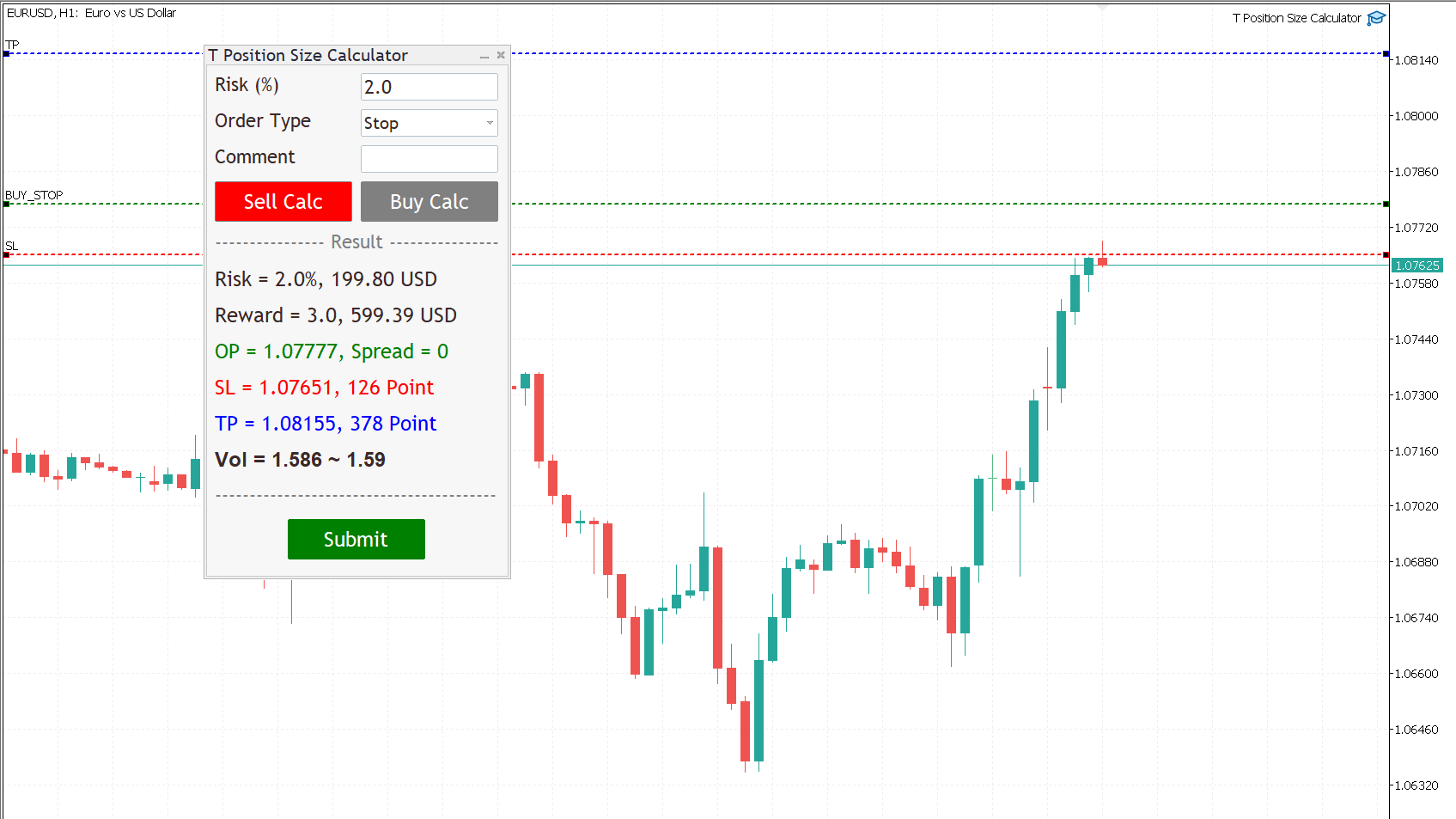
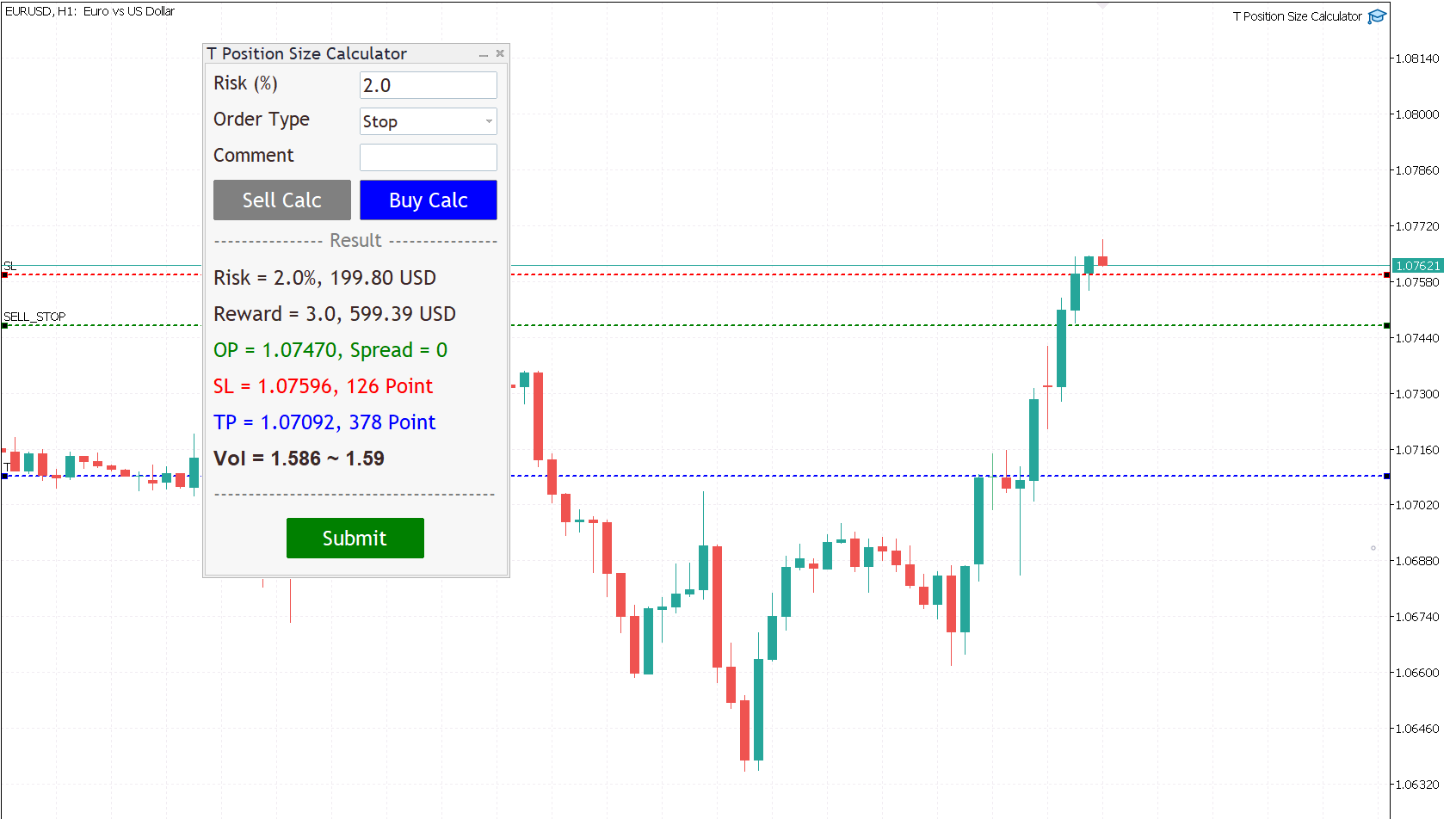
T Position Size Calculator

Demo version

T Position Size Calculator doesn't work in the strategy tester. The Strategy Tester does not support the processing of ChartEvent. It does not support most of the panel's functionality.

Contact me for any questions or ideas for improvement or in case of a bug found.

Control and manage your trading like a professional trader with T Position Size Calculator.

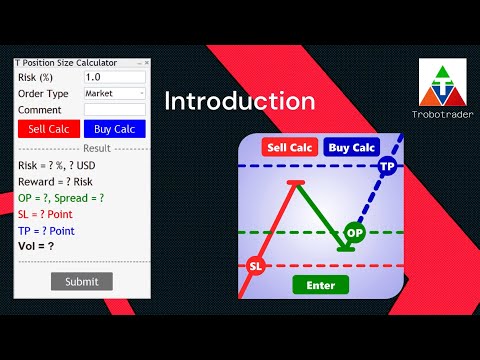
T Position Size Calculator – an MT5 Expert Adviser, is a user-friendly custom tools (Dialog Panel and Three Lines, Order Line, Stop Line, Profit Line) on the chart. It allows you to determine your required trading.

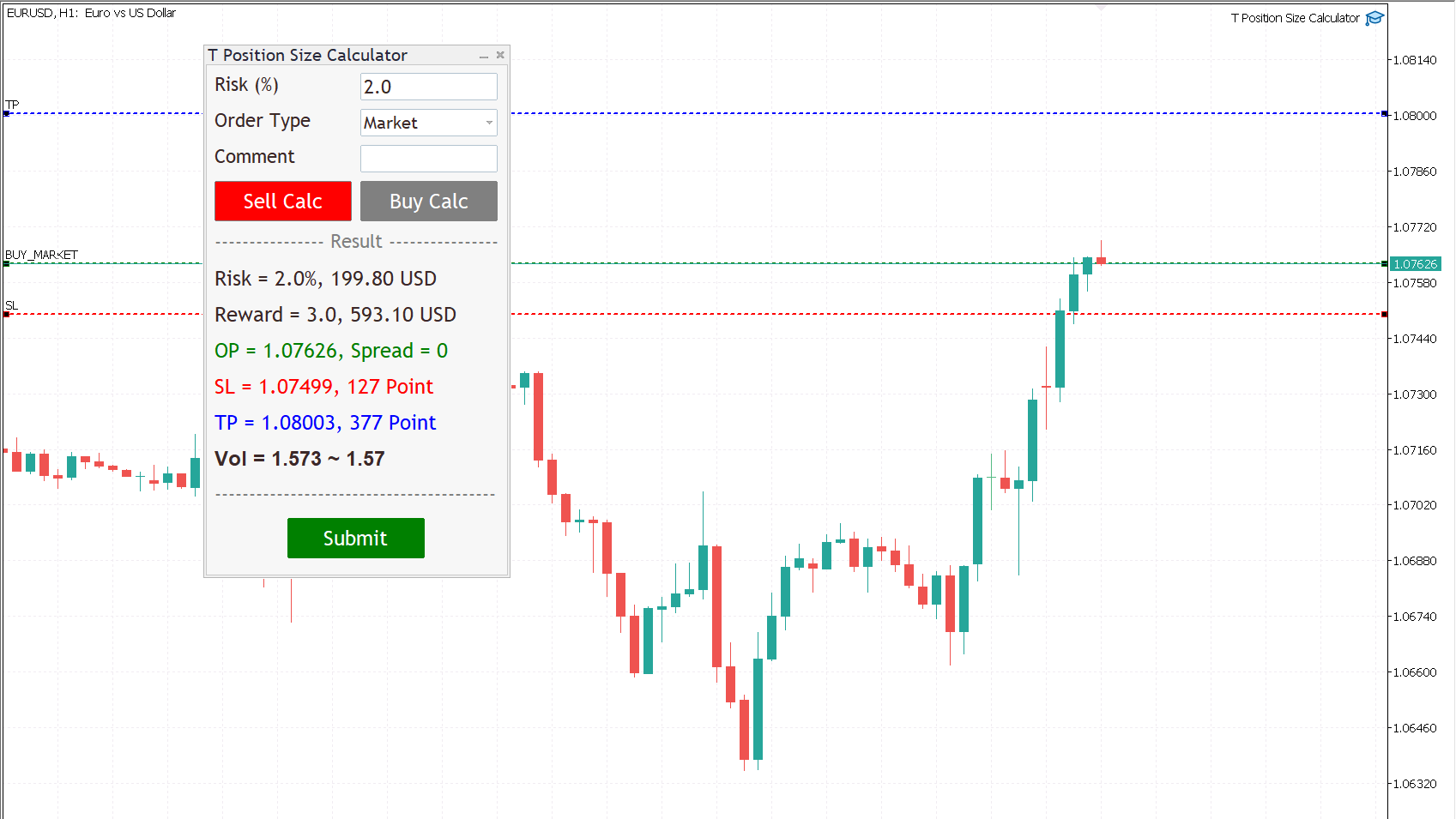
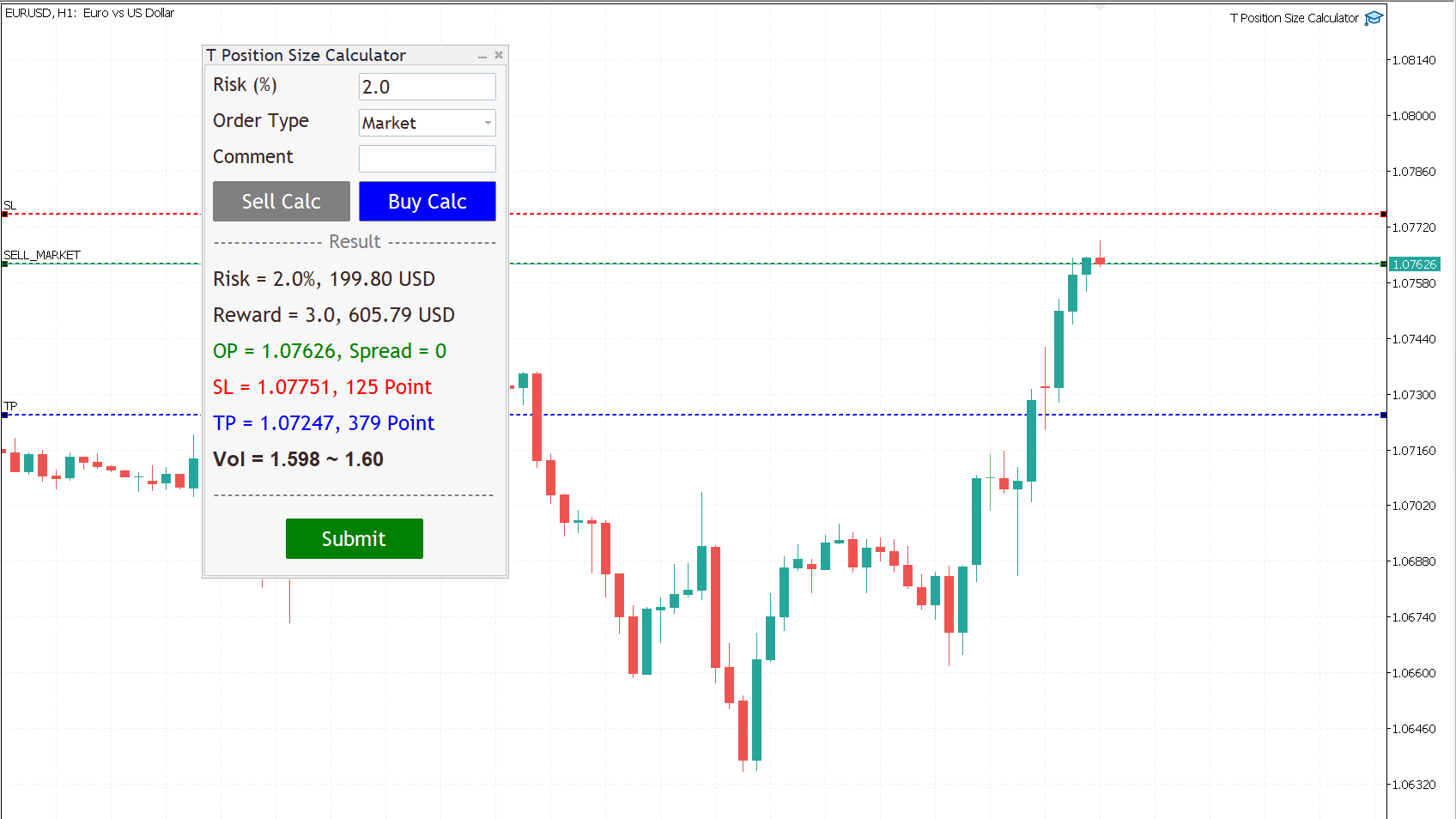
By using T Position Size Calculator you can automatically calculate position size instantly by click on Sell Calc or Buy Calc button then you can drag and drop the lines at your levels for each trading.

You can trade without worrying about calculating incorrectly.

Expands the standard terminal capabilities with this utility.

T Position Size Calculator works on any trading instruments: forex, stocks, indices, cryptocurrency, CFD, Spread Betting and more.


HOW DOES IT WORK?

We need to check two box for working with T Position Size Calculator

  1. Go to menu MT5, Tool => Options => Check on box, Allow algorithmic trading.

  2. Check on the box, Allow algo trading, when attach T Position Size Calculator with Chart.

Follow a few steps in Dialog Panel to submit order to market :

  • Simply enter the percentage you’re risking in Risk % of the box, 2 mean that 2%.

  • Select order type (can be Market, Limit, Stop).

  • Press the “Sell Calc” or “Buy Calc” button.

    This will trigger (show) 3 lines on your current chart. You can drag and drop the lines (Order Line, Stop Line, Profit Line) to determine your risk / reward. 

Then this tool will automatically calculate volume (position size) instantly and result will show in this dialog panel.
  • When you agree, press Submit button to execute the trade (submit your order to market) .

    Note that submitting can be failed so you try press Submit button a gain.

    That’s it! – It even works on future pending orders too!

ADDITIONAL FUNCTION

  1. Dialog Manager

  • Width app : 320, You can change width app by try this option.

  • Toggle minimize : m, When you press M key, dialog will minimize. Press M key gain, dialog will maximize.

  • Risk (%) min : 1.0

  • Risk (%) max : 5.0

    If you input risk(%) is in of range, min and max. The this tool will accept your input then calculate after click on the button.

  1. Trading Lines Manager - Order Line, Stop Line, Profit Line

  • Distance (%), Order and Stop : 5, We set the default value, distance from order price to stop price, is five percent of chart's high.

  • Reward ratio : 3.0, Reward radio is 3 time of the distance.

  • Line width : 2

  • Line color :

  • Line style :

  • Bring to back : true

  • Z-order : 0

    Properties of the lines.

  • Deviation (avoid requotes) : 5, It is important to note that requotes will still occur if the price change is more than the set range of deviation.

Shortcut Key

Below instruction have some functions work with shortcut key to manage your task faster than normal.

Note that you can change or add more value.

    Timeframe Manager
    • Timeframe : H1=1,H4=2,D1=3,W1=4,MN=5

      When you press 1 key then your timeframe chart change to H1, Press 2 change to H4,...

      However you can add more timeframe with the key.

    Chart Manager
      • Goto name : GOTO-DATE, define the name of vertical line for navigate chart.

      • Goto to date (GOTO-DATE) : g

        When you press G key, the chart will navigate to GOTO-DATE

      • Update goto : G

        When you press shift + G key, It will update goto-date position to current screen at first bar (left corner).

      • Goto all open charts : true, Synchronize all charts navigate to GOTO-DATE.

      • Open watch-list : M

        When you press shift + M key, Open all symbols in watch-list, max = 5.

      • Max Symbols in watch-list : 20, Maximum symbols can be opened when press M key.

      Synchronize Chart Manager
      • Synchronize other charts : S,

        When you press shift + S key, It will synchronize all open charts with current chart.

      • Synchronize crosshair : true, Show crosshair (vertical and horizontal lines) in synchronize charts when middle mouse click. If you toggle click, show and hide.

      Template Manager
      • Save current template : T

        When you press shift + T key, Save template's name with the symbol's name both master and slave chart, Path : \MQL5\Files\Templates

        Note that if want to save template by manual, you need to minimize dialog before.

      • Apply current template : t

        When you press shift + t key, Apply the template is saved. If not found it apply with DEFAULT-TEMPLATE

      • Default template :DEFAULT-TEMPLATE

      • Slave chart : true, 

      When you drag symbol on watchlist to drop on the chart then press shift + T key, Save template's name with the symbol's name both master and slave chart.

      When you drag symbol on watchlist to drop on the chart then press shift + t key, it will apply the template is saved to all opened charts. if not found it will apply DEFAULT-TEMPLATE before you must save it.

        Window Manager
          • Hide / Show indicators : i, Press I key, hide / show indicators.

          • Equal height indicators : /, Press / key, set equal height all indicators.

          • Clear fixed height indicators : I, Press shift + I key, remove fixed height indicators.

          • Double click left or right corner chart or indicator window to toggle maximize the window.

          Object Tool Manager
            • Delete all objects : D, Press shift + D key, delete all objects tool on the current chart.

            • Delete recent (stack) object : Z, Press shift + Z key, delete a recent object by order.

            • Synchronize objects properties : true, When change properties current object, It will change all the same object type with changed properties.

            • Toggle LOW TIMEFRAME object visibility : L, Press shift + L key, hide/show all object that you draw in lower than current timeframe.

            • Toggle CURRENT TIMEFRAME object visibility : C, Press shift + C key, hide/show all object that you draw in current timeframe.

            • Toggle HIGH TIMEFRAME object visibility : H, Press shift + H key, hide/show all object that you draw in higher than current timeframe.
            おすすめのプロダクト
            Expert TP SL v04 - Professional Trading Assistant with AI Motivation System Advanced manual trading tool with automatic risk management, overtrading protection, and intelligent psychological support for disciplined trading. PRODUCT OVERVIEW Expert TP SL v04 is a comprehensive trading assistant designed for manual traders who want to maintain emotional discipline while automating risk calculations. This isn't just another order placement tool - it's a complete trading psychology system that pr
            Inverted_Chart_EA Utility Expert Advisor Inverted_Chart_EA creates and maintains a mirror-inverted chart of any symbol and timeframe. It automatically generates a custom instrument (e.g. US30_INV ) and keeps its price history updated in real time, with bars mirrored around a chosen pivot. This utility gives traders a new way to analyze the market from a different perspective by flipping the chart upside down. Why use an inverted chart? Highlight hidden patterns – price formations that look ordin
            Bober Real MT5
            Arnold Bobrinskii
            4.76 (17)
            Bober Real MT5 is a fully automatic Forex trading Expert Advisor. This robot was made in 2014 year and did a lot of profitbale trades during this period. So far over 7000% growth on my personal account. There was many updates but 2019 update is the best one. The robot can run on any instrument, but the results are better with EURGBP, GBPUSD, on the M5 timeframe. Robot doesn't show good results in tester or live account if you run incorrect sets. Set files for Live accounts availible only for cu

            Overview Mirror Signals EA is a powerful monitoring Expert Advisor that automatically sends real-time Telegram notifications for all important trade events on your MetaTrader 5 account. It is engineered specifically for signal providers , trade-copier operators , auditors , educators , and professional trading services that require immediate, detailed, and reliable reporting. Everything from entries, exits, SL/TP changes, comment changes, trailing stop activations, pending order modifications
            | Fully-automated Smart Money Concept (ICT) inspired trading solution with multi-strategy capabilities | Built by a grid trader >> for grid traders.  This is MT5 version, click  here  for  Blue CARA MT4  (settings and logics are same in both versions)     Real monitoring signal  -->  Cara Gold Intro Blue CARA EA   ('CARA') - short for  C omprehensive  A lgorithmic   R esponsive   A dvisor is a next-gen  multi-currency    multi-timeframe  EA base on the widely known (and perhaps the most popul
            The Goat Scalper EA — Smart, Fast, and Built for Real Market Performance Overview The Goat Scalper EA is a next-generation trading system built to capture decisive market moves with surgical precision. Unlike typical scalpers that rely on risky methods such as martingale, grid, hedging, or arbitrage, The Goat uses a pure breakout logic based on advanced supply and demand zone detection, ensuring stable and transparent results in any condition. Core Strengths Smart Risk Management Stop Loss on
            CrossRoad Scalping Pro Infinite Breakevenは、2025年12月8日までプロモーション価格にて販売開始いたします。 このエキスパートアドバイザーはあらゆる資産に対応し、汎用性も備えています。 マルチアセットスキャルパーEAは、MetaTrader 5プラットフォーム向けに開発されたプロフェッショナルな自動取引システムで、複数の資産で同時にスキャルピング取引を行うように設計されています。バージョン8.2では、トリプルコンファームと統合リスク管理機能を備えたマルチタイムフレーム技術が採用されています。 テクニカルアーキテクチャ 1. インテリジェントシグナルシステム マルチタイムフレーム計算:トリプル分析(操作、高速および低速コンファーム) 投票システム:調整可能なウェイトを備えた3つの主要指標(EMA、MACD、RSI) リスクモード:感応度に影響を与える5段階(超アグレッシブ→超保守) 2. 高度なリスク管理 ハイブリッドロット計算:固定またはリスクベース(USD) Infinite Breakeven:pipsではなくドル単位のプ
            Classic Market Surfer EA - A Timeless, Proven Strategy for Gold Trading For years, this powerful trading strategy has been hidden from the public-reserved for a select few. Now, for the first time, the Classic Market Surfer EA is available to traders like you.   Built on pure, time-tested trading principles, this EA doesn't rely on trendy gimmicks like AI or machine learning. Instead, it harnesses a classic, robust strategy that has consistently delivered results over the years. This is not a "g
            BreakEvan Utility  Is a simple tool in a panel with this utilities: This utility will draw a Golden Line in the chart applied showing the breakeven price, considering all the positions opened for that specific symbol. Also the information panel shows: Balance Breakeven Price for that chart Force Breakeven (for that symbol) as ON/OFF Force Breakeven Global (takes into account all trades opened) as ON/OFF Total Lots opened for Symbol Total Lots opened Global And two buttons: Force Breakeven: Whe
            RSI Grid MT5
            Joseph Anthony Aya-ay Yutig
            他のEAを無料で入手!!!他のEAを無料で入手!!!他のEAを無料で入手!!!他のEAを無料で入手!!!他のEAを無料で入手!!! RSIグリッドはRSIの買われ過ぎと売られ過ぎの条件に基づいており、取引が市場の負け側にあるときにグリッドを開きます。 RSIはテクニカルトレーダーに強気と弱気の価格の勢いに関するシグナルを提供し、多くの場合、資産の価格のグラフの下にプロットされます。資産は通常、RSIが70%を超えると買われ過ぎと見なされ、30%を下回ると売られ過ぎと見なされます。 パラメーター: タイムフィルター 月曜日 火曜日 水曜日 木曜日 金曜日 土曜日 日曜日 始まる時間 終了時間 RSI設定 RSI期間 買われ過ぎ 売られ過ぎ 時間枠 資金管理 Autolot 最大ロット 利益を得る グリッドサイズ 乗数 トレーリングオプション トレーリングストップ トレーリングステップ トレイルオフセット ファイルを設定する v1.8GBPUSDセット1 https://youtu.be/a7PfCr1jYXQ htt
            Overview Mirror Signals Service EA (Text only)   is a powerful monitoring Expert Advisor that automatically sends   real-time Telegram notifications   for all important trade events on your MetaTrader 5 account. It is engineered specifically for   signal providers ,   trade-copier operators ,   auditors ,   educators , and   professional trading services   that require immediate, detailed, and reliable reporting. Everything from   entries, exits, SL/TP changes, comment changes, trailing sto
            MT4版  |  FAQ Owl Smart Levels Indicator は、 Bill Williams の高度なフラクタル、市場の正しい波構造を構築する Valable ZigZag、エントリの正確なレベルをマークする Fibonacci レベルなどの一般的な市場分析ツールを含む 1 つのインジケーター内の完全な取引システムです。 利益を得るために市場と場所に。 戦略の詳細な説明 インジケータを操作するための指示 顧問-取引助手 プライベートユーザーチャット ->購入後に私に書いて、私はプライベートチャットにあなたを追加し、あなたはそこにすべてのボーナスをダウンロードすることができます 力はシンプルさにあります! Owl Smart Levels 取引システムは非常に使いやすいので、専門家にも、市場を勉強し始めて自分で取引戦略を選択し始めたばかりの人にも適しています。 戦略と指標に秘密の数式や計算方法が隠されているわけではなく、すべての戦略指標は公開されています。 Owl Smart Levels を使用すると、取引を開始するためのシグナルをすばやく確認し、注文を出すための
            Manus Pro
            Itumeleng Mohlouwa Kgotso Tladi
            MANUS PRO EA The Trading Revolution You've Been Waiting For Are you TIRED of watching other traders make consistent profits while your account bleeds red?   The financial markets don't wait for anyone – and neither should you. MANUS PRO isn't just another Expert Advisor... it's your   TICKET TO FINANCIAL FREEDOM . Why MANUS PRO is Different (And Why Everyone's Talking About It) FOR BEGINNERS: Your Trading Mentor That Never Sleeps Zero Learning Curve   – Install, activate, and watch it wo
            SolarTrade Suite 金融ロボット: LaunchPad Market Expert - 取引を開始するために設計されています! これは、革新的で高度なアルゴリズムを使用して値を計算する取引ロボットであり、金融​​市場の世界でのアシスタントです。 SolarTrade Suite シリーズのインジケーター セットを使用して、このロボットを起動するタイミングをより適切に選択してください。 説明の下部にある SolarTrade Suite シリーズの他の製品をご覧ください。 投資と金融市場の世界を自信を持ってナビゲートしたいですか? SolarTrade Suite 金融ロボット: LaunchPad Market Expert は、情報に基づいた投資決定を行い、利益を増やすのに役立つ革新的なソフトウェアです。 SolarTrade Suite 金融ロボット: LaunchPad Market Expert の利点: - 正確な計算: 当社のロボットは、高度なアルゴリズムと分析方法を使用して、市場の動きを正確に予測します。 資産を売買するのに最適なタイミングを
            SL TP Manager Utility MT5
            AL MOOSAWI ABDULLAH JAFFER BAQER
            SL-TP Manager Utility for MT5 - Professional Risk Management Tool Advanced Position Protection & Profit Management SL-TP Manager Utility is a powerful, intuitive tool designed for traders who want precise control over their risk management. This utility provides a sleek interface for setting, modifying, and managing your Stop Loss, Take Profit, and Trailing Stop levels with just a few clicks. Key Features: Dual Mode Operation: Set values in pips or absolute price with a simple toggle Independent
            TradePilotmt5
            Hossein Khalil Alishir
            TradePilot Expert Advisor (EA) for MetaTrader 5 TradePilot is a professional and user-friendly Expert Advisor (EA) for MetaTrader 5 (MT5) . It simplifies automated trading , risk management , and trade execution with a smart trading panel . Perfect for beginners and experienced traders looking for a reliable trade manager EA with automated lot size calculation and smart position management. Key Advantages User-Friendly Trading Panel: Customizable panel with buttons and hotkeys for fast ex
            Crash5 EA ,I s a automatic robot that has the level of professional decision when to take a trade without any emotion. The bot will help in your scalping decision making with its own TP (take profit) and SL (stop loss) with the trail stop when in profit. This is a trend based spike catching ,looking on whats happening in real time charts no repainting of any signals. The robot helps in making decisions on the candle stick pattern opened and closed lat price with the help of RSI ,MACD and the EMA
            Sonic R Pro Enhanced EA - バージョン 2025 249ドル - 最初の5名様限定! ライブシグナル Sonic R Pro Enhancedのライブパフォーマンスを確認: トレード戦略 Sonic R Pro Enhancedは、Dragon Band (EMA 34とEMA 89) を基にした自動トレード戦略の改良版であり、先進的なアルゴリズムを搭載しています。 タイムフレーム: M15, M30 対応通貨ペア: XAUUSD, BTCUSD, AUDJPY, USDJPY トレードスタイル: スイングトレード - リトレースメント & 逆張り 最低資金: 500 USD レバレッジ: 1:200 以上 ユーザーガイド Sonic R Pro Enhancedはシンプルさを追求しています。設定するのは1つのパラメータ: RiskAmount のみです。 RiskAmount < 0 の場合:口座残高のパーセンテージでリスクを計算 RiskAmount > 0 の場合:1回のトレードあたりの固定リスク金額 (USD) 例: RiskA
            Crypto_Forex MT5用インジケーター「 WPR with 2 Moving Averages 」(リペイント機能なし) - WPR自体はスキャルピングに最適なオシレーターの1つです。 - 「WPR and 2 Moving Averages」インジケーターを使用すると、WPRオシレーターの高速移動平均線と低速移動平均線を確認できます。 - このインジケーターを使用すると、価格調整を早期に把握できます。 - このインジケーターはパラメータで簡単に設定でき、どの時間枠でも使用できます。 - 買いと売りのエントリー条件は画像で確認できます。 - WPR MA クロスの PC およびモバイル アラート付き。 買いシグナルの条件例: (1) - 高速MAが低速MAを下向きにクロスし、WPR値が-50を下回っている場合:買いトレードを開きます。 (2) - WPR値が-20を超える買われすぎゾーンに入ったら:買いトレードを終了します。 売りシグナルの条件例: (1) - 高速MAが低速MAを下向きにクロスし、WPR値が-50を超えている場合:売りトレードを開きます。 (2) WP
            Trading Utility for Forex Currency Pairs Only not for Gold  Functions Auto Lot Calculation based on Risk Auto stoploss  Auto TakeProfit Breakeven Auto Close Half % Close in percentage with respect to the PIPs Pending Orders BuyLimit Sell Limit with distances BuyStop Sell Stop    with distances Trading Informations Risk in percentage For Multiple trades Combine Takeprofit and Combine Stoplosses
            Hamster Scalping mt5
            Ramil Minniakhmetov
            4.71 (237)
            Hamster Scalpingは、マーチンゲールを使用しない完全に自動化された取引アドバイザーです。夜のスキャルピング戦略。 RSIインジケーターとATRフィルターが入力として使用されます。アドバイザには、ヘッジ口座タイプが必要です。 実際の作業の監視、およびその他の開発については、https:// www.mql5.com/en/users/mechanic/sellerを参照してください 。 一般的な推奨事項 最小デポジット$ 100、最小スプレッドのECNアカウントを使用し、eurusd M5 gmt +3のデフォルト設定。 入力パラメータ EAは、4桁と5桁の両方の引用符で機能します。入力パラメータでは、5文字の値をポイントで示し、すべてを4文字で自動的に再計算します。 NewCycle-モードがオンの場合、アドバイザーは停止せずに動作します。モードがオフの場合、一連の取引の完了後、アドバイザーは新しい注文を開きません。 期間インジケーター1-最初のインジケーターの期間。 アップレベル-アドバイザーが売りを開始する最初のインジケーターの上位レベル。 ダウンレベル
            シグナルを出すインジケーターがあり、それをエキスパートに変換したいですか? このエキスパートを使用すると、インジケーターを再プログラムまたは適合させることなく変換できます。適切に構成するには、次の手順に従う必要があります。 1)インジケーターはインジケーターフォルダーにある必要があります。 2)インジケーターが提供するBUYおよびSELLバッファーを慎重に選択する必要があります。 3)すべての操作を実行するか、購入または販売タイプの操作のみを実行するかを選択します。 4)操作に応じて、SLおよびTPによるか、有効期限によるかを問わず、操作を閉じる方法を選択します。 5)選択に応じて、時間フィールドまたはSLおよびTPフィールドに入力します。 6)必要な場合のみ、[ボリューム]、[コメント]、[マジック]、および[偏差]フィールドに入力します。 7)インジケーターによって与えられた入力を管理したい場合にのみ、最大利益と最大損失を設定して、EARNINGMANAGERフィールドを有効にして入力することができます。 8)トレーリングストップをアクティブまたは非アクティブに
            Moving Average Surfer – MT5向け精密トレンドキャプチャ EA Moving Average Surfer は、正確なエントリー判断・効率性・自動リスク管理を求めるトレーダーのために設計された高度なエキスパートアドバイザーです。高速と低速の移動平均線を組み合わせたトレンド分析に加え、市場環境をさらに精査するための複数のフィルターを搭載し、高確率の取引セットアップだけを選び抜くことを目的としています。 RSI フィルターによるモメンタム判定、ATR ベースのストップロス/テイクプロフィット、資金を保護する動的ロット管理など、実践的な安全機能が豊富に組み込まれています。また、長期・短期を問わずあらゆる時間足で稼働でき、スキャルピングからスイングまで幅広い手法に対応します。ユニークなマジックナンバーにより複数チャート同時運用も安全に行えます。 規律ある自動売買と柔軟なカスタマイズ性を両立した Moving Average Surfer は、高確率エントリーを正確に捉えたいトレーダーに最適なソリューションです。
            Prizmal Logic
            Vladimir Lekhovitser
            5 (1)
            リアルタイム取引シグナル 取引活動の公開リアルタイム監視: https://www.mql5.com/ja/signals/2353471 公式情報 出品者プロフィール 公式チャンネル ユーザーマニュアル セットアップ手順および使用ガイド: ユーザーマニュアルを開く 本エキスパートアドバイザーは、ルールに基づいた取引戦略に基づいて設計されています。 この戦略は、常に市場に参加するのではなく、特定の市場条件を識別することに重点を置いています。 システムは価格の動き、ボラティリティの特性、時間的要因を分析します。 これらの要素は、現在の市場環境が取引に適しているかどうかを判断するために使用されます。 複数の事前定義された条件が同時に満たされた場合にのみ取引が実行されます。 条件が満たされない場合、エキスパートアドバイザーは非アクティブな状態を維持します。 その結果、取引頻度は一定ではありません。 取引がまったく行われない期間が発生することがあります。 これには、ポジションが一切開かれない日も含まれます。 一方で、市場環境が適している場合には、比較的短時間で複数の
            Majd Qatuni exp
            Majd Ahmad Mahmoud Qatuni
            MAJD QATUNI Trend Reversal EA v1.27 A fully automated Expert Advisor tested specifically on Gold (XAUUSD) , designed to capture potential market reversals after strong momentum periods. It uses a consecutive candlestick pattern , enhanced by multi-indicator filters and advanced risk management for precise entries and profit protection. Current price is for demo use only. Key Features: Momentum-Based Reversal Strategy: Detects N consecutive bullish/bearish candles, then waits for a correction
            The   Grid Builder MT5   utility is designed for placing a grid of pending orders of any complexity and will be an excellent tool in the hands of a trader who trades grid trading strategies. The tool has numerous settings that allow you to quickly and easily build a grid of orders with the specified parameters. All types of pending orders are supported: Buy Stop; Buy Limit; Sell Stop; Sell Limit. The script also allows you to delete a previously placed grid of orders in one click. If the "Delete
            Exclusive EA for FOREX HEDGE account The EA (FuzzyLogicTrendEA) is based on fuzzy logic strategies based on the analysis of a set of 5 indicators and filters. Each indicator and filter has a weight in the calculation and, when the fuzzy logic result reaches the value defined in the EA parameter, a negotiation is opened seeking a pre-defined gain. As additional functions it is possible to define maximum spread, stop loss and so on . Recommended Symbol: EURUSD, AUDUSD, GBPUSD, NZDUSD, USDCAD, AUD
            Scalping bot for the gold/dollar pair (XAU/USD) — a powerful and versatile solution for traders, designed to deliver maximum efficiency in a dynamic market. This bot is specifically engineered for scalping: it analyzes price changes and places trades even before significant market movements begin. This allows it to secure advantageous positions early and capitalize on even the smallest market fluctuations. Key Features: Flexibility: Adapts to any market conditions and suits your trading strategy
            Noize Absorption Index - is the manual trading system that measures the difference of pressure between bears forces and bulls forces. Green line - is a noize free index that showing curent situation. Zero value of index shows totally choppy/flat market.Values above zero level shows how powerfull bullish wave is and values below zero measures bearish forces.Up arrow appears on bearish market when it's ready to reverse, dn arrow appears on weak bullish market, as a result of reverse expectation.
            MT5からTelegramに完全にカスタマイズ可能なシグナルを送信して、シグナルプロバイダーになりましょう!この製品は、使いやすく視覚的に魅力的なグラフィカルインターフェースで提供されています。設定をカスタマイズして、数分で製品を使用開始できます! ユーザーガイド + デモ  | MT4バージョン  | Discordバージョン デモを試したい場合は、ユーザーガイドをご覧ください。 MT5からTelegramへの送信者は、ストラテジーテスターでは動作しません。 MT5からTelegramへの機能 多数のオプションを使用して、シグナルを完全にカスタマイズします シグナルの前後に独自のカスタムメッセージを追加します。これには、タグ、リンク、チャンネルなどが含まれます シグナル内の絵文字を追加、削除、カスタマイズします。また、すべて削除することもできます。 シンボルまたはマジックナンバーで送信する取引をフィルタリングします 特定のシンボルの送信を除外します 特定のマジックナンバーの送信を除外します シグナルと一緒に送信する取引の詳細をカスタマイズします シグナルと一緒にスクリーンショット
            このプロダクトを購入した人は以下も購入しています
            The product will copy all telegram signal to MT5 ( which you are member) , also it can work as remote copier.  Easy to set up, copy order instant, can work with almost signal formats, image signal,  s upport to translate other language to English Work with all type of channel or group, even channel have "Restrict Saving Content", work with  multi channel, multi MT5 Work as remote copier: with signal have ticket number, it will copy exactly via ticket number. Support to backtest signal. How to s
            Farmed Hedge Yield Farming - Professional Pair Trading Dashboard (Manual - Hybrid - Semi/Automated EA) Launch Price xxx $ | Regular Price 899$ VERSION 3 - WILD HARVEST UPDATE Trading Approach: - Manual Trading: Primary focus - Auto Pilot: Optional supplementary feature - Full Automation: Not the main purpose Recommended Timeframe: H1-H4 DEMO VERSION Download the free demo to test functionality. Use Strategy Tester with Visual Mode to see how it works. VERIFIED TRADING RESULTS - Farmed Hedge Y
            YuClusters
            Yury Kulikov
            4.93 (43)
            Attention: You can view the program operation in the free version  YuClusters DEMO .  YuClusters is a professional market analysis system. The trader has unique opportunities to analyze the flow of orders, trade volumes, price movements using various charts, profiles, indicators, and graphical objects. YuClusters operates on data based on Time&Sales or ticks information, depending on what is available in the quotes of a financial instrument. YuClusters allows you to build graphs by combining da
            Trade on crypto exchanges in MT5! GRat_Crypto is a tool for manual and automated trading , including ANY available EA, ANY  cryptocurrency  on most popular crypto exchanges in the familiar MT5 environment 24/7. Features 1. ALL instruments of the 9 most popular crypto exchanges are available: Binance, BingX, Bybit, Coinbase, CoinEx, Kraken,   KuCoin, MEXC and OKX . 2. The ability to place ANY type of order available in MT5, both market and pending, to modify orders and positions, to delete order
            Lazy Trader is your personal risk management assistant that independently finds the best market entries, manages positions, and helps you extract maximum profit from every trading idea! It monitors charts from M1 to W1 , finds optimal entry points based on your parameters, and manages trades without your involvement: - Got an idea on the daily chart? No need to wait for lower timeframes to form a signal — Lazy Trader will check everything and open all necessary positions while you live your lif
            The product will copy all  Discord  signal   to MT5   ( which you are member  ) , also it can work as remote copier.  Easy to set up. Work with almost signal formats, support to translate other language to English Work with multi channel, multi MT5. Work with Image signal. Copy order instant, auto detect symbol. Work as remote copier: with signal have ticket number, it will copy exactly via ticket number. How to setup and guide: Let read all details about setup and download Discord To MetaTrader
            EASY Insight AIO – スマートで手間いらずな取引のオールインワンソリューション 概要 数秒で市場全体——FX、ゴールド、暗号資産、指数、さらには株式まで——を、手作業のチャート確認や複雑なセットアップ・インジケーター導入なしにスキャンできたらどうでしょうか? EASY Insight AIO はAIトレードのための究極のプラグ&プレイ型エクスポートツールです。市場全体のスナップショットを、クリーンなCSVファイルで一括出力。ChatGPT、Claude、Gemini、Perplexityなど、さまざまなAIプラットフォームで即座に解析できます。 ウィンドウの切り替えやグラフのごちゃごちゃしたオーバーレイはもう不要。自動エクスポートされる純粋で構造化されたインサイトだけで、無駄なチャート監視に悩まされず、スマートなデータ主導の判断に集中できます。 なぜEASY Insight AIOなのか? 本当のオールインワン • セットアップ不要、インジケーターのインストール不要、チャートへのオーバーレイ不要。インストールして起動し、エクスポートするだけです。 マルチアセット対
            THIS EA IS A SEMI-AUTO EA, IT NEEDS USER INPUT. Manual & Test Version Please TEST this product before BUYING  and watch my video about it. The price of the ManHedger will increase to 250$ after 20 copies sold. Contact me for user support or bug reports or if you want the MT4 version! MT4 Version  I do not guarantee any profits or financial success using this EA. With this Expert Advisor, you can: Implement your own Zone Recovery strategy to capitalize on trending markets. Create Grid trading s
            Mentfx Mmanage mt5
            Anton Jere Calmes
            4.25 (8)
            The added video will showcase all functionality, effectiveness, and uses of the trade manager. Drag and Drop Trade Manager. Draw your entry and have the tool calculate the rest. Advanced targeting and close portions of a trade directly available in tool (manage trades while you sleep). Market order or limit order on either side with factored spread. Just draw the entry, the tool does the rest. Hotkey setup to make it simple. Draw where you want to enter, and the stop loss, the tool calculates al
            Mt5 To InterativeBrokers Copier allows you to copy deals from MT5 account to Interactive Brokers. With this, you can run your EA strategy on a MT5 Demo/Real Account, then copy all the deals to Interactive Brokers account real time. Features: 1. Copy or Invert-Copy deals Realtime from MT5 to IB Account. 2. Synchronizing positions of both accounts periodicaly, in case any missing copying. 3. You can choose only Buy position or Sell position. Symbols Setup: General Format:  {MT Symbol} -> {IB S

            Custom Alerts AIO:マルチマーケット監視を一括で実現 — 設定不要ですぐに使えるインテリジェントツール 概要 Custom Alerts AIO は、追加のインジケーター設定が不要で、インストール後すぐに利用できる高機能マーケットスキャナーです。FX Power、FX Volume、FX Dynamic、FX Levels、IX Power を内部にすべて統合し、主要なすべての資産クラス(為替、金属、指数、暗号資産)を一括監視できます。MetaTrader の仕様により、株式は個別のシンボルとして追加可能ですが、一般的には利用頻度は低めです。 1. なぜ Custom Alerts AIO を選ぶべきか 追加ライセンス不要 • 必要なすべての Stein Investments インジケーターが内蔵されており、すぐに使用可能です。 • チャートに表示されるグラフィックは省略されており、アラート生成に特化した構成です。 市場を広範囲にカバー • 為替、金属、暗号資産、株価指数に対応(株式は手動追加可能)。 • シンボル名を入力する必要はなく、プロパティで資産クラス
            Crystal Trade Manager – Advanced MT5 Risk and Trade Control Utility Overview Crystal Trade Manager (CTM) is a professional MetaTrader 5 utility designed for risk management, trade automation, and instant execution control. It provides traders with an integrated system for protecting equity, managing daily drawdowns, controlling lot sizes, and applying automation features such as automatic SL/TP, break-even, and trailing stop. The tool is suitable for manual traders, prop-firm challenge particip
            Unlimited Trade Copier Pro MT5 is a tool to copy trade remotely to multiple MT4, MT5 and cTrader accounts at different computers/locations over internet. This is an ideal solution for you if you are a signal provider and want to copy your trades to other receivers globally on your own rules. One provider can copy trades to multiple receivers and one receiver can get trade from multiple providers as well. The provider can even set the subscription expiry for each receiver, so that receiver will n
            Strategy Builder offers an incredible amount of functionality. It combines a trade panel with configurable automation (covert indicators into an EA), real-time statistics (profit & draw down) plus automatic optimization of SL, TP/exit, trading hours, indicator inputs. Multiple indicators can be combined into an single alert/trade signal and can include custom indicators, even if just have ex4 file or purchased from Market. The system is easily configured via a CONFIG button and associated pop-u
            The  Easy Strategy Builder (ESB)  is a " Do It Yourself " solution that allows you to create a wide range of the automated trading strategies without any line of codes. This is the world’s easiest method to automate your strategies that can be used in STP, ECN and FIFO brokers. No drag and drop is needed. Just by set conditions of your trading strategy and change settings on desired values and let it work in your account. ESB has hundreds of modules to define unlimited possibilities of strategi
            FiboPlusWave Series products Ready-made trading system based on Elliott waves and Fibonacci retracement levels . It is simple and affordable. Display of the marking of Elliott waves (main or alternative option) on the chart. Construction of horizontal levels, support and resistance lines, a channel. Superposition of Fibonacci levels on waves 1, 3, 5, A Alert system (on-screen, E-Mail, Push notifications).    Features: without delving into the Elliott wave theory, you can immediately open one of
            PROTECT YOUR FTMO Account in a simplest way Must-Have Account Protector for any Prop-trading Account and Challenge MT4 / MT5 Expert Advisor that protects your Forex Prop Trading account from an unexpected drawdown! FTMO Protector  is a Tool that lets you manage trades and control your profit and loss across multiple Robots and currency pairs using a simple parameters and settings. Use as many EAs and Instruments you need, the Protector will: 1.   Calculate your midnight (01:00 System time) Balan
            HYT (Help Your Trading) は、主に次の 2 つのテクニックを使用して、損失ポジション を平均化 できるように設計されたツールです。 標準平均化。 トレンドの方向に沿ってポジションをオープンすることでヘッジします。 このツールを使用すると、買いと売りの両方において、異なる方向に開かれた複数のポジションを管理できます。 HYT は、次のポジションのサイズ、注文価格、平均化の方向、指定された利益確定レベルでのポジションのクローズを自動的に計算します。 また、希望する利益確定レベルと初期ロットを指定して、「購入」ボタンと「販売」ボタンを使用してポジションを開くオプションも提供します。 使用を開始する には、ツールをチャートにドラッグし、利益確定レベルを設定して、「平均化を開始」ボタンをクリックするだけです。 初期ポジションが大きすぎない ことを確認し、平均を下げるときにツールによってポジション サイズが拡大されるため、追加費用が発生することを覚悟してください。 HYTは 自動取引 も可能です。自動取引を有効にすると、ツールは指定されたパラメータに従ってポジションを開閉しま
            Wouldn't it be great if AI had a second look at your trading data — graphics, indicators, and beyond? Introducing AI Trading Station , a revolutionary utility seamlessly integrated with the MetaTrader platform. Powered by the advanced intelligence of OpenAI's ChatGPT, this complete solution covers every step of your trading journey, from data gathering to trade execution. The Complete Trading Process. Reinvented Data Gathering & Visualization: Collect and display vital market data on intuitive
            The product will copy all WhatsApp signal to MT5 ( which you are member).  Easy to set up, copy order instant, can work with almost signal formats,  image signal. Work with all type of channel or group, work with  multi channel, multi MT5 Support to translate other language to English How to setup and guide: Let read all details about setup and download WhatsAppCopier apps   here Recommend to all: try install demo version from market to your PC/ VPS because some time you maybe have problem with
            如果产品有任何问题或者您需要在此产品上添加功能,请联系我 Contact/message me if you encounter any issue using the product or need extra feature to add on the base version. There is Demo version of this panel Dashboard Babon Scalping System MT5 Demo in my product list, please try it out to get familiar with all functionalities for free. Free version: LINK MT4 version: LINK This system basically utilizes TDI, Heiken Ashi Trend, Price Trend on H1 time-frame and TMA on H1&H4 time-frame to generate the trend (big picture). Then
            Live Forex Signals サイト信号での取引用に設計されています   https://live-forex-signals.com/en と https://foresignal.com/en . Live Forex Signal for MetaTrader 4   https://www.mql5.com/en/market/product/81445 パラメータ サイトへのサブスクリプションを持っている場合は、ユーザー名とパスワードlive-forex-signals.com/foresignal.com サブスクリプションがない場合は、フィールドを空のままにします; オープンされているお得な情報へのコメント リスクリスクは、取引のための預金の割合として、リスク=0の場合、値ロットが使用されます 取引のためのロット固定ボリューム UseTakeProfitは、サイトから利益を取る使用します 当サイトからのご利用停止のご案内 F r e c h encysignalupdateinminute顧問のサイトへの訪問頻度を指定します MaximumSpreadForT
            [ MT4 Version ] DoIt Trade Coach AI (MT5/MT4) — AI Trade Validator for Manual Traders You are the trader. The AI is your second opinion. Intro price valid until 26.12.2025. After that, price updates to 197 USD. DoIt Trade Coach AI is a MetaTrader utility that helps you validate your trade ideas before you enter: you propose direction + Entry/SL/TP, the AI analyzes the setup, explains what’s strong/weak, suggests improvements, and lets you execute directly from the panel. This is NOT an autom
            Trading Chaos Expert
            Gennadiy Stanilevych
            5 (11)
            This software has no equals in the world and represents a universal trade "console" covering trading signals, automated market entry, setting of Stop Loss and Take Profit, as well as Trailing Profit for multiple trades at the same time in a single open window. Intuitive control of the Expert Advisor in "three clicks" ensures a comprehensive use of all its functions on different computers, including tablets PCs. Interacting with additional signal indicators that mark the chart to give a real mark
            Gold instrument scanner is the chart pattern scanner to detect the triangle pattern, falling wedge pattern, rising wedge pattern, channel pattern and so on. Gold instrument scanner uses highly sophisticated pattern detection algorithm. However, we have designed it in the easy to use and intuitive manner. Advanced Price Pattern Scanner will show all the patterns in your chart in the most efficient format for your trading. You do not have to do tedious manual pattern detection any more. Plus you
            ClusterSecond
            Rafil Nurmukhametov
            4.78 (32)
            The utility allows you to build different types of graphs: Seconds chart from 1 second to 86400 seconds Tick chart from 1 tick and above The volume chart Delta chart Renko chart Range chart Demo version of the utility https://www.mql5.com/ru/channels/clustersecond Built-in indicators for volumetric analysis: daily market profile and market profile of the selected timeframe, Cluster Search Imbalance VWAP Dynamic POC, VAH, VAL the profile depth of the market vertical volume with various display op
            This Utility is designed for price action strategies, trading flags and retests, such as Guerrilla Trading and similar strategies It allows to: place pending orders for retests (on the Retest line or x PIPs away from the retest line) place orders for flag formations calculate lotsizes based on account size, currency pair and risk percentage split trades and place multiple trades if lot size exceeds max lot size given by broker manage trades with a trailing SL/TP behind the most recent highs/lows
            Fly With Gold – Scenario Dashboard PRO Market Condition & Trend Analysis Dashboard for MT4 / MT5 Fly With Gold – Scenario Dashboard PRO is a professional market condition analysis indicator designed to help traders identify trend, range (lateral), and neutral market phases in real time. This product is an analysis and decision-support tool . It does not generate trading signals , does not open trades , and does not guarantee profits . What the Indicator Does Analyzes market conditions and classi
            Best Renko Chart Generator
            Mohammad Taher Halimi Tabrizi
            5 (1)
            This is the Best Renko chart generator ever in the market you can set the box sizes based on ATR or Fixed Size: 1. Fixed Box Size 2. Current ATR Size 3. ATR size of the Chart Start Time. also you can set the Renko chart cut of date and time to start as reference of creating renko charts. you need to attach to a symbol chart that want the renko chart of it, then immediately a new chart will be opened which is based on renko, you can use this generated chart and attach your EA to trade on or you e
            ️ Equity Protector EA – Auto SL & Trailing Stop for MT5 Protect your capital. Automate your risk. Maximize your control. The Equity Protector EA is a powerful risk management tool designed for Meta Trader 5 traders who prioritize capital preservation and smart trade automation. Whether you're a scalper, swing trader, or long-term investor, this EA ensures your account stays protected while optimizing trade exits with precision. Key Benefits Drawdown Shield Automatically monitors your accoun
            作者のその他のプロダクト
            Demo version T Trading Simulator   doesn't work in the strategy tester. The Strategy Tester does not support the processing of ChartEvent. It does not support most of the panel's functionality. Contact me for any questions or ideas for improvement or in case of a bug found. Hi everyone, Trobotrader here. By T Trading Simulator , You can go back to past then analysis and trade with this simulator to develop trading skill. We are going to walk through step-by-step how  you can use T Trading Simul
            フィルタ:
            レビューなし
            レビューに返信