 MetaTrader 5
 エキスパート
 インディケータ
 ライブラリ
ライブラリ
 ユーティリティ
 ウィジェット
 ルール
ルール
YouTubeにあるマーケットチュートリアルビデオをご覧ください
ロボットや指標を購入する
仮想ホスティングで
EAを実行
EAを実行
ロボットや指標を購入前にテストする
マーケットで収入を得る
販売のためにプロダクトをプレゼンテーションする方法
MetaTrader 5版新取引ユーティリティ - 4
 以下はMetaTrader5での取引を簡素化する取引プログラムです。ユーティリティにカーソルを合わせると、その説明と目的が表示されます。
SAYON Orders Manager is a complete trade panel for MetaTrader 5.
Open, manage and close your trades from one clean panel, with every level drawn directly on the chart.
It works on any symbol: forex, metals, indices, crypto and stocks. Nothing runs on your account until you decide: all automatic rules start OFF. OPEN TRADES WITH CONTROL Risk in % of balance or equity, in money, or in fixed lots The lot size is calculated for you from the stop loss distance Drag SL, TP and entry lines on the chart

Plan it. Size it. Send it. Protect it.
Signal Forge Trader Hub is a trading panel for traders who decide their own entries. It does the boring and risky part for you: lot size, targets, break-even and account rules.
What it does • Risk your way — lots, cash or % of the account. The panel converts the other two for you. • Plan on the chart — BUY or SELL draws entry, stop loss and targets with clear tags (price, R, money). Drag a tag and everything updates live. • Up to 5 take profits — one cli

ご購入後は、まず私にご連絡ください MQL5 のプライベートメッセージでご連絡いただくと、PDF ユーザーガイド、オンライン講座、MQL5 チャンネルへのアクセス、個別の設定サポートを受け取れます。さらに Smart Universal Expert Advisor を無料でプレゼントします。特典一式の受け取りは、MQL5 で Issam にご連絡ください。プレゼントの受け取りは任意で、レビューの投稿は不要です。 Cynex Copier MT5 ご購入後、MQL5で私にメッセージをお送りいただくと、Smart Universal Expert Advisorを無料で受け取れるほか、オンライン講座、PDFマニュアル、非公開グループへのアクセスもご利用いただけます。 同じ Windows パソコンまたは Windows VPS 上の MetaTrader 5 ターミナル間で取引をコピーします。1 つの口座から複数の受信先へ送信、複数の送信元から 1 つの口座へ受信、または送受信を同時に行えます。各受信先でロット数、銘柄、取引管理を個別に設定できます。 チャート上のダッシュボードで 68

All In One Trade Management Panelは、MetaTrader 5を完全なトレーディングワークスペースに変えます。ドラッグアンドドロップのポジションツールで取引を計画し、パネルにリスクからすべてのロットを計算させ、オープン取引を管理および自動化し、日次制限でアカウントを保護し、構造、オーダーフロー、ニュースで市場を読み取ります。すべてチャート上の1つのパネルから。
裁量トレーダー、プロップファームのチャレンジトレーダー、すべての取引で一貫したリスクを求める人のために作られています。
デモ口座向けの無料トライアル版 – ライブチャートで試せます、時間制限なし。
チャート上で取引を計画 - New LongまたはNew Shortをクリックし、エントリーを配置してから、ストップロスとテイクプロフィットラインをあなたのレベルにドラッグします - ロットサイズは残高のパーセンテージまたは固定ロットから計算され、ブローカーのロットステップに丸められます - 最大10のテイクプロフィットレベル、それぞれがポジションの独自のシェアを持ちます - ドラッグ中に金額で

Prop Firm Drawdown Lock は、プロップファーム口座向けの MetaTrader 5 用リスクマネージャーです。日次損失上限と最大ドローダウンをリアルタイムで監視し、あとどれだけ失えるかをすべてのチャートに表示し、上限に触れる前に全決済して口座をロックします。たった一日の失敗でチャレンジや資金提供口座を失うことはもうありません。 FTMO 型のルール(日次最大損失、最大ドローダウン、利益目標)があるプロップファームのチャレンジ、検証、資金提供口座で取引するトレーダーのために作りました。注文は出さず、シグナルも出しません。裁量取引、トレードコピー、同じターミナル内の他の EA の上に重ねる安全層です。 ファームより先に止める プロップファームはティックごとに有効証拠金で違反を判定し、ポジションを閉じる注文自体にスプレッドとスリッページがかかります。上限ちょうどで閉じるのでは遅すぎます。この EA では公式上限の何 % で動くかをあなたが決め(例えば日次損失の 90 %)、パネルは常に「EA が動く水準まであといくら失えるか」を表示します。口座がすでに失われる水準ではあ

スプレッドの急拡大、スリッページ、ブローカーの不整合をすべて検知——タイムスタンプ付きで書き出し可能な証拠として記録します。
概要
ExecutionProof Auditor は、MetaTrader 5 用のパッシブ監視・証拠記録ユーティリティです。監視対象シンボル全体にわたり、実際の実行品質——スプレッドの挙動、注文のスリッページ、ブローカーが公表するスプレッドと実際のスプレッドの差——を継続的に追跡し、意味のある異常をすべてタイムスタンプ付きの書き出し可能な証拠に変換します。ブローカーとの紛争の裏付け、プロップファームの実行品質の主張の検証、あるいは単にご自身の実際の取引コストを把握するために活用できます。
ExecutionProof Auditor は取引の発注・変更・決済を一切行いません。純粋な観察者であり、見て、測定し、記録するだけです。そのため報告される数値はすべて、あなたの口座で実際に起きたことそのままであり、推測も自動化も一切ありません。
主な機能
- リアルタイム・マルチシンボルのスプレッド追跡——設定したウォッチリスト全体を専用タイマーでサンプリング

手動 トレード・ リプレイツール 手動 トレード・ リプレイツール は、 MT5 Strategy Tester の ビジュアル モード で 手動 バック テスト を 行う ため に 設計 さ れ た トレード 支援 ツール です。 この ツール は 自動 売買 シグナル を 生成 する もの では ありま せん。 過去 の 相場 を 再生 し ながら、 実際 の 取引 と 同じ よう に 自分 で 相場 を 判断 し、 手動 で エントリー、 Stop Loss、 Take Profit の 設定、 ポジション 管理 を 行う こと が でき ます。 リプレイ 終了 後 は、 MT5 Strategy Tester の 公式 統計 レポート を 利用 し て、 自分 の トレード 戦略 が 長期 的 に プラス の 期待 値 を 持 って いるか を 確認 でき ます。 Price Action、 サポート/ レジスタンス、 チャート パターン、 トレンド フォロー、 スイング トレード、 ICT/ SMC、 移動 平均 線 戦略 など、 裁量 判断 が 必要 な さまざま な トレ
FREE

Easy Manager – MetaTrader用のシンプルで実用的なトレーディングアシスタント 概要 Easy Managerは、MetaTrader内で取引の実行、リスク管理、チャート分析をより便利に行えるように設計された軽量なトレーディングアシスタントです。必要な取引ツールをすっきりとしたコンパクトなインターフェースに統合し、トレーダーが複数のツールに頼ることなく、ポジション管理、潜在的な取引計画、口座リスクの監視、重要な価格レベルの特定を行うのに役立ちます。 インターフェースは実用的な機能性と分かりやすい操作性を中心に設計されており、最も頻繁に使用されるツールはチャートから直接アクセスできるようになっています。 ユーザーガイド: https://www.mql5.com/en/blogs/post/777381
主な機能 1. ATRベースのポジションオープナー ポジションオープナーは、あらかじめ定義されたロットサイズとATRに基づく距離計算を使用して、市場ポジションを簡単に開設できる機能を提供します。 このツールは、平均真値幅(ATR)を使用して、現在の市場価格を中心とし

Mentaris Trade Manager — MT5チャートから取引を管理
個別ポジションと段階的エントリーのバスケットを管理し、TP/SL水準の調整、部分決済のプレビュー、よく使う設定の保存を一つの作業画面で行えます。取引判断はご自身の戦略に基づいて行い、MentarisでMetaTrader 5チャート上から取引を管理できます。
複数のエントリーをバスケットとして管理
合計数量と数量加重平均エントリー価格を確認し、該当するScale Inポジションの共通TP/SL水準を管理できます。パネルからバスケット、エントリーグループ、個別ポジションを確認できます。 平均エントリー価格とバスケットの損益分岐点の計算には、手数料とスワップは含まれません。損益分岐価格でも、費用控除後に損失が出ないことは保証されません。
チャート上で水準を直接調整
FOCUSで取引を選択して管理水準を確認し、対応する水準を希望の位置へドラッグします。変更案をOKで確定するか、Xで取り消します。変更の適用にはブローカーの承認が必要です。
部分決済を実行前に確認
決済数量の選択、割合のショートカット

MAKO Helix — マルチタイムフレーム対応 マーケット構造ダッシュボード
こんなお悩みはありませんか? 相場の構造に沿ってトレードすると、判断が明確になることは誰もが知っています。しかし、その構造を確認するのは手間がかかります。M1、M5、M15、H1、日足、週足、月足とチャートを一つずつ開き、高値と安値を手作業でマークし、頭の中で比較しなければなりません。時間がかかり、読み違いも起こります。値動きが速いときは全体像を見失い、気づかないうちに上位足のトレンドに逆らってトレードしてしまうこともあります。
解決策 MAKO Helix は、その作業を1つのチャート上で代わりに行う分析ダッシュボードです。注文の発注や決済は一切行いません。トレードを自動で行うロボットではなく、相場を読むためのツールです。
更新のたびに、最大7つの時間足(M1、M5、M15、H1、D1、W1、MN)でスイング(高値と安値)を検出し、見やすい表に表示します。 • 各時間足の構造:Bullish(上昇)、Bearish(下降)、Ranging(レンジ) • 直近の高値と安値(価格つき) • 価格が高

Broker Basket Preflight 複数銘柄の戦略をテストする前に、ブローカーの正確な銘柄名を確認するための、読み取り専用の MetaTrader 5 診断スクリプトです。契約仕様と取引数量のルール、価格の刻み幅、気配値の経過時間、スプレッドを Experts ジャーナルに出力します。 2026年10月更新キット:設定、既定値、シミュレーション比較概要 . MT5 Setup Hub . デスクトップ版 MetaTrader 5 の Market から実行可能なバージョンを無料でインストールし、ナビゲーター → スクリプト → Market で Broker Basket Preflight を見つけて、別のチャートで実行してください。 ツールボックス(Ctrl+T)を開き、Experts タブを選択してレポートを確認してください。 バージョン 1.10 任意のローカルCSV監査で、重複、取得不可、古いデータ、制限、刻み不一致を含む各銘柄を1行で記録。 任意の逆方向価格変動シナリオをOrderCalcProfitでBUY/SELL別に計算。例示数量をブローカーの刻みに切り下
FREE

Watchlist Symbol Changer – ワンクリックでチャートの銘柄を切替、保有ポジションを損益で色分け
気配値表示の全銘柄にボタンを用意した無料のチャートパネルです。クリックするとチャートの銘柄が切り替わり、時間足はそのまま維持されます。このEAは取引を行いません。
機能 - 気配値表示の銘柄ごとに1つのボタン。現在の銘柄は水色の枠で強調されます。 - ページ送り(Prev / Next)と、気配値表示の変更後に使う更新ボタン。 - 保有ポジション:利益なら緑、損失なら赤。同じ銘柄の複数ポジションは合算され、スワップの加算も選べます。 - プレフィックスによる銘柄フィルター(任意)。 - 動作が軽い:タイマーはポジション色のためだけに動き、変化があった時だけ再描画します。
設定 表示コーナー、余白、ボタンサイズ、1行のボタン数(0 = チャート幅で自動)、フォントサイズ、全ての色、ポジション色分けのオン/オフ、スワップのオン/オフ、更新間隔、タイトルバーのオン/オフ、プレフィックスフィルター。
ご注意 - 1つのチャートに適用してください。銘柄切替のたびにパネ
FREE

ChartX は、トレードセットアップの描画、チャート間の同期、オーダーマネージャーへの受け渡しを行う MetaTrader 5 ユーティリティです。TradingView スタイルの描画体験を MT5 上でネイティブに提供します。 ウェブサイト: https://chartx.quoc.app Youtube: https://youtu.be/olJ5i2ES6uI お問い合わせ: https://contact.quoc.app/ 主な機能 Long/Short のトレードセットアップを専用ポジションゾーンとしてチャート上に直接描画できます。 自動リスクラベル:描画しながら Entry、Stop Loss、Take Profit、R:R 比率を自動計算してチャートに表示します。 チャート間同期:同じシンボルの全チャートに描画を同期。M15 から D1 まで計画を常に一致させます。 5 つの描画ツール:トレンドライン、ライン、矩形、水平線、Long/Short ゾーン。MT5 の描画メニューを探す必要はありません。 完全なキーボード操作:1-5 でツール選択、6 でシンボルの描画を

MGA – Manual Gold Assistant A Different Way to Manage Difficult XAUUSD Exposure What if a difficult position did not always have to be immediately realized as a loss, but could instead be frozen, reduced, and managed progressively when the market offers new opportunities? MGA – Manuel Gold Assistant is a complete manual trading environment developed primarily for XAUUSD . It combines, within a single interface: market analysis, position management, risk management, hedging, progressive exposure

Pulsar Panel MT5は、MetaTrader 5用の、チャート上で操作するトレードマネージャーです。ドラッグ可能なエントリーライン、決済逆指値(Stop Loss、SL)ライン、決済指値(Take Profit、TP)ラインで注文を計画し、最大4つのTPレベル、ブレークイーブン、トレーリングストップを設定して発注し、ポジションを管理し、1日の損失を制限し、統計を確認できます。 Pulsar Panelは、チャート上に直接パネルを描画するエキスパートアドバイザー(Expert Advisor、EA)です。外部アプリケーションのインストールは不要で、ダイナミックリンクライブラリ(DLL)も使用しません。 重要 - 動作条件。 Pulsar Panelはリアル口座とデモ口座のチャートで動作します。ストラテジーテスターでは何も実行しないため、マーケットのデモ版では動作をお見せできません。スクリーンショットをご覧ください。ターミナルと、EA設定の"Common"(全般)タブの両方でAlgo Trading(アルゴリズム取引)を有効にする必要があり、口座で自動売買が許可されている必要が

MetaTrader 5 用のシンプルなリアルタイム情報パネルです。売買ロジックは一切含まれず、ポジションの新規・変更・決済は行いません。お使いの EA の動作にも影響しません。
時刻とセッション • サーバー時刻、ローカル時刻、GMT • シドニー、東京、ロンドン、ニューヨーク各セッションをリアルタイムで表示 • セッションの重複を検出し、次のセッションまでのカウントダウンを表示
マーケットデータ • 銘柄と時間足 • 現在・平均・最大スプレッド
口座 • 残高、有効証拠金、余剰証拠金、含み損益
アクティビティ • 保有ポジション、待機注文、市場での合計ロット
取引履歴 • 銘柄とマジックナンバーでグループ化 • 期間:Today / This week / This month / All time • Trades、Win%、P&L、MaxDD(1 回の取引での最大損失)で並べ替え可能 • 行が収まらない場合は自動的に銘柄のみでグループ化 • 最大 2 つのマジックナンバーでフィルター、手動取引の有無を選択可能
ニュースフィルター • MQL5 経済指標カレンダーを
FREE

GTM EA Bot Studio
MetaTrader 5用ドラッグ&ドロップ式エキスパートアドバイザービルダー · v1.42 GTM EA Bot Studio は、MetaTrader 5の中で動作するロボットビルダーです。チャート上のワークスペースに色付きのブロックをドラッグして独自のエキスパートアドバイザーを作成し、そのチャートでテストしてライブ稼働させます。コード不要、MetaEditor不要、コンパイル不要です。 ユーザーガイド: ステップバイステップの完全なガイド(英語およびシンハラ語のPDF)は、私のブログ記事にあります: 使い方 - 3つのステップ 作成。 WHENブロック(例:"WHEN a new candle opens")をドラッグし、フィルターを追加し、"EMA 9 crosses above EMA 21"のような条件を持つIFと、BUYまたはSELLを追加します。任意の数値をクリックすると新しい値を入力できます。 テスト。 Testを押すと、ボットが過去のローソク足で実行され、すべての取引がチャート上に描画されます - エントリー矢印、緑の利益目標

このアシスタントツールの利点 1 - 目標とする利益額(ドル)に達した時点で、すべてのポジションを決済します。 2 - 希望する価格で、ポジションの利食い(テイクプロフィット)レベルを瞬時に設定します。 3 - トレイリング・ブレークイーブン機能。 4 - ワンクリックですべての利食い設定を解除します。 5 - ワンクリックですべての損切り(ストップロス)注文を解除します。 6 - ワンクリックで、すべてのポジションをブレークイーブン(収支トントン)の状態に設定します。 7 - ワンクリックですべてのポジションを決済します。 8 - モニター上のスペースをほとんど取りません。 9 – ブレークイーブン価格を自動計算し、チャート上に表示します。 10 – アシスタントボックスに重要かつ有用な情報を表示します。 アシスタントボックスに口座の利益額を表示 アシスタントボックスに売りポジションの合計ロット数を表示 アシスタントボックスに買いポジションの合計ロット数を表示
各機能の詳細
1 - 目標とする利益額(ドル)に達した時点で、すべてのポジションを決済します。 ( 詳細はスクリー

トレードをゲームのように。 Confetti Trade Celebration は、テイクプロフィットのたびに小さなお祝いを演出します。チャートいっぱいに紙吹雪が舞い、結果を示すバナーが表示され、クラッカーの音が鳴ります。目標達成が、まるでポイントを獲得したような気分に。 実用的な通知ツールでもあります。「取引」タブを隠していても、別のチャートを見ていても、目標に到達したことをすぐに目で確認できます。 仕組み 任意のチャートにインジケーターを適用します。口座の決済済み取引を読み取るだけで、注文の発注・変更・決済は一切行いません。 ポジションがテイクプロフィットで決済されると(設定により、プラスで決済されたすべてのポジションでも)お祝いが始まります。 裁量取引とエキスパートアドバイザー(EA)の両方に対応し、ヘッジング口座とネッティング口座で動作します。 チャート上で C キーを押すと、いつでもテスト用の紙吹雪を発射できます。 機能 DirectX 11 による描画で数千枚の紙吹雪を表示。使用できない場合は、どのパソコンでも動作する CPU 描画に自動で切り替わります 5 種類の発射ス

Propfirm Metrics は、プロップファームのトレーダー向けに設計されたシンプルな読み取り専用ダッシュボードです。MetaTrader 5 上で重要な口座指標を簡単に確認できます。
残高、エクイティ、含み損益、当日の損益、残りの日次および総ドローダウン、コンシステンシールール、取引日数、利益目標までの進捗など、現在の口座状況をわかりやすく表示します。
使用しているプロップファームのルールを入力するだけで、Propfirm Metrics が必要な数値を自動的に計算し、見やすいパネルに表示します。
主な機能:
• 日次および総ドローダウンの監視 • 残りのドローダウンをリアルタイム表示 • 当日の利益と含み損益 • コンシステンシールールの監視 • 最高利益日とコンシステンシー達成に必要な利益 • 取引日、利益日、条件達成日のカウント • 利益目標への進捗表示 • 日次リセット時刻の設定 • プロップファームの制限を自由に設定可能 • すべてのシンボルとEAを含むMT5口座全体を監視
Propfirm Metrics は読み取り専用です。取引の開始、決済、変更は一切
FREE

MetaTrader 5用の秒足(1~30秒)、ティックバー、レンジバーです。ブローカーの実ティック履歴からカスタム銘柄として構築され、ティックごとに更新されます。チャート上では、どのインジケーター、テンプレート、EAでも動作させられます。チャート上のヘルパーが各バーの実際の時刻を表示します。本EAがチャート上で取引することは決してありません。 機能 EAをブローカーの銘柄のチャートに適用します。EAは次のことを行います: ソース銘柄の仕様を持つカスタム銘柄(例:EURUSD_S5)を作成します その履歴を、ブローカーの実ティックから、デフォルトでは直近3日分、分割して構築します(テストでは、BTCUSDmの3日分、376,095ティックに2.0秒かかりました) カスタムチャートを開きます。テンプレートを指定した場合はそのテンプレートを適用します ソース銘柄の新しいティックを、届くたびにすべてカスタムチャートに追加します 新しいバーを毎秒数回ターミナルから読み戻します(MetaTrader 5 ビルド6230での実測:ターミナルがライブティックから構築したバーは、どのチャートやプログラ

Isobar Event Shield は MetaTrader 5 で経済指標ニュースからトレードを守るユーティリティです。ターミナル内蔵の経済指標カレンダーを読み込み、取引銘柄に影響する各発表までカウントダウンし、発表の直前に、お客様または他の EA がすでに保有しているポジションと待機注文へ選択した保護を適用します。自ら新規ポジションを建てることはありません。 クイックスタート ユーティリティを 1 つのチャートに適用し(ターミナルごとに 1 つ)、ツールバーで Algo Trading を有効にします。 チャート銘柄の基軸通貨と決済通貨は自動で監視されます。他の通貨は Extra Currencies to Watch に追加し(例:USD,EUR,JPY)、Protection Scope を Linked のままにすると、それらの通貨を使うすべての銘柄が保護されます。 Open Position Action とウィンドウの長さ(Window Opens と Window Closes、初期値 15 分と 10 分)を選びます。 パネルをチャートに表示したままにします。ウ

Daytime Auto Close MT5 Daytime Auto Close は、時間に基づいてポジションを管理するエキスパートアドバイザー(EA)です。指定した締め切り時刻以降に、保有ポジションの決済リクエストを自動送信します。毎日決済するモードと金曜日のみ決済するモードから選択でき、日次または週末の取引終了ルーティンに合わせて使用できます。 従来の取引ロボットとは異なり、このツールは新規取引を一切行いません。手動取引や他の EA が保有したポジションを含め、口座全体の既存の BUY・SELL ポジションを管理します。スケジュールにはブローカーのサーバー時刻を使用します。 主な機能 毎日決済モード:毎日、設定時刻以降にすべての保有ポジションの決済を自動的に試みます。 金曜日決済モード:金曜日にのみ決済スケジュールを適用します。 決済時刻の設定:希望する時と分を設定できます。初期設定の締め切り時刻は 23:55 です。 ブローカーのサーバー時刻:パソコンのローカル時刻ではなく、取引サーバーの時刻を使用します。 口座全体の管理:EA を設置したチャートだけでなく、すべての銘柄と B
FREE

Chart Line Trade Manager – ドラッグ可能なSL・TP・トレールラインとリスクベースのロット計算を備えたトレードパネル
Chart Line Trade Manager は裁量取引用のツールであり、自動売買ストラテジーではありません。チャート上のコンパクトなパネルから注文を出し、水平線をドラッグしてストップを管理します。ロットサイズは、ストップラインまでの距離と選んだリスクから、コストを含めて計算されます。
機能 - BUY / SELL:成行注文。ロットは「価格 → ストップライン」の距離とリスク(残高の%、有効証拠金の%、または固定額)から計算し、常に切り捨てます。オプション:リスクが小さすぎる場合は最小ロットで発注。ストップラインをドラッグしていない場合、注文は送信されません。 - BUY / SELL PENDING:エントリーラインでの待機注文。指値か逆指値かはラインの位置で決まります。 - ストップロス/テイクプロフィットライン:ラインをドラッグすると、その方向のすべてのポジションと待機注文のSL / TPがそのラインに移動します。その方向の新

Indicator Signal Alerts Kb は、インジケーターを監視し、買いまたは売りのシグナルが出たときにポップアップ、スマートフォンへのプッシュ通知、メールでお知らせします。MetaTrader 5 の内蔵インジケーター向けのすぐに使える設定から始めることも、お使いのインジケーターを接続することもできます。最大4つの追加インジケーターをフィルターとして各シグナルの確認に使えます。プログラミングは不要です。 ユーザーマニュアル 完全版マニュアル(英語):設定、すぐに使えるレシピ、フィルター、トラブルシューティング すぐに使える設定から始める パラメータの最初の行は Ready setup です。下のリストから設定を選んで OK を押すと、インジケーター、ルール、フィルターが設定され、次のシグナルでアラートが届きます。 1. Alligator + EMA 200 trend, H4 (EURUSD, GBPUSD, USDJPY, XAUUSD) 2. Awesome Oscillator + EMA 200 trend, H4 (EURUSD, GBPUSD, USDJP
FREE
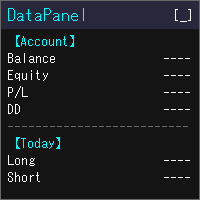
DataPanel は、口座の状態をチャートの上にまとめて表示するEAです。 注文は一切出さず、DLLも使いません。 もともとは、他のEAを動かしている口座の様子をひと目で見たくてClaude Codeで作成しました。 いろいろ追加した結果情報量が多くなりましたが、必要な情報のみ表示できるので必要に応じて設定で変更してください。
見られるもの 残高、有効証拠金、評価損益、証拠金維持率 残高と有効証拠金のドローダウン(最大値と発生した時刻)。入出金とクレジットはドローダウンに含めません 今日・今週・今月・今年・全期間の損益(ロング/ショート別)と成長率 勝率、プロフィットファクター、期待値、連勝・連敗、平均保有時間、スワップや手数料などのコスト マジックナンバー別・通貨ペア別の損益と、取引した通貨ペアの割合 ポジション一覧、損益分岐レート、ロスカットまでの余裕 経済指標(国や重要度を選べます)、当日の祝日、レート一覧、通貨の強弱、市場セッション 同じPCで動いている他のMT5も含めた、リアル口座の損益の合計(他のMT5でもDataPanelを起動している必要があります) 使い勝手 金額は
FREE

チャレンジを潰すのは利益目標ではなく一日の損失。過剰レバレッジの夜、忘れた指値、ギャップ。
PropFirm Shield Essential は最重要ルールを見張る無料ガード — 違反前に口座をロック。
どのチャートにも。全アカウント監視 — 全シンボル、マジック、手動、コピー、他EA。
- 日内損失ガード — 限度とリセット時間を設定。 - ロックダウン — 決済、指値削除、リセットまで新規禁止。 - バッファ — 限度前に作動。 - ウォッチドッグ — ティックなしでも監視。 - ステータス表示 — 净值、日次PnL、下限、リセット。 - 状態永続化。
なぜ無料? 完全な日内損失エンジン。削られたデモではない。
有料版 PropFirm Shield は追加:最大損失(静的+トレーリング)、プリセット、AUTO-SL、利益ロック、PANIC、最小日数、最悪ケース、パネル、プッシュ。
デモでテスト。ルール違反管理ツール、取引システムではない。
FREE

チャレンジ費用 $500。$100,000 のアカウント。悪い夜ひとつで全て終わり。
戦略が悪かったわけではない。04:07、誰も見ていない時にギャップ、忘れた指値注文の約定、1本のローソクが3週間の規律を消した。
PropFirm Shield は眠らないガード。
どのチャートにもアタッチ — 全アカウントを監視:全シンボル、全マジック、手動取引、コピー、他EA。ルールを脅かすものがあれば違反前に行動。
守るもの - DAILY LOSS — あなたのファームのリセット時刻で残高をスナップショット。限度80%のバッファ。 - MAX DRAWDOWN — 静的(FTMO/The5ers/FundedNext)またはトレーリング(Apex/TopStep)。ピークを追跡し緩まない。 - 最悪ケース — 「全SL発動時の損失」を差し引き判定。違反前にトリガー。
見ていない時の動作 - AUTO-SL — ノーガードポジションに自動SL(他EAの取引含む)。 - プロフィットロック — +X%でその日を確定、口座ロック。 - PANICボタン — 1クリックで全決済+ロック。

Prop Risk Guard は、口座のリスク管理ルールを自動的に適用します。1つのチャートに追加するだけで、口座内のすべてのポジションを監視します。設定した上限に達すると、ポジションを決済し、指値・逆指値などの保留中注文を削除して取引をロックします。これにより、1回の大きな損失や制御不能になったEAによって、評価口座や資金提供口座のルールに違反することを防ぎます。 1日の損失上限 パーセンテージ、固定金額、またはその両方で設定できます(より厳しい上限が適用されます)。 1日の開始時点の残高、1日の開始時点の有効証拠金(Equity)、またはその2つのうち高い方を基準に計算します。 毎日のリセット時刻は、サーバー時間に基づいて自由に設定できます。 ロックは次のリセットまで維持され、リセット後は取引が自動的に再開されます。 入金および出金は、1日の損失として計上されません。 最大ドローダウン 固定式: 初期残高を基準に計算します。 トレーリング式: 有効証拠金(Equity)の最高到達点を基準に計算します。 初期残高までのトレーリング: 有効証拠金の上昇に合わせて上限が引き上げられ、初

プロップファームには、づいたにはれになるルールがあります:あなたのは、のでなければなりません。
Apexはをの30-50%に。TopStepも。FTMO 1-Stepは「Best Day」を。FundedNextはにコンシステンシールールをします。をえるとがされます。
はですが、リアルタイムでやるはいません:がの30%までなら、すでに$8,000いでいる、げるは$3,428 — ではありません。くのトレーダーはをけてめてこののをります。
PropFirm Consistencyがあなたにわってします。
- みから vs をリアルタイム - のをドルてでに - Payout Readinessバッジ:++コンシステンシーをで - の60%で() - オプションのCAP_LOCKモード:にポジションをじてアカウントをロック - ルールのプリセット(30%、40%、50%)またはカスタム - を - ターミナルやVPSも - ウォッチドッグタイマー - がじていてもを
のチャートにアタッチするだけ。アカウントを - シンボル、マジックナンバー、、のEAの、コピーされたポジション。

ZeroLogics . トレード管理、リスク管理、資金計画のための基本ツールです。視覚的なライン、TP、RR、ロット数、損益表示、ドラッグ可能なSLおよびTPを備え、さらにトレーリングストップ、自動建値移行(ブレークイーブン)、自動部分決済など、ポジションごとの基本的な自動化機能を搭載しています。 日々のトレードをよりスムーズにすることを目的としたツールであり — プロ向けツールではなく、またそれを目指すものでもありません。英語とスペイン語の2言語に対応しています。
Trade Manager Assistant 包括的ユーザーガイドおよび技術操作マニュアル ZeroLogics • MetaTrader 5 (MQL5) • 公式マニュアル 1. はじめに&アーキテクチャ Trade Manager (TM) は、MetaTrader 5における注文執行、金銭的リスク計算、動的ポジション管理を行うための基本アシスタントです。ベクターグラフィックエンジン CCanvas 上に構築されており、外部フォント、DLLライブラリ、外部画像ファイルを一切必要としないため、発注時の遅延ゼロ

JT360 OrderPanel Pro – Professional Trade Execution and Risk Management for MetaTrader 5 Product Overview JT360 OrderPanel Pro is an interactive trading panel for MetaTrader 5 that combines trade execution, risk calculation, position management, and multiple protection mechanisms within a single interface. The panel is designed for traders who make their own trading decisions and want to apply structured risk rules, controlled order execution, and additional safety mechanisms. In addition to sta

SAYON Trade Copier copies trades between MetaTrader accounts on the same computer or VPS: MT5 → MT5, MT4 → MT4, MT4 → MT5 and MT5 → MT4 .
One single EA for both roles: set it as Master on the account that sends the trades and as Slave on the accounts that copy them. You can switch role from the panel. The MT4 version is FREE. Copying between MT4 and MT5 costs just one license: install this MT5 version on the MT5 terminals and the free MT4 version on the MT4 terminals. Fast and reliable: the copi

ATS Trade Manager is the site foreman of your trades. Plan a trade on the chart with draggable lines and coloured zones, send it with the lot size worked out from your risk, and let the foreman look after it: break-even, trailing stop, up to three take-profit levels with a partial close at each, a daily loss lock and one panel to close groups of trades. It trades only when you press SEND. PLAN A TRADE ON THE CHART Press PLAN and the chart shows the trade before you take it: a blue line and zone
FREE

Know the broker symbol before you evaluate the EA. D7 Symbol Inspector is a free, read-only MetaTrader 5 chart utility. It brings the symbol fields that often decide whether an EA can size, place or protect an order into one panel — without sending or modifying a trade. Who it is for Use it before testing an Expert Advisor on a broker symbol, especially when the symbol has a suffix, unusual contract size, nonstandard volume steps or a spread that changes through the session. What it reads Last a
FREE

Account Center — Trading Journal and Account Dashboard for MetaTrader 5 Your platform shows how much you made or lost. It does not show why. Account Center turns one chart into a full-screen account center and trading journal: the chart hides, a clean panel takes its place, and every closed trade gets the human side next to the numbers — your emotion, your plan, your mistakes and your lesson. WHAT YOU GET Dashboard Equity, balance, floating P/L and today's result with your mood before the sessio

MultiOrder Dock - Dynamic Execution & Risk Manager
MultiOrder Dock is a professional, high-speed execution panel designed for MetaTrader 5 traders who require absolute control over position sizing and active order management directly from their chart.
Whether you trade Forex, Gold, Indices, or Crypto, this tool eliminates manual position calculation errors and enables instant setup execution with custom risk parameters.
================================================== KEY FEATURES ========

Copy Dog AI Trades Copier MT5 Copy Dog AI Trades Copier copies trades between MetaTrader accounts and lets you set the copying rules by talking in your language, or by typing your copying commands and account management on the chart panel in MT4 or MT5. Write or say what you want in plain words, for example: "Copy only gold from now on, half the sender's lot size, and trail each copy 200 points behind the price." Google Gemini turns your words into rules, explains them back to you in plain words
FREE

LocalTimePlus — MT5ローカル時間補正 × カスタムスケール拡張ツール MT5標準の時間軸・価格軸を完全に置き換え、 ローカル時間への自動補正 、 高精度クロスヘア表示 、 直感的なズーム操作 、 透明キャンバスによる独自描画エンジン を搭載した高機能チャート拡張ツールです。 秒足・短期トレード・海外サーバー利用者にとって、 「時間ズレ問題」を根本から解決します。 概要 LocalTimePlus は MT5 のチャート上に透明キャンバスを重ね、 独自の時間スケール・価格スケール・クロスヘアUI を描画するツールです。 MT5標準のスケールを非表示にし、 完全にカスタムスケールへ置き換えることができます。 主な機能 1️⃣ ローカル時間への自動補正(AutoOffset) サーバー時間とローカル時間の差を自動計算 15分単位で丸めて安定した補正を適用 手動オフセット(時間・分)も設定可能 時間ラベル・クロスヘア時刻・日付表示がすべてローカル時間に統一 2️⃣ カスタム時間スケール(下部) 均等間隔の時刻ラベル 秒表示の ON/OFF 日付が変わったタイ
FREE

Order Flow Footprint Workspace is a read-only order-flow and market microstructure workspace for MetaTrader 5.
It transforms the tick data provided by your broker into an interactive session-based footprint view with price-level activity, profiles, historical navigation and diagnostics. The workspace automatically adapts to the information actually available in the broker feed and does not invent trade direction when the source data cannot support it.
MAIN FEATURES
• Footprint candles with S

# Ronin Copier - Tactical Prop Sync
**プロップトレーダーのための完全ローカル・DLL不要・超低遅延コピーツール**
**アーリーアダプター特別価格(数量限定):** - **先着10本:** **$59**(現在のステージ) - **次の10本:** **$99** - **定価:** **$199** *※レビューおよび販売マイルストーン達成ごとに自動で値上げされます。*
---
複数のプロップファーム(FTMO、FundedNext、Alpha Capital等)やプライベートブローカー口座を運用していませんか? **Ronin Copier** は、同一PCまたはWindows VPS上の複数のMT5ターミナル間で、複雑なネットワーク設定、WebRequest、危険な外部DLLを一切使わずにミリ秒レベルの高速トレード同期を実現します。
状態整合(State Reconciliation)アーキテクチャと極薄のタクティカルHUDを搭載し、注文の取りこぼし、実行遅延、証拠金変動によるロット再計算エラーを徹底的に排除しました。

# Ronin Scalp — Tactical Trade Cockpit
**規律あるスキャルパーとプロップトレーダーのための、超薄型タクティカルHUD**
**ローンチ特別価格:$30(先着10本限定)**
---
チャート画面を圧迫する巨大なパネルとは異なり、**Ronin Scalp** は画面端のわずか118ピクセルの極小スペースに常駐します。ミリ秒の遅延が勝敗を分けるゴールド(XAUUSD)や主要通貨のスキャルピング、そして厳格な資金管理が求められるプロップファーム(FTMO、FundedNextなど)の挑戦者のために設計された、超高速執行&資金防衛コックピットです。
---
### 主な機能
1. **自動2%リスク許容 & 推奨ロット計算エンジン** - **待機モード:** 口座残高・有効証拠金に基づいて許容される最大損失額(例: 2%)を自動計算。あらかじめ設定した損切り幅(SL pips)から最適な発注ロットを瞬時に逆算表示します。プレッシャー下での暗算ミスを完全に排除。 - **エントリー中モード:** ポジション保有時はリア

Ronin Shield - 日次損失リミッター&口座ガード(MT5)
決めた損失ラインに達したら、その日のトレードを強制終了します。 プロップファームのチャレンジ中の「あと1回だけ」を、ルールで止めるためのユーティリティです。
1つのチャートに適用するだけで、その口座のすべての銘柄・すべてのポジション(手動トレード、他のEAを含む)を監視します。 銘柄ごとにチャートを開く必要はありません。 外部DLL・Web通信は一切使用しません。UIは英語です。
============================== 監視する3つのライン ============================== 1. 日次損失リミット ブローカーのサーバー時間0時からの損益(確定損益+含み損益)を監視します。 2. 日次利益ロック その日の目標利益に達したら取引を終了し、利益の吐き出しを防ぎます。 3. 総ドローダウン上限 初期残高から固定(Static)、または最高資産に追従(Trailing)から選べます。
いずれも金額(Money)またはパーセント(Percent)

StatsBoard — Account P&L Statistics Board
StatsBoard is a lightweight MT5 indicator that turns your entire trading history into a clear, on-chart statistics dashboard. No equity curve, no clutter — just the numbers that matter, organized by day, week, month, quarter, year, symbol, magic number, and comment.
**Key Features**
- **10 built-in tabs**: Summary, Day, Week, Month, Quarter, Year, Symbol, Magic, Comment, Account - **Full P&L breakdown per period**: lots, min/max lots, trade count, ne

RMT Capital Firewall is a risk guard for MetaTrader 5. It watches daily loss, drawdown, an equity floor, open risk and positions without a stop loss, warns before a limit, and — only if you authorise it — closes the positions in the scope you chose and stays latched until you re-arm. Every decision is recorded as a structured audit line in the Experts journal. The problem it solves A daily-loss or drawdown rule is easy to write down and hard to keep when a position is running against you, or whe

VolPulse Telegram Bridge forwards the alerts of the free VolPulse Volume Profile indicator to Telegram: market-state changes, touches of key levels (POC, VAH, VAL, naked POC) and new entry signals with stop and target. It does not trade. It does not read your positions, balance or account number. Setup (about 2 minutes) Install the free indicator "VolPulse Volume Profile" and attach it to your charts:
https://www.mql5.com/en/market/product/200141 Tools → Options → Expert Advisors → tick "Allow W
FREE

Launch price: 39 USD for the first 10 copies. Then 59 USD, final price 79 USD. Early buyers keep every future update. Trade Panel Sextant for MetaTrader 5 – every trade sized from your risk. You set how much you want to risk, place the stop where the chart says, and Sextant calculates the lot size, sends the order and manages the trade. An account guard with a daily loss limit, a daily target and trade caps keeps a bad day from becoming a bad month. Everything sits in one calm, tabbed panel: TRA

Obiriec Order Panel is a panel shown on the chart for placing and managing orders by hand. It does not open trades on its own.
Features - Shows the current Bid price, Ask price and spread of the symbol you choose. Type the symbol in the panel (the default is XAUUSD). - Places Buy and Sell orders as Market, Limit or Stop orders, with the entry price you enter. - Takes a total lot size and up to five Take Profit levels. Each Take Profit can have its own lot size. If a lot size is left empty, the

TeekTrader OCO Trading Panel TeekTrader OCO Trading Panel is a manual trading and position management utility for MetaTrader 5, designed to make trade execution faster and position management more practical directly from the chart. Key Features OCO Orders — Place linked orders using the One Cancels the Other concept. Take Profit & Stop Loss Preview — Visualize potential Take Profit and Stop Loss levels on the chart before executing a trade. Automated Breakeven — Automatically move Stop Loss to b

Discipline Trader — Smart Trade Panel for MT5 Trade with a plan, not guesswork. Calculate lot sizes by risk %, place trades with predefined SL/TP, manage positions with one click, and enforce daily and basket loss limits. Includes break-even, partial close, trailing stop, a visual risk monitor and trade journal. You stay in control — the panel helps you stay disciplined.
You decide the trade. Discipline Trader helps you size it, protect it and manage it. Whether you trade gold, forex, indices

TrendSync Time Alarm turns your chart into a precise, dependable clock. Set an interval and it alerts you - on screen, by sound, on your phone, or by email - the moment each time block is reached.
Because it runs on a built-in timer instead of waiting for price ticks, it fires on time even in a quiet or illiquid market, when tick-based alerts go silent. It is a lightweight utility with no buffers and no plots, so it adds virtually no load, and it works on any symbol and any timeframe.
KEY FEA
FREE

(New and experimental testing phase) M5S Automation EA is a free utility built to work together with the M5 Sniper Indicator. On its own it does nothing, it simply listens to the signals that M5 Sniper produces and opens the trades for you automatically, so you no longer have to sit and watch the chart to catch every entry.
It reads the entry, stop loss and the three take profit levels straight from the indicator and places the trades exactly as they appear. You can choose to run one position t
FREE

Experience trading without friction. Zentriq Trade Manager is a modern, high-performance trade management utility engineered with a high-DPI canvas interface, anticipatory workflow design, and an integrated Macroeconomic News Filter. Designed for discretionary traders, scalpers, and prop firm traders who demand speed, precision, zero-clutter ergonomics, and automated news event protection. User Manual Get the most out of Zentriq Trade Manager with the complete user manual: Complete User Manual:

TradeMaster Pro V4.18 TradeMasterPro A lightweight chart-management utility that replaces three separate tools with one invisible indicator. ️ PRECISE MOUSE-WHEEL ZOOM (X + Y Axes) Horizontal zoom — smooth, step-by-step bar scaling ( CHART_SCALE 0–5). Fractional sensitivity is accumulated internally, so even a 0.1× multiplier works reliably on any mouse (including free-spin wheels). Vertical zoom — when Scale Fix is active, the wheel zooms the price axis around its center instead of scrolling b
FREE

# MiniBull Guard v1.30
## Never trade without a stop again.
**You open the trade. MiniBull Guard sets the stop, shows the risk and keeps your head clear.**
- **No more naked positions.** Every new trade gets a stop loss within moments, even when you forget, hesitate or trade from your phone. - **A stop the market can breathe around.** Sized from real volatility (ATR) by default, or from a distance you choose. - **Know your loss before it happens.** In money and in percent of your equity, not
FREE

Global Account Risk Manager applies account-level risk rules to a MetaTrader 5 account. It watches every open position and pending order on the account and closes everything when a limit that you define is reached. It does not open trades and it does not generate signals.
It is intended for traders who run several Expert Advisors, or EAs together with manual trades, and want one place to set rules for the whole account instead of configuring each EA separately.
Works on any chart
Attach it t

Công cụ ghi lại tín hiệu giao dịch theo tâm lý [] Công cụ cộng đồng tối ưu để thử nghiệm chiến lược, rèn luyện tâm lý giao dịch và xây dựng khả năng chịu đựng trên thị trường. Giới thiệu sản phẩm:
Đây là một công cụ mô phỏng huấn luyện tâm lý giao dịch, không phải là EA tự động hay chỉ báo kỹ thuật. Đây là công cụ phát lại biểu đồ lịch sử được thiết kế MIỄN PHÍ 100% để giúp cộng đồng giao dịch thực hành tâm lý thị trường, kỷ luật và khả năng kiểm soát cảm xúc. Nếu mục tiêu chính của bạn là kiể

Non-trading MT5 tool: draws published projection lines for a limited list of instruments. Recommended M30. --- iSpectrum is a non-trading analytical tool for MetaTrader 5. It draws projection lines and background shading on the chart of the current symbol. The lines are calculated by the author with specialised timing-analysis software and are loaded from the author's data server over a secure encrypted connection. The program does not open, close or modify orders and does not manage posit

AAS Tester is a manual market replay and trading practice utility for MetaTrader 5. The program creates a separate replay chart and sequentially replays historical data from the currently connected broker. You can study past price action as if the market were moving in real time, without seeing future prices. AAS Tester is designed for manual backtesting. All trades inside the replay environment are virtual and do not affect your real trading account. MAIN FEATURES • Historical broker tick repla

FxStrike999 OA bot is a universal trading robot and trader toolkit for MetaTrader 5. It works on any symbol and can be used in three ways: as a position accelerator for small deposits, as a trader panel that manages the trades you open, and as a fully automated robot driven by signals from the CashFlow Assistant and PulseTrail Pro indicators.
It is not a fixed black box. It is a constructor: you choose how aggressive it is, how it adds to positions, and how it protects profit. The robot execut

OneClickTrading – Manual Trading Panel for MetaTrader 5 OneClickTrading is a manual trading and risk-management panel for MetaTrader 5, designed for traders who want fast order execution, precise position sizing and flexible trade management directly from the chart. The tool does not trade automatically. Every trade and management action is triggered manually by the user. Key Features Manual BUY / SELL execution BUY LIMIT / SELL LIMIT BUY STOP / SELL STOP Automatic lot-size calculation based on

Trade Exit Manager — order entry and staged position management Trade Exit Manager is a MetaTrader 5 trading utility with two chart buttons. It places two user-configured order groups and follows a predefined exit plan: five partial-close levels, break-even stop adjustment, a hidden stop and trailing. The user chooses directions, volumes, order counts and distances. The utility does not analyze the market or generate entry signals. Features Two order groups. Configure market direction, pending t

TradeArchitect Grid Manager is a chart-based manual trading utility for MetaTrader 5. It combines visual trade planning, risk-based position sizing, market and pending order execution, position management, and optional martingale or anti-martingale progression.
The utility does not generate trading signals and does not decide when to buy or sell. The trader chooses the direction, Entry, Stop Loss and Take Profit. GridPlan Trade Manager performs the calculations, checks the plan and manages th

Alpha TradeCommander Pro with Auto Risk Lot Calculator MT5
Modern Dark GUI Panel with Auto Risk % Calculation, 1-Click Execution & Auto Break-Even
### Overview Alpha TradeCommander Pro MT5 is an indispensable On-Chart Trading Assistant designed for professional day traders, prop firm challenge candidates, and high-frequency scalpers.
In fast-paced markets, taking 15 seconds to calculate your position size can cost you dozens of pips. Alpha TradeCommander Pro automates professional mathematic
FREE

WatchListPro — Watch list and Linker for MetaTrader 5 Developer / website: Tradingvyuga.com
WatchListPro is a MetaTrader 5 Expert Advisor: a ticker watchlist with a chart linker. Build working instrument sheets, switch the symbol on several charts with one click, save templates, and trade from a single hub.
It uses your broker's symbols (forex, crypto, metals, stocks, and more). Instrument selection is manual. Several open charts are recommended. It does not work in the Strategy Tester.
Featu
FREE

# Omega — Session-Cycle Visualization & Analytics for MT5
**Omega** turns your chart into a structured map of the trading day. It automatically divides every session into 9 recurring time-cycles, draws them as color-coded rectangles, overlays a live Fibonacci fan, and silently logs every box, breakout, and structural event to a local SQLite database you can query, chart, or build a dashboard on top of — all with zero manual input.
This is a **visualization and analytics tool** , not a signal

Omni Signal Copier – Telegram, Discord, Slack and TradingView signals into MetaTrader Omni Signal Copier reads trading signals from Telegram, Discord, Slack, TradingView alerts (via ntfy), text files and manual input , understands them with a multi-language parser and trades them on your MetaTrader account – with multi-TP, break-even, trailing, a prop-firm guard and a live dashboard with 8 tabs. Everything runs inside the Expert Advisor: no extra program, no DLL, no external server of ours . The

SL TP Manager is a compact on-chart panel that sets the stop loss or take profit of all open trades on a symbol in one click, or moves every stop loss to break-even. It is designed for traders who scale in with several positions and do not want to edit each trade one by one.
HOW IT WORKS - Type a price in the SL box and click Set SL: the stop loss is applied to every open trade on the chart's symbol. - Type a price in the TP box and click Set TP: the take profit is applied the same way. - Clic
FREE

Funded Account Guard monitors the whole trading account and enforces the risk limits you set. When a limit is reached, it closes all positions, deletes pending orders and blocks new entries until the limit period ends. It is intended for funded and evaluation accounts with a daily loss limit and a maximum drawdown limit, and for any trader who wants a fixed daily stop.
The utility does not open trades, does not give signals and does not move stop loss or take profit levels.
Rules - Daily loss
FREE

️ The Must-Have Account Guard for Prop Firm Algo Traders Running third-party EAs on your funded accounts? Stop worrying about breaching firm rules. Most EAs bought from the MQL5 Market only focus on their own strategy—they know nothing about prop firm restrictions. Prop Firm Rules Manager MT5 bridges that gap completely by serving as an account-level management layer: Automated News Protection: Pauses trading and unloads EA activity before high-impact news, then automatically resumes after the
FREE
MetaTraderマーケットはトレーダーのための自動売買ロボットやテクニカル指標を備えており、 ターミナルから直接利用することができます。
MQL5.community支払いシステムはMetaTraderサービス上のトランザクションのためにMQL5.comサイトに登録したすべてのユーザーに利用可能です。WebMoney、PayPal または銀行カードを使っての入金や出金が可能です。

取引の機会を逃しています。
- 無料取引アプリ
- 8千を超えるシグナルをコピー
- 金融ニュースで金融マーケットを探索