GTM EA Bot Studio Drag and Drop EA Builder

GTM EA Bot Studio
MetaTrader 5用ドラッグ&ドロップ式エキスパートアドバイザービルダー · v1.42

GTM EA Bot Studioは、MetaTrader 5の中で動作するロボットビルダーです。チャート上のワークスペースに色付きのブロックをドラッグして独自のエキスパートアドバイザーを作成し、そのチャートでテストしてライブ稼働させます。コード不要、MetaEditor不要、コンパイル不要です。

ユーザーガイド:ステップバイステップの完全なガイド(英語およびシンハラ語のPDF)は、私のブログ記事にあります:

使い方 - 3つのステップ

  1. 作成。 WHENブロック(例:"WHEN a new candle opens")をドラッグし、フィルターを追加し、"EMA 9 crosses above EMA 21"のような条件を持つIFと、BUYまたはSELLを追加します。任意の数値をクリックすると新しい値を入力できます。
  2. テスト。 Testを押すと、ボットが過去のローソク足で実行され、すべての取引がチャート上に描画されます - エントリー矢印、緑の利益目標ゾーン、赤のストップゾーン、そして結果。カードには取引数、勝率、プロフィットファクター、純損益、最大ドローダウンが表示されます。
  3. ライブ稼働。 Run liveを押すと、ボットは通常のEAと同様にそのチャートで取引を行い、再起動後も稼働を続けます。ライブカードには、ボットが何をしているかが正確に表示されます。

主な機能

9グループ・68ブロック イベント、フィルター、ロジック、11種類のインジケーター(MA, RSI, MACD, Stochastic, Bollinger, ATR, CCI, ADX, Parabolic SAR, Momentum, Williams %R)、ローソク足パターン、価格と計算、成行注文と待機注文、ポジション管理、安全制限、変数とアラート。検索ボックスで任意のブロックを名前で検索できます。
インジケーターごとに個別の時間足 1つのボットでH1のトレンドとM5のエントリーを組み合わせられます。WHENブロックは、任意の時間足のローソク足ごとに1回、指定時刻、毎ティック、開始時、または取引の決済時に実行できます。
正直な結果を示すクイックテスト ローソク足ごとのスプレッド、ギャップはギャップ価格で約定、ブレークイーブン/トレーリング/部分決済はローソク足の内部でチェック、ドローダウンは各ローソク足の最悪地点で計測、1ロットあたりの手数料。
Rise / Fallスタイルのティックボット 最終桁の偶数/奇数/オーバー/アンダー、上昇または下落ティックの連続、そして"CLOSE trades after n ticks" - すぐに使えるRise / Fallテンプレート付き。
ライブカード B / Sマークと決済済み各取引の損益を表示するティックチャート、マウスホイールでのズーム、ドラッグで過去のティックを遡って表示、残高/有効証拠金の推移タブ、そしてボット自身の成績。
チャート上のSL / TPボックス 保有中のすべての取引にボックスが表示されます。赤いボックスは最初のストップロスの位置に留まり、オレンジの線はブレークイーブンまたはトレーリングによってストップが移動した位置を示します。決済済み取引のボックスは表示/非表示を切り替えられます。
安全機能を内蔵 ストップロスに基づくRisk %ロット計算、日次損失/利益ストップ、1日の最大取引数、有効証拠金ストップ、最大ロット。すべてのBUY / SELLは、銘柄の最小ロットから始まります。
保存、共有、Strategy Tester ボットをライブラリに保存し、オープンまたはロック付きで共有できます(他のユーザーはテストと稼働はできますが、あなたのルールを見ることはできません)。保存したボットはMT5のStrategy Testerでテストできます。
7つのすぐに使えるテンプレート MA cross + RSI、RSI reversal、session breakout、Bollinger bounce、MACD trend、Stochastic pullback、Rise / Fall ticks - 学習や改変の出発点となります。
多言語対応とオプションのAIヘルパー デフォルトは英語です。ご自身のAIキーを使うと、Studioはインターフェース全体をあなたの言語に翻訳し、ヘルプチャットで質問に答えます - 依頼したときのみ。モデルはリストから選ぶか、キーから自動検出させることができます。

できないこと

  • これはロボットを作成するためのツールであり、すぐに稼げる完成済みの戦略ではありません。結果は、作成したルール、銘柄、ブローカー、市場によって異なります。
  • クイックテストはローソク足から算出する高速な目安です。正確な数値にはMT5のStrategy Testerをご利用ください。
  • MT5の取引は固定ペイアウト型の契約ではありません。ティックボットの損益は、価格の変動幅にロット数を掛けたもので決まります。
  • AIヘルパーにはご自身のAPIキーが必要で、使用は任意です。

はじめに

  1. GTM EA Bot Studioをチャートに適用し、Algo Tradingをオンにします。
  2. Libraryからテンプレートを開くか、最初のWHENブロックをドラッグします。
  3. Testを押し、調整し、再度テストします。デモ口座で試してから、Run liveを押してください。

全68ブロック

When WHEN a new [timeframe] candle opens, ON every price tick, AT hh:mm every day, WHEN the bot starts, WHEN a trade of this bot closes
Filters ONLY between hh:mm and hh:mm, ONLY on Mon-Fri / Mon-Thu / Tue-Thu / Mon-Sat / every day, ONLY if spread <= n pips, ONLY if open trades < n, ONLY if trades today < n, ONLY if n candles passed since the last trade, ONLY if no BUY / SELL / trade is open, ONLY IF (any question)
Logic IF ..., IF ... ELSE ..., a > < >= <= = b, a crosses above / below b, AND, OR, NOT, candle [n] is bullish / bearish / a doji, bullish engulfing, bearish engulfing, hammer, shooting star, inside bar, outside bar at [n], value is rising / falling for n candles, a BUY / SELL / trade is open, time is between hh:mm and hh:mm, last digit of the price is even / odd / over / under / equal to n, the last n ticks all went up / down
Indicators Moving average (SMA, EMA, SMMA, LWMA; close, open, high, low, median, typical), RSI, MACD (main, signal, histogram), Stochastic (%K, %D), Bollinger Bands (upper, middle, lower), ATR, CCI, ADX (ADX, +DI, -DI), Parabolic SAR, Momentum, Williams %R, highest high / lowest low of n candles
Price & math a number you type, close / open / high / low of candle [n], Bid, Ask, spread (pips), n pips, a + - x / b, candle body, range, upper wick, lower wick, balance, equity, open profit, today's profit, last trade profit, open trades, hour, minute, day of week, variable, last digit of Bid / Ask
Trade BUY / SELL - lots or risk %, SL none / pips / x ATR, TP none / pips / x R / x ATR, BUY LIMIT, SELL LIMIT, BUY STOP, SELL STOP - distance, lots, SL, TP, expiry, CLOSE all / BUY / SELL / profitable / losing trades, DELETE all pending orders
Manage BREAKEVEN at n pips / R profit, lock n pips, TRAIL the stop n pips / x ATR behind, after n pips profit, TAKE n % off at n R profit, CLOSE trades older than n candles, CLOSE trades after n ticks
Safety STOP the day at loss n % or profit n % (close trades / keep trades), MAX n trades per day, STOP the bot if equity falls n % below the start, MAX lot size n
Tools SET variable to value, CHANGE variable by value, ALERT text (popup / popup + phone / sound only), NOTE text (written to the Experts log), STOP new trades for today

入力パラメーター

Bot file to run in the Strategy Tester 保存済みボットのファイル名。空欄 = 下のテンプレート。
Template used when no bot file is given 7つのテンプレートのいずれか。
Points in one pip 0 = 自動。
Max slippage (points) 注文で許容する最大の価格変動。
Commission per 1 lot クイックテストで使用(新規 + 決済)。
Sounds インターフェースと取引のサウンド。
AI API key 任意 - ヘルプチャットと翻訳用。
AI model 自動、リストのモデル、またはCustom。
Custom model name Customを選択した場合に使用。
AI API address 空欄 = キーまたはモデルから自動検出。

ユーザーガイド:ステップバイステップの完全なガイド(英語およびシンハラ語のPDF)は、私のブログ記事にあります:

レバレッジ商品の取引には高いリスクが伴います。過去の結果およびテスト結果は、将来の結果を保証するものではありません。すべてのボットはまずデモ口座でお試しください。

おすすめのプロダクト
Risk Panel - Click to Trade Risk Panel - Click to Trade is a manual trade execution utility for MetaTrader 5. It provides a chart-based interface for preparing and placing buy and sell orders with risk-based position sizing. Features Adjustable risk percentage based on account equity. ATR-based stop-loss calculation. Take-profit calculation using a configurable risk-to-reward ratio. Buy and Sell trade controls. Order placement through a dedicated trade button. Spread limit and trade deviation se
AI QUANT SYSTEM EA — Institutional Neural Engine (v52.0) Fully Automatic Trading EA Please Note:- First that this is an EXPERT ADVISOR, not a Utility. However, due to certain restrictions, I have to publish this  EXPERT ADVISOR  under the Utilities category.  We are  Provided  including a FREE OpenAI API key with this product, so you do not need to purchase AI API KEYS one separately, With Lifetime FREE Upgardes in Future. The AI Quant System EA is a next-generation, high-frequency quantitative
DD Guardian Bot — User Guide Requirements MetaTrader 5 (any broker) A Telegram account Step 1 — Create your Telegram Bot Open Telegram and search for @BotFather Send /newbot and follow the prompts to set a name and username BotFather will reply with a Bot Token — copy and save it Send any message to your new bot (e.g. /start ) so it can detect your Chat ID Open the following URL in a browser to find your Chat ID: https://api.telegram.org/bot&lt ;YOUR_TOKEN>/getUpdates Look for "chat":{"id": 12
TradesManger
Ali Abdalrasool Ai-sayyd Sobai
Ultimate Manager is the ultimate Expert Advisor (EA) for MetaTrader5, empowering traders with seamless control over every aspect of their trades. This powerful tool manages lot sizes, stop losses, trailing stops, trade durations, and trailing activation thresholds with precision. Featuring intuitive buttons, you can execute two trades simultaneously, close all positions, close buys only, close sells only, or close profitable trades in an instant. Designed for efficiency and risk management, Ulti
Smart Bulk Order Closer
Muhammad Hassan Muhammad Ahmad Atiyah
Smart Bulk Order Closer MT5 Script – PnL-Based Trade Closer Overview Smart Bulk Order Closer is a script for MetaTrader 5 that closes open positions based on their current floating profit or loss in account currency. The script executes once per attachment and only closes trades that meet the user-defined PnL conditions. It does not run in the background, does not modify Stop Loss or Take Profit, and does not open trades. Core Functionality The script evaluates each position individually and ap
Smart SL Scalp Assistant ― プロップファーム挑戦者のための半自動リスク管理EA(MT5) SLラインを置くだけで、口座残高とリスク%からロットを自動計算。ワンクリックでエントリーし、損失を「設定した金額以上に出さない」ことに特化したスキャルピング・デイトレード向けの半自動トレードパネルです。売買の判断はすべてトレーダー自身が行います。 プロップファームのチャレンジに(FTMO・Fintokei・FundedNextなど) ・プロップ監視(表示のみ・初期ON):STATUSパネルに「本日の損失」「全体の損失」を表示し、1日の損失上限(デイリードローダウン)・全体の損失上限(最大ドローダウン)までの残り金額をリアルタイムで確認できます ・残りが少なくなると金色、上限に達すると赤で表示 ・初期金額・1日の上限%・全体の上限%はパラメータで設定(初期値:5%/10%) ・合計リスク上限:全ポジションのSL到達時の損失合計が、設定したリスク%を超えないようロットを自動で調整。最小ロットでも超える場合はエントリーを止めます ※表示と計算の補助ツールです。エントリ
Account Guard Daily Limit   is the free version of Account Guard. It watches the whole account and enforces two rules: a daily loss limit and a maximum drawdown. It opens no trades of its own. It works for manual trades and for any EA on the account. The panel shows the state, the day result against the limit, and how much room is left above the drawdown floor. The two rules Daily loss limit   in percent of the initial balance. When it is hit, every position and pending order is closed. Any trad
FREE
Quick Order Closer
Danny Giovanni Romero Lozano
Demo Version Here : https://www.mql5.com/en/market/product/170598 The fastest on the entire platform, try it with 50 open trades or more This Expert Advisor provides a fast and intuitive way to manage and close open trading positions directly from the chart using a clean button-based interface. With a single click, traders can instantly close positions based on different conditions, improving execution speed and overall trade management efficiency. Key Features Close all open positions instant
Risk Controller Expert Advisorは、アカウントのトレーディングアドバイザーの総リスクを管理できるようにするプログラムです。 このプログラムを使用すると、すべてのアドバイザーのアカウントで許可される最大のリスクを制御できます。 たとえば、最大ドローダウンの30%のリスクを設定します。つまり、株式取引ロボットが30%のリスクを超えると、リスクコントローラーはアドバイザーのすべてのポジションを閉じ、開いているすべてのチャートを閉じることもできます。顧問はさらに働くことから。 平均化ロボットをマーチンゲールと交換し、不可抗力やその他の予期しない状況が発生した場合にロボットからの最大損失を制限したい場合は、「安らかな睡眠」のためにエキスパートアドバイザーが必要になります。市場の逆転。 Советник Risk Controller, очень важная и по моему мнению необходимая программа для каждого трейдера который торгует роботами. 制御は、アカウントの最大損失に相当す
Introducing the "Auto Timed Close Operations", a useful utility for MetaTrader 5 traders! This utility has been developed to help traders of all levels automatically close their open positions at the exact moment they desire. With the "Auto Timed Close Operations", you gain the required control over your trades and can avoid unwanted surprises at the end of the day or at any other predefined time. We know how important it is to protect your profits and limit your losses, and that's exactly what
GS trade report
Aleksander Gladkov
5 (1)
3 in 1 : Report + monitoring + sending messages (Telegram, ...) to optimize trading and use of advisors. Monitoring: Panel on the chart Sending messages to Telegram Sending messages to Email Sending Notifications Sending pop-up messages Sound notifications when the established Profit/Loss levels are exceeded Monitoring is activated by pressing the Start button. Profit for the period by currency pairs, hours and Magic number for the current account. Forms four tables: by symbols, by magic number
Introducing the Precision Data Extractor: EMA , an MQL5 utility crafted for traders, analysts and quants who need accurate historical data to build robust datasets. This tool lets you selectively pull historical price and indicator data— Exponential Moving Average ( EMA )—from multiple applied prices , timeframes , and periods , then stores it in a CSV format, making it easy to feed into machine learning models, trading algorithms, or in-depth market analyses . Compatible with Forex, Stocks, and
Operative Management Pro – Advanced Trading Utility Operative Management Pro is a smart visual tool for traders who want to analyze and simulate their trades before placing them on the market. This panel displays in real-time the most important parameters of the current symbol: Current price and minimum lot size Required margin Spread cost in USD and pips Take Profit and Stop Loss value in USD Automatic risk and reward calculation With just a click on the chart, you can simulate BUY or SELL t
OrderManager をご紹介:MT5用の革新的なユーティリティ 新しく設計されたOrder Managerユーティリティを使用して、MetaTrader 5での取引をプロフェッショナルなものにしましょう。シンプルさと使いやすさに焦点を当てたこのユーティリティは、各取引に関連するリスクを簡単に定義し、視覚化できます。これにより、情報に基づいた意思決定が可能になり、取引戦略を最適化できます。OrderManagerに関する詳細は、マニュアルをご参照ください。 [ マニュアル ] [ MT4 バージョン ] [ Telegram チャンネル ]  New: [ Telegram To MT5 ] 主な特長: リスク管理:取引のリスクを素早く簡単に定義し、より良い意思決定を行い、取引パフォーマンスを向上させます。 視覚表現:オープンなポジションとそれに関連するリスクをグラフィカルに表示し、明瞭かつ簡潔な理解が可能です。 注文変更:数回のクリックで注文を簡単に変更またはクローズし、取引プロセスを効率化し、貴重な時間を節約します。 手のひらの上の最新ニュース:ボタン一つで最新の市場ニュース
A script for quick reversing positions and/or orders. If you need to reverse a position with the same volume, open an opposite position of a different volume or change the type of existing orders (for example, Buy Limit -> Sell Limit, Buy Stop -> Sell Limit, etc.) with the same or different take profit/stop loss, this script will make all the routine for you! Allow AutoTrading before running the script. Usage: Run the script on a chart. Input Parameters: Language of messages displayed (EN, RU, D
Introducing the  Precision Data Extractor: SMMA , an MQL5 utility crafted for traders, analysts and quants who need accurate historical data to build robust datasets. This tool lets you selectively pull historical price and indicator data—  Smoothed Moving Average  ( SMMA )—from  multiple applied prices, timeframes, and  periods , then stores it in a  CSV  format, making it easy to feed into  machine learning models, trading algorithms , or  in-depth market analyses . Compatible with  Forex ,  S
This indicator sends a message (notification), an email, and plays a custom sound when a Limit (Buy/Sell) or Limit Stop (Buy/Sell) or Take Profit, Stop Loss, Stop Out is executed. A user can change the sound file name, and select if they receive notifications/emails. It runs as an indicator, and only one indicator is locked (used) by a user account/login. Parameters soundFile - sound file Save your file at the terminal folder, for example: " C:\Program Files\MetaTrader 5\Sounds\Order Executed.
1つのチャートで、完全コントロール。 チャートごとにオブジェクト、色、設定を個別に管理して時間を無駄にするのはもうやめましょう。Chart Sync Manager なら、1つのパネルと少数のショートカットだけで、すべての MetaTrader チャートを即座に同期、コピー、操作できます。 1回描けば、どこでも更新。ワンクリックでチャートを開閉。シンボル別のオブジェクト管理で作業スペースをすっきり保てます。スプレッド表示、カウントダウンタイマー、ローソク足終了アラートで、大事な情報を見逃しません。 時間を節約し、ミスを減らし、よりスマートに取引しましょう。 Chart Sync Manager Installation & Inputs Guide MT4版  https://www.mql5.com/en/market/product/148491 MT5版  https://www.mql5.com/en/market/product/148492 主な機能:   オブジェクト - オブジェクトを1回描くだけで、他のチャートにリアルタイムで同期されます。トレンドライン、水平線、垂直
EQUITY DRAWDOWN MONITOR   This is a simple mt5 advisor that monitors the drawdon levels Features: Easy to use Useful for money managers How to Use  Load the EA once a single chart Type the maximum drawdown desired in inputs Leave the EA alone and never close that chart The EA monitors all trades and magic numbers in your account. Input Parameter Drawdown Percent:   Maximum drawdown in percentage terms allowable in the account. When the drawdown level is surpassed, the EA will close all trades
Chart Connect
Eliel Do Rosario Batista
This EA does not perform trading operations.       It's a       auxiliary visual tool       for graphics synchronization. The “there are no trading operations” error in the validator is expected and intentional. CHARTCONNECT – Chart Synchronizer (Version 1.19) Connect all your charts to the same symbol with just one click. What is CHARTCONNECT? ChartConnect   is a lightweight and efficient tool designed to   automatically synchronize the ticker symbol   of all open charts in MetaTrader 5
ProBridger
Marius Ovidiu Sunzuiana
How Traders and Analysts Can Use the Data Export Bridge to Improve Their Analytics The MQL Data Export Bridge unlocks a new level of analytical power by transforming MetaTrader into a real‑time data provider for any external research environment. Here are the most impactful ways different users can apply the bridge to enhance their trading performance. Build Predictive Models with Machine Learning Who benefits: Quantitative traders, data scientists, algorithm developers How it helps: Export t
It is a utility that posts customized messages on Telegram based on account trading activity. Once the utility is on the chart, with each new position opened from the same chart symbol the utility is added, a customized message will be sent to the Telegram group defined in the input parameters. The utility will post to the Telegram group if a new position is opened and if it is the same symbol as the chart the utility is running on. If you are using an Expert Advisor for Buy and Sell and want to
RR Gestion
Wilson Eduardo Loor Arguello
絶対的な精度、スピード、視覚的コントロールでトレードを。 RR Gestion V4.0は、TradingViewの流れるような視覚的注文体験をMT5チャートに直接もたらす、MetaTrader 5向けの究極のリスク・リワード・パネルです。 主な機能: 完全視覚化されたドラッグ&ドロップUI: リスク(赤)とリワード(緑)のボックスをチャート上で直接操作。エントリー、SL、TPのラインをドラッグするだけで、ロットサイズがリアルタイムで自動計算されます。 移動・最小化可能なパネル: ヘッダーをドラッグして移動。 _ をクリックするとメインボディが隠れ、「Quick Trade」行のみが表示されます。 スマートなBUY/SELL切り替え: ロングとショートのシナリオをシームレスに切り替え。 ️ コントロールとパラメータ: 注文タイプ: Market(成行)、Stop(逆指値)、Limit(指値)。スマートバリデーション機能付き。 リスクサイズモード: $(固定金額)、Lot(固定ロット)、%(口座残高パーセント)。 Stop Lossモード: 「価格 (Precio)」と「Pip
The utility is designed to send signals from MT4 to Telegram. It has several unique features, allowing not only the sending of trade signals but also the following functionalities: Send messages directly from the terminal to Telegram Send emojis along with custom text Send text and images from Telegram All of these features enable users to manage a signal channel while focusing on trading and finding quality signals. Customizable Signal Messages You can fully customize the signal message: Specif
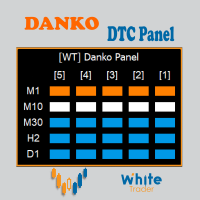
Do not buy before seeing the Danko Trend Color product, as this panel is a way to view a summary of this indicator on various timeframes. The Danko DTC Panel utility allows you to look at the trend in up to 5 timeframes. When clicking on the timeframe texts, a new window will open with the indicator plotted on the screen so you can see the complete chart. The width of the panel, with the amount of candles you want to see, is customizable, see the images below. Ao clicar nos textos dos timeframe
Stale Pending Order Sweeper
AL MOOSAWI ABDULLAH JAFFER BAQER
FORGOTTEN PENDING ORDERS ARE TRADES YOU NEVER MEANT TO TAKE - THIS UTILITY CLEARS THEM AWAY Stale Pending Order Sweeper is an order-housekeeping utility for MetaTrader 5. It never opens a trade and never touches an open position. It watches the limit, stop and stop-limit orders you choose and deletes the ones that have gone stale: too old, too far from the current price, still waiting when the Friday cutoff arrives, or left behind with no open position of their own. Try it free before you decide
口座の各 EA が本当はいくら稼いでいるかが分かります。Halberd Portfolio Monitor は口座の取引履歴をマジック番号ごとに分け、戦略ごとに取引数、勝率、プロフィットファクター、純損益、ドローダウン、保有ポジションと健康状態を表示します。読み取り専用で、取引は一切しません。 1つの口座で複数の EA を動かすと、MetaTrader に表示される残高は全部の合計だけです。静かに負け続けている戦略が、勝っている戦略の陰に隠れてしまうことがあります。Halberd Portfolio Monitor は口座の履歴を読み、EA ごとに1行ずつ並べます。どの EA が口座を支えていて、どの EA が崩れ始めているかが分かります。 このプログラムは注文の発注・変更・決済を行いません。ご自分の口座の履歴と保有ポジションを読むだけです。データがターミナルの外に出ることはありません。 戦略ごとに表示するもの 取引数、勝率、プロフィットファクター。 純損益、最大ドローダウン、その戦略の最高値からの現在のドローダウン(決済済みの取引、口座通貨)。 直近の期間(既定は30日)の損益。 保
Trailing Stop Fast  Trailing Stop Fast EA locks trade profit once trade moves in profit by certain points(eg 100 points) by moving the Stop Loss in direction of trade. There are three inputs in EA to be provided by user to EA  TrailingStart  this input used as activator when trade moved 100 points towards profit, this EA will start shifting your stop loss towards profit. TrailingStop  input defines what should be the distance of stop loss from current market price once TrailingStart activated
BalanceGuard
Chukwuemeka Kingsley Anyanwu
Take full control of your trading with the BalanceGuard Expert Advisor. This smart risk-management tool continuously tracks your account equity and activates a protective stop once your predefined drawdown limit is reached—so you never risk more than you’re comfortable with. Featuring adjustable drawdown settings and a clean, intuitive dashboard that displays essential account statistics, BalanceGuard empowers you to trade confidently while protecting your capital.
Forex Unlimited ツールを発見 – MT4 または MT5 用の究極のポジション管理ツール トレードを次のレベルに引き上げる準備はできていますか?Forex Unlimited ツールを使用すれば、リスクの手動計算や資本配分の不安を解消できます。私たちは、使いやすく高度なポジション管理ツールを開発し、 2つのバージョン を用意しました: MetaTrader 4 用と MetaTrader 5 用です。購入時には、MT4 または MT5 どちらの取引プラットフォームを使用するか確認し、適切なバージョンを選択してツールのすべての機能を最大限に活用してください。 Forex Unlimitedツールのパワー: オーダーを完全にコントロール 3つのオーダータイプから選択できます: リミットオーダー 、 ストップオーダー 、または マーケットエグゼキューション 。 リミットオーダー : 現在の市場価格より低い価格でオーダーを設定します。 ストップオーダー : あらかじめ決めた価格でオーダーを有効にします。 マーケットエグゼキューション : 現在の市場価格で即時に実行します。
このプロダクトを購入した人は以下も購入しています
Trade Assistant MT5
Evgeniy Kravchenko
4.43 (216)
取引 ごとのリスクの 計算、新規注文 の 簡単 な 設置、部分的 な 決済機能 を 持 つ 注文管理、 7 種類 のトレーリングストップなど 、便利 な 機能 を 備 えています 。 追加の資料と説明書 インストール手順   -   アプリケーションの手順   ライン機能 チャート上にオープニングライン、ストップロス、テイクプロフィットを表示します。この機能により、新規注文を簡単に設定することができ、注文を出す前にその特徴を確認することができます。   リスク計算 リスク計算機能は、設定されたリスクとストップロス注文のサイズを考慮して、新規注文のボリュームを計算します。ストップロスの大きさを自由に設定できると同時に、設定したリスクを守ることができます。 Lot calc ボタン - リスク 計算 を 有効 / 無効 にします 。 Risk フィールドでは 、必要 なリスクの 値 を 0 から 100 までのパーセンテージまたは 預金通貨 で 設定 します 。 設定」 タブで 、 リスク 計算 の 種類 を 選択 します :「 $ 通貨」、「 % 残高」、「 % エクイティ 」、「
Farmed Hedge Yield Farming | All Markets (Manual - Hybrid - Semi/Automated EA) VERIFIED TRADING RESULTS - Farmed Hedge Yield Axi Copy:  https://www.mql5.com/en/signals/2356376 - Farmed Hedge Yield Exn Copy:   https://www.mql5.com/en/signals/2356404 - Farmed Hedge Yield V Copy:  https://www.mql5.com/en/signals/2357156 IMPORTANT NOTICE: FarmedHedge is a MANUAL-FOCUSED TRADING UTILITY ,not a fully automated EA. Results shown on this Signal include manual trades and overall strategic management.
Telegram to MT5 Multi-Channel Copier   は、 Telegram と Discord チャンネルのトレードシグナルを MetaTrader 5 へ自動コピーします。ボット不要、ブラウザ拡張不要、手動コピー不要。Telegram や Discord にシグナルが届くと、EA が数秒であなたのターミナルに注文を出します。 さらに、チャンネルをコピーする前に、内蔵バックテスターでそのチャンネルがあなたの口座でどう動いたかを確認できます。 製品は 2 つのコンポーネントで構成されます:Telegram チャンネルを監視する Windows アプリと、MT5 ターミナルでシグナルを執行する本 EA です。MT4 版もあります   こちら . 購入前にお試しください:   アプリは無料でダウンロードできます。ご自身のチャンネルを接続し、各シグナルがどのように読み取られるかをご確認ください。Backtest タブと実際の取引には、購入またはレンタルした EA が必要です。このページの無料デモはストラテジーテスターでのみ動作し、テスターでは Telegram と D
EA Overfitter
Stephen J Martret
5 (4)
That backtest looks great. But will it still be making money tomorrow, next week, next month? EA Overfitter re-runs your EA on 100 price histories it has never seen. One score tells you if the edge is real. A backtest tells you what an EA did on one price history — the one that happened to occur. What you cannot tell from it is how much of that result was the strategy and how much was the particular path. EA Overfitter answers that. It builds up to 100 synthetic price histories your EA has n
TradePanel MT5
Alfiya Fazylova
4.89 (174)
Trade Panelは多機能なトレーディングアシスタントです。アプリには手動取引用の50以上のトレーディング機能が搭載されており、ほとんどの取引作業を自動化することができます。 アプリの説明書: https://www.mql5.com/en/blogs/post/756482 デモ口座用アプリの試用版: https://www.mql5.com/en/blogs/post/750865 アプリのインストール方法: https://www.mql5.com/en/blogs/post/756239 アプリをビジュアルモードでテストする方法: https://www.mql5.com/en/blogs/post/770277 VPSのMetaTraderにアプリをインストールする方法: https://www.mql5.com/en/blogs/post/770190 取引。 ワンクリックで取引操作を行うことができます: リスクを自動計算して指値注文やポジションを開く。 複数の注文やポジションをワンクリックで開く。 注文のグリッドを開く。 保留中の注文やポジションをグループごとに閉じる
News Trade EA MT5
Konstantin Kulikov
4.55 (11)
僕自身が数年間使っている便利なロボットをご紹介します。半自動モードでも完全自動モードでもお使いいただけます。 >>> Chat <<< 当プログラムは経済指標カレンダーで発表されるニュースをもとにした取引の柔軟な設定が可能です。戦略テスターでは確認不可です。実際の取引のみです。 最新の設定アーカイブをダウンロードしてください: https://www.mql5.com/en/blogs/post/747929 シグナルモニタリング: https://www.mql5.com/en/signals/author/test-standart 当該エキスパート・アドバイザーのためのカスタマイズ設定セットを作る場合は、ブログの全パラメータの説明を参照してください :   https://www.mql5.com/en/blogs/post/748545 。 基本的なデフォルト設定について 一つのチャートからGBPとの通貨ペア(GBPUSD、EURGBP、GBPJPY、GBPCAD、GBPAUD、GBPCHF)で取引をします。GBPは最もボラティリティの高い通貨のため、取引が成功するチ
Power Candles Strategy Scanner:自己最適化するマルチシンボル・セットアップファインダー わずかな動きのたびに鳴るスキャナーは、やがて無視されるようになります。慌ただしいローソク足の確定ひとつでアラートが次々と届き、本当にトレードしたい唯一のセットアップがノイズに埋もれてしまう。 Power Candles Strategy Scanner は、自己最適化する Power Candles エンジンを Market Watch のすべてのシンボルで動かし、あなた自身のフィルターを通過したものだけを知らせます。基準は、直近の確定足の強さ、セットアップのリスクリワード、リアルタイムのスプレッド、そしてあなたがトレードする資産クラスです。シンボルがリストに入った瞬間、スキャナーがあなたを呼びます。フィルターで外したものはすべて静かなまま。同じローソク足の確定で出たヒットは、すべて1通のメッセージにまとめて届きます。 購入前にパネルとすべてのフィルターをご覧ください。 スクリーンショット、全機能のツアー、Power Candles との連携ワークフロー: stein.

================================================================================ POC BREAKOUT - V20.72. Full Professional Grade Toolkit ================================================================================ POC Breakout is a full MetaTrader 5 trading dashboard for discretionary traders who want breakout signals, Point of Control (POC) context, volume profiles, order flow, market structure, news, alerts, and advanced trade planning in one professional workspace. Attached directly to you
次回アップデート — バージョン 2.52 近日公開!【新機能】 市場分析とトレードワークフローを強化する、4つの主要な新機能にご期待ください 皆様のトレードニーズに応える4つの新機能により、市場分析を次のレベルへと引き上げます。新機能をご紹介します: 1. TRADE OVERVIEW DASHBOARD 2. CONFLUENCE AT ZONE 3. STRONG & WEAK HIGH/LOW 4. OTE 1. TRADE OVERVIEW DASHBOARD 市場全体の状況をより簡単に把握できるダッシュボードです。トレード判断をサポートするガイダンスを提供し、市場分析とトレード計画を体系的に行えるよう支援します。すべてを1つの画面で確認できます。 マルチタイムフレーム市場概要(Multi-Timeframe Market Overview) 市場の方向性と価格構造をより明確に把握 市場状況をすばやく確認 体系的な市場分析とエントリー計画のためのガイダンス 2. CONFLUENCE AT ZONE 価格が重要なゾーンに入るとき…いくつのサポート要因が一致しているかを確認で
Strategy Builder offers an incredible amount of functionality. It combines a trade panel with configurable automation (covert indicators into an EA), real-time statistics (profit & draw down) plus automatic optimization of SL, TP/exit, trading hours, indicator inputs. Multiple indicators can be combined into an single alert/trade signal and can include custom indicators, even if just have ex4 file or purchased from Market. The system is easily configured via a CONFIG button and associated pop-u
EA Auditor
Stephen J Martret
5 (7)
EA Auditor is an independent analysis tool for traders evaluating Expert Advisors and trading signals on MetaTrader 5. It audits backtest reports, reviews posted developer signals, and cross-verifies the two against each other to help traders assess strategies before committing capital. The MQL5 market offers a wide range of Expert Advisors from many developers, with varying approaches, quality, and transparency. EA Auditor provides a consistent, data-driven framework for reviewing them, answer
The product will copy all telegram signal to MT5 ( which you are member) , also it can work as remote copier.  Easy to set up, copy order instant, can work with almost signal formats, image signal,  s upport to translate other language to English Work with all type of channel or group, even channel have "Restrict Saving Content", work with  multi channel, multi MT5 Work as remote copier: with signal have ticket number, it will copy exactly via ticket number. Support to backtest signal. How to s
Dealer's Panel No signal decides anything here — a hand does. One click, and the panel calculates what's underneath: lot size from risk, target from a 30-step balance ladder that remembers exactly how far an account has climbed. Toggle between market and pending without touching an input field. Set a stop, and the take-profit can write itself — a fixed share of the balance, translated into price with no arithmetic left for the trader to get wrong. One trade live at a time; it won't let a seco
RETAILBERG FOOTPRINT CHART PRO — Order-Flow Workspace for MetaTrader 5 Version 7.00  |  Professional System  |  31 tools  |  One chart A full 150-page illustrated User Manual is included. Please read the full manual to understand this feature packed footprint chart elements and ui. https://www.mql5.com/en/blogs/post/777982 DEMO / STRATEGY TESTER — PLEASE READ FIRST
Elliott Wave Helper
Siarhei Vashchylka
4.93 (14)
Elliott Wave Helper is a panel for constructing wave analysis. Manual (Be sure to read before purchasing) | Version for MT4 Advantages 1. Constructing wave analysis and wave structure in a few clicks 2. Availability of all wave analysis patterns, including triangles and combinations 3. All nine wave display styles, including a special circle font 4. Change colors and display styles of wave groups directly from the chart 5. Binding all elements to a set timeframe or timeframes 6. A template syste
REVDEN AI Desk:あなた自身の AI との一つの会話で、REVDEN のマーケットコンテキストをもとにトレードを運営する トレードのすべてを一つの会話で運営する姿を想像してみてください。 REVDEN AI Desk はそれを MetaTrader 5 にもたらします。あなた自身の AI に相場をどう読んでいるかを尋ねると、AI はあなたが取引する銘柄について REVDEN の完全なコンテキストをもとに答えます。銘柄の状態、リスク像、今後の指標発表まで含めてです。AI の提案はエントリー、ストップ、ターゲット、リスクとともに届き、合うものをあなたが承認します。ルールの変更も同じ方法です。変えたい点を書けば、AI が新しいルールブックの草案を作り、採用するかどうかはあなたが決めます。会話の周りには、マーケット全体が一つの画面にまとまっています。 デスクとセットアップガイドをご覧ください。 すべての画面、すべての設定、そしてあなた自身の AI との最初のステップ: stein.investments/products/revden-ai-desk AI との一つの会話、マーケッ

The product will copy all  Discord  signal   to MT5   ( which you are member  ) , also it can work as remote copier.  Easy to set up. Work with almost signal formats, support to translate other language to English Work with multi channel, multi MT5. Work with Image signal. Copy order instant, auto detect symbol. Work as remote copier: with signal have ticket number, it will copy exactly via ticket number. How to setup and guide: Let read all details about setup and download Discord To MetaTrader
YuClusters
Yury Kulikov
4.93 (43)
Attention: You can view the program operation in the free version  YuClusters DEMO .  YuClusters is a professional market analysis system. The trader has unique opportunities to analyze the flow of orders, trade volumes, price movements using various charts, profiles, indicators, and graphical objects. YuClusters operates on data based on Time&Sales or ticks information, depending on what is available in the quotes of a financial instrument. YuClusters allows you to build graphs by combining da
Premium Trade Manager - コーチ内蔵型トレードパネル Premium Trade Manager は、AIトレーディングコーチをあなたのチャートの中に置き、その下に完全な執行エンジンを備えたツールです。いつも通りにトレードをセットアップし、あなた専任のAIトレーディングコーチ Max にそのセットアップをそのまま読み取らせて、発注前に率直な見解を伝えてもらいましょう。ストップの幅が規律あるアプローチに合っているか、リスクサイズは適切か、高影響のニュースイベントが数分後に迫っていないか、プロップファームの制限に近づいていないか。その下には、クリックの後をすべて処理するエンジンが備わっています。ワンクリックのリスクサイズ計算による発注、チャート上でドラッグして組み立て、発注後も動かせるプラン、最大4段階の分割利確、7種類のトレール方式、リアルタイムのプロップファームコンプライアンス、ニュースガード、そしてコストを自ら採点するスプレッド機能。判断はあなたが下す。Max がもう一度確認する。後のことはすべてパネルが担う。 購入前に実際に触れて試せます。 ブラウザ上でライブ
Trade Indicator Assistant   is a powerful MT5 utility designed to turn indicators into automated trading systems. Its main feature is the ability to automatically detect an indicator’s   BUY and SELL signal buffers , without requiring you to know the buffer numbers, search through indicator settings, or modify the indicator source code. Bonus Indicator:   After purchasing Trade Indicator Assistant, contact me to receive   Trade Signal Pro   completely free as a bonus indicator. [Download Demo V
The Patch It never opens a trade. It walks behind the ones that did. Every open position, every pending order — checked twice a second for the one thing that's easy to forget: a stop, a target. Found bare, it doesn't ask. It writes the missing number in, measured in points from wherever the position began, and moves on to the next. No strategy, no opinion on direction. Just the quiet assumption that nothing should ever sit on the market unprotected — not because someone decided it shouldn't,
Auto DCA EA
Truong Giang Hoang
5 (1)
All new interface and function Add telegram notify (you have to get Telegram bot API and chat ID). With this ea, you can earn 10-40% even more profit/month! 1. This EA is used to automatically take profit or DCA your orders on MT5 according to the parameters you set. You can enter first order on your phone or MT5 terminal on your computer and it automatically take profit or DCA your orders. 2. Enter buy/sell limit-stop price * Buy limit price/ Sell limit price/ Buy stop price/ Sell stop price:
Floor Watch
Syed Tauqeer Hussain Shah
Floor Watch One number, watched every thirty seconds: how far equity has fallen since the day began — or since its highest point, if it's told to trail the peak instead of the open. Cross the line and it doesn't argue. Every open position closes, every pending order vanishes, and anything that slips through afterward gets shut the moment it appears. Not asked. Removed. The floor holds until the clock turns 5 AM Pakistan time — then, and only then, does the day start over. One rule. No except
One button. One trade. MT5 Trading Deck is a hotkey trading panel for MetaTrader 5 that turns the platform into a keyboard-driven execution cockpit. Stop loss, take profit and lot size are pre-calculated for every key; the moment you press, a market order is live on the broker. A complete technical user manual is attached in the product Comments section. It documents every input parameter, the full hotkey map, the recommended Stream Deck XL layout, and the advanced workflows for Pre-Limit orders
FUTURES ORDERFLOW FOOTPRINT CHART Professional OrderFlow EA for MetaTrader 5 Version 1.01| Professional tool for real traders | Institutional-Grade Visualization STRATEGY TESTER USERS - PLEASE SELECT EVERY REAL TICK WHEN TESTING AND YOU HAVE DOWNLOADED HISTORICAL DATA. IF YOU SEE A WAITING SCREEN AND IT IS NOT DOWNLOADING, IT MEANS YOU HAVE LOW HISTORICAL DATA. TRY 1 MIN AND 5 MIN FIRST ON 1 DAY DATA. ONE DAY DATA SHOULD BE THE NEWEST AND MOST CURRENT DATE. PLEASE WAIT UNTIL THE MARKET HAS ROL
EASY Insight AIO – スマートで手間いらずな取引のオールインワンソリューション 概要 数秒で市場全体——FX、ゴールド、暗号資産、指数、さらには株式まで——を、手作業のチャート確認や複雑なセットアップ・インジケーター導入なしにスキャンできたらどうでしょうか? EASY Insight AIO はAIトレードのための究極のプラグ&プレイ型エクスポートツールです。市場全体のスナップショットを、クリーンなCSVファイルで一括出力。ChatGPT、Claude、Gemini、Perplexityなど、さまざまなAIプラットフォームで即座に解析できます。 ウィンドウの切り替えやグラフのごちゃごちゃしたオーバーレイはもう不要。自動エクスポートされる純粋で構造化されたインサイトだけで、無駄なチャート監視に悩まされず、スマートなデータ主導の判断に集中できます。 なぜEASY Insight AIOなのか? 本当のオールインワン • セットアップ不要、インジケーターのインストール不要、チャートへのオーバーレイ不要。インストールして起動し、エクスポートするだけです。 マルチアセット対
一度の購入で、現在提供中および今後リリースする私のすべての MT4・MT5 インジケーターを追加料金なしで受け取れます。 購入後、受け取り方法について私にお問い合わせください。 10 件の購入ごとに 50$ ずつ、最大 999$ まで値上げする予定です。購入手続き時に Market に表示される価格が適用されます。 信頼するインジケーターをそのままに。周辺の取引作業を自動化。 あなたのシグナル。あなたのルール。あなたの取引執行。 信頼する MT5 インジケーターはあるのに、チャートの監視、シグナル待ち、ロット計算、発注、各ポジションの管理を手作業で行っていませんか? Stratiora Signal Engine MT5 は、これらの作業をつなぎます。対応する買い・売りバッファのシグナルを、エントリー、取引量計算、Stop Loss、Take Profit、フィルター、ポジション管理、口座保護までの自動処理に変換できます。 インジケーターや取引アイデアを変えるたびに別の EA を依頼する代わりに、柔軟な一つのエンジンで各シグナルの取引方法を決められます。 あなたのシグナル。あなたのル
Ultimate Extractor - Professional Trading Analytics for MT5 *****this is the local HTML version of Ultimate Extractor. !!!!!it is not compatible with Cloud!!!! For the online version please reach out to me directly****** Ultimate EA manager also now available when you use cloud pro and above for free!! Ultimate Extractor transforms your MetaTrader 5 trading history into actionable insights with comprehensive analytics, interactive charts, and real-time performance tracking. What It Does Automa
Master Your Trading Discipline   Stop losing your hard-earned gains to overtrading and emotional decisions. The Discipline Tool is your ultimate trading assistant, ensuring strict risk management in real-time. Key Protection Features: Advanced Drawdown Defense : Automatically halts trading if your daily drawdown exceeds a preset threshold (percentage or dollar amount). Real-Time Equity Lock : Safeguard profits by referencing peak equity, ensuring drawdown stays within control. Hard Profit Target
Titan Machinist - Your Professional Management System for MetaTrader                                                                                                                                 Transform Your Trading with Automated Position Management Tired of having to manually manage every single trade? Titan Machinist is the ultimate solution to automate your trade management, allowing you to trade like a true professional. Suitable for any trading technique: one s
作者のその他のプロダクト
GTM FVG and Order Block Zones
Gayan Indika Honnanthara Acharige
GTM FVG and Order Block Zones は、MetaTrader 5 のチャートにフェアバリューギャップ(FVG)とオーダーブロックをゾーンとして描き、BOS / CHoCH の印と、現在の値動きの強い高値・安値と弱い高値・安値も表示します。小さなパネルには、トレンド、価格の上と下で最も近いゾーン、そして価格がいま入っているゾーンが表示されます。 チャートを読むための無料ツールです。売買は行わず、買いや売りのシグナルも出しません。          ゾーンは確定したローソク足だけで判定します ゾーンは、それを確定させるローソク足が閉じた時点で現れます。その後は動かず、履歴から消えることもありません。終わるのはブレイクされたときだけです。ゾーンが再計算されるのは、FVG の測り方など、判定方法に関わる設定を変えたときだけです。          フェアバリューギャップ フェアバリューギャップは 3 本のローソク足でできる形で、1 本目と 3 本目が重ならず、真ん中の足が通過した隙間が残ります。 測り方は 2 通り: Wicks (ICT の定義。1 本目のヒゲと 3
FREE
GTM Candle Timer は、現在のローソク足が確定するまでの残り時間を表示します。時間はブローカーの サーバー時間 で計算され、チャート上のどこにでもドラッグできる小さなパネルに表示されます。表示内容はすべてパネル上で直接オン・オフでき、入力パラメータのダイアログを開く必要はありません。 無料で、有料の「フル版」はありません。ポップアップ、サウンド、スマートフォンへのプッシュ通知という、すべてのアラートが含まれています。          なぜ新しいキャンドルタイマーなのか? キャンドルタイマーのレビューで最も多い不満はいつも同じです。色を変えられない、または白いチャートで見えない。タイマーを移動できない。サーバー時間ではなくパソコンの時計を使っている。ティックが来ないと止まる。チャートの外にはみ出す。アラートがない、または有料版でしか使えない。GTM Candle Timer は、そのすべてに応えるために作られました。          表示される内容 チャート自身の時間足の 大きなカウントダウン と、ローソク足の進行に合わせて伸びる プログレスバー 。最後の数秒になると
FREE
GTM Sessions は、シドニー、東京、ロンドン、ニューヨークの各セッションと ICT キルゾーン(killzones)を、ブローカーの サーバー時間 でチャートに描画します。GMT オフセットを入力する必要はなく、夏時間も自動で処理されます。小さなパネルには、今開いているセッション、次のセッションが始まる時刻、そして今日の値幅が平均と比べてどうかが表示されます。すべてパネル上で直接オン・オフできます。 無料で、有料の「フル版」はありません。ポップアップ、サウンド、スマートフォンへのプッシュ通知という、すべてのアラートが含まれています。          なぜ新しいセッションインジケーターなのか? セッション系ツールでは、いつも同じ問題が繰り返されます。ブローカーの GMT オフセットを自分で調べて入力しなければならない。夏時間が無視されるため、1 年のうち一定期間はボックスが 1 時間ずれる。ロンドンとニューヨークは時計を変える日が違うため、オフセットが正しくても数週間はずれる。ラベルが長い。何百日分ものボックスでターミナルが重くなる。アラートがない、または有料版でしか使えな
FREE
Trading Journal and Analytics
Gayan Indika Honnanthara Acharige
5 (1)
GTM Journal は、MetaTrader 5 ターミナルにすでにある取引履歴からトレード日誌を作成します。決済済みのポジションはすべて約定履歴から再構成されます。エントリー、決済、ポジションを開いたときに設定したストップロス、そのストップロスが最終的にどこにあったか、そしてポジション保有中に到達した最高値と最安値です。すべてが、チャート上のどこにでもドラッグできる 1 つのパネルの中の 11 ページに表示されます。手で入力する必要はありません。 取引は行いません。 ポジションを開かず、何も変更せず、何も決済せず、注文も送りません。口座の履歴を読み取り、振り返りやすいように整理します。メモ、タグ、スクリーンショット、設定は、あなた自身のパソコンにファイルとして保存されます。インターネット経由で何かを送信する可能性があるのは、下で説明するオプションの AI 質問機能だけで、それもあなた自身のキーを追加した場合に限られます。          リスクの測り方 R 倍数とは、トレードの結果をエントリー時のリスクで割った値です。GTM Journal は、 ポジションを開いたときに置か
1つのチャートに8本の移動平均線、指定した2本がクロスするたびに BUY または SELL の矢印、そして入力ダイアログを開かずにすべてを変更できるコントロールパネル。 多くの移動平均ツールは2本のラインと固定ルールしかありません。このツールは8本のラインを使え、どの2本でシグナルを出すかを自分で決められ、チャート上からいつでも変更できます — 期間、手法、色、太さ、破線パターン、矢印の形、矢印のサイズ、そしてクロスがカウントされるまでにどれだけ維持される必要があるか。 すべて シンボルごと・時間足ごと に保存されます。M1 チャートでは大きな矢印の 5/21、同じシンボルの H1 チャートでは控えめなドットの 50/200 を使えます。時間足を切り替えれば、適切な設定が一緒に読み込まれます。 口座へのアクセスは一切ありません。 これはインジケーターです。チャートに描画し、アラートを出します。注文の発注、決済、変更はできず、ネットワークコードも含まれていません — どこにも何も送信されません。 実際にできること シグナルを出す組み合わせを選ぶ パネルの FAST または SLO
FREE
GTM Panel Pro は MetaTrader 5 用の手動トレード管理ツールです。1 つのチャートで 4 つの独立したトレードグループ(A、B、C、D)と 4 つの待機注文スロット(L1〜L4)を扱えます。それぞれに専用のロット、ストップ、ターゲット、建値決済、トレーリングストップ、マジックナンバーがあります。CLOSE を押すと、選択中のグループだけが対象になります。 バージョン 2.53 では、ご自身の API キーで動くオプションの AI アシスタント、Telegram ボイスメッセージ、14 言語の HELP ボックス、エントリーチェックリスト、価格アラート、チャート上の自由なターゲットボックス、トレードに反応するアニメーションロボットが追加されました。          手動ツールです。クリックしない限り何も取引されません。 内部に戦略や自動売買ロボットはありません。パネルは指示されたトレードを開き、守り、閉じるだけです。AI アシスタントは操作を提案するだけで、トレードを開く・閉じる・変更する操作はすべて、パネルで APPLY を押すか Telegram で YE
Trade manager gtm
Gayan Indika Honnanthara Acharige
GTM Panel は、MetaTrader 5 用の 手動 トレードパネルです。シグナルを出すことはなく、自分でトレードを1つも開きません。何をいつトレードするかはあなたが決め — パネルが発注し、守り、追跡し、10回ではなく1回の操作で決済します。 多くのパネルが後回しにしている機能を中心に作られています: 指値・逆指値注文(ペンディングオーダー) です。成行スコープの横に4つの独立した指値スロットがあり、それぞれが独自の色、価格、ロット、SL と TP、そしてチャート上の独自のラインを持ちます。5つすべてを同時に確認でき、どの注文を編集中か見失うことはありません。 最初にお読みください — この製品について これは トレード管理ユーティリティ です。エキスパートアドバイザーでも、ロボットでも、シグナルサービスでも、戦略でもありません。エントリーロジックは一切含まれていません。結果については何も約束しません:管理ツールは負ける手法を勝てる手法に変えることはできません。できるのは、複数のポジションを手作業で管理するときに起こる遅れ、誤クリック、ストップロスの設定忘れをなくすことで
GTM Chart Image は、あなた自身の画像をローソク足の背後に、あなた自身のロゴを MetaTrader 5 チャートの好きな場所に表示します。チャートごとに見た目を変えたり、戦略や口座ごとにチャートを区別したり、共有するチャートに名前やブランドを透かしとして入れたりできます。画像は内蔵されていません。すべての画像はあなたが用意するものです。 取引は行わず、価格も読み取りません。チャートに 2 つの画像を描くだけです。          重要:画像は BMP ファイルである必要があります MetaTrader は画像を BMP 形式で読み込みます。画像を 24 ビットまたは 32 ビットの BMP として保存し、ターミナルの MQL5\Files フォルダにコピーしてください(ファイル → データフォルダを開く → MQL5 → Files)。Windows のペイントでは:ファイル → 名前を付けて保存 → BMP 画像。PNG と JPG は直接読み込めないため、先に BMP として保存してください。32 ビット BMP は透明度を保つので、背景の枠がないロゴに便利です
GTM Bot Maker No Code EA Builder
Gayan Indika Honnanthara Acharige
GTM Bot Maker は、チャート上で直接、既製のブロックからエキスパートアドバイザー(EA)を組み立てます。 エントリーを選び、フィルターをオンにし、決済とリスクを設定し、過去のローソク足で結果をプレビュー — そしてEAをオンにします。MQL5不要、コードエディタ不要、コンパイル不要。すべてパネルから、/コマンドで、または自分のキーを使ったAIにアイデアを説明することでライブに変更できます。   使い方 — 3ステップ 1. 組み立てる — BUILDER を開きます。4種類のエントリータイプから1つ選び、15個のフィルター(または自作インジケーター)から好きなものをオンにし、決済とリスクを設定します。8つのテンプレートから始めることもできます。 2. 確認する — PREVIEW を押します。過去のすべてのシグナルがチャート上に SLボックス、TPボックス、TP1-TP4、エントリー / エグジット矢印付きで描かれ、トレード数、勝率、プロフィットファクター、最良・最悪のトレードも表示されます。OPTIMI
GTM AI Trade Core — MetaTrader 5 の中のAIトレーディングアシスタント GTM AI Trade Core は MT5 用のフルスクリーン マルチシンボル・トレーディングアシスタント です。あらゆる市場の最大 30シンボル を監視し、 シンボルごとの独自エントリーモデル に基づいてトレードを開き、建値決済とトレーリングストップで管理し、 Account Guard で口座を守ります — そしてこれらすべてを AIと会話する ことで構築・操作できます(パネル上、または Telegram からテキストや音声で)。 最初は SIMULATOR モード(仮想残高でのペーパートレード)で起動するので、LIVE に切り替える前にセットアップがどう動くかを正確に確認できます。 ひと言で言うと: セットアップをわかりやすい言葉で説明すると — "V25: H1 EMA 50 above 200, then an M5 break of structure with a fair value gap, SL 1.5 ATR, TP 3 ATR, break-even a
GTM Prop Firm Risk Manager
Gayan Indika Honnanthara Acharige
GTM Prop Guard はプロップファームの口座を見守り、うっかりルールを破ることを防ぎます。今日あといくら損失を出せるかを表示し、取引の 前に 最大の安全ロットを計算し、口座が失格になる価格をチャートに描き、上限が近づくと介入します:警告し、次に新規取引を決済し、最後にすべてを決済してロックします。 1つのチャートから 口座全体 を見守ります - すべての銘柄、すべてのEA、スマホからの注文も含みます。          すべての取引の前・最中・後の保護 多くのガードは上限を超えてから反応します。GTM Prop Guard は取引の 前 から働きます:ROOM LEFT TODAY は保有中の各ストップロスがまだ生む損失を計算し、SAFE LOT NOW はストップにかかっても口座が上限内に収まる最大ロットです。          今日の残り枠と安全ロット ROOM LEFT TODAY :保有ポジションの最悪ケースを考慮したうえで、今日まだ失ってよい金額 - すべてのストップロス、さらに任意で、約定してストップにかかる可能性のある待機注文も含みます。 SAFE LOT N
Trade Manager and Journal
Gayan Indika Honnanthara Acharige
GTM Trade Manager v3 is a manual trade panel for MetaTrader 5. You decide when to buy and sell. The panel opens the trades with your settings, then looks after every one of them: partial closes at TP1 and TP2, break-even, trailing, and a clean chart that shows exactly where each trade stands. It also sees every open trade on the account , including trades you open from your phone, another PC or another EA. All your closed trades go into a history with replay, a data analyzer and a journal. This
フィルタ:
レビューなし
レビューに返信