D7 Symbol Inspector
- ユーティリティ
- バージョン: 1.0

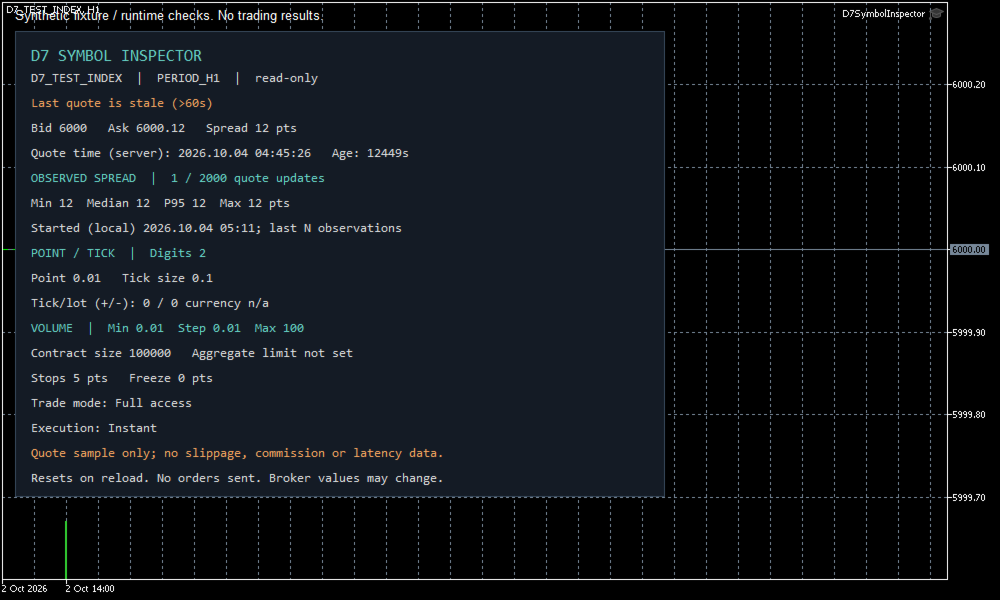
Check a broker symbol before evaluating an Expert Advisor. D7 Symbol Inspector is a complete MetaTrader 5 chart utility that displays symbol specifications and observed bid/ask spreads in one panel. It does not place or modify trades.
What the panel shows
- Last available bid, ask and spread in points, with the quote's server timestamp and estimated age.
- Minimum, median, 95th percentile and maximum spread across the last observed quote updates in the current chart session, with the sample count shown.
- Price digits, point and trading tick size, displayed separately.
- Broker-reported profit/loss tick values per lot in account currency.
- Contract size, minimum volume, volume step, maximum volume and aggregate volume limit.
- Stop and freeze distances in points, symbol trade permissions and execution mode.
How to use it
- Install the utility from the MetaTrader 5 Market tab.
- Open a chart for the exact broker symbol you want to inspect.
- Attach D7 Symbol Inspector from Navigator → Expert Advisors. The utility uses the Expert Advisor program type but performs no trading operations.
- Read the quote timestamp first. Then compare the symbol fields with the requirements documented for the EA you intend to test.
- Leave the chart open during the relevant trading period to collect spread observations. Use separate charts to inspect different symbols.
Use a chart area of at least 700 × 530 pixels at standard display scaling; allow more space at higher DPI. Left and top margins are adjustable.
Inputs
- SampleCapacity: last quote observations retained, from 10 to 10000; default 2000.
- RefreshSeconds: panel refresh interval, from 1 to 60 seconds; default 1.
- LeftMargin: horizontal panel position in pixels; default 12.
- TopMargin: vertical panel position in pixels; default 28.
How to interpret the statistics
Spread is (ask − bid) / point. Median uses the central value, or the average of the two central values for an even sample. The 95th percentile uses the nearest-rank method.
The sample contains quote updates observed by this running instance. It is not a complete tick-history export. MT5 event processing and timer snapshots may skip intervening quotes; repeated snapshots with the same timestamp and prices are ignored. Once the sample is full, each new observation replaces the oldest one. Reattaching, changing the symbol or timeframe, or reloading the utility resets the sample.
Limitations
The last quote may be stale while the market is closed or the connection is unavailable. Its timestamp remains visible, and the panel flags an estimated age above 60 seconds when a server-time estimate is available. A stale initial quote can appear in the sample.
Symbol properties are supplied by the broker and can change. Zero tick values can indicate that conversion information is unavailable. Trade permissions do not prove that a trading session is open.
This utility does not measure commission, swap, slippage, execution quality or network latency. It does not assess strategy profitability, calculate a suitability score or recommend a trade. No algorithmic trading permission, DLL access or external web access is required for its read-only functions.
Support
Use the product comments or MQL5 private messages. When reporting an issue, include the MT5 build, exact symbol, broker server, input settings and a screenshot of the panel. Do not include passwords or account access details.