 MetaTrader 5
 Experts
 Indicators
 Libraries
 Utilities
 Widgets
 Rules
Rules
Watch the Market tutorial videos on YouTube
How to buy а trading robot or an indicator
Run your EA on
virtual hosting
virtual hosting
Test аn indicator/trading robot before buying
Want to earn in the Market?
How to present a product for a sell-through
New trading utilities for MetaTrader 5 - 4
 Below are trading programs simplifying trading in MetaTrader 5. Hover over a utility to read its description and purpose.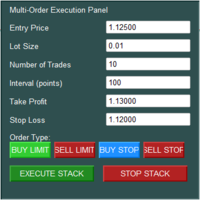
The Multi-Order Execution is an Expert Advisor for MetaTrader 5, designed to simplify the placement of multiple pending orders through a convenient on-chart control panel. The EA supports four pending order types: Buy Limit, Sell Limit, Buy Stop, and Sell Stop. Traders can configure the entry price, lot size, number of orders, price interval, take-profit (TP), and stop-loss (SL) directly from the chart. The EA automatically calculates each order's entry price based on the selected order type and

Auto Stop Loss and Trailing Step for MT5 Take control of your trades with a smart, easy-to-use trading management panel for MetaTrader 5. Open BUY and SELL positions manually, customize lot size, Stop Loss, Take Profit, and manage profits with an adjustable trailing stop based on points. Featuring a clean interface, flexible settings, and broker stop-level protection, it helps streamline trade execution and position management.
Keywords: MT5 Trade Manager, Auto Stop Loss, Trailing Stop EA, Tr
FREE

Get a clean trading report of your MetaTrader 5 account in your Telegram chat, group or channel - without opening the terminal. Reports Daily report right after the server day closes: net result, % gain, closed trades, win rate, gross profit/loss, profit factor, volume, fees and swap, deposits/withdrawals, plus week-to-date and month-to-date results. Weekly summary on Saturday with a day-by-day breakdown. Monthly summary after the last session of the month: week-by-week breakdown, green/red days
FREE

Prop Daily Equity Guard is a risk-management utility that watches your account and enforces the limits you set, like a prop-firm risk desk. It works with manual trades and with any other Expert Advisor running on the same account. What it does Daily loss limit in account currency or % of the day-start balance. When it is reached, all trades are closed and pending orders are deleted. Daily profit target : lock in a good day and stop trading. Profit lock (trailing) : once today's profit reaches a

CandleTimer Pro – Candle Countdown & Timeframe Switcher Stay on top of every candle with CandleTimer Pro, a lightweight MT5 utility designed for traders who value speed, clarity, and convenience. Live Candle Countdown: Instantly see the remaining time on the current candle. Quick Timeframe Switching: Switch between M1, M5, M15, M30, H1, H4, and D1 with a simple click. Minimalist Interface: A compact on-chart button keeps your chart clean and organized. Keyboard Shortcut: Use Ctrl+Z to cycle thro
FREE

Gold Scalp Assistant is a semi-automatic trade panel for MetaTrader 5. It does not open trades on its own. You decide the direction and press a button; the assistant opens the trades, sizes them, sets the stops and then manages them with the rules you choose. It works on any symbol. The default distances are set for gold quotes with 2 or 3 digits.
Panel - BUY xN and SELL xN: open N market trades in one click (N = 1 to 10, changed with + and - or typed in). - Lot field: lot per trade (fixed mode

Daily Loss Floor Guard watches the whole trading account and enforces the loss and profit rules you set. It does not open trades and does not contain a trading strategy.
Attach it to one chart. It monitors all symbols, all Expert Advisors and manual trades, including trades placed from the mobile app.
What it does when a rule is reached - Closes open positions. For the daily loss limit you can instead choose to keep open positions and only block new trades. - Deletes pending orders (optional).

Trade Manager Panel is a powerful and easy-to-use on-chart utility designed for manual traders, scalpers, and grid traders on MetaTrader 5. It simplifies your trade management process by allowing you to control multiple open positions with just a single click directly from the chart. If you have multiple trades running on a single pair, modifying Stop Loss and Take Profit one by one is time-consuming. This panel solves that problem by applying your desired levels to all positions instantly. Key

TradeBot – Trade Manager & Copier for MT5 TradeBot is an Expert Advisor designed to simplify trade management and trade copying in MetaTrader 5. It helps traders manage open positions efficiently and automate trade-copying workflows with configurable settings. Key Features Automated Trade Management: Manage trades according to your configured rules. Trade Copying: Copy trades between supported trading accounts or terminals, depending on the EA's configuration. Risk Management: Configure trade-ma

VeloRisk Position Size Calculator — MT5 Trade with a Plan. Calculate Your Risk Before You Enter. VeloRisk is a practical risk management utility for MetaTrader 5 designed to help traders calculate position sizes based on their account balance, chosen risk percentage, and stop-loss distance. Instead of estimating lot sizes manually, VeloRisk helps you determine a suitable position size before placing a trade. Its purpose is simple: make risk calculations easier, faster, and more consistent. Wheth

Protects your MT5 account from trades that are not yours: positions and pending orders with an unknown magic number, and manual trades from places you do not trade from. In Act mode it closes them. Your own EAs are never touched. It never opens a trade. What it protects you from Someone else trading on your account: a person who has your password and trades from the phone app or the web terminal, when you tell it that you do not trade from there (InpManualTrades). An EA you did not mean to run:

Records clean M1 data with real tick counts and spreads for up to 6 symbols from one chart, spike and spread-widening minutes, a daily spread-by-hour table, a daily cross-market table and the facts of every closed trade, into weekly CSV files. Optional daily delivery to your own Telegram bot. It never opens or changes trades. Data For Quant Researcher is a recording tool for people who study their market and their own execution with real data instead of guesses. Attach it to one chart and it rec

Drawdown Minimizer for MetaTrader 5 - your EAs pay in, old losers get paid off. This utility runs next to your other Expert Advisors and never opens a trade. It keeps a savings book of the net realized profit of your whole account and uses it to close the oldest losing positions of the EAs you choose - slice by slice, oldest first. WHY IT EXISTS Made by traders, for traders. One of our grid EAs got stuck in drawdown for months. The old positions did not come back, and they paid swap every single

Your real chance to pass this challenge, from where you stand. Prop Challenge Odds runs inside MetaTrader 5 and estimates the probability that the prop challenge you are trading right now ends in a pass. It starts from your account as it is today: balance, today's loss, trailing peak, trading days. It also tells you which risk level gives you the best odds, including "stop for today". Overview Online challenge simulators work before the challenge, on a trade list you export. Risk panels in MT5 e

Does your indicator repaint? Audit any MT5 indicator on your own chart: it is replayed bar by bar, as if live, and every value it showed at bar close is compared with the history it draws afterwards. You get a verdict per buffer, the delay of its signals, and its results as the history shows them next to what you could have seen live. Overview Most indicators are judged on their history. But many of them redraw that history: an arrow that appeared live is erased a few bars later, a pivot moves,

What the backtest report doesn't show. EA Risk X-Ray audits the hidden risk of any Expert Advisor, on your own account or on a Strategy Tester report. It rebuilds the floating loss of every open position minute by minute, detects martingale and grid behaviour, replays the trades 5,000 times, and gives one clear verdict: low, moderate or high hidden risk. Overview Most statistics, including the drawdown of the Strategy Tester report and of most account monitors, are computed when trades close. A

No more calculating lots by hand or forgetting to move your stop. Set your risk in %, click BUY or SELL: lot, stop loss and take profit are placed for you, then breakeven, partial close and trailing run on their own. Free 14-day trial for demo accounts: https://www.mql5.com/en/blogs/post/778026 NEW in version 2.20 Alerts: pop-up with sound, push notification to your phone and/or e-mail. You are alerted when a trade opens (also when a pending order is filled), at TP1 and TP2, when the stop moves

The Gap Between Knowing and Doing is Where Your Profits Die. Most losing streaks aren't caused by a bad market; they are caused by a bad execution loop — doubling lots after a loss, moving stops to "give it more room," or flipping directions in a panic. You know the rules, yet you break them. TradeLock Pro closes this gap. It doesn't tell you where the market will go; it keeps impulsive decisions out of your execution when the market moves. 1. Force Discipline Before You Enter Stop "market-chasi

Mihenk Signal Trader turns a signal or your own trade idea into a correctly sized position and then manages that position for you: it protects the stop, locks in profit and follows the move until the trade is done. You decide the entry; the panel takes care of everything after it. Launch price: 49 USD. Two ways to enter, one press Take a signal. When a new BUY or SELL badge appears on the chart, the panel prepares the trade for you: a proposed stop beyond the recent swing and a lot size calculat

Account Guardian is an account protection utility for MetaTrader 5. It watches your whole account and enforces your own rules: daily, weekly and monthly loss limits, maximum drawdown, news windows, trading hours, discipline limits and trade protection. When a rule is hit it blocks or closes trades and alerts you. It never opens trades and works with manual trading and with any Expert Advisor. HOW IT PROTECTS YOU It watches every open position and order of the account, or only the magic numbers y

Trade Mirror is a fast local trade copier for MetaTrader 5. Attach it as Provider to the account you trade on and as Receiver to every account that should follow. Trades are copied between terminals on the same computer within a fraction of a second, with no server, no subscription and no DLL. It copies trades but cannot guarantee any result. HOW IT WORKS The Provider shares its open positions through a small file in the common MetaTrader folder. Every Receiver terminal on the same computer read

TradeLens Journal is a modern on-chart trading journal for MetaTrader 5. It reads your closed trade history and turns it into clear statistics, charts and reports, so you can see what really works. It is read-only: it never opens, changes or closes a trade. WHAT YOU SEE Overview: net profit, win rate, profit factor, expectancy, maximum drawdown and number of trades, with a profit curve and detailed statistics. Equity: a large profit curve with a drawdown chart under it. Breakdown: results by sym

If you run more than one funded account, payout dates are easy to lose track of. One firm pays every two weeks, another once a month, a third whenever you ask. Prop Firm Payout Tracker puts them all in one panel on your chart, so you can see what is coming up, what is overdue, what your share is and what you have already withdrawn. Add your firms once, link your accounts with their next payout date, and the tracker does the rest. It warns you in time and moves the date forward when you log a pay

Top Trade Manager for MT5 - Trade Panel, Position Size Calculator and Risk Manager Top Trade Manager is a complete trade manager for MetaTrader 5 : a trade panel, position size calculator and risk manager in one. Drag your entry, stop loss and take profit on the chart and the lot size, risk and reward are calculated instantly. Then manage the trade with partial close , break even , trailing stop and hidden stop loss and take profit , follow the economic news calendar , and mark up your chart wit

MT-Radar — free MetaTrader terminal monitoring from your phone
Want to know your Expert Advisor is running and your terminal is connected, without logging into your VPS over RDP every time?
MT-Radar shows the status of all your MT4/MT5 terminals in one secure web panel. Open it on your phone, tablet or any computer and see in seconds that everything is working as it should.
What MT-Radar shows: Account and terminal — account information and general terminal details Journals — terminal log and
FREE

Sizing a trade by hand means doing pip-value and commission math under pressure, or trusting a single calculator that can get gold and index lot sizes wrong. A mis-sized lot turns a planned 1% risk into something very different once commission and a rounded lot step are factored in. Phoenix Position Size & Risk Calculator MT5 sizes the trade, lets you set it up directly on the chart by dragging the Entry, Stop Loss and Take Profit lines, and places it for you, with the safety checks a one-click
FREE

OrderCanvas is a trade panel for MetaTrader 5 that moves manual trading onto the chart. You choose a side, the entry, take profit and stop loss appear as lines, you adjust them on the chart, and only then send the order.
What it changes in daily trading Lot size from the stop: enter the risk in money or percent of the balance and the lot size follows the stop distance, so no calculator is needed. No order dialog for every trade: prices are changed by dragging the line (applied on release) or by
FREE

Enter your firm's daily loss and drawdown limits once. Multi-Account Risk Sync Panel checks your account against them all day and, the moment a limit is reached, closes your open positions, deletes your pending orders and stops itself. Built for prop firm challenges, funded accounts and any account with a hard loss limit. It does not open trades, does not copy trades and does not touch any other account. Every screenshot on this page is from a live demo chart. Key Features Daily loss limit as a

Haven Trading Simulator — historical trading simulator for MT5 Haven Trading Simulator — a manual trading practice tool for MetaTrader 5. It replays historical candles, lets you place virtual Market, Limit and Stop orders, and displays training results without trading on a live account. Choose a past period and make decisions using only the price history revealed so far. Practise entries and exits, manage risk, repeat market scenarios and review your trading statistics. User Guide (English) |

Intelligent Forex Trade Panel is a one-click trade manager for MetaTrader 5. It helps you open and manage trades faster, with your risk calculated for you before every order. The panel never opens a trade on its own. Every order comes from your click. Main features Risk-based lot size - enter your risk as a % of balance and the panel calculates the lot from your stop loss. Or switch to a fixed lot with one click. ATR stop loss and take profit - one click sets a volatility-based SL and TP (stop

CM Trade Manager A manual trading panel for MetaTrader 5: prepare your entries, place market and pending orders, and manage positions directly from the chart. Includes presets with up to three take-profit targets, estimated monetary risk before placing a trade, and a toolbox for partial closes, breakeven and trade history. How does it help you? Manage all three stages of a manual trade from the same chart: Before entry: choose a preset or adjust your lot size, SL and TP, and check the estimated

Put the right Expert Advisor on the right chart at the right hour, take it off when its session ends, and close its trades by Magic Number in the same step, without touching a chart. Rotation Manager Console works with the EAs you already own, with no source code and no changes to them: you save each one as a profile straight from its chart, write a schedule with time windows, repeats and weekdays, and the panel rotates them for you, in English, Russian, German, Spanish, French, Italian, Japanes

Candle Strength Momentum is an MT5 oscillator that shows the buying and selling pressure of each candle as two separate lines, weighted by tick volume. It is built for traders who read price action and want to compare buyers and sellers on the current candle without stacking several indicators on the chart. Most oscillators average past prices. This one scores every candle on its own: where it closes inside its range, how large its body is, and how far it moved from the previous close. The resul

Most challenges are not failed by bad trading but by breaking one rule once. QuantEdge Prop Firm Guardian watches your account in real time and acts before the limit:
- Daily loss and max loss (static or trailing), with a safety buffer for spread and slippage: closes every trade and blocks trading - Profit target reached: trades closed to secure the pass, optional daily gain lock - High-impact news (MT5 economic calendar): blocks or closes trades around the release - Weekend close, stop loss re

Chart Post Maker turns the current MetaTrader 5 chart into a clean, signed image for social media in one click. Traders who share their analysis usually take a screenshot, crop it, hide indicators, add text in another program and only then publish. Chart Post Maker does all of this inside the terminal. You choose the format, check the preview and save. The image is ready to post on a feed, in a story or in a channel. The indicator works in two modes. In the clean mode (Indicators: OFF) it draws

Clarity Panel is a manual trading panel for MetaTrader 5. You set the risk and the stop, and it calculates the lot. Before you send the order it also shows what the trade costs and how often you have to be right to break even. The lot already includes spread, commission and slippage, so a 1% risk stays 1% after costs.
Most panels stop at the lot size. This one adds the numbers that usually stay hidden: on a small stop the costs can be 10 or 20 percent of the risk, and a 1:2 trade then needs wel

Stop calculating lot sizes by hand. Put the red line where your stop loss should be: QuantEdge Trade Manager computes the lot so that hitting the stop loses exactly your risk, shows the money at risk and to gain, and sends the order in one click.
Order entry - Risk as % of equity, fixed money or fixed lot; commission can be included in the risk - Draggable stop loss, take profit and entry lines, with the money and % shown on the chart - Take profit from a reward:risk ratio (default 2.0) or plac

Set your risk, click your stop-loss on the chart: the lot is calculated, commission included, and the position opens instantly, in one click or after confirmation. Then ClickRisk manages the trade for you: break-even, partial TPs, trailing stop and daily loss limit. It alerts you before economic news and keeps you informed on Telegram. For MetaTrader 5 and 4. HOW IT WORKS 1. Choose your risk : a fixed amount or a percentage of your balance. 2. Click BUY or SELL (market order), or click your entr

Tiltproof Risk Manager enforces stop-loss and anti-tilt discipline on every position on your account. It does not open trades. It watches every position, whether it was opened manually, from another EA or from the mobile app, and steps in when your own rules are broken.
It is built for traders who know their rules but break them under pressure: trading without a stop loss, widening a stop that is about to be hit, or re-entering bigger right after a loss.
Stop-loss enforcement
- Grace period: y

SMC Buy Sell KPG Trade Assistant - User Guide (MT5) The SMC Buy Sell KPG Trade Assistant is a professional, all-in-one trade management and analytical dashboard for MetaTrader 5. It seamlessly integrates the complete visual engine of the "SMC Buy Sell KPG" indicator with an advanced, interactive execution panel.
This utility is designed for traders who utilize Smart Money Concepts (SMC) and require objective, real-time structural analysis combined with strict, automated risk management. It se

Copy trades from Telegram signal channels you already follow, straight into your own MT5. REQUIREMENTS (READ FIRST) MetaTrader 5 on Windows (a Windows PC or a Windows VPS). Mac and mobile MT5 are not supported. A Telegram channel or group that posts trading signals. This product does not provide signals. The free companion app must run on the same Windows machine as MT5. Download it from the free release page on MQL5 Algo Forge: https://forge.mql5.io/ian1228/tg2mt5-companion/releases WHO THIS IS

Bastion Daily Guard protects your account from the bad day. You set two limits, the maximum number of trades per day and the maximum daily drawdown, and Daily Guard makes sure you respect them on the whole account until the next daily reset. How it works Set the maximum trades per day and the maximum daily drawdown %, then press OK to arm the defense The daily drawdown includes closed trades and the floating profit and loss of open positions Deposits and withdrawals are not counted as profit or
FREE

Trade Manager Bastion is a trading panel for manual traders with a built-in risk defense. You plan each trade on the chart with risk-based lot size, manage it automatically after entry, and set daily limits that stop you from overtrading on a bad day. Trade: plan the order on the chart Entry, Stop Loss and Take Profit as lines on the chart: drag them or type the price, with arrows to move SL and TP by a few points Lot size calculated from your risk % at the Stop Loss, or from the profit % you

See the daily loss limit, maximum loss limit and profit target of your account live, with prop firm presets, and get an alert before a limit is reached.
Description: Risk Monitor Ultimate shows the daily loss limit, maximum loss limit and profit target of your account on the chart, including prop firm rules, and warns you before you break them. It never opens or closes trades.
What you see - Today's result including open positions, and how much more can be lost today - Total result since the
FREE

SignalReplicator copies the trade signals of your Telegram channels into your own MetaTrader 5 account. The channel posts a signal, and the order opens in your terminal with your lot size and your limits. You don't need to be in front of the phone, and you don't arrive late. No Telegram API keys and no bot. You log in with your phone number and the code Telegram sends you, like any Telegram app, and the reader sees every channel and group your account has joined, private and VIP ones included. H

Superior Signals Copier MT5 automatically copies trading signals from your Telegram channels, WhatsApp groups, and Discord servers straight to your MetaTrader 5 terminal with sub-second execution. It reads the signal text, works out the symbol, direction, entry, stop loss, and take-profit levels, sizes the position under your exact risk rules, and sends the trade to your MT5 account within moments of the message arriving — no manual reading, typing, or guessing during fast market movements. The

Automatic Position Size Calculator for MT5 Calculate your position size in seconds and trade with better risk control. It helps traders calculate lot sizes based on their selected risk and place market or pending orders directly from the chart. Designed with a clean, customizable interface, it combines position sizing, order placement, and visual trade management in one easy-to-use tool. Key Features Automatic Position Sizing Calculate lot sizes based on your selected risk percentage. Automatic

Auto Stop Loss and Target Enforcer watches every new position. If one opens without a stop loss or a take profit, it adds them a few seconds later. It covers trades opened by hand and trades opened by other Expert Advisors.
How stops and targets are set - Stop loss: a multiple of the typical market move (Average True Range), a fixed number of pips, a set share of the account, or beyond the nearest support or resistance level. - Take profit: a multiple of the typical market move, a fixed number

StopFirst Trade Manager opens trades the way a careful trader does: the stop comes first, the lot size follows from it, and the whole account's risk is in front of you before you click. Once the trade is open, it moves the stop to breakeven, trails it and takes partial profits for you.
Every entry carries a stop. There is no way to open a trade from the panel without one.
HOW TO USE IT
1. Attach it to a chart and allow Algo Trading. The panel appears in the corner. 2. Set your risk - a perc

StopFirst Lot Calculator answers one question before every trade: how many lots, if this is where my stop goes?
You decide how much you are willing to lose and where the trade is wrong. The calculator turns those two decisions into a lot size, and shows you what that lot really puts at risk, what margin it needs and where the target sits. Drag the stop line and every figure follows.
It is an indicator. It cannot place an order, it needs no Algo Trading permission, and it runs on the same char
FREE

FUTURES CHART TRADER PRO: The Ultimate Futures Trading Experience in MT5
Tired of oversized panels covering your charts and losing precious seconds calculating lots or modifying orders one by one?
For Scalping and Intraday trading, every millisecond counts and visual clarity is essential. Futures Chart Trader Pro brings the speed, precision, and intuition of professional Futures platforms directly into MetaTrader 5.
Get complete control over your risk, entries, and bulk position management w

Account Protection Suite protects the whole trading account from one chart. It covers trades you open by hand and trades opened by other Expert Advisors.
Protection modules - Stops and targets: adds a stop loss and a take profit to any trade opened without them. The distance can follow the typical market move (Average True Range), be a fixed number of pips, risk a set share of the account, or sit beyond the nearest support or resistance. Stops can be moved clear of nearby levels. - Daily loss

DomDom turns MetaTrader 5 into an order-flow workstation: read the book and the tape, trade by click or hotkey, and replay the session after hours.
DomDom is built for exchange-traded instruments such as futures, where the broker streams Depth of Market and real trades. It never invents a book: when the broker sends no size, the size cells stay empty.
The panel at a glance The panel has three parts: the toolbar at the top, the price ladder in the middle and the status line at the bottom. Hove

Plan, execute and protect every trade in MetaTrader 5: exact risk-based lot size, automatic management, baskets and Prop Firm rules in a single panel. Manzano Trade Manager Pro is a professional trade manager for MetaTrader 5, designed especially for traders who trade funded accounts (Prop Firms) and need advanced control over risk, execution and position management. It brings together in one tool visual trade planning, automatic lot size calculation, individual, collective and basket managemen

Free prop firm rules monitor for MetaTrader 5: daily loss limit, maximum drawdown and the open risk of all your stop losses on one read-only panel. It shows how much money is left before the daily-loss rule and the maximum-loss rule, and whether your open stop losses would break a rule if they were all hit.
It never opens, modifies or closes a trade. It runs as an Expert Advisor only because it uses the terminal's own profit calculation for every open position, which indicators are not allowed
FREE

Max Drawdown Guardian watches your equity against the drawdown rule you trade under and acts before the rule is broken.
What it does - Static or trailing drawdown, measured from initial balance, peak equity or highest closed balance. A trailing limit can stop at the initial balance. - Eight ready-made rule presets (for example 10% static, 5% trailing from peak equity), or your own percentage or money amount. - Two warnings before the limit, at 50% and 75% by default, sent as a pop-up, a push n
FREE
Risk Position Tool is a free position size calculator for MetaTrader 5. Drag the entry, stop-loss and take-profit lines on the chart. It shows the lot for your risk, the money at the stop and target, the reward:risk ratio and the margin. It only calculates. It never places, changes or closes an order, so it is safe on any account. Standalone: Everything is built in. You do not need to buy or install any other product named on this page. Quick start Attach the indicator to the chart of the symbol
FREE

Universal Pro SMC AI Trading System & Indicator Utility MT5 Institutional Smart Money Liquidity Engine • 100% Non-Repainting • Multi-Asset • External AI Integration Universal Pro SMC AI is a next-generation institutional trading utility engineered for intraday and swing traders across Gold (XAUUSD), Bitcoin (BTCUSD), US30 (Dow Jones 30), and Major Forex pairs . Unlike conventional retail indicators that rely on lagging moving averages and generate false breakout signals, this system tracks i

Nexus Chart Trader is an institutional-grade manual trading and risk management utility designed for active discretionary traders, scalpers, and execution managers who demand absolute speed, precision, and real-time risk visibility on MetaTrader 5.
Built entirely in 100% native MQL5 without slow external dependencies or heavy DLLs, Nexus Chart Trader guarantees sub-millisecond execution response times, multi-asset compatibility (Forex, Indices, Commodities, and Cryptocurrencies), and intellig

Renko Prime by TickFactory - Built from real ticks. Renko Prime turns any MetaTrader 5 chart into a real Renko chart. Every brick is built from the broker's real tick history, not from M1 candles, so the bricks you see live are exactly the same bricks you get when you reload the history. How it works Attach Renko Prime to a chart of the real symbol (for example EURUSD). The utility creates a Renko symbol (EURUSD_Renko) and switches that chart to it. Your indicators, objects and templates work on

TradeDeck is a trade assistant and trading panel for manual trading: a lot calculator, risk management and one-click order placement from the chart. You set the risk and place three lines on the chart; the panel calculates the volume, sends the order and then takes care of the routine management: breakeven, trailing stop and partial close.
Placing a trade from the chart Press Lines (or Shift+L) and three lines appear on the chart: entry, Stop Loss and Take Profit. Each line has a label with th

A trading panel for prop firm accounts that turns your firm's daily and maximum loss rules into the lot size you may trade right now, refuses entries that would break a rule, stops trading through the panel once a limit is reached, and keeps optional discipline rules - pauses after losing streaks, cooldowns and trade limits - for you. WHAT IT DOES Prop Rule Engine keeps a live risk budget from your firm's rules and converts it into a lot size for the stop you are looking at. One number, in larg

Replay the past. Trade it by hand. Learn what really works.
Your broker's own history, candle by candle, with real spread, commission and swap. Multi-timeframe sync Prop-firm rules Journal and HTML report Never sends real orders 100% native MQL5, no DLLs Early adopter price: 69 USD
One-time purchase · All future updates included · No subscription
This introductory price is temporary and will increase. Why ChronoReplay Practising on live markets is slow and expensive, and the

Every EA on your account. Scored with evidence. Guarded where it matters.
A public risk score for each robot, the trades that prove it, and protection aimed at the EA causing the risk. Martingale, grid and averaging detected Prop-firm loss limits on equity Never opens a trade 100% native MQL5, no DLLs No web requests Early adopter price: 69 USD
One-time purchase · All future updates included · No subscription
Or rent it: 6 months 30 USD · 1 year 45 USD
This introductory price

Your prop firm has a daily limit. DayLock stops your trading before you reach it.
A referee for your funded account: it closes everything at a safety margin above the firm's limit, then blocks new trades until the firm's own reset. 19 prop-firm presets you can adjust Lot calculator: know the size before you trade Reset on the firm's clock, with EU and US daylight saving Covers manual trades and every EA Never opens a trade 100% native MQL5, no DLLs Early adopter price: 49

News widens the spread. Kairos waits until it is back.
One chart guards the whole terminal: a lock before a release, and it only lifts when the live spread has returned to normal, not when a timer runs out. One chart for every symbol and every EA Waits for the market, not the clock Position size 100% → 50% → 0% instead of only on/off Anomaly detection without a calendar event Broker rollover and triple-swap warning Never opens a trade 100% native MQL5, no DLLs, no web

In ancient Athens the agora was the marketplace where every trade met. Agora shows you where they meet today.
Eight order-flow views for every symbol in Market Watch, in one panel on your chart, in 2D, 2.5D and free 3D, and the market structure drawn on your own charts. Turn the market around, replay it, compare sessions side by side, and always know how good the data behind it is. Volume Profile, Market Profile (TPO), Rolling Heatmap, Temporal Profile, Delta and CVD, Volume Bubbles, Liquidit

Multi Risk Manager Pro A comprehensive trade management, risk control, and trade copying utility for MetaTrader 5. Multi Risk Manager Pro is an all-in-one Expert Advisor designed to help traders manage position sizing, open trades, account risk, trading sessions, and trade copying from a single customizable interface. Whether you trade manually, use other Expert Advisors, manage multiple trading accounts, or operate under prop firm risk rules, Multi Risk Manager Pro provides a range of tools to

Arixis Trade Broadcaster — MT5 Trade Notifications Turn your MetaTrader 5 trading activity into professional, automated notifications. Arixis Trade Broadcaster is a MetaTrader 5 Expert Advisor designed to monitor trading activity across your account and publish informative messages to external communication platforms. Whether you trade manually, use Expert Advisors, or manage several strategies, Trade Broadcaster helps you follow trading activity without continuously watching your terminal. Supp
FREE

ELSNA Trade Manager ELSNA Trade Manager is an on-chart, multi-panel trade execution and position-management dashboard for MetaTrader 5 (MQL5) It replaces scattered right-click menus and manual ticket entry with a single draggable, zoomable, themeable control surface that works on any symbol and any timeframe. What it does Order entry. A MARKET panel fires BUY/SELL orders with one click (optional confirm dialog, optional instant mode), sized by fixed lot , risk % of balance, or a fixed risk amoun
FREE
Do you know why the MetaTrader Market is the best place to sell trading strategies and technical indicators? No need for advertising or software protection, no payment troubles. Everything is provided in the MetaTrader Market.

You are missing trading opportunities:
- Free trading apps
- Over 8,000 signals for copying
- Economic news for exploring financial markets
Registration
Log in
You agree to website policy and terms of use
If you do not have an account, please register