RMT Capital Firewall
- ユーティリティ
- バージョン: 1.2
- アップデート済み: 13 10月 2026
- アクティベーション: 10

RMT Capital Firewall is a risk guard for MetaTrader 5. It watches daily loss, drawdown, an equity floor, open risk and positions without a stop loss, warns before a limit, and — only if you authorise it — closes the positions in the scope you chose and stays latched until you re-arm. Every decision is recorded as a structured audit line in the Experts journal.
The problem it solves
A daily-loss or drawdown rule is easy to write down and hard to keep when a position is running against you, or when an EA keeps trading while you are away. RMT Capital Firewall checks those rules for you every second and keeps a record of what it saw and what it did.
What it checks
Every limit is off (0) until you set it:
- Daily loss in percent, measured either as the equity move since the start of the server day or as realised loss only.
- Maximum drawdown in percent from peak equity.
- Equity floor in account money.
- Total open risk to stop loss, maximum risk of a single position, maximum lot, maximum number of positions. The amount at risk of each position is the loss at its stop as the terminal itself calculates it (OrderCalcProfit), in the account currency; a stop at or beyond the entry counts as zero. If the terminal cannot calculate it, the panel shows UNKNOWN instead of a figure.
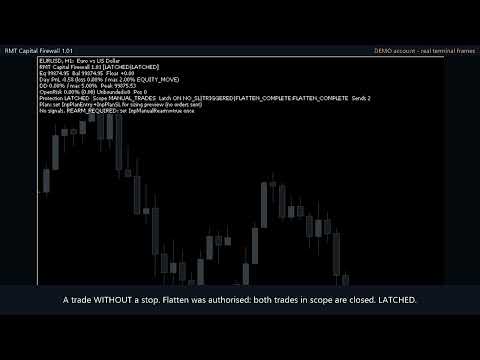
- Positions without a stop loss: reported as UNBOUNDED and never counted as zero risk. You choose whether that is a warning, a limit or a trigger.
- A warning level (80% of each threshold by default) before the limit is reached.
What it does when a limit is hit
- Default policy is monitor-only: the panel and the audit lines show the breach, nothing is closed.
- If you set the policy to flatten and also enable InpAllowFlatten, it closes the positions inside the scope, with bounded retries. With InpAllowCancelPending it also cancels pending orders in the scope.
- After a breach the state stays latched and visible until you re-arm manually. A triggered protection is not cleared by a new trading day.
- State is saved to disk: after a terminal restart a latched protection is restored as latched.
Scope: which positions it looks at
You choose it with InpOwnerScope. The default is the tool's own magic number, which is the safest setting and covers nothing until you change it. To protect real trades pick one of: manual trades (with InpIncludeManual), one selected magic number, the chart symbol, or the whole account (requires the explicit InpAccountWideConfirm). Equity-based limits (daily equity move, drawdown, equity floor) always read account equity.
Working together with RMT AutoTrader and RMT Visual Trade Planner
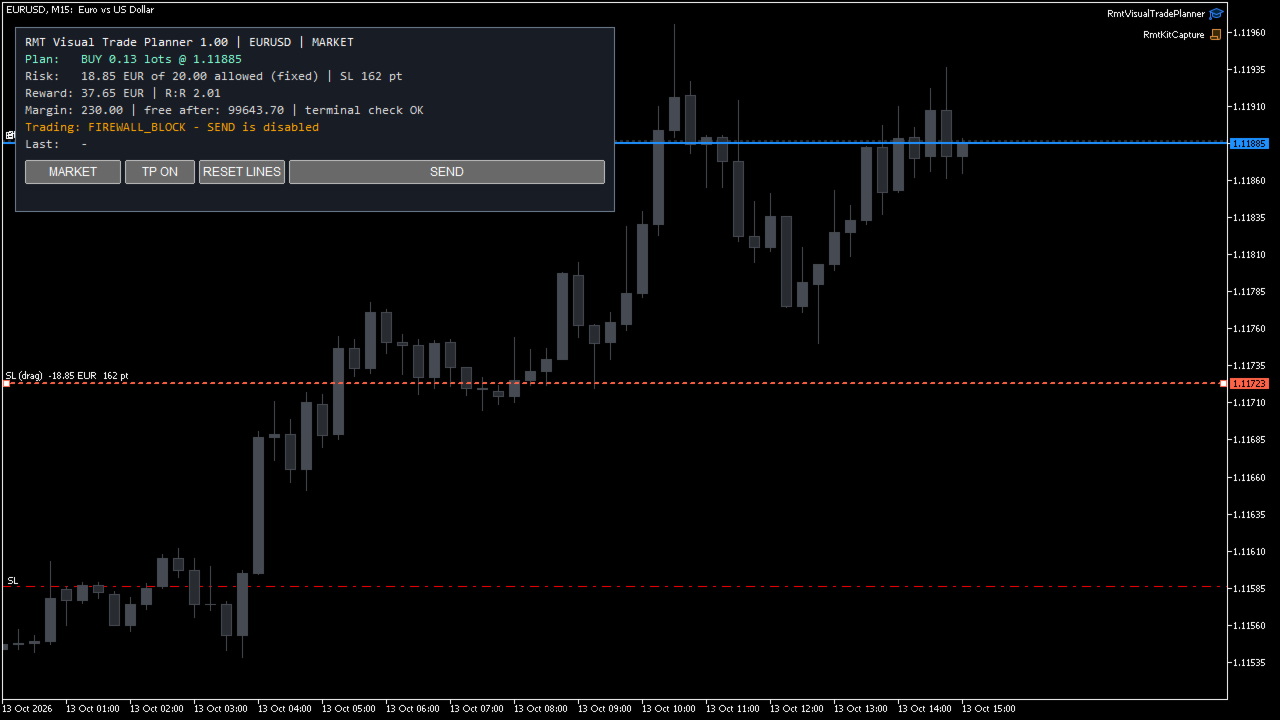
While a limit is reached or a protection is active or latched, the Firewall tells the other RMT tools in the same terminal not to open new positions. RMT Modular AutoTrader stops opening trades and keeps managing the ones it has; RMT Visual Trade Planner disables its SEND button and says why. The block is withdrawn when you re-arm. This works only between RMT tools that ask for it: it does not stop another vendor's EA or a manual click.
Position-size calculator
Enter a planned entry and stop loss and the panel shows the lot size for your risk percent or fixed money risk, using the terminal's own profit calculation for that entry and stop, and the symbol's lot step and limits. It is a calculator: it does not place the order.
What to check before you choose a risk guard
- Which trades does it act on? Here the scope is an explicit setting, and account-wide needs a second confirmation.
- What happens after it triggers? Here the state stays latched, also across a terminal restart, until you re-arm it.
- What does it do when data is missing? Here unreadable history is shown as UNKNOWN and nothing is closed on it.
- Can you see why it acted? Every state change, trigger, close attempt and refusal is one line in the Experts journal.
What it is not
- It does not open positions or generate signals.
- It cannot stop another EA from sending orders. It detects what is open and applies your policy to it.
- A protective close is a normal market order: it depends on the broker, connection, liquidity and Algo Trading being enabled. If the market is closed or the close is refused, the tool stays latched and records the refusal; it does not report a close that did not happen.
- It does not promise profits or that losses will be limited to the configured value. Gaps and slippage can exceed any limit.
New in version 1.02
- Open risk and single-position risk come from the terminal's own profit calculation. Versions 1.00 and 1.01 used the symbol's tick value, which on some brokers understates metals: on gold the two risk limits could trigger late.
- If the terminal cannot calculate the amount, the panel shows UNKNOWN and the other RMT tools open no new positions while a risk limit is enabled. Nothing is closed for that reason.
- The lot-size calculator uses the same calculation.
Since version 1.01
- Limits are evaluated on a timer (1 second by default), not only on chart ticks.
- Positions opened while a protective close is running are added to the closing queue.
- A reached limit stays visible until re-arm instead of clearing silently.
- Manual re-arm is processed once per request, with one audit line.
- A new server day no longer interrupts an active protection.
- If trade history cannot be read, daily loss is shown as UNKNOWN with a warning, never as zero.
- Coordination with RMT Modular AutoTrader and RMT Visual Trade Planner: no new entries from them while the Firewall is latched.
- State files written by version 1.00 are restored by 1.01.
Requirements
MetaTrader 5. Algo Trading must be enabled for protective closes. Tested on a hedging demo account with EURUSD, GBPUSD, USDJPY, GBPJPY, gold (XAUUSD, XAUEUR) and silver (XAGUSD); netting accounts, indices, stocks and crypto are not certified. No DLLs, no WebRequest, no external services.
Test your configuration on a demo account first. Leveraged trading involves risk of loss.