 MetaTrader 5
 Experts
 지표
지표
 라이브러리
라이브러리
 유틸리티
유틸리티
 위젯
위젯
 규칙
규칙
MetaTrader 5용 새 트레이딩 유틸리티 - 4
 다음은 MetaTrader 5의 거래를 단순화하는 거래 프로그램입니다. 유틸리티의 설명과 목적을 읽으려면 유틸리티 위에 마우스를 놓으십시오.
Propfirm Metrics는 Prop Firm 트레이더가 MetaTrader 5에서 중요한 계좌 지표를 쉽게 확인할 수 있도록 설계된 간단한 읽기 전용 대시보드입니다.
잔고, 자산, 미실현 손익, 일일 손익, 남은 일일 및 전체 드로다운, 일관성 규칙, 거래 일수, 목표 수익 진행 상황 등 현재 계좌 상태를 명확하게 표시합니다.
사용 중인 Prop Firm 계좌의 규칙을 입력하면 Propfirm Metrics가 필요한 값을 자동으로 계산하여 보기 쉬운 패널에 표시합니다.
주요 기능:
• 일일 및 전체 드로다운 모니터링 • 남은 드로다운 실시간 표시 • 일일 수익 및 미실현 손익 • 일관성 규칙 모니터링 • 최고 수익 거래일 및 일관성 조건 충족에 필요한 수익 • 거래일, 수익 거래일 및 조건 충족 거래일 카운터 • 목표 수익 진행 상황 • 사용자 설정 가능한 일일 리셋 시간 • 사용자 설정 가능한 Prop Firm 제한 • 모든 종목과 EA를 포함한 전체 MT5 계좌에서
FREE

Spread Profile by Hour는 사용 중인 브로커 자체의 틱 히스토리로부터 한 심볼의 스프레드 분포를 서버 기준 하루의 시간대별로 구성하여 24개의 막대로 그립니다. 막대의 진한 부분은 해당 시간대의 스프레드 중앙값이고, 더 밝은 윗부분은 90백분위수까지 이어집니다. 평소 사용하는 손절 폭을 입력하면 각 막대에 중앙값 스프레드가 그 손절 폭에서 차지하는 비율이 표시되므로, 비용을 리스크와 같은 단위로 볼 수 있습니다. 이 프로그램은 측정 도구입니다. 주문을 내지 않고, DLL과 WebRequest를 사용하지 않으며, 사용자가 켠 CSV 내보내기 외에는 어떤 파일도 쓰지 않습니다. 만든 이유: 데이 트레이딩과 스캘핑 규칙에서는 진입 신호가 아니라 스프레드가 우위의 생존 여부를 결정하는 경우가 많습니다. 터미널은 현재 순간의 스프레드를 보여주고, 바 히스토리는 바마다 스프레드 값 하나만 보관하므로 그 시간 안에서 무슨 일이 있었는지가 가려집니다. 같은 규칙이 조용한 시간대에는
FREE

Symbol Spec Auditor는 심볼의 계약 사양 중 포지션 크기와 거래 비용을 결정하는 부분을 차트 위 하나의 패널에 모아 보여줍니다: 포인트 가치, 스프레드 비용, 증거금, 스왑, 실행 규칙, 거래 세션. 원시 사양 값은 계좌 통화 기준 1.00 랏당 금액으로 환산되며, 랏 크기 계산 코드를 소리 없이 망가뜨리는 브로커 설정은 경고로 나열됩니다. 버튼 하나로 시장 감시의 모든 심볼에 대해 같은 점검 결과를 CSV 파일로 내보냅니다. 이 프로그램은 점검 도구입니다. 주문을 내지 않고, DLL과 WebRequest를 사용하지 않으며, 사용자가 요청한 CSV 내보내기 외에는 어떤 파일도 쓰지 않습니다. 만든 이유: 한 브로커에서 잘 동작하던 코드가 다음 브로커에서는 아무도 확인하지 않은 사양 세부 사항 때문에 오작동하는 일이 흔합니다. 계약 크기가 100온스가 아닌 1온스인 금, 잔고와 틱 가치가 센트 단위인 센트 계좌, 가까운 손절(스탑로스)을 거부하는 스탑 레벨, 포인트와 다
FREE

가벼운 무게로 원활한 성능, 간편한 조작 및 직관적인 사용을 위해 설계된 거래 보조 도구입니다. 무겁고 지나치게 복잡한 거래 관리 프로그램과는 달리, 이지 매니저는 불필요한 지연이나 복잡함 없이 가볍고 반응성이 뛰어나도록 설계되었습니다. 가장 많은 기능을 제공하는 데 집중하기보다는, 가장 유용한 거래 관리 도구들을 간편하고 사용하기 쉬운 인터페이스에 통합하는 데 주력합니다. Easy Manager는 모든 사용자에게 적합하며, 숙련된 트레이더조차도 불필요한 기능으로 패널이 복잡해지는 것을 방지하는 효율적인 위험 관리 기능을 높이 평가합니다. 사용자 가이드: https://www.mql5.com/en/blogs/post/777381 기술적 특징 포지션 오프너 차트에서 직접 새로운 거래 설정을 생성하고 관리합니다. 매수 및 매도 거래 선택 조정 가능한 부지 크기 수동 입력, 손절매 및 이익실현 수준 ATR 기반 거래 실행 계좌 잔액을 기준으로 한 위험도 계산 위험도는 금액과 백분율로 표시
FREE

Indicator Signal Alerts Kb 는 지표를 지켜보다가 매수 또는 매도 신호가 나오면 팝업 창, 휴대폰 푸시 알림, 이메일로 알려 줍니다. MetaTrader 5 내장 지표용 바로 쓰는 설정으로 시작하거나 이미 사용 중인 지표를 연결하세요. 최대 네 개의 추가 지표가 필터로서 각 신호를 확인할 수 있습니다. 프로그래밍이 필요 없습니다. 사용자 설명서 전체 설명서(영어): 설정, 바로 쓰는 예제, 필터, 문제 해결 바로 쓰는 설정으로 시작하기 매개변수의 첫 줄은 Ready setup입니다. 아래 목록에서 설정을 고르고 OK를 누르면 지표, 규칙, 필터가 지정되고 다음 신호에서 알림을 받게 됩니다. 1. Alligator + EMA 200 trend, H4 (EURUSD, GBPUSD, USDJPY, XAUUSD) 2. Awesome Oscillator + EMA 200 trend, H4 (EURUSD, GBPUSD, USDJPY, XAUUSD) 3. Stochastic
FREE

MetaTrader 5용 로컬 트레이드 카피어입니다. 같은 Windows PC 또는 VPS에 있는 MT5 터미널 간에 포지션을 복사하며, 양쪽 브로커의 계약 사양(계약 크기, 틱 가치, 계좌 통화)으로 각 복사 포지션의 크기를 정하므로 두 브로커가 랏을 다르게 정의해도 복사 포지션은 같은 익스포저를 갖습니다. 같은 마스터 포지션의 두 번째 복사 포지션은 절대 열지 않습니다. 기능 각 터미널에서 같은 EA를 차트 하나에 부착합니다: 마스터 터미널에서는 Mode 입력값을 Master로 설정합니다. 각 리시버 터미널에서는 Mode 입력값을 Receiver로 설정합니다. 마스터는 열린 포지션, 그 심볼 사양, 하트비트를 공유 폴더 Common\Files의 파일에 기록합니다. 각 리시버는 100 ms마다 이 파일을 읽고 자신의 포지션을 마스터에 맞춥니다: 새 포지션을 엽니다 손절(스톱로스)과 익절(테이크프로핏)을 변경합니다 부분 청산합니다 청산합니다 서버도, 네트워크 연결도, DLL도, We

SizePlan MT5 - 진입하기 전에 트레이드 전체를 계획하세요 SizePlan은 MetaTrader 5 차트를 시각적인 트레이드 플랜으로 바꿉니다. 차트에서 Entry, Stop Loss, Take Profit을 드래그하면 주문을 보내기 전에 얼마를 위험에 거는지, 얼마를 벌 수 있는지, 그리고 사용 중인 브로커의 이 종목에서 몇 랏인지 바로 보입니다. 그런 다음 클릭 한 번으로 플랜을 보내고 같은 패널에서 포지션을 관리하세요. 트레이드는 당신이 고릅니다. 계산과 실행 절차는 SizePlan이 맡습니다. 신호도, 예측도, 자체 전략도 없습니다. 1. 계획 - 계산기가 아니라 차트 위에서 Entry, Stop Loss, Take Profit은 드래그하는 라인이며, 움직이는 동안 리스크와 수익이 금액과 포인트로 갱신됩니다 스톱을 멀리 두면 랏이 줄어들고, 금액 기준 리스크는 설정한 그대로 유지됩니다 Reward:Risk 비율 또는 SL이나 TP 가격을 고정하면 나머지 플랜이 맞춰집

RSI Auto Close MT5 RSI Auto Close 는 상대강도지수(RSI)가 과매수 또는 과매도 극단값에 도달했을 때 보유 포지션을 자동으로 청산하여 수익을 보존하고 자산을 보호하도록 설계된 포지션 관리 전용 EA(Expert Advisor)입니다. 기존 자동매매 로봇과 달리 본 유틸리티는 새로운 진입 주문을 일체 생성하지 않습니다 . 실시간 틱 단위로 차트를 모니터링하여 RSI 설정값을 돌파하는 즉시 수동 진입 포지션을 신속히 청산하므로, 재량 트레이더가 과열 구간에서 망설임 없이 포지션을 정리할 수 있도록 돕습니다. 모멘텀 및 평균 회귀를 기반으로 지연 없는 자동 청산 시스템을 원하는 트레이더에게 적합합니다. 주요 기능 신규 주문 생성 제로: 수동 매매 진입을 방해하지 않고 오직 기존 포지션의 감시 및 청산만 수행 청산 방향 선택: 드롭다운 메뉴를 통해 매수(BUY) 전용 또는 매도(SELL) 전용 청산 모드 선택 가능 실시간 틱 단위 실행: 매 틱마다 RSI 값을 실

Stochastic Auto Close MT5 Stochastic Auto Close는 스토캐스틱(Stochastic) 오실레이터가 과매수 또는 과매도 극단 구간에 도달했을 때 보유 포지션을 자동으로 청산하여 수익을 보존하고 원금을 보호하는 포지션 관리 전용 EA입니다. 일반적인 자동매매 봇과 달리 이 유틸리티는 신규 진입 주문을 일체 생성하지 않습니다. 실시간 틱 단위로 차트를 감시하며 사이클 고점 및 저점에서 수동 포지션을 즉시 청산합니다. 오실레이터 모멘텀과 사이클 반전을 기반으로 지연 없는 자동 청산 환경을 원하는 트레이더를 위해 설계되었습니다. 주요 기능 신규 주문 제로: 수동 매매 진입을 방해하지 않고 오직 기존 포지션 관리 및 청산만 실행합니다. 청산 방향 선택: 드롭다운 메뉴를 통해 BUY 전용, SELL 전용, 양방향(Both) 청산 모드를 자유롭게 지정할 수 있습니다. 실시간 틱 실행: 매 가격 틱마다 지표 수치를 판별하여 즉각적인 청산 반응 속도를 제공합니다. 과

Trade Desk 는 MetaTrader용 트레이드 패널( trade panel )이자 트레이드 매니저( trade manager )입니다. 차트에서 진입을 정하고 랏 계산기( lot size calculator )로 수량을 맞춘 뒤, 같은 패널에서 열린 포지션( open positions )을 관리합니다. 손절( stop loss ), 여러 익절( multiple take profit ), 본절( break even ), 트레일링 스탑( trailing stop )을 한곳에서 다룹니다. 추가 안내: 데모 계좌용 체험판 — MetaTrader 4용 Trade Desk 가격: 현재 가격 $30는 처음 10명의 구매자를 위한 기간 한정 시작 가격입니다. 정가는 $99입니다. 차트 도구의 대부분은 주문을 넣는 데까지만 돕습니다. 체결 뒤에는 포지션 매니저( position manager )가 필요합니다. Trade Desk 는 두 일을 같은 차트에 둡니다. 레벨을 드래그하면서 위험 보

MetaTrader 5용 계좌 원장입니다. 결과를 매직 넘버, 심볼, 요일, 시간대별로 나누고, 가격 손익, 수수료, 스왑, 기타 비용을 별도 열에 표시하며, 각 체결에서 지불한 스프레드와 요청한 가격 대비 슬리피지를 측정합니다. 합계는 업데이트할 때마다 계좌 잔고와 대조합니다. 차트에서 절대 거래하지 않습니다. 기능 차트 하나에 부착합니다. 계좌의 딜 내역을 읽고, 모든 포지션을 해당 딜로부터 재구성하여 결과를 패널에 표시합니다: 순손익, 가격 손익, 수수료, 스왑, 기타 비용을 별도 열로 구분 모든 체결의 스프레드 비용과 슬리피지 비용, 터미널 자체의 틱 기록으로 측정 청산된 모든 거래의 MFE와 MAE: 포지션이 열려 있는 동안 가격이 유리한 방향과 불리한 방향으로 각각 얼마나 움직였는지 거래 수, 승률, 프로핏 팩터, 랏 수, 랏당 총비용 입금, 출금, 크레딧, 보너스, 정정 및 기타 비거래 항목, 거래 결과와 분리하여 표시 딜이 추가되면 자동으로 업데이트됩니다. 계산은 딜

MetaTrader 5용 초 단위 바(1~30초), 틱 바, 레인지 바입니다. 브로커의 실제 틱 기록으로 사용자 지정 심볼을 만들고 매 틱마다 업데이트합니다. 차트에서는 어떤 지표, 템플릿, EA든 실행할 수 있습니다. 차트의 도우미가 모든 바의 실제 시간을 보여 줍니다. 이 EA는 차트에서 절대 거래하지 않습니다. 기능 EA를 브로커 심볼의 차트에 붙이면 EA는 다음을 수행합니다: 원본 심볼의 사양을 가진 사용자 지정 심볼(예: EURUSD_S5)을 만듭니다 브로커의 실제 틱으로 그 기록을 나누어 구축하며, 기본값은 최근 3일입니다(테스트에서 BTCUSDm 3일분, 376,095틱에 2.0초 소요) 사용자 지정 차트를 열고, 템플릿을 지정했다면 그 템플릿을 적용합니다 원본 심볼의 새 틱이 도착할 때마다 사용자 지정 차트에 추가합니다 새 바를 초당 몇 번씩 터미널에서 다시 읽습니다(MetaTrader 5 빌드 6230에서 측정: 터미널이 실시간 틱으로 만든 바는 어떤 차트나 프로그램

Isobar Event Shield는 MetaTrader 5에서 경제 뉴스로부터 거래를 보호합니다. 터미널에 내장된 경제 캘린더를 읽어 심볼에 영향을 주는 각 발표까지 카운트다운하고, 발표 직전에 사용자나 다른 EA가 이미 보유한 포지션과 대기 주문에 선택한 보호 조치를 적용합니다. 스스로 거래를 열지는 않습니다. 빠른 시작 유틸리티를 차트 하나에 적용하고(터미널당 하나) 도구 모음에서 Algo Trading을 켭니다. 차트 심볼의 기준 통화와 호가 통화는 자동으로 감시됩니다. 다른 통화는 Extra Currencies to Watch에 추가하고(예: USD,EUR,JPY), Protection Scope를 Linked로 두면 해당 통화를 쓰는 모든 심볼이 보호됩니다. Open Position Action과 윈도우 길이(Window Opens, Window Closes, 기본 15분과 10분)를 선택합니다. 패널을 차트에 둡니다. 윈도우가 열리면 보호가 자동으로 실행되고, 닫히면

Daytime Auto Close MT5 Daytime Auto Close는 시간 기반 포지션 관리 EA로, 사용자가 지정한 마감 시각에 도달하면 미청산 포지션을 청산하기 위한 요청을 자동으로 전송합니다. 매일 청산 또는 금요일에만 청산하는 모드를 선택하여 하루 또는 한 주의 거래를 마무리하는 일정에 맞출 수 있습니다. 일반적인 거래 로봇과 달리 이 도구는 새로운 거래를 개설하지 않습니다. 수동 거래와 다른 EA가 개설한 포지션을 포함하여 계좌 전체의 기존 BUY 및 SELL 포지션을 관리합니다. 일정은 브로커의 서버 시간을 기준으로 합니다. 주요 기능 매일 청산 모드: 매일 설정된 시각 이후에 모든 미청산 포지션의 청산을 자동으로 시도합니다. 금요일 청산 모드: 금요일에만 청산 일정을 적용합니다. 사용자 지정 청산 시각: 원하는 시와 분을 설정할 수 있습니다. 기본 마감 시각은 23:55입니다. 브로커 서버 시간: 컴퓨터의 현지 시간이 아닌 거래 서버의 시간을 사용합니다. 계좌 전
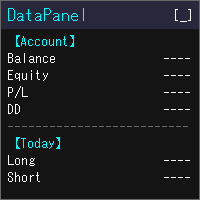
DataPanel은 계좌의 상태를 차트 위의 패널 하나에 모아서 보여 줍니다. 주문은 전혀 내지 않으며 DLL도 사용하지 않습니다. 원래는 다른 EA를 돌리고 있는 계좌의 상황을 한눈에 보고 싶어서 Claude Code로 만들었습니다. 기능을 이것저것 추가하다 보니 정보가 많아졌지만, 필요한 정보만 표시할 수 있으니 설정에서 필요에 맞게 바꿔 주세요. 볼 수 있는 것 잔고, 유효 증거금(순자산), 평가 손익, 증거금 유지율 잔고와 순자산의 드로다운(최대값과 발생 시각). 입금·출금·크레딧은 드로다운에 포함하지 않습니다 오늘·이번 주·이번 달·올해·전체 기간의 손익(롱/숏 별도)과 성장률 승률, 프로핏 팩터, 기대값, 연승·연패, 평균 보유 시간, 스왑·수수료 같은 비용 매직 넘버별·종목별 손익과, 거래한 종목의 비율 포지션 목록, 손익분기 가격, 스톱아웃까지의 여유 경제지표(국가와 중요도를 선택 가능), 오늘의 공휴일, 시세 목록, 통화 강도, 시장 세션 같은 PC에서 실행 중인 모
FREE

챌린지 비용 $500. $100,000 계좌가 위태롭다. 나쁜 밤 하나면 끝.
전략이 실패해서가 아니다. 04:07, 아무도 보지 않을 때 갭이 오고, 잊혀진 대기 주문이 체결되고, 캔들 하나가 3주의 규율을 지웠기 때문이다.
PropFirm Shield는 잠들지 않는 경비다.
아무 차트에나 부착 — 전체 계좌를 감시: 모든 심볼, 모든 매직, 수동 거래, 카피, 다른 EA. 규칙을 위협하면 위반 전에 행동한다.
지키는 것 - DAILY LOSS — 회사 리셋 시간에 잔고 스냅샷. 한도 80%의 버퍼. - MAX DRAWDOWN — 정적(FTMO/The5ers/FundedNext) 또는 트레일링(Apex/TopStep). 피크를 추적, 절대 느슨해지지 않음. - 최악 케이스 — 「전부 SL 체결 시 손실」 차감 판정. 위반 전 트리거.
보고 있지 않을 때의 행동 - AUTO-SL — 스톱 없는 포지션에 자동 SL(다른 EA 포함). - 수익 잠금 — +X%에서 그날 확정,

Prop Risk Guard 는 계좌의 리스크 관리 규칙을 자동으로 적용합니다. 차트 하나에 추가하기만 하면 계좌의 모든 포지션을 감시합니다. 한도에 도달하면 포지션을 청산하고 대기 주문을 삭제한 뒤 거래를 잠급니다. 이를 통해 한 번의 큰 손실 거래나 통제 불능 상태의 EA가 평가 계좌 또는 펀딩 계좌의 규칙을 위반하는 것을 방지합니다. 일일 손실 한도 백분율, 고정 금액 또는 두 가지를 함께 설정할 수 있습니다(더 엄격한 한도가 적용됩니다). 하루 시작 시점의 잔액, 하루 시작 시점의 자산(Equity) 또는 두 값 중 더 높은 값을 기준으로 계산합니다. 일일 초기화 시간은 서버 시간을 기준으로 직접 선택할 수 있습니다. 거래 잠금은 다음 초기화 시점까지 유지되며, 초기화 후 거래가 자동으로 재개됩니다. 입금과 출금은 일일 손실로 계산되지 않습니다. 최대 드로다운 고정형: 초기 잔액을 기준으로 계산합니다. 트레일링형: 자산(Equity)의 최고 도달점을 기준으로 계산합니다. 초기

SHORT DESCRIPTION: 프랍 펌 챌린지를 위한 원클릭 트레이드 패널. 오늘 아직 감당할 수 있는 손실을 기준으로 모든 랏을 계산하고, 일일 또는 최대 손실 규칙을 어기기 전에 모든 포지션을 청산합니다.
FULL DESCRIPTION: 대부분의 챌린지는 잘못된 분석 때문에 실패하지 않습니다. 너무 큰 한 번의 거래, 잊어버린 보유 포지션, 또는 회사와 다르게 계산한 일일 손실 때문에 실패합니다.
FirmPilot은 세 가지를 합니다:
1. 랏을 대신 계산합니다. 리스크 %와 손절 거리를 설정하면 FirmPilot이 랏을 계산하고, 모든 보유 손절이 동시에 체결되어도 규칙 안에 머물도록 제한합니다. 2. 계좌를 지킵니다. 순자산이 일일 또는 최대 손실 한도 위의 안전 버퍼에 도달하면 계좌의 모든 포지션과 대기 주문을 청산하고 거래를 잠급니다. 잠금 중에 열린 거래(수동 또는 다른 EA)는 즉시 청산됩니다(시장이 닫혀 있으면 열리는 즉시). 3. 현재 상황을 보여줍니다.

ATS Trade Manager is the site foreman of your trades. Plan a trade on the chart with draggable lines and coloured zones, send it with the lot size worked out from your risk, and let the foreman look after it: break-even, trailing stop, up to three take-profit levels with a partial close at each, a daily loss lock and one panel to close groups of trades. It trades only when you press SEND. PLAN A TRADE ON THE CHART Press PLAN and the chart shows the trade before you take it: a blue line and zone
FREE

Know the broker symbol before you evaluate the EA. D7 Symbol Inspector is a free, read-only MetaTrader 5 chart utility. It brings the symbol fields that often decide whether an EA can size, place or protect an order into one panel — without sending or modifying a trade. Who it is for Use it before testing an Expert Advisor on a broker symbol, especially when the symbol has a suffix, unusual contract size, nonstandard volume steps or a spread that changes through the session. What it reads Last a
FREE

Telegram Trade and Pattern Tool
Full-functionality demo account with all features
Telegram Trade and Pattern Tool is a candlestick-pattern and margin monitoring panel with remote trading control through Telegram. It scans charts across multiple symbols and timeframes at once, sends alerts with screenshots — down to a real-time signal for an abnormally large candle — and lets you react right there, in the same chat: open a trade, close a position, set or move a stop, all without opening the ter

Guides and demo test: Installation guide | User guide | Demo account test | Panel and settings guide
DS Universal Trade Manager for MetaTrader 5
Compact trade planning, position management and optional indicator automation
The DS Universal Trade Manager combines the essential tools for manual trade planning and position management in one compact interface. Entry, stop-loss, take-profit, risk, break-even, trailing and partial targets can be planned, adjusted and monitored directly on the char

Account Center — Trading Journal and Account Dashboard for MetaTrader 5 Your platform shows how much you made or lost. It does not show why. Account Center turns one chart into a full-screen account center and trading journal: the chart hides, a clean panel takes its place, and every closed trade gets the human side next to the numbers — your emotion, your plan, your mistakes and your lesson. WHAT YOU GET Dashboard Equity, balance, floating P/L and today's result with your mood before the sessio

Free one-click trade panel for MT5: BUY/SELL on the price line and Breakeven, Partial, Reverse and Close buttons on every position. DESCRIPTION: TrendSync Trade Buttons is a free, lightweight trade panel for manual traders on MetaTrader 5. Open, reduce and close positions straight from the chart, without dialog boxes and without hunting for tickets in the Trade tab. It is an execution tool, not a signal robot . It does not open trades by itself. Every action is yours; it just makes it one click.
FREE

LocalTimePlus — MT5 Local Time Correction × Custom Scale Extension Tool LocalTimePlus replaces MT5’s default time and price scales with a fully custom system featuring automatic local‑time correction , high‑precision crosshair display , intuitive zoom controls , and a transparent canvas rendering engine . It completely solves the “time‑offset problem” for scalpers, short‑term traders, and users trading on overseas servers. Overview LocalTimePlus overlays a transparent canvas on the MT5 cha
FREE

# Ronin Copier - Tactical Prop Sync
**Zero-Latency, Zero-DLL Local Trade Copier Built for Serious Prop Traders.**
**EARLY ADOPTER PROMOTION (LIMITED COPIES):** - **First 10 copies:** **$59** (Current Stage) - **Next 10 copies:** **$99** - **Final Price:** **$199** *Price increases automatically as review milestones are reached.*
---
Managing multiple MT5 accounts across prop firms (FTMO, FundedNext, Alpha Capital, etc.) or private brokers? **Ronin Copier** provides seamless, millisecond-

Launch Special: $30 (First 10 copies only)
Ronin Scalp Tactical Cockpit is an ultra-slim, tactical HUD designed for disciplined scalpers, Gold (XAUUSD) traders, and Prop Firm candidates (FTMO, FundedNext, etc.).
Unlike bulky panels that clutter your chart, Ronin Scalp occupies only 118 pixels on the edge of your screen. Built for high-speed precision, it provides systematic risk management, instant execution protection, and panic defense when milliseconds determine your trade outcome.
======

Ronin Shield - Daily Loss Limiter & Account Guard (MT5)
When your loss limit is hit, your trading day is over. A utility built to stop the "just one more trade" moment during prop firm challenges.
Attach it to just one chart and it protects the whole account: every symbol and every position, including manual trades and other EAs. No need to open a chart for each symbol. No external DLLs. No web requests.
============================== THREE PROTECTION LINES ============================== 1.

Risk rules are easiest to define before a trading session and hardest to follow when pressure rises.
UTrade Risk Guard was created by a trader with more than five years of live trading experience.
Over time, I learned that discipline and psychology influence almost every trading decision. At the same time, constantly checking daily limits, entry counts, position exposure, Stop Losses and the moment when trading should stop consumes attention, energy and focus.
I used to believe that trading

CopyDeck Trade Copier MT5 CopyDeck Trade Copier MT5 copies trades between MetaTrader terminals on the same Windows PC or VPS and lets you see and control every copied trade from a live dashboard on the chart.
No input window to dig through and no guessing: connection status, copy speed, open copies, profit, drawdown, and every setting sit in one clean panel, in your language. Why CopyDeck? A real dashboard, not a list of inputs. Every setting lives in a tabbed on-chart dashboard and applies ins

Big Dream Expert Advisor A MetaTrader 5 trading panel combining multi-timeframe candle pattern analysis, manual basket execution, R:R-based trade management, four-block profit management, and an integrated candle timer. Strategy Overview Big Dream analyzes four candle patterns: • Bullish Engulfing
• Bearish Engulfing
• Morning Star
• Evening Star Pattern analysis is displayed across three timeframes: • H1
• M15
• M5 The panel provides the current pattern detected on each timeframe so traders can

Smart Risk Trade Panel is a trading panel for MetaTrader 5 built around one idea: you decide how much you are willing to lose, and the panel calculates the correct lot size for you . No calculator, no spreadsheet, no guessing. Press BUY or SELL and three lines appear on the chart: entry, stop loss and take profit. Drag the stop or the target wherever the chart tells you, and the lot size, the loss at stop, the gain at target and the reward:risk ratio are recalculated instantly. When everything l

Launch price: 39 USD for the first 10 copies. Then 59 USD, final price 79 USD. Early buyers keep every future update. Trade Panel Sextant for MetaTrader 5 – every trade sized from your risk. You set how much you want to risk, place the stop where the chart says, and Sextant calculates the lot size, sends the order and manages the trade. An account guard with a daily loss limit, a daily target and trade caps keeps a bad day from becoming a bad month. Everything sits in one calm, tabbed panel: TRA

Experience trading without friction. Zentriq Trade Manager is a modern, high-performance trade management utility engineered with a high-DPI canvas interface, anticipatory workflow design, and an integrated Macroeconomic News Filter. Designed for discretionary traders, scalpers, and prop firm traders who demand speed, precision, zero-clutter ergonomics, and automated news event protection.
Why Zentriq Trade Manager? (The Modern Trader's Edge) Most MetaTrader utilities rely on outdated, clunky

Yes — the main concept should be described as a high-impact/news-event trading mode , where both sides are prepared immediately before a specified market event, allowing the first significant price movement to trigger one side while the opposite side is removed/closed. Here is a stronger MQL5 publication description focused on that concept: High-Impact Market Event Trading EA – Dual-Side Breakout Capture A specialized MT5 Expert Advisor designed for high-impact market events and scheduled news r

EKAI Trade Copier Pro Institutional-grade local trade copier for MetaTrader 5 with News-Aware Guard, Prop Firm Rules Sync, Trade Quality Score, Volatility-Adaptive Lot Sizing, SL Enforcer, and Panic Mode. Zero DLL. Zero network. One EA, two modes. Overview EKAI Trade Copier Pro replicates trades in real time from one MetaTrader 5 account (sender) to any number of MetaTrader 5 accounts (receivers) on the same machine, with institutional-grade safety features found nowhere else in the MQL5 Market.

Global Account Risk Manager applies account-level risk rules to a MetaTrader 5 account. It watches every open position and pending order on the account and closes everything when a limit that you define is reached. It does not open trades and it does not generate signals.
It is intended for traders who run several Expert Advisors, or EAs together with manual trades, and want one place to set rules for the whole account instead of configuring each EA separately.
Works on any chart
Attach it t

Công cụ ghi lại tín hiệu giao dịch theo tâm lý [] Công cụ cộng đồng tối ưu để thử nghiệm chiến lược, rèn luyện tâm lý giao dịch và xây dựng khả năng chịu đựng trên thị trường. Giới thiệu sản phẩm:
Đây là một công cụ mô phỏng huấn luyện tâm lý giao dịch, không phải là EA tự động hay chỉ báo kỹ thuật. Đây là công cụ phát lại biểu đồ lịch sử được thiết kế MIỄN PHÍ 100% để giúp cộng đồng giao dịch thực hành tâm lý thị trường, kỷ luật và khả năng kiểm soát cảm xúc. Nếu mục tiêu chính của bạn là kiể

AAS Tester is a manual market replay and trading practice utility for MetaTrader 5. The program creates a separate replay chart and sequentially replays historical data from the currently connected broker. You can study past price action as if the market were moving in real time, without seeing future prices. AAS Tester is designed for manual backtesting. All trades inside the replay environment are virtual and do not affect your real trading account. MAIN FEATURES • Historical broker tick repla

FxStrike999 OA bot is a universal trading robot and trader toolkit for MetaTrader 5. It works on any symbol and can be used in three ways: as a position accelerator for small deposits, as a trader panel that manages the trades you open, and as a fully automated robot driven by signals from the CashFlow Assistant and PulseTrail Pro indicators.
It is not a fixed black box. It is a constructor: you choose how aggressive it is, how it adds to positions, and how it protects profit. The robot execut

WatchListPro — Watch list and Linker for MetaTrader 5 Developer / website: Tradingvyuga.com
WatchListPro is a MetaTrader 5 Expert Advisor: a ticker watchlist with a chart linker. Build working instrument sheets, switch the symbol on several charts with one click, save templates, and trade from a single hub.
It uses your broker's symbols (forex, crypto, metals, stocks, and more). Instrument selection is manual. Several open charts are recommended. It does not work in the Strategy Tester.
Featu
FREE

Alpha TradeCommander Pro with Auto Risk Lot Calculator MT5
Modern Dark GUI Panel with Auto Risk % Calculation, 1-Click Execution & Auto Break-Even
### Overview Alpha TradeCommander Pro MT5 is an indispensable On-Chart Trading Assistant designed for professional day traders, prop firm challenge candidates, and high-frequency scalpers.
In fast-paced markets, taking 15 seconds to calculate your position size can cost you dozens of pips. Alpha TradeCommander Pro automates professional mathematic
FREE

Posentryx Panel – Risk Based Trade Manager
Trade with your risk, not with a guessed lot size. Choose how much of your account you want to risk, place your stop loss on the chart, and Posentryx Panel calculates the exact lot for you. Open, protect and close your trades in one click.
KEY FEATURES
- Risk per trade in % of balance or equity – adjust with the – / + buttons or type the value
- Calculator lines: Entry, Stop Loss and Take Profit drawn on the chart and draggable with the mouse – the lo

Risk Control Panel does not predict the market and does not trade on its own. Before every click, it answers three questions: how much am I risking, how much room is left today, and what happens to this position if the price moves.
Plan the trade on the chart
Drag the Entry, Stop Loss and Take Profit lines, or type the distances in points, pips, price or multiples of the risk. The panel calculates the lot from the stop loss, so a trade that is stopped out loses what you chose: a percentage of

Trading Workspace Themes by Soecke is a free chart customization script for MetaTrader 5. Choose from eight color themes and apply your preferred appearance to the current chart or all open charts.
Included themes
DEEP_SPACE, MIDNIGHT_BLUE, VOLCANIC_AMBER, POLAR_DARK, SOFT_LITE, COASTLINE, AMETHYST_SOFT and SAKURA_MIST.
Each theme defines colors for the chart background, foreground, grid, bullish and bearish candles, bar outlines, chart line, price lines, stop levels and volume bars.
Feature
FREE

️ The Must-Have Account Guard for Prop Firm Algo Traders Running third-party EAs on your funded accounts? Stop worrying about breaching firm rules. Most EAs bought from the MQL5 Market only focus on their own strategy—they know nothing about prop firm restrictions. Prop Firm Rules Manager MT5 bridges that gap completely by serving as an account-level management layer: Automated News Protection: Pauses trading and unloads EA activity before high-impact news, then automatically resumes after the
FREE

Backstage — Preserve the History Behind Your Strategy Decisions MT5 analysis depends on the account history still available from the terminal and broker. When older history disappears, it cannot be reconstructed later simply by choosing an earlier date. Backstage turns the closed-trade history currently available in MT5 into a persistent local CSV source. It maintains the corresponding progress state and daily backup so Castlist, Spotlight and read-only analytical tools can reuse the same histor

APL Trade Engine Draw your analysis, plan your trade and manage its lifecycle directly in MetaTrader 5. APL Trade Engine connects chart analysis with interactive order execution and rule-based position management. You choose the trading idea, entry and stop loss. The EA applies your predefined risk amount, split-order structure and protection settings. From chart analysis to interactive execution Draw directly on your MT5 chart using trend lines, horizontal lines, channels, paths, rectangles, s

Smart Risk Position Sizer — Order Execution and Risk Management on the Chart
Short description (one line)
Click the chart to set entry and stop. The lot size is calculated from your risk, and the stop-loss is attached automatically.
Full description
Smart Risk Position Sizer is a trade execution and risk management tool for MetaTrader 5. You choose your risk once, then place every trade with two clicks on the chart. The tool calculates the position size for you.
How it works Limit orders (B

Insider Flow puts on the chart of a US stock what the company's insiders report to the US Securities and Exchange Commission (SEC): their open-market buys and sells, together with the company's earnings dates, share offerings, buybacks and late-filing notices. A scanner mode follows the whole US market. Insider Flow is a utility. It does not open, change or close trades.
Insiders are the officers, directors and owners of 10% or more of a company. They must report their trades within two busine

Precision Trade Assistant Professional Risk Management & Trade Execution for MT5 Trade with precision. Control your risk. Execute without friction. Forget manual lot size calculations and repetitive Stop Loss and Take Profit setup. Precision Trade Assistant (PTA) is an execution utility and risk management assistant that provides one cohesive workflow — from visual trade setup and hotkey-based execution to automated position management and systematic risk controls. Designed for discretionary da

Automated Timeframe cycling with Symbols centered. Force every timeframe onto one clock window, so the story you see on Daily is the same story you are slicing on H4, H1, and M1. Traders usually flip timeframes and lose the span. A Daily chart shows a few weeks, then M15 shows a few hours, and the eye treats them as different markets. TASSERACT locks the window to N bars of the highest enabled timeframe — default 10 Daily — and maps every lower timeframe to that same stretch. You stay inside o
FREE

NOTE : The walkthrough GIFs on this page were recorded on an earlier build, so they show the old plain-text status instead of the new PFX status panel. Updated GIFs showing the new panel are on my list for the next update. Everything else works exactly as shown.
STOP COPYING TRADES INTO SPREADSHEETS. FOREVER. Every serious trader knows a journal is what separates guessing from improving. And almost nobody keeps one - because typing trades into a spreadsheet after a long session is the last thin
FREE

The simplest and most useful trading panel for every manual trader!
Are you tired of closing trades one by one during news? Do you want to protect your profit with one click?
This panel does exactly that:
CLOSE ALL - Instantly closes ALL open positions with one click. You can choose to close all symbols or only current symbol. Essential for scalpers and news traders.
BREAKEVEN ALL - Instantly moves Stop Loss to entry price (breakeven) for all profitable trades. Protect your profits and
FREE

Actively developed: new features and improvements are added regularly. Found an issue or have a suggestion? Leave a comment and it will be fixed quickly.
Plan every trade like on TradingView: drag a Risk:Reward box on your MetaTrader 5 chart and see your exact lot size, risk and target instantly. Free. PLAN
- Click BUY or SELL, then click the chart - or double-click for a box at market price.
- Drag the stop loss, take profit, entry and box width directly on the chart.
- Lot size is calculat
FREE

SL TP Manager is a compact on-chart panel that sets the stop loss or take profit of all open trades on a symbol in one click, or moves every stop loss to break-even. It is designed for traders who scale in with several positions and do not want to edit each trade one by one.
HOW IT WORKS - Type a price in the SL box and click Set SL: the stop loss is applied to every open trade on the chart's symbol. - Type a price in the TP box and click Set TP: the take profit is applied the same way. - Clic
FREE

TradePanel — All-in-One Trading Panel for MT5 TradePanel is a compact, draggable on-chart control panel for fast manual trading. Open and close positions, read live price and P&L, and switch symbols — all without leaving the chart or opening an order ticket. Built on CTrade with retry logic on every close, size-step/min/max-aware lot handling, and per-chart position memory, it is designed to be a safe, reliable daily driver — not just a demo panel. Full step-by-step guide (every button explai
FREE

is an on-chart pre-trade planner for the symbol on that chart. It clears the price and time scales and fills the tab with a live reading of this account against this symbol: spread, pip value, point value, an ATR stop, three ATR targets, and ten lot sizes sized from a percent of balance. Targets are reduced by the live spread. The stop is increased by it. Commission and planned swap are then applied, so the money and percent figures are net of those costs before a buy or sell. It does not place
FREE

PropBlaster Guard Lite - Daily Loss Limit Guard Free risk-management utility that stops you from breaking your daily loss limit. It closes rule-breaking trades, can close everything at the limit, caps trades per day and makes a stop loss mandatory.
FULL DESCRIPTION PropBlaster Guard Lite watches one MT5 account and enforces the most important prop-firm rule: the daily loss limit. It never opens trades on your account.
What it does
- Daily loss limit in % of the balance at the start of the tr
FREE

is an exit manager for trades you open yourself. It does not open positions and it does not send signals. After a manual buy or sell, it gives that trade a stop and up to six exit stages based on volatility. Three stages come from Average True Range, each with its own timeframe. Three come from completed range: daily (ADR), weekly (AWR), and monthly (AMR). Each stage can be switched on or off. Enabled stages are sorted by distance. Nearer stages trail the stop. The furthest is posted as the take
FREE

Market Watch's Symbols, Lot Sizing choice, Spread, & Price are shown. The app is visually customizable. Click on any Symbol for interaction with its chart!
Trader Market Watch is a display-only MetaTrader 5 board. It fills the chart tab with the symbols already in Market Watch and does not place or modify orders. Each row shows the symbol, the spread in pips, and the price. Two lot columns sit beside them: the lot size that uses your chosen percent of balance as margin, and the largest
FREE

visual trade planner for MetaTrader 5. It draws multi-timeframe ATR reward and stop zones on the chart so you can judge distance and payoff before you place the trade yourself. It does not send, modify, or close orders. Motive A single ATR on the chart timeframe often hides the larger and smaller ranges a trade is actually working against. This EA stacks three take-profit slices, each from its own timeframe, period, and multiplier, then places an ATR stop and an optional fixed stop beside them.
FREE

GOLD MTF CONFLUENCE v2.1 for MT5 Multi-Timeframe Analysis & Trend Confluence System Specifically for Gold (XAUUSD), Forex, Crypto, Stocks
1. Introduction Gold MTF Confluence v2.1 is a powerful technical indicator specifically designed for trading Gold (XAUUSD) on the MetaTrader 5 platform. The core of the system is based on the concept of "Confluence" – meaning the consensus of multiple different technical indicators at the same time to create a trading signal with a high probability of win

XAUUSD BREAKOUT STRATEGY 1HR TF EA for MT5 Professional Breakout Trading System for Forex, Gold, Crypto & Indices XAUUSD BREAKOUT STRATEGY 1HR TF EA is a fully automated Expert Advisor designed to trade breakout opportunities using a proven range-box methodology. The EA automatically identifies market consolidation zones, places pending breakout orders, and manages trades using intelligent risk management, breakeven protection, trailing stop, and time-based exits. The system is suitable for trad

ClearEdge Daily Candle
New York-close daily candle on any timeframe, with candle countdown, live spread and volatility information.
Overview
ClearEdge Daily Candle draws the current day's candle next to the live price on any chart timeframe. On the 1-minute, 5-minute, 15-minute, 1-hour or higher charts, you can see where the trading day opened, how far price has moved in both directions, and whether the day is currently bullish or bearish, without switching to the daily (D1) chart.
Why bro

Trade Growth Farm Visual trading dashboard for MetaTrader 5
Trade Growth Farm presents your trading activity as a visual farm. Configure a plant for a symbol, an EA magic number, or a magic prefix, and follow its profit relative to your chosen target.
Use it alongside your existing trading approach to organize current positions, review recorded results and access an optional manual group-close control. The utility does not generate entry signals or open trades automatically.
Features - Up to

SIMBA Manual Assistant Pro You Already Know How to Enter. Now Manage the Trade With a Plan. You already have a trading strategy. Maybe you trade support and resistance. Maybe breakouts, price action, moving averages, market structure, supply and demand, or something completely different. You know how you want to enter. But what happens after you enter? Should you move your stop-loss to break-even? Should you take partial profit? Should you let the trade run? Is that pullback normal, or is the m

Trade Anomalo Telegram Report Trade Anomalo Telegram Report is a professional administrative utility designed for MetaTrader 5 that aggregates daily trading performance across multiple symbols and delivers a comprehensive summary report directly to your private Telegram channel, group, or a dedicated Forum Topic. Whether you run single-asset robots, multi-chart Expert Advisors, or manual strategies, this tool scans closed deal history, compiles net profits (including swaps and commissions), eval

Kestrel is a one-click order book for scalping. A button stays on the price chart. The book opens in its own full-screen window. Each ticker has a buy and sell ladder, a live price, and a small chart of your own orders. Left click places a limit, right click cancels it. The green price buys at market, the red price sells. Open positions sit at the bottom: one cross closes that trade, Close all flattens every Kestrel position.

RiskCompass Guard - prop firm risk guard EA MT5 RiskCompass Panel v2 is a risk management panel for MetaTrader 5 — a prop-firm risk tool with a daily loss cap shown in cash, a position size calculator and a news filter. Its partner RiskCompass Guard EA adds auto-flatten, new-entry blocking and weekend close, built to fit prop-firm daily-loss rules. What RiskCompass Guard does Three independent daily-loss thresholds: warn (colors only), block new entries at 70% of the daily cap, and auto-flatten
MetaTrader 마켓은 거래로봇과 기술지표를 판매하기에 최적의 장소입니다.
오직 어플리케이션만 개발하면 됩니다. 수백만 명의 MetaTrader 사용자에게 제품을 제공하기 위해 마켓에 제품을 게시하는 방법에 대해 설명해 드리겠습니다.
